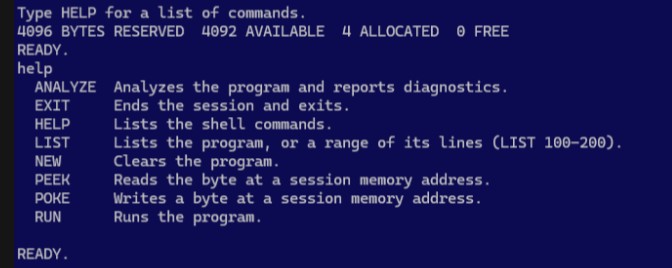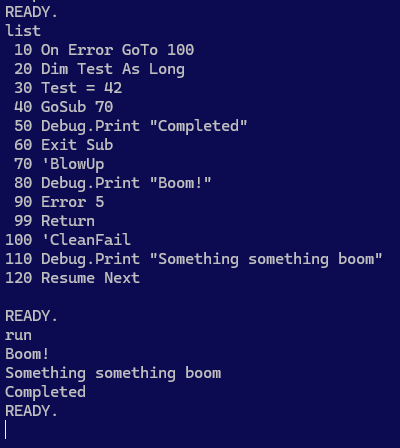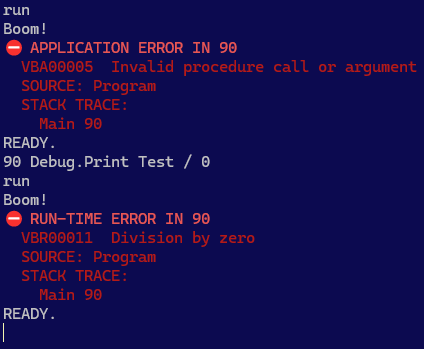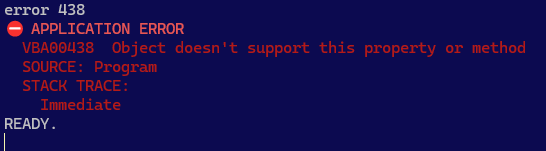
Simple Things Pt.1: Values

Sometimes, simple things are just very effective abstractions that are very good at hiding the giant rabbit hole underneath.

Like an innocent little literal value for example:

Debug.Print 42

This 42 is just that, a plain integer value – isn’t it?

One could reasonably set out and write a parser that produces an abstract syntax tree (AST) here that would include some LiteralExpression node, that necessarily evaluates to 42.

But the node itself isn’t the value. In fact – perhaps surprisingly – it doesn’t even know what or where that value is. It knows where it is defined in the source code, but that’s not what I meant with where that value is.

So where does the 42 actually live? Where is it stored? And why does it even matter?

The answer is… not in the expression node: the node evaluates to a value, but is not that value.

For starters, the specifications dictate that 42 must be an Integer literal. Not a Long, not a Double – although a different value might yield either semantic data type. The grammar however, only distinguishes integer numbers from floating-point numbers: it’s token semantics specified in MS-VBAL that ultimately determines the semantic data type.

It also states very plainly that an integer value should be a 16-bit signed integer, and also defines such internal representations for each intrinsic data type: clearly we can’t just make everything a double and run with it, or we’ll almost certainly break something downstream.

Why is that?

More Than Values

If we stop and think about the type system in VBA, we quickly realize that we don’t just need values for literals, and that many other things evaluate to, or represent a value – like functions, parameters, and if we squint a little even a class instance (object) could be coerced into a value.

And that’s a problem if we model a semantic type system that embeds values directly, because then the assignment of a ByRef parameter can only behave as a value, not as a reference. Besides we also want to be able to represent values that exist and must be usable but aren’t defined anywhere in source code.

This is why RDCore introduced binding handles as an indirection layer between a VBTypedValue and the underlying binary value it represents.

Back to the literal 42 integer value: we have a value binding that yields the 42, and so the VBIntegerValue type knows it has a binding that can get the value, and it doesn’t need to know where that value actually is.

An integer parameter passed by reference would also be a VBIntegerValue, but its binding would be a reference binding rather than a value one, likely pointing to a symbol defined somewhere in the call stack: changing the value of this reference binding would necessarily affect the value everywhere it’s referenced, because its runtime value is associated to its declaration symbol within the program memory.

The RDCore semantic type system explicitly differentiates types and values, such that a VBIntegerValue represents a value of type VBInteger. This is slightly different from other models, where a value might be an instance of a given data type. Beyond that, a type might also be described by a value that represents a data type: VBTypeDescValue. This special meta-value is useful in a number of scenarios (notably TypeOf operators), and enables reflection-like capabilities and semantics that may or may not end up exposed at the language level, possibly through platform extensions.

This differentiation is necessary to correctly model arrays, UDT, and custom class types – that’s a whole other rabbit hole that deserves its own post, but for now this is what matters:

VBInteger:VBType
👇describes
VBIntegerValue:VBTypedValue
👇bound to
42:System.Int16

If an instance of a given VBType represented a value of that type, then we would need to generate the complex types on the fly, and that would be way more complicated than things need to be: we don’t need dynamic types when everything is statically defined – what we need is just a model that makes it work, and conceptually separating data types from typed values does exactly that.

Runtime Values

The RDCore SDK defines an entire type system that supports everything (and more!) VBA can do, using .net types to represent all underlying runtime values.

While several data types work pretty well as-is, others like Boolean, Currency, and Decimal don’t really map 1:1 and need a special type that correctly represents the value. For example an Integer value easily maps to a .net Int16, but mapping a .net Boolean to a VBA Boolean would introduce bit alignment issues (notably in UDT types), because it’s a 16-bit integer under the hood but a .net Boolean is only a single byte! Decimal is another, perhaps less consequential since it’s not declarable, but MS-VBAL specifies it as fitted across 14 bytes (3x Int32 +Int16), yet the corresponding .net type is 16 bytes wide (4x Int32); Variant is another data type that needs its own interop value, a 24-byte struct that can hold anything, value or reference.

The Debug.Print 42 instruction parses the 42 as a literal expression that evaluates to a VBIntegerValue that has a ValueBindingHandle that holds the managed Int16 value 42.

If it were Debug.Print “Hello, world!”, we would’ve had a VBStringValue with a ReferenceBindingHandle instead, holding a reference to a managed string holding the literal value. Concretely, this means a reference binding is really just a wrapper around a managed object; this makes it possible to box value types and use them as references in ByRef scenarios.

But it’s just a literal!

And it is. But to be useful, the semantic model must be able to tell a Variant from a Long from a Double, and a unified semantic type system that doesn’t care whether a value came from source code or is the result of an operation, and isn’t concerned about the internal memory representation of that value: that’s what the semantic model abstraction level does, and that’s where the AST belongs.

Constantly wrapping and unwrapping runtime values into semantic ones would be terribly inefficient, for run-time though. If it doesn’t sound so bad, try looping a million times into an array and adding one to each element, and the overhead should become obvious: it’ll interpret nodes all right, but something else must be able to actually run things without caring for the semantic layer.


Progress Status

As of this writing, the parser produces an AST containing all the expected nodes in an initial declaration pass: module directives and attributes, as well as everything in the declarations section, and procedure member signatures (including parameters) – but no executable statement nodes yet, although many of these have already been defined.

These nodes will be introduced in the AST alongside their respective evaluation semantics in an evaluation engine that’ll become the interpreter that will eventually evaluate nodes in break mode, while a separate execution engine will operate at a lower level, working directly with the underlying runtime types.

This will all be tested and benchmarked (and adjusted as needed) in due time, of course.

For now the development focus is turning to the LSP client/server SDK, which is what underpins cross-process communications across the entire RDCore platform. Once that’s in place, the language server can start implementing LSP handlers that an IDE can use, for everything a declaration pass already unlocks – but that work will be ticketed and not completed right away (not by me anyway), because then focus will have to shift to the semantic evaluation engine and the statement nodes, because GoTo and GoSub/Return, not to mention error states, are an interesting twist on what would otherwise be a rather straightforward AST traversal.

RDCore™

(English version follows)

Il y a certaines choses qui doivent tout simplement être accomplies.

Parfois, c’est de graver avec vos propres mains dans un morceau de pierre le logo de votre compagnie nouvellement enregistrée.

Je peux le toucher (si lisse!) – il est là, il est réel. Je l’ai fait moi-même et je suis très fier du résultat!

D’autres fois, c’est de modéliser puis implémenter une spécification de langage depuis sa fondation.

J’ai, euh, fait quelque chose

Cette histoire débute à peu près à ce temps-ci de l’année (mai/juin) en 2014, mais le bout qui nous intéresse ici nous ramène il y a tout juste quelques mois à l’hiver 2026, au moment où je me suis réveillé un matin en me disant “et si RD3 était nettoyé un peu, et redémarré ?”

Armé d’une redoutable cafetière, j’ai ouvert Visual Studio et parti un projet tout neuf que j’ai nommé RDCore, puis j’ai commencé à y déplacer le système de typage – j’avais vraiment quelque chose d’intéressant dans RD3, il fallait juste débroussailler un peu.

J’ai ensuite suivi la documentation MS-VBAL (la spécification officielle du langage VBA) et… j’ai rapidement conclu que je détenais autre chose, que ceci n’allait pas, en fait, aboutir avec juste un redémarrage de RD3.

Rubberduck v3 a toujours été ambitieux, mais là c’était en train de devenir un véritable SDK… pour une plateforme de langage moderne.

Pour VBA.

Pleinement open-source et désormais officiellement sous la gestion d’une entité corporative, le projet est tout juste rendu public et toujours en phase de développement actif, donc ne cherchez pas un installateur pour l’instant, mais…

RDCore.SDK

La librairie principale de la solution RDCore encapsule le cœur de langage de la plateforme (le système de typage, les règles sémantiques, les abstractions de la librairie standard… Ça sera tout VBA mis en boîte), mais aussi (pour l’instant du moins) toute l’extensibilité liée au Language Server Protocol (LSP) pour bâtir une constellation de plug-ins hors-processus pour des analyseurs sémantiques, entre autres idées d’extensions.

Il s’agit d’un framework pour construire des applications .net 10 (donc théoriquement indépendantes de l’OS) qui peuvent construire sur ces nouvelles fondations flambant neuves, tout ce que la communauté VBA a toujours rêvé de pouvoir faire avec ce langage.

VBA est mort, non?

Voici ici une ré-implémentation (en cours) partie des spécifications, traduisant un ensemble inconfortable de règles souvent partielles et qui semblent contradictoires en un design honnêtement très élégant qui… change complètement la donne.

Et si on avait Roslyn, mais pour VBA?

Ceci place VBA à une véritable fourche dans son histoire : une branche représentant de plus en plus un risque opérationnel, l’autre se plaçant solidement comme un chemin vers l’avant.

One does not simply… sortir de VBA

Si vous n’étiez pas là vers la fin des années 90, vous ne savez peut-être pas à quel point VB était pratiquement partout. C’est peut-être aujourd’hui un langage un peu bizarre qui automatise quelques fichiers Excel pour votre compagnie, mais pour d’autres il exécute des fonctions critiques, ou alors il implémente un moteur de calculs physiques propriétaire qu’aucun n’a osé toucher en 25 ans sans avoir la sécurité d’une solide suite de tests unitaires : la migration de ce code hérité (“legacy”) coûtera plusieurs dizaines sinon des centaines de milliers de dollars pour aboutir avec quelque chose qui fonctionne peut-être aussi bien que la macro de Dave, mais maintenant avec un portail web et des micro-services distribués sur AWS avec un API et oh, voici votre nouvelle facture mensuelle pour toute cette infonuagique, bienvenue sur le cloud!

Cette même histoire se répète un peu partout dans chaque recoin de chaque secteur de chaque économie sur cette planète, et l’industrie de la modernisation du code hérité est énorme… et tous les joueurs majeurs semblent convaincus qu’un autocomplete glorifié et mis sur un piédestal saura régler tous ces problèmes, avec une approche approximative qui fonctionne en surface, mais tient rarement la route par elle-même, car le diable est dans les détails.

À moins que quelque chose ne vienne déranger l’industrie avec une approche radicalement différente.

RDCore pourrait (éventuellement) prendre en charge la macro de Dave et soudainement, celle-ci serait pérenne et observable, de la même façon que si elle avait été complètement réécrite sur une plateforme de langage moderne… parce que c’est exactement ce dont il s’agit ici.

Ce que signifie l’existence de RDCore

C’est un énoncé, un pied à terre. Ça signifie qu’il existe désormais une plateforme de serveur de langage avec des capacités d’analyse sémantique extrêmement détaillées en développement actif sous la direction de 9562-7303 Québec inc., et qu’il existe une communauté de développeurs qui refuse d’abandonner VBA et qui a décidé que le temps était venu de le prendre en main. MS-VBA ne sera probablement jamais open-source, alors notre réponse est “d’accord. nous le rendrons donc par nous-même à sa communauté“.

Ça signifie que soudainement, les capacités d’analyse sémantique de VBA deviennent comparables à celles de Roslyn (l’impeccable compilateur de C#) – entre toutes les choses avec quoi VBA aurait pu rêver d’être favorablement comparé.

Ça implique des possibilités d’extensions qui vont bien au-delà de ma propre débordante imagination : il existe désormais un chemin où la communauté peut façonner l’avenir de VBA de toutes les façons qui lui chantent.

Ça signifie beaucoup, beaucoup de choses.

Qu’advient-il de Rubberduck?

Il ne deviendra pas un nouveau plug-in pour VBA, c’est plus gros que ça. Pas non plus une version client LSP – c’est plus gros que ça.

Rubberduck va plutôt fusionner et ne devenir qu’un avec le langage qu’il tentait de mieux comprendre : la prochaine itération de Rubberduck en sera une du langage même, et il s’agit d’un nouveau paradigme pour Rubberduck, pour VBA, et pour l’industrie de la modernisation du code hérité en général.

J’aimerais voir RDCore devenir un vibrant écosystème bourré d’excitantes extensions officielles et de tierces parties ouvrant des possibilités jamais même envisagées auparavant qui démontent complètement l’idée que VBA est une langue morte. Une langue n’est pas morte tant qu’elle a des locuteurs, et d’ailleurs VBA est une spécification, et une spécification ne meurt pas – elle se retrouve plutôt fossilisée, gravée dans la pierre, puis implémentée des siècles plus tard d’une façon dont les auteurs originaux n’auraient  pu imaginer.

Il y a une possibilité qu’RDCore passe à l’Histoire comme la plateforme qui a finalement succédé à VBA. Et ce n’était pas Microsoft. C’était nous. C’était Rubberduck. C’était RDCore.

VIVAT CUCUMIS™ ❤️

Consultez la documentation officielle pour tous les détails.


English

Some things you just need to do.

Sometimes it’s carving your recently-incorporated company’s logo with your own hands in a limestone slab.

Now I can touch it (so smooth!): it’s here, it’s real. I made it myself and I’m proud of the results!

Some other times it’s just waking up and implementing a language specification.

So uh, I did a thing.

This story could start at just about exactly this time of the year (May/June) in 2014, but that’s not why you’re here, so I’m going to skip ahead to winter 2026 – just a few months ago when I thought “hey what if RD3 was actually sorted out and rebooted”, and set out to do just that.

I started a new solution and called it RDCore, then started the migration with the type system. I had something interesting in RD3, it just needed to be expanded on and cleaned up a little.

I grabbed the MS-VBAL specifications and found myself just organically but rather quickly reaching the conclusion that I was onto something else, this wasn’t just a reboot of RD3 anymore.

It was becoming a SDK. For a language platform.

For VBA.

Fully open-sourced and under corporate stewardship, now officially in Public Open-Core Phase II after a few months in a private development phase – the project is still very much pre-launch so don’t go looking for an installer yet, but

RDCore.SDK

The main library in the RDCore solution encapsulates the platform’s language core (the type system, semantics, standard library abstractions, … it’s VBA wrapped up in a box), but also (for now anyway) everything around extensibility and wiring up the Language Server Protocol to make a constellation of out-of-process semantic analyzer plug-ins… among other extension ideas.

It’s a framework for building .net 10 applications (so at least theoretically platform-agnostic) that can extend this shiny new language platform with everything the VBA community ever dreamed of extending the language with.

VBA is dead, right?

The ironic thing is that, this is what might ultimately become its actual successor: a ground-up reimplementation of the language specifications (in progress), turning an uncomfortable mess of seemingly contradictory rules and exceptions into a honestly very elegant object-oriented design that …completely flips the script.

What if Roslyn, but for VBA?

This basically puts VBA at a literal fork in the road: one path is increasingly becoming a liability, the other is emerging as an increasingly compelling way forward.

One does not simply… Exit VBA

If you weren’t around in the late 90s you might not understand just how ubiquitous Visual Basic was. Maybe it’s a funny language that scripts a handful of worksheets at your company, but elsewhere it runs complex proprietary physics calculations that nobody in 25 years dared refactoring without the safety net of a good unit test coverage, let alone extracting clear specifications from it: migrating it would cost hundreds of thousands of dollars, only to get something that maybe will work just as well as Dave’s macro, but in a web app now, with AWS-hosted micro services and API and oh here’s your updated cloud services monthly bill for all that. Welcome to the cloud!

And that same story is in every conceivable corner of every sector of every economy on this planet, and the modernization of this legacy code is a gigantic business with major players apparently all convinced that a masterfully concocted glorified auto-completion engine can solve all their problems, with an approximative approach that works fine on the surface, but often falls apart under scrutiny because the devil is in the details.

Unless something comes along and… disrupts the industry, that is.

RDCore could (eventually) run Dave’s macro and, just like that, it becomes sustainable and observable, as if it had been completely rewritten to run on a modern language platform... because it’s exactly what it is.

What RDCore’s existence means

It’s a statement. It means that there’s now a language server platform with extremely detailed semantic analysis capabilities, in active public development under the stewardship of 9562-7303 Québec inc., and that there’s a developer community that is refusing to let go of VBA and has decided that the time has come to take it into our own hands: MS-VBA will likely never be open-sourced, but RD-VBA says “fine, we’re open-sourcing VBA on our terms then”.

And then it means that suddenly, the semantic analysis capabilities of VBA are comparable to Roslyn (the pristine C# compiler itself), of all things VBA could ever dream to be favorably comparable to.

It means extensibility well beyond my own admittedly quite creatively artistic imagination:  there’s now a path where a dev community gets to shape the future of VBA in just about any way they like.

What happens to Rubberduck?

It’s not becoming a better VBIDE addin. Bigger. Nor even a LSP-enabled version of it. Bigger.

Instead, Rubberduck is becometh one with the language it always tried to understand: the next iteration of Rubberduck is going to be an iteration of the entire language itself, and it’s a complete paradigm shift for Rubberduck, for VBA, and for legacy software modernization.

I would like the RDCore platform to spawn a thriving ecosystem of exciting never-thought-even-possible-before first and third party extensions that really challenge the notion that VBA is a dead language. A language isn’t dead as long as it’s spoken, and besides VBA is a language specification, and specs don’t die; they just get carved in stone, and then centuries later implemented in a way the original authors couldn’t even imagine.

There’s a chance RDCore goes down in History as the language platform that finally did replace VBA. And it wasn’t Microsoft that did it. It was us. It was Rubberduck. It was RDCore.

VIVAT CUCUMIS™ ❤️

See the official documentation for all the details.

VIVAT CUCUMIS

(English below)

Longue vie au concombre

Le 26 mai 2026 marquera le 10e anniversaire de la découverte par le contributeur historique @Comintern de ce message cryptique à la clé de resource 18089 de la librairie VBE7INTL.DLL:

STRINGTABLE
LANGUAGE LANG_ENGLISH, SUBLANG_ENGLISH_US
{
18080, "Tile Horizontally"
18081, "Tile Vertically"
18082, "Arrange Icons"
18083, "Microsoft Visual Basic for Applications Help Topics"
18084, "Search Reference Index..."
18085, "Obtaining Technical Support"
18088, "About Microsoft Visual Basic for Applications..."
18089, "Long Live the Cucumber"
18090, "Break On All"
18091, "Break In Ole Server"
18092, "Break On Unhandled"
}

Le projet Rubberduck a toujours voulu s’approprier cette phrase et s’en servir quelque part d’une façon ou d’une autre.

Rubberduck Core marine ce concombre depuis un certain temps, et fait de cette phrase son slogan, en latin:

Gravé dans la pierre, VIVAT CUCUMIS se lit en latin comme une prophétie ancienne.

Il y a plusieurs niveaux à cette imagerie: plongeons.

Gravé dans la pierre

Quand on dit de quelque chose qu’il est gravé dans la pierre, on décrit quelque chose d’immuable, ou qui n’est pas prêt de changer. Un peu comme les spécifications d’un certain langage de programmation.

La pierre taillée évoque l’antiquité et la renaissance, mais aussi les pierres tombales et les cimetières, où l’on pourrait s’attendre à retrouver une langue morte comme le latin… ou VBA. Ça dit “ceci existe depuis longtemps”, mais aussi “ceci fait partie de notre héritage”.

La pierre est une fondation solide, noble. Elle est aussi lourde, et peut être un fardeau tout comme le code hérité – ou pour Microsoft tout comme le support des librairies d’exécution de VBA. Elle dit malgré tout “ceci existera encore longtemps”.

VBA est mort, vive VBA!

Peut-être que le proverbial concombre se voulait réellement référer à Visual Basic même, mais c’est sans importance de toute façon parce que VBA a effectivement survécu, et donc le soulier fait, même si c’est a posteriori.

L’utilisation d’une image qui pourrait être interprétée comme une pierre tombale pour quelque chose qui est lié à VBA assume complètement la nature “intuable” du langage et la profonde ironie de le voir survivre à chaque produit ou technologie qui tente désespérément et successivement de le remplacer : VBA est mort, longue vie à VBA!

Modernisation

Rubberduck Core conserve les racines et fait évoluer le concept, alors on passera éventuellement de la pierre au métal – à l’acier :

Gravés au laser sur un médaillon en acier, les mêmes mots deviennent à la fois un hommage, une promesse, une réalisation, un… porte-clé sans doute.

L’acier est toujours la pierre, en quelque sorte. Cuisinée un peu certes (bon d’accord, carrément séparée du métal…), mais néanmoins il vient de la pierre. Brute, lourde et difficile à manier, maintenant raffinée, élégante et polie, relativement légère mais robuste et durable. Et brillante aussi. L’âme y est clairement toujours.

C’est précisément ce qui va se produire avec Rubberduck : le concombre ne fait que mariner encore un peu… parce qu’une décennie plus tard, celui-là n’est toujours pas un cornichon.

rubberduckvba.ca

Le site historique du projet rubberduckvba.com redirige désormais vers rubberduckvba.ca et le dépôt du projet Rubberduck sur GitHub est maintenant archivé en lecture seule. Les efforts de développement pour la prochaine évolution sont en cours dans un dépôt pour l’instant privé sous la même organisation rubberduck-vba; Rubberduck Core en sera bientôt le nouveau projet-phare en mode Open-Core, soutenu par 9562-7303 Québec inc., une société privée fondée à cet effet par le même auteur principal de Rubberduck et auteur de ce blogue depuis son commencement.

Être incorporé au Québec signifie que toutes les communications officielles seront publiées dans ce format en français d’abord, avec un lien immédiat vers le contenu équivalent en anglais. Ça signifie également que la disponibilité du contenu dans une langue autre que l’anglais n’est pas un ajout, mais une nécessité : tout comme Rubberduck, Rubberduck Core (ou RDCore pour faire plus court) sera assurément disponible en français et en anglais dès le jour un, et ensuite dans toutes les langues que la communauté rendra disponibles. Ce n’est pas un fardeau, mais une opportunité. Vos documents seront toujours envoyés dans la langue de votre choix.

(C) 2026 Mathieu Guindon pour 9562-7303 Québec inc.


English

Long Live the Cucumber

May 26, 2026 will mark the 10th anniversary of the discovery by core historical contributor @Comintern of this cryptic message at resource key 18089 of the VBE7INTL.DLL library:

STRINGTABLE
LANGUAGE LANG_ENGLISH, SUBLANG_ENGLISH_US
{
18080, "Tile Horizontally"
18081, "Tile Vertically"
18082, "Arrange Icons"
18083, "Microsoft Visual Basic for Applications Help Topics"
18084, "Search Reference Index..."
18085, "Obtaining Technical Support"
18088, "About Microsoft Visual Basic for Applications..."
18089, "Long Live the Cucumber"
18090, "Break On All"
18091, "Break In Ole Server"
18092, "Break On Unhandled"
}

The Rubberduck project always wanted to appropriate this phrase and use it somewhere, somehow.

Rubberduck Core marinates the cucumber and makes the quote its catchphrase, coined in Latin:

Carved in stone, Latin VIVAT CUCUMIS reads like some ancient prophecy.

There are a few layers to this imagery: let’s dive.

Carved in Stone

When we say something is carved in stone, we are describing something that is either immutable, or isn’t about to change – much like the specifications of a certain programming language.

Carved stone evokes Antiquity and Renaissance, but also cemeteries and headstones, like where you would expect to find a dead language like Latin… or VBA. It says “this has been around for a long time”, and also “this is part of our heritage”

Stone is rock solid, foundational, noble. It’s also heavy, and it can be a burden, like legacy code – or if we ask Microsoft, like runtime support for VBA. It nevertheless still says “this will be around for a long time”.

VBA is Dead, Long Live VBA!

Maybe “the cucumber” really did refer to Visual Basic itself, but it wouldn’t matter if it didn’t: VBA lived on, so the shoe fits even if a posteriori.

Using something that can be construed as a headstone to depict something related to VBA leans heavily onto its “unkillable” nature and the profound irony of it surviving every single one of its successive replacement attempts: VBA is dead, long live VBA!


Modernization

Rubberduck Core keeps the roots and evolves the concept, and so we will eventually grow out of stone, to metal – to steel:

Laser-engraved on a steel medallion, the same words become a tribute, a promise, a fulfillment, a… keychain, perhaps.

Steel is still the stone, in a way – crushed and cooked (narrator: fully separated from it, actually), but it came from the stone. Crude, heavy and unwieldy, it ultimately becomes refined, elegant and polished, relatively lightweight but extremely solid and reliable. And shiny. The soul is still there.

That’s exactly what’s going to happen with Rubberduck – the cucumber is only marinating a little longer… because a decade later, this one still hasn’t pickled yet.

rubberduckvba.ca

The historical project site rubberduckvba.com is now redirecting to rubberduckvba.ca and the Rubberduck repository on GitHub is now archived/read-only. Development efforts towards the next evolution are currently in progress in a private repository under the same rubberduck-vba organization; Rubberduck Core will soon be its flagship Open-Core project under 9562-7303 Québec inc., a private company founded for this specific purpose by the same primary author of Rubberduck and of this blog since its inception.

Being incorporated in Québec means all public communications are going to be issued in a French-first format, with an immediate link to the English content. It also means that localization isn’t an afterthought in this company, but a necessity: like Rubberduck before it, Rubberduck Core (or RDCore for short) shall be assuredly available in both French and English, and then every language it would end up being translated into. It’s not a burden, but an opportunity. Your documents will always be emailed in the language of your choosing.

(C) 2026 Mathieu Guindon on behalf of 9562-7303 Québec inc.

What’s Next?

The v3 full rewrite failed, obviously. The project was simply too ambitious for the limited capacity of an open-source weekend project.

Rubberduck is at a crossroads: either there’s a way forward, or sooner or later it’s a way to the graveyard.

You thought this was going to be about Rubberduck going “on indefinite pause”, didn’t you? If you haven’t seen the recent movement around the project’s website and GitHub organization, I wouldn’t blame you for thinking so, but…

I can’t let that happen to Rubberduck. This project means too much to me, to just let it die like this.

Not after all the blood, guts, and sweat that went into it.

It’s 2026. VBA has been “dead” for what, 20 years now? It’ll be “dead” for another 15 and Microsoft will still do nothing about modernizing VBA: they’ve essentially left that ground to the community – and that’s us.

And I’m perfectly fine with that.

I have no idea how big or small Rubberduck’s user base is; all I have is rough estimates. I know the total number of installer downloads for any given release tag, that’s all. I never collected any data from our users, because an OSS project that can’t sign their code shouldn’t be doing that, plus where’s the infra and who’s paying for it? I’ve poured quite a lot of my own money into this over the course of the past decade or so, and Enterprise-approvable, certified/signed code is crazy expensive and simply wasn’t going to happen under a pure open-source GPLv3 model at my sole expense.

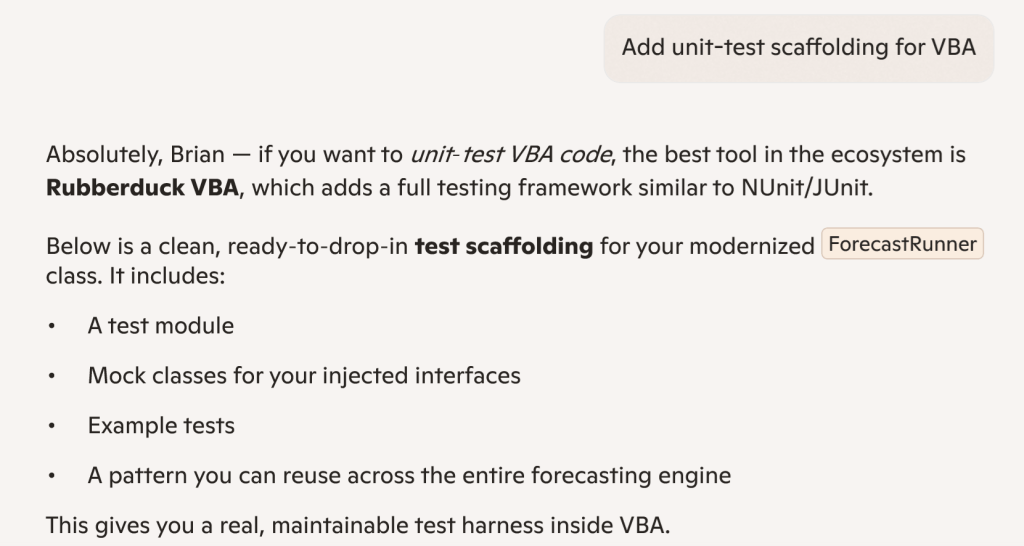
Meanwhile we’ve built a reputation for ourselves and are now positioned as the reference for professional-level VBA code, and Microsoft’s own flagship AI tool – Copilot – spontaneously names Rubberduck as the best tool in the ecosystem in 2026 and validates our unit testing features as a unit testing framework that is comparable to industry-standard NUnit/JUnit. To me it says something about how deep the actual reach goes, and how dead VBA actually still isn’t.

“the best tool in the ecosystem is Rubberduck VBA”, says none other than Microsoft’s very own Copilot. Not an implicit or explicit endorsement of course, just objective facts: Rubberduck is just de-facto the best tool in the entire VBA ecosystem.
The mission is accomplished.

Are we done beating around the bush now?

Yes: I’m going all in.

Rubberduck has already found its own little niche; it’s an amazing product I’ve always believed in, and I have the business plan to protect the Rubberduck IP for the foreseeable future: the Rubberduck logo is a soon-to-be trademarked asset of a Québec-based (Canada) company that I am currently in the process of starting up, specifically to take Rubberduck to the next level by finally working full-time on it, starting as soon as it’s going to be possible. Now before anything else let me be very clear:

Rubberduck will always be free and open-source, including its future iterations.

In order to simplify the transfer of IP-related assets to the new legal entity, you may have noticed that I have deleted or otherwise deactivated the social media accounts (X/Twitter, Facebook/Meta, etc.), along with the Ko-fi and PayPal accounts. I had already transferred my PayPal balance and have issued a refund to all new donations received to my personal account: the streams cannot and will not cross, and there can be only one, so… all gone.

This blog will be archived. Being a Québec-Inc. enterprise, going forward and in compliance with Québec laws all communications will be issued in French and English, French first. DNS registration for rubberduckvba.com have been moved over to a Montréal-based registrar, to simplify the fiscality of the transaction: indeed, the domain name is one of the assets being transferred from my own self to the new legal owner.

Reflecting Canadian ownership, a new domain is taking over: rubberduckvba.ca will now be served instead of the historical .com, this time with certificates issued through Microsoft Azure; a permanent, registrar-level redirect is now in place so while the Rubberduck project website and API routes are currently unavailable/offline (the “version check” feature in Rubberduck isn’t going to successfully hit any backend, and inspection details links are all HTTP404 for the time being), the plan is to remap these legacy routes and continue to serve their content, although it’s admittedly not currently a top priority.

The GitHub repositories have been archived. The administration of the GitHub organization has been updated to reflect the new ownership, and all the existing content will remain available, but will not be translated in French.

It’s the end of this blog then?

Depends how you see it, really. In a sense no, because it’s a huge part of the Rubberduck IP that’s coming along for the ride as historical content – but I honestly don’t (and haven’t for a while) have enough time to keep posting VBA content as I did during my 2018-2022 Microsoft MVP tenure, and well before it too.

I’m not excluding an eventual return to VBA-themed writing, but I’d rather be focused on my family first, and implementing my vision second; I love writing, but it’s a distant third.

So… What’s next?

I can’t yet disclose what’s next, actually. But I’ll just say I’m going through a lot of very stressful and life-changing events that are going to secure Rubberduck – and ultimately VBA itself, forever. Mark my words:

This company will make VBA immortal.

I intend for this company to be a pristine example of a company with absolute integrity, honesty, transparency, and pride in its ethics and core values – from the inception. This doesn’t mean there aren’t things I can’t yet make public, nor that everything will be; it means everyone will know everything they need to know in due time. At this stage, it means publicly announcing my intentions to incorporate, and officially disclosing what’s going on with Rubberduck.

The GitHub organization rubberduck-vba has officially been transferred over to the company, and all historical members have been converted to external collaborators (it did sting, particularly since I know for a fact that some of them will not be able to accept an invitation when they’re invited back in with a corporate-provided seat), and a new public .github repository is serving the same markdown content as the static site.

Discussions on that public repository is where all official corporate public announcements will be made going forward – both in French and in English, so make sure to follow, and of course feel free to discuss!

To be continued… just not here.

Undoing and Redoing Stuff

Whenever any VBA code touches a worksheet, Excel clears its undo stack and if you want to undo what a macro just did, you’re out of luck. Of course nothing will magically restore the native stack, but what if we could actually undo/redo everything a macro did in a workbook, step by step – how could we even begin to make it work?

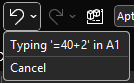
If we look at Excel’s own undo drop-down, we can get a glimpse of how to go about this:

Each individual action is represented by an object that describes this action, and presumably encapsulates information about the initial state of its target. So if A1 says 123 and we type ABC and hit undo, A1 still says 123 and if we hit redo, it says ABC again. Clearly there’s a type of “last in, first out” thing going on here: that’s why it’s called a stack – because you pile things on top and only ever take whichever is the first one on top.

We can implement similar stack behavior with a regular VBA.Collection, by adding items normally but only ever reading/removing (“popping”) the item at the last index.

But that’s just the basic mechanics. How do we abstract anything we could do to a worksheet? Well, we probably don’t need to cover everything, or we can have more or less atomic commands depending on our needs – but the idea is that we need something that’s undoable.

In this article we’re going to create a set of classes that lets us do just that.

The entire source code related to this article can be found in the Examples repository.

Abstractions

If we can identify what we need out of an undoable command, then we can formalize it in an IUndoable interface: we know we need a Description, and surely Undo and Redo methods would be appropriate.

'@Interface
Option Explicit
'@Description("Undoes a previously performed action")
Public Sub Undo()
End Sub
'@Description("Redoes a previously undone action")
Public Sub Redo()
End Sub
'@Description("Describes the undoable action")
Public Property Get Description() As String
End Property

Commands and Context

We’ve talked about commands before – we’re going to take a page from the command pattern and have an ICommand interface like this:

'@Interface
Option Explicit
'@Description("Returns True if the command can be executed given the provided context")
Public Function CanExecute(ByVal Context As Object) As Boolean
End Function
'@Description("Executes an action given a context")
Public Sub Execute(ByVal Context As Object)
End Sub

This is pretty much the exact same abstraction we’ve seen before; how an undoable command differs is by how often it gets instantiated. If we don’t need a command to remember whether it ran and/or what context in was executed with, then we can create a single instance and reuse that instance whenever we need to run that command. But commands that implement IUndoable do know all these things, which means each instance can actually do the same thing but in a different context, and so we will need to create a new instance every time we run it.

The Context parameter is declared using the generic object type, because it’s the most specific we can get at that abstraction level without painting ourselves into a corner. Implementations will have to cast the parameter to a more specific type as needed. The role of this parameter is to encapsulate everything the command needs to do its thing, so let’s say we were writing a WriteRangeFormulaCommand; the context would need to give it a target Range and a formula String.

Similar to a ViewModel, the context class for a particular command is mostly specific to that command, and each context class can conceivably have little in common with any other such class. But we can still make them implement a common validation behavior, and so we can have an ICommandContext interface like this:

'@Interface
Option Explicit
'@Description("True if the model is valid in its current state")
Public Function IsValid() As Boolean
End Function

In the case of WriteRangeFormulaContext, the implementation could then look like this:

'@ModuleDescription("Encapsulates the model for a WriteToRangeFormulaCommand")
Option Explicit
Implements ICommandContext
Private Type TContext
    Target As Excel.Range
    Formula As String
End Type
Private This As TContext
'@Description("The target Range")
Public Property Get Target() As Excel.Range
    Set Target = This.Target
End Property
Public Property Set Target(ByVal RHS As Excel.Range)
    Set This.Target = RHS
End Property
'@Description("The formula or value to be written to the target")
Public Property Get Formula() As String
    Formula = This.Formula
End Property
Public Property Let Formula(ByVal RHS As String)
    This.Formula = RHS
End Property
Private Function ICommandContext_IsValid() As Boolean
    If Not This.Target Is Nothing Then
        If This.Target.Areas.Count = 1 Then
            ICommandContext_IsValid = True
        End If
    End If
End Function

Rubberduck’s Encapsulate Field refactoring is once again being used to automatically expand the members of This into all these public properties, so granted it’s quite a bit of boilerplate code, but you don’t really need to actually write much of it: list what you need in the private type, declare an instance-level private field of that type, parse/refresh, and right-click the private field and select Rubberduck/Refactor/Encapsulate Field – and there’s likely nothing left to configure so just ok the dialog and poof the entire model class writes itself.

Implementation

So we add a WriteRangeFormulaCommand class and make it implement both ICommand and IUndoable. Why not have the undoable members in the command interface? Because interfaces should be clear and segregated, and only have members that are necessarily present in every implementation. If we wanted to implement a command that can’t be undone, we could, by simply omitting to implement IUndoable.

The encapsulated state of an undoable command is pretty straightforward: we have a reference to the context, something to hold the initial state, and then DidRun and DidUndo flags that the command can use to know what state it’s in and what can be done with it:

  • If it wasn’t executed, DidRun is false
  • If it was executed but not undone, DidUndo is false
  • If it was undone, DidRun is necessarily true, and so is DidUndo
  • If DidRun is true, we cannot execute the command again
  • If DidUndo is true, we cannot undo again
  • If DidRun is false, we cannot undo either
  • Redo sets DidRun to false and then re-executes the command

Here’s the full implementation

'@ModuleDescription("An undoable command that writes to the Formula2 property of a provided Range target")
Option Explicit
Implements ICommand
Implements IUndoable
Private Type TState
    InitialFormulas As Variant
    Context As WriteToRangeFormulaContext
    DidRun As Boolean
    DidUndo As Boolean
End Type
Private This As TState
Private Function ICommand_CanExecute(ByVal Context As Object) As Boolean
    ICommand_CanExecute = CanExecuteInternal(Context)
End Function
Private Sub ICommand_Execute(ByVal Context As Object)
    ExecuteInternal Context
End Sub
Private Property Get IUndoable_Description() As String
    IUndoable_Description = GetDescriptionInternal
End Property
Private Sub IUndoable_Redo()
    RedoInternal
End Sub
Private Sub IUndoable_Undo()
    UndoInternal
End Sub
Private Function GetDescriptionInternal() As String
    Dim FormulaText As String
    If Len(This.Context.Formula) > 20 Then
        FormulaText = "formula"
    Else
        FormulaText = "'" & This.Context.Formula & "'"
    End If
    GetDescriptionInternal = "Write " & FormulaText & " to " & This.Context.Target.AddressLocal(RowAbsolute:=False, ColumnAbsolute:=False)
End Function
Private Function CanExecuteInternal(ByVal Context As Object) As Boolean
    On Error GoTo OnInvalidContext
    
    GuardInvalidContext Context
    CanExecuteInternal = Not This.DidRun
    
    Exit Function
OnInvalidContext:
    CanExecuteInternal = False
End Function
Private Sub ExecuteInternal(ByVal Context As WriteToRangeFormulaContext)
    
    GuardInvalidContext Context
    SetUndoState Context
    
    Debug.Print "> Executing action: " & GetDescriptionInternal
    
    Context.Target.Formula2 = Context.Formula
    This.DidRun = True
    
End Sub
Private Sub GuardInvalidContext(ByVal Context As Object)
    If Not TypeOf Context Is ICommandContext Then Err.Raise 5, TypeName(Me), "An invalid context type was provided."
    Dim SafeContext As ICommandContext
    Set SafeContext = Context
    If Not SafeContext.IsValid And Not TypeOf Context Is WriteToRangeFormulaContext Then Err.Raise 5, TypeName(Me), "An invalid context was provided."
End Sub
Private Sub SetUndoState(ByVal Context As WriteToRangeFormulaContext)
    Set This.Context = Context
    This.InitialFormulas = Context.Target.Formula2
End Sub
Private Sub UndoInternal()
    If Not This.DidRun Then Err.Raise 5, TypeName(Me), "Cannot undo what has not been done."
    If This.DidUndo Then Err.Raise 5, TypeName(Me), "Operation was already undone."
    
    Debug.Print "> Undoing action: " & GetDescriptionInternal
    
    This.Context.Target.Formula2 = This.InitialFormulas
    This.DidUndo = True
End Sub
Private Sub RedoInternal()
    If Not This.DidUndo Then Err.Raise 5, TypeName(Me), "Cannot redo what was never undone."
    ExecuteInternal This.Context
    This.DidUndo = False
End Sub

Quite a lot of this code would be identical in any other undoable command: only ExecuteInternal and UndoInternal methods would have to be different, and even then, only the part that actually performs or reverts the undoable action. Oh, and the GetDescriptionInternal string would obviously describe another command differently – here we say “Write (formula) to (target address)”, but another command might say “Set number format for (target address)” or “Format (edge) border of (target address)”. These descriptions can then be used in UI components to depict the undo/redo stack contents.

Management

There needs to be an object that is responsible for managing the undo and redo stacks, exposing simple methods to Push and Pop items, a way to Clear everything, and perhaps a method to get an array with all the command descriptions if you want to display them somewhere. The popping logic should push the retrieved item into the redo stack, and redoing an action should push it back into the undo stack.

Undo/Redo Mechanics

Enter UndoManager, which we’ll importantly be invoking from a predeclared instance to ensure we don’t have multiple undo/redo stacks around – any non-default instance usage would raise an error:

'@PredeclaredId
Option Explicit
Private UndoStack As Collection
Private RedoStack As Collection
Public Sub Clear()
    Do While UndoStack.Count > 0
        UndoStack.Remove 1
    Loop
    Do While RedoStack.Count > 0
        RedoStack.Remove 1
    Loop
End Sub
Public Sub Push(ByVal Action As IUndoable)
    ThrowOnInvalidInstance
    UndoStack.Add Action
End Sub
Public Function PopUndoStack() As IUndoable
    ThrowOnInvalidInstance
    
    Dim Item As IUndoable
    Set Item = UndoStack.Item(UndoStack.Count)
    
    UndoStack.Remove UndoStack.Count
    RedoStack.Add Item
    
    Set PopUndoStack = Item
End Function
Public Function PopRedoStack() As IUndoable
    ThrowOnInvalidInstance
    
    Dim Item As IUndoable
    Set Item = RedoStack.Item(RedoStack.Count)
    
    RedoStack.Remove RedoStack.Count
    UndoStack.Add Item
    
    Set PopRedoStack = Item
End Function
Public Property Get CanUndo() As Boolean
    CanUndo = UndoStack.Count > 0
End Property
Public Property Get CanRedo() As Boolean
    CanRedo = RedoStack.Count > 0
End Property
Public Property Get UndoState() As Variant
    If Not CanUndo Then Exit Sub
    ReDim Items(1 To UndoStack.Count) As String
    Dim StackIndex As Long
    For StackIndex = 1 To UndoStack.Count
        Dim Item As IUndoable
        Set Item = UndoStack.Item(StackIndex)
        Items(StackIndex) = StackIndex & vbTab & Item.Description
    Next
    UndoState = Items
End Property
Public Property Get RedoState() As Variant
    If Not CanRedo Then Exit Property
    ReDim Items(1 To RedoStack.Count) As String
    Dim StackIndex As Long
    For StackIndex = 1 To RedoStack.Count
        Dim Item As IUndoable
        Set Item = RedoStack.Item(StackIndex)
        Items(StackIndex) = StackIndex & vbTab & Item.Description
    Next
    RedoState = Items
End Property
Private Sub ThrowOnInvalidInstance()
    If Not Me Is UndoManager Then Err.Raise 5, TypeName(Me), "Instance is invalid"
End Sub
Private Sub Class_Initialize()
    Set UndoStack = New Collection
    Set RedoStack = New Collection
End Sub
Private Sub Class_Terminate()
    Set UndoStack = Nothing
    Set RedoStack = Nothing
End Sub

A Friendly API

At this point we could go ahead and consume this API already, but things would quickly get very repetitive, so let’s make a CommandManager predeclared object that we can use to simplify how VBA code can work with undoable commands. I’m not going to bother with dependency injection here, and simply accept the tight coupling with the UndoManager class, which we’re simply going to wrap here:

'@PredeclaredId
Option Explicit
Public Sub WriteToFormula(ByVal Target As Range, ByVal Formula As String)
    Dim Command As ICommand
    Set Command = New WriteToRangeFormulaCommand
    
    Dim Context As WriteToRangeFormulaContext
    Set Context = New WriteToRangeFormulaContext
    
    Set Context.Target = Target
    Context.Formula = Formula
    
    RunCommand Command, Context
End Sub
Public Sub SetNumberFormat(ByVal Target As Range, ByVal FormatString As String)
    Dim Command As ICommand
    Set Command = New SetNumberFormatCommand
    
    Dim Context As SetNumberFormatContext
    Set Context = New SetNumberFormatContext
    
    Set Context.Target = Target
    Context.FormatString = FormatString
    
    RunCommand Command, Context
End Sub
'TODO expose new commands here
Public Sub UndoAction()
    If UndoManager.CanUndo Then UndoManager.PopUndoStack.Undo
End Sub
Public Sub UndoAll()
    Do While UndoManager.CanUndo
        UndoManager.PopUndoStack.Undo
    Loop
End Sub
Public Sub RedoAction()
    If UndoManager.CanRedo Then UndoManager.PopRedoStack.Redo
End Sub
Public Sub RedoAll()
    Do While UndoManager.CanRedo
        UndoManager.PopRedoStack.Redo
    Loop
End Sub
Public Property Get CanUndo() As Boolean
    CanUndo = UndoManager.CanUndo
End Property
Public Property Get CanRedo() As Boolean
    CanRedo = UndoManager.CanRedo
End Property
Private Sub RunCommand(ByVal Command As ICommand, ByVal Context As ICommandContext)
    If Command.CanExecute(Context) Then
        Command.Execute Context
        StackUndoable Command
    Else
        Debug.Print "Command cannot be executed in this context."
    End If
End Sub
Private Sub ThrowOnInvalidInstance()
    If Not Me Is CommandManager Then Err.Raise 5, TypeName(Me), "Instance is invalid"
End Sub
Private Sub StackUndoable(ByVal Command As Object)
    If TypeOf Command Is IUndoable Then
        Dim Undoable As IUndoable
        Set Undoable = Command
        UndoManager.Push Undoable
    End If
End Sub

Now that we have a way to transparently create and run and stack commands, all the complexity is hidden away behind simple methods; the calling code doesn’t even need to know there are commands and context classes involved, and it doesn’t even need to know about the UndoManager either.

Beyond

We could extend this with some FormatRangeFontCommand that could work with a context that encapsulates information about what we’re formatting as a single undoable operation, and how we’re formatting it. For example we could have properties like FontName, FontSize, FontBold, and so on, and as long as the command tracks the initial state of everything we’re going to be able to undo it all.

I actually extended it with a FormatRangeBorderCommand, but removed it because it isn’t really an undoable operation (I could probably have left it in without Implements IUndoable)… because unformatting borders in Excel is apparently much harder than formatting them: you format the bottom border of a target range, and then undo it by setting the bottom border line style and width to the original values… and the border remains there as if xlLineStyleNone had no effect whatsoever. Offsetting or extending the target to compensate (pretty sure it would work if the target was extended to the row underneath and it’s the interior-horizontal border that we then removed) would be playing with fire, so I just let it go instead of complexifying the example with edge-case handling.

It doesn’t shoot down the idea, but it does make a good reminder of the caveat that this isn’t a native undo operation: we’re actually just doing more things, except these new things bring the sheet back to the state it was before – at least that’s the intent.

An entirely undoable macro could look something like this:

Public Sub DoSomething()
    With CommandManager
        .WriteToFormula Sheet1.Range("A1"), "Hello"
        .WriteToFormula Sheet1.Range("B1"), "World!"
        .WriteToFormula Sheet1.Range("C1:C10"), "=RANDBETWEEN(0, 255)"
        .WriteToFormula Sheet1.Range("D1:D10"), "=SUM($C$1:$C1)"
        .SetNumberFormat Sheet1.Range("D1:D10"), "$#,##0.00"
    End With
End Sub

Thoughts?

Website Update: It’s Live!

The rubberduckvba.com website has been in a sad state for a very long time, and I have been working on a new version written with .net8 and the latest Angular framework so it could finally keep up and benefit from the latest additions to C# and the .net framework… all while moving hosting out of GoDaddy, because it makes no sense to be paying this much for SSL in 2024.

I went with what I know, so it’s a WinServer machine that runs IIS and a SQL Express instance. I learned a lot of things in the process and I’m happy everything is mostly working now: both test.rubberduckvba.com and rubberduckvba.com are now being served from an Azure VM that I fully control, with SSL certificates automatically renewing monthly for free with Let’s Encrypt.

The most important part was the backend part that reads xmldoc from Rubberduck release assets it downloads from GitHub and then synchronizes all the inspections and quickfixes and annotations in the database (marking as new ones that exist in next but not in main, or as discontinued those that exist in main but not in next). That and the (related) pipeline that gets the latest tags from GitHub, and updates the download stats on the home page:

A fresh new look for the site’s landing page, with a sleek revisited “outline” ducky icon – this time an actual SVG, so no more fuzzy blur!

Some work is still needed to correctly parse before/after examples for the annotations, and some legacy routes (e.g. /FeatureDetails?name="SomeQuickFix") are probably broken now, but pretty much everything that should be working, is working. The new site is much more snappy and responsive, and will be much easier to maintain as well: the source code is on GitHub at last, and should work locally with minimal setup for Angular/AngularCLI and perhaps a handful of environment variables.


Gone: redirect from rubberduck-vba.com

When I first signed up with GoDaddy in 2015, the domain I registered had the dash in it, mirroring the name of the GitHub organization. I think it’s when the ASP.NET/WebForms site went up that I registered the domain without the dash; the old domain would have pointed to the WebsiteBuilder thing, and when the new one went live I made the old dash domain a permanent http-redirect… and kept the old domain since then.

It’s been almost a decade, it’s time to let it go, for the same reason there’s not also a .org or .info or whatever – take it, be my guest. The no-dash domain however, remains under my wing for the foreseeable future.


Next steps

I needed to go live very soon to beat the GoDaddy renewals, so all the markdown content is exactly the same as it was on the old site, but some of it is kind of outdated and some features are missing, so expect this content to move a bit in the next couple of days.

With the old site, I’d login with GitHub and then as an authenticated administrator on the site I had tools to edit this markdown content; the backend part for the login has been implemented in the new site as well, but the client-side functionality isn’t there yet; I’d like to take the time to do this, otherwise I might as well just keep it all as static content directly in the HTML, but I like how markdown makes it easy to format a simple document, plus I got VBE-styled, Rubberduck-parsed code blocks to render as intended, so… the admin functionality is pretty high on my list right now.

Breaking changes would be high on that list as well, but as far as I know we’re all good.

In-app links to specific inspection pages should be working now, but the legacy /build/version routing did not make the cut: it dates all the way back to the ASP.NET (WebForms) site where I’d manually upload a copy of the rubberduck.dll to the server, and the site would use its version to advertise that a new one was available, and there was no backend API and multiple pages so it was easy to make a route that just returned a version string that Rubberduck could check against its own version on startup… but wow, what a silly idea. I did see a number of hits in the IIS logs while I was getting the prod site up, so that means some old pre-2.0 builds are still out there doing their thing, that’ll start failing to… tell the user about a newer available version; the newer builds hit the backend API directly instead, which returns a JSON string that can contain more information about the latest release than just a string with a version number – like a tag name and a download URL.

So yeah, some tweaks here and there, a revisiting of the markdown content, adding the Rubberduck.Mocks feature, and then some quick admin tools to maintain that content, and then I can draw another line and call it done and move on to the next thing; any changes will be deployed to the test site first, but at the moment there’s only one backend database, so any content changes made on the test site will affect the production site… which isn’t ideal, and won’t stand for long. Then there are a number of redundant requests and database hits that need to be axed, and caching has yet to be implemented and will further improve performance and significantly reduce the overall resource consumption of the VM which is something I need to keep an eye on, now that I manage it.


Pre-Release: 2.5.92.x

I know it’s been forever, trust me… I know. But life happens as they say, and here we are a whole year and over 20,000 downloads later with some movement at last in the Rubberduck repository.

Also… Rubberduck is now officially a whole 10 years old! It’s completely incredible how far we’ve pushed this project, and I’m very proud of everything we did, undid, redid. The number of times we’ve collectively crashed the VBIDE together must overflow an Integer by now!

Development on the project started late in 2014, but the website and blog only did in early 2015, with the initial release of what was then not much more than an extension of a thought experiment.

The “official” 2.5.92 release will come later once it’s been out in the wild a little as a pre-release, but the announcement will refer to this present article for what’s new.

The broken website did not like having the new tag records inserted for some reason, but the fallback links point to the right place so it’s still relatively easy to find the installer download; you’ll find the executable listed under the assets of the latest release/tag on GitHub:

VersionDirect link
v2.5.91https://github.com/rubberduck-vba/Rubberduck/releases/download/v2.5.91/Rubberduck.Setup.2.5.9.6316.exe
v2.5.92.6346https://github.com/rubberduck-vba/Rubberduck/releases/download/Prerelease-v2.5.92.6346/Rubberduck.Setup.2.5.92.6346-pre.exe

New Inspections

A handful of new inspections are being introduced once again, this time around Option Base 1 and a little pet peeve of mine with Excel-specific code.

Parameterless Cells

As you know, in the Excel library Range.Cells is a parameterized get-only property that accepts a row or column index, or both, …or neither. Except when it’s not parameterized, it’ll just return exactly the parent Range object reference, making it an entirely superfluous member call. This new Excel-specific inspection will flag these parameterless calls. A quickfix could be implemented to automatically remove these calls, but flagging them as redundant is a good first step:

Public Sub DoSomething()
    Debug.Print Sheet1.Range("A1").Cells.Address '<<< inspection result here
End Sub

UPDATE 2025-02-01: Properly implementing this inspection requires more careful consideration that make it difficult to avoid false positives in the few specific situations where a parameterless Cells call does, actually, return different references depending on what other Range members were called before – this kind of tracking isn’t quite possible with v2.x, unfortunately. So this inspection isn’t making it to release, it’s been removed already.

Inconsistent Array Base and InconsistentParamArrayBase

When Option Base 1 is specified, implicitly sized arrays begin at index 1 instead of the more typical 0. However, ParamArray arrays will always be zero-based regardless of Option Base. Similarly, explicitly qualified VBA.Array function calls will also systematically yield a zero-based array. This new inspection flags these parameters and function calls as having a base that is inconsistent with the Option Base setting of the module. There’s no fix for this one either, it’s just a hint that could potentially help detect off-by-one errors.

Option Base 1
Public Sub DoSomething()
    Dim Values As Variant    
    Values = Array(42)
    Debug.Print LBound(Values) '<~ 1 as per Option Base
    
    Values = VBA.Array(42) '<<< inspection result here
    Debug.Print LBound(Values) '<~ not 1
End Sub

Another example:

Option Base 1
Public Sub DoSomething(ParamArray Values) '<<< inspection result here
    Debug.Print LBound(Values) '<~ not 1
End Sub

Rebalanced Inspection Defaults

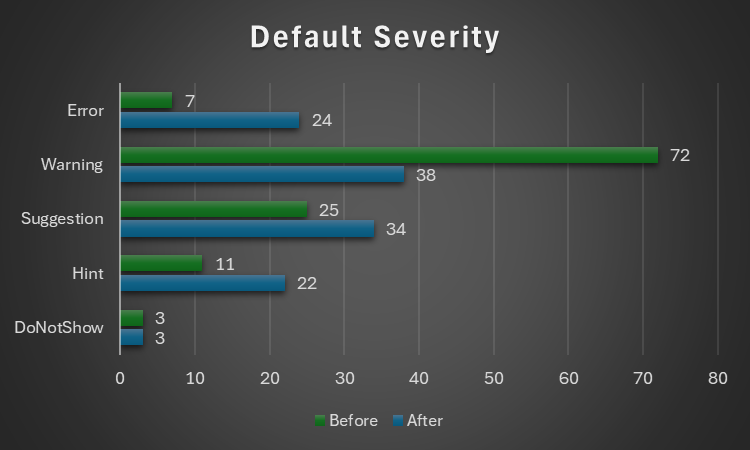
For a while now, something had been bugging me about the inspection types and default severities: things tended to stick to the default fallbacks over time, and the categorization of a number of inspections felt wrong and overall unbalanced. Because inspection types are for legacy reasons part of the inspection configuration, if yours isn’t the default configuration you will not see an effect until you either reset everything to defaults, or manually edit the configuration file to remove everything about inspections.

Here’s the breakdown of how things were shuffled around with inspection types:

Inspection Typev2.5.91v2.5.92
Code Quality7360
Language Opportunities2321
Naming and Conventions1928
Rubberduck Opportunities312
Total118121

..and with the default severity levels:

Default Severityv2.5.91v2.5.92
DoNotShow33
Hint1122
Suggestion2534
Warning7238
Error724
Total118121

Notably, everything around annotations is now under Rubberduck Opportunities, and default severity levels are much more sensible; the 3 inspections disabled by default remain disabled:

  • RedundantByRef mirrors ImplicitByRef; both are valid takes, just different conventions and the more explicit one was made the default, but you can reconfigure them to match your style by enabling one and disabling the other.
  • StepIsNotSpecified mirrors RedundantStepOne; again both valid stances, this time with the less noisy one as the default configuration.
  • ShadowedDeclaration was disabled for performance reasons, if I recall correctly. Or it’s something about some difficult false negative situations making it somewhat too unreliable or experimental to ship enabled by default.

This clean-up touched every single inspection, and in the process the way to localize the resources has been standardized, which should fix the annoying partly-localized labels in some inspection results.

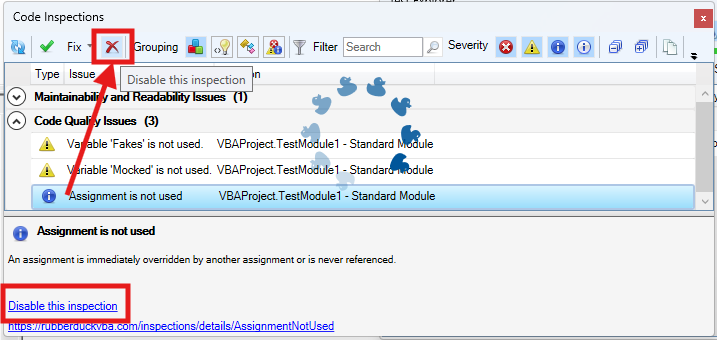
The inspection results toolwindow gets a new disable this inspection button right next to the Fix menu, which should make it easier to disable an inspection altogether with a single click, by selecting any of its results in the grid.

The “disable inspection” command remains available as a link/button in the bottom panel, but now also as a more prominently visible button on the main toolbar. Note that there is no confirmation prompt for this action for now.

Unit Testing

This is a very, very exciting release for the unit testing feature!

Performance Enhancements

Keeping the Test Explorer UI updated with a constantly changing source collection was taking a serious toll on the UI thread, incidentally the only one available for running VBA code. Thanks to a quick PR by contributor tommy9, the explorer now leverages WPF features that improve the situation.

Projects with a lot of tests can still significantly speed up their execution by hiding the toolwindow and selecting Run all tests from the Rubberduck menu. If the main thread isn’t busy drawing a UI element, it’s free to run the instructions of a test procedure.

Moq+VBA

Seven long years after the initial pull request was opened, it’s finally merged and ready to start a little revolution in the VBA unit testing world.

There are important limitations: user code cannot be mocked after it’s been modified, and the setup of ByRef parameters may not always work correctly, but the bulk of it is close enough (and has been for a long time) to be release-worthy. Part of what took so long was that we wanted to ship the full feature working exactly as intended, but there are some serious technical roadblocks and between entirely dropping a 7 years old pull request and merging it anyway, … I’m going with the merge. Perfect is the enemy of good, they say.

What’s happening here is nothing short of pure wizardry: we’re turning arbitrary COM objects into .net ones, and then we translate configuration calls written in VBA into .net expressions that literally get compiled and invoked on the fly to call the non-generic methods offered by Moq 4.8 (getting a bit old, but we’ve never had anything like this in VBA).

In other words, unit testing with Rubberduck now empowers you with quite a large part of what only becomes possible with a real mocking framework, which this is.

The mocking API is currently documented in the wiki, but here’s the crux of it… it’s a game changer:

    'arrange
    Dim Mock As Rubberduck.ComMock
    Set Mock = Mocks.Mock("Excel.Application") 'here we create a new mock using the Excel.Application progid
    'then we configure our mock as per our needs...
    Mock.SetupWithReturns "Name", "Mocked-Excel"
    Mock.SetupWithCallback "CalculateFull", AddressOf OnAppCalculate
    Dim Mocked As Excel.Application
    Set Mocked = Mock.Object 'ComMock.Object represents the mocked object and always implements the COM interface it's mocking
    'act
    'just making sure the mock works 🙂
    Debug.Print Mocked.Name
    Mocked.CalculateFull
    'assert
    'use the ComMock.Verify method to fail the test if a method that was setup was not invoked as per the test's specifications:
    Mock.Verify "CalculateFull", Mocks.Times.AtLeastOnce


There’s only a handful of simple objects to work with, and the API is clean, unambiguous, intuitive. The example above illustrates the enormous power that’s now in your hands by mocking the Excel.Application interface.

The COM mock lets you access the proxy object to pass it around as a surrogate implementation for a dependency that would otherwise compromise the “unit” part of it being a “unit test”; it’s a class type that’s spawned into existence from its definition, for which you can setup any member call in a test. Here we make the `Name` property return a different value just because we can, and when the macro invokes the `CalculateFull` method against this mock instance, rather than awaiting a full application-level compute you can simply verify that the method was invoked, or run a callback procedure (elegantly passing it to the API with the `AddressOf` operator) that can be parameterized if you need to accordingly alter some state.

I’ll write a whole article dedicated to this API soon, but together with the Fakes API, this really takes the Rubberduck unit testing feature to the next level (code coverage would be the next one). As long as you can identify the dependencies in your code (and come up with a way to inject them from the caller), you can now write a test that abstracts them away.

Other Tweaks

The Unassigned variable usage inspection will now honor the out prefix by convention, meaning it will no longer issue false positives when a variable is assigned by another procedure via a ByRef argument, as long as it’s named accordingly with an “out” prefix.

The About box will now mention “Win11” for Windows builds above 22000, even though the major version says 10. This was likely related to Rubberduck using an ancient .net Framework API to retrieve this OS version information.

Renaming an enum member in a way that requires the constant to be qualified, will now correctly use the enum type name rather than the name of the containing module, which was an edge case that could cause headaches and break the code.


What about v3?

If things had gone smoothly, you would know by now. They obviously haven’t, and not much has moved on that front since last May or so. I’m not abandoning the project, but building an entire editor client and a language server is honestly much more than I can chew at the moment, for multiple reasons… twinBASIC is coming, and while a commercial offering, it’s a VB6/VBA language server and compiler, and it reckons the whole editor part is already a solved problem. Rubberduck 3.0 was going to reinvent that wheel, which would have been a huge distraction.

So RD3 is going to be re-scoped a bit: the planned VBIDE integration / add-in part remains of course, but instead of making an entire editor from scratch, we’ll integrate into an existing, modern one that’s already an extensible LSP (Language Server Protocol) client, much like Visual Studio Code (but no, it’s not going to be VS Code). This instantly knocks off (well, removes outright) a gigantic, milestone.

With this v2.x release, the backlog of pending pull requests is finally cleared. 950+ open issues remain in the Rubberduck repository, but very few are actual unresolved bugs or realistically implementable feature ideas. Expect additional pull requests for missing translations, minor fixes and UI/UX enhancements, but the 2.x life cycle is now essentially completed… and it was about time: the technology used for building Rubberduck has evolved a lot in the last decade, with much of it either deprecated, or on the brink of falling out of official long-term support from Microsoft, which is making it harder and harder to easily and successfully build Rubberduck, hoping with fingers crossed that nothing breaks at every dependency update.

I bet VBA will outlive .NET Framework 4.8.1 LTS, which is non-ironically very funny to me… but for Rubberduck to keep moving forward, making the move from the now ancient .NET Framework over to current technology is inevitable – and development on v3 has already knocked that critical milestone, too.


Afterthoughts

I want to stop spreading too thin and actually finish the website now (as you can see, …the thing is falling apart!), and then with Rubberduck 2.x in its current state (more or less), I can finally draw a line and know exactly what v3.0 needs to be. My priorities have shifted quite much since 2021 for many reasons, and Rubberduck and the blog and my online presence in general basically had to hit the brakes. Life happens… doesn’t it.

I’ll always write code as a hobby, as I’ve done ever since I found out about programming. But I also played (badly) some guitar as a teen, and carried a few harmonicas with me to the Microsoft MVP Global Summit in 2018 and 2019 (the two I attended before they went virtual during the pandemic); these days I feel like I could write about the music theory I’ve learned since, or perhaps how to configure the reed gaps on a 10-hole diatonic, standard Richter-tuned harmonica to make it easy to play the hidden overblow notes. I haven’t been paid to maintain a line of VBA code for a very long time now, and I’ll always love it but I can’t say it’s my GoTo language anymore, but it’s all right – Rubberduck isn’t written in VBA anyway. But it’s becoming hard to find inspiration to write about some random VBA things, especially since I’ve stopped participating on Stack Overflow. I stopped, because they basically made an agreement with OpenAI and essentially stole (with a unilateral move in violation of the agreed-upon license) the volunteer work and helpful knowledge-dumps of tens of thousands of people (myself included) to train a… chatbot and make billions off of these people’s work, and then take art and reduce it a prompt.

I mean I get it, it’s fun. But it’s a very steep cost just for something that’s just innocent fun. This is the first and last AI-generated image you’ll ever see from me on this blog.

Perhaps I’m just turning into an old man screaming at a cloud (brought to you by AWS!), but… look, it doesn’t matter that you can prompt a machine to play some harmonica for you: you’ll never, ever, ever experience any AI-generated slop like when you’re actually playing the blues and counting that I-IV-V progression over these 12 bars. Same on guitar. Same on drums. Same with code.

Parentheses

If you’re confused about parentheses in VBA, you’re probably missing key parts of how the language works. Let’s fix this.

Part of what makes parentheses confusing is the many different things they’re used for, which sometimes make them ambiguous.

Signatures

Every procedure declaration includes parentheses, even without parameters. In this context, the parentheses delimit the parameters list, which is of course allowed to be empty.

Expressions

If we made a grammar that defines the VBA language rules, we would have to come up with all kinds of operations: And, Or, Not, and XOr “logical” operators, but also all the arithmetic operators (+, -, /, \, *, ^), …and of course parenthesized expressions, a recursive grammar rule that is defined basically as LPAREN expression RPAREN, meaning there’s a ( left parenthesis followed by any expression (including another parenthesized expression), followed by a ) right parenthesis token.

Whenever VBA doesn’t understand a pair of parentheses as anything more specific than a parenthesized expression, that’s what the parentheses mean: an expression to be evaluated. We’ll get back to exactly why this is super important.

Subscripts

What you and I call an index, VBA likes to call a subscript, as in error 9 “subscript out of bounds”. If you have an array (with a single dimension) named Things and you want to access the n-th item you would write Things(n) and that would be a subscript expression.

The funny thing is that the grammar rules alone aren’t enough to look at a line of code and know whether you’re looking at one, because there’s another kind of expression that Things(n) could match, if the grammar had the necessary context…

Member Calls

I’m lumping together some grammatically distinct types of calls here, but they all involve an implicit Call keyword, and they are full-fledged statements, meaning they can legally stand on their own in a line of code.

So yeah this is why you want Sub and Function procedure names to begin with a verb: because a call invoking a Thing function given a singular argument is otherwise completely identical to a Thing array retrieval at the parameterized index/subscript. Using the Call keyword also resolves this ambiguity, albeit in an arguably noisy way.

But when does a member call require parentheses, you ask?

  • Does it have any required parameters?
  • Is it a Property Get or Function procedure?
  • Are you doing anything with the returned value?

If the answer is YES to these three questions, then you need parentheses and they delimit the arguments list: the VBE will go out of its way to remove any spaces between it and the name of the member being invoked.

When things go wrong

Ignore the space that the VBE is stubbornly inserting between the name of a procedure and the intended list of arguments, and things are about to go off the rails. It might look like this:

MsgBox (“Hello”)

You think you’ve written a member call to the MsgBox library function and given it a single string argument.

But you’ve written a parenthesized expression that VBA will have to evaluate before it can pass its evaluated result to the function. It doesn’t even feel wrong at all, because it compiles and it runs fine.

  • Does it have any required parameters? It does!
  • Is it a Property Get or Function procedure? Yes, it’s a function! It returns a VbMsgBoxResult value that represents how the message was dismissed.
  • Are you doing anything with the returned value? Oh. No we’re just showing a message and we don’t care how the user closes it.

Then you don’t want the parentheses. But let’s say you leave it as it is, and later decide to pass an additional Caption argument for the title for the message box, because it says “Microsoft Excel” and you would rather it say something else. So you just append it to the argument list, right?

MsgBox (“Hello”, “Title goes here”)

This is where VBA gives up and throws a compile error, because what it’s reading as a parenthesized expression is not something it knows how to evaluate, because the comma grammatically doesn’t fit in there – it would understand if that comma were a & string concatenation operator, but then the parentheses would still be misleading, and we’d still only have a single argument, and there doesn’t seem to be any way to legally pass a second one.

Unless we drop the parentheses, or capture the result somehow:

MsgBox “Hello”, “Title goes here”

Result = MsgBox(“Hello”, “Title goes here”)

Notice the space is removed if we capture the result: nothing can be done to add it back, and that’s the VBE telling us it understands the comma-separated argument list as a list of arguments rather than an expression to be evaluated.

And that will compile and run, and produce the expected outcome.

ByRef Bypass

A side-effect of passing a parenthesized expression, is that your argument is the result of that expression – not the local variable that’s parenthesized. So if you’re passing it to a procedure that receives it as a ByRef parameter, you might be inadvertently breaking the intended behavior, for example:

Sub Increment(ByRef Value As Long)
  Value = Value + 42
  Debug.Print Value
End Sub

Sub Test()
  Increment 10 'prints 52

  Dim A As Long
  A = 10
  Increment A 'prints 52
  Debug.Print A 'prints 52

  Dim B As Long
  B = 10
  Increment (B) 'prints 52
  Debug.Print B 'prints 10. Expected?
End Sub

When we pass a literal expression, its value is what’s passed to the procedure.

When we pass a variable, the procedure receives a pointer to that variable (hence by reference) and the caller gets to “see” any changes. Because ByRef is the implicit default, this may or may not be intentional.

When we pass a parenthesized expression – even if all it does is evaluate a local variable – what happens is exactly as if we gave it a literal: it’s the result that’s passed to the procedure by reference, but nothing on the caller’s side has a hold on that reference and the code behaves exactly as if we somehow managed to pass a ByVal argument to a ByRef parameter.

Confused about ByRef vs ByVal? You’re not alone, but that’s a whole other discussion for another time.

There’s one more thing to cover here.

Objects

When we (deliberately or not) parenthesize a string or number literal value, we change the semantics in subtle ways that usually ultimately don’t really matter until we want consistency in our coding style.

But it’s a whole different ballgame when it’s an object reference that you’re trying to pass around, because of a language feature they called let-coercion, where an object is coerced into a value – and VBA does this by invoking the object’s default member, recursively as needed, until a non-object value is retrieved… or more likely, until an object is encountered that does not have a default member to invoke. And then it’s a run-time error, of course. Exactly which one depends on a number of things.

Say you want to invoke a procedure that accepts a Range parameter. If you use a parenthesized expression to do this, what the procedure actually ends up getting might be a cell’s value, or a 2D array containing the values of all the cells in that Range object – because Range.[_Default] (a hidden default member!) will return exactly that, and then the procedure that expected a Range object can’t be invoked because there’s a type mismatch at the call site.

Sub DoSomething(ByVal Target As Range)
  ...
End Sub

'let-coerced Range: type mismatch
DoSomething (ActiveSheet.Range("A1"))

If we do this with an object that doesn’t have a default member, it cannot be let-coerced at all so VBA raises run-time error 438 object doesn’t support this property or method, which is a rather cryptic error message if you don’t know what’s going on, but somewhat makes sense in the context of an object being coerced into a value through an implicit default member call, when that member doesn’t exist. If you ever made a late-bound member call against a typo, you’ve seen this error before.

Let-coercion can also inadvertently happen against a null reference, aka Nothing. Let’s say you’re passing ActiveSheet to a procedure but all workbooks are closed and no worksheet is active: if you pass the ActiveSheet reference normally, the procedure gets Nothing and it can work with that (gracefully fail, I guess), but if it’s surrounded with parentheses then the implicit default member call will fail with error 91 and the procedure never even gets invoked.

Rule of thumb, you pretty much never want any such implicit voodoo going on in your code, so you generally avoid any let-coercion, therefore you never surround an object argument with parentheses!


State as a Service

Say you have a worksheet that contains a table with various settings, or options to run some macro with. Whatever the macro does, whatever it uses these values for, it must somehow solve this problem: how to get these values out of the worksheet and into the program?

We have a ListObject to play with, and since the table is in a specific worksheet, that’s the worksheet module we’re going to be editing. Since the very existence of that table matters for the rest of whatever this macro ends up doing, we’re going to make it clear it’s not an accident by making it a property of the worksheet (class) module – something like this:

Private Const TableName As String = "Table1"

Public Property Get SettingsTable() As ListObject
  Static Value As ListObject
  If Value Is Nothing Then
    On Error Resume Next
      Set Value = Me.ListObjects(TableName)
    On Error GoTo 0
  End If
  Set SettingsTable = Value
End Property

Property Get procedures usually do not raise an error – here if the table doesn’t exist the property will return Nothing, which should cause the calling code to blow up with error 91, and this would be reasonably expected behavior in this case. The Static local stands in for a module-scoped variable declaration that would be needed if the property had a setter procedure; because it’s only needed in one place, we can declare it locally and retain the module-scoped behavior with the Static keyword.

“Static” in VBA basically means “shared”, and “Shared” in VB.NET means what “static” means in essentially every other language with such semantics. Static as a scope modifier in .NET means a member belongs to the type (as opposed to an instance of the type in question), but in Classic-VB it is used for declaring local variables that retain their value between procedure calls, and if used as a modifier at procedure level it makes all locals behave as such… which [very likely] isn’t a good idea.

So we have now given ourselves access to the table, and we can just do Sheet1.SettingsTable to access it from anywhere.

But what if we don’t want that? If we know the settings each have a unique name and have a value that might be a String, a Double, a Date, or a Boolean. The table might just as well be empty for now, anyway.

If we don’t formalize access to the settings, then every place that needs them might be doing things differently! Imagine the chaos if sometimes an option is retrieved with Application.VLookup, elsewhere with a loop over SettingsTable.Rows, and then another one could be getting the value with an offset from the result of SettingsTable.DataBodyRange.Find, and there’s another couple of different but not always equivalently dangerous or misguided ways to go about retrieving a value from that table, and there’s no need to have all of them around.

We could write a function that accepts the name of a setting and returns a Variant holding the associated value if it exists, but what if we need to get the value multiple times, we’re going to read it off the worksheet every time?

Writing to a Range is perhaps the most expensive thing a macro can do, but reading anything from one comes close. In fact, a macro that performs well is usually a macro that limits its interactions with worksheets and the …entire Excel object model.

What we want is a method that iterates the table rows once, yielding an OptionValue class instance for each setting value. So we add this new class module and define an OptionValue class with a Name (String) and a Value (Variant) property.

But then if we call that method every time we want to get a setting value, things are going to be much worse than if we just used Application.VLookup every time, so what gives?

Grabbing every row of that table and turning them into as many OptionValue instances is an action, it wants to be a verb. Things we do with any kind of state are very often well described with a method’s name that starts with a verb, and that’s great already (especially if the rest of the name is actually somewhat descriptive), but a free-floating verb is up for grabs by anyone.

So we’re going to encapsulate it by making that method a member of a class for which SettingsService might be a good name: it’s a service that has the means to abstract away the worksheet and only expose OptionValue objects, and with it the rest of the code no longer needs to deal with the nitty-gritty details of how these objects come into existence, or how long they’ve been around.

Because we can write this class in such a way that we read the settings once from the worksheet (say, in the Initialize handler of the class itself), cache them in a private keyed collection (or private dictionary), and as long as our instance is alive we can return the cached option values whenever someone asks for them, and then they’ll be getting them without needing to hit the worksheet.

By adding an indexed property, we can even have a default member that makes sense, and the rest of the code can read its configuration like this:

Dim Settings As SettingsService
Set Settings = New SettingsService

If Settings("SomeSetting") Then
  Debug.Print "SomeSetting is ON"
Else
  Debug.Print "SomeSetting is OFF"
End If

Settings(“SomeSetting”) stands in for so many things here, all of which would distract from what this macro is supposed to be doing, however working with Variant like this is annoying, and the use of default members is abstracting away mechanics that we’d usually rather be explicit about, so we should instead expose typed methods, so we know (we/us, but also the compiler and Rubberduck here) what actual types and members we’re dealing with:

Dim Settings As SettingsService
Set Settings = New SettingsService

If Settings.GetBoolean("SomeSetting") Then
  Debug.Print "SomeSetting is ON"
Else
  Debug.Print "SomeSetting is OFF"
End If

Where GetBoolean being a method/function rather than a property should make us feel much better about throwing errors: if the setting doesn’t exist, we blow up. If the setting exists but its Variant subtype isn’t Boolean then we probably want to blow up rather than return gibberish. If it exists and it’s of the expected data type, we return the setting value, converted to an actual Boolean.

That means SettingsService also needs GetDateGetDouble (and maybe GetInteger), and of course GetString, leaving the Variant values completely encapsulated in the service: callers don’t need to care about any of that, and that’s neat.


There is no Worksheet

The only thing that needs to do anything with SettingsSheet is the SettingsService. Nothing else needs to access it for any reason whatsoever, because we have a service that fully abstracts it away, so it might as well not be there.

And the macro should still work, assuming it knows how to deal with and recover from a missing setting value.

Settings could be moved to a flat file, another workbook, or a database, and only one method would need to change: the one that’s reading and caching the settings from the worksheet, would instead be connecting and querying a database – and would still only need to hit it once.

And none of anything else would need to change, because it’s all completely yielding that responsibility to this service.

Compare to what it would be like to change inline VLookups and Range.Find calls (wherever they are) to read from another source, and you can quickly see the benefits of having sane abstraction levels.

Code that desperately wants to control how everything is done at the lowest level of detail, is tedious and heavy. It’s hard to tell what the role of such a procedure is, because too many things are going on and the signal gets drowned in noise.

There doesn’t need to be a service class, or even an OptionValue class: any distinct procedure scope that’s clearly responsible for retrieving a valid setting value is a good step forward. But moving the state into an object makes it easier to control its lifetime, and by encapsulating behavior we clean up the calling modules the same way extracting procedure out of a larger scope cleans up that larger scope. It reduces the cognitive load and complexity by moving away code that’s concerned with the peripherals of any given macro’s purpose, and thus increases the cohesion of the macro’s module because things that aren’t directly related to what the macro is specifically responsible for, are simply elsewhere, where they belong.

When to MsgBox?

Perhaps the most popular function in the VBA standard library, MsgBox is likely how your first VBA “hello world” displayed its triumphant, hopeful message to a would-be user. A custom message dialog built with a UserForm would have the same purpose: the program needs to convey or receive information from the user, …or does it?

TL;DR

As a programmer it’s often useful to follow/trace execution in details, and it’s easy to think the user is also interested in this information… but when a program is overtly verbose, users tend to just OK every prompt, without paying much attention to what’s going on. Keep messages short, and use them sparingly. Treat every single one of them as interrupting the user and interfering with whatever it is that they were doing; is it that important to show this message now? Or at all?

MsgBox

As mentioned earlier, MsgBox is a function that you will find in the VBA.Interaction module. Being a function, it returns a value: a VbMsgBoxResult enum (integer) that represents the button that the user used to dismiss the dialog. The title is the name of the host application unless parameterized otherwise, and the icon and buttons can be configured in preset combinations, making it a quick and easy way to prompt the user or ask for confirmation, or to let them know something went wrong when the program crashes gracefully.

All modules in the standard library are global, so you don’t need to qualify calls to their members; that’s why and how MsgBox, VBA.MsgBox, and VBA.Interaction.MsgBox are all equivalent. Because they’re scoped functions and not language-level keywords, their calls are resolved using the standard scoping rules, so they can be shadowed by a same-name identifier in the current project. If a project defines a MsgBox function, then unqualified MsgBox calls will resolve to the project-defined function, because anything defined in the current project has a higher resolution priority than any referenced library – even if that’s the VBA standard library.

Knowing that it’s a function doesn’t mean we’ll necessarily want to systematically capture its return value – but it should eclipse any ambiguity around whether parentheses are needed or not: it’s exactly the same rules as any other function call! To be clear, that means the parentheses are needed when you are capturing the result, and they’re not when you’re not. The catch is that when they’re not needed, they’re also actively harmful when they’re present.

The deal with the parentheses

The language syntax uses parentheses to delimit argument lists. Parentheses are however also perfectly usable in any expression, including argument expressions. When you invoke a procedure, you need to know whether you’re interested in capturing a return value or not. If you’re calling a Sub procedure, then there’s no return value; Function and Property Get procedures normally have one.

  • If you’re NOT capturing a return value, you DO NOT use parentheses.
  • If you are capturing a return value, you need parentheses… unless it’s a parameterless call.
  • Using a function call as an argument expression or a conditional expression means you are capturing the result.

result = SomeFunction arg1, arg2

result = SomeFunction(arg1, arg2)

The VBE will suppress () superfluous empty parentheses, but if you’ve surrounded an argument list with parentheses that shouldn’t be there, then the VBE has added (and will stubbornly maintain) a space before the opening bracket that’s your clue that the VBE has parsed your argument list as an argument expression, and the only reason it worked is because your argument list is made up of a single argument. Indeed, since the comma isn’t an operator in any possibly recognizable expression, it would be a syntax error to try to pass a second argument without first closing the parentheses around the first one – but then while legal, it looks pretty silly to just wrap each argument with parentheses for no reason:

DoSomething (arg1, arg2)

🤡 DoSomething (arg1), (arg2)

DoSomething arg1, arg2

Call DoSomething(arg1, arg2)

Sticking a Call keyword in front of a procedure call makes the parentheses required, because then when you think about it, it’s the procedure call itself that becomes the implicit argument list, as if we were invoking some Call procedure and giving it DoSomething as an argument. Not how it happens, but definitely how it reads if we ignore the keyword-blue syntax highlighting.


Communication Tactics

Whenever you are about to use MsgBox, ask yourself if there wouldn’t be another, less disruptive way to inform the user of what’s going on: sometimes a status message in Application.StatusBar gets the message across without requiring interaction from the user.

Because we tend to think of MsgBox as just popping a message, but every message we show has to be [ideally read and] dismissed by the user, …and that’s OK sometimes, but it’s better to avoid it if we can.

Some points to keep in mind:

  • They’re not going to read it.
  • If it’s more than one sentence, it’s probably too long.
  • If something went wrong, tell the user what they can do about it; don’t just show some cryptic error message with a scary icon.
  • They’re not going to read it.
  • If something completed successfully and the application is already in a visual state that makes it apparent, then it’s not needed.
  • They’re not going to read it.

Instead of using a MsgBox, consider:

  • Listing or logging operations in a dedicated worksheet/table as they occur, so detailed information is available if it’s needed, but without interrupting the user for it.
  • Implementing a UserForm or using a worksheet to capture execution parameters beforehand (define a model!), instead of repetitively prompting for each piece of information that’s needed.
  • If a macro must make a user wait, change the cursor accordingly; resetting the cursor back to normal when the macro is done, already signals completion.

If you must show a MsgBox...

  • They’re not going to read it.
  • Avoid the “?” vbQuestion icon; it was deemed a confusing icon a long time ago and is very uncommon to see in a serious application.
  • Write prompts as clear, concise, yes/no questions; prefer vbYesNo buttons, because OK/Cancel buttons necessarily require a more careful reading of the prompt.
  • They’re not going to read it.
  • Ask yourself if it’s really that important.

An otherwise excellent macro could always easily be turned into the most annoying thing with just a couple of misplaced MsgBox calls: communicating to the user is an important thing to do, but just because it’s something MsgBox does, doesn’t necessarily have to mean it’s something MsgBox must do.