RD-VBA CLI

(English below)

Un jalon majeur a été franchi la semaine dernière : la plateforme RDCore dispose désormais d’un interpréteur qui assemble toutes les pièces du puzzle en quelque chose de traçable, configurable et extensible, qui ressemble aux débuts d’un runtime.

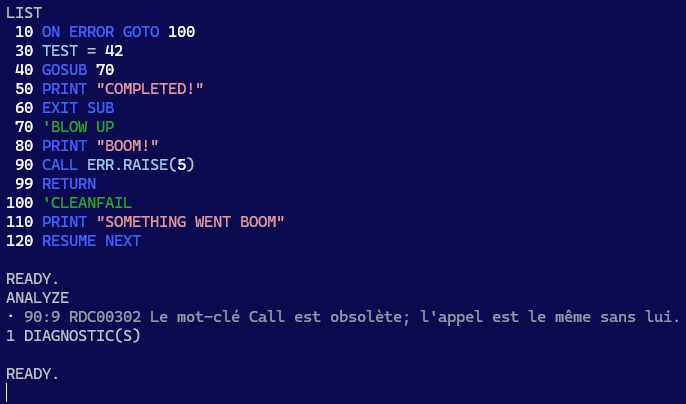
Là où tout ceci devient très concret : l’application console exécute maintenant une boucle REPL interactive où vous exécutez une session runtime en mode immédiat :
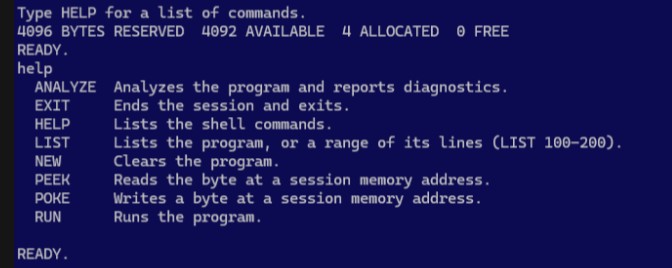
Ne vous laissez pas avoir par le look C64-BASIC : il s’agit d’un client LSP avec une session RD-VBA.

Les 4 octets alloués sont pris par le module et la procédure synthétique où vit le code source de votre programme. Tapez une instruction VBA, elle s’évalue et affiche son résultat; précédez-la d’un numéro de ligne, et vous venez d’inscrire cette instruction à cette ligne dans votre programme RD-VBA. Le nom de ce module synthétique est Program, et le nom de la procédure est Main. Vous verrez régulièrement ces identifiants dans les traces de la pile d’exécution (stack trace) des erreurs rencontrées – qui seront ici toujours sous Main, mais vous comprendrez que ce même mécanisme fonctionnera peu importe la profondeur de la pile dans un véritable client (IDE), avec un vrai projet et plusieurs modules et procédures.

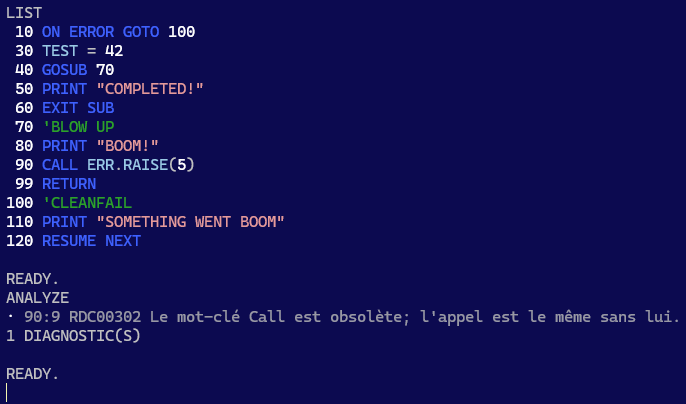
L’idée ici n’est pas de faire évoluer cette application en un IDE non plus – mais ça fait une façon très divertissante de tester la plateforme, le cœur de langage et ses sémantiques. Le rôle de cette application est de simplement permettre de tester la plateforme de bout en bout. Étant un client LSP, nous verrons fort probablement apparaître un surlignage sémantique de la syntaxe au niveau de la sortie de LIST par exemple, ou alors des listes de complétion interactives; les diagnostics sont déjà branchés et ANALYZE en affichera les détails dès que ceux-ci deviendront disponibles. PEEK/POKE ne sont que pure lecture/écriture directe en mémoire à la Commodore64.

RUN exécute le programme de haut en bas, à moins que vous lui construisiez un parcours avec GoTo et GoSub/Return, auquel cas vous savez probablement ce que vous faites… sinon les diagnostics seront bientôt là pour vous guider.

Sémantiques

Toute la plomberie est en place; ce qu’il reste, c’est l’implémentation : les instructions I/O comme Open, Close, Print#, Write#, Put#, Get# sont implémentées; les déclarations, boucles, conditions, sauts et gestion d’erreurs sont fonctionnels. Beaucoup reste à faire: chacune des instructions doit avoir une implémentation, sans quoi les exécuter sera toujours en erreur.

L’implémentation de la librairie standard a débuté : Len et LenB sont les premiers consommateurs des données de stockage des UDT, et bien que LSet fonctionne tel que spécifié sur une String ou un UDT, la très vaste majorité de la librairie demeure à implémenter. Il s’agit de travail relativement simple qui n’a pas à traverser plusieurs couches d’abstraction et peuvent être des gains rapides; c’est pourquoi j’ai préféré donner les plus gros morceaux à Claude, les fonctions pures de la librairie peuvent être implémentées plus tard.

Ceci dit l’exécution et la gestion d’erreurs en place donnent déjà un bon aperçu :
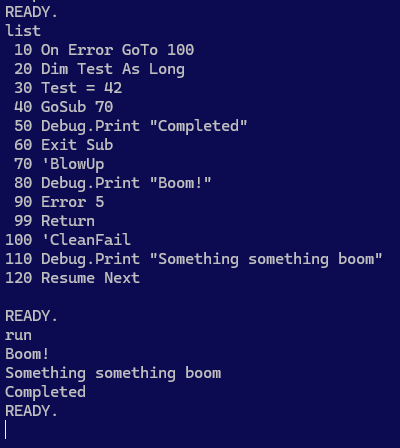
Un programme RD-VBA qui ne contient pas d’instructions non-implémentées se complète.

Le retrait de l’instruction On Error GoTo révèle quelques faits intéressants :
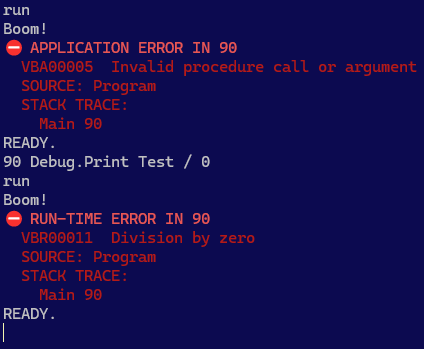
D’abord, il y a une différence entre une erreur lancée explicitement par l’application, et une erreur d’exécution. Ensuite on remarque le numéro de ligne, puis la stack trace.

Ce que ces images ne montrent pas, c’est que le numéro de ligne est un symbole ici, seulement parce qu’il s’agit du mode programme – mais dans un document, la configuration par défaut fait de ce numéro l’emplacement L1C1 exact de l’erreur dans le document.

Une erreur d’application (VBA00000) est une erreur lancée par le code source (via Error, ou Err.Raise); une erreur d’exécution (VBR00000) est une erreur lancée par l’interpréteur. MS-VBA ne différencie pas réellement ces deux types d’erreurs – il y a donc désormais une distinction claire entre les deux, et ça ne brise rien du tout!
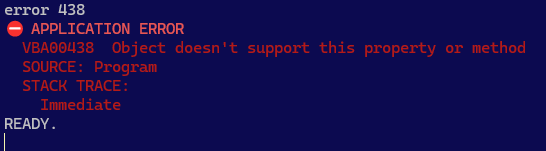
Aucune erreur d’application ne peut être confondue avec une erreur d’exécution, et il y aura toujours une trace de la pile d’exécution, même en mode immédiat!

Limitations

Certaines limitations sont inhérentes au fait qu’il s’agisse d’une application console: en effet il serait surprenant d’y voir une fonctionnalité affichant des info-bulles au survol d’un symbole.

D’autres limitations sont plutôt liées au design:

  • Le module Program et la procédure Main sont intrinsèques et ne peuvent pas être renommés.
  • Une commande sans numéro de ligne s’exécute immédiatement; les numéros de ligne sont donc obligatoires pour tout programme dans ce client.
  • Les numéros de lignes ne devraient pas empêcher l’utilisation de libellés, mais ceux-ci ne fonctionnent pas actuellement avec un numéro de ligne; GoTo/GoSub doivent donc référer à un numéro de ligne.
  • Les continuations sont invalides: un numéro de ligne ne peut pas être situé en plein milieu d’une instruction.
  • Limitation éventuelle du jeu de syntaxe valide en mode BASIC (configurable).
  • Limitation éventuelle à 10,000 lignes de la longueur permise d’une procédure; l’erreur procedure too long devrait alors être lancée à la compilation, mais possible que le mode BASIC fonctionne différemment.
  • Exit Sub termine le programme; Exit Function et Exit Property sont statiquement invalides.
  • Sub Main() et End Sub sont implicites: le corps du programme constitue le corps de cette procédure.
  • L’ajout de procédures additionnelles n’est pas supporté (les numéros de ligne étant invalides au niveau des déclarations d’un module); utilisez plutôt GoSub/Return avec de larges sauts de numérotation pour coder des sous-routines.

D’autres limitations sont ponctuelles et seront résolues avant le lancement de la v1 :

  • L’instruction REM qui explose à l’exécution est objectivement comique, mais ne restera vraisemblablement pas brisée longtemps.
  • L’invocation de membres de la librairie standard qui ne sont pas encore implémentés sera également en erreur.

Manipulation de Mémoire

Les commandes PEEK et POKE ne sont pas (encore?) implémentées en tant que mots-clés et donc pas utilisables dans du code source RD-VBA, mais les commandes fonctionnent et permettent donc une lecture/écriture directe d’octets en mémoire applicative – opération évidemment très risquée, mais la nostalgie l’a emportée.

Ceci dit les opérations LSet fonctionnent dans le code source sur des String et UDT.

Jalons

L’évolution du cœur de langage est complètement découplée de celle de l’application CLI, donc celle-ci fonctionnera de mieux en mieux et de façon de plus en plus complète à mesure que s’ajouteront les sémantiques du cœur de langage, et ce sans rien devoir corriger ou modifier dans l’application même.

Cela ne signifie pas pour autant que le travail est terminé!

L’application supporte notamment des thèmes, donc si le bleu C64-BASIC ne vous plaît pas, vous pouvez toujours passer à un thème foncé moderne. Ce n’est donc qu’une question de temps avant que la sortie de LIST affiche un surlignage sémantique issu du serveur de langage!

Exploiter cette connexion LSP constitue la façon dont cette application deviendra ultimement beaucoup plus qu’un éditeur BASIC. ANALYZE est déjà prêt à afficher les diagnostics, dès qu’ils commenceront à apparaître dans la plateforme.

Le mode REPL est bien pour une démo, mais le véritable outil est le mode CLI non interactif.

Les outils modernes s’exécutent dans des pipelines CI/CD (intégration et livraison continues) dans le cloud. rdc.exe sera à terme en mesure de compiler un projet, d’en exécuter les tests, et de bloquer une livraison qui dévie des conventions établies, le tout complètement en-dehors de l’écosystème MS-VBA.

Êtes-vous READY?


English

A major milestone was knocked down in the last week: the RDCore platform now has an interpreter that puts all the previous pieces together into a traceable, configurable, and extensible beginning of a runtime.

Where this gets very real, is with the CLI app now running an interactive REPL program mode where you’re basically running a runtime session in immediate mode:
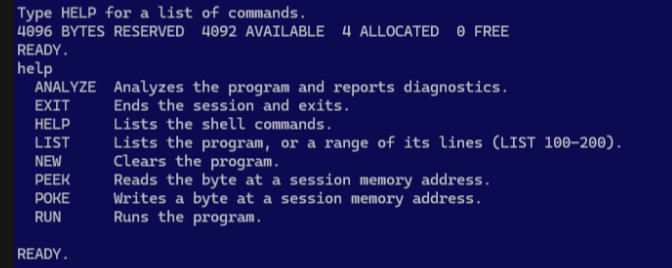
Don’t be fooled by the C64-BASIC look; this CLI app is a full-fledged LSP client with an active RD-VBA runtime session.

The 4 bytes taken are allocated for the synthesized module and procedure scope your program space lives in. Type a VBA expression, and you get its result; precede it with a line number, and now you’ve written that instruction at that specified line number in your program. The name of this synthesized module is Program, and the name of the enclosing procedure is Main. This matters, because you’ll see these identifiers in error stack traces – here only ever inside Main, but you can see what this means for error handling with an actual IDE client, and a project with real procedure scopes.

The idea is not to evolve this app into one, either; it’s just to make a fun way to test the language core and semantics… and diagnostics – the platform, basically. The role of RD-VBA CLI mode is to test the platform end-to-end, hands-on – and being a LSP client means we’ll probably get to write old-school BASIC programs with semantic syntax highlighting in LIST outputs, completion lists for the REPL inputs. Diagnostics are already wired, ANALYZE will start showing meaningful output when providers/extensions issue diagnostics. PEEK/POKE is just C64-like pure unsafe program memory read/write.

RUN runs the program top to bottom, unless you make it do funny things like GoSub, in which case you probably know what you’re doing. If you don’t, …RDCore diagnostics will eventually have your back covered.

Semantics

So the plumbing is in place; what remains is semantics: file I/O statements like Open, Write, Print#, are implemented at the language core layer. Declarations, control flow, error handling as well. Still a lot remains TODO – every single statement keyword must have its semantics implemented, otherwise running them gets you an internal error.

Standard library implementation has begun as well; Len and LenB are the first consumers of the UDT member storage data, and while all the symbols are defined and LSet works as specified on UDT and strings, the vast majority of the standard library remains to be implemented; this is mechanical work that doesn’t need to reach across multiple layers to be a quick gain – so I let Claude/Opus focus on the more meaty parts that do cross into the runtime and memory layout, leaving the simpler, pure functions for later.

Control flow and error handling is fully functional:
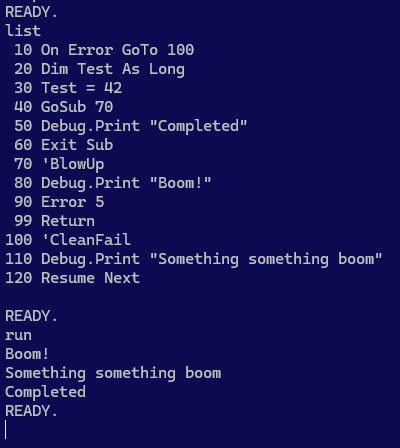
BASIC-like RD-VBA code runs end-to-end in the app, …as long as the program doesn’t involve unimplemented semantics.

Removing the On Error GoTo instruction reveals a number of interesting facts about RD-VBA:
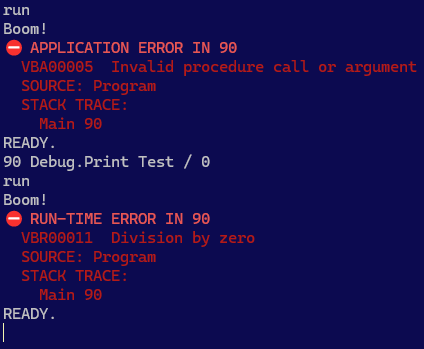
First, there’s a difference between an error you raise and an error the runtime raises. Second, errors have a source location pointing to the line number of the faulting instruction, and then there’s a stack trace.

What this doesn’t tell you, is that the platform is showing symbolic line numbers here only because it has no workspace document proper (the internal buffer just simulates one), but in an IDE client the default configuration would be reporting the actual L1C1 document location.

An application error (“VBA00000”) is a run-time error that is raised by the workspace code; a runtime error (“VBR00000”) is a run-time error that is raised in the language core runtime semantics. MS-VBA historically did not really differentiate between these errors; now there’s a structural distinction between them, and it doesn’t break anything!
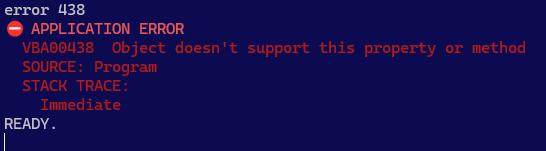
No Error or Err.Raise statement can ever be mistaken for a runtime error, and we always get a stack trace, even in immediate command mode.

Limitations

Some limitations are inherent to the CLI app being a CLI app: hover tooltips aren’t going to be available, and that’s a given.

Others are design decisions. These include:

  • Program.Main project and procedure scope; intrinsic, cannot be renamed.
  • C64-style program interface, using line numbers as markers for instructions that are stored in the source buffer rather than immediately piped to the interpreter; this makes line numbers inherently mandatory in this client.
  • Line numbers should not prevent the use of line labels, however labels do not currently parse with line numbers. GoTo must therefore refer to line numbers.
  • Line continuations cannot be used; a line number isn’t a valid statement to continue into.
  • Eventually artificially limiting the valid RD-VBA syntax (including comments) in CLI program mode to the BASIC subset of VB, via appsettings.json platform configuration.
  • Eventually limiting the number of logical lines to 10,000; procedure too long compile-time error ought to be raised then, but BASIC mode will probably end up working differently.
  • Exit Sub terminates the program; Exit Function and Exit Property are statically illegal.
  • Sub Main() and End Sub are implicit; the program body is that procedure’s body.
  • Additional Sub procedures cannot be defined (line numbers are illegal on declaration members); use GoSub/Return with wide line numbering gaps to denote subroutines instead.

Other limitations are temporary pre-alpha missing implementations that will definitely be implemented before a v1.0 can ship:

  • REM statements (BASIC-style comments) throwing statement not implemented is objectively funny, but will probably not take too long to get working as the no-op instruction it is.
  • Standard library implementation being incomplete, any function call that refers to a symbol defined there throws not implemented as well.

Unsafe Program Memory Ops

Not (yet?) implemented as keywords, the PEEK and POKE immediate commands allow byte-level unsafe reads and writes (!) from/to a specified address in program memory space. This is obviously dangerous and may lead to crashes, but nostalgia won.

That said LSet and RSet semantics are both implemented, including against UDT values.

🎯 Milestones

The evolution of the RD-VBA language core and runtime implementation is architecturally decoupled from the CLI application, so it’ll automatically throw fewer errors as the language core progresses, without fixing or changing anything anywhere in the CLI app.

That doesn’t mean the work is done, however.

The app supports themes, so if you don’t like C64-style BASIC blue, you might like a modern dark theme instead. It’s only a matter of time before LIST output gets semantic syntax highlighting from the language server!

Leveraging this LSP connection is how the app will turn into something more than a BASIC console. ANALYZE is already wired up to report diagnostics as soon as they start coming.

A BASIC immediate/command/program mode is nice for a platform demo, but the real tool is the non-interactive CLI mode.

Modern tools run in the cloud, from CI/CD scripts that build a project, run its tests, inspect its vulnerabilities and deviations from established coding practices; rdc.exe supports an extensible set of command-line tools exactly for this. Extensions can supply a provider for various commands such as test or analyze, and a CI/CD script could be configured to gate a build on tests passing and diagnostics showing no warnings or errors.

Are you READY?
RDCore @ 20260915

Français (English below)

Si on m’avait demandé il y a quelques mois pourquoi rien n’est codé avec l’assistance d’une IA dans RDCore, j’aurais répondu que l’architecture, pourtant bien ciblée, était toujours en mouvement. Je ne voulais pas qu’un LLM décide de cette architecture, notamment parce que RDCore fait un certain nombre de choses à sa propre façon, et parce que coordonner 5 processus n’est pas exactement simple.

Tout au long, on me demandait pourquoi je refusais d’utiliser l’IA pour accélérer les choses.

La vitesse de la mise en place initiale était tout simplement sans importance : c’était à propos de l’architecture et du modèle – concevoir ces éléments avec mes propres mains et mon propre cerveau ont permis d’atteindre une solide fondation – et oui, avec l’aide de l’IA pour débattre d’idées et évaluer les options.

L’IA générative est excellente pour accélérer une implémentation, mais beaucoup moins pour décider ce qui doit être implémenté – sauf que maintenant, la colonne vertébrale est solidement en place.

Pendant le dernier mois, quelque chose s’est produit : le cœur et l’architecture sont suffisamment avancés, et j’ai donc décidé de donner une nouvelle chance à l’IA, cette fois-ci avec Claude Code. Si nous n’étions pas en 2026, vous ne pourriez croire ce qu’il a fait du backlog.

Comme il s’agit d’un énorme projet, il est découpé en plusieurs jalons. Voici donc…

Jalon : Communications JSON-RPC

Les connexions LSP/JSON-RPC sont désormais fonctionnelles au niveau du SDK – donc pour l’ensemble de la plateforme : toutes les composantes démarrent, échangent leurs capacités, et se ferment proprement.

Ce jalon a été rapidement fermé, puisqu’il était pratiquement complet – mais ça signifie quoi?

La plupart des serveurs de langage sont des monolithes qui se chargent de tout. RDCore est conçu différemment, et sépare ses responsabilités dans des processus distincts.

Il en résulte un parsing server entièrement stateless, la mémoire applicative qui vit dans l’hôte d’environnement, une librairie runtime dédiée à l’exécution, les sémantiques statiques du cœur de langage définies au niveau du SDK, et un serveur de langage qui se consacre donc pour l’essentiel au protocole LSP.

Chacune de ces composantes peut donc évoluer indépendamment des autres.

Capacités de la Plateforme

L’idée est la suivante : peu importe ce que fait une composante, elle l’appelle “capacité” et décrit à la plateforme ce qu’elle peut faire.

Plusieurs choses dans la plateforme sont fournies, et donc une extension peut définir et enregistrer un fournisseur et ainsi contribuer à l’expérience de l’utilisateur.

Tout démarre avec un client LSP (IDE) qui démarre le serveur de langage : ils établissent une connexion bidirectionnelle à travers une named pipe, puis le serveur RDCore fait quelque chose que peu d’autres font, et démarre une poignée de processus :

  • rdc.exe, l’hôte d’environnement qui coordonne l’exécution et la mémoire.
  • RDCore.ParseServer.exe, un serveur stateless qui s’occupe exclusivement de la syntaxe; il ne produit une arborescence (AST) que pour un document complet pour l’instant, mais supporte déjà un ancrage et bientôt des fragments de code.
  • RDCore.Diagnostics.exe, une extension chargée de produire les diagnostics (erreurs de syntaxe pour l’instant).

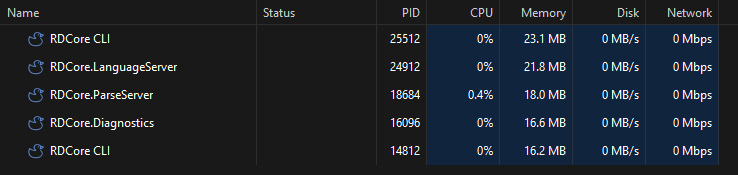
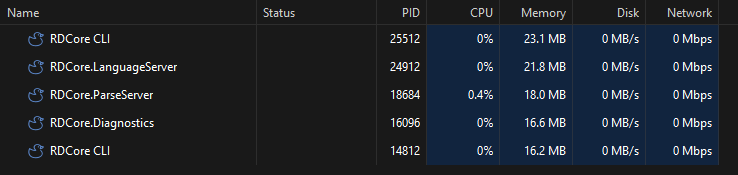
Avec rdc.exe en tant que client, nous observons donc 5 processus à l’exécution :

Task Manager montrant les processus RDCore à l’exécution. Le plus petit des deux rdc.exe est le client, l’autre est l’hôte d’environnement RD-VBA.

Jalon : AST Bidirectionnel

Une arborescence qui conserve l’emplacement du code source – incluant ce qu’il ne comprend pas, lui permet de correctement être exprimée en code source. Ceci implique des refactorings et code actions chirurgicaux à l’horizon.

Une chose que l’AST fait déjà que le parser de Rubberduck ne faisait pas donc, est de préserver la source. Les blocs “morts” de compilation conditionnelle étaient pour Rubberduck des espaces blancs – maintenant, des nœuds trivia renseignent sur ce contenu et permettront, une fois l’interpréteur en place, de discerner les définitions “vives” des définitions “mortes”, et ainsi une action refactor/renommer qui ne laisse pas derrière une définition inactive.

Une arborescence immuable représentant la pure syntaxe est l’élément clé dont Rubberduck a toujours eu besoin, et n’a jamais eu.

Jalon: Déclarations

Avec la plateforme qui prend vie, une autre étape a été franchie : tout ce qui produit un symbole est désormais dans la sortie (AST) du parser.

Quand le serveur de langage reçoit l’arborescence d’un module, un fournisseur en extrait les symboles, qui sont ensuite relayés à l’hôte d’environnement, lequel les gère en mémoire.

Tout ceci n’est pas tout à fait entièrement en place: les types complexes (tableaux/arrays, UDT et objets) ne sont pas encore gérés – mais ils sont les suivants. Ensuite on pourra créer des instances de classes et en allouer l’espace mémoire nécessaire, et des outils CLI pourront renseigner sur l’état de la mémoire.

Les tableaux et UDT sont représentés par des blocs de mémoire contiguës, conçus avec LSet/RSet et les tableaux 2D Variant en tête.

Le mécanisme d’allocations est assez complexe et bénéficie d’une importante couverture de tests. On y trouve un chemin “rapide” qui trouve rapidement le plus petit bloc de mémoire disponible à réutiliser, ainsi qu’un chemin plus “lent” qui va jusqu’à réserver de nouveaux segments au besoin. La mémoire libérée devient disponible pour réutilisation ultérieure, et l’idée de compacter la mémoire est pour l’instant écartée. Il s’agit d’un mécanisme où la planète arrête de tourner pour qu’en quelques cycles tous les objets déplacés obtiennent une nouvelle adresse, pour réclamer l’espace fragmenté laissé derrière le pointeur d’allocation – le programme peut ensuite poursuivre son cours. Si vous êtes familiers avec le garbage collector (GC) de .net, ces mécanismes ne doivent pas vous surprendre.

Les travaux à venir y intégreront l’adressage des paramètres et variables locales, qui vivent sur leur tranche de la pile d’exécution (stack frame): pour l’instant seules les déclarations statiques sont allouées.

Jalon : Résolution

Avec les symboles définis en mémoire, l’étape suivante était évidemment d’en permettre la résolution à partir d’un nom et d’un périmètre (scope)… et ainsi une autre importante étape est franchie.

Le ticket #973 du projet legacy Rubberduck demeure le dernier boss, mais comme la résolution fonctionne exactement telle que spécifiée, je n’ai aucun doute que RDCore saura manœuvrer à travers tout le Thundercode qu’on lui enverra. Ceci requiert évidemment les sémantiques d’exécution des expressions d’accès de membre, qui sont maintenant débloquées, donc l’implémentation ne saurait tarder.

Ouvert il y a plus de 11 ans par notre cher ami ThunderFrame, #973 (legacy Rubberduck) demeure le dragon à abattre. Peu importe où tu es Andrew, tu restes dans l’équipe et tu continues d’y contribuer!

Jalon : Sémantiques Statiques

MS-VBAL distingue clairement les règles s’appliquant à l’exécution de celles s’appliquant à la compilation. Les sémantiques statiques déterminent les types impliqués, alors qu’à l’exécution on parle généralement d’effets secondaires en mémoire ou ailleurs.

La plupart de ces règles au cœur du langage sont définies depuis un certain temps et attendaient ce moment. Avec la gestion de la mémoire en place, ce jalon peut maintenant être atteint et les travaux peuvent démarrer au niveau du moteur d’analyse.

La phase d’analyse prévue comprend un mécanisme d‘exécution simulée, lequel exerce les sémantiques d’exécution, mais sans affecter l’état global. Une fois en place, ceci permettra d’identifier des boucles infinies, récursion incontrôlée, code inatteignable, et tout ce dont Rubberduck a toujours rêvé pouvoir accomplir. RDCore ne devine pas ce que fait le code: il l’exerce et rapporte les faits produits par le moteur d’exécution.

Il se trouve que devenir le langage donne à Rubberduck des capacités que comprendre le langage n’ont jamais pu matérialiser.

Jalon: Moteur d’exécution

Le moteur en lui-même n’a pas encore fait l’objet d’un focus particulier, mais les travaux sur la résolution de symboles viennent débloquer l’implémentation des sémantiques statiques et d’exécution telles que les expressions d’accès à un membre, et l’opérateur de comparaison Is.

Ce jalon constitue le travail à longue-haleine vers lequel je vais bientôt me tourner. Il inclut l’implémentation complète de la librairie standard, avec les fonctions de conversion, arithmétique, finance, dates et strings, et des implémentations indépendantes de Windows pour MsgBox, InputBox, et autres fonctions traditionnellement liées à Windows.

Les projets RD-VBA ne réfèreront pas à VBA7.DLL, libérant VBA de son hôte historique.

Jalon: Serveur de Language

Ce jalon a progressé de façon significative et plusieurs tickets sont maintenant ouverts, et d’autres suivront à mesure que les capacités de la plateforme deviendront disponibles.

Il s’agit de tickets ouverts à tous, pour l’implémentation de chacun des points de terminaison LSP, et chacun d’entre eux débloque instantanément des fonctionnalités client/IDE:

De nombreux autres tickets semblables seront créés à mesure que de nouvelles capacités deviennent disponibles au niveau LSP.

Jalon: Application CLI

RDCore.CLI s’exécute en différents modes, selon les paramètres qui lui sont passés :

  • Avec un ClientProcessId, l’application tient le rôle de l’hôte d’environnement, tel que spécifié dans MS-VBAL.
  • Avec un workspace URI, l’application devient un client LSP en mode CLI, qui exécute une commande puis démonte la plateforme.
  • Sans paramètres, l’application sort présentement avec un code d’erreur, mais un client LSP en mode programme est prévu; d’autres détails suivront.

Le plus intéressant est la façon dont l’application branche ses commandes: l’hôte charge les extensions, ensuite de nouvelles commandes peuvent être fournies par ces extensions.

Cela signifie que la commande rdc –test fonctionnera exactement comme elle semble vouloir fonctionner, avec la commande test fournie et gérée par RDCore.UnitTesting, la 2e extension officielle prévue de la plateforme, à venir (elle aura son propre repository). Pour l’instant, la commande rdc –new crée un nouvel espace de travail / projet.


Feuille de route : intégration HexIDE

Une application CLI client LSP c’est bien, mais un client LSP qui est un IDE, c’est objectivement mieux. C’est d’ailleurs ce qui a coulé RD3, et tel que promis, rien dans RDCore n’est un IDE.

Par contre…

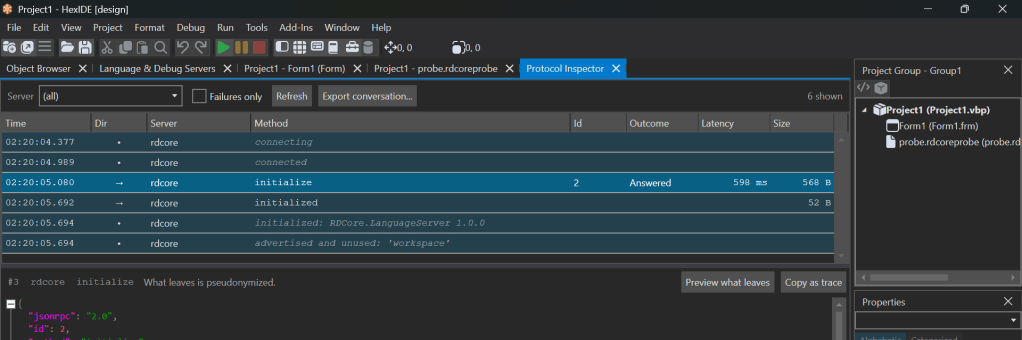
Une collègue (@imojenisys) travaille en parallèle depuis un certain temps sur son propre IDE pour VB6 – une expérience familière comme dans le VBE, mais avec des thèmes et un client LSP… qui parvient déjà à communiquer avec RDCore :

L’onglet HexIDE Protocol Conversations affiche l’initialisation LSP et les communications subséquentes avec le serveur de langage de RDCore, incluant le contenu de chacun de ces messages.

Le repository de HexIDE a été recopié (forked) sous l’organisation rubberduck-vba, avec pour but de positionner cet IDE comme L’IDE officiel de la plateforme, en contribuant les modifications au projet source.

Gestion des Attentes

Il est clair depuis le tout début, que RDCore vise à implémenter MS-VBAL indépendamment de Microsoft Windows.

Historiquement, VB fut conçu dans l’autre sens (à l’envers), à partir d’un designer glisser-déposer pour une conception UI “WYSIWYG”, sur lequel est venu se greffer un langage et un moteur d’exécution. RDCore renversé tout ça et part des spécifications du langage, et la notion de UI est très loin dans le futur.

Ceci sera sans aucun doute un peu frustrant pour la communauté VB, parce qu’il semble impossible de proposer une alternative à VB sans UI, c’est impensable!

En 30 ans, on a vu plusieurs tentatives commencer avec un UI pour ensuite s’effondrer : si partir d’un UI pour se rendre tranquillement vers un langage et un moteur d’exécution était une approche viable, on l’aurait vu fonctionner depuis. Il y a tout un cimetière de projets “IDE VB6” abandonnés qui ont pris ce chemin.

RDCore est différent. Il laisse délibérément tomber MSForms et ActiveX, et tout ce qui lierait la plateforme au destin de Windows.

Les fonctions de la librairie standard telles que MsgBox vont avoir un fournisseur permettant une configuration; afficher une boîte de dialogue sera une capacité de l’hôte comme une autre, laissant le tout sain et sauf pour une exécution en pipeline CI/CD.

La Suite

Le projet donne aujourd’hui une impression nettement différente d’il y a tout juste un mois à peine. Pour la première fois, le nouveau code débloque non plus de nouveaux éléments architecturaux, mais de nouvelles capacités. Le parser produit un AST, l’AST produit des symboles, les symboles sont placés en mémoire et les sémantiques peuvent les résoudre, et tout ceci débloque de véritables fonctionnalités du cœur de langage et du serveur LSP.

Je n’ai aucune idée de ce dont aura l’air la prochaine mise à jour, puisqu’il y a un effet boule de neige ici et donc il y aura bientôt une explosion de fonctionnalités débloquées. Mon focus sera sur le moteur d’exécution et tout ce qui permettra de débloquer l’interpréteur – incluant des fonctionnalités de déboguage (exécution pas à pas, points d’arrêt, etc.), via le protocole DAP.


RDCore @ 2026-09-15


English

If you asked me a few months ago why there’s nothing AI-assisted in RDCore, I would have said it’s because the architecture was, despite a clear target, still moving. I did not want a LLM to come up with whatever they “think” the thing should look like, notably because RDCore does a number of things its own way, and because designing a 5-process architecture isn’t exactly trivial.

All along the way, I kept getting questions about why I wasn’t leveraging AI to get some speed.

It wasn’t about speed though: it was about the architecture and the model – crafting this with my own hands and thinking things through, sure using AI to brainstorm ideas and weight options, but I didn’t want to generate the implementation without a solid backbone in place.

Generative AI is very good at accelerating implementation. Deciding what should be implemented, much less so – except now the backbone is in place.

So here we are now, and during the last month something happened: the core architecture is satisfyingly far enough along that I decided to give AI another shot, and went with Claude Code this time, and if it wasn’t 2026 you wouldn’t believe what it did to the backlog.

Since this is a very large project, it breaks down into multiple milestones. Let’s have a look.


Milestone: JSON-RPC Plumbing

The LSP handshake and formalization of a platform-wide RPC protocol is completed at the SDK level, and now all core platform components come alive, exchange information, and cleanly tear down.

This milestone was quickly knocked down since it was almost complete already, so what does it mean?

Most language servers are a giant monolith that does everything. RDCore is built differently, and cleanly separates and layers concerns across multiple different processes.

It means a parser that’s entirely stateless, program memory that lives in an environment host, runtime semantics implemented in a dedicated runtime library, static semantics in the language core SDK, and a language server that only needs to be concerned about LSP.

This makes completely decoupled components that can all evolve independently and scale without bloat.

Platform Capabilities

The idea is that whatever a component does, it calls it a capability and tells the platform what it can do. Many things in the platform are provided, and so components (and/or extensions) can register providers and contribute to the user experience.

Everything begins with a LSP client starting the language server: they establish a 2-way named pipe connection, and then the language server does something most language servers don’t – it spawns a handful of child processes:

  • rdc.exe runs the environment host, which coordinates runtime and memory operations;
  • RDCore.ParseServer.exe runs a stateless parser that cares for absolutely nothing beyond syntax; the language server can ask it to produce a syntax tree for any module, currently only supporting full document parsing, with anchored-offset code fragments planned.
  • RDCore.Diagnostics.exe runs the core semantic analyzers (currently none) and produces all the core diagnostics (currently only syntax errors)

With the console application rdc.exe running in client mode (or an IDE client), that makes 5 processes alive and ready to work.

Running RDCore processes, as seen in Task Manager; the smaller RDCore.CLI process is acting as the LSP client, the larger one is the RD-VBA host.

Milestone: Round-tripping AST

Having a syntax tree that preserves the location of everything – including tokens that don’t make sense, makes an AST that can round-trip back to source code. This means surgical refactorings and code actions on the horizon.

One thing the AST already does that the Rubberduck parser didn’t do, is it preserves the source. Conditionally compiled “dead code” blocks appeared to Rubberduck as plain whitespace – in RDCore we get a trivia node with that content, and the declaration pass picks up all the declarations, and that means we can now not only tell you which branch is dead or alive, we can also know that a given symbol has a definition that is inactive, and an eventual refactor/rename refactoring will no longer leave behind the code in a dead precompiler branch.

Having a real, immutable abstract syntax tree that represents pure syntax, is something Rubberduck never had – and always wanted.

Milestone: Declaration Pass

With the platform coming alive, another milestone was knocked down at the parser level: everything that represents a symbol that defines anything, is now in the syntax tree output of the parser.

When the language server receives the trees for all source documents in the workspace, a symbol provider traverses them and generates symbols that are then relayed to the environment host, which manages them in program memory space.

This isn’t fully implemented yet: the complex types remain (arrays, UDT, objects), but they’re next – then the runtime can start allocating instance fields for class instances, and CLI tooling can be written to track and monitor runtime memory.

Arrays and UDT are represented in memory by contiguous address space, which was designed with LSet / RSet semantics and 2D Variant arrays in mind.

The allocator is a rather advanced (and thoroughly tested) mechanism with a “fast path” that quickly finds the smallest free memory block that can accept the required bytes, and a “slow path” that can extend program memory space with a new segment as necessary; deallocated memory becomes free blocks that are instantly available to be reused, and then compacting the available space is a feature that’s shelved with a “let’s see how it goes” plan: if the fragmentation of program memory is generally under control, we may get away with no need for compaction – which is a heavy-handed “stop the world” mechanism that moves all allocated pointers to a new address, eliminating unusable fragmented memory space left behind the “current address” pointer. If you know anything about the .net garbage collector (GC), these concepts are nothing new.

Pending work includes unifying address space with stack-allocated locals and parameters: currently only static declarations are allocated.

Milestone: Resolver

With the symbols defined in the host, the next obvious step is to be able to resolve them by name and scope, and that’s another critical milestone knocked down.

Legacy Rubberduck issue #973 remains the final boss here: the goal is to have identifier resolution work exactly to spec, so I expect it to ace every single Thundercode stress-test we throw at it. This cannot be completed however, until the runtime semantics for member access expressions are implemented, but now that all symbols are properly allocated, this is work that’s unlocked now, and will be implemented shortly.

Legacy Rubberduck issue #973 was filed 11 years ago by our dear friend ThunderFrame, and remains the ultimate test case for RDCore’s own resolver. Wherever you are Andrew, you’re still part of the team, and actively helping.

Milestone: Static Semantics

The MS-VBAL specifications distinguish static and runtime semantics, as it should: static semantics are concerned about data types, and the runtime semantics actually do stuff, usually involving side effects in program memory.

Much of the static semantics have been implemented and waiting for this moment for some time, and while statements’ static semantics remain to be written, everything the parser produces can now be resolved, so this milestone is now unlocked and work can theoretically begin on the analysis pipeline.

The planned analysis phase ultimately includes simulated execution, where the runtime semantics are to be exercised, but sandboxed: once this is implemented, we can issue semantic flags for unreachable code, infinite loops, unbounded recursion, and so much more – everything Rubberduck ever dreamed of is becoming reality. RDCore doesn’t guess what the language does, it exercises the code and reports back knowing exactly what the runtime does.

This isn’t just a wish: the RDCore platform was specifically designed to enable this. Becoming the language, it turns out, gives us way more power than understanding the language ever could.

Milestone: Runtime

The runtime milestone hasn’t been the main focus last month, but work on symbol resolution is directly unlocking both static and runtime semantics that need a symbol resolver, such as member access expressions and the Is operator.

This milestone is the real long-haul work that I’ll be turning to, and includes a complete implementation of the standard library, from type conversions to string and date helpers to math and finance, platform-agnostic MsgBox and InputBox functions; the RD-VBA standard library will not be constrained to the Windows operating system.

RD-VBA projects will not be referencing Microsoft’s VBA7.DLL, effectively breaking VBA free from its historical host.

Milestone: Language Server

This milestone has moved forward significantly, and is now ready to be worked on and actively contributed to by adding LSP handlers for the requests and notifications that can be served, as per the available capabilities.

The server is currently acting as the platform’s orchestrator and everything is wired up. As of this writing, the following tickets are up-for-grabs:

More such tickets will be created (many have already been) as the language server and the platform as a whole starts enabling more LSP handlers. Note that foldings are already being provided, as an initial proof of concept and perhaps as a template for the many LSP handlers to come.

Milestone: CLI App

RDCore.CLI runs in various modes, depending on its command-line arguments:

  • Given a ClientProcessId, it acts as the environment host as specified in MS-VBAL.
  • Given a workspace URI, it acts as a LSP client in CLI mode, accepting and executing a command and then tearing down.
  • Given no command-line arguments, it currently exits with an error code – but the plan is for it to run as a lightweight LSP client in program mode; more details to follow.

The interesting part is how it wires up its verbs: the platform discovers its extensions, and extensions can register capabilities that the CLI app understands as CLI commands it can support and forward to the extension that provides it.

This means `rdc –workspace <path> –test` will work exactly as advertised, with the `test` verb provided by an eventual RDCore.UnitTesting extension (planned to ship as the second platform extension, after core diagnostics; will be its own repository). For now though, it means `rdc –new` can create a .rdproj out of any given folder location.


Roadmap: HexIDE Integration

A CLI app with a lightweight LSP client is nice, but a full-fledged IDE is objectively nicer. This is what sunk RD3 and as promised, nothing in RDCore is an IDE.

However…

A colleague (@imojenisys) has been working in parallel on her own project – a VB6 IDE that feels just like the VBE (with theming!), but runs a LSP client… and can already interact with the RDCore language server.

Shown: HexIDE Protocol Conversations tab, depicting the LSP initialization handshake and subsequent communications with the RDCore language server, including each message’s payload.

The HexIDE repository has been forked under the rubberduck-vba GitHub organization, and the plan is to position it as the platform’s official IDE, back-contributing any enhancements or features to the upstream repository.


Setting Expectations

It has been clear from the very beginning that RDCore would build MS-VBAL from the ground up and implement it independently of Windows. Historically, VB started the other way around (backwards): from the UI designer as a starting point it went on to events and language design and ultimately to a runtime. RDCore is completely flipping this around, starting with the language core, and UI being a distant future.

This will probably upset the VB community a bit, because how are you a credible VB alternative without a form designer, right?

It’s been over 30 years: if building a VB alternative from the UI working towards a runtime was a viable approach, it would have worked by now. It’s not, and there’s a whole graveyard of abandoned “VB6 IDE” projects out there that did exactly this.

RDCore is different: it deliberately dismisses MSForms, ActiveX, UI designers, and everything that inherently ties it to Windows.

Standard library functions such as MsgBox will have providers that depend on platform configuration settings: the ability to display an interactive dialog will be a host capability like any other, keeping everything sane and safe for headless execution in a CI/CD pipeline.


Forward

The project feels materially different than it did just a month ago. For the first time, newly implemented components primarily unlock more components, not just new architecture. Parser produces an AST, AST produces symbols, symbols get allocated and resolved, and this unlocks real language core and LSP features.

I have no idea what the next update will be like, because things are starting to snowball now. I’ll be working on the runtime semantics for executable statement nodes, primarily: the current epic/objective being to knock down the blockers that will unlock getting an actual interpreter under way, including debugger features (step through , step over, break/continue, etc.) in HexIDE via DAP.

RD3 March 2024

Last time I wrote here, the language server was just barely starting to be able to communicate with the editor client, and the editor was displaying content but while content could be modified, it wouldn’t notify the server about it yet. Since then a lot has happened in both the editor client and the language server, and the server is now actually parsing the workspace/project files, issuing some diagnostics (syntax errors (LL) and SLL parser failures), and it returns folding ranges when the client asks for them.

The editor itself has seen a few tweaks; the “ducky button” idea might have been superseded by a new markers margin that could conceivably anchor context menus for code actions.

The first diagnostics issued by RD3 originate directly from the parser itself: SLL prediction mode failures are deemed hints, and LL mode failures are either syntax errors… or grammar bugs.

I’m happy with just something showing up at this stage; icons in the margin render on the correct document line as it’s scrolled up and down, but they don’t refresh properly on document change yet. Similarly, additional work is going to be needed around foldings, but so far it’s looking great and everything that should work, does.

Foldings are going to work, too, including ranges using custom @Region/@EndRegion annotations!

Settings

The settings dialog has received quite a bit of attention lately, and I’d almost consider it release-ready now. Features include:

  • Back/forward navigation buttons
  • Filtering the current view
  • Searching across all settings
  • Reactive layout that rearranges tiles as the dialog is resized
  • Expand any setting group to a full-page view
  • Asynchronous validation for URI settings (both file:// and http/s:// URIs)
  • Opening the dialog for any particular setting key, which is how the cogwheel icons everywhere are going to be bringing up the settings dialog.
Typing in the search box automatically filters items in the current view; the “search” command creates a new view with the search results from all setting groups. Navigation commands are featured on the left, and a reset command on the right.

The debate around whether settings should automatically be saved to disk as they are modified has been settled: we drop the Apply button, and keep all changes in the UI until the dialog is okayed, which means the settings dialog of RD3 is going to behave very similarly to the one in RD2, except we’re also dropping the Apply button, leaving just Accept and Cancel.

Each modified setting value is listed in the details of a confirmation message that is shown after settings are serialized to the file system, unless the message is disabled, of course. Missing resource keys have since been added ☺️

Search results include a label that says which setting group it belongs under, which is great because lots of similarly-purposed settings have similar names and descriptions:

Even with identical names and descriptions, you know exactly what you’re looking at because the parent setting group is shown at the bottom right of every search result.

Another thing of note, is that RD3 has now dropped its custom markdown-enabled WPF message box in favor of native task dialogs:

Task dialogs have everything we need: custom buttons, icons, captions, a checkbox in the footer, …a footer, collapsible details, and more.

This move takes a whole entire headache away by outright eliminating a potential source of annoying bugs, while ensuring RD3 messages are reliably shown, and show everything we need them to show.

Each message shown in RD3 is going to have an associated key, and this key is how “do not show this message again” is going to be saved as a setting value under the General/DisabledMessageKeys setting (a setting whose value is a list of strings).

Server Side

Work on the server side has taken a bit of a backseat while I was working on the client, so while it’s parsing all code files in a workspace/project, collects and resolves a type for all member symbols in both referenced libraries and the current workspace, and even issues diagnostics for syntax errors and SLL failures, that’s still not enough to even begin to think about feature parity with Rubberduck 2.x; additional work is needed to collect and resolve hierarchical symbols (i.e. everything inside procedure scopes) and issue semantic tokens to the editor client, which would enable semantic colorizations aka syntax highlighting, and on the server side unlocks the level of static code analysis we need. We could technically already have client-side, regex rule-based highlighting, but knowing that it’s 1) wholly insufficient and 2) bound to be overwritten by the semantic tokens, adding it now just isn’t worth it.


Editor

The editor is now notifying the server when a document is opened, closed, or modified, but it also needs LSP wiring for when a document is saved, and well it actually needs to write the modifications to the physical workspace folder (aka “save”). The Workspace Explorer is currently showing files that exist in the workspace folder but aren’t included in the project, but there’s no command to include a file into (or exclude from) the active project, so my next task should be to do with the Workspace Explorer what I just did with the settings dialog, and revisit everything it’s supposed to be able to do (in an alpha release anyway) – and make it happen.

With the language server issuing member symbols, the editor client is now well behind in terms of what it does vs what it could do. Off the top of my head, the following tooltabs/features can be started now, since all the data they need is available:

  • Code Explorer
  • Object Browser
  • Properties
  • Find Symbol

As for the editor itself, its combo boxes are still empty, but with member symbols resolved we could actually populate them, including listing WithEvents variables and implemented interfaces.


Project Planning

If you’ve been following all along, you know this part isn’t my preferred one, but as you can see from the above, RD3 is quickly expanding its capabilities and will soon have so much “ready to sprint” work piled up, I won’t be able to knock it all down by myself and will have to write down a brain dump of what’s left to do and in what priority order.

I went ahead and archived last year’s Project Cucumber on GitHub, and created a new GitHub project linked to specific RD3 projects – so there’s a board for the language server with a ticket for every LSP handler it needs to implement, and then there’s a completely distinct board for the editor client, and another one for the update server, and there’s one for the addin too, and another one for an eventual RD3 subdomain on rubberduckvba.com, and so on.

And then there’s a separate project/board that’s a bug tracker that encompasses all the projects.


Next Steps

The number of things that can be worked on is increasing as the foundational groundwork solidifies, and the next step for the project is becoming more and more the next step for me; we’re reaching a point where a meaningful backlog can start being maintained and this means the next step for me has to be to come up with some documentation for what’s there, to help would-be contributors find their way in the RD3 solution. And then I’ll get back to UI work, so the next update should have some interesting screenshots!

Progress on the RD3 Editor Shell

Progress has been a bit scattered, but steady. The shell now supports theming and Rubberduck 3 will ship minimally with light/blue, light, dark, and dark/blue themes, currently essentially copied and adapted from Visual Studio and VS Code color palettes. I’ve hit a bump on the road trying to get fancy with the window chrome controls, but I’m going to be putting that aside if I don’t get to a satisfying solution soon.

Light/blue theme with an empty editor shell.
Dark theme in the exact same state.
Dark/blue theme mirrors VS Code’s “Abyss” theme.

With the envisioned chrome, the title bar would blend with the menu bar, and the window commands at the right would also match the theme. Obviously that’s far from a showstopper!

With theming out of the way, the editor shell looks fabulous but is still far from completed. The client area where the giant ducky outline logo is currently shown, is where the editor actually needs to have its docking panels and document tab host – the outline logo will have to be moved there if it’s to be visible at all when everything is done.

Because of license compatibility issues, the AvalonDock library which would be the natural go-to option since the actual editor tabs will be AvalonEdit controls, cannot be used. As an alternative with a compatible license, rather than developing our own docking panels and MDI layout, we’ll be using the Dragablz library and its Dockablz layout panels.

Document Types

The prototype 6 months ago only covered one aspect of the editor – the code editor. But Rubberduck 3.0 will need to have the ability to edit more than just VBA code.

In VBA a project is embedded in its host document and consists of the VBProject component modules; in RD3 a VBA project lives on disk, and Rubberduck knows what project files are to be synchronized with the VBE, but there’s nothing stopping it from being able to include additional files which don’t synchronize back to the VBE but can be useful for development.

Plain Text

RD3 will create a .rdproj (“Rubberduck Project”) file in the workspace folder. That file is going to be a plain text (JSON) file, and we want the editor to be able to open and edit it. Eventually there might be a dedicated language server that understands JSON syntax as a language (and then .rdproj files can get syntax highlighting, section folding, completion, etc.), but that will not be a priority at first – what will be, is just to ensure we can load such text files in the editor.

Markdown

Text files with formatting; markdown (.md) format is essentially today’s tech for what used to be done with RTF – in other words, they’re formatted text files, but instead of an obscure RTF syntax it’s all done with plain ASCII characters, just like on GitHub, Stack Overflow, and Jira.

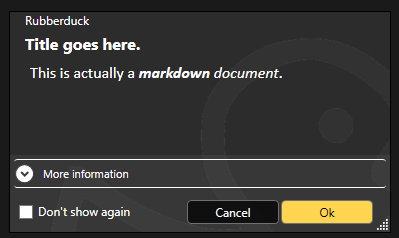
And this is great news, because then having the ability to render markdown in XAML means we get to format other things that used to be strictly plain text – like message boxes:

The language server can also supply such formatted content for tooltips and parameter info, so there’s a non-zero chance @description annotations in RD3 can even honor such formatting when present in docstrings.

The editor shell will support editing and rendering markdown documents, so your project can include a README.md file that you can edit and preview directly in the editor.

It also makes a nice document type to display a startup/”welcome” tab that describes the latest features after an update, again a bit like Visual Studio does.

VBA Code

Text files that the editor understands to be Classic-VB code files (this will have to be based on their respective file extensions) that contain the code for VBProject components that may or may not belong to the workspace of the project that’s in the VBE. Because we’re working off exported files and a .rdproj tells us what libraries are referenced and where to go find what modules for that project, we can now also edit “orphaned files”, as we are no longer constrained to editing code files that belong to the host project!


.rdproj, and consequences

Among the many challenges in RD2, was the fact that we wanted to avoid cluttering our users’ files with any kind of non-code metadata. For example at one point an idea was floated around for hijacking just one single module and having it contain nothing other than commented-out project metadata. Or perhaps carrying this metadata in a file alongside the host document. None of these approaches were going to be enjoyable to use, so instead RD2 dropped the idea of having any per-project configurations, because in RD2 the host document is the single source of truth.

That’s one of the many things changing with v3.0: because the truth has moved outside of the host document and into workspace folders, we now have a per-project physical location to put Rubberduck metadata in.

If we are to hope for feature parity with 2.x, the add-in needs to tell the language server about the project, including the location of referenced libraries. In RD2 we would simply acquire the project references and proceed to extract the types and members, but the language server in RD3 knows absolutely nothing about COM and does exactly zero interop with the VBIDE – so we needed a way to pass the information along without twisting the LSP in ways that would make it impossible for clients other than the Rubberduck Editor to use our language server. Not that it’s a requirement, but the idea is to do things right, not just to make it work for our purposes: if we strictly adhere to the language server protocol (LSP) specifications, then at least in theory it would be simple to write an addin client for any other LSP-capable editor, including VSCode. It’s not a target to write such a client, but having the possibility to do it is.

So rather than coming up with a way to serialize that information and pass it to the server through custom initialization parameters (the protocol defines an “additional data” dictionary that could theoretically be used for this), the addin will generate and maintain a .rdproj file whenever it exports source files to the workspace.

This “Rubberduck Project” file will contain basic information such as the Rubberduck version, a URI for the project root, and then a URI for each library reference (or perhaps just a ProgID string? Or a GUID representing its CLSID? All of the above? 🤔 TBD) and another URI for each module in the project. This isn’t completely final because it’s pretty much just about to be implemented, but the idea would be to end up serializing to a file that would look something like this:

{ 
"rubberduck" : "3.0.0",
"project" : {
"references" : [
"file://path/to/vba7.dll",
"file://path/to/host.tlb",
"file://path/to/library"
],
"modules" : [{
"name" : "ThisWorkbook",
"super" : "Workbook",
"uri" : "file://relative/path"
}, {
"name" : "Sheet1",
"super" : "Worksheet",
"uri" : "file://relative/path"
}, {
"name" : "Module1",
"uri" : "file://relative/path"
}]
}
}

Of particular note are the document module supertypes, which is information RD2 manages to collect from in-process ITypeInfo pointers that the language server in RD3 isn’t going to have access to, by virtue of running in an entirely separate process.

This means the RD3 addin has the following responsibilities:

  • Connect/Disconnect the VBIDE host;
  • Import/Export modules into the VBE and workspace folders;
  • All debugger functionalities;
  • Execute Rubberduck unit tests (VBA code);
  • Collect any ITypeLib/ITypeInfo metadata that can be collected for a VBProject.
  • Start/Shutdown the Rubberduck Editor;

That’s quite a lot already, and these bullet points already make it clear that the single responsibility of the Rubberduck.dll library must encompass every single interaction with the VBIDE, including the native Office CommandBar controls.

It’s a lot already, but that’s the complete extent of it – which means RD3 connects and loads as a VBIDE addin when the VBE starts up, …but then it doesn’t need to resolve the entirety of Rubberduck at startup, which means a splash screen isn’t even warranted here because we’re completely loaded and good to go in the blink of an eye, and it’s (mostly) not even because of dotnet 7! In other words, RD3 restores the Alt+F11 performance and sharpness you know and love.

The last bullet in the list is why: the VBE loads the RD3 VBIDE add-in, and uses JsonRPC messages to communicate with the Rubberduck Editor process. The editor in turn starts the language server, and each process runs in its own separate silo while running periodical “health checks” to ensure there’s still a client process on the other end – if a server loses its client, it shuts down; if a client loses its server, it can just start a new one and carry on without much disruption.

The addin becomes a lightweight launcher that extends the VBE by exposing menu commands that pop an “About” box, or start the Rubberduck Editor app. It wouldn’t be outside of its scope to also launch update and telemetry servers, and since the settings are shared between all processes, a command to bring up Rubberduck settings could be in-scope as well.


Next Steps

Work on the Rubberduck Editor is only getting started! Without thinking too far ahead, here’s what’s to come:

  • Window chrome controls and resize thumb
  • Put everything together to serialize .rdproj
  • “New Rubberduck Project” dialog UI
  • Import/export VBProject commands
  • Document tab host
  • Docking panels, side/tool panels
  • “Welcome” markdown document tab
  • Open/close text and other document types
  • Save, save as commands
  • Settings dialog UI
  • About dialog UI

And then that’s just what can move forward to completion in the Rubberduck Editor part without the server side – but we’ll cross that bridge when we get to the airport, as they say.

Both telemetry and update server applications have their skeletons done and can be started and debugged just like the language server.

Update Server

By running this server separately from the rest, we can get RD3 to update itself without needing to leave the VBE or close the host application and everything you’re working on: if the update server is so configured, it can tell the addin to shut down, which in turn shuts down the Rubberduck Editor, which shuts down the language server.

At that point none of the Rubberduck libraries are in use, and the update server can overwrite them with a newer version before instructing you to manually load the Rubberduck addin which again starts pretty much instantly.

This only requires that we package and ship the update server separately from the addin… kind of like how Visual Studio does.

Telemetry Server

One of the things we want RD3 to address, is just getting basic feature usage information so there’s data out there to help diagnose and prioritize any issues. Logging in RD2 is pretty extensive and verbose already, but it’s very organic and missing in some places; in RD3 logging is built into the base classes for every server-side handler, and with requests coming in asynchronously we need a better way to track what entries belong to which request, and this is exactly what telemetry logs do. The telemetry server will be fully configurable and will never transmit any PII information anywhere. As it handles telemetry events, this server serializes and enqueues telemetry payloads; the queue can then be reviewed, filtered, manually transmitted or cleared, or it can be configured to transmit periodically in batches – the receiving end will be hosted on api.rubberduckvba.com, and there’s a storage concern that may require severely limiting how much data we can keep around and aggregate (probably going to need to sample the data / reject most payloads!), but that’s a concern for another day.

Ultimately the goal is to surface the entire dataset through some explorable dashboards, charts, and tables on the website, so everyone can see what data is being collected: exactly none of it is going to be a secret.

The language server will be able to send language-level telemetry data, on top of everything else that’s useful for debugging. Aggregating this data would allow us to expose how our users are using VBA, from simple metrics like the number of modules in a project to interesting tidbits such as the average number of expressions in a conditional, or what kind of loop constructs people use the most (e.g. While…Wend vs Do…Loop), whether our users declare and fire custom events, implement interfaces, …anything we can think of, really. This obviously isn’t a priority, but it’s been on my mind ever since I heard the Microsoft Excel product team mention they haven’t got the slightest idea of what people do with VBA: seen by the right eyes this data could, ironically, eventually possibly contribute to achieving feature-parity in the VBA alternatives being developed by Microsoft… or rest the case that VBA cannot be taken away because what people do with it involves things that aren’t going to be supported in prospective so-called alternatives (looking at you, OfficeJS).


Development of Rubberduck 3.0 continues, stay tuned for updates, as I’ll be posting here all along the journey.

RD3 Update – October 2023

Things were moving pretty fast with the prototype, but moving on to the actual LSP-driven project hit a roadblock as far as actually achieving the cross-process JsonRPC communications. I put it aside for a while, hoping to get back to it later, and then summer arrived and real-life stuff kept me busy. Renovations in Rubberduck, renovations at home.

Wow time flies, pretty much six months have elapsed since the last status update, and now it’s Hacktoberfest again already! So what happened?

RPC Issues

For about five of those six months, not much moved forward, but ideas kept brewing all along, and the RPC issues have now been resolved.

So, where’s RD3 at?

Clean Start, Clean Exit

When the VBE loads RD3, the add-in starts a separate language server process and connects to it through the language server protocol (LSP), using the very same technology that Microsoft put in VSCode, via the OmniSharp libraries. When the add-in is unloaded from the VBE (whether manually or as the host application shuts down), the server receives both Shutdown and Exit notifications, and once they’re handled and the server actually shuts down we’ll be left with a clean exit every time.

Logging is implemented on both client and server sides, and while debugging the startup and initialization was a bit painful (can’t start the server from Visual Studio, and can’t hook up the debugger quickly enough to attach in time to see what’s going on), now that it’s done the server process can be attached after it starts, so we can hit breakpoints in the server code.

Net7

Perhaps the biggest achievement is that RD3 is now building with .net 7.0, save for a specific library that has to target Framework 4.8.1 because of its use of a number of COM-marshaling methods that don’t (yet?) exist in .net core: that’s the parts dealing with unmanaged memory and pointer magic, that allow RD2 to run unit tests, among other things.

Because everything else is under .net7, Rubberduck gets to leverage all the amazing enhancements that have been brought to the C# language and development platform in the past, uh, decade or so. RD3 will likely release under .net8, which has long-term support from Microsoft.

There’s a catch though: this means RD3 will not be able to run on old, officially unsupported versions of Windows – we’re forfeiting them, in favor of being able to leverage the many enhancements being made to the .net platform. At this stage it’s still unclear exactly what this means for VB6 support: for now the focus is integrating with the VBIDE in VBA, but nothing says VB6 support is being ditched – it was just simpler to exclude that one RD library from the solution for now.

Settings

One of the first pieces of Rubberduck written around this time back in 2014 – the settings I/O and modeling – has officially been axed at long last. Since forever, Rubberduck settings have been serialized to an XML configuration file. In RD3 that’s changing to JSON and much simplified abstractions. In RD2 the default settings live in an XML-encoded “Settings.settings” file that’s a pure nightmare to maintain; in RD3 defaults are moving back into the code itself (I know, it’s data, not code per se), with each serializable struct implementing a generic IDefaultSettingsProvider interface that mandates the presence of a “Default” member that returns a static instance of that settings struct (e.g. LanguageServerSettings.Default, returns a LanguageServerSettings instance with the hard-coded default values.

JSON settings is how pretty much everyone else does it, and there’s a reason for that: the format is much easier to read and manually edit. Plus we already have JSON involved with the RPC messages between client and server. XML was originally adopted because that was the format for Visual Studio’s own settings and configuration under .net Framework 4.x.. and today it’s JSON everywhere.

Rubberduck Editor

Last spring the prototype editor was being integrated into the VBE using essentially the same mechanics used in RD2 for the dockable toolwindows, just undocked and basically turned into just another VBIDE document window.

With the project now under .net7, it turns out we can now have actual WPF/XAML windows in Rubberduck, so there is no more need to implement the entire UI as user controls that are embedded inside a WinForms user control that gets injected into a native toolwindow.

The RD3 editor will let go of most of the native VBIDE integration, and live in a separate window – very much like the Power Query Editor in Excel. The only native UI components in RD3 are the Rubberduck menu items, which have been boiled down to just “Show Editor” and “About” commands, both of which will now bring up a fully WPF UI, rather than a WPF UI embedded in a WinForms dialog: the Rubberduck Editor will be its own application, and we’ll have full control over everything that happens inside that editor.

The downside (if it is one), is that we have to implement basic commands such as Copy and Paste, as well as toolwindows we take for granted, like Properties and Object Browser.

At this stage the editor shell is able to display tab documents bound to a ViewModel; tabs can be moved around, torn from the main window and dragged to another monitor, or docked inside the editor shell. I’m now working on figuring out how the toolwindows are going to work; I’d like something similar to Visual Studio, but the Dragablz library would need to be forked and updated with such capabilities… the “toolwindows” aren’t docking and don’t work in a way that would make sense in a code editor.

Workflow

This does impact the VBA dev workflow: in RD2 the single source of truth was the VBE. In RD3 that’s no longer the case, since the VBE isn’t going to contain the code that’s being edited. The single source of truth in RD3 is going to be moving to the Rubberduck Editor, and the editor will be working off code files exported to file system folders, dubbed “workspace folders”.

When the Debug/Run command is executed, the RDE will save all modified documents to the workspace, synchronize the host VBA project components to mirror it, and then the VBE takes over from that point on (RDE window will minimize itself) to compile and actually run/debug the project.

The host VBA project can also be synchronized any time you want, using the File/Synchronize command – and the editor will run a FileSystemWatcher on workspace folders, so it will detect any external changes/additions/deletions, and immediately notify the language server. If external changes are detected on a file that is opened in the editor, it will prompt to either reload the document, or keep the editor version if it has unsaved changes (thus discarding the external changes).

In RD2 you had to manually tell Rubberduck about changes occurring in the VBE, because automatically parsing on idle involved low-level keyboard hooks and since these hooks were already involved in auto completion and hotkeys, it was deemed too invasive, and ran against the basic premise of the parser, which is that we’re operating with legal, compilable code.

This all changes dramatically in RD3. Because the editor is fully managed, nothing happens in it without the language server receiving requests and notifications. Content changes synchronize in real-time, the editor receives responses with completion lists, syntax errors to highlight (squiggles!), or edits (e.g. auto-formatting etc.) made server-side that the editor immediately carries into the code pane as you type – exactly like how Visual Studio and VSCode and any other modern-day code editor that works with a language server.

The server works asynchronously and out of process, so long-running tasks can send progress notifications, and even partial responses – for example a completion list might only include names to render the list in the client, and the associated tooltips and commands might be sent a few milliseconds later.

Debugging

As was mentioned before, the one thing the RDE cannot do, is attach as a debugger to your running VBA code. When you debug, the RDE will minimize itself and leave the VBE in charge. Edit-and-continue poses a particular challenge: after a debug session, the RDE doesn’t know if anything was modified in the VBE, and its file system watchers cannot help because code doesn’t just magically export itself back to the workspace folders – so here’s what we’re looking at:

  • When a debug session is launched from the RDE, code gets synchronized into the VBE before it is compiled and executed;
  • If the RDE is re-focused and the VBE is back into edit mode (i.e. debug session has ended), the entire workspace gets refreshed with a new export from the VBE;
  • If the RDE is re-focused during a debug session, document tabs will be read-only and the status bar will indicate why;
  • If the host application crashes, or the debug session does not end with the RDE being brought back before the host application shuts down, then the single source of truth resides safely in the host document and the workspace will synchronize next time the RDE loads this project;
  • Any edits made to the exported workspace files during a debug session would be overwritten and lost when the session ends and the RDE is re-focused, unless source control is involved and the changes were committed – in which case the modifications can then be recovered from source control.

Breakpoints cannot be set programmatically either, so the RDE will likely not support them. Bookmarks have a similar problem, in that the VBIDE API doesn’t really let us manipulate them, however the RDE can very well have its own bookmarks system. Debugger toolwindows (immediate, locals, call stack, etc.) are also not going to be present in the Rubberduck Editor, since they’d all be useless without a debugger attached.

User Interface

Some parts of RD2 XAML markup may survive, but really the intent is to make the RDE have a consistent, pleasing, modern, intuitive, and functional user interface for all of its functionalities. Because we’re no longer confined to a WinForms/native host, key/command bindings (hotkeys) will no longer require any kind of bug-prone hooking; focus should behave much more naturally as well, and drag-and-drop is going to be a breeze with the Dragablz library. RD3 basically entails crafting an entire IDE UI from scratch, starting with the editor shell.

The RDE window features a complete menu bar (largely inspired from Visual Studio’s), an actual status bar, and the client area consists of a Dockablz layout panel hosting a Dragablz document tab container.

Some more tinkering is still needed around toolwindows, because what we get out of the box with Dragablz is not going to work for our purposes. Perhaps there’s a way to split the left and right docking areas in two so there’s a distinct drop location for toolwindows that displays them with the tabs at the bottom, but for now there’s no such thing and toolwindows are essentially just another type of document tab.

Another thing that will need attention ideally before the entire UI is done, is theming: indeed it would be sad to make our own editor from scratch without supporting light, dark, and custom themes and syntax highlighting!

Server Side

The LSP server is in place, handling server lifecycle requests and notifications. The next step is to beef up the initialization to send the server information about the project(s) loaded in the VBE, including whether it’s an unsaved new blank project or an existing one hosted in a saved document, and a URI for each library reference so the server can load them and extract all the types and their respective members.

Then we’ll need to setup the actual workspace folders and parse any code files in them – and when we’re done doing that we can send the semantic tokens to the editor to perform syntax highlighting and folding ranges, all while the server starts running diagnostics/inspections, prioritizing the documents that are opened in the editor. The client-side code for this was written in the prototyping stage, so it’s not complete but exactly how that’s going to work is already all figured out.


2023.Q4

The last quarter of 2023 is likely to see lots of progress on all fronts: with LSP in place and a working but bare-bones editor, I can see myself focusing on UI work mostly, while other contributors hop on and work on server-side processing – much of which will have to be ported from the RD2 code base and reworked to fit the new paradigms.

There is a lot of work ahead, but with the client/server communications happening, things that have been on our minds for years, are about to get very real.

The ball is rolling, and nothing will stop it.

Rubberduck 3.0: January Update

I intended to write about Rubberduck 3.0 progress last December, but things snowballed during the Holidays and here we are two-three weeks later and wow, time flies! Happy New Year dear readers (belatedly, I guess), 2023 is full of promises, and there are very nice things going on that I need to take a moment and share here.

Without any further ado, let’s clear the big news.

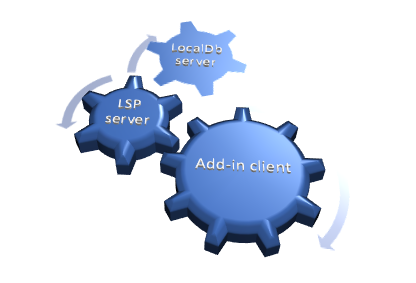
3 interlocked gears. Gear 1 is the largest, is labelled "add-in client", and drives gear 2 which is smaller and labelled "LSP server". Gear 2 drives gear 3, another smaller gear labelled "LocalDb server".

The main issues with Rubberduck have always been:

  • Memory consumption: Rubberduck consumes a lot of memory in the host process.
  • Instabilities related to COM interop: various tear-down issues with Office CommandBar and dockable toolwindows.
  • Poor VBIDE extensibility tooling and editor interactions.
  • Logs are difficult to use, it’s not clear what is happening in response to what – even when there’s only a single instance writing to the logs. Adding more logging means making things worse.

With v3 we’re addressing these long-standing issues by taking a number of design decisions early in the development process. These decisions were weighted against their downsides and alternatives, and probably make Rubberduck the first VBIDE add-in to implement a LSP Server for its purposes.

Language Server Protocol

For a while there have been discussions among Rubberduck devs about whether implementing LSP would be a feasible thing to do. It’s a protocol that formalizes all communications between a client (an IDE) and a language server that is used in modern IDEs such as Visual Studio and VSCode; twinBASIC implements it, and Rubberduck 3.0 will implement it too.

By moving all of the language-processing aspects out-of-process into a language server, we immediately tackle memory consumption issues: most of the CPU and memory resources Rubberduck 3.0 will use, are going to be outside of the add-in/host process.

With LSP in place, Rubberduck’s objective to bring editing VBA code in the Visual Basic Editor into the 21st century feels closer than ever.

SQLite

Rubberduck’s LSP implementation will be split in two processes, as the LSP server process will be a client for another server process that will host a SQLite database. SQLite is a lightweight library many applications on many platforms (including mobile!) use to persist data between sessions. The database is a local .db file, and the database engine runs in-process. Rubberduck 3.0 will host a SQLite instance in its own server process, and the LSP server process will communicate with it through JSON-RPC, the same way the add-in communicates with the LSP server.

Instead of keeping hundreds of thousands of objects in memory for quick lookups, Rubberduck will write these objects to the database, and only fetch what it needs to work, which should tremendously help reduce the memory and processing footprint of the add-in host process. Using it as a log target (instead of text files) could reduce in-process disk I/O… and replace it with socket I/O and work happening out-of-process.


Cross-Process Communication

The add-in project has no reference to the server project in the Rubberduck solution, and the calls aren’t late-bound either. What’s happening here is different, and there are implications: Remote Procedure Call (RPC) communications occur through web sockets (WS), using a port between 1024 and 5000. As a result, we need to have Windows Defender Firewall open that port for us:

A screenshot of the moment I knew the socket server worked.

Since everything is local, the port only needs private networks permission to operate. We use JsonRPC to send data through that port, so we’re streaming the bytes of human-readable, plain text JSON.

This new client/server architecture enforces a much more decoupled and robust solution.


Telemetry

Telemetry is considered a potentially controversial feature: it will be completely disabled by default and will have to be selectively opted-in explicitly, but with everything becoming asynchronous, trace logging alone often does not suffice for troubleshooting. By implementing a proper telemetry model, we’re giving ourselves the tools to track a request and all actions that stem from it, across the multiple processes.

Since the project started, the only usage data we ever had was our own biased anecdotal usage: we haven’t the slightest idea of what features are under-used, what features are clearly everyone’s favorites, what inspections are most commonly fired, what inspections are disabled, whether inspections we release disabled by default are ever enabled, etc.

Whether enabled or not, Rubberduck 3.0 will collect detailed telemetry data, and store it locally in the SQLite database, by default clearing any existing data on startup: vital debugging information is present if it’s needed.

Ok I’m opting-in, what gives?

Opting into telemetry will allow a Rubberduck client to automatically upload the telemetry data to a future endpoint on api.rubberduckvba.com (via https), where it will be persisted to a SQL Server database schema. Since there is no need for us to track any users, while still potentially extremely detailed, all telemetry data will be anonymous and impossible to track back to any particular user, computer, organization, or country. The transmitted telemetry data will only ever contain information that was explicitly allowed to be transmitted.

Time will tell how aggregated telemetry data can be used, but with enough data we (that includes you) could gain valuable insights on various points of interest:

  • Rubberduck feature usage statistics
  • LSP performance monitoring and troubleshooting
  • VBA language usage statistics, common issues

By transmitting some or all of your telemetry data, you’ll be helping make Rubberduck better for everyone, just by using it. However should you decide to not opt into it, we understand and respect your decision. Note that TraceTelemetry items are the trace logs, so transmitting them is exactly like sending us your log file for troubleshooting. I’ll make a separate post with all the details around pre-release time, and these features will be exhaustively documented on the website.


Progress?

Having the LSP and Telemetry models is one thing, actually implementing them is another. Last time I said I was going to be focusing primarily on the Rubberduck Editor UI, and I did for a while: the editor was progressing very well and I was making very conclusive tests with an in-process parser when I took the decision to move the parser out-of-process.

I proceeded to read the entire LSP specification and implemented a model for it. Shortly after, I realized that we were potentially going to be running multiple instances of a LSP server at once, and it dawned on me that having as many instances of the SQLite database loaded in memory was not going to be globally efficient… so I decided to pull the SQLite database into its own dedicated server process.

The whole exercise demanded a lot of movement in solution projects and namespaces, but I’m very happy with the results: everything is in its place, and the actual add-in project is pretty much empty!

I started with the server implementation that’s the furthest from the add-in: the SQLite database server. This server speaks to LSP through JSON-RPC, but while Language Server Protocol formalizes how the add-in and the LSP talk to each other, I don’t have such a formal protocol for communications between the LSP and the database… so I’m basing most of it on what I learned with LSP.

How it’s going to work: you start Excel and hit Alt+F11 to bring up the VBE. The Rubberduck add-in gets loaded and starts up, then starts a LSP server process and initializes it. In turn the LSP server starts, and attempts to locate the database server. If the database process isn’t found, the LSP server starts one. The Excel/VBE/Rubberduck client process owns the LSP server process, but nobody owns the database server: when the database has disconnected its last client, it automatically shuts down.

The servers (both database and LSP) are console applications that run silently as background processes. In order to facilitate configuring them, and viewing/reviewing their respective inputs and outputs, I’ve written a small client console application that shows the server console content, lets you easily export it to text files or copy it to the clipboard, etc.

a screenshot showing the Rubberduck.DataServer client console application in the middle of exporting a log output to a .log text file.
Screenshot from before the DataServer UI was moved into its own LocalDbClient project.

The LSP client console application will have an additional Telemetry tab to review, delete, and manually submit telemetry data. Server log trace can be set to verbose or turned off, and the server itself can be instructed to shut down, directly from this application.

When RD3 releases, these client console applications will probably be accessible from an add-in menu, or perhaps they’ll be started together with the add-in and minimized to the system tray… we’ll cross that bridge when we get to the river.

Meanwhile work on the editor itself has taken a backseat, since it wasn’t useful to work on parameter info tooltips and wire up add-in functionality that would have to be later undone to work through the LSP server. All of the proof-of-concept stuff that worked, is still working. It just needs to be wired up to work with LSP requests and notifications, so focus has now shifted to the language server and its database backend.

The next few weeks/months are going to be all about implementing the LSP server, most likely.