The RDCore language platform is taking shape and is about to get very serious about its ambitions: take MS-VBAL and implement it from the ground up into the LSP platform Rubberduck would have been if it became VBA.
I remember telling a friend last spring about my plans; “ok but what about the debugger?” they asked – I said where we’re going we don’t need a debugger, we are the debugger. Last week, we arrived.
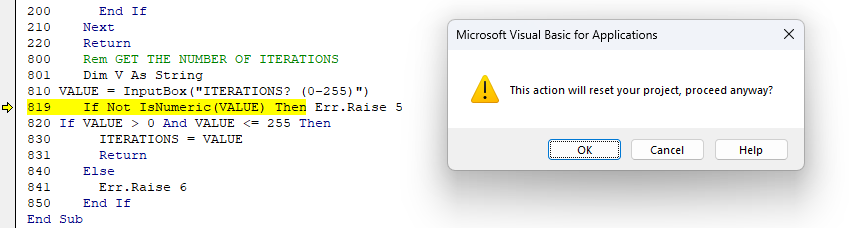
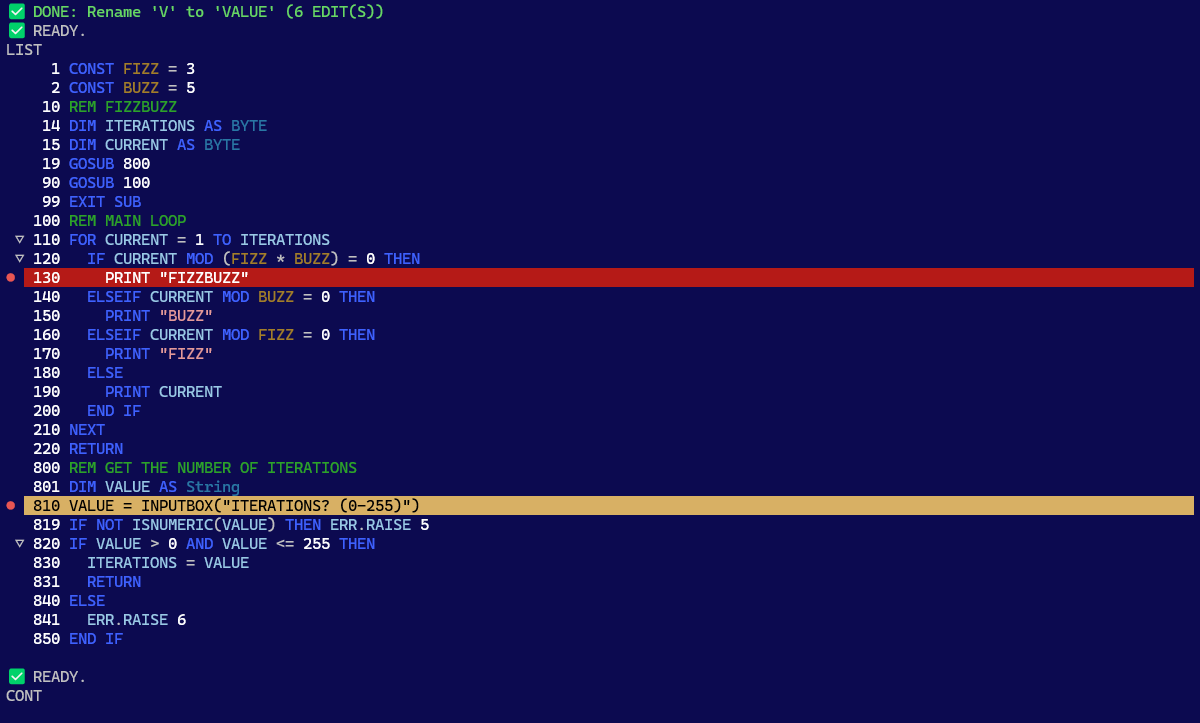
MS-VBA halts your debugging session when you rename a symbol in the current instruction, presumably because the edit cannot be made in all places at once, leaving the program invalid in the interim steps.RD-VBA merrily lets you resume after doing exactly the same, because renaming a symbol is an atomic operation that can perform multiple edits at once.
Edit and continue
Perhaps the single most defining feature of Classic Visual Basic, has arrived in RDCore: the ability to reshape the compiled program, observe and manipulate its symbols and values as it runs in a debugger.
E&C is a rather complex matter, and MS-VBA halts execution in quite several situations, for very valid reasons. The fact that RDCore allows resuming execution in places where MS-VBA would not, doesn’t take anything away from the historical feature: RDC’s internals are modeled in such a way that makes these limitations a bit easier to overcome, I suppose.
Edit and apply later
When RDCore cannot apply an edit, it often can (and does) hold on to the compiled version and issues a RDC20001 diagnostic that says the edit will be applied after the program restarts – rather than stopping the debug session right there and then.
Edit and take it back
If RDCore cannot apply an edit, and cannot hold on to the compiled version while keeping its state coherent, you can simply undo it, and then resume execution as if nothing happened.
See the documentation for a complete breakdown of the specific cases and the differences between RDCore and MS-VBA.
All debugger features are provided through standard DAP endpoints over stdio.
Code formatting
LSP defines endpoints for code formatting and format-as-you-type, but doesn’t specify what it specifically entails, leaving a language server free to do whatever it deems necessary to fulfill the request.
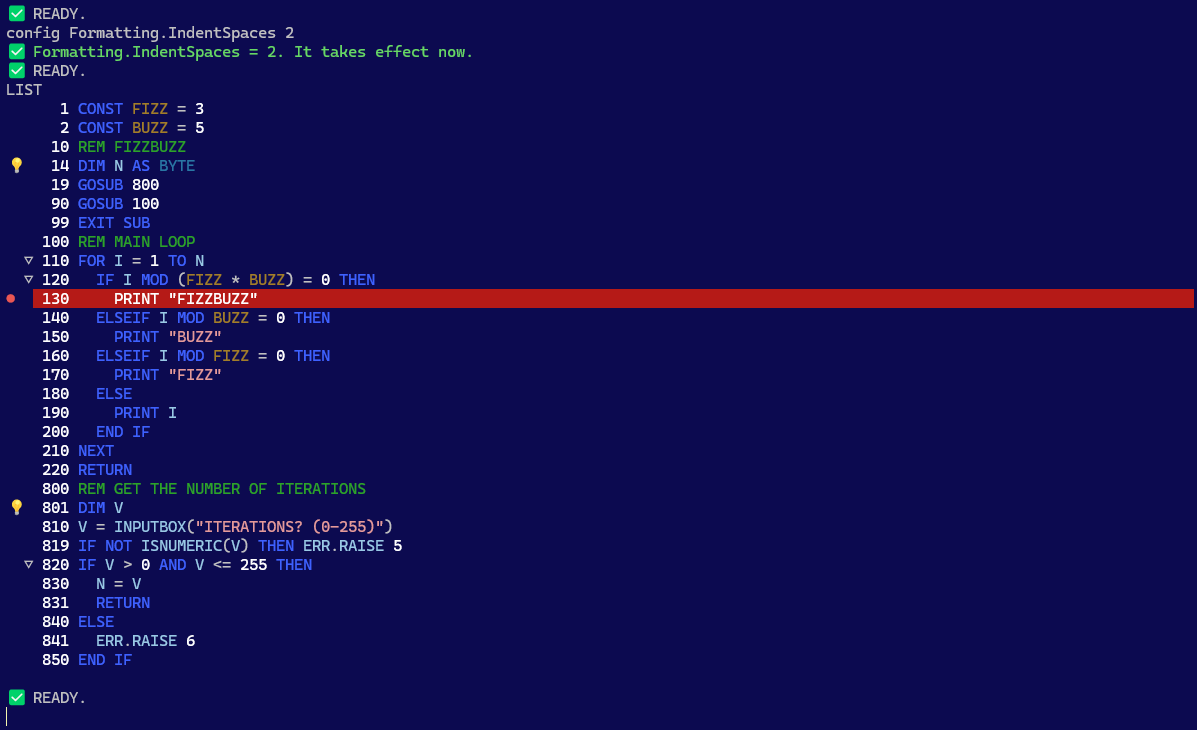
In RDCore, that means indenting the module of course – with legacy Rubberduck’s indenter settings imported from your Rubberduck configuration… a bit like how Rubberduck imported your legacy Smart Indenter settings on the first load.
In the REPL client (rdc.exe running standalone), formatting is applied whenever the program source code is read – so when you LIST or SAVE a .rdc program file.
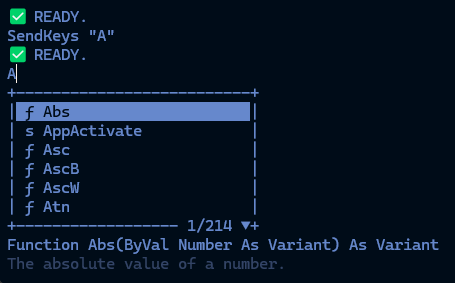
Code formatting settings are editable (with completion lists!) from the interface with the CONFIG command, and take effect immediately.
Block foldings
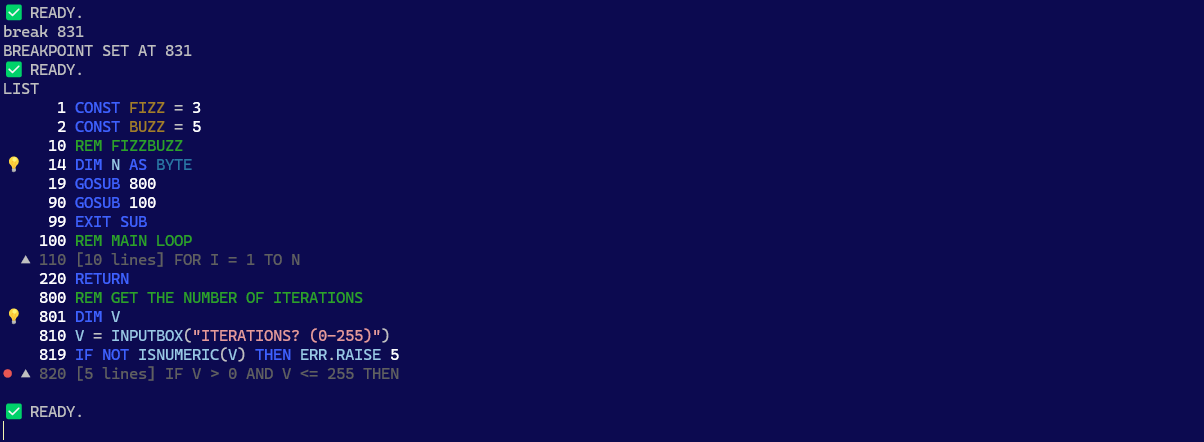
At the start of any block, the LIST output will show ▽▲ glyphs in the margin, indicating the start of foldable and folded code blocks, respectively.
Use the FOLD command to toggle them; completion list offers the valid line numbers.
If a folded block hides a breakpoint, it is displayed in the margin on the folded line, even if that line doesn’t have a breakpoint.
Completion lists
Completion lists show available commands, keywords, standard library modules, functions, and procedures; enum arguments, object members. All with the signature and docstring underneath.
The one single thing that makes the biggest difference in how hard or easy it is to learn a programming language, is its completion lists: without it, everything feels like a magic incantation that you must know in order to make anything work at all.
With it, it’s like the standard library is telling you how to use it, and you can explore all the types and members and discover things, all without leaving your editor.
RD-VBA completion is snappy and relevant, and signature help provides the docstrings as you type – in the language configuration of your session for the standard library (although currently only available in French and English).
MSForms hosting
The RD-VBA runtime is now capable of hosting MSForms. It does not, at this stage, host its own “RDForms” cross-platform GUI components, so trying to run a user form in Linux or on a machine without the non-distributable MSForms 2.0 DLL will raise a runtime error instead of showing a UI.
At design/compile time though, all the symbols remain available, so you get completion lists and signature help regardless, and the code compiles.
We could describe it as RD-VBA replacing MS-VBA as the MSForms designer and runtime host here, taking the legacy Microsoft UI framework made for Office automation out of its box and into standalone RD-VBA applications.
This is ultimately just the fallback solution, a shortcut to get something out the door faster: the goal is for the beta stage to host its own implementation of a GUI framework that can run and render anywhere: the one HexIDE built to do the same for VB6 forms and controls.
Remember MVVM in VBA? The example form’s content is dynamically generated at run-time, and RDCore runs it and its events; it works!
Alpha release?
As of this writing, RDCore is still unreleased pre-alpha. To try it today, you must clone the repository on GitHub and build and deploy the platform yourself, and then it’ll deploy an unoptimized debug build that’s intended for local development and debugging.
The roadmap is quickly becoming a long green list of checked boxes, there are now over 13k unit tests and 80% coverage, so an alpha release can’t be too far down the line. What’s holding it up?
HexIDE integration
Releasing RDCore without a LSP client integration beyond its own REPL/CLI toy application wouldn’t do it justice: there are so many things RDCore can do as a platform, that the REPL client simply cannot express, the first of which is handling a project with anything more than a single procedure scope with BASIC-style line numbers. The REPL client is a LSP demo and platform integration testing tool; it isn’t “the product”, even if, without an IDE, it’s what gives you a small glimpse of what the platform and language server can do.
There could be a small VSCode extension that implements the SDK’s RDCoreClientApp and integrates the LSP server into VSCode… but VSC is a general-purpose jack of all trades, master of none editor that makes the experience awkward when you just want your good old VBIDE with the modern-day perks.
This is where HexIDE wins: like VSCode it has its language features provided by LSP server extensions. But the Hex is for 6, as in VB6 – it is an independent project under MIT licensing, which gives a fork more rights than what we intend to leverage to ultimately make it the RDCore platform’s official IDE.
By 2027, it will be possible to import a VBA project or open a .vbp in HexIDE; analyze, test, and build it (.net exe/dll) in both CI/CD pipelines and the editor with RDCore, and compile it to native x86/x64 and extend the language beyond VBA with twinBASIC – all without leaving your IDE, and none of it requiring you to be on a Windows desktop with Office installed.
RDCore.SDK
The MIT-licensed RDCore.SDK project at the center of the platform is being extracted into its own separate repository, and will be publishing a NuGet package that RDCore platform components and extensions (including the HexIDE extension) will be referencing like any other package. The idea is to make it as easy as possible to write RDCore platform extensions.
Because the language core and runtime and platform SDK is only the beginning for the RDCore platform: unit testing will soon build on top of it, for example – but the alpha release will not wait for the platform extensions.
Un jalon majeur a été franchi la semaine dernière : la plateforme RDCore dispose désormais d’un interpréteur qui assemble toutes les pièces du puzzle en quelque chose de traçable, configurable et extensible, qui ressemble aux débuts d’un runtime.
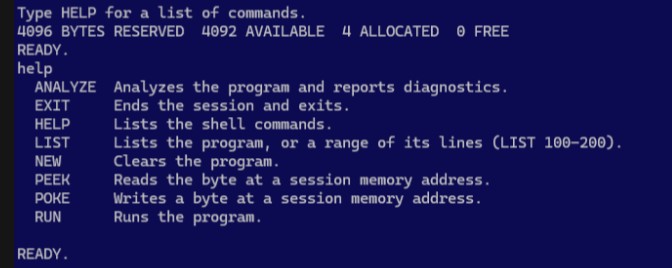
Là où tout ceci devient très concret : l’application console exécute maintenant une boucle REPL interactive où vous exécutez une session runtime en mode immédiat :
Ne vous laissez pas avoir par le look C64-BASIC : il s’agit d’un client LSP avec une session RD-VBA.
Les 4 octets alloués sont pris par le module et la procédure synthétique où vit le code source de votre programme. Tapez une instruction VBA, elle s’évalue et affiche son résultat; précédez-la d’un numéro de ligne, et vous venez d’inscrire cette instruction à cette ligne dans votre programme RD-VBA. Le nom de ce module synthétique est Program, et le nom de la procédure est Main. Vous verrez régulièrement ces identifiants dans les traces de la pile d’exécution (stack trace) des erreurs rencontrées – qui seront ici toujours sous Main, mais vous comprendrez que ce même mécanisme fonctionnera peu importe la profondeur de la pile dans un véritable client (IDE), avec un vrai projet et plusieurs modules et procédures.
L’idée ici n’est pas de faire évoluer cette application en un IDE non plus – mais ça fait une façon très divertissante de tester la plateforme, le cœur de langage et ses sémantiques. Le rôle de cette application est de simplement permettre de tester la plateforme de bout en bout. Étant un client LSP, nous verrons fort probablement apparaître un surlignage sémantique de la syntaxe au niveau de la sortie de LIST par exemple, ou alors des listes de complétion interactives; les diagnostics sont déjà branchés et ANALYZE en affichera les détails dès que ceux-ci deviendront disponibles. PEEK/POKE ne sont que pure lecture/écriture directe en mémoire à la Commodore64.
RUN exécute le programme de haut en bas, à moins que vous lui construisiez un parcours avec GoTo et GoSub/Return, auquel cas vous savez probablement ce que vous faites… sinon les diagnostics seront bientôt là pour vous guider.
Sémantiques
Toute la plomberie est en place; ce qu’il reste, c’est l’implémentation : les instructions I/O comme Open, Close, Print#, Write#, Put#, Get# sont implémentées; les déclarations, boucles, conditions, sauts et gestion d’erreurs sont fonctionnels. Beaucoup reste à faire: chacune des instructions doit avoir une implémentation, sans quoi les exécuter sera toujours en erreur.
L’implémentation de la librairie standard a débuté : Len et LenB sont les premiers consommateurs des données de stockage des UDT, et bien que LSet fonctionne tel que spécifié sur une String ou un UDT, la très vaste majorité de la librairie demeure à implémenter. Il s’agit de travail relativement simple qui n’a pas à traverser plusieurs couches d’abstraction et peuvent être des gains rapides; c’est pourquoi j’ai préféré donner les plus gros morceaux à Claude, les fonctions pures de la librairie peuvent être implémentées plus tard.
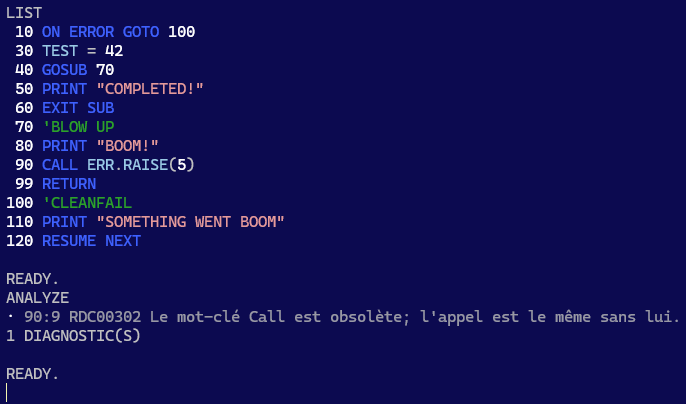
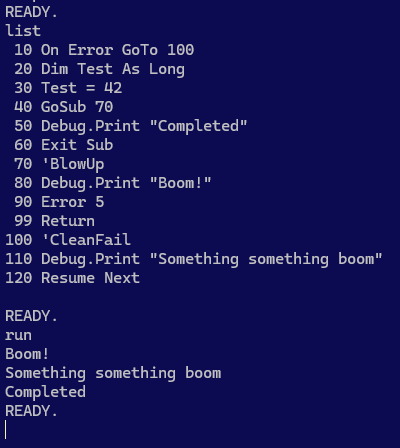
Ceci dit l’exécution et la gestion d’erreurs en place donnent déjà un bon aperçu :
Un programme RD-VBA qui ne contient pas d’instructions non-implémentées se complète.
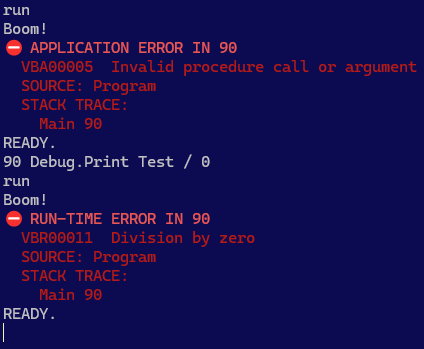
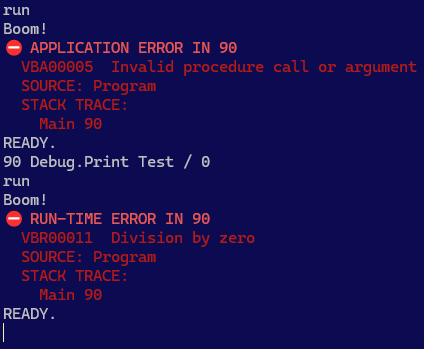
Le retrait de l’instruction On Error GoTo révèle quelques faits intéressants :
D’abord, il y a une différence entre une erreur lancée explicitement par l’application, et une erreur d’exécution. Ensuite on remarque le numéro de ligne, puis la stack trace.
Ce que ces images ne montrent pas, c’est que le numéro de ligne est un symbole ici, seulement parce qu’il s’agit du mode programme – mais dans un document, la configuration par défaut fait de ce numéro l’emplacement L1C1 exact de l’erreur dans le document.
Une erreur d’application (VBA00000) est une erreur lancée par le code source (via Error, ou Err.Raise); une erreur d’exécution (VBR00000) est une erreur lancée par l’interpréteur. MS-VBA ne différencie pas réellement ces deux types d’erreurs – il y a donc désormais une distinction claire entre les deux, et ça ne brise rien du tout!
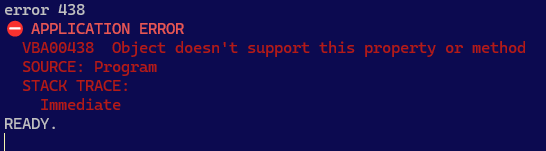
Aucune erreur d’application ne peut être confondue avec une erreur d’exécution, et il y aura toujours une trace de la pile d’exécution, même en mode immédiat!
Limitations
Certaines limitations sont inhérentes au fait qu’il s’agisse d’une application console: en effet il serait surprenant d’y voir une fonctionnalité affichant des info-bulles au survol d’un symbole.
D’autres limitations sont plutôt liées au design:
Le module Program et la procédure Main sont intrinsèques et ne peuvent pas être renommés.
Une commande sans numéro de ligne s’exécute immédiatement; les numéros de ligne sont donc obligatoires pour tout programme dans ce client.
Les numéros de lignes ne devraient pas empêcher l’utilisation de libellés, mais ceux-ci ne fonctionnent pas actuellement avec un numéro de ligne; GoTo/GoSub doivent donc référer à un numéro de ligne.
Les continuations sont invalides: un numéro de ligne ne peut pas être situé en plein milieu d’une instruction.
Limitation éventuelle du jeu de syntaxe valide en mode BASIC (configurable).
Limitation éventuelle à 10,000 lignes de la longueur permise d’une procédure; l’erreur procedure too long devrait alors être lancée à la compilation, mais possible que le mode BASIC fonctionne différemment.
Exit Sub termine le programme; Exit Function et Exit Property sont statiquement invalides.
Sub Main() et End Sub sont implicites: le corps du programme constitue le corps de cette procédure.
L’ajout de procédures additionnelles n’est pas supporté (les numéros de ligne étant invalides au niveau des déclarations d’un module); utilisez plutôt GoSub/Return avec de larges sauts de numérotation pour coder des sous-routines.
D’autres limitations sont ponctuelles et seront résolues avant le lancement de la v1 :
L’instruction REM qui explose à l’exécution est objectivement comique, mais ne restera vraisemblablement pas brisée longtemps.
L’invocation de membres de la librairie standard qui ne sont pas encore implémentés sera également en erreur.
Manipulation de Mémoire
Les commandes PEEK et POKE ne sont pas (encore?) implémentées en tant que mots-clés et donc pas utilisables dans du code source RD-VBA, mais les commandes fonctionnent et permettent donc une lecture/écriture directe d’octets en mémoire applicative – opération évidemment très risquée, mais la nostalgie l’a emportée.
Ceci dit les opérations LSet fonctionnent dans le code source sur des String et UDT.
Jalons
L’évolution du cœur de langage est complètement découplée de celle de l’application CLI, donc celle-ci fonctionnera de mieux en mieux et de façon de plus en plus complète à mesure que s’ajouteront les sémantiques du cœur de langage, et ce sans rien devoir corriger ou modifier dans l’application même.
Cela ne signifie pas pour autant que le travail est terminé!
L’application supporte notamment des thèmes, donc si le bleu C64-BASIC ne vous plaît pas, vous pouvez toujours passer à un thème foncé moderne. Ce n’est donc qu’une question de temps avant que la sortie de LIST affiche un surlignage sémantique issu du serveur de langage!
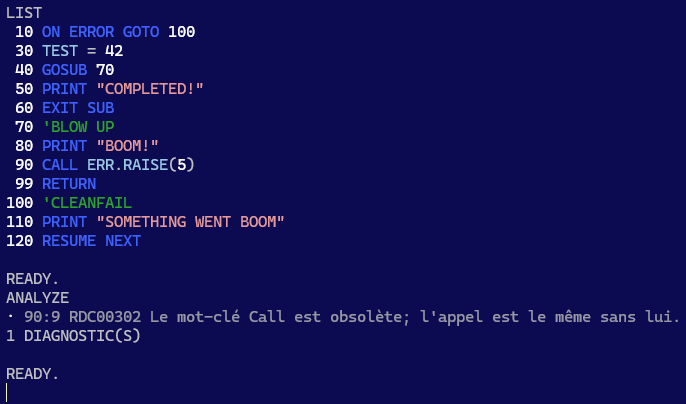
Exploiter cette connexion LSP constitue la façon dont cette application deviendra ultimement beaucoup plus qu’un éditeur BASIC. ANALYZE est déjà prêt à afficher les diagnostics, dès qu’ils commenceront à apparaître dans la plateforme.
Le mode REPL est bien pour une démo, mais le véritable outil est le mode CLI non interactif.
Les outils modernes s’exécutent dans des pipelines CI/CD (intégration et livraison continues) dans le cloud. rdc.exe sera à terme en mesure de compiler un projet, d’en exécuter les tests, et de bloquer une livraison qui dévie des conventions établies, le tout complètement en-dehors de l’écosystème MS-VBA.
Si seulement 1986 avait eu LSP… If only 1986 had LSP…
A major milestone was knocked down in the last week: the RDCore platform now has an interpreter that puts all the previous pieces together into a traceable, configurable, and extensible beginning of a runtime.
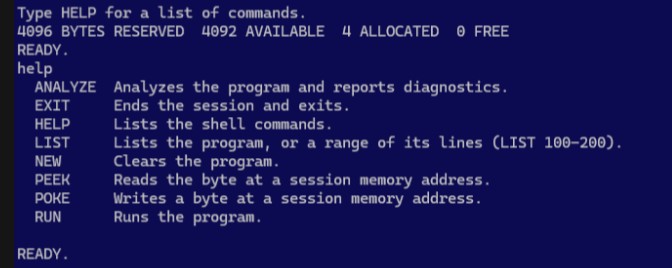
Where this gets very real, is with the CLI app now running an interactive REPL program mode where you’re basically running a runtime session in immediate mode:
Don’t be fooled by the C64-BASIC look; this CLI app is a full-fledged LSP client with an active RD-VBA runtime session.
The 4 bytes taken are allocated for the synthesized module and procedure scope your program space lives in. Type a VBA expression, and you get its result; precede it with a line number, and now you’ve written that instruction at that specified line number in your program. The name of this synthesized module is Program, and the name of the enclosing procedure is Main. This matters, because you’ll see these identifiers in error stack traces – here only ever inside Main, but you can see what this means for error handling with an actual IDE client, and a project with real procedure scopes.
The idea is not to evolve this app into one, either; it’s just to make a fun way to test the language core and semantics… and diagnostics – the platform, basically. The role of RD-VBA CLI mode is to test the platform end-to-end, hands-on – and being a LSP client means we’ll probably get to write old-school BASIC programs with semanticsyntax highlighting in LIST outputs, completion lists for the REPL inputs. Diagnostics are already wired, ANALYZE will start showing meaningful output when providers/extensions issue diagnostics. PEEK/POKE is just C64-like pure unsafe program memory read/write.
RUN runs the program top to bottom, unless you make it do funny things like GoSub, in which case you probably know what you’re doing. If you don’t, …RDCore diagnostics will eventually have your back covered.
Semantics
So the plumbing is in place; what remains is semantics: file I/O statements like Open, Write, Print#, are implemented at the language core layer. Declarations, control flow, error handling as well. Still a lot remains TODO – every single statement keyword must have its semantics implemented, otherwise running them gets you an internal error.
Standard library implementation has begun as well; Len and LenB are the first consumers of the UDT member storage data, and while all the symbols are defined and LSet works as specified on UDT and strings, the vast majority of the standard library remains to be implemented; this is mechanical work that doesn’t need to reach across multiple layers to be a quick gain – so I let Claude/Opus focus on the more meaty parts that do cross into the runtime and memory layout, leaving the simpler, pure functions for later.
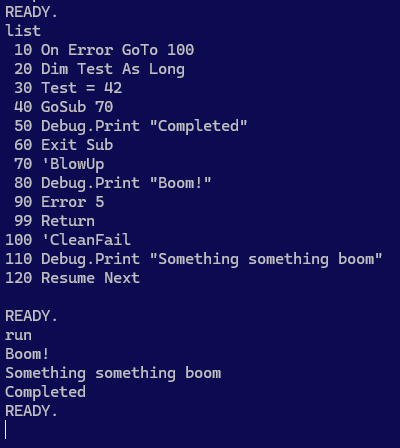
Control flow and error handling is fully functional:
BASIC-like RD-VBA code runs end-to-end in the app, …as long as the program doesn’t involve unimplemented semantics.
Removing the On Error GoTo instruction reveals a number of interesting facts about RD-VBA:
First, there’s a difference between an error you raise and an error the runtime raises. Second, errors have a source location pointing to the line number of the faulting instruction, and then there’s a stack trace.
What this doesn’t tell you, is that the platform is showing symbolic line numbers here only because it has no workspace document proper (the internal buffer just simulates one), but in an IDE client the default configuration would be reporting the actual L1C1 document location.
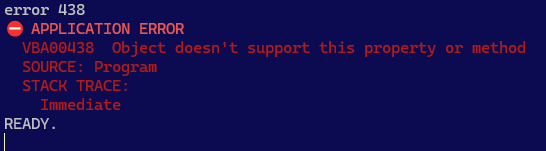
An application error (“VBA00000”) is a run-time error that is raised by the workspace code; a runtime error (“VBR00000”) is a run-time error that is raised in the language core runtime semantics. MS-VBA historically did not really differentiate between these errors; now there’s a structural distinction between them, and it doesn’t break anything!
No Error or Err.Raise statement can ever be mistaken for a runtime error, and we always get a stack trace, even in immediate command mode.
Limitations
Some limitations are inherent to the CLI app being a CLI app: hover tooltips aren’t going to be available, and that’s a given.
Others are design decisions. These include:
Program.Main project and procedure scope; intrinsic, cannot be renamed.
C64-style program interface, using line numbers as markers for instructions that are stored in the source buffer rather than immediately piped to the interpreter; this makes line numbers inherently mandatory in this client.
Line numbers should not prevent the use of line labels, however labels do not currently parse with line numbers. GoTo must therefore refer to line numbers.
Line continuations cannot be used; a line number isn’t a valid statement to continue into.
Eventually artificially limiting the valid RD-VBA syntax (including comments) in CLI program mode to the BASIC subset of VB, via appsettings.json platform configuration.
Eventually limiting the number of logical lines to 10,000; procedure too long compile-time error ought to be raised then, but BASIC mode will probably end up working differently.
Exit Sub terminates the program; Exit Function and Exit Property are statically illegal.
Sub Main() and End Sub are implicit; the program body is that procedure’s body.
Additional Sub procedures cannot be defined (line numbers are illegal on declaration members); use GoSub/Return with wide line numbering gaps to denote subroutines instead.
Other limitations are temporary pre-alpha missing implementations that will definitely be implemented before a v1.0 can ship:
REM statements (BASIC-style comments) throwing statement not implemented is objectively funny, but will probably not take too long to get working as the no-op instruction it is.
Standard library implementation being incomplete, any function call that refers to a symbol defined there throws not implemented as well.
Unsafe Program Memory Ops
Not (yet?) implemented as keywords, the PEEK and POKE immediate commands allow byte-level unsafe reads and writes (!) from/to a specified address in program memory space. This is obviously dangerous and may lead to crashes, but nostalgia won.
That said LSet and RSet semantics are both implemented, including against UDT values.
🎯 Milestones
The evolution of the RD-VBA language core and runtime implementation is architecturally decoupled from the CLI application, so it’ll automatically throw fewer errors as the language core progresses, without fixing or changing anything anywhere in the CLI app.
That doesn’t mean the work is done, however.
The app supports themes, so if you don’t like C64-style BASIC blue, you might like a modern dark theme instead. It’s only a matter of time before LIST output gets semantic syntax highlighting from the language server!
Leveraging this LSP connection is how the app will turn into something more than a BASIC console. ANALYZE is already wired up to report diagnostics as soon as they start coming.
A BASIC immediate/command/program mode is nice for a platform demo, but the real tool is the non-interactive CLI mode.
Modern tools run in the cloud, from CI/CD scripts that build a project, run its tests, inspect its vulnerabilities and deviations from established coding practices; rdc.exe supports an extensible set of command-line tools exactly for this. Extensions can supply a provider for various commands such as test or analyze, and a CI/CD script could be configured to gate a build on tests passing and diagnostics showing no warnings or errors.