RD-VBA CLI

(English below)

Un jalon majeur a été franchi la semaine dernière : la plateforme RDCore dispose désormais d’un interpréteur qui assemble toutes les pièces du puzzle en quelque chose de traçable, configurable et extensible, qui ressemble aux débuts d’un runtime.

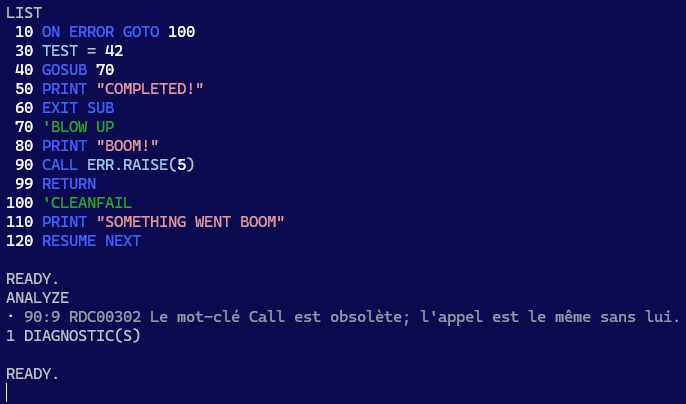
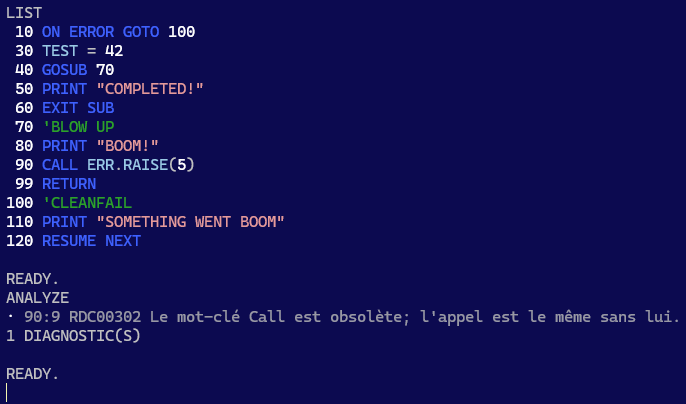
Là où tout ceci devient très concret : l’application console exécute maintenant une boucle REPL interactive où vous exécutez une session runtime en mode immédiat :
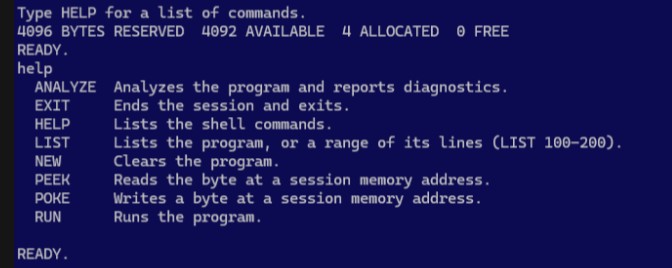
Ne vous laissez pas avoir par le look C64-BASIC : il s’agit d’un client LSP avec une session RD-VBA.

Les 4 octets alloués sont pris par le module et la procédure synthétique où vit le code source de votre programme. Tapez une instruction VBA, elle s’évalue et affiche son résultat; précédez-la d’un numéro de ligne, et vous venez d’inscrire cette instruction à cette ligne dans votre programme RD-VBA. Le nom de ce module synthétique est Program, et le nom de la procédure est Main. Vous verrez régulièrement ces identifiants dans les traces de la pile d’exécution (stack trace) des erreurs rencontrées – qui seront ici toujours sous Main, mais vous comprendrez que ce même mécanisme fonctionnera peu importe la profondeur de la pile dans un véritable client (IDE), avec un vrai projet et plusieurs modules et procédures.

L’idée ici n’est pas de faire évoluer cette application en un IDE non plus – mais ça fait une façon très divertissante de tester la plateforme, le cœur de langage et ses sémantiques. Le rôle de cette application est de simplement permettre de tester la plateforme de bout en bout. Étant un client LSP, nous verrons fort probablement apparaître un surlignage sémantique de la syntaxe au niveau de la sortie de LIST par exemple, ou alors des listes de complétion interactives; les diagnostics sont déjà branchés et ANALYZE en affichera les détails dès que ceux-ci deviendront disponibles. PEEK/POKE ne sont que pure lecture/écriture directe en mémoire à la Commodore64.

RUN exécute le programme de haut en bas, à moins que vous lui construisiez un parcours avec GoTo et GoSub/Return, auquel cas vous savez probablement ce que vous faites… sinon les diagnostics seront bientôt là pour vous guider.

Sémantiques

Toute la plomberie est en place; ce qu’il reste, c’est l’implémentation : les instructions I/O comme Open, Close, Print#, Write#, Put#, Get# sont implémentées; les déclarations, boucles, conditions, sauts et gestion d’erreurs sont fonctionnels. Beaucoup reste à faire: chacune des instructions doit avoir une implémentation, sans quoi les exécuter sera toujours en erreur.

L’implémentation de la librairie standard a débuté : Len et LenB sont les premiers consommateurs des données de stockage des UDT, et bien que LSet fonctionne tel que spécifié sur une String ou un UDT, la très vaste majorité de la librairie demeure à implémenter. Il s’agit de travail relativement simple qui n’a pas à traverser plusieurs couches d’abstraction et peuvent être des gains rapides; c’est pourquoi j’ai préféré donner les plus gros morceaux à Claude, les fonctions pures de la librairie peuvent être implémentées plus tard.

Ceci dit l’exécution et la gestion d’erreurs en place donnent déjà un bon aperçu :
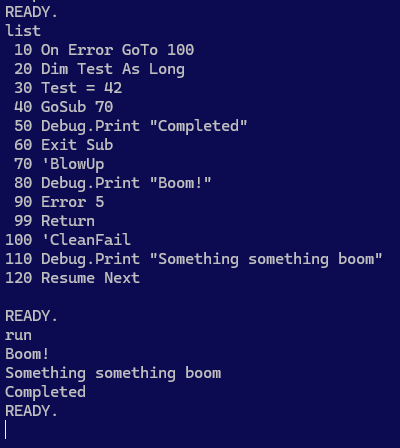
Un programme RD-VBA qui ne contient pas d’instructions non-implémentées se complète.

Le retrait de l’instruction On Error GoTo révèle quelques faits intéressants :
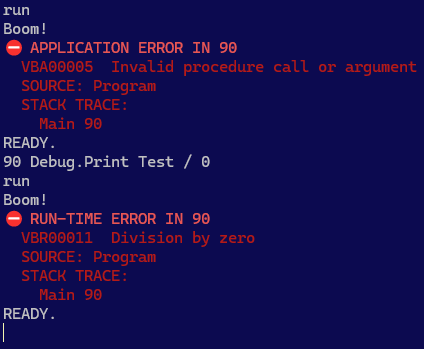
D’abord, il y a une différence entre une erreur lancée explicitement par l’application, et une erreur d’exécution. Ensuite on remarque le numéro de ligne, puis la stack trace.

Ce que ces images ne montrent pas, c’est que le numéro de ligne est un symbole ici, seulement parce qu’il s’agit du mode programme – mais dans un document, la configuration par défaut fait de ce numéro l’emplacement L1C1 exact de l’erreur dans le document.

Une erreur d’application (VBA00000) est une erreur lancée par le code source (via Error, ou Err.Raise); une erreur d’exécution (VBR00000) est une erreur lancée par l’interpréteur. MS-VBA ne différencie pas réellement ces deux types d’erreurs – il y a donc désormais une distinction claire entre les deux, et ça ne brise rien du tout!
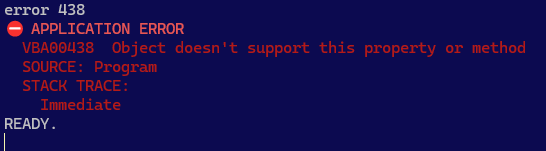
Aucune erreur d’application ne peut être confondue avec une erreur d’exécution, et il y aura toujours une trace de la pile d’exécution, même en mode immédiat!

Limitations

Certaines limitations sont inhérentes au fait qu’il s’agisse d’une application console: en effet il serait surprenant d’y voir une fonctionnalité affichant des info-bulles au survol d’un symbole.

D’autres limitations sont plutôt liées au design:

  • Le module Program et la procédure Main sont intrinsèques et ne peuvent pas être renommés.
  • Une commande sans numéro de ligne s’exécute immédiatement; les numéros de ligne sont donc obligatoires pour tout programme dans ce client.
  • Les numéros de lignes ne devraient pas empêcher l’utilisation de libellés, mais ceux-ci ne fonctionnent pas actuellement avec un numéro de ligne; GoTo/GoSub doivent donc référer à un numéro de ligne.
  • Les continuations sont invalides: un numéro de ligne ne peut pas être situé en plein milieu d’une instruction.
  • Limitation éventuelle du jeu de syntaxe valide en mode BASIC (configurable).
  • Limitation éventuelle à 10,000 lignes de la longueur permise d’une procédure; l’erreur procedure too long devrait alors être lancée à la compilation, mais possible que le mode BASIC fonctionne différemment.
  • Exit Sub termine le programme; Exit Function et Exit Property sont statiquement invalides.
  • Sub Main() et End Sub sont implicites: le corps du programme constitue le corps de cette procédure.
  • L’ajout de procédures additionnelles n’est pas supporté (les numéros de ligne étant invalides au niveau des déclarations d’un module); utilisez plutôt GoSub/Return avec de larges sauts de numérotation pour coder des sous-routines.

D’autres limitations sont ponctuelles et seront résolues avant le lancement de la v1 :

  • L’instruction REM qui explose à l’exécution est objectivement comique, mais ne restera vraisemblablement pas brisée longtemps.
  • L’invocation de membres de la librairie standard qui ne sont pas encore implémentés sera également en erreur.

Manipulation de Mémoire

Les commandes PEEK et POKE ne sont pas (encore?) implémentées en tant que mots-clés et donc pas utilisables dans du code source RD-VBA, mais les commandes fonctionnent et permettent donc une lecture/écriture directe d’octets en mémoire applicative – opération évidemment très risquée, mais la nostalgie l’a emportée.

Ceci dit les opérations LSet fonctionnent dans le code source sur des String et UDT.

Jalons

L’évolution du cœur de langage est complètement découplée de celle de l’application CLI, donc celle-ci fonctionnera de mieux en mieux et de façon de plus en plus complète à mesure que s’ajouteront les sémantiques du cœur de langage, et ce sans rien devoir corriger ou modifier dans l’application même.

Cela ne signifie pas pour autant que le travail est terminé!

L’application supporte notamment des thèmes, donc si le bleu C64-BASIC ne vous plaît pas, vous pouvez toujours passer à un thème foncé moderne. Ce n’est donc qu’une question de temps avant que la sortie de LIST affiche un surlignage sémantique issu du serveur de langage!

Exploiter cette connexion LSP constitue la façon dont cette application deviendra ultimement beaucoup plus qu’un éditeur BASIC. ANALYZE est déjà prêt à afficher les diagnostics, dès qu’ils commenceront à apparaître dans la plateforme.

Le mode REPL est bien pour une démo, mais le véritable outil est le mode CLI non interactif.

Les outils modernes s’exécutent dans des pipelines CI/CD (intégration et livraison continues) dans le cloud. rdc.exe sera à terme en mesure de compiler un projet, d’en exécuter les tests, et de bloquer une livraison qui dévie des conventions établies, le tout complètement en-dehors de l’écosystème MS-VBA.

Êtes-vous READY?


English

A major milestone was knocked down in the last week: the RDCore platform now has an interpreter that puts all the previous pieces together into a traceable, configurable, and extensible beginning of a runtime.

Where this gets very real, is with the CLI app now running an interactive REPL program mode where you’re basically running a runtime session in immediate mode:
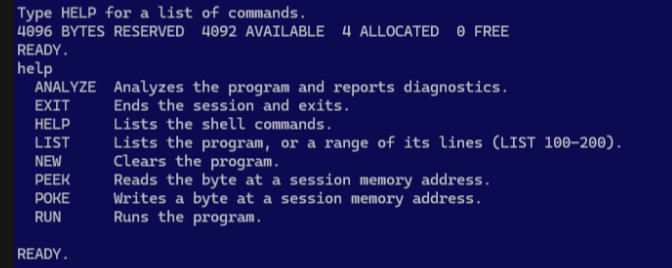
Don’t be fooled by the C64-BASIC look; this CLI app is a full-fledged LSP client with an active RD-VBA runtime session.

The 4 bytes taken are allocated for the synthesized module and procedure scope your program space lives in. Type a VBA expression, and you get its result; precede it with a line number, and now you’ve written that instruction at that specified line number in your program. The name of this synthesized module is Program, and the name of the enclosing procedure is Main. This matters, because you’ll see these identifiers in error stack traces – here only ever inside Main, but you can see what this means for error handling with an actual IDE client, and a project with real procedure scopes.

The idea is not to evolve this app into one, either; it’s just to make a fun way to test the language core and semantics… and diagnostics – the platform, basically. The role of RD-VBA CLI mode is to test the platform end-to-end, hands-on – and being a LSP client means we’ll probably get to write old-school BASIC programs with semantic syntax highlighting in LIST outputs, completion lists for the REPL inputs. Diagnostics are already wired, ANALYZE will start showing meaningful output when providers/extensions issue diagnostics. PEEK/POKE is just C64-like pure unsafe program memory read/write.

RUN runs the program top to bottom, unless you make it do funny things like GoSub, in which case you probably know what you’re doing. If you don’t, …RDCore diagnostics will eventually have your back covered.

Semantics

So the plumbing is in place; what remains is semantics: file I/O statements like Open, Write, Print#, are implemented at the language core layer. Declarations, control flow, error handling as well. Still a lot remains TODO – every single statement keyword must have its semantics implemented, otherwise running them gets you an internal error.

Standard library implementation has begun as well; Len and LenB are the first consumers of the UDT member storage data, and while all the symbols are defined and LSet works as specified on UDT and strings, the vast majority of the standard library remains to be implemented; this is mechanical work that doesn’t need to reach across multiple layers to be a quick gain – so I let Claude/Opus focus on the more meaty parts that do cross into the runtime and memory layout, leaving the simpler, pure functions for later.

Control flow and error handling is fully functional:
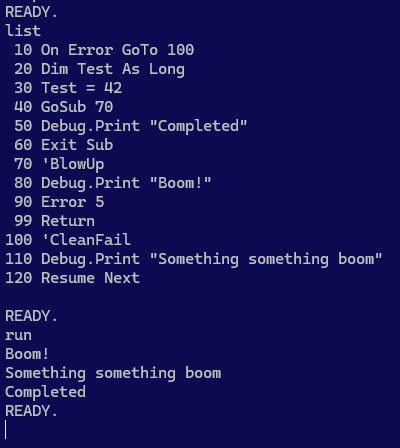
BASIC-like RD-VBA code runs end-to-end in the app, …as long as the program doesn’t involve unimplemented semantics.

Removing the On Error GoTo instruction reveals a number of interesting facts about RD-VBA:
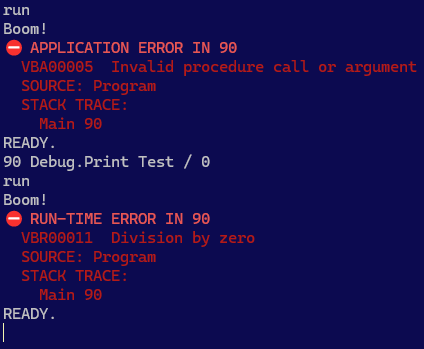
First, there’s a difference between an error you raise and an error the runtime raises. Second, errors have a source location pointing to the line number of the faulting instruction, and then there’s a stack trace.

What this doesn’t tell you, is that the platform is showing symbolic line numbers here only because it has no workspace document proper (the internal buffer just simulates one), but in an IDE client the default configuration would be reporting the actual L1C1 document location.

An application error (“VBA00000”) is a run-time error that is raised by the workspace code; a runtime error (“VBR00000”) is a run-time error that is raised in the language core runtime semantics. MS-VBA historically did not really differentiate between these errors; now there’s a structural distinction between them, and it doesn’t break anything!
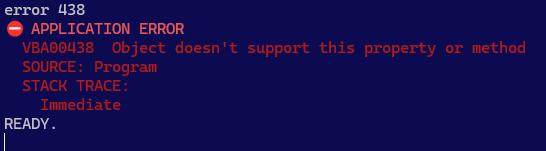
No Error or Err.Raise statement can ever be mistaken for a runtime error, and we always get a stack trace, even in immediate command mode.

Limitations

Some limitations are inherent to the CLI app being a CLI app: hover tooltips aren’t going to be available, and that’s a given.

Others are design decisions. These include:

  • Program.Main project and procedure scope; intrinsic, cannot be renamed.
  • C64-style program interface, using line numbers as markers for instructions that are stored in the source buffer rather than immediately piped to the interpreter; this makes line numbers inherently mandatory in this client.
  • Line numbers should not prevent the use of line labels, however labels do not currently parse with line numbers. GoTo must therefore refer to line numbers.
  • Line continuations cannot be used; a line number isn’t a valid statement to continue into.
  • Eventually artificially limiting the valid RD-VBA syntax (including comments) in CLI program mode to the BASIC subset of VB, via appsettings.json platform configuration.
  • Eventually limiting the number of logical lines to 10,000; procedure too long compile-time error ought to be raised then, but BASIC mode will probably end up working differently.
  • Exit Sub terminates the program; Exit Function and Exit Property are statically illegal.
  • Sub Main() and End Sub are implicit; the program body is that procedure’s body.
  • Additional Sub procedures cannot be defined (line numbers are illegal on declaration members); use GoSub/Return with wide line numbering gaps to denote subroutines instead.

Other limitations are temporary pre-alpha missing implementations that will definitely be implemented before a v1.0 can ship:

  • REM statements (BASIC-style comments) throwing statement not implemented is objectively funny, but will probably not take too long to get working as the no-op instruction it is.
  • Standard library implementation being incomplete, any function call that refers to a symbol defined there throws not implemented as well.

Unsafe Program Memory Ops

Not (yet?) implemented as keywords, the PEEK and POKE immediate commands allow byte-level unsafe reads and writes (!) from/to a specified address in program memory space. This is obviously dangerous and may lead to crashes, but nostalgia won.

That said LSet and RSet semantics are both implemented, including against UDT values.

🎯 Milestones

The evolution of the RD-VBA language core and runtime implementation is architecturally decoupled from the CLI application, so it’ll automatically throw fewer errors as the language core progresses, without fixing or changing anything anywhere in the CLI app.

That doesn’t mean the work is done, however.

The app supports themes, so if you don’t like C64-style BASIC blue, you might like a modern dark theme instead. It’s only a matter of time before LIST output gets semantic syntax highlighting from the language server!

Leveraging this LSP connection is how the app will turn into something more than a BASIC console. ANALYZE is already wired up to report diagnostics as soon as they start coming.

A BASIC immediate/command/program mode is nice for a platform demo, but the real tool is the non-interactive CLI mode.

Modern tools run in the cloud, from CI/CD scripts that build a project, run its tests, inspect its vulnerabilities and deviations from established coding practices; rdc.exe supports an extensible set of command-line tools exactly for this. Extensions can supply a provider for various commands such as test or analyze, and a CI/CD script could be configured to gate a build on tests passing and diagnostics showing no warnings or errors.

Are you READY?

WorksheetFunction and Errors

Using Excel worksheet functions taps into the native calculation engine: using Excel’s very own MATCH function instead of writing a lookup loop or otherwise reinventing that wheel every time makes a lot of sense if your project is hosted in Excel in the first place, or if you’re otherwise referencing the Excel type library.

You may have seen it look like this:

Dim result As Variant
result = Application.WorksheetFunction.Match(...)

Or like this:

Dim result As Variant
result = Application.Match(...)

You’ve tested both, confirmed they both work, and might be using them interchangeably in code, and all is well… until it isn’t anymore and you’re facing a cryptic run-time error:

The canned default message for error 1004 is a meaningless “Application-defined or object-defined error”. The message you get for a worksheet function that raises this error is arguably even more confusing: “unable to get the {function name} property of the WorksheetFunction class”.

What could this nonsense possibly mean? First, we need to understand that we’re looking at a templated error message where “property” has to have been mistakenly made part of the templated string – because we’re really looking at a function member here, but even reading the message with the correct kind of member makes no sense… until we read it as simply “the worksheet function returned a worksheet error value“: if we typed that exact same invocation in an actual worksheet cell formula, Excel’s own error-handling would do the same, and the cell would contain an #N/A error:

When MATCH or VLOOKUP fails in a cell, that cell’s error value propagates to any caller/cell that references it. When you invoke these functions from VBA code, it’s into your VBA code that these errors propagate now.

Given bad arguments or a failed lookup, Application.WorksheetFunction.Match and Application.Match will behave very differently. Let us understand why and how. Note I’m going to be using a VLookup function here, but Index or Match wouldn’t be any different, and everything here holds true for any other worksheet function, from the simplest Sum to the most obscure financial function nobody ever used.

The two forms are not interchangeable, and it’s important to understand the difference!

Early Bound: Errors are Raised

When you invoke WorksheetFunction members, errors are raised as VBA run-time errors. This means a failed lookup can be caught with an On Error statement, as would any other run-time error.

  On Error GoTo LookupFailed
  Debug.Print Application.WorksheetFunction.VLookup(...)
  Exit Sub
LookupFailed:
  Debug.Print "..."
  Resume Next

When you type these member calls, you know you’re typing early-bound code because IntelliSense (its ancestor, anyway) is listing that member in an inline dropdown:

VLookup is a member of the object returned by the WorksheetFunction property of the Application object.

The implication is that the function is assumed to “just work”: if using that same function with these same parameter values in an actual worksheet formula results in a #REF!, #VALUE!, #N/A, #NAME?, or any other Variant/Error value… then the early-bound WorksheetFunction equivalent raises run-time error 1004.

This VBA-like behavior is very useful when any failure of the worksheet function needs to be treated as a run-time error, for example when we are expecting the function to succeed every time and it failing would be a bug: throwing an error puts us on an early path to recovery.

Sometimes though, we don’t know what to expect, and a worksheet function returning an error is just one of the possible outcomes – using error handling in such cases would amount to using error handling for control flow, and that is a design smell: we should be using runtime errors for exceptional things that we’re not expecting. When a worksheet function can fail as part of normal execution, we have other options.

Late Bound: Errors are Values

When you invoke worksheet functions using late-bound member calls against an Excel.Application object, when a function fails, it returns an error code.

Dim result As Variant
result = Application.VLookup(...)

It’s important to understand that the Variant type means nothing in particular until it gets a subtype at runtime; result is a Variant/Empty until the assignment succeeds – when it does result might be a Variant/Double if the value is numeric; if the lookup failed, instead of raising a run-time error result will now be a Variant/Error value.

Operations Involving Variant/Error: Removing Assumptions

Because a failed late-bound WorksheetFunction returns an error value, it’s easy to forget the data type of the result might not be convertible to the declared type, so the first opportunity for things to go wrong materializes if we simply assume a non-error result by declaring a non-Variant data type for the variable that is being assigned with the function’s result:

Dim result As Long 'assumes a successful lookup...
result = Application.VLookup(...) 'runtime error 13 when lookup fails!

So we soon start systematically assigning these results to a Variant:

Dim result As Variant
result = Application.VLookup(...)

…only to find that all we did was moving the type mismatch error further down, here:

If result > 0 Then 'runtime error 13 when result is Variant/Error!

The first thing we should do with a Variant, is to remove any assumptions about its content. The VBA.Information.IsError function returns True given a Variant/Error, and we must use it to correctly remove assumptions about what’s in this result variable:

Dim result As Variant
result = Application.VLookup(...)
If IsError(result) Then
    'lookup failed

Else
    'lookup succeeded

End If

Inside the lookup failed conditional block, result is a Variant/Error value that can only be compared against another Variant/Error value – involving result in an operation with any other runtime type will throw a type mismatch error.

Using the VBA.Conversion.CVErr function, we can convert a Long integer into a Variant/Error value; the Excel object model library includes named constants for each type of worksheet error, so we can use them with the CVErr function to refine our knowledge of what’s in result, if we need anything more detailed than “something went wrong”:

Dim result As Variant
result = Application.VLookup(...)
If IsError(result) Then
    'lookup failed
    Select Case result
        Case CVErr(xlErrNA)
            'result is a #N/A error: value wasn't found in the lookup range

        Case CVErr(xlErrRef)
            'result is a #REF! error: is the lookup range badly defined?

        Case Else
            'result is another type of error value

    End Select

Else
    'lookup succeeded

End If

By systematically treating the result of a late-bound Application.{WorksheetFunction} call as a potential Variant/Error value, we avoid assuming success and handle a bad result without exposing our “happy path” to type mismatch errors; we then use If...Else...Then standard control flow statements to branch execution differently depending on the outcome, using standard On Error statements / error handling for the exceptional situations that could arise beyond these worksheet errors we’re already accounting for.


Other Variant/Error Pitfalls

The IsError function isn’t just useful to determine whether a late-bound WorksheetFunction call returned a usable value or not. The function returns True given any Variant/Error value, which makes it the perfect tool to identify worksheet cells that contain values that aren’t usable either.

Dim cell As Range
Set cell = Sheet1.Range("A1")
If cell.Value > 42 Then 'assumes cell.Value can be compared to 42!
    '...
End If

VBA code often assumes cells contain valid values, and whenever that assumption is broken, a type mismatch error occurs. Unless the cell value was written by the same VBA code, it’s never really safe to assume a worksheet cell contains what the code expects it to contain. Using the IsError function we remove such assumptions and make the code more resilient:

Dim cell As Range
Set cell = Sheet1.Range("A1")
If Not IsError(cell.Value) Then
    If cell.Value > 42 Then
        '...
    End If
Else
    MsgBox cell.Address(External:=True) & " contains an unexpected value."
End If

A Variant/Error value can spell trouble in many other ways. Sometimes it’s an implicit conversion to String that causes the type mismatch:

Dim cell As Range
Set cell = Sheet1.Range("A1")
MsgBox cell.Value 'assumes cell.Value can be converted to a String!

Implicit conversions can be hard to spot, but if your code is blowing up with a type mismatch error involving the value of a worksheet cell, or a value returned by a worksheet function, then that’s where you need to look.

On Error Resume Next

Despite everything that’s been written about it, sometimes On Error Resume Next is the perfect tool for the job. Say you have a ListObject on Sheet1, that would be named Table1; you could have a Table1 property that would return this ListObject:

'@Description("Gets the 'Table1' ListObject from this sheet.")
Public Property Get Table1() As ListObject
  Set Table1 = Me.ListObjects("Table1")
End Property

The only problem, is that when the Table1 table is inevitably renamed (right?) in Excel, this property starts raising run-time error 9, because the ListObjects collection of Sheet1 doesn’t contain an item named "Table1" anymore, and throwing [an error] from a Property Get procedure goes against property design best practices. Enter On Error Resume Next:

'@Description("Gets the 'Table1' ListObject from this sheet, or 'Nothing' if not found.")
Public Property Get Table1() As ListObject
  On Error Resume Next ' suppresses possible error 9...
    Set Table1 = Me.ListObjects("Table1") ' ...that would be raised while evaluating RHS
  On Error GoTo 0 ' execution would jump here before the Table1 reference is assigned
End Property

Error handling is promptly explicitly restored with On Error GoTo 0, and the property will now return Nothing and defer to the caller the decision of what to do with an invalid table:

Dim table As ListObject
Set table = Sheet1.Table1
If table Is Nothing Then Exit Sub ' or raise an error? MsgBox?
'...safely carry on...

A nice side-effect of this, is that it’s very compelling for the calling code to capture the returned value into a local variable – and leaving the complexities of caching concerns to the calling code (you don’t want/need to dereference that ListObject from the worksheet’s ListObjects collection every single time you need to access it!) makes it much less likely to run into an awkward situation such as this:

'@Description("Gets the 'Table1' ListObject from this sheet.")
Public Property Get Table1() As ListObject
  Static cache As ListObject
  If cache Is Nothing Then
    Set cache = Me.ListObjects("Table1")
  End If
  Set Table1 = cache
End Property

...
  Debug.Print Me.Table1.Name
  ...
  Me.ListObjects(1).Delete
  ...
  Debug.Print Me.Table1.Name ' error 424 "object required"
...

Assuming the table initially exists on the worksheet, the first call to Me.Table1 sets the cache reference and the calling instruction outputs the table’s name. In the second call to Me.Table1, the cache reference is already set, it’s not Nothing anymore – the object pointer is zombified: there’s a pointer, but the object itself is gone, and the corrupted cache state might very well be persisted until an End instruction kills the entire execution context. And that’s why cache invalidation is up there together with naming things at the top-2 of hard things in programming… but I digress.

On Error Resume Next + Conditionals = Trouble

Of all the things that could go wrong with generously suppressing error handling by spraying On Error Resume Next all over the code base, is that potentially catastrophic bugs like below can happen – what’s the MsgBox saying, and what icon does it have? Is that clearly intentional?

Public Sub AntiExample()
  'On Error GoTo Rubberduck
  On Error Resume Next
  ' ...code...
  Sheet1.Range("A1").Value = CVErr(xlErrNA) ' A1 contains a #N/A error value
  ' ...code...
  ' ...
  ' ...more code...
  ' ...
  If Sheet1.Range("A1").Value = 42 Then
    MsgBox Err.Description, vbCritical
    Exit Sub
  Else
    MsgBox Err.Description, vbExclamation
    Exit Sub
  End If
  Exit Sub
Rubberduck:
  MsgBox Err.Description, vbInformation
End Sub

Did you guess it right? I’m only going to tell you that Resume Next can be extremely dangerous if it’s used wrong: a MsgBox is harmless, but that conditional block could contain anything. When in doubt, On Error GoTo Rubberduck, but if you choose to use Resume Next anyway, there’s an inspection that can warn you when it is used without being paired with On Error GoTo 0 (in most common scenarios anyway) – but it’s not that inspection’s job to tell you there’s too much code between On Error Resume Next and On Error GoTo 0: that is entirely up to you… but the way I see it, OERN is great for fencing a single potentially problematic statement – and that is easier to do when the procedure is responsible for very few things: when you start having multiple potential errors to handle in the same scope, it’s past time to think about increasing the abstraction level and moving code to smaller procedures that do fewer things.

Pragmatically speaking, if used correctly, On Error Resume Next does not really need to be paired with On Error GoTo 0: execution state is always local to the procedure (/stack frame), and with On Error Resume Next the execution state will never be in error after the procedure exits. In a sense, specifying it explicitly is a bit like specifying an explicit Public access modifier, or an explicit ByRef specifier on a parameter declaration: it’s the implicit default, made explicit – on the other hand, it’s much cleaner to exit a procedure with Err.Number being 0, consistent with the execution/error state.

When you see On Error Resume Next at the top of a rather large procedure, comment it out and run the code if possible; see what errors are being silently shoved under the carpet, what code executes in that uncertain error state. Try to narrow down the potential errors to specific statements, and isolate them: reduce the amount of code that is allowed to run in an error state to a bare minimum, pull the “dangerous” statements into their own function, see if there’s a way to avoid needing to handle an error in the first place. In the above code for example, the error raised here:

If Sheet1.Range("A1").Value = 42 Then

Could easily be avoided by verifying whether we’re looking at a value that can legally be compared to 42 (or any other non-Error value), like this:

Dim cellValue As Variant
cellValue = Sheet1.Range("A1").Value ' cellValue is Variant/Error

If IsNumeric(cellValue) Then ' false
  If cellValue = 42 Then ' comparison is safe in this branch
     '...
  End If
ElseIf Not IsError(cellValue) Then ' false
  'cellValue isn't an error value, but isn't numeric either
  '...
Else
  'execution branches here
  '...
End If

Of course that’s just one example… and every situation is different: if you’re reading a Recordset and one of the fields is missing, you have all rights to blow things up… but you still have to make sure you clean up the mess and close the connection properly before you exit the scope – but then consider, if you were given the opened connection as a parameter… life is much simpler: it’s not your job at all to close that connection – whoever created it will be assuming it’s still open when the failing procedure returns! The basic golden rule of thumb being that the code that’s responsible for creating an object (or invoking a factory method that creates it) should also be the code that’s responsible for destroying that object.

Pattern: TryParse

Error-handling in VBA can easily get hairy. The best error handling code is no error handling code at all, and by writing our code at a high enough abstraction level, we can achieve exactly that – and leave the gory details in small, specialized, lower-abstraction procedures.

I’m growing rather fond of adapting the famous TryParse Pattern to VBA code, borrowed from the .NET landscape. Not really for performance reasons (VBA doesn’t deal with exceptions or stack traces), but for the net readability and abstraction gains. The crux of it is, you write a small, specialized function that returns a Boolean and takes a ByRef parameter for the return value – like this:

Public Function TryDoSomething(ByVal arg As String, ByRef outResult As Object) As Boolean
    'only return True and set outResult to a valid reference if successful
End Function

Let the calling code decide what to do with a failure – don’t pop a MsgBox in such a function: it’s the caller’s responsibility to know what to do when you return False.

The pattern comes from methods like bool Int32.TryParse(string, out Int32) in .NET, where an exception-throwing Int32 Int32.Parse(string) equivalent method is also provided: whenever there’s a TryDoSomething method, there’s an equivalent DoSomething method that is more straightforward, but also more risky.

Applied consistently, the Try prefix tells us that the last argument is a ByRef parameter that means to hold the return value; the out prefix is Apps Hungarian (the actual original intent of “[Systems] Hungarian Notation”) that the calling code can see with IntelliSense, screaming “this argument is your result, and must be passed by reference” – even though IntelliSense isn’t showing the ByRef modifier:

This pattern is especially useful to simplify error handling and replace it with standard flow control, like If statements. For example you could have a TryFind function that takes a Range object along with something to find in that range, invokes Range.Find, and only returns True if the result isn’t Nothing:

Dim result As Range
If Not TryFind(Sheet1.Range("A:A"), "test", result) Then
    MsgBox "Range.Find yielded no results.", vbInformation
    Exit Sub
End If

result.Activate 'result is guaranteed to be usable here

It’s especially useful for things that can raise a run-time error you have no control over – like opening a workbook off a user-provided String input, opening an ADODB database connection, or anything else that might fail for any reason well out of your control, and all your code needs to know is whether it worked or not.

Public Function TryOpenConnection(ByVal connString As String, ByRef outConnection As ADODB.Connection) As Boolean
    Dim result As ADODB.Connection
    Set result = New ADODB.Connection

    On Error GoTo CleanFail
    result.Open connString

    If result.State = adOpen Then
        TryOpenConnection = True
        Set outConnection = result
    End If

CleanExit:
    Exit Function

CleanFail:
    Debug.Print "TryOpenConnection failed with error: " & Err.Description
    Set result = Nothing
    'Resume CleanExit
    'Resume
End Function

The function returns True if the connection was successfully opened, False otherwise – regardless of whether that’s because the connection string is malformed, the server wasn’t found, or the connection timed out. If the calling code only needs to care about whether or not the connection succeeded, it’s perfect:

Dim adoConnection As ADODB.Connection
If Not TryOpenConnection(connString, adoConnection) Then
    MsgBox "Could not connect to database.", vbExclamation
    Exit Function
End If

'proceed to consume the successfully open connection

Note how Exit Sub/Exit Function are leveraged, to put a quick end to the doomed procedure’s misery… and let the rest of it confidently resume with the assurance that it’s working with an open connection, without a nesting level: having the rest of the procedure in an Else block would be redundant.

The .NET guideline about offering a pair of methods TryDoSomething/DoSomething are taken from Framework Design Guidelines, an excellent book with plenty of very sane conventions – but unless you’re writing a VBA Framework “library” project, it’s almost certainly unnecessary to include the error-throwing sister method. YAGNI: You Ain’t Gonna Need It.

Cool. Can it be abused though?

Of course, and easily so: any TryDoSomethingThatCouldNeverRaiseAnError method would be weird. Keep the Try prefix for methods that make you dodge that proverbial error-handling bullet. Parameters should generally passed ByVal, and if there’s a result to return, it should be returned as a Function procedure’s return value.

If a function needs to return more than one result and you find yourself using ByRef parameters for outputs, consider reevaluating its responsibilities: there’s a chance it might be doing more than it should. Or if the return values are so closely related they could be expressed as one thing, consider extracting them into a small class.

The GridCoord class in the OOP Battleship project is a great example of this: systematically passing X and Y values together everywhere quickly gets old, and turning them into an object suddenly gives us the ability to not only pass them as one single entity, but we also get to compare it with another coordinate object for equality or intersection, or to evaluate whether that other coordinate is adjacent; the object knows how to represent itself as a String value, and the rest of the code consumes it through the read-only IGridCoord interface – all that functionality would have to be written somewhere else, if X and Y were simply two Long integer values.

Bubbly Run-Time Errors

300 feet below the surface, in a sunken wreck from another age, a rotting wooden deck silently collapses under the weight of heavy cast iron canons. As the sea floor becomes a thick cloud of millennial dust, the weaponry cracks a cask of over-aged priceless wine, and a tiny amount of air, trapped centuries ago, is freed. Under the tremendous, crushing pressure of the oceanic bottom, the bubbles are minuscule at first. As the ancestral oxygen makes its final journey from the bottom of the ocean up to the surface, the bubbles grow in size with the decreasing pressure – and when it finally reaches its destination to blend with the contemporary atmosphere, it erupts with a bubbly “plop” as it releases itself from the water that held it quietly imprisoned all these years.

Uh, so how does this relate to code in any way?

Bubbles want to explode: the same applies to most run-time errors.

When an error is raised 300 feet down the call stack, it bubbles up to its caller, then to the caller of that caller, and so on until it reaches the entry point – the surface – and blows everything up. When the error is unhandled at least.

And so they told you to handle errors. That every procedure must have an event handler.

Truth is, this is utter cargo-cultist BS. Not every procedure must handle every error. Say you have an object that’s responsible for setting up an ADODB Connection, parameterizing some SQL Command on the fly, and returning a Recordset. You could handle all errors inside that class, trap all the bubbles, and return Nothing instead of a result when something goes wrong. Neat huh? Yeah. Until the caller wants to know why their code isn’t working. That SqlCommand class cannot handle everything: errors need to bubble up to the calling code, for the calling code to handle.

The calling code might be another class module, with a function responsible for – I don’t know – pulling a list of products from a database and returning an array of strings that this function’s own caller uses to populate a ComboBox control, in a UserForm’s Initialize handler. So the data service class lets SqlCommand errors bubble up to its own caller; the UserForm’s Initialize handler receives the error, understands that it won’t be able to populate its ComboBox, and in response decides to go up in flames by bubbling up the error to its own caller – some parameterless procedure in a Macros module, that was called when the user clicked a nicely formatted shape on a dedicated worksheet.

That’s the entry point. That is where the bubbling stops. That procedure was responsible for bringing up a form for the user to enter some data, but something happened (the detailed information is in the Err object) and we can’t do that now – so we abort the form and display a nice user-friendly message in a MsgBox instead, and we can even send the actual error details into a new Outlook email to helpdesk@contoso.com.

Getting a grip on the handle

Most errors aren’t handled where they’re raised. Well, some are, obviously. But to say that every procedure should have its error handler is just as blatantly wrong as saying no procedure should ever have any error handler: “only a Sith deals in absolutes”.

So which errors should be killed on-the-spot, and which errors should be allowed to bubble up?

Avoidable errors

The vast majority of run-time errors occur due to lack of proper input validation code: we take a value and assume it’s of a type we’re expecting, or at least one we can work with. We assume its format, we assume its location, we assume …lots of things. The more assumptions code makes, the more error-prone it is. Problem is, we don’t always realize all the assumptions we make – and that’s when run-time errors come and bite us. These are completely avoidable errors: they shouldn’t be handled at all, for they are bugs. And we want bugs to blow things up. So if you have code making assumptions – for example a row number is never going to be zero – then you have bugs that are easy to fix (and that a good unit test coverage should prevent, BTW)… and it boils down, mostly, to proper input validation. Avoiding avoidable errors is the #1 best bug-preventing thing you can do.

Of course this supposes the assumptions we make are conscious ones – sometimes, code makes assumptions we don’t realize we’re making. For example, VBA code that implicitly refers to the active workshseet, often assumes that the active sheet is one specific sheet:

foo = Sheet1.Range(Cells(i, j), Cells(i, j)).Value

The above code assumes Sheet1 is active, because the two unqualified Cells calls implicitly refer to the active worksheet. Avoidable. If foo is declared as a String and Sheet1 is active, that same code will still blow up if the cell contains a #VALUE! error. Assumptions are very easy to make! Fortunately they’re also easy to avoid.

Errors you know how to handle

Sometimes you’ll run code that can raise an error even if you’ve validated all inputs – if the SQL server is down, trying to connect to it will blow up your code if you don’t handle that situation. Or the user might not be authorized to run the SQL command, or whatever. The decision on whether to handle in on-the-spot or bubbling it up to the caller, depends on how well you’ve split the responsibilities among your modules and procedures: a utility function usually has no business handling/swallowing its own errors. And unless you’re running the current [not yet released] 2.0.14.x Rubberduck build, your unit tests can’t mock up /fake a MsgBox call, so you have code paths that cannot be cleanly tested.

Looking at it from the client code’s perspective is how you’re going to know what kind of errors and “bad result” outputs you want to be dealing with. And if that client code is a unit test, then you’re probably doing the right thing, whatever that is.

Other times you’ll run into an error, but you know you can simply, gracefully and usefully recover from that error, and resume normal execution – these errors, if they can’t be avoided, should be the kind to handle on-the-spot.

Everything else

For everything else, you’ll want bubbles. Not all the way up though – you’ll want to catch them before they surface and pop in the user’s face! But if your code validates all inputs and makes little or no assumptions, and handles the specific errors you know could happen because roses are red and violets are blue… at the top of every call stack there should be a catch-all handler – an ultimate bubble catcher, that gracefully handles everything other code had to let through.


So…

Rubberduck is never going to tell you to sprinkle error-handling code everywhere. But I think we could have an inspection that warns you if you have a [possible] entry point that lets run-time errors bubble up unhandled.

What do you think? What else can Rubberduck do for you? Should Rubberduck treat any object-returning method as potentially returning Nothing, and suggest that you validate the method’s return value? You would right-click any Range.Find call, and if the returned reference is never compared against Nothing then Rubberduck could introduce an If block that does just that, making the rest of the code path safe to execute in the case of a failing call. Just thinking out loud here…