
The RDCore language platform is taking shape and is about to get very serious about its ambitions: take MS-VBAL and implement it from the ground up into the LSP platform Rubberduck would have been if it became VBA.
I remember telling a friend last spring about my plans; “ok but what about the debugger?” they asked – I said where we’re going we don’t need a debugger, we are the debugger. Last week, we arrived.
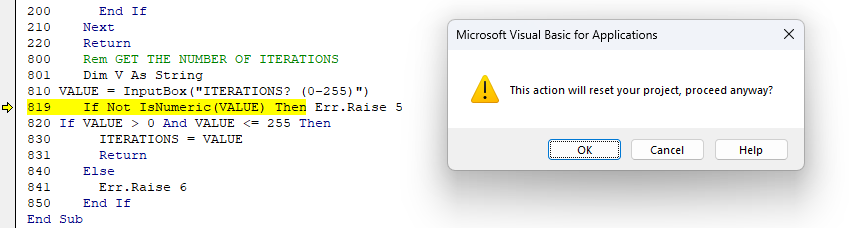
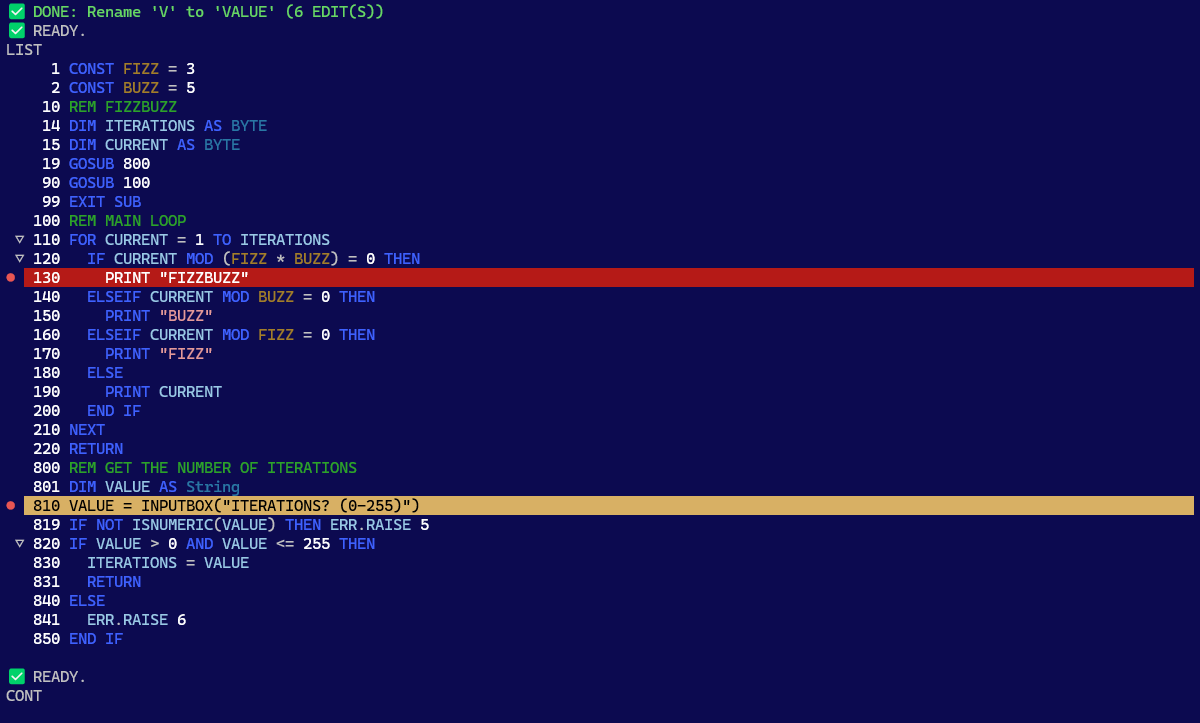
Edit and continue
Perhaps the single most defining feature of Classic Visual Basic, has arrived in RDCore: the ability to reshape the compiled program, observe and manipulate its symbols and values as it runs in a debugger.
E&C is a rather complex matter, and MS-VBA halts execution in quite several situations, for very valid reasons. The fact that RDCore allows resuming execution in places where MS-VBA would not, doesn’t take anything away from the historical feature: RDC’s internals are modeled in such a way that makes these limitations a bit easier to overcome, I suppose.
Edit and apply later
When RDCore cannot apply an edit, it often can (and does) hold on to the compiled version and issues a RDC20001 diagnostic that says the edit will be applied after the program restarts – rather than stopping the debug session right there and then.
Edit and take it back
If RDCore cannot apply an edit, and cannot hold on to the compiled version while keeping its state coherent, you can simply undo it, and then resume execution as if nothing happened.
See the documentation for a complete breakdown of the specific cases and the differences between RDCore and MS-VBA.
All debugger features are provided through standard DAP endpoints over stdio.
Code formatting
LSP defines endpoints for code formatting and format-as-you-type, but doesn’t specify what it specifically entails, leaving a language server free to do whatever it deems necessary to fulfill the request.
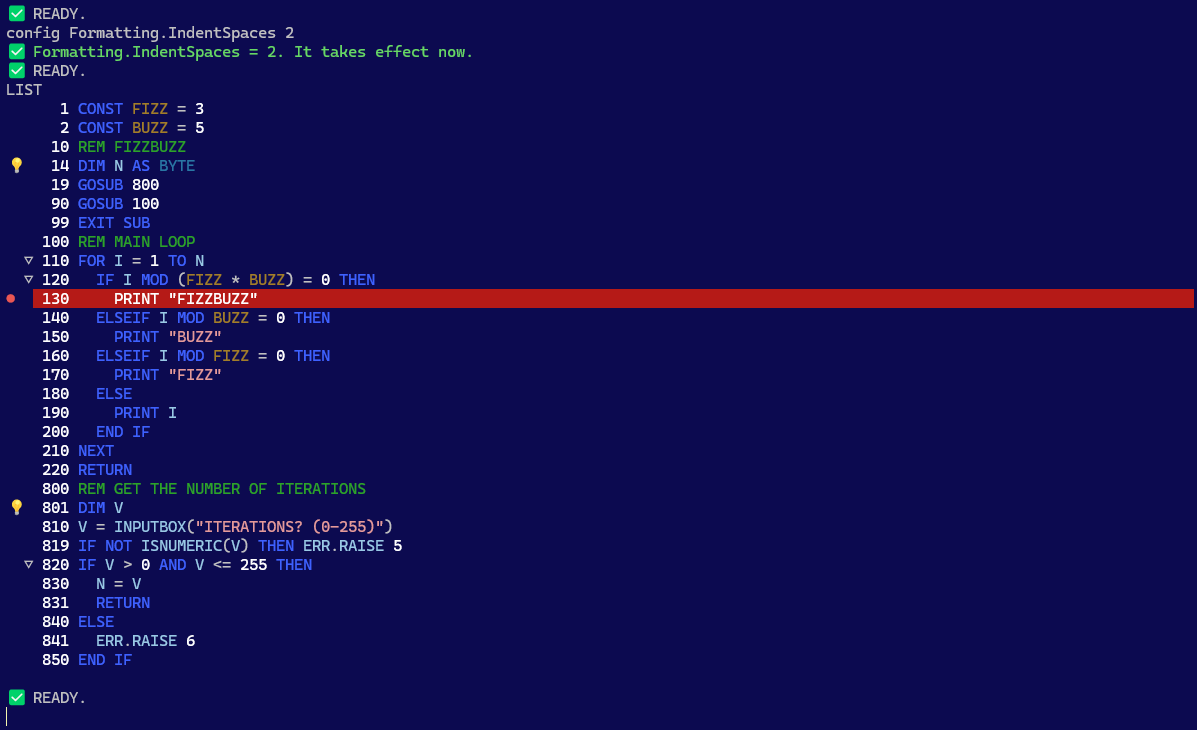
In RDCore, that means indenting the module of course – with legacy Rubberduck’s indenter settings imported from your Rubberduck configuration… a bit like how Rubberduck imported your legacy Smart Indenter settings on the first load.
In the REPL client (rdc.exe running standalone), formatting is applied whenever the program source code is read – so when you LIST or SAVE a .rdc program file.
Code formatting settings are editable (with completion lists!) from the interface with the CONFIG command, and take effect immediately.
Block foldings
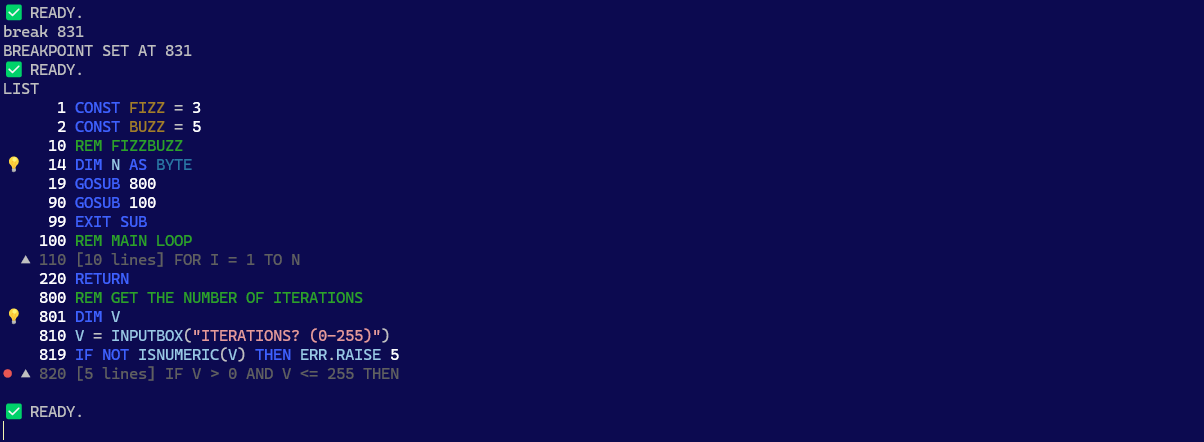
At the start of any block, the LIST output will show ▽▲ glyphs in the margin, indicating the start of foldable and folded code blocks, respectively.
Use the FOLD command to toggle them; completion list offers the valid line numbers.
If a folded block hides a breakpoint, it is displayed in the margin on the folded line, even if that line doesn’t have a breakpoint.
Completion lists
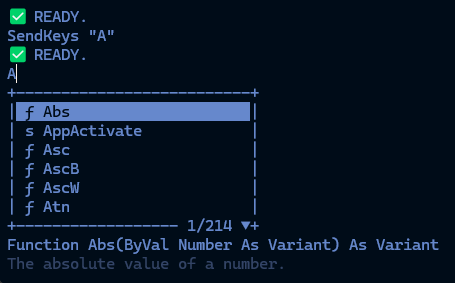
The one single thing that makes the biggest difference in how hard or easy it is to learn a programming language, is its completion lists: without it, everything feels like a magic incantation that you must know in order to make anything work at all.
With it, it’s like the standard library is telling you how to use it, and you can explore all the types and members and discover things, all without leaving your editor.
RD-VBA completion is snappy and relevant, and signature help provides the docstrings as you type – in the language configuration of your session for the standard library (although currently only available in French and English).
MSForms hosting
The RD-VBA runtime is now capable of hosting MSForms. It does not, at this stage, host its own “RDForms” cross-platform GUI components, so trying to run a user form in Linux or on a machine without the non-distributable MSForms 2.0 DLL will raise a runtime error instead of showing a UI.
At design/compile time though, all the symbols remain available, so you get completion lists and signature help regardless, and the code compiles.
We could describe it as RD-VBA replacing MS-VBA as the MSForms designer and runtime host here, taking the legacy Microsoft UI framework made for Office automation out of its box and into standalone RD-VBA applications.
This is ultimately just the fallback solution, a shortcut to get something out the door faster: the goal is for the beta stage to host its own implementation of a GUI framework that can run and render anywhere: the one HexIDE built to do the same for VB6 forms and controls.
Remember MVVM in VBA? The example form’s content is dynamically generated at run-time, and RDCore runs it and its events; it works!
Alpha release?
As of this writing, RDCore is still unreleased pre-alpha. To try it today, you must clone the repository on GitHub and build and deploy the platform yourself, and then it’ll deploy an unoptimized debug build that’s intended for local development and debugging.
The roadmap is quickly becoming a long green list of checked boxes, there are now over 13k unit tests and 80% coverage, so an alpha release can’t be too far down the line. What’s holding it up?
HexIDE integration
Releasing RDCore without a LSP client integration beyond its own REPL/CLI toy application wouldn’t do it justice: there are so many things RDCore can do as a platform, that the REPL client simply cannot express, the first of which is handling a project with anything more than a single procedure scope with BASIC-style line numbers. The REPL client is a LSP demo and platform integration testing tool; it isn’t “the product”, even if, without an IDE, it’s what gives you a small glimpse of what the platform and language server can do.
There could be a small VSCode extension that implements the SDK’s RDCoreClientApp and integrates the LSP server into VSCode… but VSC is a general-purpose jack of all trades, master of none editor that makes the experience awkward when you just want your good old VBIDE with the modern-day perks.
This is where HexIDE wins: like VSCode it has its language features provided by LSP server extensions. But the Hex is for 6, as in VB6 – it is an independent project under MIT licensing, which gives a fork more rights than what we intend to leverage to ultimately make it the RDCore platform’s official IDE.
By 2027, it will be possible to import a VBA project or open a .vbp in HexIDE; analyze, test, and build it (.net exe/dll) in both CI/CD pipelines and the editor with RDCore, and compile it to native x86/x64 and extend the language beyond VBA with twinBASIC – all without leaving your IDE, and none of it requiring you to be on a Windows desktop with Office installed.
RDCore.SDK
The MIT-licensed RDCore.SDK project at the center of the platform is being extracted into its own separate repository, and will be publishing a NuGet package that RDCore platform components and extensions (including the HexIDE extension) will be referencing like any other package. The idea is to make it as easy as possible to write RDCore platform extensions.
Because the language core and runtime and platform SDK is only the beginning for the RDCore platform: unit testing will soon build on top of it, for example – but the alpha release will not wait for the platform extensions.

