RDCore.VSCode est une extension VS Code qui se connecte au serveur de langage RDCore pour offrir l’expérience LSP complète dans l’éditeur Visual Studio Code.
RDCore publie la version 0.2.5-alpha avec un correctif au niveau de la plateforme qui permet de déboguer un espace de travail qui référence MSForms. Ceci corrige l’intégration à HexIDE juste avant la grosse sortie de HexIDE.
VS Code n’est peut-être pas votre éditeur préféré, mais il fonctionne et fait le travail. Pour certains, il lui manque trop de fonctionnalités pour être utile. Pour d’autres, le thème abyss est tout ce dont il aura jamais besoin. Pour ceux qui se trouvent quelque part entre les deux, une nouvelle extension RDCore lui fait prendre en charge le code VBA et les espaces de travail .rdproj.
Avec la plateforme RDCore derrière, l’implémentation d’un client language server protocol (LSP) pour VS Code s’est faite en moins de 10 minutes, avec une seule requête (chapeau à Claude Opus 5.5) : le serveur LSP alors intégré à HexIDE nuisait aux tests d’intégration de la plateforme RDCore, et j’avais besoin d’un client capable d’en faire plus que le client REPL de RDC.
Et puis, puisqu’il existait, je me suis dit qu’il pouvait aussi bien être publié : quelqu’un allait bien faire un client VS Code pour RDCore un jour ou l’autre, alors une offre maison me semble tout indiquée.
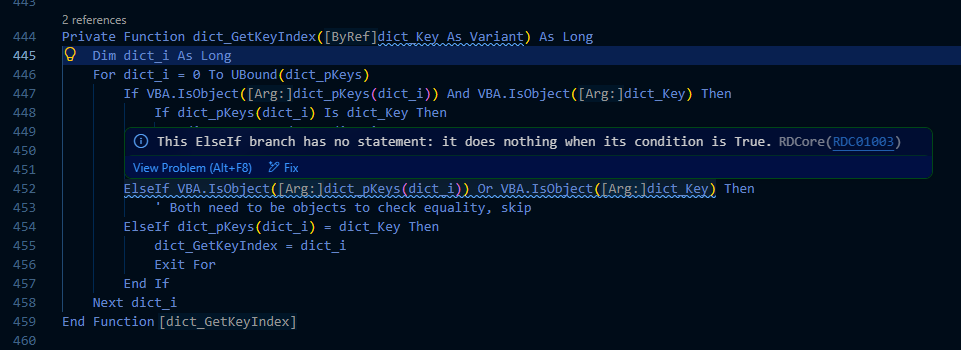
La version initiale offre tous les gestionnaires LSP standard que RDC fournit d’emblée : on obtient donc des code lenses navigables, des inlay hints, des diagnostics avec leurs correctifs rapides et leurs liens vers la documentation, la coloration syntaxique sémantique, le pliage du code, et les fonctionnalités du débogueur DAP, points d’arrêt conditionnels compris.
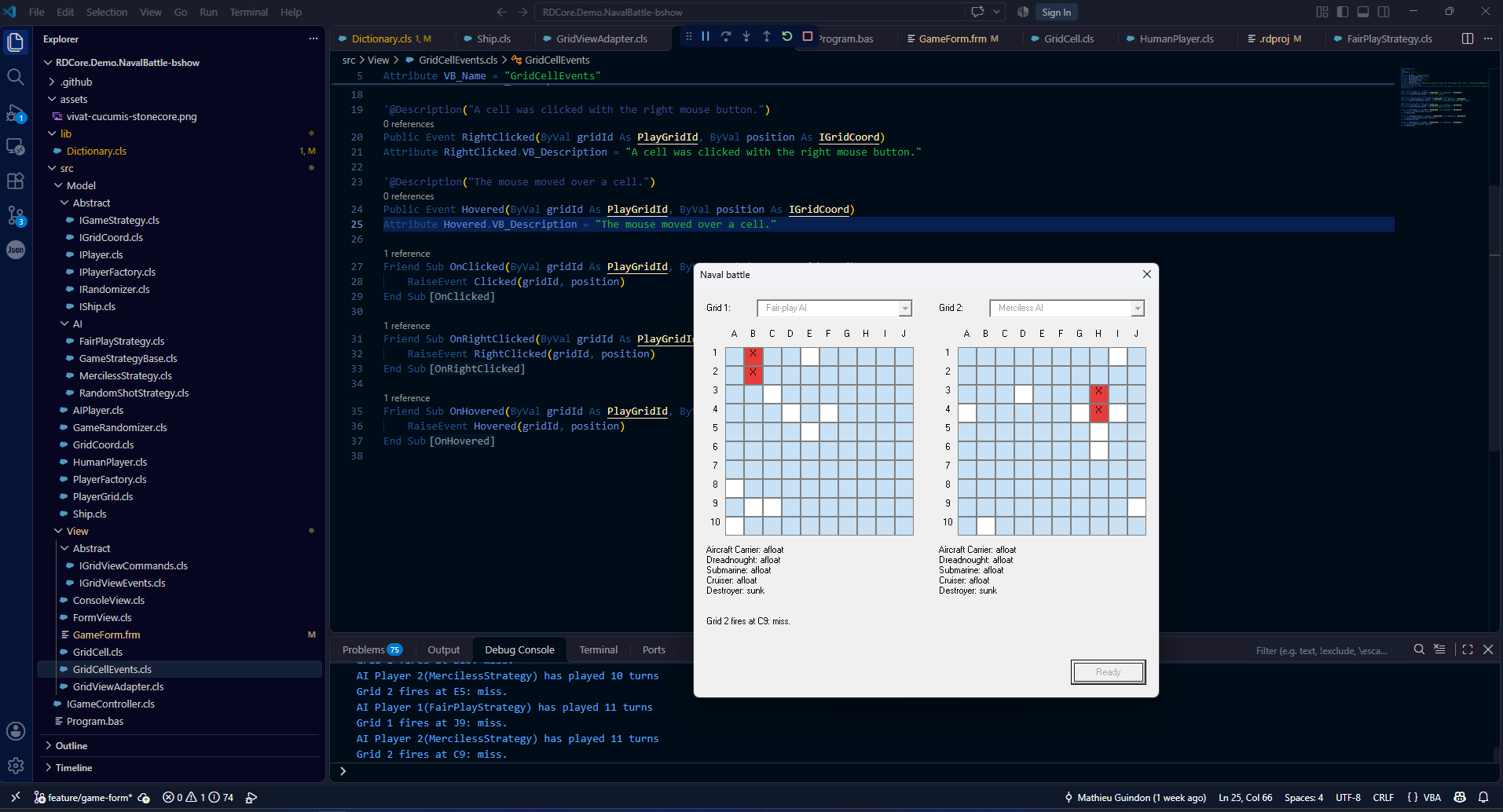
Voici la démo de plateforme NavalBattle exécutée dans le débogueur de Visual Studio Code, avec une interface MSForms native hébergée par l’environnement d’exécution RDCore, sous Win64 :
FairplayAI (grille 1) a gagné cette partie contre MercilessAI, pour la petite histoire.
L’adaptateur de débogage est un peu lent à démarrer, mais la console de débogage fonctionne et permet de manipuler les variables locales, puis de modifier et continuer.
Essayez-le!
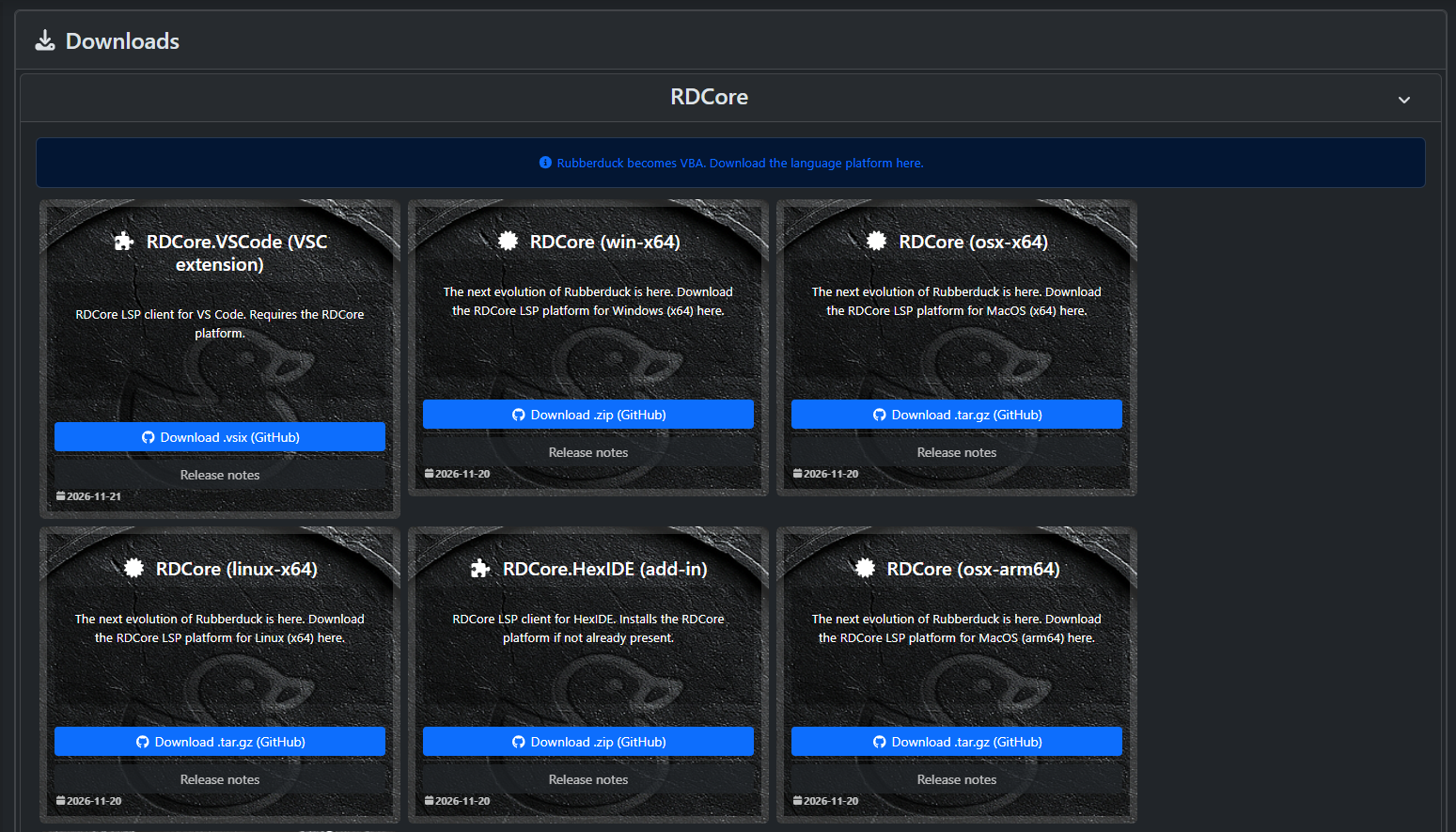
Ce client s’ajoute à la page des téléchargements du site; vous le trouverez avec les autres liens de téléchargement de RDCore, dont le client HexIDE :
La section RDCore de la page des téléchargements de rubberduckvba.ca accueille déjà le petit nouveau de la famille.
V I V A T ❤️ C U C U M I S ™
English
RDCore.VSCode is a VS Code extension that connects to the RDCore language server to deliver the complete LSP experience in the Visual Studio Code editor.
RDCore ships version 0.2.5-alpha with a platform-level fix to enable debugging a workspace that references MSForms. This fixes the HexIDE integration just before HexIDE’s own big release.
VS Code may not be your favorite editor, but it works and gets the job done. For some, it lacks too many features to be useful. For others, the abyss theme is all it’s ever going to need. For those somewhere in between, there’s a new RDCore extension that makes it handle VBA code and .rdproj workspaces.
With the RDCore platform behind it, implementing a language server protocol (LSP) client for VS Code happened in under 10 minutes with a single prompt (props to Claude Opus 5.5): HexIDE’s then-bundled LSP server was getting in the way of RDCore platform-level integration tests, and I needed a client that could do more than RDC’s own REPL client does.
And then since it existed, I thought it might as well ship – someone was going to make a VS Code client for RDCore one day or another, so a first-party offering seems appropriate.
The initial release offers all the vanilla-LSP handlers that RDC supplies out of the box, so we get navigable codelens, inlay hints, diagnostics with their quickfixes and documentation links, semantic syntax highlighting, foldings, plus the DAP debugger features – including conditional breakpoints.
Here is the NavalBattle platform demo running through the Visual Studio Code debugger, with a native MSForms GUI hosted by the RDCore runtime, on Win64:
FairplayAI (grid 1) won this game against MercilessAI, for the record.
The debug adapter is a bit slow to start, but the debug console works and lets you manipulate locals, and then edit and continue.
Try it!
This client makes a new addition to the site’s downloads page; you’ll find it alongside the other RDCore download links, including the HexIDE client:
The RDCore section of the rubberduckvba.ca downloads page already welcomes the newest member of the family.
RDCore v0.2.1-alpha, la deuxième préversion de la plateforme, est arrivée! Elle exécute votre code VBA et VB6 hors de l’éditeur VBA, sous Windows, Linux et macOS, et cette fois-ci, elle amène les formulaires avec elle.
RDCore v0.2.1-alpha : la plateforme, avec rdc et le serveur de langage. Elle a besoin de l’environnement d’exécution .NET 11.
RDCore et RDForms exécutant la démo de la plateforme sur un Mac, avec des sprites PNG. Derrière, la démo “application console” complétant une partie dans les mêmes conditions.
La première version alpha hébergeait les MSForms natifs, sous Windows seulement. Cette deuxième version alpha exécute vos formulaires Classic-VB dans RDForms, le tout nouveau cadriciel d’interface multiplateforme de la plateforme, qui affiche et exécute votre interface existante sous Linux, ou sur un Mac, Intel ou ARM64. Évidemment, ça fonctionne aussi sous Windows. Porter votre interface vers le nouveau cadriciel est entièrement facultatif (RDCore comprend les fichiers .frm et .frx), mais RDForms est fortement recommandé si vous démarrez un nouveau projet : il fond essentiellement MSForms dans les formulaires Classic-VB, de sorte que vos formulaires RD-VBA peuvent être MDI et afficher des images PNG avec un canal alpha. Bien sûr, ils ne se reportent pas vers MSForms ou les formulaires Classic-VB : ni l’un ni l’autre ne vous laisse régler l’opacité d’un contrôle, par exemple.
Le code d’un formulaire RDForms vit dans un module .rdform, à côté d’un document de conception .xaml.
Le cycle de vie des formulaires VB, les groupes de contrôles, Controls.Add, les membres des ListBox et des ComboBox (avec des icônes!), les menus contextuels, les twips et les modes d’échelle, PaintPicture, Print, Line, Circle, PSet, Point, etc. fonctionnent tous dans RDForms comme dans VB6; les UserControls, PropertyPages et UserDocuments sont des modules de code, et PropertyBag et Ambient sont pris en charge.
App.KeepSystemTheme fait suivre à RDForms le thème du système, alors vous obtenez un thème sombre gratuitement dans vos applications RDForms. Les lecteurs d’écran et les outils de test d’interface voient les menus et les contrôles, eux aussi. Les projets qui référencent MSComctlLib et FM20.DLL les lient dans RDForms, mais ni l’une ni l’autre de ces DLL n’est livrée avec le paquet RDForms.
Quoi d’autre de neuf?
Un projet RD-VBA peut maintenant être une Console Application : ses invites MsgBox et InputBox sont posées dans la console, mais sous Windows, on peut aussi les configurer pour faire apparaître les boîtes natives. Et un programme bâti sous Windows s’exécute sous Linux ou macOS, sans ses sources.
Un espace de travail peut maintenant contenir plusieurs projets qui se référencent les uns les autres : un groupe de projets VB6, ou une paire complément VBA et classeur Excel, peut tenir dans un seul espace de travail. Friend et VB_Exposed fonctionnent comme la spécification le prévoit.
Changements incompatibles
Cette version corrige les constantes du précompilateur VB en introduisant Is64BitEnv, qui sépare proprement les tests de système d’exploitation des tests d’architecture. Dans MS-VBA, Win64 vaut 1 sur un Mac 64 bits, ce qui brouille la frontière entre les deux et fait que les directives #If se comportent de façon inattendue; RDCore vous apporte des diagnostics qui vous disent quand elles sont mal configurées, et offrent de les corriger. La constante Linux64, introduite dans la première version alpha, est retirée (elle vaut 0 à moins que votre code la définisse) : Linux vaut 1 sous Linux, et Is64BitEnv vaut 1 dans tout environnement 64 bits, peu importe le système d’exploitation. #If Linux And Is64BitEnv teste ce que testait Linux64.
Le code écrit dans MS-VBA avec des directives de compilation conditionnelle qui fonctionnent sur un Mac continue de fonctionner tel quel.
Le schéma d’un fichier .rdproj a changé plusieurs fois depuis la première version alpha. Un projet créé avec cette première alpha se charge encore, mais il est recommandé de recréer le .rdproj, surtout si votre espace de travail a été créé à partir d’un projet VB6 : le nouveau schéma comprend des métadonnées de projet supplémentaires, que VB6 utilise pour make et que rdc build utilise à des fins semblables.
Quelques autres changements peuvent surprendre un espace de travail existant (une erreur non gérée termine maintenant le programme comme le fait End, par exemple); les notes de version les énumèrent tous.
Parité des inspections et des refactorisations de Rubberduck
La dernière version de la plateforme RDCore apporte presque chacune des inspections du Rubberduck d’origine (celles qui sont propres à Excel sont exclues, pour l’instant), mais avec un modèle sémantique qui permet d’aller beaucoup plus loin dans l’analyse, en faisant beaucoup moins de suppositions. La plupart offrent une ou plusieurs actions de code correctives (des correctifs rapides), et oui, vous pouvez encore les ignorer, mais ça se fait par les paramètres de configuration, et c’est encore mieux, parce que les paramètres de configuration forment une hiérarchie : la configuration de la plateforme pour la machine se trouve dans le dossier d’installation, la configuration de l’utilisateur dans votre profil, et maintenant une configuration d’espace de travail peut la remplacer pour un espace de travail.
Les inspections de Rubberduck sont devenues des diagnostics RDC. Voyez la documentation pour la liste complète :
Membres par défaut et vérifications des affectations
Liaison tardive et validation des interfaces
Code inutilisé ou mort
Plateformes et compilation conditionnelle
Là où MS-VBA et sa propre spécification MS-VBAL divergent
Projets et compilation : références circulaires entre projets, aucun point d’entrée ou plus d’un
Moins de faux positifs sur toute la ligne
Des outils de refactorisation, bien sûr :
Extract Method peut remplacer d’un coup, partout dans le projet, les copies de la sélection par un appel de la nouvelle méthode
Inline Member, tout nouveau : remplace un appel d’une procédure par son corps
Convertir un GoSub en procédure
Encapsulate Field
Implement Interface (offert sur la ligne Implements)
Move Members vers le haut et vers le bas d’un module; Sort Members
Remove et Reorder Parameters
Move Closer to Usage
Rename des types, des énumérations, des modules, du projet, des étiquettes de ligne et des contrôles de formulaire; le renommage suit les vraies liaisons symboliques. Comme toutes les refactorisations de RDC, il est entièrement déterministe et n’est pas une opération de recherche et remplacement textuelle.
Outils CLI
Les applications client et serveur de RDCore ont maintenant un écran de démarrage fourni par le SDK, et peuvent le remplacer par le leur, alors tous les outils ont l’air de faire partie de la même famille, parce que c’est le cas!
rdc build -c Release bâtit un programme qui peut s’exécuter hors de son espace de travail, et rdc build -r le bâtit pour Windows, Linux ou macOS (x64 ou Arm64), depuis n’importe quelle machine.
rdc bench exécute le corpus de bancs d’essai de la plateforme sur votre machine; donnez-lui un espace de travail et vous pouvez mesurer votre propre code source RD-VBA. La plateforme s’occupe pour vous de la mise en température et des statistiques.
rdc export-library extrait tous les symboles d’une bibliothèque de types donnée; quand la plateforme a les symboles d’une bibliothèque, elle peut compiler le code source écrit pour cette bibliothèque (mais pas l’exécuter : il faut pour ça la bibliothèque elle-même).
rdc mcp --workspace <chemin> sert les outils d’assistant IA intégrés de RDCore, par le protocole MCP standard.
Serveur MCP intégré
Comme on l’a déjà écrit, RDCore embrasse l’IA. Les outils MCP intégrés le démontrent : ils donnent à un assistant de programmation LLM le modèle sémantique de RDCore, par des outils entièrement déterministes qui trouvent les symboles, les références et les diagnostics, listent et appliquent les correctifs rapides, et renomment selon les liaisons. Un assistant IA qui utilise ces outils a quelque chose que la plupart n’ont pas, parce que les outils MCP se branchent habituellement sur un IDE, et non directement sur le cerveau et le modèle sémantique d’une plateforme de langage.
La différence est majeure : sans modèle sémantique, un assistant IA travaille avec des résultats non déterministes et traite le code source comme du texte brut. Bien des modèles deviennent très bons à travailler ainsi, mais ils restent sujets aux hallucinations et ne génèrent pas toujours le code optimal. Avec le MCP de RDCore, ces agents ont accès aux symboles, aux références, aux diagnostics et aux correctifs, et ils peuvent se servir de ces outils pour valider le code qu’ils génèrent, avant même qu’il n’arrive dans une réponse du clavardage.
Tout hôte d’assistant qui parle MCP peut s’en servir : vous fournissez le modèle, RDCore lui donne des ailes.
Performance
Ce cycle apporte des gains de performance étonnants sur toute la ligne pour le code compilé, et cette version compile beaucoup plus de code source RD-VBA que la précédente : là où bien des cas restaient interprétés, la plupart s’exécutent aujourd’hui compilés.
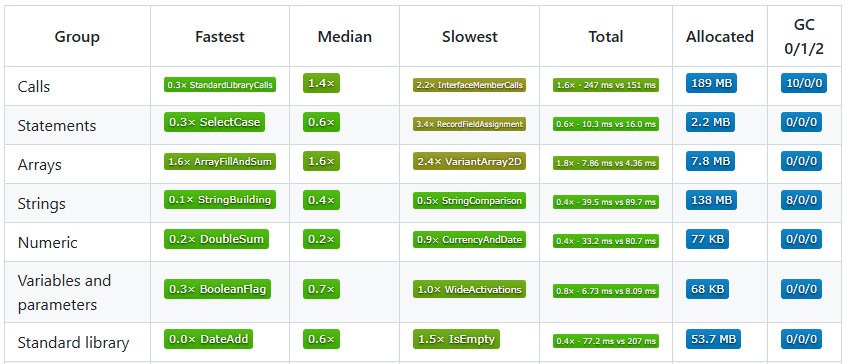
L’achèvement de l’étape de l’abaissement vers l’IR explique à lui seul une bonne part des gains, mais les bancs d’essai se sont surtout améliorés grâce à l’optimisation de la compilation et à la réduction des allocations : plusieurs opérations n’allouent maintenant presque rien et n’entraînent exactement aucune collecte de mémoire .NET :
Ces chiffres bougent à chaque fusion et n’indiquent que des charges de travail précises et irréalistes; mesurez votre propre code par rapport à une exécution de référence dans MS-VBA pour faire vos propres comparaisons valables à la maison.
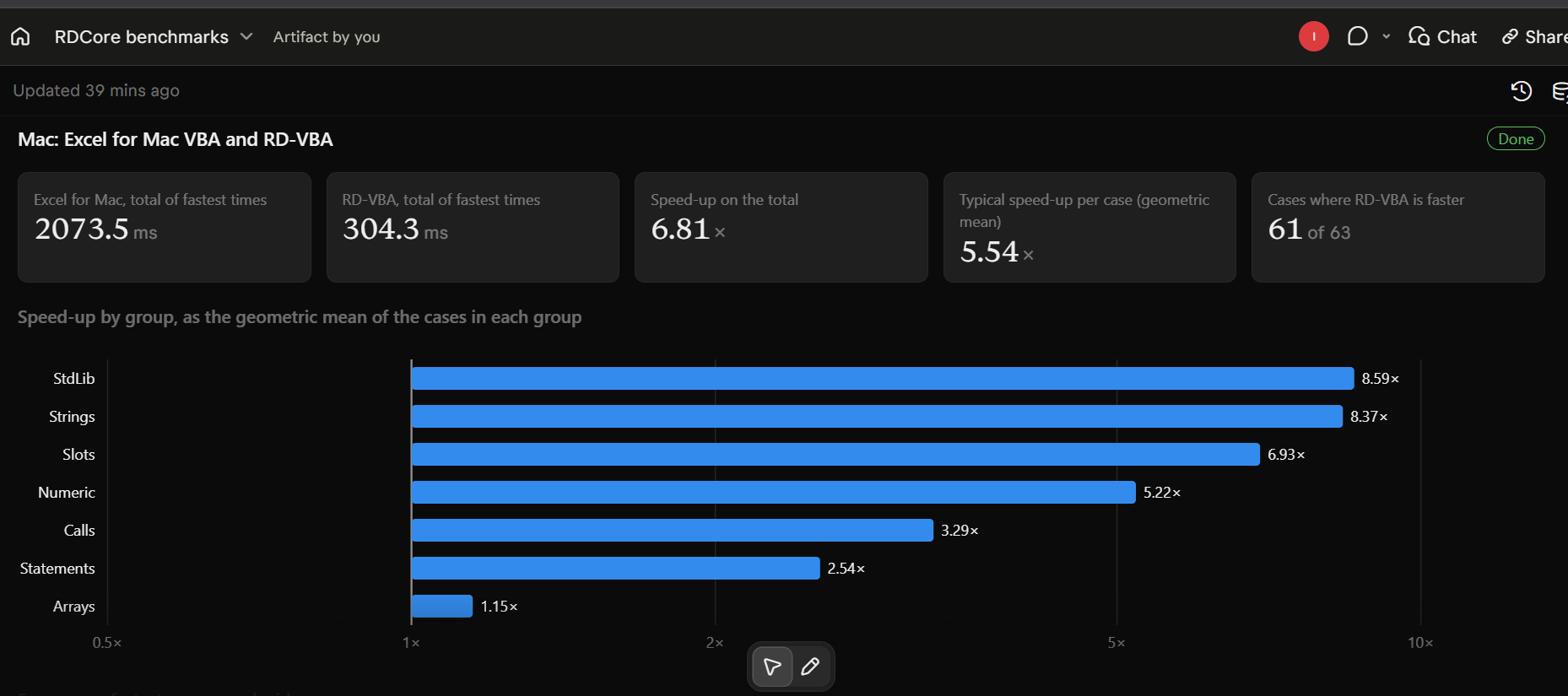
Exécution maison sur MacOS: RD-VBA l’emporte avec 61/63 cas plus rapides que MS-VBA, complétant ici le banc d’essai en 304.3 millisecondes, contre 2,073.5 pour MS-VBA sur MacOS (ARM64).
Essayez-le!
Ça fait beaucoup de canard pour une deuxième préversion, et c’est encore une alpha : attendez-vous à des aspérités, et à ce que les choses changent d’une version à l’autre. Téléchargez-la, pointez rdc vers votre code, et puis VIVAT CUCUMIS!
V I V A T ❤️ C U C U M I S ™
English
RDCore v0.2.1-alpha, the platform’s second preview, is out! It runs your VBA and VB6 code outside the VBA editor, on Windows, Linux and macOS, and this time it brings the forms along.
RDCore+RDForms running the platform demo on a Mac, with PNG sprites. Background: the console application demo running to completion all the same.
The initial alpha release hosted native MSForms, on Windows only. This second alpha release runs your Classic-VB forms in RDForms, the platform’s shiny new cross-platform UI framework that renders and runs your legacy UI on Linux, or on a Mac, Intel or ARM64. Of course it also works on Windows. Porting your UI to the new framework is entirely optional (RDCore understands .frm/.frx), but RDForms is highly encouraged if you’re starting a new project: it essentially folds MSForms into Classic-VB forms, so your RD-VBA forms can be MDI and display PNG images with an alpha channel. Obviously, they don’t back-port to MSForms or Classic-VB forms: neither lets you set a control’s Opacity, for example.
An RDForms form’s code-behind lives in a .rdform module beside a .xaml designer document.
VB forms’ lifecycle, control arrays, Controls.Add, ListBox and ComboBox members (with icons!), context/popup menus, twips and scale modes, PaintPicture, Print, Line, Circle, PSet, Point, etc. all work on RDForms as they do in VB6; UserControls, PropertyPages and UserDocuments are code modules, with PropertyBag and Ambient supported.
App.KeepSystemTheme makes RDForms follow the system-wide theme, so you get a dark theme for free in your RDForms applications. Screen readers and UI testing tools see menus and controls, too. Projects that reference MSComctlLib and FM20.DLL bind them in RDForms, but neither DLL ships with the RDForms package.
What else is new?
RD-VBA projects can now be a Console Application, whose MsgBox/InputBox prompts are handled in the console, although on Windows they can also be configured to pop the native boxes. And a program built on Windows runs on Linux or macOS, without its sources.
Workspaces can now include multiple projects that reference one another; a VB6 project group or a VBA add-in + Excel workbook pair can exist in one workspace. Friend and VB_Exposed work as specified.
Breaking changes
This release fixes the VB precompiler constants by introducing Is64BitEnv, cleanly separating OS checks from bitness checks. In MS-VBA, Win64 is 1 on a 64-bit Mac, which blurs the line between OS and bitness checks and makes #If directives behave unexpectedly; RDCore brings you diagnostics that tell you when they are set up wrong, and offer to fix them. The Linux64 constant that the first alpha release introduced is retired (it is 0 unless your code defines it): Linux is 1 when running on Linux, and Is64BitEnv is 1 when running in a 64-bit environment, regardless of the OS. #If Linux And Is64BitEnv tests what Linux64 did.
Code that is written in MS-VBA with conditional compilation directives that work on a Mac continues to work as-is.
The schema definition of a .rdproj file has changed several times since the initial alpha release. A project file from that first alpha still loads, but re-creating the .rdproj is recommended, especially if your workspace was created from a VB6 project: the new schema includes additional project-level metadata that VB6 uses for make and that rdc build uses for similar purposes.
A few other changes may surprise an existing workspace (an unhandled error now ends the program as End does, for one); the release notes list them all.
Rubberduck inspection & refactoring parity
The latest version of the RDCore platform brings almost every single one of the legacy Rubberduck inspections (the Excel-specific ones are excluded, for now), but now with a semantic model that enables going much further in the analysis, while making far fewer assumptions. Most of them offer one or more corrective code actions (quick fixes), and yes, you can still ignore them, but that’s through configuration settings, so it gets even better, because configuration settings are a hierarchy: machine-level platform configuration lives in the installation folder, user-level configuration lives in your user profile, and now workspace-level configuration can override it within a workspace.
Rubberduck’s inspections have become RDC diagnostics. See the documentation for the full list:
Default members and assignment checks
Late binding and interface validation
Unused/dead code
Platforms and conditional compilation
Where MS-VBA and its own MS-VBAL specification diverge
Projects and builds: circular project references, no entry point or more than one
Fewer false positives across the board
Refactoring tools, of course:
Extract Method can replace every duplicate of the selection across the project with a call to the new method, in one go
Inline Member, brand new: replaces a call of a procedure with its body
Convert GoSub to Procedure
Encapsulate Field
Implement Interface (offered on the Implements line)
Move Members up and down a module; Sort Members
Remove/Reorder Parameters
Move Closer to Usage
Rename types, enums, modules, the project, line labels, form controls; rename follows actual symbolic bindings. Like all RDC refactorings, it is entirely deterministic and not a text-based search & replace operation.
CLI Tools
RDCore client and server applications now get an SDK-provided splash screen and may replace it with their own, so all the tools look & feel like they’re part of the same family, because they are!
rdc build -c Release builds a program that can run outside of its workspace, and rdc build -r builds it for Windows, Linux or macOS (x64 or Arm64), from any machine.
rdc bench runs the platform’s benchmark corpus on your machine; give it a workspace and you can benchmark your own RD-VBA source code. The platform handles warm-ups and stats for you.
rdc export-library extracts all the symbols of a specified type library; when the platform has the symbols for a library, it can compile (but not run; that needs the actual library) source code written against that library.
rdc mcp --workspace <path> serves RDCore’s built-in AI assistant tools, over standard MCP.
Built-in MCP Server
As was written before, RDCore embraces AI. The built-in MCP tooling demonstrates it: it gives an LLM coding assistant RDCore’s semantic model through fully deterministic tools that find symbols, references and diagnostics, list and apply quick fixes, and rename by binding. An AI assistant that uses these tools has something most don’t, because MCP tools typically hook into an IDE, not directly into a language platform’s brains and semantic model.
The difference is major: without a semantic model, an AI assistant works with non-deterministic outcomes and treats source code as plain text. Many models are getting very good at working like this, but they remain prone to hallucinations and may not always generate optimal code. With RDCore MCP, these agents get access to symbols, references, diagnostics and fixes, and they can use these tools to validate the code they generate before it even lands in a chat reply.
Any assistant host that speaks MCP can use them: you supply the model, RDCore empowers it.
Performance
This cycle delivers astonishing performance gains across the board for compiled code, and this version compiles much more RD-VBA source code than the previous release: where many cases remained interpreted, most today run compiled.
Completing the IR lowering milestone explains a lot of the performance gains all by itself, but the benchmarks mostly improved by optimizing compilation and reducing allocations: several operations now allocate almost nothing and incur exactly zero .NET garbage collections:
These figures move at every merge and only indicate specific, unrealistic workloads; benchmark your own code against an MS-VBA reference run to make your own valid comparisons at home.
A third party’s run on MacOS: RD-VBA wins with 61/63 faster cases than MS-VBA, completing the benchmark runs in 304.3 milliseconds while MS-VBA did the same in 2,073.5, on MacOS (ARM64).
Try it!
That’s a lot of duck for a second preview, and it’s still an alpha: expect rough edges, and expect things to change between versions. Download it, point rdc at your code, and VIVAT CUCUMIS!
La plateforme RDCore franchit aujourd’hui une étape importante avec sa première version alpha publiée officiellement. Cette pré-version peut être téléchargée et installée dès maintenant, et fonctionne sous Windows, Linux et macOS. Pour le moment, seules les plateformes 64 bits sont prises en charge.
La plateforme accueille RD‑VBA, une implémentation de la spécification MS‑VBAL corrigée sur certains points, enrichie sur d’autres, qui permet notamment d’utiliser PEEK et POKE dans le mode BASIC, ajoute les constantes de précompilation #If Linux et #IfLinux64, et compile vers l’IL de .NET 10.
Le cœur du langage réside dans le SDK (NuGet : v0.1.2‑alpha). Il définit une variante de VBA ainsi qu’une implémentation complète de sa bibliothèque standard capable de s’exécuter partout où .NET est disponible, sans dépendre du tristement célèbre environnement d’exécution MicrosoftVisual Basic ni d’une application hôte quelconque. La plateforme fournit son propre environnement d’exécution.
Automatisation COM
VBA a toujours été capable d’automatiser des objets COM sans être hébergé dans le processus concerné. C’est exactement ce qui se produit lorsqu’une variable reçoit un New Excel.Application ou qu’un appel à CreateObject(“Excel.Application”) est effectué.
Comme RD‑VBA s’exécute en dehors des applications Microsoft Office, cette approche devient désormais la méthode normale d’interaction avec COM.
rdc build
En contrepartie, vous gagnez la possibilité de compiler du code RD‑VBA en exécutables autonomes. Les commandes rdc build et rdc run font exactement ce que leur nom laisse entendre.
Serveur de langage
Le cœur du langage n’est qu’un modèle. Ce qui lui donne vie, c’est l’architecture client/serveur LSP qui constitue la plateforme. En son centre se trouve le serveur de langage, qui coordonne les échanges entre l’hôte d’exécution, le client ou l’EDI et les extensions de la plateforme.
Le serveur fournit l’implémentation du protocole LSP 3.17 par l’intermédiaire d’OmniSharp 0.19. Les erreurs de syntaxe, de compilation et, lorsque possible, d’exécution sont signalées sous forme de diagnostics dès la phase de conception.
Les listes d’autocomplétion sont disponibles pour les mots-clés et les identificateurs, et prennent en charge la recherche par bosses PascalCase : saisir « mb » permet par exemple de retrouver MidB et MsgBox.
La plateforme elle-même n’inclut pas d’EDI*; cependant, rdc.exe agit également comme client LSP autonome et lance une console interactive RD‑VBA/BASIC lorsqu’il est exécuté sans argument.
*mais attendez, ce n’est pas tout!
RDCore.HexIDE
Sans faire directement partie de la distribution RDCore, ce module complémentaire pour HexIDE agit comme client LSP. Il télécharge la plateforme si nécessaire, avec votre consentement, puis assure la liaison entre l’EDI et le serveur de langage.
Pour installer RDCore.HexIDE, téléchargez le paquet signé depuis sa publication GitHub, extrayez-le dans un dossier qui lui est propre sous le dossier addins de HexIDE, puis redémarrez HexIDE.
HexIDE est né comme projet d’EDI VB6 accompagné d’un interpréteur expérimental. Avec RDCore comme moteur, il devient naturellement l’environnement de référence pour les espaces de travail RD‑VBA.
Importation de code source MS‑VBA
Les utilisateurs de Rubberduck dans le VBIDE connaissent probablement déjà les fonctionnalités d’exportation et de synchronisation de projets destinées au travail sous gestion de versions.
Sinon, exportez simplement les modules de votre projet dans un dossier dédié puis ouvrez ce dossier comme espace de travail dans HexIDE. RDCore génère un fichier .rdproj qui recense tous les éléments appartenant au projet, qu’il s’agisse de code source ou non.
Votre espace de travail peut ainsi contenir des fichiers README.md, des images, des ressources localisées ou tout autre actif chargé à l’exécution.
Le code MS‑VBA qui suppose la présence d’un hôte devra être adapté pour recourir à l’automatisation COM externe. Le code qui utilise déjà cette approche devrait fonctionner tel quel.
Importation d’un projet VB6
Les projets VB6 existent déjà sous forme de fichiers et sont décrits par un fichier .vbp. Lorsqu’un tel espace de travail est ouvert dans RDCore, le fichier .rdproj correspondant est généré automatiquement à partir du projet VB6 existant.
Là encore, la compatibilité devrait être largement transparente, avec quelques réserves.
Applications graphiques
RDCore héberge nativement MSForms 2.0 sur les postes Windows qui disposent de cette bibliothèque en version 64 bits. En revanche, il n’héberge pas les formulaires VB classiques, même si tous les symboles associés sont définis au moment de la compilation.
Le projet RDForms est actuellement en développement et sera publié pendant le cycle alpha. Cette infrastructure d’interface utilisateur reposera sur le rendu multiplateforme Avalonia et sur le moteur d’exécution RDCore.
L’objectif est de réunifier les formulaires VB classiques et MSForms dans une seule plateforme moderne capable d’importer les fichiers historiques .frm et .frx, tout en offrant une API événementielle familière pour le code existant et une API MVVM pour les nouveaux développements.
Un concepteur XAML pour HexIDE fait également partie du programme.
D’ici la publication de RDForms, les interfaces utilisateur interactives restent limitées aux systèmes Windows disposant de MSForms 2.0 en version 64 bits.
Applications console
Les applications ne nécessitant aucune interface graphique peuvent s’exécuter partout où .NET est disponible.
Sous Windows, MsgBox utilise une boîte de dialogue Win32 native. Sur les autres plateformes, la fonction est fournie par l’environnement hôte (rdc) et affiche une boîte de dialogue simulée en mode texte dans la console. InputBox suit le même principe.
Lorsqu’une application est exécutée avec rdc run –unattended, toute tentative d’interaction avec l’utilisateur provoque une erreur d’exécution mettant fin au processus.
À vous de jouer!
RDCore entame son cycle alpha avec une implémentation LSP déjà remarquablement avancée. Les fonctionnalités essentielles attendues d’un environnement moderne sont présentes aujourd’hui et continueront d’évoluer au cours des prochains mois.
C’est donc le moment idéal pour explorer RDCore et HexIDE.
Et si vous ne savez pas par où commencer, le dépôt RDCore.Demo.NavalBattle constitue la vitrine officielle de la plateforme. Cette adaptation RD‑VBA du code MS‑VBA original publié sur ce blogue propose une interface MSForms sous Windows et une interface console sur toutes les autres plateformes.
The RDCore platform has officially released a tagged alpha build: a pre-release that you can download and install, and that runs on Windows, Linux, and macOS. For now, it is only available on 64-bit systems.
The platform is the home of RD-VBA, an implementation of the MS-VBAL specification, corrected in places and enhanced in others, that lets you PEEK and POKE at memory space in BASIC mode, adds #If Linux and #If Linux64 precompiler constants, and compiles to .NET 10 IL.
The language core lives in the SDK (NuGet: v0.1.2-alpha) and defines a version of VBA and an implementation of its standard library that runs everywhere .NET runs, without the infamous Microsoft Visual Basic runtime and outside of any host application: the platform provides its own host.
COM Automation
VBA was always able to automate COM without needing to be hosted inside the COM process in question – it’s what you do whenever you set an object variable to a New Excel.Application, or when you CreateObject(“Excel.Application”). RD-VBA running outside a Microsoft Office host means you must do things that way now.
rdc build
What you gain in exchange is the ability to build standalone executables from RD-VBA source code, so CLI commands like rdc build and rdc run do exactly what they sound like they’re doing.
Language Server
The language core alone is just a model. What brings it to life is the LSP client/server architecture of the platform and its components, at the center of which we find the language server, which acts as a coordinator between the host and runtime, the client/IDE, and the platform extensions.
The server delivers LSP 3.17 through OmniSharp 0.19, progress reporting included. Syntax and compilation errors, and run-time errors whenever possible, are reported as design-time diagnostics. Completion lists are triggered for keywords and identifiers, and match PascalCase humps, so “mb” gets you “MidB” and “MsgBox”.
The platform itself doesn’t include an IDE*, but rdc.exe itself is a standalone LSP client that runs a fun RD-VBA/BASIC shell when executed without any command-line arguments.
*but wait, there’s more!
RDCore.HexIDE
Not directly part of the platform bundle, this LSP client is a HexIDE add-in that downloads the RDCore platform, with your consent, if it’s not already installed, and then becomes the bridge between the IDE and the language server.
To install the RDCore.HexIDE add-in, download the signed package from its GitHub release, extract it into its own folder under HexIDE’s addins folder, and restart HexIDE.
HexIDE started as a VB6 IDE project with a toy interpreter – with RDCore as a backend, it becomes the natural home of RD-VBA workspaces.
Importing MS-VBA source code
If you’re using Rubberduck in the VBIDE, you’re probably already familiar with the export project and synchronize folder features, which were intended for working with source control.
Otherwise, export your project’s modules to a dedicated local folder, and open that folder as a workspace in HexIDE: RDCore generates a .rdproj file that enumerates all the files that belong to the project, whether they’re source code or not – so your workspace can contain a README.md file and additional assets (images, resource strings, etc.) that source code loads at run-time.
MS-VBA source code that presumes a host must be adapted to automate COM from the sidelines. MS-VBA source code that already does this should work as-is.
Importing a VB6 project
VB6 projects already exist in the file system, and a .vbp file describes the project: opening such a workspace in RDCore will automatically generate the .rdproj file from the .vbp, and again should work as-is… with a few caveats.
GUI Applications
RDCore hosts native MSForms 2.0 on a Windows desktop that has the 64-bit library. It does not host VB Forms despite having all the symbols defined at compile time; hosting VB forms requires reengineering pieces that belong to Microsoft, and RDCore does not do that.
RDForms is under development and will ship during the alpha cycle; it is the UI framework that RDCore will ultimately be using: Avalonia cross-platform rendering with RDCore runtime support will be combining Classic VB Forms and MS-VBA’s MSForms into a unified, modern UI framework that seamlessly imports legacy .frx and .frm, and then exposes a familiar event-based API for legacy workloads, and an MVVM API for the new ones. A XAML designer for HexIDE is also part of the deal.
Until RDForms releases, interactive UI in RDCore remains limited to Windows machines that have Microsoft’s 64-bit MSForms 2.0 library installed.
Console Applications
An application that doesn’t need to display a UI can run anywhere .NET runs. On Windows, MsgBox is a native Win32 message box; otherwise, the function is implemented by the environment host (rdc) and draws a text-mode message box in the console; InputBox is in a similar condition.
When executed with rdc run with the –unattended switch on, code that requires such user interactions throws at run-time, failing the process.
Playtime!
RDCore launches its alpha cycle much further along its LSP implementation than most other LSP projects would: everything you expect is there and already works, and both the SDK and the platform will keep evolving in the next few months.
This makes the next few months the perfect time to play with RDCore and HexIDE, and if you don’t know where to start, there’s always the RDCore.Demo.NavalBattle repository, which is the platform’s showcase demo: it runs an MSForms UI on Windows, and a console UI everywhere else, and it’s an RD-VBA port of the original MS-VBA code initially published on this blog.
The RDCore language platform is taking shape and is about to get very serious about its ambitions: take MS-VBAL and implement it from the ground up into the LSP platform Rubberduck would have been if it became VBA.
I remember telling a friend last spring about my plans; “ok but what about the debugger?” they asked – I said where we’re going we don’t need a debugger, we are the debugger. Last week, we arrived.
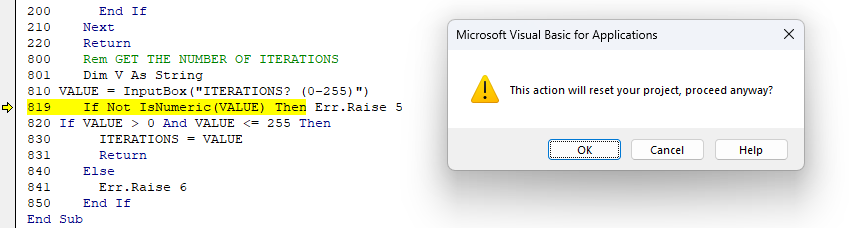
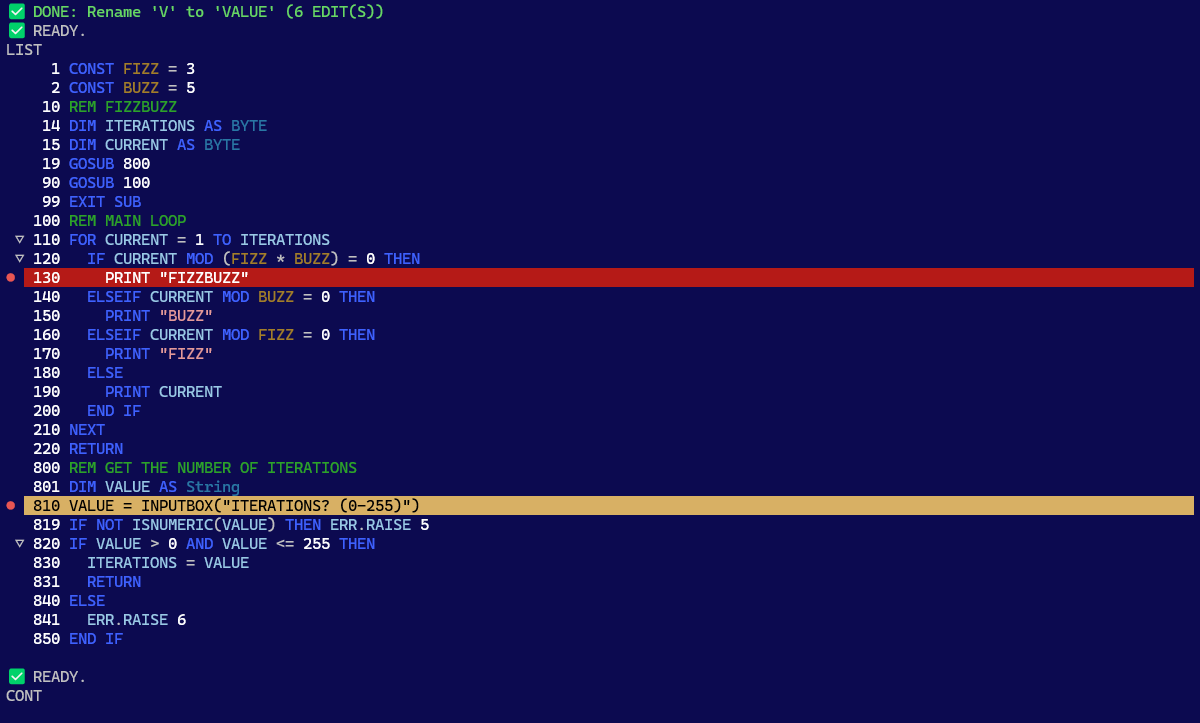
MS-VBA halts your debugging session when you rename a symbol in the current instruction, presumably because the edit cannot be made in all places at once, leaving the program invalid in the interim steps.RD-VBA merrily lets you resume after doing exactly the same, because renaming a symbol is an atomic operation that can perform multiple edits at once.
Edit and continue
Perhaps the single most defining feature of Classic Visual Basic, has arrived in RDCore: the ability to reshape the compiled program, observe and manipulate its symbols and values as it runs in a debugger.
E&C is a rather complex matter, and MS-VBA halts execution in quite several situations, for very valid reasons. The fact that RDCore allows resuming execution in places where MS-VBA would not, doesn’t take anything away from the historical feature: RDC’s internals are modeled in such a way that makes these limitations a bit easier to overcome, I suppose.
Edit and apply later
When RDCore cannot apply an edit, it often can (and does) hold on to the compiled version and issues a RDC20001 diagnostic that says the edit will be applied after the program restarts – rather than stopping the debug session right there and then.
Edit and take it back
If RDCore cannot apply an edit, and cannot hold on to the compiled version while keeping its state coherent, you can simply undo it, and then resume execution as if nothing happened.
See the documentation for a complete breakdown of the specific cases and the differences between RDCore and MS-VBA.
All debugger features are provided through standard DAP endpoints over stdio.
Code formatting
LSP defines endpoints for code formatting and format-as-you-type, but doesn’t specify what it specifically entails, leaving a language server free to do whatever it deems necessary to fulfill the request.
In RDCore, that means indenting the module of course – with legacy Rubberduck’s indenter settings imported from your Rubberduck configuration… a bit like how Rubberduck imported your legacy Smart Indenter settings on the first load.
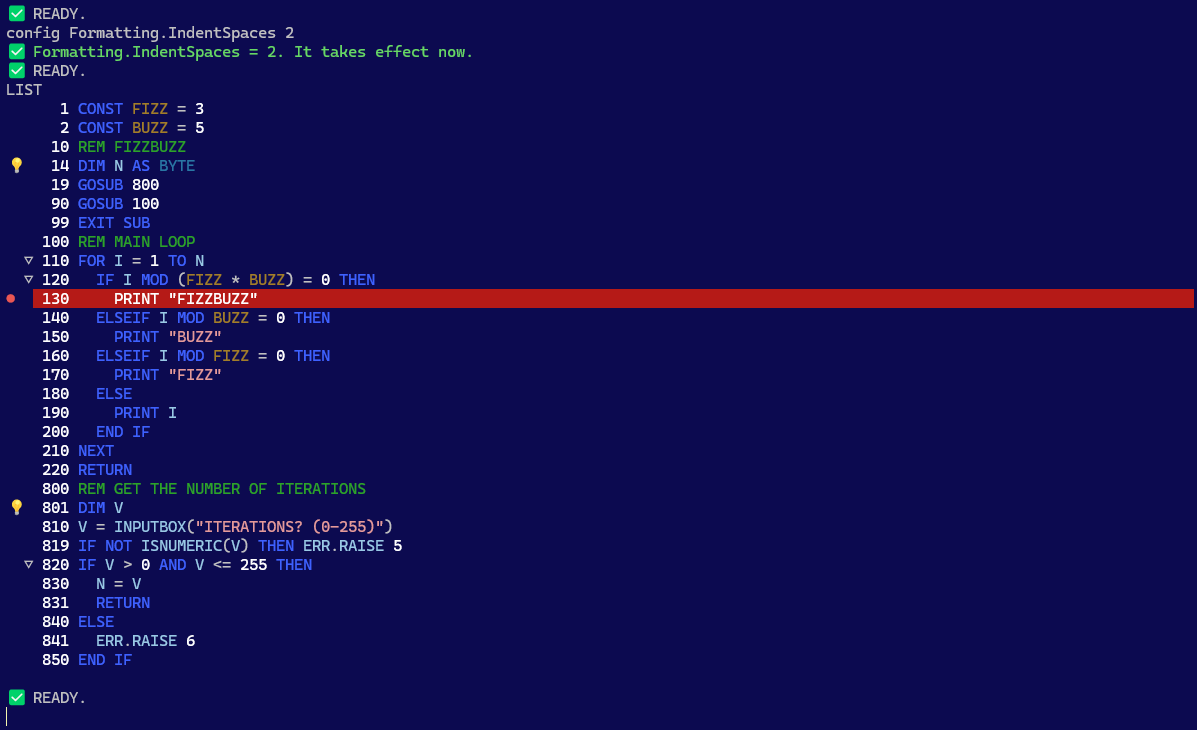
In the REPL client (rdc.exe running standalone), formatting is applied whenever the program source code is read – so when you LIST or SAVE a .rdc program file.
Code formatting settings are editable (with completion lists!) from the interface with the CONFIG command, and take effect immediately.
Block foldings
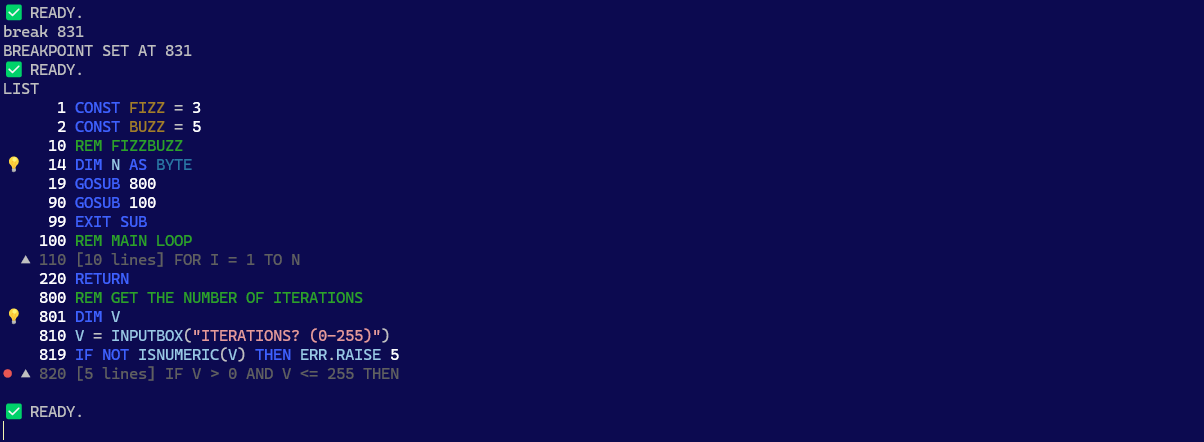
At the start of any block, the LIST output will show ▽▲ glyphs in the margin, indicating the start of foldable and folded code blocks, respectively.
Use the FOLD command to toggle them; completion list offers the valid line numbers.
If a folded block hides a breakpoint, it is displayed in the margin on the folded line, even if that line doesn’t have a breakpoint.
Completion lists
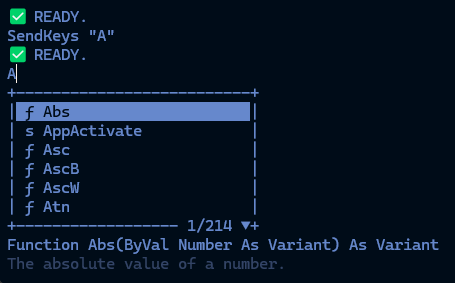
Completion lists show available commands, keywords, standard library modules, functions, and procedures; enum arguments, object members. All with the signature and docstring underneath.
The one single thing that makes the biggest difference in how hard or easy it is to learn a programming language, is its completion lists: without it, everything feels like a magic incantation that you must know in order to make anything work at all.
With it, it’s like the standard library is telling you how to use it, and you can explore all the types and members and discover things, all without leaving your editor.
RD-VBA completion is snappy and relevant, and signature help provides the docstrings as you type – in the language configuration of your session for the standard library (although currently only available in French and English).
MSForms hosting
The RD-VBA runtime is now capable of hosting MSForms. It does not, at this stage, host its own “RDForms” cross-platform GUI components, so trying to run a user form in Linux or on a machine without the non-distributable MSForms 2.0 DLL will raise a runtime error instead of showing a UI.
At design/compile time though, all the symbols remain available, so you get completion lists and signature help regardless, and the code compiles.
We could describe it as RD-VBA replacing MS-VBA as the MSForms designer and runtime host here, taking the legacy Microsoft UI framework made for Office automation out of its box and into standalone RD-VBA applications.
This is ultimately just the fallback solution, a shortcut to get something out the door faster: the goal is for the beta stage to host its own implementation of a GUI framework that can run and render anywhere: the one HexIDE built to do the same for VB6 forms and controls.
Remember MVVM in VBA? The example form’s content is dynamically generated at run-time, and RDCore runs it and its events; it works!
Alpha release?
As of this writing, RDCore is still unreleased pre-alpha. To try it today, you must clone the repository on GitHub and build and deploy the platform yourself, and then it’ll deploy an unoptimized debug build that’s intended for local development and debugging.
The roadmap is quickly becoming a long green list of checked boxes, there are now over 13k unit tests and 80% coverage, so an alpha release can’t be too far down the line. What’s holding it up?
HexIDE integration
Releasing RDCore without a LSP client integration beyond its own REPL/CLI toy application wouldn’t do it justice: there are so many things RDCore can do as a platform, that the REPL client simply cannot express, the first of which is handling a project with anything more than a single procedure scope with BASIC-style line numbers. The REPL client is a LSP demo and platform integration testing tool; it isn’t “the product”, even if, without an IDE, it’s what gives you a small glimpse of what the platform and language server can do.
There could be a small VSCode extension that implements the SDK’s RDCoreClientApp and integrates the LSP server into VSCode… but VSC is a general-purpose jack of all trades, master of none editor that makes the experience awkward when you just want your good old VBIDE with the modern-day perks.
This is where HexIDE wins: like VSCode it has its language features provided by LSP server extensions. But the Hex is for 6, as in VB6 – it is an independent project under MIT licensing, which gives a fork more rights than what we intend to leverage to ultimately make it the RDCore platform’s official IDE.
By 2027, it will be possible to import a VBA project or open a .vbp in HexIDE; analyze, test, and build it (.net exe/dll) in both CI/CD pipelines and the editor with RDCore, and compile it to native x86/x64 and extend the language beyond VBA with twinBASIC – all without leaving your IDE, and none of it requiring you to be on a Windows desktop with Office installed.
RDCore.SDK
The MIT-licensed RDCore.SDK project at the center of the platform is being extracted into its own separate repository, and will be publishing a NuGet package that RDCore platform components and extensions (including the HexIDE extension) will be referencing like any other package. The idea is to make it as easy as possible to write RDCore platform extensions.
Because the language core and runtime and platform SDK is only the beginning for the RDCore platform: unit testing will soon build on top of it, for example – but the alpha release will not wait for the platform extensions.