What’s the big deal with folders?

If you’re a seasoned VBA developer, you probably have your “VBA Toolbox” – a set of classes that you systematically include in pretty much every single new VBA project.

Before you’ve even written a single line of code, your project might look something like this already:
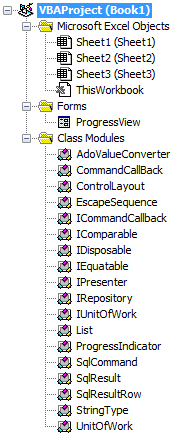
ProjectExplorer

The VBE’s Project Explorer gives you folders that regroup components by component type: forms in a folder, standard modules in another, and classes in another.

That’s great ok for small projects, perhaps. But as your toolbox grows, the classes that are specific to your project get drowned in a sea of class modules, and if you’re into object-oriented programming, you soon end up finding needles in a haystack. “But they’re sorted alphabetically, it’s not that bad!” – sure. And then you come up with all kinds of prefixes and naming schemes to keep related things together, to trick the sorting and actually manage to find things in a decent manner.

The truth is, this sucks.

Now picture this:

You shouldn’t have to care about a component’s type. Since forever, the VBE has forced VBA developers to accept that it could possibly make sense to have completely unrelated forms grouped together, and completely unrelated classes together, just because they’re the same type of VBA objects.

But it doesn’t have to be this way. I like how Visual Studio /.net lets you organize things in folders, which [can] define namespaces, which are a scope on their own.

There’s not really a concept of namespaces inside a VBA project: you could simulate them with standard modules that expose global objects that regroup functionality, but still every component in a project is accessible from anywhere in that project anyway. And who needs namespaces anyway?

Rubberduck 2.0 will not give you namespaces – that would be defying the VBA compiler (you can’t have two classes with the same name in the same project). What it will give you though, is folders.

Cool! How does it work?

Since the early versions of Rubberduck, we’ve been using @annotations (aka “magic comments”) in the unit testing feature, to identify test modules and test methods. Rubberduck 2.0 simply expands on this, so you can annotate a module like this:

'@Folder Foo.Bar

And that module will be shown under a “Bar” folder, itself under a “Foo” folder. How simple is that! We’ll eventually make the delimiter configurable too, so if you prefer this:

'@Folder Foo/Bar

Then you can have it!

With the ability to easily organize your modules into a “virtual folder hierarchy”, adhering to the Single Responsibility Principle and writing object-oriented code that implies many small specialized classes, is no longer going to clutter up your IDE… now be kind, give your colleagues a link to Rubberduck’s website 😉


The Code Explorer

The goal behind the Code Explorer feature, is to make it easier to navigate your VBA project. It’s not just about organizing your code with folders: since version 1.21, the Code Explorer has allowed VBA devs to drill down and explore a module’s members without even looking at the code:

CodeExplorer-expanded

The 2.0 Code Explorer is still under development – but it’s coming along nicely. If you’re using the latest release (v1.4.3), you’ll notice that this treeview has something different: next release every dockable toolwindow will be an embedded WPF/XAML user control, which means better layouts, and an altogether nicer-looking UI. This change isn’t being done just because it’s prettier: it was pretty much required, due to massive architectural changes.

Stay tuned!

Breaking Changes – Part 1: Parser

Rubberduck 2.0 flips everything around.

When numbering versions, incrementing the “major” digit is reserved for breaking changes – and that’s exactly what Rubberduck 2.0 will introduce.

I have these changes in my own personal fork at the moment, not yet PR’d into the main repository.. but as more and more people fork the main repo I feel a need to go over some of the changes that are about to happen to the code base.

If you’re wondering, it’s becoming clearer now, that Rubberduck 2.0 will not be released until another couple of months – at this rate we’re looking at something like the end of winter 2016… but it’s going to be worth the wait.


Parser State

Parsing in Rubberduck 1.x was relatively simple:

  • User clicks on a command that requires a fresh parse tree;
  • Parser knows which modules have been modified since the last parse, so only the modified modules are processed by the ANTLR parser;
  • Once we have a parse tree and a set of Declaration objects for everything (modules, procedures, variables, etc.), we resolve the identifier usages we encounter as we walk the parse tree again, to one of these declarations;
  • Once identifier resolution is completed, the command can run.

The parse results were cached, so that if the Code Explorer processed the entire code base to show up, and then the user wanted to run code inspections or one of the refactor commands, they could be reused as long as none of the modules were modified.

Parsing in Rubberduck 2.0 flips this around and completely centralizes the parser state, which means the commands that require a fresh parse tree can be disabled until a fresh parse tree is available.

We’ve implemented a key hook that tells the parser whenever the user has pressed a key that’s changed the content of the active code pane. When the 2.0 parser receives this message, it cancels the parse task (wherever it’s at) for that module, and starts it over; anytime there’s a “ready” parse tree for all modules, the expensive identifier resolution step begins in the background – and once that step completes, the parser sends a message to whoever is listening, essentially saying “If you ever need to analyze some code, I have everything you need right here”.

Sounds great! So… What does it mean?

It means the Code Explorer and Find Symbol features no longer need to trigger a parse, and no longer need to even wait for identifier resolution to complete before they can do their thing.

It means no feature ever needs to trigger a parse anymore, and Rubberduck will be able to disable the relevant menu commands until parser state is ready to handle what you want to do, like refactor/rename, find all references or go to implementation.

It means despite the VBE not having a status bar, we can (read: will) use a command bar to display the current parser state in real-time (as you type!), and let you click that parser state command button to expand the parser/resolver progress and see exactly what little ducky’s working on in the background.


To be continued…

There’s a new duck in town!

…and it rocks.

The past few months have been tough. We were facing some serious ANTLR grammar bugs, and our identifier resolver had even more serious bugs, which meant false positives in code inspections, a rename refactoring that wouldn’t always rename all references, and a StackOverflowException if you were unlucky… which blew up Rubberduck, the VBE, and the Office host app with it, without warning.

That’s why 1.3 remained a “pre-release”.

Rubberduck 1.4 has none of these issues. Oh, our ANTLR grammar is still far from perfect (line numbers, and “precompiler” #IF statements come to mind) – but a number of bugs were fixed, and the resolver was completely rewritten. It’s not as perfect as we’d like it to be, but it correctly resolved everything we threw at it, without a single exception.

So, what’s so cool about it?


#Refactor

Extract Method has been around since version 1.2, and Rename was pre-released (albeit with some issues) with 1.3; Rubberduck 1.4 introduces two new refactorings:

  • Reorder Parameters in a procedure, and automatically adjust all call sites.
  • Remove Parameters from a procedure’s signature, and automatically adjust all call sites.

Rename can be used from the Project Explorer, Code Pane or Form Designer context menus, as well as from the Code Explorer to rename a project, a component (form, module, class), a procedure, variable, line label, …anything. This completely eliminates all excuses to keep meaningless identifiers in your code.


#Navigate

The Code Explorer was already a nice feature in 1.2, but Rubberduck 1.4 takes navigation to a whole new level.

  • Find Symbol lets you search for anything – and go to its declaration.
  • Find all references displays all call sites of any identifier.
  • Go to implementation lets you navigate implementations of an interface or interface members. Rubberduck considers any class referenced by an Implements statement as an interface.

One cool thing is that we’ve created declarations for pretty much everything in the Standard VBA library, so you can use find all references to list all usages of, say, MsgBox, or Err.Raise.


#Git

That’s right. We’ve talked about it for a while. Well, it’s here. Integrated source control, right there in the VBE. Commit, push, pull, merge, branch, to and from local or remote repositories on GitHub.


And so much more…

If you’ve never used a previous version of Rubberduck, now is the time.

Every VBA programmer needs a Rubberduck.

DOWNLOAD

Rubberduck, or Gummianka, le petit canard en caoutchouc

Next release rocks. Like, if you’re running 1.22, you’re not going to believe everything that’s coming at you in 1.4 – and if you’re running 1.3x, …you’re not going to believe it either.

The feature set is becoming massive, and that’s thoroughly awesome. We are currently in the final stages of stabilizing the next release and polishing everything. There’s a ton of amazing stuff coming, but one of the coolest things is that, thanks to the awesomeness of Code Review community members…

…we are proud to announce localization in French and Swedish, and a German translation is under way.

If a language isn’t supported on your system, it won’t show up in the display language dropdown:

Options-Localized

More announcements to come, stay tuned!

You’ve waited long enough.

The wait is over!

I have to say that this release has been… exhausting. Correctly resolving identifier references has proven to be much, much more complicated than I had originally anticipated. VBA has multiple ways of making this hard: with blocks are but one example; user-defined-type fields are but another.

But it’s done. And as far as I could tell, it works.

Why did you tag it as “pre-release” then?

Because resolving identifier references in VBA is hard, and what I released is not without issues; it’s not perfect and still needs some work, but I believe most normal use cases are covered.

For example, this code will blow up with a wonderful StackOverflowException:

Class1

Public Function Foo() As Class2
    Set Foo = New Class2
End Function

Class2

Public Sub Foo()
End Sub

ThisWorkbook

Public Sub DoSomething()
    Dim Foo As New Class1
    With Foo
            .Foo
    End With
End Sub

It compiles, VBA resolves it. And it’s fiendish, and nobody in their right minds would do anything near as ambiguous as that. But it’s legal, and it blows up.

That’s why I tagged it as a “pre-release”: because there are a number of hair-pulling edge cases that just didn’t want to cooperate.

See, finding all references to “foobar” works very well here:

Public Sub DoSomething()
    Dim foobar As New Class1
    With foobar
        With .Foo
            .Bar
        End With
    End With
End Sub

…and finding all references to “Foo” in the below code will not blow up, but the “.Foo” in the 2nd with block resolves as a reference to the local variable “Foo”:

Public Sub DoSomething()
    Dim Foo As New Class1
    With Foo
        With .Foo
            .Bar
        End With
    End With
End Sub

And of course, there are a number of other issues still.

Here’s a non-exhaustive list of relatively minor known issues we’re postponing to 1.31 or other future release – please don’t hesitate to submit a new issue if you find anything that doesn’t work as you’d expect.

There can be only one

Rubberduck doesn’t [yet] handle cross-project references; while all opened VBA projects are parsed and navigatable, they’re all “silos”, as project references aren’t taken into account; this means if project A is referencing project B, and project A contains the only usage of a procedure defined in project B, then that procedure will fire up a code inspection saying the procedure is never used.

It also means “find all references” and “rename” will miss it.

self-referencing Parameters

“Find all references” has been seen listing the declaration of a parameter in its list of references. Not a biggie, but not intended either. There’s no explanation for that one, yet – in fact it’s possible you never even encounter this issue.

Selection Glitches From Code Inspection Results

We know what causes it: the length of the selection is that of the last word/token in the parser context associated with the inspection result. That’s like 80% fixed! Now the other 80% is a little bit tricky…

Performance

Code inspections were meant to get faster. They got more accurate instead. This needs a tune-up. You can speed up inspections by turning off the most expensive ones… although these are often the most useful ones, too.

Function return vAlue not assigned

There has been instances of [hard-to-repro] object-typed property getters that fire up an inspection result, when they shouldn’t. Interestingly this behavior hasn’t been reproduced in smaller projects. This inspection is important because a function (or property getter) that’s not assigned, will not return anything – and that’s more than likely a bug waiting to be discovered.

Parameter can be passed by value

This inspection is meant to indicate that a ByRef parameter is not assigned a value, and could safely be passed ByVal. However if such a parameter is passed to another procedure as a ByRef parameter, Rubberduck should assume that the parameter is assigned. That bit is not yet implemented, so that inspection result should be taken with a grain of salt (like all code inspection results in any static code analysis tool anyway).

This inspection will not fire up a result if the parameter isn’t a primitive type, for performance reason (VBA performance); if performance is critical for your VBA code, passing parameters by reference may yield better results.

Special Thanks to Rob Bovey and Stephen Bullen

Twitter is awesome: you share something with the world, and then the world shares something with you. Thanks to the awesomeness of Ross McLean, we are pleased to announce that Rubberduck 2.0 will include automagic indentation

…Powered by smart indenter

Yes! The original author and current maintainer of the magic indenting freeware tool downloaded by dozens of thousands of happy customers have kindly supplied us with the VB6 source code, and we’re going to put it to good use, port it to .NET, embed the almighty indentation algorithm into Rubberduck, and try to keep as much as possible of the formidable set of configuration settings that make Smart Indenter such a wonder.

To be continued…

Naming is hard. Renaming is easy.

There are only two hard things in Computer Science: cache invalidation and naming things.

— Phil Karlton

How many VBA modules declare variables looking like this:

Dim v As Long, vWSs As Variant, Mrange As Range, Vrange As Range

Or like this:

Dim i As Long
Dim LR As Long

How many procedures have cryptic names that only the author knows what they mean?

How many Times did you refrain from renaming a procedure in fear of breaking the code?

Fear no more. Renaming doesn’t have to be the hardest part of using meaningful names in code.

With the next release of Rubberduck, finding a meaningful name is going to be the hardest part – I’m please to announce that Rubberduck 1.3 will feature a rename refactoring:

rename-const

Awesome. How does it work?

I’m tempted to say “Magic!” here. Rubberduck uses the current selection (/caret location) to guess what you’re trying to rename. If you’re on a constant usage, it knows to rename the constant and every single one of its references; if you’re just inside a procedure scope, it guesses you want to rename the procedure and affect every single call site; if you’re somewhere in the declarations section of a module, it lets you rename the module itself, and automatically adjusts every explicit reference to it.

The Rubberduck/Refactor menu will feature a new “Rename” button, accessible with Alt+B,R,R (Rubberduck/Refactor/Rename).

The Code Explorer‘s context menu will also feature a “Rename” button, so that any module/member can be renamed without even looking at the actual code.

Lastly, we’ll hijack the code pane context menu and add our “Refactor” menu in there, too.

Naming is hard. Renaming doesn’t have to be!

Rubberduck 1.3: When the VBE becomes a real IDE

Parsing is hard!

Rubberduck parsing is being refined again. The first few releases used a hand-made, regex-based parser. That was not only unmaintainable and crippled with bugs, it also had fairly limited capabilities – sure we could locate procedures, variables, parameters… but the task was daunting and, honestly, unachievable.

Version 1.2 changed everything. We ditched the regex solution and introduced a dependency on ANTLR4 for C#, using an admittedly buggy grammar intended for parsing VB6 code. Still, the generated lexer/parser was well beyond anything we could have done with regular expressions, and we could implement code inspections that wouldn’t have been possible otherwise. That was awesome… but then new flaws emerged as we realized we needed more than that.

Version 1.3 will change everything again. Oh, we’re still using ANTLR and a (now modified) buggy grammar definition, but then we’re no longer going to be walking the parse tree all the time – we’re walking it once to collect all declarations, and then once to collect all usages of every single identifier we can find.


What does that mean?

Imagine a table where, for every declaration, you lay down information such as the code module where you found it, the exact location in the code file, the scope it’s in, whether it’s a class module, a standard module, a procedure, a function, a property get/let/setter, an event, a parameter, a local variable, a global constant, etc. – and then whether it has a return/declared type, what that type is, whether it’s assigned a reference upon declaration (“As New”) – basically, on that table lays the entire code’s wireframe.

Then imagine that, for everything on that table, you’re able to locate every single reference to that identifier, whether it’s an assignment, and exactly where that reference is located – at which position in which code file and in which scope.

The result is the ability to make the difference between an array index assignment and a function call. If VBA can figure out the code, so can Rubberduck.

This means the next few versions will start seeing very cool features such as…

  • Find all references – from a context menu in the Code Explorer tree view, or heck, why not from a context menu in the code pane itself!
  • GoTo implementations – easily navigate to all classes that implement a specific interface you’ve written.
  • GoTo anything – type an identifier name in a box, and instantly navigate to its declaration… wherever that is.
  • Safe delete – remove an identifier (or module/class) only if it’s not used anywhere; and if it’s used somewhere, navigate to that usage and fix it before breaking the code.
  • Rename refactoring – rename foo to bar, and only the “foo” you mean to rename; this isn’t a Find & Replace, not even a RegEx search – it’s a full-fledged “rename” refactoring à la Visual Studio!

Not to mention everything else that’s in store for v1.3 (did I say IDE-Integrated GitHub Source Control?) – stay tuned!

Code Explorer – does it replace the VBE’s Project Explorer?

Version 1.21 will feature a Code Explorer getting closer to where we envision it:

Just like the Project Explorer we can now toggle folders on and off, and components are sorted alphabetically. We can add standard and class modules, even test modules, open the designer when a form is selected – we can even run all tests from there if we want.

The Code Explorer is a bit of an hybrid between the VBE’s Project Explorer and Object Browser windows – we see all the members of every module, and we can double-click navigate anywhere.

We’re planning to implement a number of refactorings in 1.3, and some of them are going to be available from the Code Explorer‘s context menu. 1.3 will also integrate GitHub source control, and the Code Explorer‘s context menu will be usable to commit or undo changes to a specific file – importing and exporting files is also going to be in that menu by then.

What else would you use the Code Explorer for? Does the Code Explorer replace the VBE’s Project Explorer for you?

Version 1.2 will hit hard!

Rubberduck has had a decent unit testing feature since 1.0. Version 1.1 introduced a concept of code inspections – a proof of concept really, a sketch of a vision of what we wanted Rubberduck to do with the VBA code in the IDE.

Upcoming version 1.2 has undergone massive changes in the parsing strategy – going from a home-made regex-based solution to a full-blown ANTLR [slightly modified] Visual Basic 6.0 grammar generating a lexer and parser. As a result, code inspection capabilities have gone exactly where we envisioned them from the start.

Here’s what version 1.2 can find in your VBA code (in alphabetical order):

  • Implicit ByRef parameter
  • Implicit Variant return type (function/property get)
  • Multiple declarations in single instruction
  • Function return value not assigned
  • Obsolete Call statement
  • Obsolete Rem statement
  • Obsolete Global declaration
  • Obsolete Let statement
  • Obsolete type hint
  • Option Base 1 is potentially confusing
  • Option Explicit is not specified
  • Parameter can be passed by value
  • Parameter is not used
  • Variable is never assigned
  • Variable is never used
  • Variable type is implicitly Variant

And we have more on their way! …and that’s just code inspections.

Version 1.2 also introduces a Refactor menu, which allows extracting a method out of any valid selection – and future versions will allow inlining a method into its call sites, renaming any identifier (and updating its usages), reording/removing parameters from a signature (and updating usages), promoting a local variable to module-level, or extracting a whole interface out of a class module’s members… and more.

Version 1.2 also introduces an API for VBA code to integrate with GitHub source control, through the very same technology that allows Visual Studio 2013 to integrate with GitHub, using LibGit2Sharp. At this stage it’s pretty much what code inspections were in version 1.1: a proof of concept – but in future versions, expect to be able to manage source control for your VBA projects in a way similar to how you manage source control for your .NET projects – within the IDE itself!

Rubberduck 1.2 will hit hard… and our duck is still but a little duckling: VBA will never be the same when it grows all its, uh, rubber.