Posts

So, 2.0.12 is late… what’s cooking?

Recently I tweeted this:

The release of Rubberduck 2.0.12, due 5 days ago, is being delayed because we have something awesome cooking up. Give us 2-3 more weeks 🙂

TL;DR: if awesomeness can be cooked, that’s what’s cooking.

The amount of work that went into the upcoming release is tremendous. We’ve been trying to figure out exactly what was blowing up when the VBE dismantled itself and the host was shutting down, causing that pesky crash on exit… ever since we’ve introduced WPF user controls in dockable toolwindows. And at last, solved it.

We’ve been working on improving performance and thread safety of the entire parsing engine, and fixed a few grammar/parser bugs on the way, including a long-standing bug that made redundant parentheses trip a parse exception, another with the slightly weird and surely redundant Case Is = syntax, and @Magic annotations can now legally be followed by any comment, which is useful when you want to, well, annotate an annotation:

'@Ignore ProcedureNotUsed; called by [DoSomething] button on Sheet12
Public Sub DoSomething()
    ...
End Sub

We’ve enhanced the COM reference collector such that the resolver has every bit of useful information about everything there is to know in a type library referenced by a VBA project. This allows us to enhance other features, like the context-sensitive commandbar that tells you what Rubberduck is your selection as, e.g. a TextBox control in a UserForm:

textbox

(don’t mind that “Serialize” button – it’s only there in debug builds ;^)

Oh, and then there’s the interactions with the website – we’ll be running the inspections and the indenter on the website, and we’ll have the ability to (optionally) have Rubberduck know when a new version is available!


2.0.12 is going to be epic.

The 2.0 build

And then there’s even more: we’re going to make the inspections a concern of the parser engine, and turn them into parse tree node annotations – which means the code that currently finds the Declaration that’s currently selected (or one of its references), can also be used to find inspection results associated with that particular Declaration; this will probably prompt a redesign of how we present inspection results, and will definitely improve performance and memory footprint.

One of the best 2.x features is probably going to be the add/remove references dialog, which is currently merely prototyped. Beefing up unit testing with data-driven tests is also going to be a big one.

And when you see where we want to be for 3.0 (code path analysis & expression resolution, plug-in architecture, a subclassed CodePanethat actually tells us what’s going on, perhaps even with our own enhanced IntelliSense, more host-specific behaviors, TONS of new inspections), …this project is so awesome, I could just keep going on and on.

Not coming soon enough? I know, right!

cr-ducky-great-again-600x500.

To be continued…


Issues, Milestones and Projects

When the Rubberduck project was first put on GitHub, we quickly decided to use issues as our “todo list”. Right then, we knew we were going to need some label system. Since everything had started on a Stack Exchange site, labels were made to look like SE tags – and came to be used as such: our “categories” labels are all the same color: DDDDDD.

tags

“Oh wow, that must be so boring!”, right?

A little bit, indeed. So we made the status tags red (B60205), the meta-tags almost-white (FEFEFE), subcategories dark gray (808080); then we have [support] in blue (0077AA), [up-for-grabs] in forest green (0E8A16) and [help-wanted] in bright gold (FBCA04), to catch the eye easily.

So we went on a spree and created an issue for every feature we (then) could think of, and Rubberduck was officially kicked off as a long-term project, and I felt like we were managing it ok.

Especially since we started creating milestones and assigning one to issues. One mistake you don’t want to make, is to create a Next Release milestone – before you know it it’s impossible to know what was fixed when!

So a milestone was created for the “initial release”, then for “version 1.1”. Then I created one dedicated to get parsing powered by ANTLR – milestones were no longer release dates, but now little projects within the project, being worked on as reported and discovered bugs were assigned under the release milestone.

It worked that way until.. very recently. Looking back, I’d say what didn’t work was that our releases were revisions but our milestones were minor releases – so there was an undetermined number of releases under one given milestone. “v2.0.12” is the first milestone in the repository that’s actually numbered after a revision – and against which there will be only one release.

So, to recap:

  • Issues ideally describe one bug or feature request
  • Milestones ideally regroup all issues to be closed for a given release

Starting with 2.0.11/12, we’re going to be shooting for monthly releases, so a new milestone should be created every month or so: Rubberduck releases have been pretty random up to this point, and with a release-per-milestone it’s going to be much easier to plan and track the “current sprint”.

Or will it? Something is missing.

Projects

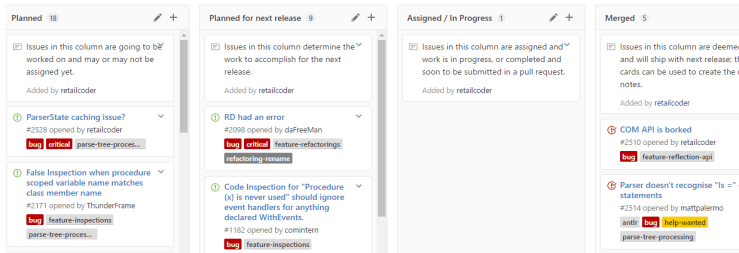
That’s what the “little projects within the project” milestones should have been from the beginning: a project. On GitHub a project lets you create columns to move cards to/from, and if you add an issue as a card to your “In Progress” column, the issue page will say “In Progress in [Project]” in the side bar.. which is pretty cool!

board.PNG

As of yesterday, Rubberduck has two types of projects:

Things we plan and track for [every] next release

There’s two of them:

  • Features tracks feature requests and enhancements to existing features.
  • BugSlayer tracks all reported bugs.

These projects have columns that help plan work, and visualize everything much more easily than with the issues list:

  • Requested / Reported
  • Deferred / Hold
  • Planned
  • Planned for next release
  • Assigned / In Progress
  • Merged
  • Released

Things we plan and track for some eventual release

When an important feature requires more work than can reasonably be tracked with a single issue / card in the Features project, a project board dedicated to that feature can be created to make it easier to track work and facilitate collaboration.

These projects have a “classical” set of columns:

  • TODO
  • In Progress
  • Done

Do you need all that for a small side-project? Maybe not… but I don’t see how it can hurt. Rubberduck isn’t really a small project anymore, though, but it’s still built by a handful of people that find a few spare hours to devote regularly. With the number of open issues (over 300), tracking things in the issues list was starting to feel like tracking help desk tickets with Outlook email follow-up flags – GitHub projects change everything. Heck, I think they’re making me start liking project management!

Nothing to declare

Somewhere in the first batch of issues/to-do’s we created when we started Rubberduck on GitHub (Issue# 33 actually), there was the intention to create a tool that could locate undeclared variables, because even if you and I use Option Explicit and declare all our variables, we have brothers and sisters that have to deal with code bases that don’t.

So we tried… but Rubberduck simply couldn’t do this with the 1.x resolver: identifiers that couldn’t be resolved were countless, running an inspection that would pop a result for every single one of them would have crippled our poor little duckling… so we postponed it.

The 2.0 resolver however, thinks quite literally like VBA itself, and knows about all available types, members, globals, locals, events, enums and whatnot, not just in the VBA project, but also in every referenced COM library: if something returns a type other than Variant or Object, Rubberduck knows about it.

The role of the resolver is simple: while the parse tree of a module is being traversed, every time an identifier is encountered it attempts to determine which declaration is being referred to. If the resolver finds a corresponding declaration, an IdentifierReference is created and added to the Declaration instance. And when the resolver can’t resolve the identifier (i.e. locate the exact declaration the identifier is referring to), a null reference was returned and, unless you have detailed logging enabled, nothing notable happens.

As of the last build, instead of “doing nothing” when a reference to variable can’t be resolved to the declaration of that variable, we create a declaration on the spot: so the first appearance of a variable in an executable statement becomes the “declaration”.

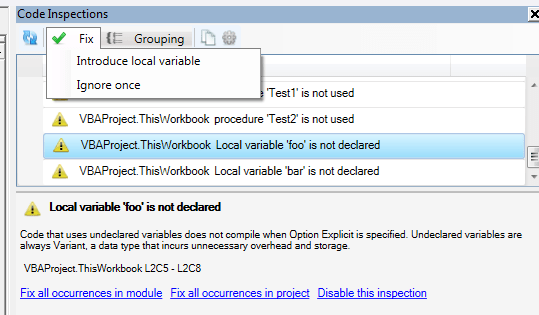
We create an implicit Variant variable declaration to work with, and then this happens:

hhp2m

With a Declaration object for an undeclared variable, any further reference to the same implicit variable would simply resolve to that declaration – this means other Rubberduck features like find all references and refactor/rename can now be used with undeclared variables too.

Rubberduck is now seeing the whole picture, with or without Option Explicit.

The introduce local variable quick-fix simply inserts a “Dim VariableName As Variant” line immediately above the first use in the procedure, where VariableName is the unresolved identifier name. The variable is made an explicit Variant, …because there’s another inspection that could fire up a result if we added an implicit Variant.

The quick-fix doesn’t assume an indentation level – makes me wonder if we should run the indenter on the procedure after applying a quick-fix… but that’s another discussion.

To be continued…

2.0: Stabilizing

The latest release packs a number of fundamental changes that affected every single part of Rubberduck. These changes are the result of the payment of a massive technical debt: from the very beginning, the very idea of wrapping the VBIDE API was deemed a massive and not-quite-needed undertaking – and so many parts of Rubberduck had direct dependencies on the VBA extensibility type library.

VBProjects, VBComponents, CodePanes, CommandBars, everything.

The problem is that, with COM resources, you need to release what you use – and cleaning up COM resources through .NET interop isn’t exactly trivial. Of course it looks pretty simple if you look at the ShutdownAddIn method in Rubberduck’s core:

try
{
    _ide.Release();
}
catch (Exception e)
{
    _logger.Error(e);
}

This Release method is exposed by the ISafeComWrapper interface, which is itself derived from a very general-purpose INullObjectWrapper interface:

public interface ISafeComWrapper : INullObjectWrapper
{
    void Release();
}

public interface ISafeComWrapper<out T> : ISafeComWrapper
{
    new T Target { get; }
}

public interface INullObjectWrapper
{
    object Target { get; }
    bool IsWrappingNullReference { get; }
}

Together, these simple interfaces form the down payment on the technical debt that has been plaguing Rubberduck from its early beginnings: the next step was to derive wrapper interfaces for every single type in the API. So instead of depending on a Microsoft.Vbe.Interop.CodePane, our code would be depending on a Rubberduck.VBEditor.SafeComWrappers.Abstract.ICodePane interface:

public interface ICodePane : ISafeComWrapper, IEquatable<ICodePane>
{
    IVBE VBE { get; }
    ICodePanes Collection { get; }
    IWindow Window { get; }
    int TopLine { get; set; }
    int CountOfVisibleLines { get; }
    ICodeModule CodeModule { get; }
    CodePaneView CodePaneView { get; }
    Selection GetSelection();
    QualifiedSelection? GetQualifiedSelection();
    void SetSelection(int startLine, int startColumn, int endLine, int endColumn);
    void SetSelection(Selection selection);
    void Show();
}

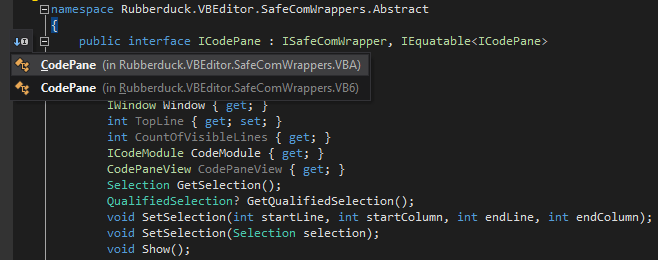
These abstract wrapper interfaces can then be implemented by concrete wrapper types that directly deal with the Microsoft interop types – so we could get rid of a number of extension methods, and move them directly into the wrapper types… and this time we’re not limited to the VBA extensibility API:

icodepaneimplementations

Every wrapper type must implement the Release method, where it cleans up after itself and its child objects – here the CodePanes wrapper releases its CodePane children before it releases itself:

public override void Release()
{
    if (!IsWrappingNullReference)
    {
        for (var i = 1; i <= Count; i++)
        {
            this[i].Release();
        }
        Marshal.ReleaseComObject(Target);
    }
}

This way, the entry point can call IVBE.Release, and every COM object ever accessed in the lifetime of Rubberduck is sure to get properly cleaned up, with one single method call.


Everywhere in Rubberduck, dependencies on Microsoft.Vbe.Interop were replaced with dependencies on Rubberduck.VBEditor.SafeComWrappers.Abstract, and then we were a step closer to a stable release.

But Rubberduck still kept crashing its host application on exit, and sometimes even at startup: something else wasn’t right, the call stack was pointing to an event listener picking up ItemAdded and ItemRemoved events fired from the References class.

Rubberduck implements COM event sinks to listen to IDE events such as “a module was renamed” or “a new project was added”, or “a project was closed”; I disabled them all. I also disabled the initial parse, just in case.


And Rubberduck kept crashing the host on exit, still.

The wrapper type that implemented the IReferences wrapper interface was registering handlers for ItemAdded and ItemRemoved; I removed them.

And Rubberduck did not crash on exit anymore.

So I reinstated the keyboard hook: still no crash.

So I reinstated the event sinks: still no crash.

So I reinstated the initial parse… and it crashed.

Initializing a VBE add-in is… complicated: the VBE hasn’t completely constructed itself at that time, and projects are still loading – the event sink was picking up ProjectAdded and ProjectRenamed events at startup (did you know your VBA projects aren’t “natively” called “VBAProject1”, but literally renamed that way at startup?), and trying to parse projects in the IDE at that point was just asking for trouble.

So I disabled the initial parse. No crash at startup, no crash at shut down. I moved the sinks’ event registration code out of constructors and into a dedicated method meant to be called once the IDE is ready for it… and forgot to call it.

So v2.0.9 does not parse automatically at startup, and doesn’t automatically know when a module or project is renamed, added, or removed.

But it doesn’t crash either. At least, not on my machine running 64-bit Office 2010 on Win10 x64… but since 2.0.9 was issued earlier today, we’ve found a race condition preventing proper teardown of the Rubberduck menu, and there are still a few more things to fix before we can call 2.0 “stable”.

But we’re much closer today than we were a month ago.

To be continued…


OOP VBA pt.2: Factories and Cheap Hotels

When writing OOP code in VBA, it’s important to keep a number of things in mind:

  • A class can be given a default instance, which makes all its public members usable without needing to create a new instance.
  • An interface can very well expose only public property get accessors, but no mutator.
  • A class Implements as many interfaces as needed.
  • Events cannot be exposed by an interface.

VB_Attributes

If you ever exported a class module and examined it in your favorite text editor, you probably noticed these:

Attribute VB_Name = "Class1"
Attribute VB_GlobalNameSpace = False
Attribute VB_Creatable = False
Attribute VB_PredeclaredId = False
Attribute VB_Exposed = False

The VB_Name attribute determines the identifier the class will be referred to in code; VB_GlobalNameSpace makes its members global which is kinda anti-OOP.. VB_Creatable can only be False in VBA projects, and means that other VBA projects cannot directly create a new instance of that class. VB_Exposed determines whether other VBA projects can see this class or not.

The one we’re interested in, is VB_PredeclaredId. If you export a UserForm module, you’ll notice it’s predeclaredId attribute is  True. This is what allows you to work against a form without creating an instance – you’re using the default instance when you do that.. and you shouldn’t.

Normally.


Finding the cheapest hotel

Here’s a little problem that I’m going to solve in VBA, with full-blown OOP:

A hotel chain operating in Goa wishes to offer room reservation services. They have three hotels in Goa: GreenValley, RedRiver and BlueHills. Each hotel has separate weekday and weekend (Saturday and Sunday) rates. There are special rates for rewards customer as a part of loyalty program.Each hotel has a rating assigned to it.

  • GreenValley with a rating of 3 has weekday rates as Rs1100 for regular customer and Rs800 for rewards customer. The weekend rates are 900 for regular customer and 800 for a rewards customer.
  • RedRiver with a rating of 4 has weekday rates as Rs1600 for regular customer and Rs1100 for rewards customer. The weekend rates are 600 for regular customer and 500 for a rewards customer.
  • BlueHills with a rating of 5 has weekday rates as Rs2200 for regular customer and Rs1000 for rewards customer. The weekend rates are 1500 for regular customer and 400 for a rewards customer.

IMPORTANT: Before you read any further

This exercise isn’t about solving the problem. The problem is rather easy to solve. It’s about managing changes, writing code that can survive changes. Specifications are never carved in stone, they change all the time. Today the hotel chain has 3 hotels, tomorrow they might have 3,500. Today the hotel chain has two types of customers. Tomorrow they might have three; eventually the chain acquires another chain in another country, and then the prices need to be converted between USD and EUR before they can be compared. The foreign hotels might have different statutory holidays, and it wouldn’t matter until the CEO decided that July 4th reservations would be 25% off, but only in the US hotels.

This solution isn’t the one OOP way to do things. It’s a solution; your mileage may vary. There are many, many ways to do this – but a monolithic block of procedural code wouldn’t survive very long with the hectic reality depicted above, would it? Or it would, but then bugs would start appearing, and more changes would have to be made, perhaps introducing new bugs, too. Sounds familiar? Keep reading.

Okay. Ready?

So, let’s say I want to store information about some pricing rule, based on some DateType and some CustomerType. I could describe this type as follows (the enums don’t belong to the interface, they’re just public types that were convenient to define there):

Option Explicit

Public Enum CustomerType
    Regular
    Premium
End Enum

Public Enum DateType
    WkDay
    WkEnd
End Enum

Public Property Get DateType() As DateType
End Property

Public Property Get CustomerType() As CustomerType
End Property

Public Function ToString() As String
End Function

Let’s call this interface IPricingRuleInfo.

In well-designed OOP, one doesn’t design an interface to change. This IPricingRuleInfo interface will change, as soon as the requirements change and we need to expose a new property. But we’re going to use VBA interfaces differently here… just bear with me.

What we’re going to do with this interface, is a façade that the program will be written against, while we hide the implementation details.

The implementation would look like this:

Option Explicit

Private Type TInfo
    DateType As DateType
    CustomerType As CustomerType
End Type
Private this As TInfo

Implements IPricingRuleInfo

Public Property Get CustomerType() As CustomerType
    CustomerType = this.CustomerType
End Property

Public Property Let CustomerType(ByVal value As CustomerType)
    this.CustomerType = value
End Property

Public Property Get DateType() As DateType
    DateType = this.DateType
End Property

Public Property Let DateType(ByVal value As DateType)
    this.DateType = value
End Property

Public Property Get Self() As IPricingRuleInfo
    Set Self = Me
End Property

Public Function Create(ByVal dtType As DateType, ByVal custType As CustomerType) As IPricingRuleInfo
    With New PricingRuleInfo
        .DateType = dtType
        .CustomerType = custType
        Set Create = .Self
    End With
End Function

Private Property Get IPricingRuleInfo_CustomerType() As CustomerType
    IPricingRuleInfo_CustomerType = this.CustomerType
End Property

Private Property Get IPricingRuleInfo_DateType() As DateType
    IPricingRuleInfo_DateType = this.DateType
End Property

Private Function IPricingRuleInfo_ToString() As String
    IPricingRuleInfo_ToString = CStr(this.CustomerType) & ";" & CStr(this.DateType)
End Function

Notice this Create method: that’s the Factory Method, intended to be used from the default instance. The properties are instance members that really belong to an instance of the class; the implementation also exposes Property Let accessors, so that Create can assign the proprerty values of the instance to create and return.

The Self getter is a little trick that enables this neat With New syntax.

The private type helps remove awkward prefixes by legalizing identical field and property names, and if the class’ state ever needs to be serialized, it’s child play.

Any code that works with a PricingRuleInfo instance will have access to its setters and default instance. But the client code wouldn’t do that: the client code works with the IPricingRuleInfo interface, and know nothing of a default instance, a factory method, or Property Let members: it only sees CustomerType and DateType read-only values, and a ToString method that concatenates them into a string.

And now we can have an IPricingRule interface like this:

Option Explicit

Public Property Get RuleInfo() As IPricingRuleInfo
End Property

Public Function Evaluate(ByVal info As IPricingRuleInfo) As Currency
End Function

And then we can have as many implementations as we like – here, a simple one called FixedAmountPricingRule, that takes an amount at creation, encapsulates it, and then uses it to return a fixed amount when evaluating the rule:

Option Explicit

Private Type TRule
    RuleInfo As IPricingRuleInfo
    Amount As Currency
End Type
Private this As TRule

Implements IPricingRule

Private Property Get IPricingRule_RuleInfo() As IPricingRuleInfo
    Set IPricingRule_RuleInfo = this.RuleInfo
End Property

Private Function IPricingRule_Evaluate(ByVal info As IPricingRuleInfo) As Currency
    IPricingRule_Evaluate = this.Amount
End Function

Public Property Get RuleInfo() As IPricingRuleInfo
    Set RuleInfo = this.RuleInfo
End Property

Public Property Set RuleInfo(ByVal value As IPricingRuleInfo)
    Set this.RuleInfo = value
End Property

Public Property Get Amount() As Currency
    Amount = this.Amount
End Property

Public Property Let Amount(ByVal value As Currency)
    this.Amount = value
End Property

Public Property Get Self() As IPricingRule
    Set Self = Me
End Property

Public Function Create(ByVal info As IPricingRuleInfo, ByVal value As Currency) As IPricingRule
    With New FixedAmountPricingRule
        Set .RuleInfo = info
        .Amount = value
        Set Create = .Self
    End With
End Function

Again, we give this class a default instance by setting its VB_PredeclaredId attribute to True and re-importing the module into the project.

Next we’ll need an abstraction for hotels – enter IHotel:

Option Explicit

Public Property Get Name() As String
End Property

Public Property Get Rating() As Byte
End Property

Public Function CalculatePricing(ByVal info As IPricingRuleInfo) As Currency
End Function

Public Function GetDateType(ByVal value As Date) As DateType
End Function

Notice how the interface exposes nothing of IPricingRule. The implementation has a dependency on IPricingRule and IPricingRuleInfo, but knows nothing of the concrete types. Here’s the code:

Option Explicit

Private Type THotel
    PricingRules As New Scripting.Dictionary
    Name As String
    Rating As Byte
End Type
Private this As THotel
Implements IHotel

Public Property Get Name() As String
    Name = this.Name
End Property

Public Property Let Name(ByVal value As String)
    this.Name = value
End Property

Public Property Get Rating() As Byte
    Rating = this.Rating
End Property

Public Property Let Rating(ByVal value As Byte)
    this.Rating = value
End Property

Public Property Get Self() As IHotel
    Set Self = Me
End Property

Public Function Create(ByVal hotelName As String, ByVal stars As Byte, Optional ByVal rules As Collection = Nothing) As StandardHotel
 
    Dim rule As IPricingRule
    With New StandardHotel
 
        .Name = hotelName
        .Rating = stars
 
        If Not rules Is Nothing Then
            For Each rule In rules
                .AddPricingRule rule
            Next
        End If
 
        Set Create = .Self
 
    End With

End Function

Public Sub AddPricingRule(ByVal rule As IPricingRule)
    this.PricingRules.Add rule.RuleInfo.ToString, rule
End Sub

Private Function IHotel_CalculatePricing(ByVal info As IPricingRuleInfo) As Currency
    Dim rule As IPricingRule
    Set rule = this.PricingRules(info.ToString)
    IHotel_CalculatePricing = rule.Evaluate(info)
End Function

Private Function IHotel_GetDateType(ByVal value As Date) As DateType
    IHotel_GetDateType = IIf(Weekday(value, vbMonday) <= 5, WkDay, WkEnd)
End Function

Private Property Get IHotel_Name() As String
    IHotel_Name = this.Name
End Property

Private Property Get IHotel_Rating() As Byte
    IHotel_Rating = this.Rating
End Property

Notice the GetDateType function: it allows a given IHotel implementation to come up with funky creative ways to determine the DateType for a given date value.

Also interesting, the AddPricingRule procedure, which isn’t exposed by the IHotel interface, but that adds pricing rules to the encapsulated dictionary of pricing rules; given an IPricingRuleInfo instance, we can now calculate the price by evaluating the rule.

The HotelFinder class is just an object that encapsulates the logic to find the cheapest hotel, given two dates and a CustomerType:

Option Explicit

Private Type TFinder
    Hotels As Collection
End Type
Private this As TFinder

Public Property Get Hotels() As Collection
    Set Hotels = this.Hotels
End Property

Public Function FindCheapestHotel(ByVal fromDate As Date, ByVal toDate As Date, ByVal custType As CustomerType) As String

    Dim place As IHotel
    Dim checkedDate As Date

    Dim cheapestAmount As Currency
    Dim cheapestHotel As IHotel
 
    Dim hotelTotal As Currency
    For Each place In this.Hotels
 
        hotelTotal = 0
        For checkedDate = fromDate To toDate
            Dim info As IPricingRuleInfo
            Set info = PricingRuleInfo.Create(place.GetDateType(checkedDate), custType)
            hotelTotal = hotelTotal + place.CalculatePricing(info)
        Next
 
        If cheapestAmount = 0 Or hotelTotal < cheapestAmount Then
            cheapestAmount = hotelTotal
            Set cheapestHotel = place
        ElseIf hotelTotal = cheapestAmount And cheapestHotel.Rating > place.Rating Then
            'same price, but higher rating; higher rating gets precedence
            Set cheapestHotel = place
        End If
 
        Debug.Print place.Name, Format(hotelTotal, "$#,##0.00")
    Next
 
    FindCheapestHotel = cheapestHotel.Name

End Function

Private Sub Class_Initialize()
    Set this.Hotels = New Collection
End Sub

Private Sub Class_Terminate()
    Set this.Hotels = Nothing
End Sub

So, we iterate a collection of hotels, evaluate the stay at each one (output the amount to the debug pane), and return the name of the cheapest hotel.

At the top of the call stack lies a procedure that creates an instance of that HotelFinder, populates its Hotels collection, and ouputs the result of the FindCheapestHotel function. This is where we reap the benefits of OOP: initializing the hotels reads pretty much exactly like reading the specs.

Option Explicit

Public Sub Test(ByVal checkin As Date, ByVal checkout As Date, ByVal custType As CustomerType)
    Dim finder As New HotelFinder
    InitializeHotels finder
    Debug.Print finder.FindCheapestHotel(checkin, checkout, custType)
End Sub

Private Sub InitializeHotels(ByVal finder As HotelFinder)

    With StandardHotel.Create("Green Valley", 3)
        .AddPricingRule FixedAmountPricingRule.Create(PricingRuleInfo.Create(WkDay, Premium), 800)
        .AddPricingRule FixedAmountPricingRule.Create(PricingRuleInfo.Create(WkEnd, Premium), 800)
        .AddPricingRule FixedAmountPricingRule.Create(PricingRuleInfo.Create(WkDay, Regular), 1100)
        .AddPricingRule FixedAmountPricingRule.Create(PricingRuleInfo.Create(WkEnd, Regular), 900)
        finder.Hotels.Add .Self
    End With
 
    With StandardHotel.Create("Red River", 4)
        .AddPricingRule FixedAmountPricingRule.Create(PricingRuleInfo.Create(WkDay, Premium), 1100)
        .AddPricingRule FixedAmountPricingRule.Create(PricingRuleInfo.Create(WkEnd, Premium), 500)
        .AddPricingRule FixedAmountPricingRule.Create(PricingRuleInfo.Create(WkDay, Regular), 1600)
        .AddPricingRule FixedAmountPricingRule.Create(PricingRuleInfo.Create(WkEnd, Regular), 600)
        finder.Hotels.Add .Self
    End With
 
    With StandardHotel.Create("Blue Hills", 5)
        .AddPricingRule FixedAmountPricingRule.Create(PricingRuleInfo.Create(WkDay, Premium), 1000)
        .AddPricingRule FixedAmountPricingRule.Create(PricingRuleInfo.Create(WkEnd, Premium), 400)
        .AddPricingRule FixedAmountPricingRule.Create(PricingRuleInfo.Create(WkDay, Regular), 2200)
        .AddPricingRule FixedAmountPricingRule.Create(PricingRuleInfo.Create(WkEnd, Regular), 1500)
        finder.Hotels.Add .Self
    End With
 
End Sub

And we get output:

Test Now, Now + 3, Premium
Green Valley $3,200.00
Red River $4,400.00
Blue Hills $4,000.00
Green Valley

Is that over-engineered? As I said above, most definitely. But then, how would a Java, C#, or VB.NET solution look like? Not much different, save a PricingStrategyFactoryFactory class for the Java code of course! The point, again, was an exercise in writing code resistant to change, not just solving a problem. Now when the specs change and we need a new pricing rule that grants 20% off on the first Tuesday of every second month, we don’t need to change any code except for the code that initializes the hotels: we just implement the new functionality, without changing code that already works: that’s the Open/Closed Principle at play. In fact, I tried to depict all of SOLID in this code – I hope I did something like that.

OOP VBA pt.1: Debunking Stuff

Ever seen that one?

It’s not a real language

The thing is, object-oriented code can definitively be written in VBA. This series of posts shows how. Let’s first debunk a few myths and misconceptions.


VBA classes don’t have constructors!

What’s a constructor but a tool for instantiating objects? In fact there are many ways to create objects, and in SOLID OOP code there shouldn’t be much Newing-up going on anyway: you would be injecting a factory or an abstract factory instead, to reduce coupling. VBA is COM, and COM loves factories. No constructors? No problem!


VBA code is inherently coupled with a UI or spreadsheet

In OOP, the ideal code has low coupling and high cohesion. This means code that doesn’t directly depend on MsgBox, or any given specific Worksheet or UserForm. Truth is, OOP code written in VB.NET or C# be it with WinForms or WPF UI frameworks, faces the same problems and can easily be written in the same “Smart UI” way that makes the UI run the show and the actual functionality completely untestable: bad code is on the programmer, not the language. And spaghetti code can be written in any language. The very same principles that make well-written VB.NET, C#, or Java code be good code, are perfectly applicable to VBA code.


Writing Object-Oriented VBA code is painful

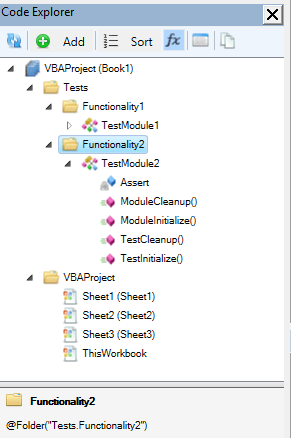
Okay, point. The VBE’s Project Explorer does make things painful, by listing all class modules alphabetically under the same folder: it’s as if the IDE itself encouraged you to cram as much functionality as possible in as few modules as possible! This is where Rubberduck’s Code Explorer comes in to save the day though: with a simple comment annotation in each class’ declarations section, you can easily organize your project into virtual folders, nest them as you see fit, and best of all you can have a form, a standard module and a dozen class modules under the same folder if you want. There’s simply no reason to avoid VBA code with many small specialized class modules anymore.


OOP is overkill for VBA

After all, VBA is just “macros”, right? Procedural code was good enough back then, why even bother with OOP when you’re writing code in a language that was made to “get things done”, right? So we go and implement hundreds of lines of code in a worksheet event handler; we go and implement dialogs and thousands of lines of code in a form’s code-behind; we declare dozens upon dozens of global variables because “that’s how it was made to work”. Right? Nope.

It works, and everyone’s happy. Until something needs to change, and something else needs to change the week after, and then another feature needs to be added the next week, then a bug needs to be fixed in that new feature, and then fixing that bug ripples in unexpected places in the code; the beast eventually grows hair and tentacles, and you’re left sitting in front of a spaghetti mess.

And it’s hard to maintain, not because it’s VBA, but because it was written “to get things done”, but not to be maintained. This “ball of mud” code can happen in any language: it’s not the language, it’s the mentality. Most VBA developers are not programmers – code gets written the way it is because doing things in a SOLID way feels like going to the Moon and back to end up next door with the exact same functionality… and lots simply don’t know better, because nobody ever taught them. At least, that’s how it started for me.

Then there’s the IDE. You would like to refactor the code a bit, but there are no refactoring tools and no unit tests, and every change you make risks breaking something somewhere, because knowing what’s used where is terribly painful… and there’s no integrated source control, so if you make a change that the undo button doesn’t remember, you better remember what it looked like. And eventually you start commenting-out a chunk of code, or start having DoSomething_v2 procedures, and then DoSomething3. Soon you don’t know which code calls which version and you have more comments than live code. Without source control, it’s impossible to revert back to any specific version, and short of always working off a copy of the host document, code changes are done at the risk of losing everything.

No safety net. Pretty much no tooling. The VBE makes it pretty hard to work with legacy code – at least, harder than with a more modern, full-featured IDE.

Rubberduck will change that: Rubberduck wants to make writing object-oriented VBA code as enjoyable as in a modern IDE, and maintaining and refactoring legacy procedural code as easy and safe as possible.

Is OOP overkill for VBA? If it’s not overkill for even the tiniest piece of modern-language code, then I fail to see why it would be overkill for any VBA project. After all, SOLID principles are language-agnostic, and the fact that VBA doesn’t support class inheritance does nothing to affect the quality of the code that’s possible to achieve in VBA.


Wait, how would SOLID even apply to VBA?

The Single Responsibility Principle is a golden rule that’s as hard to follow in VBA as it is in any other language: write small procedures and functions that do one thing, prefer many small specialized modules over fewer, large ones.

The Open/Closed Principle, which leaves classes open for extension, closed for modification is even harder to get right, again regardless of the language. However like the others, if the other 4 principles are followed, then this one is just common sense.

Liskov Substitution Principle involves no wizardry, it’s about writing code so that an implementation of an interface guarantees that it does what the interface says it’s doing, so that any given implementation of an interface can be injected into the code, it will still run correctly.

The Interface Segregation Principle goes hand in hand with the other principles, and keeps your code cohesive, focused. Interfaces should not leak any specific implementation; an interface with too many members sounds like breaking SRP anyway.

The Dependency Inversion Principle is possibly the one that raises eyebrows, especially if you don’t know that VBA classes can implement interfaces. Yet it’s perfectly possible to write code against an IMsgBox interface, inject a MsgBoxImpl class in the production code, and inject a MsgBoxStub class in the test code.

See? Nothing VBA can’t handle. So object-oriented VBA code is theoretically possible. In the next couple of weeks we’ll go over what it means in real-world VBA code, in terms of project architecture, design patterns, and code design in general.

2.0 Beta is here!

A little while ago, we issued an alpha release of Rubberduck 2.0, just because, well, v1.4.3 had been around since July 2015, and we wanted to say “look, this is what we’ve been working on; it’s not nearly stable yet, but we still want to show you what’s coming”.

Time flies. 6 whole weeks, 353 commits (plus a few last-minute ones), 142* pull requests from 8 contributors, 143* closed issues, 60* new ones, 129,835 additions and 113,388 deletions in 788* files later, Rubberduck still has a number of known issues, some involving COM interop, most involving COM reflection and difficulties in coming up with a host-agnostic way of identifying the exact types we’re dealing with.

It might seem obvious, but knowing that ThisWorkbook is a Workbook object is anything but trivial – at this point we know that Workbook implements a WorkbookEvents interface; we also know what events are exposed: we’re this close to connect all the dots and have a resolver that works the way we need it to.

So what does this mean?

It means a number of false positives for a number of inspections. It means false negatives for a number of others.

Other than that, if the last version you used was 1.4.3, you’re going to be blown away. If the last version you used was 2.0.1a, you’ll appreciate all the work that just went into this beta build.

There are a number of little minor issues here and there, but the major issues we’re having pretty much all revolve around resolving identifier references, but I have to admit I don’t like unit test discovery working off the parser – it just doesn’t feel right and we’re going to fix that soon.

Speaking of unit testing… thanks to @ThunderFrame’s hard work, Rubberduck 2.0 unit tests now work in Outlook, Project, Publisher and Visio.

@Hosch250 If you get unit testing to work in outlook I’ll eat my hat.

– @RubberDuck 2016-05-13

So Chris, how’s the hat?

Stay tuned, things are going to snowball from this point on – we’ll be releasing much more often than we have been.

*From the GitHub “Pulse” page between May 7 and June 7, 2016.

VBA Rubberducking (Part 4)

This post is the fourth in a series of post that walk you through the various features of the Rubberduck open-source VBE add-in.

  • Part 1 introduced the navigation features.
  • Part 2 covered the code inspections.
  • Part 3 featured the unit testing feature.

Refactorings

At first we were happy to just be able to inspect the code.

fizzbuzz-inspections

Quickly we realized “inspection quick-fixes” could be something else; some of the inspections’ quick-fixes are full-fledged automated refactoring operations. Renaming an identifier – and doing it right – is very different than just Ctrl+H/replace an identifier. Manually removing an uneeded parameter in an existing method breaks all call sites and the code no longer even compiles; Rubberduck sees all call sites, and knows which argument to remove everywhere to keep the code compiling.. and it’s much faster than doing it by hand!

Rubberduck 1.3 had Rename and Extract Method refactorings; v1.4.3 also had Remove Parameters and Reorder Parameters refactorings.

Rubberduck 2.0 introduces a few more.

refactor-menu

The context menu commands are enabled depending on context; be it the current parser state, or the current selection.

Rename

That’s a pretty well-named refactoring. It deals with the impacts on the rest of the code base, of renaming pretty much any identifier.

Extract Method

Pretty much completely rewritten, v2.0 Extract Method refactoring is becoming pretty solid. Make a valid selection, and take that selection into its own member, replacing it with a call to the extracted code, all parameters and locals figured out for you.

Extract Interface

VBA supports interface inheritance; Rubberduck makes it easy to pull all public members of a module into a class that the original module then Implements. This is VBA’s own way of coding against abstractions. Unit tests love testing code that’s depending on abstractions, not concrete implementations, because then the tests can provide (“inject”) fake dependencies and test the applicative logic without triggering any unwanted side-effects, like displaying a message box, writing to a file, or to a database.

Implement Interface

Implementing all members of an interface (and all members of an interface must be implemented) can be tedious; Rubberduck automatically creates a stub method for every member of the interface specified in an Implements statement.

Remove/Reorder Parameters

Reworking a member’s signature is always annoying, because then you have to cycle through every single call site and update the argument list; Rubberduck knows where every call site is, and updates all call sites for you.

Move Closer to Usage

Variables should have the smallest possible scope. The “scope too wide” inspection uses this refactoring to move a declaration just above its first usage; it also works to rearrange “walls of declarations” at the top of a huge method you’re trying to cut into more manageable pieces.

Encapsulate Field

Fields are internal data, implementation details; objects shouldn’t expose public fields, but rather, encapsulate them and expose them as properties. Rubberduck turns a field into a property with only as much effort as it takes to name the new property.

Introduce Parameter/Field

Pretty much the antagonist of move closer to usage, this refactoring promotes a local variable to a parameter or a field, or a parameter to a field; if a new parameter is created, call sites will be updated with a “TODO” bogus argument that leaves the code uncompilable until an argument is supplied for the new parameter at all call sites.


More refactorings are planned for 2.1 and future versions, including Inline Method (the inverse of Extract Method), to move the body of a small procedure or function into all its call sites. Ideas for more refactorings and inspections? Suggest a feature!


VBA Rubberducking (Part 3)

This post is the third in a series of post that walk you through the various features of the Rubberduck open-source VBE add-in.

  • Part 1 introduced the navigation features.
  • Part 2 covered the code inspections.

Unit Testing

If you’ve been following Rubberduck since its early days, you already know that this is where and how the project started. Before Rubberduck was a VBE add-in, it was an Excel add-in completely written in VBA, that started with this Code Review post; before Rubberduck was even named “Rubberduck”, it was a C# port of this VBA code – the idea being to enable writing and running unit tests beyond Excel, in Access and Word VBA as well, without having to replicate all that code in multiple add-in projects.

Zero Boilerplate

There are other VBA unit testing solutions out there. A lot require quite a bit of boilerplate setup code; those written in VBA require programmatic access to the VBIDE object model, which may be a security concern (you’re allowing VBA to execute code that can generate and run VBA code after all). Rubberduck unit tests require neither. Because it’s a VBE add-in, Rubberduck already has programmatic access to the code in the IDE, and the ability to scan, modify, generate and execute VBA code – without requiring a dent in your corporate security policy.

Rubberduck requires pretty much zero boilerplate. This is a fully working test module:

 '@TestModule
 Private Assert As Rubberduck.AssertClass
 
 '@TestMethod
 Public Sub FooIs42()
 
     'Arrange
     Const expected As Integer = 42
     Dim actual As Integer
 
     'Act
     actual = Module1.GetFoo
 
     'Assert
     Assert.AreEqual expected, actual, "Nope, not 42."
 
 End Sub

Okay, it’s just an example. But still, it shows how little is required for it to work:

  • A @TestModule annotation in the declarations section of a standard module.
  • A Rubberduck.AssertClass instance, which can be late or early-bound.
  • A @TestMethod annotation to formally identify a test method.

That’s all. And up until recently, the @TestMethod annotation was optional – in Rubberduck 1.x, if you had a public parameterless method with a name that starts with “Test”, in a standard module, Rubberduck treated it as a test method. This is changing in 2.0, as we are making the @TestMethod annotation mandatory, favoring explicitness over implicit naming conventions. Test methods still need to be public and parameterless, and in a standard module though.

xcrux

Now, let’s say GetFoo returning 42 is a business requirement, and that something needs to change in Module1 or elsewhere and, inadvertently, GetFoo starts returning 0. If you don’t have a unit test that documents and verifies that business requirement, you’ve introduced a bug that may take a while to be discovered. However if you do have a test for it, and that you’ve made it a habit to run your test suite whenever you make a change just to be sure that all the business requirements are still met…

p6txc

Then you have a failing test, and you know right away that your modification has subtly introduced a change in behavior that will be reported as a bug sooner or later.

If you’ve already written unit tests, I’m probably preaching to the choir here. If you’ve only ever written VBA code, it’s possible you’ve heard of unit testing before, but aren’t quite sure how you could make your code work with it.

Luckily, the key concepts are language-agnostic, and VBA definitely has support for everything you need for full-blown Test-Driven Development.

Code Against Abstractions

Whether you’re writing C#, Java, PHP, Python, Ruby, or VBA, if your code is tightly coupled with a UI, accessing the file system, a Web service, a database, …or a worksheet, then it’s not fit for a unit test, because a unit test…

  • Should be fast
  • Should not have side-effects
  • Should not depend on (or impact) other tests
  • Should have all dependencies under control
  • Should test one thing, and have one reason to fail

Wait. My code is accessing a worksheet. Does that mean I can’t write tests for it?

Yes and no. I’ll tell you a secret. Quite a lot of VBA posts I see on Code Review are asking for tips to get their code to run faster with large data sets. Something I often say in my reviews, is that the single slowest thing you can do in VBA is access a worksheet.

Don’t code your logic against the worksheet, code your logic against an abstraction of the worksheet. An array is often all you need: refactor your logic to work with an array instead of a worksheet, and not only you’ll be able to write a test that gives it any array you want, your code will also perform better!

Encapsulate your logic in class modules, test the public interface; if the logic brings up a UI (even a message box!), extract that piece of code elsewhere – make it the responsibility of something else, get it out of the way so your tests can concentrate on the actual important things that they’re testing for.


A whole book could be written about reducing coupling in code, increasing cohesion, and writing tests in general. Poke around, research a bit. You’ll see where Rubberduck wants to take your VBA code.


The Test Explorer

Rubberduck’s Test Explorer offers two main “sets” of commands: “Run”, and “Add”.

The “Add” menu lets you easily add a test module to your project, and from there you can just as easily add a test method, one of two templates:

  • Test Method is the standard Arrange-Act-Assert deal, with error handling that ensures the test will correctly fail on error and report that error.
  • Test Method (Expected Error) is the same AAA deal, except this template is for writing tests that are expected to raise a specific runtime error; such tests fail if the expected error isn’t raised.

The “Run” menu lets you easily run all, or a subset of the tests – e.g. you might want to only run the tests that failed the last time you ran them.

Results can be regrouped either by outcome or by location (project/module), and again can be copied to the clipboard with a single click.

Test settings let you control the contents of the test module template:

4b3mb

Binding mode determines whether the AssertClass instance is going to be declared “As Object” (late-bound, default) or “As New Rubberduck.AssertClass” (early-bound).

Type safety determines whether the Assert variable is going to be a Rubberduck.AssertClass (strict) or a Rubberduck.PermissiveAssertClass (permissive); the permissive asserts differs with the strict (original and default) version in that equality checks are more closely modeled on VBA equality rules: with a permissive assert, an Integer value of 254 can be compared to a Byte value of 254 and deemed equal. Strict equality requires the types to match, not just the value.

Test Module Template checkboxes determine whether the @TestInitialize, @TestCleanup, @ModuleInitialize and @ModuleCleanup method stubs are going to be generated, and also whether creating a new test module creates a test method by default.

All these settings only affect new test modules, not existing ones.


The Assert Class

Tests assert things. Without assertions, a Rubberduck test can’t have a meaningful result, and will simply pass. The IAssert interface (implemented by both AssertClass and PermissiveAssertClass) exposes a number of members largely inspired by MS-Tests in Visual Studio:

Name Description
AreEqual Verifies that two specified objects are equal. The assertion fails if the objects are not equal.
AreNotEqual Verifies that two specified objects are not equal. The assertion fails if the objects are equal.
AreNotSame Verifies that two specified object variables refer to different objects. The assertion fails if they refer to the same object.
AreSame Verifies that two specified object variables refer to the same object. The assertion fails if they refer to different objects.
Fail Fails the assertion without checking any conditions.
Inconclusive Indicates that the assertion cannot be verified.
IsFalse Verifies that the specified condition is false. The assertion fails if the condition is true.
IsNothing Verifies that the specified object is Nothing. The assertion fails if it is notNothing.
IsNotNothing Verifies that the specified object is not Nothing. The assertion fails if it isNothing.
IsTrue Verifies that the specified condition is true. The assertion fails if the condition is false.

To be continued…

VBA Rubberducking (Part 2)

This post is the second in a series of post that walk you through the various features of the Rubberduck open-source VBE add-in. The first post was about the navigation features.

Code Inspections

vbe

Back when the project started, when we started realizing what it meant to parse VBA code, we knew we were going to use that information to tell our users when we’re seeing anything from possibly iffy to this would be a bug in their code.

The first one to be implemented was OptionExplicitInspection. The way Rubberduck works, a variable that doesn’t resolve to a known declaration simply doesn’t exist. Rubberduck is designed around the fact that it’s working against code that VBA compiles; is also needs to assume you’re working with code that declares its variables.

Without ‘Option Explicit’ on, Rubberduck code inspections can yield false positives.

Because it’s best-practice to always declare your variables, and because the rest of Rubberduck won’t work as well as it should if you’re using undeclared variables, this inspection defaults to Error severity level.

OptionExplicitInspection was just the beginning. As of this writing, we have implementations for 35 inspections, most with one or more one-click quick-fixes.

35 inspections?

And there’s a couple more left to implement, too. A lot of inspections rely on successful parsing and processing of the entire project and its references; if there’s a parsing error, then Rubberduck will not produce new inspection results. When parsing succeeds, inspections run automatically and the “status bar” indicates Ready when it’s completed.

  1. AssignedByValParameterInspection looks for parameters passed by value and assigned a new value, suggesting to either extract a local variable, or pass it by reference if the assigned value is intended to be returned to the calling code.
  2. ConstantNotUsedInspection looks for constant declarations that are never referenced. Quick-fix is to remove the unused declaration.
  3. DefaultProjectNameInspection looks for unnamed projects (“VBAProject”), and suggests to refactor/rename it. If you’re using source control, you’ll want to name your project, so we made an inspection for it.
  4. EmptyStringLiteralInspection finds “” empty strings and suggests replacing with vbNullString constants.
  5. EncapsulatePublicFieldInspection looks for public fields and suggests making it private and expose it as a property.
  6. FunctionReturnValueNotUsedInspection locates functions whose result is returned, with none of the call sites doing anything with it. The function is used as a procedure, and Rubberduck suggests implementing it as such.
  7. IdentifierNotAssignedInspection reports variables that are declared, but never assigned.
  8. ImplicitActiveSheetReferenceInspection is Excel-specific, but it warns about code that implicitly refers to the active sheet.
  9. ImplicitActiveWorkbookReferenceInspection is also Excel-specific, warns about code that implicitly refers to the active workbook.
  10. ImplicitByRefParameterInspection parameters are passed by reference by default; a quick-fix makes the parameters be explicit about it.
  11. ImplicitPublicMemberInspection members of a module are public by default. Quick-fix makes the member explicitly public.
  12. ImplicitVariantReturnTypeInspection a function or property getter’s signature doesn’t specify a return type; Rubberduck makes it return a explicit Variant.
  13. MoveFieldCloserToUsageInspection locates module-level variables that are only used in one procedure, i.e. its accessibility could be narrowed to a smaller scope.
  14. MultilineParameterInspection finds parameters in signatures, that are declared across two or more lines (using line continuations), which hurts readability.
  15. MultipleDeclarationsInspection finds instructions containing multiple declarations, and suggests breaking it down into multiple lines. This goes hand-in-hand with declaring variables as close as possible to their usage.
  16. MultipleFolderAnnotationsInspection warns when Rubberduck sees more than one single @Folder annotation in a module; only the first annotation is taken into account.
  17. NonReturningFunctionInspection tells you when a function (or property getter) isn’t assigned a return value, which is, in all likelihood, a bug in the VBA code.
  18. ObjectVariableNotSetInspection tells you when a variable that is known to be an object type, is assigned without the Set keyword – this is a bug in the VBA code, and fires a runtime error 91 “Object or With block variable not set”.
  19. ObsoleteCallStatementInspection locates usages of the Call keyword, which is never required. Modern form of VB code uses the implicit call syntax.
  20. ObsoleteCommentSyntaxInspection locates usages of the Rem keyword, a dinosaurian syntax for writing comments. Modern form of VB code uses a single quote to denote a comment.
  21. ObsoleteGlobalInspection locates usages of the Global keyword, which is deprecated by the Public access modifier. Global cannot compile when used in a class module.
  22. ObsoleteLetStatementInspection locates usages of the Let keyword, which is required in the ancient syntax for value assignments.
  23. ObsoleteTypeHintInspection locates usages of type hints in declarations and identifier references, suggesting to replace them with an explicit value type.
  24. OptionBaseInspection warns when a module uses Option Base 1, which can easily lead to off-by-one bugs, if you’re not careful.
  25. OptionExplicitInspection warns when a module does not set Option Explicit, which can lead to VBA happily compiling code that uses undeclared variables, that are undeclared because there’s a typo in the assignment instruction. Always use Option Explicit.
  26. ParameterCanBeByValInspection tells you when a parameter is passed ByRef (implicitly or explicitly), but never assigned in the body of the member – meaning there’s no reason not to pass the parameter by value.
  27. ParameterNotUsedInspection tells you when a parameter can be safely removed from a signature.
  28. ProcedureCanBeWrittenAsFunctionInspection locates procedures that assign a single ByRef parameter (i.e. treating it as a return value), that would be better off written as a function.
  29. ProcedureNotUsedInspection locates procedures that aren’t called anywhere in user code. Use an @Ignore annotation to remove false positives such as public procedures and functions called by Excel worksheets and controls.
  30. SelfAssignedDeclarationInspection finds local object variables declared As New, which (it’s little known) affects the object’s lifetime and can lead to surprising/unexpected behavior, and bugs.
  31. UnassignedVariableUsageInspection locates usages of variables that are referred to before being assigned a value, which is usually a bug.
  32. UntypedFunctionUsageInspection recommends using String-returning functions available, instead of the Variant-returning ones (e.g. Mid$ vs. Mid).
  33. UseMeaningfulNamesInspection finds identifiers with less than 3 characters, without vowels, or post-fixed with a number – and suggests renaming them. Inspection settings will eventually allow “white-listing” common names.
  34. VariableNotAssignedInspection locates variables that are never assigned a value (or reference), which can be a bug.
  35. VariableNotUsedInspection locates variables that might be assigned a value, but are never referred to and could be safely removed.
  36. VariableTypeNotDeclaredInspection finds variable declarations that don’t explicitly specify a type, making the variable implicitly Variant.
  37. WriteOnlyPropertyInspection finds properties that expose a setter (Property Let or Property Set), but no getter. This is usually a design flaw.

Oops, looks like I miscounted them… and there are even more coming up, including host-specific ones that only run when the VBE is hosted in Excel, or Access, or whatever.

The Inspection Results toolwindow

If you bring up the VBE in a brand new Excel workbook, and then bring up the inspection results toolwindow (Ctrl+Shift+I by default) you could be looking at something like this:

8owq4

Most inspections provide one or more “quick-fixes”, and sometimes a quick-fix can be applied to all inspection results at once, within a module, or even within a project. In this case Option Explicit can be automatically added to all modules that don’t have it in the project, using the blue Fix all occurrences in project link at the bottom.

Or, use the Fix drop-down menu in the top toolbar to apply a quick-fix to the selected inspection result:

fdqhe

Each inspection has its own set of “quick-fixes” in the Fix menu. A common one is Ignore once; it inserts an @Ignore annotation that instructs the specified inspection to skip a declaration or identifier reference..

InspectionResults

The bottom panel contains information about the selected inspection result, and fix-all links that always use the first quick-fix in the “Fix” menu. Disable this inspection turns the inspection’s “severity” to DoNotShow, which effectively disables the inspection.

You can access inspection settings from the Rubberduck | Settings menu in the main commandbar, or you can click the settings button in the inspection results toolwindow to bring up the settings dialog:

wqtok

If you like using the Call keyword, you can easily switch off the inspection for it from there.

The Copy toolbar button sends inspection results into the clipboard so they can be pasted into a text file or an Excel worksheet.

As with similar dockable toolwindows in Rubberduck, the way the grid regroups inspection results can be controlled using the Grouping menu:

54ur0

The refresh button causes a re-parse of any modified module; whenever parser state reaches “ready”, the inspections run and the grid refreshes – just as it would if you refreshed from the Rubberduck command bar, or from the Code Explorer toolwindow.

To be continued…