Posts

2.0.14?

Recently I asked on Twitter what the next RD News post should be about.

next-rdnews-post-survey-results

Seems you want to hear about upcoming new features, so… here it goes!


The current build contains a number of breakthrough features; I mentioned an actual Fakes framework for Rubberduck unit tests in an earlier post. That will be an ongoing project on its own though; as of this writing the following are implemented:

  • Fakes
    • CurDir
    • DoEvents
    • Environ
    • InputBox
    • MsgBox
    • Shell
    • Timer
  • Stubs
    • Beep
    • ChDir
    • ChDrive
    • Kill
    • MkDir
    • RmDir
    • SendKey

As you can see there’s still a lot to add to this list, but we’re not going to wait until it’s complete to release it. So far everything we’re hijacking hooking up is located in VBA7.DLL, but ideally we’ll eventually have fakes/stubs for the scripting runtime (FileSystemObject), ADODB (database access), and perhaps even host applications’ own libraries (stabbing stubbing the Excel object has been a dream of mine) – they’ll probably become available as separate plug-in downloads, as Rubberduck is heading towards a plug-in architecture.

The essential difference between a Fake and a Stub is that a Fake‘s return value can be configured, whereas a Stub doesn’t return a value. As far as the calling VBA code is concerned, that’s nothing to care about though: it’s just another member call:

[ComVisible(true)]
[Guid(RubberduckGuid.IStubGuid)]
[EditorBrowsable(EditorBrowsableState.Always)]
public interface IStub
{
    [DispId(1)]
    [Description("Gets an interface for verifying invocations performed during the test.")]
    IVerify Verify { get; }

    [DispId(2)]
    [Description("Configures the stub such as an invocation assigns the specified value to the specified ByRef argument.")]
    void AssignsByRef(string Parameter, object Value);

    [DispId(3)]
    [Description("Configures the stub such as an invocation raises the specified run-time eror.")]
    void RaisesError(int Number = 0, string Description = "");

    [DispId(4)]
    [Description("Gets/sets a value that determines whether execution is handled by Rubberduck.")]
    bool PassThrough { get; set; }
}

So how does this sorcery work? Presently, quite rigidly:

[ComVisible(true)]
[Guid(RubberduckGuid.IFakesProviderGuid)]
[EditorBrowsable(EditorBrowsableState.Always)]
public interface IFakesProvider
{
    [DispId(1)]
    [Description("Configures VBA.Interactions.MsgBox calls.")]
    IFake MsgBox { get; }

    [DispId(2)]
    [Description("Configures VBA.Interactions.InputBox calls.")]
    IFake InputBox { get; }

    [DispId(3)]
    [Description("Configures VBA.Interaction.Beep calls.")]
    IStub Beep { get; }

    [DispId(4)]
    [Description("Configures VBA.Interaction.Environ calls.")]
    IFake Environ { get; }

    [DispId(5)]
    [Description("Configures VBA.DateTime.Timer calls.")]
    IFake Timer { get; }

    [DispId(6)]
    [Description("Configures VBA.Interaction.DoEvents calls.")]
    IFake DoEvents { get; }

    [DispId(7)]
    [Description("Configures VBA.Interaction.Shell calls.")]
    IFake Shell { get; }

    [DispId(8)]
    [Description("Configures VBA.Interaction.SendKeys calls.")]
    IStub SendKeys { get; }

    [DispId(9)]
    [Description("Configures VBA.FileSystem.Kill calls.")]
    IStub Kill { get; }

...

Not an ideal solution – the IFakesProvider API needs to change every time a new IFake or IStub implementation needs to be exposed. We’ll think of a better way (ideas welcome)…

So we use the awesomeness of EasyHook to inject a callback that executes whenever the stubbed method gets invoked in the hooked library. Implementing a stub/fake is pretty straightforward… as long as we know which internal function we’re dealing with – for example this is the Beep implementation:

internal class Beep : StubBase
{
    private static readonly IntPtr ProcessAddress = EasyHook.LocalHook.GetProcAddress(TargetLibrary, "rtcBeep");

    public Beep() 
    {
        InjectDelegate(new BeepDelegate(BeepCallback), ProcessAddress);
    }

    [UnmanagedFunctionPointer(CallingConvention.StdCall, SetLastError = true)]
    private delegate void BeepDelegate();

    [DllImport(TargetLibrary, SetLastError = true)]
    private static extern void rtcBeep();

    public void BeepCallback()
    {
        OnCallBack(true);

        if (PassThrough)
        {
            rtcBeep();
        }
    }
}

As you can see the VBA7.DLL (the TargetLibrary) contains a method named rtcBeep which gets invoked whenever the VBA runtime interprets/executes a Beep keyword. The base class StubBase is responsible for telling the Verifier that an usage is being tracked, for tracking the number of invocations, …and disposing all attached hooks.

The FakesProvider disposes all fakes/stubs when a test stops executing, and knows whether a Rubberduck unit test is running: that way, Rubberduck fakes will only ever work during a unit test.

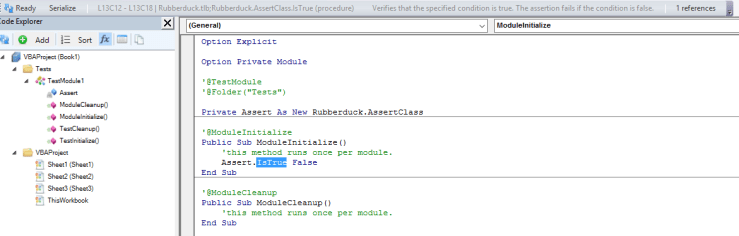
The test module template has been modified accordingly: once this feature is released, every new Rubberduck test module will include the good old Assert As Rubberduck.AssertClass field, but also a new Fakes As Rubberduck.FakesProvider module-level variable that all tests can use to configure their fakes/stubs, so you can write a test for a method that Kills all files in a folder, and verify and validate that the method does indeed invoke VBA.FileSystem.Kill with specific arguments, without worrying about actually deleting anything on disk. Or a test for a method that invokes VBA.Interaction.SendKeys, without actually sending any keys anywhere.

And just so, a new era begins.


Awesome! What else?

One of the oldest dreams in the realm of Rubberduck features, is to be able to add/remove module and member attributes without having to manually export and then re-import the module every time. None of this is merged yet (still very much WIP), but here’s the idea: a bunch of new @Annotations, and a few new inspections:

  • MissingAttributeInspection will compare module/member attributes to module/member annotations, and when an attribute doesn’t have a matching annotation, it will spawn an inspection result. For example if a class has a @PredeclaredId annotation, but no corresponding VB_PredeclaredId attribute, then an inspection result will tell you about it.
  • MissingAnnotationInspection will do the same thing, the other way around: if a member has a VB_Description attribute, but no corresponding @Description annotation, then an inspection result will also tell you about it.
  • IllegalAnnotationInspection will pop a result when an annotation is illegal – e.g. a member annotation at module level, or a duplicate member or module annotation.

These inspections’ quick-fixes will respectively add a missing attribute or annotation, or remove the annotation or attribute, accordingly. The new attributes are:

  • @Description: takes a string parameter that determines a member’s DocString, which appears in the Object Browser‘s bottom panel (and in Rubberduck 3.0’s eventual enhanced IntelliSense… but that one’s quite far down the road). “Add missing attribute” quick-fix will be adding a [MemberName].VB_Description attribute with the specified value.
  • @DefaultMember: a simple parameterless annotation that makes a member be the class’ default member; the quick-fix will be adding a [MemberName].VB_UserMemId attribute with a value of 0. Only one member in a given class can legally have this attribute/annotation.
  • @Enumerator: a simple parameterless annotation that commands a [MemberName].VB_UserMemId attribute with a value of -4, which is required when you’re writing a custom collection class that you want to be able to iterate with a For Each loop construct.
  • @PredeclaredId: a simple parameterless annotation that translates into a VB_PredeclaredId (class) module attribute with a value of True, which is how UserForm objects can be used without Newing them up: the VBA runtime creates a default instance, in global namespace, named after the class itself.
  • @Internal: another parameterless annotation, that controls the VB_Exposed module attribute, which determines if a class is exposed to other, referencing VBA projects. The attribute value will be False when this annotation is specified (it’s True by default).

Because the only way we’ve got to do this (for now) is to export the module, modify the attributes, save the file to disk, and then re-import the module, the quick-fixes will work against all results in that module, and synchronize attributes & annotations in one pass.

Because document modules can’t be imported into the project through the VBE, these attributes will unfortunately not work in document modules. Sad, but on the flip side, this might make [yet] an[other] incentive to implement functionality in dedicated modules, rather than in worksheet/workbook event handler procedures.

Rubberduck command bar addition

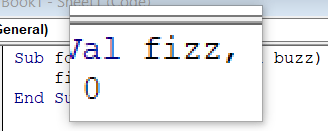
The Rubberduck command bar has been used as some kind of status bar from the start, but with context sensitivity, we’re using these VB_Description attributes we’re picking up, and @Description attributes, and DocString metadata in the VBA project’s referenced COM libraries, to display it right there in the toolbar:
docstrings-in-rdbar.PNG

Until we get custom IntelliSense, that’s as good as it’s going to get I guess.


TokenStreamRewriter

As of next release, every single modification to the code is done using Antlr4‘s TokenStreamRewriter – which means we’re no longer rewriting strings and using the VBIDE API to rewrite VBA code (which means a TON of code has just gone “poof!”): we now work with the very tokens that the Antlr-generated parser itself works with. This also means we can now make all the changes we want in a given module, and apply the changes all at once – by rewriting the entire module in one go. This means the VBE’s own native undo feature no longer gets overwhelmed with a rename refactoring, and it means fewer parses, too.

There’s a bit of a problem though. There are things our grammar doesn’t handle:

  • Line numbers
  • Dead code in #If / #Else branches

Rubberduck is kinda cheating, by pre-processing the code such that the parser only sees WS (whitespace) tokens in their place. This worked well… as long as we were using the VBIDE API to rewrite the code. So there’s this part still left to work out: we need the parser’s token stream to determine the “new contents” of a module, but the tokens in there aren’t necessarily the code you had in the VBE before the parse was initiated… and that’s quite a critical issue that needs to be addressed before we can think of releasing.


So we’re not releasing just yet. But when we do, it’s likely not going to be v2.0.14, for everything described above: we’re looking at v2.1 stuff here, and that makes me itch to complete the add/remove project references dialog… and then there’s data-driven testing that’s scheduled for 2.1.x…

To be continued…

Bubbly Run-Time Errors

300 feet below the surface, in a sunken wreck from another age, a rotting wooden deck silently collapses under the weight of heavy cast iron canons. As the sea floor becomes a thick cloud of millennial dust, the weaponry cracks a cask of over-aged priceless wine, and a tiny amount of air, trapped centuries ago, is freed. Under the tremendous, crushing pressure of the oceanic bottom, the bubbles are minuscule at first. As the ancestral oxygen makes its final journey from the bottom of the ocean up to the surface, the bubbles grow in size with the decreasing pressure – and when it finally reaches its destination to blend with the contemporary atmosphere, it erupts with a bubbly “plop” as it releases itself from the water that held it quietly imprisoned all these years.

Uh, so how does this relate to code in any way?

Bubbles want to explode: the same applies to most run-time errors.

When an error is raised 300 feet down the call stack, it bubbles up to its caller, then to the caller of that caller, and so on until it reaches the entry point – the surface – and blows everything up. When the error is unhandled at least.

And so they told you to handle errors. That every procedure must have an event handler.

Truth is, this is utter cargo-cultist BS. Not every procedure must handle every error. Say you have an object that’s responsible for setting up an ADODB Connection, parameterizing some SQL Command on the fly, and returning a Recordset. You could handle all errors inside that class, trap all the bubbles, and return Nothing instead of a result when something goes wrong. Neat huh? Yeah. Until the caller wants to know why their code isn’t working. That SqlCommand class cannot handle everything: errors need to bubble up to the calling code, for the calling code to handle.

The calling code might be another class module, with a function responsible for – I don’t know – pulling a list of products from a database and returning an array of strings that this function’s own caller uses to populate a ComboBox control, in a UserForm’s Initialize handler. So the data service class lets SqlCommand errors bubble up to its own caller; the UserForm’s Initialize handler receives the error, understands that it won’t be able to populate its ComboBox, and in response decides to go up in flames by bubbling up the error to its own caller – some parameterless procedure in a Macros module, that was called when the user clicked a nicely formatted shape on a dedicated worksheet.

That’s the entry pointThat is where the bubbling stops. That procedure was responsible for bringing up a form for the user to enter some data, but something happened (the detailed information is in the Err object) and we can’t do that now – so we abort the form and display a nice user-friendly message in a MsgBox instead, and we can even send the actual error details into a new Outlook email to helpdesk@contoso.com.

Getting a grip on the handle

Most errors aren’t handled where they’re raised. Well, some are, obviously. But to say that every procedure should have its error handler is just as blatantly wrong as saying no procedure should ever have any error handler: “only a Sith deals in absolutes”.

So which errors should be killed on-the-spot, and which errors should be allowed to bubble up?

Avoidable errors

The vast majority of run-time errors occur due to lack of proper input validation code: we take a value and assume it’s of a type we’re expecting, or at least one we can work with. We assume its format, we assume its location, we assume …lots of things. The more assumptions code makes, the more error-prone it is. Problem is, we don’t always realize all the assumptions we make – and that’s when run-time errors come and bite us. These are completely avoidable errors: they shouldn’t be handled at all, for they are bugs. And we want bugs to blow things up. So if you have code making assumptions – for example a row number is never going to be zero – then you have bugs that are easy to fix (and that a good unit test coverage should prevent, BTW)… and it boils down, mostly, to proper input validation. Avoiding avoidable errors is the #1 best bug-preventing thing you can do.

Of course this supposes the assumptions we make are conscious ones – sometimes, code makes assumptions we don’t realize we’re making. For example, VBA code that implicitly refers to the active workshseet, often assumes that the active sheet is one specific sheet:

foo = Sheet1.Range(Cells(i, j), Cells(i, j)).Value

The above code assumes Sheet1 is active, because the two unqualified Cells calls implicitly refer to the active worksheet. Avoidable. If foo is declared as a String and Sheet1 is active, that same code will still blow up if the cell contains a #VALUE! error. Assumptions are very easy to make! Fortunately they’re also easy to avoid.

Errors you know how to handle

Sometimes you’ll run code that can raise an error even if you’ve validated all inputs – if the SQL server is down, trying to connect to it will blow up your code if you don’t handle that situation. Or the user might not be authorized to run the SQL command, or whatever. The decision on whether to handle in on-the-spot or bubbling it up to the caller, depends on how well you’ve split the responsibilities among your modules and procedures: a utility function usually has no business handling/swallowing its own errors. And unless you’re running the current [not yet released] 2.0.14.x Rubberduck build, your unit tests can’t mock up /fake a MsgBox call, so you have code paths that cannot be cleanly tested.

Looking at it from the client code’s perspective is how you’re going to know what kind of errors and “bad result” outputs you want to be dealing with. And if that client code is a unit test, then you’re probably doing the right thing, whatever that is.

Other times you’ll run into an error, but you know you can simply, gracefully and usefully recover from that error, and resume normal execution – these errors, if they can’t be avoided, should be the kind to handle on-the-spot.

Everything else

For everything else, you’ll want bubbles. Not all the way up though – you’ll want to catch them before they surface and pop in the user’s face! But if your code validates all inputs and makes little or no assumptions, and handles the specific errors you know could happen because roses are red and violets are blue… at the top of every call stack there should be a catch-all handler – an ultimate bubble catcher, that gracefully handles everything other code had to let through.


So…

Rubberduck is never going to tell you to sprinkle error-handling code everywhere. But I think we could have an inspection that warns you if you have a [possible] entry point that lets run-time errors bubble up unhandled.

What do you think? What else can Rubberduck do for you? Should Rubberduck treat any object-returning method as potentially returning Nothing, and suggest that you validate the method’s return value? You would right-click any Range.Find call, and if the returned reference is never compared against Nothing then Rubberduck could introduce an If block that does just that, making the rest of the code path safe to execute in the case of a failing call. Just thinking out loud here…


Go ahead, mock VBA

Rubberduck has been offering IDE-integrated unit test since day one.

But let’s face it: unit testing is hard. And unit testing VBA code that pops a MsgBox isn’t only hard, it’s outright impossible! Why? Because it defeats the purpose of an automated test: you don’t want to be okaying message boxes (or worse, clicking No when the test needed you to click Yes), you want to run the tests and watch them all turn green!

So you had to implement some kind of wrapper interface, and write code that doesn’t call MsgBox directly – like the D of SOLID says, depend on abstractions, not on concrete types.

So you’d code against some IMsgBox wrapper interface:

Option Explicit
Public Function Show(ByVal prompt As String, _
 Optional ByVal buttons As VbMsgBoxStyle = vbOKOnly, _
 Optional ByVal title As String = vbNullString, _
 Optional ByVal helpFile As String, _
 Optional ByVal context As Long) As VbMsgBoxResult
End Function

And then you’d implement the concrete type:

Option Explicit
Implements IMsgBox
Private Function IMsgBox_Show(ByVal prompt As String, _
 Optional ByVal buttons As VbMsgBoxStyle = vbOKOnly, _
 Optional ByVal title As String = vbNullString, _
 Optional ByVal helpFile As String, _
 Optional ByVal context As Long) As VbMsgBoxResult
    IMsgBox_Show = MsgBox(prompt, buttons, title, helpFile, context)
End Function

Now that gets you compilable VBA code, but if you want to write a test for code where the result of a MsgBox call can influence the tested method’s code path, you need to make a fake implementation, and inject that FakeMsgBox into your code, so that your code calls not the real MsgBox function, but the fake implementation.

And if you want to verify that the code setup a vbYesNo message box with the company name as a title, you need to adapt your fake message box and make it configurable.

In other words, setting up fakes by hand is a pain in the neck.

So this is where Rubberduck tests are going:

'@TestMethod
Public Sub TestMethod1()
    On Error GoTo TestFail
    
    Fakes.MsgBox.Returns 42
    Debug.Print MsgBox("Flabbergasted yet?", vbYesNo, "Rubberduck") 'prints 42
    
    With Fakes.MsgBox.Verify
        .Parameter "prompt", "Flabbergasted yet?"
        .Parameter "buttons", vbYesNo
        .Parameter "title", "Rubberduck"
    End With
TestExit: 
    Exit Sub
TestFail: 
    Assert.Fail "Test raised an error: #" & Err.Number & " - " & Err.Description
End Sub

Soon. Very soon. Like, next release soon, Rubberduck will begin to allow unit test code to turn the actual MsgBox into a fake one, by setting up a Rubberduck fake.

So yeah, we’re mocking VBA. All of it.

To Be Continued…

@Annotations: The Underducks

Some of Rubberduck’s coolest features are literally hidden – not intentionally… but exposing them in the UI just wasn’t a top priority, or proved to be quite complex to implement in a nice user-friendly way.

Sad, because it makes them look like underdogs underducks, when they really deserve to show up front & center.

@Folder

Since v2.0.12, adding a new test module to a VBA project makes it show up under a “Tests” folder in the Code Explorer:

folders

You might be thinking “oh cool, folders!” and then go and try to add one using the Add command, or right-click somewhere to find some “add folder” command, and eventually give up.

Folders aren’t real. VBA doesn’t support folders; the code files aren’t even code files, they’re embedded in a host document! So we can’t just “create a folder” in a VBA project, it has to be something else.

This is what an early-bound 2.0.12 test module’s declarations section looks like:

Option Explicit
Option Private Module
'@TestModule
'@Folder("Tests")

Private Assert As New Rubberduck.AssertClass

Notice the @Folder(“Tests”) comment. Folders don’t really exist, but by annotating code modules like this Rubberduck can make them seem real, at least in the Code Explorer.

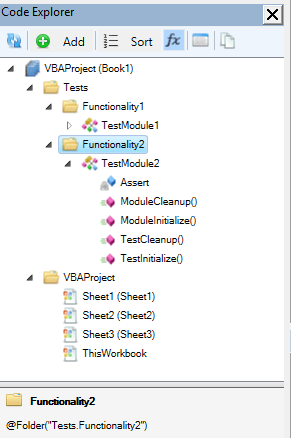
You can control which module appears under which folder by modifying the annotation, using the dot (“.”) as a separator:

folders2.PNG

The Code Explorer‘s bottom panel shows the @Folder annotation that’s responsible for creating the selected folder, when a folder is selected (if no folder is specified, everything goes to a default “VBAProject” folder).

In this case:

'@Folder("Tests.Functionality2")

Or whatever you want to make it. When two or more modules have “Tests” as a “root folder”, Rubberduck knows to show these two modules under the same “Tests” folder.

This means large VBA projects with a ton of classes can now be organized in folders for easier browsing, like large VB.NET projects are organized in namespaces. Now VBA doesn’t support namespaces, the rules haven’t changed: you can’t have two same-name modules in the same VBA project regardless of which “folder” you’re putting them in. But it sure makes it much easier to organize things.

The reason we can’t have a simple “create folder” command, is ultimately because VBA doesn’t support folders: we can’t create an empty folder, a folder only exists because there’s a module that has an annotation that created it.

What if there’s more than one annotation?

Rubberduck will only ever use the first @Folder annotation it finds in a module; any subsequent @Folder annotation is ignored. So you can have this:

'@Folder("Tests")
'@Folder("Foo.Bar")

And Rubberduck won’t be confused; the Code Explorer will have that module under the “Tests” folder, and unless there’s another module somewhere that specifies “Foo.Bar”, there won’t be a “Foo.Bar” folder anywhere.

But because multiple @Folder annotations are potentially confusing for us mere mortals, we’ve implemented an inspection that warns you when a module has more than one single @Folder annotation specified:

multiple-folders.PNG

Future versions will probably introduce a quick-fix for that inspection, so that extraneous annotations can be removed without even looking at the code module itself.


@IgnoreModule

Sometimes a single module can be responsible for a lot of inspection results, and that module can’t really be changed/fixed right now because, y’know, reasons – so you’d like to prevent Rubberduck inspections from looking at that module, so you can focus on inspection results from other modules without drowning them in noise from a module you’d like to ignore.

Since 2.0.12 you can now make code inspections completely ignore a specific module, with a single module-level annotation:

'@IgnoreModule

Now that’s great, but it’s also drastic: all inspections will ignore that module. If all you wanted was to shut off the use meaningful names inspection for that module without disabling the inspection itself, you can parameterize the annotation:

'@IgnoreModule UseMeaningfulName

And now only the use meaningful name inspection will be ignored in that module, without turning off the inspection itself.

So how do you know what inspection names to use? These names are the actual internal class names (minus the “Inspection” suffix) of each inspection in the Rubberduck code base itself, so they’re not exactly easy to get if you’re not looking at the Inspections namespace… fortunately the project’s website uses the Rubberduck build itself to create the Inspections/List page, and the inspection names appear in the bullet-list:

all-inspections.PNG

…of course, the website processes the names to insert spaces (based on the PascalCase casing – that’s why ByVal appears as “By Val”), so the actual usable @Ignore and @IgnoreModule annotation parameters are all in that list, except you need to remove the spaces when using them.

The @Ignore annotation uses the same mechanism, except it works at individual inspection result level; the Ignore Once quickfix that’s available for most inspections, automatically inserts @Ignore annotations, but there’s currently no way to automatically add an @IgnoreModule annotation – future versions will most definitely fix that though.

Up for Grabs

One of the best things about open-source software is that, when you find a bug as a user, you can not only report it to the developers, but also dig into the source code yourself and perhaps locate and fix the problem and PR it into the next release.

From the very beginning of our GitHub history, we’ve used issues as our “to-do” list, the “project backlog”. With GitHub projects we have subdivided the issue list into easier-to-track projects, as was shown last month. Thing is, with the few of us, the lots of you and the pretty wide project scope, the “to-do” list is constantly growing with awesome ideas.

There’s quite a lot to do in Rubberduck, and because we’d like you to help us do this, a lot of these things have an [up-for-grabslabel in our repository.

Some are easier than others. Of course it’s not always obvious to assess the “difficulty level” of an issue, but we can try:

difficulty-levels

Duckling (14 open) is labeling the “simple” issues we think don’t really require much experience with the code base. e.g. #1732 Inspection for empty modules

Ducky (17 open)  issues are more involved than duckling; if you haven’t been poking around too much, these ones might be more challenging. e.g. #2704 Concrete implementations should be private

Duck (13 open) issues are for contributors that would like something trickier and/or more substantative to tackle. e.g. #298 VB6 IDE Support

Quackhead (1 open) issues need contributors that know how Rubberduck understands VBA code and interacts with the VBE. e.g. #403 Static Analysis & Code Metrics

And then there’s all the others that we haven’t got around to stick an [up-for-grabs] label on, that you can just go and ask about anytime you like.


But… I don’t do C#!

Doesn’t matter! Our wiki needs to document all the refactorings and inspections; unit testing section could use articles about writing testable, object-oriented VBA code…

@Vogel612 made a translation helper (in Java!), to make it easier to localize Rubberduck and translate the resource files; if you can translate English into a language that’s not yet supported (we had to drop a few languages in 2.0, due to the sheer amount of new but untranslated resource strings), we’ll be happy to guide you and answer every question you might have about any of these resource strings.

But… I don’t do VBA!

Doesn’t matter! In fact, while VBA code is ultimately our data, there’s plenty of areas that don’t even need to get anywhere near actual VBA code. The regex builder tool for example, couldn’t care less about VBA (well aside from building VBScript-flavored regex…), and traversing an expression tree to evaluate/interpret it, determining if a conditional evaluates to a constant, …these things aren’t VBA-specific – they’re just things you need to work with, regardless of what language your data is written with. Except BrainFuck perhaps. Point is, knowing VBA helps, but the core team is there to help too if need be…

I mean, how much VBA do you need to know in order to be able determine whether a module is empty?


So, 2.0.12 is late… what’s cooking?

Recently I tweeted this:

The release of Rubberduck 2.0.12, due 5 days ago, is being delayed because we have something awesome cooking up. Give us 2-3 more weeks 🙂

TL;DR: if awesomeness can be cooked, that’s what’s cooking.

The amount of work that went into the upcoming release is tremendous. We’ve been trying to figure out exactly what was blowing up when the VBE dismantled itself and the host was shutting down, causing that pesky crash on exit… ever since we’ve introduced WPF user controls in dockable toolwindows. And at last, solved it.

We’ve been working on improving performance and thread safety of the entire parsing engine, and fixed a few grammar/parser bugs on the way, including a long-standing bug that made redundant parentheses trip a parse exception, another with the slightly weird and surely redundant Case Is = syntax, and @Magic annotations can now legally be followed by any comment, which is useful when you want to, well, annotate an annotation:

'@Ignore ProcedureNotUsed; called by [DoSomething] button on Sheet12
Public Sub DoSomething()
    ...
End Sub

We’ve enhanced the COM reference collector such that the resolver has every bit of useful information about everything there is to know in a type library referenced by a VBA project. This allows us to enhance other features, like the context-sensitive commandbar that tells you what Rubberduck is your selection as, e.g. a TextBox control in a UserForm:

textbox

(don’t mind that “Serialize” button – it’s only there in debug builds ;^)

Oh, and then there’s the interactions with the website – we’ll be running the inspections and the indenter on the website, and we’ll have the ability to (optionally) have Rubberduck know when a new version is available!


2.0.12 is going to be epic.

The 2.0 build

And then there’s even more: we’re going to make the inspections a concern of the parser engine, and turn them into parse tree node annotations – which means the code that currently finds the Declaration that’s currently selected (or one of its references), can also be used to find inspection results associated with that particular Declaration; this will probably prompt a redesign of how we present inspection results, and will definitely improve performance and memory footprint.

One of the best 2.x features is probably going to be the add/remove references dialog, which is currently merely prototyped. Beefing up unit testing with data-driven tests is also going to be a big one.

And when you see where we want to be for 3.0 (code path analysis & expression resolution, plug-in architecture, a subclassed CodePanethat actually tells us what’s going on, perhaps even with our own enhanced IntelliSense, more host-specific behaviors, TONS of new inspections), …this project is so awesome, I could just keep going on and on.

Not coming soon enough? I know, right!

cr-ducky-great-again-600x500.

To be continued…


Issues, Milestones and Projects

When the Rubberduck project was first put on GitHub, we quickly decided to use issues as our “todo list”. Right then, we knew we were going to need some label system. Since everything had started on a Stack Exchange site, labels were made to look like SE tags – and came to be used as such: our “categories” labels are all the same color: DDDDDD.

tags

“Oh wow, that must be so boring!”, right?

A little bit, indeed. So we made the status tags red (B60205), the meta-tags almost-white (FEFEFE), subcategories dark gray (808080); then we have [support] in blue (0077AA), [up-for-grabs] in forest green (0E8A16) and [help-wanted] in bright gold (FBCA04), to catch the eye easily.

So we went on a spree and created an issue for every feature we (then) could think of, and Rubberduck was officially kicked off as a long-term project, and I felt like we were managing it ok.

Especially since we started creating milestones and assigning one to issues. One mistake you don’t want to make, is to create a Next Release milestone – before you know it it’s impossible to know what was fixed when!

So a milestone was created for the “initial release”, then for “version 1.1”. Then I created one dedicated to get parsing powered by ANTLR – milestones were no longer release dates, but now little projects within the project, being worked on as reported and discovered bugs were assigned under the release milestone.

It worked that way until.. very recently. Looking back, I’d say what didn’t work was that our releases were revisions but our milestones were minor releases – so there was an undetermined number of releases under one given milestone. “v2.0.12” is the first milestone in the repository that’s actually numbered after a revision – and against which there will be only one release.

So, to recap:

  • Issues ideally describe one bug or feature request
  • Milestones ideally regroup all issues to be closed for a given release

Starting with 2.0.11/12, we’re going to be shooting for monthly releases, so a new milestone should be created every month or so: Rubberduck releases have been pretty random up to this point, and with a release-per-milestone it’s going to be much easier to plan and track the “current sprint”.

Or will it? Something is missing.

Projects

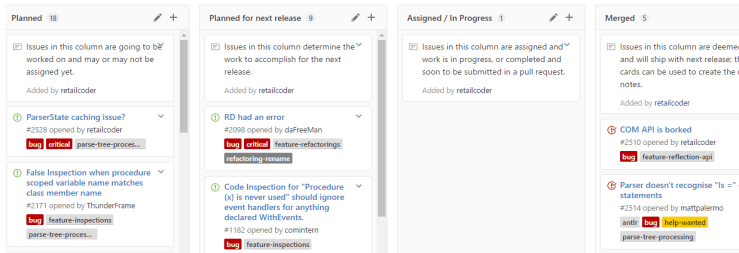
That’s what the “little projects within the project” milestones should have been from the beginning: a project. On GitHub a project lets you create columns to move cards to/from, and if you add an issue as a card to your “In Progress” column, the issue page will say “In Progress in [Project]” in the side bar.. which is pretty cool!

board.PNG

As of yesterday, Rubberduck has two types of projects:

Things we plan and track for [every] next release

There’s two of them:

  • Features tracks feature requests and enhancements to existing features.
  • BugSlayer tracks all reported bugs.

These projects have columns that help plan work, and visualize everything much more easily than with the issues list:

  • Requested / Reported
  • Deferred / Hold
  • Planned
  • Planned for next release
  • Assigned / In Progress
  • Merged
  • Released

Things we plan and track for some eventual release

When an important feature requires more work than can reasonably be tracked with a single issue / card in the Features project, a project board dedicated to that feature can be created to make it easier to track work and facilitate collaboration.

These projects have a “classical” set of columns:

  • TODO
  • In Progress
  • Done

Do you need all that for a small side-project? Maybe not… but I don’t see how it can hurt. Rubberduck isn’t really a small project anymore, though, but it’s still built by a handful of people that find a few spare hours to devote regularly. With the number of open issues (over 300), tracking things in the issues list was starting to feel like tracking help desk tickets with Outlook email follow-up flags – GitHub projects change everything. Heck, I think they’re making me start liking project management!

Nothing to declare

Somewhere in the first batch of issues/to-do’s we created when we started Rubberduck on GitHub (Issue# 33 actually), there was the intention to create a tool that could locate undeclared variables, because even if you and I use Option Explicit and declare all our variables, we have brothers and sisters that have to deal with code bases that don’t.

So we tried… but Rubberduck simply couldn’t do this with the 1.x resolver: identifiers that couldn’t be resolved were countless, running an inspection that would pop a result for every single one of them would have crippled our poor little duckling… so we postponed it.

The 2.0 resolver however, thinks quite literally like VBA itself, and knows about all available types, members, globals, locals, events, enums and whatnot, not just in the VBA project, but also in every referenced COM library: if something returns a type other than Variant or Object, Rubberduck knows about it.

The role of the resolver is simple: while the parse tree of a module is being traversed, every time an identifier is encountered it attempts to determine which declaration is being referred to. If the resolver finds a corresponding declaration, an IdentifierReference is created and added to the Declaration instance. And when the resolver can’t resolve the identifier (i.e. locate the exact declaration the identifier is referring to), a null reference was returned and, unless you have detailed logging enabled, nothing notable happens.

As of the last build, instead of “doing nothing” when a reference to variable can’t be resolved to the declaration of that variable, we create a declaration on the spot: so the first appearance of a variable in an executable statement becomes the “declaration”.

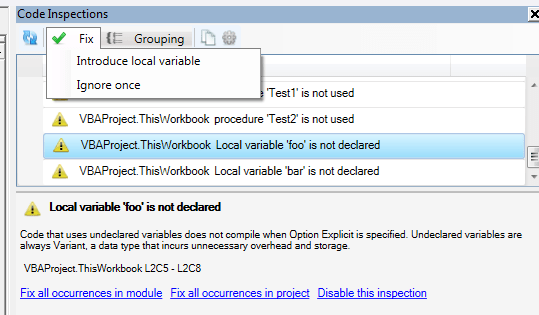
We create an implicit Variant variable declaration to work with, and then this happens:

hhp2m

With a Declaration object for an undeclared variable, any further reference to the same implicit variable would simply resolve to that declaration – this means other Rubberduck features like find all references and refactor/rename can now be used with undeclared variables too.

Rubberduck is now seeing the whole picture, with or without Option Explicit.

The introduce local variable quick-fix simply inserts a “Dim VariableName As Variant” line immediately above the first use in the procedure, where VariableName is the unresolved identifier name. The variable is made an explicit Variant, …because there’s another inspection that could fire up a result if we added an implicit Variant.

The quick-fix doesn’t assume an indentation level – makes me wonder if we should run the indenter on the procedure after applying a quick-fix… but that’s another discussion.

To be continued…

2.0: Stabilizing

The latest release packs a number of fundamental changes that affected every single part of Rubberduck. These changes are the result of the payment of a massive technical debt: from the very beginning, the very idea of wrapping the VBIDE API was deemed a massive and not-quite-needed undertaking – and so many parts of Rubberduck had direct dependencies on the VBA extensibility type library.

VBProjects, VBComponents, CodePanes, CommandBars, everything.

The problem is that, with COM resources, you need to release what you use – and cleaning up COM resources through .NET interop isn’t exactly trivial. Of course it looks pretty simple if you look at the ShutdownAddIn method in Rubberduck’s core:

try
{
    _ide.Release();
}
catch (Exception e)
{
    _logger.Error(e);
}

This Release method is exposed by the ISafeComWrapper interface, which is itself derived from a very general-purpose INullObjectWrapper interface:

public interface ISafeComWrapper : INullObjectWrapper
{
    void Release();
}

public interface ISafeComWrapper<out T> : ISafeComWrapper
{
    new T Target { get; }
}

public interface INullObjectWrapper
{
    object Target { get; }
    bool IsWrappingNullReference { get; }
}

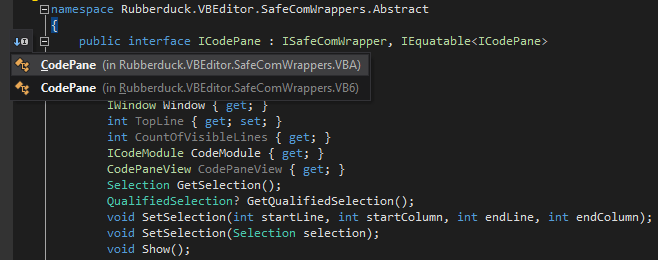
Together, these simple interfaces form the down payment on the technical debt that has been plaguing Rubberduck from its early beginnings: the next step was to derive wrapper interfaces for every single type in the API. So instead of depending on a Microsoft.Vbe.Interop.CodePane, our code would be depending on a Rubberduck.VBEditor.SafeComWrappers.Abstract.ICodePane interface:

public interface ICodePane : ISafeComWrapper, IEquatable<ICodePane>
{
    IVBE VBE { get; }
    ICodePanes Collection { get; }
    IWindow Window { get; }
    int TopLine { get; set; }
    int CountOfVisibleLines { get; }
    ICodeModule CodeModule { get; }
    CodePaneView CodePaneView { get; }
    Selection GetSelection();
    QualifiedSelection? GetQualifiedSelection();
    void SetSelection(int startLine, int startColumn, int endLine, int endColumn);
    void SetSelection(Selection selection);
    void Show();
}

These abstract wrapper interfaces can then be implemented by concrete wrapper types that directly deal with the Microsoft interop types – so we could get rid of a number of extension methods, and move them directly into the wrapper types… and this time we’re not limited to the VBA extensibility API:

icodepaneimplementations

Every wrapper type must implement the Release method, where it cleans up after itself and its child objects – here the CodePanes wrapper releases its CodePane children before it releases itself:

public override void Release()
{
    if (!IsWrappingNullReference)
    {
        for (var i = 1; i <= Count; i++)
        {
            this[i].Release();
        }
        Marshal.ReleaseComObject(Target);
    }
}

This way, the entry point can call IVBE.Release, and every COM object ever accessed in the lifetime of Rubberduck is sure to get properly cleaned up, with one single method call.


Everywhere in Rubberduck, dependencies on Microsoft.Vbe.Interop were replaced with dependencies on Rubberduck.VBEditor.SafeComWrappers.Abstract, and then we were a step closer to a stable release.

But Rubberduck still kept crashing its host application on exit, and sometimes even at startup: something else wasn’t right, the call stack was pointing to an event listener picking up ItemAdded and ItemRemoved events fired from the References class.

Rubberduck implements COM event sinks to listen to IDE events such as “a module was renamed” or “a new project was added”, or “a project was closed”; I disabled them all. I also disabled the initial parse, just in case.


And Rubberduck kept crashing the host on exit, still.

The wrapper type that implemented the IReferences wrapper interface was registering handlers for ItemAdded and ItemRemoved; I removed them.

And Rubberduck did not crash on exit anymore.

So I reinstated the keyboard hook: still no crash.

So I reinstated the event sinks: still no crash.

So I reinstated the initial parse… and it crashed.

Initializing a VBE add-in is… complicated: the VBE hasn’t completely constructed itself at that time, and projects are still loading – the event sink was picking up ProjectAdded and ProjectRenamed events at startup (did you know your VBA projects aren’t “natively” called “VBAProject1”, but literally renamed that way at startup?), and trying to parse projects in the IDE at that point was just asking for trouble.

So I disabled the initial parse. No crash at startup, no crash at shut down. I moved the sinks’ event registration code out of constructors and into a dedicated method meant to be called once the IDE is ready for it… and forgot to call it.

So v2.0.9 does not parse automatically at startup, and doesn’t automatically know when a module or project is renamed, added, or removed.

But it doesn’t crash either. At least, not on my machine running 64-bit Office 2010 on Win10 x64… but since 2.0.9 was issued earlier today, we’ve found a race condition preventing proper teardown of the Rubberduck menu, and there are still a few more things to fix before we can call 2.0 “stable”.

But we’re much closer today than we were a month ago.

To be continued…


OOP VBA pt.2: Factories and Cheap Hotels

When writing OOP code in VBA, it’s important to keep a number of things in mind:

  • A class can be given a default instance, which makes all its public members usable without needing to create a new instance.
  • An interface can very well expose only public property get accessors, but no mutator.
  • A class Implements as many interfaces as needed.
  • Events cannot be exposed by an interface.

VB_Attributes

If you ever exported a class module and examined it in your favorite text editor, you probably noticed these:

Attribute VB_Name = "Class1"
Attribute VB_GlobalNameSpace = False
Attribute VB_Creatable = False
Attribute VB_PredeclaredId = False
Attribute VB_Exposed = False

The VB_Name attribute determines the identifier the class will be referred to in code; VB_GlobalNameSpace makes its members global which is kinda anti-OOP.. VB_Creatable can only be False in VBA projects, and means that other VBA projects cannot directly create a new instance of that class. VB_Exposed determines whether other VBA projects can see this class or not.

The one we’re interested in, is VB_PredeclaredId. If you export a UserForm module, you’ll notice it’s predeclaredId attribute is  True. This is what allows you to work against a form without creating an instance – you’re using the default instance when you do that.. and you shouldn’t.

Normally.


Finding the cheapest hotel

Here’s a little problem that I’m going to solve in VBA, with full-blown OOP:

A hotel chain operating in Goa wishes to offer room reservation services. They have three hotels in Goa: GreenValley, RedRiver and BlueHills. Each hotel has separate weekday and weekend (Saturday and Sunday) rates. There are special rates for rewards customer as a part of loyalty program.Each hotel has a rating assigned to it.

  • GreenValley with a rating of 3 has weekday rates as Rs1100 for regular customer and Rs800 for rewards customer. The weekend rates are 900 for regular customer and 800 for a rewards customer.
  • RedRiver with a rating of 4 has weekday rates as Rs1600 for regular customer and Rs1100 for rewards customer. The weekend rates are 600 for regular customer and 500 for a rewards customer.
  • BlueHills with a rating of 5 has weekday rates as Rs2200 for regular customer and Rs1000 for rewards customer. The weekend rates are 1500 for regular customer and 400 for a rewards customer.

IMPORTANT: Before you read any further

This exercise isn’t about solving the problem. The problem is rather easy to solve. It’s about managing changes, writing code that can survive changes. Specifications are never carved in stone, they change all the time. Today the hotel chain has 3 hotels, tomorrow they might have 3,500. Today the hotel chain has two types of customers. Tomorrow they might have three; eventually the chain acquires another chain in another country, and then the prices need to be converted between USD and EUR before they can be compared. The foreign hotels might have different statutory holidays, and it wouldn’t matter until the CEO decided that July 4th reservations would be 25% off, but only in the US hotels.

This solution isn’t the one OOP way to do things. It’s solution; your mileage may vary. There are many, many ways to do this – but a monolithic block of procedural code wouldn’t survive very long with the hectic reality depicted above, would it? Or it would, but then bugs would start appearing, and more changes would have to be made, perhaps introducing new bugs, too. Sounds familiar? Keep reading.

Okay. Ready?

So, let’s say I want to store information about some pricing rule, based on some DateType and some CustomerType. I could describe this type as follows (the enums don’t belong to the interface, they’re just public types that were convenient to define there):

Option Explicit

Public Enum CustomerType
    Regular
    Premium
End Enum

Public Enum DateType
    WkDay
    WkEnd
End Enum

Public Property Get DateType() As DateType
End Property

Public Property Get CustomerType() As CustomerType
End Property

Public Function ToString() As String
End Function

Let’s call this interface IPricingRuleInfo.

In well-designed OOP, one doesn’t design an interface to change. This IPricingRuleInfo interface will change, as soon as the requirements change and we need to expose a new property. But we’re going to use VBA interfaces differently here… just bear with me.

What we’re going to do with this interface, is a façade that the program will be written against, while we hide the implementation details.

The implementation would look like this:

Option Explicit

Private Type TInfo
    DateType As DateType
    CustomerType As CustomerType
End Type
Private this As TInfo

Implements IPricingRuleInfo

Public Property Get CustomerType() As CustomerType
    CustomerType = this.CustomerType
End Property

Public Property Let CustomerType(ByVal value As CustomerType)
    this.CustomerType = value
End Property

Public Property Get DateType() As DateType
    DateType = this.DateType
End Property

Public Property Let DateType(ByVal value As DateType)
    this.DateType = value
End Property

Public Property Get Self() As IPricingRuleInfo
    Set Self = Me
End Property

Public Function Create(ByVal dtType As DateType, ByVal custType As CustomerType) As IPricingRuleInfo
    With New PricingRuleInfo
        .DateType = dtType
        .CustomerType = custType
        Set Create = .Self
    End With
End Function

Private Property Get IPricingRuleInfo_CustomerType() As CustomerType
    IPricingRuleInfo_CustomerType = this.CustomerType
End Property

Private Property Get IPricingRuleInfo_DateType() As DateType
    IPricingRuleInfo_DateType = this.DateType
End Property

Private Function IPricingRuleInfo_ToString() As String
    IPricingRuleInfo_ToString = CStr(this.CustomerType) & ";" & CStr(this.DateType)
End Function

Notice this Create method: that’s the Factory Method, intended to be used from the default instance. The properties are instance members that really belong to an instance of the class; the implementation also exposes Property Let accessors, so that Create can assign the proprerty values of the instance to create and return.

The Self getter is a little trick that enables this neat With New syntax.

The private type helps remove awkward prefixes by legalizing identical field and property names, and if the class’ state ever needs to be serialized, it’s child play.

Any code that works with a PricingRuleInfo instance will have access to its setters and default instance. But the client code wouldn’t do that: the client code works with the IPricingRuleInfo interface, and know nothing of a default instance, a factory method, or Property Let members: it only sees CustomerType and DateType read-only values, and a ToString method that concatenates them into a string.

And now we can have an IPricingRule interface like this:

Option Explicit

Public Property Get RuleInfo() As IPricingRuleInfo
End Property

Public Function Evaluate(ByVal info As IPricingRuleInfo) As Currency
End Function

And then we can have as many implementations as we like – here, a simple one called FixedAmountPricingRule, that takes an amount at creation, encapsulates it, and then uses it to return a fixed amount when evaluating the rule:

Option Explicit

Private Type TRule
    RuleInfo As IPricingRuleInfo
    Amount As Currency
End Type
Private this As TRule

Implements IPricingRule

Private Property Get IPricingRule_RuleInfo() As IPricingRuleInfo
    Set IPricingRule_RuleInfo = this.RuleInfo
End Property

Private Function IPricingRule_Evaluate(ByVal info As IPricingRuleInfo) As Currency
    IPricingRule_Evaluate = this.Amount
End Function

Public Property Get RuleInfo() As IPricingRuleInfo
    Set RuleInfo = this.RuleInfo
End Property

Public Property Set RuleInfo(ByVal value As IPricingRuleInfo)
    Set this.RuleInfo = value
End Property

Public Property Get Amount() As Currency
    Amount = this.Amount
End Property

Public Property Let Amount(ByVal value As Currency)
    this.Amount = value
End Property

Public Property Get Self() As IPricingRule
    Set Self = Me
End Property

Public Function Create(ByVal info As IPricingRuleInfo, ByVal value As Currency) As IPricingRule
    With New FixedAmountPricingRule
        Set .RuleInfo = info
        .Amount = value
        Set Create = .Self
    End With
End Function

Again, we give this class a default instance by setting its VB_PredeclaredId attribute to True and re-importing the module into the project.

Next we’ll need an abstraction for hotels – enter IHotel:

Option Explicit

Public Property Get Name() As String
End Property

Public Property Get Rating() As Byte
End Property

Public Function CalculatePricing(ByVal info As IPricingRuleInfo) As Currency
End Function

Public Function GetDateType(ByVal value As Date) As DateType
End Function

Notice how the interface exposes nothing of IPricingRule. The implementation has a dependency on IPricingRule and IPricingRuleInfo, but knows nothing of the concrete types. Here’s the code:

Option Explicit

Private Type THotel
    PricingRules As New Scripting.Dictionary
    Name As String
    Rating As Byte
End Type
Private this As THotel
Implements IHotel

Public Property Get Name() As String
    Name = this.Name
End Property

Public Property Let Name(ByVal value As String)
    this.Name = value
End Property

Public Property Get Rating() As Byte
    Rating = this.Rating
End Property

Public Property Let Rating(ByVal value As Byte)
    this.Rating = value
End Property

Public Property Get Self() As IHotel
    Set Self = Me
End Property

Public Function Create(ByVal hotelName As String, ByVal stars As Byte, Optional ByVal rules As Collection = Nothing) As StandardHotel
 
    Dim rule As IPricingRule
    With New StandardHotel
 
        .Name = hotelName
        .Rating = stars
 
        If Not rules Is Nothing Then
            For Each rule In rules
                .AddPricingRule rule
            Next
        End If
 
        Set Create = .Self
 
    End With

End Function

Public Sub AddPricingRule(ByVal rule As IPricingRule)
    this.PricingRules.Add rule.RuleInfo.ToString, rule
End Sub

Private Function IHotel_CalculatePricing(ByVal info As IPricingRuleInfo) As Currency
    Dim rule As IPricingRule
    Set rule = this.PricingRules(info.ToString)
    IHotel_CalculatePricing = rule.Evaluate(info)
End Function

Private Function IHotel_GetDateType(ByVal value As Date) As DateType
    IHotel_GetDateType = IIf(Weekday(value, vbMonday) <= 5, WkDay, WkEnd)
End Function

Private Property Get IHotel_Name() As String
    IHotel_Name = this.Name
End Property

Private Property Get IHotel_Rating() As Byte
    IHotel_Rating = this.Rating
End Property

Notice the GetDateType function: it allows a given IHotel implementation to come up with funky creative ways to determine the DateType for a given date value.

Also interesting, the AddPricingRule procedure, which isn’t exposed by the IHotel interface, but that adds pricing rules to the encapsulated dictionary of pricing rules; given an IPricingRuleInfo instance, we can now calculate the price by evaluating the rule.

The HotelFinder class is just an object that encapsulates the logic to find the cheapest hotel, given two dates and a CustomerType:

Option Explicit

Private Type TFinder
    Hotels As Collection
End Type
Private this As TFinder

Public Property Get Hotels() As Collection
    Set Hotels = this.Hotels
End Property

Public Function FindCheapestHotel(ByVal fromDate As Date, ByVal toDate As Date, ByVal custType As CustomerType) As String

    Dim place As IHotel
    Dim checkedDate As Date

    Dim cheapestAmount As Currency
    Dim cheapestHotel As IHotel
 
    Dim hotelTotal As Currency
    For Each place In this.Hotels
 
        hotelTotal = 0
        For checkedDate = fromDate To toDate
            Dim info As IPricingRuleInfo
            Set info = PricingRuleInfo.Create(place.GetDateType(checkedDate), custType)
            hotelTotal = hotelTotal + place.CalculatePricing(info)
        Next
 
        If cheapestAmount = 0 Or hotelTotal < cheapestAmount Then
            cheapestAmount = hotelTotal
            Set cheapestHotel = place
        ElseIf hotelTotal = cheapestAmount And cheapestHotel.Rating > place.Rating Then
            'same price, but higher rating; higher rating gets precedence
            Set cheapestHotel = place
        End If
 
        Debug.Print place.Name, Format(hotelTotal, "$#,##0.00")
    Next
 
    FindCheapestHotel = cheapestHotel.Name

End Function

Private Sub Class_Initialize()
    Set this.Hotels = New Collection
End Sub

Private Sub Class_Terminate()
    Set this.Hotels = Nothing
End Sub

So, we iterate a collection of hotels, evaluate the stay at each one (output the amount to the debug pane), and return the name of the cheapest hotel.

At the top of the call stack lies a procedure that creates an instance of that HotelFinder, populates its Hotels collection, and ouputs the result of the FindCheapestHotel function. This is where we reap the benefits of OOP: initializing the hotels reads pretty much exactly like reading the specs.

Option Explicit

Public Sub Test(ByVal checkin As Date, ByVal checkout As Date, ByVal custType As CustomerType)
    Dim finder As New HotelFinder
    InitializeHotels finder
    Debug.Print finder.FindCheapestHotel(checkin, checkout, custType)
End Sub

Private Sub InitializeHotels(ByVal finder As HotelFinder)

    With StandardHotel.Create("Green Valley", 3)
        .AddPricingRule FixedAmountPricingRule.Create(PricingRuleInfo.Create(WkDay, Premium), 800)
        .AddPricingRule FixedAmountPricingRule.Create(PricingRuleInfo.Create(WkEnd, Premium), 800)
        .AddPricingRule FixedAmountPricingRule.Create(PricingRuleInfo.Create(WkDay, Regular), 1100)
        .AddPricingRule FixedAmountPricingRule.Create(PricingRuleInfo.Create(WkEnd, Regular), 900)
        finder.Hotels.Add .Self
    End With
 
    With StandardHotel.Create("Red River", 4)
        .AddPricingRule FixedAmountPricingRule.Create(PricingRuleInfo.Create(WkDay, Premium), 1100)
        .AddPricingRule FixedAmountPricingRule.Create(PricingRuleInfo.Create(WkEnd, Premium), 500)
        .AddPricingRule FixedAmountPricingRule.Create(PricingRuleInfo.Create(WkDay, Regular), 1600)
        .AddPricingRule FixedAmountPricingRule.Create(PricingRuleInfo.Create(WkEnd, Regular), 600)
        finder.Hotels.Add .Self
    End With
 
    With StandardHotel.Create("Blue Hills", 5)
        .AddPricingRule FixedAmountPricingRule.Create(PricingRuleInfo.Create(WkDay, Premium), 1000)
        .AddPricingRule FixedAmountPricingRule.Create(PricingRuleInfo.Create(WkEnd, Premium), 400)
        .AddPricingRule FixedAmountPricingRule.Create(PricingRuleInfo.Create(WkDay, Regular), 2200)
        .AddPricingRule FixedAmountPricingRule.Create(PricingRuleInfo.Create(WkEnd, Regular), 1500)
        finder.Hotels.Add .Self
    End With
 
End Sub

And we get output:

Test Now, Now + 3, Premium
Green Valley $3,200.00
Red River $4,400.00
Blue Hills $4,000.00
Green Valley

Is that over-engineered? As I said above, most definitely. But then, how would a Java, C#, or VB.NET solution look like? Not much different, save a PricingStrategyFactoryFactory class for the Java code of course! The point, again, was an exercise in writing code resistant to change, not just solving a problem. Now when the specs change and we need a new pricing rule that grants 20% off on the first Tuesday of every second month, we don’t need to change any code except for the code that initializes the hotels: we just implement the new functionality, without changing code that already works: that’s the Open/Closed Principle at play. In fact, I tried to depict all of SOLID in this code – I hope I did something like that.