Things were moving pretty fast with the prototype, but moving on to the actual LSP-driven project hit a roadblock as far as actually achieving the cross-process JsonRPC communications. I put it aside for a while, hoping to get back to it later, and then summer arrived and real-life stuff kept me busy. Renovations in Rubberduck, renovations at home.
Wow time flies, pretty much six months have elapsed since the last status update, and now it’s Hacktoberfest again already! So what happened?
RPC Issues
For about five of those six months, not much moved forward, but ideas kept brewing all along, and the RPC issues have now been resolved.
So, where’s RD3 at?
Clean Start, Clean Exit
When the VBE loads RD3, the add-in starts a separate language server process and connects to it through the language server protocol (LSP), using the very same technology that Microsoft put in VSCode, via the OmniSharp libraries. When the add-in is unloaded from the VBE (whether manually or as the host application shuts down), the server receives both Shutdown and Exit notifications, and once they’re handled and the server actually shuts down we’ll be left with a clean exit every time.
Logging is implemented on both client and server sides, and while debugging the startup and initialization was a bit painful (can’t start the server from Visual Studio, and can’t hook up the debugger quickly enough to attach in time to see what’s going on), now that it’s done the server process can be attached after it starts, so we can hit breakpoints in the server code.
Net7
Perhaps the biggest achievement is that RD3 is now building with .net 7.0, save for a specific library that has to target Framework 4.8.1 because of its use of a number of COM-marshaling methods that don’t (yet?) exist in .net core: that’s the parts dealing with unmanaged memory and pointer magic, that allow RD2 to run unit tests, among other things.
Because everything else is under .net7, Rubberduck gets to leverage all the amazing enhancements that have been brought to the C# language and development platform in the past, uh, decade or so. RD3 will likely release under .net8, which has long-term support from Microsoft.
There’s a catch though: this means RD3 will not be able to run on old, officially unsupported versions of Windows – we’re forfeiting them, in favor of being able to leverage the many enhancements being made to the .net platform. At this stage it’s still unclear exactly what this means for VB6 support: for now the focus is integrating with the VBIDE in VBA, but nothing says VB6 support is being ditched – it was just simpler to exclude that one RD library from the solution for now.
Settings
One of the first pieces of Rubberduck written around this time back in 2014 – the settings I/O and modeling – has officially been axed at long last. Since forever, Rubberduck settings have been serialized to an XML configuration file. In RD3 that’s changing to JSON and much simplified abstractions. In RD2 the default settings live in an XML-encoded “Settings.settings” file that’s a pure nightmare to maintain; in RD3 defaults are moving back into the code itself (I know, it’s data, not code per se), with each serializable struct implementing a generic IDefaultSettingsProvider interface that mandates the presence of a “Default” member that returns a static instance of that settings struct (e.g. LanguageServerSettings.Default, returns a LanguageServerSettings instance with the hard-coded default values.
JSON settings is how pretty much everyone else does it, and there’s a reason for that: the format is much easier to read and manually edit. Plus we already have JSON involved with the RPC messages between client and server. XML was originally adopted because that was the format for Visual Studio’s own settings and configuration under .net Framework 4.x.. and today it’s JSON everywhere.
Rubberduck Editor
Last spring the prototype editor was being integrated into the VBE using essentially the same mechanics used in RD2 for the dockable toolwindows, just undocked and basically turned into just another VBIDE document window.
With the project now under .net7, it turns out we can now have actual WPF/XAML windows in Rubberduck, so there is no more need to implement the entire UI as user controls that are embedded inside a WinForms user control that gets injected into a native toolwindow.
The RD3 editor will let go of most of the native VBIDE integration, and live in a separate window – very much like the Power Query Editor in Excel. The only native UI components in RD3 are the Rubberduck menu items, which have been boiled down to just “Show Editor” and “About” commands, both of which will now bring up a fully WPF UI, rather than a WPF UI embedded in a WinForms dialog: the Rubberduck Editor will be its own application, and we’ll have full control over everything that happens inside that editor.
The downside (if it is one), is that we have to implement basic commands such as Copy and Paste, as well as toolwindows we take for granted, like Properties and Object Browser.
At this stage the editor shell is able to display tab documents bound to a ViewModel; tabs can be moved around, torn from the main window and dragged to another monitor, or docked inside the editor shell. I’m now working on figuring out how the toolwindows are going to work; I’d like something similar to Visual Studio, but the Dragablz library would need to be forked and updated with such capabilities… the “toolwindows” aren’t docking and don’t work in a way that would make sense in a code editor.
Workflow
This does impact the VBA dev workflow: in RD2 the single source of truth was the VBE. In RD3 that’s no longer the case, since the VBE isn’t going to contain the code that’s being edited. The single source of truth in RD3 is going to be moving to the Rubberduck Editor, and the editor will be working off code files exported to file system folders, dubbed “workspace folders”.
When the Debug/Run command is executed, the RDE will save all modified documents to the workspace, synchronize the host VBA project components to mirror it, and then the VBE takes over from that point on (RDE window will minimize itself) to compile and actually run/debug the project.
The host VBA project can also be synchronized any time you want, using the File/Synchronize command – and the editor will run a FileSystemWatcher on workspace folders, so it will detect any external changes/additions/deletions, and immediately notify the language server. If external changes are detected on a file that is opened in the editor, it will prompt to either reload the document, or keep the editor version if it has unsaved changes (thus discarding the external changes).
In RD2 you had to manually tell Rubberduck about changes occurring in the VBE, because automatically parsing on idle involved low-level keyboard hooks and since these hooks were already involved in auto completion and hotkeys, it was deemed too invasive, and ran against the basic premise of the parser, which is that we’re operating with legal, compilable code.
This all changes dramatically in RD3. Because the editor is fully managed, nothing happens in it without the language server receiving requests and notifications. Content changes synchronize in real-time, the editor receives responses with completion lists, syntax errors to highlight (squiggles!), or edits (e.g. auto-formatting etc.) made server-side that the editor immediately carries into the code pane as you type – exactly like how Visual Studio and VSCode and any other modern-day code editor that works with a language server.
The server works asynchronously and out of process, so long-running tasks can send progress notifications, and even partial responses – for example a completion list might only include names to render the list in the client, and the associated tooltips and commands might be sent a few milliseconds later.
Debugging
As was mentioned before, the one thing the RDE cannot do, is attach as a debugger to your running VBA code. When you debug, the RDE will minimize itself and leave the VBE in charge. Edit-and-continue poses a particular challenge: after a debug session, the RDE doesn’t know if anything was modified in the VBE, and its file system watchers cannot help because code doesn’t just magically export itself back to the workspace folders – so here’s what we’re looking at:
When a debug session is launched from the RDE, code gets synchronized into the VBE before it is compiled and executed;
If the RDE is re-focused and the VBE is back into edit mode (i.e. debug session has ended), the entire workspace gets refreshed with a new export from the VBE;
If the RDE is re-focused during a debug session, document tabs will be read-only and the status bar will indicate why;
If the host application crashes, or the debug session does not end with the RDE being brought back before the host application shuts down, then the single source of truth resides safely in the host document and the workspace will synchronize next time the RDE loads this project;
Any edits made to the exported workspace files during a debug session would be overwritten and lost when the session ends and the RDE is re-focused, unless source control is involved and the changes were committed – in which case the modifications can then be recovered from source control.
Breakpoints cannot be set programmatically either, so the RDE will likely not support them. Bookmarks have a similar problem, in that the VBIDE API doesn’t really let us manipulate them, however the RDE can very well have its own bookmarks system. Debugger toolwindows (immediate, locals, call stack, etc.) are also not going to be present in the Rubberduck Editor, since they’d all be useless without a debugger attached.
User Interface
Some parts of RD2 XAML markup may survive, but really the intent is to make the RDE have a consistent, pleasing, modern, intuitive, and functional user interface for all of its functionalities. Because we’re no longer confined to a WinForms/native host, key/command bindings (hotkeys) will no longer require any kind of bug-prone hooking; focus should behave much more naturally as well, and drag-and-drop is going to be a breeze with the Dragablz library. RD3 basically entails crafting an entire IDE UI from scratch, starting with the editor shell.
The RDE window features a complete menu bar (largely inspired from Visual Studio’s), an actual status bar, and the client area consists of a Dockablz layout panel hosting a Dragablz document tab container.
Some more tinkering is still needed around toolwindows, because what we get out of the box with Dragablz is not going to work for our purposes. Perhaps there’s a way to split the left and right docking areas in two so there’s a distinct drop location for toolwindows that displays them with the tabs at the bottom, but for now there’s no such thing and toolwindows are essentially just another type of document tab.
Another thing that will need attention ideally before the entire UI is done, is theming: indeed it would be sad to make our own editor from scratch without supporting light, dark, and custom themes and syntax highlighting!
Server Side
The LSP server is in place, handling server lifecycle requests and notifications. The next step is to beef up the initialization to send the server information about the project(s) loaded in the VBE, including whether it’s an unsaved new blank project or an existing one hosted in a saved document, and a URI for each library reference so the server can load them and extract all the types and their respective members.
Then we’ll need to setup the actual workspace folders and parse any code files in them – and when we’re done doing that we can send the semantic tokens to the editor to perform syntax highlighting and folding ranges, all while the server starts running diagnostics/inspections, prioritizing the documents that are opened in the editor. The client-side code for this was written in the prototyping stage, so it’s not complete but exactly how that’s going to work is already all figured out.
2023.Q4
The last quarter of 2023 is likely to see lots of progress on all fronts: with LSP in place and a working but bare-bones editor, I can see myself focusing on UI work mostly, while other contributors hop on and work on server-side processing – much of which will have to be ported from the RD2 code base and reworked to fit the new paradigms.
There is a lot of work ahead, but with the client/server communications happening, things that have been on our minds for years, are about to get very real.
I’m pleased to announce that Rubberduck release version 2.5.2 has achieved over 32 thousand total downloads this month, overflowing a VBA Integer data type! Big numbers are fun and all, but the time has come to reset the counters and officially release the next version.
Those of you that have been keeping up with the many pre-release builds for the past two years will not have too many surprises here, but for the vast majority of you this will be a welcome upgrade with the combined efforts of our contributors over the past 20 months or so. That’s two Hacktoberfests and over 700 commits from 180 pull requests!
See rubberduckvba.com/features for more information about Rubberduck features.
What’s New?
This release brings an awesome new peek definition navigation command (pre-released in 2021!), which lets you view source code that’s anywhere else in the project, without leaving where you’re at.
The Fakes API has been seriously enhanced with more than a dozen new standard library function overrides, as discussed in details in a previous article.
The version check feature is no longer sending HTTP requests to legacy routes on the website (although the website still supports them, so the feature still works in older Rubberduck installs). Instead, an HTTPS request is sent to the public API behind the website – the result is a more reliable feature that now receives much more information than just a version number. It wouldn’t be surprising to see a future iteration show additional information about the latest tag/release, such as the number of downloads, and the installer executable asset URL, for example.
A Rubberduck release wouldn’t be a Rubberduck release without at least a handful of new inspections! 6 new inspections are coming this time around:
IIf side-effects flags uses of the IIf function where arguments are potentially side-effecting.
Public control field access flags code that accesses form controls from outside the form, recommending a more encapsulated approach.
Public Enum in Worksheet module warns about Enum types declared in a Worksheet document module, which can easily result in compilation errors when the worksheet is later copied.
Suspicious predeclared instance access warns about accesses to a form’s predeclared instance made in that form’s code-behind module; depending on how the form is used, such code may not work as intended.
UDT Member not usedfinds UDT members that are declared without being referenced anywhere.
The Extract Methodrefactoring is making a long-awaited comeback, 5 whole years after the old 2.0 implementation was deemed irreparably broken. It has a number of limitations, for now the selection to extract cannot contain any of the following:
GoTo statements
GoSub...Return statements
Conditionally-compiled statements
This obviously isn’t an exhaustive list of everything that happened in the last two years, but it’s a good summary of the new stuff.
What’s next?
This release is the last one planned to start with a 2; work has started on Rubberduck 3.0, a major overhaul of everything we’ve built so far. Rubberduck is being split into client/server processes, storage is moving out-of-process, and the entire user interface is being remade to support everything that’s coming in v3.
Because a massive number of breaking changes need to happen, RD3 is being developed in a separate repository; you’ll find it under the rubberduck-vba organization on GitHub, and that’s where the bulk of development efforts are going to be directed at in the coming months.
Website
The new revamped website is live now; still has a couple of annoying issues (search results page links don’t work, for one), but overall I’m very happy with how it turned out!
Swag Shop
If you’re following Rubberduck on social media, you know I’ve opened a swag shop where you can get Rubberduck-branded mugs, pens, stickers, t-shirts, and more; these past couple of weeks I’ve been building an assortment of various products at various price points for various budgets. Shipping remains a challenge (it’s expensive!), but Ko-fi doesn’t take a cut on shop sales (or donations), which makes it a better deal for a shop with uncertain sales, compared to say Amazon, where shipping is less of a challenge but the monthly fees are prohibitive for a small-volume shop.
There’s now a rather decent offering and quite a lot of inventory; eventually I’ll get more stuff made (hats, hoodies maybe), and will replenish whatever runs out, but my attention will be mostly dedicated to Rubberduck3 development now.
Rubberduck 2.x has been an amazing adventure and a tremendous learning experience – I’m primed and looking forward to all the new challenges porting 2.x to RD3 will bring!
I’ve embarked on a journey to take Rubberduck to the next major version, making it the add-in we’ve always wanted to build. These monthly updates provide a sneak peek at what’s coming, and how it’s coming to be.
Quick catch-up
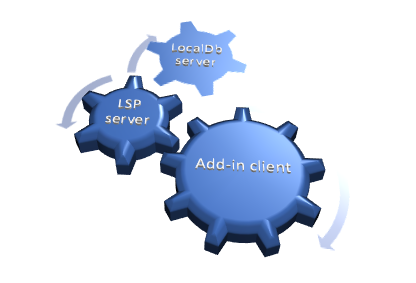
Rubberduck 3.0 will run a LSP server process in the background
A separate process will host a local SQLite database
Telemetry will be opt-in, fully configurable, and transparent
Several quite important low-level changes since last time: we’re now looking at named pipes rather than sockets for the JSON-RPC communications between the editor and the language server, and I’m now using Microsoft’s StreamJsonRpc library for this. Named pipes are inherently local, so they’re less of a concern than sockets, and they don’t seem to trip up Windows Defender, so we’ll take it!
I spent the better part of last month tidying up and documenting the code off the language server protocol (LSP) specifications, moving things around and splitting up responsibilities, writing abstractions that will be shared by all server processes: LSP and SQLite, but also a separate/dedicated server process for telemetry, so even constant writes couldn’t interfere much with LSP server activities, or with the add-in client.
At the time of this writing, I’m still somewhat struggling with the RPC communications, but that won’t remain stuck for too long – the plan is to merge a rather large structural PR and the whole RPC infra by the end of this week.
The Rubberduck.Server.LocalDb console at startup. This process will normally run in the background, hidden.
I’ve taken a number of important decisions about the project in the last few weeks.
GitHub Repository Issues
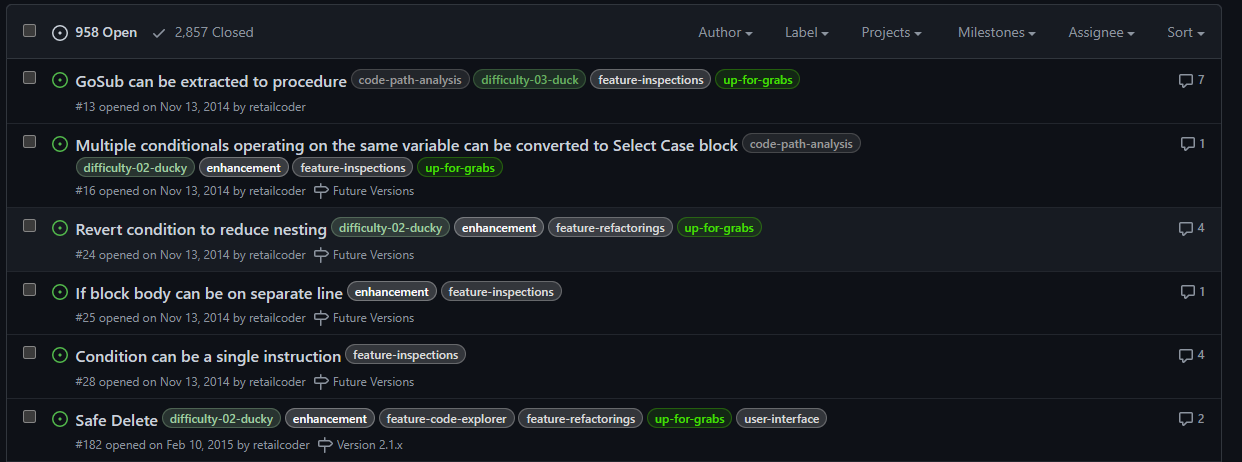
Since the project’s beginning, Rubberduck was pretty much ad-hoc development. I remember in the first few days after creating the GitHub repository, going on an issue-creation spree to write down everything I could dream the thing could do. A lot of it was implemented, but the oldest open issues in the repository are from 2014, 2015:
2,857 issues closed is quite something. 958 open feels daunting though. Using issues as a backlog might not have been the best of ideas…
I’m not going through nearly a thousand issues to sort out what’s already implemented/fixed, what’s unrealistic after all, what’s a good idea that got buried under a million others, etc. Implementing LSP isn’t magically going to clean this up, and when 3.0 releases we’re not going to be maintaining two distinct, massive code bases: one of them isn’t going to make it, and it’s sadly going to have to be the one with 1.7K stars and 284 forks and 97 watchers. I can hardly express how I feel about these numbers, let alone those:
As of 2023/02/14, release tag 2.5.2.1 (build 2.5.2.5906) has been downloaded 27,320 times… that’s crazy!
The repository isn’t going anywhere though – it’s just that at some point in the [somewhat-near] future, it’s going to be made read-only and essentially archived, and the Rubberduck3 repository will become Rubberduck’s new home on GitHub (you’ll still find it under the rubberduck-vba organization).
Rubberduck is still accepting pull requests for v2.x and will continue to do so until further notice.
Methodology Upgrade
If building Rubberduck up to v2.5 was pretty much ad-hoc (and that’s fine!), I don’t think the same strategy would work with v3.0; we can’t just go and create a thousand issues to churn through, or pick a feature to implement because it looks like it’s going to be fun to do. Rubberduck 3.0 is still an embryo at this point, and while all the DNA is there and we know exactly (at least in large fuzzy outlines) what we want this add-in to do, this time things need to happen in order, for technical reasons mostly, but also for project management.
By adopting a different development methodology, we’re going to better control the backlog and project progression. We can better track what’s in progress and determine what the next logical steps should be.
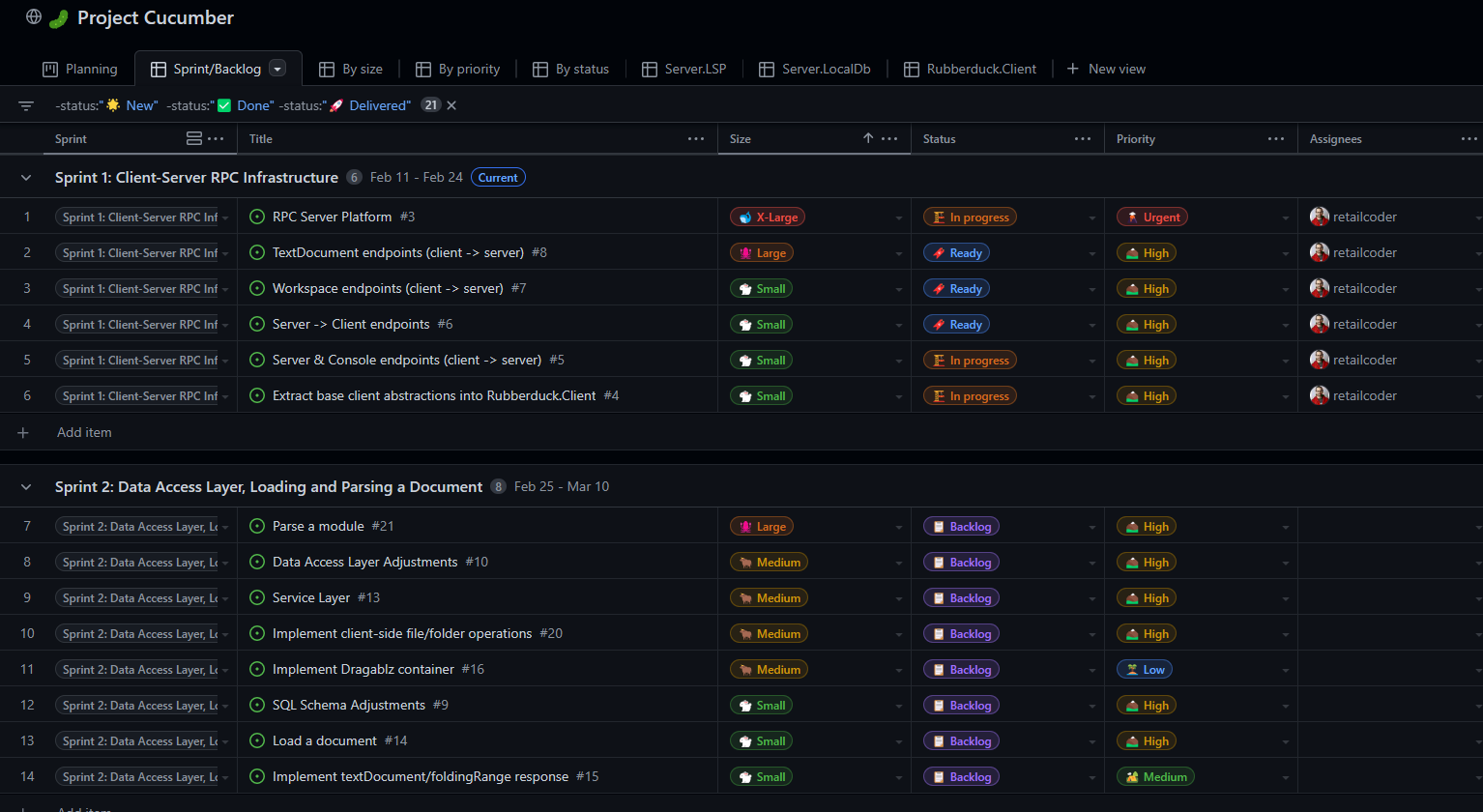
Instead of making a ton of issues, we’ll be drafting them, sizing them, prioritizing them, refining them until they’re small enough to be realistically achievable within a week or two of part-time contributions. Work items will now have a life cycle like this:
New items/ideas not yet fleshed out, not yet planned, and/or not yet prioritized.
Backlog for work items being documented.
Ready for documented work items that are ready to be worked on; items are assigned a sprint (not necessarily the next one), and convert into issues at this stage.
In Progress is work in progress; a branch is created for resolving that issue.
In Review is work items ready to be peer reviewed; a pull request is opened at that stage.
Done is when the work is merged into dev/next.
Delivered status is set when the work is merged into main.
Items/issues will be assigned a priority level:
Urgent is the highest priority level, for things that should be worked on before anything else.
High is for work that’s directly aligned with the objectives of the sprint it’s in.
Medium priority work could be delayed a sprint or two.
Low priority work doesn’t need to be in the current sprint, but would be nice to deliver anyway.
The priority level of any given issue likely evolves over time, particularly the lower-level ones.
In addition to status and priority, each draft issue / work item gets sized. Again this is meant to evolve over time: issues should become smaller over time as they are refined and documented and broken down into smaller tasks.
X-Large items represent a large development that should be broken down into smaller tasks.
Large items represent a significant development effort that can realistically be completed within a sprint by a single developer.
Medium items represent perhaps up to 2-3 days of effort.
Small items represent small tasks that can be completed in a few hours.
Tiny items represent tasks that should only take a few minutes: fixing a typo, adding a column to a database view or table, a configuration tweak, etc.
As of this writing, Sprint 1 is in its second half, and I’m still working on the RPC infrastructure:
“Project Cucumber” – it just had to be named that.
There’s a bit of history around the cucumber thing, and it involves two major contributors we lost and think about fondly all the time.
Comintern simply disappeared one day after a brief return, after a year under terms that essentially prevented him from working on open-source projects and hanging out in a public chat. We’re all hoping he’s all right and will eventually pop back.We lost our beloved ThunderFrame to a fierce cancer in late 2018. Rest in peace, my friend. I got the Ctrl+Alt+Delete cushion covers you wanted me to have.
Discord Server
Rubberduck’s dev chat was always in a Stack Exchange room under the Code Review site. In fact it’s just a Code Review chat room we ended up [ab]using for this purpose. Back in 2014 I was very active on CR, and as a moderator on that site in 2015-2018 it made a lot of sense to keep it there.
But with 2-week sprints and a living backlog, we’re going to need more than SE chat to pull this off, and this is where Discord shines.
The general chat is fun, but a nice thing about Discord is that you can schedule events, like a public Sprint Review presentation every two weeks, followed by a Sprint Planning conversation among developers.
I’ll be hosting these events regularly, whether there’s an audience or not, whether other contributors are present or not.
Sprint Review
At each end of a sprint, we’re going to be going over what was done in the previous two weeks, and developers will present/demo their work. Since I’m doing sprint 1 by myself the first review will be me going over the solution structure and explaining the mechanisms and abstractions involved at a high level; reviews for sprint 2 and onward will likely involve more contributors, and things will get more and more exciting to present every time.
Sprint Planning
After the review concludes, developers convene to plan a realistically deliverable workload for the upcoming sprint. If we overshoot and under-deliver, we can always adjust the next sprint. If we over-deliver, we can always pull work items from upcoming sprints into the current one. So this conversation is about the work itself, whether there’s enough information in an issue for anyone at the table (or not!) to pick up and complete that task within two weeks, and whether the backlog is healthy or falling behind; if it’s falling behind, we take the time to talk about what needs to happen and outline work items to be drafted and refined during the sprint (I’ll be doing that backlog maintenance).
So yeah, Rubberduck3 is starting to feel very much like it’s just about to officially kick off, and Rubberduck as a project is entering a whole new phase, in continuous delivery mode.
I intended to write about Rubberduck 3.0 progress last December, but things snowballed during the Holidays and here we are two-three weeks later and wow, time flies! Happy New Year dear readers (belatedly, I guess), 2023 is full of promises, and there are very nice things going on that I need to take a moment and share here.
Without any further ado, let’s clear the big news.
The main issues with Rubberduck have always been:
Memory consumption: Rubberduck consumes a lot of memory in the host process.
Instabilities related to COM interop: various tear-down issues with Office CommandBar and dockable toolwindows.
Poor VBIDE extensibility tooling and editor interactions.
Logs are difficult to use, it’s not clear what is happening in response to what – even when there’s only a single instance writing to the logs. Adding more logging means making things worse.
With v3 we’re addressing these long-standing issues by taking a number of design decisions early in the development process. These decisions were weighted against their downsides and alternatives, and probably make Rubberduck the first VBIDE add-in to implement a LSP Server for its purposes.
Language Server Protocol
For a while there have been discussions among Rubberduck devs about whether implementing LSP would be a feasible thing to do. It’s a protocol that formalizes all communications between a client (an IDE) and a language server that is used in modern IDEs such as Visual Studio and VSCode; twinBASIC implements it, and Rubberduck 3.0 will implement it too.
By moving all of the language-processing aspects out-of-process into a language server, we immediately tackle memory consumption issues: most of the CPU and memory resources Rubberduck 3.0 will use, are going to be outside of the add-in/host process.
With LSP in place, Rubberduck’s objective to bring editing VBA code in the Visual Basic Editor into the 21st century feels closer than ever.
SQLite
Rubberduck’s LSP implementation will be split in two processes, as the LSP server process will be a client for another server process that will host a SQLite database. SQLite is a lightweight library many applications on many platforms (including mobile!) use to persist data between sessions. The database is a local .db file, and the database engine runs in-process. Rubberduck 3.0 will host a SQLite instance in its own server process, and the LSP server process will communicate with it through JSON-RPC, the same way the add-in communicates with the LSP server.
Instead of keeping hundreds of thousands of objects in memory for quick lookups, Rubberduck will write these objects to the database, and only fetch what it needs to work, which should tremendously help reduce the memory and processing footprint of the add-in host process. Using it as a log target (instead of text files) could reduce in-process disk I/O… and replace it with socket I/O and work happening out-of-process.
Cross-Process Communication
The add-in project has no reference to the server project in the Rubberduck solution, and the calls aren’t late-bound either. What’s happening here is different, and there are implications: Remote Procedure Call (RPC) communications occur through web sockets (WS), using a port between 1024 and 5000. As a result, we need to have Windows Defender Firewall open that port for us:
A screenshot of the moment I knew the socket server worked.
Since everything is local, the port only needs private networks permission to operate. We use JsonRPC to send data through that port, so we’re streaming the bytes of human-readable, plain text JSON.
This new client/server architecture enforces a much more decoupled and robust solution.
Telemetry
Telemetry is considered a potentially controversial feature: it will be completely disabled by default and will have to be selectively opted-in explicitly, but with everything becoming asynchronous, trace logging alone often does not suffice for troubleshooting. By implementing a proper telemetry model, we’re giving ourselves the tools to track a request and all actions that stem from it, across the multiple processes.
Since the project started, the only usage data we ever had was our own biased anecdotal usage: we haven’t the slightest idea of what features are under-used, what features are clearly everyone’s favorites, what inspections are most commonly fired, what inspections are disabled, whether inspections we release disabled by default are ever enabled, etc.
Whether enabled or not, Rubberduck 3.0 will collect detailed telemetry data, and store it locally in the SQLite database, by default clearing any existing data on startup: vital debugging information is present if it’s needed.
Ok I’m opting-in, what gives?
Opting into telemetry will allow a Rubberduck client to automatically upload the telemetry data to a future endpoint on api.rubberduckvba.com (via https), where it will be persisted to a SQL Server database schema. Since there is no need for us to track any users, while still potentially extremely detailed, all telemetry data will be anonymous and impossible to track back to any particular user, computer, organization, or country. The transmitted telemetry data will only ever contain information that was explicitly allowed to be transmitted.
Time will tell how aggregated telemetry data can be used, but with enough data we (that includes you) could gain valuable insights on various points of interest:
Rubberduck feature usage statistics
LSP performance monitoring and troubleshooting
VBA language usage statistics, common issues
By transmitting some or all of your telemetry data, you’ll be helping make Rubberduck better for everyone, just by using it. However should you decide to not opt into it, we understand and respect your decision. Note that TraceTelemetry items are the trace logs, so transmitting them is exactly like sending us your log file for troubleshooting. I’ll make a separate post with all the details around pre-release time, and these features will be exhaustively documented on the website.
Progress?
Having the LSP and Telemetry models is one thing, actually implementing them is another. Last time I said I was going to be focusing primarily on the Rubberduck Editor UI, and I did for a while: the editor was progressing very well and I was making very conclusive tests with an in-process parser when I took the decision to move the parser out-of-process.
I proceeded to read the entire LSP specification and implemented a model for it. Shortly after, I realized that we were potentially going to be running multiple instances of a LSP server at once, and it dawned on me that having as many instances of the SQLite database loaded in memory was not going to be globally efficient… so I decided to pull the SQLite database into its own dedicated server process.
The whole exercise demanded a lot of movement in solution projects and namespaces, but I’m very happy with the results: everything is in its place, and the actual add-in project is pretty much empty!
I started with the server implementation that’s the furthest from the add-in: the SQLite database server. This server speaks to LSP through JSON-RPC, but while Language Server Protocol formalizes how the add-in and the LSP talk to each other, I don’t have such a formal protocol for communications between the LSP and the database… so I’m basing most of it on what I learned with LSP.
How it’s going to work: you start Excel and hit Alt+F11 to bring up the VBE. The Rubberduck add-in gets loaded and starts up, then starts a LSP server process and initializes it. In turn the LSP server starts, and attempts to locate the database server. If the database process isn’t found, the LSP server starts one. The Excel/VBE/Rubberduck client process owns the LSP server process, but nobody owns the database server: when the database has disconnected its last client, it automatically shuts down.
The servers (both database and LSP) are console applications that run silently as background processes. In order to facilitate configuring them, and viewing/reviewing their respective inputs and outputs, I’ve written a small client console application that shows the server console content, lets you easily export it to text files or copy it to the clipboard, etc.
Screenshot from before the DataServer UI was moved into its own LocalDbClient project.
The LSP client console application will have an additional Telemetry tab to review, delete, and manually submit telemetry data. Server log trace can be set to verbose or turned off, and the server itself can be instructed to shut down, directly from this application.
When RD3 releases, these client console applications will probably be accessible from an add-in menu, or perhaps they’ll be started together with the add-in and minimized to the system tray… we’ll cross that bridge when we get to the river.
Meanwhile work on the editor itself has taken a backseat, since it wasn’t useful to work on parameter info tooltips and wire up add-in functionality that would have to be later undone to work through the LSP server. All of the proof-of-concept stuff that worked, is still working. It just needs to be wired up to work with LSP requests and notifications, so focus has now shifted to the language server and its database backend.
The next few weeks/months are going to be all about implementing the LSP server, most likely.
One of the objectively coolest features in Rubberduck is the Fakes API. Code that pops a MsgBox for example, needs a way to work without actually popping that message box, otherwise that code cannot be unit tested… without somehow hijacking the MsgBox function. The Fakes API does exactly that: it hooks into the VBA runtime, intercepts specific internal function calls, and makes it return exactly what your test setup …set up.
This API can stop time, or Now can be told to return 1:59AM on first invocation, 1:00AM on the next, and then we can test and assert that some time-sensitive logic survives a daylight savings time toggle, or how Timer-dependent code behaves at midnight.
Let’s take a look at the members of the IFakesProvider interface.
Fakes Provider
Fakes for many of the internal VBA standard library functions exist since the initial release of the feature, although some providers wouldn’t always play nicely together – thanks to a recent pull request from @tommy9 these issues have been resolved, and a merry bunch of additional implementations are now available in pre-release builds:
Name
Description
Parameter names
MsgBox
Configures VBA.Interaction.MsgBox calls
Fakes.Params.MsgBox
InputBox
Configures VBA.Interaction.InputBox calls
Fakes.Params.InputBox
Beep
Configures VBA.Interaction.Beep calls
Environ
Configures VBA.Interaction.Environ calls
Fakes.Params.Environ
Timer
Configures VBA.DateTime.Timer calls
DoEvents
Configures VBA.Interaction.DoEvents calls
Shell
Configures VBA.Interaction.Shell calls
Fakes.Params.Shell
SendKeys
Configures VBA.Interaction.SendKeys calls
Fakes.Params.SendKeys
Kill
Configures VBA.FileSystem.Kill calls
Fakes.Params.Kill
MkDir
Configures VBA.FileSystem.MkDir calls
Fakes.Params.MkDir
RmDir
Configures VBA.FileSystem.RmDir calls
Fakes.Params.RmDir
ChDir
Configures VBA.FileSystem.ChDir calls
Fakes.Params.ChDir
ChDrive
Configures VBA.FileSystem.ChDrive calls
Fakes.Params.ChDrive
CurDir
Configures VBA.FileSystem.CurDir calls
Fakes.Params.CurDir
Now
Configures VBA.DateTime.Now calls
Time
Configures VBA.DateTime.Time calls
Date
Configures VBA.DateTime.Date calls
Rnd*
Configures VBA.Math.Rnd calls
Fakes.Params.Rnd
DeleteSetting*
Configures VBA.Interaction.DeleteSetting calls
Fakes.Params.DeleteSetting
SaveSetting*
Configures VBA.Interaction.SaveSetting calls
Fakes.Params.SaveSetting
Randomize*
Configures VBA.Math.Randomize calls
Fakes.Params.Randomize
GetAllSettings*
Configures VBA.Interaction.GetAllSettings calls
SetAttr*
Configures VBA.FileSystem.SetAttr calls
Fakes.Params.SetAttr
GetAttr*
Configures VBA.FileSystem.GetAttr calls
Fakes.Params.GetAttr
FileLen*
Configures VBA.FileSystem.FileLen calls
Fakes.Params.FileLen
FileDateTime*
Configures VBA.FileSystem.FileDateTime calls
Fakes.Params.FileDateTime
FreeFile*
Configures VBA.FileSystem.FreeFile calls
Fakes.Params.FreeFile
IMEStatus*
Configures VBA.Information.IMEStatus calls
Dir*
Configures VBA.FileSystem.Dir calls
Fakes.Params.Dir
FileCopy*
Configures VBA.FileSystem.FileCopy calls
Fakes.Params.FileCopy
*Members marked with an asterisk are only available in pre-release builds for now.
Parameter Names
The IVerify.ParameterXyz members make a unit test fail if the specified parameter wasn’t given a specified value, but the parameter names must be passed as strings. This is a UX issue: the API essentially requires hard-coded magic string literals in its users’ code; this is obviously error-prone and feels a bit arcane to use. The IFakesProvider interface has been given a Params property that gets an instance of a class that exposes the parameter names for each of the IFake implementations, as shown in the list above, and the screenshot below:
Picking the correct parameter name from a drop-down completion list beats risking a typo, doesn’t it?
Note: the PR for this feature has not yet been merged at the time of this writing.
Testing Without Fakes (aka Testing with Stubs)
Unit tests have a 3-part structure: first we arrange the test, then we act by invoking the method we want to test; lastly, we assert that an actual result matches the expectations. When using fakes, we configure them in the arrange part of the test, and in the assert part we can verify whether (and/or how many times) a particular method was invoked with a particular parameterization.
Let’s say we had a procedure we wanted to write some tests for:
Public Sub TestMe()
    If MsgBox("Print random number?", vbYesNo + vbQuestion, "Test") = vbYes Then
        Debug.Print Now & vbTab & Rnd * 42
    Else
        Debug.Print Now
    End If
End Sub
If we wanted to make this logic fully testable without the Fakes API, we would need to inject (likely as parameters) abstractions for MsgBox, Now, and Debug dependencies: instead of invoking MsgBox directly, the procedure would be invoking the Prompt method of an interface/class that wraps the MsgBox functionality. Unit tests would need a stub implementation of that interface in order to allow some level of configuration setup – an invocation counter, for example. A fully testable version of the above code might then look like this:
Public Sub TestMe(ByVal MessageBox As IMsgBox, ByVal Random As IRnd, ByVal DateTime As IDateTime, ByVal Logger As ILogger)
    If MessageBox.Prompt("Print random number?", "Test") = vbYes Then
        Logger.LogDebug DateTime.Now & vbTab & Random.Next * 42
    Else
        Logger.LogDebug DateTime.Now
    End If
End Sub
The method is testable, because the caller controls all the dependencies. We’re probably injecting an IMsgBox that pops a MsgBox, an IRnd that wraps Rnd, a DateTime parameter that returns VBA.DateTime.Now and an ILogger that writes to the debug pane, but we don’t know any of that. I fact, we could very well run this method with an ILogger that writes to some log file or even to a database; the IRnd implementation could consistently be returning 0.4 on every call, IDateTime.Now could return Now adjusted to UTC, and IMsgBox might actually display a fancy custom modal UserForm dialog – either way, TestMe doesn’t need to change for any of that to happen: it does what it needs to do, in this case fetching the next random number and outputting it along with the current date/time if a user prompt is answered with a “Yes”, otherwise just output the current date/time. It’s the interfaces that provide the abstraction that’s necessary to decouple the dependencies from the logic we want to test. We could implement these interfaces with stubs that simply count the number of times each member is invoked, and the logic we’re testing would still hold.
We could then write tests that validate the conditional logic:
'@TestMethod
Public Sub TestMe_WhenPromptYes_GetsNextRandomValue()
    ' Arrange
    Dim MsgBoxStub As StubMsgBox ' implements IMsgBox, but we want the stub functionality here
    Set MsgBoxStub = New StubMsgBox
    MsgBoxStub.Returns vbYes
    Dim RndStub As StubRnd ' implements IRnd, but we want the stub functionality here too
    Set RndStub = New StubRnd
    ' Act
    Module1.TestMe MsgBoxStub, RndStub, New DateTimeStub, New LoggerStub
    ' Assert
    Assert.Equals 1, RndStub.InvokeCount
End Sub
'@TestMethod
Public Sub TestMe_WhenPromptNo_DoesNotGetNextRandomValue()
    ' Arrange
    Dim MsgBoxStub As StubMsgBox
    Set MsgBoxStub = New StubMsgBox
    MsgBoxStub.Returns vbNo
    Dim RndStub As StubRnd
    Set RndStub = New StubRnd
    ' Act
    Module1.TestMe MsgBoxStub, RndStub, New DateTimeStub, New LoggerStub
    ' Assert
    Assert.Equals 0, RndStub.InvokeCount
End Sub
These stub implementations are class modules that need to be written to support such tests. StubMsgBox would implement IMsgBox and expose a public Returns method to configure its return value; StubRnd would implement IRnd and expose a public InvokeCount property that returns the number of times the IRnd.Next method was called. In other words, it’s quite a bit of boilerplate code that we’d usually rather not need to write.
Let’s see how using the Fakes API changes that.
Using Rubberduck.FakesProvider
The standard test module template defines Assert and Fakes private fields. When early-bound (needs a reference to the Rubberduck type library), the declarations and initialization look like this:
'@TestModule
Option Explicit
Option Private Module
Private Assert As Rubberduck.AssertClass
Private Fakes As Rubberduck.FakesProvider
'@ModuleInitialize
Public Sub ModuleInitialize()
    Set Assert = CreateObject("Rubberduck.AssertClass")
    Set Fakes = CreateObject("Rubberduck.FakesProvider")
End Sub
The Fakes API implements three of the four stubs for us, so we still need an implementation for ILogger, but now the method remains fully testable even with direct MsgBox, Now and Rnd calls:
Public Sub TestMe(ILogger Logger)
    If MsgBox("Print random number?", vbYesNo + vbQuestion, "Test") = vbYes Then
        Logger.LogDebug Now & vbTab & Rnd * 42
    Else
        Logger.LogDebug Now
    End If
End Sub
With an ILogger stub we could write a test that validates what’s being logged in each conditional branch (or we could decide that we don’t need an ILogger interface and we’re fine with tests actually writing to the debug pane, and leave Debug.Print statements in place), but let’s just stick with the same two tests we wrote above without the Fakes API. They look like this now:
'@TestMethod
Public Sub TestMe_WhenPromptYes_GetsNextRandomValue()

    ' Arrange
    Fakes.MsgBox.Returns vbYes
    ' Act
    Module1.TestMe New LoggerStub ' ILogger is irrelevant for this test
    ' Assert
    Fakes.Rnd.Verify.Once
End Sub
'@TestMethod
Public Sub TestMe_WhenPromptNo_DoesNotGetNextRandomValue()

    ' Arrange
    Fakes.MsgBox.Returns vbNo
    ' Act
    Module1.TestMe New LoggerStub ' ILogger is irrelevant for this test
    ' Assert
    Fakes.Rnd.Verify.Never
End Sub
We configure the MsgBox fake to return the value we need, we invoke the method under test, and then we verify that the Rnd fake was invoked once or never, depending on what we’re testing. A failed verification will fail the test the same as a failed Assert call.
The fakes automatically track invocations, and remember what parameter values each invocation was made with. Setup can optionally supply an invocation number (1-based) to configure specific invocations, and verification can be made against specific invocation numbers as well, and we could have a failing test that validates whether Randomize is invoked when Rnd is called.
API Details
The IFake interface exposes members for the setup/configuration of fakes:
Name
Description
AssignsByRef
Configures the fake such as an invocation assigns the specified value to the specified ByRef argument.
Passthrough
Gets/sets whether invocations should pass through to the native call.
RaisesError
Configures the fake such as an invocation raises the specified run-time error.
Returns
Configures the fake such as the specified invocation returns the specified value.
ReturnsWhen
Configures the fake such as the specified invocation returns the specified value given a specific parameter value.
Verify
Gets an interface for verifying invocations performed during the test. See IVerify.
The members of Rubberduck.IFake
The IVerify interface exposes members for verifying what happened during the “Act” phase of the test:
Name
Description
AtLeast
Verifies that the faked procedure was called a specified minimum number of times.
AtLeastOnce
Verifies that the faked procedure was called one or more times.
AtMost
Verifies that the faked procedure was called a specified maximum number of times.
AtMostOnce
Verifies that the faked procedure was not called or was only called once.
Between
Verifies that the number of times the faked procedure was called falls within the supplied range.
Exactly
Verifies that the faked procedure was called a specified number of times.
Never
Verifies that the faked procedure was called exactly 0 times.
Once
Verifies that the faked procedure was called exactly one time.
Parameter
Verifies that the value of a given parameter to the faked procedure matches a specific value.
ParameterInRange
Verifies that the value of a given parameter to the faked procedure falls within a specified range.
ParameterIsPassed
Verifies that an optional parameter was passed to the faked procedure. The value is not evaluated.
ParameterIsType
Verifies that the passed value of a given parameter was of a type that matches the given type name.
The members of Rubberduck.IVerify
There’s also an IStub interface: it’s a subset of IFake, without the Returns setup methods. Thus, IStub is used for faking Sub procedures, and IFake for Function and Property procedures.
When to Stub Standard Library Members
Members of VBA.FileSystem not covered include EOF and LOF functions, Loc, Seek, and Reset. VBA I/O keywords Name, Open, and Close operate at a lower level than the standard library and aren’t covered, either. VBA.Interaction.CreateObject and VBA.Interaction.GetObject, VBA.Interaction.AppActivate, VBA.Interaction.CallByName, and the hidden VBA.Interaction.MacScript function, aren’t implemented.
Perhaps CreateObject and GetObject calls belong behind an abstract factory and a provider interface, respectively, and perhaps CallByName doesn’t really need hooking anyway. In any case there are a number of file I/O operations that cannot be faked and demand an abstraction layer between the I/O work and the code that commands it: that’s when you’re going to want to write stub implementations.
If you’re writing a macro that makes an HTTP request and processes its response, consider abstracting the HttpClient stuff behind an interface (something like Function HttpGet(ByVal Url As String)): the macro code will gain in readability and focus, and then if you inject that interface as a parameter, then a unit test can inject a stub implementation for it, and you can write tests that handle (or not?) an HTTP client error, or process such or such JSON or HTML payload – without hitting any actual network and making any actual HTTP requests.
Until we can do mocking with Rubberduck, writing test stubs for our system-boundary interfaces is going to have to be it. Mocking would remove the need to explicitly implement most test stubs, by enabling the same kind of customization as with fakes, but with your own interfaces/classes. Or Excel’s. Or anything, in theory.
The next major version of Rubberduck is currently in [very] early development stages – saying that there is a lot of work ahead would be quite an understatement, but the skeleton is slowly taking shape, and things are looking very, very good.
Since the beginning of the project, Rubberduck’s user interface components (other than dialogs) have always been hosted in traditional, native dockable toolwindows. We built everything on top of the VBIDE editor, using Office CommandBar UI to simulate a status bar and make up for the lack of in-editor integration. Over the years this early design decision slowly became a burden: tearing down the many dockable toolwindows contributed to a pesky access violation crash on exit, low-level hooks for keyboard shortcuts constantly need to detach and re-attach as focus switches between the VBE main window and other applications, autocompletion/self-closing pairs was a nightmare to implement, and while the all-or-nothing approach to parsing made it so that we could always assume we were looking at valid VBA code that could be compiled, it also painted us into a corner where actually moving towards what we wanted Rubberduck to achieve by v3.0 would be extremely difficult, if not impossible.
Behold, the Rubberduck Editor
Rubberduck’s input was always driven by the Visual Basic Editor – now the code in the VBE is going to be output by Rubberduck. Of course, the code will go both ways, but now hidden attributes probably won’t need to be hidden anymore, and the editor can now be exactly what we envision it to be.
There will only be a single toolwindow that will host the editor and UI components like the Code Explorer. At this early stage my focus is entirely on the editor itself, but the idea is ultimately to get actual document tabs and a more practical and friendly docking manager.
Here’s what it looks like as of this writing:
The dropdowns don’t have a real item source yet, but the mock data gives a good idea of what it’s going to be like to edit VBA code with Rubberduck in the future.
Typing “Sub” and hitting the spacebar immediately completes the block and places a new folding node:
The faint dotted underline under “Sub” is a text marker; the editor has the ability to display various such markers at the exact desired position in the document, so we will be using them to show inspection results right there – with tooltips:
Hint-level results will be denoted with this dotted underline indicator; suggestion level will be a green squiggly underline, warnings a blue squiggle, and error level results will appear as red squiggles:
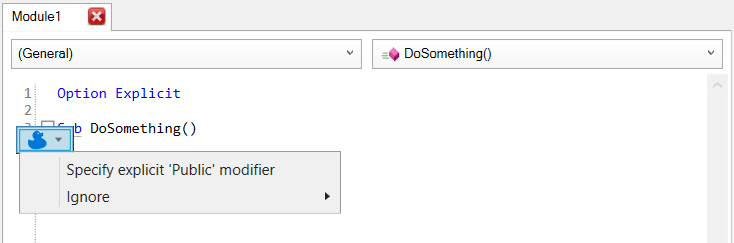
There will also be a new “ducky button” that pops up when the caret is on one such marker, and lets you pick a quick-fix in-place to address an inspection result:
The indenter still needs to be wired up, but this editor will ultimately indent your code as you type it. All the autocompletion features also need to be ported over to work here, and then we’ll want searchable and filterable IntelliSense, parameter info tooltips, and we’ll need to simulate the VBIDE “prettification” that occurs when a line is validated, so that public sub becomes Public Sub and identifiers take the casing they’re declared with.
We get an undo stack that can handle much more than 20 steps, and did I mention the status bar?
For now, all it does is report the current caret position in the editor, but Rubberduck 3.0 will be using it to report parsing progress, instead of the CommandBar button/label we’ve been abusing forever.
There will probably still be a command bar of some sort, but it will be part of the WPF/XAML managed UI; the old Rubberduck CommandBar will be decommissioned.
The one thing that’s 100% guaranteed to not happen in the new Rubberduck editor, is everything that needs to happen beyond design-time: there is no hook into the VBIDE debugger, so Rubberduck has no way of tracking the current instruction. As a result, the editor will be sadly useless in debug mode.
The editor work is just the beginning: Rubberduck 3.0 currently doesn’t even have a parser, let alone any inspections. In the next few months, the very heart of Rubberduck will be reworked to function with the new editor. It’s essentially like rewriting Rubberduck, but with an editor we fully control instead of one we constantly need to fight with.
Meanwhile v2.5.2 is approaching 25K downloads, and there’s quite a bit of work in 2.5.x that hasn’t been “officially” released yet, including everything that happened during a very successful Hacktoberfest 2022: we’ll be releasing v2.5.3 in the near future – stay tuned!
Version 2.5.1 was released August 22, 2020. Since then, the installer was downloaded over 11,600 times; we are now 420 commits and 650 modified files later, and the time has come to deliver all that work into a convenient little installer package and move on to the next dev/release cycle.
What’s New?
If you’ve kept up with latest pre-release builds (especially in the last few weeks), nothing much. If you’ve been patiently waiting for the next release, you’re in for a treat!
The first thing you’ll probably notice is the shiny new splash screen design:
It’s the same old yellow splash made with Paint.NET, with a tiled reflection distortion effect against the background, a semi-transparent white bottom panel, and a finer font. Do you like it?
50-some issues labelled “bug” were closed between 2020-08-22 and mid-April 2021, many of them thanks to flicking the switch on leveraging our internal ITypeLib API for user code – thanks to earlier invaluable contributions from the amazing Wayne Phillips (vbWatchdog, twinBASIC), Rubberduck is now able to tap into the actual in-memory COM type library compiled from the VBA code and, eventually, fill the remaining the gaps in Rubberduck’s understanding of the code: Rubberduck now understands enough to be able to tell that ThisWorkbook has a _Workbook subtype, and that Sheet1 has a _Worksheet subtype, …and that’s enough to identify the ThisWorkbook module at long last, and as a result Rubberduck’s ImplicitActiveSheetReference and ImplicitActiveWorkbookReference inspections get to work exactly as intended, and the door is now opened for so many interesting things…
New Inspections
A Rubberduck release wouldn’t be a Rubberduck release without at least a handful of new inspections. The IllegalAnnotation inspection is being replaced by InvalidAnnotation, UnrecognizedAnnotation, and together with the new AnnotationInIncompatibleComponentType inspection they allow Rubberduck to better convey exactly what’s wrong with a given “illegal” annotation comment.
Some annotations cannot be used in certain types of modules. For example, attribute-related annotations cannot be used in document modules (because Rubberduck cannot import back the modified modules), and a @TestModule annotation is only meaningful in a standard module.
Note that the @Description, @ModuleDescription and @VariableDescription annotations do work in document modules now, because Rubberduck is now reading docstrings off annotations rather than hidden attributes.
Code in the ThisWorkbook module (Excel) referring to members of the Workbook class, have an implicit Me qualifier. This makes an unqualified Worksheets(1) retrieval in ThisWorkbook refer to ThisWorkbook.Worksheets(1), but an identical statement in any other module would be (implicitly) referring to ActiveWorkbook. By qualifying such member calls with Me, the intent is clarified.
Code in a worksheet module (Excel) referring to members of the Worksheet class, have an implicit Me qualifier. This makes an unqualified Range member call in the Sheet2 module refer to Sheet2, but an identical statement in any other module would be (implicitly) referring to ActiveSheet. By qualifying such member calls with Me, the intent is clarified.
Flags unbound annotations; that is, annotation comments that were correctly parsed as Rubberduck annotations but that could not be associated with a target element. This would happen when a module annotation is used in local scope, or a member annotation at module level. This inspection only flags annotation comments that parsed as Rubberduck annotations.
The RHS/Value parameter of a Property Let procedure is always passed by value. As such, an explicit ByRef modifier on such a parameter definition is misleading. From MS-VBAL (VBA language specifications) section 5.3.1.7 Property Declarations:
§ If the <value-param> of a <property-LHS-declaration> does not have a <parameter-mechanism> element or has a <parameter-mechanism> consisting of the keywordByRef, it has the same meaning as if it instead had a <parameter-mechanism> element consisting of the keywordByVal. § The <value-param> of a <property-LHS-declaration> always has the runtime semantics of a ByVal parameter.
This inspection flags comments that parsed like a Rubberduck annotation, but aren’t recognized or supported. It picks up typos in Rubberduck annotations, and annotation-like comments that aren’t Rubberduck annotations but parse as such. Splicing this specific scenario from other invalid annotations is particularly useful when you want to mute inspection results for non-Rubberduck annotations while still validating the supported ones.
New Quick Fixes
This release also introduces a handful of new quick-fixes:
This fix is now available for ProcedureNotUsed inspection results in standard and document modules; it simply annotates a member with the new @EntryPoint annotation which specifically instructs ProcedureNotUsed to ignore that member. Use this quick-fix for UDFs and macro procedures that are attached to document objects and don’t need an Excel hotkey. If your project is hosted in an Excel workbook, macros annotated with @ExcelHotkey are also considered as entry points now.
VariableTypeNotDeclared inspection results could always be “fixed” by making the declared type an explicitVariant; this new quick-fix makes Rubberduck infer the declared type from usage where possible, which is objectively awesome.
This new quick-fix is available for the new implicit containing workbook/worksheet reference inspections, making the reference to the containing module explicit.
The Write-Only Property inspection gets a new quick-fix with this release; this iteration does not try to infer the backing field, so further manual edits are needed, but it’s a start.
New UI Language: Italian
Thanks to a timely contribution by @PhilCattivocaratere, we are thrilled to announce that this release introduces Italian as a UI language:
Every single UI string in Rubberduck comes from a localized resource file. Translating all the resources for a new language can take 3-5 hours, and then it’s only a matter of keeping the translations up-to-date by creating a small pull request when new resource strings are added for new features.
In a nutshell
Here’s a quick summary of the most significant pull requests and commits merged this cycle:
Encapsulate Field enhancements
We are now leveraging our internal ITypeLib API
We are now building Rubberduck with the latest version of Visual Studio 2019
Precompiler directives now parse correctly with line continuations
Internal CodeBuilder API honors indenter settings when generating code
Fixed a number of issues with name conflict validation
Test methods now support a @TestIgnore annotation to ignore a test
Specific projects can now be ignored by the parser
Users no longer need to accept the GPLv3 as if it were an End User License Agreement (EULA)
Custom templates extensions is changing from .rdt to .template
Implicit Variant inspection quick-fix will now infer the best type from usage instead of just making the variable an explicitVariant
For...Next loop variables no longer trigger a variable not used inspection
Implicit Public Member inspection will now flag Enum types and Type structures
Branch “master” was renamed to “main”
New Property Group indenter settings
Arrays declared with ReDim now correctly resolve the declared type
@Description, @VariableDescription, and @ModuleDescription can now be used in document modules (cannot be synchronized)
Documentation strings are now read from annotations when missing from attributes
Start menu link to website now uses https
Fixed context menu positioning
New @EntryPoint annotation marks a standard or document module member as invoked from outside the code; as such the Procedure Not Used inspection will no longer flags members annotated with @EntryPoint or @ExcelHotkey (Excel only).
Several other opportunistic fixes left & right, improved overall stability.
Shiny new splash screen; debug builds now indicate “debug” instead of a meaningless local build number (build version# is controlled by the AppVeyor CI build server; local builds are all .0).
Expand/collapse all in Code Explorer
Rubberduck CommandBar label will now show the corresponding parameter declaration for a selected argument, and Find all References will now include arguments at call sites for parameter declarations (previous versions would only count named arguments).
Find Symbol navigation tool works again.
Find all References search results will now highlight the target reference in its context.
Added Italian UI resources.
Possible (Silent) Crash on Exit
I haven’t personally experienced it in a long time in Excel, but Rubberduck may run into issues tearing down, sometimes causing an AccessViolationException when it unloads, which can either crash the host process or leave it hanging as a ghosted process that will interfere with reloading: verify that the host process (e.g. ACCESS.EXE) has shut down completely using Task Manager when you close everything, and make sure to kill any such ghosted processes before loading Rubberduck in a new process.
Sounds familiar? If you’ve been following the project all along, you probably remember similar behavior in earlier releases – at one point during this development cycle we thought the problem was finally under control, but the cure was worse than the disease and there was a chance that the host document / project gets completely corrupted and impossible to open in the VBE: because we think it’s much better to sometimes crash on teardown than to corrupt our users’ host documents forever, we have reverted that “fix” and will have to come up with something else.
What’s Next?
Lots of good stuff, including a new peek definition command to the code pane, Code Explorer, and the VBE’s own Project Explorer‘s context menus – the feature was developed too late to make the cut for this release, but will be available in 2.5.2.x pre-release builds very soon:
Peek Definition commands pop a panel that shows you the syntax-highlighted source code for a type or member. The pop-up panel can then be dragged around to keep it in sight while editing.
In the Unit Testing department, a mocking framework is about to debut as an experimental feature with a number of technical limitations.
I’m going to be turning my attention towards code path analysis this cycle; this internal API is needed to implement the more advanced inspection ideas, and an Extract Method refactoring needs it too.
Bindings are what makes Model-View-ViewModel feel a little bit like magic. Consider this example code, which creates the dynamic controls for an example UI and showcases how much of a game-changer having a MVVM framework could be for VBA code:
Private Sub InitializeView()

    Dim Layout As IContainerLayout
    Set Layout = ContainerLayout.Create(Me.Controls, TopToBottom)

    With DynamicControls.Create(This.Context, Layout)

        With .LabelFor("All controls on this form are created at run-time.")
            .Font.Bold = True
        End With

        .TextBoxFor BindingPath.Create(This.ViewModel, "StringProperty"), _
                    Validator:=New RequiredStringValidator, _
                    TitleSource:="Some String:" '<~ also accepts an IBindingPath

        .TextBoxFor BindingPath.Create(This.ViewModel, "CurrencyProperty"), _
                    FormatString:="{0:C2}", _
                    TitleSource:="Some Amount:" '<~ also accepts an IBindingPath

        .CommandButtonFor CancelCommand.Create(Me), This.ViewModel, "Close"

    End With
End Sub
This VBA code generates a dynamic UI layout with controls automatically bound to ViewModel properties, and buttons automatically bound to commands. In a project that leverages the MVVM infrastructure code, that’s the only code needed to produce this:
The RequiredStringValidator makes it impossible to leave the ‘StringProperty’ TextBox empty; valid values are automatically applied to the corresponding ViewModel property.
There’s a lot to be written about this DynamicControls API, but that part isn’t very polished yet, and the secret sauce is that it builds (mostly anyway) on top of Property Bindings: they are what makes this sorcery possible… even with a classic drag-and-drop designer UI.
I just couldn’t resist having [at least basic, bare-bones but still extensible] support for a working .LabelFor / .TextBoxFor syntax in VBA code, for the MSForms UI library! I’ll save that for another day though, the layout stuff isn’t where it needs to be yet.
I’m missing about a million unit tests so there’s a good chance something somewhere isn’t working the way it should, but what’s there should be close enough to be worth talking about, and what matters the most is that the code is testable.
Let’s dissect how property bindings work. This time I did not push code to the examples repository, because this is an actual project in its own right, with its own need for examples. I have uploaded everything to https://github.com/rubberduck-vba/MVVM.
Property Bindings
In the context of this MVVM infrastructure code, a property binding is an object responsible for binding a source property path to a target property path; the source points to a ViewModel property, and the target to a property of a UI element (control).
ViewModel?
A ViewModel can be any object that implements the INotifyPropertyChanged interface, as long as that class has:
Public properties for everything the View needs to bind to.
Property Let procedures should invoke OnPropertyChanged, but only when the property value actually changed: avoid signaling a changed property when its current value was merely overwritten with the same.
Property Get procedures are required for all binding modes; Property Let procedures are only needed for TwoWay and OneWayToSource bindings.
ICommand public properties can be exposed to avoid coupling the view with any particular specific command (other than AcceptCommand and/or CancelCommand).
Note that a View could use multiple ViewModels as needed; ViewModel classes should never know anything about any View.
INotifyPropertyChanged
This interface is central in the event propagation mechanics: in design patterns terms, a class that implement it is the subject in an Observer Pattern where the registered handlers are the observers. The reason a ViewModel needs to implement this interface, is because creating a property binding registers the binding as an observer – and it handles the ViewModel telling it about a property change by applying the binding(s) for that property.
The ExampleViewModel class illustrates how to properly implement this interface:
Public Property Get SomeProperty() As String
    SomeProperty = This.SomeProperty
End Property

Public Property Let SomeProperty(ByVal RHS As String)
    If This.SomeProperty <> RHS Then
        This.SomeProperty = RHS
        OnPropertyChanged "SomeProperty"
    End If
End Property

Private Sub OnPropertyChanged(ByVal PropertyName As String)
    This.Notifier.OnPropertyChanged Me, PropertyName
End Sub

Private Sub Class_Initialize()
    Set This.Notifier = New PropertyChangeNotifierBase
    '...
End Sub
The OnPropertyChanged method is only invoked when the RHS assigned value is different than the current value, and we don’t need to worry about tracking/adding observers or invoking them, because everything we need is already encapsulated in the PropertyChangeNotifierBase class, so we implement the interface by simply passing the parameters over to this “notifier” instance:
Private Sub INotifyPropertyChanged_OnPropertyChanged(ByVal Source As Object, ByVal PropertyName As String)
    This.Notifier.OnPropertyChanged Source, PropertyName
End Sub

Private Sub INotifyPropertyChanged_RegisterHandler(ByVal Handler As IHandlePropertyChanged)
    This.Notifier.RegisterHandler Handler
End Sub
Now we know the interfaces involved in keeping source and target in sync, let’s look at everything else – starting with the binding paths.
IBindingPath
The documentation calls it “An object that can resolve a string property path to a value”, and that’s really all it does. The properties may need some explaining though:
Context refers to the base object for resolving the path, i.e. your ViewModel (for the source), or a UI control (for the target).
Path refers to the property path string; usually just a ViewModel or control property name, but this string is resolved recursively so you could bind to “ViewModel.SomeObject.SomeProperty” if you needed to.
Object is the object that owns the property we’re referring to. If the path is just a property name, then this is the same reference as the Context.
PropertyName is the resolved property name. In the example path above, that would be “SomeProperty”.
The interface also exposes Resolve, as well as TryReadPropertyValue, TryWritePropertyValue, and ToString methods; these members are invoked by the MVVM infrastructure internals.
IBindingPath is implemented by the BindingPath class, which exposes a Createfactory method that property-injects the Context and Path values and invokes the Resolve method before returning the created object, so creating a binding path really just looks like this:
Dim Path As IBindingPath
Set Path = BindingPath.Create(ViewModel, "PropertyName")
And with that we’re ready to create an IPropertyBinding.
PropertyBindingBase
The IPropertyBinding interface is mostly only useful internally. There’s little of interest here that isn’t more appropriately covered by looking at the factory method for the PropertyBindingBase class. You ready? It’s quite a mouthful…
Public Function Create(ByVal BindingManager As IBindingManager, ByVal CommandManager As ICommandManager, ByVal TargetContext As Object, ByVal SourceContext As Object, ByVal SourcePropertyPath As String, _
Optional ByVal TargetPropertyPath As String = DefaultTargetControlProperty, _
Optional ByVal Mode As BindingMode = BindingMode.TwoWayBinding, _
Optional ByVal UpdateSource As BindingUpdateSourceTrigger = BindingUpdateSourceTrigger.OnExit, _
Optional ByVal Converter As IValueConverter, _
Optional ByVal StringFormat As IStringFormatter, _
Optional ByVal Validator As IValueValidator, _
Optional ByVal ValidationAdorner As IDynamicAdorner, _
Optional ByVal CancelExitOnValidationError As Boolean = True) As IPropertyBinding
The factory method creates the IBindingPath objects from the given context and property path strings, which makes it simpler for the calling code. Note that the target property path is Optional, how is that possible?
If you’ve spent a bit of time with the MVVM prototype code, you probably noticed the PropertyBinding class was pretty much out of control, and extending it to support more target types would only make it worse. So what I did is, I pulled the common code into a new PropertyBindingBase class, then moved the control-specific code into its own specialized control-specific property binding implementation, and now there’s a strategy pattern that’s responsible for fetching the correct implementation – so that’s how binding a TextBox target creates a TextBoxPropertyBinding, and how binding a Label target creates a OneWayPropertyBinding. Each control-specific binding class can handle that control’s events and implement control-specific behavior accordingly.
IBindingManager
The binding manager is the object that knows about all the property bindings; each property binding needs a reference to the binding manager that owns it, in order to invoke data validation and trigger command bindings to evaluate whether commands can be executed. This object is automatically created when you create an AppContext instance, but the AppContext can be injected with any IBindingManager implementation as needed.
ICommandManager
This “manager” guy knows about all the command bindings, which isn’t something I’ve talked about much yet. Next article about the Command Pattern will dive into more details; this object is automatically created when you create an AppContext instance, but the AppContext can be inject with any ICommandManager implementation as needed.
TargetContext
Typically, that’s just a reference to the target MSForms control. Technically, it could really be any object that has any number of public properties.
SourceContext
Typically, that’s just a reference to the source ViewModel object. Technically, it could really be any object that has any number of public properties [and ideally, that implements INotifyPropertyChanged to support 2-way bindings].
SourcePropertyPath
The last required parameter is a string representing a path (relative to the SourceContext) to the property that holds the value we want the binding target to use; see IBindingPath.
TargetPropertyPath
Each binding type has a default target property that is automatically inferred from the type of target (and in some cases, from the data type of the source property). For example, binding to a TextBox control automatically wires up the control’s Text property, such that providing a TargetPropertyPath is only needed when binding to another target property.
Mode
This enum value determines whether the binding synchronizes the target, the source, or both. Note that binding modes OneWayBinding and TwoWayBinding both require the source object to implement INotifyPropertyChanged.
UpdateSource
This enum value determines when the binding gets to update its source. When the Mode is OneWayBinding or OneTimeBinding, value UpdateSourceTrigger.Never is used automatically.
OnKeyPress gets to validate each individual keypress. Useful for TextBox bindings that need a key validator.
OnExit and OnPropertyChanged are still somewhat ambiguously defined, but OnExit gets to keep the target control focused if there’s a validation error, and OnPropertyChanged is [currently] firing for every keypress in a TextBox, after the control’s Text property udpates. Disambiguating the terms would mean breaking with MSForms’ meaning of “updated”… which may actually be a good thing: OnPropertyChanged would basically fire on exit but without a possible navigation-blocking validation error, and then OnKeyPress mode would still need to behave like OnPropertyChanged as far as updating the source goes.
Converter
Each property binding can use an IValueConverter to “convert” a value midway between the source and the target (or between the target and the source). For example we can bind a CheckBox control to a Boolean property, but if we need the checkbox checked when the property value is False, we can use an InverseBooleanConverter to convert True to False as the binding is applied.
StringFormat
The IAppContext.StringFormatterFactory property (can be property-injected from AppContext.Create) determines which formatter class type is going to be injected here. Supply a VBStringFormatterFactory to use VB6/VBA Strings.Format format string syntax, or supply a StringFormatterFactory (or just leave the defaults alone) to use the much more flexible .NET String.Format syntax.
Validator
When a binding is given an IValueValidator, it gets to start issuing validation errors, which propagate to the ViewModel and can be used to pop a warning banner with the validation error message. Note: the AcceptCommand class’ implementation of ICommand.CanExecute makes it return False when the ViewModel has validation errors.
ValidationAdorner
Having validation errors is good, letting the user know about them is even better. Supply an IDynamicAdorner implementation by invoking ValidationErrorAdorner.Create and use the default error formatters or supply custom ones.
Order of Operations
Several objects get involved whenever something happens in a UI control. Let’s look at what happens when we type something in a TextBox with a standard two-way property binding to some ViewModel property.
Control Events
If the TextBox control has a Change event handler in the form’s code-behind (it really shouldn’t though, if we actually follow MVVM), that code probably gets to run first. The IPropertyBinding implementation would be a TextBoxPropertyBinding object, which handles MouseUp and KeyPress, but these handlers don’t trigger anything. What actually triggers the propagation of the new TextBox.Text value to the ViewModel property, is the BeforeUpdate and Exit events, both of which are initially handled in the ControlEventsPunk class, an object that leverages the Win32 IConnectionPoint API to hook up event handlers for the MSForms.Controls interface of our TextBox control (we covered that in the previous post).
So the first thing to run is the ControlEventsPunk.OnBeforeUpdate callback, which promptly iterates all registered handlers (“observers”) and invokes their HandleBeforeUpdate method.
So the ControlEventsPunk.OnBeforeUpdate callback propagates the event to the TextBoxPropertyBinding, and the IHandleControlEvents_HandleBeforeUpdate procedure runs as a result… which proceeds to forward it to the PropertyBindingBase class with a call to OnBindingUpdateSourceOpportunity, a method with the responsibility of conditionally invoking the ApplyToSource method.
ApplyToSource
The method’s job is to read the value from the binding target, and then write that value to the binding source. If the binding’s Mode is OneTimeBinding or OneWayBinding, we can already bail out because these modes only ever write to the binding target.
The first thing that needs to happen is a call to Resolve against the target (an IBindingPath). Typically the Target path would resolve IBindingPath.Object to a MSForms UI control, and IBindingPath.PropertyName accordingly resolves to Text for a TextBoxPropertyBinding, or Value for a CheckBoxPropertyBinding, or Caption for a CaptionPropertyBinding given a Frame or Label target – unless a TargetPropertyPath string was provided, in which case all bets are off and we might be binding the ForeColor or Font.Bold properties of a Label-like control, or what’s stopping us from binding its Width property (time to revisit that progress indicator, I guess).
And that’s just the tip of the iceberg, because the binding can use an IValueConverter implementation, such that you could conceivably implement, say, a converter that takes some Enum constant and maps each value to some Picture icon, and then use that converter in the binding of a ViewModel property of that Enum type to some MSForms.Image control’s Picture property… but I digress. Converters can also do boring things, like making sure the input value 2 becomes 0.02 before it gets written to that PercentValue ViewModel property, and then string formats can make sure that looks like 2.0% before it gets written to TextBox.Text, but we’ll get to that.
So the next thing that needs to happen is a call to IBindingPath.TryReadPropertyValue, and if we can’t do that we need to bail out, but this time ApplyResult.BindingSkipped won’t be good enough, so we explicitly return a BindingFailed result.
Once we know what value is currently in TextBox.Text (when the source update trigger is OnKeyPress, we have the KeyAscii value for it), we need to invoke IValueConverter.ConvertBack if a converter was specified for the binding; if the conversion fails, we return ApplyResult.BindingConversionError.
If conversion succeeded, we’re ready to validate the converted value (or the original one, if there is no converter). If the update trigger is OnKeyPress, then the validator operates on the single keypress – otherwise we validate the entire value. Things get interesting when there’s a validation error now: we’re returning ApplyResult.BindingValidationError, but then if there’s a ValidationAdorner, its Show method gets invoked and the validation error for that property is propagated to an IValidationManager object.
If validation passes, we try to read the source property value. If we can’t read it, we bail with a BindingFailed result. Otherwise we compare the source value with the target value, and if they are different then we proceed to clear any validation errors for that property, and then we finally write the new value to the source property; if that final step succeeds, we return ApplyResult.BindingSuccess result.
ApplyToTarget
When it’s a ViewModel property that changes, a similar sequence of events unfolds: the Property Let procedure invokes INotifyPropertyChanged.NotifyPropertyChanged, the property binding was registered as an observer, so IHandlePropertyChanged_HandlePropertyChanged is invoked; whenever the provided Source is the binding source and the provided PropertyName is the source property name, ApplyToTarget gets invoked.
When the binding mode is OneWayToSource or OneTimeBinding, we know we can immediately bail out, because these states don’t write to the binding target. Now, it’s entirely possible that we still need to supply a TextBox with a Text value even if we can’t yet resolve the binding Source (e.g. IBindingPath.Object resolves to Nothing). In such cases, we attempt to get a sensible default target value depending on the name of the target property:
“Text” and “Caption” target properties default to vbNullString;
“Enabled” and “Visible” target properties default to False;
“Value” property defaults to False when the target is a CheckBox or OptionButton.
If the source object is Nothing and we don’t have a fallback default, we bail out. Otherwise we try to read the source (ViewModel) value, then we validate it, then we convert it, then we read the target property value, compare with the source, and overwrite it if they’re different… but just before doing that, we run it through an IStringFormatter if we have one.
StringFormat
An MVVM application might need to use, say, a Date value somewhere. The application needs the data type to be Date, such that the program doesn’t need to worry about a malformed or ambiguous date string and works with the actual underlying Date value. Such an application would define a ViewModel class with a Date property (say, OrderDate), and then there can be a TextBox control showing that Date value to the user.
If we don’t do anything, the content of that TextBox control would be whatever VBA decides a Date value needs to look like when represented as a String, and that would be the (sorry, American readers) utterly nonsensical en-US format (mm-dd-yyyy). If your application’s users are happy with such a format, more power to them – but I like my date strings unambiguous and boringly standard, so I’d want the TextBox content to say “yyyy-mm-dd” instead. By providing a FormatString argument to the property binding, we can make it do exactly that. Or we can just as easily make it say “Thursday, October 22 2020” if we wanted to, and with a StringToDateConverter we could round-trip that value back to a proper Date.
Or maybe our ViewModel has a Currency property because our application needs to get some dollar amount, and having that displayed in a TextBox control as 1234567.89 is bare-bones good enough, but we could provide a FormatString argument to the property binding and have our ViewModel’s Currency property hold the numeric value 1234567.89 all while the bound TextBox control says $1,234,567.89.
Without MVVM property bindings doing this for us, implementing this kind of functionality is such a pain in the neck that it’s hardly ever done at all! Nobody wants to deal with parsing dates and formatted currency amounts off a TextBox control, and for a reason: when TextBox.Textis the value you’re working with, you are working with a String and you do need to parse its content.
With MVVM, we’re completely elsewhere: the TextBox.Text is just a receptacle for displaying whatever the real underlying value is (i.e. the ViewModel property), and is completely separated from it – and this tremendously simplifies everything.
The MVVM infrastructure code comes with two implementations for the IStringFormatter interface:
So in order to make a Date ViewModel property look like YYYY-MM-DD we could:
Use a VBStringFormatter with a “YYYY-MM-DD” format string (case insensitive)
Use a StringFormatter with a “yyyy-MM-dd” format string (note: lowercase-“m” refers to the “minute” part of the datetime here – use uppercase-“M” for the month!)
And in order to make a Currency ViewModel property look like money we could:
Use a VBStringFormatter with a “Currency” (or a culture-invariant “$#,##0.00”) format string
Use a StringFormatter with a “{0:C2}” format string (if we want 2 decimals)
Creating an IStringFormatter every time we want to use one would be annoying, so the binding manager uses the abstract factory from the IAppContext to spawn it automatically. A nice side-effect of this, is that the string formatters for the bindings of a given context are guaranteed to all use the same syntax. So if we wanted to use VB format strings, we would create the app context like this:
Dim Context As IAppContext
Set Context = AppContext.Create(FormatterFactory:=New VBStringFormatterFactory)
Note that if you use a format string that results in a TextBox.Text value that can’t be automatically (and correctly) parsed back into the data type of the bound ViewModel property (if that isn’t a String), updating the binding source will likely fail with a conversion error: you will need to implement an IValueConverter and inject it into the binding along with the format string in order to correctly convert the formatted string back to a value that is usable by the binding; a StringToDateConverter class exists in the MVVM infrastructure code to work with Date properties and standard format strings, but the implementation may need adjustments to handle formats that don’t automatically round-trip back to a Date value.
Validation
Another key aspect of property bindings, is that they simplify validating user inputs. If a program needs to work with some numeric value provided by the user and the user interface doesn’t validate its inputs, there’s a type mismatch error written in the sky there, or worse. As a general rule of thumb, it’s a good idea for code to assume that a value coming from the user is anything but what the program needs to work as expected.
The best way to handle an error is always to avoid throwing that error in the first place, and validating user inputs contributes to exactly this.
If you need the digits of a phone number and present the user with a control that only accepts a certain number of digit characters and then uses a format string to prettify the value on exit, you ensure that your PhoneNumber string value only ever contains the meaningful characters, leaving the “what a phone number looks like” concern separate from the “phone number” data itself, which means every phone number in your list/table ultimately gets to look exactly the same, as opposed to the free-form nightmares I presume we’re all well too familiar with.
The MVVM infrastructure addresses validation concerns through the IValidationManager interface. The object that implements this interface is responsible for managing validation errors across binding sources (ViewModels) in the context of an IApplicationContext.
ValidationManager
The role of the validation manager is to encapsulate the validation state and expose methods to add and clear validation errors; the IsValidindexed property returns a Boolean given a context (the ViewModel) and an optional property name: in order to know whether the entire context is valid, omit the PropertyName argument.
OnValidationError and ClearValidationError respectively add and remove a validation error for a particular source property, and the validation manager keeps validation errors in a dictionary keyed with the ViewModel object (a string representation of its object pointer), such that each ViewModel can be deemed “valid” or “invalid” individually/separately.
The “manager” class isn’t responsible for doing anything with a validation error: it just holds the state, so that other components can query it and retrieve the IValidationError for SomeViewModel.SomeProperty.
An IValidationError is a simple object that gives us a Message (from the IValueValidator that caused the binding to fail validation) and the IPropertyBinding that couldn’t be applied.
So, that dynamic UI stuff?
It works good-enough to make a good-enough screenshot, but the IContainerLayout stuff needs more thinking-through and more fiddling to get everything just right. See, as of this writing the layout API stacks controls horizontally or vertically, and well, that’s about it.
I want a docking panel, a layout container that can resize its children as needed and that’s a truly fascinating topic… For now there’s an IDynamicControlBuilder interface that looks like this:
'@Folder MVVM.Infrastructure.Abstract
'@ModuleDescription "Builds dynamic MSForms UI components from a binding source."
'@Interface
'@Exposed
Option Explicit

'@Description "Creates a multiline MSForms.TextBox control for the spercified String property binding path."
Public Function TextAreaFor(ByVal SourceValue As IBindingPath, Optional ByVal Converter As IValueConverter, Optional ByVal Validator As IValueValidator, Optional ByVal ErrorAdorner As IDynamicAdorner, Optional ByVal TitleSource As Variant) As MSForms.TextBox
End Function

'@Description "Creates a MSForms.TextBox control for the specified String property binding path."
Public Function TextBoxFor(ByVal SourceValue As IBindingPath, Optional ByVal FormatString As String, Optional ByVal Converter As IValueConverter, Optional ByVal Validator As IValueValidator, Optional ByVal ErrorAdorner As IDynamicAdorner, Optional ByVal TitleSource As Variant) As MSForms.TextBox
End Function

'@Description "Creates a MSForms.Label control for the specified Caption string or String property binding path."
Public Function LabelFor(ByVal SourceCaption As Variant, Optional ByVal FormatString As String, Optional ByVal Converter As IValueConverter) As MSForms.Label
End Function

'@Description "Creates a MSForms.ComboBox control for the specified Value property binding path; SourceItems should be an array property."
Public Function ComboBoxFor(ByVal SourceValue As IBindingPath, ByVal SourceItems As IBindingPath, Optional ByVal FormatString As String, Optional ByVal Converter As IValueConverter, Optional ByVal Validator As IValueValidator, Optional ByVal ErrorAdorner As IDynamicAdorner, Optional ByVal TitleSource As Variant) As MSForms.ComboBox
End Function

'@Description "Creates a MSForms.ListBox control for the specified Value property binding path; SourceItems should be an array property."
Public Function ListBoxFor(ByVal SourceValue As IBindingPath, ByVal SourceItems As IBindingPath, Optional ByVal TitleSource As Variant) As MSForms.ListBox
End Function

'@Description "Creates a MSForms.OptionButton control for the specified Value (Boolean) property binding path; uses the specified Caption string or String property binding path for the control's Caption."
Public Function OptionButtonFor(ByVal SourceValue As IBindingPath, ByVal SourceCaption As Variant) As MSForms.OptionButton
End Function

'@Description "Creates a MSForms.CheckBoxButton control for the specified Value (Boolean) property binding path; uses the specified Caption string or String property binding path for the control's Caption."
Public Function CheckBoxFor(ByVal SourceValue As IBindingPath, ByVal SourceCaption As Variant) As MSForms.CheckBox
End Function

'@Description "Creates a MSForms.CommandButton control for the specified ICommand, using the specified ViewModel context and Caption string or String property binding path."
Public Function CommandButtonFor(ByVal Command As ICommand, ByVal BindingContext As Object, ByVal SourceCaption As Variant) As MSForms.CommandButton
End Function
…and I haven’t even tested all of it yet, and small little things that actually matter, like OptionButton groups, aren’t being considered. I still need to think of how this API can get where it wants to be, but I really like where it’s going.
Thoughts?
To be honest, I’m having a blast with this, and writing actual working MVVM code in VBA is completely surreal, in a very awesome way.
I think it’s in itself a nice deep-dive into OOP+VBA – whether the MVVM architecture it enables ends up being the backbone of any production app or not.
Using a WithEvents variable to handle the MSForms.Control events of, say, a TextBox control has the irritating tendency to throw a rather puzzling run-time error 459 “Object or class does not support the set of events”. To be honest, I had completely forgotten about this when I started working on this MVVM framework. I had even posted an answer on Stack Overflow and my learning-it-the-hard-way is immortalized on that page.
…there’s a bit of COM hackery going on behind the scenes; there’s enough smokes & mirrors for VBA to successfully compile the above, but, basically, you’re looking at a glitch in The Matrix (Rubberduck’s resolver has similar “nope” issues with MSForms controls): there isn’t any obvious way to get VBA to bind a dynamic control object to its MSForms.Control events.
-Mathieu Guindon, Apr 18 ’19
What I hadn’t noticed until today, was that another user had posted an answer to that question a few hours later that day – and that answer ultimately leads to the groundbreaking manual wiring-up of what VBA normally does automagically under the hood when we declare a WithEvents variable.
pUnk’d
The code I’m about to share is heavily based on the work shared on Stack Overflow by user Evr, and uses the ConnectToConnectionPoint Win32 API that, it must be mentioned, comes with a caveat:
This function is available through Windows XP and Windows Server 2003. It might be altered or unavailable in subsequent versions of Windows.
Regardless, it works (for now anyway, …if we lose Mac support for this specific capability).
Rubberduck uses similar connection points to handle a number of VBE events that aren’t otherwise exposed, so I knew this was going to work one way or another. The idea is to pass an IUnknown pointer to an object that exposes members with very specific VB_UserMemId attribute values, and have accordingly very specific member signatures.
This post lists a bunch of such attributes – however since there aren’t any problems with binding regular TextBox and CommandButton events (these do work with simple WithEvents event providers), I’m only interested in these:
Event
VB_UserMemId
AfterUpdate
-2147384832
BeforeUpdate
-2147384831
Enter
-2147384830
Exit
-2147384829
The VB_UserMemId attribute values for each of the MSForms.Control events.
This is going to be a little bit lower-level than usual, but every VBA user class has an IUnknown pointer, So we can use any class module that has the members with the appropriate VB_UserMemId attribute values, and pass that as the pUnk pointer argument.
So, here’s the punk in question, exactly as I currently have it:
VERSION 1.0 CLASS
BEGIN
  MultiUse = -1  'True
END
Attribute VB_Name = "ControlEventsPunk"
Attribute VB_GlobalNameSpace = False
Attribute VB_Creatable = False
Attribute VB_PredeclaredId = False
Attribute VB_Exposed = False
Attribute VB_Description = "Provides an event sink to relay MSForms.Control events."
'@Folder MVVM.Infrastructure.Win32
'@ModuleDescription "Provides an event sink to relay MSForms.Control events."
'based on https://stackoverflow.com/a/51936950
Option Explicit
Implements IControlEvents
Private Type GUID
    Data1 As Long
    Data2 As Integer
    Data3 As Integer
    Data4(0 To 7) As Byte
End Type
'[This function is available through Windows XP and Windows Server 2003. It might be altered or unavailable in subsequent versions of Windows.]
'https://docs.microsoft.com/en-us/windows/win32/api/shlwapi/nf-shlwapi-connecttoconnectionpoint
#If VBA7 Then
Private Declare PtrSafe Function ConnectToConnectionPoint Lib "shlwapi" Alias "#168" (ByVal Punk As stdole.IUnknown, ByRef riidEvent As GUID, ByVal fConnect As Long, ByVal PunkTarget As stdole.IUnknown, ByRef pdwCookie As Long, Optional ByVal ppcpOut As LongPtr) As Long
#Else
Private Declare Function ConnectToConnectionPoint Lib "shlwapi" Alias "#168" (ByVal punk As stdole.IUnknown, ByRef riidEvent As GUID, ByVal fConnect As Long, ByVal punkTarget As stdole.IUnknown, ByRef pdwCookie As Long, Optional ByVal ppcpOut As Long) As Long
#End If
Private Type TState
    RefIID As GUID 'The IID of the interface on the connection point container whose connection point object is being requested.
    Connected As Boolean
    PunkTarget As Object
    Cookie As Long

    Handlers As Collection
End Type
'from https://stackoverflow.com/a/61893857 (same user as #51936950!)
Private Const ExitEventID As Long = -2147384829
Private Const EnterEventID As Long = -2147384830
Private Const BeforeUpdateEventID As Long = -2147384831
Private Const AfterUpdateEventID As Long = -2147384832
Private This As TState
'@Description "Gets/sets the target MSForms.Control reference."
Public Property Get Target() As Object
Attribute Target.VB_Description = "Gets/sets the target MSForms.Control reference."
    Set Target = This.PunkTarget
End Property
Public Property Set Target(ByVal RHS As Object)
    Set This.PunkTarget = RHS
End Property
'@Description "Registers the listener."
Public Function Connect() As Boolean
Attribute Connect.VB_Description = "Registers the listener."
    GuardClauses.GuardNullReference This.PunkTarget, TypeName(Me), "Target is not set."
    ConnectToConnectionPoint Me, This.RefIID, True, This.PunkTarget, This.Cookie, 0&
    This.Connected = This.Cookie <> 0
    Connect = This.Connected
End Function
'@Description "De-registers the listener."
Public Function Disconnect() As Boolean
Attribute Connect.VB_Description = "De-registers the listener."
    If Not This.Connected Then Exit Function
    ConnectToConnectionPoint Me, This.RefIID, False, This.PunkTarget, This.Cookie, 0&
    This.Connected = False
    Disconnect = True
End Function
'@Description "A callback that handles MSForms.Control.AfterUpdate events for the registered target control."
Public Sub OnAfterUpdate()
Attribute OnAfterUpdate.VB_UserMemId = -2147384832
Attribute OnAfterUpdate.VB_Description = "A callback that handles MSForms.Control.AfterUpdate events for the registered target control."
    Dim Handler As IHandleControlEvents
    For Each Handler In This.Handlers
        Handler.HandleAfterUpdate
    Next
End Sub
'@Description "A callback that handles MSForms.Control.BeforeUpdate events for the registered target control."
Public Sub OnBeforeUpdate(ByVal Cancel As MSForms.ReturnBoolean)
Attribute OnBeforeUpdate.VB_UserMemId = -2147384831
Attribute OnBeforeUpdate.VB_Description = "A callback that handles MSForms.Control.BeforeUpdate events for the registered target control."
    Dim Handler As IHandleControlEvents
    For Each Handler In This.Handlers
        Handler.HandleBeforeUpdate Cancel
    Next
End Sub
'@Description "A callback that handles MSForms.Control.Exit events for the registered target control."
Public Sub OnExit(ByVal Cancel As MSForms.ReturnBoolean)
Attribute OnExit.VB_UserMemId = -2147384829
Attribute OnExit.VB_Description = "A callback that handles MSForms.Control.Exit events for the registered target control."
    Dim Handler As IHandleControlEvents
    For Each Handler In This.Handlers
        Handler.HandleExit Cancel
    Next
End Sub
'@Description "A callback that handles MSForms.Control.Enter events for the registered target control."
Public Sub OnEnter()
Attribute OnEnter.VB_UserMemId = -2147384830
Attribute OnEnter.VB_Description = "A callback that handles MSForms.Control.Enter events for the registered target control."
    Dim Handler As IHandleControlEvents
    For Each Handler In This.Handlers
        Handler.HandleEnter
    Next
End Sub
'@Description "Registers the specified object to handle the relayed control events."
Public Sub RegisterHandler(ByVal Handler As IHandleControlEvents)
Attribute RegisterHandler.VB_Description = "Registers the specified object to handle the relayed control events."
    This.Handlers.Add Handler
End Sub
Private Sub Class_Initialize()
    Set This.Handlers = New Collection
    This.RefIID.Data1 = &H20400
    This.RefIID.Data4(0) = &HC0
    This.RefIID.Data4(7) = &H46
End Sub
Private Sub IControlEvents_OnAfterUpdate()
    OnAfterUpdate
End Sub
Private Sub IControlEvents_OnBeforeUpdate(ByVal Cancel As MSForms.IReturnBoolean)
    OnBeforeUpdate Cancel
End Sub
Private Sub IControlEvents_OnEnter()
    OnEnter
End Sub
Private Sub IControlEvents_OnExit(ByVal Cancel As MSForms.IReturnBoolean)
    OnExit Cancel
End Sub
Private Sub IControlEvents_RegisterHandler(ByVal Handler As IHandleControlEvents)
    RegisterHandler Handler
End Sub
Let’s ignore the IControlEvents interface for now. The class has a Target – that’ll be our TextBox control instance. So we set the Target, and then we can invoke Connect, and when we’re done we can invoke Disconnect to explicitly undo the wiring-up.
Then we have an OnEnter method with VB_UserMemId = -2147384830, which makes it an event handler procedure for MSForms.Control.Enter. The name of the procedure isn’t relevant, but it’s important that the procedure is parameterless.
Similarly, the name of the OnExit procedure has no importance, but it must have a single ByVal Cancel As MSForms.ReturnBoolean parameter (only ByVal and the data type matter). For events that have more than one parameter, the order is also important.
In theory that’s all we need: we could go on and handle Control.Exit in this OnExit procedure, and call it a day. In fact you can probably do that right away – however I need another step for my purposes, because I’m going to need my PropertyBindingBase class to propagate these events “up” to, say, some TextBoxPropertyBinding class that can implement some TextBox-specific behavior for the Control events.
Propagating Events
I had already a working pattern for my INotifyPropertyChange requirements to propagate property changes across objects, and the pattern is applicable here too. See, I could have declared a Public Event Exit(ByRef Cancel As MSForms.ReturnBoolean) on the ControlEventsPunk class, and then I could have used a WithEvents variable to handle them – and that would have worked too. Except I don’t want to use events here, because events work well as implementation details… but they can’t be exposed on an interface, which makes them actually more complicated to work with.
There are two interfaces: one that defines the “events” and exposes a method to register “handlers”, and the other mandates the presence of a callback for each “event”. For INotifyPropertyChange the handler interface was named IHandlePropertyChange, so I went with IControlEvents and IHandleControlEvents.
So, the “provider” interface looks like this:
'@Folder MVVM.Infrastructure.Bindings.Abstract
'@ModuleDescription "Provides the infrastructure to relay MSForms.Control events."
Option Explicit
Public Sub RegisterHandler(ByVal Handler As IHandleControlEvents)
End Sub
Public Sub OnEnter()
End Sub
Public Sub OnExit(ByVal Cancel As MSForms.ReturnBoolean)
End Sub
Public Sub OnAfterUpdate()
End Sub
Public Sub OnBeforeUpdate(ByVal Cancel As MSForms.ReturnBoolean)
End Sub
And then the “handler” interface looks like this:
'@Folder MVVM.Infrastructure.Bindings.Abstract
'@ModuleDescription "An object that can be registered as a handler for IControlEvents callbacks."
Option Explicit
Public Sub HandleEnter()
End Sub
Public Sub HandleExit(ByVal Cancel As MSForms.ReturnBoolean)
End Sub
Public Sub HandleAfterUpdate()
End Sub
Public Sub HandleBeforeUpdate(ByVal Cancel As MSForms.ReturnBoolean)
End Sub
So, looking back at the ControlEventsPunk class, we find that the implementation for RegisterHandler consists in adding the provided Handler object to an encapsulated Collection that holds all the registered handlers; when we “handle” a control event, we iterate all registered handlers and invoke them all in a sequence. When an event has a Cancel parameter, the last handler that ran gets the final say on whether the parameter should be True or False, and each handler receives the Cancel value that was set by the previous handler than ran.
This is a slightly different paradigm than your regular VBA/VB6 auto-wired events, where one event only ever has one handler: now these work more like the multicast delegates that events are in .NET, with an “invocation list” and the ability to add/remove (although, I haven’t implemented the removal) handlers dynamically at run-time – except the “handlers” are full-fledged VBA objects here, rather than .NET delegates.
Whenever the MVVM infrastructure needs to propagate events, I use this pattern instead. This was my first time actually implementing an Observer Pattern, and hadn’t even realized! (thanks Max!) – that isn’t a pattern you see often in event-capable languages, but I can definitely see this proven, solid abstraction (Java developers would probably be rather familiar with that one) become my new favorite go-to pattern to expose events on an interface in VBA… But there’s probably a reason the first time I come across a situation where that pattern is really handy (and actually needed, for testability), is when I’m writing framework-level (i.e. an API intended to be used by code that isn’t written yet) code that’s very much as deep into the OOP rabbit hole as I’ve ever been in VBA (or any other language for that matter)… and there’s still no rock bottom in sight.
In any case, now that we have a way to handle and propagate control events, we can have MVVM property bindings that can format TextBox.Text on exit, i.e. we can have a ViewModel that knows SomeProperty has a value of 25.59, and the Text property of the bound textbox control can say $25.59 just by specifying a FormatString (like “Currency”, for example) when we create the binding.
For the next post in this series I think we’re ready to deep-dive into the actual binding mechanics, and I’ll have the updated MVVM infrastructure code on GitHub by then.
I have recently written (100% VBA) a proof-of-concept for a Model-View-ViewModel (MVVM) framework, and since the prototype works exactly as needed (with some rough edges of course)… I’ve decided to explore what Rubberduck can do to make MVVM fully supported, but going down that path poses a serious problem that needs a very good and well thought-out solution.
A Vision of a Framework
When you start a new project in Visual Studio (including 6.0 /VB6), the IDE prompts for a project type, essentially asking “what are we building today?“
In VBA the assumption is that you just want to write a bit of script to automate some document manipulation. And then the framework so to speak, is the VBA Standard Library: functions, methods, constants, and actual objects too; all globally-scoped for convenience and quick-and-easy access: a fully spelled-out VBA.Interaction.MsgBox function call is a rare sight! Combined with the nonexistence of namespaces, the flip side is that the global scope is easily polluted, and name collisions are inevitable since anything exposed by any library becomes globally accessible. This makes fully-qualified global function calls appear sporadically sprinkled in the code, which can be confusing. I digress, but what I mean to get at is that this is part of what made Microsoft make the shift to the .NET platform in the early 2000’s, and eventually abandon the Visual Basic Editor to its fate. The COM platform and Win32 API was the framework, and Win32 programming languages built on top of that.
This leaves two approaches for a vision of a “framework” for VBA:
Package a type library and ship it.
Pros: any COM-visible library will work, can be written in .NET
Cons: projects now have a hard dependency on a specific type library; updating is a mess, etc.
Embed the framework into VBA projects, pretty much like JavaScript does.
Pros: devs are in charge of everything, framework is 100% VBA and inherently open-source, updating is essentially seamless for any non-breaking change, no early-bound dependencies, graceful late-bound degradation, etc.
Cons: VBA devs and maintainers that aren’t using Rubberduck will be massively lost in the source code (framework would cleanly leverage @Folder annotations), but then when the host application allows it this could be mitigated by embedding the code into its own separate VBA project and reference it from other projects (e.g. ship an Excel add-in with the framework code your VBA project depends on).
I think I’m slightly biased here, but I think this rules out the type library approach regardless. So we need a way to make this work in VBA, with VBA source code that lives in a GitHub repository with vetted, trusted content.
Where Rubberduck fits in
Like Visual Studio, Rubberduck could prompt VBA devs with “what are we building today?” and offer to pull various “bundles” of modules from this GitHub repository into the active project. Rubberduck would request the available “bundles” from api.rubberduckvba.com, which would return with “bundle metadata” describing each “package” (is “nugget” forbidden to use as a name for these / play on “nuget” (the package manager for .NET)?), and then list them in a nice little dialog.
The “nugget” metadata would include a name, a description, and the path to each file to download for it. Every package would be the same “version”, but the tool could easily request any particular “tag” or “release” version, and/or pull from “main” or from “next” branches, and the source code / framework itself could then easily be a collaborative effort, with its own features and projects and milestones and collaborators, completely separate from the C# Rubberduck code base.
This complete decoupling from Rubberduck means you don’t need to use Rubberduck to leverage this VBA code in your VBA projects, and new tags / “releases” would be entirely independent of Rubberduck’s own release cycles. That means you’re using, say, future-Rubberduck 2.7.4 and the “nuggets” feature offers “v1.0 [main]” and “v1.1 [next]”; one day you’re still using Rubberduck 2.7.4 but now you get “v1.1 [main]”, “v1.0”, and “v1.2 [next]” to chose from, and if you updated the “nuggets” in your project from v1.0 to v1.1 then Rubberduck inspections would flag uses of any obsolete members that would now be decorated with @Obsolete annotations… it’s almost like this annotation was presciently made for this.
But before we can even think of implementing something like this and make MVVM infrastructure the very first “nugget”, we need a rock-solid framework in the first place.
Unit Tests
I had already written the prototype in a highly decoupled manner, mindful of dependencies and how things could later be tested from the outside. I’m very much not-a-zealot when it comes to things like Test-Driven Development (TDD), but I do firmly believe unit tests provide a solid safety net and documentation for everything that matters – especially if the project is to make any kind of framework, where things need to provably work.
And then it makes a wonderful opportunity to blog about writing unit tests with Rubberduck, something I really haven’t written nearly enough about.
Tests? Why?!
Just by writing these tests, I’ve found and fixed edge-case bugs and improved decoupling and cohesion by extracting (and naming!) smaller chunks of functionality into their own separate class module. The result is quite objectively better, simpler code.
Last but not least, writing testable code (let alone the tests!) in VBA makes a great way to learn these more advanced notions and concepts in a language you’re already familiar with.
If you’re new to VBA and programming in general, or if you’re not a programmer and you’re only interested in making macros, then reading any further may make your head spin a bit (if that’s already under way… I’m sorry!), so don’t hesitate to ask here or on the examples repository on GitHub if you have any questions! This article is covering a rather advanced topic, beyond classes and interfaces, but keep in mind that unit testing does not requireOOP! It just so happens that object-oriented code adhering to SOLID principles tends to be easily testable.
This is an ongoing project and I’m still working on the test suite and refactoring things; I wouldn’t want to upload the code to GitHub in its current shape, so I’ll come back here with a link once I have something that’s relatively complete.
Where to Start?
There’s a relatively small but very critical piece of functionality that makes a good place to begin in the MVVM infrastructure code (see previous article): the BindingPath class, which I’ve pulled out of PropertyBinding this week. The (still too large for its own good) PropertyBinding class is no longer concerned with the intricacies of resolving property names and values: both this.Source and this.Target are declared As IBindingPath in a PropertyBinding now, which feels exactly right.
The purpose of a BindingPath is to take a “binding context” object and a “binding path” string (the binding path is always relative to the binding context), and to resolve the member call represented there. For example, this would be a valid use of the class:
Dim Path As IBindingPath
Set Path = BindingPath.Create(Sheet1.Shapes("Shape1").TextFrame.Characters, "Text")
This Path object implements TryReadPropertyValue and TryWritePropertyValue methods that the BindingManager can invoke as needed.
'@Folder MVVM.Infrastructure.Bindings
'@ModuleDescription "An object that can resolve a string property path to a value."
'@PredeclaredId
Option Explicit
Implements IBindingPath
Private Type TState
    Context As Object
    Path As String

    Object As Object
    PropertyName As String
End Type
Private This As TState
'@Description "Creates a new binding path from the specified property path string and binding context."
Public Function Create(ByVal Context As Object, ByVal Path As String) As IBindingPath
    GuardClauses.GuardNonDefaultInstance Me, BindingPath, TypeName(Me)
    GuardClauses.GuardNullReference Context, TypeName(Me)
    GuardClauses.GuardEmptyString Path, TypeName(Me)

    Dim Result As BindingPath
    Set Result = New BindingPath
    Set Result.Context = Context
    Result.Path = Path

    Result.Resolve
    Set Create = Result
End Function
'@Description "Gets/Sets the binding context."
Public Property Get Context() As Object
    Set Context = This.Context
End Property
Public Property Set Context(ByVal RHS As Object)
    GuardClauses.GuardDefaultInstance Me, BindingPath, TypeName(Me)
    GuardClauses.GuardNullReference RHS, TypeName(Me)
    GuardClauses.GuardDoubleInitialization This.Context, TypeName(Me)
    Set This.Context = RHS
End Property
'@Description "Gets/Sets a string representing a property path against the binding context."
Public Property Get Path() As String
    Path = This.Path
End Property
Public Property Let Path(ByVal RHS As String)
    GuardClauses.GuardDefaultInstance Me, BindingPath, TypeName(Me)
    GuardClauses.GuardEmptyString RHS, TypeName(Me)
    GuardClauses.GuardDoubleInitialization This.Path, TypeName(Me)
    This.Path = RHS
End Property
'@Description "Gets the bound object reference."
Public Property Get Object() As Object
    Set Object = This.Object
End Property
'@Description "Gets the name of the bound property."
Public Property Get PropertyName() As String
    PropertyName = This.PropertyName
End Property
'@Description "Resolves the Path to a bound object and property."
Public Sub Resolve()
    This.PropertyName = ResolvePropertyName(This.Path)
    Set This.Object = ResolvePropertyPath(This.Context, This.Path)
End Sub
Private Function ResolvePropertyName(ByVal PropertyPath As String) As String
    Dim Parts As Variant
    Parts = Strings.Split(PropertyPath, ".")
    ResolvePropertyName = Parts(UBound(Parts))
End Function
Private Function ResolvePropertyPath(ByVal Context As Object, ByVal PropertyPath As String) As Object
    Dim Parts As Variant
    Parts = Strings.Split(PropertyPath, ".")

    If UBound(Parts) = LBound(Parts) Then
        Set ResolvePropertyPath = Context
    Else
        Dim RecursiveProperty As Object
        Set RecursiveProperty = CallByName(Context, Parts(0), VbGet)
        If RecursiveProperty Is Nothing Then Exit Function
        Set ResolvePropertyPath = ResolvePropertyPath(RecursiveProperty, Right$(PropertyPath, Len(PropertyPath) - Len(Parts(0)) - 1))
    End If

End Function
Private Property Get IBindingPath_Context() As Object
    Set IBindingPath_Context = This.Context
End Property
Private Property Get IBindingPath_Path() As String
    IBindingPath_Path = This.Path
End Property
Private Property Get IBindingPath_Object() As Object
    Set IBindingPath_Object = This.Object
End Property
Private Property Get IBindingPath_PropertyName() As String
    IBindingPath_PropertyName = This.PropertyName
End Property
Private Sub IBindingPath_Resolve()
    Resolve
End Sub
Private Function IBindingPath_ToString() As String
    IBindingPath_ToString = StringBuilder _
        .AppendFormat("Context: {0}; Path: {1}", TypeName(This.Context), This.Path) _
        .ToString
End Function
Private Function IBindingPath_TryReadPropertyValue(ByRef outValue As Variant) As Boolean
    If This.Object Is Nothing Then Resolve
    On Error Resume Next
    outValue = VBA.Interaction.CallByName(This.Object, This.PropertyName, VbGet)
    IBindingPath_TryReadPropertyValue = (Err.Number = 0)
    On Error GoTo 0
End Function
Private Function IBindingPath_TryWritePropertyValue(ByVal Value As Variant) As Boolean
    If This.Object Is Nothing Then Resolve
    On Error Resume Next
    VBA.Interaction.CallByName This.Object, This.PropertyName, VbLet, Value
    IBindingPath_TryWritePropertyValue = (Err.Number = 0)
    On Error GoTo 0
End Function
Here’s our complete “system under test” (SUT) as far as the BindingPathTests module goes. We have a Create factory method, Context and Path properties, just like the class we’re testing.
The path object is itself read-only once initialized, but the binding source may resolve to Nothing or to a different object reference over the course of the object’s lifetime: say we want a binding path to SomeViewModel.SomeObjectProperty; when we first create the binding, SomeObjectProperty might very well be Nothing, and then it’s later Set-assigned to a valid object reference. This is why the IBindingPath interface needs to expose a Resolve method, so that IPropertyBinding can invoke it as needed, as the binding is being applied.
We’ll want a test for every guard clause, and each method needs at least one test as well.
So, I’m going to add a new test module and call it BindingPathTests. Rubberduck’s templates are good-enough to depict the mechanics and how things work at a high level, but if you stick to the templates you’ll quickly find your unit tests rather boring, wordy, and repetitive: we must break out of the mold, there isn’t one true way to do this!
Rubberduck discovers unit tests in standard modules annotated with @TestModule. Test methods are any [parameterless, for now] method annotated with a @TestMethod annotation that can have a category string – the Test Explorer can group your tests using these categories. The declarations section of a test module must include a declaration (early or late bound) for an Rubberduck.AssertClass or Rubberduck.PermissiveAssertClass (both implement the same internal interface; the “permissive” one has VBA-like equality semantics, and the default one has stricter type equality requirements (a Long can’t be equal to a Double, for example). The default test template also defines a FakesProvider object, but we’re not going to need it now (if we needed to test logic that involved e.g. branching on the result of a MsgBox function call, we could hook into the MsgBox function and configure it to return what the test needs it to return, which is honestly wicked awesome). So our test module might look something like this at first:
'@Folder Tests.Bindings
'@TestModule
Option Explicit
Option Private Module
#Const LateBind = LateBindTests
#If LateBind Then
Private Assert As Object
#Else
Private Assert As Rubberduck.AssertClass
#End If
With this conditionally-compiled setup, all we need to toggle between late and early binding is to define a project-scoped conditional compilation argument: bring up the project properties and type LateBindTests=0 or LateBindTests=1 in that box, and just like that you can control conditional compilation project-wide without modifying a single module.
The first thing to do is to get the test state defined, and implement TestInitialize and TestCleanup methods that configure this state – in the case of BindingManagerTests, I’m going to add a private type and a private field to define and hold the current test state:
Private Type TState
    ExpectedErrNumber As Long
    ExpectedErrSource As String
    ExpectedErrorCaught As Boolean

    ConcreteSUT As BindingManager
    AbstractSUT As IBindingManager
    HandlePropertyChangedSUT As IHandlePropertyChanged

    BindingSource As TestBindingObject
    BindingTarget As TestBindingObject
    SourcePropertyPath As String
    TargetPropertyPath As String
    Command As TestCommand
End Type
Private Test As TState
Unit Testing Paradigm
Test modules are special, in the sense that they aren’t (absolutely shouldn’t be anyway) accessible from any code path in the project. Rubberduck invokes them one by one when you run a command like “run all tests” or “repeat last run”. But there’s a little more to it than that, worthy of mention.
VBA being single-threaded, tests are invoked by Rubberduck on the UI/main thread, and uses a bit of trickery to keep its own UI somewhat responsive. Each module runs sequentially, and each test inside each module runs sequentially as well – but the test execution order still shouldn’t be considered deterministic, and each test should be completely independent of every other test, such that executing all tests in any given order always produces the same outcomes.
A test that makes no assertions will be green/successful. When writing unit tests, the first thing you want to see is a test that’s failing (you can’t trust a test you have never seen fail!), and with Rubberduck in order to give a test a reason to fail, you use Assert methods (wiki).
When Rubberduck begins processing a test module, it invokes the methods (again, sequentially but not in an order that should matter) marked @ModuleInitialize in the module – ideally that would be only one method.
This is where the Assert object should be assigned (the default test templates do this):
'@ModuleInitialize
Private Sub ModuleInitialize()
#If LateBind Then
    'requires HKCU registration of the Rubberduck COM library.
    Set Assert = CreateObject("Rubberduck.PermissiveAssertClass")
#Else
    'requires project reference to the Rubberduck COM library.
    Set Assert = New Rubberduck.PermissiveAssertClass
#End If
End Sub
Rubberduck’s test engine will then execute all methods (usually cleaner with only one though) annotated with @TestInitializebefore executing each test in the module; that is the best place to put the wordy setup code that would otherwise need to be in pretty much every single test of the module:
'@TestInitialize
Private Sub TestInitialize()
    Dim Context As TestBindingObject
    Set Context = New TestBindingObject

    Set Context.TestBindingObjectProperty = New TestBindingObject

    Test.Path = "TestBindingObjectProperty.TestStringProperty"
    Test.PropertyName = "TestStringProperty"
    Set Test.BindingSource = Context.TestBindingObjectProperty

    Set Test.BindingContext = Context
    Set Test.ConcreteSUT = BindingPath.Create(Test.BindingContext, Test.Path)
    Set Test.AbstractSUT = Test.ConcreteSUT
End Sub
By moving the test state to module level rather than having it local to each test, we already eliminate a lot of code duplication, and the Test module variable makes a rather nifty way to access the current test state, too!
Methods annotated with @TestCleanup are automatically invoked after each test in the module; in order to avoid accidentally sharing state between tests, every object reference should be explicitly set to Nothing, and values of intrinsic data types should be explicitly reset to their respective default value:
'@TestCleanup
Private Sub TestCleanup()
    Set Test.ConcreteSUT = Nothing
    Set Test.AbstractSUT = Nothing
    Set Test.BindingSource = Nothing
    Set Test.BindingContext = Nothing
    Test.Path = vbNullString
    Test.PropertyName = vbNullString
    Test.ExpectedErrNumber = 0
    Test.ExpectedErrSource = vbNullString
    Test.ExpectedErrorCaught = False
End Sub
What Goes Into the Test State?
A number of members should always be in the Test state structure:
ConcreteSUT (or just SUT) and AbstractSUT both point to the same object, through the default interface (BindingPath) and the explicit one (IBindingPath), respectively.
If the system under test class implements additional interfaces, having a pointer to the SUT object with these interfaces is also useful. For example the TState type for the BindingManager class has a HandlePropertyChangedSUT As IHandlePropertyChanged member, because the class implements this interface.
Default property values and dependency setup: we want a basic default SUT configured and ready to be tested (or fine-tuned and then tested).
ExpectedErrNumber, ExpectedErrSource, and ExpectedErrorCaught are useful when a test is expecting a given input to produce a particular specific error.
Expecting Errors
The “expected error” test method template works for its purpose, but having this on-error-assert logic duplicated everywhere is rather ugly. Consider pulling that logic into a private method instead (I’m considering adding this into Rubberduck’s test module templates):
Private Sub ExpectError()
    Dim Message As String
    If Err.Number = Test.ExpectedErrNumber Then
        If (Test.ExpectedErrSource = vbNullString) Or (Err.Source = Test.ExpectedErrSource) Then
            Test.ExpectedErrorCaught = True
        Else
            Message = "An error was raised, but not from the expected source. " & _
                      "Expected: '" & TypeName(Test.ConcreteSUT) & "'; Actual: '" & Err.Source & "'."
        End If
    ElseIf Err.Number <> 0 Then
        Message = "An error was raised, but not with the expected number. Expected: '" & Test.ExpectedErrNumber & "'; Actual: '" & Err.Number & "'."
    Else
        Message = "No error was raised."
    End If

    If Not Test.ExpectedErrorCaught Then Assert.Fail Message
End Sub
With this infrastructure in place, the unit tests for all guard clauses in the module can look like this – it’s still effectively doing Arrange-Act-Assert like the test method templates strongly suggest, only implicitly so (each “A” is essentially its own statement, see comments in the tests below):
'@TestMethod("GuardClauses")
Private Sub Create_GuardsNullBindingContext()
    Test.ExpectedErrNumber = GuardClauseErrors.ObjectCannotBeNothing '<~ Arrange
    On Error Resume Next
        BindingPath.Create Nothing, Test.Path '<~ Act
        ExpectError '<~ Assert
    On Error GoTo 0
End Sub
'@TestMethod("GuardClauses")
Private Sub Create_GuardsEmptyPath()
    Test.ExpectedErrNumber = GuardClauseErrors.StringCannotBeEmpty '<~ Arrange
    On Error Resume Next
        BindingPath.Create Test.BindingContext, vbNullString '<~ Act
        ExpectError '<~ Assert
    On Error GoTo 0
End Sub
'@TestMethod("GuardClauses")
Private Sub Create_GuardsNonDefaultInstance()
    Test.ExpectedErrNumber = GuardClauseErrors.InvalidFromNonDefaultInstance '<~ Arrange
    On Error Resume Next
        With New BindingPath
            .Create Test.BindingContext, Test.Path '<~ Act
            ExpectError '<~ Assert
        End With
    On Error GoTo 0
End Sub
And then similar tests exist for the respective guard clauses of Context and Path members. Having tests that validate that guard clauses are doing their job is great: it tells us exactly how not to use the class… and that doesn’t tell us much about what a BindingPath object actually does.
Testing the Actual Functionality
The methods we’re testing need to be written in a way that makes it possible for a test to determine whether it’s doing its job correctly or not. For functions and properties, the return value is the perfect thing to Assert on. For Sub procedures, you have to Assert on the side-effects, and have verifiable and useful, reliable ways to verify them.
These two tests validate that the BindingPath returned by the Create factory method has resolved the PropertyName and Object properties, respectively.
'@TestMethod("Bindings")
Private Sub Create_ResolvesPropertyName()
    Dim SUT As BindingPath
    Set SUT = BindingPath.Create(Test.BindingContext, Test.Path)
    Assert.IsFalse SUT.PropertyName = vbNullString
End Sub
'@TestMethod("Bindings")
Private Sub Create_ResolvesBindingSource()
    Dim SUT As BindingPath
    Set SUT = BindingPath.Create(Test.BindingContext, Test.Path)
    Assert.IsNotNothing SUT.Object
End Sub
I could have made multiple assertions in a test, like this…
'@TestMethod("Bindings")
Private Sub Create_ResolvesBindingSource()
    Dim SUT As BindingPath
    Set SUT = BindingPath.Create(Test.BindingContext, Test.Path)
    Assert.IsFalse SUT.PropertyName = vbNullString
    Assert.IsNotNothing SUT.Object
End Sub
The Test Explorer would say “IsFalse assert failed” or “IsNotNothing assert failed”, so it’s arguably (perhaps pragmatically so) still useful and clear enough why that test would fail (and if you had multiple Assert.IsFalse calls in a test you could provide a different message for each)… but really as a rule of thumb, tests want to have one reason to fail. If the conditions to meaningfully pass or fail a test aren’t present, use Assert.Inconclusive to report the test as such:
'@TestMethod("Bindings")
Private Sub Resolve_SetsBindingSource()
    With New BindingPath
        .Path = Test.Path
        Set .Context = Test.BindingContext

        If Not .Object Is Nothing Then Assert.Inconclusive "Object reference is unexpectedly set."
        .Resolve

        Assert.AreSame Test.BindingSource, .Object
    End With
End Sub
'@TestMethod("Bindings")
Private Sub Resolve_SetsBindingPropertyName()
    With New BindingPath
        .Path = Test.Path
        Set .Context = Test.BindingContext

        If .PropertyName <> vbNullString Then Assert.Inconclusive "PropertyName is unexpectedly non-empty."
        .Resolve

        Assert.AreEqual Test.PropertyName, .PropertyName
    End With
End Sub
This mechanism is especially useful when the test state isn’t in local scope and there’s a real possibility that the TestInitialize method is eventually modified and inadvertently breaks a test. Such conditional Assert.Inconclusive calls are definitely a form of defensive programming, just like having guard clauses throwing custom meaningful errors.
Note that while we know that the BindingPath.Create function invokes the Resolve method, the tests for Resolve don’t involve Create: the Path and Context are being explicitly spelled out, and the .Resolve method is invoked from a New instance.
And that’s pretty much everything there is to test in the BindingPath class.
There’s one thing I haven’t mentioned yet, that you might have caught in the TState type:
BindingSource As TestBindingObject
BindingTarget As TestBindingObject
This TestBindingObject is a test stub: it’s a dependency of the class (it’s the “binding context” of the test path) and it’s a real object, but it is implemented in a bit of a special way that the BindingPath tests don’t do justice to.
Test Stubs
Eventually Rubberduck’s unit testing framework will feature a COM-visible wrapper around Moq, a popular mocking framework for .NET that Rubberduck already uses for its own unit test requirements. When this happens Rubberduck unit tests will no longer need such “test stubs”. Instead, the framework will generate them at run-time and make them work exactly as specified/configured by a unit test, and “just like that” VBA/VB6 suddenly becomes surprisingly close to being pretty much on par with professional, current-day IDE tooling.
The ITestStub interface simply formalizes the concept:
'@Exposed
'@Folder Tests.Stubs
'@ModuleDescription "An object that stubs an interface for testing purposes."
'@Interface
Option Explicit
'@Description "Gets the number of times the specified member was invoked in the lifetime of the object."
Public Property Get MemberInvokes(ByVal MemberName As String) As Long
End Property
'@Description "Gets a string representation of the object's internal state, for debugging purposes (not intended for asserts!)."
Public Function ToString() As String
End Function
A TestStubBase “base class” provides the common implementation mechanics that every class implementing ITestStub will want to use – the idea is to use a keyed data structure to track the number of times each member is invoked during the lifetime of the object:
'@Folder Tests.Stubs
Option Explicit
Private Type TState
    MemberInvokes As Dictionary
End Type
Private This As TState
'@Description "Tracks a new invoke of the specified member."
Public Sub OnInvoke(ByVal MemberName As String)
    Dim newValue As Long
    If This.MemberInvokes.Exists(MemberName) Then
        newValue = This.MemberInvokes.Item(MemberName) + 1
        This.MemberInvokes.Remove MemberName
    Else
        newValue = 1
    End If
    This.MemberInvokes.Add MemberName, newValue
End Sub
'@Description "Gets the number of invokes made against the specified member in the lifetime of this object."
Public Property Get MemberInvokes(ByVal MemberName As String) As Long
    If This.MemberInvokes.Exists(MemberName) Then
        MemberInvokes = This.MemberInvokes.Item(MemberName)
    Else
        MemberInvokes = 0
    End If
End Property
'@Description "Gets a string listing the MemberInvokes cache content."
Public Function ToString() As String
    Dim MemberNames As Variant
    MemberNames = This.MemberInvokes.Keys

    With New StringBuilder
        Dim i As Long
        For i = LBound(MemberNames) To UBound(MemberNames)
            Dim Name As String
            Name = MemberNames(i)
            .AppendFormat "{0} was invoked {1} time(s)", Name, This.MemberInvokes.Item(Name)
        Next
        ToString = .ToString
    End With

End Function
Private Sub Class_Initialize()
    Set This.MemberInvokes = New Dictionary
End Sub
With this small bit of infrastructure, the TestBindingObject class is a full-fledged mock object that can increment a counter whenever a member is invoked, and that can be injected as a dependency for anything that needs an IViewModel:
'@Folder Tests.Stubs
'@ModuleDescription "An object that can stub a binding source or target for unit tests."
Option Explicit
Implements ITestStub
Implements IViewModel
Implements INotifyPropertyChanged
Private Type TState
    Stub As TestStubBase
    Handlers As Collection
    TestStringProperty As String
    TestNumericProperty As Long
    TestBindingObjectProperty As TestBindingObject
    Validation As IHandleValidationError
End Type
Private This As TState
Public Property Get TestStringProperty() As String
    This.Stub.OnInvoke "TestStringProperty.Get"
    TestStringProperty = This.TestStringProperty
End Property
Public Property Let TestStringProperty(ByVal RHS As String)
    This.Stub.OnInvoke "TestStringProperty.Let"
    If This.TestStringProperty <> RHS Then
        This.TestStringProperty = RHS
        OnPropertyChanged Me, "TestStringProperty"
    End If
End Property
Public Property Get TestNumericProperty() As Long
    This.Stub.OnInvoke "TestNumericProperty.Get"
    TestNumericProperty = This.TestNumericProperty
End Property
Public Property Let TestNumericProperty(ByVal RHS As Long)
    This.Stub.OnInvoke "TestNumericProperty.Let"
    If This.TestNumericProperty <> RHS Then
        This.TestNumericProperty = RHS
        OnPropertyChanged Me, "TestNumericProperty"
    End If
End Property
Public Property Get TestBindingObjectProperty() As TestBindingObject
    This.Stub.OnInvoke "TestBindingObjectProperty.Get"
    Set TestBindingObjectProperty = This.TestBindingObjectProperty
End Property
Public Property Set TestBindingObjectProperty(ByVal RHS As TestBindingObject)
    This.Stub.OnInvoke "TestBindingObjectProperty.Set"
    If Not This.TestBindingObjectProperty Is RHS Then
        Set This.TestBindingObjectProperty = RHS
        OnPropertyChanged Me, "TestBindingObjectProperty"
    End If
End Property
Private Sub OnPropertyChanged(ByVal Source As Object, ByVal PropertyName As String)
    Dim Handler As IHandlePropertyChanged
    For Each Handler In This.Handlers
        Handler.OnPropertyChanged Source, PropertyName
    Next
End Sub
Private Sub Class_Initialize()
    Set This.Stub = New TestStubBase
    Set This.Handlers = New Collection
    Set This.Validation = ValidationManager.Create
End Sub
Private Sub INotifyPropertyChanged_OnPropertyChanged(ByVal Source As Object, ByVal PropertyName As String)
    OnPropertyChanged Source, PropertyName
End Sub
Private Sub INotifyPropertyChanged_RegisterHandler(ByVal Handler As IHandlePropertyChanged)
    This.Handlers.Add Handler
End Sub
Private Property Get ITestStub_MemberInvokes(ByVal MemberName As String) As Long
    ITestStub_MemberInvokes = This.Stub.MemberInvokes(MemberName)
End Property
Private Function ITestStub_ToString() As String
    ITestStub_ToString = This.Stub.ToString
End Function
Private Property Get IViewModel_Validation() As IHandleValidationError
    Set IViewModel_Validation = This.Validation
End Property
This functionality will be extremely useful when testing the actual property bindings: for example we can assert that a method was invoked exactly once, and fail a test if the method was invoked twice (and/or if it never was).
There’s a lot more to discuss about unit testing in VBA with Rubberduck! I hope this article gives a good idea of how to get the best out of Rubberduck’s unit testing feature.