Secure ADODB

Unless you’re hosted in Access, your VBA project doesn’t have access to a database engine. If you’re in Excel, it’s easy to treat the host workbook as a database and each worksheet as a table. While we can build an application that uses Excel worksheets to store data, we probably shouldn’t do that. The reasons are many, but primarily (pun …yeah, intended), we want to be able to establish bullet-proof referential integrity between records/tables; while Excel is great for many things, it’s useless for that: it’s the job of a relational database system (RDBMS), not that of any worksheet software, no matter how powerful. Power Query is very much worth looking into, but if you’re building a small CRUD (Create/Read/Update/Delete) application in VBA, you’ll want VBA code responsible for the data access – enter ADODB, …and every pitfall that comes with it.

In this article we will explore a heavily object-oriented solution to querying a database securely with the ADODB library.


Securely?

Querying a database with ADODB is easy: just set up a connection, open it, then execute whatever SQL statement you need through the Connection, and you get the results in a Recordset object:

Dim conn As ADODB.Connection
Set conn = New ADODB.Connection
conn.Open "ConnectionString"

Dim rs As ADODB.Recordset
Set rs = conn.Execute("SELECT Field1, Field2 FROM Table1")

'...

rs.Close
conn.Close

That is great for one-timer, ad-hoc queries: things quickly get messy when you start needing multiple queries, or when your SQL statement needs to be invoked repeatedly with different values:

Dim conn As ADODB.Connection
Set conn = New ADODB.Connection
conn.Open "ConnectionString"

Dim i As Long
For i = 1 To 10
    Dim rs As ADODB.Recordset
    Set rs = conn.Execute("SELECT Field1, Field2 FROM Table1 WHERE Field3 = " & i)
    '...
    rs.Close
Next
conn.Close

This right here – WHERE SomeField = " & i, is making the database engine work harder than it needs to… and it’s costing server-side performance, because as far as the engine knows, it’s getting a different query every time – and thus computes the same execution plan over and over, every time… when it could just be reusing it. Databases are smart. Like, wicked smart… but yeah we still need to ask for the right thing!

Compare to something like this:

Const sql As String = "SELECT Field1, Field2 FROM Table1 WHERE Field3 = ?"
Dim conn As ADODB.Connection
Set conn = New ADODB.Connection
conn.Open "ConnectionString"

Dim i As Long
For i = 1 To 10
    Dim cmd As ADODB.Command
    Set cmd = New ADODB.Command
    cmd.CommandType = adCmdText
    cmd.CommandText = sql
    cmd.Parameters.Append cmd.CreateParameter(Type:=adInteger, Value:= i)

    Dim rs As ADODB.Recordset
    Set rs = cmd.Execute
    '...
    rs.Close
Next
conn.Close

Oh my, so much more code, so little gain – right?

Using ADODB.Command when queries involve a WHERE (and/or VALUES) clause and user-provided (directly or not) values is not only more efficient (the cached execution plan is reused because the command string is identical every time), it’s also more secure. Concatenating user inputs into SQL command strings is a common rookie mistake, and it’s a practice that is way more widespread than it should be (regardless of the language, paradigm, or platform); your code becomes vulnerable to SQL Injection Attacks – something that may or may not be in your threat model, but that inevitably turns into… easily avoidable bugs: think of what might happen if a user entered O'Connor in that LastName field. If you’re thinking “oh that’s easy! I’ll just double-up single quotes, and fixed!“, then you’re playing a needlessly exhausting game of cat-and-mouse with the next thing that will break your clever escaping: the mouse wins.

Abstract thoughts

Much simpler to just use an ADODB.Command every time, and when you need it parameterized, to Append any number of ADODB.Parameter objects to its Parameters collection. Except, it does make a lot of code to write, every time.

What do we do when we see repetitive patterns in code? If you’re thinking “we put it in a function!” then you’re thinking abstraction and that’s exactly the right train of thought.

We’re just going to take this abstraction… and make it an object. Then think of what objects it needs in order to do its job, and abstract these objects behind interfaces too, and take these abstractions in as constructor parameters of our Create “static” factory method. Rinse & repeat until all dependencies are property-injected and all responsibilities are nicely encapsulated into their own classes. It was fun!

I wrote an original version of this functionality little while ago – you can find the original version on Code Review, and see how different/similar it is to this simplified/improved version in our Examples repository on GitHub.

The original was just an ADODB wrapper class though, couldn’t really be unit-tested, and was annoying to maintain because it felt very repetitive. This version is separating the type mappings from the parameter-providing logic, which makes configuring these mappings is done through an object that’s solely responsible for these mappings; it also separates the command from the connection, and abstracts away that connection enough to enable unit testing and cover quite a large part of the API – but most importantly, this version exposes adequate abstractions for the calling code to use and stub in its own unit tests.

VBA code written with this API (and the principles it demonstrates) can easily be fully testable, without ever actually hitting any database.

I can do this in the immediate pane:

?UnitOfWork.FromConnectionString("connection string").Command.GetSingleValue("SELECT Field1 FROM Table1 WHERE Id=?", 1)

I mean, it’s a contrived example, but with a valid connection string, query, and arguments, that’s all we need to get an actual parameterized ADODB command sending that 1 as an actual ADODB parameter, …and the following debug output:

Begin connect...
Connect completed. Status: 1
Begin transaction completed. 
Begin execute...
Execute completed, -1 record(s) affected.
{whatever value was in Field1}
Rollback transaction completed.
Disconnect completed. Status: 1

I made DbConnection listen in on whatever events the ADODB connection is firing, pending the implementation of an adapter to expose some IDbConnectionEvents members – the idea is to end up with client code that can inject its own callbacks and do things like log such messages. In the meantime Debug.Print statements are producing this debug output, but that’s it’s an implementation detail: it doesn’t publicly expose any of these events. It couldn’t, either: the rest of the code needs to work with the IDbConnection interface, and interfaces unfortunately can’t expose events in VBA.


SecureADODB

Some might call it layered spaghetti. Others call it lasagna. I call it well-abstracted code that reads and maintains like a charm and provably works as intended. There is nothing, absolutely nothing wrong with having many class modules in a VBA project: the only problem is… well, the VBE itself:

Project Explorer is making OOP rather painful. In fact it makes any kind of modularization painful.
Code Explorer makes the VBE more OOP-friendly: now you can have folders regrouping modules by functionality rather than just by module type.

Nice, rich APIs involve many related objects, interfaces, methods – members that make up the object model the API’s client code will be working with. As long as we can keep all these classes organized, there’s no problem having many of them.

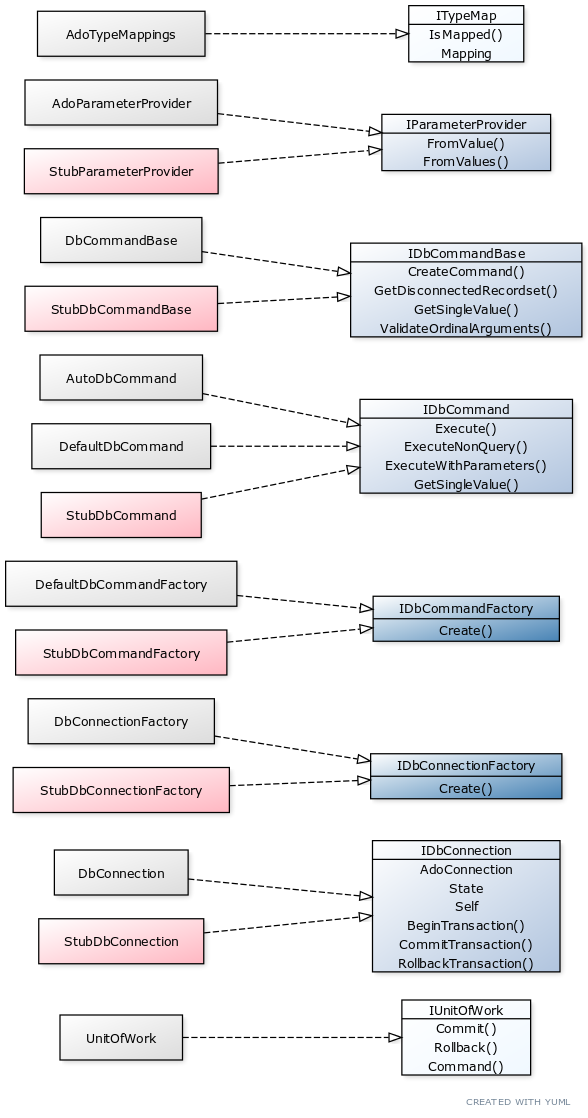
Before we look at the implementation, let’s review the interfaces and the overall structure.

Only two interfaces aren’t being stubbed for unit tests. IUnitOfWork because as the top-level object nothing in the object model consumes it. It is needed though, because client code can inject it as a dependency of some FooRepository class, and then tests can provide it with a StubUnitOfWork that implements IUnitOfWork.

The other “façade” interface is ITypeMap. This one isn’t really needed (neither is the predeclared instance of AdoTypeMappings or its Default factory method), something felt wrong with the client code without it. While the class is essentially just a dictionary / literally a map, there’s something rather elegant about depending on an ITypeMap rather than some Scripting.Dictionary.

The two dark blue interfaces are abstract factory interfaces, each with a “real” and a “stub” implementation for tests: these are very simple classes whose entire purpose is to create an object of a particular type.

If we consider IParameterProvider an implementation detail of IDbCommandBase, that leaves us with only the core stuff: IDbCommandBase, IDbCommand, and IDbConnection – everything else just revolves around these.

DbCommandBase

The old SqlCommand code had two sets of commands: “Execute” for methods you could pass a Connection to, and “QuickExecute” for methods that created a connection on-the-spot. I decided to split the two behaviors into two distinct implementation of the same interface, and that’s how I ended up with DefaultDbCommand and AutoDbCommand. As I was cleaning up the two new classes, I had to notice these two classes needed a number of common bits of functionality… as would any other implementation of IDbCommand.

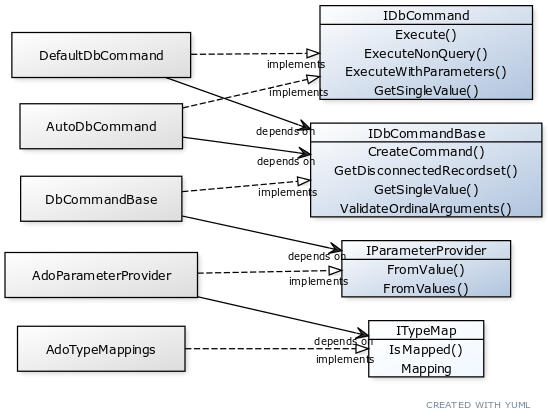
In a language that supports inheritance, I would probably make the two classes inherit a third abstract “base” class where I’d implement the IDbCommand interface. In VBA, we can’t derive a class from another, or inherit members from another class: inheritance is flat-out unavailable. There’s an alternative though, and it’s arguably even better than inheritance: composition. We can put the common functionality in a third class, and then have the two implementations take an instance of that “base” class as we would any other dependency – effectively achieving what we wanted out of inheritance, but through composition.

Code is said to be “decoupled” when none of its concrete components are inter-dependent, as is apparent with the solid black “depends on” arrows here. Decoupled components can easily be swapped for other implementations, like …test stubs.

What’s wrong with inheritance?

Don’t get me wrong, inheritance is very cool: with an abstract class you can have templated methods, where a method in the base class (typically a method that implements some interface member) invokes an abstract or virtual method (typically with protected scope) that the inherited class must override and provide an implementation for. Rubberduck uses this pattern in quite a few places (inspections, notably). Without inheritance, it’s just not something that’s possible.

Inheritance is described as a “is a” relationship, while composition is more of a “has a” relationship. This is important, because when the only consideration weighting in favor of inheritance is the need for two classes to share some functionality, it’s exactly why inheritance should not be used.


Decoupling FTW

The “base” class appeared as a need to have a place for IDbCommand implementations to access shared functionality. I wanted to return disconnected recordsets, and retrieving the value of the first field of the first record of a recordset isn’t something that’s glaringly implementation-specific. The other piece of functionality I needed, was a function that creates the ADODB.Command object and adds the parameters.

Because I wanted this class to create the ADODB.Command, I needed it to be able to turn a Variant into an ADODB.Parameter through some mapping, and since I didn’t want my class to be necessarily coupled with that mapping, or anything remotely related to configuring ADODB parameters… I’m property-injecting an IParameterProvider dependency:

Public Function Create(ByVal provider As IParameterProvider) As IDbCommandBase
    Errors.GuardNonDefaultInstance Me, DbCommandBase
    Errors.GuardNullReference provider
    
    Dim result As DbCommandBase
    Set result = New DbCommandBase
    Set result.ParameterProvider = provider
    
    Set Create = result

End Function

Validating the command string / arguments

Since the commands are given an SQL command string to execute, and a ParamArray array of arguments that should have the same number of items as there are ? ordinal parameters in the SQL command string, we have an opportunity to catch a missing or extraneous argument before we even send the command string to the database server. And because this validation logic would have to be the same regardless of what IDbCommand implementation we’re looking at, DbCommandBase makes the best place to put it.

This implementation is probably too naive for a number of edge cases, but sufficient for most: we’re simply counting the number of ? characters in the sql string, and comparing that with the number of elements in the args array. We need to handle errors here, because if the args array is empty, evaluating UBound(args) and/or LBound(args) will throw a “subscript out of range” run-time error 9.

Public Function ValidateOrdinalArguments(ByVal sql As String, ByRef args() As Variant) As Boolean
    On Error GoTo CleanFail
    Dim result As Boolean
    
    Dim expected As Long
    expected = Len(sql) - Len(Replace(sql, "?", vbNullString))
    
    Dim actual As Long
    On Error GoTo CleanFail 'if there are no args, LBound/UBound are both out of bounds
    actual = UBound(args) + (1 - LBound(args))
    
CleanExit:
    result = (expected = actual)
    ValidateOrdinalArguments = result
    Exit Function
CleanFail:
    actual = 0
    Resume CleanExit
End Function

Getting a disconnected Recordset

If we created a database connection, issued a command against it, and received the recordset from ADODB.Command.Execute, and then we close the connection and return that recordset, then the calling code can’t use the data anymore: a connected recordset only works if the calling code owns the connection. So we need a way to issue a disconnected recordset, while still using an ADODB.Command. The way to do this, is to pass the command as the Source argument to Recordset.Open, and to use a static, client-side cursor:

Private Function GetDisconnectedRecordset(ByVal cmd As ADODB.Command) As ADODB.Recordset
    Errors.GuardNullReference cmd
    Errors.GuardNullReference cmd.ActiveConnection
    
    Dim result As ADODB.Recordset
    Set result = New ADODB.Recordset
    
    result.CursorLocation = adUseClient
    result.Open Source:=cmd, CursorType:=adOpenStatic
    
    Set result.ActiveConnection = Nothing
    Set GetDisconnectedRecordset = result
End Function

Getting a single value result

With functions to validate the parameters, create commands and get a disconnected recordset, we have everything we need for IDbCommand implementations to do their job, but if we leave it like this, we’ll end up with all implementations copying the logic of IDbCommand.GetSingleValue: best have that logic in DbCommandBase and avoid as much repetition as possible.

Private Function GetSingleValue(ByVal db As IDbConnection, ByVal sql As String, ByRef args() As Variant) As Variant
    Errors.GuardEmptyString sql
    
    Dim cmd As ADODB.Command
    Set cmd = CreateCommand(db, adCmdText, sql, args)
    
    Dim results As ADODB.Recordset
    Set results = GetDisconnectedRecordset(cmd)
    
    GetSingleValue = results.Fields.Item(0).value
End Function

Creating the command

A few things can go wrong when creating the ADODB.Command object: we need an ADODB.Connection that’s open, and the parameters must be valid. Since we’re not executing the command just yet, we don’t have to worry about everything that could go wrong actually executing the command string and processing the parameters on the server. So the strategy here is to guard against invalid inputs as much as possible, and then to handle errors when we add the parameters, and return the Command object with whatever parameters were successfully added. We don’t need to try salvaging the rest of the parameters if one blows up, since that failing parameter will fail command execution anyway, but there isn’t much we can do about it, other than perhaps throw an error and have the caller not even try to run the command – but here I decided that the server-side errors would be more useful than any custom “invalid parameter” error.

Note that the ADODB.Command object is actually created by the method-injected IDbConnection dependency. This creates a seam between the class and ADODB, despite the inherent coupling with the ADODB.Command type: it makes the command’s ActiveConnection an implementation detail of IDbConnection.CreateCommand, and that’s all I needed to make this method work with a stub connection that isn’t actually connecting to anything:

Private Function CreateCommand(ByVal db As IDbConnection, ByVal commandType As ADODB.CommandTypeEnum, ByVal sql As String, ByRef args() As Variant) As ADODB.Command
    Errors.GuardNullReference db
    Errors.GuardEmptyString sql
    Errors.GuardExpression db.State <> adStateOpen, message:="Connection is not open."
    Errors.GuardExpression Not ValidateOrdinalArguments(sql, args), message:="Arguments supplied are inconsistent with the provided command string parameters."
    
    Dim cmd As ADODB.Command
    Set cmd = db.CreateCommand(commandType, sql)
    
    On Error GoTo CleanFail
    Dim arg As ADODB.Parameter
    For Each arg In this.ParameterProvider.FromValues(args)
        cmd.parameters.Append arg
    Next
    
CleanExit:
    Set CreateCommand = cmd
    Exit Function
CleanFail:
    Resume CleanExit
End Function

DbCommand

As mentioned before, there are two implementations for the IDbCommand interface: one that creates and owns its own IDbConnection, the other that takes it in as a dependency.

This abstraction represents an object that can take an SQL statement and parameters, and return the result(s) to its caller.

DefaultDbCommand receives its IDbConnection dependency through property injection in its Create factory method.

AutoDbCommand takes a connection string and an IDbConnectionFactory instead.

UnitOfWork uses a DefaultDbCommand because the unit of work needs to own the connection, but AutoDbCommand could be used instead of a unit of work, if we just need a quick SELECT and no transaction.

Abstract Factory

IDbConnectionFactory is an Abstract Factory here. This is needed, because unit tests need to be able to inject a stub factory that produces stub connections: an abstract factory is a factory interface that creates objects of a type that is also an abstraction – in this case, IDbConnectionFactory.Create returns an IDbConnection object. Implementing this factory class is exactly as simple as you’d think – here’s DbConnectionFactory:

'@Exposed
'@Folder("SecureADODB.DbConnection")
'@ModuleDescription("An implementation of an abstract factory that creates DbConnection objects.")
Option Explicit
Implements IDbConnectionFactory

Private Function IDbConnectionFactory_Create(ByVal connString As String) As IDbConnection
    Set IDbConnectionFactory_Create = DbConnection.Create(connString)
End Function

And here’s StubDbConnectionFactory:

'@Folder("Tests.Stubs")
'@ModuleDescription("A stub acting as a IDbConnectionFactory implementation.")
Option Explicit
Implements IDbConnectionFactory
Private Type TInvokeState
    CreateConnectionInvokes As Long
End Type
Private this As TInvokeState

Private Function IDbConnectionFactory_Create(ByVal connString As String) As IDbConnection
    this.CreateConnectionInvokes = this.CreateConnectionInvokes + 1
    Set IDbConnectionFactory_Create = New StubDbConnection
End Function

Public Property Get CreateConnectionInvokes() As Long
    CreateConnectionInvokes = this.CreateConnectionInvokes
End Property

The test stub is more “complex” because it tracks method invocations, so that tests can know whether & how many times any given member was invoked during a test run.

The Abstract Factory pattern is very useful with Dependency Injection: it gives us an abstraction to inject when a class needs a dependency that just cannot be injected when the object is created – the alternative would be tight coupling: if we weren’t injecting a connection factory, then the command class would’ve had to be the one invoking DbConnection.Create – tightly coupling it with the DbConnection class and instantly making unit testing impossible. An abstract factory removes the coupling and allows unit tests to inject an alternative/stub implementation of the factory that creates StubDbConnection objects.

Wrapping it all up

AutoDbConnection can very well be consumed as-is by the client code:

Dim results As ADODB.Recordset
Set results = AutoDbConnection.Create(connString, New DbConnectionFactory, DbCommandBase.Create(AdoParameterProvider.Create(AdoTypeMappings.Default))).Execute(sql)

The only problem is that, well, the dependencies need to be resolved somehow, and that means the client code is now responsible for wiring everything up. While each component has a clear purpose, explicitly creating all these objects quickly gets old and redundant: we need an object that simplifies this – enter IUnitOfWork, and now we can use this much simpler code:

Dim results As ADODB.Recordset
Set results = UnitOfWork.FromConnectionString(connString).Command.Execute(sql)

Unit of Work is a design pattern that encapsulates a transaction: each individual operation can succeed or fail, and the unit of work either succeeds or fails as a whole. These notions are abstracted in the IUnitOfWork interface:

'@Folder("SecureADODB.UnitOfWork")
'@ModuleDescription("Represents an object encapsulating a database transaction.")
'@Interface
'@Exposed
Option Explicit

'@Description("Commits the transaction.")
Public Sub Commit()
End Sub

'@Description("Rolls back the transaction.")
Public Sub Rollback()
End Sub

'@Description("Creates a new command to execute as part of the transaction.")
Public Function Command() As IDbCommand
End Function

When a UnitOfWork is created, it initiates a database transaction. When it is destroyed before the transaction is committed, the transaction gets rolled back and from the database’s point of view, it’s like nothing happened.

Transaction?

If you’re unfamiliar with database transactions, there’s an easy example to illustrate what they do: imagine you have an Accounts table, and you’re processing a transfer – you need to UPDATE the record for the source account to deduct the transfer amount, then UPDATE the record for the destination account to add the transferred amount. In a happy world where everything goes well that would be the end of it… but the world is a cruel place, and assuming the 1st command goes through, nothing guarantees nothing will blow up when sending the 2nd command. Without transactions, the funds would simply vanish: they’re gone from the first account, and they were never added to the second account. With a transaction, we can rollback everything when the 2nd operation completes, no funds vanish and the data is exactly the way it was before the transaction started.


Again, the implementation is pretty straightforward – the only peculiarity is that the class has two factory methods – one named Create that takes all the dependencies in, and another named FromConnectionString that conveniently wires up a default set of dependencies (and then passes them to the Create method to avoid duplicating code).

'@Folder("SecureADODB.UnitOfWork")
'@ModuleDescription("An object that encapsulates a database transaction.")
'@PredeclaredId
'@Exposed
Option Explicit
Implements IUnitOfWork
Private Type TUnitOfWork
    Committed As Boolean
    RolledBack As Boolean
    Connection As IDbConnection
    CommandFactory As IDbCommandFactory
End Type
Private this As TUnitOfWork

'@Description("Creates a new unit of work using default configurations.")
'@Ignore ProcedureNotUsed
Public Function FromConnectionString(ByVal connString As String) As IUnitOfWork
    
    Dim db As IDbConnection
    Set db = DbConnection.Create(connString)
    
    Dim provider As IParameterProvider
    Set provider = AdoParameterProvider.Create(AdoTypeMappings.Default)
    
    Dim baseCommand As IDbCommandBase
    Set baseCommand = DbCommandBase.Create(provider)
    
    Dim factory As IDbCommandFactory
    Set factory = DefaultDbCommandFactory.Create(baseCommand)
    
    Set FromConnectionString = UnitOfWork.Create(db, factory)
    
End Function

'@Inject: just an idea.. see #https://github.com/rubberduck-vba/Rubberduck/issues/5463
Public Function Create(ByVal db As IDbConnection, ByVal factory As IDbCommandFactory) As IUnitOfWork
    Errors.GuardNonDefaultInstance Me, UnitOfWork
    Errors.GuardNullReference factory
    Errors.GuardNullReference db
    Errors.GuardExpression db.State <> adStateOpen, message:="Connection should be open."
    
    Dim result As UnitOfWork
    Set result = New UnitOfWork
    Set result.CommandFactory = factory
    Set result.Connection = db
    
    Set Create = result
End Function

'@Inject: this member should only be invoked by Me.Create, where Me is the class' default/predeclared instance.
'@Ignore ProcedureNotUsed: false positive with v2.5.0.5418
Friend Property Set Connection(ByVal value As IDbConnection)
    Errors.GuardDoubleInitialization this.Connection
    Errors.GuardNullReference value
    Set this.Connection = value
    this.Connection.BeginTransaction
End Property

'@Inject: this member should only be invoked by Me.Create, where Me is the class' default/predeclared instance.
'@Ignore ProcedureNotUsed: false positive with v2.5.0.5418
Friend Property Set CommandFactory(ByVal value As IDbCommandFactory)
    Errors.GuardDoubleInitialization this.CommandFactory
    Errors.GuardNullReference value
    Set this.CommandFactory = value
End Property

Private Sub Class_Terminate()
    On Error Resume Next
    If Not this.Committed Then this.Connection.RollbackTransaction
    On Error GoTo 0
End Sub

Private Sub IUnitOfWork_Commit()
    Errors.GuardExpression this.Committed, message:="Transaction is already committed."
    Errors.GuardExpression this.RolledBack, message:="Transaction was rolled back."
    On Error Resume Next ' not all providers support transactions
    this.Connection.CommitTransaction
    this.Committed = True
    On Error GoTo 0
End Sub

Private Function IUnitOfWork_Command() As IDbCommand
    Set IUnitOfWork_Command = this.CommandFactory.Create(this.Connection)
End Function

Private Sub IUnitOfWork_Rollback()
    Errors.GuardExpression this.Committed, message:="Transaction is already committed."
    On Error Resume Next ' not all providers support transactions
    this.Connection.RollbackTransaction
    this.RolledBack = True
    On Error GoTo 0
End Sub

Errors

If you paid close attention to the code listings so far, you likely already noticed the many Errors.GuardXxxxx member calls scattered throughout the code. There are probably as many ways to deal with custom errors as there are VBA classes out there, this is one way. Probably not the best way, but it feels “just right” for me in this case and I think I like it enough to keep using it until the problems it creates become clearer (there’s always something). Errors is a standard private module in the project, that defines custom error codes. Okay I was lazy and deemed SecureADODBCustomError all I needed, but it could also have been an Enum with descriptive names for each custom error code.

The module simply exposes a small number of very simple Sub procedures that make it easy for the rest of the code to raise meaningful custom errors:

'@Folder("SecureADODB")
'@ModuleDescription("Global procedures for throwing common errors.")
Option Explicit
Option Private Module

Public Const SecureADODBCustomError As Long = vbObjectError Or 32

'@Description("Re-raises the current error, if there is one.")
Public Sub RethrowOnError()
    With VBA.Information.Err
        If .Number <> 0 Then
            Debug.Print "Error " & .Number, .Description
            .Raise .Number
        End If
    End With
End Sub

'@Description("Raises a run-time error if the specified Boolean expression is True.")
Public Sub GuardExpression(ByVal throw As Boolean, _
Optional ByVal Source As String = "SecureADODB.Errors", _
Optional ByVal message As String = "Invalid procedure call or argument.")
    If throw Then VBA.Information.Err.Raise SecureADODBCustomError, Source, message
End Sub

'@Description("Raises a run-time error if the specified instance isn't the default instance.")
Public Sub GuardNonDefaultInstance(ByVal instance As Object, ByVal defaultInstance As Object, _
Optional ByVal Source As String = "SecureADODB.Errors", _
Optional ByVal message As String = "Method should be invoked from the default/predeclared instance of this class.")
    Debug.Assert TypeName(instance) = TypeName(defaultInstance)
    GuardExpression Not instance Is defaultInstance, Source, message
End Sub

'@Description("Raises a run-time error if the specified object reference is already set.")
Public Sub GuardDoubleInitialization(ByVal instance As Object, _
Optional ByVal Source As String = "SecureADODB.Errors", _
Optional ByVal message As String = "Object is already initialized.")
    GuardExpression Not instance Is Nothing, Source, message
End Sub

'@Description("Raises a run-time error if the specified object reference is Nothing.")
Public Sub GuardNullReference(ByVal instance As Object, _
Optional ByVal Source As String = "SecureADODB.Errors", _
Optional ByVal message As String = "Object reference cannot be Nothing.")
    GuardExpression instance Is Nothing, Source, message
End Sub

'@Description("Raises a run-time error if the specified string is empty.")
Public Sub GuardEmptyString(ByVal value As String, _
Optional ByVal Source As String = "SecureADODB.Errors", _
Optional ByVal message As String = "String cannot be empty.")
    GuardExpression value = vbNullString, Source, message
End Sub

Most of these procedures are invoked as the first executable statement in a given scope, to raise an error given invalid parameters or internal state, such as these:

Private Sub IUnitOfWork_Commit()
    Errors.GuardExpression this.Committed, message:="Transaction is already committed."
    Errors.GuardExpression this.RolledBack, message:="Transaction was rolled back."
    On Error Resume Next ' not all providers support transactions
    this.Connection.CommitTransaction
    this.Committed = True
    On Error GoTo 0
End Sub

Consistently raising such errors is the single best way to ensure our objects are always in a known and usable state, because we outright forbid them to be invalid. These validation clauses are called guard clauses, hence the GuardXxxxx procedure names.

A lot of the unit tests simply verify that, given the specified conditions, the expected error is raised:

'@TestMethod("Factory Guard")
Private Sub Create_ThrowsIfNotInvokedFromDefaultInstance()
    On Error GoTo TestFail
    
    With New AutoDbCommand
        On Error GoTo CleanFail
        Dim sut As IDbCommand
        Set sut = .Create("connection string", New StubDbConnectionFactory, New StubDbCommandBase)
        On Error GoTo 0
    End With
    
CleanFail:
    If Err.Number = ExpectedError Then Exit Sub
TestFail:
    Assert.Fail "Expected error was not raised."
End Sub

If each guard clause has a unit test, then the tests are effectively documenting how the objects are meant to be used. With more specific custom errors, the tests would be more accurate, but there’s a point where you need to look at what you’ve got and say “I think I can work with that”, and move on.


Audience

Obviously, one doesn’t import 20 classes into their VBA project just to send one ADODB command to a database server. However if you’re maintaining a VB6 application that uses ADODB all over the place, leaks connections, leaves recordsets dangling, …then importing this API can really help tighten up the data access code in that legacy app. Or maybe you’re writing a complex data-driven system in VBA for Excel because that’s all you’ve got, and a UnitOfWork abstraction makes sense for you.

The goal here is mostly to 1) demonstrate proper usage of ADODB.Command for secure, parameterized queries, and 2) demonstrate that Classic VB (VB6/VBA) has always had everything everyone ever needed to write full-blown object-oriented code that leverages abstraction, encapsulation, and polymorphism – making it possible to write clean and fully unit-tested code.

…and of course, it makes a great practical application of the OOP concepts discussed in many other articles on this blog. Studying the code in this project gives you insight on…

  • OOP foundations: abstraction, encapsulation, polymorphism.
  • SOLID principles: single responsibility, dependency inversion, etc.
  • DI techniques: property injection, abstract factory.
  • Unit testing: what to test, how to test, stubbing dependencies, etc.
  • Using custom errors, guard clauses, input validation.
  • Leveraging Rubberduck annotations, minimizing inspection results.

Office-JS & Script Lab

Apparently this is this blog’s 100th article (!), and since Rubberduck is also about the future of Office automation in VBA, I wanted to write about what’s increasingly being considered a serious contender for an eventual replacement of Visual Basic for Applications. Just recently Mr.Excel (Bill Jelen) uploaded a video on YouTube dubbing it the “VBA killer”, and without being over-dramatic, I can’t help but to pragmatically agree with the sentiment… to an extent.

Forget VBA, think Win32 and COM: the Web has been “threatening” the future of Windows desktop applications of all kinds for about as long as VBA has been around. Windows desktop development went from COM-based to .NET, and now to cross-platform .NET Core, and there’s still COM interoperability built into .NET. It’s 2020 and Microsoft SQL Server runs perfectly fine on Linux, and you can use Microsoft Visual Studio on your Mac now, and a lot of what Microsoft does is open-sourced and accepts contributions, including .NET itself… and TypeScript is up there, too.

VBA isn’t going anywhere.

COM hasn’t gone anywhere either. If you used any Declare statements in VBA you probably know about user32.dll and kernel32.dll. The Win32 API is here to stay; COM is here to stay. My reading is that as long as the Windows plumbing exists to make it possible, VBA has no reason to go anywhere. The problem is that VBA and its COM-based Win32 infrastructure are essentially a dead end: it’s literally not going anywhere. The VBE has long been abandoned, and VBA as a language is stuck 20 years ago… but it’s likely going to stick around for a long time in desktop-land, even if (when?) the Excel COM type library stops getting new members – as the freezing of the GitHub repository holding the official VBA documentation suggests:

“This repo is no longer accepting PRs or new issues.”

Maybe (probably) I’m reading way too much into this, but to me that is a sign that we’ve reached a critical point in VBA’s history/lifetime. I do note that the repository wasn’t made read-only and that it’s still possible to submit a pull request, but the wording strongly suggests not to.

Meanwhile, the Office Extensibility team is hard at work getting the Excel Online automation capabilities of Office-JS on par with what can be achieved on Win32/desktop with VBA. As time marches forward, eventually we’ll reach a tipping point where Office-JS stabilizes while more and more enterprises embrace the Web as a platform: maybe I’m over-estimating how long that transition will take, but even well beyond that tipping point, COM and VBA will very likely still be around for a long, long time. It’s just that eventually the Excel team will have to stop updating (but not necessarily stop shipping) the COM type library, and focus on cross-platform extensibility.

Now, have you tried Excel Online? Personally, I don’t use it a lot (Rubberduck is Win32-only), but functions like XLOOKUP and SORT (and dynamic arrays in general) are a massive game-changer, and I will neither confirm nor deny that there are even more amazing capabilities to come. Things like this should make anyone seriously think twice before opting for a plain old perpetual desktop license: Excel 2016 isn’t going to get XLOOKUP anymore than Excel 2010 ever will…


This week I decided I was tired of seeing proof-of-concept “hello world” code demonstrating what Office-JS can do, and went on to explore and scratch more than just the surface. I found a Tetris game and decided to port my OOP Battleship from VBA to TypeScript… a language I know next to nothing about (and, looking at that Tetris game code and comparing it to mine… it shows!).

Script Lab

If you’re a VBA enthusiast, the first thing you notice in Excel Online, is the absence of a Developer tab. To automate Excel on the Web, you need to add Script Lab, a free add-on that brings up a task pane titled “Code”, that is very simple to use and that looks like this:

The default snippet merely sets up a “Run” UI button and wires it up to invoke a run async function that… does nothing but bring up a little banner at the top of the task pane that says “Your code goes here”.

As VBA developers, we’re used to having an actual IDE with an edit-and-continue debugger, dividing our projects into modules, and dragging and dropping controls onto a UserForm visual designer. So, your first impression of Script Lab might very well be that it’s even less of a code editor than the VBE is – especially with Rubberduck! You have to walk into it with an open mind, and with an open heart you just might discover a new friend, like I did.

Paradigm Shift

I’ve written code for a long time, but I’m not a web developer. HTML, JavaScript and CSS have scared me ever since they came into existence: too many things to think about, too many browsers, too many little things that break here but work there. I’ve been telling myself “I should try to do this” for years now, and I have to say that the project in the screenshot below is really my first [somewhat] serious attempt at anything web, …if we exclude what little ASP.NET/MVC I wrote for the rubberduckvba.com website (I’m more of a backend guy okay!).

So here’s the paradigm: that task pane is your playground, your sandbox – you have full control over everything that happens in there, the only limit is really just how bad you can be at CSS and HTML:

It’s not playable yet. I’ll definitely share it when it is …after a code review and a refactoring!

You can pop the code editor panel out into a separate browser window, which I warmly recommend doing – the code window docked on one side, the worksheet on the other. Another thing you’ll want to do is tweak your user settings to set editor.wordwrap: 'off', because for some reason the default setting is to word-wrap long lines of code, …which makes an interesting [CSS] tab when you have base-64 encoded .png image resources.

You’ll definitely want to pop the code editor into its own separate browser window.

There are a couple minor annoyances with the editor itself. Working with a single-file script for any decent-sized project, means you’re going to be scrolling up and down a lot. Hard to reliably reproduce, but I’m finding the editor tends to frequently (but thankfully, harmlessly) crash given a syntax error, like if you deleted a semicolon or something. Navigating between tabs loses your caret position, which means more scrolling. Could be just my machine (or my way-too-large-for-its-own-good script), but I’ve also experienced frequent and significant slow-downs and delays when typing.

Not having edit-and-continue debugging capabilities is a major paradigm shift as well, but then Script Lab isn’t meant to be a full-blown Integrated Development Environment… and the code that runs isn’t the code you’re editing; TypeScript compiles down to pure JavaScript, and mapping files need to get involved to help a TypeScript editor map the compiled JavaScript to the source TypeScript instructions.

On the bright side, like in Visual Studio { scopes } can be folded /collapsed, which does help reduce the amount of scrolling around and is a very useful and welcome editor feature. Also I couldn’t help but notice with utter glee that the editor auto-completes parentheses, braces, brackets, single and double quotes, …but while it does highlight matching parenthesis, unlike Rubberduck’s self-closing pair feature, backspacing onto a ( will not delete the matching closing ) character. One nice thing it does that Rubberduck autocompletion doesn’t, is that it wraps the selection: you can select an expression, type ( and instead of overwriting your selection with that character, it “wraps” the selected expression and you end up with (your selection).

As a programming language, TypeScript feels very much like the single best way to approach JavaScript: it supports strong types like a statically-typed language, and dynamic types, …like JavaScript (think Variant in VBA, but one to which you can tack-on any member you like at run-time). Coming from C# I’m finding myself surprisingly capable in this language that supports inherently object-oriented structures like classes and interfaces, and where even string literals have a ton of useful members (built-in support for regular expressions! lookbehinds in regex patterns!). Learning how string interpolation works will quickly make VBA concatenations feel clunky. Array methods will quickly become second-nature and you’ll realize just how much looping we do in VBA just because the types we’re dealing with have so little functionality.

But the most significant thing has to be how functions are now first-class citizens that can be passed around as parameters like any other object, just like we do in C# with delegates and lambda expressions. For example, in the constructor of my Ship class, I’m populating a Map<GridCoord, boolean> to hold the ship’s internal hit-state:

this.state = new Map<GridCoord, boolean>(
  new Array(this.size).fill(false).map((value: boolean, index: number): [GridCoord, boolean] => {
    let p = orientation === ShipOrientation.Horizontal 
      ? position.offset(index - 1, 0) 
      : position.offset(0, index - 1);
    return [p, false];
  }
);

We’re creating a ship of a particular size and orientation, and the state means to hold the hit-state (true: hit) of each individual grid coordinate occupied by the ship. new Array(this.size).fill(false) creates an array of the appropriate length, filled with false Boolean values; but I wanted to map the array indices to actual grid coordinates to make my life easier, so I simply use .map((value, index):[GridCoord, boolean] => {...}) to do exactly that!

Reads like character soup? Don’t worry, that code is more verbose than it needs to be, and the lambda syntax is confusing to everyone that never worked with it. In a nutshell, (i) => {...} represents a function that takes an i parameter. There is no As keyword to specify data types in TypeScript, instead we would declare a numeric variable with e.g. var i: number. That means (value, index):[GridCoord, boolean] => {...} represents a function that takes a value and an index parameter (their values are provided by the map method), and returns a tuple (the square-bracketed part; can be thought of as some kind of anonymous type that’s defined on-the-spot with unnamed but typed members) made of a GridCoord and a boolean value. Therefore, the body of that function works out what GridCoord/boolean value to yield for each item of the Array(this.size) array.

Ternary (i.e. 3-operands) operators are another nice thing VBA doesn’t have. foo = bar ? a : b; assigns a to foo if bar evaluates to true, and assigns b otherwise. The closest we have in VBA is the IIf function, but because the provided true-value and false-value arguments are arguments, they both need to be evaluated before the function is even invoked.

I could go on and on about every little language feature TypeScript has that VBA doesn’t, but the truth is, there’s simply no possible comparison to be made: as a language (I’m not talking about the capabilities of the Excel object model here), VBA loses on every single aspect. And while VBA is essentially constrained to the VBE, TypeScript is in no way constrained to Script Lab. In fact if I wanted to make an actual serious Office-JS project, I’d likely be using VSCode, which I admittedly have yet to use for anything, but I’ve heard only good things about this lightweight IDE… and if I didn’t like it then I could just stick to good old Visual Studio.


VBA will very likely remain the uncontested King of Office automation on desktop for a very long time still: programming in TypeScript is a lot of fun to me, but I’m not Joe-in-Accounting – I write code (C#, T-SQL, VBA, …) for a living, and I doubt Script Lab, HTML, CSS, JavaScript and Chrome developer tools appeal as much to someone that isn’t enthusiastic about not just automating Office, not just VBA, but about programming in general. And for that, and that alone, I posit that VBA will continue to rule as King of Win32 Office automation for many years to come, and Rubberduck will be there to keep adding modern-IDE functionalities to the Visual Basic Editor.

The King is dead, long live the King!

To be continued…
Modern VBA Best Practices: Default Members

Today I learned that VB.NET does in fact support Default properties. For years I was under the impression that dismissing the Set keyword meant default members couldn’t possibly exist in .NET, and I was wrong: dismissing the Set keyword meant that parameterless default members couldn’t exist in .NET, but VB.NET can still implicitly invoke a Public Property Get Item(index) default member, just like its VB6 ancestor.

Rewind to their inception, and default members/properties have all the looks of a language feature that’s considered a nice convenient way to type code faster (in 20/20 hindsight, that was at the cost of readability). That’s why and how Debug.Print Application can compile, run, and output Microsoft Excel in the debug pane; it’s why and how an ADODB.Connection object and its ConnectionString properties can be impossible to tell apart… as a convenience; how a Range “is” its value(s), a TextBox “is” its text, or an OptionButton “is” True or False.

These are the modern-day considerations for VB.NET default properties (emphasis mine, .NET-specifics removed):

Default properties can result in a small reduction in source code-characters, but they can make your code more difficult to read. If the calling code is not familiar with your class […], when it makes a reference to the class […] name it cannot be certain whether that reference accesses the class […] itself, or a default property. This can lead to compiler errors or subtle run-time logic errors. […]
Because of these disadvantages, you should consider not defining default properties. For code readability, you should also consider always referring to all properties explicitly, even default properties.

I cannot think of a single valid reason for any of these considerations to not be applicable to modern VBA, or even VB6 code. VB.NET removed the need for a disambiguating Set keyword by making a parameterless default member throw a compiler error. For contrast consider this code, and imagine the Set keyword doesn’t exist:

Dim things(9)
things(0) = New Thing

If the Thing class defines a parameterless default member, then who can tell what’s at index 0 of the things array? A Thing object reference? A SomethingElse object reference? The String representation of a Thing instance? 42?

Default members are hopefully not side-effecting magic invisible stardust code that is by definition invoked implicitly, by code that says one thing and does another, and requires looking up the documentation or the object browser definition of a type to remember what member we’re actually invoking – and even then, it can be obscured; the Excel type library is a prime example, with a hidden _Default property being the (drumroll) default property of the Range class, for example. Lastly, an implicit default member call is not 100% equivalent to an explicit one, and that tiny little difference can go as far as instantly crashing Excel.

Sounds terrible. Why would Rubberduck have a @DefaultMember annotation then?

With Rubberduck’s annotation and inspection/quick-fix system, you can easily define default members for your class modules; simply decorate the procedure with a '@DefaultMember annotation, synchronize member attributes, and done.

It’s not because you can, that you should. If you’re like me and someone gave you a knife, you’d probably at least try not to cut yourself. If you’re writing a custom collection class and you want it to be usable with the classic things(i) syntax rather than an explicit things.Item(i) member call, Rubberduck’s job is to help you do exactly that without needing to remove/export the code file, tweak it manually in Notepad++, then re-import it back into the project – that’s why the @DefaultMember annotation exists: because for the rare cases where you do want a default member, your ducky doesn’t let you down.

Currently, Rubberduck won’t complain if you make a parameterless procedure a default member. There’s an inspection idea that’s up-for-grabs to flag them though, if you’re looking for a fun contribution to an open-source project!

Rubberduck 2.4.1: ThunderFrame Edition

As was shared a week or two ago on social media, Rubberduck contributor and supporter Andrew “ThunderFrame” Jackson passed away recently – but his love for VBA, his awesomely twisted ways of breaking it, his insights, the 464 issues (but mostly ideas, with 215 still open as of this writing) and 30 pull requests he contributed to Rubberduck, have shaped a large part of what this project is all about, and for this release we wanted to honor him with a special little something in Rubberduck, starting with the splash screen.

Andrew joined the project very early on. He gave us the signature spinning duckies and the SVG icon of the project; he once implemented a very creative way to make unit testing work in Outlook (and I know a certain duck that had to eat their hat because of it!), before the feature was made host-agnostic. He gave us the weirdest, most completely evil-but-still-legal VBA code we could possibly test Rubberduck’s parser/resolver with – and we’re very proud to have a ThunderCode-proof parser now!

What’s New?

This isn’t an exhaustive list. See the release notes for more information.

¡Rubberduck ahora habla español!

This release introduces Spanish language support. German, French, and Czech translations have also been updated.

Rubberduck doesn’t speak your language yet? Nothing would make us happier than helping you help us translate Rubberduck! See contributing.md for all the details, and don’t hesitate to ask any questions you have – go on, fork us!

The project’s many resource files are easily handled with the ResX Manager add-in for Visual Studio.

UI Enhancements

The Test Explorer has had a rather impressive facelift, Inspection Results are now much easier to review, navigate and filter. There is a known issue about the GroupingGrid control expanding/collapsing all groupings together, but we weren’t going to hold back the release for this – we will definitely address it in a near-future release though.

Toggle buttons in the toolbar now allow filtering inspection results by severity, and grouping by inspection type, by module, by individual inspection, or by severity.
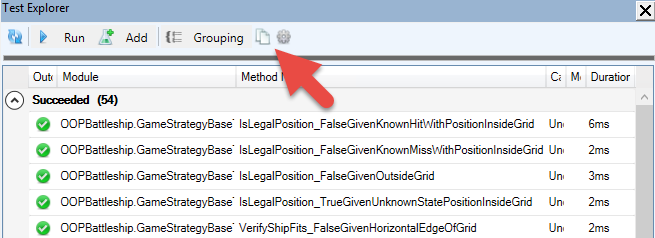
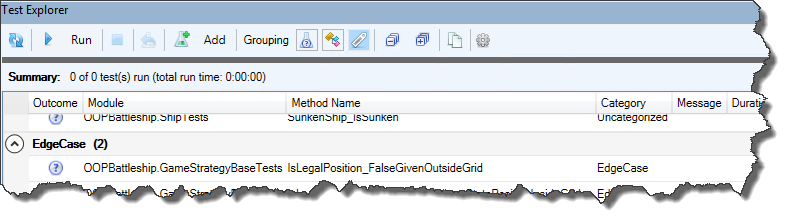
Similar toggle buttons in the Test Explorer allow grouping tests by outcome, module, or category. Tests can be categorized by specifying a category name string as an argument to the @TestMethod annotation.

Parser performance has improved, especially for the most common usages of “bang” (foo!bar) notation, which remain a difficult language construct to handle. But they’re also late-bound, implicit, default member calls that would probably be better off made explicit and early-bound.

Self-Closing Pair completion works rather nicely now, with only two known, low-priority edge cases that don’t behave quite as nicely as they should.

Easter Is Coming

And with Easter comes… White Walkers Easter Eggs, so all I’m going to say, is that they’ll be flagging ThunderCode – the kind of code our friend loved to test & push the limits of Rubberduck’s parser with. If your code trips a ThunderCode inspection, …nah, it can’t happen.

Woopsie, might happen after all. We’ll eventually figure out a way to hide them from the settings!

Also it’s apparently not impossible that there’s no way no other Easter Eggs were never not added to Rubberduck. For the record I don’t know if this means what I think I mean it to say, and that’s perfect.

What’s Next?

Some very important changes have been waiting for this release and will be merged in the next few weeks – these changes won’t necessarily be visible from a user standpoint, but they will greatly enhance our internal API – refactorings, COM object management, and we’ll be leveraging more of the TypeLibs API, which in turn should end up translating into greatly enhanced user experience and feature set.

Next release will include a few new inspections, including one that locates obsolete While...Wend loops, and suggests to rewrite them as Do While...Loop blocks, which can be exited with an Exit Do statement, whereas While loops can only be prematurely exited (without throwing an error) by an inelegant GoTo jump.

We really want to tighten our release cycle, so we’ll be shooting for the end of April for what should be version 2.4.2.

Rubberduck v2.4.0

Unlike quite a number of Rubberduck releases, this time we’re not boasting a thousand commits though: we’re looking at well under 300 changes, but if the last you’ve seen of Rubberduck was 2.3.0 or prior, …trying this release you’ll quickly realize why we originally wanted to release it around Christmas.

So, here’s your belated Christmas gift from the Rubberduck dev team!

VBE Project References: CURED!

You may have seen the Introducing the Reference Explorer announcement post last autumn – well, the new feature is now field-tested, works beautifully, instinctively, and is ready for prime time. It’s a beauty!

The add/remove references dialog has seen a number of enhancements since its pre-release: thanks everyone for your constructive feedback!
Quickly locate any type library by name and/or description.
Pin your favorite references, and Rubberduck will keep them handy for all your VBA/VB6 projects.

You’ll never want to use the vanilla-VBE references dialog again!

If you’ve been following the Rubberduck project for quite some time, you may remember something about using annotations together with inspections and quick-fixes to document the presence of module & member attributes. You may also remember when & why the idea was dropped. Keeping in tradition with including new inspections every release… Surprise, it’s coming back!

German, French, and Czech translations have been updated, a number of bugs were fixed in a few inspections, the Code Explorer has seen a number of subtle enhancements, and WPF binding leaks are all but gone.

Code Explorer Enhancements

Adding the Reference Explorer made a perfect opportunity to revisit the Code Explorer toolwindow – our signature navigation feature. Behold, the new Code Explorer:

The new ‘Sync with code pane’ toolbar button (the left/right arrows icon) selects the treeview node closest to the current code pane selection.

There’s a new ‘Library References’ node that shows your project’s library dependencies …whether they’re in use or not:

Find all references can now be used to locate all uses of a given type library – including the built-in standard libraries! Note that rendering lots of search results in a toolwindow will require confirmation if there are too many results to display.

The project reference nodes get new icons:

Classes with a VB_PredeclaredID attribute set to True now have their own icon too (and their names now say (Predeclared) explicitly), and class modules marked with an @Interface annotation now appear with an “interface” icon, like IGameStrategy here:

Annotations & Attributes

They’re back, and this time it does work, and it’s another game changer: Rubberduck users no longer need to export any code file to modify module & member attributes!

Module & Member Annotations

At module level, the @ModuleDescription annotation can be given a string argument that controls the value of the module’s VB_Description attribute; the @Exposed annotation controls the value of the VB_Exposed attribute; the presence of a @PredeclaredId annotation signals a VB_PredeclaredId attribute with a value of True.

At member level, @Description annotations can be given a string argument that controls the value of the member’s VB_Description attribute.

Through inspections, Rubberduck is now able to warn about attributes that don’t have a corresponding annotation, and annotations that don’t have a corresponding attributes. Look for inspection results under the “Rubberduck Opportunities” category.

v2.4.x

The months to come will see further enhancements in several areas; there are several pull requests lined up already – stay tuned, and keep up with the pre-release builds by watching releases on GitHub!

Code Insights with Rubberduck + Excel

You’re writing a rather large VBA/VB6 project, and you’re starting to have a sizable amount of passing unit tests. Did you know you can copy the test results to the clipboard with a single click?

…and then paste them onto a new worksheet and turn it into a data table:

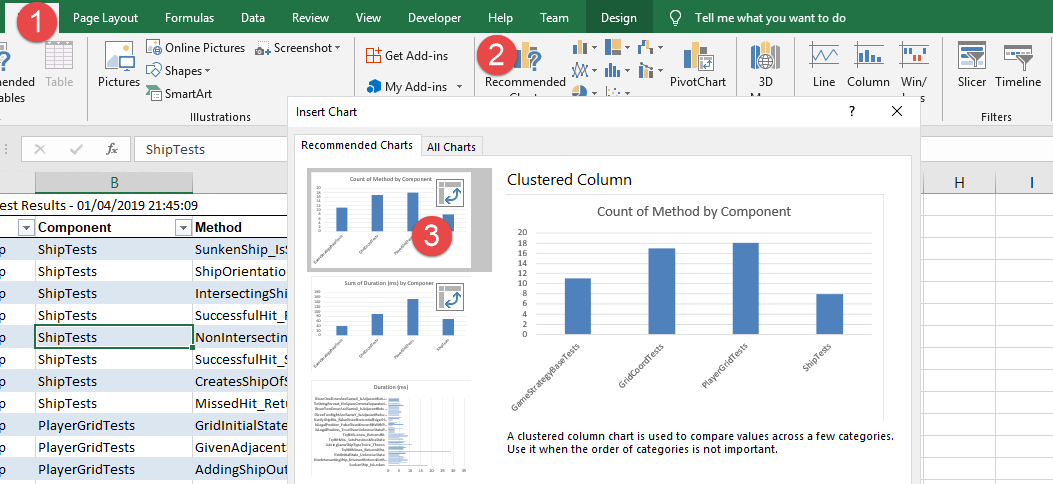
If you’re not sure what to do next, you can even let Excel give you ideas – you’ll find the Recommended Charts button under the Insert Ribbon tab:

With the count of method by component chart, we can see what test modules have more test methods; the sum of duration by component chart can show us which test modules take the longer to execute – or we could average it across test categories, or archive test results and later aggregate them… and then use this data to performance-profile problematic test scenarios.

Similarly, the “Copy to Clipboard” button from the Code Explorer can be used to export a table into Excel, and using the recommended pivot tables feature, we can get a detailed breakdown of the project – for example count of names by declaration type creates a pivot table that lists all Rubberduck declaration types, so you can easily know how many line labels your project has, or how many Declare Function imports are used:

With a little bit of filtering and creativity, we can regroup all Constant, Function, PropertyGet and Variable declarations by return type, and easily identify, say, everything that returns a Variant:

The possibilities are practically endless: the data could be timestamped and exported to some Access or SQL Server database, to feed some dashboard or report showing how a project grows over time.

How would you analyze your VBA projects? What code metrics would you like to be able to review and pivot like this? Share your ideas, or implement them, and send a pull request our way!

Introducing the Reference Explorer

Back in the 2.1.x announcement post over a whole year ago, one of the bullet points about the upcoming roadmap said we were going to “make you never want to use the VBE’s Project References dialog ever again“; it took a bit longer than expected, but as far as we can tell, this feature does exactly that.

If you’ve been following the project on social media recently, you already know that the next version of Rubberduck will introduce a very exciting, unique new feature: the Reference Explorer dialog, and the addition of a references node in the Code Explorer tree.

Vanilla-VBE

Since forever, adding a reference to the active project in the VBE is a rather… vanilla experience. Functional, but somewhere between bland and tedious.

What’s wrong with it?

Regardless of what we think of the very 1998-era buttons docked on the side, the dialog works. There’s a list of available libraries (sorted alphabetically), we can browse for unlisted ones, cancel or accept changes, and the libraries that are selected when the dialog is displayed, are conveniently shown at the top of the list!

On a closer look though…

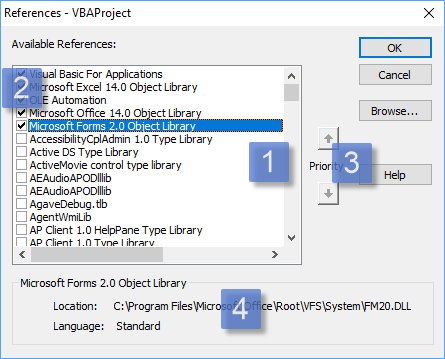
The vanilla-VBE project references dialog
  1. The list of available libraries has the available libraries listed in alphabetical order. You can’t resize the dialog to show more, but you get first-key search. The Scripting runtime’s library name starts with “Microsoft”… which happens to also be the case for a few other libraries; this makes the extremely useful Scripting.Dictionary and Scripting.FileSystemObject classes pretty much hidden until you stumble upon a blog post or a Stack Overflow answer that introduces them.
  2. The selected libraries show up at the top of the list, in priority order. Locked libraries are stacked at the top. You use the up/down arrow buttons to move the selected library up or down, but you can’t move the locked ones.
  3. The priority buttons are used to determine the identifier resolution order; if an identifier exists in two or more libraries, VBA/VB6 binds to the type defined in the library with the highest priority. There’s no visual cue in the list itself to identify the locked-in type libraries, so the Enabled state of these buttons is used to convey that information: you can’t move the locked-in, default references.
  4. The bottom panel is useful… but the path gets cropped if it’s longer than the rather narrow dialog can fit, and you can’t select or copy the text. The actual library version number isn’t shown.

Visual Studio

Let’s take a look at what adding a project reference using the latest version of Microsoft Visual Studio feels like:

The Microsoft Visual Studio 2017 Reference Manager dialog

The dialog can be resized, search is no longer limited to a single character, but still limited to the beginning of the [Name]. The library info is now richer; it moved to the right side, and a panel on the left side determines the contents of the list. Other than that, besides a new [Version] column and a nice dark theme, …the mechanics are pretty much the same as they were 20 years ago: check boxes in a list. Priority is no longer relevant in .NET though – namespaces fixed that.

Rubberduck

This screenshot was taken shortly before the pull request was opened:

The Rubberduck ‘Add/Remove References’ dialog (work in process: release build may differ)
  1. Available libraries appear in a list on the left-hand side of the dialog. Like in Visual Studio, the version number appears next to the library name, and the list is sorted alphabetically. There is no checkbox: instead, the selected library can be moved into the list of referenced libraries.
  2. Referenced libraries appear in a list on the right-hand side of the dialog. Since there is no checkbox, the selected library can be moved back into the list of available libraries.
  3. Priority up/down buttons appear for the selected referenced library, unless it’s locked.
  4. Icons differentiate locked libraries, libraries that were already referenced when the dialog was shown, and libraries that were newly added. In the list of available libraries, recent and pinned libraries have an icon too.
  5. Search works on a “contains” basis, and matches the library name, description, and path. It immediately filters the list of available libraries.
  6. Tabs for quickly accessing type libraries recently referenced, or pinned libraries, or registered. Host-specific project types are in a separate tab, as applicable.
  7. Bottom panel displays the full name and path of the selected type library. The text can be selected and copied into the clipboard.
  8. Browse button allows referencing any project/library that isn’t listed anywhere. If a library can’t be loaded, it will appear in the list as a broken reference, before it’s even tentatively added to the project.

If you haven’t seen it in action yet, here’s a sneak peek:

Of course that’s just the beginning: layout is not completely final, drag-and-drop functionality remains to-do, among other enhancements.

A first iteration of this feature will likely be merged some time next week, and since this is a major, completely new feature, we’ll bump the minor version and that will be Rubberduck 2.4.0, to be released by the end of 2018…

…not too long after the imminent 2.3.1 hotfix release.

If you think this is one of the coolest things a VBE add-in could possibly do, you’re probably not alone. Share the news, and star us on GitHub!

Introducing Rubberduck v2.3.0

Version 2.2.0 was released in April 2018. Well over 1,700 commits and 2,185 modified files later, Rubberduck is now more stable than ever, and well overdue for a new release. November 25th will see Rubberduck 2.3 issued – as of this writing, we’re ironing a few wrinkles, but everything looks like we’re on track to release some time this Sunday.

A tremendous amount of effort went into the core, the engine, and the brain: the number of situations causing inspection false positives is on a serious decline, and we’ve taken very important steps towards ensuring proper tear-down of every component. Rubberduck 2.3 is by far the most stable release to date, and all the invisible work lays the foundation for the very exciting things to come.

We’re all extremely proud to present the results of so many months of hard work! Here’s a non-exhaustive overview of the new features (versus 2.2.0).

Official VB6 IDE Support

As of v2.3.0 (with special thanks to @mansellan), Rubberduck officially works in Visual Studio 6.0, the glorious, the… legendary VB6 IDE.

That’s right: code inspections, code metrics, all navigation enhancements, unit testing, refactorings, …all your favorite Rubberduck features, in the Visual Basic 6.0 editor.

VB6

This is without a doubt the biggest improvement to ever come to the VB6 IDE this century, from an open-source project.

As is the case for VBA hosts, if you already have Smart Indenter installed, Rubberduck will detect the legacy 32-bit add-in and prompt to import your settings – note that configuring Rubberduck’s indenter will not affect your Smart Indenter settings.


Autocompletion Enhancements

Rubberduck now changes how typing code in the editor feels. If you ever edited VBA/VB6 code in Notepad++ (let alone VB.NET code in the latest Visual Studio), you know that the VBE shows its age when you type a " double quote or open a ( parenthesis. With Rubberduck, typing code in the VBE will now feel radically different than without, in a very good way. A new dedicated settings page makes it easy to enable/disable each feature separately, and leaves room for future customization and enhancements.

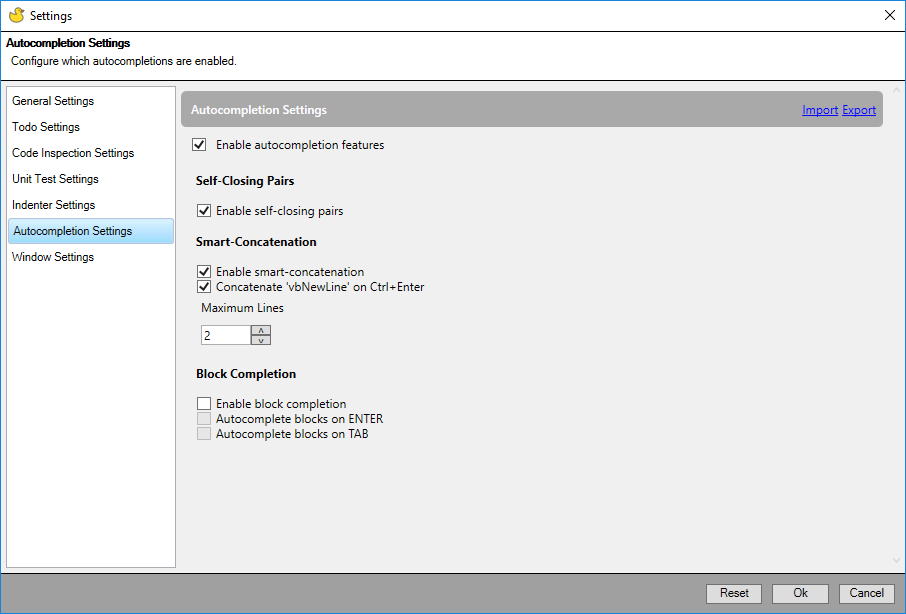
Due to its rather invasive nature, a design decision was made to ship autocompletion features disabled by default; these features must be enabled manually, in the autocompletion settings tab of Rubberduck’s “Settings” dialog:

AutoCompleteSettings-v2.3

Self-Closing Pairs

It’s hard to describe everything enabling SCP completion does. A picture is worth a thousand words, so… how about seeing them in action?

When {BACKSPACE} is pressed and the caret immediately follows any opening token, Rubberduck attempts to locate and remote the matching closing token, wherever it is on the current logical line of code – nested or not.

Smart Concatenation

When enabled, Rubberduck will step in when the {ENTER} key is pressed while the caret is inside a string literal, to automatically append ” & _” to the current line.

The feature can also be configured so that when the {CTRL} key is held down when {ENTER} is pressed, ” & vbNewLine & _” will be appended to the current line.

{BACKSPACE} cleanly reverts smart-concatenation when the caret is on the last line of the logical code line and the caret line contains nothing but the opening & closing quotes.

Block Completion

Block completion will be implemented early in the 2.3.x cycle: these settings have no effect whatsoever for now.

The vision for this feature, is to capture “trigger” keywords (e.g. For), select them; if {TAB} or {ENTER} is pressed (as configured) when the “trigger” is selected (among other conditions), then the block expands, and Rubberduck automatically highlights a placeholder expression; hitting {TAB} again selects the next placeholder, {SHIFT}+{TAB} the previous. Providing a value for the last placeholder places the caret inside the block, indented as per indenter settings.

Auto-correct

Later in the 2.3.x cycle, auto-completion will be further enhanced with an “auto-correct” feature, which will enable automatically expanding e.g. foo++ into foo = foo + 1, among other ideas… including automatic fixing of a configurable list of “frequent typos”.


New Inspections

As with every new Rubberduck release, the team implemented a number of new inspections. This release introduces an internal API for code path analysis, which allows us to start implementing the more involved inspections on our plate!

These new inspections bring the total number to 75!

AssignmentNotUsed

The first inspection to leverage code path analysis, will now flag this code:

foo = 42 ' <~ value is never used
foo = 10
Debug.Print foo

When an assignment is subsequently discarded before the stored value is accessed, Rubberduck will notify about the redundant assignment, as a code quality issue.

DuplicatedAnnotation

This inspection, spliced from the existing “illegal annotation” inspection, helps validate/sanitize Rubberduck annotations – for example, contradicting @Folder annotations:

'@Folder("Foo")
'@Folder("Bar")

ExcelUdfNameIsValidCellReference

An Excel-specific inspection that flags public functions that are visible as worksheet user-defined functions (UDF), but shadowed by a cell reference. This inspection is particularly useful with recent 64-bit versions of Microsoft Excel, where 16,384 columns effectively reserve every 3-letter combination up to “XFC”.

Public Function Foo123() As String
'FOO123 is a valid cell reference; function cannot be invoked!
End Function

This first iteration only inspects public functions in standard procedural modules.

IsMissingOnInappropriateArgument

A rather specific inspection validating usages of IsMissing, flagging instances where the function is given a non-Variant argument.

Public Sub DoSomething(Optional ByVal foo As String)
    If IsMissing(foo) Then ' condition is always false
    End If
End Sub

IsMissingWithNonArgumentParameter

Another inspection validating usages of IsMissing, flagging instances where the function is given a non-parameter argument.

Public Sub DoSomething()
    Dim foo As Variant
    If IsMissing(foo) Then ' condition is always false
    End If
End Sub

ObsoleteCallingConvention

CDecl calling convention isn’t supported on Windows; Declare statements using it should be wrapped with conditional compilation directives so as to only compile in a Mac environment.

Private Declare Sub Beep CDecl Lib "kernel32" (dwFreq As Any, dwDuration As Any)

ObsoleteMemberUsage

Rubberduck 2.3 introduces a new @Obsolete annotation, which can be used for annotating “obsolete” procedures – the inspection flags usages of procedures marked with this annotation.

OnLocalError

The Local token is redundant in On Error statements. This inspection flags usages.

Private Sub DoSomething()
    On Local Error GoTo ErrHandler
    '...
    Exit Sub
ErrHandler:
End Sub

The rationale being, runtime errors are always local; the two syntaxes look different but do exactly the same thing.


v2.3.x

There are a number of features that were intended to be developed for 2.2.x, that didn’t make it into this release – not because the ideas were dropped, but because of mere time constraints. The add/remove references dialog is one such feature. Keep an eye out on 2.3.x pre-release builds and announcements; the v2.4 announcement will recap everything that happened in 2.3.x, but every new feature will very likely see its own dedicated blog post as it is merged and pre-released.

Self-Closing Pairs: Dancing with the VBE

A few months ago I merrily announced the first Rubberduck feature that actively interfered with typing code in the VBE. It wasn’t the first opportunity though: a rather long time ago, I flirted with the idea of triggering a parse task at every keypress, so that Rubberduck’s parse trees would always be up-to-date – but back then the parse task cancellation mechanics weren’t as fine-tuned as they are now, and it ended up being a bad idea. Interfering with typing in any way that introduces any kind of lag, or exacerbates a memory leak, can only be a bad idea.

But auto-completion was different. If done right, it would be the single best thing to happen to the VBE since Smart Indenter came along, two decades ago. So in less than two weeks I whipped up something I thought would work, got ecstatic over how awesome seeing blocks automatically completing, I announced the feature… and as feedback from the pre-release builds started coming in as bug reports, I started to realize the reason why no other VBE add-in offered a feature like this: the feature is far from trivial, and any mistake or oversight means interfering with typing code in an utterly annoying and disrupting way – the margin for error is very thin, as is the fine line between being incredibly intuitive & helpful, and being a complete pain in the neck.

The VBIDE API wasn’t made for this. The VBE wasn’t made to be extended that way.

But I’m not letting that stop me.

So I scrapped most of my hasty work, went back to the drawing board, rolled up my sleeves, and started over. At the time of this writing, block completion still hasn’t gotten the attention it deserves, for I decided to start round 2 with self-closing pairs.

As of this writing, I can confidently say that the feature is going to be rock-solid.

Fighting the VBE

The Visual Basic Editor has a soul of its own. And when you twist its arm, it slaps you back at every chance it has. To fight it, you need to know how it moves. You can’t prevent its mischievous deeds; to win, you need to embrace them, anticipate them. The extensibility API won’t let us inject a single character on the current line of code: we need to replace the entire line – and then dance with the devil.

man doing boxing
Photo by Pixabay on Pexels.com

Warm-Up

With the code panes subclassed to pick up keystrokes, VBENativeServices fires up an event that the AutoCompleteService handles (assuming settings have autocompletion enabled – failing which the event isn’t even fired). At this point if the IntelliSense drop-down is shown or the current selection isn’t at a single-character position, we immediately bail out. Otherwise, we run the self-closing pairs feature proper.

Cue Eye of the Tiger backing track…

Know where you are

We need to get the integral text of the current logical line of code (i.e. accounting for line continuations), take note of the caret position relative to the beginning of this logical line of code; take note of the line position relative to line 1 of the module as well – we encapsulate this data into a CodeString – a class that represents a logical line of code, a caret position in that logical line, with the position of this logical line in the module: that’s the original, and only the first real punch…

Know where the VBE is

The original is a trap though. If you don’t tread carefully here, you’ll take a serious one in the ribs. The problem is that because the original code is currently being edited, it’s e.g. “msgbox|” (where | would be the caret), if the keypress was " then when you mean to write “msgbox"|"” by replacing the entire current line of code, the VBE inserts that string but then the caret is now on the next line and you need to explicitly set the ICodePane.Selection value. Now dodge this: between the moment you replace the current line msgbox with msgbox"" and by the next moment you want to place the caret back to msgbox"|", if you skipped a step you have an uppercut to dodge, for at that point what’s really in the VBE is MsgBox "", so the caret ends up here: MsgBox |"". If you counter with offsetting the caret position by one, you just broke the case where the user would have typed that whitespace: msgbox "" would be off by one also: MsgBox ""|.

The solution is Judoesque: let the VBE come at you with everything it can. Embrace the flames. Fight fire with fire. The whole “prettification” trick is encapsulated in a specialized ICodeStringPrettifier object, whose role is to tell the VBE to bring it.

At the core of the prettifier, this:

module.DeleteLines(original.SnippetPosition);
module.InsertLines(original.SnippetPosition.StartLine, original.Code);

Hit me with your best shot. To work out the “prettified” version of the code, we determine the original caret position in terms of non-whitespace character count. Then we make the VBE modify the code, get the new prettifiedCode, and the caret position we want  to be at should be at the index of the nth non-whitespace character, where n is the original count. And that should get us out of trouble.

The only problem is that we don’t know which self-closing pair we’re dealing with, so it’s too early do intervene now – now that we know where the VBE stands, we need to know if we want to deliver a left or a right.

Find an opening

Once we know which SelfClosingPair to test for a result, it’s still too early to pull the prettifier trick – first we need to be sure our pair produces an output given the input, so we Execute it once, against the original code. If the pair returns a result, then we get the prettified original caret position… that way we don’t ruin the show by swinging into the void 3 times for every one time we land a hit.

One-Two

If we just hit once with everything we’ve got, the VBE will beat us again. We need a combo. First we replace the current logical line (“snippet”) with the result we got from the second Execute of the pair, which ran off the prettifier code:

result = scpService.Execute(selfClosingPair, prettified, e.Character);

module.DeleteLines(result.SnippetPosition);
module.InsertLines(result.SnippetPosition.StartLine, result.Code);

Here the VBE will prettify again, so you need to take it by surprise with a second blow – if the re-prettified code isn’t the code we’ve just written to the code pane, then we’re likely off by one and the final Selection will have to be offset:

var reprettified = module.GetLines(result.SnippetPosition);
var offByOne = result.Code != reprettified;
var finalSelection = new Selection(result.SnippetPosition.StartLine, 
                                   result.CaretPosition.StartColumn + 1)
                     .ShiftRight(offByOne ? 1 : 0);
pane.Selection = finalSelection;

If we dodged every bullet up to this point, we win… round 1.

Round 2: Backspace

Handling the pair-opening character is one thing, handling the pair-closing character is trivial. Handling backspace is fun though: we get to locate the matching character for our pair, and make both the opening and closing characters to be removed from the logical code line that we write back. Round 2 is just as riveting as round 1!

So if you have this:

foo = (| _
    (2 + 2) + 42
)

If the next keypress is BACKSPACE then you get this:

foo = | _
(2 + 2) + 42

Or given this:

foo = ( _
    (|2 + 2) + 42
)

You’d get:

foo = ( _
    2 + 2 + 42
)

We won’t be handling the DELETE key, but we’re not done yet: we can deliver another blow.

Round 3: Smart Concatenation

By handling the ENTER key and knowing whether the CTRL key was also pressed, we can turn this:

MsgBox "Lorem ipsum dolor sit amet,|"

if the next keypress is ENTER, into this:

MsgBox "Lorem ipsum dolor sit amet," & _
       "|"

and if the next keypress is CTRL+ENTER, into this:

MsgBox "Lorem ipsum dolor sit amet," & vbNewLine & _
       "|"

The VBE will only fight back with a compile error if the logical line of code contains too many line continations. We don’t have anything to do: the VBIDE API will throw an error, but Rubberduck’s wrappers simply catch that COM exception, making the line-insert operation no-op: the new line ends up not being added, no annoying message box, and the caret ends up on the next line, at the same indent.

Ding Ding Ding!

Rubberduck wins this fight for self-closing pairs, but the VBE will be back for more soon enough: it is anticipated to put up a good fight for block completion as well…

OOP Battleship Part 4: AI Strategies

NewGame

If you recall the AIPlayer class from Part 2, the Create factory method takes an IGameStrategy parameter:

Public Function Create(ByVal gridId As Byte, ByVal GameStrategy As IGameStrategy) As IPlayer
    With New AIPlayer
        .PlayerType = ComputerControlled
        .GridIndex = gridId
        Set .Strategy = GameStrategy
        Set .PlayGrid = PlayerGrid.Create(gridId)
        Set Create = .Self
    End With
End Function

An AIPlayer can be created with an instance of any class that implements the IGameStrategy interface.

In any OOP language that supports class inheritance, we could have a base class e.g. GameStrategyBase, from which we could derive the various implementations, and with that we would have a place to write all the code that’s common to all implementations, …or that all implementations would possibly need to use… or not. See, class inheritance is the most important language feature that the “VBA can’t do OOP” or “VBA is not a real language” crowd love to bring up. And yet, more often than not, class inheritance isn’t the ideal solution – composition is.

And we’re going to do exactly that, by composing all IGameStrategy implementations with a GameStrategyBase class:

Battleship.AI

Coupling a game strategy with this “base” class isn’t an issue: the class is specifically meant to be used by IGameStrategy implementations. So we can shamelessly do this:

Option Explicit
Implements IGameStrategy
Private base As GameStrategyBase

Private Sub Class_Initialize()
    Set base = New GameStrategyBase
End Sub

And then proceed with implementing the PlaceShip method, given that AI player’s own PlayerGrid and the IShip the game controller is asking us to place on the grid. The base.PlaceShip method simply returns the first legal position+direction it can find.

Then we can implement the Play function to return an IGridCoord position and let the controller know what position this player is shooting at. We have a number of helper functions in GameStrategyBase we can use for that.

Random

The RandomShotStrategy shoots at random coordinates until it has located all enemy ships …then proceeds to sink them all, one after the other. It also places its ships randomly, regardless of whether the ships are adjacent or not.

Private Sub IGameStrategy_PlaceShip(ByVal grid As PlayerGrid, ByVal currentShip As IShip)

    Dim direction As ShipOrientation
    Dim position As IGridCoord
    Set position = base.PlaceShip(Random, grid, currentShip, direction)

    grid.AddShip Ship.Create(currentShip.ShipKind, direction, position)
    If grid.shipCount = PlayerGrid.ShipsPerGrid Then grid.Scramble

End Sub

Private Function IGameStrategy_Play(ByVal enemyGrid As PlayerGrid) As IGridCoord
    Dim position As IGridCoord
    Do
        If EnemyShipsNotAcquired(enemyGrid)  0 Then
            Set position = base.ShootRandomPosition(Random, enemyGrid)
        Else
            Set position = base.DestroyTarget(Random, enemyGrid, enemyGrid.FindHitArea)
        End If
    Loop Until base.IsLegalPosition(enemyGrid, position)
    Set IGameStrategy_Play = position
End Function

Here the double-negative in the statement “the number of enemy ships not acquired, is not equal to zero” (WordPress is having a hard time with rendering that  operator, apparently), will probably be end up being inverted into a positive statement, which would make it read better. Perhaps If EnemyShipsToFind = 0 Then, and invert the Else logic. Or…

Private Function IGameStrategy_Play(ByVal enemyGrid As PlayerGrid) As IGridCoord
    Dim position As IGridCoord
    Do
        If EnemyShipsToFind(enemyGrid) > 0 Then
            Set position = base.ShootRandomPosition(Random, enemyGrid)
enemyGrid.FindHitArea)
        Else
            Set position = base.DestroyTarget(Random, enemyGrid,
        End If
    Loop Until base.IsLegalPosition(enemyGrid, position)
    Set IGameStrategy_Play = position
End Function

That EnemyShipsToFind function should probably be a member of the PlayerGrid class.

FairPlay

The FairPlayStrategy is similar, except it will proceed to destroy an enemy ship as soon as it’s located. It also takes care to avoid placing ships adjacent to each other.

Private Sub IGameStrategy_PlaceShip(ByVal grid As PlayerGrid, ByVal currentShip As IShip)
    Do
        Dim direction As ShipOrientation
        Dim position As IGridCoord
        Set position = base.PlaceShip(Random, grid, currentShip, direction)

    Loop Until Not grid.HasAdjacentShip(position, direction, currentShip.Size)

    grid.AddShip Ship.Create(currentShip.ShipKind, direction, position)
    If grid.shipCount = PlayerGrid.ShipsPerGrid Then grid.Scramble
End Sub

Private Function IGameStrategy_Play(ByVal enemyGrid As PlayerGrid) As IGridCoord
    Dim position As GridCoord
    Do
        Dim area As Collection
        Set area = enemyGrid.FindHitArea

        If Not area Is Nothing Then
            Set position = base.DestroyTarget(Random, enemyGrid, area)
        Else
            Set position = base.ShootRandomPosition(Random, enemyGrid)
        End If
    Loop Until base.IsLegalPosition(enemyGrid, position)
    Set IGameStrategy_Play = position
End Function

Merciless

The MercilessStrategy is more elaborate: it doesn’t just shoot at random – it shoots in patterns, targeting the edges and/or the center areas of the grid. It will destroy an enemy ship as soon as it’s found, and will avoid shooting in an area that couldn’t possibly host the smallest enemy ship that’s still afloat. And yet, it’s possible it just shoots a random position, too:

Private Sub IGameStrategy_PlaceShip(ByVal grid As PlayerGrid, ByVal currentShip As IShip)
    Do
        Dim direction As ShipOrientation
        Dim position As IGridCoord
        Set position = base.PlaceShip(Random, grid, currentShip, direction)
    Loop Until Not grid.HasAdjacentShip(position, direction, currentShip.Size)

    grid.AddShip Ship.Create(currentShip.ShipKind, direction, position)
    If grid.shipCount = PlayerGrid.ShipsPerGrid Then grid.Scramble
End Sub

Private Function IGameStrategy_Play(ByVal enemyGrid As PlayerGrid) As IGridCoord
    Dim position As GridCoord
    Do
        Dim area As Collection
        Set area = enemyGrid.FindHitArea

        If Not area Is Nothing Then
            Set position = base.DestroyTarget(Random, enemyGrid, area)
        Else
            If this.Random.NextSingle < 0.1 Then
                Set position = base.ShootRandomPosition(this.Random, enemyGrid)
            ElseIf this.Random.NextSingle < 0.6 Then
                Set position = ScanCenter(enemyGrid)
            Else
                Set position = ScanEdges(enemyGrid)
            End If
        End If

    Loop Until base.IsLegalPosition(enemyGrid, position) And _
               base.VerifyShipFits(enemyGrid, position, enemyGrid.SmallestShipSize) And _
               AvoidAdjacentHitPosition(enemyGrid, position)
    Set IGameStrategy_Play = position
End Function

In most cases (ScanCenter and ScanEdges do), the AI doesn’t even care to “remember” the last hit it made: instead, it asks the enemy grid to give it a “hit area”. It then proceeds to analyze whether that area is horizontal or vertical, and then attempts to extend it further.

It’s Open-Source!

I uploaded the complete code to GitHub: https://github.com/rubberduck-vba/Battleship.