I got nerd-sniped. A Rubberduck user put up a feature request on the project’s repository, and I thought “we need this, yesterday”… so I did it, and the result crushed all the expectations I had – the prerelease build is here!
There are a few quirks – but rule of thumb, it’s fairly stable and works pretty well. Did you see it in action?
This feature rather impressively enhances the coding experience in the VBE – be it only with how it honors your Rubberduck/Smart Indenter settings to literally auto-indent code blocks as you type them.
Writing auto-completing VBA code, especially with auto-completing double quotes and parentheses, gives an entirely fresh new feel to the good old VBE… I’m sure you’re going to love it.
And in case you don’t, you could always cherry-pick which auto-completions you want to use, and which ones you want to disable:
Inline Completion
These work with the current line (regardless of whether you’re typing code or a comment, or whether you’re inside a string literal), by automatically inserting a “closing” token as soon as you type an “opening” token – and immediately puts the caret between the two. These include (pipe character | depicts caret position):
String literals: " -> "|"
Parentheses: ( -> (|)
Square brackets: [ -> [|]
Curly braces: { -> {|}
Block Completion
These work with the previous line, immediately after committing it: on top of the previous line’s indentation, a standard indent width (per indenter settings) is automatically added, and the caret is positioned exactly where you want it to be. These include (for now):
Do -> Do [Until|While]...Loop
Enum -> Enum...End Enum
For -> For [Each]...Next
If...Then -> If...Then...End If
#If...Then -> #If...Then...#End If
Select Case -> Select Case...End Select
Type -> Type...End Type
While -> While...Wend
With...End With
On top of these standard blocks, On Error Resume Next automatically completes to ...On Error GoTo 0.
Quirks & Edge Cases
It’s possible that parenthesis completion interferes with e.g. Sub() statements (an additional opening parenthesis is sometimes added). This has been experienced and reproduced, but not consistently. If you use the feature and can reliably reproduce this glitch, please open an issue and share the repro steps with us!
On Error Resume Next will indent its body, but there currently isn’t any indenter setting for this: we need to add an indenter option to allow configuring whether this “block” should be indented or not.
Deleting or back-spacing auto-completed code may trigger the auto-complete again, once.
Line numbers are ignored, and an opening token found on the last line of a line-continuated comment will trigger a block auto-complete.
Lastly, care was taken to avoid completing already-completed blocks, however if you try hard enough to break it, you’ll be able to generate non-compilable code. Auto-completion cannot leverage the parser and only has a very limited string view of the current/committed line of code. The nice flipside of this limitation, is very nice performance and no delays in your typing.
None of these issues outweight the awesomeness of it, so all auto-completions are enabled by default.
The key to writing clear, unambiguous code, is rather simple:
Do what you say; say what you do.
VBA has a number of features that make it easy to not even realize you’re writing code that doesn’tdo what it saysit does.
One of the reasons for that, is the existence of default members – under the guise of what appears to be simpler code, member calls are made implicitly.
If you know what’s going on, you’re probably fine. If you’re learning, or you’re just unfamiliar with the API you’re using, there’s a trap before your feet, and both run-time and compile-time errors waiting to happen.
It’s adding a Range object, using the String representation of Range.[_Default] as a key. That’s two very different things, done by two bits of identical code. Clearly that snippet does more than just what it claims to be doing.
Discovering Default Members
One of the first classes you might encounter, might be the Collection class. Bring up the Object Browser (F2) and find it in the VBA type library: you’ll notice a little blue dot next to the Item function’s icon:
Whenever you encounter that blue dot in a list of members, you’ve found the default member of the class you’re looking at.
That’s why the Object Browser is your friend – even though it can list hidden members (that’s toggled via a somewhat hidden command buried the Object Browser‘s context menu), IntelliSense /autocomplete doesn’t tell you as much:
Rubberduck’s context-sensitive toolbar has an opportunity to display that information, however that wouldn’t help discovering default members:
Until Rubberduck reinvents VBA IntelliSense, the Object Browser is all you’ve got.
What’s a Default Member anyway?
Any class can have a default member, and only one single member can be the default.
When a class has a default member, you can legally omit that member when working with an instance of that class.
In other words, myCollection.Item(1) is exactly the same as myCollection(1), except the latter is implicitly invoking the Item function, while the former is explicit about it.
Can my classes have a default member?
You too can make your own classes have a default member, by specifying a UserMemId attribute value of 0 for that member.
Unfortunately only the Description attribute can be given a value (in the Object Browser, locate and right-click the member, select properties) without removing/exporting the module, editing the exported .cls file, and re-importing the class module into the VBA project.
An Item property that looks like this in the VBE:
Public Property Get Item(ByVal index As Long) As Variant
End Property
Might look like this once exported:
Public Property Get Item(ByVal index As Long) As Variant
Attribute Item.VB_Description = "Gets or sets the element at the specified index."
Attribute Item.VB_UserMemId = 0
End Property
It’s that VB_UserMemId member attribute that makes Item the default member of the class. The VB_Description member attribute determines the docstring that the Object Browser displays in its bottom panel, and that Rubberduck displays in its context-sensitive toolbar.
Whatever you do, DO NOT make a default member that returns an instance of the class it’s defined in. Unless you want to crash your host application as soon as the VBE tries to figure out what’s going on.
What’s Confusing About it?
There’s an open issue (now closed) detailing the challenges implicit default members pose. If you’re familiar with Excel.Range, you know how it’s pretty much impossible to tell exactly what’s going on when you invoke the Cells member (see Stack Overflow).
You may have encountered MSForms.ReturnBoolean before:
Private Sub ComboBox1_KeyPress(ByVal KeyAscii As MSForms.ReturnInteger)
If Not IsNumeric(Chr(KeyAscii)) Then KeyAscii = 0
End Sub
The reason you can assign KeyAscii = 0and have any effect with that assignment (noticed it’s passed ByVal), is because MSForms.ReturnInteger is a class that has, you guessed it, a default member – compare with the equivalent explicit code:
Private Sub ComboBox1_KeyPress(ByVal KeyAscii As MSForms.ReturnInteger)
If Not IsNumeric(Chr(KeyAscii.Value)) Then KeyAscii.Value = 0
End Sub
And now everything makes better sense. Let’s look at common Excel VBA code:
Dim foo As Range
foo = Range("B12") ' default member Let = default member Get / error 91
Set foo = Range("B12") ' sets the object reference '...
If foo is a Range object that is already assigned with a valid object reference, it assigns foo.Value with whatever Range("B12").Value returns. If foo happened to be Nothing at that point, run-time error 91 would be raised. If we added the Set keyword to the assignment, we would now be assigning the actual object reference itself. Wait, there’s more.
Dim foo As Variant
Set foo = Range("B12") ' foo becomes Variant/Range
foo = Range("B12") ' Variant subtype is only known at run-time '...
If foo is a Variant, it assigns Range("B12").Value (given multiple cells e.g. Range("A1:B12").Value, foo becomes a 2D Variant array holding the values of every cell in the specified range), but if we add Set in front of the instruction, foo will happily hold a reference to the Range object itself. But what if foo has an explicit value type?
Dim foo As String
Set foo = Range("B12") ' object required
foo = Range("B12") ' default member Get and implicit type conversion '...
If foo is a String and the cell contains a #VALUE! error, a run-time error is raised because an error value can’t be coerced into a String …or any other type, for that matter. Since String isn’t an object type, sticking a Set in front of the assignment would give us an “object required” compile error.
Add to that, that Range is either a member of a global-scope object representing whichever worksheet is the ActiveSheet if the code is written in a standard module, or a member of the worksheet itself if the code is written in a worksheet module, and it becomes clear that this seemingly simple code is riddled with assumptions – and assumptions are usually nothing but bugs waiting to surface.
See, “simple” code really isn’t all that simple after all. Compare to a less naive / more defensive approach:
Dim foo As Variant foo = ActiveSheet.Range("B12").Value
If Not IsError(foo) Then
Dim bar As String
bar = CStr(foo) '...
End If
Now prepending a Set keyword to the foo assignment no longer makes any sense, since we know the intent is to get the .Value off the ActiveSheet. We’re reading the cell value into an explicit Variant and explicitly ensuring the Variant subtype isn’t Variant/Error before we go and explicitly convert the value into a String.
Write code that speaks for itself:
Avoid implicit default member calls
Avoid implicit global qualifiers (e.g. [ActiveSheet.]Range)
Avoid implicit type conversions from Variant subtypes
Bang (!) Operator
When the default member is a collection class with a String indexer, VBA allows you to use the Bang Operator! to… implicitly access that indexer and completely obscure away the default member accesses:
Here we’re looking at ADODB.Recordset.Fields being the default member of ADODB.Recordset; that’s a collection class with an indexer that can take a String representing the field name. And since ADODB.Field has a default property, that too can be eliminated, making it easy to… completely lose track of what’s really going on.
Can Rubberduck help / Can I help Rubberduck?
As of this writing, Rubberduck has all the information it needs to issue inspection results as appropriate… assuming everything is early-bound (i.e. not written against Variant or Object, which means the types involved are only known to VBA at run-time).
In fact, there’s already an Excel-specific inspection addressing implicit ActiveSheet references, that would fire a result given an unqualified Range (or Cells, Rows, Columns, or Names) member call.
This inspection used to fire a result even when the code was written in a worksheet module, making it a half-lie: without Me. qualifying the call, Range("A1") in a worksheet module is actually implicitly referring to that worksheet…and changing the code to explicitly refer to ActiveSheet would actually change the behavior of the code. Rubberduck has since been updated to understand these implications.
Let-assignments involving implicit type conversions are also something we need to look into. Help us do it! This inspection also implies resolving the type of the RHS expression – a capability we’re just barely starting to leverage.
If you’re curious about Rubberduck’s internals and/or would love to learn some serious C#, don’t hesitate to create an issue on our repository to ask anything about our code base; our team is more than happy to guide new contributors in every area!
The release was going to include a number of important fixes for the missing annotation/attribute inspection and quick-fix, but instead we disabled it, along with a few other buggy inspections, and pushed the release – 7 months after 2.0.13, the last release was now over 1,300 commits behind, and we were reaching a point where we knew a “green release” was imminent, but also a point where we were going to have to make some more changes to parts of the core – notably in order to implement the fixes for these broken annotation/attribute inspections.
So we shipped what we had, because we wouldn’t jeopardize the 2.1 release with parser logic changes at that point.
Crossroads
By Hillebrand Steve, U.S. Fish and Wildlife Service [Public domain], via Wikimedia CommonsSo here we are, at the crossroads: with v2.1.0 released, things are going to snowball – there’s a lot on our plates, but we now have a solid base to build upon. Here’s what’s coming:
Castle Windsor IoC: hopefully-zero user-facing changes, we’re replacing good old Ninject with a new dependency injection framework in order to gain finer control over object destruction – we will end up correctly unloading!
That’s actually priority one: the port is currently under review on GitHub, and pays a fair amount of long-standing technical debt, especially with everything involving menus.
Annotation/Attributes: fixing these inspection, and the quick-fix that synchronizes annotations with module attributes and vice-versa, will finally expose VB module and member attributes to VBA code panes, using Rubberduck’s annotation syntax.
For example, adding '@Description("This procedure does XYZ") on top of a procedure will tell Rubberduck that you mean that procedure to have a VB_Description attribute; when Rubberduck parses that module after you synchronize, it will be able to use that description in the context status bar, or as tooltips in the Code Explorer.
IgnoreOnce: this quick-fix is supported by pretty much every single inspection, and means to insert an ‘@Ignore SomeInspectionNameannotation, but the current implementation has a bug that makes successive calls offset the insertion line, which obviously results in broken code.
This is considered a serious issue, because it affects pretty much every single inspection. Luckily there’s a [rather annoying and not exactly acceptable] work-around (apply the fix bottom-to-top in a module), but still.
But there’s a Greater Picture, too.
The 2.1.x Cycle
At the end of this development cycle, Rubberduck will:
Work in the VB6 IDE;
Have formalized the notion of an experimental feature;
Have a working Extract Method refactoring;
Make you never want to use the VBE’s Project References dialog ever again;
Compute and report various code metrics, including cyclomatic complexity and nesting levels, and others(and yes, line count too);
Maybe analyze a number of execution paths and implement some of the coolest code inspections we could think of;
Be ready to get really, really serious about a tear-tab AvalonEdit code pane.
If all you’re seeing is Rubberduck’s version check, the next version you’ll be notified about will be 2.1.2, for which we’re shooting for 2017-11-13. If you want to try every build until then (or just a few), then you’ll want to keep an eye on our releases page!
Last time I went over the startup and initialization of Rubberduck, and I said I was going to follow it up with how the parser and resolver work.
Just so happens that Max Dörner, who has pretty much owned the parser and resolver parts of Rubberduck since he joined the project (that’s right – jumped head-first into some of the toughest, most complicated code in the project!), has nicely documented the highlights of how parsing and resolving works.
So yeah, all I did here was type up an intro. Buckle up, you’re in for a ride!
Part 2: Parsing & Resolving
Rubberduck processes the code in all unprotected modules in a five-step process. First, in the parser state Pending, the projects and modules to parse are determined. Then, in the parser state LoadingReferences, the references currently used by the projects, e.g. the Excel object model, and some built-in declarations are loaded into Rubberduck. Following this, the actual processing of the code begins. Between the parser states Parsing and Parsed the code gets parsed into parse trees with the help of Antlr4. Following this, between the states ResolvingDeclarations and ResolvedDeclarations the module, method and variable declarations are generated based on the parse tree. Finally, between the states ResolvingReferences and Ready the parse trees are walked a second time to determine the references to the declarations within the code.
At each state change, an event is fired which can be handled by any feature subscribing to it, e.g. the CodeExplorer, which listens for the state change to ResolvedDeclarations.
A More Detailed Story
The entry point for the parsing process is the ParseCoordinator inside the Rubberduck.Parsingassembly. It coordinates the parsing process and is responsible for triggering the appropriate state changes at the right time, for which it uses a IParserStateManager passed to it. To trigger the different stages of the parsing process, the ParseCoordinator uses a IParsingStageService. This is a facade passed to it providing a unified interface for calling the individual stages, which are all implemented in an individual set of classes. Each has a concurrent version for production and a synchronous one for testing. The latter was needed because of concurrency problems of the mocking framework.
General Logistics
Every parsing run gets executed in fresh background task. Moreover, to always be in a consistent state, we allow only one parsing run to execute at a time. This is achieved by acquiring a lock in a top level method. This top level method is also the point at which any cancellation or unexpected exception will be caught and logged.
The first step of the actual parsing process is to set the overall parser state to Pending. This signals to all components of Rubberduck that we left a fully usable state. Afterwards, we refresh the projects cache on the RubberduckParserState asking the VBE for the loaded projects and then acquire a collection of the modules currenlty present.
Loading References
After setting the overall parser state to LoadingReferences, the declarations for the project references, i.e. the references selected in Tools –> References... , get loaded into Rubberduck. This is done using the ReferencedDeclarationsCollector in the Rubberduck.Parsing.ComReflectionnamespace, which reads the appropriate type libraries and generates the corresponding declarations.
Note that the order in the References dialog determines what procedure or field an identifier resolves to in VBA if two or more references define a procedure or field of the same name. This prioritization is taken into account when loading the references.
Unfortunately, we are currently not able to load all built-in declarations from the type libraries: there are some hidden members of the MSForms library, some special syntax declarations like LBound and everything related to Debug, and aliases for built-in functions like Left, where Leftis the alias for the actual hidden function defined in the VBA type library. These get loaded as a set of hand-crafted declarations defined in the Rubberduck.Parsing.Symbols.DeclarationLoadersnamespace.
Parsing the Code
At the start of the processing of the actual code, the parser state is set to Parsing. However, this time this is achieved by setting the individual modules states of the modules to be parsed and then evaluating the overall state.
Each module gets parsed separately using an individual ComponentParseTask from the Rubberduck.Parsing.VBA namespace, which is powered by the Antlr4 parser generator. The end result is a pair of two parse trees providing a structured representation of the code one time as seen in the VBE and one time as exported to file.
The general process using Antlr is to provide the code to a lexer that turns the code into a stream of tokens based on lexer rules. (The lexer rules used in Rubberduck can be found in the file VBALexer.g4 in the Rubberduck.Parsing.Grammar namespace.) Then this token stream gets processed by a parser that generates a parse tree based on the stream and a set of parser rules describing the syntactic rules of the language. (The VBA parser rules used in Rubberduck can be found in the file VBAParser.g4 in the Rubberduck.Parsing.Grammar namespace. However, there are more specialized rules in the project). The parse tree then consists of nodes of various types corresponding to the rules in the parser rules.
Even when counting the Antlr workflow described above as one step, the actual parsing process in the ComponentParseTask is a multi stage process in itself. This has two reasons: there are precompiler directives in VBA and some information regarding modules is hidden from the user inside the VBE, namely attributes.
The precompiler directives in VBA allow to conditionally select which code is alive. This allows to write code that would only be legal VBA after evaluating the conditional compilation directives. Accordingly, this has to be done before the code reaches the parser. To achieve this, we parse each module first with a specialized grammar for the precompiler directives and then hide all tokens that are dead after the evaluation from the VBA parser, including the precompiler directives themselves, by sending the tokens to a hidden channel in the tokenstream. Afterwards, the dead code is still part of the text representation of the tokenstream by disregarded by the parser.
To cover both the attributes, which are only present in the exported modules, and provide meaningful line numbers in inspection results, errors and the command bar, we parse both the attributes and the code as seen in the VBE code pane into a separate parse tree and save both on the ModuleState belonging to the module on the RubberduckParserState.
One thing of note is that Antlr provides two different kinds of parsers: the LL parser that basically parses all valid input for every not indirectly left-recursive grammar (our VBA grammar satisfies this) and the SLL parser, which is considerably faster but cannot necessarily parse all valid input for all such grammars. Both parsers are guaranteed to yield the same result whenever the parse succeeds at all. Since the SLL parser works for next to all commonly encountered code, we first parse using it and fall back to the LL parser if there is a parser error.
Following the parse, the state of the module is set to Parsed on a successful parse and to ParserError, otherwise. After all modules have finished parsing, the overall parser state is evaluated. If there has been any parser error, the parsing process ends here.
Resolving Declarations
After parsing the code into parse trees, it is time to generate the declarations for the procedures, functions, properties, variables and arguments in the code.
First, the state of all modules gets set to ResolvingDeclarations, analogous to the start of parsing the code. Then the tree walker and listener infrastructure of Antlr is used to traverse the parse trees and generate declarations whenever the appropriate grammar constructs are encountered. This is done inside the implementations of IDeclarationResolveRunner in the Rubberduck.Parsing.VBAnamespace.
Note that there is still some information missing on the declarations at this point that cannot be determined in this first pass over the parse trees. E.g. the supertypes of classes implementing the interface of another class are not known yet and, although the name of the type of each declaration is already known, the actual type might not be known yet. For both cases we first have to know all declarations.
After the parse trees of all modules have been walked, the overall parser state gets set to ResolvedDeclarations, unless there has been an error, which would result in the state ResolverError and an immediate stop of the parsing run.
Resolving References
After all declarations are known, it is possible to resolve all references to these declarations within the code, beit as types, supertypes or in expressions. This is done using the implementations of IReferenceResolveRunner in the Rubberduck.Parsing.VBA namespace.
First, the state of the modules for which to resolve the references gets set to ResolvingReferencesand the overall state gets evaluated. Then the CompilationPasses run. In these the type names found when resolving the declarations get resolved to the actual types. Moreover, the type hierarchy gets determined, i.e. super- and and subtypes get added to the declarations based on the implements statements in the code.
After that, the parse trees get walked again to find all references to the declarations. This is a slightly complicated process because of the various language constructs in VBA. As a side effect, the variables not resolving to any declaration get collected. Based on these, new declarations get created, which get marked as undeclared. These form the basis for the inspection for undeclared variables.
After all references in a module got resolved, the module state gets set to Ready. If there is some error, the module state gets set to ResolverError. Finally, the overall state gets evaluated and the parsing run ends.
Handling State Changes
On each change of the overall state, an event is raised to which other features can subscribe. Examples are the CodeExplorer, which refreshes on the change to ResolvedDeclarations, and the inspections, which run on the change to Ready.
Handling any state change but the two above is discouraged, except maybe for the change to Pending or the error states if done to disable things. The problem with the other states is that they may never be encountered during a parsing run due to optimizations. Moreover, Rubberduck is generally not in a stable state between Pending and ResolvedDeclarations. Features requiring access to references should generally only handle the Ready state.
Events also get raised for changes of individual module states. However, it should be preferred to handle overall state changes because module states change a lot, especially in large projects.
IMPORTANT: Never request a parse from a state change handler! That will cancel the current parse right after the handlers for this state in favor of the newly requested one.
Doing Only What Is Necessary
When parsing again after a successful parsing run, the easiest way to proceed is to throw away all information you got from the last parsing run and start from scratch. However, this is quite wasteful since typically only a few modules change between parsing runs. So, we try to reuse as much information as possible from prior parsing runs. Since our VBA grammar is build for parsing entire modules the smallest unit of reuse of information we can work with is a module.
We only reparse modules that satisfy one of three conditions: they are new, modified, or not in the state Ready. For the first two conditions it should be obvious why we have to reparse such modules. The question is rather how we evaluate these conditions.
To be able to determine whether a module has changed, we save a hash of the code contained in the module whenever the module gets parsed successfully. At the start of the parsing run, we compare the saved hash with the hash of the corresponding freshly loaded component to find those modules with modified content. In addition we save a flag on the module telling us whether the content hash has ever been saved. If this is not the case, the module is regarded as new.
For the third condition the question is rather why we also reparse such modules. The reason is that such modules might be in an invalid state although the content hash had been written in the last parsing run. E.g. they might have encountered a resolver error or they got parsed successfully in the last parsing run, but the parsing run got cancelled before the declarations got resolved. In these cases the content hash has already been saved so that the module is neither considered to be new nor modified. Consequently, it would not be considered for parsing and resolving if only modules satisfying one of the first two conditions were considered. Because of the possibility of such problems, we rather err on the save side and reparse every module that has not reached the success state Ready.
Since reparsing makes all information we previously acquired about the module invalid, we have to resolve the declarations anew for the modules we reparse. Fortunately, the base characteristics of a declaration only depend on the module it is defined in. So, we only have to resolve declarations for those modules that get reparsed. For references the situation is more complicated.
Since all declarations from the modules we reparse get replaced with new ones, all references to them, all super- and subtypes involving the reparsed modules and all variable and method types involving the reparsed modules are invalid. So, we have to re-resolve the references for all modules that reference the reparsed modules. To allow us to know which modules these are we save the information which module references which other modules in an implementation of IModuleToModuleReferenceManager accessed in the ParseCoordinator via the IParsingCacheService facade. This information gets saved whenever the references for all modules have been resolved successfully, even before evaluating the overall parser state.
In addition to the modules that reference modules that got reparsed, we also re-resolve those modules that referenced modules or project references having just been removed. This is necessary because the references might now point to different declarations. In particular, a renamed module is treated as unrelated to the old one. This means that renaming a module looks to Rubberduck like the removal of the old module and the addition of a new module with a new name.
The final optimization in place on a reparse is that we do not reload the referenced type libraries or the special built-in declarations every time. We just reload those we have not loaded before.
Caching and Cache Invalidation
If you have read the previous paragraph, you might have already realized that the additional speed due to only doing what is necessary comes at a cost: various types of cached data get invalid after parsing and resolving only some modules. So we have to remove the data at a suitable place in the parsing process. To achieve this the ParseCoordinator primarily calls different methods from the IParsingCacheService facade handed to it.
In the next sections we will work our way up from cache data for which you would probably seldom realize that we forgot to remove it to data for which forgetting to remove it sends the parser down in flames. After that, we will finish with a few words about refreshing the DeclarationFinder on the RubberduckParserState.
Invalid Type Declarations
The kind of cache invalidation problem you would probably not realize is that the type as which a variable is defined has to be replaced in case it is a user defined class and the class module gets reparsed; it now has a different declaration. This would probably just cause some issues with some inspections because the actual IdentifierReference tying the identifier to the class declaration is not related to the type declaration we save. Fortunately, the TypeAnnotationPass works by replacing the type declaration anyway. So, we just have to do that for all modules for which we resolve references.
Invalid Super- and Subtypes
As mentioned in the section about resolving references, we run a TypeHierarchyPass to determine the super- and subtypes of each class module (and built-in library). After reparsing a module, we have to re-resolve its supertypes. However, we also have to remove the old declaration of the module itself from the supertypes of its subtypes and from the subtypes of its supertypes, which has some further data invalidation consequences. Otherwise, the “Find all Implementations” dialog or the rename refactoring might produce …interesting results for the affected modules.
The removal of the super- and subtypes is performed via an implementation of ISupertypeCleareron all modules we re-resolve, including the modules we reparse, before clearing the state of the modules to be reparsed. Here, a removal of the supertypes is sufficient because everything is wired up such that manipulating the supertypes automatically triggers the corresponding change on the subtypes.
Invalid Module-To-Module References
As with all other reference caches, part of our cache saving which module references which other modules can become invalid when we re-resolve a module; it might just be that the the part referencing another module is gone. Fortunately, the way these references are saved does not depend on the actual declarations. So reparsing alone does not cause problems. This allows us to defer the removal of the module-to-module references to the reference resolver.
Being able to postpone the removal until we resolve references is fortunate because of potential problems with cancellations. We use the module-to-module references to determine which modules need to be re-resolved. If they got removed and the parsing run got cancelled before they got filled again in the reference resolver, we would potentially miss modules we have to re-resolve. Then the user would need to modify the affected modules in order to force Rubberduck to re-resolve them.
To handle this problem, the reference resolver itself has a cache of the modules to resolve, which is only cleared at the very end of its work. This is safe because the reference resolver only ever processes modules for which it can find a parse tree on the RupperduckParserState.
Invalid References
Invalid IndentifierReferences to declarations from previous parsing runs can cause any number of strange behaviors. This can range from selections referring to references that have once been at that line and column but having been removed in the meantime to refactorings changing things they really should not change.
It is rather clear that the references from all modules to be re-resolved should be removed. However, this is not as straightforward as it seems. The problem is that the references live in a collection on the referenced declaration and not in a collection attached to the module whose code is referencing the declaration. In particular, this makes it easy to forget to remove references from built-in declarations. To avoid such issues, we extracted the logic for removing references by a module into implementations of IReferenceRemover, which is hidden behind the IParsingCacheService facade.
Modules And Projects That No Longer Exist
Now we come to the piece where everything falls to pieces if we are not doing our job, modules and projects that get removed from the VBE. The problem is that some functionality like the CodeExplorer has to query information from the components in the VBE via COM Interop. If a component does no longer exist when the information gets queried, the parsing run will die with a COMException and there is little we can do about that. So we have to be careful to remove all declarations for no longer existing components right at the start of the parsing run.
To find out which modules no longer exist, we simply collect all the modules on the declarations we have cached and compare these to the modules we get from the VBE. More precisely, we compare the identifiers we use for modules, the QualifiedModuleNames. This will also find modules that got renamed. Projects are bit more tricky since they are usually treated as equal if their ProjectIds are the same; we save these in the project help file. Thus, we have to take special care for renamed projects. Knowing the removed projects, their modules get added to the removed modules as well.
Removing the data for removed modules and projects is a bit more complicated than for modules that still exist. After their declarations got removed, there is no sign anymore that they ever existed. So, we have to take special care to remove everything in the right order to guarantee that all information is gone already when we erase the declaration; after each step, the parsing run might be cancelled.
The final effect of removing modules is that the modules referencing the removed modules need to be re-resolved. Intuitively one might think that this will always result in a resolver error. However, keep in mind that renaming is handled as removing a module and adding another. Then the references will simply point to the new renamed module. Because of possible cancellations on the way to resolving the references, we immediately set the state of the modules to be re-resolved to ResolvingReferences. This has the effect that they will be reparsed in case of a cancellation.
Note that basically the same procedure is also necessary whenever we reload project references. Accordingly, we do this right after unloading the references, without allowing cancellations in between.
Refreshing the DeclarationFinder
Since declarations and references change in nearly all steps of the parsing process, we have to refresh our primary cached source of declarations, the DeclarationFinder, quite regularly when parsing. Unfortunately, this is a rather computation intensive thing to do; a lot of dictionaries get populated. So, we refresh only if we need to. E.g. we do not refresh after loading and unloading project references in case nothing changed. However, there are two points in each parsing run where we always have to refresh it: before setting the state to ResolvedDeclarations and before evaluating the overall state at the end of the parsing run, which results in the Ready state in the success path.
Refreshing before the change to ResolvedDeclarations is necessary to ensure that removed modules vanish from the DeclarationFinder before the handlers of this state change event run, including the CodeExplorer. We have to refresh again at the end because, from inside the ParseCoordinator, we can never be sure that the reference resolver did not do anything; it has its own cache of modules that need to be resolved.
One optimization done in the DeclarationFinder itself is that some collections are populated lazily, in particular those dealing only with built-in declarations. This saves the time to rebuild the collections multiple times on each parsing run. However, there is a price to pay. The primary users of the DeclarationFinder are the reference resolver and the inspections, both of which are parallelized. Accordingly, it can happen that multiple threads race to populate the collections. This is bad for the performance of the corresponding features. So, we make compromises by immediately populating the most commonly used collections.
Maybe you’ve browsed Rubberduck’s repository, or forked it to get a closer look at the source code. Or maybe you didn’t but you’re still curious about how it might all work.
I haven’t written a blog post in quite a long while (been busy!), so I thought I’d start a series that describes Rubberduck’s internals, starting at the beginning.
Part I: Starting up
Rubberduck embraces the Dependency Injection principle: depend on abstractions, not concrete implementations. Hand-in-hand with DI, the Inversion of Control principle describes how all the decoupled pieces come together. This decoupling enables testable code, which is fundamental when your add-in has a unit testing framework feature in any project of that size.
Because RD is a rather large project, instead of injecting the dependencies (and their dependencies, and these dependencies’ dependencies, and so on…) “by hand”, we use Ninject to do it for us.
We configure Ninject in the Rubberduck.Root namespace, more specifically in the complete mess of a class, RubberduckModule. I say complete mess because, well, a couple of things are wrong in that file. How it steals someone else’s job by constructing the menus, for example. Or how it’s completely under-using the conventions Ninject extension. The abstract factory convention is nice though: Ninject will automatically inject a generated proxy type that implements the factory interface – you never need a concrete implementation of a factory class!
The add-in’s entry point is located in Rubberdcuk._Extension, the class that the VBE discovers in the Windows Registry as an add-in to load. This class implements the IDTExtensibility2 interface, which looks essentially like this:
The Application object is the VBE itself – the very same VBE object you’d get in VBA from the host application’s Application.VBE property, and there are a number of things to consider in how these methods are implemented, but everything essentially starts in OnConnection and ends in OnDisconnection.
So we first get hold a reference to the precious Application and AddInInst objects that we receive here, but because we don’t want a direct dependency on the VBIDE API throughout Rubberduck, we wrap it with a wrapper type that implements our IVBE interface – same for the IAddIn(yes, we wrapped every single type in the VBIDE API type library; that way we can at least try to make Rubberduck work in VB6):
 var vbe = (VBE) Application;
 _ide = new VBEditor.SafeComWrappers.VBA.VBE(vbe);
 VBENativeServices.HookEvents(_ide);

 var addin = (AddIn)AddInInst;
 _addin = new VBEditor.SafeComWrappers.VBA.AddIn(addin) { Object = this };
Then InitializeAddIn is called. That method looks for the configuration settings file, and sets the Thread.CurrentUICulture accordingly. When we know that the settings aren’t disabling the startup splash, we get our build number from the running assembly and bring up the splash screen. Only then do we call the Startup method; when Startup returns (or throws), the splash screen is disposed.
The method is pretty simple:
private void Startup()
{
    var currentDomain = AppDomain.CurrentDomain;
    currentDomain.AssemblyResolve += LoadFromSameFolder;

    _kernel = new StandardKernel(
        new NinjectSettings {LoadExtensions = true},
        new FuncModule(),
        new DynamicProxyModule());
    _kernel.Load(new RubberduckModule(_ide, _addin));

    _app = _kernel.Get<App>();
    _app.Startup();

    _isInitialized = true;
}
We initialize a Ninject StandardKernel, load our module (give it our IVBE and IAddIn object references), get an App object and call its Startup method, where the funstuff begins:
public void Startup()
{
    EnsureLogFolderPathExists();
    EnsureTempPathExists();
    LogRubberduckSart();
    LoadConfig();
    CheckForLegacyIndenterSettings();
    _appMenus.Initialize();
    _hooks.HookHotkeys(); // need to hook hotkeys before we localize menus, to correctly display ShortcutTexts
    _appMenus.Localize();

    UpdateLoggingLevel();

    if (_config.UserSettings.GeneralSettings.CheckVersion)
    {
        _checkVersionCommand.Execute(null);
    }
}
The method names speak for themselves: we conditionally hit the registry looking for a legacy Smart Indenter key to import indenter settings from, and run the asynchronous “version check” command, which sends an HTTP request to http://rubberduckvba.com/build/version/stable, a URL that merely returns the version number of the build that’s running on the website: by comparing that version with the running version, Rubberduck can let you know when a new version is available.
That’s literally all there is to it: just with that, we have a backbone to build with. If we want a new command, we just implement an ICommand, and if that command goes into a menu we hook it up to a CommandMenuItem class. Commands often delegate their work to more specialized objects, e.g. a refactoring, or a presenter of some sort.
Next post will dive into how Rubberduck’s parser and resolver work.
Recently I asked on Twitter what the next RD News post should be about.
Seems you want to hear about upcoming new features, so… here it goes!
The current build contains a number of breakthrough features; I mentioned an actual Fakes framework for Rubberduck unit tests in an earlier post. That will be an ongoing project on its own though; as of this writing the following are implemented:
Fakes
CurDir
DoEvents
Environ
InputBox
MsgBox
Shell
Timer
Stubs
Beep
ChDir
ChDrive
Kill
MkDir
RmDir
SendKey
As you can see there’s still a lot to add to this list, but we’re not going to wait until it’s complete to release it. So far everything we’re hijackinghooking up is located in VBA7.DLL, but ideally we’ll eventually have fakes/stubs for the scripting runtime (FileSystemObject), ADODB (database access), and perhaps even host applications’ own libraries (stabbingstubbing the Excel object has been a dream of mine) – they’ll probably become available as separate plug-in downloads, as Rubberduck is heading towards a plug-in architecture.
The essential difference between a Fake and a Stub is that a Fake‘s return value can be configured, whereas a Stub doesn’t return a value. As far as the calling VBA code is concerned, that’s nothing to care about though: it’s just another member call:
[ComVisible(true)]
[Guid(RubberduckGuid.IStubGuid)]
[EditorBrowsable(EditorBrowsableState.Always)]
public interface IStub
{
    [DispId(1)]
    [Description("Gets an interface for verifying invocations performed during the test.")]
    IVerify Verify { get; }

    [DispId(2)]
    [Description("Configures the stub such as an invocation assigns the specified value to the specified ByRef argument.")]
    void AssignsByRef(string Parameter, object Value);

    [DispId(3)]
    [Description("Configures the stub such as an invocation raises the specified run-time eror.")]
    void RaisesError(int Number = 0, string Description = "");

    [DispId(4)]
    [Description("Gets/sets a value that determines whether execution is handled by Rubberduck.")]
    bool PassThrough { get; set; }
}
So how does this sorcery work? Presently, quite rigidly:
Not an ideal solution – the IFakesProvider API needs to change every time a new IFake or IStub implementation needs to be exposed. We’ll think of a better way (ideas welcome)…
So we use the awesomeness of EasyHook to inject a callback that executes whenever the stubbed method gets invoked in the hooked library. Implementing a stub/fake is pretty straightforward… as long as we know which internal function we’re dealing with – for example this is the Beep implementation:
As you can see the VBA7.DLL (the TargetLibrary) contains a method named rtcBeep which gets invoked whenever the VBA runtime interprets/executes a Beep keyword. The base class StubBase is responsible for telling the Verifier that an usage is being tracked, for tracking the number of invocations, …and disposing all attached hooks.
The FakesProvider disposes all fakes/stubs when a test stops executing, and knows whether a Rubberduck unit test is running: that way, Rubberduck fakes will only ever work during a unit test.
The test module template has been modified accordingly: once this feature is released, every new Rubberduck test module will include the good old Assert As Rubberduck.AssertClass field, but also a new Fakes As Rubberduck.FakesProvider module-level variable that all tests can use to configure their fakes/stubs, so you can write a test for a method that Kills all files in a folder, and verify and validate that the method does indeed invoke VBA.FileSystem.Kill with specific arguments, without worrying about actually deleting anything on disk. Or a test for a method that invokes VBA.Interaction.SendKeys, without actually sending any keys anywhere.
And just so, a new era begins.
Awesome! What else?
One of the oldest dreams in the realm of Rubberduck features, is to be able to add/remove module and member attributes without having to manually export and then re-import the module every time. None of this is merged yet (still very much WIP), but here’s the idea: a bunch of new @Annotations, and a few new inspections:
MissingAttributeInspection will compare module/member attributes to module/member annotations, and when an attribute doesn’t have a matching annotation, it will spawn an inspection result. For example if a class has a @PredeclaredId annotation, but no corresponding VB_PredeclaredId attribute, then an inspection result will tell you about it.
MissingAnnotationInspection will do the same thing, the other way around: if a member has a VB_Description attribute, but no corresponding @Description annotation, then an inspection result will also tell you about it.
IllegalAnnotationInspection will pop a result when an annotation is illegal – e.g. a member annotation at module level, or a duplicate member or module annotation.
These inspections’ quick-fixes will respectively add a missing attribute or annotation, or remove the annotation or attribute, accordingly. The new attributes are:
@Description: takes a string parameter that determines a member’s DocString, which appears in the Object Browser‘s bottom panel (and in Rubberduck 3.0’s eventual enhanced IntelliSense… but that one’s quite far down the road). “Add missing attribute” quick-fix will be adding a [MemberName].VB_Description attribute with the specified value.
@DefaultMember: a simple parameterless annotation that makes a member be the class’ default member; the quick-fix will be adding a [MemberName].VB_UserMemId attribute with a value of 0. Only one member in a given class can legally have this attribute/annotation.
@Enumerator: a simple parameterless annotation that commands a [MemberName].VB_UserMemId attribute with a value of -4, which is required when you’re writing a custom collection class that you want to be able to iterate with a For Each loop construct.
@PredeclaredId: a simple parameterless annotation that translates into a VB_PredeclaredId (class) module attribute with a value of True, which is how UserForm objects can be used without Newing them up: the VBA runtime creates a default instance, in global namespace, named after the class itself.
@Internal: another parameterless annotation, that controls the VB_Exposed module attribute, which determines if a class is exposed to other, referencing VBA projects. The attribute value will be False when this annotation is specified (it’s True by default).
Because the only way we’ve got to do this (for now) is to export the module, modify the attributes, save the file to disk, and then re-import the module, the quick-fixes will work against all results in that module, and synchronize attributes & annotations in one pass.
Because document modules can’t be imported into the project through the VBE, these attributes will unfortunately not work in document modules. Sad, but on the flip side, this might make [yet] an[other] incentive to implement functionality in dedicated modules, rather than in worksheet/workbook event handler procedures.
Rubberduck command bar addition
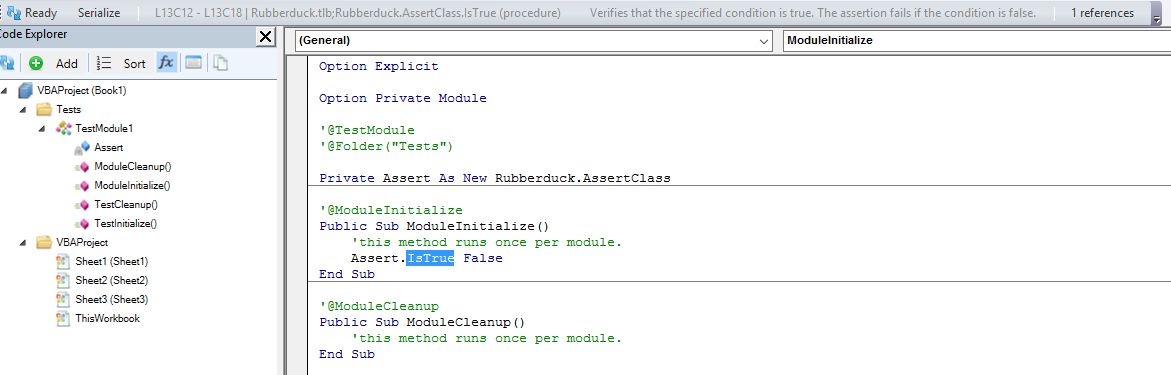
The Rubberduck command bar has been used as some kind of status bar from the start, but with context sensitivity, we’re using these VB_Description attributes we’re picking up, and @Description attributes, and DocString metadata in the VBA project’s referenced COM libraries, to display it right there in the toolbar:
Until we get custom IntelliSense, that’s as good as it’s going to get I guess.
TokenStreamRewriter
As of next release, every single modification to the code is done using Antlr4‘s TokenStreamRewriter – which means we’re no longer rewriting strings and using the VBIDE API to rewrite VBA code (which means a TON of code has just gone “poof!”): we now work with the very tokens that the Antlr-generated parser itself works with. This also means we can now make all the changes we want in a given module, and apply the changes all at once – by rewriting the entire module in one go. This means the VBE’s own native undo feature no longer gets overwhelmed with a rename refactoring, and it means fewer parses, too.
There’s a bit of a problem though. There are things our grammar doesn’t handle:
Line numbers
Dead code in #If / #Else branches
Rubberduck is kinda cheating, by pre-processing the code such that the parser only sees WS (whitespace) tokens in their place. This worked well… as long as we were using the VBIDE API to rewrite the code. So there’s this part still left to work out: we need the parser’s token stream to determine the “new contents” of a module, but the tokens in there aren’t necessarily the code you had in the VBE before the parse was initiated… and that’s quite a critical issue that needs to be addressed before we can think of releasing.
So we’re not releasing just yet. But when we do, it’s likely not going to be v2.0.14, for everything described above: we’re looking at v2.1 stuff here, and that makes me itch to complete the add/remove project references dialog… and then there’s data-driven testing that’s scheduled for 2.1.x…
The release of Rubberduck 2.0.12, due 5 days ago, is being delayed because we have something awesome cooking up. Give us 2-3 more weeks 🙂
TL;DR: if awesomeness can be cooked, that’s what’s cooking.
The amount of work that went into the upcoming release is tremendous. We’ve been trying to figure out exactly what was blowing up when the VBE dismantled itself and the host was shutting down, causing that pesky crash on exit… ever since we’ve introduced WPF user controls in dockable toolwindows. And at last, solved it.
We’ve been working on improving performance and thread safety of the entire parsing engine, and fixed a few grammar/parser bugs on the way, including a long-standing bug that made redundant parentheses trip a parse exception, another with the slightly weird and surely redundant Case Is = syntax, and @Magic annotations can now legally be followed by any comment, which is useful when you want to, well, annotate an annotation:
'@Ignore ProcedureNotUsed; called by [DoSomething] button on Sheet12
Public Sub DoSomething()
    ...
End Sub
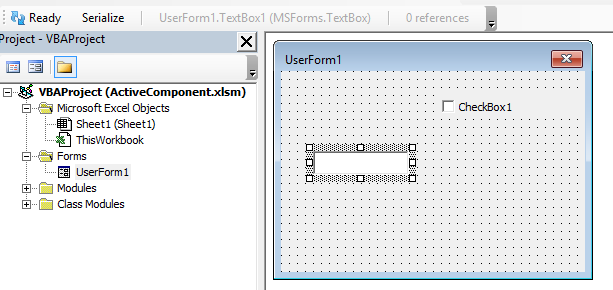
We’ve enhanced the COM reference collector such that the resolver has every bit of useful information about everything there is to know in a type library referenced by a VBA project. This allows us to enhance other features, like the context-sensitive commandbar that tells you what Rubberduck is your selection as, e.g. a TextBox control in a UserForm:
(don’t mind that “Serialize” button – it’s only there in debug builds ;^)
Oh, and then there’s the interactions with the website – we’ll be running the inspections and the indenter on the website, and we’ll have the ability to (optionally) have Rubberduck know when a new version is available!
2.0.12 is going to be epic.
The 2.0 build
And then there’s even more: we’re going to make the inspections a concern of the parser engine, and turn them into parse tree node annotations – which means the code that currently finds the Declaration that’s currently selected (or one of its references), can also be used to find inspection results associated with that particular Declaration; this will probably prompt a redesign of how we present inspection results, and will definitely improve performance and memory footprint.
One of the best 2.x features is probably going to be the add/remove references dialog, which is currently merely prototyped. Beefing up unit testing with data-driven tests is also going to be a big one.
And when you see where we want to be for 3.0 (code path analysis & expression resolution, plug-in architecture, a subclassed CodePanethat actually tells us what’s going on, perhaps even with our own enhanced IntelliSense, more host-specific behaviors, TONS of new inspections), …this project is so awesome, I could just keep going on and on.
Somewhere in the first batch of issues/to-do’s we created when we started Rubberduck on GitHub (Issue# 33 actually), there was the intention to create a tool that could locate undeclared variables, because even if you and I use Option Explicit and declare all our variables, we have brothers and sisters that have to deal with code bases that don’t.
So we tried… but Rubberduck simply couldn’t do this with the 1.x resolver: identifiers that couldn’t be resolved were countless, running an inspection that would pop a result for every single one of them would have crippled our poor little duckling… so we postponed it.
The 2.0 resolver however, thinks quite literally like VBA itself, and knows about all available types, members, globals, locals, events, enums and whatnot, not just in the VBA project, but also in every referenced COM library: if something returns a type other than Variant or Object, Rubberduck knows about it.
The role of the resolver is simple: while the parse tree of a module is being traversed, every time an identifier is encountered it attempts to determine which declaration is being referred to. If the resolver finds a corresponding declaration, an IdentifierReference is created and added to the Declaration instance. And when the resolver can’t resolve the identifier (i.e. locate the exact declaration the identifier is referring to), a null reference was returned and, unless you have detailed logging enabled, nothing notable happens.
As of the last build, instead of “doing nothing” when a reference to variable can’t be resolved to the declaration of that variable, we create a declaration on the spot: so the first appearance of a variable in an executable statement becomes the “declaration”.
We create an implicit Variant variable declaration to work with, and then this happens:
With a Declaration object for an undeclared variable, any further reference to the same implicit variable would simply resolve to that declaration – this means other Rubberduck features like find all references and refactor/rename can now be used with undeclared variables too.
Rubberduck is now seeing the whole picture, with or without Option Explicit.
The introduce local variable quick-fix simply inserts a “Dim VariableName As Variant” line immediately above the first use in the procedure, where VariableName is the unresolved identifier name. The variable is made an explicit Variant, …because there’s another inspection that could fire up a result if we added an implicit Variant.
The quick-fix doesn’t assume an indentation level – makes me wonder if we should run the indenter on the procedure after applying a quick-fix… but that’s another discussion.
The thing is, object-oriented code can definitively be written in VBA. This series of posts shows how. Let’s first debunk a few myths and misconceptions.
VBA classes don’t have constructors!
What’s a constructor but a tool for instantiating objects? In fact there are many ways to create objects, and in SOLID OOP code there shouldn’t be much Newing-up going on anyway: you would be injecting a factory or an abstract factory instead, to reduce coupling. VBA is COM, and COM loves factories. No constructors? No problem!
VBA code is inherently coupled with a UI or spreadsheet
In OOP, the ideal code has low coupling and high cohesion. This means code that doesn’t directly depend on MsgBox, or any given specific Worksheet or UserForm. Truth is, OOP code written in VB.NET or C# be it with WinForms or WPF UI frameworks, faces the same problems and can easily be written in the same “Smart UI” way that makes the UI run the show and the actual functionality completely untestable: bad code is on the programmer, not the language. And spaghetti code can be written in any language. The very same principles that make well-written VB.NET, C#, or Java code be good code, are perfectly applicable to VBA code.
Writing Object-Oriented VBA code is painful
Okay, point. The VBE’s Project Explorer does make things painful, by listing all class modules alphabetically under the same folder: it’s as if the IDE itself encouraged you to cram as much functionality as possible in as few modules as possible! This is where Rubberduck’s Code Explorer comes in to save the day though: with a simple comment annotation in each class’ declarations section, you can easily organize your project into virtual folders, nest them as you see fit, and best of all you can have a form, a standard module and a dozen class modules under the same folder if you want. There’s simply no reason to avoid VBA code with many small specialized class modules anymore.
OOP is overkill for VBA
After all, VBA is just “macros”, right? Procedural code was good enough back then, why even bother with OOP when you’re writing code in a language that was made to “get things done”, right? So we go and implement hundreds of lines of code in a worksheet event handler; we go and implement dialogs and thousands of lines of code in a form’s code-behind; we declare dozens upon dozens of global variables because “that’s how it was made to work”. Right? Nope.
It works, and everyone’s happy. Until something needs to change, and something else needs to change the week after, and then another feature needs to be added the next week, then a bug needs to be fixed in that new feature, and then fixing that bug ripples in unexpected places in the code; the beast eventually grows hair and tentacles, and you’re left sitting in front of a spaghetti mess.
And it’s hard to maintain, not because it’s VBA, but because it was written “to get things done”, but not to be maintained. This “ball of mud” code can happen in any language: it’s not the language, it’s the mentality. Most VBA developers are not programmers – code gets written the way it is because doing things in a SOLID way feels like going to the Moon and back to end up next door with the exact same functionality… and lots simply don’t know better, because nobody ever taught them. At least, that’s how it started for me.
Then there’s the IDE. You would like to refactor the code a bit, but there are no refactoring tools and no unit tests, and every change you make risks breaking something somewhere, because knowing what’s used where is terribly painful… and there’s no integrated source control, so if you make a change that the undo button doesn’t remember, you better remember what it looked like. And eventually you start commenting-out a chunk of code, or start having DoSomething_v2 procedures, and then DoSomething3. Soon you don’t know which code calls which version and you have more comments than live code. Without source control, it’s impossible to revert back to any specific version, and short of always working off a copy of the host document, code changes are done at the risk of losing everything.
No safety net. Pretty much no tooling. The VBE makes it pretty hard to work with legacy code – at least, harder than with a more modern, full-featured IDE.
Rubberduck will change that: Rubberduck wants to make writing object-oriented VBA code as enjoyable as in a modern IDE, and maintaining and refactoring legacy procedural code as easy and safe as possible.
Is OOP overkill for VBA? If it’s not overkill for even the tiniest piece of modern-language code, then I fail to see why it would be overkill for any VBA project. After all, SOLID principles are language-agnostic, and the fact that VBA doesn’t support class inheritance does nothing to affect the quality of the code that’s possible to achieve in VBA.
Wait, how would SOLID even apply to VBA?
The Single Responsibility Principle is a golden rule that’s as hard to follow in VBA as it is in any other language: write small procedures and functions that do one thing, prefer many small specialized modules over fewer, large ones.
The Open/Closed Principle, which leaves classes open for extension, closed for modification is even harder to get right, again regardless of the language. However like the others, if the other 4 principles are followed, then this one is just common sense.
Liskov Substitution Principle involves no wizardry, it’s about writing code so that an implementation of an interface guarantees that it does what the interface says it’s doing, so that any given implementation of an interface can be injected into the code, it will still run correctly.
The Interface Segregation Principle goes hand in hand with the other principles, and keeps your code cohesive, focused. Interfaces should not leak any specific implementation; an interface with too many members sounds like breaking SRP anyway.
The Dependency Inversion Principle is possibly the one that raises eyebrows, especially if you don’t know that VBA classes can implement interfaces. Yet it’s perfectly possible to write code against an IMsgBox interface, inject a MsgBoxImpl class in the production code, and inject a MsgBoxStub class in the test code.
See? Nothing VBA can’t handle. So object-oriented VBA code is theoretically possible. In the next couple of weeks we’ll go over what it means in real-world VBA code, in terms of project architecture, design patterns, and code design in general.
A little while ago, we issued an alpha release of Rubberduck 2.0, just because, well, v1.4.3 had been around since July 2015, and we wanted to say “look, this is what we’ve been working on; it’s not nearly stable yet, but we still want to show you what’s coming”.
Time flies. 6 whole weeks, 353 commits (plus a few last-minute ones), 142* pull requests from 8 contributors, 143* closed issues, 60* new ones, 129,835 additions and 113,388 deletions in 788* files later, Rubberduck still has a number of known issues, some involving COM interop, most involving COM reflection and difficulties in coming up with a host-agnostic way of identifying the exact types we’re dealing with.
It might seem obvious, but knowing that ThisWorkbook is a Workbook object is anything but trivial – at this point we know that Workbook implements a WorkbookEvents interface; we also know what events are exposed: we’re this close to connect all the dots and have a resolver that works the way we need it to.
So what does this mean?
It means a number of false positives for a number of inspections. It means false negatives for a number of others.
Other than that, if the last version you used was 1.4.3, you’re going to be blown away. If the last version you used was 2.0.1a, you’ll appreciate all the work that just went into this beta build.
There are a number of little minor issues here and there, but the major issues we’re having pretty much all revolve around resolving identifier references, but I have to admit I don’t like unit test discovery working off the parser – it just doesn’t feel right and we’re going to fix that soon.
Speaking of unit testing… thanks to @ThunderFrame’s hard work, Rubberduck 2.0 unit tests now work in Outlook, Project, Publisher and Visio.




 Rubberduck News