Inside Rubberduck (pt.1)

https://www.cgtrader.com/free-3d-print-models/art/sculptures/rubber-duck-voronoi-style
“Rubber Duck” – Voronoi Style Free 3D print model by Roman Hegglin

Maybe you’ve browsed Rubberduck’s repository, or forked it to get a closer look at the source code. Or maybe you didn’t but you’re still curious about how it might all work.

I haven’t written a blog post in quite a long while (been busy!), so I thought I’d start a series that describes Rubberduck’s internals, starting at the beginning.

Part I: Starting up

Rubberduck embraces the Dependency Injection principle: depend on abstractions, not concrete implementations. Hand-in-hand with DI, the Inversion of Control principle describes how all the decoupled pieces come together. This decoupling enables testable code, which is fundamental when your add-in has a unit testing framework feature in any project of that size.

Because RD is a rather large project, instead of injecting the dependencies (and their dependencies, and these dependencies’ dependencies, and so on…) “by hand”, we use Ninject to do it for us.

We configure Ninject in the Rubberduck.Root namespace, more specifically in the complete mess of a class, RubberduckModule. I say complete mess because, well, a couple of things are wrong in that file. How it steals someone else’s job by constructing the menus, for example. Or how it’s completely under-using the conventions Ninject extension. The abstract factory convention is nice though: Ninject will automatically inject a generated proxy type that implements the factory interface – you never need a concrete implementation of a factory class!

The add-in’s entry point is located in Rubberdcuk._Extension, the class that the VBE discovers in the Windows Registry as an add-in to load. This class implements the IDTExtensibility2 interface, which looks essentially like this:

public interface IDTExtensibility2
{
    void OnAddInsUpdate(ref Array custom);
    void OnConnection(object Application, ext_ConnectMode ConnectMode, object AddInInst, ref Array custom);
    void OnStartupComplete(ref Array custom);
    void OnBeginShutdown(ref Array custom);
    void OnDisconnection(ext_DisconnectMode RemoveMode, ref Array custom);
}

The Application object is the VBE itself – the very same VBE object you’d get in VBA from the host application’s Application.VBE property, and there are a number of things to consider in how these methods are implemented, but everything essentially starts in OnConnection and ends in OnDisconnection.

So we first get hold a reference to the precious Application and AddInInst objects that we receive here, but because we don’t want a direct dependency on the VBIDE API throughout Rubberduck, we wrap it with a wrapper type that implements our IVBE interface – same for the IAddIn(yes, we wrapped every single type in the VBIDE API type library; that way we can at least try to make Rubberduck work in VB6):

 var vbe = (VBE) Application; 
 _ide = new VBEditor.SafeComWrappers.VBA.VBE(vbe);
 VBENativeServices.HookEvents(_ide);
 
 var addin = (AddIn)AddInInst;
 _addin = new VBEditor.SafeComWrappers.VBA.AddIn(addin) { Object = this };

Then InitializeAddIn is called. That method looks for the configuration settings file, and sets the Thread.CurrentUICulture accordingly. When we know that the settings aren’t disabling the startup splash, we get our build number from the running assembly and bring up the splash screen. Only then do we call the Startup method; when Startup returns (or throws), the splash screen is disposed.

The method is pretty simple:

private void Startup()
{
    var currentDomain = AppDomain.CurrentDomain;
    currentDomain.AssemblyResolve += LoadFromSameFolder;

    _kernel = new StandardKernel(
        new NinjectSettings {LoadExtensions = true}, 
        new FuncModule(), 
        new DynamicProxyModule());
    _kernel.Load(new RubberduckModule(_ide, _addin));

    _app = _kernel.Get<App>();
    _app.Startup();

    _isInitialized = true;
}

We initialize a Ninject StandardKernel, load our module (give it our IVBE and IAddIn object references), get an App object and call its Startup method, where the fun stuff begins:

public void Startup()
{
    EnsureLogFolderPathExists();
    EnsureTempPathExists();
    LogRubberduckSart();
    LoadConfig();
    CheckForLegacyIndenterSettings();
    _appMenus.Initialize();
    _hooks.HookHotkeys(); // need to hook hotkeys before we localize menus, to correctly display ShortcutTexts
    _appMenus.Localize();

    UpdateLoggingLevel();

    if (_config.UserSettings.GeneralSettings.CheckVersion)
    {
        _checkVersionCommand.Execute(null);
    }
}

The method names speak for themselves: we conditionally hit the registry looking for a legacy Smart Indenter key to import indenter settings from, and run the asynchronous “version check” command, which sends an HTTP request to http://rubberduckvba.com/build/version/stable, a URL that merely returns the version number of the build that’s running on the website: by comparing that version with the running version, Rubberduck can let you know when a new version is available.

That’s literally all there is to it: just with that, we have a backbone to build with. If we want a new command, we just implement an ICommand, and if that command goes into a menu we hook it up to a CommandMenuItem class. Commands often delegate their work to more specialized objects, e.g. a refactoring, or a presenter of some sort.

Next post will dive into how Rubberduck’s parser and resolver work.

to be continued…

2.0.14?

Recently I asked on Twitter what the next RD News post should be about.

next-rdnews-post-survey-results

Seems you want to hear about upcoming new features, so… here it goes!


The current build contains a number of breakthrough features; I mentioned an actual Fakes framework for Rubberduck unit tests in an earlier post. That will be an ongoing project on its own though; as of this writing the following are implemented:

  • Fakes
    • CurDir
    • DoEvents
    • Environ
    • InputBox
    • MsgBox
    • Shell
    • Timer
  • Stubs
    • Beep
    • ChDir
    • ChDrive
    • Kill
    • MkDir
    • RmDir
    • SendKey

As you can see there’s still a lot to add to this list, but we’re not going to wait until it’s complete to release it. So far everything we’re hijacking hooking up is located in VBA7.DLL, but ideally we’ll eventually have fakes/stubs for the scripting runtime (FileSystemObject), ADODB (database access), and perhaps even host applications’ own libraries (stabbing stubbing the Excel object has been a dream of mine) – they’ll probably become available as separate plug-in downloads, as Rubberduck is heading towards a plug-in architecture.

The essential difference between a Fake and a Stub is that a Fake‘s return value can be configured, whereas a Stub doesn’t return a value. As far as the calling VBA code is concerned, that’s nothing to care about though: it’s just another member call:

[ComVisible(true)]
[Guid(RubberduckGuid.IStubGuid)]
[EditorBrowsable(EditorBrowsableState.Always)]
public interface IStub
{
    [DispId(1)]
    [Description("Gets an interface for verifying invocations performed during the test.")]
    IVerify Verify { get; }

    [DispId(2)]
    [Description("Configures the stub such as an invocation assigns the specified value to the specified ByRef argument.")]
    void AssignsByRef(string Parameter, object Value);

    [DispId(3)]
    [Description("Configures the stub such as an invocation raises the specified run-time eror.")]
    void RaisesError(int Number = 0, string Description = "");

    [DispId(4)]
    [Description("Gets/sets a value that determines whether execution is handled by Rubberduck.")]
    bool PassThrough { get; set; }
}

So how does this sorcery work? Presently, quite rigidly:

[ComVisible(true)]
[Guid(RubberduckGuid.IFakesProviderGuid)]
[EditorBrowsable(EditorBrowsableState.Always)]
public interface IFakesProvider
{
    [DispId(1)]
    [Description("Configures VBA.Interactions.MsgBox calls.")]
    IFake MsgBox { get; }

    [DispId(2)]
    [Description("Configures VBA.Interactions.InputBox calls.")]
    IFake InputBox { get; }

    [DispId(3)]
    [Description("Configures VBA.Interaction.Beep calls.")]
    IStub Beep { get; }

    [DispId(4)]
    [Description("Configures VBA.Interaction.Environ calls.")]
    IFake Environ { get; }

    [DispId(5)]
    [Description("Configures VBA.DateTime.Timer calls.")]
    IFake Timer { get; }

    [DispId(6)]
    [Description("Configures VBA.Interaction.DoEvents calls.")]
    IFake DoEvents { get; }

    [DispId(7)]
    [Description("Configures VBA.Interaction.Shell calls.")]
    IFake Shell { get; }

    [DispId(8)]
    [Description("Configures VBA.Interaction.SendKeys calls.")]
    IStub SendKeys { get; }

    [DispId(9)]
    [Description("Configures VBA.FileSystem.Kill calls.")]
    IStub Kill { get; }

...

Not an ideal solution – the IFakesProvider API needs to change every time a new IFake or IStub implementation needs to be exposed. We’ll think of a better way (ideas welcome)…

So we use the awesomeness of EasyHook to inject a callback that executes whenever the stubbed method gets invoked in the hooked library. Implementing a stub/fake is pretty straightforward… as long as we know which internal function we’re dealing with – for example this is the Beep implementation:

internal class Beep : StubBase
{
    private static readonly IntPtr ProcessAddress = EasyHook.LocalHook.GetProcAddress(TargetLibrary, "rtcBeep");

    public Beep() 
    {
        InjectDelegate(new BeepDelegate(BeepCallback), ProcessAddress);
    }

    [UnmanagedFunctionPointer(CallingConvention.StdCall, SetLastError = true)]
    private delegate void BeepDelegate();

    [DllImport(TargetLibrary, SetLastError = true)]
    private static extern void rtcBeep();

    public void BeepCallback()
    {
        OnCallBack(true);

        if (PassThrough)
        {
            rtcBeep();
        }
    }
}

As you can see the VBA7.DLL (the TargetLibrary) contains a method named rtcBeep which gets invoked whenever the VBA runtime interprets/executes a Beep keyword. The base class StubBase is responsible for telling the Verifier that an usage is being tracked, for tracking the number of invocations, …and disposing all attached hooks.

The FakesProvider disposes all fakes/stubs when a test stops executing, and knows whether a Rubberduck unit test is running: that way, Rubberduck fakes will only ever work during a unit test.

The test module template has been modified accordingly: once this feature is released, every new Rubberduck test module will include the good old Assert As Rubberduck.AssertClass field, but also a new Fakes As Rubberduck.FakesProvider module-level variable that all tests can use to configure their fakes/stubs, so you can write a test for a method that Kills all files in a folder, and verify and validate that the method does indeed invoke VBA.FileSystem.Kill with specific arguments, without worrying about actually deleting anything on disk. Or a test for a method that invokes VBA.Interaction.SendKeys, without actually sending any keys anywhere.

And just so, a new era begins.


Awesome! What else?

One of the oldest dreams in the realm of Rubberduck features, is to be able to add/remove module and member attributes without having to manually export and then re-import the module every time. None of this is merged yet (still very much WIP), but here’s the idea: a bunch of new @Annotations, and a few new inspections:

  • MissingAttributeInspection will compare module/member attributes to module/member annotations, and when an attribute doesn’t have a matching annotation, it will spawn an inspection result. For example if a class has a @PredeclaredId annotation, but no corresponding VB_PredeclaredId attribute, then an inspection result will tell you about it.
  • MissingAnnotationInspection will do the same thing, the other way around: if a member has a VB_Description attribute, but no corresponding @Description annotation, then an inspection result will also tell you about it.
  • IllegalAnnotationInspection will pop a result when an annotation is illegal – e.g. a member annotation at module level, or a duplicate member or module annotation.

These inspections’ quick-fixes will respectively add a missing attribute or annotation, or remove the annotation or attribute, accordingly. The new attributes are:

  • @Description: takes a string parameter that determines a member’s DocString, which appears in the Object Browser‘s bottom panel (and in Rubberduck 3.0’s eventual enhanced IntelliSense… but that one’s quite far down the road). “Add missing attribute” quick-fix will be adding a [MemberName].VB_Description attribute with the specified value.
  • @DefaultMember: a simple parameterless annotation that makes a member be the class’ default member; the quick-fix will be adding a [MemberName].VB_UserMemId attribute with a value of 0. Only one member in a given class can legally have this attribute/annotation.
  • @Enumerator: a simple parameterless annotation that commands a [MemberName].VB_UserMemId attribute with a value of -4, which is required when you’re writing a custom collection class that you want to be able to iterate with a For Each loop construct.
  • @PredeclaredId: a simple parameterless annotation that translates into a VB_PredeclaredId (class) module attribute with a value of True, which is how UserForm objects can be used without Newing them up: the VBA runtime creates a default instance, in global namespace, named after the class itself.
  • @Internal: another parameterless annotation, that controls the VB_Exposed module attribute, which determines if a class is exposed to other, referencing VBA projects. The attribute value will be False when this annotation is specified (it’s True by default).

Because the only way we’ve got to do this (for now) is to export the module, modify the attributes, save the file to disk, and then re-import the module, the quick-fixes will work against all results in that module, and synchronize attributes & annotations in one pass.

Because document modules can’t be imported into the project through the VBE, these attributes will unfortunately not work in document modules. Sad, but on the flip side, this might make [yet] an[other] incentive to implement functionality in dedicated modules, rather than in worksheet/workbook event handler procedures.

Rubberduck command bar addition

The Rubberduck command bar has been used as some kind of status bar from the start, but with context sensitivity, we’re using these VB_Description attributes we’re picking up, and @Description attributes, and DocString metadata in the VBA project’s referenced COM libraries, to display it right there in the toolbar:

docstrings-in-rdbar.PNG

Until we get custom IntelliSense, that’s as good as it’s going to get I guess.


TokenStreamRewriter

As of next release, every single modification to the code is done using Antlr4‘s TokenStreamRewriter – which means we’re no longer rewriting strings and using the VBIDE API to rewrite VBA code (which means a TON of code has just gone “poof!”): we now work with the very tokens that the Antlr-generated parser itself works with. This also means we can now make all the changes we want in a given module, and apply the changes all at once – by rewriting the entire module in one go. This means the VBE’s own native undo feature no longer gets overwhelmed with a rename refactoring, and it means fewer parses, too.

There’s a bit of a problem though. There are things our grammar doesn’t handle:

  • Line numbers
  • Dead code in #If / #Else branches

Rubberduck is kinda cheating, by pre-processing the code such that the parser only sees WS (whitespace) tokens in their place. This worked well… as long as we were using the VBIDE API to rewrite the code. So there’s this part still left to work out: we need the parser’s token stream to determine the “new contents” of a module, but the tokens in there aren’t necessarily the code you had in the VBE before the parse was initiated… and that’s quite a critical issue that needs to be addressed before we can think of releasing.


So we’re not releasing just yet. But when we do, it’s likely not going to be v2.0.14, for everything described above: we’re looking at v2.1 stuff here, and that makes me itch to complete the add/remove project references dialog… and then there’s data-driven testing that’s scheduled for 2.1.x…

To be continued…

Go ahead, mock VBA

Rubberduck has been offering IDE-integrated unit test since day one.

But let’s face it: unit testing is hard. And unit testing VBA code that pops a MsgBox isn’t only hard, it’s outright impossible! Why? Because it defeats the purpose of an automated test: you don’t want to be okaying message boxes (or worse, clicking No when the test needed you to click Yes), you want to run the tests and watch them all turn green!

So you had to implement some kind of wrapper interface, and write code that doesn’t call MsgBox directly – like the D of SOLID says, depend on abstractions, not on concrete types.

So you’d code against some IMsgBox wrapper interface:

Option Explicit
Public Function Show(ByVal prompt As String, _
 Optional ByVal buttons As VbMsgBoxStyle = vbOKOnly, _
 Optional ByVal title As String = vbNullString, _
 Optional ByVal helpFile As String, _
 Optional ByVal context As Long) As VbMsgBoxResult
End Function

And then you’d implement the concrete type:

Option Explicit
Implements IMsgBox
Private Function IMsgBox_Show(ByVal prompt As String, _
 Optional ByVal buttons As VbMsgBoxStyle = vbOKOnly, _
 Optional ByVal title As String = vbNullString, _
 Optional ByVal helpFile As String, _
 Optional ByVal context As Long) As VbMsgBoxResult
    IMsgBox_Show = MsgBox(prompt, buttons, title, helpFile, context)
End Function

Now that gets you compilable VBA code, but if you want to write a test for code where the result of a MsgBox call can influence the tested method’s code path, you need to make a fake implementation, and inject that FakeMsgBox into your code, so that your code calls not the real MsgBox function, but the fake implementation.

And if you want to verify that the code setup a vbYesNo message box with the company name as a title, you need to adapt your fake message box and make it configurable.

In other words, setting up fakes by hand is a pain in the neck.

So this is where Rubberduck tests are going:

'@TestMethod
Public Sub TestMethod1()
    On Error GoTo TestFail
    
    Fakes.MsgBox.Returns 42
    Debug.Print MsgBox("Flabbergasted yet?", vbYesNo, "Rubberduck") 'prints 42
    
    With Fakes.MsgBox.Verify
        .Parameter "prompt", "Flabbergasted yet?"
        .Parameter "buttons", vbYesNo
        .Parameter "title", "Rubberduck"
    End With
TestExit: 
    Exit Sub
TestFail: 
    Assert.Fail "Test raised an error: #" & Err.Number & " - " & Err.Description
End Sub

Soon. Very soon. Like, next release soon, Rubberduck will begin to allow unit test code to turn the actual MsgBox into a fake one, by setting up a Rubberduck fake.

So yeah, we’re mocking VBA. All of it.

To Be Continued…

So, 2.0.12 is late… what’s cooking?

Recently I tweeted this:

The release of Rubberduck 2.0.12, due 5 days ago, is being delayed because we have something awesome cooking up. Give us 2-3 more weeks 🙂

TL;DR: if awesomeness can be cooked, that’s what’s cooking.

The amount of work that went into the upcoming release is tremendous. We’ve been trying to figure out exactly what was blowing up when the VBE dismantled itself and the host was shutting down, causing that pesky crash on exit… ever since we’ve introduced WPF user controls in dockable toolwindows. And at last, solved it.

We’ve been working on improving performance and thread safety of the entire parsing engine, and fixed a few grammar/parser bugs on the way, including a long-standing bug that made redundant parentheses trip a parse exception, another with the slightly weird and surely redundant Case Is = syntax, and @Magic annotations can now legally be followed by any comment, which is useful when you want to, well, annotate an annotation:

'@Ignore ProcedureNotUsed; called by [DoSomething] button on Sheet12
Public Sub DoSomething()
    ...
End Sub

We’ve enhanced the COM reference collector such that the resolver has every bit of useful information about everything there is to know in a type library referenced by a VBA project. This allows us to enhance other features, like the context-sensitive commandbar that tells you what Rubberduck is your selection as, e.g. a TextBox control in a UserForm:

textbox

(don’t mind that “Serialize” button – it’s only there in debug builds ;^)

Oh, and then there’s the interactions with the website – we’ll be running the inspections and the indenter on the website, and we’ll have the ability to (optionally) have Rubberduck know when a new version is available!


2.0.12 is going to be epic.

The 2.0 build

And then there’s even more: we’re going to make the inspections a concern of the parser engine, and turn them into parse tree node annotations – which means the code that currently finds the Declaration that’s currently selected (or one of its references), can also be used to find inspection results associated with that particular Declaration; this will probably prompt a redesign of how we present inspection results, and will definitely improve performance and memory footprint.

One of the best 2.x features is probably going to be the add/remove references dialog, which is currently merely prototyped. Beefing up unit testing with data-driven tests is also going to be a big one.

And when you see where we want to be for 3.0 (code path analysis & expression resolution, plug-in architecture, a subclassed CodePanethat actually tells us what’s going on, perhaps even with our own enhanced IntelliSense, more host-specific behaviors, TONS of new inspections), …this project is so awesome, I could just keep going on and on.

Not coming soon enough? I know, right!

cr-ducky-great-again-600x500.

To be continued…


Nothing to declare

Somewhere in the first batch of issues/to-do’s we created when we started Rubberduck on GitHub (Issue# 33 actually), there was the intention to create a tool that could locate undeclared variables, because even if you and I use Option Explicit and declare all our variables, we have brothers and sisters that have to deal with code bases that don’t.

So we tried… but Rubberduck simply couldn’t do this with the 1.x resolver: identifiers that couldn’t be resolved were countless, running an inspection that would pop a result for every single one of them would have crippled our poor little duckling… so we postponed it.

The 2.0 resolver however, thinks quite literally like VBA itself, and knows about all available types, members, globals, locals, events, enums and whatnot, not just in the VBA project, but also in every referenced COM library: if something returns a type other than Variant or Object, Rubberduck knows about it.

The role of the resolver is simple: while the parse tree of a module is being traversed, every time an identifier is encountered it attempts to determine which declaration is being referred to. If the resolver finds a corresponding declaration, an IdentifierReference is created and added to the Declaration instance. And when the resolver can’t resolve the identifier (i.e. locate the exact declaration the identifier is referring to), a null reference was returned and, unless you have detailed logging enabled, nothing notable happens.

As of the last build, instead of “doing nothing” when a reference to variable can’t be resolved to the declaration of that variable, we create a declaration on the spot: so the first appearance of a variable in an executable statement becomes the “declaration”.

We create an implicit Variant variable declaration to work with, and then this happens:

hhp2m

With a Declaration object for an undeclared variable, any further reference to the same implicit variable would simply resolve to that declaration – this means other Rubberduck features like find all references and refactor/rename can now be used with undeclared variables too.

Rubberduck is now seeing the whole picture, with or without Option Explicit.

The introduce local variable quick-fix simply inserts a “Dim VariableName As Variant” line immediately above the first use in the procedure, where VariableName is the unresolved identifier name. The variable is made an explicit Variant, …because there’s another inspection that could fire up a result if we added an implicit Variant.

The quick-fix doesn’t assume an indentation level – makes me wonder if we should run the indenter on the procedure after applying a quick-fix… but that’s another discussion.

To be continued…

2.0 Beta is here!

A little while ago, we issued an alpha release of Rubberduck 2.0, just because, well, v1.4.3 had been around since July 2015, and we wanted to say “look, this is what we’ve been working on; it’s not nearly stable yet, but we still want to show you what’s coming”.

Time flies. 6 whole weeks, 353 commits (plus a few last-minute ones), 142* pull requests from 8 contributors, 143* closed issues, 60* new ones, 129,835 additions and 113,388 deletions in 788* files later, Rubberduck still has a number of known issues, some involving COM interop, most involving COM reflection and difficulties in coming up with a host-agnostic way of identifying the exact types we’re dealing with.

It might seem obvious, but knowing that ThisWorkbook is a Workbook object is anything but trivial – at this point we know that Workbook implements a WorkbookEvents interface; we also know what events are exposed: we’re this close to connect all the dots and have a resolver that works the way we need it to.

So what does this mean?

It means a number of false positives for a number of inspections. It means false negatives for a number of others.

Other than that, if the last version you used was 1.4.3, you’re going to be blown away. If the last version you used was 2.0.1a, you’ll appreciate all the work that just went into this beta build.

There are a number of little minor issues here and there, but the major issues we’re having pretty much all revolve around resolving identifier references, but I have to admit I don’t like unit test discovery working off the parser – it just doesn’t feel right and we’re going to fix that soon.

Speaking of unit testing… thanks to @ThunderFrame’s hard work, Rubberduck 2.0 unit tests now work in Outlook, Project, Publisher and Visio.

@Hosch250 If you get unit testing to work in outlook I’ll eat my hat.

– @RubberDuck 2016-05-13

So Chris, how’s the hat?

Stay tuned, things are going to snowball from this point on – we’ll be releasing much more often than we have been.

*From the GitHub “Pulse” page between May 7 and June 7, 2016.

VBA Rubberducking (Part 4)

This post is the fourth in a series of post that walk you through the various features of the Rubberduck open-source VBE add-in.

  • Part 1 introduced the navigation features.
  • Part 2 covered the code inspections.
  • Part 3 featured the unit testing feature.

Refactorings

At first we were happy to just be able to inspect the code.

fizzbuzz-inspections

Quickly we realized “inspection quick-fixes” could be something else; some of the inspections’ quick-fixes are full-fledged automated refactoring operations. Renaming an identifier – and doing it right – is very different than just Ctrl+H/replace an identifier. Manually removing an uneeded parameter in an existing method breaks all call sites and the code no longer even compiles; Rubberduck sees all call sites, and knows which argument to remove everywhere to keep the code compiling.. and it’s much faster than doing it by hand!

Rubberduck 1.3 had Rename and Extract Method refactorings; v1.4.3 also had Remove Parameters and Reorder Parameters refactorings.

Rubberduck 2.0 introduces a few more.

refactor-menu

The context menu commands are enabled depending on context; be it the current parser state, or the current selection.

Rename

That’s a pretty well-named refactoring. It deals with the impacts on the rest of the code base, of renaming pretty much any identifier.

Extract Method

Pretty much completely rewritten, v2.0 Extract Method refactoring is becoming pretty solid. Make a valid selection, and take that selection into its own member, replacing it with a call to the extracted code, all parameters and locals figured out for you.

Extract Interface

VBA supports interface inheritance; Rubberduck makes it easy to pull all public members of a module into a class that the original module then Implements. This is VBA’s own way of coding against abstractions. Unit tests love testing code that’s depending on abstractions, not concrete implementations, because then the tests can provide (“inject”) fake dependencies and test the applicative logic without triggering any unwanted side-effects, like displaying a message box, writing to a file, or to a database.

Implement Interface

Implementing all members of an interface (and all members of an interface must be implemented) can be tedious; Rubberduck automatically creates a stub method for every member of the interface specified in an Implements statement.

Remove/Reorder Parameters

Reworking a member’s signature is always annoying, because then you have to cycle through every single call site and update the argument list; Rubberduck knows where every call site is, and updates all call sites for you.

Move Closer to Usage

Variables should have the smallest possible scope. The “scope too wide” inspection uses this refactoring to move a declaration just above its first usage; it also works to rearrange “walls of declarations” at the top of a huge method you’re trying to cut into more manageable pieces.

Encapsulate Field

Fields are internal data, implementation details; objects shouldn’t expose public fields, but rather, encapsulate them and expose them as properties. Rubberduck turns a field into a property with only as much effort as it takes to name the new property.

Introduce Parameter/Field

Pretty much the antagonist of move closer to usage, this refactoring promotes a local variable to a parameter or a field, or a parameter to a field; if a new parameter is created, call sites will be updated with a “TODO” bogus argument that leaves the code uncompilable until an argument is supplied for the new parameter at all call sites.


More refactorings are planned for 2.1 and future versions, including Inline Method (the inverse of Extract Method), to move the body of a small procedure or function into all its call sites. Ideas for more refactorings and inspections? Suggest a feature!


VBA Rubberducking (Part 3)

This post is the third in a series of post that walk you through the various features of the Rubberduck open-source VBE add-in.

  • Part 1 introduced the navigation features.
  • Part 2 covered the code inspections.

Unit Testing

If you’ve been following Rubberduck since its early days, you already know that this is where and how the project started. Before Rubberduck was a VBE add-in, it was an Excel add-in completely written in VBA, that started with this Code Review post; before Rubberduck was even named “Rubberduck”, it was a C# port of this VBA code – the idea being to enable writing and running unit tests beyond Excel, in Access and Word VBA as well, without having to replicate all that code in multiple add-in projects.

Zero Boilerplate

There are other VBA unit testing solutions out there. A lot require quite a bit of boilerplate setup code; those written in VBA require programmatic access to the VBIDE object model, which may be a security concern (you’re allowing VBA to execute code that can generate and run VBA code after all). Rubberduck unit tests require neither. Because it’s a VBE add-in, Rubberduck already has programmatic access to the code in the IDE, and the ability to scan, modify, generate and execute VBA code – without requiring a dent in your corporate security policy.

Rubberduck requires pretty much zero boilerplate. This is a fully working test module:

 '@TestModule
 Private Assert As Rubberduck.AssertClass
 
 '@TestMethod
 Public Sub FooIs42()
 
     'Arrange
     Const expected As Integer = 42
     Dim actual As Integer
 
     'Act
     actual = Module1.GetFoo
 
     'Assert
     Assert.AreEqual expected, actual, "Nope, not 42."
 
 End Sub

Okay, it’s just an example. But still, it shows how little is required for it to work:

  • A @TestModule annotation in the declarations section of a standard module.
  • Rubberduck.AssertClass instance, which can be late or early-bound.
  • @TestMethod annotation to formally identify a test method.

That’s all. And up until recently, the @TestMethod annotation was optional – in Rubberduck 1.x, if you had a public parameterless method with a name that starts with “Test”, in a standard module, Rubberduck treated it as a test method. This is changing in 2.0, as we are making the @TestMethod annotation mandatory, favoring explicitness over implicit naming conventions. Test methods still need to be public and parameterless, and in a standard module though.

xcrux

Now, let’s say GetFoo returning 42 is a business requirement, and that something needs to change in Module1 or elsewhere and, inadvertently, GetFoo starts returning 0. If you don’t have a unit test that documents and verifies that business requirement, you’ve introduced a bug that may take a while to be discovered. However if you do have a test for it, and that you’ve made it a habit to run your test suite whenever you make a change just to be sure that all the business requirements are still met…

p6txc

Then you have a failing test, and you know right away that your modification has subtly introduced a change in behavior that will be reported as a bug sooner or later.

If you’ve already written unit tests, I’m probably preaching to the choir here. If you’ve only ever written VBA code, it’s possible you’ve heard of unit testing before, but aren’t quite sure how you could make your code work with it.

Luckily, the key concepts are language-agnostic, and VBA definitely has support for everything you need for full-blown Test-Driven Development.

Code Against Abstractions

Whether you’re writing C#, Java, PHP, Python, Ruby, or VBA, if your code is tightly coupled with a UI, accessing the file system, a Web service, a database, …or a worksheet, then it’s not fit for a unit test, because a unit test…

  • Should be fast
  • Should not have side-effects
  • Should not depend on (or impact) other tests
  • Should have all dependencies under control
  • Should test one thing, and have one reason to fail

Wait. My code is accessing a worksheet. Does that mean I can’t write tests for it?

Yes and no. I’ll tell you a secret. Quite a lot of VBA posts I see on Code Review are asking for tips to get their code to run faster with large data sets. Something I often say in my reviews, is that the single slowest thing you can do in VBA is access a worksheet.

Don’t code your logic against the worksheet, code your logic against an abstraction of the worksheet. An array is often all you need: refactor your logic to work with an array instead of a worksheet, and not only you’ll be able to write a test that gives it any array you want, your code will also perform better!

Encapsulate your logic in class modules, test the public interface; if the logic brings up a UI (even a message box!), extract that piece of code elsewhere – make it the responsibility of something else, get it out of the way so your tests can concentrate on the actual important things that they’re testing for.


A whole book could be written about reducing coupling in code, increasing cohesion, and writing tests in general. Poke around, research a bit. You’ll see where Rubberduck wants to take your VBA code.


The Test Explorer

Rubberduck’s Test Explorer offers two main “sets” of commands: “Run”, and “Add”.

The “Add” menu lets you easily add a test module to your project, and from there you can just as easily add a test method, one of two templates:

  • Test Method is the standard Arrange-Act-Assert deal, with error handling that ensures the test will correctly fail on error and report that error.
  • Test Method (Expected Error) is the same AAA deal, except this template is for writing tests that are expected to raise a specific runtime error; such tests fail if the expected error isn’t raised.

The “Run” menu lets you easily run all, or a subset of the tests – e.g. you might want to only run the tests that failed the last time you ran them.

Results can be regrouped either by outcome or by location (project/module), and again can be copied to the clipboard with a single click.

Test settings let you control the contents of the test module template:

4b3mb

Binding mode determines whether the AssertClass instance is going to be declared “As Object” (late-bound, default) or “As New Rubberduck.AssertClass” (early-bound).

Type safety determines whether the Assert variable is going to be a Rubberduck.AssertClass (strict) or a Rubberduck.PermissiveAssertClass (permissive); the permissive asserts differs with the strict (original and default) version in that equality checks are more closely modeled on VBA equality rules: with a permissive assert, an Integer value of 254 can be compared to a Byte value of 254 and deemed equal. Strict equality requires the types to match, not just the value.

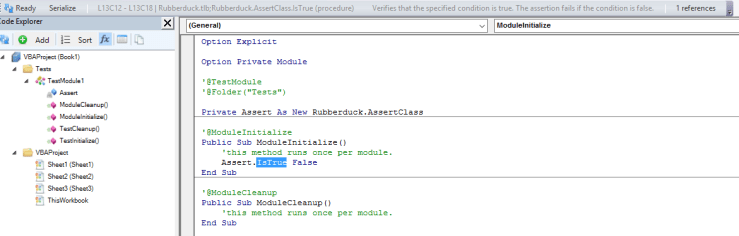
Test Module Template checkboxes determine whether the @TestInitialize@TestCleanup@ModuleInitialize and @ModuleCleanup method stubs are going to be generated, and also whether creating a new test module creates a test method by default.

All these settings only affect new test modules, not existing ones.


The Assert Class

Tests assert things. Without assertions, a Rubberduck test can’t have a meaningful result, and will simply pass. The IAssert interface (implemented by both AssertClass and PermissiveAssertClass) exposes a number of members largely inspired by MS-Tests in Visual Studio:

Name Description
AreEqual Verifies that two specified objects are equal. The assertion fails if the objects are not equal.
AreNotEqual Verifies that two specified objects are not equal. The assertion fails if the objects are equal.
AreNotSame Verifies that two specified object variables refer to different objects. The assertion fails if they refer to the same object.
AreSame Verifies that two specified object variables refer to the same object. The assertion fails if they refer to different objects.
Fail Fails the assertion without checking any conditions.
Inconclusive Indicates that the assertion cannot be verified.
IsFalse Verifies that the specified condition is false. The assertion fails if the condition is true.
IsNothing Verifies that the specified object is Nothing. The assertion fails if it is notNothing.
IsNotNothing Verifies that the specified object is not Nothing. The assertion fails if it isNothing.
IsTrue Verifies that the specified condition is true. The assertion fails if the condition is false.

To be continued…

VBA Rubberducking (Part 2)

This post is the second in a series of post that walk you through the various features of the Rubberduck open-source VBE add-in. The first post was about the navigation features.

Code Inspections

vbe

Back when the project started, when we started realizing what it meant to parse VBA code, we knew we were going to use that information to tell our users when we’re seeing anything from possibly iffy to this would be a bug in their code.

The first one to be implemented was OptionExplicitInspection. The way Rubberduck works, a variable that doesn’t resolve to a known declaration simply doesn’t exist. Rubberduck is designed around the fact that it’s working against code that VBA compiles; is also needs to assume you’re working with code that declares its variables.

Without ‘Option Explicit’ on, Rubberduck code inspections can yield false positives.

Because it’s best-practice to always declare your variables, and because the rest of Rubberduck won’t work as well as it should if you’re using undeclared variables, this inspection defaults to Error severity level.

OptionExplicitInspection was just the beginning. As of this writing, we have implementations for 35 inspections, most with one or more one-click quick-fixes.

35 inspections?

And there’s a couple more left to implement, too. A lot of inspections rely on successful parsing and processing of the entire project and its references; if there’s a parsing error, then Rubberduck will not produce new inspection results. When parsing succeeds, inspections run automatically and the “status bar” indicates Ready when it’s completed.

  1. AssignedByValParameterInspection looks for parameters passed by value and assigned a new value, suggesting to either extract a local variable, or pass it by reference if the assigned value is intended to be returned to the calling code.
  2. ConstantNotUsedInspection looks for constant declarations that are never referenced. Quick-fix is to remove the unused declaration.
  3. DefaultProjectNameInspection looks for unnamed projects (“VBAProject”), and suggests to refactor/rename it. If you’re using source control, you’ll want to name your project, so we made an inspection for it.
  4. EmptyStringLiteralInspection finds “” empty strings and suggests replacing with vbNullString constants.
  5. EncapsulatePublicFieldInspection looks for public fields and suggests making it private and expose it as a property.
  6. FunctionReturnValueNotUsedInspection locates functions whose result is returned, with none of the call sites doing anything with it. The function is used as a procedure, and Rubberduck suggests implementing it as such.
  7. IdentifierNotAssignedInspection reports variables that are declared, but never assigned.
  8. ImplicitActiveSheetReferenceInspection is Excel-specific, but it warns about code that implicitly refers to the active sheet.
  9. ImplicitActiveWorkbookReferenceInspection is also Excel-specific, warns about code that implicitly refers to the active workbook.
  10. ImplicitByRefParameterInspection parameters are passed by reference by default; a quick-fix makes the parameters be explicit about it.
  11. ImplicitPublicMemberInspection members of a module are public by default. Quick-fix makes the member explicitly public.
  12. ImplicitVariantReturnTypeInspection a function or property getter’s signature doesn’t specify a return type; Rubberduck makes it return a explicit Variant.
  13. MoveFieldCloserToUsageInspection locates module-level variables that are only used in one procedure, i.e. its accessibility could be narrowed to a smaller scope.
  14. MultilineParameterInspection finds parameters in signatures, that are declared across two or more lines (using line continuations), which hurts readability.
  15. MultipleDeclarationsInspection finds instructions containing multiple declarations, and suggests breaking it down into multiple lines. This goes hand-in-hand with declaring variables as close as possible to their usage.
  16. MultipleFolderAnnotationsInspection warns when Rubberduck sees more than one single @Folder annotation in a module; only the first annotation is taken into account.
  17. NonReturningFunctionInspection tells you when a function (or property getter) isn’t assigned a return value, which is, in all likelihood, a bug in the VBA code.
  18. ObjectVariableNotSetInspection tells you when a variable that is known to be an object type, is assigned without the Set keyword – this is a bug in the VBA code, and fires a runtime error 91 “Object or With block variable not set”.
  19. ObsoleteCallStatementInspection locates usages of the Call keyword, which is never required. Modern form of VB code uses the implicit call syntax.
  20. ObsoleteCommentSyntaxInspection locates usages of the Rem keyword, a dinosaurian syntax for writing comments. Modern form of VB code uses a single quote to denote a comment.
  21. ObsoleteGlobalInspection locates usages of the Global keyword, which is deprecated by the Public access modifier. Global cannot compile when used in a class module.
  22. ObsoleteLetStatementInspection locates usages of the Let keyword, which is required in the ancient syntax for value assignments.
  23. ObsoleteTypeHintInspection locates usages of type hints in declarations and identifier references, suggesting to replace them with an explicit value type.
  24. OptionBaseInspection warns when a module uses Option Base 1, which can easily lead to off-by-one bugs, if you’re not careful.
  25. OptionExplicitInspection warns when a module does not set Option Explicit, which can lead to VBA happily compiling code that uses undeclared variables, that are undeclared because there’s a typo in the assignment instruction. Always use Option Explicit.
  26. ParameterCanBeByValInspection tells you when a parameter is passed ByRef (implicitly or explicitly), but never assigned in the body of the member – meaning there’s no reason not to pass the parameter by value.
  27. ParameterNotUsedInspection tells you when a parameter can be safely removed from a signature.
  28. ProcedureCanBeWrittenAsFunctionInspection locates procedures that assign a single ByRef parameter (i.e. treating it as a return value), that would be better off written as a function.
  29. ProcedureNotUsedInspection locates procedures that aren’t called anywhere in user code. Use an @Ignore annotation to remove false positives such as public procedures and functions called by Excel worksheets and controls.
  30. SelfAssignedDeclarationInspection finds local object variables declared As New, which (it’s little known) affects the object’s lifetime and can lead to surprising/unexpected behavior, and bugs.
  31. UnassignedVariableUsageInspection locates usages of variables that are referred to before being assigned a value, which is usually a bug.
  32. UntypedFunctionUsageInspection recommends using String-returning functions available, instead of the Variant-returning ones (e.g. Mid$ vs. Mid).
  33. UseMeaningfulNamesInspection finds identifiers with less than 3 characters, without vowels, or post-fixed with a number – and suggests renaming them. Inspection settings will eventually allow “white-listing” common names.
  34. VariableNotAssignedInspection locates variables that are never assigned a value (or reference), which can be a bug.
  35. VariableNotUsedInspection locates variables that might be assigned a value, but are never referred to and could be safely removed.
  36. VariableTypeNotDeclaredInspection finds variable declarations that don’t explicitly specify a type, making the variable implicitly Variant.
  37. WriteOnlyPropertyInspection finds properties that expose a setter (Property Let or Property Set), but no getter. This is usually a design flaw.

Oops, looks like I miscounted them… and there are even more coming up, including host-specific ones that only run when the VBE is hosted in Excel, or Access, or whatever.

The Inspection Results toolwindow

If you bring up the VBE in a brand new Excel workbook, and then bring up the inspection results toolwindow (Ctrl+Shift+I by default) you could be looking at something like this:

8owq4

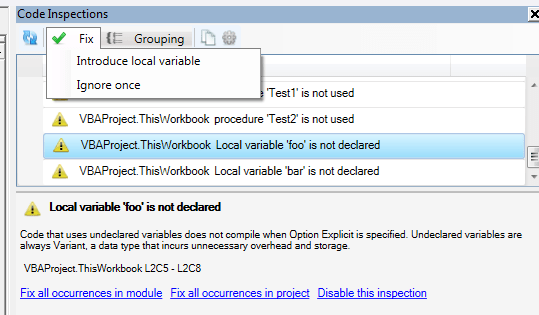
Most inspections provide one or more “quick-fixes”, and sometimes a quick-fix can be applied to all inspection results at once, within a module, or even within a project. In this case Option Explicit can be automatically added to all modules that don’t have it in the project, using the blue Fix all occurrences in project link at the bottom.

Or, use the Fix drop-down menu in the top toolbar to apply a quick-fix to the selected inspection result:

fdqhe

Each inspection has its own set of “quick-fixes” in the Fix menu. A common one is Ignore once; it inserts an @Ignore annotation that instructs the specified inspection to skip a declaration or identifier reference..

InspectionResults

The bottom panel contains information about the selected inspection result, and fix-all links that always use the first quick-fix in the “Fix” menu. Disable this inspection turns the inspection’s “severity” to DoNotShow, which effectively disables the inspection.

You can access inspection settings from the Rubberduck | Settings menu in the main commandbar, or you can click the settings button in the inspection results toolwindow to bring up the settings dialog:

wqtok

If you like using the Call keyword, you can easily switch off the inspection for it from there.

The Copy toolbar button sends inspection results into the clipboard so they can be pasted into a text file or an Excel worksheet.

As with similar dockable toolwindows in Rubberduck, the way the grid regroups inspection results can be controlled using the Grouping menu:

54ur0

The refresh button causes a re-parse of any modified module; whenever parser state reaches “ready”, the inspections run and the grid refreshes – just as it would if you refreshed from the Rubberduck command bar, or from the Code Explorer toolwindow.

To be continued…


VBA Rubberducking (Part 1)

The VBE editor was last updated in 1998 – back when VB6 was all the rage, and the .NET framework was probably just a little more than a nice idea.

Vanilla VBA editor

The VBE was just slightly less full-featured than its standalone counterpart, Visual Studio 6.0; however years went by, and the latest Visual Studio versions make the VBE look like an odd beast from another century.

Enter Rubberduck.

RubberduckVBE

There are other VBE add-ins out there. For many years, VBA (and VB6) devs have loved using MZ-Tools and Smart Indenter – perhaps the two most popular add-ins ever written for the VBE. One has a lightning-fast analyzer that is capable of finding unused declarations, and even locates references in commented-out code; the other offers a highly configurable indenter that lets you instantly apply an indenting style to an entire module, or more surgically to a single procedure. What does Rubberduck bring to the table?

Lots, lots, lots of things.

This post is the first in a series of post that walk you through the various features of the Rubberduck open-source VBE add-in.

Navigation Tools

One of the most frustrating aspects of the VBE, is its limited set navigation tools. Let’s recap what the vanilla VBE gives us:

  • Ctrl+F / “Find” is a little more than a basic text search, that lets you search and replace text in the current procedure, module, project, or selection. Although VBA isn’t case-sensitive, you can match case, and use pattern matching, which isn’t exactly a regex search, but better than nothing.
  • Shift+F2 / “Go to Definition”, is actually fantastic: you can right-click any identifier and jump to its declaration – and if it’s an identifier defined in a referenced library, it takes you to its entry in the Object Browser.
  • Ctrl+R / “Project Explorer” is a dockable toolwindow that lists all opened projects and the modules under them, in a convenient TreeView where you can double-click on a node and navigate there.
  • Ctrl+Shift+F2 / “Last Position” is also fantastic: the VBE keeps a little stack of recent places you’ve been, and works like a “back” browser button that takes you back to where you were before. Quite possibly my personal favorite of all.
  • Bookmarks is under-used… for a reason. You can toggle any line as a bookmark, and cycle through them, but there’s no place to see them all at once.

And… that’s about it. Let’s see what Rubberduck has to offer.

Code Explorer

CodeExplorer

This isn’t the final version (we haven’t released it in 2.0 yet). When it grows up, it wants to be a full-fledged replacement for the Project Explorer. Its default hotkey even hijacks the Ctrl+R shortcut. Here’s what it does that the Project Explorer doesn’t do:

  • Drill down to module members, and then further down to list enum and user-defined type members.
  • See constant values as they appear in code.
  • Navigate not only to any module, but any field, enum member, constant, procedure, property get/let/set accessor, function, imported library functions and procedures.
  • Rename anything.. without breaking the code that references what you’re renaming.
  • Find all references to anything.
  • Indent an entire project, or a selected module.

But the coolest thing is that Rubberduck’s Code Explorer takes special comments like this:

 '@Folder("ProgressIndicator.Logic")

And then renders the module like this:

CodeExplorer-Folders.png

That’s right. Folders. In VBA. Sure, okay, they’re not real folders – it’s a trick, an illusion… but that trick now means that with a simple annotation in every module, you can organize your VBA project the way you want to; you’re no longer forced to search for a class module among 80 others in a large project, you’re free to regroup forms together with their related classes!

This feature alone is a game changer: with it, class modules can become first-class citizen; you don’t have to fear drowning in a sea of modules, and you don’t have to give them funky prefixes to have them sorted in a way that makes it anywhere near decent to navigate.

Find Symbol

One of my favorite ReSharper features, is Ctrl+T / “go to anything”. When I realized we could have this feature in the VBE, I went ahead and did it. This simple feature lets you type the name of any identifier, and locate a specific instance of it:

FindSymbol.png

This includes any variable, constant, type, enum, procedure, function, property, library function/procedure, parameter, …even line labels can be navigated to.

Just Ctrl+T, type something, hit ENTER, and you’re there. Or browse the dropdown list and click that “go” button.

Find all references

Whether you’re looking for all call sites of a procedure in your code, or you’re just curious about how many times you’re using the vbNullString built-in constant, you can right-click any identifier (at the declaration, or any of its references) and Find all references will give it to you, in a convenient tabbed search results toolwindow:

FindAllReferences.png

Double-click any result to navigate there.

Find all implementations

Similar to find all references (its results use the same toolwindow), this one is also one of my favorite ReSharper features, that Rubberduck simply had to implement. It’s only useful when you’re coding against abstractions and implementing interfaces (if you didn’t know… yes, VBA code can do that!) – but then, it’s the best way of navigating to implementations of an interface class or member.

For example, here I added two new class modules, added this line in each, and then implemented the members:

Implements ProgressIndicator

After refreshing the parser state, I can right-click the Execute method in my ProgressIndicator class, select “Find all implementations”, and get this:

FindAllImplementations.png

TODO Explorer

Rubberduck can (well, does actually) spot special markers in comments, and lets you navigate them in a dockable toolwindow – again, double-click navigates there:

todo-explorer.png

Take that, bookmarks! You can group them by marker or by location.

By default, Rubberduck will mark NOTETODO and BUG as interesting, but you can always configure it to whatever suits your needs in the Todo Settings tab of the settings dialog:

todo-settings.png

Regex Search & Replace

Okay, that one’s not really there yet. But it’s totally on the roadmap, and definitely coming in a future version of Rubberduck. Take that, search with pattern!


Whew! That covers Rubberduck’s navigation features. What do you think?

To be continued…