Posts

VBA and Git the Sequel: This Time it’s Integrated

There’s some information about the new beta Source Control Integration feature over at my blog.

Christopher J. McClellan's avatarChristopher J. McClellan

I’ve talked before about using Git with VBA and also about the importance of using source control and other tools for our work. Truthfully though, using source control with VBA is still hard. This is mostly because getting the code modules into and out of the VB Project is hard, and harder to do right. Well, you may have heard that there’s a new duck in town. It’s taken me about 6 months of spare time, but Rubberduck v1.4 not only has a source control COM library that you can use right in VBA to work with Git VBA repositories, but you can also now branch, commit, pull, push, and merge right from inside of the editor.

View original post 545 more words

There’s a new duck in town!

…and it rocks.

The past few months have been tough. We were facing some serious ANTLR grammar bugs, and our identifier resolver had even more serious bugs, which meant false positives in code inspections, a rename refactoring that wouldn’t always rename all references, and a StackOverflowException if you were unlucky… which blew up Rubberduck, the VBE, and the Office host app with it, without warning.

That’s why 1.3 remained a “pre-release”.

Rubberduck 1.4 has none of these issues. Oh, our ANTLR grammar is still far from perfect (line numbers, and “precompiler” #IF statements come to mind) – but a number of bugs were fixed, and the resolver was completely rewritten. It’s not as perfect as we’d like it to be, but it correctly resolved everything we threw at it, without a single exception.

So, what’s so cool about it?


#Refactor

Extract Method has been around since version 1.2, and Rename was pre-released (albeit with some issues) with 1.3; Rubberduck 1.4 introduces two new refactorings:

  • Reorder Parameters in a procedure, and automatically adjust all call sites.
  • Remove Parameters from a procedure’s signature, and automatically adjust all call sites.

Rename can be used from the Project Explorer, Code Pane or Form Designer context menus, as well as from the Code Explorer to rename a project, a component (form, module, class), a procedure, variable, line label, …anything. This completely eliminates all excuses to keep meaningless identifiers in your code.


#Navigate

The Code Explorer was already a nice feature in 1.2, but Rubberduck 1.4 takes navigation to a whole new level.

  • Find Symbol lets you search for anything – and go to its declaration.
  • Find all references displays all call sites of any identifier.
  • Go to implementation lets you navigate implementations of an interface or interface members. Rubberduck considers any class referenced by an Implements statement as an interface.

One cool thing is that we’ve created declarations for pretty much everything in the Standard VBA library, so you can use find all references to list all usages of, say, MsgBox, or Err.Raise.


#Git

That’s right. We’ve talked about it for a while. Well, it’s here. Integrated source control, right there in the VBE. Commit, push, pull, merge, branch, to and from local or remote repositories on GitHub.


And so much more…

If you’ve never used a previous version of Rubberduck, now is the time.

Every VBA programmer needs a Rubberduck.

DOWNLOAD

Rubberduck, or Gummianka, le petit canard en caoutchouc

Next release rocks. Like, if you’re running 1.22, you’re not going to believe everything that’s coming at you in 1.4 – and if you’re running 1.3x, …you’re not going to believe it either.

The feature set is becoming massive, and that’s thoroughly awesome. We are currently in the final stages of stabilizing the next release and polishing everything. There’s a ton of amazing stuff coming, but one of the coolest things is that, thanks to the awesomeness of Code Review community members…

…we are proud to announce localization in French and Swedish, and a German translation is under way.

If a language isn’t supported on your system, it won’t show up in the display language dropdown:

Options-Localized

More announcements to come, stay tuned!

What happened to “release early, release often”?

Since the project started, we’ve been releasing pretty much every 100 commits or so – actually more than that, given 13 releases in 1,003 commits. Our “next” branch stands at 1,375 commits at the time of this writing, and the next release will likely be well beyond the 1,400th commit. What’s up, duck?

Quite a lot actually.

Architecture changes

Since the 1.3 pre-release, we have moved the unit testing feature into its own project. This means starting with Rubberduck 1.4, upgrading your Rubberduck will not break any references because the .tlb will remain the same unless there are changes to the unit testing feature.

Localization

We’ve been working on extracting every single hard-coded UI string literal into resource files, and proceeded to translate them. The French translation is pretty much done, and we’ve been promised a Swedish translation. Surely more translations will be added in future versions. Rubberduck’s UI language will be selectable from a dropdown in the options dialog.

Grammar is fun

Our ANTLR grammar has undergone yet another little tune-up, which fixes a number of annoyances. And when our grammar fails, we’re now going to be showing you exactly where and why it’s failing, and you can double-click the error to navigate there.

Navigation

We already had the Code Explorer doing a great job with navigation, but v1.4 takes navigation totally elsewhere, by letting you locate all references to any identifier (including built-in constants, enums, functions, modules, etc.), and all implementations of any implemented interface class – this latter functionality is an awesome tool if you’re into coding against abstractions… which happens to be a great way to write unit-testable code.

But that’s not all: a find symbol functionality lets you search for literally anything, from variables to constants, procedures, modules, function parameters, …even subroutine line labels.

UX

Parsing a relatively large VBA project, and resolving all rerences to all identifiers, can take a little while. Instead of just freezing up the IDE while Rubberduck is working on that, we’re now going to be displaying a little progress dialog, showing you exactly what’s going on – and we only parse and resolve references for modules that have been modified since the last parse, so we’re doing everything we can to keep that waiting time to a minimum.

Moreover, the Code Explorer and Code Inspections now work on a background thread, so you can continue browsing your project while Rubberduck is parsing/resolving/inspecting – keep in mind though, that if you modify the code while it’s being inspected, you’re likely to get stale inspection results… and that’s not a bug.

Refactorings

1.3 introduced a rename refactoring, on top of the extract method introduced in 1.2; well guess what, 1.4 fixes a number of issues in both, and introduces brand new ones! You will be able to reorder parameters in any procedure, and automatically update all usages; or remove a parameter in a signature, and automatically update all call sites.

Source Control

It’s almost done. Most of it is already committed to our [next] branch, so 1.4 isn’t shipping without this feature – GitHub integrated source control for VBA. No, it’s not a joke.


So yeah, there’s a lot going on, and it’s all coming in the next release of Rubberduck. And more awesome features are coming up for 2.0; follow us on Twitter, and stay tuned!

You’ve waited long enough.

The wait is over!

I have to say that this release has been… exhausting. Correctly resolving identifier references has proven to be much, much more complicated than I had originally anticipated. VBA has multiple ways of making this hard: with blocks are but one example; user-defined-type fields are but another.

But it’s done. And as far as I could tell, it works.

Why did you tag it as “pre-release” then?

Because resolving identifier references in VBA is hard, and what I released is not without issues; it’s not perfect and still needs some work, but I believe most normal use cases are covered.

For example, this code will blow up with a wonderful StackOverflowException:

Class1

Public Function Foo() As Class2
    Set Foo = New Class2
End Function

Class2

Public Sub Foo()
End Sub

ThisWorkbook

Public Sub DoSomething()
    Dim Foo As New Class1
    With Foo
            .Foo
    End With
End Sub

It compiles, VBA resolves it. And it’s fiendish, and nobody in their right minds would do anything near as ambiguous as that. But it’s legal, and it blows up.

That’s why I tagged it as a “pre-release”: because there are a number of hair-pulling edge cases that just didn’t want to cooperate.

See, finding all references to “foobar” works very well here:

Public Sub DoSomething()
    Dim foobar As New Class1
    With foobar
        With .Foo
            .Bar
        End With
    End With
End Sub

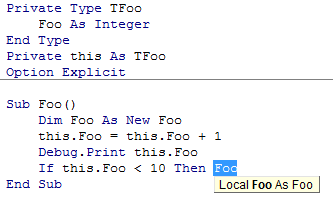
…and finding all references to “Foo” in the below code will not blow up, but the “.Foo” in the 2nd with block resolves as a reference to the local variable “Foo”:

Public Sub DoSomething()
    Dim Foo As New Class1
    With Foo
        With .Foo
            .Bar
        End With
    End With
End Sub

And of course, there are a number of other issues still.

Here’s a non-exhaustive list of relatively minor known issues we’re postponing to 1.31 or other future release – please don’t hesitate to submit a new issue if you find anything that doesn’t work as you’d expect.

There can be only one

Rubberduck doesn’t [yet] handle cross-project references; while all opened VBA projects are parsed and navigatable, they’re all “silos”, as project references aren’t taken into account; this means if project A is referencing project B, and project A contains the only usage of a procedure defined in project B, then that procedure will fire up a code inspection saying the procedure is never used.

It also means “find all references” and “rename” will miss it.

self-referencing Parameters

“Find all references” has been seen listing the declaration of a parameter in its list of references. Not a biggie, but not intended either. There’s no explanation for that one, yet – in fact it’s possible you never even encounter this issue.

Selection Glitches From Code Inspection Results

We know what causes it: the length of the selection is that of the last word/token in the parser context associated with the inspection result. That’s like 80% fixed! Now the other 80% is a little bit tricky…

Performance

Code inspections were meant to get faster. They got more accurate instead. This needs a tune-up. You can speed up inspections by turning off the most expensive ones… although these are often the most useful ones, too.

Function return vAlue not assigned

There has been instances of [hard-to-repro] object-typed property getters that fire up an inspection result, when they shouldn’t. Interestingly this behavior hasn’t been reproduced in smaller projects. This inspection is important because a function (or property getter) that’s not assigned, will not return anything – and that’s more than likely a bug waiting to be discovered.

Parameter can be passed by value

This inspection is meant to indicate that a ByRef parameter is not assigned a value, and could safely be passed ByVal. However if such a parameter is passed to another procedure as a ByRef parameter, Rubberduck should assume that the parameter is assigned. That bit is not yet implemented, so that inspection result should be taken with a grain of salt (like all code inspection results in any static code analysis tool anyway).

This inspection will not fire up a result if the parameter isn’t a primitive type, for performance reason (VBA performance); if performance is critical for your VBA code, passing parameters by reference may yield better results.

Special Thanks to Rob Bovey and Stephen Bullen

Twitter is awesome: you share something with the world, and then the world shares something with you. Thanks to the awesomeness of Ross McLean, we are pleased to announce that Rubberduck 2.0 will include automagic indentation

…Powered by smart indenter

Yes! The original author and current maintainer of the magic indenting freeware tool downloaded by dozens of thousands of happy customers have kindly supplied us with the VB6 source code, and we’re going to put it to good use, port it to .NET, embed the almighty indentation algorithm into Rubberduck, and try to keep as much as possible of the formidable set of configuration settings that make Smart Indenter such a wonder.

To be continued…

While we’re waiting…

I cannot wait to release the next version. Seriously. You have no idea how much it itches.

It’s coming, no worries; we only have a few tiny little adjustments to make and we’re ready.

In the mean time, v1.22 had over 160 downloads (probably 170 by the time I publish this post), which is more than anything I would have expected. After all, in the past 30 days I’ve fixed so many bugs I’ve come to see 1.22 as an under-featured buggy tool – code inspections are definitely promising, but the parser has (had!) too many issues for a lot of them to be reliable. Fortunately version 1.3 changes that.

We’ve had awesome feedback already, some on GitHub, some via our contact us form on rubberduck-vba.com, some on Twitter… but hardly any here.

So I’m going to include some new features of v1.3 here (just to skew the results a bit – and I’m also biting my tongue on very cool things coming up for v2.0), and ask you…

Comments are welcome!

An update on the v1.3 release

As I said earlier on Twitter, I messed up the 1.3 release… big time. Shooting for April 18 was fine, rushing to meet that “deadline” wasn’t.

We’re removing the 1.3 pre-release. I pushed “release early, release often” too far this time. Recommend uninstall+rollback to 1.22.. sorry!

Again, apologies. I was so excited about releasing all the features I had been working on for over a month now, that I overlooked a number of serious issues, and to top it off, I blew up the x64 installer… again.

We’re currently fixing those last few issues, and we’ll take the time it takes to test things properly, and release a stable v1.3 that everybody will enjoy using.

Stay tuned, v1.3 is coming… and you’re going to love it.

Version 1.22 – Hotfix

There was an issue with some of the features when a password protected VBA Project was loaded. This caused several of the tool window, most notably the Test Explorer, to fail to open. As many of the more popular add-ins are password protected, this was a pretty big problem.

This has been corrected and the 32bit installer is available now. This post will be updated when the 64bit installer is available.

Download the latest version here.

Naming is hard. Renaming is easy.

There are only two hard things in Computer Science: cache invalidation and naming things.

— Phil Karlton

How many VBA modules declare variables looking like this:

Dim v As Long, vWSs As Variant, Mrange As Range, Vrange As Range

Or like this:

Dim i As Long
Dim LR As Long

How many procedures have cryptic names that only the author knows what they mean?

How many Times did you refrain from renaming a procedure in fear of breaking the code?

Fear no more. Renaming doesn’t have to be the hardest part of using meaningful names in code.

With the next release of Rubberduck, finding a meaningful name is going to be the hardest part – I’m please to announce that Rubberduck 1.3 will feature a rename refactoring:

rename-const

Awesome. How does it work?

I’m tempted to say “Magic!” here. Rubberduck uses the current selection (/caret location) to guess what you’re trying to rename. If you’re on a constant usage, it knows to rename the constant and every single one of its references; if you’re just inside a procedure scope, it guesses you want to rename the procedure and affect every single call site; if you’re somewhere in the declarations section of a module, it lets you rename the module itself, and automatically adjusts every explicit reference to it.

The Rubberduck/Refactor menu will feature a new “Rename” button, accessible with Alt+B,R,R (Rubberduck/Refactor/Rename).

The Code Explorer‘s context menu will also feature a “Rename” button, so that any module/member can be renamed without even looking at the actual code.

Lastly, we’ll hijack the code pane context menu and add our “Refactor” menu in there, too.

Naming is hard. Renaming doesn’t have to be!