Nothing to declare

Somewhere in the first batch of issues/to-do’s we created when we started Rubberduck on GitHub (Issue# 33 actually), there was the intention to create a tool that could locate undeclared variables, because even if you and I use Option Explicit and declare all our variables, we have brothers and sisters that have to deal with code bases that don’t.

So we tried… but Rubberduck simply couldn’t do this with the 1.x resolver: identifiers that couldn’t be resolved were countless, running an inspection that would pop a result for every single one of them would have crippled our poor little duckling… so we postponed it.

The 2.0 resolver however, thinks quite literally like VBA itself, and knows about all available types, members, globals, locals, events, enums and whatnot, not just in the VBA project, but also in every referenced COM library: if something returns a type other than Variant or Object, Rubberduck knows about it.

The role of the resolver is simple: while the parse tree of a module is being traversed, every time an identifier is encountered it attempts to determine which declaration is being referred to. If the resolver finds a corresponding declaration, an IdentifierReference is created and added to the Declaration instance. And when the resolver can’t resolve the identifier (i.e. locate the exact declaration the identifier is referring to), a null reference was returned and, unless you have detailed logging enabled, nothing notable happens.

As of the last build, instead of “doing nothing” when a reference to variable can’t be resolved to the declaration of that variable, we create a declaration on the spot: so the first appearance of a variable in an executable statement becomes the “declaration”.

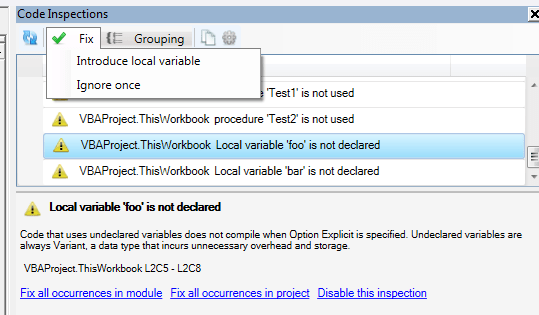
We create an implicit Variant variable declaration to work with, and then this happens:
hhp2m

With a Declaration object for an undeclared variable, any further reference to the same implicit variable would simply resolve to that declaration – this means other Rubberduck features like find all references and refactor/rename can now be used with undeclared variables too.

Rubberduck is now seeing the whole picture, with or without Option Explicit.

The introduce local variable quick-fix simply inserts a “Dim VariableName As Variant” line immediately above the first use in the procedure, where VariableName is the unresolved identifier name. The variable is made an explicit Variant, …because there’s another inspection that could fire up a result if we added an implicit Variant.

The quick-fix doesn’t assume an indentation level – makes me wonder if we should run the indenter on the procedure after applying a quick-fix… but that’s another discussion.

To be continued…
2.0: Stabilizing

The latest release packs a number of fundamental changes that affected every single part of Rubberduck. These changes are the result of the payment of a massive technical debt: from the very beginning, the very idea of wrapping the VBIDE API was deemed a massive and not-quite-needed undertaking – and so many parts of Rubberduck had direct dependencies on the VBA extensibility type library.

VBProjects, VBComponents, CodePanes, CommandBars, everything.

The problem is that, with COM resources, you need to release what you use – and cleaning up COM resources through .NET interop isn’t exactly trivial. Of course it looks pretty simple if you look at the ShutdownAddIn method in Rubberduck’s core:

try
{
    _ide.Release();
}
catch (Exception e)
{
    _logger.Error(e);
}

This Release method is exposed by the ISafeComWrapper interface, which is itself derived from a very general-purpose INullObjectWrapper interface:

public interface ISafeComWrapper : INullObjectWrapper
{
    void Release();
}

public interface ISafeComWrapper<out T> : ISafeComWrapper
{
    new T Target { get; }
}

public interface INullObjectWrapper
{
    object Target { get; }
    bool IsWrappingNullReference { get; }
}

Together, these simple interfaces form the down payment on the technical debt that has been plaguing Rubberduck from its early beginnings: the next step was to derive wrapper interfaces for every single type in the API. So instead of depending on a Microsoft.Vbe.Interop.CodePane, our code would be depending on a Rubberduck.VBEditor.SafeComWrappers.Abstract.ICodePane interface:

public interface ICodePane : ISafeComWrapper, IEquatable<ICodePane>
{
    IVBE VBE { get; }
    ICodePanes Collection { get; }
    IWindow Window { get; }
    int TopLine { get; set; }
    int CountOfVisibleLines { get; }
    ICodeModule CodeModule { get; }
    CodePaneView CodePaneView { get; }
    Selection GetSelection();
    QualifiedSelection? GetQualifiedSelection();
    void SetSelection(int startLine, int startColumn, int endLine, int endColumn);
    void SetSelection(Selection selection);
    void Show();
}

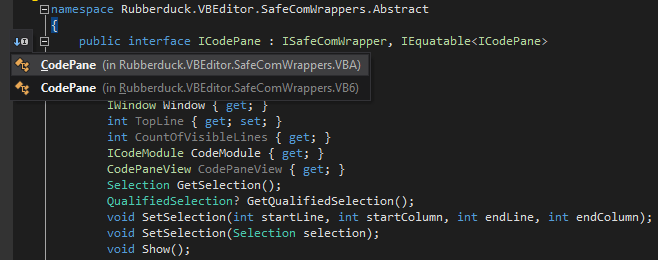
These abstract wrapper interfaces can then be implemented by concrete wrapper types that directly deal with the Microsoft interop types – so we could get rid of a number of extension methods, and move them directly into the wrapper types… and this time we’re not limited to the VBA extensibility API:

icodepaneimplementations

Every wrapper type must implement the Release method, where it cleans up after itself and its child objects – here the CodePanes wrapper releases its CodePane children before it releases itself:

public override void Release()
{
    if (!IsWrappingNullReference)
    {
        for (var i = 1; i <= Count; i++)
        {
            this[i].Release();
        }
        Marshal.ReleaseComObject(Target);
    }
}

This way, the entry point can call IVBE.Release, and every COM object ever accessed in the lifetime of Rubberduck is sure to get properly cleaned up, with one single method call.


Everywhere in Rubberduck, dependencies on Microsoft.Vbe.Interop were replaced with dependencies on Rubberduck.VBEditor.SafeComWrappers.Abstract, and then we were a step closer to a stable release.

But Rubberduck still kept crashing its host application on exit, and sometimes even at startup: something else wasn’t right, the call stack was pointing to an event listener picking up ItemAdded and ItemRemoved events fired from the References class.

Rubberduck implements COM event sinks to listen to IDE events such as “a module was renamed” or “a new project was added”, or “a project was closed”; I disabled them all. I also disabled the initial parse, just in case.


And Rubberduck kept crashing the host on exit, still.

The wrapper type that implemented the IReferences wrapper interface was registering handlers for ItemAdded and ItemRemoved; I removed them.

And Rubberduck did not crash on exit anymore.

So I reinstated the keyboard hook: still no crash.

So I reinstated the event sinks: still no crash.

So I reinstated the initial parse… and it crashed.

Initializing a VBE add-in is… complicated: the VBE hasn’t completely constructed itself at that time, and projects are still loading – the event sink was picking up ProjectAdded and ProjectRenamed events at startup (did you know your VBA projects aren’t “natively” called “VBAProject1”, but literally renamed that way at startup?), and trying to parse projects in the IDE at that point was just asking for trouble.

So I disabled the initial parse. No crash at startup, no crash at shut down. I moved the sinks’ event registration code out of constructors and into a dedicated method meant to be called once the IDE is ready for it… and forgot to call it.

So v2.0.9 does not parse automatically at startup, and doesn’t automatically know when a module or project is renamed, added, or removed.

But it doesn’t crash either. At least, not on my machine running 64-bit Office 2010 on Win10 x64… but since 2.0.9 was issued earlier today, we’ve found a race condition preventing proper teardown of the Rubberduck menu, and there are still a few more things to fix before we can call 2.0 “stable”.

But we’re much closer today than we were a month ago.

To be continued…


IDE-Integrated Git Source Control

It was merged just yesterday. When Rubberduck 2.0 is released, VBA devs will have a new tool in their arsenal: full-fledged Git source control, seamlessly integrated into their IDE, in a dockable toolwindow:

sc-panel.PNG

Why use Source Control?

How many of you keep version and change tracking information in comments? Does this look any familiar?


'modified 2014-04-27, ticket #173

Or this perhaps?

'version 1.2
' - added CalculateRangePrices macro
' - fixed bug in SalesByCustomerReport

These things don’t belong in code, they belong in your commit history. Using source control gives you that, so you can have code files that contain, well, code.

Collaborative work in VBA is pretty annoying anyway – you have to manually merge changes, and import/export modules manually, if you’re not outright copy/pasting code. This is error-prone and, let’s face it, nobody does it.

With Rubberduck and your GitHub repository two clicks away, you can now work on your code even if you don’t have the macro-enabled workbook with you right now. Because Rubberduck doesn’t just dump the .xlsm file into a GitHub repo – it actually exports each individual code file (yes, including workbooks and worksheets and UserForms) into an actual working directory, so you can work in VBA just like you would in VB6.. or C#, or Java.

You can create a branch, and work on a feature while shielding your “master” branch from these changes, issue a bug-fix on “master”, merge the bug-fix into your dev branch, finalize your work, then merge your dev branch into master, and release a new version: that’s how devs work, and that’s how VBA devs can work too, even if they’re a lone wolf.

Source Control integration was issue #50 in Rubberduck’s repository (we’re now at #1219, some 3,000 commits later) – we wanted this feature all along. And we’re delivering it next release, promise.

Special thanks to @Hosch250, who worked astonishingly hard to make this happen.

See how it works on our wiki (yes, that’s work in progress).


VBA and Git the Sequel: This Time it’s Integrated

There’s some information about the new beta Source Control Integration feature over at my blog.

Christopher J. McClellan's avatarChristopher J. McClellan

I’ve talked before about using Git with VBA and also about the importance of using source control and other tools for our work. Truthfully though, using source control with VBA is still hard. This is mostly because getting the code modules into and out of the VB Project is hard, and harder to do right. Well, you may have heard that there’s a new duck in town. It’s taken me about 6 months of spare time, but Rubberduck v1.4 not only has a source control COM library that you can use right in VBA to work with Git VBA repositories, but you can also now branch, commit, pull, push, and merge right from inside of the editor.

View original post 545 more words

What happened to “release early, release often”?

Since the project started, we’ve been releasing pretty much every 100 commits or so – actually more than that, given 13 releases in 1,003 commits. Our “next” branch stands at 1,375 commits at the time of this writing, and the next release will likely be well beyond the 1,400th commit. What’s up, duck?

Quite a lot actually.

Architecture changes

Since the 1.3 pre-release, we have moved the unit testing feature into its own project. This means starting with Rubberduck 1.4, upgrading your Rubberduck will not break any references because the .tlb will remain the same unless there are changes to the unit testing feature.

Localization

We’ve been working on extracting every single hard-coded UI string literal into resource files, and proceeded to translate them. The French translation is pretty much done, and we’ve been promised a Swedish translation. Surely more translations will be added in future versions. Rubberduck’s UI language will be selectable from a dropdown in the options dialog.

Grammar is fun

Our ANTLR grammar has undergone yet another little tune-up, which fixes a number of annoyances. And when our grammar fails, we’re now going to be showing you exactly where and why it’s failing, and you can double-click the error to navigate there.

Navigation

We already had the Code Explorer doing a great job with navigation, but v1.4 takes navigation totally elsewhere, by letting you locate all references to any identifier (including built-in constants, enums, functions, modules, etc.), and all implementations of any implemented interface class – this latter functionality is an awesome tool if you’re into coding against abstractions… which happens to be a great way to write unit-testable code.

But that’s not all: a find symbol functionality lets you search for literally anything, from variables to constants, procedures, modules, function parameters, …even subroutine line labels.

UX

Parsing a relatively large VBA project, and resolving all rerences to all identifiers, can take a little while. Instead of just freezing up the IDE while Rubberduck is working on that, we’re now going to be displaying a little progress dialog, showing you exactly what’s going on – and we only parse and resolve references for modules that have been modified since the last parse, so we’re doing everything we can to keep that waiting time to a minimum.

Moreover, the Code Explorer and Code Inspections now work on a background thread, so you can continue browsing your project while Rubberduck is parsing/resolving/inspecting – keep in mind though, that if you modify the code while it’s being inspected, you’re likely to get stale inspection results… and that’s not a bug.

Refactorings

1.3 introduced a rename refactoring, on top of the extract method introduced in 1.2; well guess what, 1.4 fixes a number of issues in both, and introduces brand new ones! You will be able to reorder parameters in any procedure, and automatically update all usages; or remove a parameter in a signature, and automatically update all call sites.

Source Control

It’s almost done. Most of it is already committed to our [next] branch, so 1.4 isn’t shipping without this feature – GitHub integrated source control for VBA. No, it’s not a joke.


So yeah, there’s a lot going on, and it’s all coming in the next release of Rubberduck. And more awesome features are coming up for 2.0; follow us on Twitter, and stay tuned!

64-bit Rubberduck: a work-around until release 1.21 (soon)

If you’re running 64-bit Microsoft Office, an out-of-the-box Rubberduck install will fail to load in the VBE.

Here’s a work-around until we get to re-test everything and release 1.21:

First, make sure the Rubberduck.Extension key is defined under Addins64, not just Addins:

rubberduck-addins64-key

But then, being registered against the .net 2.0 runtime, the add-in still refuses to load – registering it against 4.0 with regasm.exe fixes this.

c:\Windows\Microsoft.NET\Framework64\v4.0.30319\RegAsm.exe /codebase $(TargetPath) /tlb

where $(TARGETPATH) is the Rubberduck.dll file, in its installation folder.