We couldn’t hold it much longer. (was about time!)
So we issued a preview build. Keep in mind that this is a preview build – we know it’s not completed, there are little glitches and issues left and right, things to polish a bit more, it may hang or crash your host application.
And it’s missing features: the Code Explorer (and its “virtual folders”) aren’t part of this release – that’s really not ready.
The Smart Indenter portis there though, and although the preview box doesn’t show it in the settings dialog, it works pretty well.
IDE-Integrated Git Source Control is there too, and works nicely as well.
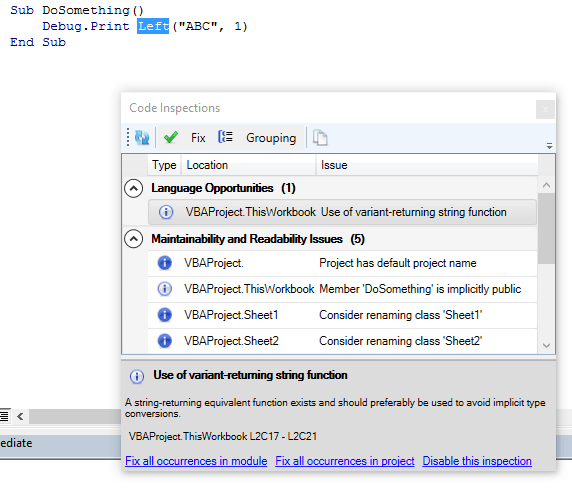
A brand new shiny WPF UI for all docked toolwindows, a new settings dialog, “why?” rationale for every inspection result, “fix ’em all” across the project/module, or disable inspections with a single click.
Our parser/resolver is much more powerful now – all known parser issues (as of v1.4.3) are now fixed, and new ones you never encountered too.
Unit testing works in AutoCAD and CorelDRAW now, and although the settings have no effect, the API is there and you can use a new PermissiveAssertClass that evaluates Equals in a less strict type-safe way, to work more like VB6 would do it.
There’s a lot to say and a lot will be said I’m sure.
Poke around, play with it – by all means, break it – and if you do break it, make sure you let us know how, so we can fix it by the time we ship the “real” 2.0 build.
Apparently there’s still a fewinspection false positives (although it should be much better than in 1.x), so make sure you double-check before you fix all occurrences in project.
I first noticed this strange behavior when I refactored Rubberduck’s menu system last summer: although I was 100% certain that there only ever was a single instance of a given menu item, in the Click event handler the sender object’s GetHashCode method returned a different value every time the handler ran.
GetHashCode, in the “normal” .net world, is tightly related to the Equals implementation – whenever you override Equals, you must also override GetHashCode. The value returned by this method is used by data structures like Dictionary and HashSet to determine some kind of “object ID” – the rules are simple:
if two things are equal (Equals(...) == true) then they must return the same value for GetHashCode()
if the GetHashCode() is equal, it is not necessary for them to be the same; this is a collision, and Equals will be called to see if it is a real equality or not.
In the “normal” .net world, it’s usually safe to assume that an object’s hash code doesn’t change throughout the lifetime of the object – because a correct implementation relies on immutable data.
Apparently COM Interop has different rules.
When Rubberduck parses the projects in the VBE, it generates a plethora of Declaration objects – thousands of them. There’s a Declaration object not only for every declared variable, procedure, property, parameter, constant or enum member, but also one for every VBComponent, and one for each VBProject – anything that has an identifier that can appear in code has a Declaration object for it. Declarations are related to each others, so any given Declaration instance knows which Declaration is its “parent”. For example, a module-level variable has the declaration for the module as its parent, and the declaration for that module has the declaration for the project as its parent.
On the first pass, there’s no problem: we’re just collecting new data.
Problems start when a module was modified, and is now being re-parsed. The parser state already has hundreds of declarations for that module, and they need to be replaced, because they’re immutable. And to be replaced, they need to be identified as declarations that belong under the module we’re re-parsing.
A module’s name must be unique within a project – we can’t just say “remove all existing declarations under Module1”, because “Module1” in and by itself isn’t enough to unambiguously qualify the identifier. We can’t even say “remove all existing declarations under Project1.Module1”, because the VBE has no problem at all with having two distinct projects with the same name.
In Rubberduck 1.x we used object equality at project level: if a declaration’s Project was the same reference as the VBProject instance we were processing, then it had to be the same object. Right? Wrong.
And this is how we got stumped.
We couldn’t use a project’s FileName, because merely accessing the property when the project is unsaved, throws a beautiful COMException – and we could be facing 5 different unsaved projects with the same name, and we needed a way to tell which project that modified “Sheet1” module belonged under. We couldn’t use a project’s hash code, because it was now known to be unreliable. We couldn’t use… we couldn’t use anything.
This COM Interop issue was threatening the entire Rubberduck project, and shattered our hopes of one day coming up with an efficient way of mapping a parse tree and a bunch of Declaration objects to a VBComponent instance: we were condemmned to constantly scrap everything we knew hadn’t changed since the last parse, and re-process everything, just to be 100% sure that the internal representation of the code matched with what the IDE actually had.
What about hi-jacking one of the R/W properties that are never going to end up user facing? Like .HelpFile? Just copy the original hashcode to the property and then search for it.
Genius!
Rubberduck 2.0 will hijack the VBProject.HelpFile property, and use it to store a ProjectId value that uniquely identifies every project in the IDE.
Problem solved! Nobody ever writes anything to that property, right?
Stay tuned, we’re just about to announce something very, very cool =)
The idea has always been floating around, and a number of feature requests had been made to support something like it.
Not to mention all the Stack Overflow questions asking how to iterate the members of a module, with answers explaining how to use the VBIDE API to achieve some level of “reflection”.
The VBIDE API works: it gives you the members of a module rather easily. But if you need anything more granular, like iterating the local variables in a given member, you’ll have to write code to manually parse that member’s code, and if you’re trying to programmatically access all references to a global variable, you’re in for lots of “fun”.
Truth is, the VBIDE API is bare-bones, and if you want to do anything remotely sophisticated with it, you basically need to write your own parser.
Rubberduck 2.0 will expose [some of] its guts to VBA clients, through COM reflection – using the ParserState API, you’ll be able to write code like this:
..and leverage the richness of Rubberduck’s own API to iterate not only module members, but any declaration Rubberduck is aware of – that includes everything from modules and their members, down to variables, constants, events, Declare statements, and even line labels. You can also iterate the references of any declaration, so in theory you could implement your own code inspections with VBA and, in conjunction with the VBIDE API, you could even implement your own refactorings…
This API can easily grow TONS of features, so the initial 2.0 release will only include a minimalist, basic functionality.
One can easily imagine that this API will eventually enable surgically parsing a given specific class module, and then iterating its public properties to create form controls for each one, e.g. a Boolean property maps to a checkbox, a String property maps to a textbox, etc. – takes dynamic UI generation to a whole new level.
It was merged just yesterday. When Rubberduck 2.0 is released, VBA devs will have a new tool in their arsenal: full-fledged Git source control, seamlessly integrated into their IDE, in a dockable toolwindow:
Why use Source Control?
How many of you keep version and change tracking information in comments? Does this look any familiar?
These things don’t belong in code, they belong in your commit history. Using source control gives you that, so you can have code files that contain, well, code.
Collaborative work in VBA is pretty annoying anyway – you have to manually merge changes, and import/export modules manually, if you’re not outright copy/pasting code. This is error-prone and, let’s face it, nobody does it.
With Rubberduck and your GitHub repository two clicks away, you can now work on your code even if you don’t have the macro-enabled workbook with you right now. Because Rubberduck doesn’t just dump the .xlsm file into a GitHub repo – it actually exports each individual code file (yes, including workbooks and worksheets and UserForms) into an actual working directory, so you can work in VBA just like you would in VB6.. or C#, or Java.
You can create a branch, and work on a feature while shielding your “master” branch from these changes, issue a bug-fix on “master”, merge the bug-fix into your dev branch, finalize your work, then merge your dev branch into master, and release a new version: that’s how devs work, and that’s how VBA devs can work too, even if they’re a lone wolf.
Source Control integration was issue #50 in Rubberduck’s repository (we’re now at #1219, some 3,000 commits later) – we wanted this feature all along. And we’re delivering it next release, promise.
Special thanks to @Hosch250, who worked astonishingly hard to make this happen.
I’ve been working on quite a lot of things these past few weeks, things that open up new horizons and help stabilize the foundations – the identifier reference resolver.
Precompiler Directives
And we’ve had major contributions too, from @autoboosh: Rubberduck’s parser now literally interprets precompiler directives, which leaves only the “live” code path for the parsing and resolving to work with. This means you can scratch what I wrote in an earlier post about this snippet:
[…] Not only that, but a limitation of the grammar makes it so that whatever we do, we’ll never be able to parse the [horrible, awfully evil] below code correctly, because that #If block is interfering with another parser rule:
Private Type MyType
  #If DEBUG_ Then
    MyMember As Long
  #Else
    MyMember As Integer
  #End If
End Type
And this (thoroughly evil) one too:
  #If DEBUG_ Then
    Sub DoSomething()
  #Else
    Sub DoSomethingElse()
  #End If
      '...
    End Sub
Rubberduck 2.0 will have no problem with those… as long as DEBUG_ is defined with a #Const statement – the only thing that’s breaking it is project-wide precompiler constants, which don’t seem to be accessible anywhere from the VBIDE API. Future versions might try to hook up the project properties window and read these constants from there though.
Isn’t that great news?
But wait, there’s more.
Project References
One of the requirements for our resolver to correctly identify which declaration an identifier might be referring to, is to know what the declarations are. Take this code:
  Dim conn As New ADODB.Connection
  conn.ConnectionString = "..."
  conn.Open
Until I merged my work last night, the declarations for “ADODB” and “Connection” were literally hard-coded. If your code was referencing, say, the Scripting Runtime library to use a Dictionary object, the resolver had no way of knowing about it, and simply ignored it. The amount of work involved to hard-code all declarations for the “most common” referenced libraries was ridiculously daunting and error-prone. And if you were referencing a less common library, it was “just too bad”. Oh, and we only had (parts of) the Microsoft Excel object model in there; if you were working in Access or Word, or AutoCAD, or any other host application that exposes an object model, the resolver simply treated all references to these types and their members, as undeclared identifiers – i.e. they were completely ignored.
I deleted these hard-coded declarations. Every single one of them. Oh and it felt great!
Instead, Rubberduck will now load the referenced type libraries, and perform some black magicCOM reflection to discover all the types and their members, and create a Declaration object for the resolver to work with.
This enables things like code inspections specific to a given type library, that only run when that library is referenced:
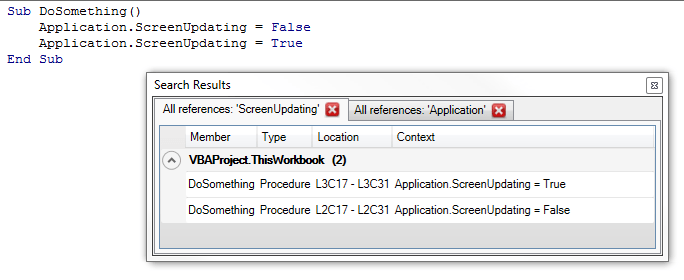
It also enables locating and browsing through references of not only your code, but also built-in declarations:
Doing this highlighted a major performance issue with the resolver: all of a sudden, there was 50,000 declarations to iterate whenever we were looking for an identifier – and the resolver did an awful job at being efficient there. So I changed that, and now most identifier lookups are O(1), which means the resolver now completes in a fraction of the time it took before.
There’s still lots of room for improvement with the resolver. I started to put it under test – the unit tests for it are surprisingly easy to write, so there’s no excuse anymore; with that done, we’ll know we’re not breaking anything when we start refactoring it.
One of the limitations of v1.x was that project references were being ignored. Well, the resolver is now equipped to start dealing with those – that’s definitely the next step here.
Module/Member Attributes
Another limitation of v1.x was that we couldn’t see module attributes, so if a class had a PredeclaredId, we had no way of knowing – so the resolver essentially treated classes and standard modules the same, to avoid problems.
Well, not anymore. The first time we process a VBComponent, we’re silently exporting it to a temporary file, and give the text file to a specialized parser that’s responsible for picking up module and member attributes – then we give these attributes to our “declarations” tree walker, which creates the declaration objects. As a result, we now know that a UserForm module has a PredeclaredId. And if you have a VB_Description attribute for each member, we pick it up – the Code Explorer will even be able to display it as a tooltip!
What about multithreading?
I tried hard. Very hard. I have a commit history to prove it. Perhaps I didn’t try hard enough though. But the parser state simply isn’t thread-safe, and with all the different components listening for parser state events (e.g. StateChanged, which triggers the code inspections to run in the background and the code and todo explorers to refresh), I wasn’t able to get the parser to run a thread-per-module and work in a reliable way.
Add to that, that we intend to make async parsing be triggered by a keyhook that detects keypresses in a code pane, parsing on multiple threads and getting all threads to agree on the current parser state is a notch above what I can achieve all by myself.
So unless a contributor wants to step in and fix this, Rubberduck 2.0 will still be processing the modules sequentially – the difference with 1.x is the tremendous resolver performance improvements, and the fact that we’re no longer blocking the UI thread, so you can continue to browse (and modify!) the code while Rubberduck is working.
What’s left to do for this to work well, now that the parsing and resolving is stabilized, is to allow graceful cancellation of the async task – because if you modify code that’s being parsed or resolved, the parser state is stale before the task even completes.
In Rubberduck 1.x, we processed each module in each project sequentially. Rubberduck 2.0 will change that and have the parsing happen in parallel, asynchronously. After parsing all modules, we need to resolve identifier references – that isn’t changing in 2.0. The 2.0 parser is a great improvement over the 1.x, but the high-level strategy remains the same.
What’s happening under the hood?
The hard work is really being done by ANTLR here. We have an ANTLR grammar that defines lexer and parser rules that, together, define what text input is legal and what input isn’t. Of course that grammar isn’t perfect, and when the parser rules mismatch the actual VBA language rules, the result is code that the VBE can compile, but that Rubberduck can’t parse. A good example of that is the set of parser rules for #If/#EndIf precompiler directives/blocks:
This definition is flawed – the moduleBody rule only allows functions, procedures and property definitions; therefore, any #If block in the declarations section of a module will trip the parser and fire a parser error, even though the VBE compiles it perfectly fine.
Not only that, but a limitation of the grammar makes it so that whatever we do, we’ll never be able to parse the [horrible, awfully evil] below code correctly, because that #If block is interfering with another parser rule:
  #If DEBUG Then
    Sub DoSomething()
  #Else
    Sub DoSomethingElse()
  #End If
      '...
    End Sub
Additionally, we’ll never be able to resolve the below code correctly, because MyMember exists twice in the same scope:
Private Type MyType
  #If DEBUG Then
    MyMember As Long
  #Else
    MyMember As Integer
  #End If
End Type
So, during the parsing phase, we use ANTLR to generate a parse tree for every module in every project in the VBE; one problem, is that a parse tree only contains the code of one module, and despite there being grammar rules to define what’s a variable and what’s a procedure, nothing in the grammar defines context, so there’s no way the parse tree alone can know whether “foo =42” means you’re assigning the return value of a function called “foo”, or if you’re assigning 42 to a local variable, or to a global one; the parse trees know nothing of VBA’s scoping rules. And since there’s a parse tree per module, there’s no way “foo” in parse tree A could be known to refer to the “foo” declared in parse tree B.
That’s why we need to further process these parse trees.
First pass: find all declarations
So we walk the parse trees – each one of them. We locate all declarations; everything that has a name that can be referenced in VBA code is a declaration. Look at the DeclarationType enum: no less than 24 things are considered a “declaration” – even line labels.
In Rubberduck 1.x, we traversed each parse tree one after the other; in 2.x, when we need to parse everything in the VBE, we traverse each parse tree in parallel – which may or may not mean that two or more parse trees are being traversed at the same time, depending on your hardware and other things.
The longer a code module is, the longer it takes to process it.
One thing to note, is that while we’re walking the parse trees and capturing “Dim” statements that declare variables, there’s no way we can capture a variable that’s used but undeclared at that point – without Option Explicit set, an undeclared variable simply goes completely under the radar… and there’s nothing we can do about it, since there’s, well, no declaration for it.
The other thing to note, is that if a single parse tree is in an error state, everything falls apart because that parse tree is missing declarations, and identifier usages – hence, we’re disabling all Rubberduck features that require a Ready state, whenever any module can’t be parsed.
Second pass: resolve identifier usages
Once we know what’s what, what’s declared where and how, we have the context that the grammar alone couldn’t define – we know that there’s a “foo” variable scoped locally to a function called “GetFoo”, on line 42 of “Module1”. That’s great, but still not good enough for our needs. We also need to know that function “GetFoo” is called on line 12 of “Module2”, and whether and where “foo” is assigned a value.
The only way to do this, is to walk the parse trees again – this time tracking what scope we’re in as we walk down the module, and every time we encounter an identifier reference, we need to figure out exactly what declaration we’re looking at.
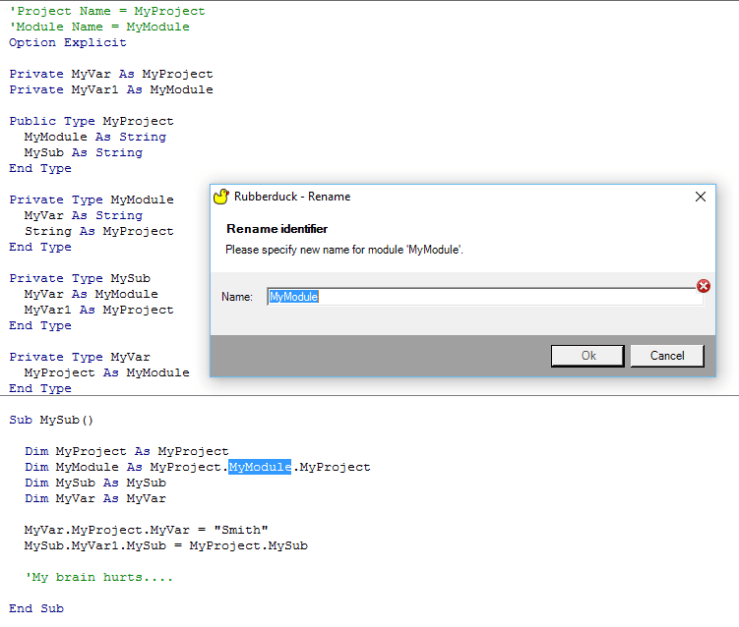
And that’s not exactly easy. VBA allows mind-blowingly ambiguous code to compile just fine, so “foo” can very well be referring to a half-dozen potential declarations: which one it’s actually referring to depends on the current scope, and whether our implementation of VBA’s scoping rules is correct:
Fiendishly ambiguous VBA code compiles fine, and resolves fine in Rubberduck 2.0, too
For a vast majority of cases, we’re doing good. And the 2.0 resolver is, so far, fixing a good number of issues too, so we’re getting even better… but it’s still not perfect.
What happens if we don’t resolve “foo” correctly? Bugs! You right-click “foo” and select “find all references”, and you get surprises. And then you refactor/rename it, and you end up breaking your code instead of improving it. Not quite what we intend to happen.
Why re-resolve everything everytime?
All of the above processing doesn’t happen all the time. In Rubberduck 1.x, we cached parse trees and used a hash of the content of each module, to determine whether a module had been modified since the last parse. In Rubberduck 2.x, we want to have a keyhook to capture modifications to a module as it’s happening, and start reparsing that module in the background while you’re typing – so when you’re ready to use one of Rubberduck’s features, the changes have been processed already.
That leaves a little gap though: if you’re cutting/pasting code with your mouse, or if another add-in modifies the code, the keyhook alone won’t pick up the changes, so 2.0 will still need the content hash, to avoid re-parsing modules that didn’t change, and to re-parse modules that we didn’t know actually changed.
The reason we need to parse an entire module (versus, for example, just the procedure that was just modified), is because the parse tree is made of tokens, and tokens retain their position… in the parse tree: unless the parse tree contains the entire module, we don’t know where in the module a token is located. And that’s crucial information.
That covers the parser. But what about the resolver?
We still need to re-walk every parse tree and resolve every identifier usage, every time a single module’s been parsed. The resolver task needs to start when all modules have completed parsing, and to cancel when any module starts a re-parse. If we could somehow examine a diff of the pre and post parse trees, and determine exactly what declarations and what identifier references have been added or removed, perhaps we wouldn’t need to do the whole thing.
But because we can’t know if the modified code is referring to things declared in another module, we need to make sure everything is kept in sync, …and the cost of this is to walk the parse trees and re-resolve everything again.
In Rubberduck 1.x this was a UI-blocking operation, and we displayed a little “progress” dialog that showed what module was being walked.
In Rubberduck 2.0 this will happen in the background, and parse trees will be walked in parallel, so we won’t be able to display that little “progress” dialog, because at any given time more than one module is possible being walked.
Instead, we’ll make a little UI that will display the state of each module, but that UI will only show up when you click the parser state label on the Rubberduck CommandBar, a new toolbar we’re adding to the VBE to compensate for the lack of a status bar in the IDE.
In Rubberduck 3.0 we hope to be able to restructure things in such a way that we’ll be able to minimize the amount of parse tree walking, and hopefully resolve identifier references in a smarter way… but 3.0 is a long way down the road; Rubberduck 2.0 is coming along nicely, but we still can’t commit to a release date at this point, unfortunately.
If you’re a seasoned VBA developer, you probably have your “VBA Toolbox” – a set of classes that you systematically include in pretty much every single new VBA project.
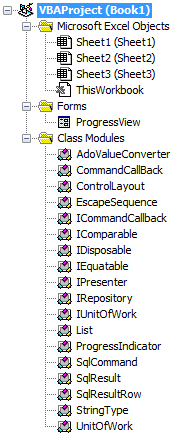
Before you’ve even written a single line of code, your project might look something like this already:
The VBE’s Project Explorer gives you folders that regroup components by component type: forms in a folder, standard modules in another, and classes in another.
That’s greatok for small projects, perhaps. But as your toolbox grows, the classes that are specific to your project get drowned in a sea of class modules, and if you’re into object-oriented programming, you soon end up finding needles in a haystack. “But they’re sorted alphabetically, it’s not that bad!” – sure. And then you come up with all kinds of prefixes and naming schemes to keep related things together, to trick the sorting and actually manage to find things in a decent manner.
The truth is, this sucks.
Now picture this:
You shouldn’t have to care about a component’s type. Since forever, the VBE has forced VBA developers to accept that it could possibly make sense to have completely unrelated forms grouped together, and completely unrelated classes together, just because they’re the same type of VBA objects.
But it doesn’t have to be this way. I like how Visual Studio /.net lets you organize things in folders, which [can] define namespaces, which are a scope on their own.
There’s not really a concept of namespaces inside a VBA project: you could simulate them with standard modules that expose global objects that regroup functionality, but still every component in a project is accessible from anywhere in that project anyway. And who needs namespaces anyway?
Rubberduck 2.0 will not give you namespaces – that would be defying the VBA compiler (you can’t have two classes with the same name in the same project). What it will give you though, is folders.
Cool! How does it work?
Since the early versions of Rubberduck, we’ve been using @annotations (aka “magic comments”) in the unit testing feature, to identify test modules and test methods. Rubberduck 2.0 simply expands on this, so you can annotate a module like this:
'@Folder Foo.Bar
And that module will be shown under a “Bar” folder, itself under a “Foo” folder. How simple is that! We’ll eventually make the delimiter configurable too, so if you prefer this:
'@Folder Foo/Bar
Then you can have it!
With the ability to easily organize your modules into a “virtual folder hierarchy”, adhering to the Single Responsibility Principle and writing object-oriented code that implies many small specialized classes, is no longer going to clutter up your IDE… now be kind, give your colleagues a link to Rubberduck’s website 😉
The Code Explorer
The goal behind the Code Explorer feature, is to make it easier to navigate your VBA project. It’s not just about organizing your code with folders: since version 1.21, the Code Explorer has allowed VBA devs to drill down and explore a module’s members without even looking at the code:
The 2.0 Code Explorer is still under development – but it’s coming along nicely. If you’re using the latest release (v1.4.3), you’ll notice that this treeview has something different: next release every dockable toolwindow will be an embedded WPF/XAML user control, which means better layouts, and an altogether nicer-looking UI. This change isn’t being done just because it’s prettier: it was pretty much required, due to massive architectural changes.
Object-Oriented Programming (OOP) is really all about 4 little things:
Abstraction.
Encapsulation.
Polymorphism.
Inheritance.
To make things clear: there’s no inheritance in VBA. But it doesn’t matter, because we can easily compensate with composition, which is often a better design decision, even in languages that support class inheritance.
The key to OOP, is classes. Why? Because classes are a blueprint for objects, …which are kinda the whole point of OOP.
Abstraction
If you’ve been writing code, you’ve been making abstractions. A procedure is abstracting a series of executable operations; a module abstracts a group of related operations, even variables are an abstraction, abstracting the result of an operation.
Or is that too abstract?
Levels of abstraction
If you think of the steps required to, say, make coffee, you might think of something like this:
Make sure there’s water in the coffee maker
Make sure there’s coffee in the coffee maker
Start the coffee maker
That would certainly make coffee, right?
What sub-steps could there be to make sure there’s water in the coffee maker? And to make sure there’s coffee in the coffee maker? Or even to start the coffee maker? These sub-steps are at a lower level of abstraction than the 3 higher-level ones.
Clean code operates on a single level of abstraction, and calls into more and more specialized code: notice we don’t care where the water compartment is at the higher levels.
That’s why we put the public members at the top: because they’re at a higher level of abstraction than the private members they’re calling.
Classes are an important abstraction: they define objects, which encapsulate data and expose methods to operate on it.
Encapsulation
Similar to abstraction, encapsulation abstracts away implementation details, exposing only what other code needs to work with.
Global variables are pretty much the opposite of encapsulation; and if you have a public field in a class module, you’re not encapsulating your data.
Instead of exposing a field, you’ll be exposing properties. Property accessors can have logic in them, and that’s the beauty of encapsulation: you’re keeping a value to yourself, and telling the rest of the world only what it needs to know.
Polymorphism
If you’ve never worked with interfaces before, that one can be hard to grasp… but it’s the coolest thing to do in VBA, because it truly unlocks the OOP-ness of the language.
Once, I implemented IRepository and IUnitOfWork interfaces in VBA. These interfaces allowed me to run my code using “fake” repositories and a “mock” unit of work, so I was able to develop a little CRUD application in Excel VBA, and test every single bit of functionality, without ever actually connecting to a database.
That worked, because I wrote the code specifically to depend on abstractions – an interface is a wonderful abstraction. The code needed something that had the CRUD methods needed to operate on the database tables: it didn’t care whether that thing used table A or table B – that’s an implementation detail!
The ability of an object to take many forms, is called polymorphism. When code works against an IRepository object rather than a CustomerRepository, it doesn’t matter that the concrete implementation is actually a ProductRepository or a CollectionBasedTestRepository.
Inheritance
VBA doens’t have that, which is sometimes frustrating: the ability for a class to inherit members from another class – when two classes relate to each other in an “is-a” manner, inheritance is at play.
Yes, inheritance is one of the 4 pillars of OOP, and composition isn’t. But inheritance has its pros and cons, and in many situations composition has more pros than cons. Well, class inheritance at least, but in VBA class and interface inheritance would be intertwined anyway, because a VBA interface is nothing more than a class with empty members.
What of Composition?
In VBA instead of saying that a class “is-a” something, we’ll say that the class “has-a” something. Subtle, but important difference: most languages that do support inheritance only ever allow a given type to inherit from one, single class.
When an object encapsulates instances of other objects, it’s leveraging composition. If you want, you can expose each member of the encapsulated object, and completely simulate class inheritance.
Ok…
…So, what does that have to do with Rubberduck?
Everything. The Visual Basic Editor (VBE) isn’t really helping you to write Object-Oriented code. In fact, it’s almost encouraging you not to.
Think of it:
The only way to find an identifier in a project is to make a text search and iterate the results one by one, including the false results.
The more classes and modules you have, the harder organizing your project becomes. And when you realize you need some sort of naming scheme to more efficiently find something in the alphabetically-sorted Project Explorer, it’s too late to rename anything without breaking everything.
So people minimized the number of modules in their VBA projects, and wrote procedural code that can’t quite be tested because of the tight coupling and low cohesion.
Tested?
I don’t mean F5-debug “tested”; I mean automated tests that run a function 15 times with different input, tests that execute every line of application logic without popping a UI, hitting a database or the file system; tests that test one thing, tests that document what the code is supposed to be doing, tests that fail when the code changes and breaks existing functionality you thought was totally unrelated.
Rubberduck loves OOP
It was already the case when the current v1.4.3 release was published, and the upcoming v2.0 release is going to confirm it: Rubberduck is a tool that helps you refactor legacy VBA code to OOP, and helps you write testable – and tested – object-oriented VBA code.
The Find implementations feature is but an example of a wonderful object-oriented navigation tool: it locates and lets you browse all classes that implement a given interface. Or all members, wherever they are, that implement a given interface member.
Is OOP overkill for VBA? Sometimes. Depends what you need VBA for. But the IDE shouldn’t be what makes you second-guess whether it’s a good idea to push a language as far as it can go.
When numbering versions, incrementing the “major” digit is reserved for breaking changes – and that’s exactly what Rubberduck 2.0 will introduce.
I have these changes in my own personal fork at the moment, not yet PR’d into the main repository.. but as more and more people fork the main repo I feel a need to go over some of the changes that are about to happen to the code base.
If you’re wondering, it’s becoming clearer now, that Rubberduck 2.0 will not be released until another couple of months – at this rate we’re looking at something like the end of winter 2016… but it’s going to be worth the wait.
Inversion of Control
In Rubberduck 1.x we had a class called RubberduckMenu, which was responsible for creating the add-in’s menu items. Then we had a RefactorMenu class, which was in theory responsible for creating the Refactor sub-menu under the main Rubberduck menu and in the code pane context menu. As more and more features were added, these classes became cluttered with more and more responsibilities, and it became clear that we needed a more maintainable way of implementing this, in a way that wouldn’t require us to modify a menu class whenever we needed to add a functionality.
In the Rubberduck 2.0 code base, RubberduckMenu and RefactorMenu (and every other “Menu” class) is deprecated, and all the per-functionality code is being moved into dedicated “Command” classes. For now everything is living in the Rubberduck.UI.Command namespace – we’ll eventually clean that up, but the beauty here is that adding a new menu item amounts to simply implementing the new functionality; take the TestExplorerCommand for example:
public class TestExplorerCommand : CommandBase
{
    private readonly IPresenter _presenter;
    public TestExplorerCommand(IPresenter presenter)
    {
        _presenter = presenter;
    }

    public override void Execute(object parameter)
    {
        _presenter.Show();
    }
}
Really, that’s all there is to it. The “Test Explorer” menu item is even simpler:
public class TestExplorerCommandMenuItem : CommandMenuItemBase
{
    public TestExplorerCommandMenuItem(ICommand command)
        : base(command)
    {
    }

    public override string Key { get { return "TestMenu_TextExplorer"; }}
    public override int DisplayOrder { get { return (int)UnitTestingMenuItemDisplayOrder.TestExplorer; } }
}
The IoC container (Ninject) knows to inject a TestExplorerCommand for this ICommand constructor parameter, merely by a naming convention (and a bit of reflection magic); the Key property is used for fetching the localized resource – this means Rubberduck 2.0 will no longer need to re-construct the entire application when the user changes the display language in the options dialog: we simply call the parent menu’s Localize method, and all captions get updated to the selected language. …and modifying the display order of menu items is now as trivial as changing the order of enum members:
public enum UnitTestingMenuItemDisplayOrder
{
    TestExplorer,
    RunAllTests,
    AddTestModule,
    AddTestMethod,
    AddTestMethodExpectedError
}
The “downside” is that the code that initializes all the menu items has been moved to a dedicated Ninject module (CommandbarsModule), and relies quite heavily on reflection and naming conventions… which can make things appear “automagic” to someone new to the code base or unfamiliar with Dependency Injection. For example, ICommand is automatically bound to FooCommandwhen it is requested in the constructor of FooCommandMenuItem, and we now have dedicated methods for setting up which IMenuItem objects appear under each “parent menu”:
private IMenuItem GetRefactoringsParentMenu()
{
    var items = new IMenuItem[]
    {
        _kernel.Get<RefactorRenameCommandMenuItem>(),
        _kernel.Get<RefactorExtractMethodCommandMenuItem>(),
        _kernel.Get<RefactorReorderParametersCommandMenuItem>(),
        _kernel.Get<RefactorRemoveParametersCommandMenuItem>(),
    };
    return new RefactoringsParentMenu(items);
}
The end result, is that instead of creating menus in the VBE’s commandbars and handling their click events in the same place, we’ve now completely split a number of responsibilities into different types, so that the App class can now be injected with a very clean AppMenu object:
public class AppMenu : IAppMenu
{
    private readonly IEnumerable<IParentMenuItem> _menus;

    public AppMenu(IEnumerable<IParentMenuItem> menus)
    {
        _menus = menus;
    }

    public void Initialize()
    {
        foreach (var menu in _menus)
        {
            menu.Initialize();
        }
    }

    public void EvaluateCanExecute(RubberduckParserState state)
    {
        foreach (var menu in _menus)
        {
            menu.EvaluateCanExecute(state);
        }
    }

    public void Localize()
    {
        foreach (var menu in _menus)
        {
            menu.Localize();
        }
    }
}
These changes, as welcome as they are, have basically broken the entire application… for the Greater Good. Rubberduck 2.0 will be unspeakably easier to maintain and extend.
When numbering versions, incrementing the “major” digit is reserved for breaking changes – and that’s exactly what Rubberduck 2.0 will introduce.
I have these changes in my own personal fork at the moment, not yet PR’d into the main repository.. but as more and more people fork the main repo I feel a need to go over some of the changes that are about to happen to the code base.
If you’re wondering, it’s becoming clearer now, that Rubberduck 2.0 will not be released until another couple of months – at this rate we’re looking at something like the end of winter 2016… but it’s going to be worth the wait.
Parser State
Parsing in Rubberduck 1.x was relatively simple:
User clicks on a command that requires a fresh parse tree;
Parser knows which modules have been modified since the last parse, so only the modified modules are processed by the ANTLR parser;
Once we have a parse tree and a set of Declaration objects for everything (modules, procedures, variables, etc.), we resolve the identifier usages we encounter as we walk the parse tree again, to one of these declarations;
Once identifier resolution is completed, the command can run.
The parse results were cached, so that if the Code Explorer processed the entire code base to show up, and then the user wanted to run code inspections or one of the refactor commands, they could be reused as long as none of the modules were modified.
Parsing in Rubberduck 2.0 flips this around and completely centralizes the parser state, which means the commands that require a fresh parse tree can be disabled until a fresh parse tree is available.
We’ve implemented a key hook that tells the parser whenever the user has pressed a key that’s changed the content of the active code pane. When the 2.0 parser receives this message, it cancels the parse task (wherever it’s at) for that module, and starts it over; anytime there’s a “ready” parse tree for all modules, the expensive identifier resolution step begins in the background – and once that step completes, the parser sends a message to whoever is listening, essentially saying “If you ever need to analyze some code, I have everything you need right here”.
Sounds great! So… What does it mean?
It means the Code Explorer and Find Symbol features no longer need to trigger a parse, and no longer need to even wait for identifier resolution to complete before they can do their thing.
It means no feature ever needs to trigger a parse anymore, and Rubberduck will be able to disable the relevant menu commands until parser state is ready to handle what you want to do, like refactor/rename,find all references or go to implementation.
It means despite the VBE not having a status bar, we can (read: will) use a command bar to display the current parser state in real-time (as you type!), and let you click that parser state command button to expand the parser/resolver progress and see exactly what little ducky’s working on in the background.






 Rubberduck News