I'm Mathieu Guindon (Microsoft MVP Office Apps & Services, 2018-2022), you may have known me as "Mat's Mug" on Stack Overflow and Code Review Stack Exchange.
I manage the Rubberduck open-source project, whose goal is to bring the Visual Basic Editor (VBE) - VBA's IDE - into the 21st century, by providing features modern IDE's provide.
I’m pleased to announce that Rubberduck release version 2.5.2 has achieved over 32 thousand total downloads this month, overflowing a VBA Integer data type! Big numbers are fun and all, but the time has come to reset the counters and officially release the next version.
Those of you that have been keeping up with the many pre-release builds for the past two years will not have too many surprises here, but for the vast majority of you this will be a welcome upgrade with the combined efforts of our contributors over the past 20 months or so. That’s two Hacktoberfests and over 700 commits from 180 pull requests!
See rubberduckvba.com/features for more information about Rubberduck features.
What’s New?
This release brings an awesome new peek definition navigation command (pre-released in 2021!), which lets you view source code that’s anywhere else in the project, without leaving where you’re at.
The Fakes API has been seriously enhanced with more than a dozen new standard library function overrides, as discussed in details in a previous article.
The version check feature is no longer sending HTTP requests to legacy routes on the website (although the website still supports them, so the feature still works in older Rubberduck installs). Instead, an HTTPS request is sent to the public API behind the website – the result is a more reliable feature that now receives much more information than just a version number. It wouldn’t be surprising to see a future iteration show additional information about the latest tag/release, such as the number of downloads, and the installer executable asset URL, for example.
A Rubberduck release wouldn’t be a Rubberduck release without at least a handful of new inspections! 6 new inspections are coming this time around:
IIf side-effects flags uses of the IIf function where arguments are potentially side-effecting.
Public control field access flags code that accesses form controls from outside the form, recommending a more encapsulated approach.
Public Enum in Worksheet module warns about Enum types declared in a Worksheet document module, which can easily result in compilation errors when the worksheet is later copied.
Suspicious predeclared instance access warns about accesses to a form’s predeclared instance made in that form’s code-behind module; depending on how the form is used, such code may not work as intended.
UDT Member not usedfinds UDT members that are declared without being referenced anywhere.
The Extract Methodrefactoring is making a long-awaited comeback, 5 whole years after the old 2.0 implementation was deemed irreparably broken. It has a number of limitations, for now the selection to extract cannot contain any of the following:
GoTo statements
GoSub...Return statements
Conditionally-compiled statements
This obviously isn’t an exhaustive list of everything that happened in the last two years, but it’s a good summary of the new stuff.
What’s next?
This release is the last one planned to start with a 2; work has started on Rubberduck 3.0, a major overhaul of everything we’ve built so far. Rubberduck is being split into client/server processes, storage is moving out-of-process, and the entire user interface is being remade to support everything that’s coming in v3.
Because a massive number of breaking changes need to happen, RD3 is being developed in a separate repository; you’ll find it under the rubberduck-vba organization on GitHub, and that’s where the bulk of development efforts are going to be directed at in the coming months.
Website
The new revamped website is live now; still has a couple of annoying issues (search results page links don’t work, for one), but overall I’m very happy with how it turned out!
Swag Shop
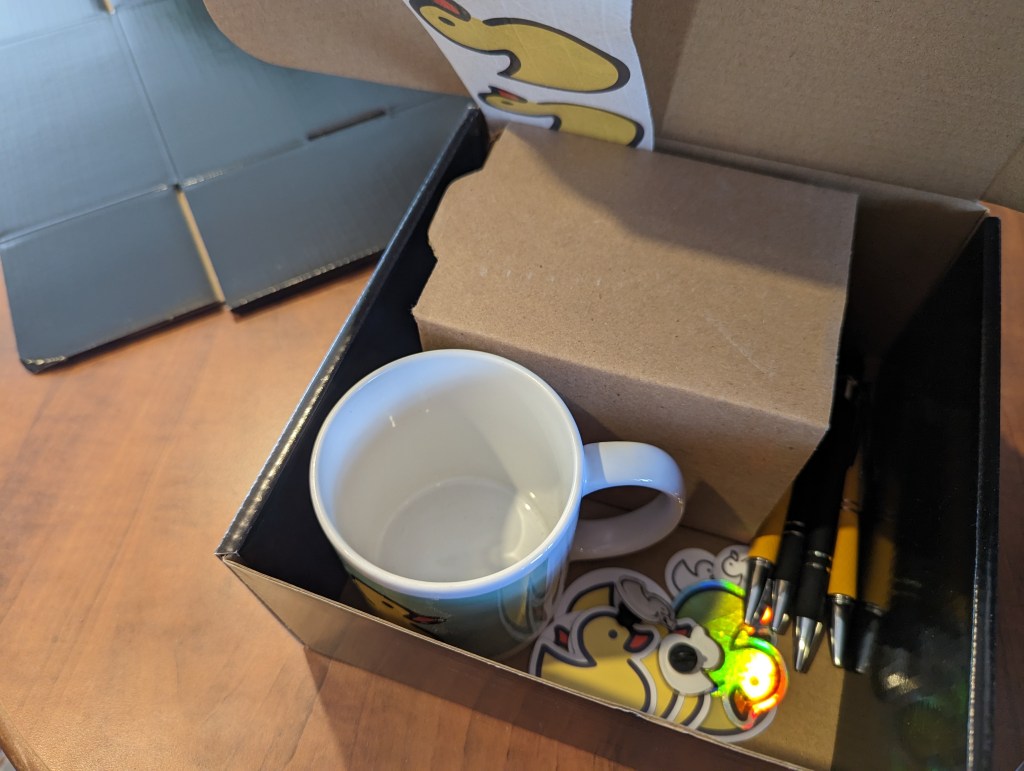
If you’re following Rubberduck on social media, you know I’ve opened a swag shop where you can get Rubberduck-branded mugs, pens, stickers, t-shirts, and more; these past couple of weeks I’ve been building an assortment of various products at various price points for various budgets. Shipping remains a challenge (it’s expensive!), but Ko-fi doesn’t take a cut on shop sales (or donations), which makes it a better deal for a shop with uncertain sales, compared to say Amazon, where shipping is less of a challenge but the monthly fees are prohibitive for a small-volume shop.
There’s now a rather decent offering and quite a lot of inventory; eventually I’ll get more stuff made (hats, hoodies maybe), and will replenish whatever runs out, but my attention will be mostly dedicated to Rubberduck3 development now.
Rubberduck 2.x has been an amazing adventure and a tremendous learning experience – I’m primed and looking forward to all the new challenges porting 2.x to RD3 will bring!
Among the very first language keywords one comes across when learning VBA, is the Dim keyword; declaring and using variables is easily the first step one takes on their journey away from the macro recorder.
About Scopes
Before we can really understand what variables do and what they’re useful for, we need to have a minimal grasp of the concept of scoping. When you record a macro, the executable instructions get written for you inside a procedure scope that’s delimited with Sub and End Sub tokens (tokens are the grammatical elements of the language, not necessarily single keywords), with the identifier name of the macro after the Sub keyword:
Sub DoSomething()
    ' executable code goes here
End Sub
Exactly none of the above code is executable, but compiling it creates an entry point that the VBA runtime can invoke and execute, because the procedure is implicitly public and as such, can be accessed from outside the “Module1” module it exists in (with or without Option Private Module). In other words the above code could tell us explicitly what the scope of the DoSomething procedure is, using the Public keyword before the Sub token:
Public Sub DoSomething()
    ' executable code goes here
End Sub
If we used Private instead, then Excel (or whatever the host application is) could not “see” it, so you would no longer find DoSomething in the list of available macros, and other modules in the same VBA project couldn’t “see” or invoke it either; a private procedure is only callable from other procedures in the same module.
Standard modules are themselves public, so you can refer to them from any other module in your project, and invoke their public members using the member access operator, the dot:
Public Sub DoStuff()
   Module1.DoSomething
End Sub
Because public members of public modules become part of a global namespace, the public members can be referred to without an explicit qualifier:
Public Sub DoStuff()
    DoSomething
End Sub
While convenient to type, it also somewhat obscures exactly what code is being invoked: without an IDE and a “navigate to definition” command, it would be pretty hard to know where that other procedure is located.
The global namespace contains not only the public identifiers from your VBA project, but also all the public identifiers from every referenced library, and they don’t need to be qualified either so that’s how you can invoke the VBA.Interaction.MsgBox function without qualifying with the library or module it’s defined in. If you write your own MsgBox function, every unqualified MsgBox call in that project is now invoking that new custom function, because VBA always prioritizes the host VBA project’s own type library over the referenced ones (every VBA project references the VBA standard library and the type library that defines the COM extension and automation model for the host application).
But that’s all going outward from a module: within a module, there are two levels of scoping: module level members can be accessed from anywhere in the module, and procedure level declarations can be accessed from anywhere inside that procedure.
Module-level declarations use Public and Private modifiers, and procedure-level ones use the Dim keyword. Dim is legal at module level too, but because Private and Public are only legal at module level (you can’t use them for procedure scope / “local” declarations), Rubberduck encourages you to use Dim for locals only.
For example a variable declared in a conditional block is allocated when the stack frame is entered regardless of the state when the condition gets evaluated, and a variable declared inside a loop body is the same variable outside that loop, and for every iteration of that loop as well: there is no “block scope” in VBA.
Non-Executable Statements
Procedures don’t only contain executable instructions: Dim statements, like statements with Private and Public modifiers, are declarative and do not do anything. You cannot place a debugger breakpoint (F9) on such statements, either. This is important to keep in mind: the smallest scope in VBA is the procedure scope, and it includes the parameters and all the local declarations of that procedure – regardless of where in the procedure body they’re declared at, so the reason to declare variables as you need them has more to do with reducing mental load and making it easier to later extract a method by moving a chunk of code into another procedure scope. Declaring all locals at the top of a procedure often results in unused variables dangling, because of the constant up-and-down, back-and-forth scrolling that inevitably happens when a procedure eventually grows; the further a variable is out of its context, the more it becomes a liability.
Const statements (to declare constant values) are also legal in local/procedure scope, and they’re identically non-executable; the same applies to Static declarations (variables that retain their value between invocations).
ReDim statements however are executable, even though they also count as a compile-time declaration – but they don’t count as a duplicate declaration, so the presence of ReDim doesn’t really justify skipping an initial Dim declaration.
Explicitness as an Option
Not only access modifiers can be implicit in VBA; the language lets you define a Variant variable on the fly, without a prior explicit declaration. If this behavior is practical for getting the job done and will indeed work perfectly fine, it’s also unnecessarily putting you at risk of typos that will only become a problem at run-time, if you’re lucky close enough to the source of the problem to hunt down and debug. By specifying Option Explicit at the top of every module, the compiler will treat implicit declarations as compile-time errors, telling you about the problem before it even becomes one.
Option Explicit has its limits though, and won’t protect you from typos in late-bound member calls, where invoking a member that doesn’t exist on a given object throws error 438 at run-time.
When to Declare a Variable
There are many reasons to declare a variable, but if you’re cleaning up macro recorder code the first thing you’ll want to do is to remove the dependency on Selection and qualifyRange and Cells member calls with a proper Worksheet object.
For example before might look like this:
Sub Macro1
    Range("A10") = 42
    Sheet2.Activate
    Range("B10") = 42
End Sub
And after might look like this:
Public Sub Macro1()
    Dim Sheet As Worksheet
    Set Sheet = ActiveSheet
    Sheet.Range("A10") = 42
    Sheet2.Activate
    Sheet.Range("B10") = 42
End Sub
The two procedures do exactly the same thing, but only one of them is doing it reliably. If the Sheet2 worksheet is already active, then there’s no difference and both versions produce identical output. Otherwise, one of them writes to whatever the ActiveSheet is, activates Sheet2, and then writes to that sheet.
There’s a notion of state in the first snippet that adds to the number of things you need to track and think about in order to understand what’s going on. Using variables, exactly what sheet is active at any point during execution has no impact whatsoever on the second snippet, beyond the initial assignment.
It’s that (global) state that’s behind erratic behavior such as code working differently when you leave it alone than when you step through – especially when loops start getting involved. Managing that global state makes everything harder than necessary.
Keep your state close, and your ducky closer, they say.
Set: With or Without?
Not being explicit can make the code read ambiguously, especially when you consider that objects in VBA can have default members. In the above snippets, the value 42 reads like it’s assigned to… the object that’s returned by the Range property getter of the Worksheet class. And that’s weird, because normally you would assign to a property of an object, not the object itself. VBA understands what it needs to do here, because the Range class says “I have a default member!” and that default member is implemented in such a way that giving it the value 42 does exactly the same as if the Range.Value member was being invoked explicitly. Because that behavior is an implementation detail, it means the only way to know is to read its documentation.
The Set keyword modifies an assignment instruction and says “we’re assigning an object reference”, so VBA doesn’t try to check if there’s a default member on the left-hand side of the assignment operator, and the compiler expects an object reference on the right-hand side, …and then only throws at run-time when that isn’t the case – but because this information is all statically available at compile-time, Rubberduck can warn about such suspicious assignments.
So to assign a variable that holds a reference to a Range object, we must use the Set keyword. To assign a variable that holds the value of a Range object, we must not use the Set keyword. Declaring an explicit data type for every variable (meaning not only declaring things, but also typing them) helps prevent very preventable bugs and subtle issues that can be hard to debug.
As SomethingExplicit
Whether Public or Private, whether local or global, most variables are better off with a specific data type using an As clause:
Dim IsSomething
Dim SomeNumber As Long
Dim SomeAmount As Currency
Dim SomeValue As Double
Dim SomeDateTime As Date
Dim SomeText As String
Dim SomeSheet As Worksheets
Dim SomeCell As Range
Using an explicit data/class/interface type, especially with objects, helps keep things early-bound, meaning both the compiler and static code analysis tools (like Rubberduck) can better tell what’s going on before the code actually gets to run.
We can often chain member calls; the Worksheets collection’s indexer necessarily yields a Worksheet object, no?
Public Sub Macro1()
    ActiveWorkbook.Worksheets("Sheet1").Range("A1").Value = 42
End Sub
If you manually type this instruction, you’ll notice something awkward that should be unexpected when you type the dot operator after Worksheets(“Sheet1”), because the property returns an Object interface… which tells VBA it has members that can be invoked, but leaves no compile-time clue about any of them. That’s why the Range member call is late-bound and only resolved at run-time, and because the compiler has no idea what the members are until the code is running, it cannot populate the completion list with the members of Worksheet, and will merrily compile and attempt to invoke a Range member.
By breaking the chain and declaring variables, we restore compile-time validations:
Public Sub Macro1()
    Dim Sheet As Worksheet
    Set Sheet = ActiveWorkbook.Worksheets("Sheet2")
    Sheet.Range("A1").Value = 42
End Sub
When NOT to Declare Variables
Variables are so nice, sometimes we declare them even when we don’t need them. There are many valid reasons to use a variable, including abstracting the result of an expression behind its value. Assuming every variable is assigned and referenced somewhere, there are still certain variables that are always redundant!
Objects are sneaky little things… not only can they have a default member that gets implicitly invoked, they can also have a default instance that lives in the global scope and is always named after the class it’s an instance of.
Declaring a local variable to hold a copy of a reference to an object that’s already globally accessible, is always redundant! Document modules (in Excel that’s ThisWorkbook and the Worksheet modules) and UserForms always have such a default instance:
Public Sub Macro1()
    Dim WB As Workbook
    Set WB = ThisWorkbook 'redundant and obscures intent!
    Dim Sheet As Worksheet
    Set Sheet = Sheet1 'redundant, just use Sheet1 directly!
End Sub
Sprinkle Generously
Variables are a simple but powerful tool in your arsenal. Using them enhances the abstraction level of your code, practices your brain to stop and think about naming things, can help prevent binding errors and remove implicit late-binding / keep your code entirely visible to the compiler and Rubberduck. Used wisely, variables can make a huge difference between messy and redundant macro-recorder code and squeaky-clean, professionally-written VBA code.
A little while ago already, I went and explored dynamic UI with MSForms in VBA through a lens tinted with Windows Presentation Foundation (WPF) concepts, and ended up implementing a working prototype Model-View-ViewModel (MVVM) framework for VBA… across a hundred and some modules covering everything from property and command bindings to input and model validation. I’m still planning to build an actual COM library for it one day – for now I’m entirely focused on everything around Rubberduck3.
Although… the last month or so has actually been mostly about publishing the new website and setting up the Ko-fi shop: the new website is not without issues (search links are broken, for one), but the source code ownership has been transferred to the rubberduck-vba organization on GitHub and I’m satisfied enough with it to move on.
But then there’s operating the shop. When an order comes in, there’s a worksheet (duh!) with a Sales table where I enter the invoice line items sold using a Stock Keeping Unit (SKU) code that identifies each item sold; the Inventory table picks up the sale and calculates a new Available to Sell figure.
But tracking items sold isn’t the whole picture: an Invoice table tracks the actual totals including the shipping charges and actual shipping costs (currently 24% underwater, but I’ve since adjusted the shipping charges to better reflect reality), computing the Cost of Goods Sold, and ultimately a profit margin.
So for each invoice, I know I need:
Invoice number and date
Billing/shipping information (name, address, etc.)
The number of units sold per SKU, with the amount paid by the customer
The shipping charge paid by the customer
And then I manually prepare the invoice document. Such a waste of time, right? Of course I couldn’t leave it at that – all I needed was a UserForm to enter all that, and a command that would update the merchandise planning workbook and prepare the invoice document for me.
Thing is, I wanted that form to use property bindings and some extent of MVVM, but I wasn’t going to import the 100+ modules of the old MVVM prototype code. So instead, I made a “lite” version.
Bindings and the propagation of property value changes are the core mechanics that make MVVM work, and we don’t need dozens of classes for that.
We do need INotifyPropertyChanged and IHandlePropertyChanged interfaces:
Option Explicit
Public Sub OnPropertyChanged(ByVal Source As Object, ByVal Name As String)
End Sub
Public Sub RegisterHandler(ByVal Handler As IHandlePropertyChanged)
End Sub
Option Explicit
Public Sub OnPropertyChanged(ByVal Source As Object, ByVal Name As String)
End Sub
These interfaces are important, because the bindings need to handle property changed events; the View Model needs to invoke the registered callbacks. This is used in place of actual events, because interfaces in VBA don’t expose events, and we want an abstraction around property changes, so that everything that needs to notify about property changes can do so in a standardized way.
The IHandlePropertyChanged interface is to be implemented by property binding classes, such as this TextBoxValueBinding class:
Option Explicit
Implements IHandlePropertyChanged
Private WithEvents UI As MSForms.TextBox

Private Type TBinding
    Source As Object
    SourceProperty As String
End Type

Private This As TBinding

Public Sub Initialize(ByVal Control As MSForms.TextBox, ByVal Source As Object, ByVal SourceProperty As String)
    Set UI = Control
    Set This.Source = Source
    This.SourceProperty = SourceProperty
    If TypeOf Source Is INotifyPropertyChanged Then RegisterPropertyChanges Source
End Sub

Private Sub RegisterPropertyChanges(ByVal Source As INotifyPropertyChanged)
    Source.RegisterHandler Me
End Sub

Private Sub IHandlePropertyChanged_OnPropertyChanged(ByVal Source As Object, ByVal Name As String)
    If Source Is This.Source And Name = This.SourceProperty Then
        UI.Text = VBA.Interaction.CallByName(This.Source, This.SourceProperty, VbGet)
    End If
End Sub

Private Sub UI_Change()
    VBA.Interaction.CallByName This.Source, This.SourceProperty, VbLet, UI.Value
End Sub
A binding has a source and a target object and property; the source is a ViewModel object, and the target is a MSForms control, in this case a TextBox. The binding must handle the control’s events to update the source whenever the value of the target changes. In this limited version we’re only going to handle the Change event, but if we wanted we could go further and handle KeyDown here to implement input validation. Some error handling wouldn’t hurt, either.
Because everything that involves notifying about property changes is standardized through interfaces, we can make a PropertyChangeNotification helper class to register the handlers:
Option Explicit
Private Handlers As VBA.Collection

Public Sub AddHandler(ByVal Handler As IHandlePropertyChanged)
    Handlers.Add Handler
End Sub

Public Sub Notify(ByVal Source As Object, ByVal Name As String)
    Dim Handler As IHandlePropertyChanged
    For Each Handler In Handlers
        Handler.OnPropertyChanged Source, Name
    Next
End Sub

Private Sub Class_Initialize()
    Set Handlers = New VBA.Collection
End Sub
This class is responsible for holding a reference to a collection of handlers, and a Notify method invokes the OnPropertyChange method on each registered handler.
ViewModel
The OrderHeaderModel class is the binding source, so it exposes a property representing the value of each field in the form. The Property Let procedures are all structured as follows:
If current encapsulated value is not equal to the new value…
Set the current value to the new value
Notify of a property change
ViewModel classses need to implement INotifyPropertyChange, and the implementation simply uses an instance of the helper class above to do its thing:
Option Explicit
Implements INotifyPropertyChanged

Private Notification As New PropertyChangeNotification

'...

Private Sub OnPropertyChanged(ByVal Name As String)
    INotifyPropertyChanged_OnPropertyChanged Me, Name
End Sub

Private Sub INotifyPropertyChanged_OnPropertyChanged(ByVal Source As Object, ByVal Name As String)
    Notification.Notify Source, Name
End Sub

Private Sub INotifyPropertyChanged_RegisterHandler(ByVal Handler As IHandlePropertyChanged)
    Notification.AddHandler Handler
End Sub
The private OnPropertyChanged method further simplifies the notification by providing the Source argument, which needs to be an instance of the ViewModel, so that’s always Me. So the properties all look more or less like this:
Public Property Get OrderNumber() As Long
    OrderNumber = This.OrderNumber
End Property

Public Property Let OrderNumber(ByVal Value As Long)
    If This.OrderDate <> Value Then
        This.OrderNumber = Value
        OnPropertyChanged "OrderNumber"
    End If
End Property
The ViewModel is inherently domain-specific, so for a form that collects information about an order we’re going to be looking at properties like OrderNumber, OrderDate, BillToName, ShipToAddress, etc.; in another application, a ViewModel could be a completely different thing – it all really depends on what the thing is meant to do. But no matter what the domain is, a ViewModel will be implementing INotifyPropertyChanged as shown above.
View
Implementing the View (the form’s code-behind module) boils down to setting up all the necessary bindings, and we do this using a PropertyBindings helper module:
Option Explicit

'@Description "Binds a MSForms.Control property to a source property"
Public Function BindProperty(ByVal Control As MSForms.Control, ByVal ControlProperty As String, ByVal SourceProperty As String, ByVal Source As Object, Optional ByVal InvertBoolean As Boolean = False) As OneWayPropertyBinding

    Dim Binding As OneWayPropertyBinding
    Set Binding = New OneWayPropertyBinding

    Binding.Initialize Control, ControlProperty, Source, SourceProperty, InvertBoolean

    Set BindProperty = Binding

End Function

'@Description "Binds the Text/Value of a MSForms.TextBox to a source property"
Public Function BindTextBox(ByVal Control As MSForms.TextBox, ByVal SourceProperty As String, ByVal Source As Object) As TextBoxValueBinding

    Dim Binding As TextBoxValueBinding
    Set Binding = New TextBoxValueBinding

    Binding.Initialize Control, Source, SourceProperty

    Set BindTextBox = Binding

End Function

'@Description "Binds the Text of a MSForms.ComboBox to a String source property"
Public Function BindComboBox(ByVal Control As MSForms.ComboBox, ByVal SourceProperty As String, ByVal Source As Object) As ComboBoxValueBinding

    Dim Binding As ComboBoxValueBinding
    Set Binding = New ComboBoxValueBinding

    Binding.Initialize Control, Source, SourceProperty

    Set BindComboBox = Binding

End Function

'@Description "Binds the Value of a MSForms.CheckBox to a Boolean source property"
Public Function BindCheckBox(ByVal Control As MSForms.CheckBox, ByVal SourceProperty As String, ByVal Source As Object) As CheckBoxValueBinding

    Dim Binding As CheckBoxValueBinding
    Set Binding = New CheckBoxValueBinding

    Binding.Initialize Control, Source, SourceProperty

    Set BindCheckBox = Binding

End Function
As you can see each MSForms control gets its Binding class, and a OneWayPropertyBinding binds a source property to a target property without notifying for target changes (so without listening for control events) – this is useful for binding labels, ListBox/ComboBox contents, and anything else that doesn’t involve control events.
The form has a private ConfigureBindings method (invoked from the UserForm_Initialize handler) where we essentially map each one of the form controls to corresponding ViewModel properties:
This rather straightforward configuration completely replaces event handlers. That’s right: the bindings take care of the control events for us, so checking the ShipToSameBox checkbox automatically disables the ShipToNameLabel, ShipToAddressLabel, ShipToAddressLine1, ShipToAddressLine2, and ShipToAddressLine3 controls on the form, and un-checking it automatically enables them, and we don’t need to explicitly handle any control events to achieve this. Small note: here the View is accessing a table in InventorySheet directly, and it shouldn’t be doing that, because what SKUs are available belongs in the Model, not the View: I should instead implement a service that accesses the worksheet for me and supplies the available SKU codes.
With the form controls effectively abstracted away by the ViewModel, we never need to directly interact with MSForms to affect the View, because the property bindings do this automatically for us. This means commands can affect just the ViewModel, and doing that will automatically keep the View in sync.
Commands
This lite version of MVVM doesn’t (yet?) have command bindings, but UI commands are still abstracted behind an ICommand interface. In my case I needed a command to add a new order line item, so I implemented it like this:
Option Explicit
Implements ICommand

Private Function ICommand_CanExecute(ByVal Parameter As Object) As Boolean
    ICommand_CanExecute = TypeOf Parameter Is OrderHeaderModel
End Function

Private Sub ICommand_Execute(ByVal Parameter As Object)
    If Not TypeOf Parameter Is OrderHeaderModel Then Err.Raise 5

    Dim Model As OrderHeaderModel
    Set Model = Parameter

    Dim Item As OrderLineItemModel
    Set Item = New OrderLineItemModel

    Item.SKU = Model.NewLineItem.SKU
    Item.Quantity = Model.NewLineItem.Quantity
    Item.Price = Model.NewLineItem.Price

    Model.AddLineItem Item

End Sub
This code is completely oblivious of any form or form controls: it only knows about the OrderHeaderModel and OrderLineItemModel classes, and what it needs to do with them. Why bother implementing this in a separate class, rather than in the form’s code-behind?
Without command bindings, we do need to handle command buttons’ Click event:
Private Sub AddLineItemButton_Click()
    CmdAddLineItem.Execute OrderModel
End Sub
I don’t like having logic in event handlers, so this one-liner is perfect. Without a command class the View would need to have more code, code that isn’t directly related to the View itself, and then the commands’ dependencies would become the View‘s dependencies, and that would be wrong: if I made a “Save to Database” button, I’d want the ADODB stuff anywhere but in the form’s code-behind; command classes can have their own dependencies, so pulling commands into their own classes keeps the View cohesive and focused on its purpose.
I’m finding that MVVM works best with relatively complex forms such as this one, where some fields’ enabled state might depend on some checkbox control’s value, for example. There’s something oddly satisfying typing something in a textbox and seeing another (disabled!) textbox get updated with the same content, knowing zero event handling is going on in the form.
Viability
If the full-featured MVVM framework isn’t viable in VBA, a more lightweight version of the UI paradigm certainly is: this particular VBA project doesn’t have dozens of class modules, and yet still manages to leverage what makes Model-View-ViewModel such a compelling architecture.
Back in the summer of 2017, we ran a rather successful GoFundMe campaign to collect funds to get some swag made, and shipped to the project’s contributors. It was great to see all that support pouring in, but it was bittersweet… for I would have loved to have been able to materially thank back our supporters. Alas, making custom printed gear quickly gets expensive, and crazy shipping fees essentially doubled it up.
So this time around I decided to bite the bullet and make a more significant initial investment, and actually start an online shop and keep an inventory in stock that can be shipped to supporters whenever, without needing to wait for prints, or paying too much for too few items being made, severely limiting profitability and driving prices up.
I guess I’ll know soon enough if I still have my old merchandise planner’s touch! If the inventory turns too fast, I’ll miss opportunities and may have to delay shipments to replenish. But if the markup is too high and stock isn’t moving quickly enough, I’ll probably need to take markdowns.
I’ll be writing an article about the particular workbook I’m using to track all that next – I want a bit of VBA code to simplify tracking sales and invoicing.. but for now I’m just thrilled to start shipping all the goodies!
I’m very happy with how everything turned out. That beautiful yellow ducky mug will probably only ever be printed in small batches, for they are quite expensive and I’m unfortunately not going to be able to have a better price for them unless I make them in very large batches. Everything else (even t-shirts, to a degree) has the potential to eventually get to a very decent price point – the goal is obviously to collect some funds to help finance the costs of hosting and securing the blog and website, but I want this inventory to move and don’t mind taking a lower margin if there’s enough volume to drive enough sales to just keep the shop afloat – time will tell!
I’ve embarked on a journey to take Rubberduck to the next major version, making it the add-in we’ve always wanted to build. These monthly updates provide a sneak peek at what’s coming, and how it’s coming to be.
Quick catch-up
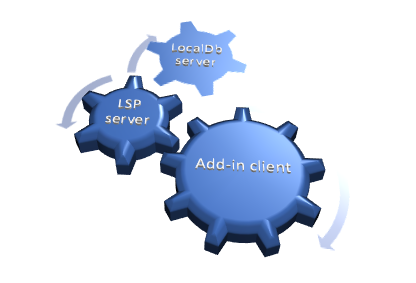
Rubberduck 3.0 will run a LSP server process in the background
A separate process will host a local SQLite database
Telemetry will be opt-in, fully configurable, and transparent
Several quite important low-level changes since last time: we’re now looking at named pipes rather than sockets for the JSON-RPC communications between the editor and the language server, and I’m now using Microsoft’s StreamJsonRpc library for this. Named pipes are inherently local, so they’re less of a concern than sockets, and they don’t seem to trip up Windows Defender, so we’ll take it!
I spent the better part of last month tidying up and documenting the code off the language server protocol (LSP) specifications, moving things around and splitting up responsibilities, writing abstractions that will be shared by all server processes: LSP and SQLite, but also a separate/dedicated server process for telemetry, so even constant writes couldn’t interfere much with LSP server activities, or with the add-in client.
At the time of this writing, I’m still somewhat struggling with the RPC communications, but that won’t remain stuck for too long – the plan is to merge a rather large structural PR and the whole RPC infra by the end of this week.
The Rubberduck.Server.LocalDb console at startup. This process will normally run in the background, hidden.
I’ve taken a number of important decisions about the project in the last few weeks.
GitHub Repository Issues
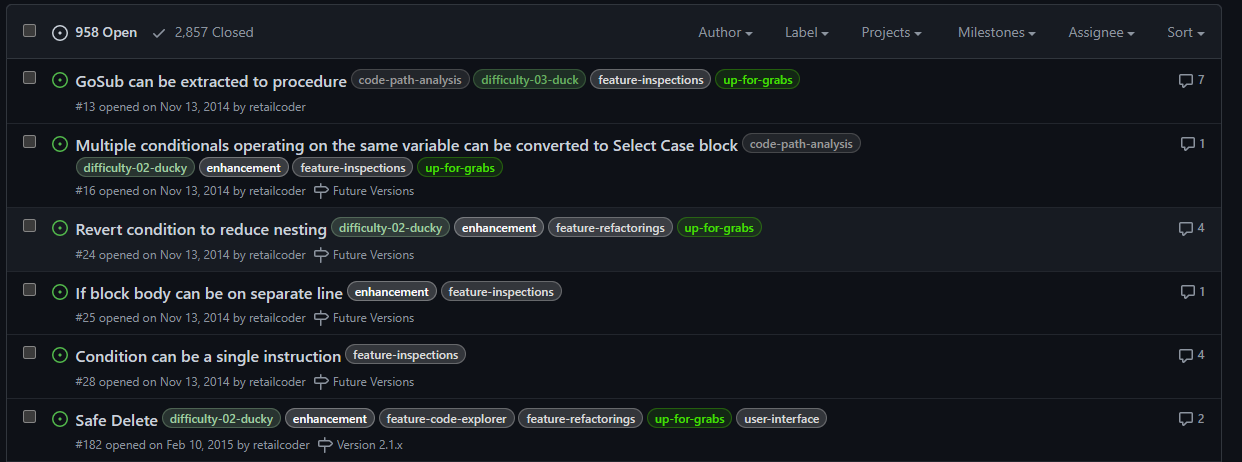
Since the project’s beginning, Rubberduck was pretty much ad-hoc development. I remember in the first few days after creating the GitHub repository, going on an issue-creation spree to write down everything I could dream the thing could do. A lot of it was implemented, but the oldest open issues in the repository are from 2014, 2015:
2,857 issues closed is quite something. 958 open feels daunting though. Using issues as a backlog might not have been the best of ideas…
I’m not going through nearly a thousand issues to sort out what’s already implemented/fixed, what’s unrealistic after all, what’s a good idea that got buried under a million others, etc. Implementing LSP isn’t magically going to clean this up, and when 3.0 releases we’re not going to be maintaining two distinct, massive code bases: one of them isn’t going to make it, and it’s sadly going to have to be the one with 1.7K stars and 284 forks and 97 watchers. I can hardly express how I feel about these numbers, let alone those:
As of 2023/02/14, release tag 2.5.2.1 (build 2.5.2.5906) has been downloaded 27,320 times… that’s crazy!
The repository isn’t going anywhere though – it’s just that at some point in the [somewhat-near] future, it’s going to be made read-only and essentially archived, and the Rubberduck3 repository will become Rubberduck’s new home on GitHub (you’ll still find it under the rubberduck-vba organization).
Rubberduck is still accepting pull requests for v2.x and will continue to do so until further notice.
Methodology Upgrade
If building Rubberduck up to v2.5 was pretty much ad-hoc (and that’s fine!), I don’t think the same strategy would work with v3.0; we can’t just go and create a thousand issues to churn through, or pick a feature to implement because it looks like it’s going to be fun to do. Rubberduck 3.0 is still an embryo at this point, and while all the DNA is there and we know exactly (at least in large fuzzy outlines) what we want this add-in to do, this time things need to happen in order, for technical reasons mostly, but also for project management.
By adopting a different development methodology, we’re going to better control the backlog and project progression. We can better track what’s in progress and determine what the next logical steps should be.
Instead of making a ton of issues, we’ll be drafting them, sizing them, prioritizing them, refining them until they’re small enough to be realistically achievable within a week or two of part-time contributions. Work items will now have a life cycle like this:
New items/ideas not yet fleshed out, not yet planned, and/or not yet prioritized.
Backlog for work items being documented.
Ready for documented work items that are ready to be worked on; items are assigned a sprint (not necessarily the next one), and convert into issues at this stage.
In Progress is work in progress; a branch is created for resolving that issue.
In Review is work items ready to be peer reviewed; a pull request is opened at that stage.
Done is when the work is merged into dev/next.
Delivered status is set when the work is merged into main.
Items/issues will be assigned a priority level:
Urgent is the highest priority level, for things that should be worked on before anything else.
High is for work that’s directly aligned with the objectives of the sprint it’s in.
Medium priority work could be delayed a sprint or two.
Low priority work doesn’t need to be in the current sprint, but would be nice to deliver anyway.
The priority level of any given issue likely evolves over time, particularly the lower-level ones.
In addition to status and priority, each draft issue / work item gets sized. Again this is meant to evolve over time: issues should become smaller over time as they are refined and documented and broken down into smaller tasks.
X-Large items represent a large development that should be broken down into smaller tasks.
Large items represent a significant development effort that can realistically be completed within a sprint by a single developer.
Medium items represent perhaps up to 2-3 days of effort.
Small items represent small tasks that can be completed in a few hours.
Tiny items represent tasks that should only take a few minutes: fixing a typo, adding a column to a database view or table, a configuration tweak, etc.
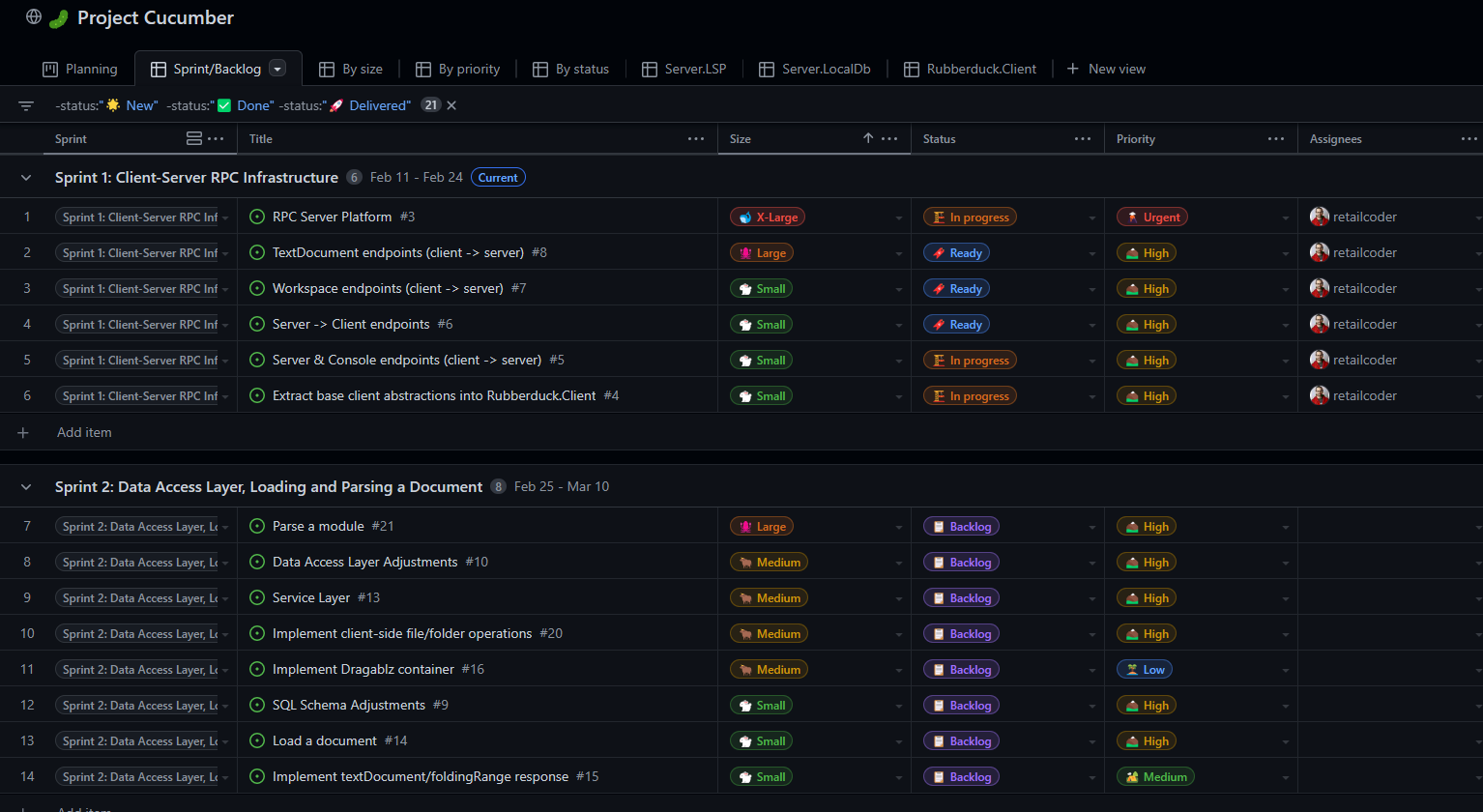
As of this writing, Sprint 1 is in its second half, and I’m still working on the RPC infrastructure:
“Project Cucumber” – it just had to be named that.
There’s a bit of history around the cucumber thing, and it involves two major contributors we lost and think about fondly all the time.
Comintern simply disappeared one day after a brief return, after a year under terms that essentially prevented him from working on open-source projects and hanging out in a public chat. We’re all hoping he’s all right and will eventually pop back.We lost our beloved ThunderFrame to a fierce cancer in late 2018. Rest in peace, my friend. I got the Ctrl+Alt+Delete cushion covers you wanted me to have.
Discord Server
Rubberduck’s dev chat was always in a Stack Exchange room under the Code Review site. In fact it’s just a Code Review chat room we ended up [ab]using for this purpose. Back in 2014 I was very active on CR, and as a moderator on that site in 2015-2018 it made a lot of sense to keep it there.
But with 2-week sprints and a living backlog, we’re going to need more than SE chat to pull this off, and this is where Discord shines.
The general chat is fun, but a nice thing about Discord is that you can schedule events, like a public Sprint Review presentation every two weeks, followed by a Sprint Planning conversation among developers.
I’ll be hosting these events regularly, whether there’s an audience or not, whether other contributors are present or not.
Sprint Review
At each end of a sprint, we’re going to be going over what was done in the previous two weeks, and developers will present/demo their work. Since I’m doing sprint 1 by myself the first review will be me going over the solution structure and explaining the mechanisms and abstractions involved at a high level; reviews for sprint 2 and onward will likely involve more contributors, and things will get more and more exciting to present every time.
Sprint Planning
After the review concludes, developers convene to plan a realistically deliverable workload for the upcoming sprint. If we overshoot and under-deliver, we can always adjust the next sprint. If we over-deliver, we can always pull work items from upcoming sprints into the current one. So this conversation is about the work itself, whether there’s enough information in an issue for anyone at the table (or not!) to pick up and complete that task within two weeks, and whether the backlog is healthy or falling behind; if it’s falling behind, we take the time to talk about what needs to happen and outline work items to be drafted and refined during the sprint (I’ll be doing that backlog maintenance).
So yeah, Rubberduck3 is starting to feel very much like it’s just about to officially kick off, and Rubberduck as a project is entering a whole new phase, in continuous delivery mode.
I intended to write about Rubberduck 3.0 progress last December, but things snowballed during the Holidays and here we are two-three weeks later and wow, time flies! Happy New Year dear readers (belatedly, I guess), 2023 is full of promises, and there are very nice things going on that I need to take a moment and share here.
Without any further ado, let’s clear the big news.
The main issues with Rubberduck have always been:
Memory consumption: Rubberduck consumes a lot of memory in the host process.
Instabilities related to COM interop: various tear-down issues with Office CommandBar and dockable toolwindows.
Poor VBIDE extensibility tooling and editor interactions.
Logs are difficult to use, it’s not clear what is happening in response to what – even when there’s only a single instance writing to the logs. Adding more logging means making things worse.
With v3 we’re addressing these long-standing issues by taking a number of design decisions early in the development process. These decisions were weighted against their downsides and alternatives, and probably make Rubberduck the first VBIDE add-in to implement a LSP Server for its purposes.
Language Server Protocol
For a while there have been discussions among Rubberduck devs about whether implementing LSP would be a feasible thing to do. It’s a protocol that formalizes all communications between a client (an IDE) and a language server that is used in modern IDEs such as Visual Studio and VSCode; twinBASIC implements it, and Rubberduck 3.0 will implement it too.
By moving all of the language-processing aspects out-of-process into a language server, we immediately tackle memory consumption issues: most of the CPU and memory resources Rubberduck 3.0 will use, are going to be outside of the add-in/host process.
With LSP in place, Rubberduck’s objective to bring editing VBA code in the Visual Basic Editor into the 21st century feels closer than ever.
SQLite
Rubberduck’s LSP implementation will be split in two processes, as the LSP server process will be a client for another server process that will host a SQLite database. SQLite is a lightweight library many applications on many platforms (including mobile!) use to persist data between sessions. The database is a local .db file, and the database engine runs in-process. Rubberduck 3.0 will host a SQLite instance in its own server process, and the LSP server process will communicate with it through JSON-RPC, the same way the add-in communicates with the LSP server.
Instead of keeping hundreds of thousands of objects in memory for quick lookups, Rubberduck will write these objects to the database, and only fetch what it needs to work, which should tremendously help reduce the memory and processing footprint of the add-in host process. Using it as a log target (instead of text files) could reduce in-process disk I/O… and replace it with socket I/O and work happening out-of-process.
Cross-Process Communication
The add-in project has no reference to the server project in the Rubberduck solution, and the calls aren’t late-bound either. What’s happening here is different, and there are implications: Remote Procedure Call (RPC) communications occur through web sockets (WS), using a port between 1024 and 5000. As a result, we need to have Windows Defender Firewall open that port for us:
A screenshot of the moment I knew the socket server worked.
Since everything is local, the port only needs private networks permission to operate. We use JsonRPC to send data through that port, so we’re streaming the bytes of human-readable, plain text JSON.
This new client/server architecture enforces a much more decoupled and robust solution.
Telemetry
Telemetry is considered a potentially controversial feature: it will be completely disabled by default and will have to be selectively opted-in explicitly, but with everything becoming asynchronous, trace logging alone often does not suffice for troubleshooting. By implementing a proper telemetry model, we’re giving ourselves the tools to track a request and all actions that stem from it, across the multiple processes.
Since the project started, the only usage data we ever had was our own biased anecdotal usage: we haven’t the slightest idea of what features are under-used, what features are clearly everyone’s favorites, what inspections are most commonly fired, what inspections are disabled, whether inspections we release disabled by default are ever enabled, etc.
Whether enabled or not, Rubberduck 3.0 will collect detailed telemetry data, and store it locally in the SQLite database, by default clearing any existing data on startup: vital debugging information is present if it’s needed.
Ok I’m opting-in, what gives?
Opting into telemetry will allow a Rubberduck client to automatically upload the telemetry data to a future endpoint on api.rubberduckvba.com (via https), where it will be persisted to a SQL Server database schema. Since there is no need for us to track any users, while still potentially extremely detailed, all telemetry data will be anonymous and impossible to track back to any particular user, computer, organization, or country. The transmitted telemetry data will only ever contain information that was explicitly allowed to be transmitted.
Time will tell how aggregated telemetry data can be used, but with enough data we (that includes you) could gain valuable insights on various points of interest:
Rubberduck feature usage statistics
LSP performance monitoring and troubleshooting
VBA language usage statistics, common issues
By transmitting some or all of your telemetry data, you’ll be helping make Rubberduck better for everyone, just by using it. However should you decide to not opt into it, we understand and respect your decision. Note that TraceTelemetry items are the trace logs, so transmitting them is exactly like sending us your log file for troubleshooting. I’ll make a separate post with all the details around pre-release time, and these features will be exhaustively documented on the website.
Progress?
Having the LSP and Telemetry models is one thing, actually implementing them is another. Last time I said I was going to be focusing primarily on the Rubberduck Editor UI, and I did for a while: the editor was progressing very well and I was making very conclusive tests with an in-process parser when I took the decision to move the parser out-of-process.
I proceeded to read the entire LSP specification and implemented a model for it. Shortly after, I realized that we were potentially going to be running multiple instances of a LSP server at once, and it dawned on me that having as many instances of the SQLite database loaded in memory was not going to be globally efficient… so I decided to pull the SQLite database into its own dedicated server process.
The whole exercise demanded a lot of movement in solution projects and namespaces, but I’m very happy with the results: everything is in its place, and the actual add-in project is pretty much empty!
I started with the server implementation that’s the furthest from the add-in: the SQLite database server. This server speaks to LSP through JSON-RPC, but while Language Server Protocol formalizes how the add-in and the LSP talk to each other, I don’t have such a formal protocol for communications between the LSP and the database… so I’m basing most of it on what I learned with LSP.
How it’s going to work: you start Excel and hit Alt+F11 to bring up the VBE. The Rubberduck add-in gets loaded and starts up, then starts a LSP server process and initializes it. In turn the LSP server starts, and attempts to locate the database server. If the database process isn’t found, the LSP server starts one. The Excel/VBE/Rubberduck client process owns the LSP server process, but nobody owns the database server: when the database has disconnected its last client, it automatically shuts down.
The servers (both database and LSP) are console applications that run silently as background processes. In order to facilitate configuring them, and viewing/reviewing their respective inputs and outputs, I’ve written a small client console application that shows the server console content, lets you easily export it to text files or copy it to the clipboard, etc.
Screenshot from before the DataServer UI was moved into its own LocalDbClient project.
The LSP client console application will have an additional Telemetry tab to review, delete, and manually submit telemetry data. Server log trace can be set to verbose or turned off, and the server itself can be instructed to shut down, directly from this application.
When RD3 releases, these client console applications will probably be accessible from an add-in menu, or perhaps they’ll be started together with the add-in and minimized to the system tray… we’ll cross that bridge when we get to the river.
Meanwhile work on the editor itself has taken a backseat, since it wasn’t useful to work on parameter info tooltips and wire up add-in functionality that would have to be later undone to work through the LSP server. All of the proof-of-concept stuff that worked, is still working. It just needs to be wired up to work with LSP requests and notifications, so focus has now shifted to the language server and its database backend.
The next few weeks/months are going to be all about implementing the LSP server, most likely.
One of the objectively coolest features in Rubberduck is the Fakes API. Code that pops a MsgBox for example, needs a way to work without actually popping that message box, otherwise that code cannot be unit tested… without somehow hijacking the MsgBox function. The Fakes API does exactly that: it hooks into the VBA runtime, intercepts specific internal function calls, and makes it return exactly what your test setup …set up.
This API can stop time, or Now can be told to return 1:59AM on first invocation, 1:00AM on the next, and then we can test and assert that some time-sensitive logic survives a daylight savings time toggle, or how Timer-dependent code behaves at midnight.
Let’s take a look at the members of the IFakesProvider interface.
Fakes Provider
Fakes for many of the internal VBA standard library functions exist since the initial release of the feature, although some providers wouldn’t always play nicely together – thanks to a recent pull request from @tommy9 these issues have been resolved, and a merry bunch of additional implementations are now available in pre-release builds:
Name
Description
Parameter names
MsgBox
Configures VBA.Interaction.MsgBox calls
Fakes.Params.MsgBox
InputBox
Configures VBA.Interaction.InputBox calls
Fakes.Params.InputBox
Beep
Configures VBA.Interaction.Beep calls
Environ
Configures VBA.Interaction.Environ calls
Fakes.Params.Environ
Timer
Configures VBA.DateTime.Timer calls
DoEvents
Configures VBA.Interaction.DoEvents calls
Shell
Configures VBA.Interaction.Shell calls
Fakes.Params.Shell
SendKeys
Configures VBA.Interaction.SendKeys calls
Fakes.Params.SendKeys
Kill
Configures VBA.FileSystem.Kill calls
Fakes.Params.Kill
MkDir
Configures VBA.FileSystem.MkDir calls
Fakes.Params.MkDir
RmDir
Configures VBA.FileSystem.RmDir calls
Fakes.Params.RmDir
ChDir
Configures VBA.FileSystem.ChDir calls
Fakes.Params.ChDir
ChDrive
Configures VBA.FileSystem.ChDrive calls
Fakes.Params.ChDrive
CurDir
Configures VBA.FileSystem.CurDir calls
Fakes.Params.CurDir
Now
Configures VBA.DateTime.Now calls
Time
Configures VBA.DateTime.Time calls
Date
Configures VBA.DateTime.Date calls
Rnd*
Configures VBA.Math.Rnd calls
Fakes.Params.Rnd
DeleteSetting*
Configures VBA.Interaction.DeleteSetting calls
Fakes.Params.DeleteSetting
SaveSetting*
Configures VBA.Interaction.SaveSetting calls
Fakes.Params.SaveSetting
Randomize*
Configures VBA.Math.Randomize calls
Fakes.Params.Randomize
GetAllSettings*
Configures VBA.Interaction.GetAllSettings calls
SetAttr*
Configures VBA.FileSystem.SetAttr calls
Fakes.Params.SetAttr
GetAttr*
Configures VBA.FileSystem.GetAttr calls
Fakes.Params.GetAttr
FileLen*
Configures VBA.FileSystem.FileLen calls
Fakes.Params.FileLen
FileDateTime*
Configures VBA.FileSystem.FileDateTime calls
Fakes.Params.FileDateTime
FreeFile*
Configures VBA.FileSystem.FreeFile calls
Fakes.Params.FreeFile
IMEStatus*
Configures VBA.Information.IMEStatus calls
Dir*
Configures VBA.FileSystem.Dir calls
Fakes.Params.Dir
FileCopy*
Configures VBA.FileSystem.FileCopy calls
Fakes.Params.FileCopy
*Members marked with an asterisk are only available in pre-release builds for now.
Parameter Names
The IVerify.ParameterXyz members make a unit test fail if the specified parameter wasn’t given a specified value, but the parameter names must be passed as strings. This is a UX issue: the API essentially requires hard-coded magic string literals in its users’ code; this is obviously error-prone and feels a bit arcane to use. The IFakesProvider interface has been given a Params property that gets an instance of a class that exposes the parameter names for each of the IFake implementations, as shown in the list above, and the screenshot below:
Picking the correct parameter name from a drop-down completion list beats risking a typo, doesn’t it?
Note: the PR for this feature has not yet been merged at the time of this writing.
Testing Without Fakes (aka Testing with Stubs)
Unit tests have a 3-part structure: first we arrange the test, then we act by invoking the method we want to test; lastly, we assert that an actual result matches the expectations. When using fakes, we configure them in the arrange part of the test, and in the assert part we can verify whether (and/or how many times) a particular method was invoked with a particular parameterization.
Let’s say we had a procedure we wanted to write some tests for:
Public Sub TestMe()
    If MsgBox("Print random number?", vbYesNo + vbQuestion, "Test") = vbYes Then
        Debug.Print Now & vbTab & Rnd * 42
    Else
        Debug.Print Now
    End If
End Sub
If we wanted to make this logic fully testable without the Fakes API, we would need to inject (likely as parameters) abstractions for MsgBox, Now, and Debug dependencies: instead of invoking MsgBox directly, the procedure would be invoking the Prompt method of an interface/class that wraps the MsgBox functionality. Unit tests would need a stub implementation of that interface in order to allow some level of configuration setup – an invocation counter, for example. A fully testable version of the above code might then look like this:
Public Sub TestMe(ByVal MessageBox As IMsgBox, ByVal Random As IRnd, ByVal DateTime As IDateTime, ByVal Logger As ILogger)
    If MessageBox.Prompt("Print random number?", "Test") = vbYes Then
        Logger.LogDebug DateTime.Now & vbTab & Random.Next * 42
    Else
        Logger.LogDebug DateTime.Now
    End If
End Sub
The method is testable, because the caller controls all the dependencies. We’re probably injecting an IMsgBox that pops a MsgBox, an IRnd that wraps Rnd, a DateTime parameter that returns VBA.DateTime.Now and an ILogger that writes to the debug pane, but we don’t know any of that. I fact, we could very well run this method with an ILogger that writes to some log file or even to a database; the IRnd implementation could consistently be returning 0.4 on every call, IDateTime.Now could return Now adjusted to UTC, and IMsgBox might actually display a fancy custom modal UserForm dialog – either way, TestMe doesn’t need to change for any of that to happen: it does what it needs to do, in this case fetching the next random number and outputting it along with the current date/time if a user prompt is answered with a “Yes”, otherwise just output the current date/time. It’s the interfaces that provide the abstraction that’s necessary to decouple the dependencies from the logic we want to test. We could implement these interfaces with stubs that simply count the number of times each member is invoked, and the logic we’re testing would still hold.
We could then write tests that validate the conditional logic:
'@TestMethod
Public Sub TestMe_WhenPromptYes_GetsNextRandomValue()
    ' Arrange
    Dim MsgBoxStub As StubMsgBox ' implements IMsgBox, but we want the stub functionality here
    Set MsgBoxStub = New StubMsgBox
    MsgBoxStub.Returns vbYes
    Dim RndStub As StubRnd ' implements IRnd, but we want the stub functionality here too
    Set RndStub = New StubRnd
    ' Act
    Module1.TestMe MsgBoxStub, RndStub, New DateTimeStub, New LoggerStub
    ' Assert
    Assert.Equals 1, RndStub.InvokeCount
End Sub
'@TestMethod
Public Sub TestMe_WhenPromptNo_DoesNotGetNextRandomValue()
    ' Arrange
    Dim MsgBoxStub As StubMsgBox
    Set MsgBoxStub = New StubMsgBox
    MsgBoxStub.Returns vbNo
    Dim RndStub As StubRnd
    Set RndStub = New StubRnd
    ' Act
    Module1.TestMe MsgBoxStub, RndStub, New DateTimeStub, New LoggerStub
    ' Assert
    Assert.Equals 0, RndStub.InvokeCount
End Sub
These stub implementations are class modules that need to be written to support such tests. StubMsgBox would implement IMsgBox and expose a public Returns method to configure its return value; StubRnd would implement IRnd and expose a public InvokeCount property that returns the number of times the IRnd.Next method was called. In other words, it’s quite a bit of boilerplate code that we’d usually rather not need to write.
Let’s see how using the Fakes API changes that.
Using Rubberduck.FakesProvider
The standard test module template defines Assert and Fakes private fields. When early-bound (needs a reference to the Rubberduck type library), the declarations and initialization look like this:
'@TestModule
Option Explicit
Option Private Module
Private Assert As Rubberduck.AssertClass
Private Fakes As Rubberduck.FakesProvider
'@ModuleInitialize
Public Sub ModuleInitialize()
    Set Assert = CreateObject("Rubberduck.AssertClass")
    Set Fakes = CreateObject("Rubberduck.FakesProvider")
End Sub
The Fakes API implements three of the four stubs for us, so we still need an implementation for ILogger, but now the method remains fully testable even with direct MsgBox, Now and Rnd calls:
Public Sub TestMe(ILogger Logger)
    If MsgBox("Print random number?", vbYesNo + vbQuestion, "Test") = vbYes Then
        Logger.LogDebug Now & vbTab & Rnd * 42
    Else
        Logger.LogDebug Now
    End If
End Sub
With an ILogger stub we could write a test that validates what’s being logged in each conditional branch (or we could decide that we don’t need an ILogger interface and we’re fine with tests actually writing to the debug pane, and leave Debug.Print statements in place), but let’s just stick with the same two tests we wrote above without the Fakes API. They look like this now:
'@TestMethod
Public Sub TestMe_WhenPromptYes_GetsNextRandomValue()

    ' Arrange
    Fakes.MsgBox.Returns vbYes
    ' Act
    Module1.TestMe New LoggerStub ' ILogger is irrelevant for this test
    ' Assert
    Fakes.Rnd.Verify.Once
End Sub
'@TestMethod
Public Sub TestMe_WhenPromptNo_DoesNotGetNextRandomValue()

    ' Arrange
    Fakes.MsgBox.Returns vbNo
    ' Act
    Module1.TestMe New LoggerStub ' ILogger is irrelevant for this test
    ' Assert
    Fakes.Rnd.Verify.Never
End Sub
We configure the MsgBox fake to return the value we need, we invoke the method under test, and then we verify that the Rnd fake was invoked once or never, depending on what we’re testing. A failed verification will fail the test the same as a failed Assert call.
The fakes automatically track invocations, and remember what parameter values each invocation was made with. Setup can optionally supply an invocation number (1-based) to configure specific invocations, and verification can be made against specific invocation numbers as well, and we could have a failing test that validates whether Randomize is invoked when Rnd is called.
API Details
The IFake interface exposes members for the setup/configuration of fakes:
Name
Description
AssignsByRef
Configures the fake such as an invocation assigns the specified value to the specified ByRef argument.
Passthrough
Gets/sets whether invocations should pass through to the native call.
RaisesError
Configures the fake such as an invocation raises the specified run-time error.
Returns
Configures the fake such as the specified invocation returns the specified value.
ReturnsWhen
Configures the fake such as the specified invocation returns the specified value given a specific parameter value.
Verify
Gets an interface for verifying invocations performed during the test. See IVerify.
The members of Rubberduck.IFake
The IVerify interface exposes members for verifying what happened during the “Act” phase of the test:
Name
Description
AtLeast
Verifies that the faked procedure was called a specified minimum number of times.
AtLeastOnce
Verifies that the faked procedure was called one or more times.
AtMost
Verifies that the faked procedure was called a specified maximum number of times.
AtMostOnce
Verifies that the faked procedure was not called or was only called once.
Between
Verifies that the number of times the faked procedure was called falls within the supplied range.
Exactly
Verifies that the faked procedure was called a specified number of times.
Never
Verifies that the faked procedure was called exactly 0 times.
Once
Verifies that the faked procedure was called exactly one time.
Parameter
Verifies that the value of a given parameter to the faked procedure matches a specific value.
ParameterInRange
Verifies that the value of a given parameter to the faked procedure falls within a specified range.
ParameterIsPassed
Verifies that an optional parameter was passed to the faked procedure. The value is not evaluated.
ParameterIsType
Verifies that the passed value of a given parameter was of a type that matches the given type name.
The members of Rubberduck.IVerify
There’s also an IStub interface: it’s a subset of IFake, without the Returns setup methods. Thus, IStub is used for faking Sub procedures, and IFake for Function and Property procedures.
When to Stub Standard Library Members
Members of VBA.FileSystem not covered include EOF and LOF functions, Loc, Seek, and Reset. VBA I/O keywords Name, Open, and Close operate at a lower level than the standard library and aren’t covered, either. VBA.Interaction.CreateObject and VBA.Interaction.GetObject, VBA.Interaction.AppActivate, VBA.Interaction.CallByName, and the hidden VBA.Interaction.MacScript function, aren’t implemented.
Perhaps CreateObject and GetObject calls belong behind an abstract factory and a provider interface, respectively, and perhaps CallByName doesn’t really need hooking anyway. In any case there are a number of file I/O operations that cannot be faked and demand an abstraction layer between the I/O work and the code that commands it: that’s when you’re going to want to write stub implementations.
If you’re writing a macro that makes an HTTP request and processes its response, consider abstracting the HttpClient stuff behind an interface (something like Function HttpGet(ByVal Url As String)): the macro code will gain in readability and focus, and then if you inject that interface as a parameter, then a unit test can inject a stub implementation for it, and you can write tests that handle (or not?) an HTTP client error, or process such or such JSON or HTML payload – without hitting any actual network and making any actual HTTP requests.
Until we can do mocking with Rubberduck, writing test stubs for our system-boundary interfaces is going to have to be it. Mocking would remove the need to explicitly implement most test stubs, by enabling the same kind of customization as with fakes, but with your own interfaces/classes. Or Excel’s. Or anything, in theory.
The next major version of Rubberduck is currently in [very] early development stages – saying that there is a lot of work ahead would be quite an understatement, but the skeleton is slowly taking shape, and things are looking very, very good.
Since the beginning of the project, Rubberduck’s user interface components (other than dialogs) have always been hosted in traditional, native dockable toolwindows. We built everything on top of the VBIDE editor, using Office CommandBar UI to simulate a status bar and make up for the lack of in-editor integration. Over the years this early design decision slowly became a burden: tearing down the many dockable toolwindows contributed to a pesky access violation crash on exit, low-level hooks for keyboard shortcuts constantly need to detach and re-attach as focus switches between the VBE main window and other applications, autocompletion/self-closing pairs was a nightmare to implement, and while the all-or-nothing approach to parsing made it so that we could always assume we were looking at valid VBA code that could be compiled, it also painted us into a corner where actually moving towards what we wanted Rubberduck to achieve by v3.0 would be extremely difficult, if not impossible.
Behold, the Rubberduck Editor
Rubberduck’s input was always driven by the Visual Basic Editor – now the code in the VBE is going to be output by Rubberduck. Of course, the code will go both ways, but now hidden attributes probably won’t need to be hidden anymore, and the editor can now be exactly what we envision it to be.
There will only be a single toolwindow that will host the editor and UI components like the Code Explorer. At this early stage my focus is entirely on the editor itself, but the idea is ultimately to get actual document tabs and a more practical and friendly docking manager.
Here’s what it looks like as of this writing:
The dropdowns don’t have a real item source yet, but the mock data gives a good idea of what it’s going to be like to edit VBA code with Rubberduck in the future.
Typing “Sub” and hitting the spacebar immediately completes the block and places a new folding node:
The faint dotted underline under “Sub” is a text marker; the editor has the ability to display various such markers at the exact desired position in the document, so we will be using them to show inspection results right there – with tooltips:
Hint-level results will be denoted with this dotted underline indicator; suggestion level will be a green squiggly underline, warnings a blue squiggle, and error level results will appear as red squiggles:
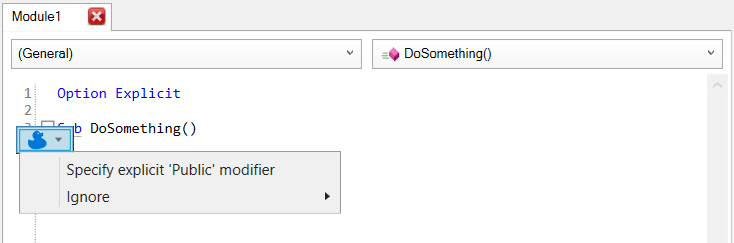
There will also be a new “ducky button” that pops up when the caret is on one such marker, and lets you pick a quick-fix in-place to address an inspection result:
The indenter still needs to be wired up, but this editor will ultimately indent your code as you type it. All the autocompletion features also need to be ported over to work here, and then we’ll want searchable and filterable IntelliSense, parameter info tooltips, and we’ll need to simulate the VBIDE “prettification” that occurs when a line is validated, so that public sub becomes Public Sub and identifiers take the casing they’re declared with.
We get an undo stack that can handle much more than 20 steps, and did I mention the status bar?
For now, all it does is report the current caret position in the editor, but Rubberduck 3.0 will be using it to report parsing progress, instead of the CommandBar button/label we’ve been abusing forever.
There will probably still be a command bar of some sort, but it will be part of the WPF/XAML managed UI; the old Rubberduck CommandBar will be decommissioned.
The one thing that’s 100% guaranteed to not happen in the new Rubberduck editor, is everything that needs to happen beyond design-time: there is no hook into the VBIDE debugger, so Rubberduck has no way of tracking the current instruction. As a result, the editor will be sadly useless in debug mode.
The editor work is just the beginning: Rubberduck 3.0 currently doesn’t even have a parser, let alone any inspections. In the next few months, the very heart of Rubberduck will be reworked to function with the new editor. It’s essentially like rewriting Rubberduck, but with an editor we fully control instead of one we constantly need to fight with.
Meanwhile v2.5.2 is approaching 25K downloads, and there’s quite a bit of work in 2.5.x that hasn’t been “officially” released yet, including everything that happened during a very successful Hacktoberfest 2022: we’ll be releasing v2.5.3 in the near future – stay tuned!
As I wrote last July, I’ve started to get more time for myself lately, and that means I get to tackle a number of long-standing projects that have been on the backburner for way too long. One of them is the rewrite of the project’s website, which has been “under construction” ever since it was published as an ASP.NET MVC website, a few years ago already.
If you missed it, I tweeted a sneak-peek link last week:
Tweeted 09/28: “A couple of things need a bit of work still, but this website rewrite is coming along nicely – have a peek here: https://test.rubberduckvba.com“
Why a rewrite?
For the longest time, I wouldn’t have considered myself a web developer. I have well over a decade of experience in C# desktop development, but the web stuff essentially scared me to death. The version of the website that’s currently live was pretty much my first time doing anything like it. The site itself wouldn’t write to the database; it was another application that pulled the tag metadata, downloaded the xml-doc assets, parsed the documentation and examples, and wrote them to the database.
One of the biggest issues with the current model, is that the database is made to contain HTML that is needlessly difficult to modify:
Unreachable code is certainly unintended, and is probably either redundant, or a bug.
<div><h5>Quick-Fixes</h5>
<p>The following quick-fixes are available for this inspection:</p>
<ul style="margin-left: 8px; list-style: none;">
<li>
<span class="icon icon-ignoreonce"></span>
<a href="https://rubberduckvba.com/QuickFixes/Details/IgnoreOnce">IgnoreOnce</a>
: Adds an '@Ignore annotation to ignore a specific inspection result. Applicable to all inspections whose results can be annotated in a module.</li>
<li>
<span class="icon icon-tick"></span>
<a href="https://rubberduckvba.com/QuickFixes/Details/IgnoreInModule">IgnoreInModule</a>
: Adds an '@IgnoreModule annotation to ignore a inspection results for a specific inspection inside a whole module. Applicable to all inspections whose results can be annotated in a module.
</li>
</ul>
</div>
Having this HTML markup, CSS classes, and inline styles as part of the data meant the data was being responsible for its own layout and appearance on the site. With the new JSON objects serialized into this Properties column, I could easily keep everything strongly typed and come up with separate view models for inspections, quick-fixes, and annotations, that each did their own thing and let the website in charge of the layout and appearance of everything.
Separation of Concerns
The solution architecture could be roughly depicted like this – I suppose I meant the arrows to represents “depends on” but note that this doesn’t necessarily mean a direct project reference: the Client/API relationship is through HTTPS, and no project in the solution references the Rubberduck.Database SQL Server database project, but ContentServices connects to a rubberduckdb database that you can deploy locally using that database project:
You could draw a thick red line between Rubberduck.Client and Rubberduck.API (actually that’s Rubberduck.WebApi now), and it would perhaps better illustrate the actual wall between the website and the data: the website project doesn’t need a connection string, only a base URL for the API!
Authentication is assured with GitHub’s API using OAuth2: if you authorize the rubberduck-vba OAuth application to your profile, the HttpContext.User is cast as a ClaimsPrincipal and claims the GitHub login as a name, and a rubberduck-orgroleclaim is added when organization membership is validated; an additional rubberduck-admin role claim is added if the user is also a member of the WebAdmin org team.
The website packages the HttpContext.User into a Json Web Token (JWT), an encrypted string that encapsulates the claims; this token is passed as a bearer token in authenticated API requests. The API accepts an Authorize header with either such a bearer token, or a valid GitHub personal access token (PAT).
The API receives a request, and given an Authorization header, either decrypts the JWT or queries GitHub to validate the provided access token and attach the appropriate role claims, before any controller action is invoked.
Another authentication filter performs a similar task to authorize an incoming webhook payload: the rubberduck-webhook role is set and tag metadata and xml-doc content can get updated automatically whenever a new tag/release gets created.
Performance
This new website performs much, much better than the current one. It sends asynchronous (ajax) requests to the MVC controller to render partial views, fetching only enough information to paginate the data and present a decent preview. Since most pages are presenting markdown content, an asynchronous request is also sent to format the markdown and, if applicable, apply syntax highlighting to code blocks. At this stage static content isn’t being cached yet, and screenshots should be loaded dynamically – still, performance is quite decent:
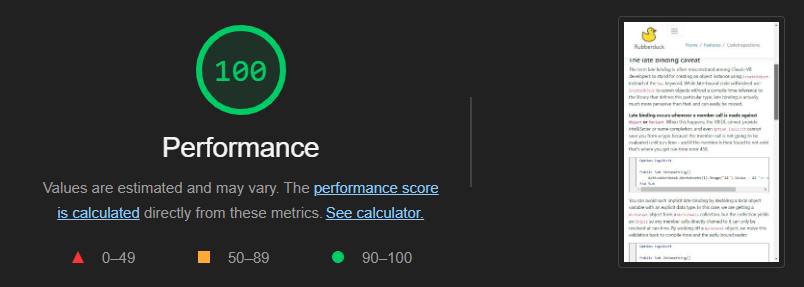
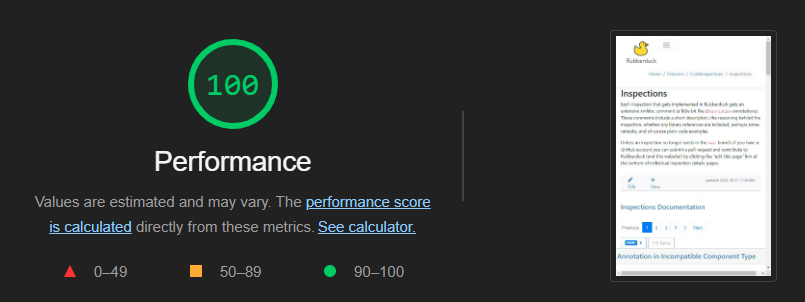
Home page scores 94, but then both Code Inspections and Inspections pages (two pages with extensive content, lots of markdown, code blocks, etc.) score a full 100 with Google Lighthouse, so things are looking very good performance-wise.
Another detail: the code examples no longer trigger a page load when you select a tab, so everything just feels much smoother now. Note, as of this writing the example records have been wiped from the database while I work on fixing a problem with the xml-doc processing, so annotations, inspections, and quick-fixes aren’t showing any examples on the test site for now.
Online Indenter
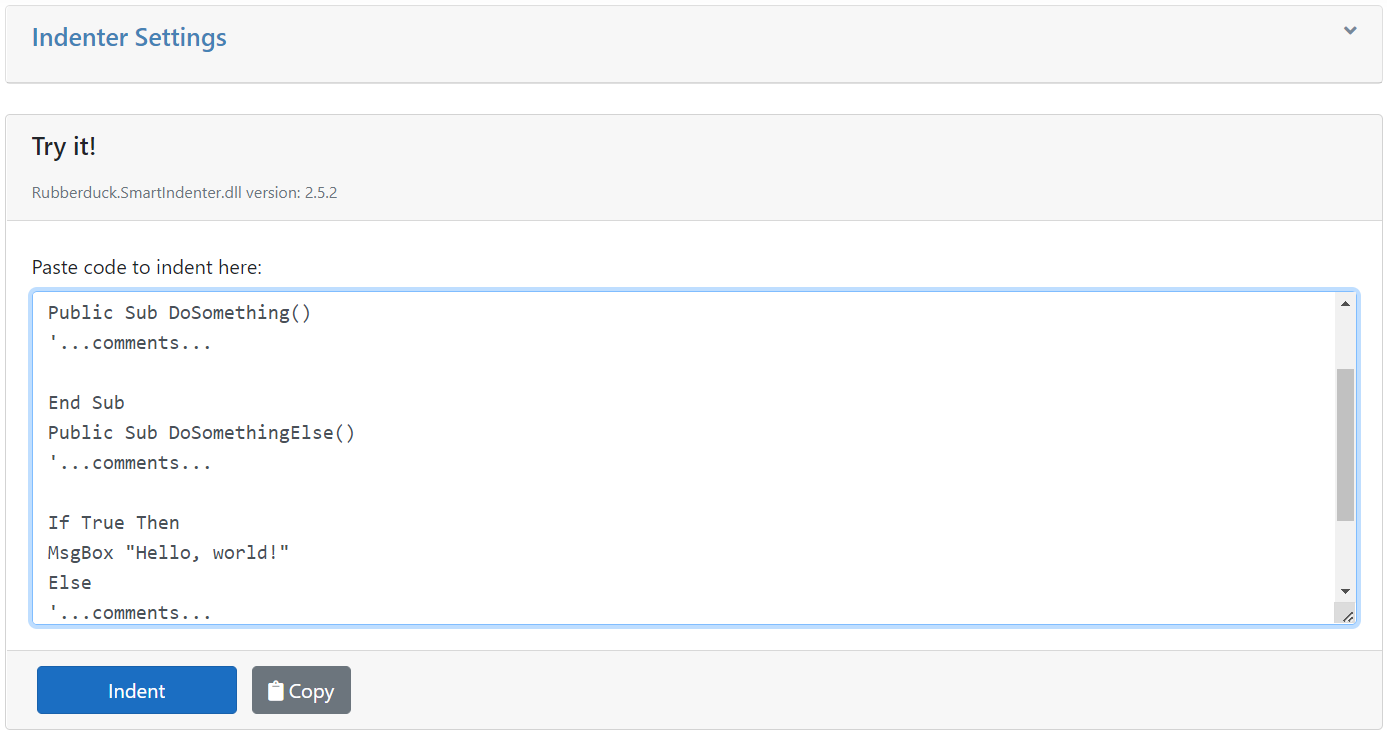
This feature once worked, but then my inexperienced past self, went and broke it in an attempt to make it asynchronous. Well, it’s back online and running Rubberduck.SmartIndenter.dll version 2.5.2:
You can paste VBA code into the box there, click the Indent button, then copy the indented code back into the clipboard.
The code can be indented as per the default indenter settings (which are also used for indenting all syntax-highlighted code blocks on the site), or if you expand the Indenter Settings panel you can tweak every knob Rubberduck’s Smart Indenter port has to offer.
It wouldn’t be too hard to include a “download these settings” button here, to serialize the settings into a .xml file that Rubberduck can then import to update indenter settings.
Content Administration
Users with the appropriate claims will be able to see additional buttons and commands on the site:
A modal dialog allows authenticated users to add and edit markdown content directly on the site.
Content administration features still need a little bit of work, but they are already being used to document how to use each and every single feature in Rubberduck – once this documentation is completed, the site will be a huge user manual, and ready for launch!
What’s Next?
Once everything works as it should (getting very close now!) and all that’s left to do is to take screenshots and generate more content, I’ll shift my focus to the Rubberduck3 project, the ownership of which I’ve now transferred over to the rubberduck-vba organization – the repo remains private for now, but all Rubberduck contributors have access to it. Uploading the RubberduckWebsite solution as a public repository isn’t a priority at this point; I feel like dealing with the implications of having API secrets in a .config file would be a distraction that I don’t need right now. When the time comes, it’ll be properly setup with continuous integration and deployment, but there are other priorities for now.
So, I haven’t posted here for well over a year now, and Rubberduck ‘s last “green release” was in May of 2021 (18,773 downloads as of this writing – the download stats on the site’s front page are stale, as of last February). The website has been “under construction” forever, and all this time I barely answered or participated on Stack Overflow and have been pretty much a ghost in the project’s dev chat and GitHub repository.
Let’s call that a sabbatical. I mean, COVID lockdowns and 2020-2021 hit hard for pretty much everyone, so I’ll just say s..tuff happens and you just have to let things go and do your best to enjoy the ride regardless.
And I did! But as of 2022 July 1, I’m no longer a Microsoft MVP: I did not apply for a 4th renewal, because I know what MVPs do, and I know what I can do myself, and I can’t be honest with myself and pretend the little content I put up in 2021 makes a solid application worthy of consideration. It’s been an amazing experience, but I wouldn’t have been comfortable with accepting this annual award for what I did that year: the Microsoft MVP award means much more than that to me.
As of this writing, the repository has over 1.6K stars on GitHub, 275 forks, and a snapshot of it is even archived along with thousands of other public repositories in the GitHub Antarctic Vault! I’m proud of what we have accomplished, and proud to be able to say Rubberduck has made it beyond the wildest dreams we had for it back in 2015! Years fly… I haven’t written any VBA code in a while, but I wasn’t writing much VBA code anyway ever since C# has been putting the bread on my table, and that never stopped me (or anyone) from working on Rubberduck. I still have ideas and now & then think of where the project should be heading, and the time will definitely come when I can turn that into code again – just not now.
What about Rubberduck?
Rubberduck has come a long, a very long way, and we’ve learned a lot all along – devs and users alike! I kind of burned out though. Nothing seemed to ever make a dent in the growing mountain of issues, and the code base being quite daunting doesn’t make it particularly friendly to new contributors or would-be C# programmers coming from VBA: it was all going to be on pretty much just us to churn through it all. Like answering on Stack Overflow, it became a chore. I couldn’t write anymore, and figured the last post I wrote made a nice front page for the blog anyway.
I strongly doubt Rubberduck can get where we envisioned it for 3.0 in the current state of the project. We could get a v2.6 out there, perhaps up to 2.9 even, but we always wanted more out of a 3.0 build, and the scale and implications of the changes needed for that to happen are rather scary.
I want the next major version to do away with performance issues, from startup to teardown; I want a smaller memory footprint; asynchronous, continuous parsing; total control over what we get to show in a code pane… but we can’t have that without a complete overhaul of the entire architecture and a redesign of the deepest core mechanisms in Rubberduck.
So where’s Rubberduck headed as a project? On one hand we have a massive and mature code base with roughly 200 known issues (and over 700 unimplemented ideas); on the other hand we have a goal that cannot realistically be fulfilled incrementally from where we’re at. I think we need to start with a brand new shell, and bring in the original code piece by piece, adjusting them as we go.
Meanwhile twinBASIC is steadily progressing, but still isn’t quite ready to power a brand new language layer for Rubberduck yet, so we’re still stuck with our Antlr4 grammar and parser, and step one would be to implement a parser that can survive syntax errors so Rubberduck can still process code that cannot run. You see ever since we introduced Antlr4, we’ve been using its token positions to locate specific code in code panes; when a new line gets inserted or any part of any code moves around, a new parse is needed for that entire module to keep these tokens in sync with what’s in the VBE. This is what’s painted us into a corner of endless parse-edit-reparse cycles.
It’s not just the tokens, it’s also what we’ve built on top of it: the `Declaration` class has so many constructors with so many constructor parameters… everything that isn’t a comment, from a line label to variables and procedures, is a declaration. Over the years a decent inheritance hierarchy was built so we have many types of specialized declarations, but each and every one of them is a rather heavy object, and thousands upon thousands of them need to be spawned every time we parse so that the resolver can keep track of everything. Then the VBE is as always actively sabotaging our efforts by hiding attributes, so a complete parse must involve exporting every module to a temporary file that we parse for these hidden attributes, which then need to be associated with the correct declaration.
In order to happen at all, Rubberduck 3.0 needs to completely flip things around, so instead of synchronizing Rubberduck with the VBE, we’d be synchronizing the VBE with Rubberduck. The implications are pretty radical: the VBE gets reduced to a mere host, and Rubberduck needs to be the code editor now, instead of interacting (and fighting!) with the VBE. In other words, I hate to say this but Rubberduck can’t really go forward without essentially a full rewrite, and without implementing what amounts to a whole IDE, inside the VBE.
Known showstoppers include hooking up and interacting with the debugger: there is no API for this, so there wouldn’t be any way to track execution, hit breakpoints, and step through the source code in the custom editor; clearly it’s a sub-par user experience, but if it’s the best we can get at one point we’re going to have to bite the bullet and make it happen anyway, and have the legacy VBE take over when code is running or paused.
So what’s likely going to happen is that the 1.6K-stars repository will remain on the 2.x architecture, and a brand new repo will eventually be up for the 3.0 rewrite. This is obviously risky, because a “Grand Redesign in the Sky” rarely ends well, but I’m not seeing any other way. I guess we’ll just have to see where that goes. Worst-case, we scrap it, stick with the 2.x architecture, and let go of the dream.
What about the website?
Early this year I had a fully working .net 6 solution that I intended to host on Microsoft Azure, but the monthly fees would quickly have depleted the donations we get and it just would not have been sustainable at all, so I thought “hey no problem I’ll just deploy it to the current GoDaddy host”… but the latest version of .net that runs over there is Framework 4.8, which means the solution had to be re-targeted and many little pieces had to be reworked – that’s done now, but the Bootstrap stuff broke and the entire front-end makes no sense anymore and I haven’t really had a chance to spend much time fixing it since then.
Between getting the ball rolling on v3.0 and getting the new website online, my priority is on the website, because well, at the end of the day I’m paying for this hosting and https — many thanks to our donors for this!
The revamped website will have much less static content and pull feature pages from its database; members of the Rubberduck GitHub organisation can edit this content as needed, easily upload updated screenshots, etc. The idea is to make the website be a huge user manual that describes every single feature and sub-feature, without needing a new deployment every time a typo needs fixing. I can’t yet commit to an ETA, but as things in my life fall back into place I’ll start having more time for this in the next few weeks/months. Let’s just say I intend to have it up before the next edition of Hacktoberfest!
What about the blog?
I love writing, so I’m not done here. As a Microsoft MVP I ended up feeling pressured to produce regular content to justify my renewals, and that wasn’t healthy. As I usually took inspiration from various answering experiences on Stack Overflow, I didn’t want my first post in over a year to be just a casual one about programming in VBA: I needed an ice breaker of some sort, and this is it. I’ll be writing more regularly now, but at my own pace.
So yeah, I’m *slowly* coming back from a rather long hiatus with a lot of rather large projects on my plate, and I intend to not burn myself up doing any of it, so this will mean rigorously time-boxing my activities and keeping a sane balance between Rubberduck, the website, the blog, the MVVM library that I still intend to build with twinBASIC, but also with my day job and family life. I’ll be happy if that makes me a Microsoft MVP again in 2023, but it’s not what I’m shooting for.
Next post should be about the upcoming Rubberduck 2.5.3 green release, it’s well past due!