RD3: December Update

Last time I said I was going to be working on a Workspace Explorer user interface, so that I have a toolwindow to play with as I work on the toolpanel layouts and docking functionality.

And I did exactly that, so while it’s far from being ready for an alpha release, it’s there and it does exactly what it needs to do, up to and including opening document tabs in the editor.

I also added control templates for different document types, so editing a .MD markdown document is done in a differently-configured editor than when editing a VBA source file.

The markdown document editor handles read-only documents by only presenting the preview pane.

Workspace Explorer

The toolwindow has acquired context menus and commands to create a new project, to open an existing one, and to synchronize the workspace with the VBE; it is configured to be shown docked on the left side by default. I’m developing the editor as a standalone application, so for now VBE synchronization is set aside until JsonRPC communications happen over named pipes – which is going to be needed at one point or another; there’s just no need to have 3-way communications going on right now.

It already supports opening multiple workspaces/projects, although additional analysis is needed to work out exactly how that’s going to work with VBE synchronization (there is a concept of an “active” project/workspace that will probably be useful for this).

The content of a workspace is represented in the explorer by a tree view that lists all the files and folders under the “.src” source root folder. Document nodes (whether they’re source files or not) can be opened in the editor by double-clicking, or selecting “Open” from the node’s context menu.

The context menu when you right-click anywhere in the background area offers new and open commands to create a new project/workspace and open an existing one, so already the UI is taking a direction where there are multiple ways to discover a command, which I believe is a good thing in an IDE application.

Since a workspace represents the project, the explorer toolwindow also needs commands to create, delete, cut, copy paste, and rename files & folders, as well as the ability to include/exclude files/folders from the project, and to move things around, preferably by simply dragging and dropping the tree nodes. Dropping a file (or files, or folders) from Windows Explorer into the tree view should ultimately copy (or move?) the dragged items into the workspace folder, and then there needs to be a command that simply opens the workspace location in Windows Explorer.

These are well beyond what’s needed for an alpha release though, so I’ll likely just iron out a few wrinkles and let it be for a while: we can open workspace files in the editor, and it’s really all I need it to do… for now.

Eventually it will need a horizontal template that would be the default view when the toolwindow is docked at the bottom (or could serve as an alternative view when docked on the sides).

Shell Layout

The editor shell is divided into sections. There are two collapsible panels on either side, and a third at the bottom; all panels can be resized as needed by dragging their outer border, and each panel houses tooltabs that show tab headings at the bottom; only the document panel will display them at the top.

Even without tearable tabs, the layout would be usable as-is. As I’m writing this update though, my focus is on getting the InterTabClient to understand where I mean to have my content – after I re-dock an undocked tab, the content ends up being rendered in the tab headers, ..and then a NullReferenceException brings down the process as soon as something moves.

At this stage toolwindows are abstract enough that adding one for the Language Server Trace went very well – and that particular toolwindow is itself very abstracted too, such that adding Editor Trace and Update Server Trace toolwindows will be a breeze. In fact adding any new toolwindow is very simple.

The ThunderFrame control has been augmented with a pin button that all toolwindows have, that makes the parent collapsible panel remain open when the mouse leaves it. The font size has decreased a bit and the icons were scaled back to 16×16 for a tighter look and to yield more screen estate to the actual content. I’ve switched back to the light theme to see how much damage the dark theme adjustments did, and it’s not too bad: seems only the scrollbars’ buttons have suffered.

The background ducky has been severely toned down and is much more subtle now; it’s also been removed from the main window background, and the code editor template background isn’t letting it through either. It’s still there if you care to look for it, but it’s not an obnoxious distraction anymore.

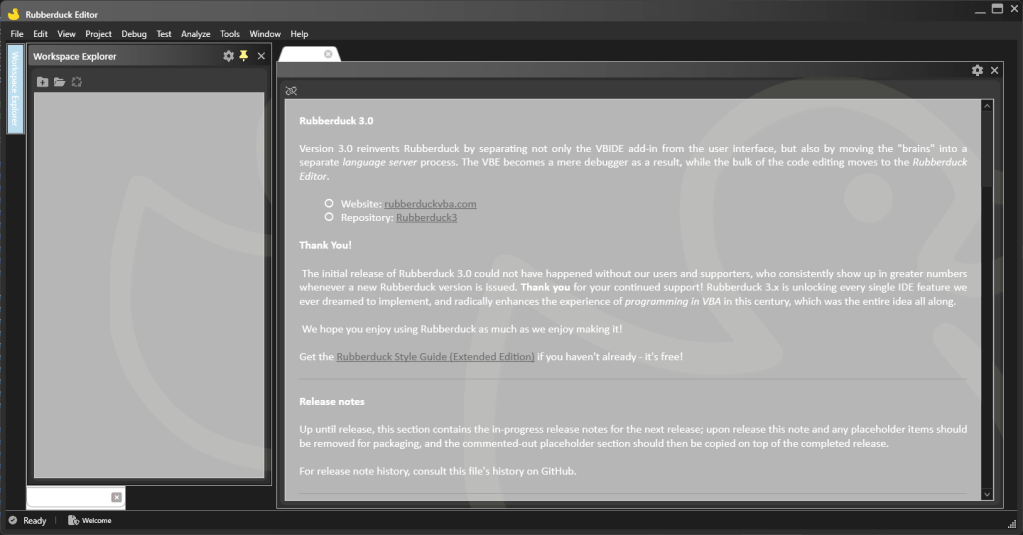
Welcome.md

By default, RD3 will automatically open a read-only markdown document named Welcome.md; this document is not part of any workspace, and will include useful links and detailed release notes including new features, enhancements and bug fixes, broken down by component (editor, language server, add-in, etc.).

Maintaining this file whenever a pull request is merged will make it much easier to put together a release and communicate “what’s new?”.

This document is the first document type to be supported, because it stands on its own and contrary to source files, once it loads and renders, it’s essentially feature-complete which makes it a quick win. Every other document is going to involve the workspace, so it made sense to get that one out of the way right away.

It also makes a good place to put release notes; each merged RD3 pull request will be listed there along with a short description of the new feature, enhancement, or bug fix.

The “welcome” document contains release notes and additional information about the release.
The code editor is barely a Notepads surrogate at this point; in the next few weeks it’ll get all the features that don’t involve the LSP server.

The template for a read-only markdown document is only showing the preview pane; editable markdown documents can collapse the pane to the right or resize it as needed (perhaps eventually re-dock it). Links are currently not working in the preview (not much effort has gone into this editor yet), but the idea is to allow navigating links when the option is enabled (and it would be disabled by default). The markdown document is already binding its font family from the ViewModel, which is a precursor to a bunch of editor settings that the code editor will want to have as well.

Status bar

The prototype-era status bar has been removed and properly templated to reflect the current editor state:

  • Only a simple icon and status label will be shown until a workspace/project is loaded. The icon will reflect the connection status of the language server, and bring up the language server trace toolwindow when clicked.
  • When a workspace is opened, the status bar label might show a small progress indicator tracking the server-side processing going on in the LSP process; the editor is immediately fully responsive and usable.
    • Cancellable server operations can be cancelled by clicking a button that appears next to the progress indicator when cancellation is possible.
  • When at least one editable document tab is opened in the editor, the status bar template changes to show the caret location, among other useful bits of information pertaining to the active document tab.

Next Steps

With the editor shell foundation in place, the next client-side features are going to start needing data from the language server, so now is a good time to take a step back, tidy things up, and make sure everything in place works as intended; document and address any pending bugs before adding new tooltabs and potentially creating more work than necessary.

Glitches with docking need to be resolved, the UI for tooltabs isn’t right, closing tabs should notify the language server, context menu commands need to be implemented to undock tooltabs, and frame headings should be draggable; little things left and right. The editor itself needs basic editing commands and a context menu; a toolbar will probably be useful, too.

Oh, and then I need to flip back to the dark theme, because working with the light one has done funky things… I need to revisit all the themes before it gets any worse:

Or perhaps I could “fix” it by just renaming it “xray-dark” or something, and then just shelve this until theming gets some real attention?🤔

And then LSP gets serious.

Update 2024-01-02: LSP communications over named pipes are now working; the problem was that the initialization was being performed twice.


Swag Shop 2024

The swag shop I opened this year is going to keep going in 2024. I’m brewing a number of RD3 design ideas, and I’d like to have embroidered hats and hoodies made.

Ko-fi supporters spending $1 or more get access to supporter-exclusive content; as I work on RD3, I upload screenshots and small posts about upcoming stuff, before it’s even pushed to GitHub.

I’m planning to start writing a complete RD3 user guide in 2024, that’ll probably end up as a PDF download alongside the Style Guide.

I bought way too much inventory in 2023, so expect extra free goodies in every shop order!

Rubberduck 2.5.91

Release 2.5.9 came with an unfortunate bug where an exception in the version check feature would blow everything up and fail the startup of the add-in. It was of course quickly fixed in a subsequent pre-release build, and meanwhile other enhancements have been merged, so here we are with a new release that fixes the error handling of the version check service and correctly parses empty instructions.

You can find the GitHub tag/release here: https://github.com/rubberduck-vba/Rubberduck/releases/tag/v2.5.91

Parser Fixes

One parser bug was reported through an interesting edge case that was reminiscent of good old ThunderCode, looking something like this:

If condition Then:::::::::::DoSomething

It is of course grammatically correct, which means Rubberduck should be able to ingest it. Thanks to yet another contribution by @MDoerner this version correctly parses such empty instructions, which feels like it opens up an opportunity for an inspection that flags them, and a quick fix to remove them.

This parser tweak is definitely making it to RD3!

Other Hacktoberfest contributions include:

  • Correctly replacing any Exit Sub with Exit Function statements when converting a Sub procedure into a Function.
  • Fixing an unsafe conversion from Char to Int that was causing a crash in PowerPoint 2019.
  • COM Interop / RCW handling solidifying shutdown by taking measures to ensure reading or writing a CommandBarButton’s caption or enabled state does not happen during shutdown / after the COM objects have been destroyed.
  • Allowing multiple line continuations before the dot operator in member access expressions.

Version Check Bug

That one is purely on me rushing to release without realizing that the web API call wasn’t surrounded by a try/catch block, and since it was an asynchronous operation… any uncaught exception would take down the host process, which is utterly uncool.

The fix was, obviously, to handle errors around the network I/O. Of course a simple work-around was to simply disable the version check on startup, but unless you’re familiar with Rubberduck configurations, tweaking these without being able to load Rubberduck in the VBE to bring up the settings dialog wasn’t exactly a user-friendly experience.

Note: the web API that refreshes the website and responds to version check requests is still down! I’ve manually inserted the database records for this release, so it shows up on the website.

Extract Method

There’s an off-by-one selection glitch with this refactoring that’s also getting fixed in this release, thanks to a timely contribution by @tommy9. This selection glitch was disabling the refactoring command when it shouldn’t be disabled, making it more difficult to use than it should be.


RD3 Progress

Meanwhile I’ve been giving quite a bit of love to v3, working on the new settings model and UI. I needed to get settings out of the way early on, because everything wants to access the configuration settings, including the locations of the server executables: I got to a point where hard-coding these was no longer practical, and since debug builds don’t generate the assemblies in a single “install folder”, being able to point them to local debug builds was a good excuse to get the settings model under way.

Data Driven UI

Historically in Rubberduck, adding a new setting meant adding a property to one of the setting groups, crafting a dedicated UI section for it in the settings UI, and then editing a .XML configuration file to define the defaults. All this work means adding a new setting is a whole undertaking in its own right, and that’s essentially a deterrent to liberally sprinkling configurable options any time we come across a decision and go “hey it would be nice if this was configurable!”.

RD3 treats settings at a different abstraction level: instead of having a “GeneralSettings” class with a property for each setting, we go meta and now GeneralSettings is becoming a settings group, and the individual settings are becoming record type instances, where each setting has a name, a description, a data type, default and current values, and additional metadata to identify hidden settings that should not appear in the dialog (e.g. the flag indicating whether Rubberduck prompted to import legacy indenter settings), or settings that are recommended to keep their default value (e.g. server executables’ locations).

Because there are settings of pretty much every data type, templating the settings UI before everything else means everything else gets to use already-templated controls, resulting in a consistent UI that looks and behaves the same across the entire application.

The still-WIP RD3 settings dialog showing some language client settings.

Unless it’s for a new data type that wasn’t already templated, adding a new setting in RD3 means adding a new record class for the setting, defining its default value and metadata in the same place, and then adding an instance to an existing setting group – and that’s all there is to it… well, excluding the associated string resources, each of which will need translations (most of this doesn’t exist in RD2).

Language Server Protocol

The VBE addin itself is implementing a LSP client, but its server is going to be the Rubberduck Editor process: the editor will be notifying the addin whenever it needs to synchronize source files into the VBE. In other words the editor is both a server and a client, depending on whether it’s talking to the addin or to the language server.

At this stage the addin is initializing a language client when it launches the editor, and as soon as the editor completes the LSP initialization handshake with the addin, it starts the language server process and initializes its own language client.

While both the addin and the editor implement LSP initialization, the two processes have vastly different responsibilities: the addin doesn’t deal with documents, and doesn’t care about semantic tokens or diagnostics: its primary responsibility is to get the code files into and out of the hosted VBA project, and provide an insulation layer between COM and the rest of Rubberduck. The editor however, is going to implement most of the LSP-defined features.

All Json-RPC communications are happening across process standard I/O for now, but this isn’t viable because when the editor talks to the addin, it needs to do so in a channel that’s separate from when it talks to the language server (things could get really funky otherwise). Named pipes will solve this, but in order to keep things moving forward I’ve opted to leave the addin behind (it’s almost completed!) and build the editor as a standalone application (which greatly simplifies debugging). We’ll get the named pipes working to implement the synchronization with the VBE, but the VBE is otherwise not needed for now, so standard I/O it is, and we’ll look into named pipes when they’re needed.

Project Templates

As I was piecing together everything I needed to serialize the .rdproj file and initialize a workspace, I came across the need to create a blank project that references the VBA library… and as I was hard-coding this sensible default I realized I could just copy an existing project file instead of hard-coding it, and things snowballed from there a bit, and so RD3 will come with a default empty project that references the VBA library, but also templates for various Microsoft Office hosts, and then why not have a template for a host-agnostic MVP project!

In Visual Studio when you start a new ASP.NET MVC project, you get a bare-bones working application that’s already somewhat organized, with the source files under specialized folders; the RD3 Rubberduck Editor will be able to do the same.

Creating a new project in the Rubberduck Editor lets you pick a project template and not start from scratch every time.
Templates are just special folders with folders and code files; all the folders under the Templates folder are considered project templates!

Project/workspace files solve the problem of “remembering” which files were opened, so it should be easy to restore them – the same feature is how template projects will open in the editor with the README.md document tab opened.

Folders

Making VBA code as git-friendly as possible is, I believe, one of the best ways to ensure VBA lives on; being able to organize a VBA project into actual folders is an important part of this, but the lack of namespaces makes it a challenge… that’s solved with the .rdproj file. Indeed, it makes a way to ensure no RD3 project can have two source files that result in importing a module into the VBE… and then overwriting it when importing the next source file.

Taking RD2 @Folder annotations as a baseline, the relationship between modules and folders is reversed in RD3: RD2 folders were just a representation of where modules fit in a tree, folders could only exist if there was a module to define it. Now that we’re moving to the file system, a project can have empty folders, and modules don’t (can’t) have a say on what folder they live under.

This poses a compatibility problem with RD2 projects, that we’re going to address by acknowledging the RD2 annotations and migrating the project to the RD3 paradigm by creating actual folders under the project workspace, and moving the source files there; the @Folder annotation comments should then be removed. This functionality is not implemented yet despite the “new project” command being completed, because it’s the language server that will tell the editor about this when it starts issuing diagnostics… and we’re not there yet.

Forward

Rubberduck 3.0 can now create a new project, load an existing one, and save workspace changes to the file system. Loading a workspace/project loads all the file contents in memory in the editor process, and that’s where we’re at: the next step is to come up with a UI to explore the files in a workspace and pick one or more to actually open in an editor tab. This workspace explorer UI is similar to the VBE’s project explorer in that it knows everything there is to know about what files are in a project, and what content is in each file… but unlike the RD2 code explorer it knows nothing about any semantics, so it doesn’t/can’t drill down to member level – it’s really all about files and folders.

Once the Workspace Explorer UI is done, I’ll be focusing on the editor shell UI again, this time to work on the docking panels and document tab system: then we’ll have the infrastructure in place to add all the toolwindows we need, and document tabs that – finally – actually display file contents… whether that’s a markdown document, a plain text file, or a VBA source file.

Opening a workspace has implications with the LSP server: when you open a project in the editor, it sends everything it knows about these files to the server process through Json-RPC communications – the server process never accesses the files directly; files “belong to” the editor process.

To be continued…

Progress on the RD3 Editor Shell

Progress has been a bit scattered, but steady. The shell now supports theming and Rubberduck 3 will ship minimally with light/blue, light, dark, and dark/blue themes, currently essentially copied and adapted from Visual Studio and VS Code color palettes. I’ve hit a bump on the road trying to get fancy with the window chrome controls, but I’m going to be putting that aside if I don’t get to a satisfying solution soon.

Light/blue theme with an empty editor shell.
Dark theme in the exact same state.
Dark/blue theme mirrors VS Code’s “Abyss” theme.

With the envisioned chrome, the title bar would blend with the menu bar, and the window commands at the right would also match the theme. Obviously that’s far from a showstopper!

With theming out of the way, the editor shell looks fabulous but is still far from completed. The client area where the giant ducky outline logo is currently shown, is where the editor actually needs to have its docking panels and document tab host – the outline logo will have to be moved there if it’s to be visible at all when everything is done.

Because of license compatibility issues, the AvalonDock library which would be the natural go-to option since the actual editor tabs will be AvalonEdit controls, cannot be used. As an alternative with a compatible license, rather than developing our own docking panels and MDI layout, we’ll be using the Dragablz library and its Dockablz layout panels.

Document Types

The prototype 6 months ago only covered one aspect of the editor – the code editor. But Rubberduck 3.0 will need to have the ability to edit more than just VBA code.

In VBA a project is embedded in its host document and consists of the VBProject component modules; in RD3 a VBA project lives on disk, and Rubberduck knows what project files are to be synchronized with the VBE, but there’s nothing stopping it from being able to include additional files which don’t synchronize back to the VBE but can be useful for development.

Plain Text

RD3 will create a .rdproj (“Rubberduck Project”) file in the workspace folder. That file is going to be a plain text (JSON) file, and we want the editor to be able to open and edit it. Eventually there might be a dedicated language server that understands JSON syntax as a language (and then .rdproj files can get syntax highlighting, section folding, completion, etc.), but that will not be a priority at first – what will be, is just to ensure we can load such text files in the editor.

Markdown

Text files with formatting; markdown (.md) format is essentially today’s tech for what used to be done with RTF – in other words, they’re formatted text files, but instead of an obscure RTF syntax it’s all done with plain ASCII characters, just like on GitHub, Stack Overflow, and Jira.

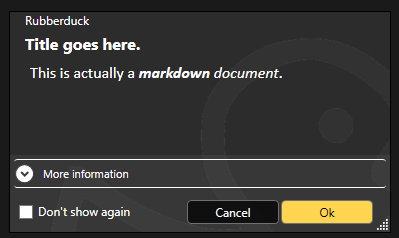
And this is great news, because then having the ability to render markdown in XAML means we get to format other things that used to be strictly plain text – like message boxes:

The language server can also supply such formatted content for tooltips and parameter info, so there’s a non-zero chance @description annotations in RD3 can even honor such formatting when present in docstrings.

The editor shell will support editing and rendering markdown documents, so your project can include a README.md file that you can edit and preview directly in the editor.

It also makes a nice document type to display a startup/”welcome” tab that describes the latest features after an update, again a bit like Visual Studio does.

VBA Code

Text files that the editor understands to be Classic-VB code files (this will have to be based on their respective file extensions) that contain the code for VBProject components that may or may not belong to the workspace of the project that’s in the VBE. Because we’re working off exported files and a .rdproj tells us what libraries are referenced and where to go find what modules for that project, we can now also edit “orphaned files”, as we are no longer constrained to editing code files that belong to the host project!


.rdproj, and consequences

Among the many challenges in RD2, was the fact that we wanted to avoid cluttering our users’ files with any kind of non-code metadata. For example at one point an idea was floated around for hijacking just one single module and having it contain nothing other than commented-out project metadata. Or perhaps carrying this metadata in a file alongside the host document. None of these approaches were going to be enjoyable to use, so instead RD2 dropped the idea of having any per-project configurations, because in RD2 the host document is the single source of truth.

That’s one of the many things changing with v3.0: because the truth has moved outside of the host document and into workspace folders, we now have a per-project physical location to put Rubberduck metadata in.

If we are to hope for feature parity with 2.x, the add-in needs to tell the language server about the project, including the location of referenced libraries. In RD2 we would simply acquire the project references and proceed to extract the types and members, but the language server in RD3 knows absolutely nothing about COM and does exactly zero interop with the VBIDE – so we needed a way to pass the information along without twisting the LSP in ways that would make it impossible for clients other than the Rubberduck Editor to use our language server. Not that it’s a requirement, but the idea is to do things right, not just to make it work for our purposes: if we strictly adhere to the language server protocol (LSP) specifications, then at least in theory it would be simple to write an addin client for any other LSP-capable editor, including VSCode. It’s not a target to write such a client, but having the possibility to do it is.

So rather than coming up with a way to serialize that information and pass it to the server through custom initialization parameters (the protocol defines an “additional data” dictionary that could theoretically be used for this), the addin will generate and maintain a .rdproj file whenever it exports source files to the workspace.

This “Rubberduck Project” file will contain basic information such as the Rubberduck version, a URI for the project root, and then a URI for each library reference (or perhaps just a ProgID string? Or a GUID representing its CLSID? All of the above? 🤔 TBD) and another URI for each module in the project. This isn’t completely final because it’s pretty much just about to be implemented, but the idea would be to end up serializing to a file that would look something like this:

{ 
"rubberduck" : "3.0.0",
"project" : {
"references" : [
"file://path/to/vba7.dll",
"file://path/to/host.tlb",
"file://path/to/library"
],
"modules" : [{
"name" : "ThisWorkbook",
"super" : "Workbook",
"uri" : "file://relative/path"
}, {
"name" : "Sheet1",
"super" : "Worksheet",
"uri" : "file://relative/path"
}, {
"name" : "Module1",
"uri" : "file://relative/path"
}]
}
}

Of particular note are the document module supertypes, which is information RD2 manages to collect from in-process ITypeInfo pointers that the language server in RD3 isn’t going to have access to, by virtue of running in an entirely separate process.

This means the RD3 addin has the following responsibilities:

  • Connect/Disconnect the VBIDE host;
  • Import/Export modules into the VBE and workspace folders;
  • All debugger functionalities;
  • Execute Rubberduck unit tests (VBA code);
  • Collect any ITypeLib/ITypeInfo metadata that can be collected for a VBProject.
  • Start/Shutdown the Rubberduck Editor;

That’s quite a lot already, and these bullet points already make it clear that the single responsibility of the Rubberduck.dll library must encompass every single interaction with the VBIDE, including the native Office CommandBar controls.

It’s a lot already, but that’s the complete extent of it – which means RD3 connects and loads as a VBIDE addin when the VBE starts up, …but then it doesn’t need to resolve the entirety of Rubberduck at startup, which means a splash screen isn’t even warranted here because we’re completely loaded and good to go in the blink of an eye, and it’s (mostly) not even because of dotnet 7! In other words, RD3 restores the Alt+F11 performance and sharpness you know and love.

The last bullet in the list is why: the VBE loads the RD3 VBIDE add-in, and uses JsonRPC messages to communicate with the Rubberduck Editor process. The editor in turn starts the language server, and each process runs in its own separate silo while running periodical “health checks” to ensure there’s still a client process on the other end – if a server loses its client, it shuts down; if a client loses its server, it can just start a new one and carry on without much disruption.

The addin becomes a lightweight launcher that extends the VBE by exposing menu commands that pop an “About” box, or start the Rubberduck Editor app. It wouldn’t be outside of its scope to also launch update and telemetry servers, and since the settings are shared between all processes, a command to bring up Rubberduck settings could be in-scope as well.


Next Steps

Work on the Rubberduck Editor is only getting started! Without thinking too far ahead, here’s what’s to come:

  • Window chrome controls and resize thumb
  • Put everything together to serialize .rdproj
  • “New Rubberduck Project” dialog UI
  • Import/export VBProject commands
  • Document tab host
  • Docking panels, side/tool panels
  • “Welcome” markdown document tab
  • Open/close text and other document types
  • Save, save as commands
  • Settings dialog UI
  • About dialog UI

And then that’s just what can move forward to completion in the Rubberduck Editor part without the server side – but we’ll cross that bridge when we get to the airport, as they say.

Both telemetry and update server applications have their skeletons done and can be started and debugged just like the language server.

Update Server

By running this server separately from the rest, we can get RD3 to update itself without needing to leave the VBE or close the host application and everything you’re working on: if the update server is so configured, it can tell the addin to shut down, which in turn shuts down the Rubberduck Editor, which shuts down the language server.

At that point none of the Rubberduck libraries are in use, and the update server can overwrite them with a newer version before instructing you to manually load the Rubberduck addin which again starts pretty much instantly.

This only requires that we package and ship the update server separately from the addin… kind of like how Visual Studio does.

Telemetry Server

One of the things we want RD3 to address, is just getting basic feature usage information so there’s data out there to help diagnose and prioritize any issues. Logging in RD2 is pretty extensive and verbose already, but it’s very organic and missing in some places; in RD3 logging is built into the base classes for every server-side handler, and with requests coming in asynchronously we need a better way to track what entries belong to which request, and this is exactly what telemetry logs do. The telemetry server will be fully configurable and will never transmit any PII information anywhere. As it handles telemetry events, this server serializes and enqueues telemetry payloads; the queue can then be reviewed, filtered, manually transmitted or cleared, or it can be configured to transmit periodically in batches – the receiving end will be hosted on api.rubberduckvba.com, and there’s a storage concern that may require severely limiting how much data we can keep around and aggregate (probably going to need to sample the data / reject most payloads!), but that’s a concern for another day.

Ultimately the goal is to surface the entire dataset through some explorable dashboards, charts, and tables on the website, so everyone can see what data is being collected: exactly none of it is going to be a secret.

The language server will be able to send language-level telemetry data, on top of everything else that’s useful for debugging. Aggregating this data would allow us to expose how our users are using VBA, from simple metrics like the number of modules in a project to interesting tidbits such as the average number of expressions in a conditional, or what kind of loop constructs people use the most (e.g. While…Wend vs Do…Loop), whether our users declare and fire custom events, implement interfaces, …anything we can think of, really. This obviously isn’t a priority, but it’s been on my mind ever since I heard the Microsoft Excel product team mention they haven’t got the slightest idea of what people do with VBA: seen by the right eyes this data could, ironically, eventually possibly contribute to achieving feature-parity in the VBA alternatives being developed by Microsoft… or rest the case that VBA cannot be taken away because what people do with it involves things that aren’t going to be supported in prospective so-called alternatives (looking at you, OfficeJS).


Development of Rubberduck 3.0 continues, stay tuned for updates, as I’ll be posting here all along the journey.

RD3 Update – October 2023

Things were moving pretty fast with the prototype, but moving on to the actual LSP-driven project hit a roadblock as far as actually achieving the cross-process JsonRPC communications. I put it aside for a while, hoping to get back to it later, and then summer arrived and real-life stuff kept me busy. Renovations in Rubberduck, renovations at home.

Wow time flies, pretty much six months have elapsed since the last status update, and now it’s Hacktoberfest again already! So what happened?

RPC Issues

For about five of those six months, not much moved forward, but ideas kept brewing all along, and the RPC issues have now been resolved.

So, where’s RD3 at?

Clean Start, Clean Exit

When the VBE loads RD3, the add-in starts a separate language server process and connects to it through the language server protocol (LSP), using the very same technology that Microsoft put in VSCode, via the OmniSharp libraries. When the add-in is unloaded from the VBE (whether manually or as the host application shuts down), the server receives both Shutdown and Exit notifications, and once they’re handled and the server actually shuts down we’ll be left with a clean exit every time.

Logging is implemented on both client and server sides, and while debugging the startup and initialization was a bit painful (can’t start the server from Visual Studio, and can’t hook up the debugger quickly enough to attach in time to see what’s going on), now that it’s done the server process can be attached after it starts, so we can hit breakpoints in the server code.

Net7

Perhaps the biggest achievement is that RD3 is now building with .net 7.0, save for a specific library that has to target Framework 4.8.1 because of its use of a number of COM-marshaling methods that don’t (yet?) exist in .net core: that’s the parts dealing with unmanaged memory and pointer magic, that allow RD2 to run unit tests, among other things.

Because everything else is under .net7, Rubberduck gets to leverage all the amazing enhancements that have been brought to the C# language and development platform in the past, uh, decade or so. RD3 will likely release under .net8, which has long-term support from Microsoft.

There’s a catch though: this means RD3 will not be able to run on old, officially unsupported versions of Windows – we’re forfeiting them, in favor of being able to leverage the many enhancements being made to the .net platform. At this stage it’s still unclear exactly what this means for VB6 support: for now the focus is integrating with the VBIDE in VBA, but nothing says VB6 support is being ditched – it was just simpler to exclude that one RD library from the solution for now.

Settings

One of the first pieces of Rubberduck written around this time back in 2014 – the settings I/O and modeling – has officially been axed at long last. Since forever, Rubberduck settings have been serialized to an XML configuration file. In RD3 that’s changing to JSON and much simplified abstractions. In RD2 the default settings live in an XML-encoded “Settings.settings” file that’s a pure nightmare to maintain; in RD3 defaults are moving back into the code itself (I know, it’s data, not code per se), with each serializable struct implementing a generic IDefaultSettingsProvider interface that mandates the presence of a “Default” member that returns a static instance of that settings struct (e.g. LanguageServerSettings.Default, returns a LanguageServerSettings instance with the hard-coded default values.

JSON settings is how pretty much everyone else does it, and there’s a reason for that: the format is much easier to read and manually edit. Plus we already have JSON involved with the RPC messages between client and server. XML was originally adopted because that was the format for Visual Studio’s own settings and configuration under .net Framework 4.x.. and today it’s JSON everywhere.

Rubberduck Editor

Last spring the prototype editor was being integrated into the VBE using essentially the same mechanics used in RD2 for the dockable toolwindows, just undocked and basically turned into just another VBIDE document window.

With the project now under .net7, it turns out we can now have actual WPF/XAML windows in Rubberduck, so there is no more need to implement the entire UI as user controls that are embedded inside a WinForms user control that gets injected into a native toolwindow.

The RD3 editor will let go of most of the native VBIDE integration, and live in a separate window – very much like the Power Query Editor in Excel. The only native UI components in RD3 are the Rubberduck menu items, which have been boiled down to just “Show Editor” and “About” commands, both of which will now bring up a fully WPF UI, rather than a WPF UI embedded in a WinForms dialog: the Rubberduck Editor will be its own application, and we’ll have full control over everything that happens inside that editor.

The downside (if it is one), is that we have to implement basic commands such as Copy and Paste, as well as toolwindows we take for granted, like Properties and Object Browser.

At this stage the editor shell is able to display tab documents bound to a ViewModel; tabs can be moved around, torn from the main window and dragged to another monitor, or docked inside the editor shell. I’m now working on figuring out how the toolwindows are going to work; I’d like something similar to Visual Studio, but the Dragablz library would need to be forked and updated with such capabilities… the “toolwindows” aren’t docking and don’t work in a way that would make sense in a code editor.

Workflow

This does impact the VBA dev workflow: in RD2 the single source of truth was the VBE. In RD3 that’s no longer the case, since the VBE isn’t going to contain the code that’s being edited. The single source of truth in RD3 is going to be moving to the Rubberduck Editor, and the editor will be working off code files exported to file system folders, dubbed “workspace folders”.

When the Debug/Run command is executed, the RDE will save all modified documents to the workspace, synchronize the host VBA project components to mirror it, and then the VBE takes over from that point on (RDE window will minimize itself) to compile and actually run/debug the project.

The host VBA project can also be synchronized any time you want, using the File/Synchronize command – and the editor will run a FileSystemWatcher on workspace folders, so it will detect any external changes/additions/deletions, and immediately notify the language server. If external changes are detected on a file that is opened in the editor, it will prompt to either reload the document, or keep the editor version if it has unsaved changes (thus discarding the external changes).

In RD2 you had to manually tell Rubberduck about changes occurring in the VBE, because automatically parsing on idle involved low-level keyboard hooks and since these hooks were already involved in auto completion and hotkeys, it was deemed too invasive, and ran against the basic premise of the parser, which is that we’re operating with legal, compilable code.

This all changes dramatically in RD3. Because the editor is fully managed, nothing happens in it without the language server receiving requests and notifications. Content changes synchronize in real-time, the editor receives responses with completion lists, syntax errors to highlight (squiggles!), or edits (e.g. auto-formatting etc.) made server-side that the editor immediately carries into the code pane as you type – exactly like how Visual Studio and VSCode and any other modern-day code editor that works with a language server.

The server works asynchronously and out of process, so long-running tasks can send progress notifications, and even partial responses – for example a completion list might only include names to render the list in the client, and the associated tooltips and commands might be sent a few milliseconds later.

Debugging

As was mentioned before, the one thing the RDE cannot do, is attach as a debugger to your running VBA code. When you debug, the RDE will minimize itself and leave the VBE in charge. Edit-and-continue poses a particular challenge: after a debug session, the RDE doesn’t know if anything was modified in the VBE, and its file system watchers cannot help because code doesn’t just magically export itself back to the workspace folders – so here’s what we’re looking at:

  • When a debug session is launched from the RDE, code gets synchronized into the VBE before it is compiled and executed;
  • If the RDE is re-focused and the VBE is back into edit mode (i.e. debug session has ended), the entire workspace gets refreshed with a new export from the VBE;
  • If the RDE is re-focused during a debug session, document tabs will be read-only and the status bar will indicate why;
  • If the host application crashes, or the debug session does not end with the RDE being brought back before the host application shuts down, then the single source of truth resides safely in the host document and the workspace will synchronize next time the RDE loads this project;
  • Any edits made to the exported workspace files during a debug session would be overwritten and lost when the session ends and the RDE is re-focused, unless source control is involved and the changes were committed – in which case the modifications can then be recovered from source control.

Breakpoints cannot be set programmatically either, so the RDE will likely not support them. Bookmarks have a similar problem, in that the VBIDE API doesn’t really let us manipulate them, however the RDE can very well have its own bookmarks system. Debugger toolwindows (immediate, locals, call stack, etc.) are also not going to be present in the Rubberduck Editor, since they’d all be useless without a debugger attached.

User Interface

Some parts of RD2 XAML markup may survive, but really the intent is to make the RDE have a consistent, pleasing, modern, intuitive, and functional user interface for all of its functionalities. Because we’re no longer confined to a WinForms/native host, key/command bindings (hotkeys) will no longer require any kind of bug-prone hooking; focus should behave much more naturally as well, and drag-and-drop is going to be a breeze with the Dragablz library. RD3 basically entails crafting an entire IDE UI from scratch, starting with the editor shell.

The RDE window features a complete menu bar (largely inspired from Visual Studio’s), an actual status bar, and the client area consists of a Dockablz layout panel hosting a Dragablz document tab container.

Some more tinkering is still needed around toolwindows, because what we get out of the box with Dragablz is not going to work for our purposes. Perhaps there’s a way to split the left and right docking areas in two so there’s a distinct drop location for toolwindows that displays them with the tabs at the bottom, but for now there’s no such thing and toolwindows are essentially just another type of document tab.

Another thing that will need attention ideally before the entire UI is done, is theming: indeed it would be sad to make our own editor from scratch without supporting light, dark, and custom themes and syntax highlighting!

Server Side

The LSP server is in place, handling server lifecycle requests and notifications. The next step is to beef up the initialization to send the server information about the project(s) loaded in the VBE, including whether it’s an unsaved new blank project or an existing one hosted in a saved document, and a URI for each library reference so the server can load them and extract all the types and their respective members.

Then we’ll need to setup the actual workspace folders and parse any code files in them – and when we’re done doing that we can send the semantic tokens to the editor to perform syntax highlighting and folding ranges, all while the server starts running diagnostics/inspections, prioritizing the documents that are opened in the editor. The client-side code for this was written in the prototyping stage, so it’s not complete but exactly how that’s going to work is already all figured out.


2023.Q4

The last quarter of 2023 is likely to see lots of progress on all fronts: with LSP in place and a working but bare-bones editor, I can see myself focusing on UI work mostly, while other contributors hop on and work on server-side processing – much of which will have to be ported from the RD2 code base and reworked to fit the new paradigms.

There is a lot of work ahead, but with the client/server communications happening, things that have been on our minds for years, are about to get very real.

The ball is rolling, and nothing will stop it.

Rubberduck 2.5.9

I’m pleased to announce that Rubberduck release version 2.5.2 has achieved over 32 thousand total downloads this month, overflowing a VBA Integer data type! Big numbers are fun and all, but the time has come to reset the counters and officially release the next version.

Those of you that have been keeping up with the many pre-release builds for the past two years will not have too many surprises here, but for the vast majority of you this will be a welcome upgrade with the combined efforts of our contributors over the past 20 months or so. That’s two Hacktoberfests and over 700 commits from 180 pull requests!

> Release notes & Installation instructions: https://github.com/rubberduck-vba/Rubberduck/releases/tag/V2.5.9

See rubberduckvba.com/features for more information about Rubberduck features.

What’s New?

This release brings an awesome new peek definition navigation command (pre-released in 2021!), which lets you view source code that’s anywhere else in the project, without leaving where you’re at.

The Fakes API has been seriously enhanced with more than a dozen new standard library function overrides, as discussed in details in a previous article.

The version check feature is no longer sending HTTP requests to legacy routes on the website (although the website still supports them, so the feature still works in older Rubberduck installs). Instead, an HTTPS request is sent to the public API behind the website – the result is a more reliable feature that now receives much more information than just a version number. It wouldn’t be surprising to see a future iteration show additional information about the latest tag/release, such as the number of downloads, and the installer executable asset URL, for example.

A Rubberduck release wouldn’t be a Rubberduck release without at least a handful of new inspections! 6 new inspections are coming this time around:

  • IIf side-effects flags uses of the IIf function where arguments are potentially side-effecting.
  • Public control field access flags code that accesses form controls from outside the form, recommending a more encapsulated approach.
  • Public Enum in Worksheet module warns about Enum types declared in a Worksheet document module, which can easily result in compilation errors when the worksheet is later copied.
  • Read-only property assignment flags programming errors that the VBE only picks up at run-time.
  • Suspicious predeclared instance access warns about accesses to a form’s predeclared instance made in that form’s code-behind module; depending on how the form is used, such code may not work as intended.
  • UDT Member not used finds UDT members that are declared without being referenced anywhere.

The Extract Method refactoring is making a long-awaited comeback, 5 whole years after the old 2.0 implementation was deemed irreparably broken. It has a number of limitations, for now the selection to extract cannot contain any of the following:

  • GoTo statements
  • GoSub...Return statements
  • Conditionally-compiled statements

This obviously isn’t an exhaustive list of everything that happened in the last two years, but it’s a good summary of the new stuff.

What’s next?

This release is the last one planned to start with a 2; work has started on Rubberduck 3.0, a major overhaul of everything we’ve built so far. Rubberduck is being split into client/server processes, storage is moving out-of-process, and the entire user interface is being remade to support everything that’s coming in v3.

Because a massive number of breaking changes need to happen, RD3 is being developed in a separate repository; you’ll find it under the rubberduck-vba organization on GitHub, and that’s where the bulk of development efforts are going to be directed at in the coming months.

Website

The new revamped website is live now; still has a couple of annoying issues (search results page links don’t work, for one), but overall I’m very happy with how it turned out!

Swag Shop

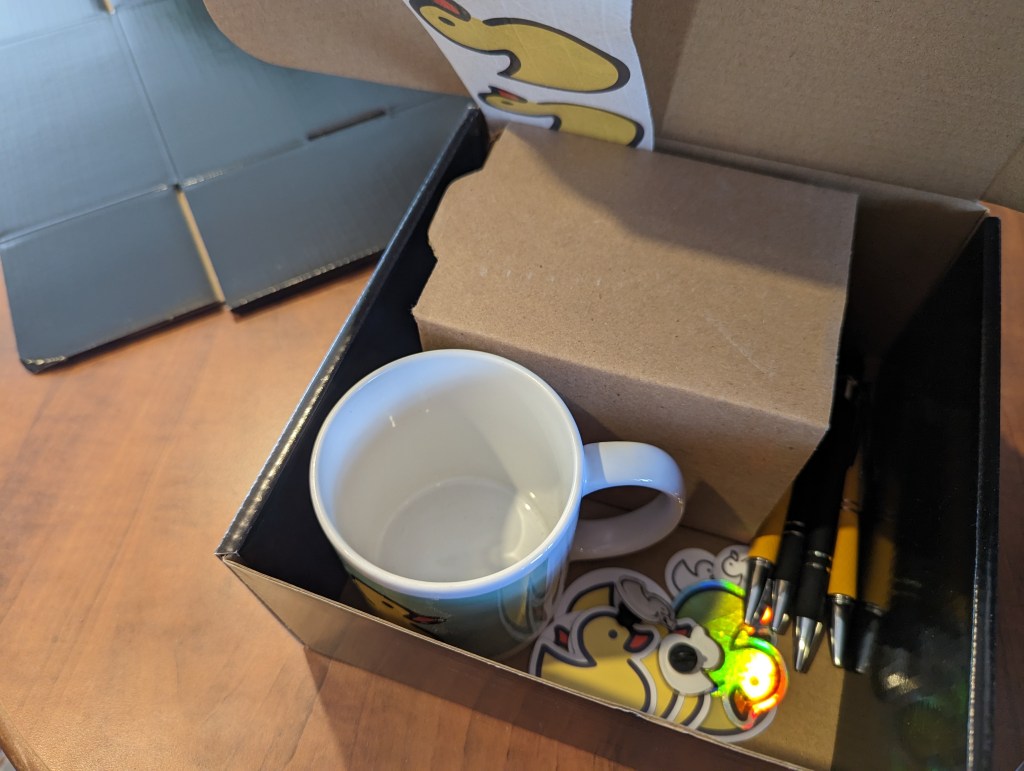
If you’re following Rubberduck on social media, you know I’ve opened a swag shop where you can get Rubberduck-branded mugs, pens, stickers, t-shirts, and more; these past couple of weeks I’ve been building an assortment of various products at various price points for various budgets. Shipping remains a challenge (it’s expensive!), but Ko-fi doesn’t take a cut on shop sales (or donations), which makes it a better deal for a shop with uncertain sales, compared to say Amazon, where shipping is less of a challenge but the monthly fees are prohibitive for a small-volume shop.

There’s now a rather decent offering and quite a lot of inventory; eventually I’ll get more stuff made (hats, hoodies maybe), and will replenish whatever runs out, but my attention will be mostly dedicated to Rubberduck3 development now.

Rubberduck 2.x has been an amazing adventure and a tremendous learning experience – I’m primed and looking forward to all the new challenges porting 2.x to RD3 will bring!

Declaring and Using Variables in VBA

Among the very first language keywords one comes across when learning VBA, is the Dim keyword; declaring and using variables is easily the first step one takes on their journey away from the macro recorder.

About Scopes

Before we can really understand what variables do and what they’re useful for, we need to have a minimal grasp of the concept of scoping. When you record a macro, the executable instructions get written for you inside a procedure scope that’s delimited with Sub and End Sub tokens (tokens are the grammatical elements of the language, not necessarily single keywords), with the identifier name of the macro after the Sub keyword:

Sub DoSomething()
    ' executable code goes here
End Sub

Exactly none of the above code is executable, but compiling it creates an entry point that the VBA runtime can invoke and execute, because the procedure is implicitly public and as such, can be accessed from outside the “Module1” module it exists in (with or without Option Private Module). In other words the above code could tell us explicitly what the scope of the DoSomething procedure is, using the Public keyword before the Sub token:

Public Sub DoSomething()
    ' executable code goes here
End Sub

If we used Private instead, then Excel (or whatever the host application is) could not “see” it, so you would no longer find DoSomething in the list of available macros, and other modules in the same VBA project couldn’t “see” or invoke it either; a private procedure is only callable from other procedures in the same module.

Standard modules are themselves public, so you can refer to them from any other module in your project, and invoke their public members using the member access operator, the dot:

Public Sub DoStuff()
   Module1.DoSomething
End Sub

Because public members of public modules become part of a global namespace, the public members can be referred to without an explicit qualifier:

Public Sub DoStuff()
    DoSomething
End Sub

While convenient to type, it also somewhat obscures exactly what code is being invoked: without an IDE and a “navigate to definition” command, it would be pretty hard to know where that other procedure is located.

The global namespace contains not only the public identifiers from your VBA project, but also all the public identifiers from every referenced library, and they don’t need to be qualified either so that’s how you can invoke the VBA.Interaction.MsgBox function without qualifying with the library or module it’s defined in. If you write your own MsgBox function, every unqualified MsgBox call in that project is now invoking that new custom function, because VBA always prioritizes the host VBA project’s own type library over the referenced ones (every VBA project references the VBA standard library and the type library that defines the COM extension and automation model for the host application).

But that’s all going outward from a module: within a module, there are two levels of scoping: module level members can be accessed from anywhere in the module, and procedure level declarations can be accessed from anywhere inside that procedure.

Module-level declarations use Public and Private modifiers, and procedure-level ones use the Dim keyword. Dim is legal at module level too, but because Private and Public are only legal at module level (you can’t use them for procedure scope / “local” declarations), Rubberduck encourages you to use Dim for locals only.

For example a variable declared in a conditional block is allocated when the stack frame is entered regardless of the state when the condition gets evaluated, and a variable declared inside a loop body is the same variable outside that loop, and for every iteration of that loop as well: there is no “block scope” in VBA.

Non-Executable Statements

Procedures don’t only contain executable instructions: Dim statements, like statements with Private and Public modifiers, are declarative and do not do anything. You cannot place a debugger breakpoint (F9) on such statements, either. This is important to keep in mind: the smallest scope in VBA is the procedure scope, and it includes the parameters and all the local declarations of that procedure – regardless of where in the procedure body they’re declared at, so the reason to declare variables as you need them has more to do with reducing mental load and making it easier to later extract a method by moving a chunk of code into another procedure scope. Declaring all locals at the top of a procedure often results in unused variables dangling, because of the constant up-and-down, back-and-forth scrolling that inevitably happens when a procedure eventually grows; the further a variable is out of its context, the more it becomes a liability.

Const statements (to declare constant values) are also legal in local/procedure scope, and they’re identically non-executable; the same applies to Static declarations (variables that retain their value between invocations).

ReDim statements however are executable, even though they also count as a compile-time declaration – but they don’t count as a duplicate declaration, so the presence of ReDim doesn’t really justify skipping an initial Dim declaration.

Explicitness as an Option

Not only access modifiers can be implicit in VBA; the language lets you define a Variant variable on the fly, without a prior explicit declaration. If this behavior is practical for getting the job done and will indeed work perfectly fine, it’s also unnecessarily putting you at risk of typos that will only become a problem at run-time, if you’re lucky close enough to the source of the problem to hunt down and debug. By specifying Option Explicit at the top of every module, the compiler will treat implicit declarations as compile-time errors, telling you about the problem before it even becomes one.

Option Explicit has its limits though, and won’t protect you from typos in late-bound member calls, where invoking a member that doesn’t exist on a given object throws error 438 at run-time.

When to Declare a Variable

There are many reasons to declare a variable, but if you’re cleaning up macro recorder code the first thing you’ll want to do is to remove the dependency on Selection and qualify Range and Cells member calls with a proper Worksheet object.

For example before might look like this:

Sub Macro1
    Range("A10") = 42
    Sheet2.Activate
    Range("B10") = 42
End Sub

And after might look like this:

Public Sub Macro1()
    Dim Sheet As Worksheet
    Set Sheet = ActiveSheet
    Sheet.Range("A10") = 42
    Sheet2.Activate
    Sheet.Range("B10") = 42
End Sub

The two procedures do exactly the same thing, but only one of them is doing it reliably. If the Sheet2 worksheet is already active, then there’s no difference and both versions produce identical output. Otherwise, one of them writes to whatever the ActiveSheet is, activates Sheet2, and then writes to that sheet.

There’s a notion of state in the first snippet that adds to the number of things you need to track and think about in order to understand what’s going on. Using variables, exactly what sheet is active at any point during execution has no impact whatsoever on the second snippet, beyond the initial assignment.

It’s that (global) state that’s behind erratic behavior such as code working differently when you leave it alone than when you step through – especially when loops start getting involved. Managing that global state makes everything harder than necessary.

Keep your state close, and your ducky closer, they say.

Set: With or Without?

Not being explicit can make the code read ambiguously, especially when you consider that objects in VBA can have default members. In the above snippets, the value 42 reads like it’s assigned to… the object that’s returned by the Range property getter of the Worksheet class. And that’s weird, because normally you would assign to a property of an object, not the object itself. VBA understands what it needs to do here, because the Range class says “I have a default member!” and that default member is implemented in such a way that giving it the value 42 does exactly the same as if the Range.Value member was being invoked explicitly. Because that behavior is an implementation detail, it means the only way to know is to read its documentation.

The Set keyword modifies an assignment instruction and says “we’re assigning an object reference”, so VBA doesn’t try to check if there’s a default member on the left-hand side of the assignment operator, and the compiler expects an object reference on the right-hand side, …and then only throws at run-time when that isn’t the case – but because this information is all statically available at compile-time, Rubberduck can warn about such suspicious assignments.

So to assign a variable that holds a reference to a Range object, we must use the Set keyword. To assign a variable that holds the value of a Range object, we must not use the Set keyword. Declaring an explicit data type for every variable (meaning not only declaring things, but also typing them) helps prevent very preventable bugs and subtle issues that can be hard to debug.

As SomethingExplicit

Whether Public or Private, whether local or global, most variables are better off with a specific data type using an As clause:

  • Dim IsSomething
  • Dim SomeNumber As Long
  • Dim SomeAmount As Currency
  • Dim SomeValue As Double
  • Dim SomeDateTime As Date
  • Dim SomeText As String
  • Dim SomeSheet As Worksheets
  • Dim SomeCell As Range

Using an explicit data/class/interface type, especially with objects, helps keep things early-bound, meaning both the compiler and static code analysis tools (like Rubberduck) can better tell what’s going on before the code actually gets to run.

We can often chain member calls; the Worksheets collection’s indexer necessarily yields a Worksheet object, no?

Public Sub Macro1()
    ActiveWorkbook.Worksheets("Sheet1").Range("A1").Value = 42
End Sub

If you manually type this instruction, you’ll notice something awkward that should be unexpected when you type the dot operator after Worksheets(“Sheet1”), because the property returns an Object interface… which tells VBA it has members that can be invoked, but leaves no compile-time clue about any of them. That’s why the Range member call is late-bound and only resolved at run-time, and because the compiler has no idea what the members are until the code is running, it cannot populate the completion list with the members of Worksheet, and will merrily compile and attempt to invoke a Range member.

By breaking the chain and declaring variables, we restore compile-time validations:

Public Sub Macro1()
    Dim Sheet As Worksheet
    Set Sheet = ActiveWorkbook.Worksheets("Sheet2")
    Sheet.Range("A1").Value = 42
End Sub

When NOT to Declare Variables

Variables are so nice, sometimes we declare them even when we don’t need them. There are many valid reasons to use a variable, including abstracting the result of an expression behind its value. Assuming every variable is assigned and referenced somewhere, there are still certain variables that are always redundant!

Objects are sneaky little things… not only can they have a default member that gets implicitly invoked, they can also have a default instance that lives in the global scope and is always named after the class it’s an instance of.

Declaring a local variable to hold a copy of a reference to an object that’s already globally accessible, is always redundant! Document modules (in Excel that’s ThisWorkbook and the Worksheet modules) and UserForms always have such a default instance:

Public Sub Macro1()
    Dim WB As Workbook
    Set WB = ThisWorkbook 'redundant and obscures intent!
    Dim Sheet As Worksheet
    Set Sheet = Sheet1 'redundant, just use Sheet1 directly!
End Sub

Sprinkle Generously

Variables are a simple but powerful tool in your arsenal. Using them enhances the abstraction level of your code, practices your brain to stop and think about naming things, can help prevent binding errors and remove implicit late-binding / keep your code entirely visible to the compiler and Rubberduck. Used wisely, variables can make a huge difference between messy and redundant macro-recorder code and squeaky-clean, professionally-written VBA code.

Lightweight MVVM in VBA

A little while ago already, I went and explored dynamic UI with MSForms in VBA through a lens tinted with Windows Presentation Foundation (WPF) concepts, and ended up implementing a working prototype Model-View-ViewModel (MVVM) framework for VBA… across a hundred and some modules covering everything from property and command bindings to input and model validation. I’m still planning to build an actual COM library for it one day – for now I’m entirely focused on everything around Rubberduck3.

Although… the last month or so has actually been mostly about publishing the new website and setting up the Ko-fi shop: the new website is not without issues (search links are broken, for one), but the source code ownership has been transferred to the rubberduck-vba organization on GitHub and I’m satisfied enough with it to move on.

But then there’s operating the shop. When an order comes in, there’s a worksheet (duh!) with a Sales table where I enter the invoice line items sold using a Stock Keeping Unit (SKU) code that identifies each item sold; the Inventory table picks up the sale and calculates a new Available to Sell figure.

But tracking items sold isn’t the whole picture: an Invoice table tracks the actual totals including the shipping charges and actual shipping costs (currently 24% underwater, but I’ve since adjusted the shipping charges to better reflect reality), computing the Cost of Goods Sold, and ultimately a profit margin.

So for each invoice, I know I need:

  • Invoice number and date
  • Billing/shipping information (name, address, etc.)
  • The number of units sold per SKU, with the amount paid by the customer
  • The shipping charge paid by the customer

And then I manually prepare the invoice document. Such a waste of time, right? Of course I couldn’t leave it at that – all I needed was a UserForm to enter all that, and a command that would update the merchandise planning workbook and prepare the invoice document for me.

Thing is, I wanted that form to use property bindings and some extent of MVVM, but I wasn’t going to import the 100+ modules of the old MVVM prototype code. So instead, I made a “lite” version.

The accompanying code for this article is in the Rubberduck Examples repository.

Property Bindings

Bindings and the propagation of property value changes are the core mechanics that make MVVM work, and we don’t need dozens of classes for that.

We do need INotifyPropertyChanged and IHandlePropertyChanged interfaces:

Option Explicit
Public Sub OnPropertyChanged(ByVal Source As Object, ByVal Name As String)
End Sub
Public Sub RegisterHandler(ByVal Handler As IHandlePropertyChanged)
End Sub
Option Explicit
Public Sub OnPropertyChanged(ByVal Source As Object, ByVal Name As String)
End Sub

These interfaces are important, because the bindings need to handle property changed events; the View Model needs to invoke the registered callbacks. This is used in place of actual events, because interfaces in VBA don’t expose events, and we want an abstraction around property changes, so that everything that needs to notify about property changes can do so in a standardized way.

The IHandlePropertyChanged interface is to be implemented by property binding classes, such as this TextBoxValueBinding class:

Option Explicit
Implements IHandlePropertyChanged
Private WithEvents UI As MSForms.TextBox

Private Type TBinding
    Source As Object
    SourceProperty As String
End Type

Private This As TBinding

Public Sub Initialize(ByVal Control As MSForms.TextBox, ByVal Source As Object, ByVal SourceProperty As String)
    Set UI = Control
    Set This.Source = Source
    This.SourceProperty = SourceProperty
    If TypeOf Source Is INotifyPropertyChanged Then RegisterPropertyChanges Source
End Sub

Private Sub RegisterPropertyChanges(ByVal Source As INotifyPropertyChanged)
    Source.RegisterHandler Me
End Sub

Private Sub IHandlePropertyChanged_OnPropertyChanged(ByVal Source As Object, ByVal Name As String)
    If Source Is This.Source And Name = This.SourceProperty Then
        UI.Text = VBA.Interaction.CallByName(This.Source, This.SourceProperty, VbGet)
    End If
End Sub

Private Sub UI_Change()
    VBA.Interaction.CallByName This.Source, This.SourceProperty, VbLet, UI.Value
End Sub

A binding has a source and a target object and property; the source is a ViewModel object, and the target is a MSForms control, in this case a TextBox. The binding must handle the control’s events to update the source whenever the value of the target changes. In this limited version we’re only going to handle the Change event, but if we wanted we could go further and handle KeyDown here to implement input validation. Some error handling wouldn’t hurt, either.

Because everything that involves notifying about property changes is standardized through interfaces, we can make a PropertyChangeNotification helper class to register the handlers:

Option Explicit
Private Handlers As VBA.Collection

Public Sub AddHandler(ByVal Handler As IHandlePropertyChanged)
    Handlers.Add Handler
End Sub

Public Sub Notify(ByVal Source As Object, ByVal Name As String)
    Dim Handler As IHandlePropertyChanged
    For Each Handler In Handlers
        Handler.OnPropertyChanged Source, Name
    Next
End Sub

Private Sub Class_Initialize()
    Set Handlers = New VBA.Collection
End Sub

This class is responsible for holding a reference to a collection of handlers, and a Notify method invokes the OnPropertyChange method on each registered handler.

ViewModel

The OrderHeaderModel class is the binding source, so it exposes a property representing the value of each field in the form. The Property Let procedures are all structured as follows:

  • If current encapsulated value is not equal to the new value
    • Set the current value to the new value
    • Notify of a property change

ViewModel classses need to implement INotifyPropertyChange, and the implementation simply uses an instance of the helper class above to do its thing:

Option Explicit
Implements INotifyPropertyChanged

Private Notification As New PropertyChangeNotification

'...

Private Sub OnPropertyChanged(ByVal Name As String)
    INotifyPropertyChanged_OnPropertyChanged Me, Name
End Sub

Private Sub INotifyPropertyChanged_OnPropertyChanged(ByVal Source As Object, ByVal Name As String)
    Notification.Notify Source, Name
End Sub

Private Sub INotifyPropertyChanged_RegisterHandler(ByVal Handler As IHandlePropertyChanged)
    Notification.AddHandler Handler
End Sub

The private OnPropertyChanged method further simplifies the notification by providing the Source argument, which needs to be an instance of the ViewModel, so that’s always Me. So the properties all look more or less like this:

Public Property Get OrderNumber() As Long
    OrderNumber = This.OrderNumber
End Property

Public Property Let OrderNumber(ByVal Value As Long)
    If This.OrderDate <> Value Then
        This.OrderNumber = Value
        OnPropertyChanged "OrderNumber"
    End If
End Property

The ViewModel is inherently domain-specific, so for a form that collects information about an order we’re going to be looking at properties like OrderNumber, OrderDate, BillToName, ShipToAddress, etc.; in another application, a ViewModel could be a completely different thing – it all really depends on what the thing is meant to do. But no matter what the domain is, a ViewModel will be implementing INotifyPropertyChanged as shown above.

View

Implementing the View (the form’s code-behind module) boils down to setting up all the necessary bindings, and we do this using a PropertyBindings helper module:

Option Explicit

'@Description "Binds a MSForms.Control property to a source property"
Public Function BindProperty(ByVal Control As MSForms.Control, ByVal ControlProperty As String, ByVal SourceProperty As String, ByVal Source As Object, Optional ByVal InvertBoolean As Boolean = False) As OneWayPropertyBinding
    
    Dim Binding As OneWayPropertyBinding
    Set Binding = New OneWayPropertyBinding
    
    Binding.Initialize Control, ControlProperty, Source, SourceProperty, InvertBoolean
    
    Set BindProperty = Binding

End Function

'@Description "Binds the Text/Value of a MSForms.TextBox to a source property"
Public Function BindTextBox(ByVal Control As MSForms.TextBox, ByVal SourceProperty As String, ByVal Source As Object) As TextBoxValueBinding
    
    Dim Binding As TextBoxValueBinding
    Set Binding = New TextBoxValueBinding
    
    Binding.Initialize Control, Source, SourceProperty
    
    Set BindTextBox = Binding
    
End Function

'@Description "Binds the Text of a MSForms.ComboBox to a String source property"
Public Function BindComboBox(ByVal Control As MSForms.ComboBox, ByVal SourceProperty As String, ByVal Source As Object) As ComboBoxValueBinding
    
    Dim Binding As ComboBoxValueBinding
    Set Binding = New ComboBoxValueBinding
    
    Binding.Initialize Control, Source, SourceProperty
    
    Set BindComboBox = Binding

End Function

'@Description "Binds the Value of a MSForms.CheckBox to a Boolean source property"
Public Function BindCheckBox(ByVal Control As MSForms.CheckBox, ByVal SourceProperty As String, ByVal Source As Object) As CheckBoxValueBinding
    
    Dim Binding As CheckBoxValueBinding
    Set Binding = New CheckBoxValueBinding
    
    Binding.Initialize Control, Source, SourceProperty
    
    Set BindCheckBox = Binding

End Function

As you can see each MSForms control gets its Binding class, and a OneWayPropertyBinding binds a source property to a target property without notifying for target changes (so without listening for control events) – this is useful for binding labels, ListBox/ComboBox contents, and anything else that doesn’t involve control events.

The form has a private ConfigureBindings method (invoked from the UserForm_Initialize handler) where we essentially map each one of the form controls to corresponding ViewModel properties:

Private Sub ConfigureBindings(ByVal Model As INotifyPropertyChanged)

    Const EnabledProperty As String = "Enabled"
    Const ListProperty As String = "List"
    
    This.Bindings.Add BindTextBox(Me.BillToNameBox, "BillToName", This.OrderModel)
    This.Bindings.Add BindTextBox(Me.BillToAddressLine1, "BillToLine1", This.OrderModel)
    This.Bindings.Add BindTextBox(Me.BillToAddressLine2, "BillToLine2", This.OrderModel)
    This.Bindings.Add BindTextBox(Me.BillToAddressLine3, "BillToLine3", This.OrderModel)
    This.Bindings.Add BindTextBox(Me.BillToEmailBox, "EmailAddress", This.OrderModel)
    This.Bindings.Add BindCheckBox(Me.BillToContributorBox, "IsContributor", This.OrderModel)
    
    This.Bindings.Add BindCheckBox(Me.ShipToSameBox, "ShipToBillingAddress", This.OrderModel)
    This.Bindings.Add BindTextBox(Me.ShipToNameBox, "ShipToName", This.OrderModel)
    This.Bindings.Add BindTextBox(Me.ShipToAddressLine1, "ShipToLine1", This.OrderModel)
    This.Bindings.Add BindTextBox(Me.ShipToAddressLine2, "ShipToLine2", This.OrderModel)
    This.Bindings.Add BindTextBox(Me.ShipToAddressLine3, "ShipToLine3", This.OrderModel)
    
    This.Bindings.Add BindProperty(Me.ShipToAddressLabel, EnabledProperty, "ShipToBillingAddress", This.OrderModel, InvertBoolean:=True)
    This.Bindings.Add BindProperty(Me.ShipToNameLabel, EnabledProperty, "ShipToBillingAddress", This.OrderModel, InvertBoolean:=True)
    This.Bindings.Add BindProperty(Me.ShipToNameBox, EnabledProperty, "ShipToBillingAddress", This.OrderModel, InvertBoolean:=True)
    This.Bindings.Add BindProperty(Me.ShipToAddressLine1, EnabledProperty, "ShipToBillingAddress", This.OrderModel, InvertBoolean:=True)
    This.Bindings.Add BindProperty(Me.ShipToAddressLine2, EnabledProperty, "ShipToBillingAddress", This.OrderModel, InvertBoolean:=True)
    This.Bindings.Add BindProperty(Me.ShipToAddressLine3, EnabledProperty, "ShipToBillingAddress", This.OrderModel, InvertBoolean:=True)
    
    This.Bindings.Add BindProperty(Me.ItemSkuSelectBox, ListProperty, "Value", InventorySheet.Table.ListColumns("SKU").DataBodyRange)
    This.Bindings.Add BindComboBox(Me.ItemSkuSelectBox, "SKU", This.OrderModel.NewLineItem)
    This.Bindings.Add BindTextBox(Me.ItemQuantityBox, "Quantity", This.OrderModel.NewLineItem)
    This.Bindings.Add BindTextBox(Me.ItemPriceBox, "Price", This.OrderModel.NewLineItem)
    
    This.Bindings.Add BindProperty(Me.LineItemsList, ListProperty, "LineItems", This.OrderModel)

End Sub

This rather straightforward configuration completely replaces event handlers. That’s right: the bindings take care of the control events for us, so checking the ShipToSameBox checkbox automatically disables the ShipToNameLabel, ShipToAddressLabel, ShipToAddressLine1, ShipToAddressLine2, and ShipToAddressLine3 controls on the form, and un-checking it automatically enables them, and we don’t need to explicitly handle any control events to achieve this. Small note: here the View is accessing a table in InventorySheet directly, and it shouldn’t be doing that, because what SKUs are available belongs in the Model, not the View: I should instead implement a service that accesses the worksheet for me and supplies the available SKU codes.

With the form controls effectively abstracted away by the ViewModel, we never need to directly interact with MSForms to affect the View, because the property bindings do this automatically for us. This means commands can affect just the ViewModel, and doing that will automatically keep the View in sync.

Commands

This lite version of MVVM doesn’t (yet?) have command bindings, but UI commands are still abstracted behind an ICommand interface. In my case I needed a command to add a new order line item, so I implemented it like this:

Option Explicit
Implements ICommand

Private Function ICommand_CanExecute(ByVal Parameter As Object) As Boolean
    ICommand_CanExecute = TypeOf Parameter Is OrderHeaderModel
End Function

Private Sub ICommand_Execute(ByVal Parameter As Object)
    If Not TypeOf Parameter Is OrderHeaderModel Then Err.Raise 5
    
    Dim Model As OrderHeaderModel
    Set Model = Parameter
    
    Dim Item As OrderLineItemModel
    Set Item = New OrderLineItemModel
    
    Item.SKU = Model.NewLineItem.SKU
    Item.Quantity = Model.NewLineItem.Quantity
    Item.Price = Model.NewLineItem.Price
    
    Model.AddLineItem Item
    
End Sub

This code is completely oblivious of any form or form controls: it only knows about the OrderHeaderModel and OrderLineItemModel classes, and what it needs to do with them. Why bother implementing this in a separate class, rather than in the form’s code-behind?

Without command bindings, we do need to handle command buttons’ Click event:

Private Sub AddLineItemButton_Click()
    CmdAddLineItem.Execute OrderModel
End Sub

I don’t like having logic in event handlers, so this one-liner is perfect. Without a command class the View would need to have more code, code that isn’t directly related to the View itself, and then the commands’ dependencies would become the View‘s dependencies, and that would be wrong: if I made a “Save to Database” button, I’d want the ADODB stuff anywhere but in the form’s code-behind; command classes can have their own dependencies, so pulling commands into their own classes keeps the View cohesive and focused on its purpose.

I’m finding that MVVM works best with relatively complex forms such as this one, where some fields’ enabled state might depend on some checkbox control’s value, for example. There’s something oddly satisfying typing something in a textbox and seeing another (disabled!) textbox get updated with the same content, knowing zero event handling is going on in the form.

Viability

If the full-featured MVVM framework isn’t viable in VBA, a more lightweight version of the UI paradigm certainly is: this particular VBA project doesn’t have dozens of class modules, and yet still manages to leverage what makes Model-View-ViewModel such a compelling architecture.

Rubberduck Swag Shop is Open!

Back in the summer of 2017, we ran a rather successful GoFundMe campaign to collect funds to get some swag made, and shipped to the project’s contributors. It was great to see all that support pouring in, but it was bittersweet… for I would have loved to have been able to materially thank back our supporters. Alas, making custom printed gear quickly gets expensive, and crazy shipping fees essentially doubled it up.

So this time around I decided to bite the bullet and make a more significant initial investment, and actually start an online shop and keep an inventory in stock that can be shipped to supporters whenever, without needing to wait for prints, or paying too much for too few items being made, severely limiting profitability and driving prices up.

I guess I’ll know soon enough if I still have my old merchandise planner’s touch! If the inventory turns too fast, I’ll miss opportunities and may have to delay shipments to replenish. But if the markup is too high and stock isn’t moving quickly enough, I’ll probably need to take markdowns.

I’ll be writing an article about the particular workbook I’m using to track all that next – I want a bit of VBA code to simplify tracking sales and invoicing.. but for now I’m just thrilled to start shipping all the goodies!

I’m very happy with how everything turned out. That beautiful yellow ducky mug will probably only ever be printed in small batches, for they are quite expensive and I’m unfortunately not going to be able to have a better price for them unless I make them in very large batches. Everything else (even t-shirts, to a degree) has the potential to eventually get to a very decent price point – the goal is obviously to collect some funds to help finance the costs of hosting and securing the blog and website, but I want this inventory to move and don’t mind taking a lower margin if there’s enough volume to drive enough sales to just keep the shop afloat – time will tell!

Rubberduck Swag Shop on Ko-fi

Rubberduck 3.0: February Update

I’ve embarked on a journey to take Rubberduck to the next major version, making it the add-in we’ve always wanted to build. These monthly updates provide a sneak peek at what’s coming, and how it’s coming to be.

Quick catch-up

  • Rubberduck 3.0 will run a LSP server process in the background
  • A separate process will host a local SQLite database
  • Telemetry will be opt-in, fully configurable, and transparent
  • January update

Several quite important low-level changes since last time: we’re now looking at named pipes rather than sockets for the JSON-RPC communications between the editor and the language server, and I’m now using Microsoft’s StreamJsonRpc library for this. Named pipes are inherently local, so they’re less of a concern than sockets, and they don’t seem to trip up Windows Defender, so we’ll take it!

I spent the better part of last month tidying up and documenting the code off the language server protocol (LSP) specifications, moving things around and splitting up responsibilities, writing abstractions that will be shared by all server processes: LSP and SQLite, but also a separate/dedicated server process for telemetry, so even constant writes couldn’t interfere much with LSP server activities, or with the add-in client.

At the time of this writing, I’m still somewhat struggling with the RPC communications, but that won’t remain stuck for too long – the plan is to merge a rather large structural PR and the whole RPC infra by the end of this week.

The Rubberduck.Server.LocalDb console at startup. This process will normally run in the background, hidden.

I’ve taken a number of important decisions about the project in the last few weeks.

GitHub Repository Issues

Since the project’s beginning, Rubberduck was pretty much ad-hoc development. I remember in the first few days after creating the GitHub repository, going on an issue-creation spree to write down everything I could dream the thing could do. A lot of it was implemented, but the oldest open issues in the repository are from 2014, 2015:

2,857 issues closed is quite something. 958 open feels daunting though. Using issues as a backlog might not have been the best of ideas…

I’m not going through nearly a thousand issues to sort out what’s already implemented/fixed, what’s unrealistic after all, what’s a good idea that got buried under a million others, etc. Implementing LSP isn’t magically going to clean this up, and when 3.0 releases we’re not going to be maintaining two distinct, massive code bases: one of them isn’t going to make it, and it’s sadly going to have to be the one with 1.7K stars and 284 forks and 97 watchers. I can hardly express how I feel about these numbers, let alone those:

As of 2023/02/14, release tag 2.5.2.1 (build 2.5.2.5906) has been downloaded 27,320 times… that’s crazy!

The repository isn’t going anywhere though – it’s just that at some point in the [somewhat-near] future, it’s going to be made read-only and essentially archived, and the Rubberduck3 repository will become Rubberduck’s new home on GitHub (you’ll still find it under the rubberduck-vba organization).

Rubberduck is still accepting pull requests for v2.x and will continue to do so until further notice.


Methodology Upgrade

If building Rubberduck up to v2.5 was pretty much ad-hoc (and that’s fine!), I don’t think the same strategy would work with v3.0; we can’t just go and create a thousand issues to churn through, or pick a feature to implement because it looks like it’s going to be fun to do. Rubberduck 3.0 is still an embryo at this point, and while all the DNA is there and we know exactly (at least in large fuzzy outlines) what we want this add-in to do, this time things need to happen in order, for technical reasons mostly, but also for project management.

By adopting a different development methodology, we’re going to better control the backlog and project progression. We can better track what’s in progress and determine what the next logical steps should be.

Instead of making a ton of issues, we’ll be drafting them, sizing them, prioritizing them, refining them until they’re small enough to be realistically achievable within a week or two of part-time contributions. Work items will now have a life cycle like this:

  • New items/ideas not yet fleshed out, not yet planned, and/or not yet prioritized.
  • Backlog for work items being documented.
  • Ready for documented work items that are ready to be worked on; items are assigned a sprint (not necessarily the next one), and convert into issues at this stage.
  • In Progress is work in progress; a branch is created for resolving that issue.
  • In Review is work items ready to be peer reviewed; a pull request is opened at that stage.
  • Done is when the work is merged into dev/next.
  • Delivered status is set when the work is merged into main.

Items/issues will be assigned a priority level:

  • Urgent is the highest priority level, for things that should be worked on before anything else.
  • High is for work that’s directly aligned with the objectives of the sprint it’s in.
  • Medium priority work could be delayed a sprint or two.
  • Low priority work doesn’t need to be in the current sprint, but would be nice to deliver anyway.

The priority level of any given issue likely evolves over time, particularly the lower-level ones.

In addition to status and priority, each draft issue / work item gets sized. Again this is meant to evolve over time: issues should become smaller over time as they are refined and documented and broken down into smaller tasks.

  • X-Large items represent a large development that should be broken down into smaller tasks.
  • Large items represent a significant development effort that can realistically be completed within a sprint by a single developer.
  • Medium items represent perhaps up to 2-3 days of effort.
  • Small items represent small tasks that can be completed in a few hours.
  • Tiny items represent tasks that should only take a few minutes: fixing a typo, adding a column to a database view or table, a configuration tweak, etc.

As of this writing, Sprint 1 is in its second half, and I’m still working on the RPC infrastructure:

“Project Cucumber” – it just had to be named that.

There’s a bit of history around the cucumber thing, and it involves two major contributors we lost and think about fondly all the time.

Comintern simply disappeared one day after a brief return, after a year under terms that essentially prevented him from working on open-source projects and hanging out in a public chat. We’re all hoping he’s all right and will eventually pop back.
We lost our beloved ThunderFrame to a fierce cancer in late 2018. Rest in peace, my friend. I got the Ctrl+Alt+Delete cushion covers you wanted me to have.

Discord Server

Rubberduck’s dev chat was always in a Stack Exchange room under the Code Review site. In fact it’s just a Code Review chat room we ended up [ab]using for this purpose. Back in 2014 I was very active on CR, and as a moderator on that site in 2015-2018 it made a lot of sense to keep it there.

But with 2-week sprints and a living backlog, we’re going to need more than SE chat to pull this off, and this is where Discord shines.

The general chat is fun, but a nice thing about Discord is that you can schedule events, like a public Sprint Review presentation every two weeks, followed by a Sprint Planning conversation among developers.

I’ll be hosting these events regularly, whether there’s an audience or not, whether other contributors are present or not.

Sprint Review

At each end of a sprint, we’re going to be going over what was done in the previous two weeks, and developers will present/demo their work. Since I’m doing sprint 1 by myself the first review will be me going over the solution structure and explaining the mechanisms and abstractions involved at a high level; reviews for sprint 2 and onward will likely involve more contributors, and things will get more and more exciting to present every time.

Sprint Planning

After the review concludes, developers convene to plan a realistically deliverable workload for the upcoming sprint. If we overshoot and under-deliver, we can always adjust the next sprint. If we over-deliver, we can always pull work items from upcoming sprints into the current one. So this conversation is about the work itself, whether there’s enough information in an issue for anyone at the table (or not!) to pick up and complete that task within two weeks, and whether the backlog is healthy or falling behind; if it’s falling behind, we take the time to talk about what needs to happen and outline work items to be drafted and refined during the sprint (I’ll be doing that backlog maintenance).


So yeah, Rubberduck3 is starting to feel very much like it’s just about to officially kick off, and Rubberduck as a project is entering a whole new phase, in continuous delivery mode.

Join us on Discord to keep up! (<~ feel free to share that link!)

Rubberduck 3.0: January Update

I intended to write about Rubberduck 3.0 progress last December, but things snowballed during the Holidays and here we are two-three weeks later and wow, time flies! Happy New Year dear readers (belatedly, I guess), 2023 is full of promises, and there are very nice things going on that I need to take a moment and share here.

Without any further ado, let’s clear the big news.

3 interlocked gears. Gear 1 is the largest, is labelled "add-in client", and drives gear 2 which is smaller and labelled "LSP server". Gear 2 drives gear 3, another smaller gear labelled "LocalDb server".

The main issues with Rubberduck have always been:

  • Memory consumption: Rubberduck consumes a lot of memory in the host process.
  • Instabilities related to COM interop: various tear-down issues with Office CommandBar and dockable toolwindows.
  • Poor VBIDE extensibility tooling and editor interactions.
  • Logs are difficult to use, it’s not clear what is happening in response to what – even when there’s only a single instance writing to the logs. Adding more logging means making things worse.

With v3 we’re addressing these long-standing issues by taking a number of design decisions early in the development process. These decisions were weighted against their downsides and alternatives, and probably make Rubberduck the first VBIDE add-in to implement a LSP Server for its purposes.

Language Server Protocol

For a while there have been discussions among Rubberduck devs about whether implementing LSP would be a feasible thing to do. It’s a protocol that formalizes all communications between a client (an IDE) and a language server that is used in modern IDEs such as Visual Studio and VSCode; twinBASIC implements it, and Rubberduck 3.0 will implement it too.

By moving all of the language-processing aspects out-of-process into a language server, we immediately tackle memory consumption issues: most of the CPU and memory resources Rubberduck 3.0 will use, are going to be outside of the add-in/host process.

With LSP in place, Rubberduck’s objective to bring editing VBA code in the Visual Basic Editor into the 21st century feels closer than ever.

SQLite

Rubberduck’s LSP implementation will be split in two processes, as the LSP server process will be a client for another server process that will host a SQLite database. SQLite is a lightweight library many applications on many platforms (including mobile!) use to persist data between sessions. The database is a local .db file, and the database engine runs in-process. Rubberduck 3.0 will host a SQLite instance in its own server process, and the LSP server process will communicate with it through JSON-RPC, the same way the add-in communicates with the LSP server.

Instead of keeping hundreds of thousands of objects in memory for quick lookups, Rubberduck will write these objects to the database, and only fetch what it needs to work, which should tremendously help reduce the memory and processing footprint of the add-in host process. Using it as a log target (instead of text files) could reduce in-process disk I/O… and replace it with socket I/O and work happening out-of-process.


Cross-Process Communication

The add-in project has no reference to the server project in the Rubberduck solution, and the calls aren’t late-bound either. What’s happening here is different, and there are implications: Remote Procedure Call (RPC) communications occur through web sockets (WS), using a port between 1024 and 5000. As a result, we need to have Windows Defender Firewall open that port for us:

A screenshot of the moment I knew the socket server worked.

Since everything is local, the port only needs private networks permission to operate. We use JsonRPC to send data through that port, so we’re streaming the bytes of human-readable, plain text JSON.

This new client/server architecture enforces a much more decoupled and robust solution.


Telemetry

Telemetry is considered a potentially controversial feature: it will be completely disabled by default and will have to be selectively opted-in explicitly, but with everything becoming asynchronous, trace logging alone often does not suffice for troubleshooting. By implementing a proper telemetry model, we’re giving ourselves the tools to track a request and all actions that stem from it, across the multiple processes.

Since the project started, the only usage data we ever had was our own biased anecdotal usage: we haven’t the slightest idea of what features are under-used, what features are clearly everyone’s favorites, what inspections are most commonly fired, what inspections are disabled, whether inspections we release disabled by default are ever enabled, etc.

Whether enabled or not, Rubberduck 3.0 will collect detailed telemetry data, and store it locally in the SQLite database, by default clearing any existing data on startup: vital debugging information is present if it’s needed.

Ok I’m opting-in, what gives?

Opting into telemetry will allow a Rubberduck client to automatically upload the telemetry data to a future endpoint on api.rubberduckvba.com (via https), where it will be persisted to a SQL Server database schema. Since there is no need for us to track any users, while still potentially extremely detailed, all telemetry data will be anonymous and impossible to track back to any particular user, computer, organization, or country. The transmitted telemetry data will only ever contain information that was explicitly allowed to be transmitted.

Time will tell how aggregated telemetry data can be used, but with enough data we (that includes you) could gain valuable insights on various points of interest:

  • Rubberduck feature usage statistics
  • LSP performance monitoring and troubleshooting
  • VBA language usage statistics, common issues

By transmitting some or all of your telemetry data, you’ll be helping make Rubberduck better for everyone, just by using it. However should you decide to not opt into it, we understand and respect your decision. Note that TraceTelemetry items are the trace logs, so transmitting them is exactly like sending us your log file for troubleshooting. I’ll make a separate post with all the details around pre-release time, and these features will be exhaustively documented on the website.


Progress?

Having the LSP and Telemetry models is one thing, actually implementing them is another. Last time I said I was going to be focusing primarily on the Rubberduck Editor UI, and I did for a while: the editor was progressing very well and I was making very conclusive tests with an in-process parser when I took the decision to move the parser out-of-process.

I proceeded to read the entire LSP specification and implemented a model for it. Shortly after, I realized that we were potentially going to be running multiple instances of a LSP server at once, and it dawned on me that having as many instances of the SQLite database loaded in memory was not going to be globally efficient… so I decided to pull the SQLite database into its own dedicated server process.

The whole exercise demanded a lot of movement in solution projects and namespaces, but I’m very happy with the results: everything is in its place, and the actual add-in project is pretty much empty!

I started with the server implementation that’s the furthest from the add-in: the SQLite database server. This server speaks to LSP through JSON-RPC, but while Language Server Protocol formalizes how the add-in and the LSP talk to each other, I don’t have such a formal protocol for communications between the LSP and the database… so I’m basing most of it on what I learned with LSP.

How it’s going to work: you start Excel and hit Alt+F11 to bring up the VBE. The Rubberduck add-in gets loaded and starts up, then starts a LSP server process and initializes it. In turn the LSP server starts, and attempts to locate the database server. If the database process isn’t found, the LSP server starts one. The Excel/VBE/Rubberduck client process owns the LSP server process, but nobody owns the database server: when the database has disconnected its last client, it automatically shuts down.

The servers (both database and LSP) are console applications that run silently as background processes. In order to facilitate configuring them, and viewing/reviewing their respective inputs and outputs, I’ve written a small client console application that shows the server console content, lets you easily export it to text files or copy it to the clipboard, etc.

a screenshot showing the Rubberduck.DataServer client console application in the middle of exporting a log output to a .log text file.
Screenshot from before the DataServer UI was moved into its own LocalDbClient project.

The LSP client console application will have an additional Telemetry tab to review, delete, and manually submit telemetry data. Server log trace can be set to verbose or turned off, and the server itself can be instructed to shut down, directly from this application.

When RD3 releases, these client console applications will probably be accessible from an add-in menu, or perhaps they’ll be started together with the add-in and minimized to the system tray… we’ll cross that bridge when we get to the river.

Meanwhile work on the editor itself has taken a backseat, since it wasn’t useful to work on parameter info tooltips and wire up add-in functionality that would have to be later undone to work through the LSP server. All of the proof-of-concept stuff that worked, is still working. It just needs to be wired up to work with LSP requests and notifications, so focus has now shifted to the language server and its database backend.

The next few weeks/months are going to be all about implementing the LSP server, most likely.