Pre-Release: 2.5.92.x

I know it’s been forever, trust me… I know. But life happens as they say, and here we are a whole year and over 20,000 downloads later with some movement at last in the Rubberduck repository.

Also… Rubberduck is now officially a whole 10 years old! It’s completely incredible how far we’ve pushed this project, and I’m very proud of everything we did, undid, redid. The number of times we’ve collectively crashed the VBIDE together must overflow an Integer by now!

Development on the project started late in 2014, but the website and blog only did in early 2015, with the initial release of what was then not much more than an extension of a thought experiment.

The “official” 2.5.92 release will come later once it’s been out in the wild a little as a pre-release, but the announcement will refer to this present article for what’s new.

The broken website did not like having the new tag records inserted for some reason, but the fallback links point to the right place so it’s still relatively easy to find the installer download; you’ll find the executable listed under the assets of the latest release/tag on GitHub:

VersionDirect link
v2.5.91https://github.com/rubberduck-vba/Rubberduck/releases/download/v2.5.91/Rubberduck.Setup.2.5.9.6316.exe
v2.5.92.6346https://github.com/rubberduck-vba/Rubberduck/releases/download/Prerelease-v2.5.92.6346/Rubberduck.Setup.2.5.92.6346-pre.exe

New Inspections

A handful of new inspections are being introduced once again, this time around Option Base 1 and a little pet peeve of mine with Excel-specific code.

Parameterless Cells

As you know, in the Excel library Range.Cells is a parameterized get-only property that accepts a row or column index, or both, …or neither. Except when it’s not parameterized, it’ll just return exactly the parent Range object reference, making it an entirely superfluous member call. This new Excel-specific inspection will flag these parameterless calls. A quickfix could be implemented to automatically remove these calls, but flagging them as redundant is a good first step:

Public Sub DoSomething()
    Debug.Print Sheet1.Range("A1").Cells.Address '<<< inspection result here
End Sub

UPDATE 2025-02-01: Properly implementing this inspection requires more careful consideration that make it difficult to avoid false positives in the few specific situations where a parameterless Cells call does, actually, return different references depending on what other Range members were called before – this kind of tracking isn’t quite possible with v2.x, unfortunately. So this inspection isn’t making it to release, it’s been removed already.

Inconsistent Array Base and InconsistentParamArrayBase

When Option Base 1 is specified, implicitly sized arrays begin at index 1 instead of the more typical 0. However, ParamArray arrays will always be zero-based regardless of Option Base. Similarly, explicitly qualified VBA.Array function calls will also systematically yield a zero-based array. This new inspection flags these parameters and function calls as having a base that is inconsistent with the Option Base setting of the module. There’s no fix for this one either, it’s just a hint that could potentially help detect off-by-one errors.

Option Base 1
Public Sub DoSomething()
    Dim Values As Variant    
    Values = Array(42)
    Debug.Print LBound(Values) '<~ 1 as per Option Base
    
    Values = VBA.Array(42) '<<< inspection result here
    Debug.Print LBound(Values) '<~ not 1
End Sub

Another example:

Option Base 1
Public Sub DoSomething(ParamArray Values) '<<< inspection result here
    Debug.Print LBound(Values) '<~ not 1
End Sub

Rebalanced Inspection Defaults

For a while now, something had been bugging me about the inspection types and default severities: things tended to stick to the default fallbacks over time, and the categorization of a number of inspections felt wrong and overall unbalanced. Because inspection types are for legacy reasons part of the inspection configuration, if yours isn’t the default configuration you will not see an effect until you either reset everything to defaults, or manually edit the configuration file to remove everything about inspections.

Here’s the breakdown of how things were shuffled around with inspection types:

Inspection Typev2.5.91v2.5.92
Code Quality7360
Language Opportunities2321
Naming and Conventions1928
Rubberduck Opportunities312
Total118121

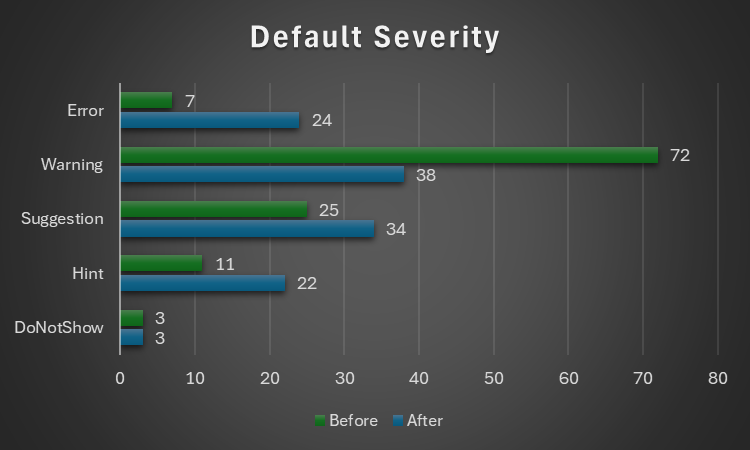
..and with the default severity levels:

Default Severityv2.5.91v2.5.92
DoNotShow33
Hint1122
Suggestion2534
Warning7238
Error724
Total118121

Notably, everything around annotations is now under Rubberduck Opportunities, and default severity levels are much more sensible; the 3 inspections disabled by default remain disabled:

  • RedundantByRef mirrors ImplicitByRef; both are valid takes, just different conventions and the more explicit one was made the default, but you can reconfigure them to match your style by enabling one and disabling the other.
  • StepIsNotSpecified mirrors RedundantStepOne; again both valid stances, this time with the less noisy one as the default configuration.
  • ShadowedDeclaration was disabled for performance reasons, if I recall correctly. Or it’s something about some difficult false negative situations making it somewhat too unreliable or experimental to ship enabled by default.

This clean-up touched every single inspection, and in the process the way to localize the resources has been standardized, which should fix the annoying partly-localized labels in some inspection results.

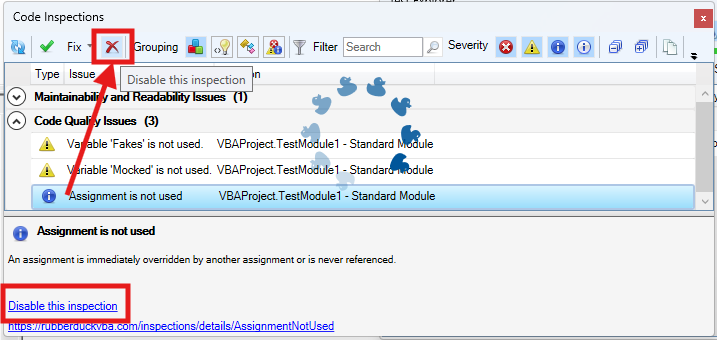
The inspection results toolwindow gets a new disable this inspection button right next to the Fix menu, which should make it easier to disable an inspection altogether with a single click, by selecting any of its results in the grid.

The “disable inspection” command remains available as a link/button in the bottom panel, but now also as a more prominently visible button on the main toolbar. Note that there is no confirmation prompt for this action for now.

Unit Testing

This is a very, very exciting release for the unit testing feature!

Performance Enhancements

Keeping the Test Explorer UI updated with a constantly changing source collection was taking a serious toll on the UI thread, incidentally the only one available for running VBA code. Thanks to a quick PR by contributor tommy9, the explorer now leverages WPF features that improve the situation.

Projects with a lot of tests can still significantly speed up their execution by hiding the toolwindow and selecting Run all tests from the Rubberduck menu. If the main thread isn’t busy drawing a UI element, it’s free to run the instructions of a test procedure.

Moq+VBA

Seven long years after the initial pull request was opened, it’s finally merged and ready to start a little revolution in the VBA unit testing world.

There are important limitations: user code cannot be mocked after it’s been modified, and the setup of ByRef parameters may not always work correctly, but the bulk of it is close enough (and has been for a long time) to be release-worthy. Part of what took so long was that we wanted to ship the full feature working exactly as intended, but there are some serious technical roadblocks and between entirely dropping a 7 years old pull request and merging it anyway, … I’m going with the merge. Perfect is the enemy of good, they say.

What’s happening here is nothing short of pure wizardry: we’re turning arbitrary COM objects into .net ones, and then we translate configuration calls written in VBA into .net expressions that literally get compiled and invoked on the fly to call the non-generic methods offered by Moq 4.8 (getting a bit old, but we’ve never had anything like this in VBA).

In other words, unit testing with Rubberduck now empowers you with quite a large part of what only becomes possible with a real mocking framework, which this is.

The mocking API is currently documented in the wiki, but here’s the crux of it… it’s a game changer:

    'arrange
    Dim Mock As Rubberduck.ComMock
    Set Mock = Mocks.Mock("Excel.Application") 'here we create a new mock using the Excel.Application progid
    'then we configure our mock as per our needs...
    Mock.SetupWithReturns "Name", "Mocked-Excel"
    Mock.SetupWithCallback "CalculateFull", AddressOf OnAppCalculate
    Dim Mocked As Excel.Application
    Set Mocked = Mock.Object 'ComMock.Object represents the mocked object and always implements the COM interface it's mocking
    'act
    'just making sure the mock works 🙂
    Debug.Print Mocked.Name
    Mocked.CalculateFull
    'assert
    'use the ComMock.Verify method to fail the test if a method that was setup was not invoked as per the test's specifications:
    Mock.Verify "CalculateFull", Mocks.Times.AtLeastOnce


There’s only a handful of simple objects to work with, and the API is clean, unambiguous, intuitive. The example above illustrates the enormous power that’s now in your hands by mocking the Excel.Application interface.

The COM mock lets you access the proxy object to pass it around as a surrogate implementation for a dependency that would otherwise compromise the “unit” part of it being a “unit test”; it’s a class type that’s spawned into existence from its definition, for which you can setup any member call in a test. Here we make the `Name` property return a different value just because we can, and when the macro invokes the `CalculateFull` method against this mock instance, rather than awaiting a full application-level compute you can simply verify that the method was invoked, or run a callback procedure (elegantly passing it to the API with the `AddressOf` operator) that can be parameterized if you need to accordingly alter some state.

I’ll write a whole article dedicated to this API soon, but together with the Fakes API, this really takes the Rubberduck unit testing feature to the next level (code coverage would be the next one). As long as you can identify the dependencies in your code (and come up with a way to inject them from the caller), you can now write a test that abstracts them away.

Other Tweaks

The Unassigned variable usage inspection will now honor the out prefix by convention, meaning it will no longer issue false positives when a variable is assigned by another procedure via a ByRef argument, as long as it’s named accordingly with an “out” prefix.

The About box will now mention “Win11” for Windows builds above 22000, even though the major version says 10. This was likely related to Rubberduck using an ancient .net Framework API to retrieve this OS version information.

Renaming an enum member in a way that requires the constant to be qualified, will now correctly use the enum type name rather than the name of the containing module, which was an edge case that could cause headaches and break the code.


What about v3?

If things had gone smoothly, you would know by now. They obviously haven’t, and not much has moved on that front since last May or so. I’m not abandoning the project, but building an entire editor client and a language server is honestly much more than I can chew at the moment, for multiple reasons… twinBASIC is coming, and while a commercial offering, it’s a VB6/VBA language server and compiler, and it reckons the whole editor part is already a solved problem. Rubberduck 3.0 was going to reinvent that wheel, which would have been a huge distraction.

So RD3 is going to be re-scoped a bit: the planned VBIDE integration / add-in part remains of course, but instead of making an entire editor from scratch, we’ll integrate into an existing, modern one that’s already an extensible LSP (Language Server Protocol) client, much like Visual Studio Code (but no, it’s not going to be VS Code). This instantly knocks off (well, removes outright) a gigantic, milestone.

With this v2.x release, the backlog of pending pull requests is finally cleared. 950+ open issues remain in the Rubberduck repository, but very few are actual unresolved bugs or realistically implementable feature ideas. Expect additional pull requests for missing translations, minor fixes and UI/UX enhancements, but the 2.x life cycle is now essentially completed… and it was about time: the technology used for building Rubberduck has evolved a lot in the last decade, with much of it either deprecated, or on the brink of falling out of official long-term support from Microsoft, which is making it harder and harder to easily and successfully build Rubberduck, hoping with fingers crossed that nothing breaks at every dependency update.

I bet VBA will outlive .NET Framework 4.8.1 LTS, which is non-ironically very funny to me… but for Rubberduck to keep moving forward, making the move from the now ancient .NET Framework over to current technology is inevitable – and development on v3 has already knocked that critical milestone, too.


Afterthoughts

I want to stop spreading too thin and actually finish the website now (as you can see, …the thing is falling apart!), and then with Rubberduck 2.x in its current state (more or less), I can finally draw a line and know exactly what v3.0 needs to be. My priorities have shifted quite much since 2021 for many reasons, and Rubberduck and the blog and my online presence in general basically had to hit the brakes. Life happens… doesn’t it.

I’ll always write code as a hobby, as I’ve done ever since I found out about programming. But I also played (badly) some guitar as a teen, and carried a few harmonicas with me to the Microsoft MVP Global Summit in 2018 and 2019 (the two I attended before they went virtual during the pandemic); these days I feel like I could write about the music theory I’ve learned since, or perhaps how to configure the reed gaps on a 10-hole diatonic, standard Richter-tuned harmonica to make it easy to play the hidden overblow notes. I haven’t been paid to maintain a line of VBA code for a very long time now, and I’ll always love it but I can’t say it’s my GoTo language anymore, but it’s all right – Rubberduck isn’t written in VBA anyway. But it’s becoming hard to find inspiration to write about some random VBA things, especially since I’ve stopped participating on Stack Overflow. I stopped, because they basically made an agreement with OpenAI and essentially stole (with a unilateral move in violation of the agreed-upon license) the volunteer work and helpful knowledge-dumps of tens of thousands of people (myself included) to train a… chatbot and make billions off of these people’s work, and then take art and reduce it a prompt.

I mean I get it, it’s fun. But it’s a very steep cost just for something that’s just innocent fun. This is the first and last AI-generated image you’ll ever see from me on this blog.

Perhaps I’m just turning into an old man screaming at a cloud (brought to you by AWS!), but… look, it doesn’t matter that you can prompt a machine to play some harmonica for you: you’ll never, ever, ever experience any AI-generated slop like when you’re actually playing the blues and counting that I-IV-V progression over these 12 bars. Same on guitar. Same on drums. Same with code.

RD3 Update – October 2023

Things were moving pretty fast with the prototype, but moving on to the actual LSP-driven project hit a roadblock as far as actually achieving the cross-process JsonRPC communications. I put it aside for a while, hoping to get back to it later, and then summer arrived and real-life stuff kept me busy. Renovations in Rubberduck, renovations at home.

Wow time flies, pretty much six months have elapsed since the last status update, and now it’s Hacktoberfest again already! So what happened?

RPC Issues

For about five of those six months, not much moved forward, but ideas kept brewing all along, and the RPC issues have now been resolved.

So, where’s RD3 at?

Clean Start, Clean Exit

When the VBE loads RD3, the add-in starts a separate language server process and connects to it through the language server protocol (LSP), using the very same technology that Microsoft put in VSCode, via the OmniSharp libraries. When the add-in is unloaded from the VBE (whether manually or as the host application shuts down), the server receives both Shutdown and Exit notifications, and once they’re handled and the server actually shuts down we’ll be left with a clean exit every time.

Logging is implemented on both client and server sides, and while debugging the startup and initialization was a bit painful (can’t start the server from Visual Studio, and can’t hook up the debugger quickly enough to attach in time to see what’s going on), now that it’s done the server process can be attached after it starts, so we can hit breakpoints in the server code.

Net7

Perhaps the biggest achievement is that RD3 is now building with .net 7.0, save for a specific library that has to target Framework 4.8.1 because of its use of a number of COM-marshaling methods that don’t (yet?) exist in .net core: that’s the parts dealing with unmanaged memory and pointer magic, that allow RD2 to run unit tests, among other things.

Because everything else is under .net7, Rubberduck gets to leverage all the amazing enhancements that have been brought to the C# language and development platform in the past, uh, decade or so. RD3 will likely release under .net8, which has long-term support from Microsoft.

There’s a catch though: this means RD3 will not be able to run on old, officially unsupported versions of Windows – we’re forfeiting them, in favor of being able to leverage the many enhancements being made to the .net platform. At this stage it’s still unclear exactly what this means for VB6 support: for now the focus is integrating with the VBIDE in VBA, but nothing says VB6 support is being ditched – it was just simpler to exclude that one RD library from the solution for now.

Settings

One of the first pieces of Rubberduck written around this time back in 2014 – the settings I/O and modeling – has officially been axed at long last. Since forever, Rubberduck settings have been serialized to an XML configuration file. In RD3 that’s changing to JSON and much simplified abstractions. In RD2 the default settings live in an XML-encoded “Settings.settings” file that’s a pure nightmare to maintain; in RD3 defaults are moving back into the code itself (I know, it’s data, not code per se), with each serializable struct implementing a generic IDefaultSettingsProvider interface that mandates the presence of a “Default” member that returns a static instance of that settings struct (e.g. LanguageServerSettings.Default, returns a LanguageServerSettings instance with the hard-coded default values.

JSON settings is how pretty much everyone else does it, and there’s a reason for that: the format is much easier to read and manually edit. Plus we already have JSON involved with the RPC messages between client and server. XML was originally adopted because that was the format for Visual Studio’s own settings and configuration under .net Framework 4.x.. and today it’s JSON everywhere.

Rubberduck Editor

Last spring the prototype editor was being integrated into the VBE using essentially the same mechanics used in RD2 for the dockable toolwindows, just undocked and basically turned into just another VBIDE document window.

With the project now under .net7, it turns out we can now have actual WPF/XAML windows in Rubberduck, so there is no more need to implement the entire UI as user controls that are embedded inside a WinForms user control that gets injected into a native toolwindow.

The RD3 editor will let go of most of the native VBIDE integration, and live in a separate window – very much like the Power Query Editor in Excel. The only native UI components in RD3 are the Rubberduck menu items, which have been boiled down to just “Show Editor” and “About” commands, both of which will now bring up a fully WPF UI, rather than a WPF UI embedded in a WinForms dialog: the Rubberduck Editor will be its own application, and we’ll have full control over everything that happens inside that editor.

The downside (if it is one), is that we have to implement basic commands such as Copy and Paste, as well as toolwindows we take for granted, like Properties and Object Browser.

At this stage the editor shell is able to display tab documents bound to a ViewModel; tabs can be moved around, torn from the main window and dragged to another monitor, or docked inside the editor shell. I’m now working on figuring out how the toolwindows are going to work; I’d like something similar to Visual Studio, but the Dragablz library would need to be forked and updated with such capabilities… the “toolwindows” aren’t docking and don’t work in a way that would make sense in a code editor.

Workflow

This does impact the VBA dev workflow: in RD2 the single source of truth was the VBE. In RD3 that’s no longer the case, since the VBE isn’t going to contain the code that’s being edited. The single source of truth in RD3 is going to be moving to the Rubberduck Editor, and the editor will be working off code files exported to file system folders, dubbed “workspace folders”.

When the Debug/Run command is executed, the RDE will save all modified documents to the workspace, synchronize the host VBA project components to mirror it, and then the VBE takes over from that point on (RDE window will minimize itself) to compile and actually run/debug the project.

The host VBA project can also be synchronized any time you want, using the File/Synchronize command – and the editor will run a FileSystemWatcher on workspace folders, so it will detect any external changes/additions/deletions, and immediately notify the language server. If external changes are detected on a file that is opened in the editor, it will prompt to either reload the document, or keep the editor version if it has unsaved changes (thus discarding the external changes).

In RD2 you had to manually tell Rubberduck about changes occurring in the VBE, because automatically parsing on idle involved low-level keyboard hooks and since these hooks were already involved in auto completion and hotkeys, it was deemed too invasive, and ran against the basic premise of the parser, which is that we’re operating with legal, compilable code.

This all changes dramatically in RD3. Because the editor is fully managed, nothing happens in it without the language server receiving requests and notifications. Content changes synchronize in real-time, the editor receives responses with completion lists, syntax errors to highlight (squiggles!), or edits (e.g. auto-formatting etc.) made server-side that the editor immediately carries into the code pane as you type – exactly like how Visual Studio and VSCode and any other modern-day code editor that works with a language server.

The server works asynchronously and out of process, so long-running tasks can send progress notifications, and even partial responses – for example a completion list might only include names to render the list in the client, and the associated tooltips and commands might be sent a few milliseconds later.

Debugging

As was mentioned before, the one thing the RDE cannot do, is attach as a debugger to your running VBA code. When you debug, the RDE will minimize itself and leave the VBE in charge. Edit-and-continue poses a particular challenge: after a debug session, the RDE doesn’t know if anything was modified in the VBE, and its file system watchers cannot help because code doesn’t just magically export itself back to the workspace folders – so here’s what we’re looking at:

  • When a debug session is launched from the RDE, code gets synchronized into the VBE before it is compiled and executed;
  • If the RDE is re-focused and the VBE is back into edit mode (i.e. debug session has ended), the entire workspace gets refreshed with a new export from the VBE;
  • If the RDE is re-focused during a debug session, document tabs will be read-only and the status bar will indicate why;
  • If the host application crashes, or the debug session does not end with the RDE being brought back before the host application shuts down, then the single source of truth resides safely in the host document and the workspace will synchronize next time the RDE loads this project;
  • Any edits made to the exported workspace files during a debug session would be overwritten and lost when the session ends and the RDE is re-focused, unless source control is involved and the changes were committed – in which case the modifications can then be recovered from source control.

Breakpoints cannot be set programmatically either, so the RDE will likely not support them. Bookmarks have a similar problem, in that the VBIDE API doesn’t really let us manipulate them, however the RDE can very well have its own bookmarks system. Debugger toolwindows (immediate, locals, call stack, etc.) are also not going to be present in the Rubberduck Editor, since they’d all be useless without a debugger attached.

User Interface

Some parts of RD2 XAML markup may survive, but really the intent is to make the RDE have a consistent, pleasing, modern, intuitive, and functional user interface for all of its functionalities. Because we’re no longer confined to a WinForms/native host, key/command bindings (hotkeys) will no longer require any kind of bug-prone hooking; focus should behave much more naturally as well, and drag-and-drop is going to be a breeze with the Dragablz library. RD3 basically entails crafting an entire IDE UI from scratch, starting with the editor shell.

The RDE window features a complete menu bar (largely inspired from Visual Studio’s), an actual status bar, and the client area consists of a Dockablz layout panel hosting a Dragablz document tab container.

Some more tinkering is still needed around toolwindows, because what we get out of the box with Dragablz is not going to work for our purposes. Perhaps there’s a way to split the left and right docking areas in two so there’s a distinct drop location for toolwindows that displays them with the tabs at the bottom, but for now there’s no such thing and toolwindows are essentially just another type of document tab.

Another thing that will need attention ideally before the entire UI is done, is theming: indeed it would be sad to make our own editor from scratch without supporting light, dark, and custom themes and syntax highlighting!

Server Side

The LSP server is in place, handling server lifecycle requests and notifications. The next step is to beef up the initialization to send the server information about the project(s) loaded in the VBE, including whether it’s an unsaved new blank project or an existing one hosted in a saved document, and a URI for each library reference so the server can load them and extract all the types and their respective members.

Then we’ll need to setup the actual workspace folders and parse any code files in them – and when we’re done doing that we can send the semantic tokens to the editor to perform syntax highlighting and folding ranges, all while the server starts running diagnostics/inspections, prioritizing the documents that are opened in the editor. The client-side code for this was written in the prototyping stage, so it’s not complete but exactly how that’s going to work is already all figured out.


2023.Q4

The last quarter of 2023 is likely to see lots of progress on all fronts: with LSP in place and a working but bare-bones editor, I can see myself focusing on UI work mostly, while other contributors hop on and work on server-side processing – much of which will have to be ported from the RD2 code base and reworked to fit the new paradigms.

There is a lot of work ahead, but with the client/server communications happening, things that have been on our minds for years, are about to get very real.

The ball is rolling, and nothing will stop it.

Rubberduck.Fakes Gets an Upgrade

One of the objectively coolest features in Rubberduck is the Fakes API. Code that pops a MsgBox for example, needs a way to work without actually popping that message box, otherwise that code cannot be unit tested… without somehow hijacking the MsgBox function. The Fakes API does exactly that: it hooks into the VBA runtime, intercepts specific internal function calls, and makes it return exactly what your test setup …set up.

This API can stop time, or Now can be told to return 1:59AM on first invocation, 1:00AM on the next, and then we can test and assert that some time-sensitive logic survives a daylight savings time toggle, or how Timer-dependent code behaves at midnight.

Let’s take a look at the members of the IFakesProvider interface.

Fakes Provider

Fakes for many of the internal VBA standard library functions exist since the initial release of the feature, although some providers wouldn’t always play nicely together – thanks to a recent pull request from @tommy9 these issues have been resolved, and a merry bunch of additional implementations are now available in pre-release builds:

NameDescriptionParameter names
MsgBoxConfigures VBA.Interaction.MsgBox callsFakes.Params.MsgBox
InputBoxConfigures VBA.Interaction.InputBox callsFakes.Params.InputBox
BeepConfigures VBA.Interaction.Beep calls
EnvironConfigures VBA.Interaction.Environ callsFakes.Params.Environ
TimerConfigures VBA.DateTime.Timer calls
DoEventsConfigures VBA.Interaction.DoEvents calls
ShellConfigures VBA.Interaction.Shell callsFakes.Params.Shell
SendKeysConfigures VBA.Interaction.SendKeys callsFakes.Params.SendKeys
KillConfigures VBA.FileSystem.Kill callsFakes.Params.Kill
MkDirConfigures VBA.FileSystem.MkDir callsFakes.Params.MkDir
RmDirConfigures VBA.FileSystem.RmDir callsFakes.Params.RmDir
ChDirConfigures VBA.FileSystem.ChDir callsFakes.Params.ChDir
ChDriveConfigures VBA.FileSystem.ChDrive callsFakes.Params.ChDrive
CurDirConfigures VBA.FileSystem.CurDir callsFakes.Params.CurDir
NowConfigures VBA.DateTime.Now calls
TimeConfigures VBA.DateTime.Time calls
DateConfigures VBA.DateTime.Date calls
Rnd*Configures VBA.Math.Rnd callsFakes.Params.Rnd
DeleteSetting*Configures VBA.Interaction.DeleteSetting callsFakes.Params.DeleteSetting
SaveSetting*Configures VBA.Interaction.SaveSetting callsFakes.Params.SaveSetting
Randomize*Configures VBA.Math.Randomize callsFakes.Params.Randomize
GetAllSettings*Configures VBA.Interaction.GetAllSettings calls
SetAttr*Configures VBA.FileSystem.SetAttr callsFakes.Params.SetAttr
GetAttr*Configures VBA.FileSystem.GetAttr callsFakes.Params.GetAttr
FileLen*Configures VBA.FileSystem.FileLen callsFakes.Params.FileLen
FileDateTime*Configures VBA.FileSystem.FileDateTime callsFakes.Params.FileDateTime
FreeFile*Configures VBA.FileSystem.FreeFile callsFakes.Params.FreeFile
IMEStatus*Configures VBA.Information.IMEStatus calls
Dir*Configures VBA.FileSystem.Dir callsFakes.Params.Dir
FileCopy*Configures VBA.FileSystem.FileCopy callsFakes.Params.FileCopy
*Members marked with an asterisk are only available in pre-release builds for now.

Parameter Names

The IVerify.ParameterXyz members make a unit test fail if the specified parameter wasn’t given a specified value, but the parameter names must be passed as strings. This is a UX issue: the API essentially requires hard-coded magic string literals in its users’ code; this is obviously error-prone and feels a bit arcane to use. The IFakesProvider interface has been given a Params property that gets an instance of a class that exposes the parameter names for each of the IFake implementations, as shown in the list above, and the screenshot below:

Picking the correct parameter name from a drop-down completion list beats risking a typo, doesn’t it?

Note: the PR for this feature has not yet been merged at the time of this writing.

Testing Without Fakes (aka Testing with Stubs)

Unit tests have a 3-part structure: first we arrange the test, then we act by invoking the method we want to test; lastly, we assert that an actual result matches the expectations. When using fakes, we configure them in the arrange part of the test, and in the assert part we can verify whether (and/or how many times) a particular method was invoked with a particular parameterization.

Let’s say we had a procedure we wanted to write some tests for:

Public Sub TestMe()
    If MsgBox("Print random number?", vbYesNo + vbQuestion, "Test") = vbYes Then
        Debug.Print Now & vbTab & Rnd * 42
    Else
        Debug.Print Now
    End If
End Sub

If we wanted to make this logic fully testable without the Fakes API, we would need to inject (likely as parameters) abstractions for MsgBox, Now, and Debug dependencies: instead of invoking MsgBox directly, the procedure would be invoking the Prompt method of an interface/class that wraps the MsgBox functionality. Unit tests would need a stub implementation of that interface in order to allow some level of configuration setup – an invocation counter, for example. A fully testable version of the above code might then look like this:

Public Sub TestMe(ByVal MessageBox As IMsgBox, ByVal Random As IRnd, ByVal DateTime As IDateTime, ByVal Logger As ILogger)
    If MessageBox.Prompt("Print random number?", "Test") = vbYes Then
        Logger.LogDebug DateTime.Now & vbTab & Random.Next * 42
    Else
        Logger.LogDebug DateTime.Now
    End If
End Sub

The method is testable, because the caller controls all the dependencies. We’re probably injecting an IMsgBox that pops a MsgBox, an IRnd that wraps Rnd, a DateTime parameter that returns VBA.DateTime.Now and an ILogger that writes to the debug pane, but we don’t know any of that. I fact, we could very well run this method with an ILogger that writes to some log file or even to a database; the IRnd implementation could consistently be returning 0.4 on every call, IDateTime.Now could return Now adjusted to UTC, and IMsgBox might actually display a fancy custom modal UserForm dialog – either way, TestMe doesn’t need to change for any of that to happen: it does what it needs to do, in this case fetching the next random number and outputting it along with the current date/time if a user prompt is answered with a “Yes”, otherwise just output the current date/time. It’s the interfaces that provide the abstraction that’s necessary to decouple the dependencies from the logic we want to test. We could implement these interfaces with stubs that simply count the number of times each member is invoked, and the logic we’re testing would still hold.

We could then write tests that validate the conditional logic:

'@TestMethod
Public Sub TestMe_WhenPromptYes_GetsNextRandomValue()
    ' Arrange
    Dim MsgBoxStub As StubMsgBox ' implements IMsgBox, but we want the stub functionality here
    Set MsgBoxStub = New StubMsgBox
    MsgBoxStub.Returns vbYes
    Dim RndStub As StubRnd ' implements IRnd, but we want the stub functionality here too
    Set RndStub = New StubRnd
    ' Act
    Module1.TestMe MsgBoxStub, RndStub, New DateTimeStub, New LoggerStub
    ' Assert
    Assert.Equals 1, RndStub.InvokeCount
End Sub
'@TestMethod
Public Sub TestMe_WhenPromptNo_DoesNotGetNextRandomValue()
    ' Arrange
    Dim MsgBoxStub As StubMsgBox
    Set MsgBoxStub = New StubMsgBox
    MsgBoxStub.Returns vbNo
    Dim RndStub As StubRnd
    Set RndStub = New StubRnd
    ' Act
    Module1.TestMe MsgBoxStub, RndStub, New DateTimeStub, New LoggerStub
    ' Assert
    Assert.Equals 0, RndStub.InvokeCount
End Sub

These stub implementations are class modules that need to be written to support such tests. StubMsgBox would implement IMsgBox and expose a public Returns method to configure its return value; StubRnd would implement IRnd and expose a public InvokeCount property that returns the number of times the IRnd.Next method was called. In other words, it’s quite a bit of boilerplate code that we’d usually rather not need to write.

Let’s see how using the Fakes API changes that.

Using Rubberduck.FakesProvider

The standard test module template defines Assert and Fakes private fields. When early-bound (needs a reference to the Rubberduck type library), the declarations and initialization look like this:

'@TestModule
Option Explicit
Option Private Module
Private Assert As Rubberduck.AssertClass
Private Fakes As Rubberduck.FakesProvider
'@ModuleInitialize
Public Sub ModuleInitialize()
    Set Assert = CreateObject("Rubberduck.AssertClass")
    Set Fakes = CreateObject("Rubberduck.FakesProvider")
End Sub

The Fakes API implements three of the four stubs for us, so we still need an implementation for ILogger, but now the method remains fully testable even with direct MsgBox, Now and Rnd calls:

Public Sub TestMe(ILogger Logger)
    If MsgBox("Print random number?", vbYesNo + vbQuestion, "Test") = vbYes Then
        Logger.LogDebug Now & vbTab & Rnd * 42
    Else
        Logger.LogDebug Now
    End If
End Sub

With an ILogger stub we could write a test that validates what’s being logged in each conditional branch (or we could decide that we don’t need an ILogger interface and we’re fine with tests actually writing to the debug pane, and leave Debug.Print statements in place), but let’s just stick with the same two tests we wrote above without the Fakes API. They look like this now:

'@TestMethod
Public Sub TestMe_WhenPromptYes_GetsNextRandomValue()
    
    ' Arrange
    Fakes.MsgBox.Returns vbYes
    ' Act
    Module1.TestMe New LoggerStub ' ILogger is irrelevant for this test
    ' Assert
    Fakes.Rnd.Verify.Once
End Sub
'@TestMethod
Public Sub TestMe_WhenPromptNo_DoesNotGetNextRandomValue()
    
    ' Arrange
    Fakes.MsgBox.Returns vbNo
    ' Act
    Module1.TestMe New LoggerStub ' ILogger is irrelevant for this test
    ' Assert
    Fakes.Rnd.Verify.Never
End Sub 

We configure the MsgBox fake to return the value we need, we invoke the method under test, and then we verify that the Rnd fake was invoked once or never, depending on what we’re testing. A failed verification will fail the test the same as a failed Assert call.

The fakes automatically track invocations, and remember what parameter values each invocation was made with. Setup can optionally supply an invocation number (1-based) to configure specific invocations, and verification can be made against specific invocation numbers as well, and we could have a failing test that validates whether Randomize is invoked when Rnd is called.

API Details

The IFake interface exposes members for the setup/configuration of fakes:

NameDescription
AssignsByRefConfigures the fake such as an invocation assigns the specified value to the specified ByRef argument.
PassthroughGets/sets whether invocations should pass through to the native call.
RaisesErrorConfigures the fake such as an invocation raises the specified run-time error.
ReturnsConfigures the fake such as the specified invocation returns the specified value.
ReturnsWhenConfigures the fake such as the specified invocation returns the specified value
given a specific parameter value.
VerifyGets an interface for verifying invocations performed during the test. See IVerify.
The members of Rubberduck.IFake

The IVerify interface exposes members for verifying what happened during the “Act” phase of the test:

NameDescription
AtLeastVerifies that the faked procedure was called a specified minimum number of times.
AtLeastOnceVerifies that the faked procedure was called one or more times.
AtMostVerifies that the faked procedure was called a specified maximum number of times.
AtMostOnceVerifies that the faked procedure was not called or was only called once.
BetweenVerifies that the number of times the faked procedure was called falls within the supplied range.
ExactlyVerifies that the faked procedure was called a specified number of times.
NeverVerifies that the faked procedure was called exactly 0 times.
OnceVerifies that the faked procedure was called exactly one time.
ParameterVerifies that the value of a given parameter to the faked procedure matches a specific value.
ParameterInRangeVerifies that the value of a given parameter to the faked procedure falls within a specified range.
ParameterIsPassedVerifies that an optional parameter was passed to the faked procedure. The value is not evaluated.
ParameterIsTypeVerifies that the passed value of a given parameter was of a type that matches the given type name.
The members of Rubberduck.IVerify

There’s also an IStub interface: it’s a subset of IFake, without the Returns setup methods. Thus, IStub is used for faking Sub procedures, and IFake for Function and Property procedures.


When to Stub Standard Library Members

Members of VBA.FileSystem not covered include EOF and LOF functions, Loc, Seek, and Reset. VBA I/O keywords Name, Open, and Close operate at a lower level than the standard library and aren’t covered, either. VBA.Interaction.CreateObject and VBA.Interaction.GetObject, VBA.Interaction.AppActivate, VBA.Interaction.CallByName, and the hidden VBA.Interaction.MacScript function, aren’t implemented.

Perhaps CreateObject and GetObject calls belong behind an abstract factory and a provider interface, respectively, and perhaps CallByName doesn’t really need hooking anyway. In any case there are a number of file I/O operations that cannot be faked and demand an abstraction layer between the I/O work and the code that commands it: that’s when you’re going to want to write stub implementations.

If you’re writing a macro that makes an HTTP request and processes its response, consider abstracting the HttpClient stuff behind an interface (something like Function HttpGet(ByVal Url As String)): the macro code will gain in readability and focus, and then if you inject that interface as a parameter, then a unit test can inject a stub implementation for it, and you can write tests that handle (or not?) an HTTP client error, or process such or such JSON or HTML payload – without hitting any actual network and making any actual HTTP requests.

Until we can do mocking with Rubberduck, writing test stubs for our system-boundary interfaces is going to have to be it. Mocking would remove the need to explicitly implement most test stubs, by enabling the same kind of customization as with fakes, but with your own interfaces/classes. Or Excel’s. Or anything, in theory.


Rubberduck 3.0 Progress Update

The next major version of Rubberduck is currently in [very] early development stages – saying that there is a lot of work ahead would be quite an understatement, but the skeleton is slowly taking shape, and things are looking very, very good.

Since the beginning of the project, Rubberduck’s user interface components (other than dialogs) have always been hosted in traditional, native dockable toolwindows. We built everything on top of the VBIDE editor, using Office CommandBar UI to simulate a status bar and make up for the lack of in-editor integration. Over the years this early design decision slowly became a burden: tearing down the many dockable toolwindows contributed to a pesky access violation crash on exit, low-level hooks for keyboard shortcuts constantly need to detach and re-attach as focus switches between the VBE main window and other applications, autocompletion/self-closing pairs was a nightmare to implement, and while the all-or-nothing approach to parsing made it so that we could always assume we were looking at valid VBA code that could be compiled, it also painted us into a corner where actually moving towards what we wanted Rubberduck to achieve by v3.0 would be extremely difficult, if not impossible.

Behold, the Rubberduck Editor

Rubberduck’s input was always driven by the Visual Basic Editor – now the code in the VBE is going to be output by Rubberduck. Of course, the code will go both ways, but now hidden attributes probably won’t need to be hidden anymore, and the editor can now be exactly what we envision it to be.

There will only be a single toolwindow that will host the editor and UI components like the Code Explorer. At this early stage my focus is entirely on the editor itself, but the idea is ultimately to get actual document tabs and a more practical and friendly docking manager.

Here’s what it looks like as of this writing:

The dropdowns don’t have a real item source yet, but the mock data gives a good idea of what it’s going to be like to edit VBA code with Rubberduck in the future.

Typing “Sub” and hitting the spacebar immediately completes the block and places a new folding node:

The faint dotted underline under “Sub” is a text marker; the editor has the ability to display various such markers at the exact desired position in the document, so we will be using them to show inspection results right there – with tooltips:

Hint-level results will be denoted with this dotted underline indicator; suggestion level will be a green squiggly underline, warnings a blue squiggle, and error level results will appear as red squiggles:

There will also be a new “ducky button” that pops up when the caret is on one such marker, and lets you pick a quick-fix in-place to address an inspection result:


The indenter still needs to be wired up, but this editor will ultimately indent your code as you type it. All the autocompletion features also need to be ported over to work here, and then we’ll want searchable and filterable IntelliSense, parameter info tooltips, and we’ll need to simulate the VBIDE “prettification” that occurs when a line is validated, so that public sub becomes Public Sub and identifiers take the casing they’re declared with.

We get an undo stack that can handle much more than 20 steps, and did I mention the status bar?

For now, all it does is report the current caret position in the editor, but Rubberduck 3.0 will be using it to report parsing progress, instead of the CommandBar button/label we’ve been abusing forever.

There will probably still be a command bar of some sort, but it will be part of the WPF/XAML managed UI; the old Rubberduck CommandBar will be decommissioned.

The one thing that’s 100% guaranteed to not happen in the new Rubberduck editor, is everything that needs to happen beyond design-time: there is no hook into the VBIDE debugger, so Rubberduck has no way of tracking the current instruction. As a result, the editor will be sadly useless in debug mode.


The editor work is just the beginning: Rubberduck 3.0 currently doesn’t even have a parser, let alone any inspections. In the next few months, the very heart of Rubberduck will be reworked to function with the new editor. It’s essentially like rewriting Rubberduck, but with an editor we fully control instead of one we constantly need to fight with.

Meanwhile v2.5.2 is approaching 25K downloads, and there’s quite a bit of work in 2.5.x that hasn’t been “officially” released yet, including everything that happened during a very successful Hacktoberfest 2022: we’ll be releasing v2.5.3 in the near future – stay tuned!

Making MVVM Work in VBA Part 1 – Testing

I have recently written (100% VBA) a proof-of-concept for a Model-View-ViewModel (MVVM) framework, and since the prototype works exactly as needed (with some rough edges of course)… I’ve decided to explore what Rubberduck can do to make MVVM fully supported, but going down that path poses a serious problem that needs a very good and well thought-out solution.

A Vision of a Framework

When you start a new project in Visual Studio (including 6.0 /VB6), the IDE prompts for a project type, essentially asking “what are we building today?

In VBA the assumption is that you just want to write a bit of script to automate some document manipulation. And then the framework so to speak, is the VBA Standard Library: functions, methods, constants, and actual objects too; all globally-scoped for convenience and quick-and-easy access: a fully spelled-out VBA.Interaction.MsgBox function call is a rare sight! Combined with the nonexistence of namespaces, the flip side is that the global scope is easily polluted, and name collisions are inevitable since anything exposed by any library becomes globally accessible. This makes fully-qualified global function calls appear sporadically sprinkled in the code, which can be confusing. I digress, but what I mean to get at is that this is part of what made Microsoft make the shift to the .NET platform in the early 2000’s, and eventually abandon the Visual Basic Editor to its fate. The COM platform and Win32 API was the framework, and Win32 programming languages built on top of that.

This leaves two approaches for a vision of a “framework” for VBA:

  • Package a type library and ship it.
    • Pros: any COM-visible library will work, can be written in .NET
    • Cons: projects now have a hard dependency on a specific type library; updating is a mess, etc.
  • Embed the framework into VBA projects, pretty much like JavaScript does.
    • Pros: devs are in charge of everything, framework is 100% VBA and inherently open-source, updating is essentially seamless for any non-breaking change, no early-bound dependencies, graceful late-bound degradation, etc.
    • Cons: VBA devs and maintainers that aren’t using Rubberduck will be massively lost in the source code (framework would cleanly leverage @Folder annotations), but then when the host application allows it this could be mitigated by embedding the code into its own separate VBA project and reference it from other projects (e.g. ship an Excel add-in with the framework code your VBA project depends on).

I think I’m slightly biased here, but I think this rules out the type library approach regardless. So we need a way to make this work in VBA, with VBA source code that lives in a GitHub repository with vetted, trusted content.

Where Rubberduck fits in

Like Visual Studio, Rubberduck could prompt VBA devs with “what are we building today?” and offer to pull various “bundles” of modules from this GitHub repository into the active project. Rubberduck would request the available “bundles” from api.rubberduckvba.com, which would return with “bundle metadata” describing each “package” (is “nugget” forbidden to use as a name for these / play on “nuget” (the package manager for .NET)?), and then list them in a nice little dialog.

The “nugget” metadata would include a name, a description, and the path to each file to download for it. Every package would be the same “version”, but the tool could easily request any particular “tag” or “release” version, and/or pull from “main” or from “next” branches, and the source code / framework itself could then easily be a collaborative effort, with its own features and projects and milestones and collaborators, completely separate from the C# Rubberduck code base.

This complete decoupling from Rubberduck means you don’t need to use Rubberduck to leverage this VBA code in your VBA projects, and new tags / “releases” would be entirely independent of Rubberduck’s own release cycles. That means you’re using, say, future-Rubberduck 2.7.4 and the “nuggets” feature offers “v1.0 [main]” and “v1.1 [next]”; one day you’re still using Rubberduck 2.7.4 but now you get “v1.1 [main]”, “v1.0”, and “v1.2 [next]” to chose from, and if you updated the “nuggets” in your project from v1.0 to v1.1 then Rubberduck inspections would flag uses of any obsolete members that would now be decorated with @Obsolete annotations… it’s almost like this annotation was presciently made for this.

But before we can even think of implementing something like this and make MVVM infrastructure the very first “nugget”, we need a rock-solid framework in the first place.


Unit Tests

I had already written the prototype in a highly decoupled manner, mindful of dependencies and how things could later be tested from the outside. I’m very much not-a-zealot when it comes to things like Test-Driven Development (TDD), but I do firmly believe unit tests provide a solid safety net and documentation for everything that matters – especially if the project is to make any kind of framework, where things need to provably work.

And then it makes a wonderful opportunity to blog about writing unit tests with Rubberduck, something I really haven’t written nearly enough about.

Tests? Why?!

Just by writing these tests, I’ve found and fixed edge-case bugs and improved decoupling and cohesion by extracting (and naming!) smaller chunks of functionality into their own separate class module. The result is quite objectively better, simpler code.

Last but not least, writing testable code (let alone the tests!) in VBA makes a great way to learn these more advanced notions and concepts in a language you’re already familiar with.

If you’re new to VBA and programming in general, or if you’re not a programmer and you’re only interested in making macros, then reading any further may make your head spin a bit (if that’s already under way… I’m sorry!), so don’t hesitate to ask here or on the examples repository on GitHub if you have any questions! This article is covering a rather advanced topic, beyond classes and interfaces, but keep in mind that unit testing does not require OOP! It just so happens that object-oriented code adhering to SOLID principles tends to be easily testable.

This is an ongoing project and I’m still working on the test suite and refactoring things; I wouldn’t want to upload the code to GitHub in its current shape, so I’ll come back here with a link once I have something that’s relatively complete.


Where to Start?

There’s a relatively small but very critical piece of functionality that makes a good place to begin in the MVVM infrastructure code (see previous article): the BindingPath class, which I’ve pulled out of PropertyBinding this week. The (still too large for its own good) PropertyBinding class is no longer concerned with the intricacies of resolving property names and values: both this.Source and this.Target are declared As IBindingPath in a PropertyBinding now, which feels exactly right.

The purpose of a BindingPath is to take a “binding context” object and a “binding path” string (the binding path is always relative to the binding context), and to resolve the member call represented there. For example, this would be a valid use of the class:

Dim Path As IBindingPath
Set Path = BindingPath.Create(Sheet1.Shapes("Shape1").TextFrame.Characters, "Text")

This Path object implements TryReadPropertyValue and TryWritePropertyValue methods that the BindingManager can invoke as needed.

'@Folder MVVM.Infrastructure.Bindings
'@ModuleDescription "An object that can resolve a string property path to a value."
'@PredeclaredId
Option Explicit
Implements IBindingPath
Private Type TState
    Context As Object
    Path As String
    
    Object As Object
    PropertyName As String
End Type
Private This As TState
'@Description "Creates a new binding path from the specified property path string and binding context."
Public Function Create(ByVal Context As Object, ByVal Path As String) As IBindingPath
    GuardClauses.GuardNonDefaultInstance Me, BindingPath, TypeName(Me)
    GuardClauses.GuardNullReference Context, TypeName(Me)
    GuardClauses.GuardEmptyString Path, TypeName(Me)
    
    Dim Result As BindingPath
    Set Result = New BindingPath
    Set Result.Context = Context
    Result.Path = Path
    
    Result.Resolve
    Set Create = Result
End Function
'@Description "Gets/Sets the binding context."
Public Property Get Context() As Object
    Set Context = This.Context
End Property
Public Property Set Context(ByVal RHS As Object)
    GuardClauses.GuardDefaultInstance Me, BindingPath, TypeName(Me)
    GuardClauses.GuardNullReference RHS, TypeName(Me)
    GuardClauses.GuardDoubleInitialization This.Context, TypeName(Me)
    Set This.Context = RHS
End Property
'@Description "Gets/Sets a string representing a property path against the binding context."
Public Property Get Path() As String
    Path = This.Path
End Property
Public Property Let Path(ByVal RHS As String)
    GuardClauses.GuardDefaultInstance Me, BindingPath, TypeName(Me)
    GuardClauses.GuardEmptyString RHS, TypeName(Me)
    GuardClauses.GuardDoubleInitialization This.Path, TypeName(Me)
    This.Path = RHS
End Property
'@Description "Gets the bound object reference."
Public Property Get Object() As Object
    Set Object = This.Object
End Property
'@Description "Gets the name of the bound property."
Public Property Get PropertyName() As String
    PropertyName = This.PropertyName
End Property
'@Description "Resolves the Path to a bound object and property."
Public Sub Resolve()
    This.PropertyName = ResolvePropertyName(This.Path)
    Set This.Object = ResolvePropertyPath(This.Context, This.Path)
End Sub
Private Function ResolvePropertyName(ByVal PropertyPath As String) As String
    Dim Parts As Variant
    Parts = Strings.Split(PropertyPath, ".")
    ResolvePropertyName = Parts(UBound(Parts))
End Function
Private Function ResolvePropertyPath(ByVal Context As Object, ByVal PropertyPath As String) As Object
    Dim Parts As Variant
    Parts = Strings.Split(PropertyPath, ".")
    
    If UBound(Parts) = LBound(Parts) Then
        Set ResolvePropertyPath = Context
    Else
        Dim RecursiveProperty As Object
        Set RecursiveProperty = CallByName(Context, Parts(0), VbGet)
        If RecursiveProperty Is Nothing Then Exit Function
        Set ResolvePropertyPath = ResolvePropertyPath(RecursiveProperty, Right$(PropertyPath, Len(PropertyPath) - Len(Parts(0)) - 1))
    End If
    
End Function
Private Property Get IBindingPath_Context() As Object
    Set IBindingPath_Context = This.Context
End Property
Private Property Get IBindingPath_Path() As String
    IBindingPath_Path = This.Path
End Property
Private Property Get IBindingPath_Object() As Object
    Set IBindingPath_Object = This.Object
End Property
Private Property Get IBindingPath_PropertyName() As String
    IBindingPath_PropertyName = This.PropertyName
End Property
Private Sub IBindingPath_Resolve()
    Resolve
End Sub
Private Function IBindingPath_ToString() As String
    IBindingPath_ToString = StringBuilder _
        .AppendFormat("Context: {0}; Path: {1}", TypeName(This.Context), This.Path) _
        .ToString
End Function
Private Function IBindingPath_TryReadPropertyValue(ByRef outValue As Variant) As Boolean
    If This.Object Is Nothing Then Resolve
    On Error Resume Next
    outValue = VBA.Interaction.CallByName(This.Object, This.PropertyName, VbGet)
    IBindingPath_TryReadPropertyValue = (Err.Number = 0)
    On Error GoTo 0
End Function
Private Function IBindingPath_TryWritePropertyValue(ByVal Value As Variant) As Boolean
    If This.Object Is Nothing Then Resolve
    On Error Resume Next
    VBA.Interaction.CallByName This.Object, This.PropertyName, VbLet, Value
    IBindingPath_TryWritePropertyValue = (Err.Number = 0)
    On Error GoTo 0
End Function

Here’s our complete “system under test” (SUT) as far as the BindingPathTests module goes. We have a Create factory method, Context and Path properties, just like the class we’re testing.

The path object is itself read-only once initialized, but the binding source may resolve to Nothing or to a different object reference over the course of the object’s lifetime: say we want a binding path to SomeViewModel.SomeObjectProperty; when we first create the binding, SomeObjectProperty might very well be Nothing, and then it’s later Set-assigned to a valid object reference. This is why the IBindingPath interface needs to expose a Resolve method, so that IPropertyBinding can invoke it as needed, as the binding is being applied.

We’ll want a test for every guard clause, and each method needs at least one test as well.

So, I’m going to add a new test module and call it BindingPathTests. Rubberduck’s templates are good-enough to depict the mechanics and how things work at a high level, but if you stick to the templates you’ll quickly find your unit tests rather boring, wordy, and repetitive: we must break out of the mold, there isn’t one true way to do this!

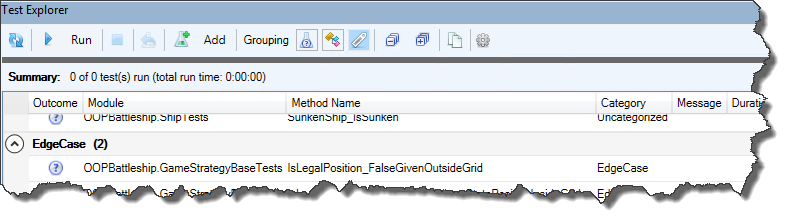
Rubberduck discovers unit tests in standard modules annotated with @TestModule. Test methods are any [parameterless, for now] method annotated with a @TestMethod annotation that can have a category string – the Test Explorer can group your tests using these categories. The declarations section of a test module must include a declaration (early or late bound) for an Rubberduck.AssertClass or Rubberduck.PermissiveAssertClass (both implement the same internal interface; the “permissive” one has VBA-like equality semantics, and the default one has stricter type equality requirements (a Long can’t be equal to a Double, for example). The default test template also defines a FakesProvider object, but we’re not going to need it now (if we needed to test logic that involved e.g. branching on the result of a MsgBox function call, we could hook into the MsgBox function and configure it to return what the test needs it to return, which is honestly wicked awesome). So our test module might look something like this at first:

'@Folder Tests.Bindings
'@TestModule
Option Explicit
Option Private Module
#Const LateBind = LateBindTests
#If LateBind Then
Private Assert As Object
#Else
Private Assert As Rubberduck.AssertClass
#End If

With this conditionally-compiled setup, all we need to toggle between late and early binding is to define a project-scoped conditional compilation argument: bring up the project properties and type LateBindTests=0 or LateBindTests=1 in that box, and just like that you can control conditional compilation project-wide without modifying a single module.

The first thing to do is to get the test state defined, and implement TestInitialize and TestCleanup methods that configure this state – in the case of BindingManagerTests, I’m going to add a private type and a private field to define and hold the current test state:

Private Type TState
    ExpectedErrNumber As Long
    ExpectedErrSource As String
    ExpectedErrorCaught As Boolean
    
    ConcreteSUT As BindingManager
    AbstractSUT As IBindingManager
    HandlePropertyChangedSUT As IHandlePropertyChanged
    
    BindingSource As TestBindingObject
    BindingTarget As TestBindingObject
    SourcePropertyPath As String
    TargetPropertyPath As String
    Command As TestCommand
End Type
Private Test As TState

Unit Testing Paradigm

Test modules are special, in the sense that they aren’t (absolutely shouldn’t be anyway) accessible from any code path in the project. Rubberduck invokes them one by one when you run a command like “run all tests” or “repeat last run”. But there’s a little more to it than that, worthy of mention.

VBA being single-threaded, tests are invoked by Rubberduck on the UI/main thread, and uses a bit of trickery to keep its own UI somewhat responsive. Each module runs sequentially, and each test inside each module runs sequentially as well – but the test execution order still shouldn’t be considered deterministic, and each test should be completely independent of every other test, such that executing all tests in any given order always produces the same outcomes.

A test that makes no assertions will be green/successful. When writing unit tests, the first thing you want to see is a test that’s failing (you can’t trust a test you have never seen fail!), and with Rubberduck in order to give a test a reason to fail, you use Assert methods (wiki).

When Rubberduck begins processing a test module, it invokes the methods (again, sequentially but not in an order that should matter) marked @ModuleInitialize in the module – ideally that would be only one method.

This is where the Assert object should be assigned (the default test templates do this):

'@ModuleInitialize
Private Sub ModuleInitialize()
#If LateBind Then
    'requires HKCU registration of the Rubberduck COM library.
    Set Assert = CreateObject("Rubberduck.PermissiveAssertClass")
#Else
    'requires project reference to the Rubberduck COM library.
    Set Assert = New Rubberduck.PermissiveAssertClass
#End If
End Sub

Rubberduck’s test engine will then execute all methods (usually cleaner with only one though) annotated with @TestInitialize before executing each test in the module; that is the best place to put the wordy setup code that would otherwise need to be in pretty much every single test of the module:

'@TestInitialize
Private Sub TestInitialize()
    Dim Context As TestBindingObject
    Set Context = New TestBindingObject
    
    Set Context.TestBindingObjectProperty = New TestBindingObject
    
    Test.Path = "TestBindingObjectProperty.TestStringProperty"
    Test.PropertyName = "TestStringProperty"
    Set Test.BindingSource = Context.TestBindingObjectProperty
    
    Set Test.BindingContext = Context
    Set Test.ConcreteSUT = BindingPath.Create(Test.BindingContext, Test.Path)
    Set Test.AbstractSUT = Test.ConcreteSUT
End Sub

By moving the test state to module level rather than having it local to each test, we already eliminate a lot of code duplication, and the Test module variable makes a rather nifty way to access the current test state, too!

Methods annotated with @TestCleanup are automatically invoked after each test in the module; in order to avoid accidentally sharing state between tests, every object reference should be explicitly set to Nothing, and values of intrinsic data types should be explicitly reset to their respective default value:

'@TestCleanup
Private Sub TestCleanup()
    Set Test.ConcreteSUT = Nothing
    Set Test.AbstractSUT = Nothing
    Set Test.BindingSource = Nothing
    Set Test.BindingContext = Nothing
    Test.Path = vbNullString
    Test.PropertyName = vbNullString
    Test.ExpectedErrNumber = 0
    Test.ExpectedErrSource = vbNullString
    Test.ExpectedErrorCaught = False
End Sub

What Goes Into the Test State?

A number of members should always be in the Test state structure:

  • ConcreteSUT (or just SUT) and AbstractSUT both point to the same object, through the default interface (BindingPath) and the explicit one (IBindingPath), respectively.
  • If the system under test class implements additional interfaces, having a pointer to the SUT object with these interfaces is also useful. For example the TState type for the BindingManager class has a HandlePropertyChangedSUT As IHandlePropertyChanged member, because the class implements this interface.
  • Default property values and dependency setup: we want a basic default SUT configured and ready to be tested (or fine-tuned and then tested).
  • ExpectedErrNumber, ExpectedErrSource, and ExpectedErrorCaught are useful when a test is expecting a given input to produce a particular specific error.

Expecting Errors

The “expected error” test method template works for its purpose, but having this on-error-assert logic duplicated everywhere is rather ugly. Consider pulling that logic into a private method instead (I’m considering adding this into Rubberduck’s test module templates):

Private Sub ExpectError()
    Dim Message As String
    If Err.Number = Test.ExpectedErrNumber Then
        If (Test.ExpectedErrSource = vbNullString) Or (Err.Source = Test.ExpectedErrSource) Then
            Test.ExpectedErrorCaught = True
        Else
            Message = "An error was raised, but not from the expected source. " & _
                      "Expected: '" & TypeName(Test.ConcreteSUT) & "'; Actual: '" & Err.Source & "'."
        End If
    ElseIf Err.Number <> 0 Then
        Message = "An error was raised, but not with the expected number. Expected: '" & Test.ExpectedErrNumber & "'; Actual: '" & Err.Number & "'."
    Else
        Message = "No error was raised."
    End If
    
    If Not Test.ExpectedErrorCaught Then Assert.Fail Message
End Sub

With this infrastructure in place, the unit tests for all guard clauses in the module can look like this – it’s still effectively doing Arrange-Act-Assert like the test method templates strongly suggest, only implicitly so (each “A” is essentially its own statement, see comments in the tests below):

'@TestMethod("GuardClauses")
Private Sub Create_GuardsNullBindingContext()
    Test.ExpectedErrNumber = GuardClauseErrors.ObjectCannotBeNothing '<~ Arrange
    On Error Resume Next
        BindingPath.Create Nothing, Test.Path '<~ Act
        ExpectError '<~ Assert
    On Error GoTo 0
End Sub
'@TestMethod("GuardClauses")
Private Sub Create_GuardsEmptyPath()
    Test.ExpectedErrNumber = GuardClauseErrors.StringCannotBeEmpty '<~ Arrange
    On Error Resume Next
        BindingPath.Create Test.BindingContext, vbNullString '<~ Act
        ExpectError '<~ Assert
    On Error GoTo 0
End Sub
'@TestMethod("GuardClauses")
Private Sub Create_GuardsNonDefaultInstance()
    Test.ExpectedErrNumber = GuardClauseErrors.InvalidFromNonDefaultInstance '<~ Arrange
    On Error Resume Next
        With New BindingPath
            .Create Test.BindingContext, Test.Path '<~ Act
            ExpectError '<~ Assert
        End With
    On Error GoTo 0
End Sub

And then similar tests exist for the respective guard clauses of Context and Path members. Having tests that validate that guard clauses are doing their job is great: it tells us exactly how not to use the class… and that doesn’t tell us much about what a BindingPath object actually does.


Testing the Actual Functionality

The methods we’re testing need to be written in a way that makes it possible for a test to determine whether it’s doing its job correctly or not. For functions and properties, the return value is the perfect thing to Assert on. For Sub procedures, you have to Assert on the side-effects, and have verifiable and useful, reliable ways to verify them.

These two tests validate that the BindingPath returned by the Create factory method has resolved the PropertyName and Object properties, respectively.

'@TestMethod("Bindings")
Private Sub Create_ResolvesPropertyName()
    Dim SUT As BindingPath
    Set SUT = BindingPath.Create(Test.BindingContext, Test.Path)
    Assert.IsFalse SUT.PropertyName = vbNullString
End Sub
'@TestMethod("Bindings")
Private Sub Create_ResolvesBindingSource()
    Dim SUT As BindingPath
    Set SUT = BindingPath.Create(Test.BindingContext, Test.Path)
    Assert.IsNotNothing SUT.Object
End Sub

I could have made multiple assertions in a test, like this…

'@TestMethod("Bindings")
Private Sub Create_ResolvesBindingSource()
    Dim SUT As BindingPath
    Set SUT = BindingPath.Create(Test.BindingContext, Test.Path)
    Assert.IsFalse SUT.PropertyName = vbNullString
    Assert.IsNotNothing SUT.Object
End Sub

The Test Explorer would say “IsFalse assert failed” or “IsNotNothing assert failed”, so it’s arguably (perhaps pragmatically so) still useful and clear enough why that test would fail (and if you had multiple Assert.IsFalse calls in a test you could provide a different message for each)… but really as a rule of thumb, tests want to have one reason to fail. If the conditions to meaningfully pass or fail a test aren’t present, use Assert.Inconclusive to report the test as such:

'@TestMethod("Bindings")
Private Sub Resolve_SetsBindingSource()
    With New BindingPath
        .Path = Test.Path
        Set .Context = Test.BindingContext
        
        If Not .Object Is Nothing Then Assert.Inconclusive "Object reference is unexpectedly set."
        .Resolve
        
        Assert.AreSame Test.BindingSource, .Object
    End With
End Sub
'@TestMethod("Bindings")
Private Sub Resolve_SetsBindingPropertyName()
    With New BindingPath
        .Path = Test.Path
        Set .Context = Test.BindingContext
        
        If .PropertyName <> vbNullString Then Assert.Inconclusive "PropertyName is unexpectedly non-empty."
        .Resolve
        
        Assert.AreEqual Test.PropertyName, .PropertyName
    End With
End Sub

This mechanism is especially useful when the test state isn’t in local scope and there’s a real possibility that the TestInitialize method is eventually modified and inadvertently breaks a test. Such conditional Assert.Inconclusive calls are definitely a form of defensive programming, just like having guard clauses throwing custom meaningful errors.

Note that while we know that the BindingPath.Create function invokes the Resolve method, the tests for Resolve don’t involve Create: the Path and Context are being explicitly spelled out, and the .Resolve method is invoked from a New instance.

And that’s pretty much everything there is to test in the BindingPath class.

There’s one thing I haven’t mentioned yet, that you might have caught in the TState type:

BindingSource As TestBindingObject
BindingTarget As TestBindingObject

This TestBindingObject is a test stub: it’s a dependency of the class (it’s the “binding context” of the test path) and it’s a real object, but it is implemented in a bit of a special way that the BindingPath tests don’t do justice to.

Test Stubs

Eventually Rubberduck’s unit testing framework will feature a COM-visible wrapper around Moq, a popular mocking framework for .NET that Rubberduck already uses for its own unit test requirements. When this happens Rubberduck unit tests will no longer need such “test stubs”. Instead, the framework will generate them at run-time and make them work exactly as specified/configured by a unit test, and “just like that” VBA/VB6 suddenly becomes surprisingly close to being pretty much on par with professional, current-day IDE tooling.

The ITestStub interface simply formalizes the concept:

'@Exposed
'@Folder Tests.Stubs
'@ModuleDescription "An object that stubs an interface for testing purposes."
'@Interface
Option Explicit
'@Description "Gets the number of times the specified member was invoked in the lifetime of the object."
Public Property Get MemberInvokes(ByVal MemberName As String) As Long
End Property
'@Description "Gets a string representation of the object's internal state, for debugging purposes (not intended for asserts!)."
Public Function ToString() As String
End Function

A TestStubBase “base class” provides the common implementation mechanics that every class implementing ITestStub will want to use – the idea is to use a keyed data structure to track the number of times each member is invoked during the lifetime of the object:

'@Folder Tests.Stubs
Option Explicit
Private Type TState
    MemberInvokes As Dictionary
End Type
Private This As TState
'@Description "Tracks a new invoke of the specified member."
Public Sub OnInvoke(ByVal MemberName As String)
    Dim newValue As Long
    If This.MemberInvokes.Exists(MemberName) Then
        newValue = This.MemberInvokes.Item(MemberName) + 1
        This.MemberInvokes.Remove MemberName
    Else
        newValue = 1
    End If
    This.MemberInvokes.Add MemberName, newValue
End Sub
'@Description "Gets the number of invokes made against the specified member in the lifetime of this object."
Public Property Get MemberInvokes(ByVal MemberName As String) As Long
    If This.MemberInvokes.Exists(MemberName) Then
        MemberInvokes = This.MemberInvokes.Item(MemberName)
    Else
        MemberInvokes = 0
    End If
End Property
'@Description "Gets a string listing the MemberInvokes cache content."
Public Function ToString() As String
    Dim MemberNames As Variant
    MemberNames = This.MemberInvokes.Keys
    
    With New StringBuilder
        Dim i As Long
        For i = LBound(MemberNames) To UBound(MemberNames)
            Dim Name As String
            Name = MemberNames(i)
            .AppendFormat "{0} was invoked {1} time(s)", Name, This.MemberInvokes.Item(Name)
        Next
        ToString = .ToString
    End With
    
End Function
Private Sub Class_Initialize()
    Set This.MemberInvokes = New Dictionary
End Sub

With this small bit of infrastructure, the TestBindingObject class is a full-fledged mock object that can increment a counter whenever a member is invoked, and that can be injected as a dependency for anything that needs an IViewModel:

'@Folder Tests.Stubs
'@ModuleDescription "An object that can stub a binding source or target for unit tests."
Option Explicit
Implements ITestStub
Implements IViewModel
Implements INotifyPropertyChanged
Private Type TState
    Stub As TestStubBase
    Handlers As Collection
    TestStringProperty As String
    TestNumericProperty As Long
    TestBindingObjectProperty As TestBindingObject
    Validation As IHandleValidationError
End Type
Private This As TState
Public Property Get TestStringProperty() As String
    This.Stub.OnInvoke "TestStringProperty.Get"
    TestStringProperty = This.TestStringProperty
End Property
Public Property Let TestStringProperty(ByVal RHS As String)
    This.Stub.OnInvoke "TestStringProperty.Let"
    If This.TestStringProperty <> RHS Then
        This.TestStringProperty = RHS
        OnPropertyChanged Me, "TestStringProperty"
    End If
End Property
Public Property Get TestNumericProperty() As Long
    This.Stub.OnInvoke "TestNumericProperty.Get"
    TestNumericProperty = This.TestNumericProperty
End Property
Public Property Let TestNumericProperty(ByVal RHS As Long)
    This.Stub.OnInvoke "TestNumericProperty.Let"
    If This.TestNumericProperty <> RHS Then
        This.TestNumericProperty = RHS
        OnPropertyChanged Me, "TestNumericProperty"
    End If
End Property
Public Property Get TestBindingObjectProperty() As TestBindingObject
    This.Stub.OnInvoke "TestBindingObjectProperty.Get"
    Set TestBindingObjectProperty = This.TestBindingObjectProperty
End Property
Public Property Set TestBindingObjectProperty(ByVal RHS As TestBindingObject)
    This.Stub.OnInvoke "TestBindingObjectProperty.Set"
    If Not This.TestBindingObjectProperty Is RHS Then
        Set This.TestBindingObjectProperty = RHS
        OnPropertyChanged Me, "TestBindingObjectProperty"
    End If
End Property
Private Sub OnPropertyChanged(ByVal Source As Object, ByVal PropertyName As String)
    Dim Handler As IHandlePropertyChanged
    For Each Handler In This.Handlers
        Handler.OnPropertyChanged Source, PropertyName
    Next
End Sub
Private Sub Class_Initialize()
    Set This.Stub = New TestStubBase
    Set This.Handlers = New Collection
    Set This.Validation = ValidationManager.Create
End Sub
Private Sub INotifyPropertyChanged_OnPropertyChanged(ByVal Source As Object, ByVal PropertyName As String)
    OnPropertyChanged Source, PropertyName
End Sub
Private Sub INotifyPropertyChanged_RegisterHandler(ByVal Handler As IHandlePropertyChanged)
    This.Handlers.Add Handler
End Sub
Private Property Get ITestStub_MemberInvokes(ByVal MemberName As String) As Long
    ITestStub_MemberInvokes = This.Stub.MemberInvokes(MemberName)
End Property
Private Function ITestStub_ToString() As String
    ITestStub_ToString = This.Stub.ToString
End Function
Private Property Get IViewModel_Validation() As IHandleValidationError
    Set IViewModel_Validation = This.Validation
End Property

This functionality will be extremely useful when testing the actual property bindings: for example we can assert that a method was invoked exactly once, and fail a test if the method was invoked twice (and/or if it never was).


There’s a lot more to discuss about unit testing in VBA with Rubberduck! I hope this article gives a good idea of how to get the best out of Rubberduck’s unit testing feature.


Hello, Rubberduck 2.5.0

Creating the pull request to merge the current [next] branch into [master] is always thrilling: the incredible amount of work that goes into Rubberduck, release after release, never ceases to amaze me. This time (again!), the pull request is well over 1.2K commits. Green-release version 2.4.1.0 was all the way back on March 25, 2019 – which was the Monday that immediately followed the last MVP Global Summit.

What’s new?

If you’ve been keeping up with pre-release builds, you already know. If you’re still using v2.4.1.0 and have the check for newer version at startup setting enabled, your ducky will be telling you about the new build next time you fire up the VBE.

When you update to v2.5, you’ll notice a new option for the check for newer version at startup setting: there’s a new “check for pre-release builds” option that can let you know not only of a new minor version bump, but also for every pre-release build – which effectively means you now get to keep Rubberduck as up-to-date as possible (every merged pull request), without needing to subscribe to GitHub email notifications.

Splash Screen

But the first thing you’ll notice (assuming you haven’t disabled it) will be the splash screen going back to the 2.4.0 yellow ducky splash – if you didn’t know, v2.4.1 was “ThunderFrame Edition” and all this time the splash screen was a nod to our dear friend Andrew Jackson:

Rubberduck’s repository is still filled with hundreds of Andrew’s ideas, and his impact on the project will remain with us forever. This ducky is based on Andrew’s work, too:

I’m not a fan of the font (it’s the same as on the ThunderSplash), but SHOWCARD GOTHIC was getting old and annoyingly too playful-looking. If a graphic artist is reading this and has a nice idea they’d like to contribute, they’re welcome to do so!

But you’re not here to read about the splash screen, are you?

Website/GitHub Integration

In the past, a new green-release meant Rubberduck needed to be deployed to the project’s website itself, so that the /version/build pages could respond with the assembly version of the Rubberduck.dll file deployed. Today the website only needs a Rubberduck build to support the online indenter page, and we only need to update that build to keep the online indenter preview tool up-to-date: if no indenter changes are made, then nothing needs to be updated – the website uses GitHub’s REST API to get the latest pre-release and official “green release” version numbers, but also to download the latest xml-doc from the Rubberduck.CodeAnalysis project, and with that the website’s /inspections/list page will now start identifying the newer inspections that are only available in a pre-release build, versus those present in the latest “green release” (this hasn’t kicked in yet, only because the [master] branch didn’t have any xml-docs to download). The /inspections/details pages are also entirely generated from the in-code xml documentation, including the many examples: we’ll eventually start linking to these pages in the inspection results toolwindow, with “why am I seeing this?” links/buttons.

New Features?

New inspections and new quickfixes, of course – but mostly lots of bugs fixed, and extremely important enhancements to the resolver logic effectively warrant the minor version bump. As mentioned in What’s Cooking for Rubberduck 2.5.x, special attention was given to the resolution of implicit default member calls and bang notation – and with that there’s very, very little early-bound code (if any) that Rubberduck isn’t understanding.

Self-closing pairs aren’t a new feature, but Rubberduck will now ship with the feature enabled by default (was opt-in before). We have been able to hijack and suppress the annoying “beep” that the VBE sounds when the Parameter Quick-Info command doesn’t have anything to show, and this has unlocked restoring automatic quick-info when typing the argument list of a function or procedure call: before that, using self-closing pairs worked pretty nicely, but parameter quick-info had to be manual, which was rather disturbing.

VBA + Source Control

If you’ve been following the project for some time, you probably remember the defunct source control panel – a toolwindow that essentially implemented Visual Studio’s Team Explorer and let you synchronize your VBA project with the files in a git repository. It would also list modified files and let you commit, push, pull, fetch, create new branches, merge them, etc. It failed and isn’t coming back, but the Code Explorer in v2.5 brings back the ability to synchronize the contents of your VBA project from the file system:

Update Components from Files will update existing modules from files in a selected folder, and Replace Contents from Files will make the VBA project mirror the contents of the selected folder (creating new project components/modules as needed). Because Visual Basic 6.0 already works off the file system, in VB6 we only offer the Update Components from Files command.

Keep in mind that while the contents of document modules can be imported, new document modules can’t be added to the host project by the VBE (the host application owns these modules: see this article): for this reason you will want to minimize the amount of code you have in modules like ThisWorkbook and other Worksheet modules in Excel, or in reports & forms in Access. Implementing the actual functionality in separate modules will make things much easier to work with this feature in conjunction with source control (whether you use git, mercurial, SVN, or any other VCS technology).

Visual Studio 2019

Rubberduck has been built with Visual Studio 2017 for quite some time: we have successfully updated all projects in the solution to the awesome new .csproj format, and until now the WPF (Windows Presentation Foundation – the .NET UI framework we use to design our toolwindows and dialogs) dependencies made it impossible to upgrade our build process to work in Visual Studio 2019 until the release of .NET Core 3 last September. This release marks the milestone where we flip the page, sunset Visual Studio 2017 – the first pull request to be merged after v2.5.0, will be one that updates the build process to work with Visual Studio 2019.

If you have forked or cloned Rubberduck, please note that Rubberduck will no longer build in VS2017, as soon as it builds in VS2019.


What Next?

One of the biggest road blocks that’s currently keeping us from implementing a lot of the amazing inspection ideas (and bringing back a proper Extract Method refactoring!), is the lack of proper code path analysis. With that, we’ll have standard tooling that all these inspections can share and reuse (rather than reinvent a rather complex wheel everytime), and then we can tackle the many open Code Path Analysis issues. I’ll be posting an “Inside Rubberduck” article about the architecture and thinking behind this at some point.

Another road block, that’s currently keeping Rubberduck from fully understanding the interfaces it’s looking at, is flicking the switch for our internal TypeLib API, which taps deep into the VBIDE’s guts and gives us visibility on the internal ITypeLib of the VBA project. Rubberduck is already leveraging some of these capabilities (that’s how unit testing works in every VBA host application), but by flicking that switch we’ll be able to, among many other things, pick up the Workbook interface of the ThisWorkbook module… which unlocks fixing a number of long-standing issues and inspection false positives.

Block Completion is another upcoming feature that will possibly be getting my attention in 2020, but not before Code Path Analysis does.

In order to address the growing concerns of performance and memory consumption (especially in larger projects, which currently work best in 64-bit hosts, and possibly not at all in 32-bit hosts), we are exploring implementing a Language Server to offload parsing & resolution out of the host process, similar to how VSCode & Roslyn works, and possibly also moving a lot of the in-memory storage of referenced type libraries’ declarations to an out-of-process database.

Rubberduck 2.4.1: ThunderFrame Edition

As was shared a week or two ago on social media, Rubberduck contributor and supporter Andrew “ThunderFrame” Jackson passed away recently – but his love for VBA, his awesomely twisted ways of breaking it, his insights, the 464 issues (but mostly ideas, with 215 still open as of this writing) and 30 pull requests he contributed to Rubberduck, have shaped a large part of what this project is all about, and for this release we wanted to honor him with a special little something in Rubberduck, starting with the splash screen.

Andrew joined the project very early on. He gave us the signature spinning duckies and the SVG icon of the project; he once implemented a very creative way to make unit testing work in Outlook (and I know a certain duck that had to eat their hat because of it!), before the feature was made host-agnostic. He gave us the weirdest, most completely evil-but-still-legal VBA code we could possibly test Rubberduck’s parser/resolver with – and we’re very proud to have a ThunderCode-proof parser now!

What’s New?

This isn’t an exhaustive list. See the release notes for more information.

¡Rubberduck ahora habla español!

This release introduces Spanish language support. German, French, and Czech translations have also been updated.

Rubberduck doesn’t speak your language yet? Nothing would make us happier than helping you help us translate Rubberduck! See contributing.md for all the details, and don’t hesitate to ask any questions you have – go on, fork us!

The project’s many resource files are easily handled with the ResX Manager add-in for Visual Studio.

UI Enhancements

The Test Explorer has had a rather impressive facelift, Inspection Results are now much easier to review, navigate and filter. There is a known issue about the GroupingGrid control expanding/collapsing all groupings together, but we weren’t going to hold back the release for this – we will definitely address it in a near-future release though.

Toggle buttons in the toolbar now allow filtering inspection results by severity, and grouping by inspection type, by module, by individual inspection, or by severity.
Similar toggle buttons in the Test Explorer allow grouping tests by outcome, module, or category. Tests can be categorized by specifying a category name string as an argument to the @TestMethod annotation.

Parser performance has improved, especially for the most common usages of “bang” (foo!bar) notation, which remain a difficult language construct to handle. But they’re also late-bound, implicit, default member calls that would probably be better off made explicit and early-bound.

Self-Closing Pair completion works rather nicely now, with only two known, low-priority edge cases that don’t behave quite as nicely as they should.

Easter Is Coming

And with Easter comes… White Walkers Easter Eggs, so all I’m going to say, is that they’ll be flagging ThunderCode – the kind of code our friend loved to test & push the limits of Rubberduck’s parser with. If your code trips a ThunderCode inspection, …nah, it can’t happen.

Woopsie, might happen after all. We’ll eventually figure out a way to hide them from the settings!

Also it’s apparently not impossible that there’s no way no other Easter Eggs were never not added to Rubberduck. For the record I don’t know if this means what I think I mean it to say, and that’s perfect.

What’s Next?

Some very important changes have been waiting for this release and will be merged in the next few weeks – these changes won’t necessarily be visible from a user standpoint, but they will greatly enhance our internal API – refactorings, COM object management, and we’ll be leveraging more of the TypeLibs API, which in turn should end up translating into greatly enhanced user experience and feature set.

Next release will include a few new inspections, including one that locates obsolete While...Wend loops, and suggests to rewrite them as Do While...Loop blocks, which can be exited with an Exit Do statement, whereas While loops can only be prematurely exited (without throwing an error) by an inelegant GoTo jump.

We really want to tighten our release cycle, so we’ll be shooting for the end of April for what should be version 2.4.2.

Rubberduck v2.4.0

Unlike quite a number of Rubberduck releases, this time we’re not boasting a thousand commits though: we’re looking at well under 300 changes, but if the last you’ve seen of Rubberduck was 2.3.0 or prior, …trying this release you’ll quickly realize why we originally wanted to release it around Christmas.

So, here’s your belated Christmas gift from the Rubberduck dev team!

VBE Project References: CURED!

You may have seen the Introducing the Reference Explorer announcement post last autumn – well, the new feature is now field-tested, works beautifully, instinctively, and is ready for prime time. It’s a beauty!

The add/remove references dialog has seen a number of enhancements since its pre-release: thanks everyone for your constructive feedback!
Quickly locate any type library by name and/or description.
Pin your favorite references, and Rubberduck will keep them handy for all your VBA/VB6 projects.

You’ll never want to use the vanilla-VBE references dialog again!

If you’ve been following the Rubberduck project for quite some time, you may remember something about using annotations together with inspections and quick-fixes to document the presence of module & member attributes. You may also remember when & why the idea was dropped. Keeping in tradition with including new inspections every release… Surprise, it’s coming back!

German, French, and Czech translations have been updated, a number of bugs were fixed in a few inspections, the Code Explorer has seen a number of subtle enhancements, and WPF binding leaks are all but gone.

Code Explorer Enhancements

Adding the Reference Explorer made a perfect opportunity to revisit the Code Explorer toolwindow – our signature navigation feature. Behold, the new Code Explorer:

The new ‘Sync with code pane’ toolbar button (the left/right arrows icon) selects the treeview node closest to the current code pane selection.

There’s a new ‘Library References’ node that shows your project’s library dependencies …whether they’re in use or not:

Find all references can now be used to locate all uses of a given type library – including the built-in standard libraries! Note that rendering lots of search results in a toolwindow will require confirmation if there are too many results to display.

The project reference nodes get new icons:

Classes with a VB_PredeclaredID attribute set to True now have their own icon too (and their names now say (Predeclared) explicitly), and class modules marked with an @Interface annotation now appear with an “interface” icon, like IGameStrategy here:

Annotations & Attributes

They’re back, and this time it does work, and it’s another game changer: Rubberduck users no longer need to export any code file to modify module & member attributes!

Module & Member Annotations

At module level, the @ModuleDescription annotation can be given a string argument that controls the value of the module’s VB_Description attribute; the @Exposed annotation controls the value of the VB_Exposed attribute; the presence of a @PredeclaredId annotation signals a VB_PredeclaredId attribute with a value of True.

At member level, @Description annotations can be given a string argument that controls the value of the member’s VB_Description attribute.

Through inspections, Rubberduck is now able to warn about attributes that don’t have a corresponding annotation, and annotations that don’t have a corresponding attributes. Look for inspection results under the “Rubberduck Opportunities” category.

v2.4.x

The months to come will see further enhancements in several areas; there are several pull requests lined up already – stay tuned, and keep up with the pre-release builds by watching releases on GitHub!

Autocomplete Enhancements

I got nerd-sniped. A Rubberduck user put up a feature request on the project’s repository, and I thought “we need this, yesterday”… so I did it, and the result crushed all the expectations I had – the prerelease build is here!

There are a few quirks – but rule of thumb, it’s fairly stable and works pretty well. Did you see it in action?

This feature rather impressively enhances the coding experience in the VBE – be it only with how it honors your Rubberduck/Smart Indenter settings to literally auto-indent code blocks as you type them.

Writing auto-completing VBA code, especially with auto-completing double quotes and parentheses, gives an entirely fresh new feel to the good old VBE… I’m sure you’re going to love it.

And in case you don’t, you could always cherry-pick which auto-completions you want to use, and which ones you want to disable:

AutoCompleteSettings.png


Inline Completion

These work with the current line (regardless of whether you’re typing code or a comment, or whether you’re inside a string literal), by automatically inserting a “closing” token as soon as you type an “opening” token – and immediately puts the caret between the two. These include (pipe character | depicts caret position):

  • String literals: " -> "|"
  • Parentheses: ( -> (|)
  • Square brackets: [ -> [|]
  • Curly braces: { -> {|}

Block Completion

These work with the previous line, immediately after committing it: on top of the previous line’s indentation, a standard indent width (per indenter settings) is automatically added, and the caret is positioned exactly where you want it to be. These include (for now):

  • Do -> Do [Until|While]...Loop
  • Enum -> Enum...End Enum
  • For -> For [Each]...Next
  • If...Then -> If...Then...End If
  • #If...Then -> #If...Then...#End If
  • Select Case -> Select Case...End Select
  • Type -> Type...End Type
  • While -> While...Wend
  • With...End With

On top of these standard blocks, On Error Resume Next automatically completes to ...On Error GoTo 0.


Quirks & Edge Cases

It’s possible that parenthesis completion interferes with e.g. Sub() statements (an additional opening parenthesis is sometimes added). This has been experienced and reproduced, but not consistently. If you use the feature and can reliably reproduce this glitch, please open an issue and share the repro steps with us!

On Error Resume Next will indent its body, but there currently isn’t any indenter setting for this: we need to add an indenter option to allow configuring whether this “block” should be indented or not.

Deleting or back-spacing auto-completed code may trigger the auto-complete again, once.

Line numbers are ignored, and an opening token found on the last line of a line-continuated comment will trigger a block auto-complete.

Lastly, care was taken to avoid completing already-completed blocks, however if you try hard enough to break it, you’ll be able to generate non-compilable code. Auto-completion cannot leverage the parser and only has a very limited string view of the current/committed line of code. The nice flipside of this limitation, is very nice performance and no delays in your typing.

None of these issues outweight the awesomeness of it, so all auto-completions are enabled by default.

OOP VBA pt.1: Debunking Stuff

Ever seen that one?

It’s not a real language

The thing is, object-oriented code can definitively be written in VBA. This series of posts shows how. Let’s first debunk a few myths and misconceptions.


VBA classes don’t have constructors!

What’s a constructor but a tool for instantiating objects? In fact there are many ways to create objects, and in SOLID OOP code there shouldn’t be much Newing-up going on anyway: you would be injecting a factory or an abstract factory instead, to reduce coupling. VBA is COM, and COM loves factories. No constructors? No problem!


VBA code is inherently coupled with a UI or spreadsheet

In OOP, the ideal code has low coupling and high cohesion. This means code that doesn’t directly depend on MsgBox, or any given specific Worksheet or UserForm. Truth is, OOP code written in VB.NET or C# be it with WinForms or WPF UI frameworks, faces the same problems and can easily be written in the same “Smart UI” way that makes the UI run the show and the actual functionality completely untestable: bad code is on the programmer, not the language. And spaghetti code can be written in any language. The very same principles that make well-written VB.NET, C#, or Java code be good code, are perfectly applicable to VBA code.


Writing Object-Oriented VBA code is painful

Okay, point. The VBE’s Project Explorer does make things painful, by listing all class modules alphabetically under the same folder: it’s as if the IDE itself encouraged you to cram as much functionality as possible in as few modules as possible! This is where Rubberduck’s Code Explorer comes in to save the day though: with a simple comment annotation in each class’ declarations section, you can easily organize your project into virtual folders, nest them as you see fit, and best of all you can have a form, a standard module and a dozen class modules under the same folder if you want. There’s simply no reason to avoid VBA code with many small specialized class modules anymore.


OOP is overkill for VBA

After all, VBA is just “macros”, right? Procedural code was good enough back then, why even bother with OOP when you’re writing code in a language that was made to “get things done”, right? So we go and implement hundreds of lines of code in a worksheet event handler; we go and implement dialogs and thousands of lines of code in a form’s code-behind; we declare dozens upon dozens of global variables because “that’s how it was made to work”. Right? Nope.

It works, and everyone’s happy. Until something needs to change, and something else needs to change the week after, and then another feature needs to be added the next week, then a bug needs to be fixed in that new feature, and then fixing that bug ripples in unexpected places in the code; the beast eventually grows hair and tentacles, and you’re left sitting in front of a spaghetti mess.

And it’s hard to maintain, not because it’s VBA, but because it was written “to get things done”, but not to be maintained. This “ball of mud” code can happen in any language: it’s not the language, it’s the mentality. Most VBA developers are not programmers – code gets written the way it is because doing things in a SOLID way feels like going to the Moon and back to end up next door with the exact same functionality… and lots simply don’t know better, because nobody ever taught them. At least, that’s how it started for me.

Then there’s the IDE. You would like to refactor the code a bit, but there are no refactoring tools and no unit tests, and every change you make risks breaking something somewhere, because knowing what’s used where is terribly painful… and there’s no integrated source control, so if you make a change that the undo button doesn’t remember, you better remember what it looked like. And eventually you start commenting-out a chunk of code, or start having DoSomething_v2 procedures, and then DoSomething3. Soon you don’t know which code calls which version and you have more comments than live code. Without source control, it’s impossible to revert back to any specific version, and short of always working off a copy of the host document, code changes are done at the risk of losing everything.

No safety net. Pretty much no tooling. The VBE makes it pretty hard to work with legacy code – at least, harder than with a more modern, full-featured IDE.

Rubberduck will change that: Rubberduck wants to make writing object-oriented VBA code as enjoyable as in a modern IDE, and maintaining and refactoring legacy procedural code as easy and safe as possible.

Is OOP overkill for VBA? If it’s not overkill for even the tiniest piece of modern-language code, then I fail to see why it would be overkill for any VBA project. After all, SOLID principles are language-agnostic, and the fact that VBA doesn’t support class inheritance does nothing to affect the quality of the code that’s possible to achieve in VBA.


Wait, how would SOLID even apply to VBA?

The Single Responsibility Principle is a golden rule that’s as hard to follow in VBA as it is in any other language: write small procedures and functions that do one thing, prefer many small specialized modules over fewer, large ones.

The Open/Closed Principle, which leaves classes open for extension, closed for modification is even harder to get right, again regardless of the language. However like the others, if the other 4 principles are followed, then this one is just common sense.

Liskov Substitution Principle involves no wizardry, it’s about writing code so that an implementation of an interface guarantees that it does what the interface says it’s doing, so that any given implementation of an interface can be injected into the code, it will still run correctly.

The Interface Segregation Principle goes hand in hand with the other principles, and keeps your code cohesive, focused. Interfaces should not leak any specific implementation; an interface with too many members sounds like breaking SRP anyway.

The Dependency Inversion Principle is possibly the one that raises eyebrows, especially if you don’t know that VBA classes can implement interfaces. Yet it’s perfectly possible to write code against an IMsgBox interface, inject a MsgBoxImpl class in the production code, and inject a MsgBoxStub class in the test code.

See? Nothing VBA can’t handle. So object-oriented VBA code is theoretically possible. In the next couple of weeks we’ll go over what it means in real-world VBA code, in terms of project architecture, design patterns, and code design in general.