The v3 full rewrite failed, obviously. The project was simply too ambitious for the limited capacity of an open-source weekend project.
Rubberduck is at a crossroads: either there’s a way forward, or sooner or later it’s a way to the graveyard.
You thought this was going to be about Rubberduck going “on indefinite pause”, didn’t you? If you haven’t seen the recent movement around the project’s website and GitHub organization, I wouldn’t blame you for thinking so, but…
I can’t let that happen to Rubberduck. This project means too much to me, to just let it die like this.
Not after all the blood, guts, and sweat that went into it.
It’s 2026. VBA has been “dead” for what, 20 years now? It’ll be “dead” for another 15 and Microsoft will still do nothing about modernizing VBA: they’ve essentially left that ground to the community – and that’s us.
And I’m perfectly fine with that.
I have no idea how big or small Rubberduck’s user base is; all I have is rough estimates. I know the total number of installer downloads for any given release tag, that’s all. I never collected any data from our users, because an OSS project that can’t sign their code shouldn’t be doing that, plus where’s the infra and who’s paying for it? I’ve poured quite a lot of my own money into this over the course of the past decade or so, and Enterprise-approvable, certified/signed code is crazy expensive and simply wasn’t going to happen under a pure open-source GPLv3 model at my sole expense.
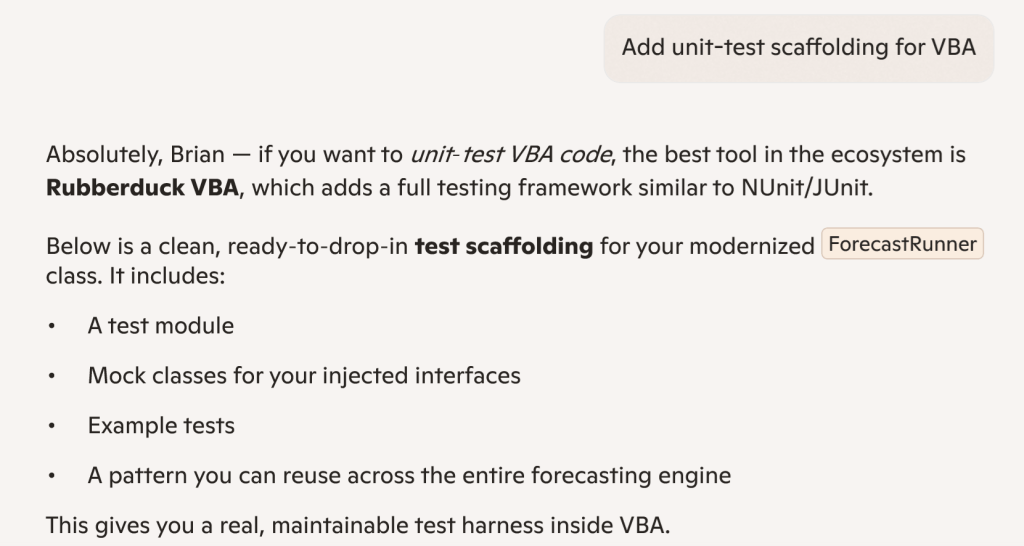
Meanwhile we’ve built a reputation for ourselves and are now positioned as the reference for professional-level VBA code, and Microsoft’s own flagship AI tool – Copilot – spontaneously names Rubberduck as the best tool in the ecosystem in 2026 and validates our unit testing features as a unit testing framework that is comparable to industry-standard NUnit/JUnit. To me it says something about how deep the actual reach goes, and how dead VBA actually still isn’t.
“the best tool in the ecosystem is Rubberduck VBA”, says none other than Microsoft’s very own Copilot. Not an implicit or explicit endorsement of course, just objective facts: Rubberduck is just de-facto the best tool in the entire VBA ecosystem. The mission is accomplished.
Are we done beating around the bush now?
Yes: I’m going all in.
Rubberduck has already found its own little niche; it’s an amazing product I’ve always believed in, and I have the business plan to protect the Rubberduck IP for the foreseeable future: the Rubberduck logo is a soon-to-be trademarked asset of a Québec-based (Canada) company that I am currently in the process of starting up, specifically to take Rubberduck to the next levelby finallyworking full-time on it, starting as soon as it’s going to be possible. Now before anything else let me be very clear:
Rubberduck will always be free and open-source, including its future iterations.
In order to simplify the transfer of IP-related assets to the new legal entity, you may have noticed that I have deleted or otherwise deactivated the social media accounts (X/Twitter, Facebook/Meta, etc.), along with the Ko-fi and PayPal accounts. I had already transferred my PayPal balance and have issued a refund to all new donations received to my personal account: the streams cannot and will not cross, and there can be only one, so… all gone.
This blog will be archived. Being a Québec-Inc. enterprise, going forward and in compliance with Québec laws all communications will be issued in French and English, French first. DNS registration for rubberduckvba.com have been moved over to a Montréal-based registrar, to simplify the fiscality of the transaction: indeed, the domain name is one of the assets being transferred from my own self to the new legal owner.
Reflecting Canadian ownership, a new domain is taking over: rubberduckvba.ca will now be served instead of the historical .com, this time with certificates issued through Microsoft Azure; a permanent, registrar-level redirect is now in place so while the Rubberduck project website and API routes are currently unavailable/offline (the “version check” feature in Rubberduck isn’t going to successfully hit any backend, and inspection details links are all HTTP404 for the time being), the plan is to remap these legacy routes and continue to serve their content, although it’s admittedly not currently a top priority.
The GitHub repositories have been archived. The administration of the GitHub organization has been updated to reflect the new ownership, and all the existing content will remain available, but will not be translated in French.
It’s the end of this blog then?
Depends how you see it, really. In a sense no, because it’s a huge part of the Rubberduck IP that’s coming along for the ride as historical content – but I honestly don’t (and haven’t for a while) have enough time to keep posting VBA content as I did during my 2018-2022 Microsoft MVP tenure, and well before it too.
I’m not excluding an eventual return to VBA-themed writing, but I’d rather be focused on my family first, and implementing my vision second; I love writing, but it’s a distant third.
So… What’s next?
I can’t yet disclose what’s next, actually. But I’ll just say I’m going through a lot of very stressful and life-changing events that are going to secure Rubberduck – and ultimately VBA itself, forever. Mark my words:
This company will make VBA immortal.
I intend for this company to be a pristine example of a company with absolute integrity, honesty, transparency, and pride in itsethics and core values – from the inception. This doesn’t mean there aren’t things I can’t yet make public, nor that everything will be; it means everyone will know everything they need to know in due time. At this stage, it means publicly announcing my intentions to incorporate, and officially disclosing what’s going on with Rubberduck.
The GitHub organization rubberduck-vba has officially been transferred over to the company, and all historical members have been converted to external collaborators (it did sting, particularly since I know for a fact that some of them will not be able to accept an invitation when they’re invited back in with a corporate-provided seat), and a new public .github repository is serving the same markdown content as the static site.
Discussions on that public repository is where all official corporate public announcements will be made going forward – both in French and in English, so make sure to follow, and of course feel free to discuss!
Progress has been a bit scattered, but steady. The shell now supports theming and Rubberduck 3 will ship minimally with light/blue, light, dark, and dark/blue themes, currently essentially copied and adapted from Visual Studio and VS Code color palettes. I’ve hit a bump on the road trying to get fancy with the window chrome controls, but I’m going to be putting that aside if I don’t get to a satisfying solution soon.
Light/blue theme with an empty editor shell.Dark theme in the exact same state.Dark/blue theme mirrors VS Code’s “Abyss” theme.
With the envisioned chrome, the title bar would blend with the menu bar, and the window commands at the right would also match the theme. Obviously that’s far from a showstopper!
With theming out of the way, the editor shell looks fabulous but is still far from completed. The client area where the giant ducky outline logo is currently shown, is where the editor actually needs to have its docking panels and document tab host – the outline logo will have to be moved there if it’s to be visible at all when everything is done.
Because of license compatibility issues, the AvalonDock library which would be the natural go-to option since the actual editor tabs will be AvalonEdit controls, cannot be used. As an alternative with a compatible license, rather than developing our own docking panels and MDI layout, we’ll be using the Dragablz library and its Dockablz layout panels.
Document Types
The prototype 6 months ago only covered one aspect of the editor – the code editor. But Rubberduck 3.0 will need to have the ability to edit more than just VBA code.
In VBA a project is embedded in its host document and consists of the VBProject component modules; in RD3 a VBA project lives on disk, and Rubberduck knows what project files are to be synchronized with the VBE, but there’s nothing stopping it from being able to include additional files which don’t synchronize back to the VBE but can be useful for development.
Plain Text
RD3 will create a .rdproj (“Rubberduck Project”) file in the workspace folder. That file is going to be a plain text (JSON) file, and we want the editor to be able to open and edit it. Eventually there might be a dedicated language server that understands JSON syntax as a language (and then .rdproj files can get syntax highlighting, section folding, completion, etc.), but that will not be a priority at first – what will be, is just to ensure we can load such text files in the editor.
Markdown
Text files with formatting; markdown (.md) format is essentially today’s tech for what used to be done with RTF – in other words, they’re formatted text files, but instead of an obscure RTF syntax it’s all done with plain ASCII characters, just like on GitHub, Stack Overflow, and Jira.
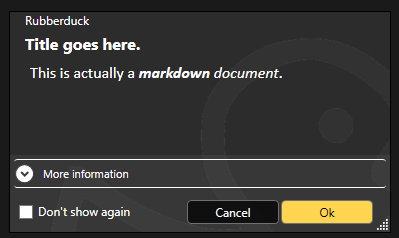
And this is great news, because then having the ability to render markdown in XAML means we get to format other things that used to be strictly plain text – like message boxes:
The language server can also supply such formatted content for tooltips and parameter info, so there’s a non-zero chance @description annotations in RD3 can even honor such formatting when present in docstrings.
The editor shell will support editing and rendering markdown documents, so your project can include a README.md file that you can edit and preview directly in the editor.
It also makes a nice document type to display a startup/”welcome” tab that describes the latest features after an update, again a bit like Visual Studio does.
VBA Code
Text files that the editor understands to be Classic-VB code files (this will have to be based on their respective file extensions) that contain the code for VBProject components that may or may not belong to the workspace of the project that’s in the VBE. Because we’re working off exported files and a .rdproj tells us what libraries are referenced and where to go find what modules for that project, we can now also edit “orphaned files”, as we are no longer constrained to editing code files that belong to the host project!
.rdproj, and consequences
Among the many challenges in RD2, was the fact that we wanted to avoid cluttering our users’ files with any kind of non-code metadata. For example at one point an idea was floated around for hijacking just one single module and having it contain nothing other than commented-out project metadata. Or perhaps carrying this metadata in a file alongside the host document. None of these approaches were going to be enjoyable to use, so instead RD2 dropped the idea of having any per-project configurations, because in RD2 the host document is the single source of truth.
That’s one of the many things changing with v3.0: because the truth has moved outside of the host document and into workspace folders, we now have a per-project physical location to put Rubberduck metadata in.
If we are to hope for feature parity with 2.x, the add-in needs to tell the language server about the project, including the location of referenced libraries. In RD2 we would simply acquire the project references and proceed to extract the types and members, but the language server in RD3 knows absolutely nothing about COM and does exactly zero interop with the VBIDE – so we needed a way to pass the information along without twisting the LSP in ways that would make it impossible for clients other than the Rubberduck Editor to use our language server. Not that it’s a requirement, but the idea is to do things right, not just to make it work for our purposes: if we strictly adhere to the language server protocol (LSP) specifications, then at least in theory it would be simple to write an addin client for any other LSP-capable editor, including VSCode. It’s not a target to write such a client, but having the possibility to do it is.
So rather than coming up with a way to serialize that information and pass it to the server through custom initialization parameters (the protocol defines an “additional data” dictionary that could theoretically be used for this), the addin will generate and maintain a .rdproj file whenever it exports source files to the workspace.
This “Rubberduck Project” file will contain basic information such as the Rubberduck version, a URI for the project root, and then a URI for each library reference (or perhaps just a ProgID string? Or a GUID representing its CLSID? All of the above? 🤔 TBD) and another URI for each module in the project. This isn’t completely final because it’s pretty much just about to be implemented, but the idea would be to end up serializing to a file that would look something like this:
Of particular note are the document module supertypes, which is information RD2 manages to collect from in-process ITypeInfo pointers that the language server in RD3 isn’t going to have access to, by virtue of running in an entirely separate process.
This means the RD3 addin has the following responsibilities:
Connect/Disconnect the VBIDE host;
Import/Export modules into the VBE and workspace folders;
All debugger functionalities;
Execute Rubberduck unit tests (VBA code);
Collect any ITypeLib/ITypeInfo metadata that can be collected for a VBProject.
Start/Shutdown the Rubberduck Editor;
That’s quite a lot already, and these bullet points already make it clear that the single responsibility of the Rubberduck.dll library must encompass every single interaction with the VBIDE, including the native Office CommandBar controls.
It’s a lot already, but that’s the complete extent of it – which means RD3 connects and loads as a VBIDE addin when the VBE starts up, …but then it doesn’t need to resolve the entirety of Rubberduck at startup, which means a splash screen isn’t even warranted here because we’re completely loaded and good to go in the blink of an eye, and it’s (mostly) not even because of dotnet 7! In other words, RD3 restores the Alt+F11performance and sharpness you know and love.
The last bullet in the list is why: the VBE loads the RD3 VBIDE add-in, and uses JsonRPC messages to communicate with the Rubberduck Editor process. The editor in turn starts the language server, and each process runs in its own separate silo while running periodical “health checks” to ensure there’s still a client process on the other end – if a server loses its client, it shuts down; if a client loses its server, it can just start a new one and carry on without much disruption.
The addin becomes a lightweight launcher that extends the VBE by exposing menu commands that pop an “About” box, or start the Rubberduck Editor app. It wouldn’t be outside of its scope to also launch update and telemetry servers, and since the settings are shared between all processes, a command to bring up Rubberduck settings could be in-scope as well.
Next Steps
Work on the Rubberduck Editor is only getting started! Without thinking too far ahead, here’s what’s to come:
Window chrome controls and resize thumb
Put everything together to serialize .rdproj
“New Rubberduck Project” dialog UI
Import/export VBProject commands
Document tab host
Docking panels, side/tool panels
“Welcome” markdown document tab
Open/close text and other document types
Save, save as commands
Settings dialog UI
About dialog UI
And then that’s just what can move forward to completion in the Rubberduck Editor part without the server side – but we’ll cross that bridge when we get to the airport, as they say.
Both telemetry and update server applications have their skeletons done and can be started and debugged just like the language server.
Update Server
By running this server separately from the rest, we can get RD3 to update itself without needing to leave the VBE or close the host application and everything you’re working on: if the update server is so configured, it can tell the addin to shut down, which in turn shuts down the Rubberduck Editor, which shuts down the language server.
At that point none of the Rubberduck libraries are in use, and the update server can overwrite them with a newer version before instructing you to manually load the Rubberduck addin which again starts pretty much instantly.
This only requires that we package and ship the update server separately from the addin… kind of like how Visual Studio does.
Telemetry Server
One of the things we want RD3 to address, is just getting basic feature usage information so there’s data out there to help diagnose and prioritize any issues. Logging in RD2 is pretty extensive and verbose already, but it’s very organic and missing in some places; in RD3 logging is built into the base classes for every server-side handler, and with requests coming in asynchronously we need a better way to track what entries belong to which request, and this is exactly what telemetry logs do. The telemetry server will be fully configurable and will never transmit any PII information anywhere. As it handles telemetry events, this server serializes and enqueues telemetry payloads; the queue can then be reviewed, filtered, manually transmitted or cleared, or it can be configured to transmit periodically in batches – the receiving end will be hosted on api.rubberduckvba.com, and there’s a storage concern that may require severely limiting how much data we can keep around and aggregate (probably going to need to sample the data / reject most payloads!), but that’s a concern for another day.
Ultimately the goal is to surface the entire dataset through some explorable dashboards, charts, and tables on the website, so everyone can see what data is being collected: exactly none of it is going to be a secret.
The language server will be able to send language-level telemetry data, on top of everything else that’s useful for debugging. Aggregating this data would allow us to expose how our users are using VBA, from simple metrics like the number of modules in a project to interesting tidbits such as the average number of expressions in a conditional, or what kind of loop constructs people use the most (e.g. While…Wend vs Do…Loop), whether our users declare and fire custom events, implement interfaces, …anything we can think of, really. This obviously isn’t a priority, but it’s been on my mind ever since I heard the Microsoft Excel product team mention they haven’t got the slightest idea of what people do with VBA: seen by the right eyes this data could, ironically, eventually possibly contribute to achieving feature-parity in the VBA alternatives being developed by Microsoft… or rest the case that VBA cannot be taken away because what people do with it involves things that aren’t going to be supported in prospective so-called alternatives (looking at you, OfficeJS).
Development of Rubberduck 3.0 continues, stay tuned for updates, as I’ll be posting here all along the journey.
Things were moving pretty fast with the prototype, but moving on to the actual LSP-driven project hit a roadblock as far as actually achieving the cross-process JsonRPC communications. I put it aside for a while, hoping to get back to it later, and then summer arrived and real-life stuff kept me busy. Renovations in Rubberduck, renovations at home.
Wow time flies, pretty much six months have elapsed since the last status update, and now it’s Hacktoberfest again already! So what happened?
RPC Issues
For about five of those six months, not much moved forward, but ideas kept brewing all along, and the RPC issues have now been resolved.
So, where’s RD3 at?
Clean Start, Clean Exit
When the VBE loads RD3, the add-in starts a separate language server process and connects to it through the language server protocol (LSP), using the very same technology that Microsoft put in VSCode, via the OmniSharp libraries. When the add-in is unloaded from the VBE (whether manually or as the host application shuts down), the server receives both Shutdown and Exit notifications, and once they’re handled and the server actually shuts down we’ll be left with a clean exit every time.
Logging is implemented on both client and server sides, and while debugging the startup and initialization was a bit painful (can’t start the server from Visual Studio, and can’t hook up the debugger quickly enough to attach in time to see what’s going on), now that it’s done the server process can be attached after it starts, so we can hit breakpoints in the server code.
Net7
Perhaps the biggest achievement is that RD3 is now building with .net 7.0, save for a specific library that has to target Framework 4.8.1 because of its use of a number of COM-marshaling methods that don’t (yet?) exist in .net core: that’s the parts dealing with unmanaged memory and pointer magic, that allow RD2 to run unit tests, among other things.
Because everything else is under .net7, Rubberduck gets to leverage all the amazing enhancements that have been brought to the C# language and development platform in the past, uh, decade or so. RD3 will likely release under .net8, which has long-term support from Microsoft.
There’s a catch though: this means RD3 will not be able to run on old, officially unsupported versions of Windows – we’re forfeiting them, in favor of being able to leverage the many enhancements being made to the .net platform. At this stage it’s still unclear exactly what this means for VB6 support: for now the focus is integrating with the VBIDE in VBA, but nothing says VB6 support is being ditched – it was just simpler to exclude that one RD library from the solution for now.
Settings
One of the first pieces of Rubberduck written around this time back in 2014 – the settings I/O and modeling – has officially been axed at long last. Since forever, Rubberduck settings have been serialized to an XML configuration file. In RD3 that’s changing to JSON and much simplified abstractions. In RD2 the default settings live in an XML-encoded “Settings.settings” file that’s a pure nightmare to maintain; in RD3 defaults are moving back into the code itself (I know, it’s data, not code per se), with each serializable struct implementing a generic IDefaultSettingsProvider interface that mandates the presence of a “Default” member that returns a static instance of that settings struct (e.g. LanguageServerSettings.Default, returns a LanguageServerSettings instance with the hard-coded default values.
JSON settings is how pretty much everyone else does it, and there’s a reason for that: the format is much easier to read and manually edit. Plus we already have JSON involved with the RPC messages between client and server. XML was originally adopted because that was the format for Visual Studio’s own settings and configuration under .net Framework 4.x.. and today it’s JSON everywhere.
Rubberduck Editor
Last spring the prototype editor was being integrated into the VBE using essentially the same mechanics used in RD2 for the dockable toolwindows, just undocked and basically turned into just another VBIDE document window.
With the project now under .net7, it turns out we can now have actual WPF/XAML windows in Rubberduck, so there is no more need to implement the entire UI as user controls that are embedded inside a WinForms user control that gets injected into a native toolwindow.
The RD3 editor will let go of most of the native VBIDE integration, and live in a separate window – very much like the Power Query Editor in Excel. The only native UI components in RD3 are the Rubberduck menu items, which have been boiled down to just “Show Editor” and “About” commands, both of which will now bring up a fully WPF UI, rather than a WPF UI embedded in a WinForms dialog: the Rubberduck Editor will be its own application, and we’ll have full control over everything that happens inside that editor.
The downside (if it is one), is that we have to implement basic commands such as Copy and Paste, as well as toolwindows we take for granted, like Properties and Object Browser.
At this stage the editor shell is able to display tab documents bound to a ViewModel; tabs can be moved around, torn from the main window and dragged to another monitor, or docked inside the editor shell. I’m now working on figuring out how the toolwindows are going to work; I’d like something similar to Visual Studio, but the Dragablz library would need to be forked and updated with such capabilities… the “toolwindows” aren’t docking and don’t work in a way that would make sense in a code editor.
Workflow
This does impact the VBA dev workflow: in RD2 the single source of truth was the VBE. In RD3 that’s no longer the case, since the VBE isn’t going to contain the code that’s being edited. The single source of truth in RD3 is going to be moving to the Rubberduck Editor, and the editor will be working off code files exported to file system folders, dubbed “workspace folders”.
When the Debug/Run command is executed, the RDE will save all modified documents to the workspace, synchronize the host VBA project components to mirror it, and then the VBE takes over from that point on (RDE window will minimize itself) to compile and actually run/debug the project.
The host VBA project can also be synchronized any time you want, using the File/Synchronize command – and the editor will run a FileSystemWatcher on workspace folders, so it will detect any external changes/additions/deletions, and immediately notify the language server. If external changes are detected on a file that is opened in the editor, it will prompt to either reload the document, or keep the editor version if it has unsaved changes (thus discarding the external changes).
In RD2 you had to manually tell Rubberduck about changes occurring in the VBE, because automatically parsing on idle involved low-level keyboard hooks and since these hooks were already involved in auto completion and hotkeys, it was deemed too invasive, and ran against the basic premise of the parser, which is that we’re operating with legal, compilable code.
This all changes dramatically in RD3. Because the editor is fully managed, nothing happens in it without the language server receiving requests and notifications. Content changes synchronize in real-time, the editor receives responses with completion lists, syntax errors to highlight (squiggles!), or edits (e.g. auto-formatting etc.) made server-side that the editor immediately carries into the code pane as you type – exactly like how Visual Studio and VSCode and any other modern-day code editor that works with a language server.
The server works asynchronously and out of process, so long-running tasks can send progress notifications, and even partial responses – for example a completion list might only include names to render the list in the client, and the associated tooltips and commands might be sent a few milliseconds later.
Debugging
As was mentioned before, the one thing the RDE cannot do, is attach as a debugger to your running VBA code. When you debug, the RDE will minimize itself and leave the VBE in charge. Edit-and-continue poses a particular challenge: after a debug session, the RDE doesn’t know if anything was modified in the VBE, and its file system watchers cannot help because code doesn’t just magically export itself back to the workspace folders – so here’s what we’re looking at:
When a debug session is launched from the RDE, code gets synchronized into the VBE before it is compiled and executed;
If the RDE is re-focused and the VBE is back into edit mode (i.e. debug session has ended), the entire workspace gets refreshed with a new export from the VBE;
If the RDE is re-focused during a debug session, document tabs will be read-only and the status bar will indicate why;
If the host application crashes, or the debug session does not end with the RDE being brought back before the host application shuts down, then the single source of truth resides safely in the host document and the workspace will synchronize next time the RDE loads this project;
Any edits made to the exported workspace files during a debug session would be overwritten and lost when the session ends and the RDE is re-focused, unless source control is involved and the changes were committed – in which case the modifications can then be recovered from source control.
Breakpoints cannot be set programmatically either, so the RDE will likely not support them. Bookmarks have a similar problem, in that the VBIDE API doesn’t really let us manipulate them, however the RDE can very well have its own bookmarks system. Debugger toolwindows (immediate, locals, call stack, etc.) are also not going to be present in the Rubberduck Editor, since they’d all be useless without a debugger attached.
User Interface
Some parts of RD2 XAML markup may survive, but really the intent is to make the RDE have a consistent, pleasing, modern, intuitive, and functional user interface for all of its functionalities. Because we’re no longer confined to a WinForms/native host, key/command bindings (hotkeys) will no longer require any kind of bug-prone hooking; focus should behave much more naturally as well, and drag-and-drop is going to be a breeze with the Dragablz library. RD3 basically entails crafting an entire IDE UI from scratch, starting with the editor shell.
The RDE window features a complete menu bar (largely inspired from Visual Studio’s), an actual status bar, and the client area consists of a Dockablz layout panel hosting a Dragablz document tab container.
Some more tinkering is still needed around toolwindows, because what we get out of the box with Dragablz is not going to work for our purposes. Perhaps there’s a way to split the left and right docking areas in two so there’s a distinct drop location for toolwindows that displays them with the tabs at the bottom, but for now there’s no such thing and toolwindows are essentially just another type of document tab.
Another thing that will need attention ideally before the entire UI is done, is theming: indeed it would be sad to make our own editor from scratch without supporting light, dark, and custom themes and syntax highlighting!
Server Side
The LSP server is in place, handling server lifecycle requests and notifications. The next step is to beef up the initialization to send the server information about the project(s) loaded in the VBE, including whether it’s an unsaved new blank project or an existing one hosted in a saved document, and a URI for each library reference so the server can load them and extract all the types and their respective members.
Then we’ll need to setup the actual workspace folders and parse any code files in them – and when we’re done doing that we can send the semantic tokens to the editor to perform syntax highlighting and folding ranges, all while the server starts running diagnostics/inspections, prioritizing the documents that are opened in the editor. The client-side code for this was written in the prototyping stage, so it’s not complete but exactly how that’s going to work is already all figured out.
2023.Q4
The last quarter of 2023 is likely to see lots of progress on all fronts: with LSP in place and a working but bare-bones editor, I can see myself focusing on UI work mostly, while other contributors hop on and work on server-side processing – much of which will have to be ported from the RD2 code base and reworked to fit the new paradigms.
There is a lot of work ahead, but with the client/server communications happening, things that have been on our minds for years, are about to get very real.
As I wrote last July, I’ve started to get more time for myself lately, and that means I get to tackle a number of long-standing projects that have been on the backburner for way too long. One of them is the rewrite of the project’s website, which has been “under construction” ever since it was published as an ASP.NET MVC website, a few years ago already.
If you missed it, I tweeted a sneak-peek link last week:
Tweeted 09/28: “A couple of things need a bit of work still, but this website rewrite is coming along nicely – have a peek here: https://test.rubberduckvba.com“
Why a rewrite?
For the longest time, I wouldn’t have considered myself a web developer. I have well over a decade of experience in C# desktop development, but the web stuff essentially scared me to death. The version of the website that’s currently live was pretty much my first time doing anything like it. The site itself wouldn’t write to the database; it was another application that pulled the tag metadata, downloaded the xml-doc assets, parsed the documentation and examples, and wrote them to the database.
One of the biggest issues with the current model, is that the database is made to contain HTML that is needlessly difficult to modify:
Unreachable code is certainly unintended, and is probably either redundant, or a bug.
<div><h5>Quick-Fixes</h5>
<p>The following quick-fixes are available for this inspection:</p>
<ul style="margin-left: 8px; list-style: none;">
<li>
<span class="icon icon-ignoreonce"></span>
<a href="https://rubberduckvba.com/QuickFixes/Details/IgnoreOnce">IgnoreOnce</a>
: Adds an '@Ignore annotation to ignore a specific inspection result. Applicable to all inspections whose results can be annotated in a module.</li>
<li>
<span class="icon icon-tick"></span>
<a href="https://rubberduckvba.com/QuickFixes/Details/IgnoreInModule">IgnoreInModule</a>
: Adds an '@IgnoreModule annotation to ignore a inspection results for a specific inspection inside a whole module. Applicable to all inspections whose results can be annotated in a module.
</li>
</ul>
</div>
Having this HTML markup, CSS classes, and inline styles as part of the data meant the data was being responsible for its own layout and appearance on the site. With the new JSON objects serialized into this Properties column, I could easily keep everything strongly typed and come up with separate view models for inspections, quick-fixes, and annotations, that each did their own thing and let the website in charge of the layout and appearance of everything.
Separation of Concerns
The solution architecture could be roughly depicted like this – I suppose I meant the arrows to represents “depends on” but note that this doesn’t necessarily mean a direct project reference: the Client/API relationship is through HTTPS, and no project in the solution references the Rubberduck.Database SQL Server database project, but ContentServices connects to a rubberduckdb database that you can deploy locally using that database project:
You could draw a thick red line between Rubberduck.Client and Rubberduck.API (actually that’s Rubberduck.WebApi now), and it would perhaps better illustrate the actual wall between the website and the data: the website project doesn’t need a connection string, only a base URL for the API!
Authentication is assured with GitHub’s API using OAuth2: if you authorize the rubberduck-vba OAuth application to your profile, the HttpContext.User is cast as a ClaimsPrincipal and claims the GitHub login as a name, and a rubberduck-orgroleclaim is added when organization membership is validated; an additional rubberduck-admin role claim is added if the user is also a member of the WebAdmin org team.
The website packages the HttpContext.User into a Json Web Token (JWT), an encrypted string that encapsulates the claims; this token is passed as a bearer token in authenticated API requests. The API accepts an Authorize header with either such a bearer token, or a valid GitHub personal access token (PAT).
The API receives a request, and given an Authorization header, either decrypts the JWT or queries GitHub to validate the provided access token and attach the appropriate role claims, before any controller action is invoked.
Another authentication filter performs a similar task to authorize an incoming webhook payload: the rubberduck-webhook role is set and tag metadata and xml-doc content can get updated automatically whenever a new tag/release gets created.
Performance
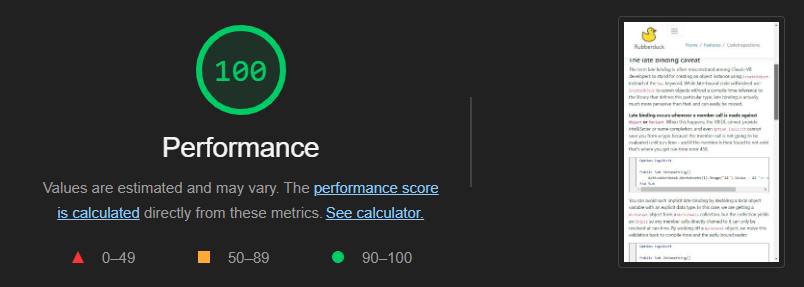
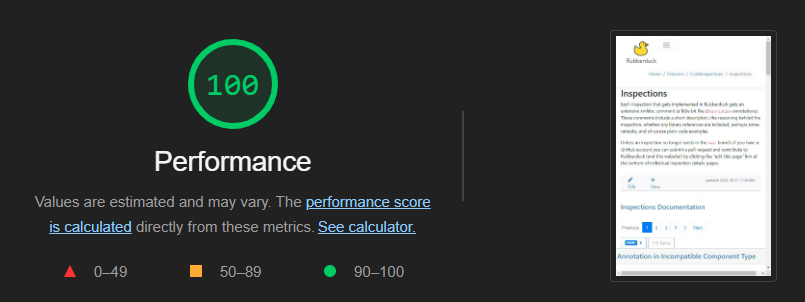
This new website performs much, much better than the current one. It sends asynchronous (ajax) requests to the MVC controller to render partial views, fetching only enough information to paginate the data and present a decent preview. Since most pages are presenting markdown content, an asynchronous request is also sent to format the markdown and, if applicable, apply syntax highlighting to code blocks. At this stage static content isn’t being cached yet, and screenshots should be loaded dynamically – still, performance is quite decent:
Home page scores 94, but then both Code Inspections and Inspections pages (two pages with extensive content, lots of markdown, code blocks, etc.) score a full 100 with Google Lighthouse, so things are looking very good performance-wise.
Another detail: the code examples no longer trigger a page load when you select a tab, so everything just feels much smoother now. Note, as of this writing the example records have been wiped from the database while I work on fixing a problem with the xml-doc processing, so annotations, inspections, and quick-fixes aren’t showing any examples on the test site for now.
Online Indenter
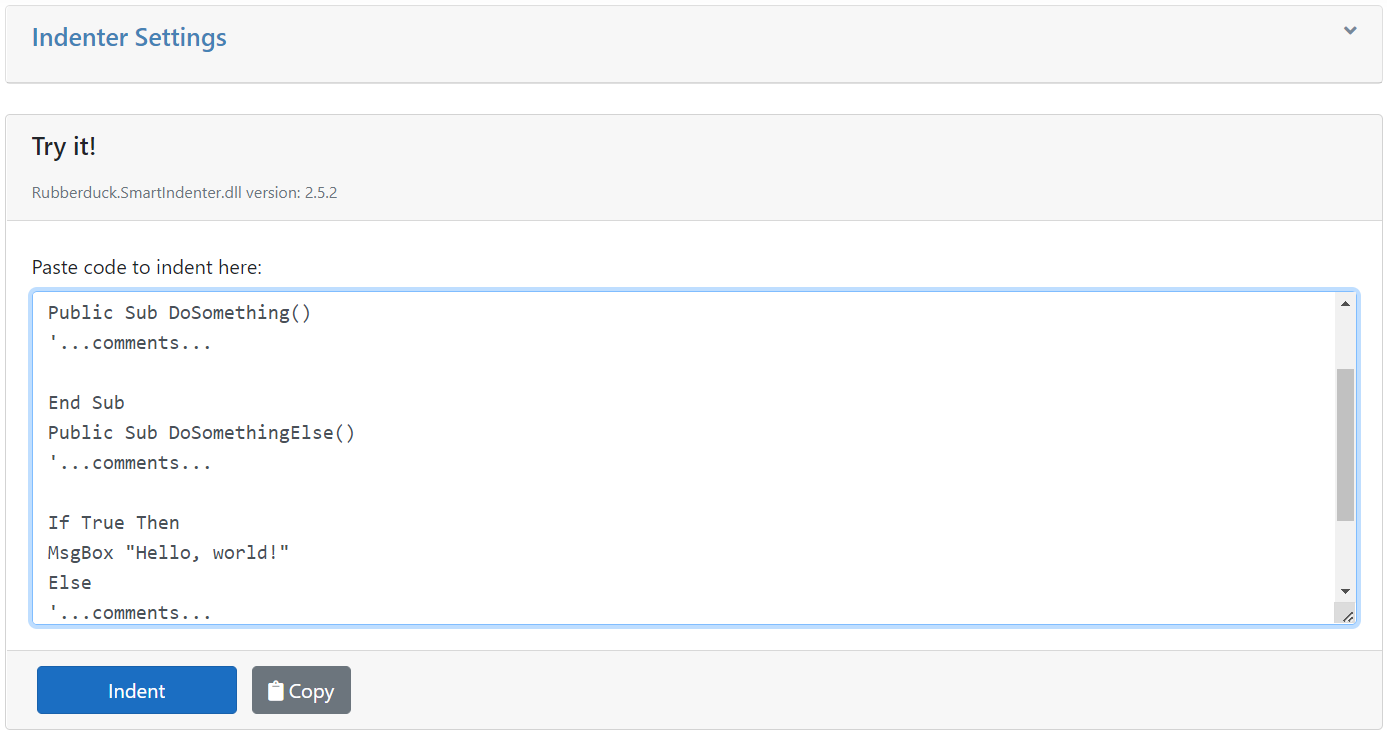
This feature once worked, but then my inexperienced past self, went and broke it in an attempt to make it asynchronous. Well, it’s back online and running Rubberduck.SmartIndenter.dll version 2.5.2:
You can paste VBA code into the box there, click the Indent button, then copy the indented code back into the clipboard.
The code can be indented as per the default indenter settings (which are also used for indenting all syntax-highlighted code blocks on the site), or if you expand the Indenter Settings panel you can tweak every knob Rubberduck’s Smart Indenter port has to offer.
It wouldn’t be too hard to include a “download these settings” button here, to serialize the settings into a .xml file that Rubberduck can then import to update indenter settings.
Content Administration
Users with the appropriate claims will be able to see additional buttons and commands on the site:
A modal dialog allows authenticated users to add and edit markdown content directly on the site.
Content administration features still need a little bit of work, but they are already being used to document how to use each and every single feature in Rubberduck – once this documentation is completed, the site will be a huge user manual, and ready for launch!
What’s Next?
Once everything works as it should (getting very close now!) and all that’s left to do is to take screenshots and generate more content, I’ll shift my focus to the Rubberduck3 project, the ownership of which I’ve now transferred over to the rubberduck-vba organization – the repo remains private for now, but all Rubberduck contributors have access to it. Uploading the RubberduckWebsite solution as a public repository isn’t a priority at this point; I feel like dealing with the implications of having API secrets in a .config file would be a distraction that I don’t need right now. When the time comes, it’ll be properly setup with continuous integration and deployment, but there are other priorities for now.







 Rubberduck News