The idea has always been floating around, and a number of feature requests had been made to support something like it.
Not to mention all the Stack Overflow questions asking how to iterate the members of a module, with answers explaining how to use the VBIDE API to achieve some level of “reflection”.
The VBIDE API works: it gives you the members of a module rather easily. But if you need anything more granular, like iterating the local variables in a given member, you’ll have to write code to manually parse that member’s code, and if you’re trying to programmatically access all references to a global variable, you’re in for lots of “fun”.
Truth is, the VBIDE API is bare-bones, and if you want to do anything remotely sophisticated with it, you basically need to write your own parser.
Rubberduck 2.0 will expose [some of] its guts to VBA clients, through COM reflection – using the ParserState API, you’ll be able to write code like this:
..and leverage the richness of Rubberduck’s own API to iterate not only module members, but any declaration Rubberduck is aware of – that includes everything from modules and their members, down to variables, constants, events, Declare statements, and even line labels. You can also iterate the references of any declaration, so in theory you could implement your own code inspections with VBA and, in conjunction with the VBIDE API, you could even implement your own refactorings…
This API can easily grow TONS of features, so the initial 2.0 release will only include a minimalist, basic functionality.
One can easily imagine that this API will eventually enable surgically parsing a given specific class module, and then iterating its public properties to create form controls for each one, e.g. a Boolean property maps to a checkbox, a String property maps to a textbox, etc. – takes dynamic UI generation to a whole new level.
I’ve been working on quite a lot of things these past few weeks, things that open up new horizons and help stabilize the foundations – the identifier reference resolver.
Precompiler Directives
And we’ve had major contributions too, from @autoboosh: Rubberduck’s parser now literally interprets precompiler directives, which leaves only the “live” code path for the parsing and resolving to work with. This means you can scratch what I wrote in an earlier post about this snippet:
[…] Not only that, but a limitation of the grammar makes it so that whatever we do, we’ll never be able to parse the [horrible, awfully evil] below code correctly, because that #If block is interfering with another parser rule:
Private Type MyType
  #If DEBUG_ Then
    MyMember As Long
  #Else
    MyMember As Integer
  #End If
End Type
And this (thoroughly evil) one too:
  #If DEBUG_ Then
    Sub DoSomething()
  #Else
    Sub DoSomethingElse()
  #End If
      '...
    End Sub
Rubberduck 2.0 will have no problem with those… as long as DEBUG_ is defined with a #Const statement – the only thing that’s breaking it is project-wide precompiler constants, which don’t seem to be accessible anywhere from the VBIDE API. Future versions might try to hook up the project properties window and read these constants from there though.
Isn’t that great news?
But wait, there’s more.
Project References
One of the requirements for our resolver to correctly identify which declaration an identifier might be referring to, is to know what the declarations are. Take this code:
  Dim conn As New ADODB.Connection
  conn.ConnectionString = "..."
  conn.Open
Until I merged my work last night, the declarations for “ADODB” and “Connection” were literally hard-coded. If your code was referencing, say, the Scripting Runtime library to use a Dictionary object, the resolver had no way of knowing about it, and simply ignored it. The amount of work involved to hard-code all declarations for the “most common” referenced libraries was ridiculously daunting and error-prone. And if you were referencing a less common library, it was “just too bad”. Oh, and we only had (parts of) the Microsoft Excel object model in there; if you were working in Access or Word, or AutoCAD, or any other host application that exposes an object model, the resolver simply treated all references to these types and their members, as undeclared identifiers – i.e. they were completely ignored.
I deleted these hard-coded declarations. Every single one of them. Oh and it felt great!
Instead, Rubberduck will now load the referenced type libraries, and perform some black magicCOM reflection to discover all the types and their members, and create a Declaration object for the resolver to work with.
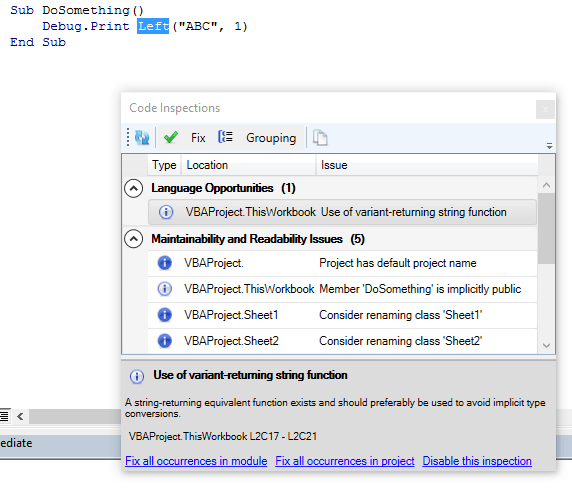
This enables things like code inspections specific to a given type library, that only run when that library is referenced:
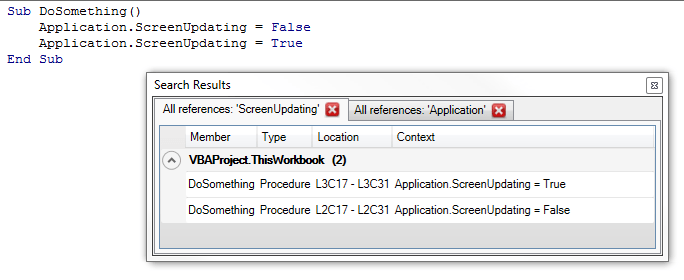
It also enables locating and browsing through references of not only your code, but also built-in declarations:
Doing this highlighted a major performance issue with the resolver: all of a sudden, there was 50,000 declarations to iterate whenever we were looking for an identifier – and the resolver did an awful job at being efficient there. So I changed that, and now most identifier lookups are O(1), which means the resolver now completes in a fraction of the time it took before.
There’s still lots of room for improvement with the resolver. I started to put it under test – the unit tests for it are surprisingly easy to write, so there’s no excuse anymore; with that done, we’ll know we’re not breaking anything when we start refactoring it.
One of the limitations of v1.x was that project references were being ignored. Well, the resolver is now equipped to start dealing with those – that’s definitely the next step here.
Module/Member Attributes
Another limitation of v1.x was that we couldn’t see module attributes, so if a class had a PredeclaredId, we had no way of knowing – so the resolver essentially treated classes and standard modules the same, to avoid problems.
Well, not anymore. The first time we process a VBComponent, we’re silently exporting it to a temporary file, and give the text file to a specialized parser that’s responsible for picking up module and member attributes – then we give these attributes to our “declarations” tree walker, which creates the declaration objects. As a result, we now know that a UserForm module has a PredeclaredId. And if you have a VB_Description attribute for each member, we pick it up – the Code Explorer will even be able to display it as a tooltip!
What about multithreading?
I tried hard. Very hard. I have a commit history to prove it. Perhaps I didn’t try hard enough though. But the parser state simply isn’t thread-safe, and with all the different components listening for parser state events (e.g. StateChanged, which triggers the code inspections to run in the background and the code and todo explorers to refresh), I wasn’t able to get the parser to run a thread-per-module and work in a reliable way.
Add to that, that we intend to make async parsing be triggered by a keyhook that detects keypresses in a code pane, parsing on multiple threads and getting all threads to agree on the current parser state is a notch above what I can achieve all by myself.
So unless a contributor wants to step in and fix this, Rubberduck 2.0 will still be processing the modules sequentially – the difference with 1.x is the tremendous resolver performance improvements, and the fact that we’re no longer blocking the UI thread, so you can continue to browse (and modify!) the code while Rubberduck is working.
What’s left to do for this to work well, now that the parsing and resolving is stabilized, is to allow graceful cancellation of the async task – because if you modify code that’s being parsed or resolved, the parser state is stale before the task even completes.
In Rubberduck 1.x, we processed each module in each project sequentially. Rubberduck 2.0 will change that and have the parsing happen in parallel, asynchronously. After parsing all modules, we need to resolve identifier references – that isn’t changing in 2.0. The 2.0 parser is a great improvement over the 1.x, but the high-level strategy remains the same.
What’s happening under the hood?
The hard work is really being done by ANTLR here. We have an ANTLR grammar that defines lexer and parser rules that, together, define what text input is legal and what input isn’t. Of course that grammar isn’t perfect, and when the parser rules mismatch the actual VBA language rules, the result is code that the VBE can compile, but that Rubberduck can’t parse. A good example of that is the set of parser rules for #If/#EndIf precompiler directives/blocks:
This definition is flawed – the moduleBody rule only allows functions, procedures and property definitions; therefore, any #If block in the declarations section of a module will trip the parser and fire a parser error, even though the VBE compiles it perfectly fine.
Not only that, but a limitation of the grammar makes it so that whatever we do, we’ll never be able to parse the [horrible, awfully evil] below code correctly, because that #If block is interfering with another parser rule:
  #If DEBUG Then
    Sub DoSomething()
  #Else
    Sub DoSomethingElse()
  #End If
      '...
    End Sub
Additionally, we’ll never be able to resolve the below code correctly, because MyMember exists twice in the same scope:
Private Type MyType
  #If DEBUG Then
    MyMember As Long
  #Else
    MyMember As Integer
  #End If
End Type
So, during the parsing phase, we use ANTLR to generate a parse tree for every module in every project in the VBE; one problem, is that a parse tree only contains the code of one module, and despite there being grammar rules to define what’s a variable and what’s a procedure, nothing in the grammar defines context, so there’s no way the parse tree alone can know whether “foo =42” means you’re assigning the return value of a function called “foo”, or if you’re assigning 42 to a local variable, or to a global one; the parse trees know nothing of VBA’s scoping rules. And since there’s a parse tree per module, there’s no way “foo” in parse tree A could be known to refer to the “foo” declared in parse tree B.
That’s why we need to further process these parse trees.
First pass: find all declarations
So we walk the parse trees – each one of them. We locate all declarations; everything that has a name that can be referenced in VBA code is a declaration. Look at the DeclarationType enum: no less than 24 things are considered a “declaration” – even line labels.
In Rubberduck 1.x, we traversed each parse tree one after the other; in 2.x, when we need to parse everything in the VBE, we traverse each parse tree in parallel – which may or may not mean that two or more parse trees are being traversed at the same time, depending on your hardware and other things.
The longer a code module is, the longer it takes to process it.
One thing to note, is that while we’re walking the parse trees and capturing “Dim” statements that declare variables, there’s no way we can capture a variable that’s used but undeclared at that point – without Option Explicit set, an undeclared variable simply goes completely under the radar… and there’s nothing we can do about it, since there’s, well, no declaration for it.
The other thing to note, is that if a single parse tree is in an error state, everything falls apart because that parse tree is missing declarations, and identifier usages – hence, we’re disabling all Rubberduck features that require a Ready state, whenever any module can’t be parsed.
Second pass: resolve identifier usages
Once we know what’s what, what’s declared where and how, we have the context that the grammar alone couldn’t define – we know that there’s a “foo” variable scoped locally to a function called “GetFoo”, on line 42 of “Module1”. That’s great, but still not good enough for our needs. We also need to know that function “GetFoo” is called on line 12 of “Module2”, and whether and where “foo” is assigned a value.
The only way to do this, is to walk the parse trees again – this time tracking what scope we’re in as we walk down the module, and every time we encounter an identifier reference, we need to figure out exactly what declaration we’re looking at.
And that’s not exactly easy. VBA allows mind-blowingly ambiguous code to compile just fine, so “foo” can very well be referring to a half-dozen potential declarations: which one it’s actually referring to depends on the current scope, and whether our implementation of VBA’s scoping rules is correct:
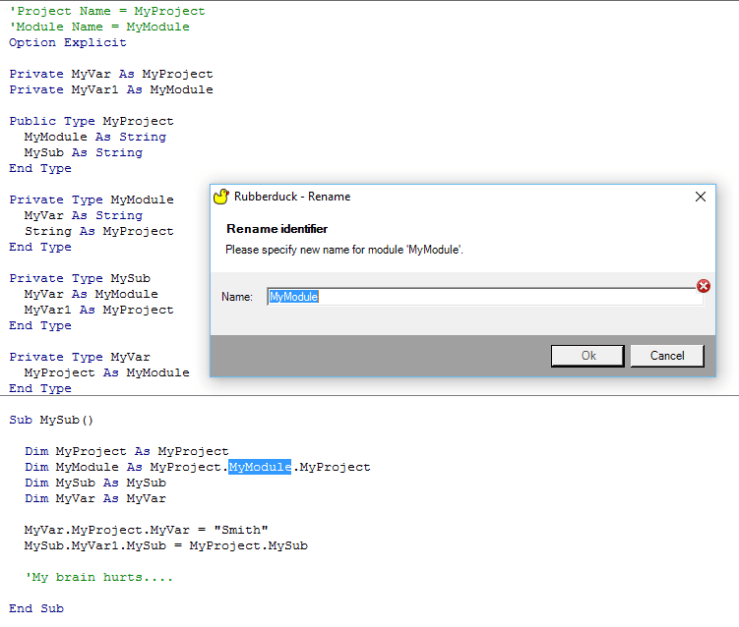
Fiendishly ambiguous VBA code compiles fine, and resolves fine in Rubberduck 2.0, too
For a vast majority of cases, we’re doing good. And the 2.0 resolver is, so far, fixing a good number of issues too, so we’re getting even better… but it’s still not perfect.
What happens if we don’t resolve “foo” correctly? Bugs! You right-click “foo” and select “find all references”, and you get surprises. And then you refactor/rename it, and you end up breaking your code instead of improving it. Not quite what we intend to happen.
Why re-resolve everything everytime?
All of the above processing doesn’t happen all the time. In Rubberduck 1.x, we cached parse trees and used a hash of the content of each module, to determine whether a module had been modified since the last parse. In Rubberduck 2.x, we want to have a keyhook to capture modifications to a module as it’s happening, and start reparsing that module in the background while you’re typing – so when you’re ready to use one of Rubberduck’s features, the changes have been processed already.
That leaves a little gap though: if you’re cutting/pasting code with your mouse, or if another add-in modifies the code, the keyhook alone won’t pick up the changes, so 2.0 will still need the content hash, to avoid re-parsing modules that didn’t change, and to re-parse modules that we didn’t know actually changed.
The reason we need to parse an entire module (versus, for example, just the procedure that was just modified), is because the parse tree is made of tokens, and tokens retain their position… in the parse tree: unless the parse tree contains the entire module, we don’t know where in the module a token is located. And that’s crucial information.
That covers the parser. But what about the resolver?
We still need to re-walk every parse tree and resolve every identifier usage, every time a single module’s been parsed. The resolver task needs to start when all modules have completed parsing, and to cancel when any module starts a re-parse. If we could somehow examine a diff of the pre and post parse trees, and determine exactly what declarations and what identifier references have been added or removed, perhaps we wouldn’t need to do the whole thing.
But because we can’t know if the modified code is referring to things declared in another module, we need to make sure everything is kept in sync, …and the cost of this is to walk the parse trees and re-resolve everything again.
In Rubberduck 1.x this was a UI-blocking operation, and we displayed a little “progress” dialog that showed what module was being walked.
In Rubberduck 2.0 this will happen in the background, and parse trees will be walked in parallel, so we won’t be able to display that little “progress” dialog, because at any given time more than one module is possible being walked.
Instead, we’ll make a little UI that will display the state of each module, but that UI will only show up when you click the parser state label on the Rubberduck CommandBar, a new toolbar we’re adding to the VBE to compensate for the lack of a status bar in the IDE.
In Rubberduck 3.0 we hope to be able to restructure things in such a way that we’ll be able to minimize the amount of parse tree walking, and hopefully resolve identifier references in a smarter way… but 3.0 is a long way down the road; Rubberduck 2.0 is coming along nicely, but we still can’t commit to a release date at this point, unfortunately.
I have to say that this release has been… exhausting. Correctly resolving identifier references has proven to be much, much more complicated than I had originally anticipated. VBA has multiple ways of making this hard: with blocks are but one example; user-defined-type fieldsare but another.
But it’s done. And as far as I could tell, it works.
Why did you tag it as “pre-release” then?
Because resolving identifier references in VBA is hard, and what I released is not without issues; it’s not perfect and still needs some work, but I believe most normal use cases are covered.
For example, this code will blow up with a wonderful StackOverflowException:
Class1
Public Function Foo() As Class2
    Set Foo = New Class2
End Function
Class2
Public Sub Foo()
End Sub
ThisWorkbook
Public Sub DoSomething()
    Dim Foo As New Class1
    With Foo
            .Foo
    End With
End Sub
It compiles, VBA resolves it. And it’s fiendish, and nobody in their right minds would do anything near as ambiguous as that. But it’s legal, and it blows up.
That’s why I tagged it as a “pre-release”: because there are a number of hair-pulling edge cases that just didn’t want to cooperate.
See, finding all references to “foobar” works very well here:
Public Sub DoSomething()
    Dim foobar As New Class1
    With foobar
        With .Foo
            .Bar
        End With
    End With
End Sub
…and finding all references to “Foo” in the below code will not blow up, but the “.Foo” in the 2nd with block resolves as a reference to the local variable “Foo”:
Public Sub DoSomething()
    Dim Foo As New Class1
    With Foo
        With .Foo
            .Bar
        End With
    End With
End Sub
And of course, there are a number of other issues still.
Here’s a non-exhaustive list of relatively minor known issues we’re postponing to 1.31 or other future release – please don’t hesitate to submit a new issue if you find anything that doesn’t work as you’d expect.
There can be only one
Rubberduck doesn’t [yet] handle cross-project references; while all opened VBA projects are parsed and navigatable, they’re all “silos”, as project references aren’t taken into account; this means if project A is referencing project B, and project A contains the only usage of a procedure defined in project B, then that procedure will fire up a code inspection saying the procedure is never used.
It also means “find all references” and “rename” will miss it.
self-referencing Parameters
“Find all references” has been seen listing the declaration of a parameter in its list of references. Not a biggie, but not intended either. There’s no explanation for that one, yet – in fact it’s possible you never even encounter this issue.
Selection Glitches From Code Inspection Results
We know what causes it: the length of the selection is that of the last word/token in the parser context associated with the inspection result. That’s like 80% fixed! Now the other 80% is a little bit tricky…
Performance
Code inspections were meant to get faster. They got more accurate instead. This needs a tune-up. You can speed up inspections by turning off the most expensive ones… although these are often the most useful ones, too.
Function return vAlue not assigned
There has been instances of [hard-to-repro] object-typed property getters that fire up an inspection result, when they shouldn’t. Interestingly this behavior hasn’t been reproduced in smaller projects. This inspection is important because a function (or property getter) that’s not assigned, will not return anything – and that’s more than likely a bug waiting to be discovered.
Parameter can be passed by value
This inspection is meant to indicate that a ByRef parameter is not assigned a value, and could safely be passed ByVal. However if such a parameter is passed to another procedure as a ByRef parameter, Rubberduck should assume that the parameter is assigned. That bit is not yet implemented, so that inspection result should be taken with a grain of salt (like all code inspection results in any static code analysis tool anyway).
This inspection will not fire up a result if the parameter isn’t a primitive type, for performance reason (VBA performance); if performance is critical for your VBA code, passing parameters by reference may yield better results.
Rubberduck parsing is being refined again. The first few releases used a hand-made, regex-based parser. That was not only unmaintainable and crippled with bugs, it also had fairly limited capabilities – sure we could locate procedures, variables, parameters… but the task was daunting and, honestly, unachievable.
Version 1.2 changed everything. We ditched the regex solution and introduced a dependency on ANTLR4 for C#, using an admittedly buggy grammar intended for parsing VB6 code. Still, the generated lexer/parser was well beyond anything we could have done with regular expressions, and we could implement code inspections that wouldn’t have been possible otherwise. That was awesome… but then new flaws emerged as we realized we needed more than that.
Version 1.3 will change everything again. Oh, we’re still using ANTLR and a (now modified) buggy grammar definition, but then we’re no longer going to be walking the parse tree all the time – we’re walking it once to collect all declarations, and then once to collect all usages of every single identifier we can find.
What does that mean?
Imagine a table where, for every declaration, you lay down information such as the code module where you found it, the exact location in the code file, the scope it’s in, whether it’s a class module, a standard module, a procedure, a function, a property get/let/setter, an event, a parameter, a local variable, a global constant, etc. – and then whether it has a return/declared type, what that type is, whether it’s assigned a reference upon declaration (“As New”) – basically, on that table lays the entire code’s wireframe.
Then imagine that, for everything on that table, you’re able to locate every single reference to that identifier, whether it’s an assignment, and exactly where that reference is located – at which position in which code file and in which scope.
The result is the ability to make the difference between an array index assignment and a function call. If VBA can figure out the code, so can Rubberduck.
This means the next few versions will start seeing very cool features such as…
Find all references – from a context menu in the Code Explorer tree view, or heck, why not from a context menu in the code pane itself!
GoTo implementations – easily navigate to all classes that implement a specific interface you’ve written.
GoTo anything – type an identifier name in a box, and instantly navigate to its declaration… wherever that is.
Safe delete – remove an identifier (or module/class) only if it’s not used anywhere; and if it’s used somewhere, navigate to that usage and fix it before breaking the code.
Rename refactoring – rename foo to bar, and only the “foo” you mean to rename; this isn’t a Find & Replace, not even a RegEx search – it’s a full-fledged “rename” refactoring à la Visual Studio!
Not to mention everything else that’s in store for v1.3 (did I say IDE-Integrated GitHub Source Control?) – stay tuned!
Rubberduck has had a decent unit testing feature since 1.0. Version 1.1 introduced a concept of code inspections – a proof of concept really, a sketch of a vision of what we wanted Rubberduck to do with the VBA code in the IDE.
Upcoming version 1.2 has undergone massive changes in the parsing strategy – going from a home-made regex-based solution to a full-blown ANTLR [slightly modified] Visual Basic 6.0 grammar generating a lexer and parser. As a result, code inspection capabilities have gone exactly where we envisioned them from the start.
Here’s what version 1.2 can find in your VBA code (in alphabetical order):
Implicit ByRef parameter
Implicit Variant return type (function/property get)
Multiple declarations in single instruction
Function return value not assigned
Obsolete Call statement
Obsolete Rem statement
Obsolete Global declaration
Obsolete Let statement
Obsolete type hint
Option Base 1 is potentially confusing
Option Explicit is not specified
Parameter can be passed by value
Parameter is not used
Variable is never assigned
Variable is never used
Variable type is implicitly Variant
And we have more on their way! …and that’s just code inspections.
Version 1.2 also introduces a Refactor menu, which allows extracting a method out of any valid selection – and future versions will allow inlining a method into its call sites, renaming any identifier (and updating its usages), reording/removing parameters from a signature (and updating usages), promoting a local variable to module-level, or extracting a whole interface out of a class module’s members… and more.
Version 1.2 also introduces an API for VBA code to integrate with GitHub source control, through the very same technology that allows Visual Studio 2013 to integrate with GitHub, using LibGit2Sharp. At this stage it’s pretty much what code inspections were in version 1.1: a proof of concept – but in future versions, expect to be able to manage source control for your VBA projects in a way similar to how you manage source control for your .NET projects – within the IDE itself!
Rubberduck 1.2 will hit hard… and our duck is still but a little duckling: VBA will never be the same when it grows all its, uh, rubber.



 Rubberduck News