I’ve embarked on a journey to take Rubberduck to the next major version, making it the add-in we’ve always wanted to build. These monthly updates provide a sneak peek at what’s coming, and how it’s coming to be.
Quick catch-up
Rubberduck 3.0 will run a LSP server process in the background
A separate process will host a local SQLite database
Telemetry will be opt-in, fully configurable, and transparent
Several quite important low-level changes since last time: we’re now looking at named pipes rather than sockets for the JSON-RPC communications between the editor and the language server, and I’m now using Microsoft’s StreamJsonRpc library for this. Named pipes are inherently local, so they’re less of a concern than sockets, and they don’t seem to trip up Windows Defender, so we’ll take it!
I spent the better part of last month tidying up and documenting the code off the language server protocol (LSP) specifications, moving things around and splitting up responsibilities, writing abstractions that will be shared by all server processes: LSP and SQLite, but also a separate/dedicated server process for telemetry, so even constant writes couldn’t interfere much with LSP server activities, or with the add-in client.
At the time of this writing, I’m still somewhat struggling with the RPC communications, but that won’t remain stuck for too long – the plan is to merge a rather large structural PR and the whole RPC infra by the end of this week.
The Rubberduck.Server.LocalDb console at startup. This process will normally run in the background, hidden.
I’ve taken a number of important decisions about the project in the last few weeks.
GitHub Repository Issues
Since the project’s beginning, Rubberduck was pretty much ad-hoc development. I remember in the first few days after creating the GitHub repository, going on an issue-creation spree to write down everything I could dream the thing could do. A lot of it was implemented, but the oldest open issues in the repository are from 2014, 2015:
2,857 issues closed is quite something. 958 open feels daunting though. Using issues as a backlog might not have been the best of ideas…
I’m not going through nearly a thousand issues to sort out what’s already implemented/fixed, what’s unrealistic after all, what’s a good idea that got buried under a million others, etc. Implementing LSP isn’t magically going to clean this up, and when 3.0 releases we’re not going to be maintaining two distinct, massive code bases: one of them isn’t going to make it, and it’s sadly going to have to be the one with 1.7K stars and 284 forks and 97 watchers. I can hardly express how I feel about these numbers, let alone those:
As of 2023/02/14, release tag 2.5.2.1 (build 2.5.2.5906) has been downloaded 27,320 times… that’s crazy!
The repository isn’t going anywhere though – it’s just that at some point in the [somewhat-near] future, it’s going to be made read-only and essentially archived, and the Rubberduck3 repository will become Rubberduck’s new home on GitHub (you’ll still find it under the rubberduck-vba organization).
Rubberduck is still accepting pull requests for v2.x and will continue to do so until further notice.
Methodology Upgrade
If building Rubberduck up to v2.5 was pretty much ad-hoc (and that’s fine!), I don’t think the same strategy would work with v3.0; we can’t just go and create a thousand issues to churn through, or pick a feature to implement because it looks like it’s going to be fun to do. Rubberduck 3.0 is still an embryo at this point, and while all the DNA is there and we know exactly (at least in large fuzzy outlines) what we want this add-in to do, this time things need to happen in order, for technical reasons mostly, but also for project management.
By adopting a different development methodology, we’re going to better control the backlog and project progression. We can better track what’s in progress and determine what the next logical steps should be.
Instead of making a ton of issues, we’ll be drafting them, sizing them, prioritizing them, refining them until they’re small enough to be realistically achievable within a week or two of part-time contributions. Work items will now have a life cycle like this:
New items/ideas not yet fleshed out, not yet planned, and/or not yet prioritized.
Backlog for work items being documented.
Ready for documented work items that are ready to be worked on; items are assigned a sprint (not necessarily the next one), and convert into issues at this stage.
In Progress is work in progress; a branch is created for resolving that issue.
In Review is work items ready to be peer reviewed; a pull request is opened at that stage.
Done is when the work is merged into dev/next.
Delivered status is set when the work is merged into main.
Items/issues will be assigned a priority level:
Urgent is the highest priority level, for things that should be worked on before anything else.
High is for work that’s directly aligned with the objectives of the sprint it’s in.
Medium priority work could be delayed a sprint or two.
Low priority work doesn’t need to be in the current sprint, but would be nice to deliver anyway.
The priority level of any given issue likely evolves over time, particularly the lower-level ones.
In addition to status and priority, each draft issue / work item gets sized. Again this is meant to evolve over time: issues should become smaller over time as they are refined and documented and broken down into smaller tasks.
X-Large items represent a large development that should be broken down into smaller tasks.
Large items represent a significant development effort that can realistically be completed within a sprint by a single developer.
Medium items represent perhaps up to 2-3 days of effort.
Small items represent small tasks that can be completed in a few hours.
Tiny items represent tasks that should only take a few minutes: fixing a typo, adding a column to a database view or table, a configuration tweak, etc.
As of this writing, Sprint 1 is in its second half, and I’m still working on the RPC infrastructure:
“Project Cucumber” – it just had to be named that.
There’s a bit of history around the cucumber thing, and it involves two major contributors we lost and think about fondly all the time.
Comintern simply disappeared one day after a brief return, after a year under terms that essentially prevented him from working on open-source projects and hanging out in a public chat. We’re all hoping he’s all right and will eventually pop back.We lost our beloved ThunderFrame to a fierce cancer in late 2018. Rest in peace, my friend. I got the Ctrl+Alt+Delete cushion covers you wanted me to have.
Discord Server
Rubberduck’s dev chat was always in a Stack Exchange room under the Code Review site. In fact it’s just a Code Review chat room we ended up [ab]using for this purpose. Back in 2014 I was very active on CR, and as a moderator on that site in 2015-2018 it made a lot of sense to keep it there.
But with 2-week sprints and a living backlog, we’re going to need more than SE chat to pull this off, and this is where Discord shines.
The general chat is fun, but a nice thing about Discord is that you can schedule events, like a public Sprint Review presentation every two weeks, followed by a Sprint Planning conversation among developers.
I’ll be hosting these events regularly, whether there’s an audience or not, whether other contributors are present or not.
Sprint Review
At each end of a sprint, we’re going to be going over what was done in the previous two weeks, and developers will present/demo their work. Since I’m doing sprint 1 by myself the first review will be me going over the solution structure and explaining the mechanisms and abstractions involved at a high level; reviews for sprint 2 and onward will likely involve more contributors, and things will get more and more exciting to present every time.
Sprint Planning
After the review concludes, developers convene to plan a realistically deliverable workload for the upcoming sprint. If we overshoot and under-deliver, we can always adjust the next sprint. If we over-deliver, we can always pull work items from upcoming sprints into the current one. So this conversation is about the work itself, whether there’s enough information in an issue for anyone at the table (or not!) to pick up and complete that task within two weeks, and whether the backlog is healthy or falling behind; if it’s falling behind, we take the time to talk about what needs to happen and outline work items to be drafted and refined during the sprint (I’ll be doing that backlog maintenance).
So yeah, Rubberduck3 is starting to feel very much like it’s just about to officially kick off, and Rubberduck as a project is entering a whole new phase, in continuous delivery mode.
I intended to write about Rubberduck 3.0 progress last December, but things snowballed during the Holidays and here we are two-three weeks later and wow, time flies! Happy New Year dear readers (belatedly, I guess), 2023 is full of promises, and there are very nice things going on that I need to take a moment and share here.
Without any further ado, let’s clear the big news.
The main issues with Rubberduck have always been:
Memory consumption: Rubberduck consumes a lot of memory in the host process.
Instabilities related to COM interop: various tear-down issues with Office CommandBar and dockable toolwindows.
Poor VBIDE extensibility tooling and editor interactions.
Logs are difficult to use, it’s not clear what is happening in response to what – even when there’s only a single instance writing to the logs. Adding more logging means making things worse.
With v3 we’re addressing these long-standing issues by taking a number of design decisions early in the development process. These decisions were weighted against their downsides and alternatives, and probably make Rubberduck the first VBIDE add-in to implement a LSP Server for its purposes.
Language Server Protocol
For a while there have been discussions among Rubberduck devs about whether implementing LSP would be a feasible thing to do. It’s a protocol that formalizes all communications between a client (an IDE) and a language server that is used in modern IDEs such as Visual Studio and VSCode; twinBASIC implements it, and Rubberduck 3.0 will implement it too.
By moving all of the language-processing aspects out-of-process into a language server, we immediately tackle memory consumption issues: most of the CPU and memory resources Rubberduck 3.0 will use, are going to be outside of the add-in/host process.
With LSP in place, Rubberduck’s objective to bring editing VBA code in the Visual Basic Editor into the 21st century feels closer than ever.
SQLite
Rubberduck’s LSP implementation will be split in two processes, as the LSP server process will be a client for another server process that will host a SQLite database. SQLite is a lightweight library many applications on many platforms (including mobile!) use to persist data between sessions. The database is a local .db file, and the database engine runs in-process. Rubberduck 3.0 will host a SQLite instance in its own server process, and the LSP server process will communicate with it through JSON-RPC, the same way the add-in communicates with the LSP server.
Instead of keeping hundreds of thousands of objects in memory for quick lookups, Rubberduck will write these objects to the database, and only fetch what it needs to work, which should tremendously help reduce the memory and processing footprint of the add-in host process. Using it as a log target (instead of text files) could reduce in-process disk I/O… and replace it with socket I/O and work happening out-of-process.
Cross-Process Communication
The add-in project has no reference to the server project in the Rubberduck solution, and the calls aren’t late-bound either. What’s happening here is different, and there are implications: Remote Procedure Call (RPC) communications occur through web sockets (WS), using a port between 1024 and 5000. As a result, we need to have Windows Defender Firewall open that port for us:
A screenshot of the moment I knew the socket server worked.
Since everything is local, the port only needs private networks permission to operate. We use JsonRPC to send data through that port, so we’re streaming the bytes of human-readable, plain text JSON.
This new client/server architecture enforces a much more decoupled and robust solution.
Telemetry
Telemetry is considered a potentially controversial feature: it will be completely disabled by default and will have to be selectively opted-in explicitly, but with everything becoming asynchronous, trace logging alone often does not suffice for troubleshooting. By implementing a proper telemetry model, we’re giving ourselves the tools to track a request and all actions that stem from it, across the multiple processes.
Since the project started, the only usage data we ever had was our own biased anecdotal usage: we haven’t the slightest idea of what features are under-used, what features are clearly everyone’s favorites, what inspections are most commonly fired, what inspections are disabled, whether inspections we release disabled by default are ever enabled, etc.
Whether enabled or not, Rubberduck 3.0 will collect detailed telemetry data, and store it locally in the SQLite database, by default clearing any existing data on startup: vital debugging information is present if it’s needed.
Ok I’m opting-in, what gives?
Opting into telemetry will allow a Rubberduck client to automatically upload the telemetry data to a future endpoint on api.rubberduckvba.com (via https), where it will be persisted to a SQL Server database schema. Since there is no need for us to track any users, while still potentially extremely detailed, all telemetry data will be anonymous and impossible to track back to any particular user, computer, organization, or country. The transmitted telemetry data will only ever contain information that was explicitly allowed to be transmitted.
Time will tell how aggregated telemetry data can be used, but with enough data we (that includes you) could gain valuable insights on various points of interest:
Rubberduck feature usage statistics
LSP performance monitoring and troubleshooting
VBA language usage statistics, common issues
By transmitting some or all of your telemetry data, you’ll be helping make Rubberduck better for everyone, just by using it. However should you decide to not opt into it, we understand and respect your decision. Note that TraceTelemetry items are the trace logs, so transmitting them is exactly like sending us your log file for troubleshooting. I’ll make a separate post with all the details around pre-release time, and these features will be exhaustively documented on the website.
Progress?
Having the LSP and Telemetry models is one thing, actually implementing them is another. Last time I said I was going to be focusing primarily on the Rubberduck Editor UI, and I did for a while: the editor was progressing very well and I was making very conclusive tests with an in-process parser when I took the decision to move the parser out-of-process.
I proceeded to read the entire LSP specification and implemented a model for it. Shortly after, I realized that we were potentially going to be running multiple instances of a LSP server at once, and it dawned on me that having as many instances of the SQLite database loaded in memory was not going to be globally efficient… so I decided to pull the SQLite database into its own dedicated server process.
The whole exercise demanded a lot of movement in solution projects and namespaces, but I’m very happy with the results: everything is in its place, and the actual add-in project is pretty much empty!
I started with the server implementation that’s the furthest from the add-in: the SQLite database server. This server speaks to LSP through JSON-RPC, but while Language Server Protocol formalizes how the add-in and the LSP talk to each other, I don’t have such a formal protocol for communications between the LSP and the database… so I’m basing most of it on what I learned with LSP.
How it’s going to work: you start Excel and hit Alt+F11 to bring up the VBE. The Rubberduck add-in gets loaded and starts up, then starts a LSP server process and initializes it. In turn the LSP server starts, and attempts to locate the database server. If the database process isn’t found, the LSP server starts one. The Excel/VBE/Rubberduck client process owns the LSP server process, but nobody owns the database server: when the database has disconnected its last client, it automatically shuts down.
The servers (both database and LSP) are console applications that run silently as background processes. In order to facilitate configuring them, and viewing/reviewing their respective inputs and outputs, I’ve written a small client console application that shows the server console content, lets you easily export it to text files or copy it to the clipboard, etc.
Screenshot from before the DataServer UI was moved into its own LocalDbClient project.
The LSP client console application will have an additional Telemetry tab to review, delete, and manually submit telemetry data. Server log trace can be set to verbose or turned off, and the server itself can be instructed to shut down, directly from this application.
When RD3 releases, these client console applications will probably be accessible from an add-in menu, or perhaps they’ll be started together with the add-in and minimized to the system tray… we’ll cross that bridge when we get to the river.
Meanwhile work on the editor itself has taken a backseat, since it wasn’t useful to work on parameter info tooltips and wire up add-in functionality that would have to be later undone to work through the LSP server. All of the proof-of-concept stuff that worked, is still working. It just needs to be wired up to work with LSP requests and notifications, so focus has now shifted to the language server and its database backend.
The next few weeks/months are going to be all about implementing the LSP server, most likely.
One of the objectively coolest features in Rubberduck is the Fakes API. Code that pops a MsgBox for example, needs a way to work without actually popping that message box, otherwise that code cannot be unit tested… without somehow hijacking the MsgBox function. The Fakes API does exactly that: it hooks into the VBA runtime, intercepts specific internal function calls, and makes it return exactly what your test setup …set up.
This API can stop time, or Now can be told to return 1:59AM on first invocation, 1:00AM on the next, and then we can test and assert that some time-sensitive logic survives a daylight savings time toggle, or how Timer-dependent code behaves at midnight.
Let’s take a look at the members of the IFakesProvider interface.
Fakes Provider
Fakes for many of the internal VBA standard library functions exist since the initial release of the feature, although some providers wouldn’t always play nicely together – thanks to a recent pull request from @tommy9 these issues have been resolved, and a merry bunch of additional implementations are now available in pre-release builds:
Name
Description
Parameter names
MsgBox
Configures VBA.Interaction.MsgBox calls
Fakes.Params.MsgBox
InputBox
Configures VBA.Interaction.InputBox calls
Fakes.Params.InputBox
Beep
Configures VBA.Interaction.Beep calls
Environ
Configures VBA.Interaction.Environ calls
Fakes.Params.Environ
Timer
Configures VBA.DateTime.Timer calls
DoEvents
Configures VBA.Interaction.DoEvents calls
Shell
Configures VBA.Interaction.Shell calls
Fakes.Params.Shell
SendKeys
Configures VBA.Interaction.SendKeys calls
Fakes.Params.SendKeys
Kill
Configures VBA.FileSystem.Kill calls
Fakes.Params.Kill
MkDir
Configures VBA.FileSystem.MkDir calls
Fakes.Params.MkDir
RmDir
Configures VBA.FileSystem.RmDir calls
Fakes.Params.RmDir
ChDir
Configures VBA.FileSystem.ChDir calls
Fakes.Params.ChDir
ChDrive
Configures VBA.FileSystem.ChDrive calls
Fakes.Params.ChDrive
CurDir
Configures VBA.FileSystem.CurDir calls
Fakes.Params.CurDir
Now
Configures VBA.DateTime.Now calls
Time
Configures VBA.DateTime.Time calls
Date
Configures VBA.DateTime.Date calls
Rnd*
Configures VBA.Math.Rnd calls
Fakes.Params.Rnd
DeleteSetting*
Configures VBA.Interaction.DeleteSetting calls
Fakes.Params.DeleteSetting
SaveSetting*
Configures VBA.Interaction.SaveSetting calls
Fakes.Params.SaveSetting
Randomize*
Configures VBA.Math.Randomize calls
Fakes.Params.Randomize
GetAllSettings*
Configures VBA.Interaction.GetAllSettings calls
SetAttr*
Configures VBA.FileSystem.SetAttr calls
Fakes.Params.SetAttr
GetAttr*
Configures VBA.FileSystem.GetAttr calls
Fakes.Params.GetAttr
FileLen*
Configures VBA.FileSystem.FileLen calls
Fakes.Params.FileLen
FileDateTime*
Configures VBA.FileSystem.FileDateTime calls
Fakes.Params.FileDateTime
FreeFile*
Configures VBA.FileSystem.FreeFile calls
Fakes.Params.FreeFile
IMEStatus*
Configures VBA.Information.IMEStatus calls
Dir*
Configures VBA.FileSystem.Dir calls
Fakes.Params.Dir
FileCopy*
Configures VBA.FileSystem.FileCopy calls
Fakes.Params.FileCopy
*Members marked with an asterisk are only available in pre-release builds for now.
Parameter Names
The IVerify.ParameterXyz members make a unit test fail if the specified parameter wasn’t given a specified value, but the parameter names must be passed as strings. This is a UX issue: the API essentially requires hard-coded magic string literals in its users’ code; this is obviously error-prone and feels a bit arcane to use. The IFakesProvider interface has been given a Params property that gets an instance of a class that exposes the parameter names for each of the IFake implementations, as shown in the list above, and the screenshot below:
Picking the correct parameter name from a drop-down completion list beats risking a typo, doesn’t it?
Note: the PR for this feature has not yet been merged at the time of this writing.
Testing Without Fakes (aka Testing with Stubs)
Unit tests have a 3-part structure: first we arrange the test, then we act by invoking the method we want to test; lastly, we assert that an actual result matches the expectations. When using fakes, we configure them in the arrange part of the test, and in the assert part we can verify whether (and/or how many times) a particular method was invoked with a particular parameterization.
Let’s say we had a procedure we wanted to write some tests for:
Public Sub TestMe()
    If MsgBox("Print random number?", vbYesNo + vbQuestion, "Test") = vbYes Then
        Debug.Print Now & vbTab & Rnd * 42
    Else
        Debug.Print Now
    End If
End Sub
If we wanted to make this logic fully testable without the Fakes API, we would need to inject (likely as parameters) abstractions for MsgBox, Now, and Debug dependencies: instead of invoking MsgBox directly, the procedure would be invoking the Prompt method of an interface/class that wraps the MsgBox functionality. Unit tests would need a stub implementation of that interface in order to allow some level of configuration setup – an invocation counter, for example. A fully testable version of the above code might then look like this:
Public Sub TestMe(ByVal MessageBox As IMsgBox, ByVal Random As IRnd, ByVal DateTime As IDateTime, ByVal Logger As ILogger)
    If MessageBox.Prompt("Print random number?", "Test") = vbYes Then
        Logger.LogDebug DateTime.Now & vbTab & Random.Next * 42
    Else
        Logger.LogDebug DateTime.Now
    End If
End Sub
The method is testable, because the caller controls all the dependencies. We’re probably injecting an IMsgBox that pops a MsgBox, an IRnd that wraps Rnd, a DateTime parameter that returns VBA.DateTime.Now and an ILogger that writes to the debug pane, but we don’t know any of that. I fact, we could very well run this method with an ILogger that writes to some log file or even to a database; the IRnd implementation could consistently be returning 0.4 on every call, IDateTime.Now could return Now adjusted to UTC, and IMsgBox might actually display a fancy custom modal UserForm dialog – either way, TestMe doesn’t need to change for any of that to happen: it does what it needs to do, in this case fetching the next random number and outputting it along with the current date/time if a user prompt is answered with a “Yes”, otherwise just output the current date/time. It’s the interfaces that provide the abstraction that’s necessary to decouple the dependencies from the logic we want to test. We could implement these interfaces with stubs that simply count the number of times each member is invoked, and the logic we’re testing would still hold.
We could then write tests that validate the conditional logic:
'@TestMethod
Public Sub TestMe_WhenPromptYes_GetsNextRandomValue()
    ' Arrange
    Dim MsgBoxStub As StubMsgBox ' implements IMsgBox, but we want the stub functionality here
    Set MsgBoxStub = New StubMsgBox
    MsgBoxStub.Returns vbYes
    Dim RndStub As StubRnd ' implements IRnd, but we want the stub functionality here too
    Set RndStub = New StubRnd
    ' Act
    Module1.TestMe MsgBoxStub, RndStub, New DateTimeStub, New LoggerStub
    ' Assert
    Assert.Equals 1, RndStub.InvokeCount
End Sub
'@TestMethod
Public Sub TestMe_WhenPromptNo_DoesNotGetNextRandomValue()
    ' Arrange
    Dim MsgBoxStub As StubMsgBox
    Set MsgBoxStub = New StubMsgBox
    MsgBoxStub.Returns vbNo
    Dim RndStub As StubRnd
    Set RndStub = New StubRnd
    ' Act
    Module1.TestMe MsgBoxStub, RndStub, New DateTimeStub, New LoggerStub
    ' Assert
    Assert.Equals 0, RndStub.InvokeCount
End Sub
These stub implementations are class modules that need to be written to support such tests. StubMsgBox would implement IMsgBox and expose a public Returns method to configure its return value; StubRnd would implement IRnd and expose a public InvokeCount property that returns the number of times the IRnd.Next method was called. In other words, it’s quite a bit of boilerplate code that we’d usually rather not need to write.
Let’s see how using the Fakes API changes that.
Using Rubberduck.FakesProvider
The standard test module template defines Assert and Fakes private fields. When early-bound (needs a reference to the Rubberduck type library), the declarations and initialization look like this:
'@TestModule
Option Explicit
Option Private Module
Private Assert As Rubberduck.AssertClass
Private Fakes As Rubberduck.FakesProvider
'@ModuleInitialize
Public Sub ModuleInitialize()
    Set Assert = CreateObject("Rubberduck.AssertClass")
    Set Fakes = CreateObject("Rubberduck.FakesProvider")
End Sub
The Fakes API implements three of the four stubs for us, so we still need an implementation for ILogger, but now the method remains fully testable even with direct MsgBox, Now and Rnd calls:
Public Sub TestMe(ILogger Logger)
    If MsgBox("Print random number?", vbYesNo + vbQuestion, "Test") = vbYes Then
        Logger.LogDebug Now & vbTab & Rnd * 42
    Else
        Logger.LogDebug Now
    End If
End Sub
With an ILogger stub we could write a test that validates what’s being logged in each conditional branch (or we could decide that we don’t need an ILogger interface and we’re fine with tests actually writing to the debug pane, and leave Debug.Print statements in place), but let’s just stick with the same two tests we wrote above without the Fakes API. They look like this now:
'@TestMethod
Public Sub TestMe_WhenPromptYes_GetsNextRandomValue()

    ' Arrange
    Fakes.MsgBox.Returns vbYes
    ' Act
    Module1.TestMe New LoggerStub ' ILogger is irrelevant for this test
    ' Assert
    Fakes.Rnd.Verify.Once
End Sub
'@TestMethod
Public Sub TestMe_WhenPromptNo_DoesNotGetNextRandomValue()

    ' Arrange
    Fakes.MsgBox.Returns vbNo
    ' Act
    Module1.TestMe New LoggerStub ' ILogger is irrelevant for this test
    ' Assert
    Fakes.Rnd.Verify.Never
End Sub
We configure the MsgBox fake to return the value we need, we invoke the method under test, and then we verify that the Rnd fake was invoked once or never, depending on what we’re testing. A failed verification will fail the test the same as a failed Assert call.
The fakes automatically track invocations, and remember what parameter values each invocation was made with. Setup can optionally supply an invocation number (1-based) to configure specific invocations, and verification can be made against specific invocation numbers as well, and we could have a failing test that validates whether Randomize is invoked when Rnd is called.
API Details
The IFake interface exposes members for the setup/configuration of fakes:
Name
Description
AssignsByRef
Configures the fake such as an invocation assigns the specified value to the specified ByRef argument.
Passthrough
Gets/sets whether invocations should pass through to the native call.
RaisesError
Configures the fake such as an invocation raises the specified run-time error.
Returns
Configures the fake such as the specified invocation returns the specified value.
ReturnsWhen
Configures the fake such as the specified invocation returns the specified value given a specific parameter value.
Verify
Gets an interface for verifying invocations performed during the test. See IVerify.
The members of Rubberduck.IFake
The IVerify interface exposes members for verifying what happened during the “Act” phase of the test:
Name
Description
AtLeast
Verifies that the faked procedure was called a specified minimum number of times.
AtLeastOnce
Verifies that the faked procedure was called one or more times.
AtMost
Verifies that the faked procedure was called a specified maximum number of times.
AtMostOnce
Verifies that the faked procedure was not called or was only called once.
Between
Verifies that the number of times the faked procedure was called falls within the supplied range.
Exactly
Verifies that the faked procedure was called a specified number of times.
Never
Verifies that the faked procedure was called exactly 0 times.
Once
Verifies that the faked procedure was called exactly one time.
Parameter
Verifies that the value of a given parameter to the faked procedure matches a specific value.
ParameterInRange
Verifies that the value of a given parameter to the faked procedure falls within a specified range.
ParameterIsPassed
Verifies that an optional parameter was passed to the faked procedure. The value is not evaluated.
ParameterIsType
Verifies that the passed value of a given parameter was of a type that matches the given type name.
The members of Rubberduck.IVerify
There’s also an IStub interface: it’s a subset of IFake, without the Returns setup methods. Thus, IStub is used for faking Sub procedures, and IFake for Function and Property procedures.
When to Stub Standard Library Members
Members of VBA.FileSystem not covered include EOF and LOF functions, Loc, Seek, and Reset. VBA I/O keywords Name, Open, and Close operate at a lower level than the standard library and aren’t covered, either. VBA.Interaction.CreateObject and VBA.Interaction.GetObject, VBA.Interaction.AppActivate, VBA.Interaction.CallByName, and the hidden VBA.Interaction.MacScript function, aren’t implemented.
Perhaps CreateObject and GetObject calls belong behind an abstract factory and a provider interface, respectively, and perhaps CallByName doesn’t really need hooking anyway. In any case there are a number of file I/O operations that cannot be faked and demand an abstraction layer between the I/O work and the code that commands it: that’s when you’re going to want to write stub implementations.
If you’re writing a macro that makes an HTTP request and processes its response, consider abstracting the HttpClient stuff behind an interface (something like Function HttpGet(ByVal Url As String)): the macro code will gain in readability and focus, and then if you inject that interface as a parameter, then a unit test can inject a stub implementation for it, and you can write tests that handle (or not?) an HTTP client error, or process such or such JSON or HTML payload – without hitting any actual network and making any actual HTTP requests.
Until we can do mocking with Rubberduck, writing test stubs for our system-boundary interfaces is going to have to be it. Mocking would remove the need to explicitly implement most test stubs, by enabling the same kind of customization as with fakes, but with your own interfaces/classes. Or Excel’s. Or anything, in theory.
The next major version of Rubberduck is currently in [very] early development stages – saying that there is a lot of work ahead would be quite an understatement, but the skeleton is slowly taking shape, and things are looking very, very good.
Since the beginning of the project, Rubberduck’s user interface components (other than dialogs) have always been hosted in traditional, native dockable toolwindows. We built everything on top of the VBIDE editor, using Office CommandBar UI to simulate a status bar and make up for the lack of in-editor integration. Over the years this early design decision slowly became a burden: tearing down the many dockable toolwindows contributed to a pesky access violation crash on exit, low-level hooks for keyboard shortcuts constantly need to detach and re-attach as focus switches between the VBE main window and other applications, autocompletion/self-closing pairs was a nightmare to implement, and while the all-or-nothing approach to parsing made it so that we could always assume we were looking at valid VBA code that could be compiled, it also painted us into a corner where actually moving towards what we wanted Rubberduck to achieve by v3.0 would be extremely difficult, if not impossible.
Behold, the Rubberduck Editor
Rubberduck’s input was always driven by the Visual Basic Editor – now the code in the VBE is going to be output by Rubberduck. Of course, the code will go both ways, but now hidden attributes probably won’t need to be hidden anymore, and the editor can now be exactly what we envision it to be.
There will only be a single toolwindow that will host the editor and UI components like the Code Explorer. At this early stage my focus is entirely on the editor itself, but the idea is ultimately to get actual document tabs and a more practical and friendly docking manager.
Here’s what it looks like as of this writing:
The dropdowns don’t have a real item source yet, but the mock data gives a good idea of what it’s going to be like to edit VBA code with Rubberduck in the future.
Typing “Sub” and hitting the spacebar immediately completes the block and places a new folding node:
The faint dotted underline under “Sub” is a text marker; the editor has the ability to display various such markers at the exact desired position in the document, so we will be using them to show inspection results right there – with tooltips:
Hint-level results will be denoted with this dotted underline indicator; suggestion level will be a green squiggly underline, warnings a blue squiggle, and error level results will appear as red squiggles:
There will also be a new “ducky button” that pops up when the caret is on one such marker, and lets you pick a quick-fix in-place to address an inspection result:
The indenter still needs to be wired up, but this editor will ultimately indent your code as you type it. All the autocompletion features also need to be ported over to work here, and then we’ll want searchable and filterable IntelliSense, parameter info tooltips, and we’ll need to simulate the VBIDE “prettification” that occurs when a line is validated, so that public sub becomes Public Sub and identifiers take the casing they’re declared with.
We get an undo stack that can handle much more than 20 steps, and did I mention the status bar?
For now, all it does is report the current caret position in the editor, but Rubberduck 3.0 will be using it to report parsing progress, instead of the CommandBar button/label we’ve been abusing forever.
There will probably still be a command bar of some sort, but it will be part of the WPF/XAML managed UI; the old Rubberduck CommandBar will be decommissioned.
The one thing that’s 100% guaranteed to not happen in the new Rubberduck editor, is everything that needs to happen beyond design-time: there is no hook into the VBIDE debugger, so Rubberduck has no way of tracking the current instruction. As a result, the editor will be sadly useless in debug mode.
The editor work is just the beginning: Rubberduck 3.0 currently doesn’t even have a parser, let alone any inspections. In the next few months, the very heart of Rubberduck will be reworked to function with the new editor. It’s essentially like rewriting Rubberduck, but with an editor we fully control instead of one we constantly need to fight with.
Meanwhile v2.5.2 is approaching 25K downloads, and there’s quite a bit of work in 2.5.x that hasn’t been “officially” released yet, including everything that happened during a very successful Hacktoberfest 2022: we’ll be releasing v2.5.3 in the near future – stay tuned!
As I wrote last July, I’ve started to get more time for myself lately, and that means I get to tackle a number of long-standing projects that have been on the backburner for way too long. One of them is the rewrite of the project’s website, which has been “under construction” ever since it was published as an ASP.NET MVC website, a few years ago already.
If you missed it, I tweeted a sneak-peek link last week:
Tweeted 09/28: “A couple of things need a bit of work still, but this website rewrite is coming along nicely – have a peek here: https://test.rubberduckvba.com“
Why a rewrite?
For the longest time, I wouldn’t have considered myself a web developer. I have well over a decade of experience in C# desktop development, but the web stuff essentially scared me to death. The version of the website that’s currently live was pretty much my first time doing anything like it. The site itself wouldn’t write to the database; it was another application that pulled the tag metadata, downloaded the xml-doc assets, parsed the documentation and examples, and wrote them to the database.
One of the biggest issues with the current model, is that the database is made to contain HTML that is needlessly difficult to modify:
Unreachable code is certainly unintended, and is probably either redundant, or a bug.
<div><h5>Quick-Fixes</h5>
<p>The following quick-fixes are available for this inspection:</p>
<ul style="margin-left: 8px; list-style: none;">
<li>
<span class="icon icon-ignoreonce"></span>
<a href="https://rubberduckvba.com/QuickFixes/Details/IgnoreOnce">IgnoreOnce</a>
: Adds an '@Ignore annotation to ignore a specific inspection result. Applicable to all inspections whose results can be annotated in a module.</li>
<li>
<span class="icon icon-tick"></span>
<a href="https://rubberduckvba.com/QuickFixes/Details/IgnoreInModule">IgnoreInModule</a>
: Adds an '@IgnoreModule annotation to ignore a inspection results for a specific inspection inside a whole module. Applicable to all inspections whose results can be annotated in a module.
</li>
</ul>
</div>
Having this HTML markup, CSS classes, and inline styles as part of the data meant the data was being responsible for its own layout and appearance on the site. With the new JSON objects serialized into this Properties column, I could easily keep everything strongly typed and come up with separate view models for inspections, quick-fixes, and annotations, that each did their own thing and let the website in charge of the layout and appearance of everything.
Separation of Concerns
The solution architecture could be roughly depicted like this – I suppose I meant the arrows to represents “depends on” but note that this doesn’t necessarily mean a direct project reference: the Client/API relationship is through HTTPS, and no project in the solution references the Rubberduck.Database SQL Server database project, but ContentServices connects to a rubberduckdb database that you can deploy locally using that database project:
You could draw a thick red line between Rubberduck.Client and Rubberduck.API (actually that’s Rubberduck.WebApi now), and it would perhaps better illustrate the actual wall between the website and the data: the website project doesn’t need a connection string, only a base URL for the API!
Authentication is assured with GitHub’s API using OAuth2: if you authorize the rubberduck-vba OAuth application to your profile, the HttpContext.User is cast as a ClaimsPrincipal and claims the GitHub login as a name, and a rubberduck-orgroleclaim is added when organization membership is validated; an additional rubberduck-admin role claim is added if the user is also a member of the WebAdmin org team.
The website packages the HttpContext.User into a Json Web Token (JWT), an encrypted string that encapsulates the claims; this token is passed as a bearer token in authenticated API requests. The API accepts an Authorize header with either such a bearer token, or a valid GitHub personal access token (PAT).
The API receives a request, and given an Authorization header, either decrypts the JWT or queries GitHub to validate the provided access token and attach the appropriate role claims, before any controller action is invoked.
Another authentication filter performs a similar task to authorize an incoming webhook payload: the rubberduck-webhook role is set and tag metadata and xml-doc content can get updated automatically whenever a new tag/release gets created.
Performance
This new website performs much, much better than the current one. It sends asynchronous (ajax) requests to the MVC controller to render partial views, fetching only enough information to paginate the data and present a decent preview. Since most pages are presenting markdown content, an asynchronous request is also sent to format the markdown and, if applicable, apply syntax highlighting to code blocks. At this stage static content isn’t being cached yet, and screenshots should be loaded dynamically – still, performance is quite decent:
Home page scores 94, but then both Code Inspections and Inspections pages (two pages with extensive content, lots of markdown, code blocks, etc.) score a full 100 with Google Lighthouse, so things are looking very good performance-wise.
Another detail: the code examples no longer trigger a page load when you select a tab, so everything just feels much smoother now. Note, as of this writing the example records have been wiped from the database while I work on fixing a problem with the xml-doc processing, so annotations, inspections, and quick-fixes aren’t showing any examples on the test site for now.
Online Indenter
This feature once worked, but then my inexperienced past self, went and broke it in an attempt to make it asynchronous. Well, it’s back online and running Rubberduck.SmartIndenter.dll version 2.5.2:
You can paste VBA code into the box there, click the Indent button, then copy the indented code back into the clipboard.
The code can be indented as per the default indenter settings (which are also used for indenting all syntax-highlighted code blocks on the site), or if you expand the Indenter Settings panel you can tweak every knob Rubberduck’s Smart Indenter port has to offer.
It wouldn’t be too hard to include a “download these settings” button here, to serialize the settings into a .xml file that Rubberduck can then import to update indenter settings.
Content Administration
Users with the appropriate claims will be able to see additional buttons and commands on the site:
A modal dialog allows authenticated users to add and edit markdown content directly on the site.
Content administration features still need a little bit of work, but they are already being used to document how to use each and every single feature in Rubberduck – once this documentation is completed, the site will be a huge user manual, and ready for launch!
What’s Next?
Once everything works as it should (getting very close now!) and all that’s left to do is to take screenshots and generate more content, I’ll shift my focus to the Rubberduck3 project, the ownership of which I’ve now transferred over to the rubberduck-vba organization – the repo remains private for now, but all Rubberduck contributors have access to it. Uploading the RubberduckWebsite solution as a public repository isn’t a priority at this point; I feel like dealing with the implications of having API secrets in a .config file would be a distraction that I don’t need right now. When the time comes, it’ll be properly setup with continuous integration and deployment, but there are other priorities for now.
As Rubberduck started to beef up its static code analysis capabilities in late 2015, it became evident that writing VBA (or VB6) code with Rubberduck loaded up in the Visual Basic Editor (VBE) would inevitably change not only how we work in VBA, but also how we write our VBA code in the first place.
“Rubberduck is essentially providing a bridge between VBA land where people just get in and have a go and the VS land where if you don’t know a great deal about software development, you just waste your time and burn. Rubberduck will put a lot of people on a big learning curve and this will result in a lot of questions.” – AndrewM-commented on Oct 9, 2015
There’s an old issue (#823, still opened as of this writing) about having a coding style guide somewhere, that would enshrine the philosophy behind what Rubberduck is, in a way, trying to make your code-writing be/become; I think that was a great idea and I’m hoping this post captures the essence of it, at least as far as thinking code goes.
About Code Inspections
If you fire up Rubberduck on any legacy VBA project with any significant amount of code, there’s a very high probability that static code analysis generates tons of inspection results, for various mundane little things. Should your goal be to quick-fix all the things and have code that doesn’t spawn any Rubberduck inspection results?
Perhaps surprisingly, the answer is a resounding “no”.
Severity Levels
In Rubberduck each inspection has a configurable “severity level” that defaults to Warning for most inspections (it’s the default-unless-specified-otherwise for all Rubberduck inspections):
Error level indicates a potential problem you likely want to pay immediate attention to, because it could be (or cause) a bug. If inspection results rendered in the code pane, these would be red squiggly underlines.
Warning level indicates a potential issue you should be aware of.
Suggestion level is usually used for various opportunities, not necessarily problems.
Hint level is also for various non-problematic opportunities. If inspection results rendered in the code pane, these would be a subtle dotted underline with a hover text.
DoNotShow disables the inspection: not only its results won’t show, they won’t even be generated.
By default, Rubberduck is configured to run all (that’s currently over 110, counting the hidden/Easter egg ones) inspections, with a handful of cherry-picked exceptions for inspections that would be flagging the exact opposite situation that another enabled inspection is already flagging – for example we ship implicit ByRef modifier enabled (as a Hint), but redundant ByRef modifier is disabled unless you give it a severity level that’s anything other than DoNotShow. This avoids “fixing” one inspection result only to get a new one flagging the exact opposite, which would be understandably confusing for users that aren’t familiar with static code analysis tooling.
Are inspections somehow imbued with the knowledge of whether you should treat them as errors, warnings, or mere hints and suggestions? Sometimes, yes. Missing Option Explicit should make a clear consensus at Error level. On the flipside, whether an implicit default member call or the use of an empty string literal should be a Warning, a Hint, or shown at all probably depends more on how comfortable or experienced you are with VBA/VB6 as a language, or could be just a personal preference; what matters is that the static code analysis tooling is letting you know something about the code, that the code alone isn’t necessarily saying.
Philosophy
One of the very first inspection to be implemented in Rubberduck was the Option Explicit inspection. Okay, part of it was just because it was a trivial one to implement even before we had an actual parser… but the basic idea was (and still is) that nobody knows everything, and it’s with our combined knowledge that we make a mighty bunch, and that is why static code analysis in Rubberduck explains the reasoning behind each inspection result: there are quite many things Rubberduck warns of, that I had no idea about 10 or 15 years ago. That never stopped me (and won’t stop you either) from writing VBA code that worked perfectly fine (except when it didn’t), but whether we realize and accept it or not… a macro written in VBA code is a set of executable instructions, which makes it a program, which makes the act of writing it programming, which makes us programmers.
Being programmers that write and maintain VBA code does set us apart, mostly because the language isn’t going anywhere and the IDE is becoming more and more severely outdated and under-featured as years pass. Yet if the volume of VBA questions on Stack Overflow means anything, VBA is still very much alive, still very much being learned, and this is where Rubberduck and static code analysis comes in.
When I started learning about .NET and C# over a decade ago, there was this exciting new language feature they called LINQ for Language-INtegrated-Query where you could start querying object collections pretty much literally like you would a database, and it was awesome (still is!). In order to make this possible, the C# compiler and the .NET framework and runtime itself had to undergo some very interesting changes Jon Skeet covers in details, but the point is… the new syntax was a bit off-putting at first, and came with new and important implications (closures, deferred execution), and the company I worked for gave us all a ReSharper license, and that is how and when I discovered that thorough & accurate static code analysis tooling could be a formidable educational tool.
Maybe we don’t agree about Hungarian Notation, and that’s fine: Rubberduck wants you to be able to find it and rename it if that’s what you want to do, but you can mute that particular inspection anytime. But I believe the tool should tell you what Systems Hungarian notation is when it calls it out, and perhaps it should even explain what Apps Hungarian is and give examples, because Apps Hungarian notation absolutely is useful and meaningful (think o-for-OneBased, or src-for-Source and dst-for-Destination prefixes). But str-for-String, lng-for-Long, o-for-Object is different, in a bad kind of way.
Rubberduck flags obsolete code constructs and keywords, too. Global declarations, On Local Error statements, explicit Call statements, While...Wend loops, all have no reason to exist in brand new, freshly-written VBA code, and quick-fixes can easily turn them into Public declarations, On Error statements, implicit Call statements (without the Call keyword!), and Do While...Loop structures.
Rubberduck wants to push your programming towards objectively, quantitatively better code.
About Code Metrics
Rubberduck could count the number of lines in a procedure, and issue an inspection result when it’s above a certain configurable threshold. In fact, things are slowly falling into place for it to eventually happen. But we wouldn’t want you to just arbitrarily cut a procedure scope at 20 lines because an inspection said so! Rubberduck can measure line count, nesting levels, and cyclomatic complexity. These metrics can be used to identify problematic areas in a code base and methodically split up large complex problems into measurably much smaller and simpler ones.
Line Countsimply counts the number of lines. Eventually this would expand into Statements and Comments counts, perhaps with percentages; 10% comments is probably considered a good sign, for example. But no tool is going to tell you that ' increments i is a useless comment, and even the best tools would probably not tell the difference between a huge ' the following chunk of code does XYZ banner comment and an actually valuable comment. Common wisdom is to keep this line count metric down as much as possible, but one should not do this at the expense of readability.
Nesting Levels counts the number of… well, nesting levels. While nesting two For...Next loops to iterate a 2D array (or a Range of cells) down and across is probably reasonable, further nesting is probably better off made implicit through a procedure call. Rule of thumb, it’s always good idea to pull the body of a loop into its own parameterized procedure scope. Arrow-shaped code gets flattened, line count gets lower, and procedures become more specialized and have fewer reasons to fail that way.
Cyclomatic Complexity essentially calculates the number of independent execution paths in a given procedure (wikipedia). A procedure with a cyclomatic complexity above 5 is harder to follow than one with a complexity of 1 or 2, but it’s not uncommon for a “God procedure” with nested loops and conditionals to measure in the high 40s or above.
The code metrics feature will eventually get all the attention it deserves, but as with inspections the general idea is to highlight procedures that could be harder to maintain than necessary, and nudge our users towards:
Writing more, smaller, more specialized procedure scopes.
Passing parameters between procedures instead of using global variables.
Having more, smaller, more cohesive modules.
Navigating the VBE
You may or may not have noticed, but the Visual Basic Editor is nudging you in the exact opposite direction, because…
Having fewer, larger, more general-purpose procedures puts you in a scripting mindset.
Using globals instead of passing parameters around is perhaps a simpler thing to do.
Having fewer, larger, more general-purpose modules makes it simpler to share the code between projects, and arguably easier to find things in the Project Explorer.
If you’re actually writing a small script, you can and probably should absolutely do that.
But if you’re like me then you’ve been pushing VBA to do things it wasn’t really meant to do, and you’re maintaining actual applications that could just as well be written in any other language out there, but you’re doing it in VBA because [your reasons are valid, whatever they are].
And that’s kind of a problem, because the VBE seems to actively not want you to write proper object-oriented code: its navigation tooling indeed makes it very hard to work in a project with many small modules, let alone an OOP project involving explicit interfaces and high abstraction levels.
Rubberduck lifts pretty much all the IDE limitations that hinder treating a VBA project as more than just an automation script. Now you can have a project with 135 class modules, all neatly organized by functionality into folders that can contain any module type, so a UserForm can appear right next to the classes that use it, without needing to resort to any kind of ugly prefixing schemes. You can right-click on an abstract interface (or one of its members) and quickly find all classes that implement it. You get a Find symbol command that lets you quickly navigate to literally anything that has a name, anywhere in the project. Curious about the definition of a procedure, but don’t want to break your flow by navigating to it? Peek definition (currently only in pre-release builds) takes you there without leaving where you’re at.
The Peek Definition command pops a floating panel conveniently showing the source code for the user-defined module or member you’ve selected.Find all References shows all the places a given identifier is being used, and shows it in context so you can easily locate the specific usage you’re looking for – and then a double-click takes you there.The Find all Implementations command is incredibly useful in object-oriented projects that leverage polymorphism through abstract interfaces: quickly locate and navigate to any implementation of any interface (class or member).
The VBE’s Project Explorer aims to give you a bird’s eye view of your project, regrouping modules by module type which is great for a small script that can get away with a small number of components, but that makes it very hard to manage larger projects. With Rubberduck’s Code Explorer you get to drill down to member level, and regroup modules by functionality using an entirely customizable folder hierarchy:
The Code Explorer leaves the VBE’s Project Explorer in the dust, fair & square.
These navigational enhancements greatly simplify moving around a project of any size, although some of them might feel a bit overkill in a smaller project, and some of them are only useful in more advanced OOP scenarios. Still, having more than just a text-based search to look for things is very useful.
Guidelines
If there’s one single over-arching principle guiding everything else, it would have to be write code that does what it says, and says what it does. Everything else seems to stem from this. These are warmly recommended guidelines, not dogma.
Naming
Use PascalCase if you like. Use camelCase if you like. Consistency is what you want to shoot for, and in a case-insensitive language that only stores a single version of any identifier name it’s much easier and simpler to just use PascalCase everywhere and move on to more interesting things, like tabs vs spaces.
Avoid _ underscores in identifier names, especially in procedure/member names.
Causes compile errors with Implements.
Use meaningful names that can be pronounced.
Avoid disemvoweling (arbitrarily stripping vowels) and Systems Hungarian prefixing schemes.
A series of variables with a numeric suffix is a missed opportunity to use an array.
A good identifier name is descriptive enough that it doesn’t need an explainer comment.
Use a descriptive name that begins with a verb for Sub and Function procedures.
Use a descriptive name (a noun) for Property procedures and modules.
For object properties, consider naming them after the object type they’re returning, like Excel.Worksheet.Range returns a Range object, or like ADODB.Recordset.Fields returns a Fields object.
Appropriately name everything the code must interact with: if a rounded rectangle shape is attached to a DoSomething macro, the default “Rounded Rectangle 1” name should be changed to “DoSomethingButton” or something that tells us about its purpose. This includes all controls on a UserForm designer, too. CommandButton12 is useless; SearchButton is much better. Consider also naming the controls that don’t necessarily interact with code, too: future code might, and the author of that future code will appreciate that the bottom panel is named BottomPanel and not Label34.
Renaming
Naming is hard enough, renaming things should be easy. With Rubberduck’s Rename refactoring (Ctrl+Shift+R) you can safely rename any identifier once, and all references to that identifier automatically get updated. Without a refactoring tool, renaming a form control can only be done from the Properties toolwindow (F4), and doing this instantly breaks any event handlers for it; renaming a variable by hand can be tedious, and renaming a single-letter variable like a or i with a local-scope find/replace (Ctrl+H) can get funny if the scope has any comments. Rubberduck knows the exact location of every reference to every identifier in your project, so if you have a module with two procedures that each declare a localThing, when you rename the local variable localThing in the first procedure, you’re not going to be affecting the localThing in the other procedure. But if you rename CommandButton1 to OkButton, then CommandButton1_Click() becomes OkButton_Click().
Parameters & Arguments
Prefer passing values as parameters instead of bumping the scope of a variable to module-level, or instead of declaring global variables.
Pass parameters ByVal whenever possible.
Arrays and User-Defined Type structures cannot and should not be passed by value.
Objects are never passed anywhere no matter the modifier: it’s only ever (ByVal: a copy of) a pointer that gets passed around – and most of the time the intent of the author is to pass that pointer by value. A pointer is simply a 32-bit or 64-bit integer value, depending on the bitness of the process; passing that pointer ByRef (explicitly or not) leaves more opportunities for programming errors.
Use an explicit ByRef modifier whenever passing parameters by reference.
Consider specifying an out prefix to name ByRef return parameters.
Consider using named arguments for out-prefixed ByRef return parameters.
Comments
Use the single quote ' character to denote a comment.
Avoid line-continuing comments; use single quotes at position 1 of each line instead.
Consider having a @ModuleDescription annotation at the top of each module.
Consider having a @Description annotation for each Public member of a module.
Remove comments that describe what an instruction does, replace with comments that explain why an instruction needs to do what it does.
Remove comments that summarize what ablock of code does; replace with a call to a new procedure with a nice descriptive name.
Avoid cluttering a module with banner comments that state the obvious. We know they’re variables, or properties, or public methods: no need for a huge green comment banner to tell us.
Avoid cluttering a procedure scope with banner comments that split up the different responsibilities of a procedure: the procedure is doing too many things, split it up and appropriately name the new procedure instead.
Variables
Declare all variables, always. Option Explicit should be enabled at all times.
Declare an explicit data type, always. If you mean As Variant, make it say As Variant.
Consider using a Variant to pass arrays between scopes, instead of typed arrays (e.g. String()).
Pluralize these identifier names: it signals a plurality of elements/items much more elegantly than Pirate Notation (arr*) does.
Avoid Public fields in class modules; encapsulate them with a Property instead.
Consider using a backing user-defined Private Typestructure for the backing fields of class properties; doing so eliminates the need for a prefixing scheme, lets a property be named exactly as per its corresponding backing field, and cleans up the locals toolwindow by grouping the fields under a single module variable.
Limit the scope of variables as much as possible. Prefer passing parameters and keeping the value in local scope over promoting the variable to a larger scope.
Declare variables where you’re using them, as you need them. You should never need to scroll anywhere to see the declaration of a variable you’re looking at.
Late Binding
Late binding has precious little to do with CreateObject and whether or not a library is referenced. In fact, late binding happens implicitly rather easily, and way too often. Strive to remain in early-bound realm all the time: when the compiler / IntelliSense doesn’t know what you’re doing, you’re on your own, and even Option Explicit can’t save you from a typo (and error 438).
Avoid making a member call against Object or Variant. If a compile-time type exists that’s usable with that object, a local variable of that data type should be assigned (Set) the Object reference and the member call made early-bound against this local variable.
Taking an object presenting one interface and assigning it to another data type is called “casting”.
Of course explicit late binding is OK (As Object, no library reference, create objects with CreateObject instead of the New operator). Late binding is very useful and has many legitimate uses, but generally not when the object type is accessible at compile-time through a library reference.
Avoid the dictionary-access (aka “bang”) operator !, it is late-bound by definition, and makes what’s actually a string literal read like a member name, and any member call chained to it is inevitably late-bound too. Rubberduck can parse and resolve these, but they’re much harder to process than standard method calls.
Explicitness
Use explicit modifiers everywhere (Public/Private, ByRef/ByVal).
Declare an explicit data type, even (especially!) if it’s Variant.
Note: some object models define a hidden default member (e.g. Range.[_Default]) that redirects to another member depending on its parameterization. In such cases it’s best to invoke that member directly; for example use Range.Value as appropriate, but the hidden [_Default] member is better off not being invoked at all, for both readability and performance reasons.
Invoke parameterized default members implicitly when they are indexers that get a particular item in an object collection, for example the Item property of a Collection. Invoking them explicitly doesn’t hurt, but could be considered rather verbose.
Call is not a keyword that needs to be in your program’s vocabulary when you use expressive, descriptive procedure names that imply an action taking place.
Consider explicitly qualifying standard module member calls with the project (and module) name, including for standard and referenced libraries, especially in VBA projects that reference multiple object models.
Structured Programming (Procedural)
One macro/script per module. Do have it in a module rather than a worksheet’s code-behind.
Public procedure first, followed by parameterized Private procedures, in decreasing abstraction level order such that the top reads like a summary and the bottom like boring, small but specific operations.
You know it’s done right when you introduce a second macro/module and get to pull the small, low-abstraction, specific operations into Public members of a utility module, and reuse them.
Don’t Repeat Yourself (DRY).
Consider passing the relevant state to another procedure when entering a block of code. Code is simpler and easier to follow when the body of a loop or a conditional block is pulled into its own scope.
Avoid using error handling to control the flow of execution: the best error handling is no error handling at all, because assumptions are checked and things are validated. For example instead of opening a file from a parameter value, first verify that the file exists instead of handling a file not found error… but still handle errors, for any exceptional situations that might occur while accessing the file.
When it’s not possible to avoid error handling, consider extracting a Boolean function that swallows the expected error and returns False on failure, to simplify the logic.
Handle errors around all file and network I/O.
Never trust user inputs to be valid or formatted as expected.
Object Oriented Programming
In VBA/VB6 we get to go further than mere scripting and apply Object-Oriented Programming principles, probably more relevantly so in VB6 and larger VBA projects. For many years it has been drilled into our heads that VBA/VB6 cannot do “real” OOP because it doesn’t support inheritance. The truth is that there is much, much more to OOP than inheritance, and if you want to learn and apply OOP principles in your VBA/VB6 code, you absolutely can, and you absolutely should, and Rubberduck will absolutely help you do that.
Adhere to standard OOP best practices, they are general, language-agnostic concepts that couldn’t care less about the capabilities of VBA/VB6:
Single Responsibility Principle – each abstraction should be responsible for one thing.
Open/Closed Principle – write code that doesn’t need to change unless the purpose of the abstraction itself needs to change.
Liskov Substitution Principle – code should run the exact same execution paths regardless of the concrete implementation of a given abstraction.
Interface Segregation Principle – keep interfaces small and specialized, avoid a design that constantly needs new members to be added to an interface.
Dependency Inversion Principle – depend on abstractions, not concrete implementations.
Leverage composition where inheritance would be needed.
You cannot have parameterized constructors, but you still can leverage property injection in factory methods to inject instance-level dependencies.
Leverage method injection to inject method-level dependencies.
Avoid New-ing dependencies in-place, it couples a class with another, which hinders testability; inject the dependencies instead.
Use the New keyword in your composition root, as close as possible to an entry point.
The Workbook_Open event handler (Excel) is a possible entry point.
Macros (Sub procedures invoked from outside the code) are also valid entry points.
Let go of the idea that a module must control every last one of its dependencies: let something else deal with creating or dereferencing these objects.
Inject an abstract factory when a dependency cannot or should not be created at the composition root, for example if you needed to connect to a database and wish to keep the connection object as short-lived and tightly-scoped as possible.
Keep the default instance of a class stateless as much as possible. Actively protect/guard against accidental misuse by throwing a run-time error as necessary.
Use standard modules instead of a utility class with a @PredeclaredId, that never gets explicitly instantiated or used as an actual object.
User Interfaces
UI code is inherently object-oriented, and thus a UserForm should be treated as the object it wants to be. The responsibilities of a user interface are simple: display and collect data to/from the user, and/or offer a way to execute commands (which typically consume or otherwise manipulate the data).
Avoid working directly with the form’s default instance. New it up instead.
Form module / code-behind should be strictly concerned with presentation concerns.
Do implement UI logic in form’s code-behind, e.g. enable this control when this command says it can be executed, or show this label when the model isn’t valid, etc.
Consider creating a model class to encapsulate the form’s state/data.
Expose a read/write property for each editable field on the form.
Expose a read-only property for data needed by the controls (e.g. the items of a ListBox).
Controls’ Change handlers manipulate the model properties.
Expose additional methods and properties as needed for data/input validation.
Consider having an IsValid property that returns True when all required values are supplied and valid, False otherwise; use this property to enable or disable the form’s Accept button.
Avoid implementing any kind of side-effecting logic in a CommandButton‘s Click handler. A CommandButton should invoke a command, right?
In procedural code the command might be a Public Sub procedure in a standard module named after the form, e.g. a SomeDialogCommands module for a SomeDialog form.
In OOP the command might be a property-injected instance of a DoSomethingCommand class; the Click handler invokes the command’s Execute method and could pass the model as a parameter.
Consider implementing a presenter object that is responsible for owning and displaying the form instance; the Model-View-Presenter UI pattern is well documented, and like everything OOP, its concepts aren’t specific to any language or platform.
Caveat: Microsoft Access Data-Bound UI
VBA projects hosted in Microsoft Access can absolutely use UserForm modules too, but without Rubberduck you need to hunt down the IDE command for it because it’s hidden. Instead, in Access you mostly create Access Forms, which (being document modules owned by the host application) have much more in common with a Worksheet module in Excel than with a UserForm.
The paradigm is different in an Access form, because of data bindings: a data-bound form is inherently coupled with the underlying database storage, and any effort to decouple the UI from the database is working directly against everything Access is trying to make easier for you.
Treating an Access form the way one would treat a worksheet UI in Excel puts you in a bit of a different mindset. Imagine the Battleship worksheet UI implemented as an Access form: the game would be updating game state records in the underlying database, and instead of having code to pull the game state into the UI there would only need to be code to re-query the game state, and the data bindings would take care of updating the actual UI – and then the game could easily become multi-player, with two clients connecting to the database and sharing the same game state.
This is very fundamentally different than how one would go about getting the data into the controls without such data bindings. Binding the UI directly to a data source is perfectly fine when that data source happens to be running in the very same process your VBA code is hosted in: Access’ Rapid Application Development (RAD) approach is perfectly valid in this context, and its global objects and global state make a nice beginner-friendly API to accomplish quite a lot, even with only a minimal understanding of the programming language (and probably a bit of Access-SQL).
If we’re talking about unbound MS-Access forms, then it’s probably worth exploring Model-View-Presenter and Model-View-Controller architectures regardless: in such exploratory OOP scenarios the above recommendations can all hold.
UI Design
I’m not going to pretend to be a guru of UI design, but over the years I’ve come to find myself consistently incorporating the same elements in my modal forms, and it has worked very well for me so here we go turning that into general guidelines.
TopPanel is a Label control with a white background that is docked at the top and tall enough to comfortably fit short instructions.
BottomPanel is also a Label control, with a dark gray background, docked at the bottom and no more than 32 pixels in height.
DialogTitle is another Label control with a bold font, overlapping the TopPanel control.
DialogInstructions is another Label control overlapping the TopPanel control.
DialogIcon is an Image control for a 16×16 or 24×24 .bmp icon aligned left, at the same Top coordinate as the DialogTitle control.
OkButton, CancelButton, CloseButton, ApplyButton would be CommandButton controls overlapping the BottomPanel control, right-aligned.
The actual client area content layout isn’t exactly free-for-all, and I doubt it’s possible to come up with a set of “rules” that can apply universally, but we can try, yeah?
Identify each field with a label; align all fields to make it look like an implicit grid.
Seek visual balance; ensure a relatively constant margin on all sides of the client area, space things out but not too much. Use Frame controls to group ComboBox options.
Avoid making a complex form with too many responsibilities and, inevitably, too many controls. Beyond a certain complexity level, consider making separate forms instead of tabs.
Use Segoe UI for a more modern font than MS Sans Serif.
Do not bold all the labels.
Have a ToolTip string for the label of every field the user must interact with. If a field is required or demands a particular format/pattern, indicate it.
Consider toggling the visibility of a 16×16 icon next to (or even inside, right-aligned) input fields, to clearly indicate any data validation errors (have a tooltip string on the image control with the validation error message, e.g. “this field is required”, or “value cannot be greater than 100”).
Name. All. The. Things.
Use background colors in input controls only to strongly signal something to the user, like a validation error that must be corrected in order to move on. Dark red text over a light pink background makes a very strong statement.
Keep a consistent color scheme/palette and style across all of your application’s UI components.
This pretty much concludes the “guidelines” section (although I’ll quite probably be adding more to it), but since discussing unit testing and testability lines up with everything above…
Unit Testing
A unit test is a small, simple procedure that is responsible for 3 things:
Arrange dependencies and set expectations.
Act, by invoking the method or function under test.
Assert that the expected result matches the actual one.
When a unit test runs, Rubberduck tracks Assert.Xxxx method calls and their outcome; if a single Assert call fails, the test fails. Such automated tests are very useful to document the requirements of a particular model class, or the behavior of a given utility function with multiple optional parameters. With enough coverage, tests can actively prevent regression bugs from being inadvertently introduced as the code is maintained and modified: if a tweak breaks a test, you know exactly what functionality you broke, and if all tests are green you know the code is still going to behave as intended.
Have a test module per unit/class you’re testing, and consider naming the test methods following a MethodUnderTest_GivenAbcThenXyz, where MethodUnderTest is the name of the method you’re testing, Abc is a particular condition, and Xyz is the outcome. For tests that expect an error, consider following a MethodUnderTest_GivenAbc_Throws naming pattern. Rubberduck will not warn about underscores in test method names, and these underscores are safe because Rubberduck test modules are standard modules, and unit test naming recommendations usually heavily favor being descriptive over being concise.
What to test?
You want to test each object’s public interface, and treat an object’s private members as implementation details. You do NOT want to test implementation details. For example if a class’ default interface only exposes a handful of Property Get members and a Create factory method that performs property-injection and a handful of properties, then there should be tests that validate that each of the parameters of the Create method correspond to an injected property. If one of the parameters isn’t allowed to be Nothing, then there should be a guard clause in the Create method for it, and a unit test that ensures a specific error is being raised when the Create method is invoked with Nothing for that parameter.
Below is one such simple example, where we have 2 properties and a method; note how tests for the private InjectDependencies function would be redundant if the public Create function is already covered – the InjectDependencies function is an implementation detail of the Create function:
'@PredeclaredId
Option Explicit
Implements IClass1
Private Type TState
    SomeValue As String
    SomeDependency As Object
End Type
Private This As TState
Public Function Create(ByVal SomeValue As String, ByVal SomeDependency As Object) As IClass1
    If SomeValue = vbNullString Then Err.Raise 5
    If SomeDependency Is Nothing Then Err.Raise 5
    Dim Result As Class1
    Set Result = New Class1
    InjectProperties Result, SomeValue, SomeDependency
    Set Create = Result
End Function
Private Sub InjectProperties(ByVal Instance As Class1, ByVal SomeValue As String, ByVal SomeDependency As Object)
    Instance.SomeValue = SomeValue
    Set Instance.SomeDependency = SomeDependency
End Sub
Public Property Get SomeValue() As String
    SomeValue = This.SomeValue
End Property
Public Property Let SomeValue(ByVal RHS As String)
    This.SomeValue = RHS
End Property
Public Property Get SomeDependency() As Object
    SomeDependency = This.SomeDependency
End Property
Public Property Set SomeDependency(ByVal RHS As Object)
    Set This.SomeDependency = RHS
End Property
Private Property Get IClass1_SomeValue() As String
    IClass1_SomeValue = This.SomeValue
End Property
Private Property Get IClass1_SomeDependency() As Object
    IClass1_SomeDependency = This.SomeDependency
End Property
Note: the property injection mechanism doesn’t need a Property Get member on the Class1 interface, however not exposing a Property Get member for a property that has a Property Let (and/or Property Set) procedure, would leave the property as write-only on the Class1 interface. Write-only properties would be flagged as a design smell, so there’s a conundrum here: either we expose a Property Get that nothing is calling (except unit tests, perhaps), or we expose a write-only property (with a comment that explains its property injection purpose). There is no right or wrong, only a consistent design matters.
If we were to write unit tests for this class, we would need at least:
One test that invokes Class1.Create with an "" empty string for the first argument and fails if error 5 isn’t raised by the procedure call.
One test that invokes Class1.Create with Nothing for the second argument and fails if error 5 isn’t raised by the procedure call.
One test that invokes Class1.Create with valid arguments and fails if the returned object is Nothing.
One test that invokes Class1.Create with valid arguments and fails if the Class1.SomeValue property doesn’t return the value of the first argument.
One test that invokes Class1.Create with valid arguments and fails if the Class1.SomeDependency property doesn’t return the very same object reference as was passed for the second argument.
One test that invokes Class1.Create with valid arguments and fails if the IClass1.SomeValue property doesn’t return the same value as Class1.SomeValue does.
One test that invokes Class1.Create with valid arguments and fails if the IClass1.SomeDependency property doesn’t return the same object reference as Class1.SomeDependency does.
Obviously that’s just a simplified example, but it does perfectly illustrate the notion that the answer to “what to test?” is simply “every single execution path”… of every public member (private members are implementation details that are invoked from the public members; if they specifically need tests, then they deserve to be their own concern-addressing class module).
What is testable?
Without the Property Get members of Class1 and/or IClass1, we wouldn’t be able to test that the Create method is property-injecting SomeValue and SomeDependency, because the object’s internal state is encapsulated (as it should be). Therefore, there’s an implicit assumption that a Property Get member for a property-injected dependency is returning the encapsulated value or reference, and nothing more: by writing tests that rely on that assumption, we are documenting it.
Now SomeDependency might be an instance of another class, and that class might have its own encapsulated state, dependencies, and testable logic. A more meaty Class1 module might have a method that invokes SomeDependency.DoSomething, and the tests for that method would have to be able to assert that SomeDependency.DoSomething has been invoked once.
If Class1 wasn’t property-injecting SomeDependency (for example if SomeDependency was being New‘d it up instead), we would not be able to write such a test, because the outcome of the test might be dependent on a method being called against that dependency.
A simple example would be Class1 newing up a FileSystemObject to iterate the files of a given folder. In such a case, FileSystemObject is a dependency, and if Class1.DoSomething is newing it up directly then every time Class1.DoSomething is called, it’s going to try and iterate the files of a given folder, because that’s what a FileSystemObject does, it hits the file system. And that’s slow. I/O (file, network, …and user) is dependent on so many things that can go wrong for so many reasons, having it interfere with tests is something you want to avoid.
The way to avoid having user, network, and file inputs and outputs interfere with the tests of any method, is to completely let go of the “need” for a method to control any of its dependencies. The method doesn’t need to create a new instance of a FileSystemObject; what it really needs is actually a much simpler any object that’s capable of returning a list of files or file names in a given folder.
So instead of this:
Public Sub DoSomething(ByVal Path As String)
    With CreateObjet("Scripting.FileSystemObject")
        ' gets the Path folder...
        ' iterates all files...
        ' ...
    End With
End Sub
We would do this:
Public Sub DoSomething(ByVal Path As String, ByVal FileProvider As IFileProvider)
    Dim Files As Variant
    Files = FileProvider.GetFiles(Path)
    ' iterates all files...
    ' ...
End Sub
Where IFileProvider would be an interface/class module that might look like this:
Option Explicit
'@Interface
'@Description "Returns an array containing the file names under the specified folder."
Public Function GetFiles(ByVal Path As String) As Variant
End Function
That interface might very well be implemented in a class module named FileProvider that uses a FileSystemObject to return the promised array.
It could also be implemented in another class module, named TestFileProvider, that uses a ParamArray parameter so that unit tests can take control of the IFileProvider dependency and inject (here by method injection) a TestFileProvider instance. The DoSomething method doesn’t need to know where the file names came from, only that it can expect an array of existing, valid file names from IFileProvider.GetFiles(String). If the DoSomething method indeed doesn’t care where the files came from, then it’s adhering to pretty much all OOP design principles, and now a test can be written that fails if DoSomething is doing something wrong – as opposed to a test that might fail if some network drive happens to be dismounted, or works locally when working from home but only with a VPN.
The hard part is obviously identifying the dependencies in the first place. If you’re refactoring a procedural VBA macro, you must determine what the inputs and outputs are, what objects hold the state that’s being altered, and devise a way to abstract them away and inject these dependencies from the calling code – whether that caller is the original entry point macro procedure, or a new unit test.
Mocking
In the above example, the TestFileProvider implementation of the IFileProvider dependency is essentially a test stub: you actually write a separate implementation for the sole purpose of being able to run the code with fake dependencies that don’t incur any file, network, or user I/O. Reusing these stubs in “test” macros that wire up the UI by injecting the test stubs instead of the actual implementations, should result in the application running normally… without hitting any file system or network.
With mocks, you don’t need to write a “test” implementation. Instead, you configure an object provided by a mocking framework to behave as the method/test needs, and the framework implements the mocked interface with an object that can be injected, that verifiably behaves as configured.
Sounds like magic? A lot of it actually is, from a VBA/VB6 standpoint. Many tests in Rubberduck leverage a very popular mocking framework called Moq. What we’re going to be releasing as an experimental feature is not only a COM-visible wrapper around Moq. The fun part is that the Moq methods we need to use are generic methods that take lambda expressions as parameters, so our wrapper needs to expose an API VBA code can use, and then “translate” it into member calls into the Moq API, but because they’re generic methods and the mocked interface is a COM object, we essentially build a .NET type on the fly to match the mocked VBA/COM interface, so that’s what Moq actually mocks: a .NET interface type Rubberduck makes up at run-time from any COM object. Moq uses Castle Windsor under the hood to spawn instances of proxy types – made-up actual objects that actually implement one or more interfaces. Castle Windsor is excellent at what it does; we use CW to automate dependency injection in Rubberduck (a technique dubbed Inversion of Control, where a single container object is responsible for creating all instances of all objects in the application in the composition root; that’s what’s going on while Rubberduck’s splash screen is being displayed).
There is a problem though: CW seems to be caching types with the reasonable but still implicit assumption that the type isn’t going to change at run-time. In our case however, this means mocking a VBA interface once and then modifying that interface (e.g. adding, removing, or reordering members, or changing a member signature in any way) and re-running the test would still be mocking the old interface, as long as the host process lives. This isn’t a problem for mocking a Range or a Worksheet dependency, but VBA user code is being punished here.
Verifiable Invocations
Going back to the IFileProvider example, the GetFiles method could be configured to return a hard-coded array of bogus test strings, and a test could be made to turn green when IFileProvider.GetFiles is invoked with the same specific Path parameter value that was given to Class1.DoSomething. If you were stubbing IFileProvider, you would perhaps increment a counter every time IFileProvider_GetFiles is invoked, and expose that counter with a property that the test could Assert is equal to an expected value. With Moq, you can make a test fail by invoking a Verify method on the mock itself, that verifies whether the specified method was invoked as configured.
A best practice with mocking would be to only setup the minimal amount of members to make the test work, because of the performance overhead: if a mocked interface has 5 methods and 3 properties but the method under test only needs 2 of these methods and 1 of these properties, then it should only setup these. Verification makes mocking a very valuable tool to test behavior that relies on side-effects and state changes.
The best part is that because VBA is COM, then everything is an interface, so if you don’t have an IFileProvider interface but you’re still passing a FileProvider object as a dependency, then you can mock the FileProvider directly and don’t need to introduce any extra “just-for-testing” IFileProvider interface if you don’t already have one.
I’m going to stop here and just publish, otherwise I’ll be editing this post forever. So much is missing…
Version 2.5.1 was released August 22, 2020. Since then, the installer was downloaded over 11,600 times; we are now 420 commits and 650 modified files later, and the time has come to deliver all that work into a convenient little installer package and move on to the next dev/release cycle.
What’s New?
If you’ve kept up with latest pre-release builds (especially in the last few weeks), nothing much. If you’ve been patiently waiting for the next release, you’re in for a treat!
The first thing you’ll probably notice is the shiny new splash screen design:
It’s the same old yellow splash made with Paint.NET, with a tiled reflection distortion effect against the background, a semi-transparent white bottom panel, and a finer font. Do you like it?
50-some issues labelled “bug” were closed between 2020-08-22 and mid-April 2021, many of them thanks to flicking the switch on leveraging our internal ITypeLib API for user code – thanks to earlier invaluable contributions from the amazing Wayne Phillips (vbWatchdog, twinBASIC), Rubberduck is now able to tap into the actual in-memory COM type library compiled from the VBA code and, eventually, fill the remaining the gaps in Rubberduck’s understanding of the code: Rubberduck now understands enough to be able to tell that ThisWorkbook has a _Workbook subtype, and that Sheet1 has a _Worksheet subtype, …and that’s enough to identify the ThisWorkbook module at long last, and as a result Rubberduck’s ImplicitActiveSheetReference and ImplicitActiveWorkbookReference inspections get to work exactly as intended, and the door is now opened for so many interesting things…
New Inspections
A Rubberduck release wouldn’t be a Rubberduck release without at least a handful of new inspections. The IllegalAnnotation inspection is being replaced by InvalidAnnotation, UnrecognizedAnnotation, and together with the new AnnotationInIncompatibleComponentType inspection they allow Rubberduck to better convey exactly what’s wrong with a given “illegal” annotation comment.
Some annotations cannot be used in certain types of modules. For example, attribute-related annotations cannot be used in document modules (because Rubberduck cannot import back the modified modules), and a @TestModule annotation is only meaningful in a standard module.
Note that the @Description, @ModuleDescription and @VariableDescription annotations do work in document modules now, because Rubberduck is now reading docstrings off annotations rather than hidden attributes.
Code in the ThisWorkbook module (Excel) referring to members of the Workbook class, have an implicit Me qualifier. This makes an unqualified Worksheets(1) retrieval in ThisWorkbook refer to ThisWorkbook.Worksheets(1), but an identical statement in any other module would be (implicitly) referring to ActiveWorkbook. By qualifying such member calls with Me, the intent is clarified.
Code in a worksheet module (Excel) referring to members of the Worksheet class, have an implicit Me qualifier. This makes an unqualified Range member call in the Sheet2 module refer to Sheet2, but an identical statement in any other module would be (implicitly) referring to ActiveSheet. By qualifying such member calls with Me, the intent is clarified.
Flags unbound annotations; that is, annotation comments that were correctly parsed as Rubberduck annotations but that could not be associated with a target element. This would happen when a module annotation is used in local scope, or a member annotation at module level. This inspection only flags annotation comments that parsed as Rubberduck annotations.
The RHS/Value parameter of a Property Let procedure is always passed by value. As such, an explicit ByRef modifier on such a parameter definition is misleading. From MS-VBAL (VBA language specifications) section 5.3.1.7 Property Declarations:
§ If the <value-param> of a <property-LHS-declaration> does not have a <parameter-mechanism> element or has a <parameter-mechanism> consisting of the keywordByRef, it has the same meaning as if it instead had a <parameter-mechanism> element consisting of the keywordByVal. § The <value-param> of a <property-LHS-declaration> always has the runtime semantics of a ByVal parameter.
This inspection flags comments that parsed like a Rubberduck annotation, but aren’t recognized or supported. It picks up typos in Rubberduck annotations, and annotation-like comments that aren’t Rubberduck annotations but parse as such. Splicing this specific scenario from other invalid annotations is particularly useful when you want to mute inspection results for non-Rubberduck annotations while still validating the supported ones.
New Quick Fixes
This release also introduces a handful of new quick-fixes:
This fix is now available for ProcedureNotUsed inspection results in standard and document modules; it simply annotates a member with the new @EntryPoint annotation which specifically instructs ProcedureNotUsed to ignore that member. Use this quick-fix for UDFs and macro procedures that are attached to document objects and don’t need an Excel hotkey. If your project is hosted in an Excel workbook, macros annotated with @ExcelHotkey are also considered as entry points now.
VariableTypeNotDeclared inspection results could always be “fixed” by making the declared type an explicitVariant; this new quick-fix makes Rubberduck infer the declared type from usage where possible, which is objectively awesome.
This new quick-fix is available for the new implicit containing workbook/worksheet reference inspections, making the reference to the containing module explicit.
The Write-Only Property inspection gets a new quick-fix with this release; this iteration does not try to infer the backing field, so further manual edits are needed, but it’s a start.
New UI Language: Italian
Thanks to a timely contribution by @PhilCattivocaratere, we are thrilled to announce that this release introduces Italian as a UI language:
Every single UI string in Rubberduck comes from a localized resource file. Translating all the resources for a new language can take 3-5 hours, and then it’s only a matter of keeping the translations up-to-date by creating a small pull request when new resource strings are added for new features.
In a nutshell
Here’s a quick summary of the most significant pull requests and commits merged this cycle:
Encapsulate Field enhancements
We are now leveraging our internal ITypeLib API
We are now building Rubberduck with the latest version of Visual Studio 2019
Precompiler directives now parse correctly with line continuations
Internal CodeBuilder API honors indenter settings when generating code
Fixed a number of issues with name conflict validation
Test methods now support a @TestIgnore annotation to ignore a test
Specific projects can now be ignored by the parser
Users no longer need to accept the GPLv3 as if it were an End User License Agreement (EULA)
Custom templates extensions is changing from .rdt to .template
Implicit Variant inspection quick-fix will now infer the best type from usage instead of just making the variable an explicitVariant
For...Next loop variables no longer trigger a variable not used inspection
Implicit Public Member inspection will now flag Enum types and Type structures
Branch “master” was renamed to “main”
New Property Group indenter settings
Arrays declared with ReDim now correctly resolve the declared type
@Description, @VariableDescription, and @ModuleDescription can now be used in document modules (cannot be synchronized)
Documentation strings are now read from annotations when missing from attributes
Start menu link to website now uses https
Fixed context menu positioning
New @EntryPoint annotation marks a standard or document module member as invoked from outside the code; as such the Procedure Not Used inspection will no longer flags members annotated with @EntryPoint or @ExcelHotkey (Excel only).
Several other opportunistic fixes left & right, improved overall stability.
Shiny new splash screen; debug builds now indicate “debug” instead of a meaningless local build number (build version# is controlled by the AppVeyor CI build server; local builds are all .0).
Expand/collapse all in Code Explorer
Rubberduck CommandBar label will now show the corresponding parameter declaration for a selected argument, and Find all References will now include arguments at call sites for parameter declarations (previous versions would only count named arguments).
Find Symbol navigation tool works again.
Find all References search results will now highlight the target reference in its context.
Added Italian UI resources.
Possible (Silent) Crash on Exit
I haven’t personally experienced it in a long time in Excel, but Rubberduck may run into issues tearing down, sometimes causing an AccessViolationException when it unloads, which can either crash the host process or leave it hanging as a ghosted process that will interfere with reloading: verify that the host process (e.g. ACCESS.EXE) has shut down completely using Task Manager when you close everything, and make sure to kill any such ghosted processes before loading Rubberduck in a new process.
Sounds familiar? If you’ve been following the project all along, you probably remember similar behavior in earlier releases – at one point during this development cycle we thought the problem was finally under control, but the cure was worse than the disease and there was a chance that the host document / project gets completely corrupted and impossible to open in the VBE: because we think it’s much better to sometimes crash on teardown than to corrupt our users’ host documents forever, we have reverted that “fix” and will have to come up with something else.
What’s Next?
Lots of good stuff, including a new peek definition command to the code pane, Code Explorer, and the VBE’s own Project Explorer‘s context menus – the feature was developed too late to make the cut for this release, but will be available in 2.5.2.x pre-release builds very soon:
Peek Definition commands pop a panel that shows you the syntax-highlighted source code for a type or member. The pop-up panel can then be dragged around to keep it in sight while editing.
In the Unit Testing department, a mocking framework is about to debut as an experimental feature with a number of technical limitations.
I’m going to be turning my attention towards code path analysis this cycle; this internal API is needed to implement the more advanced inspection ideas, and an Extract Method refactoring needs it too.
Sync Project commands in the Code Explorer context menu.
VBA code being embedded in a host document might be very practical for certain aspects of both development and deployment, but let’s face it, it also makes using source control (e.g. git, SVN, mercurial, etc.) with VBA projects rather frustrating. As a developer, committing source code to a repository is usually a very simple task, because the code files live in the file system, and git can track changes and additions. With VBA, we commit the code that’s exported on the file system, the host document may contain different code, and merging remote changes implies exporting your code again, working out any merge conflicts with the exported code, then re-importing the merged changes into the host document.
Which wouldn’t be so bad… if the VBE had a nice way of exporting more than one single file at a time, and if importing files had an option to replace modules when they already exist… instead of importing the module with a “1” suffix as if that were something anyone ever needed to do!
Did You Know? The VBE’s “Import File…” command doesn’t make it very obvious, but it does support importing multiple files at once. Simply select multiple files when prompted for what file to import! Another little known feature of the VBE (one of the few Rubberduck hasn’t enhanced yet) is that its Project Explorer toolwindow is a drag-and-drop destination that can accept files you dragged from the Windows Explorer (⊞+E).
Rubberduck’s Export Project… command prompts for a folder, and then proceeds to export all modules there – overwriting any existing files in that folder. By default, the hotkey for that command is Ctrl+Shift+E, but it can be reconfigured to any key combination you like.
The context menu of Rubberduck’s Code Explorer toolwindow has a Sync Project sub-menu that offers two commands:
Update Components from Files…
Replace Contents from Files…
Rubberduck in general needs more documentation, but exactly what these “Sync Project” commands do is something that goes well beyond just using Rubberduck and they really deserve all the attention they can get, since they exist to facilitate an actual developmentworkflow that looks something like this:
This command prompts for source code files to import into your project.
If the project already contains a module with the same name as one of the imported files, the module is considered the same, and replaced with the imported version.
If the project does not already contain the imported modules, they’re simply added to the project.
If the project contains modules with different names than the imported files, these modules remain in the project.
Replace Contents
This command also prompts for source code files to import into your project, but the selected files will replace everything in the current project. Because this command is potentially destructive, a confirmation is required.
The entire project becomes the selected files.
If the project contained (non-document) modules before, they are removed before the import is performed.
We have a number of open issues (here, here, and here) about getting the “export project” command to take the @Folder annotations into account, and transpose the virtual folder hierarchy into an actual folder hierarchy on the file system, which would play nicely with version control and would help better organize a VBA repository.
I have recently written (100% VBA) a proof-of-concept for a Model-View-ViewModel (MVVM) framework, and since the prototype works exactly as needed (with some rough edges of course)… I’ve decided to explore what Rubberduck can do to make MVVM fully supported, but going down that path poses a serious problem that needs a very good and well thought-out solution.
A Vision of a Framework
When you start a new project in Visual Studio (including 6.0 /VB6), the IDE prompts for a project type, essentially asking “what are we building today?“
In VBA the assumption is that you just want to write a bit of script to automate some document manipulation. And then the framework so to speak, is the VBA Standard Library: functions, methods, constants, and actual objects too; all globally-scoped for convenience and quick-and-easy access: a fully spelled-out VBA.Interaction.MsgBox function call is a rare sight! Combined with the nonexistence of namespaces, the flip side is that the global scope is easily polluted, and name collisions are inevitable since anything exposed by any library becomes globally accessible. This makes fully-qualified global function calls appear sporadically sprinkled in the code, which can be confusing. I digress, but what I mean to get at is that this is part of what made Microsoft make the shift to the .NET platform in the early 2000’s, and eventually abandon the Visual Basic Editor to its fate. The COM platform and Win32 API was the framework, and Win32 programming languages built on top of that.
This leaves two approaches for a vision of a “framework” for VBA:
Package a type library and ship it.
Pros: any COM-visible library will work, can be written in .NET
Cons: projects now have a hard dependency on a specific type library; updating is a mess, etc.
Embed the framework into VBA projects, pretty much like JavaScript does.
Pros: devs are in charge of everything, framework is 100% VBA and inherently open-source, updating is essentially seamless for any non-breaking change, no early-bound dependencies, graceful late-bound degradation, etc.
Cons: VBA devs and maintainers that aren’t using Rubberduck will be massively lost in the source code (framework would cleanly leverage @Folder annotations), but then when the host application allows it this could be mitigated by embedding the code into its own separate VBA project and reference it from other projects (e.g. ship an Excel add-in with the framework code your VBA project depends on).
I think I’m slightly biased here, but I think this rules out the type library approach regardless. So we need a way to make this work in VBA, with VBA source code that lives in a GitHub repository with vetted, trusted content.
Where Rubberduck fits in
Like Visual Studio, Rubberduck could prompt VBA devs with “what are we building today?” and offer to pull various “bundles” of modules from this GitHub repository into the active project. Rubberduck would request the available “bundles” from api.rubberduckvba.com, which would return with “bundle metadata” describing each “package” (is “nugget” forbidden to use as a name for these / play on “nuget” (the package manager for .NET)?), and then list them in a nice little dialog.
The “nugget” metadata would include a name, a description, and the path to each file to download for it. Every package would be the same “version”, but the tool could easily request any particular “tag” or “release” version, and/or pull from “main” or from “next” branches, and the source code / framework itself could then easily be a collaborative effort, with its own features and projects and milestones and collaborators, completely separate from the C# Rubberduck code base.
This complete decoupling from Rubberduck means you don’t need to use Rubberduck to leverage this VBA code in your VBA projects, and new tags / “releases” would be entirely independent of Rubberduck’s own release cycles. That means you’re using, say, future-Rubberduck 2.7.4 and the “nuggets” feature offers “v1.0 [main]” and “v1.1 [next]”; one day you’re still using Rubberduck 2.7.4 but now you get “v1.1 [main]”, “v1.0”, and “v1.2 [next]” to chose from, and if you updated the “nuggets” in your project from v1.0 to v1.1 then Rubberduck inspections would flag uses of any obsolete members that would now be decorated with @Obsolete annotations… it’s almost like this annotation was presciently made for this.
But before we can even think of implementing something like this and make MVVM infrastructure the very first “nugget”, we need a rock-solid framework in the first place.
Unit Tests
I had already written the prototype in a highly decoupled manner, mindful of dependencies and how things could later be tested from the outside. I’m very much not-a-zealot when it comes to things like Test-Driven Development (TDD), but I do firmly believe unit tests provide a solid safety net and documentation for everything that matters – especially if the project is to make any kind of framework, where things need to provably work.
And then it makes a wonderful opportunity to blog about writing unit tests with Rubberduck, something I really haven’t written nearly enough about.
Tests? Why?!
Just by writing these tests, I’ve found and fixed edge-case bugs and improved decoupling and cohesion by extracting (and naming!) smaller chunks of functionality into their own separate class module. The result is quite objectively better, simpler code.
Last but not least, writing testable code (let alone the tests!) in VBA makes a great way to learn these more advanced notions and concepts in a language you’re already familiar with.
If you’re new to VBA and programming in general, or if you’re not a programmer and you’re only interested in making macros, then reading any further may make your head spin a bit (if that’s already under way… I’m sorry!), so don’t hesitate to ask here or on the examples repository on GitHub if you have any questions! This article is covering a rather advanced topic, beyond classes and interfaces, but keep in mind that unit testing does not requireOOP! It just so happens that object-oriented code adhering to SOLID principles tends to be easily testable.
This is an ongoing project and I’m still working on the test suite and refactoring things; I wouldn’t want to upload the code to GitHub in its current shape, so I’ll come back here with a link once I have something that’s relatively complete.
Where to Start?
There’s a relatively small but very critical piece of functionality that makes a good place to begin in the MVVM infrastructure code (see previous article): the BindingPath class, which I’ve pulled out of PropertyBinding this week. The (still too large for its own good) PropertyBinding class is no longer concerned with the intricacies of resolving property names and values: both this.Source and this.Target are declared As IBindingPath in a PropertyBinding now, which feels exactly right.
The purpose of a BindingPath is to take a “binding context” object and a “binding path” string (the binding path is always relative to the binding context), and to resolve the member call represented there. For example, this would be a valid use of the class:
Dim Path As IBindingPath
Set Path = BindingPath.Create(Sheet1.Shapes("Shape1").TextFrame.Characters, "Text")
This Path object implements TryReadPropertyValue and TryWritePropertyValue methods that the BindingManager can invoke as needed.
'@Folder MVVM.Infrastructure.Bindings
'@ModuleDescription "An object that can resolve a string property path to a value."
'@PredeclaredId
Option Explicit
Implements IBindingPath
Private Type TState
    Context As Object
    Path As String

    Object As Object
    PropertyName As String
End Type
Private This As TState
'@Description "Creates a new binding path from the specified property path string and binding context."
Public Function Create(ByVal Context As Object, ByVal Path As String) As IBindingPath
    GuardClauses.GuardNonDefaultInstance Me, BindingPath, TypeName(Me)
    GuardClauses.GuardNullReference Context, TypeName(Me)
    GuardClauses.GuardEmptyString Path, TypeName(Me)

    Dim Result As BindingPath
    Set Result = New BindingPath
    Set Result.Context = Context
    Result.Path = Path

    Result.Resolve
    Set Create = Result
End Function
'@Description "Gets/Sets the binding context."
Public Property Get Context() As Object
    Set Context = This.Context
End Property
Public Property Set Context(ByVal RHS As Object)
    GuardClauses.GuardDefaultInstance Me, BindingPath, TypeName(Me)
    GuardClauses.GuardNullReference RHS, TypeName(Me)
    GuardClauses.GuardDoubleInitialization This.Context, TypeName(Me)
    Set This.Context = RHS
End Property
'@Description "Gets/Sets a string representing a property path against the binding context."
Public Property Get Path() As String
    Path = This.Path
End Property
Public Property Let Path(ByVal RHS As String)
    GuardClauses.GuardDefaultInstance Me, BindingPath, TypeName(Me)
    GuardClauses.GuardEmptyString RHS, TypeName(Me)
    GuardClauses.GuardDoubleInitialization This.Path, TypeName(Me)
    This.Path = RHS
End Property
'@Description "Gets the bound object reference."
Public Property Get Object() As Object
    Set Object = This.Object
End Property
'@Description "Gets the name of the bound property."
Public Property Get PropertyName() As String
    PropertyName = This.PropertyName
End Property
'@Description "Resolves the Path to a bound object and property."
Public Sub Resolve()
    This.PropertyName = ResolvePropertyName(This.Path)
    Set This.Object = ResolvePropertyPath(This.Context, This.Path)
End Sub
Private Function ResolvePropertyName(ByVal PropertyPath As String) As String
    Dim Parts As Variant
    Parts = Strings.Split(PropertyPath, ".")
    ResolvePropertyName = Parts(UBound(Parts))
End Function
Private Function ResolvePropertyPath(ByVal Context As Object, ByVal PropertyPath As String) As Object
    Dim Parts As Variant
    Parts = Strings.Split(PropertyPath, ".")

    If UBound(Parts) = LBound(Parts) Then
        Set ResolvePropertyPath = Context
    Else
        Dim RecursiveProperty As Object
        Set RecursiveProperty = CallByName(Context, Parts(0), VbGet)
        If RecursiveProperty Is Nothing Then Exit Function
        Set ResolvePropertyPath = ResolvePropertyPath(RecursiveProperty, Right$(PropertyPath, Len(PropertyPath) - Len(Parts(0)) - 1))
    End If

End Function
Private Property Get IBindingPath_Context() As Object
    Set IBindingPath_Context = This.Context
End Property
Private Property Get IBindingPath_Path() As String
    IBindingPath_Path = This.Path
End Property
Private Property Get IBindingPath_Object() As Object
    Set IBindingPath_Object = This.Object
End Property
Private Property Get IBindingPath_PropertyName() As String
    IBindingPath_PropertyName = This.PropertyName
End Property
Private Sub IBindingPath_Resolve()
    Resolve
End Sub
Private Function IBindingPath_ToString() As String
    IBindingPath_ToString = StringBuilder _
        .AppendFormat("Context: {0}; Path: {1}", TypeName(This.Context), This.Path) _
        .ToString
End Function
Private Function IBindingPath_TryReadPropertyValue(ByRef outValue As Variant) As Boolean
    If This.Object Is Nothing Then Resolve
    On Error Resume Next
    outValue = VBA.Interaction.CallByName(This.Object, This.PropertyName, VbGet)
    IBindingPath_TryReadPropertyValue = (Err.Number = 0)
    On Error GoTo 0
End Function
Private Function IBindingPath_TryWritePropertyValue(ByVal Value As Variant) As Boolean
    If This.Object Is Nothing Then Resolve
    On Error Resume Next
    VBA.Interaction.CallByName This.Object, This.PropertyName, VbLet, Value
    IBindingPath_TryWritePropertyValue = (Err.Number = 0)
    On Error GoTo 0
End Function
Here’s our complete “system under test” (SUT) as far as the BindingPathTests module goes. We have a Create factory method, Context and Path properties, just like the class we’re testing.
The path object is itself read-only once initialized, but the binding source may resolve to Nothing or to a different object reference over the course of the object’s lifetime: say we want a binding path to SomeViewModel.SomeObjectProperty; when we first create the binding, SomeObjectProperty might very well be Nothing, and then it’s later Set-assigned to a valid object reference. This is why the IBindingPath interface needs to expose a Resolve method, so that IPropertyBinding can invoke it as needed, as the binding is being applied.
We’ll want a test for every guard clause, and each method needs at least one test as well.
So, I’m going to add a new test module and call it BindingPathTests. Rubberduck’s templates are good-enough to depict the mechanics and how things work at a high level, but if you stick to the templates you’ll quickly find your unit tests rather boring, wordy, and repetitive: we must break out of the mold, there isn’t one true way to do this!
Rubberduck discovers unit tests in standard modules annotated with @TestModule. Test methods are any [parameterless, for now] method annotated with a @TestMethod annotation that can have a category string – the Test Explorer can group your tests using these categories. The declarations section of a test module must include a declaration (early or late bound) for an Rubberduck.AssertClass or Rubberduck.PermissiveAssertClass (both implement the same internal interface; the “permissive” one has VBA-like equality semantics, and the default one has stricter type equality requirements (a Long can’t be equal to a Double, for example). The default test template also defines a FakesProvider object, but we’re not going to need it now (if we needed to test logic that involved e.g. branching on the result of a MsgBox function call, we could hook into the MsgBox function and configure it to return what the test needs it to return, which is honestly wicked awesome). So our test module might look something like this at first:
'@Folder Tests.Bindings
'@TestModule
Option Explicit
Option Private Module
#Const LateBind = LateBindTests
#If LateBind Then
Private Assert As Object
#Else
Private Assert As Rubberduck.AssertClass
#End If
With this conditionally-compiled setup, all we need to toggle between late and early binding is to define a project-scoped conditional compilation argument: bring up the project properties and type LateBindTests=0 or LateBindTests=1 in that box, and just like that you can control conditional compilation project-wide without modifying a single module.
The first thing to do is to get the test state defined, and implement TestInitialize and TestCleanup methods that configure this state – in the case of BindingManagerTests, I’m going to add a private type and a private field to define and hold the current test state:
Private Type TState
    ExpectedErrNumber As Long
    ExpectedErrSource As String
    ExpectedErrorCaught As Boolean

    ConcreteSUT As BindingManager
    AbstractSUT As IBindingManager
    HandlePropertyChangedSUT As IHandlePropertyChanged

    BindingSource As TestBindingObject
    BindingTarget As TestBindingObject
    SourcePropertyPath As String
    TargetPropertyPath As String
    Command As TestCommand
End Type
Private Test As TState
Unit Testing Paradigm
Test modules are special, in the sense that they aren’t (absolutely shouldn’t be anyway) accessible from any code path in the project. Rubberduck invokes them one by one when you run a command like “run all tests” or “repeat last run”. But there’s a little more to it than that, worthy of mention.
VBA being single-threaded, tests are invoked by Rubberduck on the UI/main thread, and uses a bit of trickery to keep its own UI somewhat responsive. Each module runs sequentially, and each test inside each module runs sequentially as well – but the test execution order still shouldn’t be considered deterministic, and each test should be completely independent of every other test, such that executing all tests in any given order always produces the same outcomes.
A test that makes no assertions will be green/successful. When writing unit tests, the first thing you want to see is a test that’s failing (you can’t trust a test you have never seen fail!), and with Rubberduck in order to give a test a reason to fail, you use Assert methods (wiki).
When Rubberduck begins processing a test module, it invokes the methods (again, sequentially but not in an order that should matter) marked @ModuleInitialize in the module – ideally that would be only one method.
This is where the Assert object should be assigned (the default test templates do this):
'@ModuleInitialize
Private Sub ModuleInitialize()
#If LateBind Then
    'requires HKCU registration of the Rubberduck COM library.
    Set Assert = CreateObject("Rubberduck.PermissiveAssertClass")
#Else
    'requires project reference to the Rubberduck COM library.
    Set Assert = New Rubberduck.PermissiveAssertClass
#End If
End Sub
Rubberduck’s test engine will then execute all methods (usually cleaner with only one though) annotated with @TestInitializebefore executing each test in the module; that is the best place to put the wordy setup code that would otherwise need to be in pretty much every single test of the module:
'@TestInitialize
Private Sub TestInitialize()
    Dim Context As TestBindingObject
    Set Context = New TestBindingObject

    Set Context.TestBindingObjectProperty = New TestBindingObject

    Test.Path = "TestBindingObjectProperty.TestStringProperty"
    Test.PropertyName = "TestStringProperty"
    Set Test.BindingSource = Context.TestBindingObjectProperty

    Set Test.BindingContext = Context
    Set Test.ConcreteSUT = BindingPath.Create(Test.BindingContext, Test.Path)
    Set Test.AbstractSUT = Test.ConcreteSUT
End Sub
By moving the test state to module level rather than having it local to each test, we already eliminate a lot of code duplication, and the Test module variable makes a rather nifty way to access the current test state, too!
Methods annotated with @TestCleanup are automatically invoked after each test in the module; in order to avoid accidentally sharing state between tests, every object reference should be explicitly set to Nothing, and values of intrinsic data types should be explicitly reset to their respective default value:
'@TestCleanup
Private Sub TestCleanup()
    Set Test.ConcreteSUT = Nothing
    Set Test.AbstractSUT = Nothing
    Set Test.BindingSource = Nothing
    Set Test.BindingContext = Nothing
    Test.Path = vbNullString
    Test.PropertyName = vbNullString
    Test.ExpectedErrNumber = 0
    Test.ExpectedErrSource = vbNullString
    Test.ExpectedErrorCaught = False
End Sub
What Goes Into the Test State?
A number of members should always be in the Test state structure:
ConcreteSUT (or just SUT) and AbstractSUT both point to the same object, through the default interface (BindingPath) and the explicit one (IBindingPath), respectively.
If the system under test class implements additional interfaces, having a pointer to the SUT object with these interfaces is also useful. For example the TState type for the BindingManager class has a HandlePropertyChangedSUT As IHandlePropertyChanged member, because the class implements this interface.
Default property values and dependency setup: we want a basic default SUT configured and ready to be tested (or fine-tuned and then tested).
ExpectedErrNumber, ExpectedErrSource, and ExpectedErrorCaught are useful when a test is expecting a given input to produce a particular specific error.
Expecting Errors
The “expected error” test method template works for its purpose, but having this on-error-assert logic duplicated everywhere is rather ugly. Consider pulling that logic into a private method instead (I’m considering adding this into Rubberduck’s test module templates):
Private Sub ExpectError()
    Dim Message As String
    If Err.Number = Test.ExpectedErrNumber Then
        If (Test.ExpectedErrSource = vbNullString) Or (Err.Source = Test.ExpectedErrSource) Then
            Test.ExpectedErrorCaught = True
        Else
            Message = "An error was raised, but not from the expected source. " & _
                      "Expected: '" & TypeName(Test.ConcreteSUT) & "'; Actual: '" & Err.Source & "'."
        End If
    ElseIf Err.Number <> 0 Then
        Message = "An error was raised, but not with the expected number. Expected: '" & Test.ExpectedErrNumber & "'; Actual: '" & Err.Number & "'."
    Else
        Message = "No error was raised."
    End If

    If Not Test.ExpectedErrorCaught Then Assert.Fail Message
End Sub
With this infrastructure in place, the unit tests for all guard clauses in the module can look like this – it’s still effectively doing Arrange-Act-Assert like the test method templates strongly suggest, only implicitly so (each “A” is essentially its own statement, see comments in the tests below):
'@TestMethod("GuardClauses")
Private Sub Create_GuardsNullBindingContext()
    Test.ExpectedErrNumber = GuardClauseErrors.ObjectCannotBeNothing '<~ Arrange
    On Error Resume Next
        BindingPath.Create Nothing, Test.Path '<~ Act
        ExpectError '<~ Assert
    On Error GoTo 0
End Sub
'@TestMethod("GuardClauses")
Private Sub Create_GuardsEmptyPath()
    Test.ExpectedErrNumber = GuardClauseErrors.StringCannotBeEmpty '<~ Arrange
    On Error Resume Next
        BindingPath.Create Test.BindingContext, vbNullString '<~ Act
        ExpectError '<~ Assert
    On Error GoTo 0
End Sub
'@TestMethod("GuardClauses")
Private Sub Create_GuardsNonDefaultInstance()
    Test.ExpectedErrNumber = GuardClauseErrors.InvalidFromNonDefaultInstance '<~ Arrange
    On Error Resume Next
        With New BindingPath
            .Create Test.BindingContext, Test.Path '<~ Act
            ExpectError '<~ Assert
        End With
    On Error GoTo 0
End Sub
And then similar tests exist for the respective guard clauses of Context and Path members. Having tests that validate that guard clauses are doing their job is great: it tells us exactly how not to use the class… and that doesn’t tell us much about what a BindingPath object actually does.
Testing the Actual Functionality
The methods we’re testing need to be written in a way that makes it possible for a test to determine whether it’s doing its job correctly or not. For functions and properties, the return value is the perfect thing to Assert on. For Sub procedures, you have to Assert on the side-effects, and have verifiable and useful, reliable ways to verify them.
These two tests validate that the BindingPath returned by the Create factory method has resolved the PropertyName and Object properties, respectively.
'@TestMethod("Bindings")
Private Sub Create_ResolvesPropertyName()
    Dim SUT As BindingPath
    Set SUT = BindingPath.Create(Test.BindingContext, Test.Path)
    Assert.IsFalse SUT.PropertyName = vbNullString
End Sub
'@TestMethod("Bindings")
Private Sub Create_ResolvesBindingSource()
    Dim SUT As BindingPath
    Set SUT = BindingPath.Create(Test.BindingContext, Test.Path)
    Assert.IsNotNothing SUT.Object
End Sub
I could have made multiple assertions in a test, like this…
'@TestMethod("Bindings")
Private Sub Create_ResolvesBindingSource()
    Dim SUT As BindingPath
    Set SUT = BindingPath.Create(Test.BindingContext, Test.Path)
    Assert.IsFalse SUT.PropertyName = vbNullString
    Assert.IsNotNothing SUT.Object
End Sub
The Test Explorer would say “IsFalse assert failed” or “IsNotNothing assert failed”, so it’s arguably (perhaps pragmatically so) still useful and clear enough why that test would fail (and if you had multiple Assert.IsFalse calls in a test you could provide a different message for each)… but really as a rule of thumb, tests want to have one reason to fail. If the conditions to meaningfully pass or fail a test aren’t present, use Assert.Inconclusive to report the test as such:
'@TestMethod("Bindings")
Private Sub Resolve_SetsBindingSource()
    With New BindingPath
        .Path = Test.Path
        Set .Context = Test.BindingContext

        If Not .Object Is Nothing Then Assert.Inconclusive "Object reference is unexpectedly set."
        .Resolve

        Assert.AreSame Test.BindingSource, .Object
    End With
End Sub
'@TestMethod("Bindings")
Private Sub Resolve_SetsBindingPropertyName()
    With New BindingPath
        .Path = Test.Path
        Set .Context = Test.BindingContext

        If .PropertyName <> vbNullString Then Assert.Inconclusive "PropertyName is unexpectedly non-empty."
        .Resolve

        Assert.AreEqual Test.PropertyName, .PropertyName
    End With
End Sub
This mechanism is especially useful when the test state isn’t in local scope and there’s a real possibility that the TestInitialize method is eventually modified and inadvertently breaks a test. Such conditional Assert.Inconclusive calls are definitely a form of defensive programming, just like having guard clauses throwing custom meaningful errors.
Note that while we know that the BindingPath.Create function invokes the Resolve method, the tests for Resolve don’t involve Create: the Path and Context are being explicitly spelled out, and the .Resolve method is invoked from a New instance.
And that’s pretty much everything there is to test in the BindingPath class.
There’s one thing I haven’t mentioned yet, that you might have caught in the TState type:
BindingSource As TestBindingObject
BindingTarget As TestBindingObject
This TestBindingObject is a test stub: it’s a dependency of the class (it’s the “binding context” of the test path) and it’s a real object, but it is implemented in a bit of a special way that the BindingPath tests don’t do justice to.
Test Stubs
Eventually Rubberduck’s unit testing framework will feature a COM-visible wrapper around Moq, a popular mocking framework for .NET that Rubberduck already uses for its own unit test requirements. When this happens Rubberduck unit tests will no longer need such “test stubs”. Instead, the framework will generate them at run-time and make them work exactly as specified/configured by a unit test, and “just like that” VBA/VB6 suddenly becomes surprisingly close to being pretty much on par with professional, current-day IDE tooling.
The ITestStub interface simply formalizes the concept:
'@Exposed
'@Folder Tests.Stubs
'@ModuleDescription "An object that stubs an interface for testing purposes."
'@Interface
Option Explicit
'@Description "Gets the number of times the specified member was invoked in the lifetime of the object."
Public Property Get MemberInvokes(ByVal MemberName As String) As Long
End Property
'@Description "Gets a string representation of the object's internal state, for debugging purposes (not intended for asserts!)."
Public Function ToString() As String
End Function
A TestStubBase “base class” provides the common implementation mechanics that every class implementing ITestStub will want to use – the idea is to use a keyed data structure to track the number of times each member is invoked during the lifetime of the object:
'@Folder Tests.Stubs
Option Explicit
Private Type TState
    MemberInvokes As Dictionary
End Type
Private This As TState
'@Description "Tracks a new invoke of the specified member."
Public Sub OnInvoke(ByVal MemberName As String)
    Dim newValue As Long
    If This.MemberInvokes.Exists(MemberName) Then
        newValue = This.MemberInvokes.Item(MemberName) + 1
        This.MemberInvokes.Remove MemberName
    Else
        newValue = 1
    End If
    This.MemberInvokes.Add MemberName, newValue
End Sub
'@Description "Gets the number of invokes made against the specified member in the lifetime of this object."
Public Property Get MemberInvokes(ByVal MemberName As String) As Long
    If This.MemberInvokes.Exists(MemberName) Then
        MemberInvokes = This.MemberInvokes.Item(MemberName)
    Else
        MemberInvokes = 0
    End If
End Property
'@Description "Gets a string listing the MemberInvokes cache content."
Public Function ToString() As String
    Dim MemberNames As Variant
    MemberNames = This.MemberInvokes.Keys

    With New StringBuilder
        Dim i As Long
        For i = LBound(MemberNames) To UBound(MemberNames)
            Dim Name As String
            Name = MemberNames(i)
            .AppendFormat "{0} was invoked {1} time(s)", Name, This.MemberInvokes.Item(Name)
        Next
        ToString = .ToString
    End With

End Function
Private Sub Class_Initialize()
    Set This.MemberInvokes = New Dictionary
End Sub
With this small bit of infrastructure, the TestBindingObject class is a full-fledged mock object that can increment a counter whenever a member is invoked, and that can be injected as a dependency for anything that needs an IViewModel:
'@Folder Tests.Stubs
'@ModuleDescription "An object that can stub a binding source or target for unit tests."
Option Explicit
Implements ITestStub
Implements IViewModel
Implements INotifyPropertyChanged
Private Type TState
    Stub As TestStubBase
    Handlers As Collection
    TestStringProperty As String
    TestNumericProperty As Long
    TestBindingObjectProperty As TestBindingObject
    Validation As IHandleValidationError
End Type
Private This As TState
Public Property Get TestStringProperty() As String
    This.Stub.OnInvoke "TestStringProperty.Get"
    TestStringProperty = This.TestStringProperty
End Property
Public Property Let TestStringProperty(ByVal RHS As String)
    This.Stub.OnInvoke "TestStringProperty.Let"
    If This.TestStringProperty <> RHS Then
        This.TestStringProperty = RHS
        OnPropertyChanged Me, "TestStringProperty"
    End If
End Property
Public Property Get TestNumericProperty() As Long
    This.Stub.OnInvoke "TestNumericProperty.Get"
    TestNumericProperty = This.TestNumericProperty
End Property
Public Property Let TestNumericProperty(ByVal RHS As Long)
    This.Stub.OnInvoke "TestNumericProperty.Let"
    If This.TestNumericProperty <> RHS Then
        This.TestNumericProperty = RHS
        OnPropertyChanged Me, "TestNumericProperty"
    End If
End Property
Public Property Get TestBindingObjectProperty() As TestBindingObject
    This.Stub.OnInvoke "TestBindingObjectProperty.Get"
    Set TestBindingObjectProperty = This.TestBindingObjectProperty
End Property
Public Property Set TestBindingObjectProperty(ByVal RHS As TestBindingObject)
    This.Stub.OnInvoke "TestBindingObjectProperty.Set"
    If Not This.TestBindingObjectProperty Is RHS Then
        Set This.TestBindingObjectProperty = RHS
        OnPropertyChanged Me, "TestBindingObjectProperty"
    End If
End Property
Private Sub OnPropertyChanged(ByVal Source As Object, ByVal PropertyName As String)
    Dim Handler As IHandlePropertyChanged
    For Each Handler In This.Handlers
        Handler.OnPropertyChanged Source, PropertyName
    Next
End Sub
Private Sub Class_Initialize()
    Set This.Stub = New TestStubBase
    Set This.Handlers = New Collection
    Set This.Validation = ValidationManager.Create
End Sub
Private Sub INotifyPropertyChanged_OnPropertyChanged(ByVal Source As Object, ByVal PropertyName As String)
    OnPropertyChanged Source, PropertyName
End Sub
Private Sub INotifyPropertyChanged_RegisterHandler(ByVal Handler As IHandlePropertyChanged)
    This.Handlers.Add Handler
End Sub
Private Property Get ITestStub_MemberInvokes(ByVal MemberName As String) As Long
    ITestStub_MemberInvokes = This.Stub.MemberInvokes(MemberName)
End Property
Private Function ITestStub_ToString() As String
    ITestStub_ToString = This.Stub.ToString
End Function
Private Property Get IViewModel_Validation() As IHandleValidationError
    Set IViewModel_Validation = This.Validation
End Property
This functionality will be extremely useful when testing the actual property bindings: for example we can assert that a method was invoked exactly once, and fail a test if the method was invoked twice (and/or if it never was).
There’s a lot more to discuss about unit testing in VBA with Rubberduck! I hope this article gives a good idea of how to get the best out of Rubberduck’s unit testing feature.
We’ve seen in UserForm1.Show what makes a Smart UI solution brittle, and how to separate the UI concerns from rest of the logic with the Model-View-Presenter (MVP) UI pattern. MVP works nicely with the MSForms library (UserForms in VBA), just like it does with its .NET Windows Forms successor. While the pattern does a good job of enhancing the testability of application logic, it also comes with its drawbacks: the View’s code-behind (that is, the code module “behind” the form designer) is still littered with noisy event handlers and boilerplate code, and the back-and-forth communication between the View and the Presenter feels somewhat clunky with events and event handlers.
Rubberduck’s UI elements are made with the Windows Presentation Foundation (WPF) UI framework, which completely redefines how everything about UI programming works, starting with the XML/markup-based (XAML) design, but the single most compelling element is just how awesome its data binding capabilities are.
We can leverage in VBA what makes Model-View-ViewModel (MVVM) awesome in C# without going nuts and writing a whole UI framework from scratch, but we’re still going to need a bit of an abstract infrastructure to work with. It took the will to do it and only costed a hair or two, but as far as I can tell this works perfectly fine, at least at the proof-of-concept stage.
This article is the first in a series that revolves around MVVM in VBA as I work (very much part-time) on the rubberduckdb content admin tool. There’s quite a bit of code to make this magic happen, so let’s kick this off with what it does and how to use it – subsequent articles will dive into how the MVVM infrastructure internals work. As usual the accompanying code can be found in theexamples repository on GitHub (give it a star, and fork it, then make pull requests with your contributions during Hacktoberfest next month and you can get a t-shirt, stickers, and other free stuff, courtesy of Digital Ocean!).
Overview
The code in the examples repository isn’t the reason I wrote this: I mentioned in the previous post that I was working on an application to maintain the website content, and decided to explore the Model-View-ViewModel pattern for that one. Truth be told, MVVM is hands-down my favorite UI pattern, by far. This is simply the cleanest UI code I’ve ever written in VBA, and I love it!
The app is work in progress, but the property and command bindings work!
The result is an extremely decoupled, very extensible, completely testable architecture where every user action (“command”) is formally defined, can be programmatically simulated/tested with real, stubbed, or faked dependencies, and can be bound to multiple UI elements and programmatically executed as needed.
MVVM Quick Checklist
These would be the rules to follow as far a relationships go between the components of the MVVM pattern:
View (i.e. the UserForm) knows about the ViewModel, but not the Model;
ViewModel knows about commands, but nothing about a View;
Exactly what the Model actually is/isn’t/should/shouldn’t be, is honestly not a debate I’m interested in – I’ll just call whatever set of classes is responsible for hydrating my ViewModel with data my “model” and sleep at night. What matters is that whatever you call the Model knows nothing of a View or ViewModel, it exists on its own.
Before we dive into bindings and the infrastructure code, we need to talk about the command pattern.
Commands
A command is an object that implements an ICommand interface that might look like this:
'@Folder MVVM.Infrastructure
'@ModuleDescription "An object that represents an executable command."
'@Interface
'@Exposed
Option Explicit

'@Description "Returns True if the command is enabled given the provided binding context (ViewModel)."
Public Function CanExecute(ByVal Context As Object) As Boolean
End Function

'@Description "Executes the command given the provided binding context (ViewModel)."
Public Sub Execute(ByVal Context As Object)
End Sub

'@Description "Gets a user-friendly description of the command."
Public Property Get Description() As String
End Property
In the case of a CommandBinding the Context parameter is always the DataContext / ViewModel (for now anyway), but manual invokes could supply other kinds of parameters. Not all implementations need to account for the ViewModel, a CanExecute function that simply returns True is often perfectly fine. The Description is used to set a tooltip on the target UI element of the command binding.
The implementation of a command can be very simple or very complex, depending on the needs. A command might have one or more dependencies, for example a ReloadCommand might want to be injected with some IDbContext object that exposes a SelectAllTheThings function and the implementation might pull them from a database, or make them up from hard-coded strings: the command has no business knowing where the data comes from and how it’s acquired.
Each command is its own class, and encapsulates the logic for enabling/disabling its associated control and executing the command. This leaves the UserForm module completely devoid of any logic that isn’t purely a presentation concern – although a lot can be achieved solely with property bindings and validation error formatters.
The infrastructure code comes with AcceptCommand and CancelCommand implementations, both useful to wire up [Ok], [Cancel], or [Close] dialog buttons.
AcceptCommand
The AcceptCommand can be used as-is for any View that can be closed with a command involving similar semantics. It is implemented as follows:
'@Exposed
'@Folder MVVM.Infrastructure.Commands
'@ModuleDescription "A command that closes (hides) a View."
'@PredeclaredId
Option Explicit
Implements ICommand

Private Type TState
    View As IView
End Type

Private this As TState

'@Description "Creates a new instance of this command."
Public Function Create(ByVal View As IView) As ICommand
    Dim result As AcceptCommand
    Set result = New AcceptCommand
    Set result.View = View
    Set Create = result
End Function

Public Property Get View() As IView
    Set View = this.View
End Property

Public Property Set View(ByVal RHS As IView)
    GuardClauses.GuardDoubleInitialization this.View, TypeName(Me)
    Set this.View = RHS
End Property

Private Function ICommand_CanExecute(ByVal Context As Object) As Boolean
    Dim ViewModel As IViewModel
    If TypeOf Context Is IViewModel Then
        Set ViewModel = Context
        If Not ViewModel.Validation Is Nothing Then
            ICommand_CanExecute = ViewModel.Validation.IsValid
            Exit Function
        End If
    End If
    ICommand_CanExecute = True
End Function

Private Property Get ICommand_Description() As String
    ICommand_Description = "Accept changes and close."
End Property

Private Sub ICommand_Execute(ByVal Context As Object)
    this.View.Hide
End Sub
CancelCommand
This command is similar to the AcceptCommand in that it simply invokes a method in the View. This implementation could easily be enhanced by making the ViewModel track “dirty” (modified) state and prompting the user when they are about to discard unsaved changes.
'@Folder MVVM.Infrastructure.Commands
'@ModuleDescription "A command that closes (hides) a cancellable View in a cancelled state."
'@PredeclaredId
'@Exposed
Option Explicit
Implements ICommand

Private Type TState
    View As ICancellable
End Type

Private this As TState

'@Description "Creates a new instance of this command."
Public Function Create(ByVal View As ICancellable) As ICommand
    Dim result As CancelCommand
    Set result = New CancelCommand
    Set result.View = View
    Set Create = result
End Function

Public Property Get View() As ICancellable
    Set View = this.View
End Property

Public Property Set View(ByVal RHS As ICancellable)
    GuardClauses.GuardDoubleInitialization this.View, TypeName(Me)
    Set this.View = RHS
End Property

Private Function ICommand_CanExecute(ByVal Context As Object) As Boolean
    ICommand_CanExecute = True
End Function

Private Property Get ICommand_Description() As String
    ICommand_Description = "Cancel pending changes and close."
End Property

Private Sub ICommand_Execute(ByVal Context As Object)
    this.View.OnCancel
End Sub
This gives us very good indications about how the pattern wants user actions to be implemented:
Class can have a @PredeclaredId annotation and expose a factory method to property-inject any dependencies; here a IView object, but a custom SaveChangesCommand would likely get injected with some DbContext service class.
All commands need a description; that description is user-facing as a tooltip on the binding target (usually a CommandButton).
CanExecute can be as simple as an unconditional ICommand_CanExecute = True, or as complex as needed (it has access to the ViewModel context); keep in mind that this method can be invoked relatively often, and should perform well and return quickly.
It’s a simple interface with a simple purpose: attach a command to a button. The EvaluateCanExecute method invokes the command’s CanExecute function and accordingly enables or disables the Target control.
By implementing all UI commands as ICommand objects, we keep both the View and the ViewModel free of command logic and Click handlers. By adopting the command pattern, we give ourselves all the opportunities to achieve low coupling and high cohesion. That is, small and specialized modules that depend on abstractions that can be injected from the outside.
Property Bindings
In XAML we use a special string syntax (“markup extensions”) to bind the value of, say, a ViewModel property, to that of a UI element property:
As long as the ViewModel implements INotifyPropertyChanged and the property fires the PropertyChanged event when its value changes, WPF can automatically keep the UI in sync with the ViewModel and the ViewModel in sync with the UI. WPF data bindings are extremely flexible and can also bind to static and dynamic resources, or other UI elements, and they are actually slightly more complex than that, but this captures the essence.
Obviously MVVM with MSForms in VBA isn’t going to involve any kind of special string syntax, but the concept of a PropertyBinding can very much be encapsulated into an object (and XAML compiles down to objects and methods, too). At its core, a binding is a pretty simple thing: a source, a target, and a method to update them.
Technically nothing prevents binding a target to any object type (although with limitations, since non-user code won’t be implementing INotifyPropertyChanged), but for the sake of clarity:
The binding Source is the ViewModel
The SourcePropertyPath is the name of a property of the ViewModel
The binding Target is the MSForms control
The binding TargetProperty is the name of a property of the MSForms control
Note that the SourcePropertyPath resolves recursively and can be a property of a property…of a property – as long as the string ultimately resolves to a non-object member.
The IBindingManager.BindPropertyPath method is pretty flexible and accepts a number of optional parameters while implementing sensible defaults for common MSForms controls’ “default property binding”. For example, you don’t need to specify a TargetProperty when binding a ViewModel property to a MSForms.TextBox: it will automatically binds to the Text property, but will accept to bind any other property.
The optional arguments are especially useful for custom data validation, but some of them also control various knobs that determine what and how the binding updates.
Value
Behavior
TwoWayBinding
Binding will update the source when the target changes, and will update the target when the source changes.
OneWayBinding
Binding will update the target when the source changes.
OneWayToSource
Binding will update the source when the target changes.
OneTimeBinding
Binding will only update the target once.
The BindingMode enum values
Value
Behavior
OnPropertyChanged
Binding will update when the bound property value changes.
OnKeyPress
Binding will update the source at each keypress. Only available for TextBox controls. Data validation may prevent the keypress from reaching the UI element.
OnExit
Binding will update the source just before target loses focus. Data validation may cancel the exit and leave the caret inside. This update source trigger is the most efficient since it only updates bindings when the user has finished providing a value.
The UpdateSourceTriggerenum values
Property Paths
The binding manager is able to recursively resolve a member path, so if your ViewModel has a ThingSection property that is itself a ViewModel with its own bindings and commands, that itself has a Thing property, know that the binding path can legally be “ThingSection.Thing“, and as long as the Source is the ViewModel object where a ThingSection property exists, and that the ThingSection porperty yields an object that has a Thing property, then all is good and the binding works. If ThingSection were to be Nothing when the binding is updated, then the target is assigned with a default value depending on the type. For example if ThingSection.Thing was bound to some TextBox1 control and the ThingSection property of the ViewModel was Nothing, then the Text property would end up being an empty string – note that this default value may be illegal, depending on what data validation is in place.
Data Validation
Every property binding can attach any IValueValidator implementation that encapsulates specialized, bespoke validation rules. The infrastructure code doesn’t include any custom validator, but the example show how one can be implemented. The interface mandates an IsValid function that returns a Boolean (True when valid), and a user-friendly Message property that the ValidationManager uses to create tooltips.
'@Folder MVVM.Example
Option Explicit
Implements IValueValidator

Private Function IValueValidator_IsValid(ByVal Value As Variant, ByVal Source As Object, ByVal Target As Object) As Boolean
    IValueValidator_IsValid = Len(Trim$(Value)) > 0
End Function

Private Property Get IValueValidator_Message() As String
    IValueValidator_Message = "Value cannot be empty."
End Property
The IsValid method provides you with the Value being validated, the binding Source, and the binding Target objects, which means every validator has access to everything exposed by the ViewModel; note that the method being a Function strongly suggests that it should not have side-effects. Avoid mutating ViewModel properties in a validator, but the message can be constructed dynamically if the validator is made to hold module-level state… although I would really strive to avoid making custom validators stateful.
While the underlying data validation mechanics are relatively complex, believe it or not there is no other step needed to implement custom validation for your property bindings: IBindingManager.BindPropertyPath is happy to take in any validator object, as long as it implements the IValueValidator interface.
Presenting Validation Errors
Without taking any steps to format validation errors, commands that can only execute against a valid ViewModel will automatically get disabled, but the input field with the invalid value won’t give the user any clue. By providing an IValidationErrorFormatter implementation when registering the binding, you get to control whether hidden UI elements should be displayed when there’s a validation error.
The ValidationErrorFormatter class meets most simple scenarios. Use the factory method to create an instance with a specific target UI element, then chain builder method calls to configure the formatting inline with a nice, fluent syntax:
Set Formatter = ValidationErrorFormatter.Create(Me.PathBox) _
                                        .WithErrorBackgroundColor(vbYellow) _
                                        .WithErrorBorderColor
Method
Purpose
Create
Factory method, ensures every instance is created with a target UI element.
WithErrorBackgroundColor
Makes the target have a different background color given a validation error. If no color is specified, a default “error background color” (light red) is used.
WithErrorBorderColor
Makes the target have a different border color given a validation error. If no color is specified, a default “error border color” (dark red) is used. Method has no effect if the UI control isn’t “flat style” or if the border style isn’t “fixed single”.
WithErrorForeColor
Makes the target have a different fore (text) color given a validation error. If no color is specified, a default “error border color” (dark red) is used.
WithErrorFontBold
Makes the target use a bold font weight given a validation error. Method has no effect if the UI element uses a bolded font face without a validation error.
WithTargetOnlyVisibleOnError
Makes the target UI element normally hidden, only to be made visible given a validation error. Particularly useful with aggregated formatters, to bind the visibility of a label and/or an icon control to the presence of a validation error.
The factory and builder methods of the ValidationErrorFormatter class.
The example code uses an AggregateErrorFormatter to tie multiple ValidationErrorFormatter instances (and thus possibly multiple different target UI controls) to the the same binding.
Value Converters
IBindingManager.BindPropertyPath can take an optional IValueConverter parameter when a conversion is needed between the source and the target, or between the target and the source. One useful value converter can be one like the InverseBooleanConverter implementation, which can be used in a binding where True in the source needs to bind to False in the target.
The interface mandates the presence of Convert and ConvertBack functions, respectively invoked when the binding value is going to the target and the source. Again, pure functions and performance-sensitive implementations should be preferred over side-effecting code.
'@Folder MVVM.Infrastructure.Bindings.Converters
'@ModuleDescription "A value converter that inverts a Boolean value."
'@PredeclaredId
'@Exposed
Option Explicit
Implements IValueConverter

Public Function Default() As IValueConverter
    GuardClauses.GuardNonDefaultInstance Me, InverseBooleanConverter
    Set Default = InverseBooleanConverter
End Function

Private Function IValueConverter_Convert(ByVal Value As Variant) As Variant
    IValueConverter_Convert = Not CBool(Value)
End Function

Private Function IValueConverter_ConvertBack(ByVal Value As Variant) As Variant
    IValueConverter_ConvertBack = Not CBool(Value)
End Function
Converters used in single-directional bindings don’t need to necessarily make both functions return a value that makes sense: sometimes a value can be converted to another but cannot round-trip back to the original, and that’s fine.
String Formatting
One aspect of property bindings I haven’t tackled yet, is the whole StringFormat deal. Once that is implemented and working, the string representation of the target control will be better separated from its actual value. And a sensible default format for some data types (Date, Currency) can even be inferred from the type of the source property!
Another thing string formatting would enable, is the ability to interpolate the value within a string. For example there could be a property binding defined like this:
And the NetAmountBox would read “USD$ 1,386.77” given the value 1386.77, and the binding would never get confused and would always know that the underlying value is a numeric value of 1386.77 and not a formatted string. Now, until that is done, string formatting probably needs to involve custom value converters. When string formatting works in property bindings, any converter will get invoked before: it’s always going to be the converted value that gets formatted.
ViewModel
Every ViewModel class is inherently application-specific and will look different, but there will be recurring themes:
Every field in the View wants to bind to a ViewModel property, and then you’ll want extra properties for various other things, so the ViewModel quickly grows more properties than comfort allows. Make smaller “ViewModel” classes by regrouping related properties, and bind with a property path rather than a plain property name.
Property changes need to propagate to the “main” ViewModel (the “data context”) somehow, so making all ViewModel classes fire a PropertyChanged event as appropriate is a good idea. Hold a WithEvents reference to the “child” ViewModel, and handle propagation by raising the “parent” ViewModel’s own PropertyChanged event, all the way up to the “main” ViewModel, where the handler nudges command bindings to evaluate whether commands can execute. One solution could be to register all command bindings with some CommandManager object that would have to implement IHandlePropertyChanged and would relieve the ViewModel of needing to do this.
Each ViewModel should implement at least two interfaces:
IViewModel, because we need a way to access the validation error handler and this interface makes a good spot for it.
INotifyPropertyChanged, to notify data bindings when a ViewModel property changes.
Here is the IViewModel implementation for the example code – the idea is really to expose properties for the view to bind, and we must not forget to notify handlers when a property value changes – notice the RHS-checking logic in the Property Let member:
'@Folder MVVM.Example
'@ModuleDescription "An example ViewModel implementation for some dialog."
'@PredeclaredId
Implements IViewModel
Implements INotifyPropertyChanged
Option Explicit

Public Event PropertyChanged(ByVal Source As Object, ByVal PropertyName As String)

Private Type TViewModel

    'INotifyPropertyChanged state:
    Handlers As Collection

    'CommandBindings:
    SomeCommand As ICommand

    'Read/Write PropertyBindings:
    SourcePath As String
    SomeOption As Boolean
    SomeOtherOption As Boolean

End Type

Private this As TViewModel
Private WithEvents ValidationHandler As ValidationManager

Public Function Create() As IViewModel
    GuardClauses.GuardNonDefaultInstance Me, ExampleViewModel, TypeName(Me)

    Dim result As ExampleViewModel
    Set result = New ExampleViewModel

    Set Create = result
End Function

Public Property Get Validation() As IHandleValidationError
    Set Validation = ValidationHandler
End Property

Public Property Get SourcePath() As String
    SourcePath = this.SourcePath
End Property

Public Property Let SourcePath(ByVal RHS As String)
    If this.SourcePath <> RHS Then
        this.SourcePath = RHS
        OnPropertyChanged "SourcePath"
    End If
End Property

Public Property Get SomeOption() As Boolean
    SomeOption = this.SomeOption
End Property

Public Property Let SomeOption(ByVal RHS As Boolean)
    If this.SomeOption <> RHS Then
        this.SomeOption = RHS
        OnPropertyChanged "SomeOption"
    End If
End Property

Public Property Get SomeOtherOption() As Boolean
    SomeOtherOption = this.SomeOtherOption
End Property

Public Property Let SomeOtherOption(ByVal RHS As Boolean)
    If this.SomeOtherOption <> RHS Then
        this.SomeOtherOption = RHS
        OnPropertyChanged "SomeOtherOption"
    End If
End Property

Public Property Get SomeCommand() As ICommand
    Set SomeCommand = this.SomeCommand
End Property

Public Property Set SomeCommand(ByVal RHS As ICommand)
    Set this.SomeCommand = RHS
End Property

Public Property Get SomeOptionName() As String
    SomeOptionName = "Auto"
End Property

Public Property Get SomeOtherOptionName() As String
    SomeOtherOptionName = "Manual/Browse"
End Property

Public Property Get Instructions() As String
    Instructions = "Lorem ipsum dolor sit amet, consectetur adipiscing elit."
End Property

Private Sub OnPropertyChanged(ByVal PropertyName As String)
    RaiseEvent PropertyChanged(Me, PropertyName)
    Dim Handler As IHandlePropertyChanged
    For Each Handler In this.Handlers
        Handler.OnPropertyChanged Me, PropertyName
    Next
End Sub

Private Sub Class_Initialize()
    Set this.Handlers = New Collection
    Set ValidationHandler = ValidationManager.Create
End Sub

Private Sub INotifyPropertyChanged_OnPropertyChanged(ByVal Source As Object, ByVal PropertyName As String)
    OnPropertyChanged PropertyName
End Sub

Private Sub INotifyPropertyChanged_RegisterHandler(ByVal Handler As IHandlePropertyChanged)
    this.Handlers.Add Handler
End Sub

Private Property Get IViewModel_Validation() As IHandleValidationError
    Set IViewModel_Validation = ValidationHandler
End Property

Private Sub ValidationHandler_PropertyChanged(ByVal Source As Object, ByVal PropertyName As String)
    OnPropertyChanged PropertyName
End Sub
Nothing much of interest here, other than the INotifyPropertyChanged implementation and the fact that a ViewModel is really just a fancy word for a class that exposes a bunch of properties that magically keep in sync with UI controls!
View
In a Smart UI, that module is, more often than not, a complete wreck. In Model-View-Presenter it quickly gets cluttered with many one-liner event handlers, and something just feels clunky about the MVP pattern. Now, I’m trying really hard, but I can’t think of a single reason to not want UserForm code-behind to look like this all the time… this is absolutely all of it, there’s no cheating going on:
'@Folder MVVM.Example
'@ModuleDescription "An example implementation of a View."
Implements IView
Implements ICancellable
Option Explicit

Private Type TView
    'IView state:
    ViewModel As ExampleViewModel

    'ICancellable state:
    IsCancelled As Boolean

    'Data binding helper dependency:
    Bindings As IBindingManager
End Type

Private this As TView

'@Description "A factory method to create new instances of this View, already wired-up to a ViewModel."
Public Function Create(ByVal ViewModel As ExampleViewModel, ByVal Bindings As IBindingManager) As IView
    GuardClauses.GuardNonDefaultInstance Me, ExampleView, TypeName(Me)
    GuardClauses.GuardNullReference ViewModel, TypeName(Me)
    GuardClauses.GuardNullReference Bindings, TypeName(Me)

    Dim result As ExampleView
    Set result = New ExampleView

    Set result.Bindings = Bindings
    Set result.ViewModel = ViewModel

    Set Create = result

End Function

Private Property Get IsDefaultInstance() As Boolean
    IsDefaultInstance = Me Is ExampleView
End Property

'@Description "Gets/sets the ViewModel to use as a context for property and command bindings."
Public Property Get ViewModel() As ExampleViewModel
    Set ViewModel = this.ViewModel
End Property

Public Property Set ViewModel(ByVal RHS As ExampleViewModel)
    GuardClauses.GuardExpression IsDefaultInstance, TypeName(Me)
    GuardClauses.GuardNullReference RHS

    Set this.ViewModel = RHS
    InitializeBindings

End Property

'@Description "Gets/sets the binding manager implementation."
Public Property Get Bindings() As IBindingManager
    Set Bindings = this.Bindings
End Property

Public Property Set Bindings(ByVal RHS As IBindingManager)
    GuardClauses.GuardExpression IsDefaultInstance, TypeName(Me)
    GuardClauses.GuardDoubleInitialization this.Bindings, TypeName(Me)
    GuardClauses.GuardNullReference RHS

    Set this.Bindings = RHS

End Property

Private Sub BindViewModelCommands()
    With Bindings
        .BindCommand ViewModel, Me.OkButton, AcceptCommand.Create(Me)
        .BindCommand ViewModel, Me.CancelButton, CancelCommand.Create(Me)
        .BindCommand ViewModel, Me.BrowseButton, ViewModel.SomeCommand
        '...
    End With
End Sub

Private Sub BindViewModelProperties()
    With Bindings

        .BindPropertyPath ViewModel, "SourcePath", Me.PathBox, _
            Validator:=New RequiredStringValidator, _
            ErrorFormat:=AggregateErrorFormatter.Create(ViewModel, _
                ValidationErrorFormatter.Create(Me.PathBox).WithErrorBackgroundColor.WithErrorBorderColor, _
                ValidationErrorFormatter.Create(Me.InvalidPathIcon).WithTargetOnlyVisibleOnError("SourcePath"), _
                ValidationErrorFormatter.Create(Me.ValidationMessage1).WithTargetOnlyVisibleOnError("SourcePath"))

        .BindPropertyPath ViewModel, "Instructions", Me.InstructionsLabel

        .BindPropertyPath ViewModel, "SomeOption", Me.OptionButton1
        .BindPropertyPath ViewModel, "SomeOtherOption", Me.OptionButton2
        .BindPropertyPath ViewModel, "SomeOptionName", Me.OptionButton1, "Caption", OneTimeBinding
        .BindPropertyPath ViewModel, "SomeOtherOptionName", Me.OptionButton2, "Caption", OneTimeBinding

        '...

    End With
End Sub

Private Sub InitializeBindings()
    If ViewModel Is Nothing Then Exit Sub
    BindViewModelProperties
    BindViewModelCommands
    Bindings.ApplyBindings ViewModel
End Sub

Private Sub OnCancel()
    this.IsCancelled = True
    Me.Hide
End Sub

Private Property Get ICancellable_IsCancelled() As Boolean
    ICancellable_IsCancelled = this.IsCancelled
End Property

Private Sub ICancellable_OnCancel()
    OnCancel
End Sub

Private Sub IView_Hide()
    Me.Hide
End Sub

Private Sub IView_Show()
    Me.Show vbModal
End Sub

Private Function IView_ShowDialog() As Boolean
    Me.Show vbModal
    IView_ShowDialog = Not this.IsCancelled
End Function

Private Property Get IView_ViewModel() As Object
    Set IView_ViewModel = this.ViewModel
End Property
Surely some tweaks will be made over the next couple of weeks as I put the UI design pattern to a more extensive workout with the Rubberduck website content maintenance app – but having used MVVM in C#/WPF for many years, I already know that this is how I want to be coding VBA user interfaces going forward.
I really love how the language has had the ability to make this pattern work, all along.


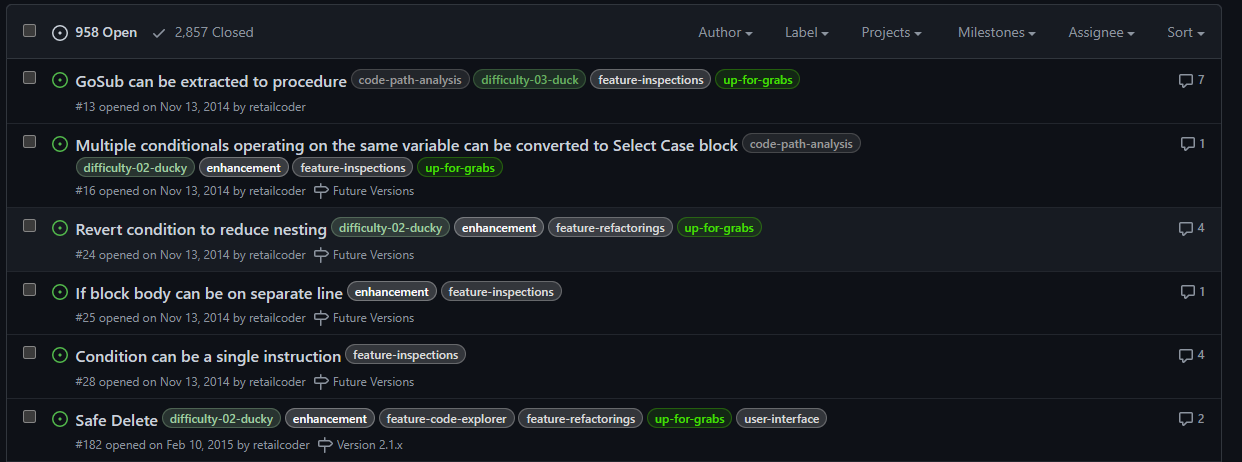

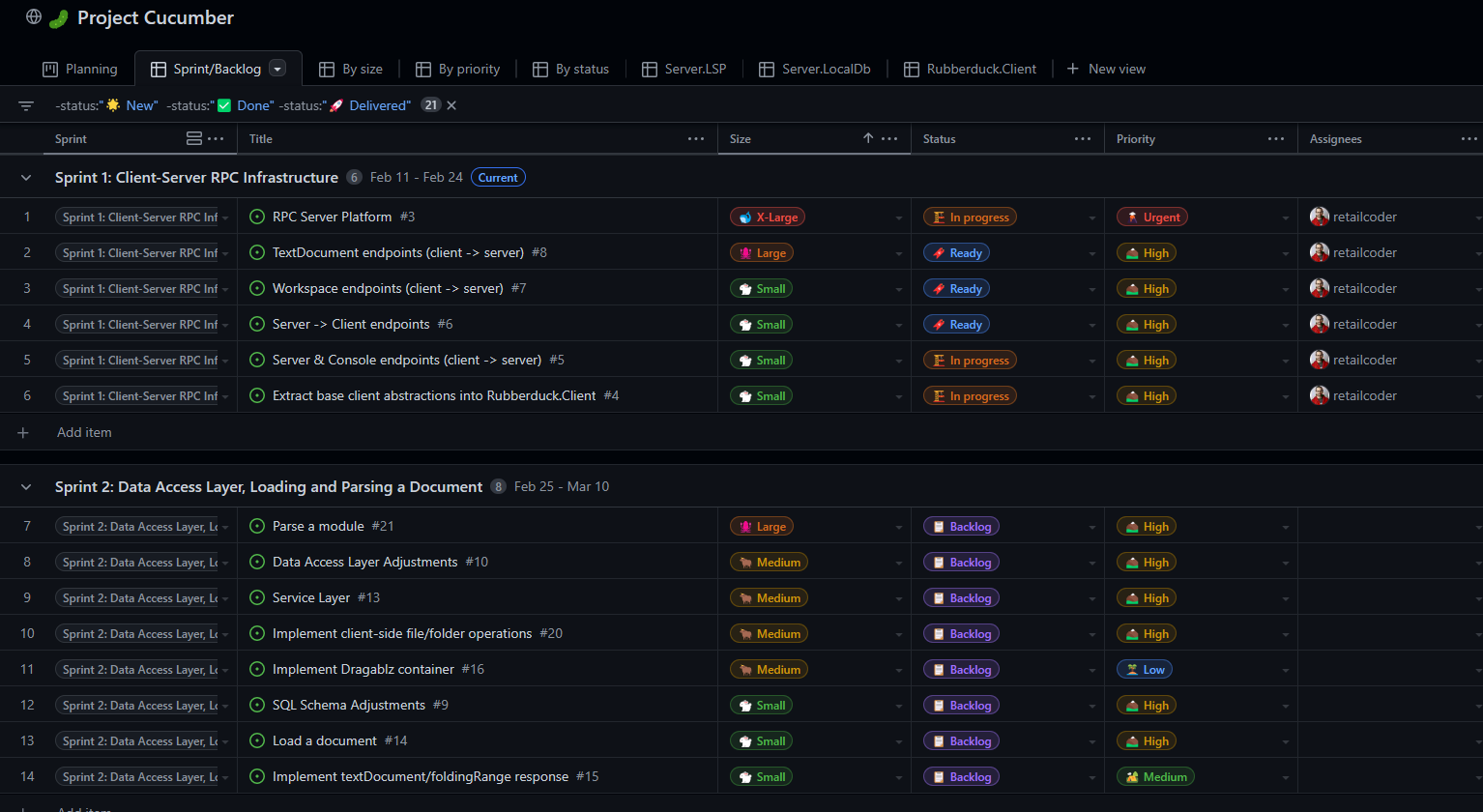


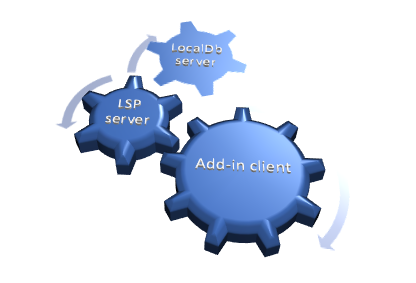


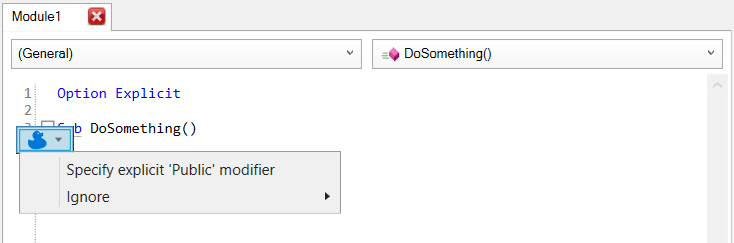


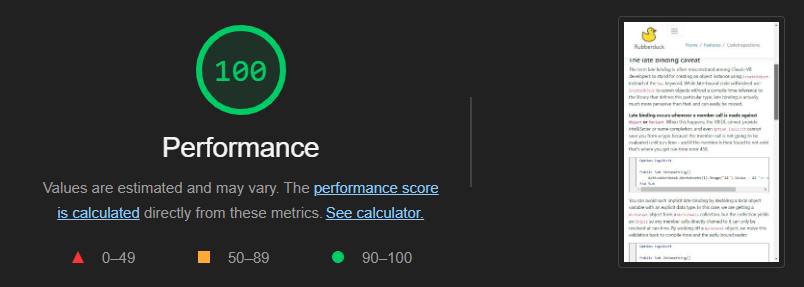
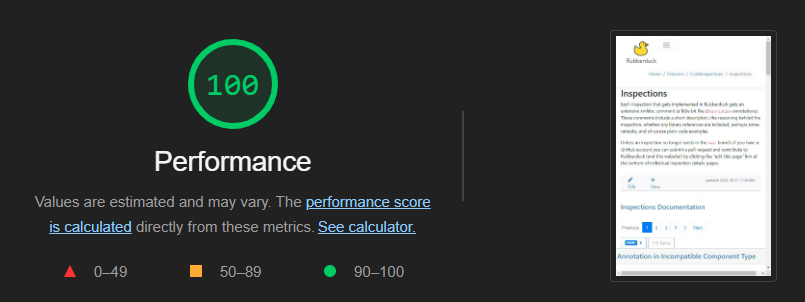
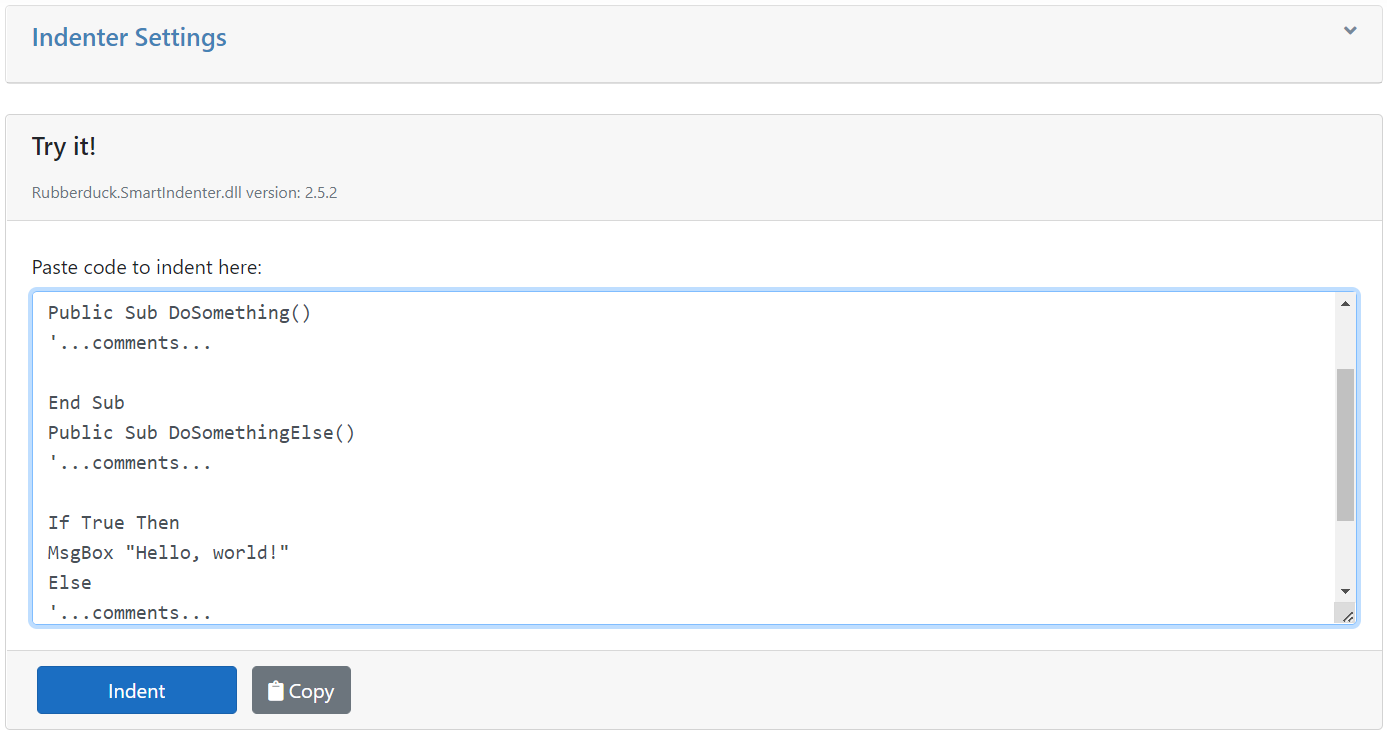


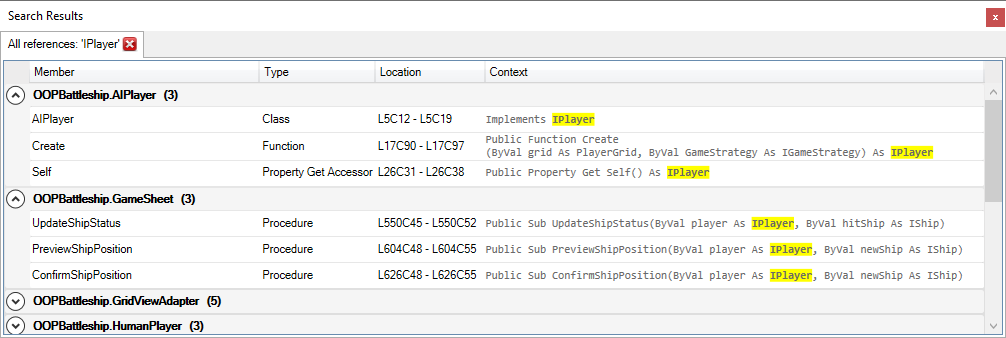


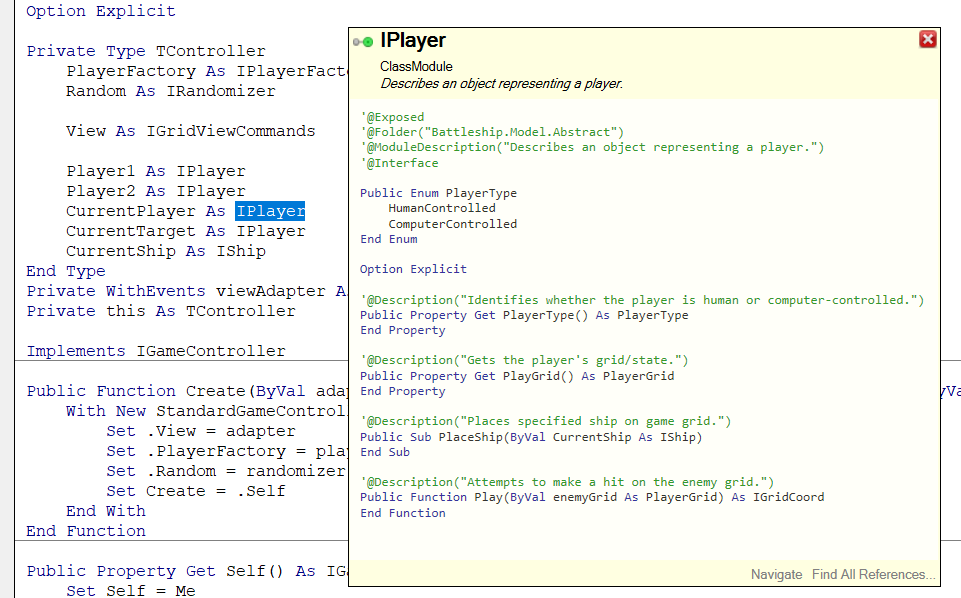



 Rubberduck News