What’s the big deal with folders?

If you’re a seasoned VBA developer, you probably have your “VBA Toolbox” – a set of classes that you systematically include in pretty much every single new VBA project.

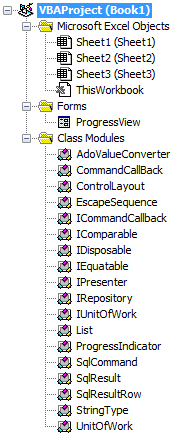
Before you’ve even written a single line of code, your project might look something like this already:

ProjectExplorer

The VBE’s Project Explorer gives you folders that regroup components by component type: forms in a folder, standard modules in another, and classes in another.

That’s great ok for small projects, perhaps. But as your toolbox grows, the classes that are specific to your project get drowned in a sea of class modules, and if you’re into object-oriented programming, you soon end up finding needles in a haystack. “But they’re sorted alphabetically, it’s not that bad!” – sure. And then you come up with all kinds of prefixes and naming schemes to keep related things together, to trick the sorting and actually manage to find things in a decent manner.

The truth is, this sucks.

Now picture this:

You shouldn’t have to care about a component’s type. Since forever, the VBE has forced VBA developers to accept that it could possibly make sense to have completely unrelated forms grouped together, and completely unrelated classes together, just because they’re the same type of VBA objects.

But it doesn’t have to be this way. I like how Visual Studio /.net lets you organize things in folders, which [can] define namespaces, which are a scope on their own.

There’s not really a concept of namespaces inside a VBA project: you could simulate them with standard modules that expose global objects that regroup functionality, but still every component in a project is accessible from anywhere in that project anyway. And who needs namespaces anyway?

Rubberduck 2.0 will not give you namespaces – that would be defying the VBA compiler (you can’t have two classes with the same name in the same project). What it will give you though, is folders.

Cool! How does it work?

Since the early versions of Rubberduck, we’ve been using @annotations (aka “magic comments”) in the unit testing feature, to identify test modules and test methods. Rubberduck 2.0 simply expands on this, so you can annotate a module like this:

'@Folder Foo.Bar

And that module will be shown under a “Bar” folder, itself under a “Foo” folder. How simple is that! We’ll eventually make the delimiter configurable too, so if you prefer this:

'@Folder Foo/Bar

Then you can have it!

With the ability to easily organize your modules into a “virtual folder hierarchy”, adhering to the Single Responsibility Principle and writing object-oriented code that implies many small specialized classes, is no longer going to clutter up your IDE… now be kind, give your colleagues a link to Rubberduck’s website 😉


The Code Explorer

The goal behind the Code Explorer feature, is to make it easier to navigate your VBA project. It’s not just about organizing your code with folders: since version 1.21, the Code Explorer has allowed VBA devs to drill down and explore a module’s members without even looking at the code:

CodeExplorer-expanded

The 2.0 Code Explorer is still under development – but it’s coming along nicely. If you’re using the latest release (v1.4.3), you’ll notice that this treeview has something different: next release every dockable toolwindow will be an embedded WPF/XAML user control, which means better layouts, and an altogether nicer-looking UI. This change isn’t being done just because it’s prettier: it was pretty much required, due to massive architectural changes.

Stay tuned!

OOP in VBA: Immutability & The Factory Pattern

The accompanying code for this article is here on GitHub.

Factory Pattern

A factory is exactly what it sounds like: it’s an object whose role is to make things; it encapsulates the notion of creating an object.

Dim thing As Something
Set thing = New Something '<~ type is known at compile-time

Dim lateBoundThing As Object
Set lateBoundThing = CreateObject("Some.ProgID") '<~ Windows Registry lookup at run-time

Whenever we use the New keyword or the CreateObject function, we create a new instance of a class.

Why would you want to encapsulate that?

VBA classes are Private by default: they can only be used within the project they are defined in. Class modules can also be made “Public, not creatable“, and used in other VBA projects that would add this VBA project as a reference (like you would reference the Scripting library, but now you’re referencing another .xlsm or .xlam). In the referencing VBA project, you can see and use the classes in that other referenced project, but you can’t create instances of them. You need a way to expose functionality to the referencing VBA project, to return instances of a public class.

You could have a standard module that exposes a public function that creates and returns the public class instance – but standard modules don’t quite encapsulate their members, and it’s up to the client code to properly qualify function calls or not: MyFactoryModule.CreateMyClass is just as valid as CreateMyClass, because public members of standard modules pollute the global namespace. An object whose sole responsibility is to create objects of a given type, keeps the global namespace clean – and that’s the factory patern in a nutshell.

But the referencing-project scenario isn’t the only reason to want a factory: sometimes creating a new instance of a class involves some amount of tedious setup code that can easily become redundant if we often need to create instances of that class in our code.

Set thing = New Something
thing.SomeProperty = someValue
thing.AnotherProperty = anotherValue
thing.OneMoreProperty = oneMoreValue
Set thing.OtherThing = New OtherThing '<~ imagine OtherThing also needs setup code!
'...

With a factory, that code only needs to exist in one place – and then DRY (Don’t Repeat Yourself) and SRP (Single Responsibility Principle) are being adhered to, which generally means cleaner code that’s easier to maintain than if it didn’t.


Singleton

In OOP design patterns, factories are often combined with the Singleton pattern, because there only ever needs to be one single instance of a factory class. Given that the class can’t be created by the client code with the New keyword, setting the VB_PredeclaredId attribute to True essentially makes that class’ default instance an effective Singleton, at least from the perspective of the VBA project that’s referencing the project that defines the factory class.

I cannot think of a way to implement the Singleton pattern in VBA: there’s always a way something somewhere might somehow be able to create another instance of the class, or for more than one instance to exist at once. If VBA classes could have constructors (let alone static and/or private ones) it would be a different story, but it doesn’t so you’d need to implement some clunky instance-managing code involving state that’s external to the class… and I’d much rather have none of that. It’s simply not worth breaking encapsulation just to try and work around that kind of language-level limitation.

That doesn’t mean we can’t have nice things though.


Default Instances

If you’ve ever exported a VBA class module and opened it in Notepad, you’ve probably already seen this:

VERSION 1.0 CLASS
BEGIN
    MultiUse = -1 'True
END
Attribute VB_Name = "Class1"
Attribute VB_GlobalNameSpace = False
Attribute VB_Creatable = False
Attribute VB_PredeclaredId = False
Attribute VB_Exposed = False

You know how every UserForm comes with a “default instance” for free? That’s because user forms have this attribute set to True, and that instructs VBA to create a global-scope object named after the type, so you can do this:

MyForm.Show

Without explicitly creating an instance of MyForm, we use one that’s already there. That’s not very OOP though – in fact it’s pretty much anti-OOP, since by doing that you’re not creating any objects, and because the automagic default instance global object is always named after the class, it makes the code look like we’re calling the Show method of the class itself, rather than the Show method of an instance of that class… So what’s the use of this attribute in an OOP discussion?

Using default instances as a prima facie singleton in VBA has shown to be the key that unlocks the true OOP capabilities of the language: by crafting an API that keeps the default instance stateless, we gain full control over exactly how our objects are shaped and can be used in other code.

With this level of control, we can now have effectively immutable, read-only objects in VBA.


Immutability

To be clear: we cannot achieve actual immutability in VBA – that would require constructors and readonly backing fields for our get-only properties. An object that is immutable is initialized with a number of values, and retains these exact same values for the entire lifetime of the object. In languages where that is enforced by the compiler, it removes implicit assumptions about objects’ state, makes objects simpler, and by extension the code easier to reason about, since there’s no mutable state to track. The Functional Programming (FP) paradigm really likes immutability, but the benefits are useful in OOP code as well.

In fact, exposing Property Let accessors for a property that has no business being written to by external code, breaks encapsulation and shouldn’t be done: the problem is that something, somewhere needs to supply the original value, and that is where factories come into play.


Example: Cross-Project Scenario

Say you have a Car class, with Make, Model and Manufacturer properties. It wouldn’t make sense for any of these properties to be changed after they’re assigned, right?

'@Folder("Examples.ReadOnlyInReferencingProject")
'@Exposed
Option Explicit

Private Type TCar
    Make As Long
    Model As String
    Manufacturer As String
End Type
Private this As TCar

Public Property Get Make() As Long
    Make = this.Make
End Property

Friend Property Let Make(ByVal value As Long)
    this.Make = value
End Property

Public Property Get Model() As String
    Model = this.Model
End Property

Friend Property Let Model(ByVal value As String)
    this.Model = value
End Property

Public Property Get Manufacturer() As String
    Manufacturer = this.Manufacturer
End Property

Friend Property Let Manufacturer(ByVal value As String)
    this.Manufacturer = value
End Property

The seldom-used Friend access modifier makes the Model property read-only, at least for code located outside the VBA project this Car class is defined in: the Property Let member is only accessible from within the same project. However, a CarFactory class defined in the same VBA project can access the Friend members:

'@Folder("Examples.ReadOnlyInReferencingProject")
'@PredeclaredId
'@Exposed
Option Explicit

Public Function Create(ByVal carMake As Long, ByVal carModel As String, ByVal carManufacturer As String) As Car
    Dim result As Car
    Set result = New Car
    result.Make = carMake
    result.Model = carModel
    result.Manufacturer = carManufacturer
    Set Create = result
 End Function

Because this CarFactory class has a PredeclaredId attribute set to True, the referencing VBA code can do this:

'@Folder("VBAProject")
Option Explicit

Public Sub DoSomething()
    Dim myCar As Car
    Set myCar = CarFactory.Create(2016, "Civic", "Honda")
    
    MsgBox "We have a " & myCar.Make & " " & myCar.Manufacturer & " " & myCar.Model & " here."
    'these assignments are illegal here, code won't compile if they're uncommented:
    'myCar.Make = 2014
    'myCar.Model = "Fit"
    
End Sub

And then the myCar object can’t be turned into a 2014 Honda Fit – not even by accident. Now that’s great, but more often than not, it’s within the project that we’d like to enjoy compiler-validated immutability – the problem is that within the project that defines the Car class, the Friend access modifier might as well be Public, for within that project, anything anywhere is able to access the Property Let members and turn our 2016 Honda into a 2017 Nissan.

If classes and public properties were all we had in our toolbox, that’s as far as we could get. Fortunately, VBA has more tricks up its sleeves.


Interface

In VBA a class module’s Public members define the default interface of an instance of that class, and while any other class can theoretically implement any other class’ default interface, in practice we actually use dedicated class modules to define formal abstract interfaces (just method stubs, no implementations) – to make sure things are confusing for everyone, we also call these special class modules… interfaces. In .NET we would use the interface keyword instead of class; in VBA we just use class modules for both.

For example we could add another class module, call it ICar (or whatever – but it’s typical if not expected to have abstract interface class names prefixed with an I), and then let it define the Get accessors we want the world to see:

'@Folder("Examples.ReadOnlyEverywhere")
'@Interface
Option Explicit

Public Property Get Make() As Long
End Property

Public Property Get Model() As String
End Property

Public Property Get Manufacturer() As String
End Property

One Interface, One Implementation: Caution!

It’s very much frowned upon in object-oriented code, to define an explicit abstract interface only to have one single class implement it: it’s a design smell because it makes things more complicated than they need to be… provided that the language has constructors and the ability to encapsulate readonly fields… which VBA does not.

So we’re going to bend the rules a bit here, tweak the accepted wisdom a bit: what we’re about to do is indeed going to enable polymorphism, but we’re not going to cover that here. For now we’re going to leverage interfaces for their ability to shape an object the way we need it to be, but it needs to be mentioned that in well-written OOP code, sticking an I in front of a class’ name and calling it an abstract interface is… not it – but that would be the subject of a discussion about abstraction levels, and abstraction in general: we’re just focusing on the mechanics here.


Implementation

In VBA we use the Implements keyword in a class module’s declarations section to tell the compiler that the class can be used with a particular interface. When we do that, we must implement every member of the interface we specified: not implementing them all would be a compile-time error.

Document Modules: Don’t.

While VBA will compile an Implements statement in any class module and that ThisWorkbook and worksheet modules are such modules, these document modules are also a special kind of class that’s best left handled by the host application that owns them: they will not be happy with implementing user classes. Corrupted project and sudden crash unhappy, I mean: whatever you do, do not use Implements in a document module’s code-behind. There are ways to work around this, using wrapper classes for example, where another class (the wrapper) implements the interface and talks to the worksheet.


So we have an ICar abstract interface that says any object implementing that interface has read-only properties Make, Model, and Manufacturer. The implementation might look like this – note this is the ReadOnlyCar class in the example code, but it could very well be the Car class above; I’ve kept them distinct to make the example code easier to follow along this article.

'@Folder("Examples.ReadOnlyEverywhere")
'@PredeclaredId
'@Exposed
Option Explicit
Implements ICar

Private Type TCar
    Make As Long
    Model As String
    Manufacturer As String
End Type
Private this As TCar

Public Property Get Make() As Long
    Make = this.Make
End Property

Friend Property Let Make(ByVal value As Long)
    this.Make = value
End Property

Public Property Get Model() As String
    Model = this.Model
End Property

Friend Property Let Model(ByVal value As String)
    this.Model = value
End Property

Public Property Get Manufacturer() As String
    Manufacturer = this.Manufacturer
End Property

Friend Property Let Manufacturer(ByVal value As String)
    this.Manufacturer = value
End Property

Private Property Get ICar_Make() As Long
    ICar_Make = this.Make
End Property

Private Property Get ICar_Manufacturer() As String
    ICar_Manufacturer = this.Manufacturer
End Property

Private Property Get ICar_Model() As String
    ICar_Model = this.Model
End Property

If we changed the return type of CarFactory.Create to the abstract ICar instead of the concrete Car, and made it return a New ReadOnlyCar reference, any existing calling code wouldn’t flinch, because the interface serves as a separation between the concrete class and the code that’s using it: it reduces the coupling and that makes the code more flexible – that factory could setup and return any implementation of the ICar interface, and as long as we adhere to the Liskov Substitution Principle (LSP), we are guaranteed to find a manufacturer in the Manufacturer property, a year in the Make property, and a model name in the Model property, because that’s what the “contract” of the ICar interface entails.

Notice the implementation is always Private? You will never ever want to change that: these methods are not meant to be exposed on the class’ default interface. That’s what the Implements keyword accomplishes: it tells VBA to expect (require, actually) certain specific members in that class. When an instance of the class is accessed through its ICar interface, what the code is seeing is the public ICar.Model, not the private ReadOnlyCar.ICar_Model.

Underscores: Don’t.

Notice the members implementing the interface always have that Interface_Member naming scheme? That underscore matters, possibly due to a bug in the VBA compiler, but if you try to make an interface with some Public Sub Do_Something() method, …VBA will refuse to recognize Private Sub IThing_Do_Something() as an implementation of that method. You should be avoiding underscores in VBA identifier names in general, anyway.


Factory Method

Depending on where we are in an OOP project, coupling with a concrete type can be perfectly fine. For example in the composition root at the entry point of a program, where objects and their dependencies are being created, we have no choice but to know about the concrete types – that doesn’t mean the rest of the code needs to know about them too though.

What we’re going to do here, is put everything we’ve seen above into practice, by simply moving the Create method from the factory class into the ReadOnlyCar class itself, and make the function return the ICar interface:

Public Function Create(ByVal carMake As Long, ByVal carModel As String, ByVal carManufacturer As String) As ICar
    Dim result As ReadOnlyCar
    Set result = New ReadOnlyCar
    result.Make = carMake
    result.Model = carModel
    result.Manufacturer = carManufacturer
    Set Create = result
End Function

Because the class has a VB_PredeclaredId attribute set to True, we get a free, global-scope default instance… that we’re going to keep stateless: it’s meaningless to assign that particular instance any values for its Make, Model, or Manufacturer properties. But that stateless default instance can be used as a factory by a referencing project if we make the class public, or by any other code that needs to create an instance of a ReadOnlyCar:

Dim myCar As ICar
Set myCar = ReadOnlyCar.Create(2014, "Honda", "Fit")
'myCar can only access the ICar members here.

Nothing can prevent us from creating a New ReadOnlyCar, but the Create factory method is more compelling to use, and now code that needs to initialize a series of ICar objects looks much cleaner than without.


What to use When

As we’ve seen, a factory method is useful when coupling isn’t a concern, and for all intents & purposes can be considered VBA’s take on parameterized object construction. A factory class is useful when the setup of an object is complex enough to warrant being pulled out of the class as its own responsibility, for it also shouldn’t be used when coupling matters. An abstract factory however, should be used when decoupling is needed (that would be when the class using the factory needs to be unit-tested but the factory then needs to supply an alternative implementation for testing purposes), and is a powerful tool in the injection of dependencies that cannot be initialized at the composition root. Big scary words? Read up on Dependency Injection in VBA!

Your project may not (probably doesn’t) need such complete decoupling, and that’s perfectly fine: OOP with tightly-coupled dependencies is still OOP – yes, even without any unit tests, and adhering to all SOLID principles is an art more than a science – but merely knowing that these techniques exist and what they are used for, will change how you reason about code: it’s no longer all about what the code does, it’s now also about how the components interact with each other, what responsibilities each object has; as the abstraction level increases, when to split things up becomes more and more obvious, and it all begins with interfaces and a better understanding of the nature of classes – once encapsulation is mastered, we can move on to explore abstraction; once abstraction is mastered, polymorphism will come much more easily. Factories being creational patterns (there are others), they make a perfect introduction to every single one of these concepts.


ThingFactoryFactory

Sometimes creating an object involves several components – in this simplified example we are creating cars with a few values, but what if creating an ICar object required us to provide some Engine object, which itself had its own dependencies? This is a contrived (and possibly bad) example, so bear with me, but let’s say every new ICar object needed to be injected with the same Engine instance… okay, definitely a bad example – the idea is that if every object ever created by a factory class needs a reference to some other object or value, then it becomes redundant to supply that reference or value through the factory’s ICar_Create method parameters.

Let’s say a car factory can only ever create new cars (hmm, what a crazy idea!) – taking in a carMake parameter for the year of manufacturing makes no sense then. And if a factory is making Nissan cars, they’re probably not making Ford or Toyota cars, so the carManufacturer parameter is really a property of the factory. Let’s make a simpler ISimplerCarFactory abstract factory interface that only takes the parameter we actually need: the carModel.

'@Folder("Examples.ReadOnlyEverywhere.AbstractFactory")
'@Interface
Option Explicit

Public Function Create(ByVal carModel As String) As ICar
End Function

Now we can see the actual benefits start to emerge – code using such a factory will be able to create an ICar without needing to specify a carManufacturer or a carMake; the factory implementation is now responsible for providing them:

'@Folder("Examples.ReadOnlyEverywhere.AbstractFactory")
'@PredeclaredId
Option Explicit
Implements ISimplerCarFactory

Private Type TFactory
    Manufacturer As String
End Type

Private this As TFactory

Public Function Create(ByVal carManufacturer As String) As ICarFactory
    Dim result As ManufacturerCarFactory
    Set result = New ManufacturerCarFactory
    result.Manufacturer = carManufacturer
    Set Create = result
End Function

Public Property Get Manufacturer() As String
    Manufacturer = this.Manufacturer
End Property

Public Property Let Manufacturer(ByVal value As String)
    this.Manufacturer = value
End Property

Private Function ISimplerCarFactory_Create(ByVal carModel As String) As ICar
    Dim result As ReadOnlyCar
    result.Manufacturer = this.Manufacturer
    result.Make = DateTime.Year
    result.Model = carModel
    Set ISimplerCarFactory_Create = result
End Function

As you can see, we’re now looking at a ManufacturerCarFactory class that can take its own dependencies, and thus has its own Create factory method that encapsulates them in private instance state. The advantages of such abstraction should become apparent now:

'@Folder("Examples")
Option Explicit

Public Sub DoSomething()
    
    ' let's make a factory that creates brand new cars whose Manufacturer is "Honda"
    Dim factory As ISimplerCarFactory
    Set factory = ManufacturerCarFactory.Create("Honda")
    
    ' let's make a bunch of cars
    Dim cars As Collection
    Set cars = CreateSomeHondaCars(factory)
    
    ' ...and now consume them
    ListAllCars cars
    
End Sub

Private Function CreateSomeHondaCars(ByVal factory As ISimplerCarFactory) As Collection
'NOTE: this function doesn't know or care what specific ISimplerCarFactory it's working with.
    Dim cars As Collection
    Set cars = New Collection
    cars.Add factory.Create("Civic")
    cars.Add factory.Create("Accord")
    cars.Add factory.Create("CRV")
    Set CreateSomeCars = cars
End Function

Private Sub ListAllCars(ByVal cars As Collection)
'NOTE: this procedure doesn't know or care whas specific ICar implementation it's working with.
    Dim c As ICar
    For Each c In cars
        Debug.Print c.Make, c.Manufacturer, c.Model
    Next
End Sub

Running this code produces this output:

 2020         Honda         Civic
 2020         Honda         Accord
 2020         Honda         CRV

The Make and Manufacturer properties of every ICar issued by this abstract factory, are provided by the factory, such that none of this code needs to worry about these values. If we wanted CreateSomeCars to make Ford models instead, we would be giving it an ISimplerCarFactory implementation that would have been created with ManufacturerCarFactory.Create("Ford").


Back on Earth

Discussions around OOP design patterns often turn to highly-abstracted components described in vague terms (“model-view-controller”, “repository”, “unit-of-work”, “command”, etc.) that, coming from procedural programming, feel convoluted and perhaps hard to follow. The sheer amount of class modules involved feels like nonsense, how does anyone even work with that many modules in a VBA project!

While Rubberduck’s Code Explorer and many other navigational enhancements completely address the code organization concerns, the fact remains that not all VBA code needs that much abstraction. The goal isn’t to learn how to write a macro here – the goal is to learn how VBA (and yes, VB6) code can scale to software-level projects. Small, perfectly-working and decently maintainable applications might have been written with a procedural paradigm, but OOP wouldn’t have been invented if scaling that up didn’t come with a number of design problems that demanded solutions – OOP design patterns propose upping the abstraction level and generalizing various common programming problems: that’s why they feel so far removed from cold-headed immediate applicability if you’re coming from small procedural projects and are just curious about classes and object-oriented code… it all feels overwhelmingly complicated stuff, with vague theoretical advantages that some praise and some others dispute, and sometimes rather energetically so.

Truth is, you don’t learn OOP by writing an ERP System, not anymore than you learn to swim by crossing the Atlantic. No project is too small to put these principles into application – sure the smaller the project the more silly & overkill having that much abstraction looks, but if you never cut your teeth on something small and keep OOP principles for the day you would actually need them, you may not have all the tools in your toolbox when you need them. Plus, it’s much easier to organically grow a code base that’s designed to scale in the first place, and then OOP principles being language-agnostic, what you’re learning here isn’t VBA, it’s Object-Oriented Programming, and that will stay with you well after you’ve moved on to, say, TypeScript.

OOP in VBA?

VBA is an Object-Oriented language…

…whether we agree or not.

Object-Oriented Programming (OOP) is really all about 4 little things:

  • Abstraction.
  • Encapsulation.
  • Polymorphism.
  • Inheritance.

To make things clear: there’s no inheritance in VBA. But it doesn’t matter, because we can easily compensate with composition, which is often a better design decision, even in languages that support class inheritance.

The key to OOP, is classes. Why? Because classes are a blueprint for objects, …which are kinda the whole point of OOP.


Abstraction

If you’ve been writing code, you’ve been making abstractions. A procedure is abstracting a series of executable operations; a module abstracts a group of related operations, even variables are an abstraction, abstracting the result of an operation.

Or is that too abstract?

Levels of abstraction

If you think of the steps required to, say, make coffee, you might think of something like this:

  • Make sure there’s water in the coffee maker
  • Make sure there’s coffee in the coffee maker
  • Start the coffee maker

That would certainly make coffee, right?

What sub-steps could there be to make sure there’s water in the coffee maker? And to make sure there’s coffee in the coffee maker? Or even to start the coffee maker? These sub-steps are at a lower level of abstraction than the 3 higher-level ones.

Clean code operates on a single level of abstraction, and calls into more and more specialized code: notice we don’t care where the water compartment is at the higher levels.

That’s why we put the public members at the top: because they’re at a higher level of abstraction than the private members they’re calling.

Classes are an important abstraction: they define objects, which encapsulate data and expose methods to operate on it.


Encapsulation

Similar to abstraction, encapsulation abstracts away implementation details, exposing only what other code needs to work with.

Global variables are pretty much the opposite of encapsulation; and if you have a public field in a class module, you’re not encapsulating your data.

Instead of exposing a field, you’ll be exposing properties. Property accessors can have logic in them, and that’s the beauty of encapsulation: you’re keeping a value to yourself, and telling the rest of the world only what it needs to know.


Polymorphism

If you’ve never worked with interfaces before, that one can be hard to grasp… but it’s the coolest thing to do in VBA, because it truly unlocks the OOP-ness of the language.

Once, I implemented IRepository and IUnitOfWork interfaces in VBA. These interfaces allowed me to run my code using “fake” repositories and a “mock” unit of work, so I was able to develop a little CRUD application in Excel VBA, and test every single bit of functionality, without ever actually connecting to a database.

That worked, because I wrote the code specifically to depend on abstractions – an interface is a wonderful abstraction. The code needed something that had the CRUD methods needed to operate on the database tables: it didn’t care whether that thing used table A or table B – that’s an implementation detail!

The ability of an object to take many forms, is called polymorphism. When code works against an IRepository object rather than a CustomerRepository, it doesn’t matter that the concrete implementation is actually a ProductRepository or a CollectionBasedTestRepository.


Inheritance

VBA doens’t have that, which is sometimes frustrating: the ability for a class to inherit members from another class – when two classes relate to each other in an “is-a” manner, inheritance is at play.

Yes, inheritance is one of the 4 pillars of OOP, and composition isn’t. But inheritance has its pros and cons, and in many situations composition has more pros than cons. Well, class inheritance at least, but in VBA class and interface inheritance would be intertwined anyway, because a VBA interface is nothing more than a class with empty members.


What of Composition?

In VBA instead of saying that a class “is-a” something, we’ll say that the class “has-a” something. Subtle, but important difference: most languages that do support inheritance only ever allow a given type to inherit from one, single class.

When an object encapsulates instances of other objects, it’s leveraging composition. If you want, you can expose each member of the encapsulated object, and completely simulate class inheritance.


Ok…

…So, what does that have to do with Rubberduck?

Everything. The Visual Basic Editor (VBE) isn’t really helping you to write Object-Oriented code. In fact, it’s almost encouraging you not to.

Think of it:

The only way to find an identifier in a project is to make a text search and iterate the results one by one, including the false results.

The more classes and modules you have, the harder organizing your project becomes. And when you realize you need some sort of naming scheme to more efficiently find something in the alphabetically-sorted Project Explorer, it’s too late to rename anything without breaking everything.

So people minimized the number of modules in their VBA projects, and wrote procedural code that can’t quite be tested because of the tight coupling and low cohesion.

Tested?

I don’t mean F5-debug “tested”; I mean automated tests that run a function 15 times with different input, tests that execute every line of application logic without popping a UI, hitting a database or the file system; tests that test one thing, tests that document what the code is supposed to be doing, tests that fail when the code changes and breaks existing functionality you thought was totally unrelated.


Rubberduck loves OOP

It was already the case when the current v1.4.3 release was published, and the upcoming v2.0 release is going to confirm it: Rubberduck is a tool that helps you refactor legacy VBA code to OOP, and helps you write testable – and tested – object-oriented VBA code.

The Find implementations feature is but an example of a wonderful object-oriented navigation tool: it locates and lets you browse all classes that implement a given interface. Or all members, wherever they are, that implement a given interface member.

Is OOP overkill for VBA? Sometimes. Depends what you need VBA for. But the IDE shouldn’t be what makes you second-guess whether it’s a good idea to push a language as far as it can go.

Breaking Changes – Part 2: Rubberduck Menus

RUBBERDUCK 2.0 FLIPS EVERYTHING AROUND.

When numbering versions, incrementing the “major” digit is reserved for breaking changes – and that’s exactly what Rubberduck 2.0 will introduce.

I have these changes in my own personal fork at the moment, not yet PR’d into the main repository.. but as more and more people fork the main repo I feel a need to go over some of the changes that are about to happen to the code base.

If you’re wondering, it’s becoming clearer now, that Rubberduck 2.0 will not be released until another couple of months – at this rate we’re looking at something like the end of winter 2016… but it’s going to be worth the wait.


Inversion of Control

In Rubberduck 1.x we had a class called RubberduckMenu, which was responsible for creating the add-in’s menu items. Then we had a RefactorMenu class, which was in theory responsible for creating the Refactor sub-menu under the main Rubberduck menu and in the code pane context menu. As more and more features were added, these classes became cluttered with more and more responsibilities, and it became clear that we needed a more maintainable way of implementing this, in a way that wouldn’t require us to modify a menu class whenever we needed to add a functionality.

In the Rubberduck 2.0 code base, RubberduckMenu and RefactorMenu (and every other “Menu” class) is deprecated, and all the per-functionality code is being moved into dedicated “Command” classes. For now everything is living in the Rubberduck.UI.Command namespace – we’ll eventually clean that up, but the beauty here is that adding a new menu item amounts to simply implementing the new functionality; take the TestExplorerCommand for example:

public class TestExplorerCommand : CommandBase
{
    private readonly IPresenter _presenter;
    public TestExplorerCommand(IPresenter presenter)
    {
        _presenter = presenter;
    }

    public override void Execute(object parameter)
    {
        _presenter.Show();
    }
}

Really, that’s all there is to it. The “Test Explorer” menu item is even simpler:

public class TestExplorerCommandMenuItem : CommandMenuItemBase
{
    public TestExplorerCommandMenuItem(ICommand command)
        : base(command)
    {
    }

    public override string Key { get { return "TestMenu_TextExplorer"; }}
    public override int DisplayOrder { get { return (int)UnitTestingMenuItemDisplayOrder.TestExplorer; } }
}

The IoC container (Ninject) knows to inject a TestExplorerCommand for this ICommand constructor parameter, merely by a naming convention (and a bit of reflection magic); the Key property is used for fetching the localized resource – this means Rubberduck 2.0 will no longer need to re-construct the entire application when the user changes the display language in the options dialog: we simply call the parent menu’s Localize method, and all captions get updated to the selected language. …and modifying the display order of menu items is now as trivial as changing the order of enum members:

public enum UnitTestingMenuItemDisplayOrder
{
    TestExplorer,
    RunAllTests,
    AddTestModule,
    AddTestMethod,
    AddTestMethodExpectedError
}

The “downside” is that the code that initializes all the menu items has been moved to a dedicated Ninject module (CommandbarsModule), and relies quite heavily on reflection and naming conventions… which can make things appear “automagic” to someone new to the code base or unfamiliar with Dependency Injection. For example, ICommand is automatically bound to FooCommand when it is requested in the constructor of FooCommandMenuItem, and we now have dedicated methods for setting up which IMenuItem objects appear under each “parent menu”:

private IMenuItem GetRefactoringsParentMenu()
{
    var items = new IMenuItem[]
    {
        _kernel.Get<RefactorRenameCommandMenuItem>(),
        _kernel.Get<RefactorExtractMethodCommandMenuItem>(),
        _kernel.Get<RefactorReorderParametersCommandMenuItem>(),
        _kernel.Get<RefactorRemoveParametersCommandMenuItem>(),
    };
    return new RefactoringsParentMenu(items);
}

The end result, is that instead of creating menus in the VBE’s commandbars and handling their click events in the same place, we’ve now completely split a number of responsibilities into different types, so that the App class can now be injected with a very clean AppMenu object:

public class AppMenu : IAppMenu
{
    private readonly IEnumerable<IParentMenuItem> _menus;

    public AppMenu(IEnumerable<IParentMenuItem> menus)
    {
        _menus = menus;
    }

    public void Initialize()
    {
        foreach (var menu in _menus)
        {
            menu.Initialize();
        }
    }

    public void EvaluateCanExecute(RubberduckParserState state)
    {
        foreach (var menu in _menus)
        {
            menu.EvaluateCanExecute(state);
        }
    }

    public void Localize()
    {
        foreach (var menu in _menus)
        {
            menu.Localize();
        }
    }
}

These changes, as welcome as they are, have basically broken the entire application… for the Greater Good. Rubberduck 2.0 will be unspeakably easier to maintain and extend.

To be continued…

Breaking Changes – Part 1: Parser

Rubberduck 2.0 flips everything around.

When numbering versions, incrementing the “major” digit is reserved for breaking changes – and that’s exactly what Rubberduck 2.0 will introduce.

I have these changes in my own personal fork at the moment, not yet PR’d into the main repository.. but as more and more people fork the main repo I feel a need to go over some of the changes that are about to happen to the code base.

If you’re wondering, it’s becoming clearer now, that Rubberduck 2.0 will not be released until another couple of months – at this rate we’re looking at something like the end of winter 2016… but it’s going to be worth the wait.


Parser State

Parsing in Rubberduck 1.x was relatively simple:

  • User clicks on a command that requires a fresh parse tree;
  • Parser knows which modules have been modified since the last parse, so only the modified modules are processed by the ANTLR parser;
  • Once we have a parse tree and a set of Declaration objects for everything (modules, procedures, variables, etc.), we resolve the identifier usages we encounter as we walk the parse tree again, to one of these declarations;
  • Once identifier resolution is completed, the command can run.

The parse results were cached, so that if the Code Explorer processed the entire code base to show up, and then the user wanted to run code inspections or one of the refactor commands, they could be reused as long as none of the modules were modified.

Parsing in Rubberduck 2.0 flips this around and completely centralizes the parser state, which means the commands that require a fresh parse tree can be disabled until a fresh parse tree is available.

We’ve implemented a key hook that tells the parser whenever the user has pressed a key that’s changed the content of the active code pane. When the 2.0 parser receives this message, it cancels the parse task (wherever it’s at) for that module, and starts it over; anytime there’s a “ready” parse tree for all modules, the expensive identifier resolution step begins in the background – and once that step completes, the parser sends a message to whoever is listening, essentially saying “If you ever need to analyze some code, I have everything you need right here”.

Sounds great! So… What does it mean?

It means the Code Explorer and Find Symbol features no longer need to trigger a parse, and no longer need to even wait for identifier resolution to complete before they can do their thing.

It means no feature ever needs to trigger a parse anymore, and Rubberduck will be able to disable the relevant menu commands until parser state is ready to handle what you want to do, like refactor/rename, find all references or go to implementation.

It means despite the VBE not having a status bar, we can (read: will) use a command bar to display the current parser state in real-time (as you type!), and let you click that parser state command button to expand the parser/resolver progress and see exactly what little ducky’s working on in the background.


To be continued…

VariableNotUsedInspection: the false positives of v1.4, upcoming fixes of v2.0

One of my favorite features since we started working on this project, is the Code Inspections.

rd-code-inspections

I like it because, well, it does find things.

The problem is that, sometimes, under specific circumstances, it makes false claims. Take this code for example:

Public Sub FormatChart(cht As ChartObject)
    Dim ax As Axis
    Set ax = cht.Axes(xlValue)
    ax.MajorGridlines.Border.Color = RGB(200, 200, 200)
    ax.MinorGridlines.Border.Color = RGB(230, 230, 230)
    ax.Crosses = xlAxisCrossesMinimum
End Sub

Here Rubberduck 1.4.3 would say “Variable ‘ax’ is never used” – and suggest a quick-fix to remove the supposedly unused declaration. A quick-fix which, of course, would break the code. Is there a bug in the VariableNotUsedInspection code?

Believe it or not, there isn’t. What makes the inspection fire up false positives, is a bug in the identifier reference resolver that causes member calls to ignore the “parent” reference.

Another common case, is caused by – again – the resolver treating For and For Each loops as assignments, but not as usages. So in code like this:

 Dim fYear As Integer
 Dim fQuarterOfYear As Integer
 Dim fMonthOfQuarter As Integer
 Dim fWeekOfMonth As Integer
 Dim fDayOfWeek As Integer
 
 For fYear = fStartYear To fStartYear + years - 1
     Set current = FiscalCalendarDate.Create(currentDate, 1, 1, 1, 1, 1, 1, 1, 1, 1, 1, fYear, vbNullString)
 
     For fQuarterOfYear = 1 To 4
 
         current.FiscalDayOfQuarter = 1
         current.FiscalWeekOfQuarter = 1
         current.FiscalMonthOfQuarter = 1
 
         For fMonthOfQuarter = 1 To 3
 
             current.FiscalDayOfMonth = 1
             current.FiscalWeekOfMonth = 1
 
             If IIf(IsLeapYear(current.calendarYear) And current.FiscalMonthOfYear = 12, True, fMonthOfQuarter Mod 2 = 0) Then
 
                 For fWeekOfMonth = 1 To 5
 ...

You get a “Variable ‘fWeekOfMonth’ is not used” and “Variable ‘fQuarterOfYear’ is not used”, because the only place they’re ever used is in For loops.

Then you have the forgotten edge cases:

Private WithEvents indicator As ProgressIndicator

WithEvents variables are likely to be assigned a reference, but not necessarily to be themselves referenced anywhere. And if they aren’t, well then, they’re reported as “never used”. Which is a problem, because you don’t want a quick-fix to go and delete the WithEvents declaration that provides all these events you’re handling. So we’re going to be ignoring WithEvents variables.


Okay… Got any Good news?

Totally. Ducky 2.0 code inspections are being completely revamped. And all these false positives are being addressed, which means…

…most inspections will support “Fix all” options. Of course one shouldn’t “fix all occurrences in project” without actually reviewing the inspection results. But so far, it’s looking very, very good. This UI is still preliminary: we’re happy to hear (and integrate) your feedback!

Blue Print of 2.x

The foundation of the project needed a bit of clean-up and restructuring. The Big Refactoring is now pretty much completed, and with it, summer 2015’s feature freeze:

Feature-freeze until this is completed. We need to implement proper DI/IoC and make the code testable, if not tested. No ifs, no buts.

So we’re ready to start implementing the new features of 2.0. But before, we need to reconnect the pieces, by moving code from the 1.x “RubberduckMenu” and “RefactorMenu” classes, and into these “ICommand” implementations.


So, What’s Cooking?

Tons. The new architecture allows us to write code that is aware of the host application. This means Unit Testing commands can be disabled when the host is Outlook, for example (it seems executing VBA code on-demand from a VBE add-in isn’t possible in Outlook – ideas welcome). It also means we can write code inspections that warn about implicit references to Application.ActiveWorkbook in Excel, but that don’t run when the host application is Access, Word, or PowerPoint. Things like that, and…

Regex Search & Replace is coming. We’ll need a way to hijack Ctrl+F and Ctrl+H!

Smart Indenter is coming. The owners of this awesome add-in have graciously offered their source code to the Rubberduck project a while ago already; 2.0 isn’t releasing without an embedded Smart Indenter!

More grammar fixes on the way. This means fewer parser errors, more accurate inspections, navigation and refactorings, i.e. a more reliable tool.

Source Control Integration continues to improve, and early minor releases of 2.x will likely see a new WPF/XAML UI.

More translations have been completed since the last release: 2.0 will speak English, French, Swedish, German, Japanese… and every other translation we receive a PR for in the next.. uh… …6-8 weeks.

Shiny new UI. Docked gridviews are turning into WPF treeviews; the “Rubberduck” menu has been revamped, and under the hood, everything changed. Might as well make 2.0 look like as much change happened!

Code Inspections and Quick-Fixes that take the host application into account, giving recommendations tailored for a given host API. Also, some of the coolest inspections we envisioned as fantasies a year ago, are now possible to implement.

More refactoring tools like inline method, encapsulate field and promote local. The early minor releases of 2.x will likely see a new WPF/XAML UI for the refactorings issued in 1.x.


Something really good is cooking.

We’re also looking at implementing a more VBA-like Assert class, that would be more permissive with AreEqual and AreNotEqual than the current (C#-like strict) implementation is. Test results will be copied to clipboard or exported/serialized to XML with a simple click.

If you write some C# and would like to contribute to Rubberduck, note that our GitHub repository has a bunch of up-for-grabs issues opened, a lot of which are critical (i.e. no fix, no release) – the faster all functionalities work off the new command architecture, the faster we can deliver a pre-release…

Stay tuned!

Resolver: still not perfect

I just found another bug in the rewritten 1.4.x resolver, and as much as I want to fix it (and I will)… part of me can’t help thinking if you encounter this bug, your code has greater problems than mine.

Picture this code:

Sub Foo()
     Dim Foo As New Foo
     With Foo
         With .Foo
             .Foo = 42
         End With 
         Bar .Foo.Foo
     End With
End Sub

Believe it or not, it compiles… and the 1.4.1 resolver works perfectly and correctly identifies who’s who and who’s calling what. Now what if we added a recursive call?

Sub Foo()
     Dim Foo As New Foo
     With Foo
         With .Foo
             .Foo = 42
         End With 
         Bar .Foo.Foo
     End With
     Foo
End Sub

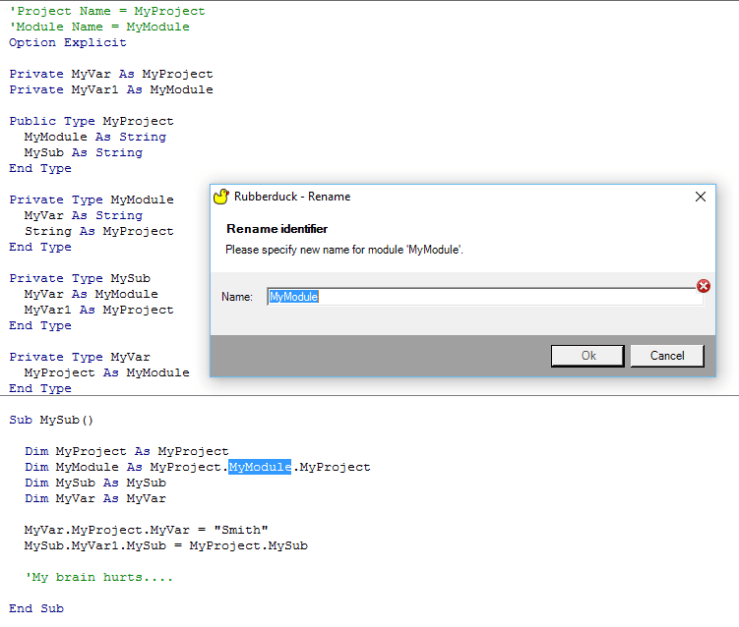
The bug here, is that this Foo gets resolved as a call to the local variable, so renaming the procedure to DoSomething would leave that Foo unchanged.

Not too bad. I mean, nobody in their right minds would ever do that. (right?)

However, it gets worse: if we change Sub to Function, in the name of being able to identify a function’s return value, a matching identifier within the body of a function (or property getter) is resolved to the function (or getter) itself… so this part needs to be refined at bit.

Function Foo()
     Dim Foo As New Foo
     With Foo
         With .Foo
             .Foo = 42
         End With 
         Bar .Foo.Foo
     End With
     Foo
End Function

Every single Foo here, with the sole exception of the local declaration, resolves to a reference to the function.

I hope this bug doesn’t affect your code… for your sake – and that of whoever will be maintaining your code in the future.

If it does… v1.4.2 with certainly include a fix for this issue.


Update

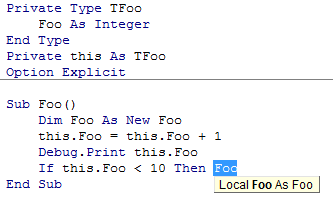
The non-resolving recursive call isn’t a bug:

it's a local!

There’s a new duck in town!

…and it rocks.

The past few months have been tough. We were facing some serious ANTLR grammar bugs, and our identifier resolver had even more serious bugs, which meant false positives in code inspections, a rename refactoring that wouldn’t always rename all references, and a StackOverflowException if you were unlucky… which blew up Rubberduck, the VBE, and the Office host app with it, without warning.

That’s why 1.3 remained a “pre-release”.

Rubberduck 1.4 has none of these issues. Oh, our ANTLR grammar is still far from perfect (line numbers, and “precompiler” #IF statements come to mind) – but a number of bugs were fixed, and the resolver was completely rewritten. It’s not as perfect as we’d like it to be, but it correctly resolved everything we threw at it, without a single exception.

So, what’s so cool about it?


#Refactor

Extract Method has been around since version 1.2, and Rename was pre-released (albeit with some issues) with 1.3; Rubberduck 1.4 introduces two new refactorings:

  • Reorder Parameters in a procedure, and automatically adjust all call sites.
  • Remove Parameters from a procedure’s signature, and automatically adjust all call sites.

Rename can be used from the Project Explorer, Code Pane or Form Designer context menus, as well as from the Code Explorer to rename a project, a component (form, module, class), a procedure, variable, line label, …anything. This completely eliminates all excuses to keep meaningless identifiers in your code.


#Navigate

The Code Explorer was already a nice feature in 1.2, but Rubberduck 1.4 takes navigation to a whole new level.

  • Find Symbol lets you search for anything – and go to its declaration.
  • Find all references displays all call sites of any identifier.
  • Go to implementation lets you navigate implementations of an interface or interface members. Rubberduck considers any class referenced by an Implements statement as an interface.

One cool thing is that we’ve created declarations for pretty much everything in the Standard VBA library, so you can use find all references to list all usages of, say, MsgBox, or Err.Raise.


#Git

That’s right. We’ve talked about it for a while. Well, it’s here. Integrated source control, right there in the VBE. Commit, push, pull, merge, branch, to and from local or remote repositories on GitHub.


And so much more…

If you’ve never used a previous version of Rubberduck, now is the time.

Every VBA programmer needs a Rubberduck.

DOWNLOAD

Rubberduck, or Gummianka, le petit canard en caoutchouc

Next release rocks. Like, if you’re running 1.22, you’re not going to believe everything that’s coming at you in 1.4 – and if you’re running 1.3x, …you’re not going to believe it either.

The feature set is becoming massive, and that’s thoroughly awesome. We are currently in the final stages of stabilizing the next release and polishing everything. There’s a ton of amazing stuff coming, but one of the coolest things is that, thanks to the awesomeness of Code Review community members…

…we are proud to announce localization in French and Swedish, and a German translation is under way.

If a language isn’t supported on your system, it won’t show up in the display language dropdown:

Options-Localized

More announcements to come, stay tuned!