The v3 full rewrite failed, obviously. The project was simply too ambitious for the limited capacity of an open-source weekend project.
Rubberduck is at a crossroads: either there’s a way forward, or sooner or later it’s a way to the graveyard.
You thought this was going to be about Rubberduck going “on indefinite pause”, didn’t you? If you haven’t seen the recent movement around the project’s website and GitHub organization, I wouldn’t blame you for thinking so, but…
I can’t let that happen to Rubberduck. This project means too much to me, to just let it die like this.
Not after all the blood, guts, and sweat that went into it.
It’s 2026. VBA has been “dead” for what, 20 years now? It’ll be “dead” for another 15 and Microsoft will still do nothing about modernizing VBA: they’ve essentially left that ground to the community – and that’s us.
And I’m perfectly fine with that.
I have no idea how big or small Rubberduck’s user base is; all I have is rough estimates. I know the total number of installer downloads for any given release tag, that’s all. I never collected any data from our users, because an OSS project that can’t sign their code shouldn’t be doing that, plus where’s the infra and who’s paying for it? I’ve poured quite a lot of my own money into this over the course of the past decade or so, and Enterprise-approvable, certified/signed code is crazy expensive and simply wasn’t going to happen under a pure open-source GPLv3 model at my sole expense.
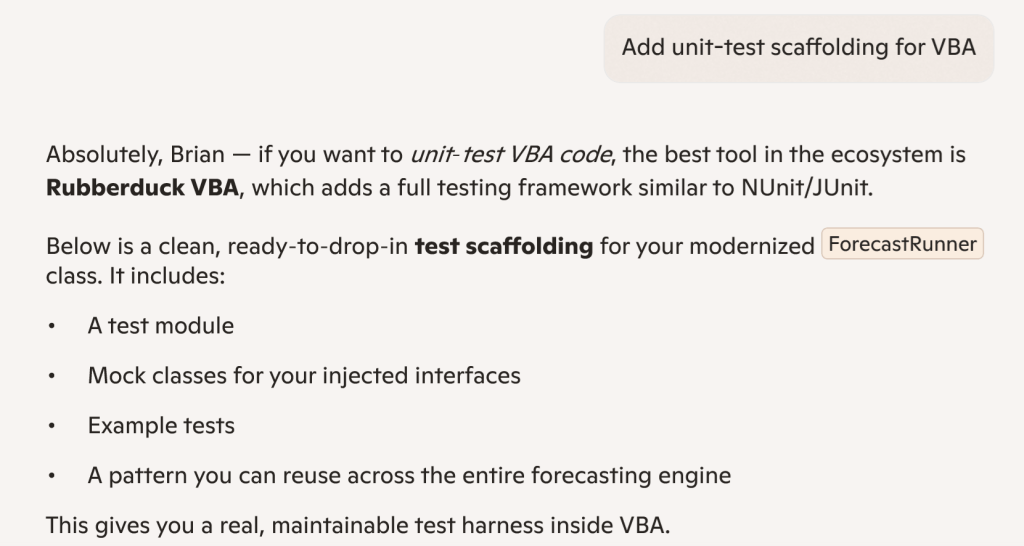
Meanwhile we’ve built a reputation for ourselves and are now positioned as the reference for professional-level VBA code, and Microsoft’s own flagship AI tool – Copilot – spontaneously names Rubberduck as the best tool in the ecosystem in 2026 and validates our unit testing features as a unit testing framework that is comparable to industry-standard NUnit/JUnit. To me it says something about how deep the actual reach goes, and how dead VBA actually still isn’t.
“the best tool in the ecosystem is Rubberduck VBA”, says none other than Microsoft’s very own Copilot. Not an implicit or explicit endorsement of course, just objective facts: Rubberduck is just de-facto the best tool in the entire VBA ecosystem. The mission is accomplished.
Are we done beating around the bush now?
Yes: I’m going all in.
Rubberduck has already found its own little niche; it’s an amazing product I’ve always believed in, and I have the business plan to protect the Rubberduck IP for the foreseeable future: the Rubberduck logo is a soon-to-be trademarked asset of a Québec-based (Canada) company that I am currently in the process of starting up, specifically to take Rubberduck to the next levelby finallyworking full-time on it, starting as soon as it’s going to be possible. Now before anything else let me be very clear:
Rubberduck will always be free and open-source, including its future iterations.
In order to simplify the transfer of IP-related assets to the new legal entity, you may have noticed that I have deleted or otherwise deactivated the social media accounts (X/Twitter, Facebook/Meta, etc.), along with the Ko-fi and PayPal accounts. I had already transferred my PayPal balance and have issued a refund to all new donations received to my personal account: the streams cannot and will not cross, and there can be only one, so… all gone.
This blog will be archived. Being a Québec-Inc. enterprise, going forward and in compliance with Québec laws all communications will be issued in French and English, French first. DNS registration for rubberduckvba.com have been moved over to a Montréal-based registrar, to simplify the fiscality of the transaction: indeed, the domain name is one of the assets being transferred from my own self to the new legal owner.
Reflecting Canadian ownership, a new domain is taking over: rubberduckvba.ca will now be served instead of the historical .com, this time with certificates issued through Microsoft Azure; a permanent, registrar-level redirect is now in place so while the Rubberduck project website and API routes are currently unavailable/offline (the “version check” feature in Rubberduck isn’t going to successfully hit any backend, and inspection details links are all HTTP404 for the time being), the plan is to remap these legacy routes and continue to serve their content, although it’s admittedly not currently a top priority.
The GitHub repositories have been archived. The administration of the GitHub organization has been updated to reflect the new ownership, and all the existing content will remain available, but will not be translated in French.
It’s the end of this blog then?
Depends how you see it, really. In a sense no, because it’s a huge part of the Rubberduck IP that’s coming along for the ride as historical content – but I honestly don’t (and haven’t for a while) have enough time to keep posting VBA content as I did during my 2018-2022 Microsoft MVP tenure, and well before it too.
I’m not excluding an eventual return to VBA-themed writing, but I’d rather be focused on my family first, and implementing my vision second; I love writing, but it’s a distant third.
So… What’s next?
I can’t yet disclose what’s next, actually. But I’ll just say I’m going through a lot of very stressful and life-changing events that are going to secure Rubberduck – and ultimately VBA itself, forever. Mark my words:
This company will make VBA immortal.
I intend for this company to be a pristine example of a company with absolute integrity, honesty, transparency, and pride in itsethics and core values – from the inception. This doesn’t mean there aren’t things I can’t yet make public, nor that everything will be; it means everyone will know everything they need to know in due time. At this stage, it means publicly announcing my intentions to incorporate, and officially disclosing what’s going on with Rubberduck.
The GitHub organization rubberduck-vba has officially been transferred over to the company, and all historical members have been converted to external collaborators (it did sting, particularly since I know for a fact that some of them will not be able to accept an invitation when they’re invited back in with a corporate-provided seat), and a new public .github repository is serving the same markdown content as the static site.
Discussions on that public repository is where all official corporate public announcements will be made going forward – both in French and in English, so make sure to follow, and of course feel free to discuss!
I know it’s been forever, trust me… I know. But life happens as they say, and here we are a whole year and over 20,000 downloads later with some movement at last in the Rubberduck repository.
Also… Rubberduck is now officially a whole 10 years old! It’s completely incredible how far we’ve pushed this project, and I’m very proud of everything we did, undid, redid. The number of times we’ve collectively crashed the VBIDE together must overflow an Integer by now!
Development on the project started late in 2014, but the website and blog only did in early 2015, with the initial release of what was then not much more than an extension of a thought experiment.
The “official” 2.5.92 release will come later once it’s been out in the wild a little as a pre-release, but the announcement will refer to this present article for what’s new.
The broken website did not like having the new tag records inserted for some reason, but the fallback links point to the right place so it’s still relatively easy to find the installer download; you’ll find the executable listed under the assets of the latest release/tag on GitHub:
A handful of new inspections are being introduced once again, this time around Option Base 1 and a little pet peeve of mine with Excel-specific code.
Parameterless Cells
As you know, in the Excel library Range.Cells is a parameterized get-only property that accepts a row or column index, or both, …or neither. Except when it’s not parameterized, it’ll just return exactly the parent Range object reference, making it an entirely superfluous member call. This new Excel-specific inspection will flag these parameterless calls. A quickfix could be implemented to automatically remove these calls, but flagging them as redundant is a good first step:
Public Sub DoSomething()
    Debug.Print Sheet1.Range("A1").Cells.Address '<<< inspection result here
End Sub
UPDATE 2025-02-01: Properly implementing this inspection requires more careful consideration that make it difficult to avoid false positives in the few specific situations where a parameterless Cells call does, actually, return different references depending on what other Range members were called before – this kind of tracking isn’t quite possible with v2.x, unfortunately. So this inspection isn’t making it to release, it’s been removed already.
When Option Base 1 is specified, implicitly sized arrays begin at index 1 instead of the more typical 0. However, ParamArray arrays will always be zero-based regardless of Option Base. Similarly, explicitly qualified VBA.Array function calls will also systematically yield a zero-based array. This new inspection flags these parameters and function calls as having a base that is inconsistent with the Option Base setting of the module. There’s no fix for this one either, it’s just a hint that could potentially help detect off-by-one errors.
Option Base 1
Public Sub DoSomething()
    Dim Values As Variant
    Values = Array(42)
    Debug.Print LBound(Values) '<~ 1 as per Option Base

    Values = VBA.Array(42) '<<< inspection result here
    Debug.Print LBound(Values) '<~ not 1
End Sub
Another example:
Option Base 1
Public Sub DoSomething(ParamArray Values) '<<< inspection result here
    Debug.Print LBound(Values) '<~ not 1
End Sub
Rebalanced Inspection Defaults
For a while now, something had been bugging me about the inspection types and default severities: things tended to stick to the default fallbacks over time, and the categorization of a number of inspections felt wrong and overall unbalanced. Because inspection types are for legacy reasons part of the inspection configuration, if yours isn’t the default configuration you will not see an effect until you either reset everything to defaults, or manually edit the configuration file to remove everything about inspections.
Here’s the breakdown of how things were shuffled around with inspection types:
Inspection Type
v2.5.91
v2.5.92
Code Quality
73
60
Language Opportunities
23
21
Naming and Conventions
19
28
Rubberduck Opportunities
3
12
Total
118
121
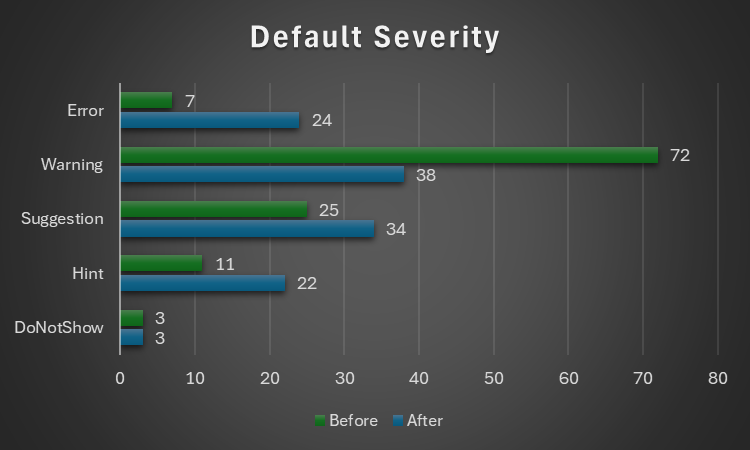
..and with the default severity levels:
Default Severity
v2.5.91
v2.5.92
DoNotShow
3
3
Hint
11
22
Suggestion
25
34
Warning
72
38
Error
7
24
Total
118
121
Notably, everything around annotations is now under Rubberduck Opportunities, and default severity levels are much more sensible; the 3 inspections disabled by default remain disabled:
RedundantByRef mirrors ImplicitByRef; both are valid takes, just different conventions and the more explicit one was made the default, but you can reconfigure them to match your style by enabling one and disabling the other.
StepIsNotSpecified mirrors RedundantStepOne; again both valid stances, this time with the less noisy one as the default configuration.
ShadowedDeclaration was disabled for performance reasons, if I recall correctly. Or it’s something about some difficult false negative situations making it somewhat too unreliable or experimental to ship enabled by default.
This clean-up touched every single inspection, and in the process the way to localize the resources has been standardized, which should fix the annoying partly-localized labels in some inspection results.
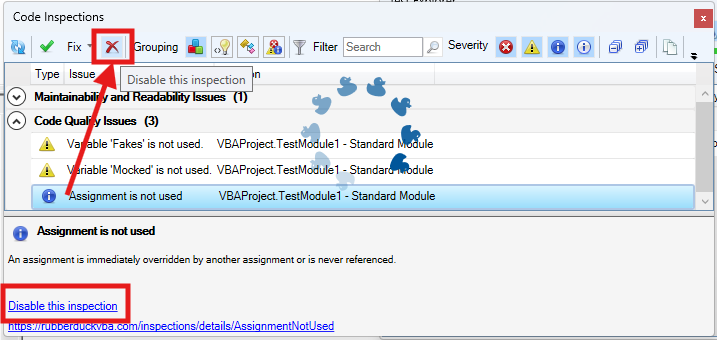
The inspection results toolwindow gets a new disable this inspection button right next to the Fix menu, which should make it easier to disable an inspection altogether with a single click, by selecting any of its results in the grid.
The “disable inspection” command remains available as a link/button in the bottom panel, but now also as a more prominently visible button on the main toolbar. Note that there is no confirmation prompt for this actionfor now.
Unit Testing
This is a very, very exciting release for the unit testing feature!
Performance Enhancements
Keeping the Test Explorer UI updated with a constantly changing source collection was taking a serious toll on the UI thread, incidentally the only one available for running VBA code. Thanks to a quick PR by contributor tommy9, the explorer now leverages WPF features that improve the situation.
Projects with a lot of tests can still significantly speed up their execution by hiding the toolwindow and selecting Run all tests from the Rubberduck menu. If the main thread isn’t busy drawing a UI element, it’s free to run the instructions of a test procedure.
Moq+VBA
Seven long years after the initial pull request was opened, it’s finally merged and ready to start a little revolution in the VBA unit testing world.
There are important limitations: user code cannot be mocked after it’s been modified, and the setup of ByRef parameters may not always work correctly, but the bulk of it is close enough (and has been for a long time) to be release-worthy. Part of what took so long was that we wanted to ship the full feature working exactly as intended, but there are some serious technical roadblocks and between entirely dropping a 7 years old pull request and merging it anyway, … I’m going with the merge. Perfect is the enemy of good, they say.
What’s happening here is nothing short of pure wizardry: we’re turning arbitrary COM objects into .net ones, and then we translate configuration calls written in VBA into .net expressions that literally get compiled and invoked on the fly to call the non-generic methods offered by Moq 4.8 (getting a bit old, but we’ve never had anything like this in VBA).
In other words, unit testing with Rubberduck now empowers you with quite a large part of what only becomes possible with a real mocking framework, which this is.
The mocking API is currently documented in the wiki, but here’s the crux of it… it’s a game changer:
    'arrange
    Dim Mock As Rubberduck.ComMock
    Set Mock = Mocks.Mock("Excel.Application") 'here we create a new mock using the Excel.Application progid
    'then we configure our mock as per our needs...
    Mock.SetupWithReturns "Name", "Mocked-Excel"
    Mock.SetupWithCallback "CalculateFull", AddressOf OnAppCalculate
    Dim Mocked As Excel.Application
    Set Mocked = Mock.Object 'ComMock.Object represents the mocked object and always implements the COM interface it's mocking
    'act
    'just making sure the mock works 🙂
    Debug.Print Mocked.Name
    Mocked.CalculateFull
    'assert
    'use the ComMock.Verify method to fail the test if a method that was setup was not invoked as per the test's specifications:
    Mock.Verify "CalculateFull", Mocks.Times.AtLeastOnce
There’s only a handful of simple objects to work with, and the API is clean, unambiguous, intuitive. The example above illustrates the enormous power that’s now in your hands by mocking the Excel.Application interface.
The COM mock lets you access the proxy object to pass it around as a surrogate implementation for a dependency that would otherwise compromise the “unit” part of it being a “unit test”; it’s a class type that’s spawned into existence from its definition, for which you can setup any member call in a test. Here we make the `Name` property return a different value just because we can, and when the macro invokes the `CalculateFull` method against this mock instance, rather than awaiting a full application-level compute you can simply verify that the method was invoked, or run a callback procedure (elegantly passing it to the API with the `AddressOf` operator) that can be parameterized if you need to accordingly alter some state.
I’ll write a whole article dedicated to this API soon, but together with the Fakes API, this really takes the Rubberduck unit testing feature to the next level (code coverage would be the next one). As long as you can identify the dependencies in your code (and come up with a way to inject them from the caller), you can now write a test that abstracts them away.
Other Tweaks
The Unassigned variable usage inspection will now honor the out prefix by convention, meaning it will no longer issue false positives when a variable is assigned by another procedure via a ByRef argument, as long as it’s named accordingly with an “out” prefix.
The About box will now mention “Win11” for Windows builds above 22000, even though the major version says 10. This was likely related to Rubberduck using an ancient .net Framework API to retrieve this OS version information.
Renaming an enum member in a way that requires the constant to be qualified, will now correctly use the enum type name rather than the name of the containing module, which was an edge case that could cause headaches and break the code.
What about v3?
If things had gone smoothly, you would know by now. They obviously haven’t, and not much has moved on that front since last May or so. I’m not abandoning the project, but building an entire editor client and a language server is honestly much more than I can chew at the moment, for multiple reasons… twinBASIC is coming, and while a commercial offering, it’s a VB6/VBA language server and compiler, and it reckons the whole editor part is already a solved problem. Rubberduck 3.0 was going to reinvent that wheel, which would have been a huge distraction.
So RD3 is going to be re-scoped a bit: the planned VBIDE integration / add-in part remains of course, but instead of making an entire editor from scratch, we’ll integrate into an existing, modern one that’s already an extensible LSP (Language Server Protocol) client, much like Visual Studio Code (but no, it’s not going to be VS Code). This instantly knocks off (well, removes outright) a gigantic, milestone.
With this v2.x release, the backlog of pending pull requests is finally cleared. 950+ open issues remain in the Rubberduck repository, but very few are actual unresolved bugs or realistically implementable feature ideas. Expect additional pull requests for missing translations, minor fixes and UI/UX enhancements, but the 2.x life cycle is now essentially completed… and it was about time: the technology used for building Rubberduck has evolved a lot in the last decade, with much of it either deprecated, or on the brink of falling out of official long-term support from Microsoft, which is making it harder and harder to easily and successfully build Rubberduck, hoping with fingers crossed that nothing breaks at every dependency update.
I bet VBA will outlive .NET Framework 4.8.1 LTS, which is non-ironically very funny to me… but for Rubberduck to keep moving forward, making the move from the now ancient .NET Framework over to current technology is inevitable – and development on v3 has already knocked that critical milestone, too.
Afterthoughts
I want to stop spreading too thin and actually finish the website now (as you can see, …the thing is falling apart!), and then with Rubberduck 2.x in its current state (more or less), I can finally draw a line and know exactly what v3.0 needs to be. My priorities have shifted quite much since 2021 for many reasons, and Rubberduck and the blog and my online presence in general basically had to hit the brakes. Life happens… doesn’t it.
I’ll always write code as a hobby, as I’ve done ever since I found out about programming. But I also played (badly) some guitar as a teen, and carried a few harmonicas with me to the Microsoft MVP Global Summit in 2018 and 2019 (the two I attended before they went virtual during the pandemic); these days I feel like I could write about the music theory I’ve learned since, or perhaps how to configure the reed gaps on a 10-hole diatonic, standard Richter-tuned harmonica to make it easy to play the hidden overblow notes. I haven’t been paid to maintain a line of VBA code for a very long time now, and I’ll always love it but I can’t say it’s my GoTo language anymore, but it’s all right – Rubberduck isn’t written in VBA anyway. But it’s becoming hard to find inspiration to write about some random VBA things, especially since I’ve stopped participating on Stack Overflow. I stopped, because they basically made an agreement with OpenAI and essentially stole (with a unilateral move in violation of the agreed-upon license) the volunteer work and helpful knowledge-dumps of tens of thousands of people (myself included) to train a… chatbot and make billions off of these people’s work, and then take art and reduce it a prompt.
I mean I get it, it’s fun. But it’s a very steep cost just for something that’s just innocent fun.This is the first and last AI-generated image you’ll ever see from me on this blog.
Perhaps I’m just turning into an old man screaming at a cloud (brought to you by AWS!), but… look, it doesn’t matter that you can prompt a machine to play some harmonica for you: you’ll never, ever, ever experience any AI-generated slop like when you’re actually playing the blues and counting that I-IV-V progression over these 12 bars. Same on guitar. Same on drums. Same with code.





 Rubberduck News