Undoing and Redoing Stuff

Whenever any VBA code touches a worksheet, Excel clears its undo stack and if you want to undo what a macro just did, you’re out of luck. Of course nothing will magically restore the native stack, but what if we could actually undo/redo everything a macro did in a workbook, step by step – how could we even begin to make it work?

If we look at Excel’s own undo drop-down, we can get a glimpse of how to go about this:
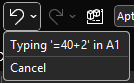
Each individual action is represented by an object that describes this action, and presumably encapsulates information about the initial state of its target. So if A1 says 123 and we type ABC and hit undo, A1 still says 123 and if we hit redo, it says ABC again. Clearly there’s a type of “last in, first out” thing going on here: that’s why it’s called a stack – because you pile things on top and only ever take whichever is the first one on top.

We can implement similar stack behavior with a regular VBA.Collection, by adding items normally but only ever reading/removing (“popping”) the item at the last index.

But that’s just the basic mechanics. How do we abstract anything we could do to a worksheet? Well, we probably don’t need to cover everything, or we can have more or less atomic commands depending on our needs – but the idea is that we need something that’s undoable.

In this article we’re going to create a set of classes that lets us do just that.

The entire source code related to this article can be found in the Examples repository.

Abstractions

If we can identify what we need out of an undoable command, then we can formalize it in an IUndoable interface: we know we need a Description, and surely Undo and Redo methods would be appropriate.

'@Interface
Option Explicit
'@Description("Undoes a previously performed action")
Public Sub Undo()
End Sub
'@Description("Redoes a previously undone action")
Public Sub Redo()
End Sub
'@Description("Describes the undoable action")
Public Property Get Description() As String
End Property

Commands and Context

We’ve talked about commands before – we’re going to take a page from the command pattern and have an ICommand interface like this:

'@Interface
Option Explicit
'@Description("Returns True if the command can be executed given the provided context")
Public Function CanExecute(ByVal Context As Object) As Boolean
End Function
'@Description("Executes an action given a context")
Public Sub Execute(ByVal Context As Object)
End Sub

This is pretty much the exact same abstraction we’ve seen before; how an undoable command differs is by how often it gets instantiated. If we don’t need a command to remember whether it ran and/or what context in was executed with, then we can create a single instance and reuse that instance whenever we need to run that command. But commands that implement IUndoable do know all these things, which means each instance can actually do the same thing but in a different context, and so we will need to create a new instance every time we run it.

The Context parameter is declared using the generic object type, because it’s the most specific we can get at that abstraction level without painting ourselves into a corner. Implementations will have to cast the parameter to a more specific type as needed. The role of this parameter is to encapsulate everything the command needs to do its thing, so let’s say we were writing a WriteRangeFormulaCommand; the context would need to give it a target Range and a formula String.

Similar to a ViewModel, the context class for a particular command is mostly specific to that command, and each context class can conceivably have little in common with any other such class. But we can still make them implement a common validation behavior, and so we can have an ICommandContext interface like this:

'@Interface
Option Explicit
'@Description("True if the model is valid in its current state")
Public Function IsValid() As Boolean
End Function

In the case of WriteRangeFormulaContext, the implementation could then look like this:

'@ModuleDescription("Encapsulates the model for a WriteToRangeFormulaCommand")
Option Explicit
Implements ICommandContext
Private Type TContext
    Target As Excel.Range
    Formula As String
End Type
Private This As TContext
'@Description("The target Range")
Public Property Get Target() As Excel.Range
    Set Target = This.Target
End Property
Public Property Set Target(ByVal RHS As Excel.Range)
    Set This.Target = RHS
End Property
'@Description("The formula or value to be written to the target")
Public Property Get Formula() As String
    Formula = This.Formula
End Property
Public Property Let Formula(ByVal RHS As String)
    This.Formula = RHS
End Property
Private Function ICommandContext_IsValid() As Boolean
    If Not This.Target Is Nothing Then
        If This.Target.Areas.Count = 1 Then
            ICommandContext_IsValid = True
        End If
    End If
End Function

Rubberduck’s Encapsulate Field refactoring is once again being used to automatically expand the members of This into all these public properties, so granted it’s quite a bit of boilerplate code, but you don’t really need to actually write much of it: list what you need in the private type, declare an instance-level private field of that type, parse/refresh, and right-click the private field and select Rubberduck/Refactor/Encapsulate Field – and there’s likely nothing left to configure so just ok the dialog and poof the entire model class writes itself.

Implementation

So we add a WriteRangeFormulaCommand class and make it implement both ICommand and IUndoable. Why not have the undoable members in the command interface? Because interfaces should be clear and segregated, and only have members that are necessarily present in every implementation. If we wanted to implement a command that can’t be undone, we could, by simply omitting to implement IUndoable.

The encapsulated state of an undoable command is pretty straightforward: we have a reference to the context, something to hold the initial state, and then DidRun and DidUndo flags that the command can use to know what state it’s in and what can be done with it:

  • If it wasn’t executed, DidRun is false
  • If it was executed but not undone, DidUndo is false
  • If it was undone, DidRun is necessarily true, and so is DidUndo
  • If DidRun is true, we cannot execute the command again
  • If DidUndo is true, we cannot undo again
  • If DidRun is false, we cannot undo either
  • Redo sets DidRun to false and then re-executes the command

Here’s the full implementation

'@ModuleDescription("An undoable command that writes to the Formula2 property of a provided Range target")
Option Explicit
Implements ICommand
Implements IUndoable
Private Type TState
    InitialFormulas As Variant
    Context As WriteToRangeFormulaContext
    DidRun As Boolean
    DidUndo As Boolean
End Type
Private This As TState
Private Function ICommand_CanExecute(ByVal Context As Object) As Boolean
    ICommand_CanExecute = CanExecuteInternal(Context)
End Function
Private Sub ICommand_Execute(ByVal Context As Object)
    ExecuteInternal Context
End Sub
Private Property Get IUndoable_Description() As String
    IUndoable_Description = GetDescriptionInternal
End Property
Private Sub IUndoable_Redo()
    RedoInternal
End Sub
Private Sub IUndoable_Undo()
    UndoInternal
End Sub
Private Function GetDescriptionInternal() As String
    Dim FormulaText As String
    If Len(This.Context.Formula) > 20 Then
        FormulaText = "formula"
    Else
        FormulaText = "'" & This.Context.Formula & "'"
    End If
    GetDescriptionInternal = "Write " & FormulaText & " to " & This.Context.Target.AddressLocal(RowAbsolute:=False, ColumnAbsolute:=False)
End Function
Private Function CanExecuteInternal(ByVal Context As Object) As Boolean
    On Error GoTo OnInvalidContext
    
    GuardInvalidContext Context
    CanExecuteInternal = Not This.DidRun
    
    Exit Function
OnInvalidContext:
    CanExecuteInternal = False
End Function
Private Sub ExecuteInternal(ByVal Context As WriteToRangeFormulaContext)
    
    GuardInvalidContext Context
    SetUndoState Context
    
    Debug.Print "> Executing action: " & GetDescriptionInternal
    
    Context.Target.Formula2 = Context.Formula
    This.DidRun = True
    
End Sub
Private Sub GuardInvalidContext(ByVal Context As Object)
    If Not TypeOf Context Is ICommandContext Then Err.Raise 5, TypeName(Me), "An invalid context type was provided."
    Dim SafeContext As ICommandContext
    Set SafeContext = Context
    If Not SafeContext.IsValid And Not TypeOf Context Is WriteToRangeFormulaContext Then Err.Raise 5, TypeName(Me), "An invalid context was provided."
End Sub
Private Sub SetUndoState(ByVal Context As WriteToRangeFormulaContext)
    Set This.Context = Context
    This.InitialFormulas = Context.Target.Formula2
End Sub
Private Sub UndoInternal()
    If Not This.DidRun Then Err.Raise 5, TypeName(Me), "Cannot undo what has not been done."
    If This.DidUndo Then Err.Raise 5, TypeName(Me), "Operation was already undone."
    
    Debug.Print "> Undoing action: " & GetDescriptionInternal
    
    This.Context.Target.Formula2 = This.InitialFormulas
    This.DidUndo = True
End Sub
Private Sub RedoInternal()
    If Not This.DidUndo Then Err.Raise 5, TypeName(Me), "Cannot redo what was never undone."
    ExecuteInternal This.Context
    This.DidUndo = False
End Sub

Quite a lot of this code would be identical in any other undoable command: only ExecuteInternal and UndoInternal methods would have to be different, and even then, only the part that actually performs or reverts the undoable action. Oh, and the GetDescriptionInternal string would obviously describe another command differently – here we say “Write (formula) to (target address)”, but another command might say “Set number format for (target address)” or “Format (edge) border of (target address)”. These descriptions can then be used in UI components to depict the undo/redo stack contents.

Management

There needs to be an object that is responsible for managing the undo and redo stacks, exposing simple methods to Push and Pop items, a way to Clear everything, and perhaps a method to get an array with all the command descriptions if you want to display them somewhere. The popping logic should push the retrieved item into the redo stack, and redoing an action should push it back into the undo stack.

Undo/Redo Mechanics

Enter UndoManager, which we’ll importantly be invoking from a predeclared instance to ensure we don’t have multiple undo/redo stacks around – any non-default instance usage would raise an error:

'@PredeclaredId
Option Explicit
Private UndoStack As Collection
Private RedoStack As Collection
Public Sub Clear()
    Do While UndoStack.Count > 0
        UndoStack.Remove 1
    Loop
    Do While RedoStack.Count > 0
        RedoStack.Remove 1
    Loop
End Sub
Public Sub Push(ByVal Action As IUndoable)
    ThrowOnInvalidInstance
    UndoStack.Add Action
End Sub
Public Function PopUndoStack() As IUndoable
    ThrowOnInvalidInstance
    
    Dim Item As IUndoable
    Set Item = UndoStack.Item(UndoStack.Count)
    
    UndoStack.Remove UndoStack.Count
    RedoStack.Add Item
    
    Set PopUndoStack = Item
End Function
Public Function PopRedoStack() As IUndoable
    ThrowOnInvalidInstance
    
    Dim Item As IUndoable
    Set Item = RedoStack.Item(RedoStack.Count)
    
    RedoStack.Remove RedoStack.Count
    UndoStack.Add Item
    
    Set PopRedoStack = Item
End Function
Public Property Get CanUndo() As Boolean
    CanUndo = UndoStack.Count > 0
End Property
Public Property Get CanRedo() As Boolean
    CanRedo = RedoStack.Count > 0
End Property
Public Property Get UndoState() As Variant
    If Not CanUndo Then Exit Sub
    ReDim Items(1 To UndoStack.Count) As String
    Dim StackIndex As Long
    For StackIndex = 1 To UndoStack.Count
        Dim Item As IUndoable
        Set Item = UndoStack.Item(StackIndex)
        Items(StackIndex) = StackIndex & vbTab & Item.Description
    Next
    UndoState = Items
End Property
Public Property Get RedoState() As Variant
    If Not CanRedo Then Exit Property
    ReDim Items(1 To RedoStack.Count) As String
    Dim StackIndex As Long
    For StackIndex = 1 To RedoStack.Count
        Dim Item As IUndoable
        Set Item = RedoStack.Item(StackIndex)
        Items(StackIndex) = StackIndex & vbTab & Item.Description
    Next
    RedoState = Items
End Property
Private Sub ThrowOnInvalidInstance()
    If Not Me Is UndoManager Then Err.Raise 5, TypeName(Me), "Instance is invalid"
End Sub
Private Sub Class_Initialize()
    Set UndoStack = New Collection
    Set RedoStack = New Collection
End Sub
Private Sub Class_Terminate()
    Set UndoStack = Nothing
    Set RedoStack = Nothing
End Sub

A Friendly API

At this point we could go ahead and consume this API already, but things would quickly get very repetitive, so let’s make a CommandManager predeclared object that we can use to simplify how VBA code can work with undoable commands. I’m not going to bother with dependency injection here, and simply accept the tight coupling with the UndoManager class, which we’re simply going to wrap here:

'@PredeclaredId
Option Explicit
Public Sub WriteToFormula(ByVal Target As Range, ByVal Formula As String)
    Dim Command As ICommand
    Set Command = New WriteToRangeFormulaCommand
    
    Dim Context As WriteToRangeFormulaContext
    Set Context = New WriteToRangeFormulaContext
    
    Set Context.Target = Target
    Context.Formula = Formula
    
    RunCommand Command, Context
End Sub
Public Sub SetNumberFormat(ByVal Target As Range, ByVal FormatString As String)
    Dim Command As ICommand
    Set Command = New SetNumberFormatCommand
    
    Dim Context As SetNumberFormatContext
    Set Context = New SetNumberFormatContext
    
    Set Context.Target = Target
    Context.FormatString = FormatString
    
    RunCommand Command, Context
End Sub
'TODO expose new commands here
Public Sub UndoAction()
    If UndoManager.CanUndo Then UndoManager.PopUndoStack.Undo
End Sub
Public Sub UndoAll()
    Do While UndoManager.CanUndo
        UndoManager.PopUndoStack.Undo
    Loop
End Sub
Public Sub RedoAction()
    If UndoManager.CanRedo Then UndoManager.PopRedoStack.Redo
End Sub
Public Sub RedoAll()
    Do While UndoManager.CanRedo
        UndoManager.PopRedoStack.Redo
    Loop
End Sub
Public Property Get CanUndo() As Boolean
    CanUndo = UndoManager.CanUndo
End Property
Public Property Get CanRedo() As Boolean
    CanRedo = UndoManager.CanRedo
End Property
Private Sub RunCommand(ByVal Command As ICommand, ByVal Context As ICommandContext)
    If Command.CanExecute(Context) Then
        Command.Execute Context
        StackUndoable Command
    Else
        Debug.Print "Command cannot be executed in this context."
    End If
End Sub
Private Sub ThrowOnInvalidInstance()
    If Not Me Is CommandManager Then Err.Raise 5, TypeName(Me), "Instance is invalid"
End Sub
Private Sub StackUndoable(ByVal Command As Object)
    If TypeOf Command Is IUndoable Then
        Dim Undoable As IUndoable
        Set Undoable = Command
        UndoManager.Push Undoable
    End If
End Sub

Now that we have a way to transparently create and run and stack commands, all the complexity is hidden away behind simple methods; the calling code doesn’t even need to know there are commands and context classes involved, and it doesn’t even need to know about the UndoManager either.

Beyond

We could extend this with some FormatRangeFontCommand that could work with a context that encapsulates information about what we’re formatting as a single undoable operation, and how we’re formatting it. For example we could have properties like FontName, FontSize, FontBold, and so on, and as long as the command tracks the initial state of everything we’re going to be able to undo it all.

I actually extended it with a FormatRangeBorderCommand, but removed it because it isn’t really an undoable operation (I could probably have left it in without Implements IUndoable)… because unformatting borders in Excel is apparently much harder than formatting them: you format the bottom border of a target range, and then undo it by setting the bottom border line style and width to the original values… and the border remains there as if xlLineStyleNone had no effect whatsoever. Offsetting or extending the target to compensate (pretty sure it would work if the target was extended to the row underneath and it’s the interior-horizontal border that we then removed) would be playing with fire, so I just let it go instead of complexifying the example with edge-case handling.

It doesn’t shoot down the idea, but it does make a good reminder of the caveat that this isn’t a native undo operation: we’re actually just doing more things, except these new things bring the sheet back to the state it was before – at least that’s the intent.

An entirely undoable macro could look something like this:

Public Sub DoSomething()
    With CommandManager
        .WriteToFormula Sheet1.Range("A1"), "Hello"
        .WriteToFormula Sheet1.Range("B1"), "World!"
        .WriteToFormula Sheet1.Range("C1:C10"), "=RANDBETWEEN(0, 255)"
        .WriteToFormula Sheet1.Range("D1:D10"), "=SUM($C$1:$C1)"
        .SetNumberFormat Sheet1.Range("D1:D10"), "$#,##0.00"
    End With
End Sub

Thoughts?

Website Update: It’s Live!

The rubberduckvba.com website has been in a sad state for a very long time, and I have been working on a new version written with .net8 and the latest Angular framework so it could finally keep up and benefit from the latest additions to C# and the .net framework… all while moving hosting out of GoDaddy, because it makes no sense to be paying this much for SSL in 2024.

I went with what I know, so it’s a WinServer machine that runs IIS and a SQL Express instance. I learned a lot of things in the process and I’m happy everything is mostly working now: both test.rubberduckvba.com and rubberduckvba.com are now being served from an Azure VM that I fully control, with SSL certificates automatically renewing monthly for free with Let’s Encrypt.

The most important part was the backend part that reads xmldoc from Rubberduck release assets it downloads from GitHub and then synchronizes all the inspections and quickfixes and annotations in the database (marking as new ones that exist in next but not in main, or as discontinued those that exist in main but not in next). That and the (related) pipeline that gets the latest tags from GitHub, and updates the download stats on the home page:

A fresh new look for the site’s landing page, with a sleek revisited “outline” ducky icon – this time an actual SVG, so no more fuzzy blur!

Some work is still needed to correctly parse before/after examples for the annotations, and some legacy routes (e.g. /FeatureDetails?name="SomeQuickFix") are probably broken now, but pretty much everything that should be working, is working. The new site is much more snappy and responsive, and will be much easier to maintain as well: the source code is on GitHub at last, and should work locally with minimal setup for Angular/AngularCLI and perhaps a handful of environment variables.


Gone: redirect from rubberduck-vba.com

When I first signed up with GoDaddy in 2015, the domain I registered had the dash in it, mirroring the name of the GitHub organization. I think it’s when the ASP.NET/WebForms site went up that I registered the domain without the dash; the old domain would have pointed to the WebsiteBuilder thing, and when the new one went live I made the old dash domain a permanent http-redirect… and kept the old domain since then.

It’s been almost a decade, it’s time to let it go, for the same reason there’s not also a .org or .info or whatever – take it, be my guest. The no-dash domain however, remains under my wing for the foreseeable future.


Next steps

I needed to go live very soon to beat the GoDaddy renewals, so all the markdown content is exactly the same as it was on the old site, but some of it is kind of outdated and some features are missing, so expect this content to move a bit in the next couple of days.

With the old site, I’d login with GitHub and then as an authenticated administrator on the site I had tools to edit this markdown content; the backend part for the login has been implemented in the new site as well, but the client-side functionality isn’t there yet; I’d like to take the time to do this, otherwise I might as well just keep it all as static content directly in the HTML, but I like how markdown makes it easy to format a simple document, plus I got VBE-styled, Rubberduck-parsed code blocks to render as intended, so… the admin functionality is pretty high on my list right now.

Breaking changes would be high on that list as well, but as far as I know we’re all good.

In-app links to specific inspection pages should be working now, but the legacy /build/version routing did not make the cut: it dates all the way back to the ASP.NET (WebForms) site where I’d manually upload a copy of the rubberduck.dll to the server, and the site would use its version to advertise that a new one was available, and there was no backend API and multiple pages so it was easy to make a route that just returned a version string that Rubberduck could check against its own version on startup… but wow, what a silly idea. I did see a number of hits in the IIS logs while I was getting the prod site up, so that means some old pre-2.0 builds are still out there doing their thing, that’ll start failing to… tell the user about a newer available version; the newer builds hit the backend API directly instead, which returns a JSON string that can contain more information about the latest release than just a string with a version number – like a tag name and a download URL.

So yeah, some tweaks here and there, a revisiting of the markdown content, adding the Rubberduck.Mocks feature, and then some quick admin tools to maintain that content, and then I can draw another line and call it done and move on to the next thing; any changes will be deployed to the test site first, but at the moment there’s only one backend database, so any content changes made on the test site will affect the production site… which isn’t ideal, and won’t stand for long. Then there are a number of redundant requests and database hits that need to be axed, and caching has yet to be implemented and will further improve performance and significantly reduce the overall resource consumption of the VM which is something I need to keep an eye on, now that I manage it.


Pre-Release: 2.5.92.x

I know it’s been forever, trust me… I know. But life happens as they say, and here we are a whole year and over 20,000 downloads later with some movement at last in the Rubberduck repository.

Also… Rubberduck is now officially a whole 10 years old! It’s completely incredible how far we’ve pushed this project, and I’m very proud of everything we did, undid, redid. The number of times we’ve collectively crashed the VBIDE together must overflow an Integer by now!

Development on the project started late in 2014, but the website and blog only did in early 2015, with the initial release of what was then not much more than an extension of a thought experiment.

The “official” 2.5.92 release will come later once it’s been out in the wild a little as a pre-release, but the announcement will refer to this present article for what’s new.

The broken website did not like having the new tag records inserted for some reason, but the fallback links point to the right place so it’s still relatively easy to find the installer download; you’ll find the executable listed under the assets of the latest release/tag on GitHub:

VersionDirect link
v2.5.91https://github.com/rubberduck-vba/Rubberduck/releases/download/v2.5.91/Rubberduck.Setup.2.5.9.6316.exe
v2.5.92.6346https://github.com/rubberduck-vba/Rubberduck/releases/download/Prerelease-v2.5.92.6346/Rubberduck.Setup.2.5.92.6346-pre.exe

New Inspections

A handful of new inspections are being introduced once again, this time around Option Base 1 and a little pet peeve of mine with Excel-specific code.

Parameterless Cells

As you know, in the Excel library Range.Cells is a parameterized get-only property that accepts a row or column index, or both, …or neither. Except when it’s not parameterized, it’ll just return exactly the parent Range object reference, making it an entirely superfluous member call. This new Excel-specific inspection will flag these parameterless calls. A quickfix could be implemented to automatically remove these calls, but flagging them as redundant is a good first step:

Public Sub DoSomething()
    Debug.Print Sheet1.Range("A1").Cells.Address '<<< inspection result here
End Sub

UPDATE 2025-02-01: Properly implementing this inspection requires more careful consideration that make it difficult to avoid false positives in the few specific situations where a parameterless Cells call does, actually, return different references depending on what other Range members were called before – this kind of tracking isn’t quite possible with v2.x, unfortunately. So this inspection isn’t making it to release, it’s been removed already.

Inconsistent Array Base and InconsistentParamArrayBase

When Option Base 1 is specified, implicitly sized arrays begin at index 1 instead of the more typical 0. However, ParamArray arrays will always be zero-based regardless of Option Base. Similarly, explicitly qualified VBA.Array function calls will also systematically yield a zero-based array. This new inspection flags these parameters and function calls as having a base that is inconsistent with the Option Base setting of the module. There’s no fix for this one either, it’s just a hint that could potentially help detect off-by-one errors.

Option Base 1
Public Sub DoSomething()
    Dim Values As Variant    
    Values = Array(42)
    Debug.Print LBound(Values) '<~ 1 as per Option Base
    
    Values = VBA.Array(42) '<<< inspection result here
    Debug.Print LBound(Values) '<~ not 1
End Sub

Another example:

Option Base 1
Public Sub DoSomething(ParamArray Values) '<<< inspection result here
    Debug.Print LBound(Values) '<~ not 1
End Sub

Rebalanced Inspection Defaults

For a while now, something had been bugging me about the inspection types and default severities: things tended to stick to the default fallbacks over time, and the categorization of a number of inspections felt wrong and overall unbalanced. Because inspection types are for legacy reasons part of the inspection configuration, if yours isn’t the default configuration you will not see an effect until you either reset everything to defaults, or manually edit the configuration file to remove everything about inspections.

Here’s the breakdown of how things were shuffled around with inspection types:

Inspection Typev2.5.91v2.5.92
Code Quality7360
Language Opportunities2321
Naming and Conventions1928
Rubberduck Opportunities312
Total118121

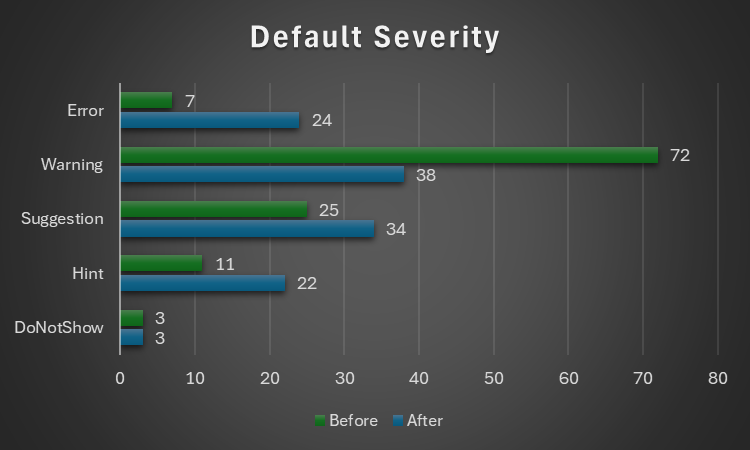
..and with the default severity levels:

Default Severityv2.5.91v2.5.92
DoNotShow33
Hint1122
Suggestion2534
Warning7238
Error724
Total118121

Notably, everything around annotations is now under Rubberduck Opportunities, and default severity levels are much more sensible; the 3 inspections disabled by default remain disabled:

  • RedundantByRef mirrors ImplicitByRef; both are valid takes, just different conventions and the more explicit one was made the default, but you can reconfigure them to match your style by enabling one and disabling the other.
  • StepIsNotSpecified mirrors RedundantStepOne; again both valid stances, this time with the less noisy one as the default configuration.
  • ShadowedDeclaration was disabled for performance reasons, if I recall correctly. Or it’s something about some difficult false negative situations making it somewhat too unreliable or experimental to ship enabled by default.

This clean-up touched every single inspection, and in the process the way to localize the resources has been standardized, which should fix the annoying partly-localized labels in some inspection results.

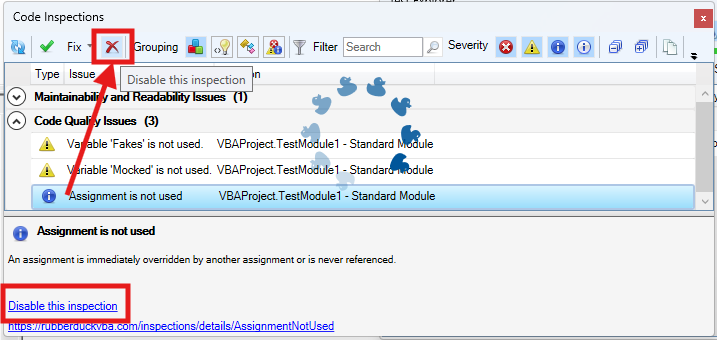
The inspection results toolwindow gets a new disable this inspection button right next to the Fix menu, which should make it easier to disable an inspection altogether with a single click, by selecting any of its results in the grid.

The “disable inspection” command remains available as a link/button in the bottom panel, but now also as a more prominently visible button on the main toolbar. Note that there is no confirmation prompt for this action for now.

Unit Testing

This is a very, very exciting release for the unit testing feature!

Performance Enhancements

Keeping the Test Explorer UI updated with a constantly changing source collection was taking a serious toll on the UI thread, incidentally the only one available for running VBA code. Thanks to a quick PR by contributor tommy9, the explorer now leverages WPF features that improve the situation.

Projects with a lot of tests can still significantly speed up their execution by hiding the toolwindow and selecting Run all tests from the Rubberduck menu. If the main thread isn’t busy drawing a UI element, it’s free to run the instructions of a test procedure.

Moq+VBA

Seven long years after the initial pull request was opened, it’s finally merged and ready to start a little revolution in the VBA unit testing world.

There are important limitations: user code cannot be mocked after it’s been modified, and the setup of ByRef parameters may not always work correctly, but the bulk of it is close enough (and has been for a long time) to be release-worthy. Part of what took so long was that we wanted to ship the full feature working exactly as intended, but there are some serious technical roadblocks and between entirely dropping a 7 years old pull request and merging it anyway, … I’m going with the merge. Perfect is the enemy of good, they say.

What’s happening here is nothing short of pure wizardry: we’re turning arbitrary COM objects into .net ones, and then we translate configuration calls written in VBA into .net expressions that literally get compiled and invoked on the fly to call the non-generic methods offered by Moq 4.8 (getting a bit old, but we’ve never had anything like this in VBA).

In other words, unit testing with Rubberduck now empowers you with quite a large part of what only becomes possible with a real mocking framework, which this is.

The mocking API is currently documented in the wiki, but here’s the crux of it… it’s a game changer:

    'arrange
    Dim Mock As Rubberduck.ComMock
    Set Mock = Mocks.Mock("Excel.Application") 'here we create a new mock using the Excel.Application progid
    'then we configure our mock as per our needs...
    Mock.SetupWithReturns "Name", "Mocked-Excel"
    Mock.SetupWithCallback "CalculateFull", AddressOf OnAppCalculate
    Dim Mocked As Excel.Application
    Set Mocked = Mock.Object 'ComMock.Object represents the mocked object and always implements the COM interface it's mocking
    'act
    'just making sure the mock works 🙂
    Debug.Print Mocked.Name
    Mocked.CalculateFull
    'assert
    'use the ComMock.Verify method to fail the test if a method that was setup was not invoked as per the test's specifications:
    Mock.Verify "CalculateFull", Mocks.Times.AtLeastOnce


There’s only a handful of simple objects to work with, and the API is clean, unambiguous, intuitive. The example above illustrates the enormous power that’s now in your hands by mocking the Excel.Application interface.

The COM mock lets you access the proxy object to pass it around as a surrogate implementation for a dependency that would otherwise compromise the “unit” part of it being a “unit test”; it’s a class type that’s spawned into existence from its definition, for which you can setup any member call in a test. Here we make the `Name` property return a different value just because we can, and when the macro invokes the `CalculateFull` method against this mock instance, rather than awaiting a full application-level compute you can simply verify that the method was invoked, or run a callback procedure (elegantly passing it to the API with the `AddressOf` operator) that can be parameterized if you need to accordingly alter some state.

I’ll write a whole article dedicated to this API soon, but together with the Fakes API, this really takes the Rubberduck unit testing feature to the next level (code coverage would be the next one). As long as you can identify the dependencies in your code (and come up with a way to inject them from the caller), you can now write a test that abstracts them away.

Other Tweaks

The Unassigned variable usage inspection will now honor the out prefix by convention, meaning it will no longer issue false positives when a variable is assigned by another procedure via a ByRef argument, as long as it’s named accordingly with an “out” prefix.

The About box will now mention “Win11” for Windows builds above 22000, even though the major version says 10. This was likely related to Rubberduck using an ancient .net Framework API to retrieve this OS version information.

Renaming an enum member in a way that requires the constant to be qualified, will now correctly use the enum type name rather than the name of the containing module, which was an edge case that could cause headaches and break the code.


What about v3?

If things had gone smoothly, you would know by now. They obviously haven’t, and not much has moved on that front since last May or so. I’m not abandoning the project, but building an entire editor client and a language server is honestly much more than I can chew at the moment, for multiple reasons… twinBASIC is coming, and while a commercial offering, it’s a VB6/VBA language server and compiler, and it reckons the whole editor part is already a solved problem. Rubberduck 3.0 was going to reinvent that wheel, which would have been a huge distraction.

So RD3 is going to be re-scoped a bit: the planned VBIDE integration / add-in part remains of course, but instead of making an entire editor from scratch, we’ll integrate into an existing, modern one that’s already an extensible LSP (Language Server Protocol) client, much like Visual Studio Code (but no, it’s not going to be VS Code). This instantly knocks off (well, removes outright) a gigantic, milestone.

With this v2.x release, the backlog of pending pull requests is finally cleared. 950+ open issues remain in the Rubberduck repository, but very few are actual unresolved bugs or realistically implementable feature ideas. Expect additional pull requests for missing translations, minor fixes and UI/UX enhancements, but the 2.x life cycle is now essentially completed… and it was about time: the technology used for building Rubberduck has evolved a lot in the last decade, with much of it either deprecated, or on the brink of falling out of official long-term support from Microsoft, which is making it harder and harder to easily and successfully build Rubberduck, hoping with fingers crossed that nothing breaks at every dependency update.

I bet VBA will outlive .NET Framework 4.8.1 LTS, which is non-ironically very funny to me… but for Rubberduck to keep moving forward, making the move from the now ancient .NET Framework over to current technology is inevitable – and development on v3 has already knocked that critical milestone, too.


Afterthoughts

I want to stop spreading too thin and actually finish the website now (as you can see, …the thing is falling apart!), and then with Rubberduck 2.x in its current state (more or less), I can finally draw a line and know exactly what v3.0 needs to be. My priorities have shifted quite much since 2021 for many reasons, and Rubberduck and the blog and my online presence in general basically had to hit the brakes. Life happens… doesn’t it.

I’ll always write code as a hobby, as I’ve done ever since I found out about programming. But I also played (badly) some guitar as a teen, and carried a few harmonicas with me to the Microsoft MVP Global Summit in 2018 and 2019 (the two I attended before they went virtual during the pandemic); these days I feel like I could write about the music theory I’ve learned since, or perhaps how to configure the reed gaps on a 10-hole diatonic, standard Richter-tuned harmonica to make it easy to play the hidden overblow notes. I haven’t been paid to maintain a line of VBA code for a very long time now, and I’ll always love it but I can’t say it’s my GoTo language anymore, but it’s all right – Rubberduck isn’t written in VBA anyway. But it’s becoming hard to find inspiration to write about some random VBA things, especially since I’ve stopped participating on Stack Overflow. I stopped, because they basically made an agreement with OpenAI and essentially stole (with a unilateral move in violation of the agreed-upon license) the volunteer work and helpful knowledge-dumps of tens of thousands of people (myself included) to train a… chatbot and make billions off of these people’s work, and then take art and reduce it a prompt.

I mean I get it, it’s fun. But it’s a very steep cost just for something that’s just innocent fun. This is the first and last AI-generated image you’ll ever see from me on this blog.

Perhaps I’m just turning into an old man screaming at a cloud (brought to you by AWS!), but… look, it doesn’t matter that you can prompt a machine to play some harmonica for you: you’ll never, ever, ever experience any AI-generated slop like when you’re actually playing the blues and counting that I-IV-V progression over these 12 bars. Same on guitar. Same on drums. Same with code.

State as a Service

Say you have a worksheet that contains a table with various settings, or options to run some macro with. Whatever the macro does, whatever it uses these values for, it must somehow solve this problem: how to get these values out of the worksheet and into the program?

We have a ListObject to play with, and since the table is in a specific worksheet, that’s the worksheet module we’re going to be editing. Since the very existence of that table matters for the rest of whatever this macro ends up doing, we’re going to make it clear it’s not an accident by making it a property of the worksheet (class) module – something like this:

Private Const TableName As String = "Table1"

Public Property Get SettingsTable() As ListObject
  Static Value As ListObject
  If Value Is Nothing Then
    On Error Resume Next
      Set Value = Me.ListObjects(TableName)
    On Error GoTo 0
  End If
  Set SettingsTable = Value
End Property

Property Get procedures usually do not raise an error – here if the table doesn’t exist the property will return Nothing, which should cause the calling code to blow up with error 91, and this would be reasonably expected behavior in this case. The Static local stands in for a module-scoped variable declaration that would be needed if the property had a setter procedure; because it’s only needed in one place, we can declare it locally and retain the module-scoped behavior with the Static keyword.

“Static” in VBA basically means “shared”, and “Shared” in VB.NET means what “static” means in essentially every other language with such semantics. Static as a scope modifier in .NET means a member belongs to the type (as opposed to an instance of the type in question), but in Classic-VB it is used for declaring local variables that retain their value between procedure calls, and if used as a modifier at procedure level it makes all locals behave as such… which [very likely] isn’t a good idea.

So we have now given ourselves access to the table, and we can just do Sheet1.SettingsTable to access it from anywhere.

But what if we don’t want that? If we know the settings each have a unique name and have a value that might be a String, a Double, a Date, or a Boolean. The table might just as well be empty for now, anyway.

If we don’t formalize access to the settings, then every place that needs them might be doing things differently! Imagine the chaos if sometimes an option is retrieved with Application.VLookup, elsewhere with a loop over SettingsTable.Rows, and then another one could be getting the value with an offset from the result of SettingsTable.DataBodyRange.Find, and there’s another couple of different but not always equivalently dangerous or misguided ways to go about retrieving a value from that table, and there’s no need to have all of them around.

We could write a function that accepts the name of a setting and returns a Variant holding the associated value if it exists, but what if we need to get the value multiple times, we’re going to read it off the worksheet every time?

Writing to a Range is perhaps the most expensive thing a macro can do, but reading anything from one comes close. In fact, a macro that performs well is usually a macro that limits its interactions with worksheets and the …entire Excel object model.

What we want is a method that iterates the table rows once, yielding an OptionValue class instance for each setting value. So we add this new class module and define an OptionValue class with a Name (String) and a Value (Variant) property.

But then if we call that method every time we want to get a setting value, things are going to be much worse than if we just used Application.VLookup every time, so what gives?

Grabbing every row of that table and turning them into as many OptionValue instances is an action, it wants to be a verb. Things we do with any kind of state are very often well described with a method’s name that starts with a verb, and that’s great already (especially if the rest of the name is actually somewhat descriptive), but a free-floating verb is up for grabs by anyone.

So we’re going to encapsulate it by making that method a member of a class for which SettingsService might be a good name: it’s a service that has the means to abstract away the worksheet and only expose OptionValue objects, and with it the rest of the code no longer needs to deal with the nitty-gritty details of how these objects come into existence, or how long they’ve been around.

Because we can write this class in such a way that we read the settings once from the worksheet (say, in the Initialize handler of the class itself), cache them in a private keyed collection (or private dictionary), and as long as our instance is alive we can return the cached option values whenever someone asks for them, and then they’ll be getting them without needing to hit the worksheet.

By adding an indexed property, we can even have a default member that makes sense, and the rest of the code can read its configuration like this:

Dim Settings As SettingsService
Set Settings = New SettingsService

If Settings("SomeSetting") Then
  Debug.Print "SomeSetting is ON"
Else
  Debug.Print "SomeSetting is OFF"
End If

Settings(“SomeSetting”) stands in for so many things here, all of which would distract from what this macro is supposed to be doing, however working with Variant like this is annoying, and the use of default members is abstracting away mechanics that we’d usually rather be explicit about, so we should instead expose typed methods, so we know (we/us, but also the compiler and Rubberduck here) what actual types and members we’re dealing with:

Dim Settings As SettingsService
Set Settings = New SettingsService

If Settings.GetBoolean("SomeSetting") Then
  Debug.Print "SomeSetting is ON"
Else
  Debug.Print "SomeSetting is OFF"
End If

Where GetBoolean being a method/function rather than a property should make us feel much better about throwing errors: if the setting doesn’t exist, we blow up. If the setting exists but its Variant subtype isn’t Boolean then we probably want to blow up rather than return gibberish. If it exists and it’s of the expected data type, we return the setting value, converted to an actual Boolean.

That means SettingsService also needs GetDateGetDouble (and maybe GetInteger), and of course GetString, leaving the Variant values completely encapsulated in the service: callers don’t need to care about any of that, and that’s neat.


There is no Worksheet

The only thing that needs to do anything with SettingsSheet is the SettingsService. Nothing else needs to access it for any reason whatsoever, because we have a service that fully abstracts it away, so it might as well not be there.

And the macro should still work, assuming it knows how to deal with and recover from a missing setting value.

Settings could be moved to a flat file, another workbook, or a database, and only one method would need to change: the one that’s reading and caching the settings from the worksheet, would instead be connecting and querying a database – and would still only need to hit it once.

And none of anything else would need to change, because it’s all completely yielding that responsibility to this service.

Compare to what it would be like to change inline VLookups and Range.Find calls (wherever they are) to read from another source, and you can quickly see the benefits of having sane abstraction levels.

Code that desperately wants to control how everything is done at the lowest level of detail, is tedious and heavy. It’s hard to tell what the role of such a procedure is, because too many things are going on and the signal gets drowned in noise.

There doesn’t need to be a service class, or even an OptionValue class: any distinct procedure scope that’s clearly responsible for retrieving a valid setting value is a good step forward. But moving the state into an object makes it easier to control its lifetime, and by encapsulating behavior we clean up the calling modules the same way extracting procedure out of a larger scope cleans up that larger scope. It reduces the cognitive load and complexity by moving away code that’s concerned with the peripherals of any given macro’s purpose, and thus increases the cohesion of the macro’s module because things that aren’t directly related to what the macro is specifically responsible for, are simply elsewhere, where they belong.

Typed Arrays Must Die

Haha. Yeah, no, I mean, really. Let me explain.

Variant is Awesome

A lot has been written about why Variant should be avoided whenever a more specific data type can be used instead. Indeed it makes little sense to use a Variant (explicit or not) when you could be working with a Long integer, a Date, or a String instead. That’s true for all intrinsic data types.

For object types, using a Variant in place of a specific class interface makes any call against it inherently late-bound, meaning it can only be resolved at run-time, because the actual class/interface type is not known at compile-time… and that’s why the VBE won’t be showing any member/completion list or parameter info for anything this Variant could be used for. Definitely no good, besides Object is a better option for explicit late binding.

Wait I thought you said it was awesome?

Totally. See, its nature makes it the perfect data type to return for any Excel UDF (user-defined function): when the function succeeds, it can return a different variant subtype than when the function fails, so an error-handling subroutine in a UDF can make the function return an actual Variant/Error value to the worksheet and yes, that’s awesome.

But wait, there’s more!

Arrays. Variant is awesome for arrays – because typed arrays must die.


Ok. What is a Typed Array?

It’s one of those language quirks that make VBA so… I’ll say adorable.

By “typed” I mean an array that’s declared as such, so any old “array of strings” would be it:

Option Explicit
Private DynamicallySizedArray() As String
Private FixedSizeArray(1 To 10) As String

The distinction between fixed and dynamically sized arrays is important in the language specifications, but let’s just take note of the fact that the syntax asks that we specify the array bounds right after the identifier name.

This is important, because As String(10) is a syntax error, not an array.

Same when you declare a parameter:

Private Sub DoSomething(ByRef Values() As String)
End Sub

Note the explicit ByRef modifier: arrays can only ever be passed by reference. Declaring this parameter ByVal would be a compile-time error, and this has interesting implications once we start considering whether and how these arrays can get assigned to.

Because the value parameter of a property is always passed by value (even if it says ByRef!), typed arrays are immediately problematic with property definitions:

Public Property Let SomeValues([ByVal] Values() As String)
End Property

And what if you wanted to return a typed array? It would look something like this:

Public Function GetSomeValues() As String()
End Function

Note that specifying array bounds or string length would be illegal here, and that because this is a member signature the sets of parentheses right after the identifier name denotes the parameter list and has to be included even when there are no parameters to declare.

I mean it’s for a lot of good and valid reasons, but the bottom line is, the syntax is inconsistent and confusing… and that’s just how bad it is at compile time. It gets worse.

ReDim

I need to talk about ReDim while I’m here. Somewhat recently, I was working on the RD3 type system and went on to implement ReDim for the array types, and I was surprised (not really 😅) at how much VBA defers to run-time. You’ll get a compile error for trying to ReDim a With block variable or a ParamArray parameter array value, but all these are run-time errors with the Preserve modifier specified:

  • Attempting to change the number of dimensions of the array
  • Attempting to change the lower boundary of the array
  • Attempting to change the upper boundary of a dimension that isn’t the last dimension of the array

Can’t assign to array

A fixed-size array can be assigned to if the value has the same number of dimensions, that the dimensions are the same size, and all the values are the default value for the declared type. A resizable array can be assigned to if… it has no dimensions.

This context-dependent behavior is something that either occupies mental space, or causes problems that the compiler will not detect until it’s too late (although, RD3 diagnostics might change that).


Variant/Array

Mental space is important when programming, because there’s a lot of things that need to be taken into consideration, and we don’t need the language itself to insert its own complexities in our code.

Variant can hold anything, including arrays. Simply put, we declare things As Variant and use a pluralized identifier name: ByVal Things As Variant.

Suddenly, working with arrays in VBA becomes much simpler – because a Variant/Array does behave exactly as one would expect: it’s all pointers underneath, so the difference is subtle, but by adding just one “layer” of pointer indirection by “hiding” our array behind a Variant, we can do everything we can otherwise do with an array, and we can write function signatures without thinking twice about where to put the parentheses.

Public Function GetSomeValues() As String()
End Function

Becomes:

Public Function GetSomeValues() As Variant
End Function

Because it’s behind a Variant, we’re now free to pass arrays around as we please – of course no array data actually goes anywhere, it’s the pointers we’re moving around, in a way that’s quite similar to how objects (pointers) are passed around.

So when you pass a Variant by value, you’re passing a copy of a pointer that says “your array is over here”. Exactly like an object reference, in fact.

Without the Variant wrapping around the array, when we try to pass it by value it’s the entire literal array we’d be copying, and VBA refuses to do this, and forces arrays to be passed by reference.

In other words shoving arrays into a Variant makes them get passed as references regardless of whether we’re doing this ByRef or ByVal, which is exactly what VBA wants.

Private Sub DoSomething(ByVal Values As Variant)
End Sub

It’s also what we want, because our mental concept of passing an array to a procedure works like this too: if we simply accept the fact that it’s a pointer that we’re actually passing, then the rules around ByRef/ByVal remain relatively simple and there is no need to worry about code that compiles but might blow up at run-time, because when we assign the array pointer we’re assigning to a Variant and not an array, so there is no restriction here, it “just works”.


Conclusions

Arrays are extremely useful in VBA, but using them at the abstraction level they were originally intended to be used at is full of traps and caveats that make them difficult to work with. By working with Variant instead, we’re still dealing with arrays, but we’re no longer dealing with the restrictions that are inherent to array variables.

So there, it’s not that typed arrays must die, it’s just that arrays in VBA are much less irritating when VBA doesn’t know it’s looking at one.

Declaring and Using Variables in VBA

Among the very first language keywords one comes across when learning VBA, is the Dim keyword; declaring and using variables is easily the first step one takes on their journey away from the macro recorder.

About Scopes

Before we can really understand what variables do and what they’re useful for, we need to have a minimal grasp of the concept of scoping. When you record a macro, the executable instructions get written for you inside a procedure scope that’s delimited with Sub and End Sub tokens (tokens are the grammatical elements of the language, not necessarily single keywords), with the identifier name of the macro after the Sub keyword:

Sub DoSomething()
    ' executable code goes here
End Sub

Exactly none of the above code is executable, but compiling it creates an entry point that the VBA runtime can invoke and execute, because the procedure is implicitly public and as such, can be accessed from outside the “Module1” module it exists in (with or without Option Private Module). In other words the above code could tell us explicitly what the scope of the DoSomething procedure is, using the Public keyword before the Sub token:

Public Sub DoSomething()
    ' executable code goes here
End Sub

If we used Private instead, then Excel (or whatever the host application is) could not “see” it, so you would no longer find DoSomething in the list of available macros, and other modules in the same VBA project couldn’t “see” or invoke it either; a private procedure is only callable from other procedures in the same module.

Standard modules are themselves public, so you can refer to them from any other module in your project, and invoke their public members using the member access operator, the dot:

Public Sub DoStuff()
   Module1.DoSomething
End Sub

Because public members of public modules become part of a global namespace, the public members can be referred to without an explicit qualifier:

Public Sub DoStuff()
    DoSomething
End Sub

While convenient to type, it also somewhat obscures exactly what code is being invoked: without an IDE and a “navigate to definition” command, it would be pretty hard to know where that other procedure is located.

The global namespace contains not only the public identifiers from your VBA project, but also all the public identifiers from every referenced library, and they don’t need to be qualified either so that’s how you can invoke the VBA.Interaction.MsgBox function without qualifying with the library or module it’s defined in. If you write your own MsgBox function, every unqualified MsgBox call in that project is now invoking that new custom function, because VBA always prioritizes the host VBA project’s own type library over the referenced ones (every VBA project references the VBA standard library and the type library that defines the COM extension and automation model for the host application).

But that’s all going outward from a module: within a module, there are two levels of scoping: module level members can be accessed from anywhere in the module, and procedure level declarations can be accessed from anywhere inside that procedure.

Module-level declarations use Public and Private modifiers, and procedure-level ones use the Dim keyword. Dim is legal at module level too, but because Private and Public are only legal at module level (you can’t use them for procedure scope / “local” declarations), Rubberduck encourages you to use Dim for locals only.

For example a variable declared in a conditional block is allocated when the stack frame is entered regardless of the state when the condition gets evaluated, and a variable declared inside a loop body is the same variable outside that loop, and for every iteration of that loop as well: there is no “block scope” in VBA.

Non-Executable Statements

Procedures don’t only contain executable instructions: Dim statements, like statements with Private and Public modifiers, are declarative and do not do anything. You cannot place a debugger breakpoint (F9) on such statements, either. This is important to keep in mind: the smallest scope in VBA is the procedure scope, and it includes the parameters and all the local declarations of that procedure – regardless of where in the procedure body they’re declared at, so the reason to declare variables as you need them has more to do with reducing mental load and making it easier to later extract a method by moving a chunk of code into another procedure scope. Declaring all locals at the top of a procedure often results in unused variables dangling, because of the constant up-and-down, back-and-forth scrolling that inevitably happens when a procedure eventually grows; the further a variable is out of its context, the more it becomes a liability.

Const statements (to declare constant values) are also legal in local/procedure scope, and they’re identically non-executable; the same applies to Static declarations (variables that retain their value between invocations).

ReDim statements however are executable, even though they also count as a compile-time declaration – but they don’t count as a duplicate declaration, so the presence of ReDim doesn’t really justify skipping an initial Dim declaration.

Explicitness as an Option

Not only access modifiers can be implicit in VBA; the language lets you define a Variant variable on the fly, without a prior explicit declaration. If this behavior is practical for getting the job done and will indeed work perfectly fine, it’s also unnecessarily putting you at risk of typos that will only become a problem at run-time, if you’re lucky close enough to the source of the problem to hunt down and debug. By specifying Option Explicit at the top of every module, the compiler will treat implicit declarations as compile-time errors, telling you about the problem before it even becomes one.

Option Explicit has its limits though, and won’t protect you from typos in late-bound member calls, where invoking a member that doesn’t exist on a given object throws error 438 at run-time.

When to Declare a Variable

There are many reasons to declare a variable, but if you’re cleaning up macro recorder code the first thing you’ll want to do is to remove the dependency on Selection and qualify Range and Cells member calls with a proper Worksheet object.

For example before might look like this:

Sub Macro1
    Range("A10") = 42
    Sheet2.Activate
    Range("B10") = 42
End Sub

And after might look like this:

Public Sub Macro1()
    Dim Sheet As Worksheet
    Set Sheet = ActiveSheet
    Sheet.Range("A10") = 42
    Sheet2.Activate
    Sheet.Range("B10") = 42
End Sub

The two procedures do exactly the same thing, but only one of them is doing it reliably. If the Sheet2 worksheet is already active, then there’s no difference and both versions produce identical output. Otherwise, one of them writes to whatever the ActiveSheet is, activates Sheet2, and then writes to that sheet.

There’s a notion of state in the first snippet that adds to the number of things you need to track and think about in order to understand what’s going on. Using variables, exactly what sheet is active at any point during execution has no impact whatsoever on the second snippet, beyond the initial assignment.

It’s that (global) state that’s behind erratic behavior such as code working differently when you leave it alone than when you step through – especially when loops start getting involved. Managing that global state makes everything harder than necessary.

Keep your state close, and your ducky closer, they say.

Set: With or Without?

Not being explicit can make the code read ambiguously, especially when you consider that objects in VBA can have default members. In the above snippets, the value 42 reads like it’s assigned to… the object that’s returned by the Range property getter of the Worksheet class. And that’s weird, because normally you would assign to a property of an object, not the object itself. VBA understands what it needs to do here, because the Range class says “I have a default member!” and that default member is implemented in such a way that giving it the value 42 does exactly the same as if the Range.Value member was being invoked explicitly. Because that behavior is an implementation detail, it means the only way to know is to read its documentation.

The Set keyword modifies an assignment instruction and says “we’re assigning an object reference”, so VBA doesn’t try to check if there’s a default member on the left-hand side of the assignment operator, and the compiler expects an object reference on the right-hand side, …and then only throws at run-time when that isn’t the case – but because this information is all statically available at compile-time, Rubberduck can warn about such suspicious assignments.

So to assign a variable that holds a reference to a Range object, we must use the Set keyword. To assign a variable that holds the value of a Range object, we must not use the Set keyword. Declaring an explicit data type for every variable (meaning not only declaring things, but also typing them) helps prevent very preventable bugs and subtle issues that can be hard to debug.

As SomethingExplicit

Whether Public or Private, whether local or global, most variables are better off with a specific data type using an As clause:

  • Dim IsSomething
  • Dim SomeNumber As Long
  • Dim SomeAmount As Currency
  • Dim SomeValue As Double
  • Dim SomeDateTime As Date
  • Dim SomeText As String
  • Dim SomeSheet As Worksheets
  • Dim SomeCell As Range

Using an explicit data/class/interface type, especially with objects, helps keep things early-bound, meaning both the compiler and static code analysis tools (like Rubberduck) can better tell what’s going on before the code actually gets to run.

We can often chain member calls; the Worksheets collection’s indexer necessarily yields a Worksheet object, no?

Public Sub Macro1()
    ActiveWorkbook.Worksheets("Sheet1").Range("A1").Value = 42
End Sub

If you manually type this instruction, you’ll notice something awkward that should be unexpected when you type the dot operator after Worksheets(“Sheet1”), because the property returns an Object interface… which tells VBA it has members that can be invoked, but leaves no compile-time clue about any of them. That’s why the Range member call is late-bound and only resolved at run-time, and because the compiler has no idea what the members are until the code is running, it cannot populate the completion list with the members of Worksheet, and will merrily compile and attempt to invoke a Range member.

By breaking the chain and declaring variables, we restore compile-time validations:

Public Sub Macro1()
    Dim Sheet As Worksheet
    Set Sheet = ActiveWorkbook.Worksheets("Sheet2")
    Sheet.Range("A1").Value = 42
End Sub

When NOT to Declare Variables

Variables are so nice, sometimes we declare them even when we don’t need them. There are many valid reasons to use a variable, including abstracting the result of an expression behind its value. Assuming every variable is assigned and referenced somewhere, there are still certain variables that are always redundant!

Objects are sneaky little things… not only can they have a default member that gets implicitly invoked, they can also have a default instance that lives in the global scope and is always named after the class it’s an instance of.

Declaring a local variable to hold a copy of a reference to an object that’s already globally accessible, is always redundant! Document modules (in Excel that’s ThisWorkbook and the Worksheet modules) and UserForms always have such a default instance:

Public Sub Macro1()
    Dim WB As Workbook
    Set WB = ThisWorkbook 'redundant and obscures intent!
    Dim Sheet As Worksheet
    Set Sheet = Sheet1 'redundant, just use Sheet1 directly!
End Sub

Sprinkle Generously

Variables are a simple but powerful tool in your arsenal. Using them enhances the abstraction level of your code, practices your brain to stop and think about naming things, can help prevent binding errors and remove implicit late-binding / keep your code entirely visible to the compiler and Rubberduck. Used wisely, variables can make a huge difference between messy and redundant macro-recorder code and squeaky-clean, professionally-written VBA code.

“I’m not a programmer”

If you’re an accountant, a sales analyst, or in any other office position where writing VBA code helps you do your job faster, you may have uttered the words “I’m not a programmer” before, and that wouldn’t have been wrong: once the code is written, you’d tweak it every once in a while to fix a bug here or there, and then move on to do your actual job as soon as things look like they work as they should. If you’re finding that as weeks and months pass, you’re spending more and more time debugging that code, it might pay off to learn a bit more about how “actual programmers” do things, but be warned: it’s a bit of a rabbit hole – in a good way, but still, it goes as deep as you’re willing to go.

If you’re a consultant delivering advanced Excel solutions to your business clients, you may have thought, said, or written the same words, too. But you like your worksheets efficient, flexible, reliable, easy to maintain; over the years you’ve become an expert at dissecting and modeling a business problem into a fine solution that will live on and grow with the client. You are a “power user”, a professional, and it shows.

Writing code involves exactly the same identical problem-solving thought process: dissecting a problem into small steps, and modeling it into …a sequence of executable statements. When you use a SUM function in a worksheet, you assess whether the range of cells you’re adding up will need to grow over time, and you make sure it’s as simple as possible to add or insert a new row without breaking the integrity of the worksheet: you’re not just solving the problem at hand, you’re anticipating the extension points, facilitating them, making it harder to break things. You shade the background of cells intended for data entry, use borders around fields, conditional formatting, and data validation to ensure everything is obvious and remains consistent; you source data validation lists from named ranges pointing to a column in a table, so that adding new possible valid entries is easy as pie and requires no other step than… adding the new possible valid entries in the table. Next to another table that requires a particular sort order because it’s being used by dynamic named ranges that source data validation lists for co-dependent dropdowns, you might put up a very obvious formatted shape with an inner text that explains why that table needs to be sorted by this column then that column, and what happens to the associated validation dropdowns when the sort is broken.

See, you are a programmer. Worksheets are programs – even more intensely so with the amazing new features coming to Excel: dynamic arrays are changing the entire paradigm and turning the very thinking of worksheet functions into something that really isn’t very far from the mindset you’d have in functional programming.

So why is it that VBA code is so often seen as merely a sequence of executable statements then? Why is it that “it works, therefore it’s good enough” is so often where the bar is? You could have made that data validation list work off a standard range of cells in some (hidden?) column somewhere off-screen, and that would have worked too… but “well, it works” isn’t where the bar should be at, and you know it.

Depending on what the code needs to do, VBA code can become much more than just a macro once you start not just solving the problem at hand, but also anticipating the extension points, facilitating them, making it easier to maintain, and harder to break things. If writing code is part of what you do for a living, then you might as well write good code. Good code isn’t just code that works. It’s code that adheres to a number of language-agnostic principles and modern-day guidelines that even plain procedural code should follow. It’s code that Joe from accounting probably couldn’t have written by themselves, but that they could likely read and understand (at least at the higher abstraction levels), and if they know enough VBA to be dangerous, they could likely even maintain and extend it!

I’m not saying every piece of VBA code needs OOP and dependency injection and inversion of control and 20 class modules with 1 method each ought to get involved in sorting a ListObject. Just that maybe, VBA code would be a little less dreadful to the eventual IT staff inheriting it, if instead of saying “I’m not a programmer”, we cared about the quality of our code in the exact same way we care about the quality of our worksheets and dashboards, or Access databases and reports, or whatever it is that we’re doing.