Last time I wrote here, the language server was just barely starting to be able to communicate with the editor client, and the editor was displaying content but while content could be modified, it wouldn’t notify the server about it yet. Since then a lot has happened in both the editor client and the language server, and the server is now actually parsing the workspace/project files, issuing some diagnostics (syntax errors (LL) and SLL parser failures), and it returns folding ranges when the client asks for them.
The editor itself has seen a few tweaks; the “ducky button” idea might have been superseded by a new markers margin that could conceivably anchor context menus for code actions.
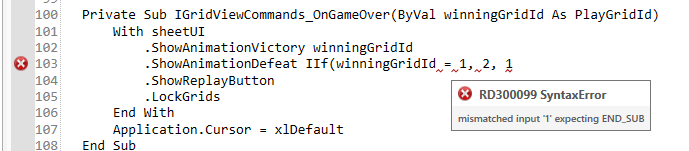
The first diagnostics issued by RD3 originate directly from the parser itself: SLL prediction mode failures are deemed hints, and LL mode failures are either syntax errors… or grammar bugs.
I’m happy with just something showing up at this stage; icons in the margin render on the correct document line as it’s scrolled up and down, but they don’t refresh properly on document change yet. Similarly, additional work is going to be needed around foldings, but so far it’s looking great and everything that should work, does.
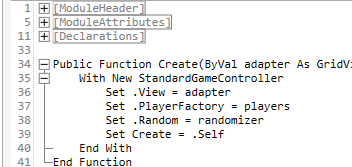
Foldings are going to work, too, including ranges using custom @Region/@EndRegion annotations!
Settings
The settings dialog has received quite a bit of attention lately, and I’d almost consider it release-ready now. Features include:
Back/forward navigation buttons
Filtering the current view
Searching across all settings
Reactive layout that rearranges tiles as the dialog is resized
Expand any setting group to a full-page view
Asynchronous validation for URI settings (both file:// and http/s:// URIs)
Opening the dialog for any particular setting key, which is how the cogwheel icons everywhere are going to be bringing up the settings dialog.
Typing in the search box automatically filters items in the current view; the “search” command creates a new view with the search results from all setting groups. Navigation commands are featured on the left, and a reset command on the right.
The debate around whether settings should automatically be saved to disk as they are modified has been settled: we drop the Apply button, and keep all changes in the UI until the dialog is okayed, which means the settings dialog of RD3 is going to behave very similarly to the one in RD2, except we’re also dropping the Apply button, leaving just Accept and Cancel.
Each modified setting value is listed in the details of a confirmation message that is shown after settings are serialized to the file system, unless the message is disabled, of course. Missing resource keys have since been added ☺️
Search results include a label that says which setting group it belongs under, which is great because lots of similarly-purposed settings have similar names and descriptions:
Even with identical names and descriptions, you know exactly what you’re looking at because the parent setting group is shown at the bottom right of every search result.
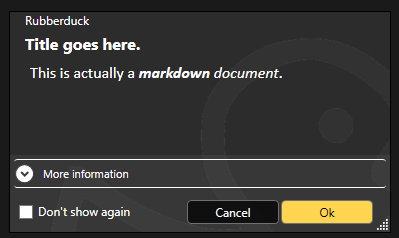
Another thing of note, is that RD3 has now dropped its custom markdown-enabled WPF message box in favor of native task dialogs:
Task dialogs have everything we need: custom buttons, icons, captions, a checkbox in the footer, …a footer, collapsible details, and more.
This move takes a whole entire headache away by outright eliminating a potential source of annoying bugs, while ensuring RD3 messages are reliably shown, and show everything we need them to show.
Each message shown in RD3 is going to have an associated key, and this key is how “do not show this message again” is going to be saved as a setting value under the General/DisabledMessageKeys setting (a setting whose value is a list of strings).
Server Side
Work on the server side has taken a bit of a backseat while I was working on the client, so while it’s parsing all code files in a workspace/project, collects and resolves a type for all member symbols in both referenced libraries and the current workspace, and even issues diagnostics for syntax errors and SLL failures, that’s still not enough to even begin to think about feature parity with Rubberduck 2.x; additional work is needed to collect and resolve hierarchical symbols (i.e. everything inside procedure scopes) and issue semantic tokens to the editor client, which would enable semantic colorizations aka syntax highlighting, and on the server side unlocks the level of static code analysis we need. We could technically already have client-side, regex rule-based highlighting, but knowing that it’s 1) wholly insufficient and 2) bound to be overwritten by the semantic tokens, adding it now just isn’t worth it.
Editor
The editor is now notifying the server when a document is opened, closed, or modified, but it also needs LSP wiring for when a document is saved, and well it actually needs to write the modifications to the physical workspace folder (aka “save”). The Workspace Explorer is currently showing files that exist in the workspace folder but aren’t included in the project, but there’s no command to include a file into (or exclude from) the active project, so my next task should be to do with the Workspace Explorer what I just did with the settings dialog, and revisit everything it’s supposed to be able to do (in an alpha release anyway) – and make it happen.
With the language server issuing member symbols, the editor client is now well behind in terms of what it does vs what it coulddo. Off the top of my head, the following tooltabs/features can be started now, since all the data they need is available:
Code Explorer
Object Browser
Properties
Find Symbol
As for the editor itself, its combo boxes are still empty, but with member symbols resolved we could actually populate them, including listing WithEvents variables and implemented interfaces.
Project Planning
If you’ve been following all along, you know this part isn’t my preferred one, but as you can see from the above, RD3 is quickly expanding its capabilities and will soon have so much “ready to sprint” work piled up, I won’t be able to knock it all down by myself and will have to write down a brain dump of what’s left to do and in what priority order.
I went ahead and archived last year’s Project Cucumber on GitHub, and created a new GitHub project linked to specific RD3 projects – so there’s a board for the language server with a ticket for every LSP handler it needs to implement, and then there’s a completely distinct board for the editor client, and another one for the update server, and there’s one for the addin too, and another one for an eventual RD3 subdomain on rubberduckvba.com, and so on.
And then there’s a separate project/board that’s a bug tracker that encompasses all the projects.
Next Steps
The number of things that can be worked on is increasing as the foundational groundwork solidifies, and the next step for the project is becoming more and more the next step for me; we’re reaching a point where a meaningful backlog can start being maintained and this means the next step for me has to be to come up with some documentation for what’s there, to help would-be contributors find their way in the RD3 solution. And then I’ll get back to UI work, so the next update should have some interesting screenshots!
Progress has been a bit scattered, but steady. The shell now supports theming and Rubberduck 3 will ship minimally with light/blue, light, dark, and dark/blue themes, currently essentially copied and adapted from Visual Studio and VS Code color palettes. I’ve hit a bump on the road trying to get fancy with the window chrome controls, but I’m going to be putting that aside if I don’t get to a satisfying solution soon.
Light/blue theme with an empty editor shell.Dark theme in the exact same state.Dark/blue theme mirrors VS Code’s “Abyss” theme.
With the envisioned chrome, the title bar would blend with the menu bar, and the window commands at the right would also match the theme. Obviously that’s far from a showstopper!
With theming out of the way, the editor shell looks fabulous but is still far from completed. The client area where the giant ducky outline logo is currently shown, is where the editor actually needs to have its docking panels and document tab host – the outline logo will have to be moved there if it’s to be visible at all when everything is done.
Because of license compatibility issues, the AvalonDock library which would be the natural go-to option since the actual editor tabs will be AvalonEdit controls, cannot be used. As an alternative with a compatible license, rather than developing our own docking panels and MDI layout, we’ll be using the Dragablz library and its Dockablz layout panels.
Document Types
The prototype 6 months ago only covered one aspect of the editor – the code editor. But Rubberduck 3.0 will need to have the ability to edit more than just VBA code.
In VBA a project is embedded in its host document and consists of the VBProject component modules; in RD3 a VBA project lives on disk, and Rubberduck knows what project files are to be synchronized with the VBE, but there’s nothing stopping it from being able to include additional files which don’t synchronize back to the VBE but can be useful for development.
Plain Text
RD3 will create a .rdproj (“Rubberduck Project”) file in the workspace folder. That file is going to be a plain text (JSON) file, and we want the editor to be able to open and edit it. Eventually there might be a dedicated language server that understands JSON syntax as a language (and then .rdproj files can get syntax highlighting, section folding, completion, etc.), but that will not be a priority at first – what will be, is just to ensure we can load such text files in the editor.
Markdown
Text files with formatting; markdown (.md) format is essentially today’s tech for what used to be done with RTF – in other words, they’re formatted text files, but instead of an obscure RTF syntax it’s all done with plain ASCII characters, just like on GitHub, Stack Overflow, and Jira.
And this is great news, because then having the ability to render markdown in XAML means we get to format other things that used to be strictly plain text – like message boxes:
The language server can also supply such formatted content for tooltips and parameter info, so there’s a non-zero chance @description annotations in RD3 can even honor such formatting when present in docstrings.
The editor shell will support editing and rendering markdown documents, so your project can include a README.md file that you can edit and preview directly in the editor.
It also makes a nice document type to display a startup/”welcome” tab that describes the latest features after an update, again a bit like Visual Studio does.
VBA Code
Text files that the editor understands to be Classic-VB code files (this will have to be based on their respective file extensions) that contain the code for VBProject components that may or may not belong to the workspace of the project that’s in the VBE. Because we’re working off exported files and a .rdproj tells us what libraries are referenced and where to go find what modules for that project, we can now also edit “orphaned files”, as we are no longer constrained to editing code files that belong to the host project!
.rdproj, and consequences
Among the many challenges in RD2, was the fact that we wanted to avoid cluttering our users’ files with any kind of non-code metadata. For example at one point an idea was floated around for hijacking just one single module and having it contain nothing other than commented-out project metadata. Or perhaps carrying this metadata in a file alongside the host document. None of these approaches were going to be enjoyable to use, so instead RD2 dropped the idea of having any per-project configurations, because in RD2 the host document is the single source of truth.
That’s one of the many things changing with v3.0: because the truth has moved outside of the host document and into workspace folders, we now have a per-project physical location to put Rubberduck metadata in.
If we are to hope for feature parity with 2.x, the add-in needs to tell the language server about the project, including the location of referenced libraries. In RD2 we would simply acquire the project references and proceed to extract the types and members, but the language server in RD3 knows absolutely nothing about COM and does exactly zero interop with the VBIDE – so we needed a way to pass the information along without twisting the LSP in ways that would make it impossible for clients other than the Rubberduck Editor to use our language server. Not that it’s a requirement, but the idea is to do things right, not just to make it work for our purposes: if we strictly adhere to the language server protocol (LSP) specifications, then at least in theory it would be simple to write an addin client for any other LSP-capable editor, including VSCode. It’s not a target to write such a client, but having the possibility to do it is.
So rather than coming up with a way to serialize that information and pass it to the server through custom initialization parameters (the protocol defines an “additional data” dictionary that could theoretically be used for this), the addin will generate and maintain a .rdproj file whenever it exports source files to the workspace.
This “Rubberduck Project” file will contain basic information such as the Rubberduck version, a URI for the project root, and then a URI for each library reference (or perhaps just a ProgID string? Or a GUID representing its CLSID? All of the above? 🤔 TBD) and another URI for each module in the project. This isn’t completely final because it’s pretty much just about to be implemented, but the idea would be to end up serializing to a file that would look something like this:
Of particular note are the document module supertypes, which is information RD2 manages to collect from in-process ITypeInfo pointers that the language server in RD3 isn’t going to have access to, by virtue of running in an entirely separate process.
This means the RD3 addin has the following responsibilities:
Connect/Disconnect the VBIDE host;
Import/Export modules into the VBE and workspace folders;
All debugger functionalities;
Execute Rubberduck unit tests (VBA code);
Collect any ITypeLib/ITypeInfo metadata that can be collected for a VBProject.
Start/Shutdown the Rubberduck Editor;
That’s quite a lot already, and these bullet points already make it clear that the single responsibility of the Rubberduck.dll library must encompass every single interaction with the VBIDE, including the native Office CommandBar controls.
It’s a lot already, but that’s the complete extent of it – which means RD3 connects and loads as a VBIDE addin when the VBE starts up, …but then it doesn’t need to resolve the entirety of Rubberduck at startup, which means a splash screen isn’t even warranted here because we’re completely loaded and good to go in the blink of an eye, and it’s (mostly) not even because of dotnet 7! In other words, RD3 restores the Alt+F11performance and sharpness you know and love.
The last bullet in the list is why: the VBE loads the RD3 VBIDE add-in, and uses JsonRPC messages to communicate with the Rubberduck Editor process. The editor in turn starts the language server, and each process runs in its own separate silo while running periodical “health checks” to ensure there’s still a client process on the other end – if a server loses its client, it shuts down; if a client loses its server, it can just start a new one and carry on without much disruption.
The addin becomes a lightweight launcher that extends the VBE by exposing menu commands that pop an “About” box, or start the Rubberduck Editor app. It wouldn’t be outside of its scope to also launch update and telemetry servers, and since the settings are shared between all processes, a command to bring up Rubberduck settings could be in-scope as well.
Next Steps
Work on the Rubberduck Editor is only getting started! Without thinking too far ahead, here’s what’s to come:
Window chrome controls and resize thumb
Put everything together to serialize .rdproj
“New Rubberduck Project” dialog UI
Import/export VBProject commands
Document tab host
Docking panels, side/tool panels
“Welcome” markdown document tab
Open/close text and other document types
Save, save as commands
Settings dialog UI
About dialog UI
And then that’s just what can move forward to completion in the Rubberduck Editor part without the server side – but we’ll cross that bridge when we get to the airport, as they say.
Both telemetry and update server applications have their skeletons done and can be started and debugged just like the language server.
Update Server
By running this server separately from the rest, we can get RD3 to update itself without needing to leave the VBE or close the host application and everything you’re working on: if the update server is so configured, it can tell the addin to shut down, which in turn shuts down the Rubberduck Editor, which shuts down the language server.
At that point none of the Rubberduck libraries are in use, and the update server can overwrite them with a newer version before instructing you to manually load the Rubberduck addin which again starts pretty much instantly.
This only requires that we package and ship the update server separately from the addin… kind of like how Visual Studio does.
Telemetry Server
One of the things we want RD3 to address, is just getting basic feature usage information so there’s data out there to help diagnose and prioritize any issues. Logging in RD2 is pretty extensive and verbose already, but it’s very organic and missing in some places; in RD3 logging is built into the base classes for every server-side handler, and with requests coming in asynchronously we need a better way to track what entries belong to which request, and this is exactly what telemetry logs do. The telemetry server will be fully configurable and will never transmit any PII information anywhere. As it handles telemetry events, this server serializes and enqueues telemetry payloads; the queue can then be reviewed, filtered, manually transmitted or cleared, or it can be configured to transmit periodically in batches – the receiving end will be hosted on api.rubberduckvba.com, and there’s a storage concern that may require severely limiting how much data we can keep around and aggregate (probably going to need to sample the data / reject most payloads!), but that’s a concern for another day.
Ultimately the goal is to surface the entire dataset through some explorable dashboards, charts, and tables on the website, so everyone can see what data is being collected: exactly none of it is going to be a secret.
The language server will be able to send language-level telemetry data, on top of everything else that’s useful for debugging. Aggregating this data would allow us to expose how our users are using VBA, from simple metrics like the number of modules in a project to interesting tidbits such as the average number of expressions in a conditional, or what kind of loop constructs people use the most (e.g. While…Wend vs Do…Loop), whether our users declare and fire custom events, implement interfaces, …anything we can think of, really. This obviously isn’t a priority, but it’s been on my mind ever since I heard the Microsoft Excel product team mention they haven’t got the slightest idea of what people do with VBA: seen by the right eyes this data could, ironically, eventually possibly contribute to achieving feature-parity in the VBA alternatives being developed by Microsoft… or rest the case that VBA cannot be taken away because what people do with it involves things that aren’t going to be supported in prospective so-called alternatives (looking at you, OfficeJS).
Development of Rubberduck 3.0 continues, stay tuned for updates, as I’ll be posting here all along the journey.
Things were moving pretty fast with the prototype, but moving on to the actual LSP-driven project hit a roadblock as far as actually achieving the cross-process JsonRPC communications. I put it aside for a while, hoping to get back to it later, and then summer arrived and real-life stuff kept me busy. Renovations in Rubberduck, renovations at home.
Wow time flies, pretty much six months have elapsed since the last status update, and now it’s Hacktoberfest again already! So what happened?
RPC Issues
For about five of those six months, not much moved forward, but ideas kept brewing all along, and the RPC issues have now been resolved.
So, where’s RD3 at?
Clean Start, Clean Exit
When the VBE loads RD3, the add-in starts a separate language server process and connects to it through the language server protocol (LSP), using the very same technology that Microsoft put in VSCode, via the OmniSharp libraries. When the add-in is unloaded from the VBE (whether manually or as the host application shuts down), the server receives both Shutdown and Exit notifications, and once they’re handled and the server actually shuts down we’ll be left with a clean exit every time.
Logging is implemented on both client and server sides, and while debugging the startup and initialization was a bit painful (can’t start the server from Visual Studio, and can’t hook up the debugger quickly enough to attach in time to see what’s going on), now that it’s done the server process can be attached after it starts, so we can hit breakpoints in the server code.
Net7
Perhaps the biggest achievement is that RD3 is now building with .net 7.0, save for a specific library that has to target Framework 4.8.1 because of its use of a number of COM-marshaling methods that don’t (yet?) exist in .net core: that’s the parts dealing with unmanaged memory and pointer magic, that allow RD2 to run unit tests, among other things.
Because everything else is under .net7, Rubberduck gets to leverage all the amazing enhancements that have been brought to the C# language and development platform in the past, uh, decade or so. RD3 will likely release under .net8, which has long-term support from Microsoft.
There’s a catch though: this means RD3 will not be able to run on old, officially unsupported versions of Windows – we’re forfeiting them, in favor of being able to leverage the many enhancements being made to the .net platform. At this stage it’s still unclear exactly what this means for VB6 support: for now the focus is integrating with the VBIDE in VBA, but nothing says VB6 support is being ditched – it was just simpler to exclude that one RD library from the solution for now.
Settings
One of the first pieces of Rubberduck written around this time back in 2014 – the settings I/O and modeling – has officially been axed at long last. Since forever, Rubberduck settings have been serialized to an XML configuration file. In RD3 that’s changing to JSON and much simplified abstractions. In RD2 the default settings live in an XML-encoded “Settings.settings” file that’s a pure nightmare to maintain; in RD3 defaults are moving back into the code itself (I know, it’s data, not code per se), with each serializable struct implementing a generic IDefaultSettingsProvider interface that mandates the presence of a “Default” member that returns a static instance of that settings struct (e.g. LanguageServerSettings.Default, returns a LanguageServerSettings instance with the hard-coded default values.
JSON settings is how pretty much everyone else does it, and there’s a reason for that: the format is much easier to read and manually edit. Plus we already have JSON involved with the RPC messages between client and server. XML was originally adopted because that was the format for Visual Studio’s own settings and configuration under .net Framework 4.x.. and today it’s JSON everywhere.
Rubberduck Editor
Last spring the prototype editor was being integrated into the VBE using essentially the same mechanics used in RD2 for the dockable toolwindows, just undocked and basically turned into just another VBIDE document window.
With the project now under .net7, it turns out we can now have actual WPF/XAML windows in Rubberduck, so there is no more need to implement the entire UI as user controls that are embedded inside a WinForms user control that gets injected into a native toolwindow.
The RD3 editor will let go of most of the native VBIDE integration, and live in a separate window – very much like the Power Query Editor in Excel. The only native UI components in RD3 are the Rubberduck menu items, which have been boiled down to just “Show Editor” and “About” commands, both of which will now bring up a fully WPF UI, rather than a WPF UI embedded in a WinForms dialog: the Rubberduck Editor will be its own application, and we’ll have full control over everything that happens inside that editor.
The downside (if it is one), is that we have to implement basic commands such as Copy and Paste, as well as toolwindows we take for granted, like Properties and Object Browser.
At this stage the editor shell is able to display tab documents bound to a ViewModel; tabs can be moved around, torn from the main window and dragged to another monitor, or docked inside the editor shell. I’m now working on figuring out how the toolwindows are going to work; I’d like something similar to Visual Studio, but the Dragablz library would need to be forked and updated with such capabilities… the “toolwindows” aren’t docking and don’t work in a way that would make sense in a code editor.
Workflow
This does impact the VBA dev workflow: in RD2 the single source of truth was the VBE. In RD3 that’s no longer the case, since the VBE isn’t going to contain the code that’s being edited. The single source of truth in RD3 is going to be moving to the Rubberduck Editor, and the editor will be working off code files exported to file system folders, dubbed “workspace folders”.
When the Debug/Run command is executed, the RDE will save all modified documents to the workspace, synchronize the host VBA project components to mirror it, and then the VBE takes over from that point on (RDE window will minimize itself) to compile and actually run/debug the project.
The host VBA project can also be synchronized any time you want, using the File/Synchronize command – and the editor will run a FileSystemWatcher on workspace folders, so it will detect any external changes/additions/deletions, and immediately notify the language server. If external changes are detected on a file that is opened in the editor, it will prompt to either reload the document, or keep the editor version if it has unsaved changes (thus discarding the external changes).
In RD2 you had to manually tell Rubberduck about changes occurring in the VBE, because automatically parsing on idle involved low-level keyboard hooks and since these hooks were already involved in auto completion and hotkeys, it was deemed too invasive, and ran against the basic premise of the parser, which is that we’re operating with legal, compilable code.
This all changes dramatically in RD3. Because the editor is fully managed, nothing happens in it without the language server receiving requests and notifications. Content changes synchronize in real-time, the editor receives responses with completion lists, syntax errors to highlight (squiggles!), or edits (e.g. auto-formatting etc.) made server-side that the editor immediately carries into the code pane as you type – exactly like how Visual Studio and VSCode and any other modern-day code editor that works with a language server.
The server works asynchronously and out of process, so long-running tasks can send progress notifications, and even partial responses – for example a completion list might only include names to render the list in the client, and the associated tooltips and commands might be sent a few milliseconds later.
Debugging
As was mentioned before, the one thing the RDE cannot do, is attach as a debugger to your running VBA code. When you debug, the RDE will minimize itself and leave the VBE in charge. Edit-and-continue poses a particular challenge: after a debug session, the RDE doesn’t know if anything was modified in the VBE, and its file system watchers cannot help because code doesn’t just magically export itself back to the workspace folders – so here’s what we’re looking at:
When a debug session is launched from the RDE, code gets synchronized into the VBE before it is compiled and executed;
If the RDE is re-focused and the VBE is back into edit mode (i.e. debug session has ended), the entire workspace gets refreshed with a new export from the VBE;
If the RDE is re-focused during a debug session, document tabs will be read-only and the status bar will indicate why;
If the host application crashes, or the debug session does not end with the RDE being brought back before the host application shuts down, then the single source of truth resides safely in the host document and the workspace will synchronize next time the RDE loads this project;
Any edits made to the exported workspace files during a debug session would be overwritten and lost when the session ends and the RDE is re-focused, unless source control is involved and the changes were committed – in which case the modifications can then be recovered from source control.
Breakpoints cannot be set programmatically either, so the RDE will likely not support them. Bookmarks have a similar problem, in that the VBIDE API doesn’t really let us manipulate them, however the RDE can very well have its own bookmarks system. Debugger toolwindows (immediate, locals, call stack, etc.) are also not going to be present in the Rubberduck Editor, since they’d all be useless without a debugger attached.
User Interface
Some parts of RD2 XAML markup may survive, but really the intent is to make the RDE have a consistent, pleasing, modern, intuitive, and functional user interface for all of its functionalities. Because we’re no longer confined to a WinForms/native host, key/command bindings (hotkeys) will no longer require any kind of bug-prone hooking; focus should behave much more naturally as well, and drag-and-drop is going to be a breeze with the Dragablz library. RD3 basically entails crafting an entire IDE UI from scratch, starting with the editor shell.
The RDE window features a complete menu bar (largely inspired from Visual Studio’s), an actual status bar, and the client area consists of a Dockablz layout panel hosting a Dragablz document tab container.
Some more tinkering is still needed around toolwindows, because what we get out of the box with Dragablz is not going to work for our purposes. Perhaps there’s a way to split the left and right docking areas in two so there’s a distinct drop location for toolwindows that displays them with the tabs at the bottom, but for now there’s no such thing and toolwindows are essentially just another type of document tab.
Another thing that will need attention ideally before the entire UI is done, is theming: indeed it would be sad to make our own editor from scratch without supporting light, dark, and custom themes and syntax highlighting!
Server Side
The LSP server is in place, handling server lifecycle requests and notifications. The next step is to beef up the initialization to send the server information about the project(s) loaded in the VBE, including whether it’s an unsaved new blank project or an existing one hosted in a saved document, and a URI for each library reference so the server can load them and extract all the types and their respective members.
Then we’ll need to setup the actual workspace folders and parse any code files in them – and when we’re done doing that we can send the semantic tokens to the editor to perform syntax highlighting and folding ranges, all while the server starts running diagnostics/inspections, prioritizing the documents that are opened in the editor. The client-side code for this was written in the prototyping stage, so it’s not complete but exactly how that’s going to work is already all figured out.
2023.Q4
The last quarter of 2023 is likely to see lots of progress on all fronts: with LSP in place and a working but bare-bones editor, I can see myself focusing on UI work mostly, while other contributors hop on and work on server-side processing – much of which will have to be ported from the RD2 code base and reworked to fit the new paradigms.
There is a lot of work ahead, but with the client/server communications happening, things that have been on our minds for years, are about to get very real.
I intended to write about Rubberduck 3.0 progress last December, but things snowballed during the Holidays and here we are two-three weeks later and wow, time flies! Happy New Year dear readers (belatedly, I guess), 2023 is full of promises, and there are very nice things going on that I need to take a moment and share here.
Without any further ado, let’s clear the big news.
The main issues with Rubberduck have always been:
Memory consumption: Rubberduck consumes a lot of memory in the host process.
Instabilities related to COM interop: various tear-down issues with Office CommandBar and dockable toolwindows.
Poor VBIDE extensibility tooling and editor interactions.
Logs are difficult to use, it’s not clear what is happening in response to what – even when there’s only a single instance writing to the logs. Adding more logging means making things worse.
With v3 we’re addressing these long-standing issues by taking a number of design decisions early in the development process. These decisions were weighted against their downsides and alternatives, and probably make Rubberduck the first VBIDE add-in to implement a LSP Server for its purposes.
Language Server Protocol
For a while there have been discussions among Rubberduck devs about whether implementing LSP would be a feasible thing to do. It’s a protocol that formalizes all communications between a client (an IDE) and a language server that is used in modern IDEs such as Visual Studio and VSCode; twinBASIC implements it, and Rubberduck 3.0 will implement it too.
By moving all of the language-processing aspects out-of-process into a language server, we immediately tackle memory consumption issues: most of the CPU and memory resources Rubberduck 3.0 will use, are going to be outside of the add-in/host process.
With LSP in place, Rubberduck’s objective to bring editing VBA code in the Visual Basic Editor into the 21st century feels closer than ever.
SQLite
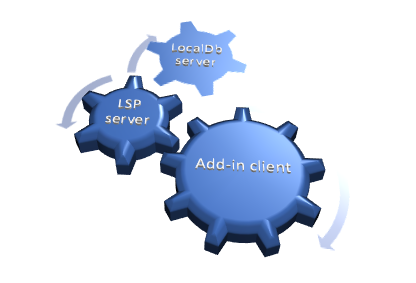
Rubberduck’s LSP implementation will be split in two processes, as the LSP server process will be a client for another server process that will host a SQLite database. SQLite is a lightweight library many applications on many platforms (including mobile!) use to persist data between sessions. The database is a local .db file, and the database engine runs in-process. Rubberduck 3.0 will host a SQLite instance in its own server process, and the LSP server process will communicate with it through JSON-RPC, the same way the add-in communicates with the LSP server.
Instead of keeping hundreds of thousands of objects in memory for quick lookups, Rubberduck will write these objects to the database, and only fetch what it needs to work, which should tremendously help reduce the memory and processing footprint of the add-in host process. Using it as a log target (instead of text files) could reduce in-process disk I/O… and replace it with socket I/O and work happening out-of-process.
Cross-Process Communication
The add-in project has no reference to the server project in the Rubberduck solution, and the calls aren’t late-bound either. What’s happening here is different, and there are implications: Remote Procedure Call (RPC) communications occur through web sockets (WS), using a port between 1024 and 5000. As a result, we need to have Windows Defender Firewall open that port for us:
A screenshot of the moment I knew the socket server worked.
Since everything is local, the port only needs private networks permission to operate. We use JsonRPC to send data through that port, so we’re streaming the bytes of human-readable, plain text JSON.
This new client/server architecture enforces a much more decoupled and robust solution.
Telemetry
Telemetry is considered a potentially controversial feature: it will be completely disabled by default and will have to be selectively opted-in explicitly, but with everything becoming asynchronous, trace logging alone often does not suffice for troubleshooting. By implementing a proper telemetry model, we’re giving ourselves the tools to track a request and all actions that stem from it, across the multiple processes.
Since the project started, the only usage data we ever had was our own biased anecdotal usage: we haven’t the slightest idea of what features are under-used, what features are clearly everyone’s favorites, what inspections are most commonly fired, what inspections are disabled, whether inspections we release disabled by default are ever enabled, etc.
Whether enabled or not, Rubberduck 3.0 will collect detailed telemetry data, and store it locally in the SQLite database, by default clearing any existing data on startup: vital debugging information is present if it’s needed.
Ok I’m opting-in, what gives?
Opting into telemetry will allow a Rubberduck client to automatically upload the telemetry data to a future endpoint on api.rubberduckvba.com (via https), where it will be persisted to a SQL Server database schema. Since there is no need for us to track any users, while still potentially extremely detailed, all telemetry data will be anonymous and impossible to track back to any particular user, computer, organization, or country. The transmitted telemetry data will only ever contain information that was explicitly allowed to be transmitted.
Time will tell how aggregated telemetry data can be used, but with enough data we (that includes you) could gain valuable insights on various points of interest:
Rubberduck feature usage statistics
LSP performance monitoring and troubleshooting
VBA language usage statistics, common issues
By transmitting some or all of your telemetry data, you’ll be helping make Rubberduck better for everyone, just by using it. However should you decide to not opt into it, we understand and respect your decision. Note that TraceTelemetry items are the trace logs, so transmitting them is exactly like sending us your log file for troubleshooting. I’ll make a separate post with all the details around pre-release time, and these features will be exhaustively documented on the website.
Progress?
Having the LSP and Telemetry models is one thing, actually implementing them is another. Last time I said I was going to be focusing primarily on the Rubberduck Editor UI, and I did for a while: the editor was progressing very well and I was making very conclusive tests with an in-process parser when I took the decision to move the parser out-of-process.
I proceeded to read the entire LSP specification and implemented a model for it. Shortly after, I realized that we were potentially going to be running multiple instances of a LSP server at once, and it dawned on me that having as many instances of the SQLite database loaded in memory was not going to be globally efficient… so I decided to pull the SQLite database into its own dedicated server process.
The whole exercise demanded a lot of movement in solution projects and namespaces, but I’m very happy with the results: everything is in its place, and the actual add-in project is pretty much empty!
I started with the server implementation that’s the furthest from the add-in: the SQLite database server. This server speaks to LSP through JSON-RPC, but while Language Server Protocol formalizes how the add-in and the LSP talk to each other, I don’t have such a formal protocol for communications between the LSP and the database… so I’m basing most of it on what I learned with LSP.
How it’s going to work: you start Excel and hit Alt+F11 to bring up the VBE. The Rubberduck add-in gets loaded and starts up, then starts a LSP server process and initializes it. In turn the LSP server starts, and attempts to locate the database server. If the database process isn’t found, the LSP server starts one. The Excel/VBE/Rubberduck client process owns the LSP server process, but nobody owns the database server: when the database has disconnected its last client, it automatically shuts down.
The servers (both database and LSP) are console applications that run silently as background processes. In order to facilitate configuring them, and viewing/reviewing their respective inputs and outputs, I’ve written a small client console application that shows the server console content, lets you easily export it to text files or copy it to the clipboard, etc.
Screenshot from before the DataServer UI was moved into its own LocalDbClient project.
The LSP client console application will have an additional Telemetry tab to review, delete, and manually submit telemetry data. Server log trace can be set to verbose or turned off, and the server itself can be instructed to shut down, directly from this application.
When RD3 releases, these client console applications will probably be accessible from an add-in menu, or perhaps they’ll be started together with the add-in and minimized to the system tray… we’ll cross that bridge when we get to the river.
Meanwhile work on the editor itself has taken a backseat, since it wasn’t useful to work on parameter info tooltips and wire up add-in functionality that would have to be later undone to work through the LSP server. All of the proof-of-concept stuff that worked, is still working. It just needs to be wired up to work with LSP requests and notifications, so focus has now shifted to the language server and its database backend.
The next few weeks/months are going to be all about implementing the LSP server, most likely.






 Rubberduck News