Pattern: TryParse

Error-handling in VBA can easily get hairy. The best error handling code is no error handling code at all, and by writing our code at a high enough abstraction level, we can achieve exactly that – and leave the gory details in small, specialized, lower-abstraction procedures.

I’m growing rather fond of adapting the famous TryParse Pattern to VBA code, borrowed from the .NET landscape. Not really for performance reasons (VBA doesn’t deal with exceptions or stack traces), but for the net readability and abstraction gains. The crux of it is, you write a small, specialized function that returns a Boolean and takes a ByRef parameter for the return value – like this:

Public Function TryDoSomething(ByVal arg As String, ByRef outResult As Object) As Boolean
    'only return True and set outResult to a valid reference if successful
End Function

Let the calling code decide what to do with a failure – don’t pop a MsgBox in such a function: it’s the caller’s responsibility to know what to do when you return False.

The pattern comes from methods like bool Int32.TryParse(string, out Int32) in .NET, where an exception-throwing Int32 Int32.Parse(string) equivalent method is also provided: whenever there’s a TryDoSomething method, there’s an equivalent DoSomething method that is more straightforward, but also more risky.

Applied consistently, the Try prefix tells us that the last argument is a ByRef parameter that means to hold the return value; the out prefix is Apps Hungarian (the actual original intent of “[Systems] Hungarian Notation”) that the calling code can see with IntelliSense, screaming “this argument is your result, and must be passed by reference” – even though IntelliSense isn’t showing the ByRef modifier:

This pattern is especially useful to simplify error handling and replace it with standard flow control, like If statements. For example you could have a TryFind function that takes a Range object along with something to find in that range, invokes Range.Find, and only returns True if the result isn’t Nothing:

Dim result As Range
If Not TryFind(Sheet1.Range("A:A"), "test", result) Then
    MsgBox "Range.Find yielded no results.", vbInformation
    Exit Sub
End If

result.Activate 'result is guaranteed to be usable here

It’s especially useful for things that can raise a run-time error you have no control over – like opening a workbook off a user-provided String input, opening an ADODB database connection, or anything else that might fail for any reason well out of your control, and all your code needs to know is whether it worked or not.

Public Function TryOpenConnection(ByVal connString As String, ByRef outConnection As ADODB.Connection) As Boolean
    Dim result As ADODB.Connection
    Set result = New ADODB.Connection

    On Error GoTo CleanFail
    result.Open connString

    If result.State = adOpen Then
        TryOpenConnection = True
        Set outConnection = result
    End If

CleanExit:
    Exit Function

CleanFail:
    Debug.Print "TryOpenConnection failed with error: " & Err.Description
    Set result = Nothing
    'Resume CleanExit
    'Resume
End Function

The function returns True if the connection was successfully opened, False otherwise – regardless of whether that’s because the connection string is malformed, the server wasn’t found, or the connection timed out. If the calling code only needs to care about whether or not the connection succeeded, it’s perfect:

Dim adoConnection As ADODB.Connection
If Not TryOpenConnection(connString, adoConnection) Then
    MsgBox "Could not connect to database.", vbExclamation
    Exit Function
End If

'proceed to consume the successfully open connection

Note how Exit Sub/Exit Function are leveraged, to put a quick end to the doomed procedure’s misery… and let the rest of it confidently resume with the assurance that it’s working with an open connection, without a nesting level: having the rest of the procedure in an Else block would be redundant.

The .NET guideline about offering a pair of methods TryDoSomething/DoSomething are taken from Framework Design Guidelines, an excellent book with plenty of very sane conventions – but unless you’re writing a VBA Framework “library” project, it’s almost certainly unnecessary to include the error-throwing sister method. YAGNI: You Ain’t Gonna Need It.

Cool. Can it be abused though?

Of course, and easily so: any TryDoSomethingThatCouldNeverRaiseAnError method would be weird. Keep the Try prefix for methods that make you dodge that proverbial error-handling bullet. Parameters should generally passed ByVal, and if there’s a result to return, it should be returned as a Function procedure’s return value.

If a function needs to return more than one result and you find yourself using ByRef parameters for outputs, consider reevaluating its responsibilities: there’s a chance it might be doing more than it should. Or if the return values are so closely related they could be expressed as one thing, consider extracting them into a small class.

The GridCoord class in the OOP Battleship project is a great example of this: systematically passing X and Y values together everywhere quickly gets old, and turning them into an object suddenly gives us the ability to not only pass them as one single entity, but we also get to compare it with another coordinate object for equality or intersection, or to evaluate whether that other coordinate is adjacent; the object knows how to represent itself as a String value, and the rest of the code consumes it through the read-only IGridCoord interface – all that functionality would have to be written somewhere else, if X and Y were simply two Long integer values.

Late Binding

Ever wondered why sometimes the VBE tells you what the members of an object are, how to parameterize these member calls, what these members return… and other times it doesn’t? Late binding is why.

Rubberduck’s static code analysis is currently powerful enough to issue an inspection result for code that would fail to compile with VB.NET’s Option Strict enabled. It’s not yet implemented. But in the meantime, you can still benefit from writing modern VBA code that passes the Option Strict rules (at least as far as late binding is concerned)… and essentially eliminate the possibility for error 438 to ever be raised in your code.

If you’re coding against a dynamic API, then this isn’t really applicable. But for literally everything else, it’s a must.

What is Late Binding?

A quick Twitter survey revealed that a majority (67%) of VBA developers (well, at least those following the @rubberduckvba account) associate the term “late binding” with the CreateObject function. While it’s true that CreateObject is the only way to create an instance of an object for which you don’t have a compile-time reference, it’s mostly a mechanism for creating an object through a registry lookup: the function accepts a ProgID or a GUID that corresponds to a specific class that must exist in the Windows Registry on the machine that executes the code. If the ProgID does not exist in the registry, an error is raised and no object gets created. While this is useful for providing an alternative implementation (handle the error and return another, compatible object), it is rarely used that way – and then there’s this common misconception that CreateObject can somehow magically create an object out of thin air, even if the library doesn’t exist on the target machine. If you’re reading a blog that says or insinuates something to that effect (I’ve seen a few), close that browser tab immediately – you’re being grossly mislead and there’s no telling what other lies can be on that page.

If you’re still skeptical, consider these two simple lines of code:

Dim app As Excel.Application
Set app = CreateObject("Excel.Application")

Assuming this code compiles, no late binding happening here: all CreateObject is doing, is take something very simple (Set app = New Excel.Application) and make it very complicated (locate the ProgID in the registry, lookup the parent library, load the library, find the type, create an instance, return that object).

Late binding occurs whenever a member call is made against the Object interface.

Dim app As Object
Set app = CreateObject("Excel.Application")

If we’re not in Excel and need some Excel automation, referencing the Excel type library gives us the ability to bind the Excel.Application type at compile-time, however early binding is version-specific… which means if you code against the Excel 2016 type library and one of your users is running Excel 2010, there’s a chance that this user can’t compile or run your code (even if you’re careful to not use any of the newer APIs that didn’t exist in Excel 2010) – and this is where late binding is useful: now the code works against whatever version of the library that exists on that user’s machine (still won’t magically make a Worksheet.ListObjects call succeed in, say, Excel 2003). The downside is, obviously, that you can’t declare any Worksheet or Workbook object: since the library isn’t referenced, the compiler doesn’t know about these classes, or any of the xlXYZ global constants defined in that library.

Things get hairy when you start using late binding for libraries that are essentially guaranteed to exist on every Windows machine built this century. Like Scripting, or several others – if your code can’t work without these libraries present, late-binding them isn’t going to solve any problem. Rather, it will likely cause more of them… because late-bound code will happily compile with typos and glaring misuses of a type library; you don’t get IntelliSense or parameter QuickInfo as you type, and that is basically the best way to run into run-time error 438 (member not found):

Dim d As Object
Set d = CreateObject("Scripting.Dictionary")
d.Add "value", "key" 'or is it "key", "value"?
If d.ContainsKey("key") Then 'or is it d.Exists("key")?
   '...
End If

It’s not about project references

Late binding isn’t about what libraries are referenced and what types need to be created with CreateObject though: not referencing a library forces you to late-bind everything, but late binding can (and does!) also occur, even if you don’t use anything other than the host application’s object model and the VBA standard library: every time anything returns an Object and you make a member call against that object without first casting it to a compile-time known interface, you are making a late-bound member call that will only be resolved at run-time.

Try typing the below examples, and feel the difference:

Dim lateBound As Object
Set lateBound = Application.Worksheets("Sheet1")
latebound.Range("A1").Value = 42

Dim earlyBound As Worksheet
Set earlyBound = Application.Worksheets("Sheet1")
earlyBound.Range("A1").Value = 42

Worksheets yields an Object that might be a Worksheet reference, or a Sheets collection (depending if you’ve parameterized it with a string/sheet name or with an array of sheet names). There are dozens of other methods in the Excel object model that return an Object. If you’re automating Excel from VB.NET with Option Strict turned on, late-bound member calls are outright forbidden.

VBA is more permissive, but it is our duty as VBA developers, to understand what’s happening, why it’s happening, and what we can do to make things more robust, and fail at compile-time whenever it’s possible to do so. By systematically declaring explicit types and avoiding member calls against Object, we not only accomplish exactly that – we also…

  • Learn to work with a less permissive compiler, by treating late-bound calls as if they were errors: hopping into the .NET world will be much less of a steep learning curve!
  • Learn to work better with the object model, better understand what types are returned by what methods – and what to look for and what to research when things go wrong.
  • Write code that better adheres to modern programming standards.

Late binding isn’t inherently evil: it’s a formidable and powerful tool in your arsenal. But using it when an early-bound alternative is available, is abusing the language feature.

Whenever you type a member call and the VBE isn’t telling you what the available members are, consider introducing a local variable declared with an explicit type, and keeping things compile-time validated – as a bonus, Rubberduck will be able to “see” more of your code, and inspections will yield fewer false positives and fewer false negatives!

What’s Wrong With VBA?

The Most Dreaded Language

The annual Stack Overflow Developer Survey has always ranked VBA pretty high on the “most dreaded” languages. For some reason this year VB6 and VB.NET aren’t making the list, but VBA is sitting at the very top of it, with 75.2% of respondents “dreading” VBA.

VBA is a gateway language – it was for me, anyway. It gets things done, and abstracts away boilerplate that you don’t really need to worry about in order to, well, get things done. For some, that’s good enough. As long as it works. Code is written to be executed, right? What if we wrote code for it to be read instead? Code that’s easy to understand, is easier to maintain and to extend without breaking things. Code that’s well organized, that uses small specialized and reusable components that can be tested independently, …is just objectively better code. And nothing in VBA says it can’t be exactly that.

Nothing is wrong with VBA. Obscure code with weird variable names, twisted code that’s hard to read and ever harder to follow, can be written in every single programming language yet invented or not.

VBA is a version of “classic” Visual Basic (VB5, VB6) that is hosted in another application. For a number of years Microsoft was selling a VBA Software Development Kit (SDK), and with it you could embed VBA in your own product to enable scripting against your own COM API / object model library: you could write an ERP (Enterprise Resource Planning) system, CAD software, vector graphics drawing software, anything really – and enable user extensibility through the VBA SDK. These were the golden years of Visual Basic: everyone knew VB. I happened to be in college around these years, and Programming I involved VB6. It was a gateway language back then too: “real programmers” wrote C++.

Visual Basic happened a few years after QBasic, which succeeded to BASIC. Edsger W. Dijkstra famously had this to say about BASIC:

It is practically impossible to teach good programming to students that have had a prior exposure to BASIC: as potential programmers they are mentally mutilated beyond hope of regeneration.

And yet after all these years, BASIC is still alive, through VBA and VB.NET. Bad code is on the programmer, not the language. And if you want to learn, you will learn: don’t let anyone tell you otherwise. Every single programmer alive was once a beginner, and whether you’re writing VBA, Java, C++, C#, heck even PHP, or the latest flavor-of-the-week of Javascript, remove the curly braces and semicolons and rule of thumb they could all pass one for the other if the same person wrote them all: ignore the brogrammers that think whatever language they code in is better than yours. Your mind isn’t any more mutilated than any other’s for it.

VBA is a full-fledged, mature programming language that has proven itself multiple times over the past 20 years (and more). It’s not just procedural code either: Visual Basic projects can define custom classes and spawn real COM objects; objects that can present multiple interfaces, expose and handle events, and these capabilities open doors no toy language can even begin to dream opening. “But it doesn’t do class inheritance! It’s not real object-oriented programming!” – sure there are limitations; but while class inheritance is cool, it’s also often and easily abused. Composition is preferred over inheritance for many reasons, and VBA lets you compose objects as much as you need. What makes inheritance so nice is in no small part that you get to treat all derived classes as their common base class, which gives you polymorphism: Car, Plane, and Boat can all be treated as a Vehicle, and each object might have different means to implement a Move method. VBA code can do this too, using interfaces. For the most part, VBA is only as limiting as you make it.

Among the useful things other languages do that VBA doesn’t, we notably find reflection: the ability to write code that can inspect itself – for example being able to query a VBA project’s type library to locate a particular Enum type, iterate its members, and store the member names and their underlying values in a dictionary. Reflection is made possible in .NET with a very detailed type system that VBA doesn’t have: writing some kind of reflection API for VBA isn’t impossible, but demands very intimate knowledge of how VBA user code and types work internally, and a way to access the internal pointers to these COM structures. Reflection is extremely powerful, but comes at a cost: it is generally avoided in places where performance matters.

VBA doesn’t support delegates, and doesn’t treat functions as first-class citizens: you can’t pass a function to another procedure in VBA; you pass the result of that function instead. This makes it hard to implement, for example, feature-rich data structures that can be queried and/or filtered: the querying and filtering needs to happen in-place using an explicit loop, and this makes the code more verbose than the equivalent in, say, C# or VB.NET, where such deeds would be accomplished using LINQ and other modern technology. But lambdas only appeared in Java rather recently, and their decades-long absence didn’t undermine Java’s claim to fame for all these years – .NET delegates are an incredibly useful tool to have at your disposal, but we can very well do without, albeit with a little bit more verbose code. And guess what? Fancypants LINQ code might be very elegant (if used well… it can also be a mind-wrecking nightmare), but .NET programmers tend to avoid using it in places where performance matters.

Error handling in VBA works with global runtime error state, and On Error statements that essentially set up conditional GoTo jumps. Other languages have exceptions and try/catch blocks… which essentially set up conditional GoTo jumps. Sure exceptions are great, and they can simplify error handling. But they are no silver bullet, and judging by the sheer amount of “real programmers” using them for flow control, or just plain swallowing them and moving on… bad exception handling in any language is just as bad as bad error handling in VBA.

The stigma around VBA and VB6 as a language, is also and perhaps even mostly due to the Visual Basic Editor (VBE) itself. As an IDE the VBE simply didn’t keep up, it was… pretty much abandoned. There’s a (now closed) question on Stack Overflow asking whether there are any refactoring tools for VBA. The top-voted answer was then a funny jab at the legacy editor, saying the only refactoring they know about, is search/replace (Ctrl+H). The editor itself feels like it’s actively working against writing full-blown object-oriented VBA code, or just plain old clean-reading code: all your classes are shoved under a single “Class Modules” folder, sorted alphabetically… so you resort to funky naming schemes just to visually regroup things by functionality. You might have toyed with interfaces before, but coding against them (i.e. to abstractions, not concrete types; c.f. the Dependency Inversion Principle) makes it impossible to navigate to the actual code that implements these interfaces. There’s no built-in support for unit testing, no mocking framework, no refactorings, no static code analysis, no code metrics, …and the list goes on and on.

The language does have its little annoying quirks (every language does), and some massively used type libraries (like Excel’s) do have their own little annoying quirks as well – but VBA as a language isn’t to blame for the quirkiness of some type libraries, even first-party ones developed by Microsoft.

VBA isn’t what’s wrong with VBA. The Visual Basic Editor is. If only there was a VBIDE add-in that made working with VBA more pleasant…

Everything You Ever Wanted To Know About Events

VBA is often said to be an event-driven language: a lot of worksheet automation involves executing code in response to such or such workbook or worksheet event. ActiveX controls such as MSForms.CommandButton are trivially double-clicked, and code is written in some CommandButton1_Click procedure.

But how does it all work, and can we leverage this event-driven paradigm in our own code too? But first, what is this paradigm all about?

Asynchronous Code

In a procedural paradigm, code executes one statement at a time, top to bottom, in sequence: procedure A gets invoked, procedure A calls procedure B, procedure B completes, execution returns to procedure A, procedure A completes, execution ends. That’s a paradigm you’re likely already familiar with.

In an event-driven paradigm, code still executes one statement at a time, in the very same way – except now procedures are being invoked by an external object, and there isn’t always a way to tell at compile-time what the run-time sequence will be. If you’re writing the code-behind for a UserForm module with Button1 and Button2 controls, there is no way to know whether Button1_Click will run before Button2_Click, or if either are even going to run at all: what code gets to run, is driven by what events get raised – hence, event-driven.

Event-driven code is asynchronous, meaning you could be in the middle of a loop, and then a DoEvents statement is encountered, and suddenly you’re not in the loop body anymore, but (as an example) in some worksheet event handler that gets invoked when the selected cell changes. And when that handler completes, execution resumes in the loop body, right where it left off.

This mechanism is extremely useful, especially in an object-oriented project, since only objects (class modules) are allowed to raise and handle events. It is being put to extensive use in the OOP BattleShip project (see GridViewAdapter and WorksheetView classes for examples of event forwarding and how to define an interface that exposes events), which I’m hoping makes a good advanced-level study on the matter.

But let’s start at the beginning.

Host Document & Other Built-In Events

Whether you’re barely a week into your journey to learn VBA, or several years into it, unless all you ever did was record a macro, you’ve been exposed to VBA events.

VBA code lives in the host document, waiting to be executed: any standard module public procedure that can be invoked without parameters can be an entry point to begin code execution – these are listed in the “macros” list, and you can attach them to e.g. some Shape and have the host application invoke that VBA code when the user clicks it.

But macros aren’t the only possible entry points: the host document often provides “hooks” that you can use to execute VBA code when the host application is performing some specific operation – like opening a new document, saving it, modifying it, etc.: different hosts allow for various degrees of granularity on “hooking” a varying amount of operations. These “hooks” are the events exposed by the host application’s object model, and the procedures that are executed when these events are raised are event handler procedures.

Document Modules

In Excel the host document is represented by a Workbook module, named ThisWorkbook; every worksheet in this workbook is represented by a Worksheet module. These document modules are a special type of class module in that they inherit a base class: the ThisWorkbook class is a Workbook class; the Sheet1 class is a Worksheet class – and when classes relate to each other with an “is-a” relationship, we’re looking at class inheritance (“has-a” being composition). So document modules are a very special kind of module, first because their instantiation is in the hands of the host application (you can’t do Set foo = New Worksheet to create a new sheet), and second because like UserForm modules, they are inheriting the members of a base class – that’s how you can type Me. in a procedure inside an otherwise empty document module, and get plenty of members to pick from: if you’re in the Sheet1 module, you have access to Me.Range, and that Range property is inherited from the Worksheet “base class”. Or Me.Controls in the UserForm1 module, inherited from the UserForm class.

Wait I thought VBA didn’t support inheritance?

Indeed, VBA user code doesn’t have any mechanism in the language to support this: there’s no Inherits keyword in VBA. But VBA creates and consumes COM types, and these types can very well be pictured as having an inheritance hierarchy.

Or something like it. Picturing the ThisWorkbook : Workbook relationship as though there was a hidden Private WithEvents Workbook As Workbook field in the ThisWorkbook module, i.e. more like composition than inheritance, wouldn’t be inaccurate either.

Fair enough. So what does this have to do with events?

Take any old Sheet1 module: because it “inherits” the Worksheet class, it has access to the events defined in that class. You can easily see what events are available in any class, using the Object Browser (F2) – all events are members represented with a lightning bolt icon:

The Worksheet.Activate event is raised when the Worksheet.Activate method is invoked.

So when you’re in a Worksheet module, you can implement event handlers for any events fired by the base Worksheet class. Because of how events work under the hood, in order for an event handler to “hook” the event it means to handle, it must have the correct signature or at least, a compatible one: the name of the procedure, the number, order, and type of its parameters must match exactly with the signature/definition of the event to be handled… and ensuring that isn’t as complicated as it sounds:

All available event sources (left) and corresponding events (right) can be selected from dropdowns at the top of the code pane: the VBE generates a procedure with the correct signature automatically!

Notice the VBE generates Private procedures: there is no reason whatsoever to ever make an event handler public. Event handler procedures are meant to handle events, i.e. they’re callbacks whose intent is to be invoked by the VBA runtime, not by user code! That’s why I recommend limiting the amount of logic that you put into an event handler procedure, and having the bulk of the work into a separate, dedicated procedure that can be made public if it needs to be invoked from elsewhere. This is especially important for UserForm modules, which tend to be accessed from outside the form’s code-behind module.

Event handler procedures are always named in a very specific way, just like interface implementations:

Private Sub EventProvider_EventName()

Note the underscore: it matters, on a syntactical level. This is why you should avoid underscores in procedure names, and name all procedures in PascalCase. Adhering to this naming standard will spare you many headaches later, when you start defining and impementing your own interfaces (spoiler: your project will refuse to compile if you try implementing an interface that has members with an underscore in their name).

Custom Events

Any VBA class module can define its own events, and events may only be defined in a class module (remember: document and userform modules are classes). Defining events is done using the (drumroll) Event keyword:

Public Event BeforeSomething(ByRef Cancel As Boolean)
Public Event AfterSomething()

You’ll want the events Public, so they can be handled in other classes. Now all that’s left to do is to raise these events. That’s done using the RaiseEvent keyword:

Public Sub DoSomething()
    Dim cancelling As Boolean
    RaiseEvent BeforeSomething(cancelling)
    If Not cancelling Then
        'do stuff...
        RaiseEvent AfterSomething
    End If
End Sub

Here are a few guidelines (that word is chosen) for sane event design:

  • DO define Before/After event pairs that are raised before and after a given operation. This leaves the handlers the flexibility to execute preparatory/cleanup code around that operation.
  • DO provide a ByRef Cancel As Boolean parameter in Before events. This lets the handlers determine whether an operation should be cancelled or not.
  • CONSIDER using ByVal Cancel As MSForms.ReturnBoolean if the MSForms type library is referenced. Being a simple object encapsulating the cancel state, it can be passed by value, and the handler code can treat it as a Boolean if it wants to, because the object’s Value is the class’ default member.
  • CONSIDER exposing a public On[EventName] procedure with the same signature as the event, whose purpose is simply to raise said event; events can only be raised by the class they are defined in, so such methods are very useful for making an object raise an event, notably for testing purposes.
  • DO use past tense to indicate that an event occurs after a certain operation has completed, when there is no need for an event to occur before. For example: Changed instead of Change.
  • DO use future tense to indicate that an event occurs before a certain operation has started, when there is no need for an event to occur after. For example: WillConnect.
  • DO NOT use present tense (be it indicative or progressive/continuous), it’s ambiguous and unclear exactly when the event is raised in the operation. For example, a lot of standard library events use this naming scheme, and it’s easy to second-guess whether the event is fired before or after said Change or Changing has actually happened.
  • DO NOT use Before or After without also exposing a corresponding After/Before event.
  • DO NOT mistake guidelines for gospel, what really matters is consistency.

The class that defines an event is the provider; a class that handles that event is a client. The client code needs to declare a WithEvents field – these fields must be early-bound, and the only types available for the As clause are event providers, i.e. classes that expose at least one event.

Option Explicit
Private WithEvents foo As Something

Private Sub foo_BeforeDoSomething(ByRef Cancel As Boolean)
    'handles Something.DoSomething
End Sub

Every WithEvents field adds a new item in the left-hand code pane dropdown, and that class’ events are displayed in the right-hand code pane dropdown – exactly like any plain old workbook or worksheet event!

Code Insights with Rubberduck + Excel

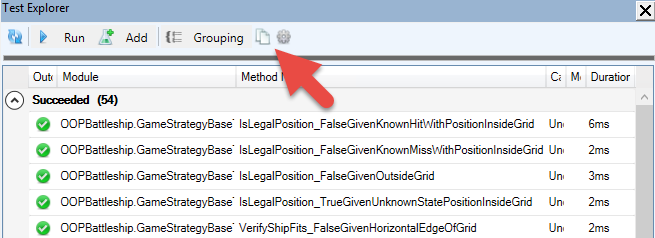
You’re writing a rather large VBA/VB6 project, and you’re starting to have a sizable amount of passing unit tests. Did you know you can copy the test results to the clipboard with a single click?

…and then paste them onto a new worksheet and turn it into a data table:

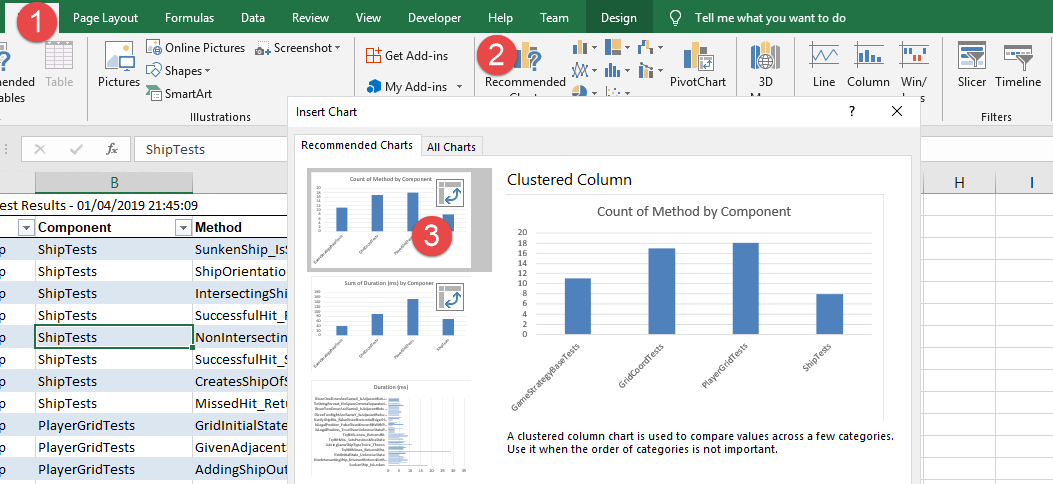
If you’re not sure what to do next, you can even let Excel give you ideas – you’ll find the Recommended Charts button under the Insert Ribbon tab:

With the count of method by component chart, we can see what test modules have more test methods; the sum of duration by component chart can show us which test modules take the longer to execute – or we could average it across test categories, or archive test results and later aggregate them… and then use this data to performance-profile problematic test scenarios.

Similarly, the “Copy to Clipboard” button from the Code Explorer can be used to export a table into Excel, and using the recommended pivot tables feature, we can get a detailed breakdown of the project – for example count of names by declaration type creates a pivot table that lists all Rubberduck declaration types, so you can easily know how many line labels your project has, or how many Declare Function imports are used:

With a little bit of filtering and creativity, we can regroup all Constant, Function, PropertyGet and Variable declarations by return type, and easily identify, say, everything that returns a Variant:

The possibilities are practically endless: the data could be timestamped and exported to some Access or SQL Server database, to feed some dashboard or report showing how a project grows over time.

How would you analyze your VBA projects? What code metrics would you like to be able to review and pivot like this? Share your ideas, or implement them, and send a pull request our way!

Lazy Object / Weak Reference

Sometimes a class needs to hold a reference to the object that “owns” it – i.e. the object that created it. When this happens, the owner object often needs to hold a reference to all the “child” objects it creates. If we say Class1 is the “parent” and Class2 is the “child”, we get something like this:

'Class1
Option Explicit
Private children As VBA.Collection

Public Sub Add(ByVal child As Class2)
    Set child.Owner = Me
    children.Add child
End Sub

Private Sub Class_Initialize()
    Set children = New VBA.Collection
End Sub

Private Sub Class_Terminate()
    Debug.Print TypeName(Me) & " is terminating"
End Sub

And Class2 might look like this:

'Class2
Option Explicit
Private parent As Class1

Public Property Get Owner() As Class1
    Set Owner = parent
End Property

Public Property Set Owner(ByVal value As Class1)
    Set parent = value
End Property

Private Sub Class_Terminate()
    Debug.Print TypeName(Me) & " is terminating"
End Sub

The problem might not be immediately apparent to untrained eyes, but this is a memory leak bug – this code produces no debug output, despite the Class_Terminate handlers:

'Module1
Option Explicit

Public Sub Test()
    Dim foo As Class1
    Set foo = New Class1
    foo.Add New Class2
    Set foo = Nothing
End Sub

Both objects remain in memory and outlive the Test procedure scope! Depending on what the code does, this could easily go from “accidental sloppy object management” to a serious bug leaving a ghost process running, with Task Manager being the only way to kill it! How do we fix this?

Not keeping a reference to Class1 in Class2 would fix it, but then Class2 might not be working properly. Surely there’s another way.

Suppose we abstract away the very notion of holding a reference to an object. Suppose we don’t hold an object reference anymore, instead we hold a Long integer that represents the address at which we’ll find the object pointer we’re referencing. To put it in simpler words, instead of holding the object itself, we hold a ticket that tells us where to go find it when we need to use it. We can do this in VBA.

First we define an interface that encapsulates the idea of an object reference – IWeakReference, that simply exposes an Object get-only property:

'@Description("Describes an object that holds the address of a pointer to another object.")
'@Interface
Option Explicit

'@Description("Gets the object at the held pointer address.")
Public Property Get Object() As Object
End Property

Then we implement it with a WeakReference class. The trick is to use CopyMemory from the Win32 API to take the bytes at a given address and copy them into an object reference we can use and return.

For an easy-to-use API, we give the class a default instance by toggling the VB_PredeclaredId attribute, and use a factory method to create and return an IWeakReference given any object reference: we take the object’s object pointer using the ObjPtr function, store/encapsulate that pointer address into a private instance field, and implement the IWeakReference.Object getter such that if anything goes wrong, we return Nothing instead of bubbling a run-time error.

VERSION 1.0 CLASS
BEGIN
  MultiUse = -1  'True
END
Attribute VB_Name = "WeakReference"
Attribute VB_GlobalNameSpace = False
Attribute VB_Creatable = False
Attribute VB_PredeclaredId = True
Attribute VB_Exposed = False
Option Explicit
Implements IWeakReference

#If Win64 Then
Private Declare PtrSafe Sub CopyMemory Lib "kernel32.dll" Alias "RtlMoveMemory" (hpvDest As Any, hpvSource As Any, ByVal cbCopy As LongPtr)
#Else
Private Declare Sub CopyMemory Lib "kernel32.dll" Alias "RtlMoveMemory" (hpvDest As Any, hpvSource As Any, ByVal cbCopy As Long)
#End If

Private Type TReference
#If VBA7 Then
    Address As LongPtr
#Else
    Address As Long
#End If
End Type

Private this As TReference

'@Description("Default instance factory method.")
Public Function Create(ByVal instance As Object) As IWeakReference
    With New WeakReference
        .Address = ObjPtr(instance)
        Set Create = .Self
    End With
End Function

Public Property Get Self() As IWeakReference
    Set Self = Me
End Property

#If VBA7 Then
Public Property Get Address() As LongPtr
#Else
Public Property Get Address() As Long
#End If
    Address = this.Address
End Property

#If VBA7 Then
Public Property Let Address(ByVal Value As LongPtr)
#Else
Public Property Let Address(ByVal Value As Long)
#End If
    this.Address = Value
End Property

Private Property Get IWeakReference_Object() As Object
' Based on Bruce McKinney's code for getting an Object from the object pointer:

#If VBA7 Then
    Dim pointerSize As LongPtr
#Else
    Dim pointerSize As Long
#End If

    On Error GoTo CleanFail
    pointerSize = LenB(this.Address)

    Dim obj As Object
    CopyMemory obj, this.Address, pointerSize

    Set IWeakReference_Object = obj
    CopyMemory obj, 0&, pointerSize

CleanExit:
    Exit Property

CleanFail:
    Set IWeakReference_Object = Nothing
    Resume CleanExit
End Property

Now Class2 can hold an indirect reference to Class1, like this:

'Class2
Option Explicit
Private parent As IWeakReference

Public Property Get Owner() As Class1
    Set Owner = parent.Object
End Property

Public Property Set Owner(ByVal Value As Class1)
    Set parent = WeakReference.Create(Value)
End Property

Private Sub Class_Terminate()
    Debug.Print TypeName(Me) & " is terminating"
End Sub

Now Module1.Test produces the expected output, and the memory leak is fixed:

Class1 is terminating
Class2 is terminating

OOP Battleship Part 4: AI Strategies

NewGame

If you recall the AIPlayer class from Part 2, the Create factory method takes an IGameStrategy parameter:

Public Function Create(ByVal gridId As Byte, ByVal GameStrategy As IGameStrategy) As IPlayer
    With New AIPlayer
        .PlayerType = ComputerControlled
        .GridIndex = gridId
        Set .Strategy = GameStrategy
        Set .PlayGrid = PlayerGrid.Create(gridId)
        Set Create = .Self
    End With
End Function

An AIPlayer can be created with an instance of any class that implements the IGameStrategy interface.

In any OOP language that supports class inheritance, we could have a base class e.g. GameStrategyBase, from which we could derive the various implementations, and with that we would have a place to write all the code that’s common to all implementations, …or that all implementations would possibly need to use… or not. See, class inheritance is the most important language feature that the “VBA can’t do OOP” or “VBA is not a real language” crowd love to bring up. And yet, more often than not, class inheritance isn’t the ideal solution – composition is.

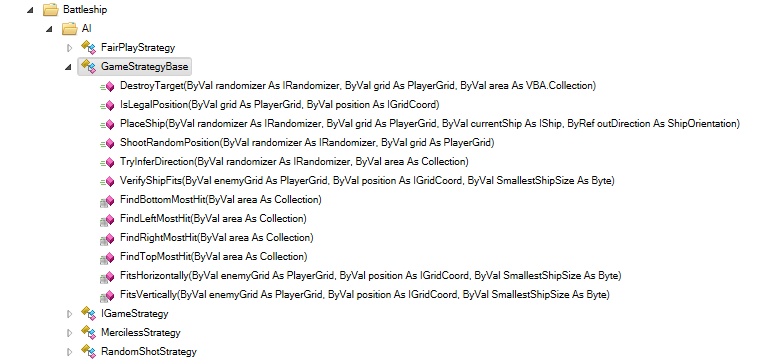
And we’re going to do exactly that, by composing all IGameStrategy implementations with a GameStrategyBase class:

Battleship.AI

Coupling a game strategy with this “base” class isn’t an issue: the class is specifically meant to be used by IGameStrategy implementations. So we can shamelessly do this:

Option Explicit
Implements IGameStrategy
Private base As GameStrategyBase

Private Sub Class_Initialize()
    Set base = New GameStrategyBase
End Sub

And then proceed with implementing the PlaceShip method, given that AI player’s own PlayerGrid and the IShip the game controller is asking us to place on the grid. The base.PlaceShip method simply returns the first legal position+direction it can find.

Then we can implement the Play function to return an IGridCoord position and let the controller know what position this player is shooting at. We have a number of helper functions in GameStrategyBase we can use for that.

Random

The RandomShotStrategy shoots at random coordinates until it has located all enemy ships …then proceeds to sink them all, one after the other. It also places its ships randomly, regardless of whether the ships are adjacent or not.

Private Sub IGameStrategy_PlaceShip(ByVal grid As PlayerGrid, ByVal currentShip As IShip)

    Dim direction As ShipOrientation
    Dim position As IGridCoord
    Set position = base.PlaceShip(Random, grid, currentShip, direction)

    grid.AddShip Ship.Create(currentShip.ShipKind, direction, position)
    If grid.shipCount = PlayerGrid.ShipsPerGrid Then grid.Scramble

End Sub

Private Function IGameStrategy_Play(ByVal enemyGrid As PlayerGrid) As IGridCoord
    Dim position As IGridCoord
    Do
        If EnemyShipsNotAcquired(enemyGrid)  0 Then
            Set position = base.ShootRandomPosition(Random, enemyGrid)
        Else
            Set position = base.DestroyTarget(Random, enemyGrid, enemyGrid.FindHitArea)
        End If
    Loop Until base.IsLegalPosition(enemyGrid, position)
    Set IGameStrategy_Play = position
End Function

Here the double-negative in the statement “the number of enemy ships not acquired, is not equal to zero” (WordPress is having a hard time with rendering that  operator, apparently), will probably be end up being inverted into a positive statement, which would make it read better. Perhaps If EnemyShipsToFind = 0 Then, and invert the Else logic. Or…

Private Function IGameStrategy_Play(ByVal enemyGrid As PlayerGrid) As IGridCoord
    Dim position As IGridCoord
    Do
        If EnemyShipsToFind(enemyGrid) > 0 Then
            Set position = base.ShootRandomPosition(Random, enemyGrid)
enemyGrid.FindHitArea)
        Else
            Set position = base.DestroyTarget(Random, enemyGrid,
        End If
    Loop Until base.IsLegalPosition(enemyGrid, position)
    Set IGameStrategy_Play = position
End Function

That EnemyShipsToFind function should probably be a member of the PlayerGrid class.

FairPlay

The FairPlayStrategy is similar, except it will proceed to destroy an enemy ship as soon as it’s located. It also takes care to avoid placing ships adjacent to each other.

Private Sub IGameStrategy_PlaceShip(ByVal grid As PlayerGrid, ByVal currentShip As IShip)
    Do
        Dim direction As ShipOrientation
        Dim position As IGridCoord
        Set position = base.PlaceShip(Random, grid, currentShip, direction)

    Loop Until Not grid.HasAdjacentShip(position, direction, currentShip.Size)

    grid.AddShip Ship.Create(currentShip.ShipKind, direction, position)
    If grid.shipCount = PlayerGrid.ShipsPerGrid Then grid.Scramble
End Sub

Private Function IGameStrategy_Play(ByVal enemyGrid As PlayerGrid) As IGridCoord
    Dim position As GridCoord
    Do
        Dim area As Collection
        Set area = enemyGrid.FindHitArea

        If Not area Is Nothing Then
            Set position = base.DestroyTarget(Random, enemyGrid, area)
        Else
            Set position = base.ShootRandomPosition(Random, enemyGrid)
        End If
    Loop Until base.IsLegalPosition(enemyGrid, position)
    Set IGameStrategy_Play = position
End Function

Merciless

The MercilessStrategy is more elaborate: it doesn’t just shoot at random – it shoots in patterns, targeting the edges and/or the center areas of the grid. It will destroy an enemy ship as soon as it’s found, and will avoid shooting in an area that couldn’t possibly host the smallest enemy ship that’s still afloat. And yet, it’s possible it just shoots a random position, too:

Private Sub IGameStrategy_PlaceShip(ByVal grid As PlayerGrid, ByVal currentShip As IShip)
    Do
        Dim direction As ShipOrientation
        Dim position As IGridCoord
        Set position = base.PlaceShip(Random, grid, currentShip, direction)
    Loop Until Not grid.HasAdjacentShip(position, direction, currentShip.Size)

    grid.AddShip Ship.Create(currentShip.ShipKind, direction, position)
    If grid.shipCount = PlayerGrid.ShipsPerGrid Then grid.Scramble
End Sub

Private Function IGameStrategy_Play(ByVal enemyGrid As PlayerGrid) As IGridCoord
    Dim position As GridCoord
    Do
        Dim area As Collection
        Set area = enemyGrid.FindHitArea

        If Not area Is Nothing Then
            Set position = base.DestroyTarget(Random, enemyGrid, area)
        Else
            If this.Random.NextSingle < 0.1 Then
                Set position = base.ShootRandomPosition(this.Random, enemyGrid)
            ElseIf this.Random.NextSingle < 0.6 Then
                Set position = ScanCenter(enemyGrid)
            Else
                Set position = ScanEdges(enemyGrid)
            End If
        End If

    Loop Until base.IsLegalPosition(enemyGrid, position) And _
               base.VerifyShipFits(enemyGrid, position, enemyGrid.SmallestShipSize) And _
               AvoidAdjacentHitPosition(enemyGrid, position)
    Set IGameStrategy_Play = position
End Function

In most cases (ScanCenter and ScanEdges do), the AI doesn’t even care to “remember” the last hit it made: instead, it asks the enemy grid to give it a “hit area”. It then proceeds to analyze whether that area is horizontal or vertical, and then attempts to extend it further.

It’s Open-Source!

I uploaded the complete code to GitHub: https://github.com/rubberduck-vba/Battleship.

OOP Battleship Part 3: The View

Download the macro-enabled Excel workbook here

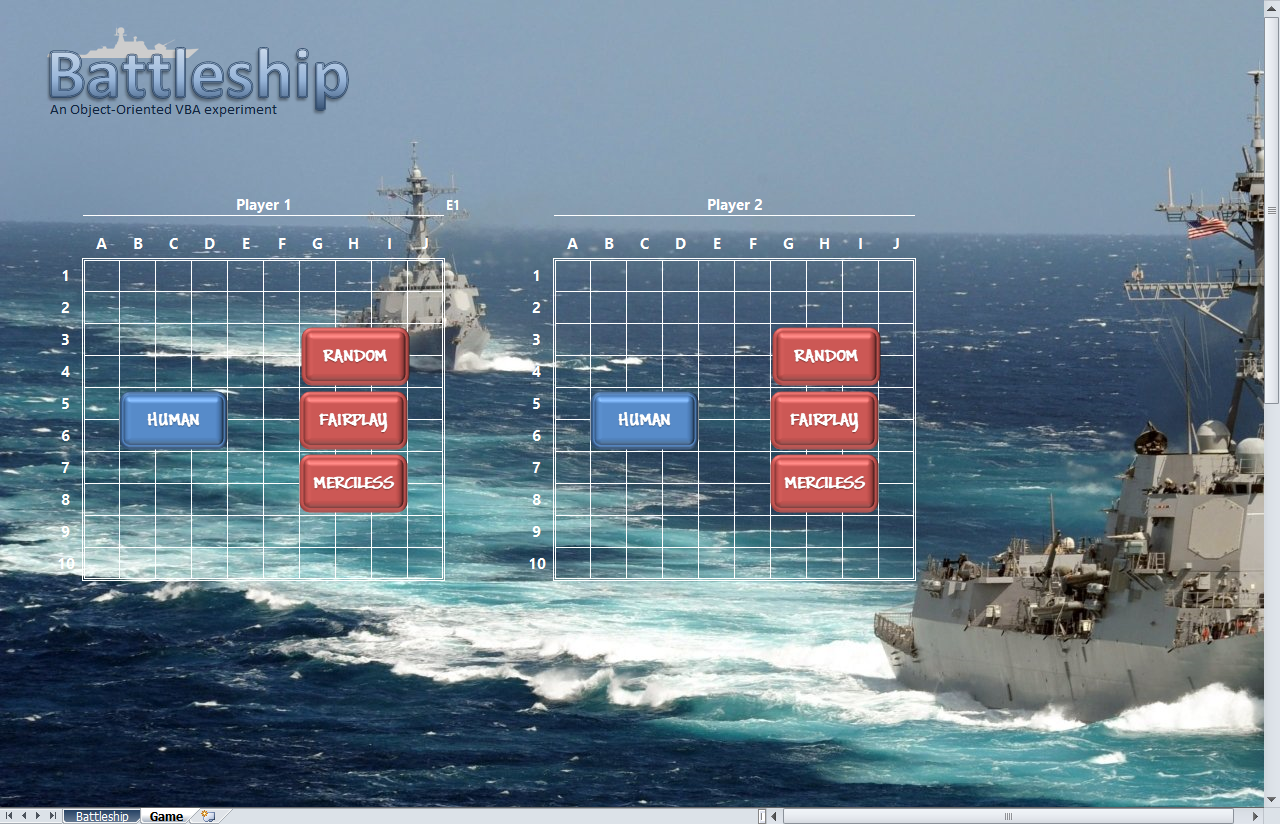
Now that we have defined our model, we need a view. In MVC terms, the view is the component that’s making the game state visible to the player; it is responsible for the two-way communication with the controller. Since we’re in Microsoft Excel, we can use a worksheet to do this. So we craft a lovely-looking Battleship game screen:

pgyam

I used a stock image for the background, spent more time than I probably should have looking for images of the game ships, and used a number of rounded rectangle shapes to make various boxes and buttons – the clickable ones being attached to sheet-local macros. The two game grids use a customized 5-icon conditional format that not-so-coincidentally map to the GridState enum values:

jxpfw

If you recall from the previous post, the GridState enum was defined as follows:

Public Enum GridState
'@Description("Content at this coordinate is unknown.")
Unknown = -1
'@Description("Unconfirmed friendly ship position.")
PreviewShipPosition = 0
'@Description("Confirmed friendly ship position.")
ShipPosition = 1
'@Description("Unconfirmed invalid/overlapping ship position.")
InvalidPosition = 2
'@Description("No ship at this coordinate.")
PreviousMiss = 3
'@Description("An enemy ship occupies this coordinate.")
PreviousHit = 4
End Enum

The PlayerGrid class has a StateArray read-only property that returns a 2D variant array with Unknown values being Empty, and the rest of the state values being returned as-is: this means in order to “refresh” the view, all we need to do is dump this 2D variant array onto the appropriate game grid, and we’re done!

Private Property Get PlayerGrid(ByVal gridId As Byte) As Range
    Set PlayerGrid = Me.Names("PlayerGrid" & gridId).RefersToRange
End Property

Public Sub RefreshGrid(ByVal grid As PlayerGrid)
    Application.ScreenUpdating = False
    Me.Unprotect
    PlayerGrid(grid.gridId).Value = Application.WorksheetFunction.Transpose(grid.StateArray)
    Me.Protect
    Me.EnableSelection = xlUnlockedCells
    Application.ScreenUpdating = True
End Sub

Listing all the code here like I did for the model post would be rather boring, so I’m not going to do that. If the model was just a handful of classes with factory methods and explicit interfaces, the view is much more interesting as a concept.

The worksheet handles 3 worksheet events:

Private Sub Worksheet_BeforeDoubleClick(ByVal target As Range, ByRef Cancel As Boolean)
    Cancel = True
    Dim gridId As Byte
    Dim position As IGridCoord
    Set position = RangeToGridCoord(target, gridId)
    If Mode = FleetPosition Or Mode = player1 And gridId = 2 Or Mode = player2 And gridId = 1 Then
        RaiseEvent DoubleClick(gridId, position, Mode)
    End If
End Sub

Private Sub Worksheet_BeforeRightClick(ByVal target As Range, Cancel As Boolean)
    Cancel = True
    If Mode = FleetPosition Then
        Dim gridId As Byte
        Dim position As IGridCoord
        Set position = RangeToGridCoord(target, gridId)
        RaiseEvent RightClick(gridId, position, Mode)
    End If
End Sub

Private Sub Worksheet_SelectionChange(ByVal target As Range)
    Dim gridId As Byte
    Dim position As IGridCoord
    Set position = RangeToGridCoord(target, gridId)
    If Not position Is Nothing Then
        Me.Unprotect
        CurrentSelectionGrid(gridId).Value = position.ToA1String
        CurrentSelectionGrid(IIf(gridId = 1, 2, 1)).Value = Empty
        Me.Protect
        Me.EnableSelection = xlUnlockedCells
        RaiseEvent SelectionChange(gridId, position, Mode)
    End If
End Sub

Notice these aren’t doing anything really – they merely work out a way to talk to another component – see, making a worksheet (or any document module class) implement an interface is a very bad idea: don’t do it (unless you like to crash the host and lose everything). So instead, we make another class implement the “view” interfaces, and make that class talk to the worksheet – a bit like we did in There is no worksheet.

The view needs two interfaces: one for the controller to send messages to the view, and the other for the view to send messages to the controller. If we call controller-to-view messages “commands”, and view-to-controller messages “events”, then the names IGridViewEvents and IGridViewCommands make complete sense!

So the WorksheetView class (not the GameSheet worksheet) implements the IGridViewCommands interface, like this:

Private Sub IGridViewCommands_OnBeginAttack(ByVal currentPlayerGridId As Byte)
    sheetUI.ShowInfoBeginAttackPhase currentPlayerGridId
End Sub

Private Sub IGridViewCommands_OnBeginShipPosition(ByVal currentShip As IShip, ByVal player As IPlayer)
    sheetUI.ShowInfoBeginDeployShip currentShip.Name
End Sub

Private Sub IGridViewCommands_OnBeginWaitForComputerPlayer()
    Application.Cursor = xlWait
    Application.StatusBar = "Please wait..."
End Sub

the WorksheetView class also handles the custom events sent from the worksheet, like this:

Private Sub sheetUI_DoubleClick(ByVal gridId As Byte, ByVal position As IGridCoord, ByVal Mode As ViewMode)
    Select Case Mode
        
        Case ViewMode.FleetPosition
            ViewEvents.ConfirmShipPosition gridId, position
            
        Case ViewMode.player1, ViewMode.player2
            ViewEvents.AttackPosition gridId, position
            
    End Select
End Sub

Private Sub sheetUI_PlayerReady()
    ViewEvents.HumanPlayerReady
End Sub

Private Sub sheetUI_RightClick(ByVal gridId As Byte, ByVal position As IGridCoord, ByVal Mode As ViewMode)
    If Mode = FleetPosition Then ViewEvents.PreviewRotateShip gridId, position
End Sub

Private Sub sheetUI_SelectionChange(ByVal gridId As Byte, ByVal position As IGridCoord, ByVal Mode As ViewMode)
    If Mode = FleetPosition Then ViewEvents.PreviewShipPosition gridId, position
End Sub

So what is this ViewEvents? If VBA allowed an interface to expose events, we wouldn’t need it: we would simply raise an event to relay the message directly to the controller, who would then handle the view events and respond with a command back to the view. But VBA does not let us expose events on an interface, so this is where the adapter pattern kicks in.

We have a GridViewAdapter class that implements both IGridViewEvents and IGridViewCommands interfaces; the WorksheetView holds a (weak) reference to the adapter, through its IGridViewEvents interface – so ViewEvents.AttackPosition is a method on the adapter.

The GridViewAdapter class receives these messages from the view, and relays them back to the controller, via events:

Private Sub IGridViewEvents_AttackPosition(ByVal gridId As Byte, ByVal position As IGridCoord)
    RaiseEvent OnAttackPosition(gridId, position)
End Sub

Private Sub IGridViewEvents_ConfirmShipPosition(ByVal gridId As Byte, ByVal position As IGridCoord)
    RaiseEvent OnConfirmCurrentShipPosition(gridId, position)
End Sub

Private Sub IGridViewEvents_CreatePlayer(ByVal gridId As Byte, ByVal pt As PlayerType, ByVal difficulty As AIDifficulty)
    RaiseEvent OnCreatePlayer(gridId, pt, difficulty)
End Sub

Private Sub IGridViewEvents_HumanPlayerReady()
    RaiseEvent OnPlayerReady
End Sub

Private Sub IGridViewEvents_PreviewRotateShip(ByVal gridId As Byte, ByVal position As IGridCoord)
    RaiseEvent OnRotateCurrentShipPosition(gridId, position)
End Sub

Private Sub IGridViewEvents_PreviewShipPosition(ByVal gridId As Byte, ByVal position As IGridCoord)
    RaiseEvent OnPreviewCurrentShipPosition(gridId, position)
End Sub

The GameController has a Private WithEvents viewAdapter As GridViewAdapter private field, and with that it’s able to respond to the adapter’s events and, say, create a HumanPlayer in grid 1, or a MercilessAI AI player in grid2 – and then instruct the view to begin positioning the ships, one by one, until the game is ready to begin.

Apart from events, the worksheet exposes methods that display, hide, or flash such or such shape, depending on what the controller says needs to happen next: the worksheet doesn’t control anything whatsoever about the game mechanics – that’s the controller’s job. The view raises events, the adapter handles them and relays them to the controller; controller alters game state, and then sends a command to the view to reflect the current state.

This makes the controller blissfully unaware about any worksheet, or event about any WorksheetView class: it knows about the GridViewAdapter, but then looking at how the game is started…

Public Sub PlayWorksheetInterface()
    Dim view As WorksheetView
    Set view = New WorksheetView
    
    Dim randomizer As IRandomizer
    Set randomizer = New GameRandomizer
    
    Set controller = New GameController
    controller.NewGame GridViewAdapter.Create(view), randomizer
End Sub

…we can easily infer that the adapter would work with any class that implements the IGridViewCommands interface and that’s able to “adapt” its event model to the IGridViewEvents methods: the components are said to be decoupled; we can easily swap one implementation for another – be it for unit-testing the individual components… or we could implement a view that has nothing to do with any Excel worksheet.

We could easily add another button to the start screen, attach it to some PlayUserFormInterface macro, and do something like this:

Public Sub PlayUserFormInterface()
    Dim view As UserFormView
    Set view = New UserFormView
    
    Dim randomizer As IRandomizer
    Set randomizer = New GameRandomizer
    
    Set controller = New GameController
    controller.NewGame GridViewAdapter.Create(view), randomizer
End Sub

And then play the exact same game with a UI that’s entirely different.

OOP Battleship Part 2: The Model

Download the macro-enabled Excel workbook here

Merciless.png
“Merciless” AI (Player1) this close to winning this game

So we’re making a game of Battleship, and we’re going to do this using an object-oriented pattern called Model-View-Controller (MVC). The first thing we need to do, is to modelize the problem in terms of objects. We’re going to need:

  • Player object, so that we know who’s playing on which grid. A player might be human or computer-controlled, and a player has a grid.
  • PlayerGrid object, so that we know the state of each player’s game grid; a player’s grid has a number of ships on it.
  • Ship object that we can place on a player’s grid. A ship has a size and an orientation – we can place them anywhere on the grid, horizontally or vertically; a ship is also going to need to know where it’s hit and whether it’s sunken.
  • GridCoordinate object, to encapsulate X and Y positions and make it easy to pass these two values together as a single entity. This object could have an Offset method that gives us another coordinate at a relative X or Y position.

These objects solve the problem space of modelizing a game of Battleship: with them we have everything we need to track game state. We’ll need something else that can make the players take turns at shooting missiles at each other’s grid, but that will be the controller‘s job; we’ll also need something else that can display the game state and take a human user’s inputs, but that will be the view‘s job. The role of the model is to encapsulate the data that we need to manipulate, and with these objects we’ve got everything we need… for now.

GridCoordinate

Let’s start with the grid coordinates system, since that is our smallest building block, and a grid coordinate doesn’t need to know about a ship or a player interface. We want a grid coordinate to be read-only: once an instance is created for position A1, it’s A1 and remains A1. We want to be able to determine if two grid coordinates are the same without needing to check for both X and Y coordinates every time, and a function that returns True when a coordinate is adjacent to another would be useful, too. Next we’ll want a string representation of the coordinate that lines up with the A1 notation of the game grid, but it would also be useful to have a (x,y) representation that can easily round-trip from a string to a grid coordinate and back, without needing to work out the column number for H.

So the IGridCoord interface would look like this:

'@Folder("Battleship.Model")
'@Description("Describes a coordinate in a 2D grid.")
'@Interface
Option Explicit

'@Description("Gets the horizontal position.")
Public Property Get X() As Long
End Property

'@Description("Gets the vertical position.")
Public Property Get Y() As Long
End Property

'@Description("Creates and returns a new coordinate by offsetting this instance.")
Public Function Offset(Optional ByVal xOffset As Long, Optional ByVal yOffset As Long) As IGridCoord
End Function

'Description("Returns True if the specified coordinate is adjacent to this instance.")
Public Function IsAdjacent(ByVal other As IGridCoord) As Boolean
End Function

'@Description("Returns True if the specified coordinate describes the same location as this instance.")
Public Function Equals(ByVal other As IGridCoord) As Boolean
End Function

'@Description("Returns a (x,y) string representation of this instance.")
Public Function ToString() As String
End Function

'@Description("Returns a A1 string representation of this instance.
Public Function ToA1String() As String
End Function

We’re making it an interface, because otherwise there would be no way of exposing X and Y properties as read-only values. Now we’re going to be writing the game against this IGridCoord interface, rather than against the GridCoord class directly. In order to make it easy to create a grid coordinate by providing an X and an Y value, we’ll give the class a predeclared ID, and use its default instance not to store state, but to expose convenient factory methods.

The listing includes module attributes, so don’t juse copy-paste this in the VBE: you need to import it in a VBA project for it to work.

VERSION 1.0 CLASS
BEGIN
  MultiUse = -1  'True
END
Attribute VB_Name = "GridCoord"
Attribute VB_GlobalNameSpace = False
Attribute VB_Creatable = False
Attribute VB_PredeclaredId = True
Attribute VB_Exposed = True
'@Folder("Battleship.Model")
'@IgnoreModule UseMeaningfulName; X and Y are perfectly fine names here.
Option Explicit
Implements IGridCoord

Private Type TGridCoord
    X As Long
    Y As Long
End Type

Private this As TGridCoord

Public Function Create(ByVal xPosition As Long, ByVal yPosition As Long) As IGridCoord
    With New GridCoord
        .X = xPosition
        .Y = yPosition
        Set Create = .Self
    End With
End Function

Public Function FromString(ByVal coord As String) As IGridCoord
    coord = Replace(Replace(coord, "(", vbNullString), ")", vbNullString)

    Dim coords As Variant
    coords = Split(coord, ",")

    If UBound(coords) - LBound(coords) + 1  2 Then Err.Raise 5, TypeName(Me), "Invalid format string"

    Dim xPosition As Long
    xPosition = coords(LBound(coords))

    Dim yPosition As Long
    yPosition = coords(UBound(coords))

    Set FromString = Create(xPosition, yPosition)
End Function

Public Property Get Self() As IGridCoord
    Set Self = Me
End Property

Public Property Get X() As Long
    X = this.X
End Property

Public Property Let X(ByVal value As Long)
    this.X = value
End Property

Public Property Get Y() As Long
    Y = this.Y
End Property

Public Property Let Y(ByVal value As Long)
    this.Y = value
End Property

Public Property Get Default() As IGridCoord
    Set Default = New GridCoord
End Property

Public Function ToString() As String
    ToString = "(" & this.X & "," & this.Y & ")"
End Function

Private Function IGridCoord_Equals(ByVal other As IGridCoord) As Boolean
    IGridCoord_Equals = other.X = this.X And other.Y = this.Y
End Function

Private Function IGridCoord_IsAdjacent(ByVal other As IGridCoord) As Boolean
    If other.Y = this.Y Then
        IGridCoord_IsAdjacent = other.X = this.X - 1 Or other.X = this.X + 1
    ElseIf other.X = this.X Then
        IGridCoord_IsAdjacent = other.Y = this.Y - 1 Or other.Y = this.Y + 1
    End If
End Function

Private Function IGridCoord_Offset(Optional ByVal xOffset As Long, Optional ByVal yOffset As Long) As IGridCoord
    Set IGridCoord_Offset = Create(this.X + xOffset, this.Y + yOffset)
End Function

Private Function IGridCoord_ToString() As String
    IGridCoord_ToString = Me.ToString
End Function

Private Function IGridCoord_ToA1String() As String
    IGridCoord_ToA1String = Chr$(64 + this.X) & this.Y
End Function

Private Property Get IGridCoord_X() As Long
    IGridCoord_X = this.X
End Property

Private Property Get IGridCoord_Y() As Long
    IGridCoord_Y = this.Y
End Property

So from the default instance, we have access to Create and FromString factory methods, a convenient Default property that gives a (0,0) default coordinate that should be equivalent to the class’ default instance; the writable X and Y properties are meant for instance state: they make no sense outside a factory method.

And now we can create and use a grid coordinate like this:

Dim position As IGridCoord
Set position = GridCoord.Create(3, 4)
Debug.Print position.ToA1String

We can also write a suite of test methods that validate that our GridCoord class behaves as expected in every case… and then make a PlayerGrid class, to represent each player’s grid.

VERSION 1.0 CLASS
BEGIN
  MultiUse = -1  'True
END
Attribute VB_Name = "PlayerGrid"
Attribute VB_GlobalNameSpace = False
Attribute VB_Creatable = False
Attribute VB_PredeclaredId = True
Attribute VB_Exposed = True
'@Folder("Battleship.Model.Player")
Option Explicit

Private Const GridSize As Byte = 10
Private Const MaxShipsPerGrid As Byte = 5

Private Const KnownGridStateErrorMsg As String _
    = "Specified coordinate is not in an unknown state."
Private Const CannotAddShipAtPositionMsg As String _
    = "Cannot add a ship of this size at this position."
Private Const CannotAddMoreShipsMsg As String _
    = "Cannot add more ships to this grid."

Public Enum PlayerGridErrors
    KnownGridStateError = vbObjectError Or 127
    CannotAddShipAtPosition
    CannotAddMoreShips
End Enum

Public Enum AttackResult
    Miss
    Hit
    Sunk
End Enum

Public Enum GridState
    '@Description("Content at this coordinate is unknown.")
    Unknown = -1
    '@Description("Unconfirmed friendly ship position.")
    PreviewShipPosition = 0
    '@Description("Confirmed friendly ship position.")
    ShipPosition = 1
    '@Description("Unconfirmed invalid/overlapping ship position.")
    InvalidPosition = 2
    '@Description("No ship at this coordinate.")
    PreviousMiss = 3
    '@Description("An enemy ship occupies this coordinate.")
    PreviousHit = 4
End Enum

Private Type TPlayGrid
    Id As Byte
    ships As Collection
    State(1 To GridSize, 1 To GridSize) As GridState
End Type

Private this As TPlayGrid

Public Function Create(ByVal gridId As Byte) As PlayerGrid
    With New PlayerGrid
        .gridId = gridId
        Set Create = .Self
    End With
End Function

Public Property Get Self() As PlayerGrid
    Set Self = Me
End Property

Of course there’s more to it, but just listing it here would get boring – the important part is that there’s a GridState array, and a collection of ships. And then these GridState and AttackResult enums.

One important method is TryHit, which is the mechanism that sets the internal state to PreviousHit or PreviousMiss, depending on whether there’s a ship at the specified position – and if there’s one, we return a ByRef reference to it, so that the controller can tell the view to update that ship’s status:

'@Description("(side-effecting) Attempts a hit at the specified position; returns the result of the attack, and a reference to the hit ship if successful.")
Public Function TryHit(ByVal position As IGridCoord, Optional ByRef hitShip As IShip) As AttackResult
    
    If this.State(position.X, position.Y) = GridState.PreviousHit Or _
       this.State(position.X, position.Y) = GridState.PreviousMiss Then
        Err.Raise PlayerGridErrors.KnownGridStateError, TypeName(Me), KnownGridStateErrorMsg
    End If
    
    Dim currentShip As IShip
    For Each currentShip In this.ships
        If currentShip.Hit(position) Then
            this.State(position.X, position.Y) = GridState.PreviousHit
            If currentShip.IsSunken Then
                TryHit = Sunk
            Else
                TryHit = Hit
            End If
            Set hitShip = currentShip
            Exit Function
        End If
    Next
    
    this.State(position.X, position.Y) = GridState.PreviousMiss
    TryHit = Miss
    
End Function

Another important function is FindHitArea, which the AI player uses when it wants to hunt down a damaged ship – it returns a collection of collections of previously hit grid positions, that the AI player can then analyze to try and infer a direction:

'@Description("Finds area around a damaged ship, if one exists.")
Public Function FindHitArea() As Collection
    Dim currentShip As IShip
    For Each currentShip In this.ships
        If Not currentShip.IsSunken Then
            Dim currentAreas As Collection
            Set currentAreas = currentShip.HitAreas
            If currentAreas.Count > 0 Then
                Set FindHitArea = currentAreas(1)
                Exit Function
            End If
        End If
    Next
End Function

Lastly, the Scamble method is invoked for AI players’ grid – it replaces confirmed ship positions with unknown states, so that the AI enemy ships are hidden. Without this method, the AI-positioned ships would be in plain sight!

'@Description("Removes confirmed ship positions from grid state.")
Public Sub Scramble()
    Dim currentX As Long
    For currentX = 1 To GridSize
        Dim currentY As Long
        For currentY = 1 To GridSize
            If this.State(currentX, currentY) = GridState.ShipPosition Then
                this.State(currentX, currentY) = GridState.Unknown
            End If
        Next
    Next
End Sub

Player

What is a player? What does it need to be able to do? We know a player will need to be associated with a game grid; we know a player can be human or computer-controlled. And if we break down the game into individual steps, we can tell we’ll need a player to be able to place a ship on its grid, and – given the enemy grid, be able to tell the game where it’s going to be shooting next. So we can already have an IPlayer interface that formalizes this contract:

'@Folder("Battleship.Model.Player")
'@Interface
Option Explicit

Public Enum PlayerType
    HumanControlled
    ComputerControlled
End Enum

'@Description("Identifies whether the player is human or computer-controlled.")
Public Property Get PlayerType() As PlayerType
End Property

'@Description("Gets the player's grid/state.")
Public Property Get PlayGrid() As PlayerGrid
End Property

'@Description("Places specified ship on game grid.")
Public Sub PlaceShip(ByVal currentShip As IShip)
End Sub

'@Description("Attempts to make a hit on the enemy grid.")
Public Function Play(ByVal enemyGrid As PlayerGrid) As IGridCoord
End Function

The HumanPlayer implementation is rather boring – PlaceShip and Play do nothing. The AIPlayer implementation is much more interesting:

VERSION 1.0 CLASS
BEGIN
  MultiUse = -1  'True
END
Attribute VB_Name = "AIPlayer"
Attribute VB_GlobalNameSpace = False
Attribute VB_Creatable = False
Attribute VB_PredeclaredId = True
Attribute VB_Exposed = False
'@Folder("Battleship.Model.Player")
Option Explicit
Implements IPlayer

Private Const Delay As Long = 800

Private Type TPlayer
    GridIndex As Byte
    PlayerType As PlayerType
    PlayGrid As PlayerGrid
    Strategy As IGameStrategy
End Type

Private this As TPlayer

Public Function Create(ByVal gridId As Byte, ByVal GameStrategy As IGameStrategy) As IPlayer
    With New AIPlayer
        .PlayerType = ComputerControlled
        .GridIndex = gridId
        Set .Strategy = GameStrategy
        Set .PlayGrid = PlayerGrid.Create(gridId)
        Set Create = .Self
    End With
End Function

Public Property Get Self() As IPlayer
    Set Self = Me
End Property

Public Property Get Strategy() As IGameStrategy
    Set Strategy = this.Strategy
End Property

Public Property Set Strategy(ByVal value As IGameStrategy)
    Set this.Strategy = value
End Property

Public Property Get PlayGrid() As PlayerGrid
    Set PlayGrid = this.PlayGrid
End Property

Public Property Set PlayGrid(ByVal value As PlayerGrid)
    Set this.PlayGrid = value
End Property

Public Property Get GridIndex() As Byte
    GridIndex = this.GridIndex
End Property

Public Property Let GridIndex(ByVal value As Byte)
    this.GridIndex = value
End Property

Public Property Get PlayerType() As PlayerType
    PlayerType = this.PlayerType
End Property

Public Property Let PlayerType(ByVal value As PlayerType)
    this.PlayerType = value
End Property

Private Property Get IPlayer_PlayGrid() As PlayerGrid
    Set IPlayer_PlayGrid = this.PlayGrid
End Property

Private Sub IPlayer_PlaceShip(ByVal currentShip As IShip)
    this.Strategy.PlaceShip this.PlayGrid, currentShip
End Sub

Private Function IPlayer_Play(ByVal enemyGrid As PlayerGrid) As IGridCoord
    Win32API.Sleep Delay
    Set IPlayer_Play = this.Strategy.Play(enemyGrid)
End Function

Private Property Get IPlayer_PlayerType() As PlayerType
    IPlayer_PlayerType = this.PlayerType
End Property

Notice the Play and PlaceShip methods aren’t actually implemented in the AIPlayer class; instead, we inject an IGameStrategy and that is what polymorphism allows us to do: we can now inject an instance of a class that implements a given strategy, and we can extend the game with another AI, without even changing a single line of existing AIPlayer code!

NewGame.png

VBA+OOP: What, When, Why

As I’m writing a series of articles about a full-blown OOP Battleship game, and generally speaking keep babbling about OOP in VBA all the time, it occurred to me that I might have failed to clearly address when OOP is a good thing in VBA.

OOP is a paradigm, which entails a specific way of thinking about code. Functional Programming (FP) is another paradigm, which entails another different way of thinking about code. Procedural Programming is also a paradigm – one where code is essentially a sequence of executable statements. Each paradigm has its pros and cons; each paradigm has value, a set of problems that are particularly well-adapted to it, …and its flock of religious zealots that swear they saw the Truth and that their way is The One True Way: don’t believe everything you read on the Internet – think of one (doesn’t matter which) as a hammer, another as a screwdriver, and the other as a shovel.

Don’t be on the “Team Hammer!” or “Team Screwdriver!”, or “Team Shovel!” – the whole (sometimes heated) debate around OOP vs FP is a false dichotomy. Different tools work best for different jobs.

So the first question you need to ask yourself is…

What are you using VBA for?

Scripting/Automation

If you’re merely scripting Excel automation, you very likely don’t need OOP. An object-oriented approach to scripting makes no sense, feels bloated, and way, way overkill. Don’t go there. Instead, a possible approach to cleaner code could be to write one macro per module: have a Public procedure at the top (your “entry point”), at a high abstraction level so it’s easy to tell at a glance everything it does – then have all the Private procedures it calls underneath, listed in the order they’re invoked, so that the module/macro essentially unfolds like a story, with the high-level bird’s eye view at the top, and the low-level gory details at the bottom.

The concept at play here is abstraction levels – see abstraction is one of the pillars of OOP, but it’s not inherently OOP. Abstraction is a very good thing to have in plain procedural code too!

Procedural Programming isn’t inherently bad, nor evil. Well-written procedural code at the right abstraction level is a pleasure to read, and when you think in terms of functions (i.e. inputs -> output) rather than “steps” or “instructions”, then you can write pure functions – and pure functions can (and probably should) be unit-tested, too.

If you’ve ever written a User-Defined Function that a worksheet invokes, you’ve likely written a pure function: it takes input, and produces output without accessing or altering any other state. If you’ve done that, congratulations, you’ve learned the fundamental building block of the Functional Programming paradigm! ..then again, pure functions aren’t inherently FP.

The vast majority of VBA code written, falls in this category. It would likely be toxic to try to squeeze OOP into such code; I’ll even say that OOP is flat-out the wrong approach here. However, an FP-like approach isn’t necessarily a bad idea… although, VBA clearly wasn’t designed with Functional Programming in mind, so you’ll hit the language’s limitations very early in the process… but it can’t hurt to design your script avoiding side-effecting functions and proliferating global state.

Framework/Toolbox Code

Somewhere in-between the script and the full-blown application, there’s this type of VBA project that you write for yourself as some kind of “toolbox” with all kinds of useful code that you often carry around and pretty much systematically import into every one of your new VBA projects.

This, in my opinion, is where OOP really shines the brightest in VBA: it doesn’t matter if it’s procedural programming code consuming these objects – it’s OOP nonetheless. As much as the Excel object model itself is made of objects, and couldn’t care less if it’s procedural or object-oriented code consuming it.

We could be talking about a fully-reusable ProgressIndicator class, some polymorphic Logger tool that the consuming code can configure as needed to log to the debugger, some text file, or a database, or a set of custom data type classes – a Stack, or an ArrayList wrapper, or a File class that wraps file I/O operations and maybe some Scripting.FileSystemObject functionality, or something else: you get the idea.

Full-Blown Applications

If you’re seeing VBA as a document-hosted VB6 (it pretty much literally is) that can do everything a VB6 program can do, then you’re looking at something else entirely – and the problems you’re solving are in a completely different realm: you’re not automating spreadsheets anymore: you’re writing a CRUD application to automate or facilitate data entry into your ERP system, or you’re maintaining a set of support tables in some corporate database, …likely, something a programmer would look at and ask “hey why are you doing this in VBA?”

“Because I can” is a perfectly acceptable answer here, although “because I have to” is often more likely. Regardless, it doesn’t matter: well-written VBA code is better than poorly-written VB.NET or C# code (or Java, or anything else): if you’re writing VB.NET and it says “Imports Microsoft.VisualBasic” at the top of your modules/classes, then you’re likely not writing idiomatic .NET code, you’re writing glorified VB6 using modern syntax, in a modern IDE.

Bad code is on the programmer, not the language.

When you’re making an application, procedural programming can be actively harmful – you’re building a complex system, using a paradigm that doesn’t scale well. FP would be an option for the bulk of the application logic, but then again VBA wasn’t made for Functional Programming. An Object-Oriented approach seems the most sensible option here.

But what about RAD?

Rapid Application Development software, such as Microsoft Access, blurs the lines: now you’re given a framework to write event-driven code (which does stem from OOP), but using object-oriented patterns (e.g. MVC) can feel like you’re working against that framework… which is never a good sign. The best approach here would be to embrace the framework, and to extract as much of the logic as possible into small/specialized, self-contained components that can be individually tested.