Making MVVM Work in VBA Part 1 – Testing

I have recently written (100% VBA) a proof-of-concept for a Model-View-ViewModel (MVVM) framework, and since the prototype works exactly as needed (with some rough edges of course)… I’ve decided to explore what Rubberduck can do to make MVVM fully supported, but going down that path poses a serious problem that needs a very good and well thought-out solution.

A Vision of a Framework

When you start a new project in Visual Studio (including 6.0 /VB6), the IDE prompts for a project type, essentially asking “what are we building today?

In VBA the assumption is that you just want to write a bit of script to automate some document manipulation. And then the framework so to speak, is the VBA Standard Library: functions, methods, constants, and actual objects too; all globally-scoped for convenience and quick-and-easy access: a fully spelled-out VBA.Interaction.MsgBox function call is a rare sight! Combined with the nonexistence of namespaces, the flip side is that the global scope is easily polluted, and name collisions are inevitable since anything exposed by any library becomes globally accessible. This makes fully-qualified global function calls appear sporadically sprinkled in the code, which can be confusing. I digress, but what I mean to get at is that this is part of what made Microsoft make the shift to the .NET platform in the early 2000’s, and eventually abandon the Visual Basic Editor to its fate. The COM platform and Win32 API was the framework, and Win32 programming languages built on top of that.

This leaves two approaches for a vision of a “framework” for VBA:

  • Package a type library and ship it.
    • Pros: any COM-visible library will work, can be written in .NET
    • Cons: projects now have a hard dependency on a specific type library; updating is a mess, etc.
  • Embed the framework into VBA projects, pretty much like JavaScript does.
    • Pros: devs are in charge of everything, framework is 100% VBA and inherently open-source, updating is essentially seamless for any non-breaking change, no early-bound dependencies, graceful late-bound degradation, etc.
    • Cons: VBA devs and maintainers that aren’t using Rubberduck will be massively lost in the source code (framework would cleanly leverage @Folder annotations), but then when the host application allows it this could be mitigated by embedding the code into its own separate VBA project and reference it from other projects (e.g. ship an Excel add-in with the framework code your VBA project depends on).

I think I’m slightly biased here, but I think this rules out the type library approach regardless. So we need a way to make this work in VBA, with VBA source code that lives in a GitHub repository with vetted, trusted content.

Where Rubberduck fits in

Like Visual Studio, Rubberduck could prompt VBA devs with “what are we building today?” and offer to pull various “bundles” of modules from this GitHub repository into the active project. Rubberduck would request the available “bundles” from api.rubberduckvba.com, which would return with “bundle metadata” describing each “package” (is “nugget” forbidden to use as a name for these / play on “nuget” (the package manager for .NET)?), and then list them in a nice little dialog.

The “nugget” metadata would include a name, a description, and the path to each file to download for it. Every package would be the same “version”, but the tool could easily request any particular “tag” or “release” version, and/or pull from “main” or from “next” branches, and the source code / framework itself could then easily be a collaborative effort, with its own features and projects and milestones and collaborators, completely separate from the C# Rubberduck code base.

This complete decoupling from Rubberduck means you don’t need to use Rubberduck to leverage this VBA code in your VBA projects, and new tags / “releases” would be entirely independent of Rubberduck’s own release cycles. That means you’re using, say, future-Rubberduck 2.7.4 and the “nuggets” feature offers “v1.0 [main]” and “v1.1 [next]”; one day you’re still using Rubberduck 2.7.4 but now you get “v1.1 [main]”, “v1.0”, and “v1.2 [next]” to chose from, and if you updated the “nuggets” in your project from v1.0 to v1.1 then Rubberduck inspections would flag uses of any obsolete members that would now be decorated with @Obsolete annotations… it’s almost like this annotation was presciently made for this.

But before we can even think of implementing something like this and make MVVM infrastructure the very first “nugget”, we need a rock-solid framework in the first place.


Unit Tests

I had already written the prototype in a highly decoupled manner, mindful of dependencies and how things could later be tested from the outside. I’m very much not-a-zealot when it comes to things like Test-Driven Development (TDD), but I do firmly believe unit tests provide a solid safety net and documentation for everything that matters – especially if the project is to make any kind of framework, where things need to provably work.

And then it makes a wonderful opportunity to blog about writing unit tests with Rubberduck, something I really haven’t written nearly enough about.

Tests? Why?!

Just by writing these tests, I’ve found and fixed edge-case bugs and improved decoupling and cohesion by extracting (and naming!) smaller chunks of functionality into their own separate class module. The result is quite objectively better, simpler code.

Last but not least, writing testable code (let alone the tests!) in VBA makes a great way to learn these more advanced notions and concepts in a language you’re already familiar with.

If you’re new to VBA and programming in general, or if you’re not a programmer and you’re only interested in making macros, then reading any further may make your head spin a bit (if that’s already under way… I’m sorry!), so don’t hesitate to ask here or on the examples repository on GitHub if you have any questions! This article is covering a rather advanced topic, beyond classes and interfaces, but keep in mind that unit testing does not require OOP! It just so happens that object-oriented code adhering to SOLID principles tends to be easily testable.

This is an ongoing project and I’m still working on the test suite and refactoring things; I wouldn’t want to upload the code to GitHub in its current shape, so I’ll come back here with a link once I have something that’s relatively complete.


Where to Start?

There’s a relatively small but very critical piece of functionality that makes a good place to begin in the MVVM infrastructure code (see previous article): the BindingPath class, which I’ve pulled out of PropertyBinding this week. The (still too large for its own good) PropertyBinding class is no longer concerned with the intricacies of resolving property names and values: both this.Source and this.Target are declared As IBindingPath in a PropertyBinding now, which feels exactly right.

The purpose of a BindingPath is to take a “binding context” object and a “binding path” string (the binding path is always relative to the binding context), and to resolve the member call represented there. For example, this would be a valid use of the class:

Dim Path As IBindingPath
Set Path = BindingPath.Create(Sheet1.Shapes("Shape1").TextFrame.Characters, "Text")

This Path object implements TryReadPropertyValue and TryWritePropertyValue methods that the BindingManager can invoke as needed.

'@Folder MVVM.Infrastructure.Bindings
'@ModuleDescription "An object that can resolve a string property path to a value."
'@PredeclaredId
Option Explicit
Implements IBindingPath
Private Type TState
    Context As Object
    Path As String
    
    Object As Object
    PropertyName As String
End Type
Private This As TState
'@Description "Creates a new binding path from the specified property path string and binding context."
Public Function Create(ByVal Context As Object, ByVal Path As String) As IBindingPath
    GuardClauses.GuardNonDefaultInstance Me, BindingPath, TypeName(Me)
    GuardClauses.GuardNullReference Context, TypeName(Me)
    GuardClauses.GuardEmptyString Path, TypeName(Me)
    
    Dim Result As BindingPath
    Set Result = New BindingPath
    Set Result.Context = Context
    Result.Path = Path
    
    Result.Resolve
    Set Create = Result
End Function
'@Description "Gets/Sets the binding context."
Public Property Get Context() As Object
    Set Context = This.Context
End Property
Public Property Set Context(ByVal RHS As Object)
    GuardClauses.GuardDefaultInstance Me, BindingPath, TypeName(Me)
    GuardClauses.GuardNullReference RHS, TypeName(Me)
    GuardClauses.GuardDoubleInitialization This.Context, TypeName(Me)
    Set This.Context = RHS
End Property
'@Description "Gets/Sets a string representing a property path against the binding context."
Public Property Get Path() As String
    Path = This.Path
End Property
Public Property Let Path(ByVal RHS As String)
    GuardClauses.GuardDefaultInstance Me, BindingPath, TypeName(Me)
    GuardClauses.GuardEmptyString RHS, TypeName(Me)
    GuardClauses.GuardDoubleInitialization This.Path, TypeName(Me)
    This.Path = RHS
End Property
'@Description "Gets the bound object reference."
Public Property Get Object() As Object
    Set Object = This.Object
End Property
'@Description "Gets the name of the bound property."
Public Property Get PropertyName() As String
    PropertyName = This.PropertyName
End Property
'@Description "Resolves the Path to a bound object and property."
Public Sub Resolve()
    This.PropertyName = ResolvePropertyName(This.Path)
    Set This.Object = ResolvePropertyPath(This.Context, This.Path)
End Sub
Private Function ResolvePropertyName(ByVal PropertyPath As String) As String
    Dim Parts As Variant
    Parts = Strings.Split(PropertyPath, ".")
    ResolvePropertyName = Parts(UBound(Parts))
End Function
Private Function ResolvePropertyPath(ByVal Context As Object, ByVal PropertyPath As String) As Object
    Dim Parts As Variant
    Parts = Strings.Split(PropertyPath, ".")
    
    If UBound(Parts) = LBound(Parts) Then
        Set ResolvePropertyPath = Context
    Else
        Dim RecursiveProperty As Object
        Set RecursiveProperty = CallByName(Context, Parts(0), VbGet)
        If RecursiveProperty Is Nothing Then Exit Function
        Set ResolvePropertyPath = ResolvePropertyPath(RecursiveProperty, Right$(PropertyPath, Len(PropertyPath) - Len(Parts(0)) - 1))
    End If
    
End Function
Private Property Get IBindingPath_Context() As Object
    Set IBindingPath_Context = This.Context
End Property
Private Property Get IBindingPath_Path() As String
    IBindingPath_Path = This.Path
End Property
Private Property Get IBindingPath_Object() As Object
    Set IBindingPath_Object = This.Object
End Property
Private Property Get IBindingPath_PropertyName() As String
    IBindingPath_PropertyName = This.PropertyName
End Property
Private Sub IBindingPath_Resolve()
    Resolve
End Sub
Private Function IBindingPath_ToString() As String
    IBindingPath_ToString = StringBuilder _
        .AppendFormat("Context: {0}; Path: {1}", TypeName(This.Context), This.Path) _
        .ToString
End Function
Private Function IBindingPath_TryReadPropertyValue(ByRef outValue As Variant) As Boolean
    If This.Object Is Nothing Then Resolve
    On Error Resume Next
    outValue = VBA.Interaction.CallByName(This.Object, This.PropertyName, VbGet)
    IBindingPath_TryReadPropertyValue = (Err.Number = 0)
    On Error GoTo 0
End Function
Private Function IBindingPath_TryWritePropertyValue(ByVal Value As Variant) As Boolean
    If This.Object Is Nothing Then Resolve
    On Error Resume Next
    VBA.Interaction.CallByName This.Object, This.PropertyName, VbLet, Value
    IBindingPath_TryWritePropertyValue = (Err.Number = 0)
    On Error GoTo 0
End Function

Here’s our complete “system under test” (SUT) as far as the BindingPathTests module goes. We have a Create factory method, Context and Path properties, just like the class we’re testing.

The path object is itself read-only once initialized, but the binding source may resolve to Nothing or to a different object reference over the course of the object’s lifetime: say we want a binding path to SomeViewModel.SomeObjectProperty; when we first create the binding, SomeObjectProperty might very well be Nothing, and then it’s later Set-assigned to a valid object reference. This is why the IBindingPath interface needs to expose a Resolve method, so that IPropertyBinding can invoke it as needed, as the binding is being applied.

We’ll want a test for every guard clause, and each method needs at least one test as well.

So, I’m going to add a new test module and call it BindingPathTests. Rubberduck’s templates are good-enough to depict the mechanics and how things work at a high level, but if you stick to the templates you’ll quickly find your unit tests rather boring, wordy, and repetitive: we must break out of the mold, there isn’t one true way to do this!

Rubberduck discovers unit tests in standard modules annotated with @TestModule. Test methods are any [parameterless, for now] method annotated with a @TestMethod annotation that can have a category string – the Test Explorer can group your tests using these categories. The declarations section of a test module must include a declaration (early or late bound) for an Rubberduck.AssertClass or Rubberduck.PermissiveAssertClass (both implement the same internal interface; the “permissive” one has VBA-like equality semantics, and the default one has stricter type equality requirements (a Long can’t be equal to a Double, for example). The default test template also defines a FakesProvider object, but we’re not going to need it now (if we needed to test logic that involved e.g. branching on the result of a MsgBox function call, we could hook into the MsgBox function and configure it to return what the test needs it to return, which is honestly wicked awesome). So our test module might look something like this at first:

'@Folder Tests.Bindings
'@TestModule
Option Explicit
Option Private Module
#Const LateBind = LateBindTests
#If LateBind Then
Private Assert As Object
#Else
Private Assert As Rubberduck.AssertClass
#End If

With this conditionally-compiled setup, all we need to toggle between late and early binding is to define a project-scoped conditional compilation argument: bring up the project properties and type LateBindTests=0 or LateBindTests=1 in that box, and just like that you can control conditional compilation project-wide without modifying a single module.

The first thing to do is to get the test state defined, and implement TestInitialize and TestCleanup methods that configure this state – in the case of BindingManagerTests, I’m going to add a private type and a private field to define and hold the current test state:

Private Type TState
    ExpectedErrNumber As Long
    ExpectedErrSource As String
    ExpectedErrorCaught As Boolean
    
    ConcreteSUT As BindingManager
    AbstractSUT As IBindingManager
    HandlePropertyChangedSUT As IHandlePropertyChanged
    
    BindingSource As TestBindingObject
    BindingTarget As TestBindingObject
    SourcePropertyPath As String
    TargetPropertyPath As String
    Command As TestCommand
End Type
Private Test As TState

Unit Testing Paradigm

Test modules are special, in the sense that they aren’t (absolutely shouldn’t be anyway) accessible from any code path in the project. Rubberduck invokes them one by one when you run a command like “run all tests” or “repeat last run”. But there’s a little more to it than that, worthy of mention.

VBA being single-threaded, tests are invoked by Rubberduck on the UI/main thread, and uses a bit of trickery to keep its own UI somewhat responsive. Each module runs sequentially, and each test inside each module runs sequentially as well – but the test execution order still shouldn’t be considered deterministic, and each test should be completely independent of every other test, such that executing all tests in any given order always produces the same outcomes.

A test that makes no assertions will be green/successful. When writing unit tests, the first thing you want to see is a test that’s failing (you can’t trust a test you have never seen fail!), and with Rubberduck in order to give a test a reason to fail, you use Assert methods (wiki).

When Rubberduck begins processing a test module, it invokes the methods (again, sequentially but not in an order that should matter) marked @ModuleInitialize in the module – ideally that would be only one method.

This is where the Assert object should be assigned (the default test templates do this):

'@ModuleInitialize
Private Sub ModuleInitialize()
#If LateBind Then
    'requires HKCU registration of the Rubberduck COM library.
    Set Assert = CreateObject("Rubberduck.PermissiveAssertClass")
#Else
    'requires project reference to the Rubberduck COM library.
    Set Assert = New Rubberduck.PermissiveAssertClass
#End If
End Sub

Rubberduck’s test engine will then execute all methods (usually cleaner with only one though) annotated with @TestInitialize before executing each test in the module; that is the best place to put the wordy setup code that would otherwise need to be in pretty much every single test of the module:

'@TestInitialize
Private Sub TestInitialize()
    Dim Context As TestBindingObject
    Set Context = New TestBindingObject
    
    Set Context.TestBindingObjectProperty = New TestBindingObject
    
    Test.Path = "TestBindingObjectProperty.TestStringProperty"
    Test.PropertyName = "TestStringProperty"
    Set Test.BindingSource = Context.TestBindingObjectProperty
    
    Set Test.BindingContext = Context
    Set Test.ConcreteSUT = BindingPath.Create(Test.BindingContext, Test.Path)
    Set Test.AbstractSUT = Test.ConcreteSUT
End Sub

By moving the test state to module level rather than having it local to each test, we already eliminate a lot of code duplication, and the Test module variable makes a rather nifty way to access the current test state, too!

Methods annotated with @TestCleanup are automatically invoked after each test in the module; in order to avoid accidentally sharing state between tests, every object reference should be explicitly set to Nothing, and values of intrinsic data types should be explicitly reset to their respective default value:

'@TestCleanup
Private Sub TestCleanup()
    Set Test.ConcreteSUT = Nothing
    Set Test.AbstractSUT = Nothing
    Set Test.BindingSource = Nothing
    Set Test.BindingContext = Nothing
    Test.Path = vbNullString
    Test.PropertyName = vbNullString
    Test.ExpectedErrNumber = 0
    Test.ExpectedErrSource = vbNullString
    Test.ExpectedErrorCaught = False
End Sub

What Goes Into the Test State?

A number of members should always be in the Test state structure:

  • ConcreteSUT (or just SUT) and AbstractSUT both point to the same object, through the default interface (BindingPath) and the explicit one (IBindingPath), respectively.
  • If the system under test class implements additional interfaces, having a pointer to the SUT object with these interfaces is also useful. For example the TState type for the BindingManager class has a HandlePropertyChangedSUT As IHandlePropertyChanged member, because the class implements this interface.
  • Default property values and dependency setup: we want a basic default SUT configured and ready to be tested (or fine-tuned and then tested).
  • ExpectedErrNumber, ExpectedErrSource, and ExpectedErrorCaught are useful when a test is expecting a given input to produce a particular specific error.

Expecting Errors

The “expected error” test method template works for its purpose, but having this on-error-assert logic duplicated everywhere is rather ugly. Consider pulling that logic into a private method instead (I’m considering adding this into Rubberduck’s test module templates):

Private Sub ExpectError()
    Dim Message As String
    If Err.Number = Test.ExpectedErrNumber Then
        If (Test.ExpectedErrSource = vbNullString) Or (Err.Source = Test.ExpectedErrSource) Then
            Test.ExpectedErrorCaught = True
        Else
            Message = "An error was raised, but not from the expected source. " & _
                      "Expected: '" & TypeName(Test.ConcreteSUT) & "'; Actual: '" & Err.Source & "'."
        End If
    ElseIf Err.Number <> 0 Then
        Message = "An error was raised, but not with the expected number. Expected: '" & Test.ExpectedErrNumber & "'; Actual: '" & Err.Number & "'."
    Else
        Message = "No error was raised."
    End If
    
    If Not Test.ExpectedErrorCaught Then Assert.Fail Message
End Sub

With this infrastructure in place, the unit tests for all guard clauses in the module can look like this – it’s still effectively doing Arrange-Act-Assert like the test method templates strongly suggest, only implicitly so (each “A” is essentially its own statement, see comments in the tests below):

'@TestMethod("GuardClauses")
Private Sub Create_GuardsNullBindingContext()
    Test.ExpectedErrNumber = GuardClauseErrors.ObjectCannotBeNothing '<~ Arrange
    On Error Resume Next
        BindingPath.Create Nothing, Test.Path '<~ Act
        ExpectError '<~ Assert
    On Error GoTo 0
End Sub
'@TestMethod("GuardClauses")
Private Sub Create_GuardsEmptyPath()
    Test.ExpectedErrNumber = GuardClauseErrors.StringCannotBeEmpty '<~ Arrange
    On Error Resume Next
        BindingPath.Create Test.BindingContext, vbNullString '<~ Act
        ExpectError '<~ Assert
    On Error GoTo 0
End Sub
'@TestMethod("GuardClauses")
Private Sub Create_GuardsNonDefaultInstance()
    Test.ExpectedErrNumber = GuardClauseErrors.InvalidFromNonDefaultInstance '<~ Arrange
    On Error Resume Next
        With New BindingPath
            .Create Test.BindingContext, Test.Path '<~ Act
            ExpectError '<~ Assert
        End With
    On Error GoTo 0
End Sub

And then similar tests exist for the respective guard clauses of Context and Path members. Having tests that validate that guard clauses are doing their job is great: it tells us exactly how not to use the class… and that doesn’t tell us much about what a BindingPath object actually does.


Testing the Actual Functionality

The methods we’re testing need to be written in a way that makes it possible for a test to determine whether it’s doing its job correctly or not. For functions and properties, the return value is the perfect thing to Assert on. For Sub procedures, you have to Assert on the side-effects, and have verifiable and useful, reliable ways to verify them.

These two tests validate that the BindingPath returned by the Create factory method has resolved the PropertyName and Object properties, respectively.

'@TestMethod("Bindings")
Private Sub Create_ResolvesPropertyName()
    Dim SUT As BindingPath
    Set SUT = BindingPath.Create(Test.BindingContext, Test.Path)
    Assert.IsFalse SUT.PropertyName = vbNullString
End Sub
'@TestMethod("Bindings")
Private Sub Create_ResolvesBindingSource()
    Dim SUT As BindingPath
    Set SUT = BindingPath.Create(Test.BindingContext, Test.Path)
    Assert.IsNotNothing SUT.Object
End Sub

I could have made multiple assertions in a test, like this…

'@TestMethod("Bindings")
Private Sub Create_ResolvesBindingSource()
    Dim SUT As BindingPath
    Set SUT = BindingPath.Create(Test.BindingContext, Test.Path)
    Assert.IsFalse SUT.PropertyName = vbNullString
    Assert.IsNotNothing SUT.Object
End Sub

The Test Explorer would say “IsFalse assert failed” or “IsNotNothing assert failed”, so it’s arguably (perhaps pragmatically so) still useful and clear enough why that test would fail (and if you had multiple Assert.IsFalse calls in a test you could provide a different message for each)… but really as a rule of thumb, tests want to have one reason to fail. If the conditions to meaningfully pass or fail a test aren’t present, use Assert.Inconclusive to report the test as such:

'@TestMethod("Bindings")
Private Sub Resolve_SetsBindingSource()
    With New BindingPath
        .Path = Test.Path
        Set .Context = Test.BindingContext
        
        If Not .Object Is Nothing Then Assert.Inconclusive "Object reference is unexpectedly set."
        .Resolve
        
        Assert.AreSame Test.BindingSource, .Object
    End With
End Sub
'@TestMethod("Bindings")
Private Sub Resolve_SetsBindingPropertyName()
    With New BindingPath
        .Path = Test.Path
        Set .Context = Test.BindingContext
        
        If .PropertyName <> vbNullString Then Assert.Inconclusive "PropertyName is unexpectedly non-empty."
        .Resolve
        
        Assert.AreEqual Test.PropertyName, .PropertyName
    End With
End Sub

This mechanism is especially useful when the test state isn’t in local scope and there’s a real possibility that the TestInitialize method is eventually modified and inadvertently breaks a test. Such conditional Assert.Inconclusive calls are definitely a form of defensive programming, just like having guard clauses throwing custom meaningful errors.

Note that while we know that the BindingPath.Create function invokes the Resolve method, the tests for Resolve don’t involve Create: the Path and Context are being explicitly spelled out, and the .Resolve method is invoked from a New instance.

And that’s pretty much everything there is to test in the BindingPath class.

There’s one thing I haven’t mentioned yet, that you might have caught in the TState type:

BindingSource As TestBindingObject
BindingTarget As TestBindingObject

This TestBindingObject is a test stub: it’s a dependency of the class (it’s the “binding context” of the test path) and it’s a real object, but it is implemented in a bit of a special way that the BindingPath tests don’t do justice to.

Test Stubs

Eventually Rubberduck’s unit testing framework will feature a COM-visible wrapper around Moq, a popular mocking framework for .NET that Rubberduck already uses for its own unit test requirements. When this happens Rubberduck unit tests will no longer need such “test stubs”. Instead, the framework will generate them at run-time and make them work exactly as specified/configured by a unit test, and “just like that” VBA/VB6 suddenly becomes surprisingly close to being pretty much on par with professional, current-day IDE tooling.

The ITestStub interface simply formalizes the concept:

'@Exposed
'@Folder Tests.Stubs
'@ModuleDescription "An object that stubs an interface for testing purposes."
'@Interface
Option Explicit
'@Description "Gets the number of times the specified member was invoked in the lifetime of the object."
Public Property Get MemberInvokes(ByVal MemberName As String) As Long
End Property
'@Description "Gets a string representation of the object's internal state, for debugging purposes (not intended for asserts!)."
Public Function ToString() As String
End Function

A TestStubBase “base class” provides the common implementation mechanics that every class implementing ITestStub will want to use – the idea is to use a keyed data structure to track the number of times each member is invoked during the lifetime of the object:

'@Folder Tests.Stubs
Option Explicit
Private Type TState
    MemberInvokes As Dictionary
End Type
Private This As TState
'@Description "Tracks a new invoke of the specified member."
Public Sub OnInvoke(ByVal MemberName As String)
    Dim newValue As Long
    If This.MemberInvokes.Exists(MemberName) Then
        newValue = This.MemberInvokes.Item(MemberName) + 1
        This.MemberInvokes.Remove MemberName
    Else
        newValue = 1
    End If
    This.MemberInvokes.Add MemberName, newValue
End Sub
'@Description "Gets the number of invokes made against the specified member in the lifetime of this object."
Public Property Get MemberInvokes(ByVal MemberName As String) As Long
    If This.MemberInvokes.Exists(MemberName) Then
        MemberInvokes = This.MemberInvokes.Item(MemberName)
    Else
        MemberInvokes = 0
    End If
End Property
'@Description "Gets a string listing the MemberInvokes cache content."
Public Function ToString() As String
    Dim MemberNames As Variant
    MemberNames = This.MemberInvokes.Keys
    
    With New StringBuilder
        Dim i As Long
        For i = LBound(MemberNames) To UBound(MemberNames)
            Dim Name As String
            Name = MemberNames(i)
            .AppendFormat "{0} was invoked {1} time(s)", Name, This.MemberInvokes.Item(Name)
        Next
        ToString = .ToString
    End With
    
End Function
Private Sub Class_Initialize()
    Set This.MemberInvokes = New Dictionary
End Sub

With this small bit of infrastructure, the TestBindingObject class is a full-fledged mock object that can increment a counter whenever a member is invoked, and that can be injected as a dependency for anything that needs an IViewModel:

'@Folder Tests.Stubs
'@ModuleDescription "An object that can stub a binding source or target for unit tests."
Option Explicit
Implements ITestStub
Implements IViewModel
Implements INotifyPropertyChanged
Private Type TState
    Stub As TestStubBase
    Handlers As Collection
    TestStringProperty As String
    TestNumericProperty As Long
    TestBindingObjectProperty As TestBindingObject
    Validation As IHandleValidationError
End Type
Private This As TState
Public Property Get TestStringProperty() As String
    This.Stub.OnInvoke "TestStringProperty.Get"
    TestStringProperty = This.TestStringProperty
End Property
Public Property Let TestStringProperty(ByVal RHS As String)
    This.Stub.OnInvoke "TestStringProperty.Let"
    If This.TestStringProperty <> RHS Then
        This.TestStringProperty = RHS
        OnPropertyChanged Me, "TestStringProperty"
    End If
End Property
Public Property Get TestNumericProperty() As Long
    This.Stub.OnInvoke "TestNumericProperty.Get"
    TestNumericProperty = This.TestNumericProperty
End Property
Public Property Let TestNumericProperty(ByVal RHS As Long)
    This.Stub.OnInvoke "TestNumericProperty.Let"
    If This.TestNumericProperty <> RHS Then
        This.TestNumericProperty = RHS
        OnPropertyChanged Me, "TestNumericProperty"
    End If
End Property
Public Property Get TestBindingObjectProperty() As TestBindingObject
    This.Stub.OnInvoke "TestBindingObjectProperty.Get"
    Set TestBindingObjectProperty = This.TestBindingObjectProperty
End Property
Public Property Set TestBindingObjectProperty(ByVal RHS As TestBindingObject)
    This.Stub.OnInvoke "TestBindingObjectProperty.Set"
    If Not This.TestBindingObjectProperty Is RHS Then
        Set This.TestBindingObjectProperty = RHS
        OnPropertyChanged Me, "TestBindingObjectProperty"
    End If
End Property
Private Sub OnPropertyChanged(ByVal Source As Object, ByVal PropertyName As String)
    Dim Handler As IHandlePropertyChanged
    For Each Handler In This.Handlers
        Handler.OnPropertyChanged Source, PropertyName
    Next
End Sub
Private Sub Class_Initialize()
    Set This.Stub = New TestStubBase
    Set This.Handlers = New Collection
    Set This.Validation = ValidationManager.Create
End Sub
Private Sub INotifyPropertyChanged_OnPropertyChanged(ByVal Source As Object, ByVal PropertyName As String)
    OnPropertyChanged Source, PropertyName
End Sub
Private Sub INotifyPropertyChanged_RegisterHandler(ByVal Handler As IHandlePropertyChanged)
    This.Handlers.Add Handler
End Sub
Private Property Get ITestStub_MemberInvokes(ByVal MemberName As String) As Long
    ITestStub_MemberInvokes = This.Stub.MemberInvokes(MemberName)
End Property
Private Function ITestStub_ToString() As String
    ITestStub_ToString = This.Stub.ToString
End Function
Private Property Get IViewModel_Validation() As IHandleValidationError
    Set IViewModel_Validation = This.Validation
End Property

This functionality will be extremely useful when testing the actual property bindings: for example we can assert that a method was invoked exactly once, and fail a test if the method was invoked twice (and/or if it never was).


There’s a lot more to discuss about unit testing in VBA with Rubberduck! I hope this article gives a good idea of how to get the best out of Rubberduck’s unit testing feature.

Model, View, ViewModel

100% VBA, 100% OOP

We’ve seen in UserForm1.Show what makes a Smart UI solution brittle, and how to separate the UI concerns from rest of the logic with the Model-View-Presenter (MVP) UI pattern. MVP works nicely with the MSForms library (UserForms in VBA), just like it does with its .NET Windows Forms successor. While the pattern does a good job of enhancing the testability of application logic, it also comes with its drawbacks: the View’s code-behind (that is, the code module “behind” the form designer) is still littered with noisy event handlers and boilerplate code, and the back-and-forth communication between the View and the Presenter feels somewhat clunky with events and event handlers.

Rubberduck’s UI elements are made with the Windows Presentation Foundation (WPF) UI framework, which completely redefines how everything about UI programming works, starting with the XML/markup-based (XAML) design, but the single most compelling element is just how awesome its data binding capabilities are.

We can leverage in VBA what makes Model-View-ViewModel (MVVM) awesome in C# without going nuts and writing a whole UI framework from scratch, but we’re still going to need a bit of an abstract infrastructure to work with. It took the will to do it and only costed a hair or two, but as far as I can tell this works perfectly fine, at least at the proof-of-concept stage.

This article is the first in a series that revolves around MVVM in VBA as I work (very much part-time) on the rubberduckdb content admin tool. There’s quite a bit of code to make this magic happen, so let’s kick this off with what it does and how to use it – subsequent articles will dive into how the MVVM infrastructure internals work. As usual the accompanying code can be found in the examples repository on GitHub (give it a star, and fork it, then make pull requests with your contributions during Hacktoberfest next month and you can get a t-shirt, stickers, and other free stuff, courtesy of Digital Ocean!).

Overview

The code in the examples repository isn’t the reason I wrote this: I mentioned in the previous post that I was working on an application to maintain the website content, and decided to explore the Model-View-ViewModel pattern for that one. Truth be told, MVVM is hands-down my favorite UI pattern, by far. This is simply the cleanest UI code I’ve ever written in VBA, and I love it!

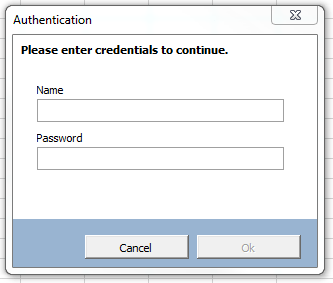
A screenshot of a carefully-crafted dialog form for managing content served by rubberduckvba.com. A modal prompts the user for SQL Server credentials, all commands but the "reload" button are disabled.
The app is work in progress, but the property and command bindings work!

The result is an extremely decoupled, very extensible, completely testable architecture where every user action (“command”) is formally defined, can be programmatically simulated/tested with real, stubbed, or faked dependencies, and can be bound to multiple UI elements and programmatically executed as needed.

MVVM Quick Checklist

These would be the rules to follow as far a relationships go between the components of the MVVM pattern:

  • View (i.e. the UserForm) knows about the ViewModel, but not the Model;
  • ViewModel knows about commands, but nothing about a View;
  • Exactly what the Model actually is/isn’t/should/shouldn’t be, is honestly not a debate I’m interested in – I’ll just call whatever set of classes is responsible for hydrating my ViewModel with data my “model” and sleep at night. What matters is that whatever you call the Model knows nothing of a View or ViewModel, it exists on its own.

Before we dive into bindings and the infrastructure code, we need to talk about the command pattern.

Commands

A command is an object that implements an ICommand interface that might look like this:

'@Folder MVVM.Infrastructure
'@ModuleDescription "An object that represents an executable command."
'@Interface
'@Exposed
Option Explicit

'@Description "Returns True if the command is enabled given the provided binding context (ViewModel)."
Public Function CanExecute(ByVal Context As Object) As Boolean
End Function

'@Description "Executes the command given the provided binding context (ViewModel)."
Public Sub Execute(ByVal Context As Object)
End Sub

'@Description "Gets a user-friendly description of the command."
Public Property Get Description() As String
End Property

In the case of a CommandBinding the Context parameter is always the DataContext / ViewModel (for now anyway), but manual invokes could supply other kinds of parameters. Not all implementations need to account for the ViewModel, a CanExecute function that simply returns True is often perfectly fine. The Description is used to set a tooltip on the target UI element of the command binding.

The implementation of a command can be very simple or very complex, depending on the needs. A command might have one or more dependencies, for example a ReloadCommand might want to be injected with some IDbContext object that exposes a SelectAllTheThings function and the implementation might pull them from a database, or make them up from hard-coded strings: the command has no business knowing where the data comes from and how it’s acquired.

Each command is its own class, and encapsulates the logic for enabling/disabling its associated control and executing the command. This leaves the UserForm module completely devoid of any logic that isn’t purely a presentation concern – although a lot can be achieved solely with property bindings and validation error formatters.

The infrastructure code comes with AcceptCommand and CancelCommand implementations, both useful to wire up [Ok], [Cancel], or [Close] dialog buttons.

AcceptCommand

The AcceptCommand can be used as-is for any View that can be closed with a command involving similar semantics. It is implemented as follows:

'@Exposed
'@Folder MVVM.Infrastructure.Commands
'@ModuleDescription "A command that closes (hides) a View."
'@PredeclaredId
Option Explicit
Implements ICommand

Private Type TState
    View As IView
End Type

Private this As TState

'@Description "Creates a new instance of this command."
Public Function Create(ByVal View As IView) As ICommand
    Dim result As AcceptCommand
    Set result = New AcceptCommand
    Set result.View = View
    Set Create = result
End Function

Public Property Get View() As IView
    Set View = this.View
End Property

Public Property Set View(ByVal RHS As IView)
    GuardClauses.GuardDoubleInitialization this.View, TypeName(Me)
    Set this.View = RHS
End Property

Private Function ICommand_CanExecute(ByVal Context As Object) As Boolean
    Dim ViewModel As IViewModel
    If TypeOf Context Is IViewModel Then
        Set ViewModel = Context
        If Not ViewModel.Validation Is Nothing Then
            ICommand_CanExecute = ViewModel.Validation.IsValid
            Exit Function
        End If
    End If
    ICommand_CanExecute = True
End Function

Private Property Get ICommand_Description() As String
    ICommand_Description = "Accept changes and close."
End Property

Private Sub ICommand_Execute(ByVal Context As Object)
    this.View.Hide
End Sub

CancelCommand

This command is similar to the AcceptCommand in that it simply invokes a method in the View. This implementation could easily be enhanced by making the ViewModel track “dirty” (modified) state and prompting the user when they are about to discard unsaved changes.

'@Folder MVVM.Infrastructure.Commands
'@ModuleDescription "A command that closes (hides) a cancellable View in a cancelled state."
'@PredeclaredId
'@Exposed
Option Explicit
Implements ICommand

Private Type TState
    View As ICancellable
End Type

Private this As TState

'@Description "Creates a new instance of this command."
Public Function Create(ByVal View As ICancellable) As ICommand
    Dim result As CancelCommand
    Set result = New CancelCommand
    Set result.View = View
    Set Create = result
End Function

Public Property Get View() As ICancellable
    Set View = this.View
End Property

Public Property Set View(ByVal RHS As ICancellable)
    GuardClauses.GuardDoubleInitialization this.View, TypeName(Me)
    Set this.View = RHS
End Property

Private Function ICommand_CanExecute(ByVal Context As Object) As Boolean
    ICommand_CanExecute = True
End Function

Private Property Get ICommand_Description() As String
    ICommand_Description = "Cancel pending changes and close."
End Property

Private Sub ICommand_Execute(ByVal Context As Object)
    this.View.OnCancel
End Sub

This gives us very good indications about how the pattern wants user actions to be implemented:

  • Class can have a @PredeclaredId annotation and expose a factory method to property-inject any dependencies; here a IView object, but a custom SaveChangesCommand would likely get injected with some DbContext service class.
  • All commands need a description; that description is user-facing as a tooltip on the binding target (usually a CommandButton).
  • CanExecute can be as simple as an unconditional ICommand_CanExecute = True, or as complex as needed (it has access to the ViewModel context); keep in mind that this method can be invoked relatively often, and should perform well and return quickly.

It’s a simple interface with a simple purpose: attach a command to a button. The EvaluateCanExecute method invokes the command’s CanExecute function and accordingly enables or disables the Target control.

By implementing all UI commands as ICommand objects, we keep both the View and the ViewModel free of command logic and Click handlers. By adopting the command pattern, we give ourselves all the opportunities to achieve low coupling and high cohesion. That is, small and specialized modules that depend on abstractions that can be injected from the outside.

Property Bindings

In XAML we use a special string syntax (“markup extensions”) to bind the value of, say, a ViewModel property, to that of a UI element property:

<TextBox Text="{Binding SomeProperty, Mode=TwoWay, UpdateSourceTrigger=PropertyChanged}" />

As long as the ViewModel implements INotifyPropertyChanged and the property fires the PropertyChanged event when its value changes, WPF can automatically keep the UI in sync with the ViewModel and the ViewModel in sync with the UI. WPF data bindings are extremely flexible and can also bind to static and dynamic resources, or other UI elements, and they are actually slightly more complex than that, but this captures the essence.

Obviously MVVM with MSForms in VBA isn’t going to involve any kind of special string syntax, but the concept of a PropertyBinding can very much be encapsulated into an object (and XAML compiles down to objects and methods, too). At its core, a binding is a pretty simple thing: a source, a target, and a method to update them.

Technically nothing prevents binding a target to any object type (although with limitations, since non-user code won’t be implementing INotifyPropertyChanged), but for the sake of clarity:

  • The binding Source is the ViewModel
  • The SourcePropertyPath is the name of a property of the ViewModel
  • The binding Target is the MSForms control
  • The binding TargetProperty is the name of a property of the MSForms control

Note that the SourcePropertyPath resolves recursively and can be a property of a propertyof a property – as long as the string ultimately resolves to a non-object member.

.BindPropertyPath ViewModel, "SourcePath", Me.PathBox, _
    Validator:=New RequiredStringValidator, _
    ErrorFormat:=AggregateErrorFormatter.Create(ViewModel, _
        ValidationErrorFormatter.Create(Me.PathBox) _ 
            .WithErrorBackgroundColor _
            .WithErrorBorderColor, _
        ValidationErrorFormatter.Create(Me.InvalidPathIcon) _
            .WithTargetOnlyVisibleOnError("SourcePath"), _                
        ValidationErrorFormatter.Create(Me.ValidationMessage1) _
            .WithTargetOnlyVisibleOnError("SourcePath"))

The IBindingManager.BindPropertyPath method is pretty flexible and accepts a number of optional parameters while implementing sensible defaults for common MSForms controls’ “default property binding”. For example, you don’t need to specify a TargetProperty when binding a ViewModel property to a MSForms.TextBox: it will automatically binds to the Text property, but will accept to bind any other property.

The optional arguments are especially useful for custom data validation, but some of them also control various knobs that determine what and how the binding updates.

ValueBehavior
TwoWayBindingBinding will update the source when the target changes, and will update the target when the source changes.
OneWayBindingBinding will update the target when the source changes.
OneWayToSourceBinding will update the source when the target changes.
OneTimeBindingBinding will only update the target once.
The BindingMode enum values
ValueBehavior
OnPropertyChangedBinding will update when the bound property value changes.
OnKeyPressBinding will update the source at each keypress. Only available for TextBox controls. Data validation may prevent the keypress from reaching the UI element.
OnExitBinding will update the source just before target loses focus. Data validation may cancel the exit and leave the caret inside. This update source trigger is the most efficient since it only updates bindings when the user has finished providing a value.
The UpdateSourceTrigger enum values

Property Paths

The binding manager is able to recursively resolve a member path, so if your ViewModel has a ThingSection property that is itself a ViewModel with its own bindings and commands, that itself has a Thing property, know that the binding path can legally be “ThingSection.Thing“, and as long as the Source is the ViewModel object where a ThingSection property exists, and that the ThingSection porperty yields an object that has a Thing property, then all is good and the binding works. If ThingSection were to be Nothing when the binding is updated, then the target is assigned with a default value depending on the type. For example if ThingSection.Thing was bound to some TextBox1 control and the ThingSection property of the ViewModel was Nothing, then the Text property would end up being an empty string – note that this default value may be illegal, depending on what data validation is in place.

Data Validation

Every property binding can attach any IValueValidator implementation that encapsulates specialized, bespoke validation rules. The infrastructure code doesn’t include any custom validator, but the example show how one can be implemented. The interface mandates an IsValid function that returns a Boolean (True when valid), and a user-friendly Message property that the ValidationManager uses to create tooltips.

'@Folder MVVM.Example
Option Explicit
Implements IValueValidator

Private Function IValueValidator_IsValid(ByVal Value As Variant, ByVal Source As Object, ByVal Target As Object) As Boolean
    IValueValidator_IsValid = Len(Trim$(Value)) > 0
End Function

Private Property Get IValueValidator_Message() As String
    IValueValidator_Message = "Value cannot be empty."
End Property

The IsValid method provides you with the Value being validated, the binding Source, and the binding Target objects, which means every validator has access to everything exposed by the ViewModel; note that the method being a Function strongly suggests that it should not have side-effects. Avoid mutating ViewModel properties in a validator, but the message can be constructed dynamically if the validator is made to hold module-level state… although I would really strive to avoid making custom validators stateful.

While the underlying data validation mechanics are relatively complex, believe it or not there is no other step needed to implement custom validation for your property bindings: IBindingManager.BindPropertyPath is happy to take in any validator object, as long as it implements the IValueValidator interface.

Presenting Validation Errors

Without taking any steps to format validation errors, commands that can only execute against a valid ViewModel will automatically get disabled, but the input field with the invalid value won’t give the user any clue. By providing an IValidationErrorFormatter implementation when registering the binding, you get to control whether hidden UI elements should be displayed when there’s a validation error.

The ValidationErrorFormatter class meets most simple scenarios. Use the factory method to create an instance with a specific target UI element, then chain builder method calls to configure the formatting inline with a nice, fluent syntax:

Set Formatter = ValidationErrorFormatter.Create(Me.PathBox) _
                                        .WithErrorBackgroundColor(vbYellow) _
                                        .WithErrorBorderColor
MethodPurpose
CreateFactory method, ensures every instance is created with a target UI element.
WithErrorBackgroundColorMakes the target have a different background color given a validation error. If no color is specified, a default “error background color” (light red) is used.
WithErrorBorderColorMakes the target have a different border color given a validation error. If no color is specified, a default “error border color” (dark red) is used. Method has no effect if the UI control isn’t “flat style” or if the border style isn’t “fixed single”.
WithErrorForeColorMakes the target have a different fore (text) color given a validation error. If no color is specified, a default “error border color” (dark red) is used.
WithErrorFontBoldMakes the target use a bold font weight given a validation error. Method has no effect if the UI element uses a bolded font face without a validation error.
WithTargetOnlyVisibleOnErrorMakes the target UI element normally hidden, only to be made visible given a validation error. Particularly useful with aggregated formatters, to bind the visibility of a label and/or an icon control to the presence of a validation error.
The factory and builder methods of the ValidationErrorFormatter class.

The example code uses an AggregateErrorFormatter to tie multiple ValidationErrorFormatter instances (and thus possibly multiple different target UI controls) to the the same binding.

Value Converters

IBindingManager.BindPropertyPath can take an optional IValueConverter parameter when a conversion is needed between the source and the target, or between the target and the source. One useful value converter can be one like the InverseBooleanConverter implementation, which can be used in a binding where True in the source needs to bind to False in the target.

The interface mandates the presence of Convert and ConvertBack functions, respectively invoked when the binding value is going to the target and the source. Again, pure functions and performance-sensitive implementations should be preferred over side-effecting code.

'@Folder MVVM.Infrastructure.Bindings.Converters
'@ModuleDescription "A value converter that inverts a Boolean value."
'@PredeclaredId
'@Exposed
Option Explicit
Implements IValueConverter

Public Function Default() As IValueConverter
    GuardClauses.GuardNonDefaultInstance Me, InverseBooleanConverter
    Set Default = InverseBooleanConverter
End Function

Private Function IValueConverter_Convert(ByVal Value As Variant) As Variant
    IValueConverter_Convert = Not CBool(Value)
End Function

Private Function IValueConverter_ConvertBack(ByVal Value As Variant) As Variant
    IValueConverter_ConvertBack = Not CBool(Value)
End Function

Converters used in single-directional bindings don’t need to necessarily make both functions return a value that makes sense: sometimes a value can be converted to another but cannot round-trip back to the original, and that’s fine.

String Formatting

One aspect of property bindings I haven’t tackled yet, is the whole StringFormat deal. Once that is implemented and working, the string representation of the target control will be better separated from its actual value. And a sensible default format for some data types (Date, Currency) can even be inferred from the type of the source property!

Another thing string formatting would enable, is the ability to interpolate the value within a string. For example there could be a property binding defined like this:

.BindPropertyPath ViewModel, "NetAmount", Me.NetAmountBox, StringFormat:="USD$ {0:C2}"

And the NetAmountBox would read “USD$ 1,386.77” given the value 1386.77, and the binding would never get confused and would always know that the underlying value is a numeric value of 1386.77 and not a formatted string. Now, until that is done, string formatting probably needs to involve custom value converters. When string formatting works in property bindings, any converter will get invoked before: it’s always going to be the converted value that gets formatted.

ViewModel

Every ViewModel class is inherently application-specific and will look different, but there will be recurring themes:

  • Every field in the View wants to bind to a ViewModel property, and then you’ll want extra properties for various other things, so the ViewModel quickly grows more properties than comfort allows. Make smaller “ViewModel” classes by regrouping related properties, and bind with a property path rather than a plain property name.
  • Property changes need to propagate to the “main” ViewModel (the “data context”) somehow, so making all ViewModel classes fire a PropertyChanged event as appropriate is a good idea. Hold a WithEvents reference to the “child” ViewModel, and handle propagation by raising the “parent” ViewModel’s own PropertyChanged event, all the way up to the “main” ViewModel, where the handler nudges command bindings to evaluate whether commands can execute. One solution could be to register all command bindings with some CommandManager object that would have to implement IHandlePropertyChanged and would relieve the ViewModel of needing to do this.

Each ViewModel should implement at least two interfaces:

  • IViewModel, because we need a way to access the validation error handler and this interface makes a good spot for it.
  • INotifyPropertyChanged, to notify data bindings when a ViewModel property changes.

Here is the IViewModel implementation for the example code – the idea is really to expose properties for the view to bind, and we must not forget to notify handlers when a property value changes – notice the RHS-checking logic in the Property Let member:

'@Folder MVVM.Example
'@ModuleDescription "An example ViewModel implementation for some dialog."
'@PredeclaredId
Implements IViewModel
Implements INotifyPropertyChanged
Option Explicit

Public Event PropertyChanged(ByVal Source As Object, ByVal PropertyName As String)

Private Type TViewModel
    
    'INotifyPropertyChanged state:
    Handlers As Collection
    
    'CommandBindings:
    SomeCommand As ICommand
    
    'Read/Write PropertyBindings:
    SourcePath As String
    SomeOption As Boolean
    SomeOtherOption As Boolean
    
End Type

Private this As TViewModel
Private WithEvents ValidationHandler As ValidationManager

Public Function Create() As IViewModel
    GuardClauses.GuardNonDefaultInstance Me, ExampleViewModel, TypeName(Me)
    
    Dim result As ExampleViewModel
    Set result = New ExampleViewModel
    
    Set Create = result
End Function

Public Property Get Validation() As IHandleValidationError
    Set Validation = ValidationHandler
End Property

Public Property Get SourcePath() As String
    SourcePath = this.SourcePath
End Property

Public Property Let SourcePath(ByVal RHS As String)
    If this.SourcePath <> RHS Then
        this.SourcePath = RHS
        OnPropertyChanged "SourcePath"
    End If
End Property

Public Property Get SomeOption() As Boolean
    SomeOption = this.SomeOption
End Property

Public Property Let SomeOption(ByVal RHS As Boolean)
    If this.SomeOption <> RHS Then
        this.SomeOption = RHS
        OnPropertyChanged "SomeOption"
    End If
End Property

Public Property Get SomeOtherOption() As Boolean
    SomeOtherOption = this.SomeOtherOption
End Property

Public Property Let SomeOtherOption(ByVal RHS As Boolean)
    If this.SomeOtherOption <> RHS Then
        this.SomeOtherOption = RHS
        OnPropertyChanged "SomeOtherOption"
    End If
End Property

Public Property Get SomeCommand() As ICommand
    Set SomeCommand = this.SomeCommand
End Property

Public Property Set SomeCommand(ByVal RHS As ICommand)
    Set this.SomeCommand = RHS
End Property

Public Property Get SomeOptionName() As String
    SomeOptionName = "Auto"
End Property

Public Property Get SomeOtherOptionName() As String
    SomeOtherOptionName = "Manual/Browse"
End Property

Public Property Get Instructions() As String
    Instructions = "Lorem ipsum dolor sit amet, consectetur adipiscing elit."
End Property

Private Sub OnPropertyChanged(ByVal PropertyName As String)
    RaiseEvent PropertyChanged(Me, PropertyName)
    Dim Handler As IHandlePropertyChanged
    For Each Handler In this.Handlers
        Handler.OnPropertyChanged Me, PropertyName
    Next
End Sub

Private Sub Class_Initialize()
    Set this.Handlers = New Collection
    Set ValidationHandler = ValidationManager.Create
End Sub

Private Sub INotifyPropertyChanged_OnPropertyChanged(ByVal Source As Object, ByVal PropertyName As String)
    OnPropertyChanged PropertyName
End Sub

Private Sub INotifyPropertyChanged_RegisterHandler(ByVal Handler As IHandlePropertyChanged)
    this.Handlers.Add Handler
End Sub

Private Property Get IViewModel_Validation() As IHandleValidationError
    Set IViewModel_Validation = ValidationHandler
End Property

Private Sub ValidationHandler_PropertyChanged(ByVal Source As Object, ByVal PropertyName As String)
    OnPropertyChanged PropertyName
End Sub

Nothing much of interest here, other than the INotifyPropertyChanged implementation and the fact that a ViewModel is really just a fancy word for a class that exposes a bunch of properties that magically keep in sync with UI controls!

View

In a Smart UI, that module is, more often than not, a complete wreck. In Model-View-Presenter it quickly gets cluttered with many one-liner event handlers, and something just feels clunky about the MVP pattern. Now, I’m trying really hard, but I can’t think of a single reason to not want UserForm code-behind to look like this all the time… this is absolutely all of it, there’s no cheating going on:


'@Folder MVVM.Example
'@ModuleDescription "An example implementation of a View."
Implements IView
Implements ICancellable
Option Explicit

Private Type TView
    'IView state:
    ViewModel As ExampleViewModel
    
    'ICancellable state:
    IsCancelled As Boolean
    
    'Data binding helper dependency:
    Bindings As IBindingManager
End Type

Private this As TView

'@Description "A factory method to create new instances of this View, already wired-up to a ViewModel."
Public Function Create(ByVal ViewModel As ExampleViewModel, ByVal Bindings As IBindingManager) As IView
    GuardClauses.GuardNonDefaultInstance Me, ExampleView, TypeName(Me)
    GuardClauses.GuardNullReference ViewModel, TypeName(Me)
    GuardClauses.GuardNullReference Bindings, TypeName(Me)
    
    Dim result As ExampleView
    Set result = New ExampleView
    
    Set result.Bindings = Bindings
    Set result.ViewModel = ViewModel
    
    Set Create = result
    
End Function

Private Property Get IsDefaultInstance() As Boolean
    IsDefaultInstance = Me Is ExampleView
End Property

'@Description "Gets/sets the ViewModel to use as a context for property and command bindings."
Public Property Get ViewModel() As ExampleViewModel
    Set ViewModel = this.ViewModel
End Property

Public Property Set ViewModel(ByVal RHS As ExampleViewModel)
    GuardClauses.GuardExpression IsDefaultInstance, TypeName(Me)
    GuardClauses.GuardNullReference RHS
    
    Set this.ViewModel = RHS
    InitializeBindings

End Property

'@Description "Gets/sets the binding manager implementation."
Public Property Get Bindings() As IBindingManager
    Set Bindings = this.Bindings
End Property

Public Property Set Bindings(ByVal RHS As IBindingManager)
    GuardClauses.GuardExpression IsDefaultInstance, TypeName(Me)
    GuardClauses.GuardDoubleInitialization this.Bindings, TypeName(Me)
    GuardClauses.GuardNullReference RHS
    
    Set this.Bindings = RHS

End Property

Private Sub BindViewModelCommands()
    With Bindings
        .BindCommand ViewModel, Me.OkButton, AcceptCommand.Create(Me)
        .BindCommand ViewModel, Me.CancelButton, CancelCommand.Create(Me)
        .BindCommand ViewModel, Me.BrowseButton, ViewModel.SomeCommand
        '...
    End With
End Sub

Private Sub BindViewModelProperties()
    With Bindings
        
        .BindPropertyPath ViewModel, "SourcePath", Me.PathBox, _
            Validator:=New RequiredStringValidator, _
            ErrorFormat:=AggregateErrorFormatter.Create(ViewModel, _
                ValidationErrorFormatter.Create(Me.PathBox).WithErrorBackgroundColor.WithErrorBorderColor, _
                ValidationErrorFormatter.Create(Me.InvalidPathIcon).WithTargetOnlyVisibleOnError("SourcePath"), _
                ValidationErrorFormatter.Create(Me.ValidationMessage1).WithTargetOnlyVisibleOnError("SourcePath"))
        
        .BindPropertyPath ViewModel, "Instructions", Me.InstructionsLabel
        
        .BindPropertyPath ViewModel, "SomeOption", Me.OptionButton1
        .BindPropertyPath ViewModel, "SomeOtherOption", Me.OptionButton2
        .BindPropertyPath ViewModel, "SomeOptionName", Me.OptionButton1, "Caption", OneTimeBinding
        .BindPropertyPath ViewModel, "SomeOtherOptionName", Me.OptionButton2, "Caption", OneTimeBinding
        
        '...
        
    End With
End Sub

Private Sub InitializeBindings()
    If ViewModel Is Nothing Then Exit Sub
    BindViewModelProperties
    BindViewModelCommands
    Bindings.ApplyBindings ViewModel
End Sub

Private Sub OnCancel()
    this.IsCancelled = True
    Me.Hide
End Sub

Private Property Get ICancellable_IsCancelled() As Boolean
    ICancellable_IsCancelled = this.IsCancelled
End Property

Private Sub ICancellable_OnCancel()
    OnCancel
End Sub

Private Sub IView_Hide()
    Me.Hide
End Sub

Private Sub IView_Show()
    Me.Show vbModal
End Sub

Private Function IView_ShowDialog() As Boolean
    Me.Show vbModal
    IView_ShowDialog = Not this.IsCancelled
End Function

Private Property Get IView_ViewModel() As Object
    Set IView_ViewModel = this.ViewModel
End Property

Surely some tweaks will be made over the next couple of weeks as I put the UI design pattern to a more extensive workout with the Rubberduck website content maintenance app – but having used MVVM in C#/WPF for many years, I already know that this is how I want to be coding VBA user interfaces going forward.

I really love how the language has had the ability to make this pattern work, all along.

To be continued…

Builder Walkthrough

Note: this article was updated 2021-04-13 with screenshots from the latest v2.5.1.x pre-release build; the extract interface enhancements shown will green-release with v2.5.2.

We’ve seen how to leverage the default instance of a class module to define a stateless interface that’s perfect for a factory method. At the right abstraction level, most objects will not require more than just a few parameters. Often, parameters are related and can be abstracted/regrouped into their own object. Sometimes that makes things expressive enough. Other times, there’s just nothing we can do to work around the fact that we need to initialize a class with a dozen or more values.

The example code for this article can be found in our Examples repository.

A class with many properties

Such classes are actually pretty common; any entity object representing a database record would fit the bill. Let’s make a User class. We’re using Rubberduck, so this will be quick!

We start with a public field for each property we want:

Option Explicit
Public Id As String
Public UserName As String
Public FirstName As String
Public LastName As String
Public Email As String
Public EmailVerified As Boolean
Public TwoFactorEnabled As Boolean
Public PhoneNumber As String
Public PhoneNumberVerified As Boolean
Public AvatarUrl As String

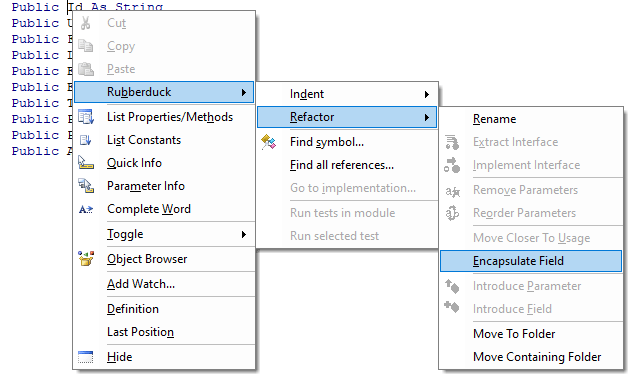
Now we hit Ctrl+` to trigger a parse, right-click any of the variables and select Encapsulate Field from the Refactor menu (or Ctrl+Shift+F if you haven’t tweaked the default hotkeys):

The command will be disabled if the caret/selection isn’t on a public field, or if the module has been modified since the last time Rubberduck parsed it.

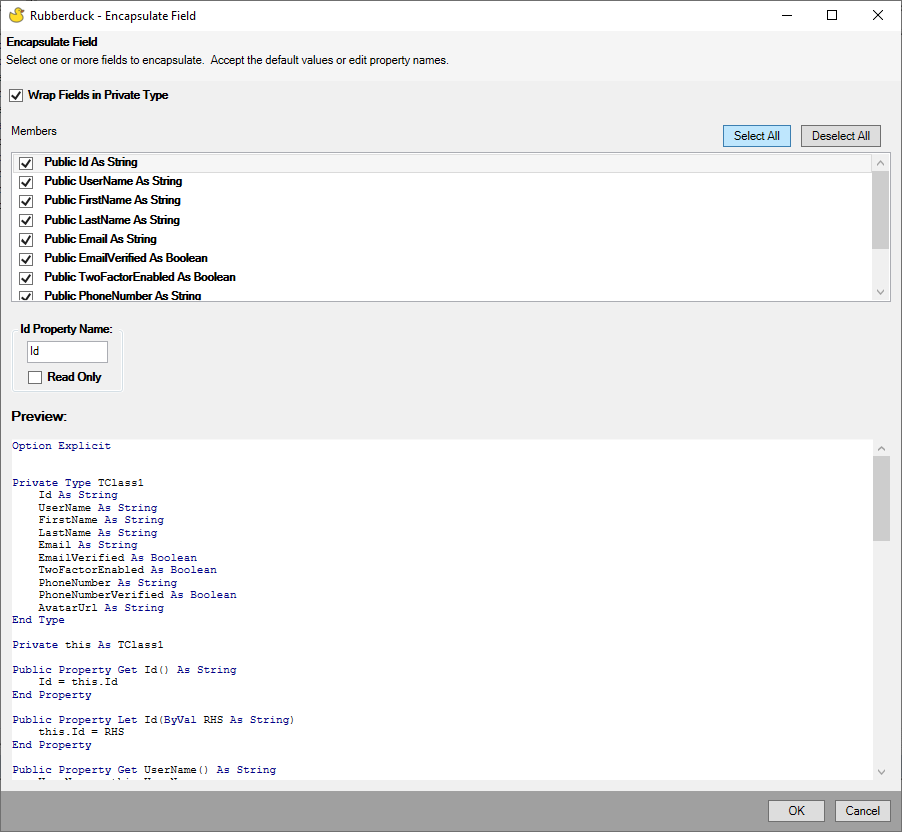
Check the wrap fields in private type box, then click the Select all button and hit OK.

The Encapsulate Field refactoring also lets you rename the properties and their respective backing field.

Now the module looks like this, and all you had to do was to declare a bunch of public fields:

Option Explicit
Private Type TUser
    Id As String
    UserName As String
    FirstName As String
    LastName As String
    Email As String
    EmailVerified As Boolean
    TwoFactorEnabled As Boolean
    PhoneNumber As String
    PhoneNumberVerified As Boolean
    AvatarUrl As String
End Type
Private this As TUser
Public Property Get Id() As String
    Id = this.Id
End Property
Public Property Let Id(ByVal value As String)
    this.Id = value
End Property
Public Property Get UserName() As String
    UserName = this.UserName
End Property
Public Property Let UserName(ByVal value As String)
    this.UserName = value
End Property
Public Property Get FirstName() As String
    FirstName = this.FirstName
End Property
Public Property Let FirstName(ByVal value As String)
    this.FirstName = value
End Property
Public Property Get LastName() As String
    LastName = this.LastName
End Property
Public Property Let LastName(ByVal value As String)
    this.LastName = value
End Property
Public Property Get Email() As String
    Email = this.Email
End Property
Public Property Let Email(ByVal value As String)
    this.Email = value
End Property
Public Property Get EmailVerified() As Boolean
    EmailVerified = this.EmailVerified
End Property
Public Property Let EmailVerified(ByVal value As Boolean)
    this.EmailVerified = value
End Property
Public Property Get TwoFactorEnabled() As Boolean
    TwoFactorEnabled = this.TwoFactorEnabled
End Property
Public Property Let TwoFactorEnabled(ByVal value As Boolean)
    this.TwoFactorEnabled = value
End Property
Public Property Get PhoneNumber() As String
    PhoneNumber = this.PhoneNumber
End Property
Public Property Let PhoneNumber(ByVal value As String)
    this.PhoneNumber = value
End Property
Public Property Get PhoneNumberVerified() As Boolean
    PhoneNumberVerified = this.PhoneNumberVerified
End Property
Public Property Let PhoneNumberVerified(ByVal value As Boolean)
    this.PhoneNumberVerified = value
End Property
Public Property Get AvatarUrl() As String
    AvatarUrl = this.AvatarUrl
End Property
Public Property Let AvatarUrl(ByVal value As String)
    this.AvatarUrl = value
End Property

I love this feature! Rubberduck has already re-parsed the module, so next we right-click anywhere in the module and select the Extract Interface refactoring, and check the box to select all Property Get accessors (skipping Property Let):

Extract Interface can automatically implement the extracted interface for you, and you can extract a public interface out of a private class.

Having a read-only interface for client code that doesn’t need the Property Let accessors makes an objectively cleaner API: assignments are recognized as invalid at compile time.

We get a read-only IUser interface for our efforts (!), and now the User class has an Implements IUser instruction at the top, …and these new members at the bottom:

Private Property Get IUser_ThingId() As String
    IUser_ThingId = ThingId
End Property

Private Property Get IUser_UserName() As String
    IUser_UserName = UserName
End Property

Private Property Get IUser_FirstName() As String
    IUser_FirstName = FirstName
End Property

Private Property Get IUser_LastName() As String
    IUser_LastName = LastName
End Property

Private Property Get IUser_Email() As String
    IUser_Email = Email
End Property

Private Property Get IUser_EmailVerified() As Boolean
    IUser_EmailVerified = EmailVerified
End Property

Private Property Get IUser_TwoFactorEnabled() As Boolean
    IUser_TwoFactorEnabled = TwoFactorEnabled
End Property

Private Property Get IUser_PhoneNumber() As String
    IUser_PhoneNumber = PhoneNumber
End Property

Private Property Get IUser_PhoneNumberVerified() As Boolean
    IUser_PhoneNumberVerified = PhoneNumberVerified
End Property

Private Property Get IUser_AvatarUrl() As String
    IUser_AvatarUrl = AvatarUrl
End Property

The scary part is that it feels as though if Extract Interface accounted for the presence of a Private Type in a similar way Encapsulate Field does, then even the TODO placeholder bits could be fully automated. Might be something to explore there… Update: automagic implementation completed!

Now we have our read-only interface worked out, if we go by previous posts’ teachings, , that is where we make our User class have a predeclared instance, and expose a factory method that I’d typically name Create:

'@Description "Creates and returns a new user instance with the specified property values."
Public Function Create(ByVal Id As String, ByVal UserName As String, ...) As IUser
    '...
End Function

Without Rubberduck, in order to have a predeclared instance of your class you would have to export+remove the class module, locate the exported .cls file, open it in Notepad++, edit the VB_PredeclaredId attribute value to True, save+close the file, then re-import it back into your VBA project.

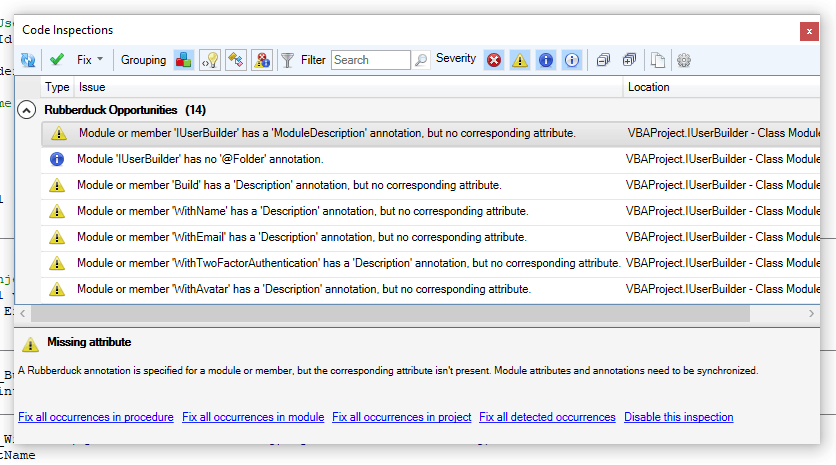
With Rubberduck, there’s an annotation for that: simply add '@PredeclaredId at the top of the class module, parse, and there will be a result for the AttributeValueOutOfSync inspection informing you that the class’ VB_PredeclaredId attribute value disagrees with the @PredeclaredId annotation, and then you apply the quick-fix you want, and you just might have synchronized hidden attributes across the with a single click.

'@PredeclaredId
Option Explicit

When it’s a factory method for a service class that takes in dependencies, 2-3 parameters is great, 5+ is suspicious. But here we’re taking in values, pure data – not some IFileWriter or other abstraction. And we need quite a lot of them (here 10, but who knows how many that can be!), and that’s a problem, because this is very ugly:

Set identity = User.Create("01234", "Rubberduck", "contact@rubberduckvba.com", False, ...)

Using named parameters can help:

Set identity = User.Create( _
    Id:="01234", _
    UserName:="Rubberduck", _
    Email:="contact@rubberduckvba.com", _
    EmailVerified:=False, _
    Phone:="555-555-5555", _
    PhoneVerified:=False, _
    ...)

But the resulting code still feels pretty loaded, and that’s with consistent line breaks. Problem is, that limits the number of factory method parameters to 20-ish (if we’re nice and stick to one per line), since that’s how many line continuations the compiler will handle for a single logical line of code.

Surely there’s a better way.

Building the Builder

I wrote about this pattern in OOP Design Patterns: The Builder, but in retrospect that article was really just a quick overview. Let’s explore the builder pattern.

I like to design objects from the point of view of the code that will be consuming them. In this case what we want to end up with, is something like this:

Set identity = UserBuilder.Create("01234", "Rubberduck") _
    .WithEmail("contact@rubberduckvba.com", Verified:=False) _
    .WithPhone("555-555-5555", Verified:=False) _
    .Build

This solves a few problems that the factory method doesn’t:

  • Optional arguments become explicitly optional member calls; long argument lists are basically eliminated.
  • Say Id and UserName are required, i.e. a User object would be invalid without these values; the builder’s own Create factory method can take these required values as arguments, and that way any User instance that was built with a UserBuilder is guaranteed to at least have these values.
  • If we can provide a value for EmailVerified but not for Email, or for PhoneVerified but not for Phone, and neither are required… then with individual properties the best we can do is raise some validation error after the fact. With a UserBuilder, we can have WithEmail and WithPhone methods that take a Verified Boolean parameter along with the email/phone, and guarantee that if EmailVerified is supplied, then Email is supplied as well.

I like to start from abstractions, so let’s add a new class module – but don’t rename it just yet, otherwise Rubberduck will parse it right away. Instead, copy the IUser interface into the new Class1 module, select all, and Ctrl+H to replace “Property Get ” (with the trailing space) with “Function With” (without the trailing space). Still with the whole module selected, we replace “String” and “Boolean” with “IUserBuilder”. The result should look like this:

'@Interface
Option Explicit
Public Function WithId() As IUserBuilder
End Function
Public Function WithUserName() As IUserBuilder
End Function
Public Function WithFirstName() As IUserBuilder
End Function
Public Function WithLastName() As IUserBuilder
End Function
Public Function WithEmail() As IUserBuilder
End Function
Public Function WithEmailVerified() As IUserBuilder
End Function
Public Function WithTwoFactorEnabled() As IUserBuilder
End Function
Public Function WithPhoneNumber() As IUserBuilder
End Function
Public Function WithPhoneNumberVerified() As IUserBuilder
End Function
Public Function WithAvatarUrl() As IUserBuilder
End Function

We’re missing a Build method that returns the IUser we’re building:

Public Function Build() As IUser
End Function

Now we add the parameters and remove the members we don’t want, merge the related ones into single functions – this is where we define the shape of our builder API: if we want to make it hard to create a User with a LastName but without a FirstName, or one with TwoFactorEnabled and PhoneNumberVerified set to True but without a PhoneNumber value… then with a well-crafted builder interface we can make it do exactly that.

Once we’re done, we can rename the class module to IUserBuilder, and that should trigger a parse. The interface might look like this now:

'@Interface
'@ModuleDescription("Incrementally builds a User instance.")
Option Explicit
'@Description("Returns the current object.")
Public Function Build() As IUser
End Function
'@Description("Builds a user with a first and last name.")
Public Function WithName(ByVal FirstName As String, ByVal LastName As String) As IUserBuilder
End Function
'@Description("Builds a user with an email address.")
Public Function WithEmail(ByVal Email As String, Optional ByVal Verified As Boolean = False) As IUserBuilder
End Function
'@Description("Builds a user with SMS-based 2FA enabled.")
Public Function WithTwoFactorAuthentication(ByVal PhoneNumber As String, Optional ByVal Verified As Boolean = False) As IUserBuilder
End Function
'@Description("Builds a user with an avatar at the specified URL.")
Public Function WithAvatar(ByVal Url As String) As IUserBuilder
End Function

Then we can add another class module, and type Implements IUserBuilder under Option Explicit, then hit Ctrl+` to parse. Unless you disabled the “check if code compiles before parsing” setting (it’s enabled by default), you should be seeing this warning:

The project can’t compile, because the interface isn’t implemented.

Click Yes to parse anyway (normally we only want compilable code, but in this case we know what we’re doing, I promise), then right-click somewhere in the Implements IUserBuilder statement, and select the Implement Interface refactoring:

Creating all these method stubs manually, or… letting Rubberduck create them all at once in a split-second?

The result is as follows, and makes a good starting point:

Option Explicit
Implements IUserBuilder
Private Function IUserBuilder_Build() As IUser
    Err.Raise 5 'TODO implement interface member
End Function
Private Function IUserBuilder_WithName(ByVal FirstName As String, ByVal LastName As String) As IUserBuilder
    Err.Raise 5 'TODO implement interface member
End Function
Private Function IUserBuilder_WithEmail(ByVal Email As String, Optional ByVal Verified As Boolean = False) As IUserBuilder
    Err.Raise 5 'TODO implement interface member
End Function
Private Function IUserBuilder_WithTwoFactorAuthentication(ByVal PhoneNumber As String, Optional ByVal Verified As Boolean = False) As IUserBuilder
    Err.Raise 5 'TODO implement interface member
End Function
Private Function IUserBuilder_WithAvatar(ByVal Url As String) As IUserBuilder
    Err.Raise 5 'TODO implement interface member
End Function

We’re “building” an IUser object. So we have a module-level User object (we need the class’ default interface here, so that we can access the Property Let members), and each With method sets one property or more and then returns the current object (Me). That last part is critical, it’s what makes the builder methods chainable. We’ll need a Build method to return an encapsulated IUser object. So the next step will be to add a @PredeclaredId annotation and implement a Create factory method that takes the required values and injects the IUser object into the IUserBuilder instance we’re returning; then we can remove the members for these required values, leaving only builder methods for the optional ones. We will also add a value parameter of the correct type to each builder method, and make them all return the current object (Me). Once the class module looks like this, we can rename it to UserBuilder, and Rubberduck parses the code changes – note the @PredeclaredId annotation (needs to be synchronized to set the hidden VB_PredeclaredId attribute to True:

'@PredeclaredId
'@ModuleDescription("Builds a User object.")
Option Explicit
Implements IUserBuilder
Private internal As User
'@Description("Creates a new UserBuilder instance.")
Public Function Create(ByVal Id As String, ByVal UserName As String) As IUserBuilder
    Dim result As UserBuilder
    Set result = New UserBuilder
    
    '@Ignore UserMeaningfulName FIXME
    Dim obj As User
    Set obj = New User
    obj.Id = Id
    obj.UserName = UserName
    
    Set result.User = internal
    Set Create = result
End Function
'@Ignore WriteOnlyProperty
'@Description("For property injection of the internal IUser object; only the Create method should be invoking this member.")
Friend Property Set User(ByVal value As IUser)
    If Me Is UserBuilder Then Err.Raise 5, TypeName(Me), "Member call is illegal from default instance."
    If value Is Nothing Then Err.Raise 5, TypeName(Me), "'value' argument cannot be a null reference."
    Set internal = value
End Property
Private Function IUserBuilder_Build() As IUser
    If internal Is Nothing Then Err.Raise 91, TypeName(Me), "Builder initialization error: use UserBuilder.Create to create a UserBuilder."
    Set IUserBuilder_Build = internal
End Function
Private Function IUserBuilder_WithName(ByVal FirstName As String, ByVal LastName As String) As IUserBuilder
    internal.FirstName = FirstName
    internal.LastName = LastName
    Set IUserBuilder_WithName = Me
End Function
Private Function IUserBuilder_WithEmail(ByVal Email As String, Optional ByVal Verified As Boolean = False) As IUserBuilder
    internal.Email = Email
    internal.EmailVerified = Verified
    Set IUserBuilder_WithEmail = Me
End Function
Private Function IUserBuilder_WithTwoFactorAuthentication(ByVal PhoneNumber As String, Optional ByVal Verified As Boolean = False) As IUserBuilder
    internal.TwoFactorEnabled = True
    internal.PhoneNumber = PhoneNumber
    internal.PhoneNumberVerified = Verified
    Set IUserBuilder_WithTwoFactorAuthentication = Me
End Function
Private Function IUserBuilder_WithAvatar(ByVal Url As String) As IUserBuilder
    internal.AvatarUrl = Url
    Set IUserBuilder_WithAvatar = Me
End Function

Now, when I said default instances and factory methods (here too) are some kind of fundamental building block, I mean we’re going to be building on top of that, starting with this builder pattern; the Create method is intended to be invoked off the class’ default instance, like this:

Set builder = UserBuilder.Create(internalId, uniqueName)

The advantages are numerous, starting with the possibility to initialize the builder with everything it needs (all the required values), so that the client code can call Build and consume a valid User object right away.

Side note about this FIXME comment – there’s more to it than it being a signpost for the reader/maintainer:

    '@Ignore UserMeaningfulName FIXME
    Dim obj As User

By default only TODO, BUG, and NOTE markers are picked up, but you can easily configure Rubberduck to find any marker you like in comments, and then the ToDo Explorer lets you easily navigate them all:

Rubberduck has a ToDo Explorer toolwindow that can be configured (click the cogwheel icon) to pick up “FIXME” anywhere in comments, anywhere in the project. Or “HERE BE DRAGONS”.

Another noteworthy observation:

'@Ignore WriteOnlyProperty
'@Description("For property injection of the internal IUser object; only the Create method should be invoking this member.")
Friend Property Set User(ByVal value As IUser)
    If Me Is UserBuilder Then Err.Raise 5, TypeName(Me), "Member call is illegal from default instance."
    If value Is Nothing Then Err.Raise 5, TypeName(Me), "'value' argument cannot be a null reference."
    Set internal = value
End Property

Me is always the current object, as in, an instance of this class module, presenting the default interface of this class module: the If Me Is UserBuilder condition evaluates whether Me is the object known as UserBuilder – and right now there’s no such thing and the code doesn’t compile.

Synchronizing Attributes & Annotations

Rubberduck knows we mean that class to have a VB_PredeclaredId attribute value of True because of the @PredeclaredId annotation, but it’s still just a comment at this point. Bring up the inspection results toolwindow, and find the results for the MissingAttribute inspection under Rubberduck Opportunities:

Clicking Fix all occurrences in project will automatically add all the missing attributes.

That didn’t fix the VB_PredeclaredId attributes! Why?! The reason is that the attribute isn’t missing, only its value is out of sync. We’ll have to change this (pull requests welcome!), but for now you’ll find the AttributeValueOutOfSync inspection results under the Code Quality Issues group. If you group results by inspection, its miscategorization doesn’t matter though:

When attributes and annotations contradict each other, the AttributeValueOutOfSync inspection starts issuing results.

Adjust the attribute value accordingly (right-click the inspection result, or select “adjust attribute value(s)” from the “Fix” dropdown menu), and now your UserBuilder is ready to use:

Dim identity As IUser
Set identity = UserBuilder.Create(uniqueId, uniqueName) _
                          .WithName(first, last) _
                          .WithEmail(emailAddress) _
                          .Build

…and misuse:

Set UserBuilder.User = New User '<~ runtime error, illegal from default instance
Debug.Print UserBuilder.User.AvatarUrl '<~ compile error, invalid use of property
Set builder = New UserBuilder
Set identity = builder.Build '<~ runtime error 91, builder state was not initialized
Set builder = New UserBuilder
Set builder = builder.WithEmail(emailAddress) '<~ runtime error 91

Conclusions

Model classes with many properties are annoying to write, and annoying to initialize. Sometimes properties are required, other times properties are optional, others are only valid if another property has such or such value. This article has shown how effortlessly such classes can be created with Rubberduck, and how temporal coupling and other state issues can be solved using the builder creational pattern.

Using this pattern as a building block in the same toolbox as factory methods and other creational patterns previously discussed, we can now craft lovely fluent APIs that can chain optional member calls to build complex objects with many properties without needing to take a gazillion parameters anywhere.

Secure ADODB

Unless you’re hosted in Access, your VBA project doesn’t have access to a database engine. If you’re in Excel, it’s easy to treat the host workbook as a database and each worksheet as a table. While we can build an application that uses Excel worksheets to store data, we probably shouldn’t do that. The reasons are many, but primarily (pun …yeah, intended), we want to be able to establish bullet-proof referential integrity between records/tables; while Excel is great for many things, it’s useless for that: it’s the job of a relational database system (RDBMS), not that of any worksheet software, no matter how powerful. Power Query is very much worth looking into, but if you’re building a small CRUD (Create/Read/Update/Delete) application in VBA, you’ll want VBA code responsible for the data access – enter ADODB, …and every pitfall that comes with it.

In this article we will explore a heavily object-oriented solution to querying a database securely with the ADODB library.


Securely?

Querying a database with ADODB is easy: just set up a connection, open it, then execute whatever SQL statement you need through the Connection, and you get the results in a Recordset object:

Dim conn As ADODB.Connection
Set conn = New ADODB.Connection
conn.Open "ConnectionString"

Dim rs As ADODB.Recordset
Set rs = conn.Execute("SELECT Field1, Field2 FROM Table1")

'...

rs.Close
conn.Close

That is great for one-timer, ad-hoc queries: things quickly get messy when you start needing multiple queries, or when your SQL statement needs to be invoked repeatedly with different values:

Dim conn As ADODB.Connection
Set conn = New ADODB.Connection
conn.Open "ConnectionString"

Dim i As Long
For i = 1 To 10
    Dim rs As ADODB.Recordset
    Set rs = conn.Execute("SELECT Field1, Field2 FROM Table1 WHERE Field3 = " & i)
    '...
    rs.Close
Next
conn.Close

This right here – WHERE SomeField = " & i, is making the database engine work harder than it needs to… and it’s costing server-side performance, because as far as the engine knows, it’s getting a different query every time – and thus computes the same execution plan over and over, every time… when it could just be reusing it. Databases are smart. Like, wicked smart… but yeah we still need to ask for the right thing!

Compare to something like this:

Const sql As String = "SELECT Field1, Field2 FROM Table1 WHERE Field3 = ?"
Dim conn As ADODB.Connection
Set conn = New ADODB.Connection
conn.Open "ConnectionString"

Dim i As Long
For i = 1 To 10
    Dim cmd As ADODB.Command
    Set cmd = New ADODB.Command
    cmd.CommandType = adCmdText
    cmd.CommandText = sql
    cmd.Parameters.Append cmd.CreateParameter(Type:=adInteger, Value:= i)

    Dim rs As ADODB.Recordset
    Set rs = cmd.Execute
    '...
    rs.Close
Next
conn.Close

Oh my, so much more code, so little gain – right?

Using ADODB.Command when queries involve a WHERE (and/or VALUES) clause and user-provided (directly or not) values is not only more efficient (the cached execution plan is reused because the command string is identical every time), it’s also more secure. Concatenating user inputs into SQL command strings is a common rookie mistake, and it’s a practice that is way more widespread than it should be (regardless of the language, paradigm, or platform); your code becomes vulnerable to SQL Injection Attacks – something that may or may not be in your threat model, but that inevitably turns into… easily avoidable bugs: think of what might happen if a user entered O'Connor in that LastName field. If you’re thinking “oh that’s easy! I’ll just double-up single quotes, and fixed!“, then you’re playing a needlessly exhausting game of cat-and-mouse with the next thing that will break your clever escaping: the mouse wins.

Abstract thoughts

Much simpler to just use an ADODB.Command every time, and when you need it parameterized, to Append any number of ADODB.Parameter objects to its Parameters collection. Except, it does make a lot of code to write, every time.

What do we do when we see repetitive patterns in code? If you’re thinking “we put it in a function!” then you’re thinking abstraction and that’s exactly the right train of thought.

We’re just going to take this abstraction… and make it an object. Then think of what objects it needs in order to do its job, and abstract these objects behind interfaces too, and take these abstractions in as constructor parameters of our Create “static” factory method. Rinse & repeat until all dependencies are property-injected and all responsibilities are nicely encapsulated into their own classes. It was fun!

I wrote an original version of this functionality little while ago – you can find the original version on Code Review, and see how different/similar it is to this simplified/improved version in our Examples repository on GitHub.

The original was just an ADODB wrapper class though, couldn’t really be unit-tested, and was annoying to maintain because it felt very repetitive. This version is separating the type mappings from the parameter-providing logic, which makes configuring these mappings is done through an object that’s solely responsible for these mappings; it also separates the command from the connection, and abstracts away that connection enough to enable unit testing and cover quite a large part of the API – but most importantly, this version exposes adequate abstractions for the calling code to use and stub in its own unit tests.

VBA code written with this API (and the principles it demonstrates) can easily be fully testable, without ever actually hitting any database.

I can do this in the immediate pane:

?UnitOfWork.FromConnectionString("connection string").Command.GetSingleValue("SELECT Field1 FROM Table1 WHERE Id=?", 1)

I mean, it’s a contrived example, but with a valid connection string, query, and arguments, that’s all we need to get an actual parameterized ADODB command sending that 1 as an actual ADODB parameter, …and the following debug output:

Begin connect...
Connect completed. Status: 1
Begin transaction completed. 
Begin execute...
Execute completed, -1 record(s) affected.
{whatever value was in Field1}
Rollback transaction completed.
Disconnect completed. Status: 1

I made DbConnection listen in on whatever events the ADODB connection is firing, pending the implementation of an adapter to expose some IDbConnectionEvents members – the idea is to end up with client code that can inject its own callbacks and do things like log such messages. In the meantime Debug.Print statements are producing this debug output, but that’s it’s an implementation detail: it doesn’t publicly expose any of these events. It couldn’t, either: the rest of the code needs to work with the IDbConnection interface, and interfaces unfortunately can’t expose events in VBA.


SecureADODB

Some might call it layered spaghetti. Others call it lasagna. I call it well-abstracted code that reads and maintains like a charm and provably works as intended. There is nothing, absolutely nothing wrong with having many class modules in a VBA project: the only problem is… well, the VBE itself:

Project Explorer is making OOP rather painful. In fact it makes any kind of modularization painful.
Code Explorer makes the VBE more OOP-friendly: now you can have folders regrouping modules by functionality rather than just by module type.

Nice, rich APIs involve many related objects, interfaces, methods – members that make up the object model the API’s client code will be working with. As long as we can keep all these classes organized, there’s no problem having many of them.

Before we look at the implementation, let’s review the interfaces and the overall structure.

Only two interfaces aren’t being stubbed for unit tests. IUnitOfWork because as the top-level object nothing in the object model consumes it. It is needed though, because client code can inject it as a dependency of some FooRepository class, and then tests can provide it with a StubUnitOfWork that implements IUnitOfWork.

The other “façade” interface is ITypeMap. This one isn’t really needed (neither is the predeclared instance of AdoTypeMappings or its Default factory method), something felt wrong with the client code without it. While the class is essentially just a dictionary / literally a map, there’s something rather elegant about depending on an ITypeMap rather than some Scripting.Dictionary.

The two dark blue interfaces are abstract factory interfaces, each with a “real” and a “stub” implementation for tests: these are very simple classes whose entire purpose is to create an object of a particular type.

If we consider IParameterProvider an implementation detail of IDbCommandBase, that leaves us with only the core stuff: IDbCommandBase, IDbCommand, and IDbConnection – everything else just revolves around these.

DbCommandBase

The old SqlCommand code had two sets of commands: “Execute” for methods you could pass a Connection to, and “QuickExecute” for methods that created a connection on-the-spot. I decided to split the two behaviors into two distinct implementation of the same interface, and that’s how I ended up with DefaultDbCommand and AutoDbCommand. As I was cleaning up the two new classes, I had to notice these two classes needed a number of common bits of functionality… as would any other implementation of IDbCommand.

In a language that supports inheritance, I would probably make the two classes inherit a third abstract “base” class where I’d implement the IDbCommand interface. In VBA, we can’t derive a class from another, or inherit members from another class: inheritance is flat-out unavailable. There’s an alternative though, and it’s arguably even better than inheritance: composition. We can put the common functionality in a third class, and then have the two implementations take an instance of that “base” class as we would any other dependency – effectively achieving what we wanted out of inheritance, but through composition.

Code is said to be “decoupled” when none of its concrete components are inter-dependent, as is apparent with the solid black “depends on” arrows here. Decoupled components can easily be swapped for other implementations, like …test stubs.

What’s wrong with inheritance?

Don’t get me wrong, inheritance is very cool: with an abstract class you can have templated methods, where a method in the base class (typically a method that implements some interface member) invokes an abstract or virtual method (typically with protected scope) that the inherited class must override and provide an implementation for. Rubberduck uses this pattern in quite a few places (inspections, notably). Without inheritance, it’s just not something that’s possible.

Inheritance is described as a “is a” relationship, while composition is more of a “has a” relationship. This is important, because when the only consideration weighting in favor of inheritance is the need for two classes to share some functionality, it’s exactly why inheritance should not be used.


Decoupling FTW

The “base” class appeared as a need to have a place for IDbCommand implementations to access shared functionality. I wanted to return disconnected recordsets, and retrieving the value of the first field of the first record of a recordset isn’t something that’s glaringly implementation-specific. The other piece of functionality I needed, was a function that creates the ADODB.Command object and adds the parameters.

Because I wanted this class to create the ADODB.Command, I needed it to be able to turn a Variant into an ADODB.Parameter through some mapping, and since I didn’t want my class to be necessarily coupled with that mapping, or anything remotely related to configuring ADODB parameters… I’m property-injecting an IParameterProvider dependency:

Public Function Create(ByVal provider As IParameterProvider) As IDbCommandBase
    Errors.GuardNonDefaultInstance Me, DbCommandBase
    Errors.GuardNullReference provider
    
    Dim result As DbCommandBase
    Set result = New DbCommandBase
    Set result.ParameterProvider = provider
    
    Set Create = result

End Function

Validating the command string / arguments

Since the commands are given an SQL command string to execute, and a ParamArray array of arguments that should have the same number of items as there are ? ordinal parameters in the SQL command string, we have an opportunity to catch a missing or extraneous argument before we even send the command string to the database server. And because this validation logic would have to be the same regardless of what IDbCommand implementation we’re looking at, DbCommandBase makes the best place to put it.

This implementation is probably too naive for a number of edge cases, but sufficient for most: we’re simply counting the number of ? characters in the sql string, and comparing that with the number of elements in the args array. We need to handle errors here, because if the args array is empty, evaluating UBound(args) and/or LBound(args) will throw a “subscript out of range” run-time error 9.

Public Function ValidateOrdinalArguments(ByVal sql As String, ByRef args() As Variant) As Boolean
    On Error GoTo CleanFail
    Dim result As Boolean
    
    Dim expected As Long
    expected = Len(sql) - Len(Replace(sql, "?", vbNullString))
    
    Dim actual As Long
    On Error GoTo CleanFail 'if there are no args, LBound/UBound are both out of bounds
    actual = UBound(args) + (1 - LBound(args))
    
CleanExit:
    result = (expected = actual)
    ValidateOrdinalArguments = result
    Exit Function
CleanFail:
    actual = 0
    Resume CleanExit
End Function

Getting a disconnected Recordset

If we created a database connection, issued a command against it, and received the recordset from ADODB.Command.Execute, and then we close the connection and return that recordset, then the calling code can’t use the data anymore: a connected recordset only works if the calling code owns the connection. So we need a way to issue a disconnected recordset, while still using an ADODB.Command. The way to do this, is to pass the command as the Source argument to Recordset.Open, and to use a static, client-side cursor:

Private Function GetDisconnectedRecordset(ByVal cmd As ADODB.Command) As ADODB.Recordset
    Errors.GuardNullReference cmd
    Errors.GuardNullReference cmd.ActiveConnection
    
    Dim result As ADODB.Recordset
    Set result = New ADODB.Recordset
    
    result.CursorLocation = adUseClient
    result.Open Source:=cmd, CursorType:=adOpenStatic
    
    Set result.ActiveConnection = Nothing
    Set GetDisconnectedRecordset = result
End Function

Getting a single value result

With functions to validate the parameters, create commands and get a disconnected recordset, we have everything we need for IDbCommand implementations to do their job, but if we leave it like this, we’ll end up with all implementations copying the logic of IDbCommand.GetSingleValue: best have that logic in DbCommandBase and avoid as much repetition as possible.

Private Function GetSingleValue(ByVal db As IDbConnection, ByVal sql As String, ByRef args() As Variant) As Variant
    Errors.GuardEmptyString sql
    
    Dim cmd As ADODB.Command
    Set cmd = CreateCommand(db, adCmdText, sql, args)
    
    Dim results As ADODB.Recordset
    Set results = GetDisconnectedRecordset(cmd)
    
    GetSingleValue = results.Fields.Item(0).value
End Function

Creating the command

A few things can go wrong when creating the ADODB.Command object: we need an ADODB.Connection that’s open, and the parameters must be valid. Since we’re not executing the command just yet, we don’t have to worry about everything that could go wrong actually executing the command string and processing the parameters on the server. So the strategy here is to guard against invalid inputs as much as possible, and then to handle errors when we add the parameters, and return the Command object with whatever parameters were successfully added. We don’t need to try salvaging the rest of the parameters if one blows up, since that failing parameter will fail command execution anyway, but there isn’t much we can do about it, other than perhaps throw an error and have the caller not even try to run the command – but here I decided that the server-side errors would be more useful than any custom “invalid parameter” error.

Note that the ADODB.Command object is actually created by the method-injected IDbConnection dependency. This creates a seam between the class and ADODB, despite the inherent coupling with the ADODB.Command type: it makes the command’s ActiveConnection an implementation detail of IDbConnection.CreateCommand, and that’s all I needed to make this method work with a stub connection that isn’t actually connecting to anything:

Private Function CreateCommand(ByVal db As IDbConnection, ByVal commandType As ADODB.CommandTypeEnum, ByVal sql As String, ByRef args() As Variant) As ADODB.Command
    Errors.GuardNullReference db
    Errors.GuardEmptyString sql
    Errors.GuardExpression db.State <> adStateOpen, message:="Connection is not open."
    Errors.GuardExpression Not ValidateOrdinalArguments(sql, args), message:="Arguments supplied are inconsistent with the provided command string parameters."
    
    Dim cmd As ADODB.Command
    Set cmd = db.CreateCommand(commandType, sql)
    
    On Error GoTo CleanFail
    Dim arg As ADODB.Parameter
    For Each arg In this.ParameterProvider.FromValues(args)
        cmd.parameters.Append arg
    Next
    
CleanExit:
    Set CreateCommand = cmd
    Exit Function
CleanFail:
    Resume CleanExit
End Function

DbCommand

As mentioned before, there are two implementations for the IDbCommand interface: one that creates and owns its own IDbConnection, the other that takes it in as a dependency.

This abstraction represents an object that can take an SQL statement and parameters, and return the result(s) to its caller.

DefaultDbCommand receives its IDbConnection dependency through property injection in its Create factory method.

AutoDbCommand takes a connection string and an IDbConnectionFactory instead.

UnitOfWork uses a DefaultDbCommand because the unit of work needs to own the connection, but AutoDbCommand could be used instead of a unit of work, if we just need a quick SELECT and no transaction.

Abstract Factory

IDbConnectionFactory is an Abstract Factory here. This is needed, because unit tests need to be able to inject a stub factory that produces stub connections: an abstract factory is a factory interface that creates objects of a type that is also an abstraction – in this case, IDbConnectionFactory.Create returns an IDbConnection object. Implementing this factory class is exactly as simple as you’d think – here’s DbConnectionFactory:

'@Exposed
'@Folder("SecureADODB.DbConnection")
'@ModuleDescription("An implementation of an abstract factory that creates DbConnection objects.")
Option Explicit
Implements IDbConnectionFactory

Private Function IDbConnectionFactory_Create(ByVal connString As String) As IDbConnection
    Set IDbConnectionFactory_Create = DbConnection.Create(connString)
End Function

And here’s StubDbConnectionFactory:

'@Folder("Tests.Stubs")
'@ModuleDescription("A stub acting as a IDbConnectionFactory implementation.")
Option Explicit
Implements IDbConnectionFactory
Private Type TInvokeState
    CreateConnectionInvokes As Long
End Type
Private this As TInvokeState

Private Function IDbConnectionFactory_Create(ByVal connString As String) As IDbConnection
    this.CreateConnectionInvokes = this.CreateConnectionInvokes + 1
    Set IDbConnectionFactory_Create = New StubDbConnection
End Function

Public Property Get CreateConnectionInvokes() As Long
    CreateConnectionInvokes = this.CreateConnectionInvokes
End Property

The test stub is more “complex” because it tracks method invocations, so that tests can know whether & how many times any given member was invoked during a test run.

The Abstract Factory pattern is very useful with Dependency Injection: it gives us an abstraction to inject when a class needs a dependency that just cannot be injected when the object is created – the alternative would be tight coupling: if we weren’t injecting a connection factory, then the command class would’ve had to be the one invoking DbConnection.Create – tightly coupling it with the DbConnection class and instantly making unit testing impossible. An abstract factory removes the coupling and allows unit tests to inject an alternative/stub implementation of the factory that creates StubDbConnection objects.

Wrapping it all up

AutoDbConnection can very well be consumed as-is by the client code:

Dim results As ADODB.Recordset
Set results = AutoDbConnection.Create(connString, New DbConnectionFactory, DbCommandBase.Create(AdoParameterProvider.Create(AdoTypeMappings.Default))).Execute(sql)

The only problem is that, well, the dependencies need to be resolved somehow, and that means the client code is now responsible for wiring everything up. While each component has a clear purpose, explicitly creating all these objects quickly gets old and redundant: we need an object that simplifies this – enter IUnitOfWork, and now we can use this much simpler code:

Dim results As ADODB.Recordset
Set results = UnitOfWork.FromConnectionString(connString).Command.Execute(sql)

Unit of Work is a design pattern that encapsulates a transaction: each individual operation can succeed or fail, and the unit of work either succeeds or fails as a whole. These notions are abstracted in the IUnitOfWork interface:

'@Folder("SecureADODB.UnitOfWork")
'@ModuleDescription("Represents an object encapsulating a database transaction.")
'@Interface
'@Exposed
Option Explicit

'@Description("Commits the transaction.")
Public Sub Commit()
End Sub

'@Description("Rolls back the transaction.")
Public Sub Rollback()
End Sub

'@Description("Creates a new command to execute as part of the transaction.")
Public Function Command() As IDbCommand
End Function

When a UnitOfWork is created, it initiates a database transaction. When it is destroyed before the transaction is committed, the transaction gets rolled back and from the database’s point of view, it’s like nothing happened.

Transaction?

If you’re unfamiliar with database transactions, there’s an easy example to illustrate what they do: imagine you have an Accounts table, and you’re processing a transfer – you need to UPDATE the record for the source account to deduct the transfer amount, then UPDATE the record for the destination account to add the transferred amount. In a happy world where everything goes well that would be the end of it… but the world is a cruel place, and assuming the 1st command goes through, nothing guarantees nothing will blow up when sending the 2nd command. Without transactions, the funds would simply vanish: they’re gone from the first account, and they were never added to the second account. With a transaction, we can rollback everything when the 2nd operation completes, no funds vanish and the data is exactly the way it was before the transaction started.


Again, the implementation is pretty straightforward – the only peculiarity is that the class has two factory methods – one named Create that takes all the dependencies in, and another named FromConnectionString that conveniently wires up a default set of dependencies (and then passes them to the Create method to avoid duplicating code).

'@Folder("SecureADODB.UnitOfWork")
'@ModuleDescription("An object that encapsulates a database transaction.")
'@PredeclaredId
'@Exposed
Option Explicit
Implements IUnitOfWork
Private Type TUnitOfWork
    Committed As Boolean
    RolledBack As Boolean
    Connection As IDbConnection
    CommandFactory As IDbCommandFactory
End Type
Private this As TUnitOfWork

'@Description("Creates a new unit of work using default configurations.")
'@Ignore ProcedureNotUsed
Public Function FromConnectionString(ByVal connString As String) As IUnitOfWork
    
    Dim db As IDbConnection
    Set db = DbConnection.Create(connString)
    
    Dim provider As IParameterProvider
    Set provider = AdoParameterProvider.Create(AdoTypeMappings.Default)
    
    Dim baseCommand As IDbCommandBase
    Set baseCommand = DbCommandBase.Create(provider)
    
    Dim factory As IDbCommandFactory
    Set factory = DefaultDbCommandFactory.Create(baseCommand)
    
    Set FromConnectionString = UnitOfWork.Create(db, factory)
    
End Function

'@Inject: just an idea.. see #https://github.com/rubberduck-vba/Rubberduck/issues/5463
Public Function Create(ByVal db As IDbConnection, ByVal factory As IDbCommandFactory) As IUnitOfWork
    Errors.GuardNonDefaultInstance Me, UnitOfWork
    Errors.GuardNullReference factory
    Errors.GuardNullReference db
    Errors.GuardExpression db.State <> adStateOpen, message:="Connection should be open."
    
    Dim result As UnitOfWork
    Set result = New UnitOfWork
    Set result.CommandFactory = factory
    Set result.Connection = db
    
    Set Create = result
End Function

'@Inject: this member should only be invoked by Me.Create, where Me is the class' default/predeclared instance.
'@Ignore ProcedureNotUsed: false positive with v2.5.0.5418
Friend Property Set Connection(ByVal value As IDbConnection)
    Errors.GuardDoubleInitialization this.Connection
    Errors.GuardNullReference value
    Set this.Connection = value
    this.Connection.BeginTransaction
End Property

'@Inject: this member should only be invoked by Me.Create, where Me is the class' default/predeclared instance.
'@Ignore ProcedureNotUsed: false positive with v2.5.0.5418
Friend Property Set CommandFactory(ByVal value As IDbCommandFactory)
    Errors.GuardDoubleInitialization this.CommandFactory
    Errors.GuardNullReference value
    Set this.CommandFactory = value
End Property

Private Sub Class_Terminate()
    On Error Resume Next
    If Not this.Committed Then this.Connection.RollbackTransaction
    On Error GoTo 0
End Sub

Private Sub IUnitOfWork_Commit()
    Errors.GuardExpression this.Committed, message:="Transaction is already committed."
    Errors.GuardExpression this.RolledBack, message:="Transaction was rolled back."
    On Error Resume Next ' not all providers support transactions
    this.Connection.CommitTransaction
    this.Committed = True
    On Error GoTo 0
End Sub

Private Function IUnitOfWork_Command() As IDbCommand
    Set IUnitOfWork_Command = this.CommandFactory.Create(this.Connection)
End Function

Private Sub IUnitOfWork_Rollback()
    Errors.GuardExpression this.Committed, message:="Transaction is already committed."
    On Error Resume Next ' not all providers support transactions
    this.Connection.RollbackTransaction
    this.RolledBack = True
    On Error GoTo 0
End Sub

Errors

If you paid close attention to the code listings so far, you likely already noticed the many Errors.GuardXxxxx member calls scattered throughout the code. There are probably as many ways to deal with custom errors as there are VBA classes out there, this is one way. Probably not the best way, but it feels “just right” for me in this case and I think I like it enough to keep using it until the problems it creates become clearer (there’s always something). Errors is a standard private module in the project, that defines custom error codes. Okay I was lazy and deemed SecureADODBCustomError all I needed, but it could also have been an Enum with descriptive names for each custom error code.

The module simply exposes a small number of very simple Sub procedures that make it easy for the rest of the code to raise meaningful custom errors:

'@Folder("SecureADODB")
'@ModuleDescription("Global procedures for throwing common errors.")
Option Explicit
Option Private Module

Public Const SecureADODBCustomError As Long = vbObjectError Or 32

'@Description("Re-raises the current error, if there is one.")
Public Sub RethrowOnError()
    With VBA.Information.Err
        If .Number <> 0 Then
            Debug.Print "Error " & .Number, .Description
            .Raise .Number
        End If
    End With
End Sub

'@Description("Raises a run-time error if the specified Boolean expression is True.")
Public Sub GuardExpression(ByVal throw As Boolean, _
Optional ByVal Source As String = "SecureADODB.Errors", _
Optional ByVal message As String = "Invalid procedure call or argument.")
    If throw Then VBA.Information.Err.Raise SecureADODBCustomError, Source, message
End Sub

'@Description("Raises a run-time error if the specified instance isn't the default instance.")
Public Sub GuardNonDefaultInstance(ByVal instance As Object, ByVal defaultInstance As Object, _
Optional ByVal Source As String = "SecureADODB.Errors", _
Optional ByVal message As String = "Method should be invoked from the default/predeclared instance of this class.")
    Debug.Assert TypeName(instance) = TypeName(defaultInstance)
    GuardExpression Not instance Is defaultInstance, Source, message
End Sub

'@Description("Raises a run-time error if the specified object reference is already set.")
Public Sub GuardDoubleInitialization(ByVal instance As Object, _
Optional ByVal Source As String = "SecureADODB.Errors", _
Optional ByVal message As String = "Object is already initialized.")
    GuardExpression Not instance Is Nothing, Source, message
End Sub

'@Description("Raises a run-time error if the specified object reference is Nothing.")
Public Sub GuardNullReference(ByVal instance As Object, _
Optional ByVal Source As String = "SecureADODB.Errors", _
Optional ByVal message As String = "Object reference cannot be Nothing.")
    GuardExpression instance Is Nothing, Source, message
End Sub

'@Description("Raises a run-time error if the specified string is empty.")
Public Sub GuardEmptyString(ByVal value As String, _
Optional ByVal Source As String = "SecureADODB.Errors", _
Optional ByVal message As String = "String cannot be empty.")
    GuardExpression value = vbNullString, Source, message
End Sub

Most of these procedures are invoked as the first executable statement in a given scope, to raise an error given invalid parameters or internal state, such as these:

Private Sub IUnitOfWork_Commit()
    Errors.GuardExpression this.Committed, message:="Transaction is already committed."
    Errors.GuardExpression this.RolledBack, message:="Transaction was rolled back."
    On Error Resume Next ' not all providers support transactions
    this.Connection.CommitTransaction
    this.Committed = True
    On Error GoTo 0
End Sub

Consistently raising such errors is the single best way to ensure our objects are always in a known and usable state, because we outright forbid them to be invalid. These validation clauses are called guard clauses, hence the GuardXxxxx procedure names.

A lot of the unit tests simply verify that, given the specified conditions, the expected error is raised:

'@TestMethod("Factory Guard")
Private Sub Create_ThrowsIfNotInvokedFromDefaultInstance()
    On Error GoTo TestFail
    
    With New AutoDbCommand
        On Error GoTo CleanFail
        Dim sut As IDbCommand
        Set sut = .Create("connection string", New StubDbConnectionFactory, New StubDbCommandBase)
        On Error GoTo 0
    End With
    
CleanFail:
    If Err.Number = ExpectedError Then Exit Sub
TestFail:
    Assert.Fail "Expected error was not raised."
End Sub

If each guard clause has a unit test, then the tests are effectively documenting how the objects are meant to be used. With more specific custom errors, the tests would be more accurate, but there’s a point where you need to look at what you’ve got and say “I think I can work with that”, and move on.


Audience

Obviously, one doesn’t import 20 classes into their VBA project just to send one ADODB command to a database server. However if you’re maintaining a VB6 application that uses ADODB all over the place, leaks connections, leaves recordsets dangling, …then importing this API can really help tighten up the data access code in that legacy app. Or maybe you’re writing a complex data-driven system in VBA for Excel because that’s all you’ve got, and a UnitOfWork abstraction makes sense for you.

The goal here is mostly to 1) demonstrate proper usage of ADODB.Command for secure, parameterized queries, and 2) demonstrate that Classic VB (VB6/VBA) has always had everything everyone ever needed to write full-blown object-oriented code that leverages abstraction, encapsulation, and polymorphism – making it possible to write clean and fully unit-tested code.

…and of course, it makes a great practical application of the OOP concepts discussed in many other articles on this blog. Studying the code in this project gives you insight on…

  • OOP foundations: abstraction, encapsulation, polymorphism.
  • SOLID principles: single responsibility, dependency inversion, etc.
  • DI techniques: property injection, abstract factory.
  • Unit testing: what to test, how to test, stubbing dependencies, etc.
  • Using custom errors, guard clauses, input validation.
  • Leveraging Rubberduck annotations, minimizing inspection results.

VBA Class Modules: gateway to SOLID code

Core contributor to the Rubberduck project, co-author of Microsoft Access in a Sharepoint World (2011), Professional Access 2013 Development (2013), and Effective SQL: 61 Specific Ways to Write Better SQL (2016), 10-times Microsoft Access MVP award recipient (2009-2019), Ben Clothier wrote a paper about class modules and OOP that makes a great on-topic addition to this blog. Enjoy!


Introduction

There are popular misconceptions surrounding VBA and object-oriented programming (OOP), usually in 2 forms:

  1. VBA isn’t really OOP, so you can’t really use OOP principles with VBA
  2. OOP makes things too complicated; procedural programming is all you need anyway

Both are incorrect because OOP is not a language feature but rather a principle of how we should design our code. In modern programming languages and IDE, there are features that makes it easier to apply & enforce the principles. In the end, it is still up to us, the programmers, to actually apply & enforce the principle. Thus, the language of choice has no bearing on whether you can apply the principles of OOP or not. If you are still skeptical, consider that the C programming language predated the development of OOP but there is a demonstration on writing OOP code in C.

The 2nd objection is commonly raised because when looking at the OOP code, it can seem frustrating because it refers to several other objects and you find yourselves looking at more files in order to see what a program does. Coming from a procedural mindset, that can feel like you’re dealing with several layers of lasagna. That does require a change in how you perceive the code.

That is the goal of this article, to help you discover how applying OOP principle can help you write better code, not just for VBA but for any programming language. If you’ve worked on a complex project, you might have had an episode where when you fixed a bug in one spot, 2 new bugs appeared in 2 unrelated places. Surely, you’d find that quite frustrating, taking out all the fun in the programming. Procedural design enables you to solve business problems quickly so that you can get on with other stuff. However, what if it’s so successful, that they come back for more; asking you for more features? How many changes do you have to make? With procedural programming, the upkeep is cumulative; first few feature requests are easy and put in action quickly. Next few, it takes more time and more tweaking. Some more, then it feels a bit harder and harder. But coding should not be like that! Adding a new feature should not scale on an exponential scale! That is what the OOP promises; by keeping a clean codebase, it is easy to describe the new feature and integrate it into the codebase with minimum change.

In fact, most programmers nowadays should be emphasizing writing refactor-friendly code. What do we mean by refactor-friendly? Basically, it is a codebase that is easy to change because you are able to change only pieces that actually needs to change and no more than that. That is very difficult to do in a purely procedural system. For long time, refactoring has not been something on average VBA developers’ mind because there were no tools to refactor VBA. Rubberduck exists to provide those tools. To get the most from refactoring, we do need to raise our level of code writing and apply good design to our VBA codebase.

The other important aspect to learn is that we want to make the wrong code look obviously and blatantly wrong. I highly encourage you to also read Joel Spolsky’s article on that subject. His article deals with the Hungarian notations, but we want to go beyond just the naming conventions. Taking up on OOP principles can significantly help us with making wrong code look wrong which means it becomes easier for us to fix the code. You’ve probably had to deal with a giant hundreds-line procedure with the great wall of declarations and deeply nested code and had the thrill of debugging it and cursing while your minor change cascades into something catastrophic. Well, there’s a better way!

The article assumes that you are familiar with VBA and procedural programming but otherwise have never or rarely used classes or interfaces. It further assumes that you might have had heard of object-oriented programming but otherwise are unfamiliar with the design and use of such. Also, it assumes that you are familiar and comfortable with using code-behinds and events in the document modules. (e.g. Excel’s workbook or worksheet, Access’ form or reports, Word’s document, etc.) We will build up on the class design and eventually apply OOP principles in designing our classes. To reinforce the concepts, we will do a build-up starting with familiar approach and transforming it into a clean codebase that is very refactor-friendly. The benefit is that you end up with a codebase that is easy to read, understand and maintain. Because this assumes you are familiar with procedural procedure (e.g. writing small functions or routines that perform a complex task by breaking it down into small steps), we need to provide a good transition from procedural mindset to object-oriented mindset. For that reason, we will take a route around the town instead of a direct route. I believe the indirect route will be beneficial in seeing what we would accomplish with a clean object-oriented codebase. This is not intended to be an exhaustive treatise but rather provide enough of fundamentals for you to see the advantages of the OOP principles in a VBA codebase.

We will start with creating custom types, and doing work with it, then use it as a basis for our first class.

Creating your custom types

You may have already used a user-defined type (UDT), which is a convenient way to create a structure of closely related properties together. You may have used it before especially if you’ve ever had to use certain API functions via the Declare statements. Let’s start with a Person UDT. We can create a new standard module and define a UDT within the module:

Public Type Person
  FirstName As String
  LastName As String
  BirthDate As Date
End Type
'figure 2-1: a Person UDT

The UDT provides us with 3 members that tells us something about a Person; namely the first & last name and the birth date. Obviously, we can have more but we want the example to stay simple. The calling code to use a Person UDT could look something like this:

Public Sub Test()
  Dim p1 As Person
  Dim p2 As Person
  
  p1.FirstName = "John"
  p1.LastName = "Smith"
  p1.BirthDate = #1970-01-01#
  
  p2.FirstName = "Jane"
  p2.LastName = "Doe"
  p2.BirthDate = #1970-01-01#

  Debug.Print VarPtr(p1), VarPtr(p2)
End Sub
'figure 2-2: testing code for using a Person UDT

This should demonstrate clearly that with a UDT, we could create several “instances”, which are independent of one other. Our setting of p2.FirstName does not affect the p1.FirstName. Note the last line printing out the VarPtr(p1) and VarPtr(p2). This prints out the variable’s memory address, which demonstrates that the p1 and p2 variables resides in a different region of memory and thus do not share anything. As an exercise, you can check the VarPtr for members of p1 and p2. For example, you could look at VarPtr(p1.FirstName) or VarPtr(p2.LastName) and compare to their respective counterpart.

In typical cases, we might want to have a collection of persons so that we can work with them in bulk or something similar. You might have done this but using a worksheet or a database table as the backing data structure. There is one crucial difference between a UDT and a database table or worksheet; the UDT is always ethereal, resides in the memory whereas the same data saved into a worksheet, a database table, or XML file are persisted and requires a specific method to read or write data to those source.

One thing about a UDT is that it cannot have any methods. We’ll start with creating a new person. In the above code example, we declared a Person variable for each object we needed, but we can do better than that. Let’s have a procedure that returns a new Person instead, as demonstrated below:

Public Function Create( _
  FirstName As String, _
  LastName As String, _
  BirthDate As Date _
) As Person
  Dim NewPerson As Person
  
  NewPerson.FirstName = FirstName
  NewPerson.LastName = LastName
  NewPerson.BirthDate = BirthDate
  
  Create = NewPerson
End Function
'figure 2-3: a Create function for a Person UDT

Now the calling code looks like this:

Public Sub Test()
  Dim p1 As Person
  Dim p2 As Person
  
  p1 = Create("John", "Smith", #1970-01-01#)
  p2 = Create("Jane", "Doe", #1970-01-01#)

  Debug.Print VarPtr(p1), VarPtr(p2)
End Sub
'figure 2-4: calling code using a Create function to create Person UDTs

Much more compact code, yes? More importantly, when we read the code, it is easy to understand what it is doing because we separate the mechanics of the creation from the current context which just needs something created without knowing the particular details in the act of creation.

But it doesn’t have to be just about the creation. Let’s say we want to provide name change. Perhaps because Ms. Doe got married and is now Mrs. Holly. We could then write a new function to help us:

Public Function ChangeLastName( _
  Person As Person, _
  NewLastName As String _
) As String
  ChangeLastName = Person.LastName
  Person.LastName = NewLastName
End Function
'figure 2-5: a ChangeLastName function to mutate a Person UDT

Thus, we could have our calling code do the name change:

Public Sub Test()
  Dim p1 As Person
  Dim p2 As Person
  
  p1 = Create("John", "Smith", #1970-01-01#)
  p2 = Create("Jane", "Doe", #1970-01-01#)

  Debug.Print VarPtr(p1), VarPtr(p2)

  Dim OldName As String
  OldName = ChangeLastName(p2, "Holly")
  
  Debug.Print OldName, p2.LastName
  Debug.Print VarPtr(p1), VarPtr(p2)
End Sub
'figure 2-6: calling code using ChangeLastName on a Person UDT.

The calling code demonstrates that when we change the last name for Ms. Doe to Mrs. Holly, the variable p2 is still the same; only its content has changed. If you are now wondering why we couldn’t have just assigned the UDT member directly instead of calling ChangeLastName, that’s exactly one of the problems we face with using UDTs:

p2.LastName = "Holly" 'Overwriting the original "Doe" entry
'figure 2-7: bypassing the ChangeLastName function by writing directly to the UDT member.

There is no way for us to control the access. VBA does not allow us to create an UDT that cannot be edited once created. That is often referred to being “immutable”. So, when we pass around UDT, we are always trusting that everyone will follow the same convention we build around the type. However, as human beings, we excel at being inconsistent and forgetful, so it’s too easy to fail to follow the convention, especially because the compiler won’t care whether you do a p2.LastName = "Holly" or ChangeLastName(p2, "Holly"). Both are legal syntax; but we don’t want it to be that way.

If you are wondering why we should want to control access and require use of a ChangeLastName instead, consider that in a typical business process, nothing stays the same for very long. What may have been true yesterday may be no longer true today. To stick to our example, we could suppose that we have a requirement that name change must be approved and is restricted to only those who are 18 years or older, based on the birth date. If we directly set the LastName property, there’s no guarantee that the checks have been enforced. We can write down a sticky note “Use ChangeLastName”, but that won’t be enforced by the compiler. One key to writing a clean code base is to have the compiler do as much work as possible in telling you that some certain action is verboten.

To recap what we’ve learned so far. We’ve seen how we can define a custom user-defined type to group a set of closely related properties. We saw that the UDT can be instantiated multiple times, enabling us to juggle more than one instances of same type at the same time. We wrote some procedures that interacts with the UDT to compensate for the shortcomings of the UDT such as making creation easy or managing some sensitive change such as changing person’s last name which may have additional constraints beyond just the code itself. We saw that an UDT does not really do a good job of managing the access to properties, which requires us to follow conventions that are not enforced by the compiler, which can make the coding around an UDT highly prone to errors or omissions.


Creating our first class module

With all that information we’ve learned, we now have enough working knowledge to start creating a class. Let’s get started by creating a new class module. We’ll call it “Person”. We create a class module via the VBIDE’s toolbar and choosing the Class Module command.

Figure 3-1: “Insert” dropdown menu from the VBIDE main toolbar

The very first thing we want to do with our first class is to define the private data it needs to have to work correctly. We could start with nothing but public fields, like this:

Public FirstName As String
Public LastName As String
Public BirthDate As Date
'figure 3-2: initial class design with fields only.

The class module is probably still unnamed and may have a default name of Class1. To provide it with a name, you can fill in the name via the Properties toolwindow:

Figure 3-3: Specifying a name for a newly created class module

However, this is no better than the original UDT we started with in Figure 2‑1. We would still have the same problem with controlling the access. For example, we might not want to allow arbitrary changes to LastName but rather control it via a dedicated ChangeLastName procedure. We could use Property statements instead. If you’ve never used one before, they are a way to provide a procedural access to a member of the data structure, which grants us additional control on how the property may be accessed. We could revise the code accordingly:

Private mFirstName As String
Private mLastName As String
Private mBirthDate As Date

Public Property Get FirstName() As String
  FirstName = mFirstName
End Property

Public Property Let FirstName(NewValue As String)
  mFirstName = FirstName
End Property

Public Property Get LastName() As String
  LastName = mLastName
End Property

Public Property Let LastName(NewValue As String)
  mLastName = LastName
End Property

Public Property Get BirthDate() As String
  BirthDate = mBirthDate
End Property

Public Property Let BirthDate(NewValue As String)
  mBirthDate = BirthDate
End Property
'figure 3-4: a class design using Property statements instead of public fields.

This is still functionally equivalent to the original version of class and the UDT; all members are readable & writable. However, because property is a procedure, we can add additional logic beyond just setting a field. A typical example might be to require validation such as the code in Figure 3‑5:

Public Property Let FirstName(NewValue As String)
  If Len(NewValue) = 0 Then
    Err.Raise 5, Description:="First name cannot be blank"
  Else
    mFirstName = NewValue
  End If
End Property 
'figure 3-5: an example of a property procedure with validation enforced.

Note that we had to define 3 private fields (mFirstName, mLastName, and mBirthDate). We had to use prefixes because we don’t want name collisions with the public-facing properties of same name. However, this is problematic for two reasons:

  1. All private fields are now sorted together in the IntelliSense, requiring you to type in a “m” to locate the module level field. This becomes annoying when you have other public members that might start with the letter “M” but will now mingle with those various backing fields. That hampers the discoverability of the code.
  2. Because of intermingling, you can’t tell quickly whether a public member LastName has a backing field or not; you’d need to look in two different places to make that determination. While the examples above have shown us properties that provide data, we could create a get-only property that is calculated. For instance, we can create an Age property that is calculated based off the mBirthDate backing field rather than having its own mAge backing field.

We can do better! Let’s use a UDT instead of a bunch of fields. Since we are improving upon the original UDT, we will start with a UDT, but this time we’ll make it Private, and we will only need a single instance of it. We’ll also take the opportunity to make all properties read-only by not providing a Property Let like we did in the original example:

Private Type TPerson
  FirstName As String
  LastName As String
  BirthDate As Date
End Type
Private This As TPerson

Public Property Get FirstName() As String
  FirstName = This.FirstName
End Property

Public Property Get LastName() As String
  LastName = This.LastName
End Property

Public Property Get BirthDate() As String
  BirthDate = This.BirthDate
End Property
'figure 3-6: a class using an UDT as its backing field for several properties.

With this approach, we have only a single module-level variable, called This. This enables us to get a nicely filtered IntelliSense listing only the backing field, which can be now the same name as the public member and this is now much easier to enforce with compiler’s help.

This is obviously an improvement, but we now have no way of setting the data to the This instance. Let’s add a procedure to do just that:

Public Sub FillData( _
  FirstName As String, _
  LastName As String, _
  BirthDate As Date _
) 
  If Len(This.FirstName) = 0 Then
    This.FirstName = FirstName
    This.LastName = LastName
    This.BirthDate = BirthDate
  End If
End Sub
'figure 3-7: a FillData procedure to write to the private data of the class.

Now we can create the persons with this revised calling code:

Public Sub Test()
  Dim p1 As Person
  Dim p2 As Person
  
  Set p1 = New Person
  Set p2 = New Person
  
  p1.FillData "John", "Smith", #1970-01-01#
  p2.FillData "Jane", "Doe", #1970-01-01#

  Debug.Print VarPtr(p1), VarPtr(p2)
End Sub
'figure 3-8: revised testing code using the Person class.

Hopefully this illustrates how much cleaner the code is. More importantly, because the fields in the class are now private and can be only set via the FillData method, and exposed as read-only, we make it possible to leverage the compiler to help us enforce guarantees about the access to those fields. That becomes important in a more complex class where we need to be able to make safe assumptions about the class’ internal state. We would not have that with an UDT.

We also have a validation check that This.FirstName is not already a zero-length string, and throwing a runtime error to prevent erroneous use of the FillData procedure. However, this is a runtime validation, rather than compile-time validation. We want the compiler to do the work for us.

Can we do that? Absolutely! We will look at how we can achieve this using interfaces next to help us hide the methods.


Controlling access to methods via interfaces

Above, you saw how we could use a class module to protect the internal data structure and thus control the access to the data, which helps us write code that we can verify at the compile time to do the correct thing. However, we still need to deal with the methods themselves. As noted, we needed to create a FillData method to write data to the internal state. As it is, it would expose the procedure to all consumers and there’s nothing preventing them from inappropriately calling it. We can use a runtime validation but the objective of this paper is to convert as much errors we can from run-time to compile-time. So we need to do something about the FillData method. We want to basically hide the FillData member once the instance has been created. How do we do that? With interfaces. What are interfaces in VBA? They’re actually just class modules. VBA does not actually make a semantic distinction between a class and interface. To further muddy the water, all VBA classes also have a default interface – that is, the class itself (i.e. its Public members). To keep it simple, we will say that an interface is basically a VBA class module with no code. Here’s how we will set up our IPerson interface:

Public Property Get FirstName() As String
End Property

Public Property Get LastName() As String
End Property

Public Property Get BirthDate() As String
End Property

Public Function ChangeLastName(NewLastName As String) As String
End Function
'figure 4-1: IPerson interface.

You might note that this has similar properties like we saw in Figure 3‑6, with the addition of a modified version of ChangeLastName we saw in Figure 2‑5. More importantly, the FillData method is not present on the IPerson interface. By itself, it does not do much because there is no implementation for the interface. We will now make the Person class implement the IPerson interface. This is done with the Implements statement:

Implements IPerson

Private Type TPerson
  FirstName As String
  LastName As String
  BirthDate As Date
End Type
Private This As TPerson

Private Property Get IPerson_FirstName() As String
  IPerson_FirstName = This.FirstName
End Property

Private Property Get IPerson_LastName() As String
  IPerson_LastName = This.LastName
End Property

Private Property Get IPerson_BirthDate() As String
  IPerson_BirthDate = This.BirthDate
End Property

Private Function IPerson_ChangeLastName(NewLastName As String) As String
  IPerson_ChangeLastName = This.LastName
  This.LastName = NewLastName
End Function

Public Sub FillData( _
  FirstName As String, _
  LastName As String, _
  BirthDate As Date _
)
  If Len(This.FirstName) = 0 Then
    This.FirstName = FirstName
    This.LastName = LastName
    This.BirthDate = BirthDate
  End If
End Sub
'figure 4-2: Person class implementing the IPerson interface.

If you compare the original class in figure 3‑6 with the code above, you should note the following differences:

  • The members are now Private rather than Public.
  • The members now have the prefix IPerson_. You might have seen similar setup with event handlers. Obviously this is special in the sense that if you have an IPerson variable, you are able to access the implementation even though it’s Private because the IPerson interface defines the member as Public (see figure 4‑1).
  • The FillData procedure is not on the IPerson interface, but is still Public and doesn’t have an IPerson_ prefix.

Let’s set up some testing code to demonstrate that we’ve in fact hidden the FillData procedure:

Public Sub Test()
  Dim p As Person
  Set p = New Person
  p.FillData "John", "Doe", #1970-01-01#

  Dim i As IPerson
  Set i = p 'We can assign a Person to IPerson because of Implements
  
  i.FillData "Invalid", "Invalid", #9999-12-31#
End Sub
'figure 4-3: testing code to demonstrate that FillData on a IPerson variable is disallowed at compile-time.

Once we’ve set up the code above, we should try to compile the code. This should yield a compile-time error, like this:

Figure 4-4: Compile error: method or data member not found.

This is an immense improvement over the original code from the Figure 3‑7, which would only be enforced at run-time, not at compile-time. By writing code that we can get the compiler to aid us in checking, we reduce the likelihood of introducing bugs due to an incorrect use of methods.

However, you might be wondering if we have to create a Person variable, what’s there to stop us from accidentally using a Person variable when we should be using an IPerson variable? Indeed, the testing code in figure 4‑3 is suboptimal. Ideally we would have a method that will provide us with an IPerson variable so that we don’t actually need to create the Person variable at all. Thus, we need to learn about creating a factory, and also learn about separation of concerns.


Factory Design Pattern

We saw how we can use interfaces to hide the methods that shouldn’t be available to consumers but we also saw that it does little good if we create the implementation then cast it in the same routine. We need to be able to separate the creation so that we will get the interface, rather than creating the implementation ourselves. By separating the two concerns, or the scope of work, we achieve cleaner code. To that end, we will need to create a factory. There are few different ways we can create a factory, with their pros and cons. Because this article intends to build up on the lessons we learned, we will start with the most simple possible way to implement a factory.

One way to create a factory in VBA is to create a standard module and treat it like a class. By using a standard module in this manner, we avoid the need to create an instance of the factory itself and keep things straightforward. Let’s create a PersonFactory module:

Public Function Create( _
  FirstName As String, _
  LastName As String, _
  BirthDate As Date _
) As IPerson
  Dim NewPerson As Person
  Set NewPerson = New Person
  NewPerson.FillData FirstName, LastName, BirthDate
  Set Create = NewPerson
End Function
'figure 5-1: PersonFactory module.

We can then revise the calling code from figure 4‑3 to look like this:

Public Sub Test()
  Dim p As IPerson
  Set p = PersonFactory.Create("John", "Doe", #1970-01-01#)
End Sub 
'figure 5-2: revised calling code using a PersonFactory module.

Note that we now only have an IPerson variable; we don’t even need to know that it’s the Person class that is the implementation for the variable.  More importantly, we are able to hide the members of Person class:

Figure 5-3: the object is only exposing the IPerson members, not the Person members.

At this point, we’ve successfully hidden the FillData member and the changes we have introduced makes it much easier for us to analyze our codebase and make wrong code look obviously wrong. You may be wondering what’s stopping us from simply creating a new Person variable and casting to it. The answer is actually nothing, really. However, the same answer applies to preventing us from making a Private procedure a Public one or promoting a local variable to a global one: we know to not make a private procedure public because that breaks the encapsulation and makes for more messy codebase. By the same token, we want to become comfortable using abstractions (e.g. the interfaces) as a perfectly normal way to work with classes where we need to hide the implementation details from the consumers.

You might have noticed that in the figure 5-3, we used the syntax PersonFactory.Create(). A common misconception regarding naming of procedures in VBA is that they cannot be the same name when they are Public and in a standard module. Thus, a common approach would be to name the method something like CreatePerson, which is a OK name. However, trying to come up with unique names for everything can quickly become a hassle. However, there is nothing preventing us from creating a Public Create() As IPerson in a PersonFactory module and a Public Create() As IWidget in a WidgetFactory module! By qualifying our calls to the Create() methods with the module name, it immediately becomes obvious what we are using to create our objects and without the overhead of creating yet another class. This ought to illustrate why semantic naming matters much more than using notations which only add more noise without making wrong code look wrong.

As already has been mentioned, there are different ways we can create factories. It could be an actual class that you could allow the use of New on. It could be a member on the predeclared class module. It depends on what you need. The key takeaway here is that by separating the concern of creating objects from the code that consumes them, we are able to make good use of interfaces to hide the members of the implementations.


Conclusion

You’ve learned how to create a class module and apply some of the good design principle including encapsulating and separating the concerns. You’ve also learned how you can use interfaces to control the access to members that shouldn’t be used by the calling code promiscuously. All those combine up to enable us to write a codebase that compiler is able to validate and enforce for us. Having the compiler do the work for us means we have less work when we review and try to understand what the code is doing. You’ve seen that does require more objects. We’ve had to create 2 class modules, 1 standard module and another standard module to do the testing/calling. With the original UDT approach outlined in section 2, it might be possible to do all in one module. A number of VBA developers may feel that keeping everything in one module makes for easier porting of code from one project to another. They may also feel that protecting the internals is easier to do with Private methods. However, as you saw, sometimes that is simply not possible using a UDT which need public methods to provide “API” around it. Also, too many private members within a module usually makes the code untestable and brittle. Finally, using a Worksheet, UserForm, or an Access form as the “class” only encourages highly coupled code that itself cannot be verified at compile-time. It is possible to set up a convention of doing things but if the convention can’t be enforced by the compiler, we would have do additional work in analyzing the code to ensure it is doing what it is intended. We will analyze those issues in a future post.

By applying good OOP design principles, we are able to make it easier on ourselves to write verifiable and testable code. The concern with managing the number of modules and being able to easily refactor code is actually a problem with the IDE, not with the language. For that reason, Rubberduck exists to alleviate those shortcomings and make it easier to apply good OOP design principles to your VBA code.


Office-JS & Script Lab

Apparently this is this blog’s 100th article (!), and since Rubberduck is also about the future of Office automation in VBA, I wanted to write about what’s increasingly being considered a serious contender for an eventual replacement of Visual Basic for Applications. Just recently Mr.Excel (Bill Jelen) uploaded a video on YouTube dubbing it the “VBA killer”, and without being over-dramatic, I can’t help but to pragmatically agree with the sentiment… to an extent.

Forget VBA, think Win32 and COM: the Web has been “threatening” the future of Windows desktop applications of all kinds for about as long as VBA has been around. Windows desktop development went from COM-based to .NET, and now to cross-platform .NET Core, and there’s still COM interoperability built into .NET. It’s 2020 and Microsoft SQL Server runs perfectly fine on Linux, and you can use Microsoft Visual Studio on your Mac now, and a lot of what Microsoft does is open-sourced and accepts contributions, including .NET itself… and TypeScript is up there, too.

VBA isn’t going anywhere.

COM hasn’t gone anywhere either. If you used any Declare statements in VBA you probably know about user32.dll and kernel32.dll. The Win32 API is here to stay; COM is here to stay. My reading is that as long as the Windows plumbing exists to make it possible, VBA has no reason to go anywhere. The problem is that VBA and its COM-based Win32 infrastructure are essentially a dead end: it’s literally not going anywhere. The VBE has long been abandoned, and VBA as a language is stuck 20 years ago… but it’s likely going to stick around for a long time in desktop-land, even if (when?) the Excel COM type library stops getting new members – as the freezing of the GitHub repository holding the official VBA documentation suggests:

“This repo is no longer accepting PRs or new issues.”

Maybe (probably) I’m reading way too much into this, but to me that is a sign that we’ve reached a critical point in VBA’s history/lifetime. I do note that the repository wasn’t made read-only and that it’s still possible to submit a pull request, but the wording strongly suggests not to.

Meanwhile, the Office Extensibility team is hard at work getting the Excel Online automation capabilities of Office-JS on par with what can be achieved on Win32/desktop with VBA. As time marches forward, eventually we’ll reach a tipping point where Office-JS stabilizes while more and more enterprises embrace the Web as a platform: maybe I’m over-estimating how long that transition will take, but even well beyond that tipping point, COM and VBA will very likely still be around for a long, long time. It’s just that eventually the Excel team will have to stop updating (but not necessarily stop shipping) the COM type library, and focus on cross-platform extensibility.

Now, have you tried Excel Online? Personally, I don’t use it a lot (Rubberduck is Win32-only), but functions like XLOOKUP and SORT (and dynamic arrays in general) are a massive game-changer, and I will neither confirm nor deny that there are even more amazing capabilities to come. Things like this should make anyone seriously think twice before opting for a plain old perpetual desktop license: Excel 2016 isn’t going to get XLOOKUP anymore than Excel 2010 ever will…


This week I decided I was tired of seeing proof-of-concept “hello world” code demonstrating what Office-JS can do, and went on to explore and scratch more than just the surface. I found a Tetris game and decided to port my OOP Battleship from VBA to TypeScript… a language I know next to nothing about (and, looking at that Tetris game code and comparing it to mine… it shows!).

Script Lab

If you’re a VBA enthusiast, the first thing you notice in Excel Online, is the absence of a Developer tab. To automate Excel on the Web, you need to add Script Lab, a free add-on that brings up a task pane titled “Code”, that is very simple to use and that looks like this:

The default snippet merely sets up a “Run” UI button and wires it up to invoke a run async function that… does nothing but bring up a little banner at the top of the task pane that says “Your code goes here”.

As VBA developers, we’re used to having an actual IDE with an edit-and-continue debugger, dividing our projects into modules, and dragging and dropping controls onto a UserForm visual designer. So, your first impression of Script Lab might very well be that it’s even less of a code editor than the VBE is – especially with Rubberduck! You have to walk into it with an open mind, and with an open heart you just might discover a new friend, like I did.

Paradigm Shift

I’ve written code for a long time, but I’m not a web developer. HTML, JavaScript and CSS have scared me ever since they came into existence: too many things to think about, too many browsers, too many little things that break here but work there. I’ve been telling myself “I should try to do this” for years now, and I have to say that the project in the screenshot below is really my first [somewhat] serious attempt at anything web, …if we exclude what little ASP.NET/MVC I wrote for the rubberduckvba.com website (I’m more of a backend guy okay!).

So here’s the paradigm: that task pane is your playground, your sandbox – you have full control over everything that happens in there, the only limit is really just how bad you can be at CSS and HTML:

It’s not playable yet. I’ll definitely share it when it is …after a code review and a refactoring!

You can pop the code editor panel out into a separate browser window, which I warmly recommend doing – the code window docked on one side, the worksheet on the other. Another thing you’ll want to do is tweak your user settings to set editor.wordwrap: 'off', because for some reason the default setting is to word-wrap long lines of code, …which makes an interesting [CSS] tab when you have base-64 encoded .png image resources.

You’ll definitely want to pop the code editor into its own separate browser window.

There are a couple minor annoyances with the editor itself. Working with a single-file script for any decent-sized project, means you’re going to be scrolling up and down a lot. Hard to reliably reproduce, but I’m finding the editor tends to frequently (but thankfully, harmlessly) crash given a syntax error, like if you deleted a semicolon or something. Navigating between tabs loses your caret position, which means more scrolling. Could be just my machine (or my way-too-large-for-its-own-good script), but I’ve also experienced frequent and significant slow-downs and delays when typing.

Not having edit-and-continue debugging capabilities is a major paradigm shift as well, but then Script Lab isn’t meant to be a full-blown Integrated Development Environment… and the code that runs isn’t the code you’re editing; TypeScript compiles down to pure JavaScript, and mapping files need to get involved to help a TypeScript editor map the compiled JavaScript to the source TypeScript instructions.

On the bright side, like in Visual Studio { scopes } can be folded /collapsed, which does help reduce the amount of scrolling around and is a very useful and welcome editor feature. Also I couldn’t help but notice with utter glee that the editor auto-completes parentheses, braces, brackets, single and double quotes, …but while it does highlight matching parenthesis, unlike Rubberduck’s self-closing pair feature, backspacing onto a ( will not delete the matching closing ) character. One nice thing it does that Rubberduck autocompletion doesn’t, is that it wraps the selection: you can select an expression, type ( and instead of overwriting your selection with that character, it “wraps” the selected expression and you end up with (your selection).

As a programming language, TypeScript feels very much like the single best way to approach JavaScript: it supports strong types like a statically-typed language, and dynamic types, …like JavaScript (think Variant in VBA, but one to which you can tack-on any member you like at run-time). Coming from C# I’m finding myself surprisingly capable in this language that supports inherently object-oriented structures like classes and interfaces, and where even string literals have a ton of useful members (built-in support for regular expressions! lookbehinds in regex patterns!). Learning how string interpolation works will quickly make VBA concatenations feel clunky. Array methods will quickly become second-nature and you’ll realize just how much looping we do in VBA just because the types we’re dealing with have so little functionality.

But the most significant thing has to be how functions are now first-class citizens that can be passed around as parameters like any other object, just like we do in C# with delegates and lambda expressions. For example, in the constructor of my Ship class, I’m populating a Map<GridCoord, boolean> to hold the ship’s internal hit-state:

this.state = new Map<GridCoord, boolean>(
  new Array(this.size).fill(false).map((value: boolean, index: number): [GridCoord, boolean] => {
    let p = orientation === ShipOrientation.Horizontal 
      ? position.offset(index - 1, 0) 
      : position.offset(0, index - 1);
    return [p, false];
  }
);

We’re creating a ship of a particular size and orientation, and the state means to hold the hit-state (true: hit) of each individual grid coordinate occupied by the ship. new Array(this.size).fill(false) creates an array of the appropriate length, filled with false Boolean values; but I wanted to map the array indices to actual grid coordinates to make my life easier, so I simply use .map((value, index):[GridCoord, boolean] => {...}) to do exactly that!

Reads like character soup? Don’t worry, that code is more verbose than it needs to be, and the lambda syntax is confusing to everyone that never worked with it. In a nutshell, (i) => {...} represents a function that takes an i parameter. There is no As keyword to specify data types in TypeScript, instead we would declare a numeric variable with e.g. var i: number. That means (value, index):[GridCoord, boolean] => {...} represents a function that takes a value and an index parameter (their values are provided by the map method), and returns a tuple (the square-bracketed part; can be thought of as some kind of anonymous type that’s defined on-the-spot with unnamed but typed members) made of a GridCoord and a boolean value. Therefore, the body of that function works out what GridCoord/boolean value to yield for each item of the Array(this.size) array.

Ternary (i.e. 3-operands) operators are another nice thing VBA doesn’t have. foo = bar ? a : b; assigns a to foo if bar evaluates to true, and assigns b otherwise. The closest we have in VBA is the IIf function, but because the provided true-value and false-value arguments are arguments, they both need to be evaluated before the function is even invoked.

I could go on and on about every little language feature TypeScript has that VBA doesn’t, but the truth is, there’s simply no possible comparison to be made: as a language (I’m not talking about the capabilities of the Excel object model here), VBA loses on every single aspect. And while VBA is essentially constrained to the VBE, TypeScript is in no way constrained to Script Lab. In fact if I wanted to make an actual serious Office-JS project, I’d likely be using VSCode, which I admittedly have yet to use for anything, but I’ve heard only good things about this lightweight IDE… and if I didn’t like it then I could just stick to good old Visual Studio.


VBA will very likely remain the uncontested King of Office automation on desktop for a very long time still: programming in TypeScript is a lot of fun to me, but I’m not Joe-in-Accounting – I write code (C#, T-SQL, VBA, …) for a living, and I doubt Script Lab, HTML, CSS, JavaScript and Chrome developer tools appeal as much to someone that isn’t enthusiastic about not just automating Office, not just VBA, but about programming in general. And for that, and that alone, I posit that VBA will continue to rule as King of Win32 Office automation for many years to come, and Rubberduck will be there to keep adding modern-IDE functionalities to the Visual Basic Editor.

The King is dead, long live the King!

To be continued…

Password Authentication

Authenticating the user of our application is a common problem, with common pitfalls – some innocuous, some fatal. It’s also a solved problem, with a fairly standard solution. Unfortunately, it’s also a problem that’s too often solved with naive, “good-enough” solutions that make any security expert twitch.

The vast majority of scenarios don’t need any custom authentication. Accessing a SQL Server database? Use Windows Authentication! Windows Auth not possible? Use SQL Authentication over a secure network! App authentication isn’t for authenticating a user with a server. More like, the application itself needs a concept of users and privileges granted to certain groups of users, and so we need to prompt the user for a user name and a password. What could possibly go wrong?

Security First: Threat Model Assessment

The first question we need to ask ourselves, is literally “what could possibly go wrong?” — as in, what are we trying to do? If the answer is along the lines of:

  • Enhance user experience with tailored functionality
  • Grouping users into “roles” for easier management
  • Prevent accidental misuse of features

…then you’re on the right track. However if you’re thinking more in terms of…

  • Prevent intentional misuse of features
  • Securely prevent groups of users from accessing functionalities
  • Securely $(anything)

…then you’re going to need another kind of approach. VBA code is not secure, period. Even if the VBA project is password-protected, the VBE can be tricked into unlocking it with some clever Win32 API calls. So, the threat model should take into account that a power user that wants to see your code… will likely succeed …pretty easily, too.

That doesn’t mean VBA code gets a pass to do everything wrong! If you’re going to do password authentication, you might as well do it right.

Where to store users’ passwords?

We’ve all done this:

Private Const ADMIN_PWD As String = "@Dm!n"

…without realizing that the code of a VBA project – even locked – is compressed into a binary file that’s zipped with the rest of the Excel host document. But nothing prevents anyone from peeking at it, say, with Notepad++

Of course it had to be on line 42.

Obviously, hard-coding passwords is the worst possible idea: we need somewhere safe, right?

Truth is, not really. You could have everything you need in a hidden worksheet that anyone can see if they like; a database server is ideal, of course, but not necessary, if parts of your host document can be used as one (looking at you too, Microsoft Access).

The reason it doesn’t matter if the “passwords table” is compromised, is because you do not store passwords, period. Not even encrypted: the “passwords table” contains nothing that can be processed (decrypted) and then used as a password.

What you store is a hash of the users’ passwords, never the passwords themselves. For example, if a user’s password was password and we hashed it with the SHA256 hashing algorithm, we would be storing the following value:

5e884898da28047151d0e56f8dc6292773603d0d6aabbdd62a11ef721d1542d8

Contrary to encryption and encoding, there is by definition no way to revert a hash value back to the original string password. It’s possible that some random string that’s not password might produce the same hash value (i.e. a hash collision) – but very (very very) unlikely, at least with SHA256 or higher.

There are many different hashing algorithms, producing values of varying length, at varying speeds: with cryptographically secure requirements, using slow algorithms that produce values with a low risk of collision will be preferred (harder/longer to brute-force). Other applications might use a faster MD5 hash that’s “good enough” if not very secure, for many things but a password.

Now obviously, if any two users have the same password, their SHA256 hash would be the same. If that’s a concern (it should be), then the solution is to use a salt: prepend a random string to the password, and hash the salted password string – assuming all users use a different salt value (it can be safely stored alongside the user record), then it becomes impossible to tell whether any two users have the same password just by looking at the table contents… and this is why a hidden worksheet is a perfectly fine place to store your user passwords if you can’t use a database for whatever reason.

Even if you know every user’s hash and salt value, you can’t know what password could possibly be prefixed with that particular salt value for a SHA256 hash algorithm to give exactly these specific bytes. These users all have the same password.

Storing a salted password hash prevents “translating” the hash values wholesale, using a lookup/”rainbow” table that contains common passwords and their corresponding hash representation. Even if one password is compromised, other users with the same password wouldn’t be, because their hash is different, thanks to the “salt” bytes.

Whether we code in C#, PHP, JavaScript, Python, Java, ..or VBA, there’s simply not a single valid reason to store user passwords in plain text. But how do we get that hash value out of a password string in the first place?

Hashing with VBA

There’s… no built-in support whatsoever for hashing in VBA… but nothing says we can’t make explicit late binding and the .NET Framework work for us! Note that we’re invoking the ComputeHash_2 method, because it’s an overload of the ComputeHash method that takes the byte array we want to give it. COM/VBA doesn’t support method overloading, so when .NET exposes overloads to COM, it appends _2 to the method name, _3, _4, and so on for each overload. The order depends on… the order they were written to the IDL, which means you could… just trust Stack Overflow on that one, and go with ComputeHash_2:

Public Function ComputeHash(ByVal value As String) As String
    Dim bytes() As Byte
    bytes = StrConv(value, vbFromUnicode)
    
    Dim algo As Object
    Set algo = CreateObject("System.Security.Cryptography.SHA256Managed")
    
    Dim buffer() As Byte
    buffer = algo.ComputeHash_2(bytes)
        
    ComputeHash = ToHexString(buffer)
End Function
Private Function ToHexString(ByRef buffer() As Byte) As String
    Dim result As String
    Dim i As Long
    For i = LBound(buffer) To UBound(buffer)
        result = result & Hex(buffer(i))
    Next
    ToHexString = result
End Function

This code would feel right at home in a SHA256Managed standard module, or it could be a class that implements some IHashAlgorithm interface with a ComputeHash method – and with it we have everything we need to start handling password-based authentication in VBA …by today’s best practices.

What follows is an object-oriented approach to leveraging this function in a VBA project that needs to authenticate a user. An online copy of this code can be downloaded from GitHub: https://github.com/rubberduck-vba/examples/tree/master/Authentication


IHashAlgorithm

I like having functionality neatly abstracted, so instead of just having a public ComputeHash function that computes the SHA256 hash for a given string, I’ll have a class module formalizing what a hash algorithm does:

'@Folder("Authentication.Hashing")
'@ModuleDescription("An interface representing a hashing algorithm.")
'@Interface
Option Explicit
'@Description("Computes a hash for the given string value.")
Public Function ComputeHash(ByVal value As String) As String
End Function

One implementation would be this SHA256Managed class module:

'@Folder("Authentication.Hashing")
'@PredeclaredId
Option Explicit
Implements IHashAlgorithm
Private base As HashAlgorithmBase
'@Description("Factory method creates and returns a new instance of this class.")
Public Function Create() As IHashAlgorithm
    Set Create = New SHA256Managed
End Function
Private Sub Class_Initialize()
    Set base = New HashAlgorithmBase
End Sub
Private Function IHashAlgorithm_ComputeHash(ByVal value As String) As String
    Dim bytes() As Byte
    bytes = StrConv(value, vbFromUnicode)
    
    Dim algo As Object
    Set algo = CreateObject("System.Security.Cryptography.SHA256Managed")
    
    Dim buffer() As Byte
    buffer = algo.ComputeHash_2(bytes)
        
    IHashAlgorithm_ComputeHash = base.ToHexString(buffer)
End Function

By coding against an interface (i.e. by invoking ComputeHash off the IHashAlgorithm interface), we are making the code easier to modify later without breaking things: if a functionality needs a MD5 hash algorithm instead of SHA256, we can implement a MD5Managed class and inject that, and no client code needs to be modified, because the code doesn’t care what specific algorithm it’s working with, as long as it implements the IHashAlgorithm interface.

The HashAlgorithmBase class is intended to be used by all implementations of IHashAlgorithm, so we’re using composition to simulate inheritance here (the coupling is intended, there’s no need to inject that object as a dependency). The class simply exposes the ToHexString function, so that any hashing algorithm can get a hex string out of a byte array:

'@Folder("Authentication.Hashing")
'@ModuleDescription("Provides common functionality used by IHashAlgorithm implementations.")
Option Explicit
'@Description("Converts a byte array to a string representation.")
Public Function ToHexString(ByRef buffer() As Byte) As String
    Dim result As String
    Dim i As Long
    For i = LBound(buffer) To UBound(buffer)
        result = result & Hex(buffer(i))
    Next
    ToHexString = result
End Function

At this point we can already test the hashing algorithm in the immediate pane:

?SHA256Managed.Create().ComputeHash("abc")
BA7816BF8F1CFEA414140DE5DAE2223B0361A396177A9CB410FF61F2015AD

The next step is to create an object that’s able to take user credentials, and tell its caller whether or not the credentials are good. This is much simpler than it sounds like.

UserAuthModel

The first thing we need to address, is the data we’re going to be dealing with – the model. In the case of a dialog that’s prompting for a user name and a password, our model is going to be a simple class exposing Name and Password read/write properties, and here an IsValid property returns True if the Name and Password values aren’t empty:

'@Folder("Authentication")
Option Explicit
Private Type TAuthModel
    Name As String
    Password As String
    IsValid As Boolean
End Type
Private this As TAuthModel
Public Property Get Name() As String
    Name = this.Name
End Property
Public Property Let Name(ByVal value As String)
    this.Name = value
    Validate
End Property
Public Property Get Password() As String
    Password = this.Password
End Property
Public Property Let Password(ByVal value As String)
    this.Password = value
    Validate
End Property
Public Property Get IsValid() As Boolean
    IsValid = this.IsValid
End Property
Private Sub Validate()
    this.IsValid = Len(this.Name) > 0 And Len(this.Password) > 0
End Sub

Since this isn’t a model for changing a password, the validation logic doesn’t need to worry about the password’s length and/or content – only that a non-empty value was provided; your mileage may vary!

If we wanted the UI to provide a ComboBox dropdown to pick a user name, then the model class would need to encapsulate an array or collection that contains the user names, and that array or collection would be provided by another component.

IAuthService

When my object-oriented brain thinks “authentication”, what shapes up in my mind is a simple interface that exposes a single Boolean-returning function that takes user credentials, and returns True when authentication succeeds with the provided credentials.

Something like this:

'@Folder("Authentication")
'@ModuleDescription("An interface representing an authentication mechanism.")
'@Interface
Option Explicit
'@Description("True if the supplied credentials are valid, False otherwise.")
Public Function Authenticate(ByVal model As UserAuthModel) As Boolean
End Function

If we have a hidden worksheet with a table containing the user names, salt values, and hashed passwords for all users, then we could implement this interface with some WorksheetAuthService class that might look like this:

'@Folder("Authentication")
'@ModuleDescription("A service responsible for authentication.")
'@PredeclaredId
Option Explicit
Implements IAuthService
Private Type TAuthService
    Algorithm As IHashAlgorithm
End Type
Private Type TUserAuthInfo
    Salt As String
    Hash As String
End Type
Private this As TAuthService
Public Function Create(ByVal hashAlgorithm As IHashAlgorithm)
    With New WorksheetAuthService
        Set .Algorithm = hashAlgorithm
        Set Create = .Self
    End With
End Function
Public Property Get Self() As IHashAlgorithm
    Set Self = Me
End Property
Public Property Get Algorithm() As IHashAlgorithm
    Set Algorithm = this.Algorithm
End Property
Public Property Set Algorithm(ByVal value As IHashAlgorithm)
    Set this.Algorithm = value
End Property
Private Function GetUserAuthInfo(ByVal user As String, ByRef outInfo As TUserAuthInfo) As Boolean
'gets the salt value & password hash for the specified user; returns false if user can't be retrieved.
    On Error GoTo CleanFail
    With PasswordsSheet.Table
        
        Dim nameColumnIndex As Long
        nameColumnIndex = .ListColumns("Name").Index
        
        Dim saltColumnIndex As Long
        saltColumnIndex = .ListColumns("Salt").Index
        
        Dim hashColumnIndex As Long
        hashColumnIndex = .ListColumns("PasswordHash").Index
        
        Dim userRowIndex As Long
        userRowIndex = Application.WorksheetFunction.Match(user, .ListColumns(nameColumnIndex).DataBodyRange, 0)
        
        outInfo.Salt = Application.WorksheetFunction.Index(.ListColumns(saltColumnIndex).DataBodyRange, userRowIndex)
        outInfo.Hash = Application.WorksheetFunction.Index(.ListColumns(hashColumnIndex).DataBodyRange, userRowIndex)
    
    End With
    GetUserAuthInfo = True
CleanExit:
    Exit Function
CleanFail:
    Debug.Print Err.Description
    Debug.Print "Unable to retrieve authentication info for user '" & user & "'."
    outInfo.Salt = vbNullString
    outInfo.Hash = vbNullString
    GetUserAuthInfo = False
    Resume CleanExit
End Function
Private Function IAuthService_Authenticate(ByVal model As UserAuthModel) As Boolean
    
    Dim info As TUserAuthInfo
    If Not model.IsValid Or Not GetUserAuthInfo(model.Name, outInfo:=info) Then Exit Function
    
    Dim pwdHash As String
    pwdHash = this.Algorithm.ComputeHash(info.Salt & model.Password)
    
    IAuthService_Authenticate = (pwdHash = info.Hash)
    
End Function

If we only look at the IAuthService_Authenticate implementation, we can easily tell what’s going on:

  • If for any reason we can’t identify the specified user / get its authentication info, we bail
  • Using the user’s Salt string, we use the hashing algorithm’s ComputeHash method to get a hash string for the specified password.
  • Authentication succeeds if the hashed salted password matches the stored hash string for that user.

Note how the provided model.Password string isn’t being copied anywhere, or compared against anything.

The GetUserAuthInfo function is being considered an implementation detail here, but could easily be promoted to its own IUserAuthInfoProvider interface+implementation: the role of that function is to get the Salt and PasswordHash values for a given user, and here we’re pulling that from a table on a worksheet, but other implementations could be pulling it from a database: this is a concern in its own right, and could very easily be argued to belong in its own class, abstracted behind its own interface.

IAuthView

If we’re going to have a dialog for the user to enter their credentials into, then everything we’ve seen about the Model-View-Presenter UI design pattern is applicable here – we already have our model, and now we need an abstraction for a view.

'@Folder("Authentication")
'@Interface
Option Explicit
'@Description("Shows the view as a modal dialog. Returns True unless the dialog is cancelled.")
Public Function ShowDialog() As Boolean
End Function
Public Property Get UserAuthModel() As UserAuthModel
End Property

From an abstract standpoint, the view is nothing more than a function that displays the dialog and returns False if the dialog was cancelled, True otherwise.

The concrete implementation will be a UserForm that includes two textboxes, two command buttons, and a few labels – like this:

The code-behind for the form is very simple:

  • Change handlers for the textboxes assign the corresponding model property
  • Click handlers for the command buttons simply Hide the form
  • A Create factory method takes a UserAuthModel object reference
  • Model is exposed for property injection (only the factory method uses this property)
'@Folder("Authentication")
'@PredeclaredId
Option Explicit
Implements IAuthView
Private Type TAuthDialog
    UserAuthModel As UserAuthModel
    IsCancelled As Boolean
End Type
Private this As TAuthDialog
Public Function Create(ByVal model As UserAuthModel) As IAuthView
    If model Is Nothing Then Err.Raise 5, TypeName(Me), "Model cannot be a null reference"
    Dim result As AuthDialogView
    Set result = New AuthDialogView
    Set result.UserAuthModel = model
    Set Create = result
End Function
Public Property Get UserAuthModel() As UserAuthModel
    Set UserAuthModel = this.UserAuthModel
End Property
Public Property Set UserAuthModel(ByVal value As UserAuthModel)
    Set this.UserAuthModel = value
End Property
Private Sub OnCancel()
    this.IsCancelled = True
    Me.Hide
End Sub
Private Sub Validate()
    OkButton.Enabled = this.UserAuthModel.IsValid
End Sub
Private Sub CancelButton_Click()
    OnCancel
End Sub
Private Sub OkButton_Click()
    Me.Hide
End Sub
Private Sub NameBox_Change()
    this.UserAuthModel.Name = NameBox.Text
    Validate
End Sub
Private Sub PasswordBox_Change()
    this.UserAuthModel.Password = PasswordBox.Text
    Validate
End Sub
Private Sub UserForm_QueryClose(Cancel As Integer, CloseMode As Integer)
    If CloseMode = VbQueryClose.vbFormControlMenu Then
        Cancel = True
        OnCancel
    End If
End Sub
Private Function IAuthView_ShowDialog() As Boolean
    Me.Show vbModal
    IAuthView_ShowDialog = Not this.IsCancelled
End Function
Private Property Get IAuthView_UserAuthModel() As UserAuthModel
    Set IAuthView_UserAuthModel = this.UserAuthModel
End Property

The important thing to note, is that the form itself doesn’t do anything: it’s just an I/O device your code uses to interface with the user – nothing more, nothing less. It collects user-provided data into a model, and ensures the dialog validates that model.

The form knows about the UserAuthModel and its properties (Name, Password, IsValid), and nothing else. It doesn’t know how to get a list of user names to populate a dropdown so that the user can pick a name from a list (that could be done, but then the model would need a UserNames property). It doesn’t know how to verify whether the provided password string is correct. It’s …just not its job to do anything other than relay messages to & from the user.

IAuthPresenter

We have a UserAuthModel that holds the user-supplied credentials. We have a WorksheetAuthService that can take these credentials and tell us if they’re good, using any IHashAlgorithm implementation. We’re missing an object that pieces it all together, and that’s the job of a presenter.

What we want is for the code that needs an authenticated user, to be able to consume a simple interface, like this:

'@Folder("Authentication")
'@ModuleDescription("Represents an object that can authenticate the current user.")
'@Interface
Option Explicit
'@Description("True if user is authenticated")
Public Property Get IsAuthenticated() As Boolean
End Property
'@Description("Prompts for user credentials")
Public Sub Authenticate()
End Sub

Now, any class that encapsulates functionality that involves authenticating the current user can be injected with an IAuthPresenter interface, and when IsAuthenticated is True we know our user is who they say they are. And if we inject the same instance everywhere, then the user only needs to enter their credentials once for the authentication state to be propagated everywhere – without using any globals!

'@Folder("Authentication")
'@PredeclaredId
'@ModuleDescription("Represents an object responsible for authenticating the current user.")
Option Explicit
Implements IAuthPresenter
Private Type TPresenter
    View As IAuthView
    AuthService As IAuthService
    IsAuthenticated As Boolean
End Type
Private this As TPresenter
Public Function Create(ByVal service As IAuthService, ByVal dialogView As IAuthView) As IAuthPresenter
    Dim result As AuthPresenter
    Set result = New AuthPresenter
    Set result.AuthService = service
    Set result.View = dialogView
    Set Create = result
End Function
Public Property Get AuthService() As IAuthService
    Set AuthService = this.AuthService
End Property
Public Property Set AuthService(ByVal value As IAuthService)
    Set this.AuthService = value
End Property
Public Property Get View() As IAuthView
    Set View = this.View
End Property
Public Property Set View(ByVal value As IAuthView)
    Set this.View = value
End Property
Private Sub IAuthPresenter_Authenticate()
    If Not this.View.ShowDialog Then Exit Sub
    this.IsAuthenticated = this.AuthService.Authenticate(this.View.UserAuthModel)
End Sub
Private Property Get IAuthPresenter_IsAuthenticated() As Boolean
    IAuthPresenter_IsAuthenticated = this.IsAuthenticated
End Property

At this point any standard module macro (aka entry point) can create the presenter and its dependencies:

Public Sub DoSomething()
    
    Dim model As UserAuthModel
    Set model = New UserAuthModel
    
    Dim dialog As IAuthView
    Set dialog = AuthDialogView.Create(model)
    
    Dim algo As IHashAlgorithm
    Set algo = SHA256Managed.Create()
    
    Dim service As IAuthService
    Set service = WorksheetAuthService.Create(algo)
    
    Dim presenter As IAuthPresenter
    Set presenter = AuthPresenter.Create(service, dialog)
    
    presenter.Authenticate
    If presenter.IsAuthenticated Then
        MsgBox "Welcome!", vbInformation
    Else
        MsgBox "Access denied", vbExclamation
    End If
    
End Sub 

If this were real application code, instead of consuming the presenter it would be injecting it into some class instance, and invoking a method on that class. This composition root (where we compose the application / instantiate and inject all the dependencies) would probably be in the Workbook_Open handler, so that the authentication state can be shared between components.


Authorisation

Up to this point, we only cared for authentication, i.e. identifying the current user. While very useful, it doesn’t tell us who’s authorized to do what. Without some pretty ugly code that special-cases specific users (e.g. “Admin”), we’re pretty limited here.

One proven solution, is to use role-based authorisations. Users belong to a “group” of users, and it’s the “group” of users that’s authorized to do things, not users themselves.

In order to do this, the WorksheetAuthService implementation needs to be modified to add a RoleId member to the TUserAuthInfo, and the IAuthService.Authenticate method could return a Long instead of a Boolean, where 0 would still mean a failed authentication, but any non-zero value would be the authenticated user’s RoleId.

Roles could be defined by an enum (note the default / 0 value):

Public Enum AuthRole
    Unauthorized = 0
    Admin
    Maintenance
    Auditing
End Enum

Or, role membership could be controlled in Active Directory (AD), using security groups – in that case you’ll want your IAuthService implementation to query AD instead of a worksheet, and the IAuthPresenter implementation to hold the current user’s role ID along with its authentication status.


There are many ways to go about implementing authentication, and many implementation-specific concerns. For example, if you’re querying a database for this, you’ll want to use commands and proper parameterization to avoid the problems associated with SQL Injection vulnerabilities: maybe a user named Robert');DROP TABLE USERS;-- isn’t part of your threat model, but can Tom O'Neil log onto your system without breaking anything?

Regardless of the approach, if you’re comparing the user’s plain-text password input with the plain-text password stored in $(storage_medium), you’re doing it wrong – whether that’s in VBA or not.

Dependency Injection in VBA

The big buzzy words are just a name given to what’s happening when we identify a procedure’s dependencies and decide to inject them. Like any procedure that needs to invoke Workbook.Worksheets.Add must depend on a given specific Workbook object. If the workbook we mean to work with is the document that’s hosting our VBA project, then that workbook is ThisWorkbook. Otherwise, you might have been writing something like this in a standard module:

Public Sub DoSomething()
    Dim sheet As Worksheet
    Set sheet = Worksheets.Add
    '...
End Sub

The problem is the implicit dependency in ActiveWorkbook. Indeed, if we don’t qualify a Worksheets call, then we’re implicitly writing [Global].Worksheets.Add, i.e. Application.Worksheets, …which means ActiveWorkbook.Worksheets – that is, whatever workbook happens to be active at that time. While that can be useful in certain specific situations, most of the time you will rather want to be working with one very specific Workbook object. The hidden, implicit dependency in the above snippet, is a Workbook; with dependency injection, you inject that Workbook object instead:

Public Sub DoSomething(ByVal wb As Workbook)
    Dim sheet As Worksheet
    Set sheet = wb.Worksheets.Add
    '...
End Sub

As a result, procedures explicitly tell their callers what their dependencies are. If a procedure starts needing many parameters, it speaks volumes about the code and its refactoring opportunities! Maybe two or more parameters are closely related and should really become a class in its own right, with its data and its methods; maybe the procedure is simply doing too many things though – having too many dependencies is easily a tell-tale sign.

Dependencies can be hard to find. Other times they’re plain obvious:

Public Sub DoSomething()
    Dim thing As ISomething
    Set thing = New Something
    thing.DoStuff
    '...
End Sub

In any case, correctly identifying all the dependencies of a procedure is definitely the hardest part of DI. The actual injection technique used makes for interesting decision-making though. If you’ve been passing parameters between procedures for any amount of time, congrats, you already master method injection.

Method Injection

We use method injection when we pass dependencies around as parameters to a method of an object.

Public Sub DoSomething(ByVal thing As ISomething)
    thing.DoStuff
    '...
End Sub

You would inject a parameter that way if no other method in that class would love to share that dependency – in which case you would preferably inject the dependency at the class level, and have one less parameter to every method that would otherwise need it.

Property Injection

Using a public Property Set member, we allow code written against the class’ default interface to inject a dependency at the class/instance level.

Public Property Get Thing() As ISomething
    Thing = this.Thing
End Property

Public Property Set Thing(ByVal value As ISomething)
    Set this.Thing = value
End Property

Public Sub DoSomething()
   this.Thing.DoStuff
    '...
End Sub

Property injection is nice, but the downside is that the point of injection isn’t as tight as with method injection: now we need to deal with temporal coupling, and make sure DoSomething can’t run if Thing isn’t set. Debug.Assert statements are perfect for this, since that kind of bug should be caught early on:

Debug.Assert Not this.Thing Is Nothing 'execution stops if expression is false
this.Thing.DoStuff '<~ this.Thing is safe to invoke members against

Alternatively, raise a custom error that explains that the Thing property needs to be assigned before DoSomething can be invoked.

But that won’t prevent other code from tampering with the assigned reference, since it’s Public. Remember when I said it allows code written against the default interface to invoke the setter? If we consider VBA classes’ default interface as the “concrete implementation”, and make it explicitly implement another interface, we can expose the Property Get member and leave the Property Set only accessible from the default interface – and since the “D” of SOLID says we shall be coding against interfaces, then very little code needs to know about the default interface: only the code that’s New-ing up the object does, in fact.

Implements IFoo

Public Property Get Thing() As ISomething
    Thing = this.Thing
End Property

Public Property Set Thing(ByVal value As ISomething)
    Set this.Thing = value
End Property

Private Property Get IFoo_Thing() As ISomething
    Set IFoo_Thing = this.Thing
End Property

Private Sub IFoo_DoSomething()
    this.Thing.DoStuff
    '...
End Sub

Any Public members of a class, are members of that class’ default interface. If this class module is Foo, then Foo.Thing can be read and assigned from a Foo variable. Since the class implements the IFoo interface and that this interface doesn’t expose a Property Set member for the Thing property, code written against IFoo will only be able to access the Property Get member and the DoSomething method: whatever code is responsible for injecting the Thing dependency, is the only code that needs to know about Foo and its Property Set Thing member.

Dim t As Foo
Set t = New Foo
Set t.Thing = New Something
'...

If you’ve read about factories in VBA, then you’ve already seen this in action; the Battleship project demonstrates it as well.

Where are all things created?

Since we’re injecting dependencies all the way down, this New-ing up necessarily happens near the entry point of the macro: ideally all dependencies are resolved and injected in one single place, known as the composition root. See, in the above snippet, imagine the Something dependency injected into foo.Thing itself had its own dependencies, which might themselves have their own dependencies: the dependency graph of a simple application should be relatively manageable, but larger applications configure a DI/IoC Container and let that object be responsible for automatically injecting all dependencies everywhere; Rubberduck uses Castle Windsor, and used Ninject before that. Unfortunately VBA does not have any offering of IoC containers at the moment, and until we’re able to create a VBA class instance from C# code, Rubberduck can’t do it either.

But, honestly, a VBA project shouldn’t become so huge as to really need an IoC container to resolve a dependency graph: poor man’s DI is perfectly fine! Here is one of the entry points of the Battleship code showing how each component is New‘d up and injected into other components – a WorksheetView is used for creating a GridViewAdapter through property injection (via a factory method), injected along with a GameRandomizer into a GameController through method injection in the NewGame method:

Public Sub PlayWorksheetInterface()
    Dim view As WorksheetView
    Set view = New WorksheetView
    
    Dim randomizer As IRandomizer
    Set randomizer = New GameRandomizer
    
    Set controller = New GameController
    controller.NewGame GridViewAdapter.Create(view), randomizer
End Sub

The controller has other dependencies that should be injected as well. One good example can be found in the viewAdapter_OnCreatePlayer handler:

    Dim player As IPlayer
    Select Case pt
        
        Case HumanControlled
            Set player = HumanPlayer.Create(grid)
            
        Case ComputerControlled
            Select Case difficulty
                Case AIDifficulty.RandomAI
                    Set player = AIPlayer.Create(grid, RandomShotStrategy.Create(rng))
                Case AIDifficulty.FairplayAI
                    Set player = AIPlayer.Create(grid, FairPlayStrategy.Create(rng))
                Case AIDifficulty.MercilessAI
                    Set player = AIPlayer.Create(grid, MercilessStrategy.Create(rng))
            End Select
    
    End Select

If we injected the IPlayer implementations from the start, we would be creating the players before the game even knows on which grid each player is playing, or whether a human player is even involved. So in this handler the GameController class is being coupled with HumanPlayer and AIPlayer classes, and this coupling isn’t ideal at all, because if the controller is coupled with a HumanPlayer object, then there’s no way we can write any unit tests for any of the controller logic. Surely there’s a better way to do this!

When you can’t create a dependency at the entry point

Sometimes you just can’t create the dependency until much later during the execution of a macro, so it’s not possible to inject it anywhere. For example you might need an ADODB.Connection, but the SQL authentication requires you to prompt the user for credentials – it would be clunky to prompt the user for database credentials at the start of the macro, before they even click any button to do something with a database. So instead of injecting the ADODB.Connection dependency directly, instead we inject an abstract factory, and since the role of a factory is precisely to create an instance of something, we’re not breaking any rules by New-ing up the connection object in there:

Implements IConnectionFactory

Private Function IConnectionFactory_Create(ByVal user As String, ByVal pwd As String) As ADODB.Connection
    Dim result As ADODB.Connection
    Set result = New ADODB.Connection
    result.ConnectionString = "..." & user & "..." & pwd & "..."
    result.Open
    Set IConnectionFactory_Create = result
End Function

And now whatever class needs a database connection can have an IConnectionFactory object injected as a dependency, and own a new connection object by invoking its Create method.

If we injected an abstract factory into Battleship’s GameController, say, IPlayerFactory, we would remove the coupling between the controller and the concrete IPlayer implementations: the controller wouldn’t need to care for HumanPlayer or AIPlayer, only that there’s a factory it can give parameters to, and get an IPlayer object back. That would greatly simplify the entire logic for the viewAdapter_OnCreatePlayer handler:

    Dim player As IPlayer
    Set player = factory.Create(grid, difficulty)

If the difficulty is AIDifficulty.Unspecified, the factory yields a HumanPlayer; otherwise, we get an AIPlayer – and by doing that, we’ve effectively removed a responsibility from the controller: now the concern of creating player objects belongs to a PlayerFactory class that can be injected into the controller at the entry point, as an IPlayerFactory dependency; the factory itself is coupled with the various IGameStrategy implementations, but that coupling isn’t hindering any testing, and so injecting some GameStrategyFactory would be possible, but it would also be over-abstracting/over-engineering, since IGameStrategy is only really relevant for an IPlayer, so a factory that’s creating players needs to know about the game strategies.

So now we can write tests for the factory to prove it returns the correct expected IPlayer implementations given different AIDifficulty arguments, and we could inject a fake implementation of the IPlayerFactory into the controller, and then write a series of tests that prove the GameController invokes the IPlayerFactory.Create method with the appropriate arguments in response to the GridViewAdapter.OnCreatePlayer event: given gridId=1, the handler instructs the factory it needs a player in grid 1; given pt=PlayerType.HumanControlled, the handler instructs the factory to create a player with AIDifficulty.Unspecified; given difficulty=AIDifficulty.MercilessAI, the handler instructs the factory to create a player with that specified difficulty parameter. We could also test that after two players have been created, the controller invokes the OnBeginShipPosition method against the view adapter, and so on.

Dependency injection promotes decoupling of dependencies, and testable procedures with fewer responsibilities.

Dependency Injection + Inversion of Control + VBA

Whether VBA can do serious OOP isn’t a question – it absolutely can: none of the SOLID principles have implications that disqualify VBA as a language, and this means we can implement dependency injection and inversion of control. This article will go over the general principles, and then subsequent articles will dive into various dependency injection techniques you can use in VBA code.

A quick summary of these fundamental guidelines, before we peek at DI and IoC:

SOLID

Single Responsibility Principle

Split things up, and then some. Write loop bodies in another procedure, extract if/else blocks into other small specialized procedures. Do as little as possible, aim for each procedure to have a well-defined single responsibility.

Open/Closed Principle

Designing classes that are “open for extension, but closed for modification” is much easier said than done, but definitely worth striving for; by adhering to the other SOLID principles, this one just naturally falls into place. In a nutshell, you’ll want to be able to add features by extending a class rather than modifying it (and risk breaking something) – the only code you need to think about is the code for the new feature… and how you’re going to be testing it.

Liskov Substitution Principle

Say you write a procedure that takes an IFooRepository parameter. Whether you invoke it with some SqlFooRepository, MySqlFooRepository, or FakeFooRepository, should make no difference whatsoever: each implementation fulfills the interface’s contract, each implementation could be swapped for another without altering the logic of the procedure.

Interface Segregation Principle

Write small, specialized interface with a clear purpose, that won’t likely need to grow new members in the future: IFooRepository.GetById is probably fine, but IFooRepository.GetByName looks like someone had a specific or particular implementation in mind when they designed the interface, and now you need to implement a GetByName method for a repository where that makes no sense.

Dependency Inversion Principle

Depend on abstractions, not concrete implementations – your code has dependencies, and you want them abstracted away behind interfaces that you receive as parameters.


What is a dependency?

You’re writing a procedure, and you need to invoke a method that belongs to another object or module – say, MsgBox: with it your procedure can warn the user of an error, or easily get a yes/no answer. But this ability comes with a cost: now there’s no way to invoke that procedure without popping a message box and stopping execution until it’s dismissed. Hard-wired dependencies make unit testing difficult (if not impossible), so we inject them instead, as abstractions.

And dependency injection?

MsgBox is a bad example – Rubberduck’s FakesProvider already lets you configure MsgBox calls any way your testing requires, and no pop-up ..pops up. But let’s say the procedure needs to do things to a Worksheet.

We could make the procedure take a Worksheet parameter, and that would be method injection.

Since we’re in a class module (right?), we could have a Property Set member that takes a Worksheet value argument and assigns it to a Worksheet instance field that our method can work with, and that would be property injection.

We could have a factory method on our class’ default instance, that receives a Worksheet argument and property-injects it to a New instance of the class, then returns an instance of the class that’s ready to use (behind an interface that doesn’t expose any Property Set accessor for the injected dependencies), and that would be as close to the ideal constructor injection as you could get in a language without constructors.

What “control” is inverted, and why?

When a method News up all its dependencies, it’s a control freak that doesn’t let the outside world know anything about what objects it needs to do its job: it’s a black box that other code needs to take as “it just works”, and we can’t do much to alter how it works.

With inversion of control (IoC), you give up that control and let something else New things up for you, and that’s why Dependency Injection (DI) goes hand-in-hand with it. IoC implies completely reversing the dependency graph. Take a UserForm that reads from / writes to a worksheet, with code-behind that implements every little bit of what needs to happen in CommandButton1_Click handlers – a “Smart UI” – reversing the dependency graph means the form’s code-behind is now only concerned about the data it needs to present to the user, and the data it needs to collect from the user; the CommandButton1 button was renamed to AcceptButton, and its Click handler does one single thing: it invokes a SaveChangesCommand object’s Execute method, and everything that was in that click handler is now in that ICommand implementation. The command knows nothing of any userform; it works with the model, that it receives in an Object parameter to its Execute method.

It all comes down to one thing: testability. You want to test your commands and what they do, how they manipulate the model – so you pull as much as possible out of UI-dependent code and into specialized classes that only know as much as they need to know. The form’s code-behind (aka the view) knows about the model, the commands; the model knows about nothing but itself; the commands know about the model; a presenter would know about both the view and the model, but shouldn’t need to care for commands.

If none of the components create their dependencies / if all components have their dependencies injected, then if we follow the dependency chain we arrive to an entry point: in VB6 that would be some Public Sub Main(); in VBA, that could be any Public Sub procedure / “macro” in a standard module, or any Worksheet or Workbook event handler. These entry points all need to New up (or otherwise provide) everything in the dependency graph (e.g. class1 depends on class2 which depends on class3 and class4, …), and then invoke the desired functionality.

What is testable code?

Testable code is code for which you can fully control/inject all the dependencies of that code. This is where coding against abstractions pays off: you can leverage polymorphism and implement test doubles / stubs / fakes as needed. The presence of a New keyword in a method is a rather obvious indicator of a dependency; it’s the implicit dependencies that are harder to spot. These could be a MsgBox prompt, a UserForm dialog, but also Open, Close, Write, Kill, Name keywords, or maybe ActiveSheet, or ActiveWorkbook implicit member calls against a hidden global object; even the current Date can be a hidden dependency if it’s involved in behavior you want to cover with one or more unit tests. The Rnd function is definitely a dependency as well.

SOLID code is inherently testable code. If you write the tests first (Test-Driven Development / TDD), you could even conceivably end up with SOLID-compliant code out of necessity.

Say you want to bring up a dialog that collects some inputs, and one of these inputs needs to be a decimal value greater than or equal to 0 but less than 1 – what are the odds that such validation logic ends up buried in some TextBox12_Change handler (and duplicated in 3 places) in the UserForm module if the problem is tackled from a testability standpoint? That’s right: exactly none.

If the first thing you do is create a MyViewModelTests module with a MySpecialDecimal_InvalidIfGreaterThanOne test method, there’s a good chance your next move could be to add a MyViewModel class with a MySpecialDecimal property – be it only so that the test method can compile:

'@TestMethod("ValidationTests")
Public Sub MySpecialDecimal_InvalidIfGreaterThanOne()
    Dim sut As MyViewModel
    Set sut = New MyViewModel
    sut.MySpecialDecimal = 42
    Assert.IsFalse sut.IsValid
End Sub

So we need this MyViewModel.IsValid member now:

Public Property Get IsValid() As Boolean
End Property

At this point we can run the test in Rubberduck’s Test Explorer, and see it fail. Never trust a test you’ve never seen fail! The next step is to write just enough code to make the test pass:

Public Property Get IsValid() As Boolean
    IsValid = MySpecialDecimal < 1
End Property

This prompts us to write another test that we know would fail:

'@TestMethod("ValidationTests")
Public Sub MySpecialDecimal_InvalidIfNegative()
    Dim sut As MyViewModel
    Set sut = New MyViewModel
    sut.MySpecialDecimal = -1
    Assert.IsFalse sut.IsValid
End Sub

So we tweak the code to make it pass:

Public Property Get IsValid() As Boolean
    IsValid = MySpecialDecimal >= 0 And MySpecialDecimal < 1
End Property

We then run the whole test suite, to validate that this change didn’t break any green test, which would mean a regression bug was introduced – and the red test is telling you exactly which input scenario broke.


In a vanilla VBE, OOP quickly gets out of hand, for any decently-sized project: wading through many class modules in the legacy editor, locating implementations of the interfaces you’re coding against – things that you would seamlessly deal with in a modern IDE, become excruciatingly painful when modules are all listed alphabetically under one single “classes” folder, and when Ctrl+F “Implements {name}” is the only thing that can help you locate interface implementations.

Rubberduck not only addresses the organization of your OOP project (with “@Folder” annotations that let you organize & regroup modules by functionality) and enhances navigation tooling (“find all implementations”, “find all references”, “find symbol”, etc.), it also provides a unit testing framework, so that testing your VBA code is done the same way it’s done in other languages and modern IDEs, with Assert expressions that make or break a green test.

But if you write unit tests for your object-oriented VBA code, you’ll quickly notice that when your tests need to inject a fake implementation of a dependency, a consequence is that you often end up with a lot of “test fake” classes whose sole purpose is to support unit testing. This is double-edged, because you need to be careful that you’re testing the right thing (i.e. the actual object/method under test) and not whether your test fake/stub is behaving correctly.

Rubberduck has well over 5K unit tests, and most of them would be very hard to implement without the ability to setup proper mocking. Using the popular Moq framework, we are able to create and configure these “test fakes” without actually writing a class that implements the interface we need to inject into the component we’re testing.

Soon, these capabilities will land in the VBA landscape, with Rubberduck’s unit testing tools wrapping up Moq to let VBA code do exactly that.

About Class Modules

What is a class?

The term is known to everyone that read anything about programming in VBA. It defines objects, yes. But what else do we know about them? What don’t we know about them?

VBA being built on top of COM has a number of implications, and explains a number of language features and the mechanics around classes and objects. Let’s dive into what makes a class module, and what being written in a class module means for your code.


Metadata

In order to define a class, a class module needs to contain metadata, information that VBA will use when it needs to create an object. This metadata is thoroughly specified in MS-VBAL section 4.2.

If we add a new class module to a VBA project, name it Thing, then export the code file, it should look something like this (minus Option Explicit if you don’t have the “require variable declaration” VBE setting enabled for some reason):

VERSION 1.0 CLASS
BEGIN
  MultiUse = -1  'True
END
Attribute VB_Name = "Thing"
Attribute VB_GlobalNameSpace = False
Attribute VB_Creatable = False
Attribute VB_PredeclaredId = False
Attribute VB_Exposed = True
Option Explicit

This VERSION 1.0 CLASS is the header VBA is looking for – if you export a standard module, it will not have that header. It won’t have the BEGIN...END block that follows either.

MultiUse = -1 is controlled by the Instancing property, which you can find in the Properties toolwindow:

VBA supports two values for this property (VB6 has more, depending on the project type):

  • Private (default)
  • PublicNotCreateable

By default, a VBA class is private, thus only visible / only exists in the project in which it’s defined. In an add-in project, this is useful for a private/internal API. When an add-in project needs to be referenced from other VBA projects, it needs a public API – provided by PublicNotCreateable class modules. These classes can be used in referencing projects, but you can only New them up in the project they’re defined in.

We could imagine that, if a class module’s property grid had more rows than that, the other values would all be listed between the BEGIN and END keywords. So where’s the (Name) coming from?

Attribute VB_Name = "Thing"

The Attribute token, as per specifications, must always appear at the beginning of a line. Attribute names are a bit cryptic, and they’re not all specified or well-documented. In fact, different VBA host applications may support different attributes… but all VBA implementations support VB_Name and the attributes that control instantiation:

  • VB_GlobalNameSpace (false)
  • VB_Createable (false if public)
  • VB_PredeclaredId (false by default)
  • VB_Exposed (true if public)

3 of these 4 attributes are controlled by the Instancing property. VB_PredeclaredId is normally False, but special classes such as a UserForm have it set to True; the VBE provides no tooling to manipulate this attribute, but VBA will honor its value if you modify it manually (or if Rubberduck does it for you).

Instance

The instancing property of the class module determines whether & how the class is able to be instantiated; an instance of a class is an object that is defined by that class. In VBA you can create a new object with the New keyword or the CreateObject function – but CreateObject will not work with VBA user code, because the instancing modes supported in VBA don’t allow it.

Being an object, an instance of a class can only ever exist at run-time. Objects only ever exist at run-time.

There are several ways objects can come into existence in VBA.

  • Issued to the left-hand side of a Set assignment, using a New keyword or a CreateObject function call on the right-hand side;
  • Issued to a With block from a New keyword or CreateObject function call;
  • On the first encounter (or first since last destruction) of the name of a class module with the VB_PredeclaredId attribute value set to True;
  • On the first encounter (or first since last destruction) of an object reference declared with As New;

Similar to how an Excel project’s ThisWorkbook module “inherits” the Workbook members, VBA classes “inherit” a standard “VB user class” that provides two hooks on two particularly important stages in the object’s lifetime: Initialize, and Terminate.

Private Sub Class_Initialize()
End Sub

Private Sub Class_Terminate()
End Sub

Given this code:

Private Sub Test()
    Dim foo As Class1
    Set foo = New Class1

    With New Class1
    End With
End Sub

The Initialize handler would run twice – once at New Class1 as the right-hand-side of the Set assignment is being evaluated, so before the foo reference is assigned. Then once more at New Class1 in the With block, as the block is entered but before the object reference is captured by the With block.

The Terminate handler would first run at End With for the With instance, and the foo instance would terminate at End Sub, because that’s where it’s going out of scope (and it’s not Set to Nothing before that, and nothing else is keeping alive a reference to the object).

Keep in mind that declarations aren’t executable statements, so this code runs both handlers exactly 0 times:

Private Sub Test()
    Dim foo As New Class1
End Sub

The As New object is only actually created where foo is first referenced. If Class1 exposed a Public Sub DoSomething() method, and the above procedure had foo.DoSomething under the declaration, Initialize would run at the dereferencing operator (.), just before the member call to the DoSomething method; the Terminate handler would run at End Sub.

Auto-instantiated objects (declared with As New), like the default instance of class modules with a PredeclaredId attribute set to True, are re-created whenever they are no longer in scope but suddenly need to exist again:

Private Sub Test()
    Dim foo As New Class1
    foo.DoSomething
    Set foo = Nothing
    Debug.Print foo Is Nothing
End Sub

Without As New, the foo.DoSomething member call would be made against Nothing and this code would raise run-time error 91. Because of As New, the assignment to Nothing does terminate the object instance, but a new one is spawned again when foo is dereferenced again – so even though the object was just destroyed, the Debug.Print statement correctly (but confusingly) outputs False, since merely referencing the object foo has caused VBA to re-create it behind your back.

This behavior is marginally useful, but definitely not as obvious at it should be: that is why Rubberduck warns about As New declarations.


Members

The members of a class are the fields (module variables), properties, and methods of the class – whether private or public. Fields should be Private and encapsulate the instance state. Property Get members can expose private fields in a read-only manner, and Function and Sub procedures are dubbed methods.

Avoid write-only properties; if external code can write to a property, it should be able to read that value back.

A class module can define a default member by specifying a VB_UserMemId member attribute with a value of 0 (or with Rubberduck, by simply adding a '@DefaultMember annotation/comment). For collection classes, convention is to have an Item property as the default member, such that things(i) is equivalent to things.Item(i). The hidden attribute, like all attributes, is only visible when the code file is exported to be viewed in a text editor that isn’t the VBE:

'@DefaultMember
Public Property Get Item(ByVal index As Variant) As Variant
Attribute Item.VB_UserMemId = 0
    '...
End Property

In any other case, default members should be avoided: a class with a default member can be let-coerced into a value, and this easily makes things confusing – especially when considering that a default member might be returning an object that itself has a default member, that returns an object, that itself has a default member, that returns an object, …the compiler needs to work some recursive logic just to resolve what types/classes are involved: needless to say, us mere puny humans reading the code, understandably have no idea.

Let-coercion happens when you try to evaluate an object as a value expression, for example:

Debug.Print Application

We know that this instruction prints “Microsoft Excel” just like it would if we fully spelled out Debug.Print Application.Name, but we can’t know how. We can’t, because if we inspect the Application class in the Object Browser, we find that its default property is a hidden _Default get-only String property, and we can only best-guess that the implementation of that property is yielding the Name property. The result is an opaque API that does things implicitly, and nobody knows what these things are. This is bad, because at face value, Debug.Print Application makes no sense as a statement if we know that Application is an object.

If we try to let-coerce an object that doesn’t have a default member, we get run-time error 438 “object doesn’t support this property or method”, which we normally see when a late-bound member call fails. An with a hidden default member, we ensure that the inner workings of our APIs remain an arcane black box for everyone consuming our APIs. Don’t do this to your future self.

Without this language feature, the Set keyword wouldn’t be needed – assigning an object reference would never be ambiguous!

Dim rng As Variant
rng = Sheet1.Range("A1:A10") 'ambiguous: is rng the Range or its default value?
Set rng = Sheet1.Range("A1:A10") 'unambiguous: definitely the Range reference

Interfaces

Every class defines a default interface – the Public members determine what’s on that interface. When a variable is declared As Class1, the members available to IntelliSense are the members of the default interface of Class1. Interfaces cannot expose fields and/or events, so if a class defines public fields, they are exposed as read/write properties; events are simply ignored.

An interface defines how an object can interact with the outside world – or rather, how the outside world can interact with an object: it’s like a boundary, an interface between the object and its client. The object encapsulates state, its interface allows the outside world to manipulate it.

Having a default interface implies that objects can have non-default interfaces, too: an object can implement as many interfaces as needed. In VBA that’s done with the Implements keyword. And because every class defines a public interface, any class can implement any other.

Say we had a Thing class, we would declare an object variable of that type like this:

Dim instance As Thing
Set instance = New Thing

This makes the compiler understand that when we access the instance object, we are seeing it through the lens of its default Thing interface, so the member we get in the drop-down list when we type the . dereferencing operator in instance., are the public members defined in the Thing class module.

If Thing implemented an ISomething interface, and we declared it like this:

Dim instance As ISomething
Set instance = New Thing

We would still be looking at a Thing, however we would now be seeing it through the lens of its ISomething interface, and the members we would get in the drop-down list when we typed instance., would be the public members defined in the ISomething class module.

The benefits of this might seem very much theoretical and far-fetched if we’re coming from purely procedural programming, but from a COM standpoint, this is very much Tuesday – meaning, declaring explicit interfaces that formally define how we intend the outside world to be able to interact with our objects, is standard practice. .NET code intended to be consumed by COM, makes a cleaner API when it defines explicit interfaces.

When a class defines a public interface, but no implementation for these members, we give that class a generic name that we traditionally prefix with a very much Hungarian I. This makes it easy to identify purely abstract classes (interfaces) in a sea of modules. With Rubberduck’s Code Explorer, classes that are implemented by other classes, as well as classes annotated with an '@Interface annotation/comment, get a special dedicated “interface” icon that can help easily identify interface modules in a code base, prefixed or not.

This prefixing tradition was carried into modern practices, and you will find this I prefix everywhere in the .NET framework, just as you will find it in a lot of (often hidden) classes in standard VBA libraries – so in order to blend in and deliver a clear consistent message to the reader/maintainer, interface class module names should be prefixed with an I:

If you dig into the hidden classes of the Excel type library, you will find hidden interfaces that expose members that should look familiar: IAppEvents, IWorkbookEvents, IChartEvents, ICommandBarEvents, IDocEvents, IOLEObjectEvents, and many others; these hidden interfaces are your biggest clue about how interfaces and events are related, and indirectly, about how events work under COM: this mechanism explains why a VBA interface cannot expose events directly. So what are events then?


Events

Easily the very first aspect of writing VBA code we are exposed to, event handler procedures are defined by a special implicit interface that we specify in VBA code using the Event keyword in a class module. When we type the space following the RaiseEvent keyword, the editor assists by listing the members of that interface:

Raising an event can be seen as a special kind of call statement that invokes a callback – a procedure that’s written in some other class module: an event handler procedure, that may or may not execute code that we know nothing about. The handler procedure runs synchronously, so the next statement to run after a RaiseEvent statement, will run after the handler procedure has returned (this is particularly useful for events that define a ByRef cancel As Boolean parameter)… unless the handler bombed:

Option Explicit
Public Event Something(ByVal foo As String, ByVal bar As Long)

Public Sub DoSomething()
    On Error Resume Next
    RaiseEvent Something("foo", 42)
    Debug.Print "done"
End Sub

This is where the notion of callback matters: the above code will never print “done” if a handler runs into an unhandled error – execution will simply stop (and VBA will pop that familiar “unhandled error” box). If the Something handler were a “normal” procedure call, “done” would get printed whether or not an error was unhandled in the procedure.

We can handle Workbook events in the ThisWorkbook document class module, because the code of ThisWorkbook already includes every member of a Workbook class, even before we write a single line of code in it:

Debug.Print TypeOf ThisWorkbook Is Excel.Workbook 'True

This type of class inheritance unfortunately isn’t possible with VBA user code, but we can also express the relationship with composition, if we visualize the ThisWorkbook module like this:

Option Explicit
Private WithEvents Workbook As Workbook

Private Sub Class_Initialize()
    Set Workbook = Me
End Sub

The net effect being that in the ThisWorkbook module we have a Workbook event provider we can pick from the left-hand side code pane drop-down, listing the available events in the right-hand side drop-down – exactly as if there was an implicit WithEvents Workbook private field in any other class module:

ThisWorkbook module handling Workbook events for itself.
Class1 module handling Workbook events for a given Workbook object reference.

We use the WithEvents keyword to declare an object variable for which we would like to handle events. The keyword is only legal in class modules (this includes document class modules and userform modules), and the As clause may only specify a class that exposes public events. Moreover, an auto-instantiated object cannot be declared WithEvents, so As New is also illegal.

Events/callbacks are particularly useful to make application components that don’t “see” each other, still be able to talk to each other and interact: the class that’s raising an event doesn’t know if there’s someone answering the call on the other side, even less who that someone is and what they do for a living. They are a tool that can help decoupling components… to an extent: the problem is that in VBA classes, events are essentially considered implementation details – they are not exposed on the class’ default interface, even though they’re Public: the only class that is allowed to access an event, is the class that defines it – no other class can raise an event, unless we expose a method specifically for that:

Public Event Something()

Public Sub OnSomething()
    RaiseEvent Something
End Sub

Public Sub DoSomething()
    OnSomething()
    '...
End Sub

The Event and WithEvents keywords provide language-level assistance with the otherwise relatively complex wiring-up of callbacks. In order to use them with interfaces, we can use an adapter pattern with formalized SomethingEvents interfaces – like how the Battleship project demonstrates with the GridViewAdapter and IGridViewEvents classes.