Rubberduck 2.5.1

Here we are again, some 580+ commits and 1000+ modified files later, with 10 contributors involved (with particular thanks to @MDoerner and @BZngr, and honorable mentions to @IvenBach and @testingoutgith1) in over 60 pull requests since the last release: time to look back at what was done and call it version 2.5.1! If you’ve been keeping up with pre-release builds, none of this is going to be news to you, but with over 9.1K downloads of v2.5.0 a lot of you seem to prefer to upgrade less often but more significantly, so here’s a timely recap.

But first, let’s get the known problems out of the way.

Known Issues

Making a VBIDE add-in means we can’t know or assume what our host application is going to be, and different hosts sometimes wire things up differently – and this can spell trouble under certain circumstances. Making a VBIDE add-in in .NET has even further implications: while it’s how we can extend a 64-bit VBE, it’s also causing various type cast errors/exceptions when other add-ins are loaded.

Possible Crash

The Visual Basic Editor has a peculiar way of loading its add-ins: Rubberduck’s (and any other VBIDE add-in’s) entry point is invoked by the VBE before the VBE has completely finished constructing itself – accessing the object model too early can throw COM exceptions that take down Rubberduck as it initializes.

Normally Rubberduck initializes itself, then proceeds to parse the project (if it’s an empty project then the bulk of that is Rubberduck loading everything defined in VBA7.DLL and the type library for the host application’s object model) – normally if the VBE isn’t ready for this yet, we bail out and don’t access any objects and the “Refresh” button says “Pending” instead of “Ready”, and by the time you manually run that command the VBE has finished initializing and the only annoyance is that the initial parse isn’t automatic.

But in certain host applications (Microsoft Access being a known one, but I’ve seen it happen in Excel as well, although not with a recent build), sometimes the VBE actually isn’t ready to take member calls against its own object model, and the result is a COM exception that is either caught and then Rubberduck says it can’t initialize, or thrown several layers deeper, uncaught, and then everything goes up in flames.

Loading Rubberduck manually from the VBE’s Add-Ins Manager is sure annoying, but is really the only 100% sure-shot way to load any VBIDE add-in with a properly initialized VBE, regardless of the host application. Note that the installer registers Rubberduck as a VBE add-in with the LoadBehavior flag set to load at startup. If Rubberduck blows up at startup or fails to initialize, consider editing this configuration to make it load manually (exception details should normally be logged for the first start-up).

Heavy on Memory (RAM)

Rubberduck has always used a lot of memory to keep all the code metadata handy and cache a lot of things to improve processing performance. Working on a large legacy project that generates lots of inspection results can grind the main thread of the host process to a halt as the toolwindow renders the many objects (whether the toolwindow is displayed or not).

Unless you are discovering Rubberduck with a new, empty VBA project, consider first reviewing the settings – can’t hurt to review them either way:

  • Disable “run inspections automatically on successful parse”, so that they only run if you explicitly refresh them from the Inspection Results toolwindow;
  • Set inspection severity to “Do not Show” for inspections that could produce thousands upon thousands of results, like “use meaningful names” if you’re into Hungarian Notation for example, or “use of bang operator” if that’s the only way you’re ever accessing recordset fields in Access;

Other general performance tips:

  • Rubberduck parses per-module, so when you leave a module after modifying it, trigger a parse – by the time you’re in the other module and have scrolled to where you want to be and are in that mindset, the modified module will have processed.
  • Reduce coupling: the more modules are inter-dependent, the more modifying a module requires re-resolving identifier references in the dependent modules.
  • Avoid complex grammar: bang operators, among other code constructs, are somewhat ambiguously defined and ultimately parse in two passes, with the first one failing. The standard member call syntax parses faster, in a single parser pass.

Undesirable Interactions

If you are using the free but rather old 32-bit MZ-Tools 3.x productivity add-in, this section shouldn’t be a concern. However MZ-Tools 8.x was rewritten from the ground up, ported from VB6 into .NET-land, and while its author Carlos Quintero took extraordinary steps to isolate MZ-Tools from other in-process .NET add-ins and has issued recommendations for Rubberduck to do the same, …there is still a chance the two add-ins bump into each other; if MZ wins, RD is essentially bricked.

MZ-Tools normally runs inside its own .NET AppDomain, except when hosted in AutoDesk products (Inventor, AutoCAD), which implement VBE initialization in a way that breaks MZ-Tools’ startup mechanics – up until recently it was assumed this collision only happens in AutoDesk hosts, but a recent support ticket involving Microsoft Access was filed and implicates interactions with MZ-Tools.

This issue manifests itself with InvalidCastException being thrown at various points, often during initialization, or later during parse: the exception message involves attempting to cast COM objects like Microsoft.Vbe.interop._VBProject into types such as VBClassicExtensibility.VBProjectClass, where VBClassicExtensibility is defined by MZ-Tools, not Rubberduck.

One thing that can be attempted to mitigate this problem, would be to set MZ-Tools to not load on start-up, and manually load it after Rubberduck has initialized… but sadly this cross-add-in confused COM marshaling is simply not supposed to happen given MZ-Tools’ AppDomain mechanics, and we don’t really have any solutions for this – same as we don’t really have any solution for cases where COM registrations are broken (e.g. when multiple Microsoft Office product versions are running side-by-side but were not installed in chronological order – that’s an officially unsupported scenario, per Microsoft).

As a result, using Rubberduck together with other .NET-based add-ins cannot be considered a completely fail-safe scenario, and we have to treat this as a “known issue” here, and the work-around sucks and boils down to “drop other add-ins, or drop Rubberduck”. This is actually probably true at various degrees of all .NET-based VBIDE add-ins.

On the bright side, we have taken several steps in this release cycle to prepare the ground not only to get Rubberduck to build correctly in the latest & greatest Visual Studio 2019, but also to get most of our build process ready for .NET Core – so when .NET Core 5 is released in a few weeks, we can try to get Rubberduck to run on the shiny new Core framework, which theoretically makes AppDomain completely moot, and so we have very little incentive to work on getting Rubberduck to load its own AppDomain the way MZ-Tools does: if we can make Rubberduck build and run on .NET Core 5, then this problem should simply disappear… in theory.


Enhancements & New Features

This release does not introduce any new top-level Rubberduck features, but makes a number of very useful user-facing additions nonetheless, on top of the many under-the-hood enhancements made this cycle.

Surfacing Annotations

One of the most useful and powerful features of Rubberduck, annotations are special comments that use a particular but relatively simple syntax – these are all grammatically valid:

'@AnnotationName("text")
'@AnnotationName "text"
'@AnnotationName("text", 123) : there can be comments here
'@AnnotationName "text", 123
'@AnnotationName Identifier1, Identifier2, ...IdentifierN

While the syntax itself is reasonably simple to use, the problem was that unless you knew every supported annotation, well then the @AnnotationName part kind of had to be a guess.

Rubberduck uses these annotations for various purposes, from identifying Rubberduck test modules to keeping hidden module/member attributes in sync with these comments (this includes the ability to document and literally map Excel hotkeys using VBA comments). You can read everything we’ve documented about them on the project’s website.

In Rubberduck 2.5.1.x builds, we finally get new commands in the code pane and Code Explorer context menus, that bring up a dialog that gives us all the options to easily and safely annotate everything that can be annotated, using the correct syntax and arguments every time:

a window describing the member to annotate and the annotation to add
Select the annotation to add, and supply the argument values. Magic!
Adding an @Ignore annotation to ignore a specific inspection, can now be done without needing to know the exact name we decided to call that inspection class in Rubberduck’s source code!

Encapsulate Field Enhancements

This particular refactoring has seen a terrific enhancement that makes it very easy to cleanly and quickly turn a set of public fields into Property Get/Let members, with a Private Type TClassName and a module-scope Private this As TClassName instance variable – and all properties automatically reading/writing from it. You can see this feature in action in the previous article.

The new Wrap fields in Private Type functionality leverages the very useful Private Type pattern.

Unit Testing

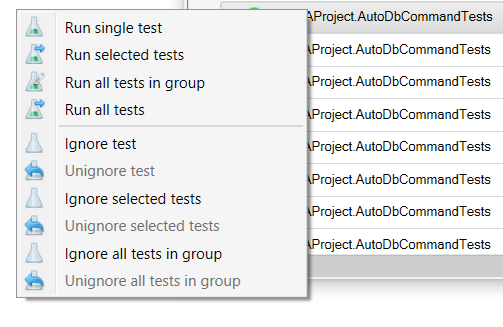
The Test Explorer now makes it easier to ignore one or more specific selected tests, or all tests under a given category/group, by exposing the context menu commands that add or remove the @TestIgnore annotation as appropriate; having this command in the Test Explorer makes it possible to annotate a test method while a completely different and unrelated module is maximized in the code editor.

Hmm, …these icons are out of control, aren’t they… expect that to change soon-ish…

Running tests while results are regrouped by outcome is still a known issue (tests run painfully slow because the UI thread is busy re-sorting and re-rendering the list every time a test finishes running), but everything works much more smoothly when the tests are regrouped any other way.

Code Inspections

Ok the logic for that is currently broken on the website (working on that… somewhat) so this is much harder than it will be in the future when I’ll just look at the [New] tab on the inspections page of the website and every inspection that is in [next] but not in [main] will be listed right there. From skimming through every pull request merged since the last release:

  • Function return value not used inspection now more clearly targets call sites, and now ignores non-user code.
  • Function return value is always discarded inspection is the old “return value not used” logic targeting the function itself, when none of the call sites capture the function’s return value.
  • Implicitly typed const inspection was added to flag Const declarations without an As clause to specify an explicit type.
  • Assignment not used inspection now correctly handles an assignment that is overridden in the next statement but first read in the RHS expression of the assignment.

Not user-facing but critically important nonetheless, is all the behind-the-scenes work done to simplify inspecting VBA code as much as possible. This cycle saw a tremendous amount of technical debt paid in the code inspections department, that pave the way for future enhancements like, say, having the ability to run inspections per-module; as the number of implemented inspections continues to grow, the ability to scope inspections in a more granular way is going to be very useful for our plan to eventually report inspection results in a custom code pane, with colored squiggly lines (that’s v3.x stuff, though).

Applying Quick-Fixes

The Code Inspections toolwindow has been updated with a context menu that makes it much simpler to apply a quick-fix to one or more inspection results; all available quick-fixes appear in the context menu, each with various options to apply to the selection. This menu is also shown by clicking the “Fix” drop-down menu from the toolwindow’s toolbar.

The weird “fix all occurrences in procedure/module/project” link buttons in the bottom panel are now gone, completely replaced with a more flexible menu system.

Code Explorer Enhancements

The Code Explorer toolwindow context menu now includes a move to folder command to easily organize your project components, and there’s a new setting to enable drag and drop in Code Explorer (disabled by default):

A new setting enables dragging & dropping capabilities in the Code Explorer toolwindow.

With that setting enabled, you can now move a code file to an existing folder, simply by dragging it from its location and dropping it onto a folder node! The setting was made to require being explicitly enabled, to avoid discovering that feature by accidentally dragging a code file somewhere (that did happen in beta/testing).

Website Integration

You may have noticed rubberduckbva.com is “under reconstruction”. Before that, the site’s content was mostly static, with only the inspections list assembled from content parsed from the Rubberduck.CodeAnalysis.xml, downloaded periodically off GitHub through unauthenticated REST API requests. That worked relatively well until a spike in traffic occurred following the release of Excel Insights, a book collectively authored by 24 Microsoft MVP Award recipients, including myself: suddenly a bug in the caching mechanism became very apparent when the site’s home page started getting served as a wonderful HTTP 500 error page.

Since the website hosting came with a SQL Server database that I wasn’t using, I decided to start using it and make the site pull the content from there rather than directly off the GitHub API. I wrote a small console application, got myself a private API key to make properly authenticated REST API requests, and now there’s a scheduled task running on a virtual machine in my garage, that runs this application every 30 minutes to update the installer asset download counts and verify whether the XML documentation assets are up-to-date for the latest pre-release build, and then proceeds to parse the XML docs and generate/update the database records: the website simply pulls the data from the database at every request, and now the website couldn’t bust GitHub’s REST API limits even if it tried.

Documenting Rubberduck is challenging: there are a lot of features, and there isn’t really any user guide that’s constantly being kept up-to-date. The wiki on the repository is terribly outdated in several parts, and the feature announcements on this blog are nice when you’re following the project along its journey, but in a dream world using Rubberduck would be content found on the website, and contributing to Rubberduck would be content found in the repository’s wiki.

Parsing the xml-docs into website content is a step in that direction. Nobody wants to maintain documentation, but xml-doc comments are part of the source code, and we even put source code analyzers in place that will break the build if we try to introduce an inspection, quick-fix, or annotation, without properly documenting it with xml-docs.

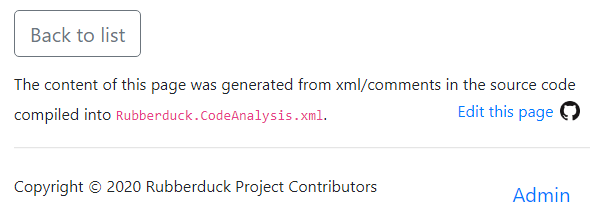
Every single inspection, quick-fix, and annotation has thorough documentation, including code examples that may span multiple modules. But best of all, every single page generated from source code includes an “edit this page” link that points to a GitHub page where you can literally edit the xml documentation for the inspection you were looking at (and review its source code if you like – it’s the same file!) – and just like that, all you need to contribute to Rubberduck (yes, single-character typo fixes and additional useful code examples are welcome!) is a GitHub login!

Every page generated from xml documentation includes an “Edit this page” link at the bottom.

Because of how the request routing on the website was setup, it was easy to make Rubberduck link in-app inspection results to this website content – you can now click a URL at the bottom of the inspection results toolwindow (this will likely change one way or another in the future) to bring up the details page with the xml documentation and code examples:

The URL at the bottom of the adjustable panel (it’s possible you need to scroll the content or make the bottom panel tall enough to show it) opens that URL in a new tab in whatever your default browser is.

The in-app content exists as localized resources, lovingly translated by our international contributors; the website content however, is only available in English, because we’re absolutely not going to start translating XML comments in the source code. But the processed content actually resides in a database, so it wouldn’t be impossible to eventually localize it at that level, as well – we’re just not there yet at all at the moment.

The website content is often different than the in-app content, and over time it should be expected to grow more and more in-depth, thorough and descriptive.

The revamped rubberduckvba.com domain will ultimately span 3 sites, including api.rubberduckvba.com, which will eventually expose REST endpoints for various purposes, including Rubberduck’s “check for newer version at startup” feature; for example something like api.rubberduckvba.com/indenter.json that might accept some VBA code in a JSON object in the request’s body, and respond with a JSON object in the response body containing the indented VBA code. Or api.rubberduckvba.com/inspect.json that might also accept some VBA code (presumably along with some metadata about the module type) in a JSON object in the request’s body, but could respond with a JSON object representing all inspection results for it. It’s still all just brewing ideas at this stage. The other subdomain, admin.rubberduckvba.com, is going to host a web-based, GitHub-authenticated version of the VBA program I’m going to present in my next article: a tool for managing and editing most of the website’s content.

Moving Forward

Rubberduck is becoming a pretty mature code base and has an ever-increasingly better abstracted internal framework/API to understand and manipulate VBA code. The project now builds with the latest version of Microsoft Visual Studio 2019, and we’re hoping COM Automation support in .NET Core 5 will allow us to build an increasing number of the project’s components with it; I’m thinking the “main” type library is better off under the old tech, but I’ll be more than happy to be proven wrong here!

A rough roadmap for v2.5.1.x might include…

  • More resolver capabilities unlocked by fully leveraging our internal ITypeLib API
  • Syntax-highlighted preview of the changes for all refactorings (and quick-fixes?)
  • Some Code Path Analysis API, to help implement the more complex inspection ideas
  • The Moq wrapper mocking framework
  • Block Completion, maybe
  • Anything else anyone feels like contributing to the project!

The goal for the rest of the 2.x cycle is to prepare everything that needs to happen in order to implement our own custom code editor window – giving us full, complete control over every single token and everything that can possibly happen in that custom code pane. We’re talking code folding, custom theming, that kind of thing.


‘Main’ vs ‘Master’ – Why it Matters

You may have noticed (or not) that the website is now labeling “main” the branch formerly known as “master”. As a French native, “master/slave” terminology in any non-actual master/slave context has always sounded a bit weird to me, but I’m a white man in North America (although not in the US) and I get the luxury to read these words and decide that they don’t affect me, and reflecting on the events of this summer has taught me that this is part of what white privilege is.

I don’t do political & editorial commenting, I prefer to leave that space to others – but I warmly recommend watching 13th on Netflix and, if you can handle it, When They See Us. Black lives matter, it’s simple – and no, it doesn’t say “but white lives don’t” anywhere between the lines.

So yes, we’re going to be taking steps to alter the language in Rubberduck a bit in this cycle. The “master” branch will be renamed to “main”, yes, but we’ll also come up with a better term for “white-listing” identifier names. It won’t stop racism, no, indeed. But it won’t hurt anyone, either.

Peace!

Builder Walkthrough

Note: this article was updated 2021-04-13 with screenshots from the latest v2.5.1.x pre-release build; the extract interface enhancements shown will green-release with v2.5.2.

We’ve seen how to leverage the default instance of a class module to define a stateless interface that’s perfect for a factory method. At the right abstraction level, most objects will not require more than just a few parameters. Often, parameters are related and can be abstracted/regrouped into their own object. Sometimes that makes things expressive enough. Other times, there’s just nothing we can do to work around the fact that we need to initialize a class with a dozen or more values.

The example code for this article can be found in our Examples repository.

A class with many properties

Such classes are actually pretty common; any entity object representing a database record would fit the bill. Let’s make a User class. We’re using Rubberduck, so this will be quick!

We start with a public field for each property we want:

Option Explicit
Public Id As String
Public UserName As String
Public FirstName As String
Public LastName As String
Public Email As String
Public EmailVerified As Boolean
Public TwoFactorEnabled As Boolean
Public PhoneNumber As String
Public PhoneNumberVerified As Boolean
Public AvatarUrl As String

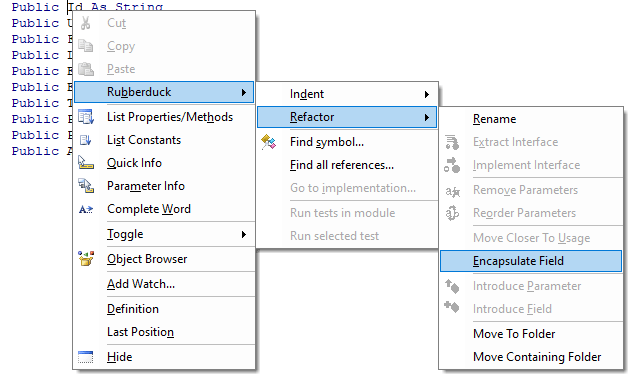
Now we hit Ctrl+` to trigger a parse, right-click any of the variables and select Encapsulate Field from the Refactor menu (or Ctrl+Shift+F if you haven’t tweaked the default hotkeys):

The command will be disabled if the caret/selection isn’t on a public field, or if the module has been modified since the last time Rubberduck parsed it.

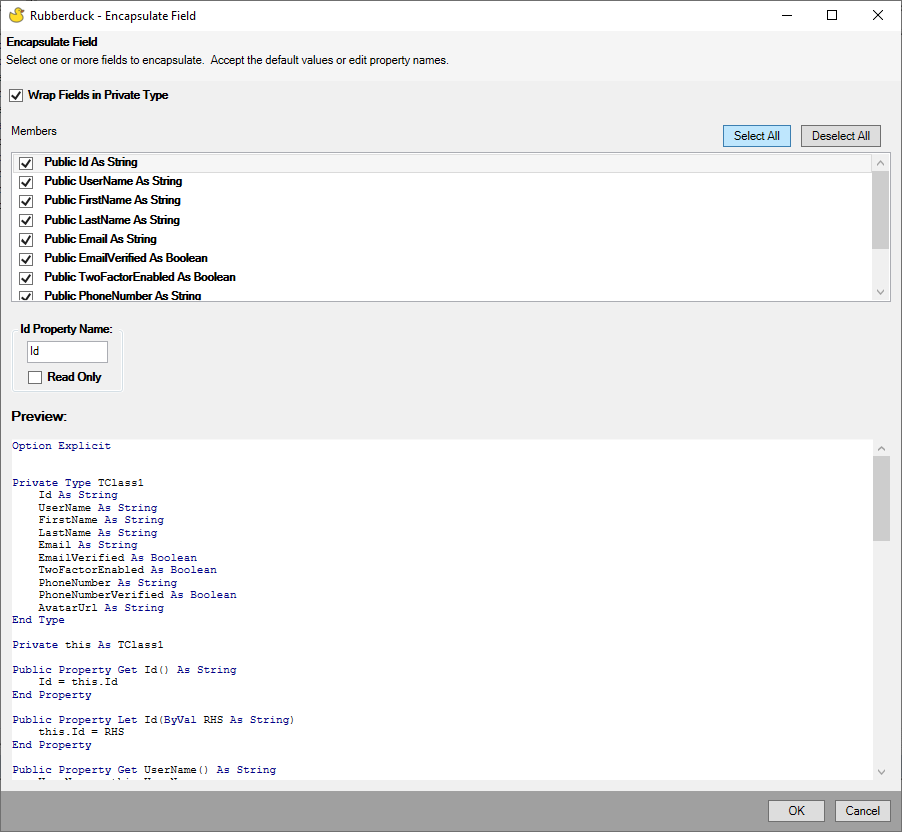
Check the wrap fields in private type box, then click the Select all button and hit OK.

The Encapsulate Field refactoring also lets you rename the properties and their respective backing field.

Now the module looks like this, and all you had to do was to declare a bunch of public fields:

Option Explicit
Private Type TUser
    Id As String
    UserName As String
    FirstName As String
    LastName As String
    Email As String
    EmailVerified As Boolean
    TwoFactorEnabled As Boolean
    PhoneNumber As String
    PhoneNumberVerified As Boolean
    AvatarUrl As String
End Type
Private this As TUser
Public Property Get Id() As String
    Id = this.Id
End Property
Public Property Let Id(ByVal value As String)
    this.Id = value
End Property
Public Property Get UserName() As String
    UserName = this.UserName
End Property
Public Property Let UserName(ByVal value As String)
    this.UserName = value
End Property
Public Property Get FirstName() As String
    FirstName = this.FirstName
End Property
Public Property Let FirstName(ByVal value As String)
    this.FirstName = value
End Property
Public Property Get LastName() As String
    LastName = this.LastName
End Property
Public Property Let LastName(ByVal value As String)
    this.LastName = value
End Property
Public Property Get Email() As String
    Email = this.Email
End Property
Public Property Let Email(ByVal value As String)
    this.Email = value
End Property
Public Property Get EmailVerified() As Boolean
    EmailVerified = this.EmailVerified
End Property
Public Property Let EmailVerified(ByVal value As Boolean)
    this.EmailVerified = value
End Property
Public Property Get TwoFactorEnabled() As Boolean
    TwoFactorEnabled = this.TwoFactorEnabled
End Property
Public Property Let TwoFactorEnabled(ByVal value As Boolean)
    this.TwoFactorEnabled = value
End Property
Public Property Get PhoneNumber() As String
    PhoneNumber = this.PhoneNumber
End Property
Public Property Let PhoneNumber(ByVal value As String)
    this.PhoneNumber = value
End Property
Public Property Get PhoneNumberVerified() As Boolean
    PhoneNumberVerified = this.PhoneNumberVerified
End Property
Public Property Let PhoneNumberVerified(ByVal value As Boolean)
    this.PhoneNumberVerified = value
End Property
Public Property Get AvatarUrl() As String
    AvatarUrl = this.AvatarUrl
End Property
Public Property Let AvatarUrl(ByVal value As String)
    this.AvatarUrl = value
End Property

I love this feature! Rubberduck has already re-parsed the module, so next we right-click anywhere in the module and select the Extract Interface refactoring, and check the box to select all Property Get accessors (skipping Property Let):

Extract Interface can automatically implement the extracted interface for you, and you can extract a public interface out of a private class.

Having a read-only interface for client code that doesn’t need the Property Let accessors makes an objectively cleaner API: assignments are recognized as invalid at compile time.

We get a read-only IUser interface for our efforts (!), and now the User class has an Implements IUser instruction at the top, …and these new members at the bottom:

Private Property Get IUser_ThingId() As String
    IUser_ThingId = ThingId
End Property

Private Property Get IUser_UserName() As String
    IUser_UserName = UserName
End Property

Private Property Get IUser_FirstName() As String
    IUser_FirstName = FirstName
End Property

Private Property Get IUser_LastName() As String
    IUser_LastName = LastName
End Property

Private Property Get IUser_Email() As String
    IUser_Email = Email
End Property

Private Property Get IUser_EmailVerified() As Boolean
    IUser_EmailVerified = EmailVerified
End Property

Private Property Get IUser_TwoFactorEnabled() As Boolean
    IUser_TwoFactorEnabled = TwoFactorEnabled
End Property

Private Property Get IUser_PhoneNumber() As String
    IUser_PhoneNumber = PhoneNumber
End Property

Private Property Get IUser_PhoneNumberVerified() As Boolean
    IUser_PhoneNumberVerified = PhoneNumberVerified
End Property

Private Property Get IUser_AvatarUrl() As String
    IUser_AvatarUrl = AvatarUrl
End Property

The scary part is that it feels as though if Extract Interface accounted for the presence of a Private Type in a similar way Encapsulate Field does, then even the TODO placeholder bits could be fully automated. Might be something to explore there… Update: automagic implementation completed!

Now we have our read-only interface worked out, if we go by previous posts’ teachings, , that is where we make our User class have a predeclared instance, and expose a factory method that I’d typically name Create:

'@Description "Creates and returns a new user instance with the specified property values."
Public Function Create(ByVal Id As String, ByVal UserName As String, ...) As IUser
    '...
End Function

Without Rubberduck, in order to have a predeclared instance of your class you would have to export+remove the class module, locate the exported .cls file, open it in Notepad++, edit the VB_PredeclaredId attribute value to True, save+close the file, then re-import it back into your VBA project.

With Rubberduck, there’s an annotation for that: simply add '@PredeclaredId at the top of the class module, parse, and there will be a result for the AttributeValueOutOfSync inspection informing you that the class’ VB_PredeclaredId attribute value disagrees with the @PredeclaredId annotation, and then you apply the quick-fix you want, and you just might have synchronized hidden attributes across the with a single click.

'@PredeclaredId
Option Explicit

When it’s a factory method for a service class that takes in dependencies, 2-3 parameters is great, 5+ is suspicious. But here we’re taking in values, pure data – not some IFileWriter or other abstraction. And we need quite a lot of them (here 10, but who knows how many that can be!), and that’s a problem, because this is very ugly:

Set identity = User.Create("01234", "Rubberduck", "contact@rubberduckvba.com", False, ...)

Using named parameters can help:

Set identity = User.Create( _
    Id:="01234", _
    UserName:="Rubberduck", _
    Email:="contact@rubberduckvba.com", _
    EmailVerified:=False, _
    Phone:="555-555-5555", _
    PhoneVerified:=False, _
    ...)

But the resulting code still feels pretty loaded, and that’s with consistent line breaks. Problem is, that limits the number of factory method parameters to 20-ish (if we’re nice and stick to one per line), since that’s how many line continuations the compiler will handle for a single logical line of code.

Surely there’s a better way.

Building the Builder

I wrote about this pattern in OOP Design Patterns: The Builder, but in retrospect that article was really just a quick overview. Let’s explore the builder pattern.

I like to design objects from the point of view of the code that will be consuming them. In this case what we want to end up with, is something like this:

Set identity = UserBuilder.Create("01234", "Rubberduck") _
    .WithEmail("contact@rubberduckvba.com", Verified:=False) _
    .WithPhone("555-555-5555", Verified:=False) _
    .Build

This solves a few problems that the factory method doesn’t:

  • Optional arguments become explicitly optional member calls; long argument lists are basically eliminated.
  • Say Id and UserName are required, i.e. a User object would be invalid without these values; the builder’s own Create factory method can take these required values as arguments, and that way any User instance that was built with a UserBuilder is guaranteed to at least have these values.
  • If we can provide a value for EmailVerified but not for Email, or for PhoneVerified but not for Phone, and neither are required… then with individual properties the best we can do is raise some validation error after the fact. With a UserBuilder, we can have WithEmail and WithPhone methods that take a Verified Boolean parameter along with the email/phone, and guarantee that if EmailVerified is supplied, then Email is supplied as well.

I like to start from abstractions, so let’s add a new class module – but don’t rename it just yet, otherwise Rubberduck will parse it right away. Instead, copy the IUser interface into the new Class1 module, select all, and Ctrl+H to replace “Property Get ” (with the trailing space) with “Function With” (without the trailing space). Still with the whole module selected, we replace “String” and “Boolean” with “IUserBuilder”. The result should look like this:

'@Interface
Option Explicit
Public Function WithId() As IUserBuilder
End Function
Public Function WithUserName() As IUserBuilder
End Function
Public Function WithFirstName() As IUserBuilder
End Function
Public Function WithLastName() As IUserBuilder
End Function
Public Function WithEmail() As IUserBuilder
End Function
Public Function WithEmailVerified() As IUserBuilder
End Function
Public Function WithTwoFactorEnabled() As IUserBuilder
End Function
Public Function WithPhoneNumber() As IUserBuilder
End Function
Public Function WithPhoneNumberVerified() As IUserBuilder
End Function
Public Function WithAvatarUrl() As IUserBuilder
End Function

We’re missing a Build method that returns the IUser we’re building:

Public Function Build() As IUser
End Function

Now we add the parameters and remove the members we don’t want, merge the related ones into single functions – this is where we define the shape of our builder API: if we want to make it hard to create a User with a LastName but without a FirstName, or one with TwoFactorEnabled and PhoneNumberVerified set to True but without a PhoneNumber value… then with a well-crafted builder interface we can make it do exactly that.

Once we’re done, we can rename the class module to IUserBuilder, and that should trigger a parse. The interface might look like this now:

'@Interface
'@ModuleDescription("Incrementally builds a User instance.")
Option Explicit
'@Description("Returns the current object.")
Public Function Build() As IUser
End Function
'@Description("Builds a user with a first and last name.")
Public Function WithName(ByVal FirstName As String, ByVal LastName As String) As IUserBuilder
End Function
'@Description("Builds a user with an email address.")
Public Function WithEmail(ByVal Email As String, Optional ByVal Verified As Boolean = False) As IUserBuilder
End Function
'@Description("Builds a user with SMS-based 2FA enabled.")
Public Function WithTwoFactorAuthentication(ByVal PhoneNumber As String, Optional ByVal Verified As Boolean = False) As IUserBuilder
End Function
'@Description("Builds a user with an avatar at the specified URL.")
Public Function WithAvatar(ByVal Url As String) As IUserBuilder
End Function

Then we can add another class module, and type Implements IUserBuilder under Option Explicit, then hit Ctrl+` to parse. Unless you disabled the “check if code compiles before parsing” setting (it’s enabled by default), you should be seeing this warning:

The project can’t compile, because the interface isn’t implemented.

Click Yes to parse anyway (normally we only want compilable code, but in this case we know what we’re doing, I promise), then right-click somewhere in the Implements IUserBuilder statement, and select the Implement Interface refactoring:

Creating all these method stubs manually, or… letting Rubberduck create them all at once in a split-second?

The result is as follows, and makes a good starting point:

Option Explicit
Implements IUserBuilder
Private Function IUserBuilder_Build() As IUser
    Err.Raise 5 'TODO implement interface member
End Function
Private Function IUserBuilder_WithName(ByVal FirstName As String, ByVal LastName As String) As IUserBuilder
    Err.Raise 5 'TODO implement interface member
End Function
Private Function IUserBuilder_WithEmail(ByVal Email As String, Optional ByVal Verified As Boolean = False) As IUserBuilder
    Err.Raise 5 'TODO implement interface member
End Function
Private Function IUserBuilder_WithTwoFactorAuthentication(ByVal PhoneNumber As String, Optional ByVal Verified As Boolean = False) As IUserBuilder
    Err.Raise 5 'TODO implement interface member
End Function
Private Function IUserBuilder_WithAvatar(ByVal Url As String) As IUserBuilder
    Err.Raise 5 'TODO implement interface member
End Function

We’re “building” an IUser object. So we have a module-level User object (we need the class’ default interface here, so that we can access the Property Let members), and each With method sets one property or more and then returns the current object (Me). That last part is critical, it’s what makes the builder methods chainable. We’ll need a Build method to return an encapsulated IUser object. So the next step will be to add a @PredeclaredId annotation and implement a Create factory method that takes the required values and injects the IUser object into the IUserBuilder instance we’re returning; then we can remove the members for these required values, leaving only builder methods for the optional ones. We will also add a value parameter of the correct type to each builder method, and make them all return the current object (Me). Once the class module looks like this, we can rename it to UserBuilder, and Rubberduck parses the code changes – note the @PredeclaredId annotation (needs to be synchronized to set the hidden VB_PredeclaredId attribute to True:

'@PredeclaredId
'@ModuleDescription("Builds a User object.")
Option Explicit
Implements IUserBuilder
Private internal As User
'@Description("Creates a new UserBuilder instance.")
Public Function Create(ByVal Id As String, ByVal UserName As String) As IUserBuilder
    Dim result As UserBuilder
    Set result = New UserBuilder
    
    '@Ignore UserMeaningfulName FIXME
    Dim obj As User
    Set obj = New User
    obj.Id = Id
    obj.UserName = UserName
    
    Set result.User = internal
    Set Create = result
End Function
'@Ignore WriteOnlyProperty
'@Description("For property injection of the internal IUser object; only the Create method should be invoking this member.")
Friend Property Set User(ByVal value As IUser)
    If Me Is UserBuilder Then Err.Raise 5, TypeName(Me), "Member call is illegal from default instance."
    If value Is Nothing Then Err.Raise 5, TypeName(Me), "'value' argument cannot be a null reference."
    Set internal = value
End Property
Private Function IUserBuilder_Build() As IUser
    If internal Is Nothing Then Err.Raise 91, TypeName(Me), "Builder initialization error: use UserBuilder.Create to create a UserBuilder."
    Set IUserBuilder_Build = internal
End Function
Private Function IUserBuilder_WithName(ByVal FirstName As String, ByVal LastName As String) As IUserBuilder
    internal.FirstName = FirstName
    internal.LastName = LastName
    Set IUserBuilder_WithName = Me
End Function
Private Function IUserBuilder_WithEmail(ByVal Email As String, Optional ByVal Verified As Boolean = False) As IUserBuilder
    internal.Email = Email
    internal.EmailVerified = Verified
    Set IUserBuilder_WithEmail = Me
End Function
Private Function IUserBuilder_WithTwoFactorAuthentication(ByVal PhoneNumber As String, Optional ByVal Verified As Boolean = False) As IUserBuilder
    internal.TwoFactorEnabled = True
    internal.PhoneNumber = PhoneNumber
    internal.PhoneNumberVerified = Verified
    Set IUserBuilder_WithTwoFactorAuthentication = Me
End Function
Private Function IUserBuilder_WithAvatar(ByVal Url As String) As IUserBuilder
    internal.AvatarUrl = Url
    Set IUserBuilder_WithAvatar = Me
End Function

Now, when I said default instances and factory methods (here too) are some kind of fundamental building block, I mean we’re going to be building on top of that, starting with this builder pattern; the Create method is intended to be invoked off the class’ default instance, like this:

Set builder = UserBuilder.Create(internalId, uniqueName)

The advantages are numerous, starting with the possibility to initialize the builder with everything it needs (all the required values), so that the client code can call Build and consume a valid User object right away.

Side note about this FIXME comment – there’s more to it than it being a signpost for the reader/maintainer:

    '@Ignore UserMeaningfulName FIXME
    Dim obj As User

By default only TODO, BUG, and NOTE markers are picked up, but you can easily configure Rubberduck to find any marker you like in comments, and then the ToDo Explorer lets you easily navigate them all:

Rubberduck has a ToDo Explorer toolwindow that can be configured (click the cogwheel icon) to pick up “FIXME” anywhere in comments, anywhere in the project. Or “HERE BE DRAGONS”.

Another noteworthy observation:

'@Ignore WriteOnlyProperty
'@Description("For property injection of the internal IUser object; only the Create method should be invoking this member.")
Friend Property Set User(ByVal value As IUser)
    If Me Is UserBuilder Then Err.Raise 5, TypeName(Me), "Member call is illegal from default instance."
    If value Is Nothing Then Err.Raise 5, TypeName(Me), "'value' argument cannot be a null reference."
    Set internal = value
End Property

Me is always the current object, as in, an instance of this class module, presenting the default interface of this class module: the If Me Is UserBuilder condition evaluates whether Me is the object known as UserBuilder – and right now there’s no such thing and the code doesn’t compile.

Synchronizing Attributes & Annotations

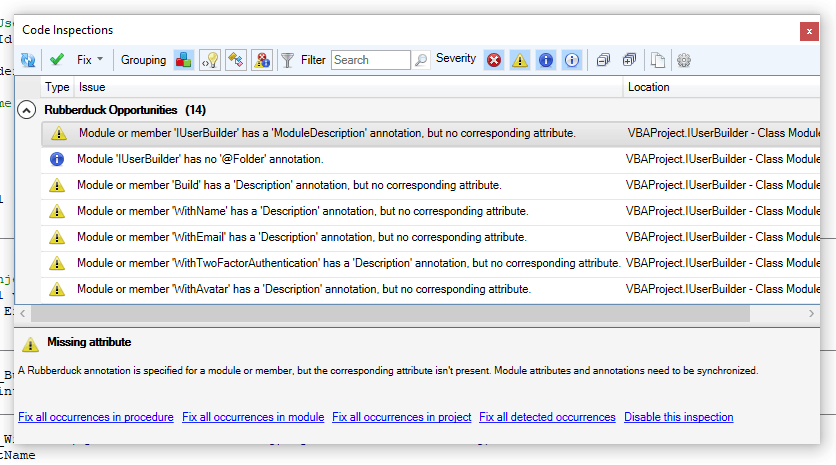
Rubberduck knows we mean that class to have a VB_PredeclaredId attribute value of True because of the @PredeclaredId annotation, but it’s still just a comment at this point. Bring up the inspection results toolwindow, and find the results for the MissingAttribute inspection under Rubberduck Opportunities:

Clicking Fix all occurrences in project will automatically add all the missing attributes.

That didn’t fix the VB_PredeclaredId attributes! Why?! The reason is that the attribute isn’t missing, only its value is out of sync. We’ll have to change this (pull requests welcome!), but for now you’ll find the AttributeValueOutOfSync inspection results under the Code Quality Issues group. If you group results by inspection, its miscategorization doesn’t matter though:

When attributes and annotations contradict each other, the AttributeValueOutOfSync inspection starts issuing results.

Adjust the attribute value accordingly (right-click the inspection result, or select “adjust attribute value(s)” from the “Fix” dropdown menu), and now your UserBuilder is ready to use:

Dim identity As IUser
Set identity = UserBuilder.Create(uniqueId, uniqueName) _
                          .WithName(first, last) _
                          .WithEmail(emailAddress) _
                          .Build

…and misuse:

Set UserBuilder.User = New User '<~ runtime error, illegal from default instance
Debug.Print UserBuilder.User.AvatarUrl '<~ compile error, invalid use of property
Set builder = New UserBuilder
Set identity = builder.Build '<~ runtime error 91, builder state was not initialized
Set builder = New UserBuilder
Set builder = builder.WithEmail(emailAddress) '<~ runtime error 91

Conclusions

Model classes with many properties are annoying to write, and annoying to initialize. Sometimes properties are required, other times properties are optional, others are only valid if another property has such or such value. This article has shown how effortlessly such classes can be created with Rubberduck, and how temporal coupling and other state issues can be solved using the builder creational pattern.

Using this pattern as a building block in the same toolbox as factory methods and other creational patterns previously discussed, we can now craft lovely fluent APIs that can chain optional member calls to build complex objects with many properties without needing to take a gazillion parameters anywhere.

Secure ADODB

Unless you’re hosted in Access, your VBA project doesn’t have access to a database engine. If you’re in Excel, it’s easy to treat the host workbook as a database and each worksheet as a table. While we can build an application that uses Excel worksheets to store data, we probably shouldn’t do that. The reasons are many, but primarily (pun …yeah, intended), we want to be able to establish bullet-proof referential integrity between records/tables; while Excel is great for many things, it’s useless for that: it’s the job of a relational database system (RDBMS), not that of any worksheet software, no matter how powerful. Power Query is very much worth looking into, but if you’re building a small CRUD (Create/Read/Update/Delete) application in VBA, you’ll want VBA code responsible for the data access – enter ADODB, …and every pitfall that comes with it.

In this article we will explore a heavily object-oriented solution to querying a database securely with the ADODB library.


Securely?

Querying a database with ADODB is easy: just set up a connection, open it, then execute whatever SQL statement you need through the Connection, and you get the results in a Recordset object:

Dim conn As ADODB.Connection
Set conn = New ADODB.Connection
conn.Open "ConnectionString"

Dim rs As ADODB.Recordset
Set rs = conn.Execute("SELECT Field1, Field2 FROM Table1")

'...

rs.Close
conn.Close

That is great for one-timer, ad-hoc queries: things quickly get messy when you start needing multiple queries, or when your SQL statement needs to be invoked repeatedly with different values:

Dim conn As ADODB.Connection
Set conn = New ADODB.Connection
conn.Open "ConnectionString"

Dim i As Long
For i = 1 To 10
    Dim rs As ADODB.Recordset
    Set rs = conn.Execute("SELECT Field1, Field2 FROM Table1 WHERE Field3 = " & i)
    '...
    rs.Close
Next
conn.Close

This right here – WHERE SomeField = " & i, is making the database engine work harder than it needs to… and it’s costing server-side performance, because as far as the engine knows, it’s getting a different query every time – and thus computes the same execution plan over and over, every time… when it could just be reusing it. Databases are smart. Like, wicked smart… but yeah we still need to ask for the right thing!

Compare to something like this:

Const sql As String = "SELECT Field1, Field2 FROM Table1 WHERE Field3 = ?"
Dim conn As ADODB.Connection
Set conn = New ADODB.Connection
conn.Open "ConnectionString"

Dim i As Long
For i = 1 To 10
    Dim cmd As ADODB.Command
    Set cmd = New ADODB.Command
    cmd.CommandType = adCmdText
    cmd.CommandText = sql
    cmd.Parameters.Append cmd.CreateParameter(Type:=adInteger, Value:= i)

    Dim rs As ADODB.Recordset
    Set rs = cmd.Execute
    '...
    rs.Close
Next
conn.Close

Oh my, so much more code, so little gain – right?

Using ADODB.Command when queries involve a WHERE (and/or VALUES) clause and user-provided (directly or not) values is not only more efficient (the cached execution plan is reused because the command string is identical every time), it’s also more secure. Concatenating user inputs into SQL command strings is a common rookie mistake, and it’s a practice that is way more widespread than it should be (regardless of the language, paradigm, or platform); your code becomes vulnerable to SQL Injection Attacks – something that may or may not be in your threat model, but that inevitably turns into… easily avoidable bugs: think of what might happen if a user entered O'Connor in that LastName field. If you’re thinking “oh that’s easy! I’ll just double-up single quotes, and fixed!“, then you’re playing a needlessly exhausting game of cat-and-mouse with the next thing that will break your clever escaping: the mouse wins.

Abstract thoughts

Much simpler to just use an ADODB.Command every time, and when you need it parameterized, to Append any number of ADODB.Parameter objects to its Parameters collection. Except, it does make a lot of code to write, every time.

What do we do when we see repetitive patterns in code? If you’re thinking “we put it in a function!” then you’re thinking abstraction and that’s exactly the right train of thought.

We’re just going to take this abstraction… and make it an object. Then think of what objects it needs in order to do its job, and abstract these objects behind interfaces too, and take these abstractions in as constructor parameters of our Create “static” factory method. Rinse & repeat until all dependencies are property-injected and all responsibilities are nicely encapsulated into their own classes. It was fun!

I wrote an original version of this functionality little while ago – you can find the original version on Code Review, and see how different/similar it is to this simplified/improved version in our Examples repository on GitHub.

The original was just an ADODB wrapper class though, couldn’t really be unit-tested, and was annoying to maintain because it felt very repetitive. This version is separating the type mappings from the parameter-providing logic, which makes configuring these mappings is done through an object that’s solely responsible for these mappings; it also separates the command from the connection, and abstracts away that connection enough to enable unit testing and cover quite a large part of the API – but most importantly, this version exposes adequate abstractions for the calling code to use and stub in its own unit tests.

VBA code written with this API (and the principles it demonstrates) can easily be fully testable, without ever actually hitting any database.

I can do this in the immediate pane:

?UnitOfWork.FromConnectionString("connection string").Command.GetSingleValue("SELECT Field1 FROM Table1 WHERE Id=?", 1)

I mean, it’s a contrived example, but with a valid connection string, query, and arguments, that’s all we need to get an actual parameterized ADODB command sending that 1 as an actual ADODB parameter, …and the following debug output:

Begin connect...
Connect completed. Status: 1
Begin transaction completed. 
Begin execute...
Execute completed, -1 record(s) affected.
{whatever value was in Field1}
Rollback transaction completed.
Disconnect completed. Status: 1

I made DbConnection listen in on whatever events the ADODB connection is firing, pending the implementation of an adapter to expose some IDbConnectionEvents members – the idea is to end up with client code that can inject its own callbacks and do things like log such messages. In the meantime Debug.Print statements are producing this debug output, but that’s it’s an implementation detail: it doesn’t publicly expose any of these events. It couldn’t, either: the rest of the code needs to work with the IDbConnection interface, and interfaces unfortunately can’t expose events in VBA.


SecureADODB

Some might call it layered spaghetti. Others call it lasagna. I call it well-abstracted code that reads and maintains like a charm and provably works as intended. There is nothing, absolutely nothing wrong with having many class modules in a VBA project: the only problem is… well, the VBE itself:

Project Explorer is making OOP rather painful. In fact it makes any kind of modularization painful.
Code Explorer makes the VBE more OOP-friendly: now you can have folders regrouping modules by functionality rather than just by module type.

Nice, rich APIs involve many related objects, interfaces, methods – members that make up the object model the API’s client code will be working with. As long as we can keep all these classes organized, there’s no problem having many of them.

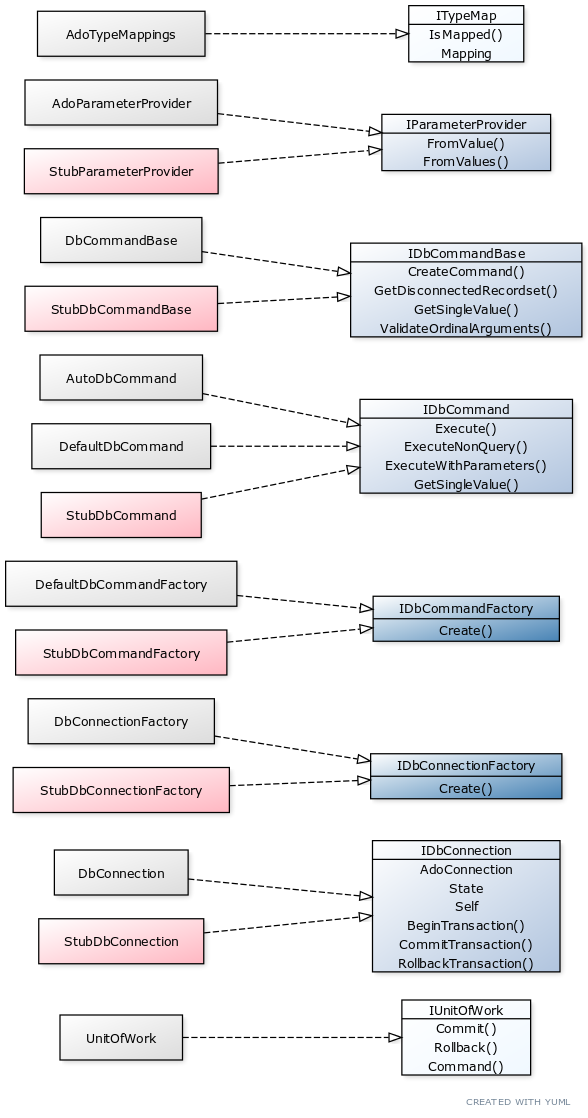
Before we look at the implementation, let’s review the interfaces and the overall structure.

Only two interfaces aren’t being stubbed for unit tests. IUnitOfWork because as the top-level object nothing in the object model consumes it. It is needed though, because client code can inject it as a dependency of some FooRepository class, and then tests can provide it with a StubUnitOfWork that implements IUnitOfWork.

The other “façade” interface is ITypeMap. This one isn’t really needed (neither is the predeclared instance of AdoTypeMappings or its Default factory method), something felt wrong with the client code without it. While the class is essentially just a dictionary / literally a map, there’s something rather elegant about depending on an ITypeMap rather than some Scripting.Dictionary.

The two dark blue interfaces are abstract factory interfaces, each with a “real” and a “stub” implementation for tests: these are very simple classes whose entire purpose is to create an object of a particular type.

If we consider IParameterProvider an implementation detail of IDbCommandBase, that leaves us with only the core stuff: IDbCommandBase, IDbCommand, and IDbConnection – everything else just revolves around these.

DbCommandBase

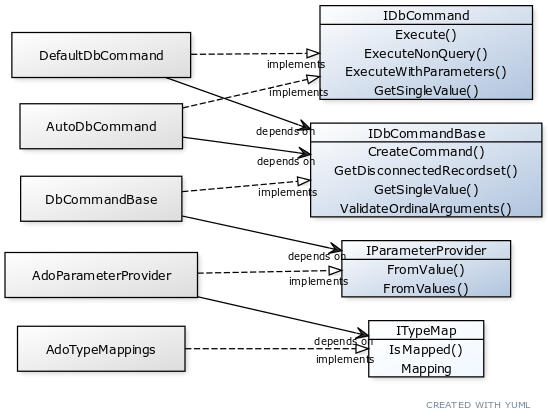
The old SqlCommand code had two sets of commands: “Execute” for methods you could pass a Connection to, and “QuickExecute” for methods that created a connection on-the-spot. I decided to split the two behaviors into two distinct implementation of the same interface, and that’s how I ended up with DefaultDbCommand and AutoDbCommand. As I was cleaning up the two new classes, I had to notice these two classes needed a number of common bits of functionality… as would any other implementation of IDbCommand.

In a language that supports inheritance, I would probably make the two classes inherit a third abstract “base” class where I’d implement the IDbCommand interface. In VBA, we can’t derive a class from another, or inherit members from another class: inheritance is flat-out unavailable. There’s an alternative though, and it’s arguably even better than inheritance: composition. We can put the common functionality in a third class, and then have the two implementations take an instance of that “base” class as we would any other dependency – effectively achieving what we wanted out of inheritance, but through composition.

Code is said to be “decoupled” when none of its concrete components are inter-dependent, as is apparent with the solid black “depends on” arrows here. Decoupled components can easily be swapped for other implementations, like …test stubs.

What’s wrong with inheritance?

Don’t get me wrong, inheritance is very cool: with an abstract class you can have templated methods, where a method in the base class (typically a method that implements some interface member) invokes an abstract or virtual method (typically with protected scope) that the inherited class must override and provide an implementation for. Rubberduck uses this pattern in quite a few places (inspections, notably). Without inheritance, it’s just not something that’s possible.

Inheritance is described as a “is a” relationship, while composition is more of a “has a” relationship. This is important, because when the only consideration weighting in favor of inheritance is the need for two classes to share some functionality, it’s exactly why inheritance should not be used.


Decoupling FTW

The “base” class appeared as a need to have a place for IDbCommand implementations to access shared functionality. I wanted to return disconnected recordsets, and retrieving the value of the first field of the first record of a recordset isn’t something that’s glaringly implementation-specific. The other piece of functionality I needed, was a function that creates the ADODB.Command object and adds the parameters.

Because I wanted this class to create the ADODB.Command, I needed it to be able to turn a Variant into an ADODB.Parameter through some mapping, and since I didn’t want my class to be necessarily coupled with that mapping, or anything remotely related to configuring ADODB parameters… I’m property-injecting an IParameterProvider dependency:

Public Function Create(ByVal provider As IParameterProvider) As IDbCommandBase
    Errors.GuardNonDefaultInstance Me, DbCommandBase
    Errors.GuardNullReference provider
    
    Dim result As DbCommandBase
    Set result = New DbCommandBase
    Set result.ParameterProvider = provider
    
    Set Create = result

End Function

Validating the command string / arguments

Since the commands are given an SQL command string to execute, and a ParamArray array of arguments that should have the same number of items as there are ? ordinal parameters in the SQL command string, we have an opportunity to catch a missing or extraneous argument before we even send the command string to the database server. And because this validation logic would have to be the same regardless of what IDbCommand implementation we’re looking at, DbCommandBase makes the best place to put it.

This implementation is probably too naive for a number of edge cases, but sufficient for most: we’re simply counting the number of ? characters in the sql string, and comparing that with the number of elements in the args array. We need to handle errors here, because if the args array is empty, evaluating UBound(args) and/or LBound(args) will throw a “subscript out of range” run-time error 9.

Public Function ValidateOrdinalArguments(ByVal sql As String, ByRef args() As Variant) As Boolean
    On Error GoTo CleanFail
    Dim result As Boolean
    
    Dim expected As Long
    expected = Len(sql) - Len(Replace(sql, "?", vbNullString))
    
    Dim actual As Long
    On Error GoTo CleanFail 'if there are no args, LBound/UBound are both out of bounds
    actual = UBound(args) + (1 - LBound(args))
    
CleanExit:
    result = (expected = actual)
    ValidateOrdinalArguments = result
    Exit Function
CleanFail:
    actual = 0
    Resume CleanExit
End Function

Getting a disconnected Recordset

If we created a database connection, issued a command against it, and received the recordset from ADODB.Command.Execute, and then we close the connection and return that recordset, then the calling code can’t use the data anymore: a connected recordset only works if the calling code owns the connection. So we need a way to issue a disconnected recordset, while still using an ADODB.Command. The way to do this, is to pass the command as the Source argument to Recordset.Open, and to use a static, client-side cursor:

Private Function GetDisconnectedRecordset(ByVal cmd As ADODB.Command) As ADODB.Recordset
    Errors.GuardNullReference cmd
    Errors.GuardNullReference cmd.ActiveConnection
    
    Dim result As ADODB.Recordset
    Set result = New ADODB.Recordset
    
    result.CursorLocation = adUseClient
    result.Open Source:=cmd, CursorType:=adOpenStatic
    
    Set result.ActiveConnection = Nothing
    Set GetDisconnectedRecordset = result
End Function

Getting a single value result

With functions to validate the parameters, create commands and get a disconnected recordset, we have everything we need for IDbCommand implementations to do their job, but if we leave it like this, we’ll end up with all implementations copying the logic of IDbCommand.GetSingleValue: best have that logic in DbCommandBase and avoid as much repetition as possible.

Private Function GetSingleValue(ByVal db As IDbConnection, ByVal sql As String, ByRef args() As Variant) As Variant
    Errors.GuardEmptyString sql
    
    Dim cmd As ADODB.Command
    Set cmd = CreateCommand(db, adCmdText, sql, args)
    
    Dim results As ADODB.Recordset
    Set results = GetDisconnectedRecordset(cmd)
    
    GetSingleValue = results.Fields.Item(0).value
End Function

Creating the command

A few things can go wrong when creating the ADODB.Command object: we need an ADODB.Connection that’s open, and the parameters must be valid. Since we’re not executing the command just yet, we don’t have to worry about everything that could go wrong actually executing the command string and processing the parameters on the server. So the strategy here is to guard against invalid inputs as much as possible, and then to handle errors when we add the parameters, and return the Command object with whatever parameters were successfully added. We don’t need to try salvaging the rest of the parameters if one blows up, since that failing parameter will fail command execution anyway, but there isn’t much we can do about it, other than perhaps throw an error and have the caller not even try to run the command – but here I decided that the server-side errors would be more useful than any custom “invalid parameter” error.

Note that the ADODB.Command object is actually created by the method-injected IDbConnection dependency. This creates a seam between the class and ADODB, despite the inherent coupling with the ADODB.Command type: it makes the command’s ActiveConnection an implementation detail of IDbConnection.CreateCommand, and that’s all I needed to make this method work with a stub connection that isn’t actually connecting to anything:

Private Function CreateCommand(ByVal db As IDbConnection, ByVal commandType As ADODB.CommandTypeEnum, ByVal sql As String, ByRef args() As Variant) As ADODB.Command
    Errors.GuardNullReference db
    Errors.GuardEmptyString sql
    Errors.GuardExpression db.State <> adStateOpen, message:="Connection is not open."
    Errors.GuardExpression Not ValidateOrdinalArguments(sql, args), message:="Arguments supplied are inconsistent with the provided command string parameters."
    
    Dim cmd As ADODB.Command
    Set cmd = db.CreateCommand(commandType, sql)
    
    On Error GoTo CleanFail
    Dim arg As ADODB.Parameter
    For Each arg In this.ParameterProvider.FromValues(args)
        cmd.parameters.Append arg
    Next
    
CleanExit:
    Set CreateCommand = cmd
    Exit Function
CleanFail:
    Resume CleanExit
End Function

DbCommand

As mentioned before, there are two implementations for the IDbCommand interface: one that creates and owns its own IDbConnection, the other that takes it in as a dependency.

This abstraction represents an object that can take an SQL statement and parameters, and return the result(s) to its caller.

DefaultDbCommand receives its IDbConnection dependency through property injection in its Create factory method.

AutoDbCommand takes a connection string and an IDbConnectionFactory instead.

UnitOfWork uses a DefaultDbCommand because the unit of work needs to own the connection, but AutoDbCommand could be used instead of a unit of work, if we just need a quick SELECT and no transaction.

Abstract Factory

IDbConnectionFactory is an Abstract Factory here. This is needed, because unit tests need to be able to inject a stub factory that produces stub connections: an abstract factory is a factory interface that creates objects of a type that is also an abstraction – in this case, IDbConnectionFactory.Create returns an IDbConnection object. Implementing this factory class is exactly as simple as you’d think – here’s DbConnectionFactory:

'@Exposed
'@Folder("SecureADODB.DbConnection")
'@ModuleDescription("An implementation of an abstract factory that creates DbConnection objects.")
Option Explicit
Implements IDbConnectionFactory

Private Function IDbConnectionFactory_Create(ByVal connString As String) As IDbConnection
    Set IDbConnectionFactory_Create = DbConnection.Create(connString)
End Function

And here’s StubDbConnectionFactory:

'@Folder("Tests.Stubs")
'@ModuleDescription("A stub acting as a IDbConnectionFactory implementation.")
Option Explicit
Implements IDbConnectionFactory
Private Type TInvokeState
    CreateConnectionInvokes As Long
End Type
Private this As TInvokeState

Private Function IDbConnectionFactory_Create(ByVal connString As String) As IDbConnection
    this.CreateConnectionInvokes = this.CreateConnectionInvokes + 1
    Set IDbConnectionFactory_Create = New StubDbConnection
End Function

Public Property Get CreateConnectionInvokes() As Long
    CreateConnectionInvokes = this.CreateConnectionInvokes
End Property

The test stub is more “complex” because it tracks method invocations, so that tests can know whether & how many times any given member was invoked during a test run.

The Abstract Factory pattern is very useful with Dependency Injection: it gives us an abstraction to inject when a class needs a dependency that just cannot be injected when the object is created – the alternative would be tight coupling: if we weren’t injecting a connection factory, then the command class would’ve had to be the one invoking DbConnection.Create – tightly coupling it with the DbConnection class and instantly making unit testing impossible. An abstract factory removes the coupling and allows unit tests to inject an alternative/stub implementation of the factory that creates StubDbConnection objects.

Wrapping it all up

AutoDbConnection can very well be consumed as-is by the client code:

Dim results As ADODB.Recordset
Set results = AutoDbConnection.Create(connString, New DbConnectionFactory, DbCommandBase.Create(AdoParameterProvider.Create(AdoTypeMappings.Default))).Execute(sql)

The only problem is that, well, the dependencies need to be resolved somehow, and that means the client code is now responsible for wiring everything up. While each component has a clear purpose, explicitly creating all these objects quickly gets old and redundant: we need an object that simplifies this – enter IUnitOfWork, and now we can use this much simpler code:

Dim results As ADODB.Recordset
Set results = UnitOfWork.FromConnectionString(connString).Command.Execute(sql)

Unit of Work is a design pattern that encapsulates a transaction: each individual operation can succeed or fail, and the unit of work either succeeds or fails as a whole. These notions are abstracted in the IUnitOfWork interface:

'@Folder("SecureADODB.UnitOfWork")
'@ModuleDescription("Represents an object encapsulating a database transaction.")
'@Interface
'@Exposed
Option Explicit

'@Description("Commits the transaction.")
Public Sub Commit()
End Sub

'@Description("Rolls back the transaction.")
Public Sub Rollback()
End Sub

'@Description("Creates a new command to execute as part of the transaction.")
Public Function Command() As IDbCommand
End Function

When a UnitOfWork is created, it initiates a database transaction. When it is destroyed before the transaction is committed, the transaction gets rolled back and from the database’s point of view, it’s like nothing happened.

Transaction?

If you’re unfamiliar with database transactions, there’s an easy example to illustrate what they do: imagine you have an Accounts table, and you’re processing a transfer – you need to UPDATE the record for the source account to deduct the transfer amount, then UPDATE the record for the destination account to add the transferred amount. In a happy world where everything goes well that would be the end of it… but the world is a cruel place, and assuming the 1st command goes through, nothing guarantees nothing will blow up when sending the 2nd command. Without transactions, the funds would simply vanish: they’re gone from the first account, and they were never added to the second account. With a transaction, we can rollback everything when the 2nd operation completes, no funds vanish and the data is exactly the way it was before the transaction started.


Again, the implementation is pretty straightforward – the only peculiarity is that the class has two factory methods – one named Create that takes all the dependencies in, and another named FromConnectionString that conveniently wires up a default set of dependencies (and then passes them to the Create method to avoid duplicating code).

'@Folder("SecureADODB.UnitOfWork")
'@ModuleDescription("An object that encapsulates a database transaction.")
'@PredeclaredId
'@Exposed
Option Explicit
Implements IUnitOfWork
Private Type TUnitOfWork
    Committed As Boolean
    RolledBack As Boolean
    Connection As IDbConnection
    CommandFactory As IDbCommandFactory
End Type
Private this As TUnitOfWork

'@Description("Creates a new unit of work using default configurations.")
'@Ignore ProcedureNotUsed
Public Function FromConnectionString(ByVal connString As String) As IUnitOfWork
    
    Dim db As IDbConnection
    Set db = DbConnection.Create(connString)
    
    Dim provider As IParameterProvider
    Set provider = AdoParameterProvider.Create(AdoTypeMappings.Default)
    
    Dim baseCommand As IDbCommandBase
    Set baseCommand = DbCommandBase.Create(provider)
    
    Dim factory As IDbCommandFactory
    Set factory = DefaultDbCommandFactory.Create(baseCommand)
    
    Set FromConnectionString = UnitOfWork.Create(db, factory)
    
End Function

'@Inject: just an idea.. see #https://github.com/rubberduck-vba/Rubberduck/issues/5463
Public Function Create(ByVal db As IDbConnection, ByVal factory As IDbCommandFactory) As IUnitOfWork
    Errors.GuardNonDefaultInstance Me, UnitOfWork
    Errors.GuardNullReference factory
    Errors.GuardNullReference db
    Errors.GuardExpression db.State <> adStateOpen, message:="Connection should be open."
    
    Dim result As UnitOfWork
    Set result = New UnitOfWork
    Set result.CommandFactory = factory
    Set result.Connection = db
    
    Set Create = result
End Function

'@Inject: this member should only be invoked by Me.Create, where Me is the class' default/predeclared instance.
'@Ignore ProcedureNotUsed: false positive with v2.5.0.5418
Friend Property Set Connection(ByVal value As IDbConnection)
    Errors.GuardDoubleInitialization this.Connection
    Errors.GuardNullReference value
    Set this.Connection = value
    this.Connection.BeginTransaction
End Property

'@Inject: this member should only be invoked by Me.Create, where Me is the class' default/predeclared instance.
'@Ignore ProcedureNotUsed: false positive with v2.5.0.5418
Friend Property Set CommandFactory(ByVal value As IDbCommandFactory)
    Errors.GuardDoubleInitialization this.CommandFactory
    Errors.GuardNullReference value
    Set this.CommandFactory = value
End Property

Private Sub Class_Terminate()
    On Error Resume Next
    If Not this.Committed Then this.Connection.RollbackTransaction
    On Error GoTo 0
End Sub

Private Sub IUnitOfWork_Commit()
    Errors.GuardExpression this.Committed, message:="Transaction is already committed."
    Errors.GuardExpression this.RolledBack, message:="Transaction was rolled back."
    On Error Resume Next ' not all providers support transactions
    this.Connection.CommitTransaction
    this.Committed = True
    On Error GoTo 0
End Sub

Private Function IUnitOfWork_Command() As IDbCommand
    Set IUnitOfWork_Command = this.CommandFactory.Create(this.Connection)
End Function

Private Sub IUnitOfWork_Rollback()
    Errors.GuardExpression this.Committed, message:="Transaction is already committed."
    On Error Resume Next ' not all providers support transactions
    this.Connection.RollbackTransaction
    this.RolledBack = True
    On Error GoTo 0
End Sub

Errors

If you paid close attention to the code listings so far, you likely already noticed the many Errors.GuardXxxxx member calls scattered throughout the code. There are probably as many ways to deal with custom errors as there are VBA classes out there, this is one way. Probably not the best way, but it feels “just right” for me in this case and I think I like it enough to keep using it until the problems it creates become clearer (there’s always something). Errors is a standard private module in the project, that defines custom error codes. Okay I was lazy and deemed SecureADODBCustomError all I needed, but it could also have been an Enum with descriptive names for each custom error code.

The module simply exposes a small number of very simple Sub procedures that make it easy for the rest of the code to raise meaningful custom errors:

'@Folder("SecureADODB")
'@ModuleDescription("Global procedures for throwing common errors.")
Option Explicit
Option Private Module

Public Const SecureADODBCustomError As Long = vbObjectError Or 32

'@Description("Re-raises the current error, if there is one.")
Public Sub RethrowOnError()
    With VBA.Information.Err
        If .Number <> 0 Then
            Debug.Print "Error " & .Number, .Description
            .Raise .Number
        End If
    End With
End Sub

'@Description("Raises a run-time error if the specified Boolean expression is True.")
Public Sub GuardExpression(ByVal throw As Boolean, _
Optional ByVal Source As String = "SecureADODB.Errors", _
Optional ByVal message As String = "Invalid procedure call or argument.")
    If throw Then VBA.Information.Err.Raise SecureADODBCustomError, Source, message
End Sub

'@Description("Raises a run-time error if the specified instance isn't the default instance.")
Public Sub GuardNonDefaultInstance(ByVal instance As Object, ByVal defaultInstance As Object, _
Optional ByVal Source As String = "SecureADODB.Errors", _
Optional ByVal message As String = "Method should be invoked from the default/predeclared instance of this class.")
    Debug.Assert TypeName(instance) = TypeName(defaultInstance)
    GuardExpression Not instance Is defaultInstance, Source, message
End Sub

'@Description("Raises a run-time error if the specified object reference is already set.")
Public Sub GuardDoubleInitialization(ByVal instance As Object, _
Optional ByVal Source As String = "SecureADODB.Errors", _
Optional ByVal message As String = "Object is already initialized.")
    GuardExpression Not instance Is Nothing, Source, message
End Sub

'@Description("Raises a run-time error if the specified object reference is Nothing.")
Public Sub GuardNullReference(ByVal instance As Object, _
Optional ByVal Source As String = "SecureADODB.Errors", _
Optional ByVal message As String = "Object reference cannot be Nothing.")
    GuardExpression instance Is Nothing, Source, message
End Sub

'@Description("Raises a run-time error if the specified string is empty.")
Public Sub GuardEmptyString(ByVal value As String, _
Optional ByVal Source As String = "SecureADODB.Errors", _
Optional ByVal message As String = "String cannot be empty.")
    GuardExpression value = vbNullString, Source, message
End Sub

Most of these procedures are invoked as the first executable statement in a given scope, to raise an error given invalid parameters or internal state, such as these:

Private Sub IUnitOfWork_Commit()
    Errors.GuardExpression this.Committed, message:="Transaction is already committed."
    Errors.GuardExpression this.RolledBack, message:="Transaction was rolled back."
    On Error Resume Next ' not all providers support transactions
    this.Connection.CommitTransaction
    this.Committed = True
    On Error GoTo 0
End Sub

Consistently raising such errors is the single best way to ensure our objects are always in a known and usable state, because we outright forbid them to be invalid. These validation clauses are called guard clauses, hence the GuardXxxxx procedure names.

A lot of the unit tests simply verify that, given the specified conditions, the expected error is raised:

'@TestMethod("Factory Guard")
Private Sub Create_ThrowsIfNotInvokedFromDefaultInstance()
    On Error GoTo TestFail
    
    With New AutoDbCommand
        On Error GoTo CleanFail
        Dim sut As IDbCommand
        Set sut = .Create("connection string", New StubDbConnectionFactory, New StubDbCommandBase)
        On Error GoTo 0
    End With
    
CleanFail:
    If Err.Number = ExpectedError Then Exit Sub
TestFail:
    Assert.Fail "Expected error was not raised."
End Sub

If each guard clause has a unit test, then the tests are effectively documenting how the objects are meant to be used. With more specific custom errors, the tests would be more accurate, but there’s a point where you need to look at what you’ve got and say “I think I can work with that”, and move on.


Audience

Obviously, one doesn’t import 20 classes into their VBA project just to send one ADODB command to a database server. However if you’re maintaining a VB6 application that uses ADODB all over the place, leaks connections, leaves recordsets dangling, …then importing this API can really help tighten up the data access code in that legacy app. Or maybe you’re writing a complex data-driven system in VBA for Excel because that’s all you’ve got, and a UnitOfWork abstraction makes sense for you.

The goal here is mostly to 1) demonstrate proper usage of ADODB.Command for secure, parameterized queries, and 2) demonstrate that Classic VB (VB6/VBA) has always had everything everyone ever needed to write full-blown object-oriented code that leverages abstraction, encapsulation, and polymorphism – making it possible to write clean and fully unit-tested code.

…and of course, it makes a great practical application of the OOP concepts discussed in many other articles on this blog. Studying the code in this project gives you insight on…

  • OOP foundations: abstraction, encapsulation, polymorphism.
  • SOLID principles: single responsibility, dependency inversion, etc.
  • DI techniques: property injection, abstract factory.
  • Unit testing: what to test, how to test, stubbing dependencies, etc.
  • Using custom errors, guard clauses, input validation.
  • Leveraging Rubberduck annotations, minimizing inspection results.

Office-JS & Script Lab

Apparently this is this blog’s 100th article (!), and since Rubberduck is also about the future of Office automation in VBA, I wanted to write about what’s increasingly being considered a serious contender for an eventual replacement of Visual Basic for Applications. Just recently Mr.Excel (Bill Jelen) uploaded a video on YouTube dubbing it the “VBA killer”, and without being over-dramatic, I can’t help but to pragmatically agree with the sentiment… to an extent.

Forget VBA, think Win32 and COM: the Web has been “threatening” the future of Windows desktop applications of all kinds for about as long as VBA has been around. Windows desktop development went from COM-based to .NET, and now to cross-platform .NET Core, and there’s still COM interoperability built into .NET. It’s 2020 and Microsoft SQL Server runs perfectly fine on Linux, and you can use Microsoft Visual Studio on your Mac now, and a lot of what Microsoft does is open-sourced and accepts contributions, including .NET itself… and TypeScript is up there, too.

VBA isn’t going anywhere.

COM hasn’t gone anywhere either. If you used any Declare statements in VBA you probably know about user32.dll and kernel32.dll. The Win32 API is here to stay; COM is here to stay. My reading is that as long as the Windows plumbing exists to make it possible, VBA has no reason to go anywhere. The problem is that VBA and its COM-based Win32 infrastructure are essentially a dead end: it’s literally not going anywhere. The VBE has long been abandoned, and VBA as a language is stuck 20 years ago… but it’s likely going to stick around for a long time in desktop-land, even if (when?) the Excel COM type library stops getting new members – as the freezing of the GitHub repository holding the official VBA documentation suggests:

“This repo is no longer accepting PRs or new issues.”

Maybe (probably) I’m reading way too much into this, but to me that is a sign that we’ve reached a critical point in VBA’s history/lifetime. I do note that the repository wasn’t made read-only and that it’s still possible to submit a pull request, but the wording strongly suggests not to.

Meanwhile, the Office Extensibility team is hard at work getting the Excel Online automation capabilities of Office-JS on par with what can be achieved on Win32/desktop with VBA. As time marches forward, eventually we’ll reach a tipping point where Office-JS stabilizes while more and more enterprises embrace the Web as a platform: maybe I’m over-estimating how long that transition will take, but even well beyond that tipping point, COM and VBA will very likely still be around for a long, long time. It’s just that eventually the Excel team will have to stop updating (but not necessarily stop shipping) the COM type library, and focus on cross-platform extensibility.

Now, have you tried Excel Online? Personally, I don’t use it a lot (Rubberduck is Win32-only), but functions like XLOOKUP and SORT (and dynamic arrays in general) are a massive game-changer, and I will neither confirm nor deny that there are even more amazing capabilities to come. Things like this should make anyone seriously think twice before opting for a plain old perpetual desktop license: Excel 2016 isn’t going to get XLOOKUP anymore than Excel 2010 ever will…


This week I decided I was tired of seeing proof-of-concept “hello world” code demonstrating what Office-JS can do, and went on to explore and scratch more than just the surface. I found a Tetris game and decided to port my OOP Battleship from VBA to TypeScript… a language I know next to nothing about (and, looking at that Tetris game code and comparing it to mine… it shows!).

Script Lab

If you’re a VBA enthusiast, the first thing you notice in Excel Online, is the absence of a Developer tab. To automate Excel on the Web, you need to add Script Lab, a free add-on that brings up a task pane titled “Code”, that is very simple to use and that looks like this:

The default snippet merely sets up a “Run” UI button and wires it up to invoke a run async function that… does nothing but bring up a little banner at the top of the task pane that says “Your code goes here”.

As VBA developers, we’re used to having an actual IDE with an edit-and-continue debugger, dividing our projects into modules, and dragging and dropping controls onto a UserForm visual designer. So, your first impression of Script Lab might very well be that it’s even less of a code editor than the VBE is – especially with Rubberduck! You have to walk into it with an open mind, and with an open heart you just might discover a new friend, like I did.

Paradigm Shift

I’ve written code for a long time, but I’m not a web developer. HTML, JavaScript and CSS have scared me ever since they came into existence: too many things to think about, too many browsers, too many little things that break here but work there. I’ve been telling myself “I should try to do this” for years now, and I have to say that the project in the screenshot below is really my first [somewhat] serious attempt at anything web, …if we exclude what little ASP.NET/MVC I wrote for the rubberduckvba.com website (I’m more of a backend guy okay!).

So here’s the paradigm: that task pane is your playground, your sandbox – you have full control over everything that happens in there, the only limit is really just how bad you can be at CSS and HTML:

It’s not playable yet. I’ll definitely share it when it is …after a code review and a refactoring!

You can pop the code editor panel out into a separate browser window, which I warmly recommend doing – the code window docked on one side, the worksheet on the other. Another thing you’ll want to do is tweak your user settings to set editor.wordwrap: 'off', because for some reason the default setting is to word-wrap long lines of code, …which makes an interesting [CSS] tab when you have base-64 encoded .png image resources.

You’ll definitely want to pop the code editor into its own separate browser window.

There are a couple minor annoyances with the editor itself. Working with a single-file script for any decent-sized project, means you’re going to be scrolling up and down a lot. Hard to reliably reproduce, but I’m finding the editor tends to frequently (but thankfully, harmlessly) crash given a syntax error, like if you deleted a semicolon or something. Navigating between tabs loses your caret position, which means more scrolling. Could be just my machine (or my way-too-large-for-its-own-good script), but I’ve also experienced frequent and significant slow-downs and delays when typing.

Not having edit-and-continue debugging capabilities is a major paradigm shift as well, but then Script Lab isn’t meant to be a full-blown Integrated Development Environment… and the code that runs isn’t the code you’re editing; TypeScript compiles down to pure JavaScript, and mapping files need to get involved to help a TypeScript editor map the compiled JavaScript to the source TypeScript instructions.

On the bright side, like in Visual Studio { scopes } can be folded /collapsed, which does help reduce the amount of scrolling around and is a very useful and welcome editor feature. Also I couldn’t help but notice with utter glee that the editor auto-completes parentheses, braces, brackets, single and double quotes, …but while it does highlight matching parenthesis, unlike Rubberduck’s self-closing pair feature, backspacing onto a ( will not delete the matching closing ) character. One nice thing it does that Rubberduck autocompletion doesn’t, is that it wraps the selection: you can select an expression, type ( and instead of overwriting your selection with that character, it “wraps” the selected expression and you end up with (your selection).

As a programming language, TypeScript feels very much like the single best way to approach JavaScript: it supports strong types like a statically-typed language, and dynamic types, …like JavaScript (think Variant in VBA, but one to which you can tack-on any member you like at run-time). Coming from C# I’m finding myself surprisingly capable in this language that supports inherently object-oriented structures like classes and interfaces, and where even string literals have a ton of useful members (built-in support for regular expressions! lookbehinds in regex patterns!). Learning how string interpolation works will quickly make VBA concatenations feel clunky. Array methods will quickly become second-nature and you’ll realize just how much looping we do in VBA just because the types we’re dealing with have so little functionality.

But the most significant thing has to be how functions are now first-class citizens that can be passed around as parameters like any other object, just like we do in C# with delegates and lambda expressions. For example, in the constructor of my Ship class, I’m populating a Map<GridCoord, boolean> to hold the ship’s internal hit-state:

this.state = new Map<GridCoord, boolean>(
  new Array(this.size).fill(false).map((value: boolean, index: number): [GridCoord, boolean] => {
    let p = orientation === ShipOrientation.Horizontal 
      ? position.offset(index - 1, 0) 
      : position.offset(0, index - 1);
    return [p, false];
  }
);

We’re creating a ship of a particular size and orientation, and the state means to hold the hit-state (true: hit) of each individual grid coordinate occupied by the ship. new Array(this.size).fill(false) creates an array of the appropriate length, filled with false Boolean values; but I wanted to map the array indices to actual grid coordinates to make my life easier, so I simply use .map((value, index):[GridCoord, boolean] => {...}) to do exactly that!

Reads like character soup? Don’t worry, that code is more verbose than it needs to be, and the lambda syntax is confusing to everyone that never worked with it. In a nutshell, (i) => {...} represents a function that takes an i parameter. There is no As keyword to specify data types in TypeScript, instead we would declare a numeric variable with e.g. var i: number. That means (value, index):[GridCoord, boolean] => {...} represents a function that takes a value and an index parameter (their values are provided by the map method), and returns a tuple (the square-bracketed part; can be thought of as some kind of anonymous type that’s defined on-the-spot with unnamed but typed members) made of a GridCoord and a boolean value. Therefore, the body of that function works out what GridCoord/boolean value to yield for each item of the Array(this.size) array.

Ternary (i.e. 3-operands) operators are another nice thing VBA doesn’t have. foo = bar ? a : b; assigns a to foo if bar evaluates to true, and assigns b otherwise. The closest we have in VBA is the IIf function, but because the provided true-value and false-value arguments are arguments, they both need to be evaluated before the function is even invoked.

I could go on and on about every little language feature TypeScript has that VBA doesn’t, but the truth is, there’s simply no possible comparison to be made: as a language (I’m not talking about the capabilities of the Excel object model here), VBA loses on every single aspect. And while VBA is essentially constrained to the VBE, TypeScript is in no way constrained to Script Lab. In fact if I wanted to make an actual serious Office-JS project, I’d likely be using VSCode, which I admittedly have yet to use for anything, but I’ve heard only good things about this lightweight IDE… and if I didn’t like it then I could just stick to good old Visual Studio.


VBA will very likely remain the uncontested King of Office automation on desktop for a very long time still: programming in TypeScript is a lot of fun to me, but I’m not Joe-in-Accounting – I write code (C#, T-SQL, VBA, …) for a living, and I doubt Script Lab, HTML, CSS, JavaScript and Chrome developer tools appeal as much to someone that isn’t enthusiastic about not just automating Office, not just VBA, but about programming in general. And for that, and that alone, I posit that VBA will continue to rule as King of Win32 Office automation for many years to come, and Rubberduck will be there to keep adding modern-IDE functionalities to the Visual Basic Editor.

The King is dead, long live the King!

To be continued…

Password Authentication

Authenticating the user of our application is a common problem, with common pitfalls – some innocuous, some fatal. It’s also a solved problem, with a fairly standard solution. Unfortunately, it’s also a problem that’s too often solved with naive, “good-enough” solutions that make any security expert twitch.

The vast majority of scenarios don’t need any custom authentication. Accessing a SQL Server database? Use Windows Authentication! Windows Auth not possible? Use SQL Authentication over a secure network! App authentication isn’t for authenticating a user with a server. More like, the application itself needs a concept of users and privileges granted to certain groups of users, and so we need to prompt the user for a user name and a password. What could possibly go wrong?

Security First: Threat Model Assessment

The first question we need to ask ourselves, is literally “what could possibly go wrong?” — as in, what are we trying to do? If the answer is along the lines of:

  • Enhance user experience with tailored functionality
  • Grouping users into “roles” for easier management
  • Prevent accidental misuse of features

…then you’re on the right track. However if you’re thinking more in terms of…

  • Prevent intentional misuse of features
  • Securely prevent groups of users from accessing functionalities
  • Securely $(anything)

…then you’re going to need another kind of approach. VBA code is not secure, period. Even if the VBA project is password-protected, the VBE can be tricked into unlocking it with some clever Win32 API calls. So, the threat model should take into account that a power user that wants to see your code… will likely succeed …pretty easily, too.

That doesn’t mean VBA code gets a pass to do everything wrong! If you’re going to do password authentication, you might as well do it right.

Where to store users’ passwords?

We’ve all done this:

Private Const ADMIN_PWD As String = "@Dm!n"

…without realizing that the code of a VBA project – even locked – is compressed into a binary file that’s zipped with the rest of the Excel host document. But nothing prevents anyone from peeking at it, say, with Notepad++

Of course it had to be on line 42.

Obviously, hard-coding passwords is the worst possible idea: we need somewhere safe, right?

Truth is, not really. You could have everything you need in a hidden worksheet that anyone can see if they like; a database server is ideal, of course, but not necessary, if parts of your host document can be used as one (looking at you too, Microsoft Access).

The reason it doesn’t matter if the “passwords table” is compromised, is because you do not store passwords, period. Not even encrypted: the “passwords table” contains nothing that can be processed (decrypted) and then used as a password.

What you store is a hash of the users’ passwords, never the passwords themselves. For example, if a user’s password was password and we hashed it with the SHA256 hashing algorithm, we would be storing the following value:

5e884898da28047151d0e56f8dc6292773603d0d6aabbdd62a11ef721d1542d8

Contrary to encryption and encoding, there is by definition no way to revert a hash value back to the original string password. It’s possible that some random string that’s not password might produce the same hash value (i.e. a hash collision) – but very (very very) unlikely, at least with SHA256 or higher.

There are many different hashing algorithms, producing values of varying length, at varying speeds: with cryptographically secure requirements, using slow algorithms that produce values with a low risk of collision will be preferred (harder/longer to brute-force). Other applications might use a faster MD5 hash that’s “good enough” if not very secure, for many things but a password.

Now obviously, if any two users have the same password, their SHA256 hash would be the same. If that’s a concern (it should be), then the solution is to use a salt: prepend a random string to the password, and hash the salted password string – assuming all users use a different salt value (it can be safely stored alongside the user record), then it becomes impossible to tell whether any two users have the same password just by looking at the table contents… and this is why a hidden worksheet is a perfectly fine place to store your user passwords if you can’t use a database for whatever reason.

Even if you know every user’s hash and salt value, you can’t know what password could possibly be prefixed with that particular salt value for a SHA256 hash algorithm to give exactly these specific bytes. These users all have the same password.

Storing a salted password hash prevents “translating” the hash values wholesale, using a lookup/”rainbow” table that contains common passwords and their corresponding hash representation. Even if one password is compromised, other users with the same password wouldn’t be, because their hash is different, thanks to the “salt” bytes.

Whether we code in C#, PHP, JavaScript, Python, Java, ..or VBA, there’s simply not a single valid reason to store user passwords in plain text. But how do we get that hash value out of a password string in the first place?

Hashing with VBA

There’s… no built-in support whatsoever for hashing in VBA… but nothing says we can’t make explicit late binding and the .NET Framework work for us! Note that we’re invoking the ComputeHash_2 method, because it’s an overload of the ComputeHash method that takes the byte array we want to give it. COM/VBA doesn’t support method overloading, so when .NET exposes overloads to COM, it appends _2 to the method name, _3, _4, and so on for each overload. The order depends on… the order they were written to the IDL, which means you could… just trust Stack Overflow on that one, and go with ComputeHash_2:

Public Function ComputeHash(ByVal value As String) As String
    Dim bytes() As Byte
    bytes = StrConv(value, vbFromUnicode)
    
    Dim algo As Object
    Set algo = CreateObject("System.Security.Cryptography.SHA256Managed")
    
    Dim buffer() As Byte
    buffer = algo.ComputeHash_2(bytes)
        
    ComputeHash = ToHexString(buffer)
End Function
Private Function ToHexString(ByRef buffer() As Byte) As String
    Dim result As String
    Dim i As Long
    For i = LBound(buffer) To UBound(buffer)
        result = result & Hex(buffer(i))
    Next
    ToHexString = result
End Function

This code would feel right at home in a SHA256Managed standard module, or it could be a class that implements some IHashAlgorithm interface with a ComputeHash method – and with it we have everything we need to start handling password-based authentication in VBA …by today’s best practices.

What follows is an object-oriented approach to leveraging this function in a VBA project that needs to authenticate a user. An online copy of this code can be downloaded from GitHub: https://github.com/rubberduck-vba/examples/tree/master/Authentication


IHashAlgorithm

I like having functionality neatly abstracted, so instead of just having a public ComputeHash function that computes the SHA256 hash for a given string, I’ll have a class module formalizing what a hash algorithm does:

'@Folder("Authentication.Hashing")
'@ModuleDescription("An interface representing a hashing algorithm.")
'@Interface
Option Explicit
'@Description("Computes a hash for the given string value.")
Public Function ComputeHash(ByVal value As String) As String
End Function

One implementation would be this SHA256Managed class module:

'@Folder("Authentication.Hashing")
'@PredeclaredId
Option Explicit
Implements IHashAlgorithm
Private base As HashAlgorithmBase
'@Description("Factory method creates and returns a new instance of this class.")
Public Function Create() As IHashAlgorithm
    Set Create = New SHA256Managed
End Function
Private Sub Class_Initialize()
    Set base = New HashAlgorithmBase
End Sub
Private Function IHashAlgorithm_ComputeHash(ByVal value As String) As String
    Dim bytes() As Byte
    bytes = StrConv(value, vbFromUnicode)
    
    Dim algo As Object
    Set algo = CreateObject("System.Security.Cryptography.SHA256Managed")
    
    Dim buffer() As Byte
    buffer = algo.ComputeHash_2(bytes)
        
    IHashAlgorithm_ComputeHash = base.ToHexString(buffer)
End Function

By coding against an interface (i.e. by invoking ComputeHash off the IHashAlgorithm interface), we are making the code easier to modify later without breaking things: if a functionality needs a MD5 hash algorithm instead of SHA256, we can implement a MD5Managed class and inject that, and no client code needs to be modified, because the code doesn’t care what specific algorithm it’s working with, as long as it implements the IHashAlgorithm interface.

The HashAlgorithmBase class is intended to be used by all implementations of IHashAlgorithm, so we’re using composition to simulate inheritance here (the coupling is intended, there’s no need to inject that object as a dependency). The class simply exposes the ToHexString function, so that any hashing algorithm can get a hex string out of a byte array:

'@Folder("Authentication.Hashing")
'@ModuleDescription("Provides common functionality used by IHashAlgorithm implementations.")
Option Explicit
'@Description("Converts a byte array to a string representation.")
Public Function ToHexString(ByRef buffer() As Byte) As String
    Dim result As String
    Dim i As Long
    For i = LBound(buffer) To UBound(buffer)
        result = result & Hex(buffer(i))
    Next
    ToHexString = result
End Function

At this point we can already test the hashing algorithm in the immediate pane:

?SHA256Managed.Create().ComputeHash("abc")
BA7816BF8F1CFEA414140DE5DAE2223B0361A396177A9CB410FF61F2015AD

The next step is to create an object that’s able to take user credentials, and tell its caller whether or not the credentials are good. This is much simpler than it sounds like.

UserAuthModel

The first thing we need to address, is the data we’re going to be dealing with – the model. In the case of a dialog that’s prompting for a user name and a password, our model is going to be a simple class exposing Name and Password read/write properties, and here an IsValid property returns True if the Name and Password values aren’t empty:

'@Folder("Authentication")
Option Explicit
Private Type TAuthModel
    Name As String
    Password As String
    IsValid As Boolean
End Type
Private this As TAuthModel
Public Property Get Name() As String
    Name = this.Name
End Property
Public Property Let Name(ByVal value As String)
    this.Name = value
    Validate
End Property
Public Property Get Password() As String
    Password = this.Password
End Property
Public Property Let Password(ByVal value As String)
    this.Password = value
    Validate
End Property
Public Property Get IsValid() As Boolean
    IsValid = this.IsValid
End Property
Private Sub Validate()
    this.IsValid = Len(this.Name) > 0 And Len(this.Password) > 0
End Sub

Since this isn’t a model for changing a password, the validation logic doesn’t need to worry about the password’s length and/or content – only that a non-empty value was provided; your mileage may vary!

If we wanted the UI to provide a ComboBox dropdown to pick a user name, then the model class would need to encapsulate an array or collection that contains the user names, and that array or collection would be provided by another component.

IAuthService

When my object-oriented brain thinks “authentication”, what shapes up in my mind is a simple interface that exposes a single Boolean-returning function that takes user credentials, and returns True when authentication succeeds with the provided credentials.

Something like this:

'@Folder("Authentication")
'@ModuleDescription("An interface representing an authentication mechanism.")
'@Interface
Option Explicit
'@Description("True if the supplied credentials are valid, False otherwise.")
Public Function Authenticate(ByVal model As UserAuthModel) As Boolean
End Function

If we have a hidden worksheet with a table containing the user names, salt values, and hashed passwords for all users, then we could implement this interface with some WorksheetAuthService class that might look like this:

'@Folder("Authentication")
'@ModuleDescription("A service responsible for authentication.")
'@PredeclaredId
Option Explicit
Implements IAuthService
Private Type TAuthService
    Algorithm As IHashAlgorithm
End Type
Private Type TUserAuthInfo
    Salt As String
    Hash As String
End Type
Private this As TAuthService
Public Function Create(ByVal hashAlgorithm As IHashAlgorithm)
    With New WorksheetAuthService
        Set .Algorithm = hashAlgorithm
        Set Create = .Self
    End With
End Function
Public Property Get Self() As IHashAlgorithm
    Set Self = Me
End Property
Public Property Get Algorithm() As IHashAlgorithm
    Set Algorithm = this.Algorithm
End Property
Public Property Set Algorithm(ByVal value As IHashAlgorithm)
    Set this.Algorithm = value
End Property
Private Function GetUserAuthInfo(ByVal user As String, ByRef outInfo As TUserAuthInfo) As Boolean
'gets the salt value & password hash for the specified user; returns false if user can't be retrieved.
    On Error GoTo CleanFail
    With PasswordsSheet.Table
        
        Dim nameColumnIndex As Long
        nameColumnIndex = .ListColumns("Name").Index
        
        Dim saltColumnIndex As Long
        saltColumnIndex = .ListColumns("Salt").Index
        
        Dim hashColumnIndex As Long
        hashColumnIndex = .ListColumns("PasswordHash").Index
        
        Dim userRowIndex As Long
        userRowIndex = Application.WorksheetFunction.Match(user, .ListColumns(nameColumnIndex).DataBodyRange, 0)
        
        outInfo.Salt = Application.WorksheetFunction.Index(.ListColumns(saltColumnIndex).DataBodyRange, userRowIndex)
        outInfo.Hash = Application.WorksheetFunction.Index(.ListColumns(hashColumnIndex).DataBodyRange, userRowIndex)
    
    End With
    GetUserAuthInfo = True
CleanExit:
    Exit Function
CleanFail:
    Debug.Print Err.Description
    Debug.Print "Unable to retrieve authentication info for user '" & user & "'."
    outInfo.Salt = vbNullString
    outInfo.Hash = vbNullString
    GetUserAuthInfo = False
    Resume CleanExit
End Function
Private Function IAuthService_Authenticate(ByVal model As UserAuthModel) As Boolean
    
    Dim info As TUserAuthInfo
    If Not model.IsValid Or Not GetUserAuthInfo(model.Name, outInfo:=info) Then Exit Function
    
    Dim pwdHash As String
    pwdHash = this.Algorithm.ComputeHash(info.Salt & model.Password)
    
    IAuthService_Authenticate = (pwdHash = info.Hash)
    
End Function

If we only look at the IAuthService_Authenticate implementation, we can easily tell what’s going on:

  • If for any reason we can’t identify the specified user / get its authentication info, we bail
  • Using the user’s Salt string, we use the hashing algorithm’s ComputeHash method to get a hash string for the specified password.
  • Authentication succeeds if the hashed salted password matches the stored hash string for that user.

Note how the provided model.Password string isn’t being copied anywhere, or compared against anything.

The GetUserAuthInfo function is being considered an implementation detail here, but could easily be promoted to its own IUserAuthInfoProvider interface+implementation: the role of that function is to get the Salt and PasswordHash values for a given user, and here we’re pulling that from a table on a worksheet, but other implementations could be pulling it from a database: this is a concern in its own right, and could very easily be argued to belong in its own class, abstracted behind its own interface.

IAuthView

If we’re going to have a dialog for the user to enter their credentials into, then everything we’ve seen about the Model-View-Presenter UI design pattern is applicable here – we already have our model, and now we need an abstraction for a view.

'@Folder("Authentication")
'@Interface
Option Explicit
'@Description("Shows the view as a modal dialog. Returns True unless the dialog is cancelled.")
Public Function ShowDialog() As Boolean
End Function
Public Property Get UserAuthModel() As UserAuthModel
End Property

From an abstract standpoint, the view is nothing more than a function that displays the dialog and returns False if the dialog was cancelled, True otherwise.

The concrete implementation will be a UserForm that includes two textboxes, two command buttons, and a few labels – like this:

The code-behind for the form is very simple:

  • Change handlers for the textboxes assign the corresponding model property
  • Click handlers for the command buttons simply Hide the form
  • A Create factory method takes a UserAuthModel object reference
  • Model is exposed for property injection (only the factory method uses this property)
'@Folder("Authentication")
'@PredeclaredId
Option Explicit
Implements IAuthView
Private Type TAuthDialog
    UserAuthModel As UserAuthModel
    IsCancelled As Boolean
End Type
Private this As TAuthDialog
Public Function Create(ByVal model As UserAuthModel) As IAuthView
    If model Is Nothing Then Err.Raise 5, TypeName(Me), "Model cannot be a null reference"
    Dim result As AuthDialogView
    Set result = New AuthDialogView
    Set result.UserAuthModel = model
    Set Create = result
End Function
Public Property Get UserAuthModel() As UserAuthModel
    Set UserAuthModel = this.UserAuthModel
End Property
Public Property Set UserAuthModel(ByVal value As UserAuthModel)
    Set this.UserAuthModel = value
End Property
Private Sub OnCancel()
    this.IsCancelled = True
    Me.Hide
End Sub
Private Sub Validate()
    OkButton.Enabled = this.UserAuthModel.IsValid
End Sub
Private Sub CancelButton_Click()
    OnCancel
End Sub
Private Sub OkButton_Click()
    Me.Hide
End Sub
Private Sub NameBox_Change()
    this.UserAuthModel.Name = NameBox.Text
    Validate
End Sub
Private Sub PasswordBox_Change()
    this.UserAuthModel.Password = PasswordBox.Text
    Validate
End Sub
Private Sub UserForm_QueryClose(Cancel As Integer, CloseMode As Integer)
    If CloseMode = VbQueryClose.vbFormControlMenu Then
        Cancel = True
        OnCancel
    End If
End Sub
Private Function IAuthView_ShowDialog() As Boolean
    Me.Show vbModal
    IAuthView_ShowDialog = Not this.IsCancelled
End Function
Private Property Get IAuthView_UserAuthModel() As UserAuthModel
    Set IAuthView_UserAuthModel = this.UserAuthModel
End Property

The important thing to note, is that the form itself doesn’t do anything: it’s just an I/O device your code uses to interface with the user – nothing more, nothing less. It collects user-provided data into a model, and ensures the dialog validates that model.

The form knows about the UserAuthModel and its properties (Name, Password, IsValid), and nothing else. It doesn’t know how to get a list of user names to populate a dropdown so that the user can pick a name from a list (that could be done, but then the model would need a UserNames property). It doesn’t know how to verify whether the provided password string is correct. It’s …just not its job to do anything other than relay messages to & from the user.

IAuthPresenter

We have a UserAuthModel that holds the user-supplied credentials. We have a WorksheetAuthService that can take these credentials and tell us if they’re good, using any IHashAlgorithm implementation. We’re missing an object that pieces it all together, and that’s the job of a presenter.

What we want is for the code that needs an authenticated user, to be able to consume a simple interface, like this:

'@Folder("Authentication")
'@ModuleDescription("Represents an object that can authenticate the current user.")
'@Interface
Option Explicit
'@Description("True if user is authenticated")
Public Property Get IsAuthenticated() As Boolean
End Property
'@Description("Prompts for user credentials")
Public Sub Authenticate()
End Sub

Now, any class that encapsulates functionality that involves authenticating the current user can be injected with an IAuthPresenter interface, and when IsAuthenticated is True we know our user is who they say they are. And if we inject the same instance everywhere, then the user only needs to enter their credentials once for the authentication state to be propagated everywhere – without using any globals!

'@Folder("Authentication")
'@PredeclaredId
'@ModuleDescription("Represents an object responsible for authenticating the current user.")
Option Explicit
Implements IAuthPresenter
Private Type TPresenter
    View As IAuthView
    AuthService As IAuthService
    IsAuthenticated As Boolean
End Type
Private this As TPresenter
Public Function Create(ByVal service As IAuthService, ByVal dialogView As IAuthView) As IAuthPresenter
    Dim result As AuthPresenter
    Set result = New AuthPresenter
    Set result.AuthService = service
    Set result.View = dialogView
    Set Create = result
End Function
Public Property Get AuthService() As IAuthService
    Set AuthService = this.AuthService
End Property
Public Property Set AuthService(ByVal value As IAuthService)
    Set this.AuthService = value
End Property
Public Property Get View() As IAuthView
    Set View = this.View
End Property
Public Property Set View(ByVal value As IAuthView)
    Set this.View = value
End Property
Private Sub IAuthPresenter_Authenticate()
    If Not this.View.ShowDialog Then Exit Sub
    this.IsAuthenticated = this.AuthService.Authenticate(this.View.UserAuthModel)
End Sub
Private Property Get IAuthPresenter_IsAuthenticated() As Boolean
    IAuthPresenter_IsAuthenticated = this.IsAuthenticated
End Property

At this point any standard module macro (aka entry point) can create the presenter and its dependencies:

Public Sub DoSomething()
    
    Dim model As UserAuthModel
    Set model = New UserAuthModel
    
    Dim dialog As IAuthView
    Set dialog = AuthDialogView.Create(model)
    
    Dim algo As IHashAlgorithm
    Set algo = SHA256Managed.Create()
    
    Dim service As IAuthService
    Set service = WorksheetAuthService.Create(algo)
    
    Dim presenter As IAuthPresenter
    Set presenter = AuthPresenter.Create(service, dialog)
    
    presenter.Authenticate
    If presenter.IsAuthenticated Then
        MsgBox "Welcome!", vbInformation
    Else
        MsgBox "Access denied", vbExclamation
    End If
    
End Sub 

If this were real application code, instead of consuming the presenter it would be injecting it into some class instance, and invoking a method on that class. This composition root (where we compose the application / instantiate and inject all the dependencies) would probably be in the Workbook_Open handler, so that the authentication state can be shared between components.


Authorisation

Up to this point, we only cared for authentication, i.e. identifying the current user. While very useful, it doesn’t tell us who’s authorized to do what. Without some pretty ugly code that special-cases specific users (e.g. “Admin”), we’re pretty limited here.

One proven solution, is to use role-based authorisations. Users belong to a “group” of users, and it’s the “group” of users that’s authorized to do things, not users themselves.

In order to do this, the WorksheetAuthService implementation needs to be modified to add a RoleId member to the TUserAuthInfo, and the IAuthService.Authenticate method could return a Long instead of a Boolean, where 0 would still mean a failed authentication, but any non-zero value would be the authenticated user’s RoleId.

Roles could be defined by an enum (note the default / 0 value):

Public Enum AuthRole
    Unauthorized = 0
    Admin
    Maintenance
    Auditing
End Enum

Or, role membership could be controlled in Active Directory (AD), using security groups – in that case you’ll want your IAuthService implementation to query AD instead of a worksheet, and the IAuthPresenter implementation to hold the current user’s role ID along with its authentication status.


There are many ways to go about implementing authentication, and many implementation-specific concerns. For example, if you’re querying a database for this, you’ll want to use commands and proper parameterization to avoid the problems associated with SQL Injection vulnerabilities: maybe a user named Robert');DROP TABLE USERS;-- isn’t part of your threat model, but can Tom O'Neil log onto your system without breaking anything?

Regardless of the approach, if you’re comparing the user’s plain-text password input with the plain-text password stored in $(storage_medium), you’re doing it wrong – whether that’s in VBA or not.

Hello, Rubberduck 2.5.0

Creating the pull request to merge the current [next] branch into [master] is always thrilling: the incredible amount of work that goes into Rubberduck, release after release, never ceases to amaze me. This time (again!), the pull request is well over 1.2K commits. Green-release version 2.4.1.0 was all the way back on March 25, 2019 – which was the Monday that immediately followed the last MVP Global Summit.

What’s new?

If you’ve been keeping up with pre-release builds, you already know. If you’re still using v2.4.1.0 and have the check for newer version at startup setting enabled, your ducky will be telling you about the new build next time you fire up the VBE.

When you update to v2.5, you’ll notice a new option for the check for newer version at startup setting: there’s a new “check for pre-release builds” option that can let you know not only of a new minor version bump, but also for every pre-release build – which effectively means you now get to keep Rubberduck as up-to-date as possible (every merged pull request), without needing to subscribe to GitHub email notifications.

Splash Screen

But the first thing you’ll notice (assuming you haven’t disabled it) will be the splash screen going back to the 2.4.0 yellow ducky splash – if you didn’t know, v2.4.1 was “ThunderFrame Edition” and all this time the splash screen was a nod to our dear friend Andrew Jackson:

Rubberduck’s repository is still filled with hundreds of Andrew’s ideas, and his impact on the project will remain with us forever. This ducky is based on Andrew’s work, too:

I’m not a fan of the font (it’s the same as on the ThunderSplash), but SHOWCARD GOTHIC was getting old and annoyingly too playful-looking. If a graphic artist is reading this and has a nice idea they’d like to contribute, they’re welcome to do so!

But you’re not here to read about the splash screen, are you?

Website/GitHub Integration

In the past, a new green-release meant Rubberduck needed to be deployed to the project’s website itself, so that the /version/build pages could respond with the assembly version of the Rubberduck.dll file deployed. Today the website only needs a Rubberduck build to support the online indenter page, and we only need to update that build to keep the online indenter preview tool up-to-date: if no indenter changes are made, then nothing needs to be updated – the website uses GitHub’s REST API to get the latest pre-release and official “green release” version numbers, but also to download the latest xml-doc from the Rubberduck.CodeAnalysis project, and with that the website’s /inspections/list page will now start identifying the newer inspections that are only available in a pre-release build, versus those present in the latest “green release” (this hasn’t kicked in yet, only because the [master] branch didn’t have any xml-docs to download). The /inspections/details pages are also entirely generated from the in-code xml documentation, including the many examples: we’ll eventually start linking to these pages in the inspection results toolwindow, with “why am I seeing this?” links/buttons.

New Features?

New inspections and new quickfixes, of course – but mostly lots of bugs fixed, and extremely important enhancements to the resolver logic effectively warrant the minor version bump. As mentioned in What’s Cooking for Rubberduck 2.5.x, special attention was given to the resolution of implicit default member calls and bang notation – and with that there’s very, very little early-bound code (if any) that Rubberduck isn’t understanding.

Self-closing pairs aren’t a new feature, but Rubberduck will now ship with the feature enabled by default (was opt-in before). We have been able to hijack and suppress the annoying “beep” that the VBE sounds when the Parameter Quick-Info command doesn’t have anything to show, and this has unlocked restoring automatic quick-info when typing the argument list of a function or procedure call: before that, using self-closing pairs worked pretty nicely, but parameter quick-info had to be manual, which was rather disturbing.

VBA + Source Control

If you’ve been following the project for some time, you probably remember the defunct source control panel – a toolwindow that essentially implemented Visual Studio’s Team Explorer and let you synchronize your VBA project with the files in a git repository. It would also list modified files and let you commit, push, pull, fetch, create new branches, merge them, etc. It failed and isn’t coming back, but the Code Explorer in v2.5 brings back the ability to synchronize the contents of your VBA project from the file system:

Update Components from Files will update existing modules from files in a selected folder, and Replace Contents from Files will make the VBA project mirror the contents of the selected folder (creating new project components/modules as needed). Because Visual Basic 6.0 already works off the file system, in VB6 we only offer the Update Components from Files command.

Keep in mind that while the contents of document modules can be imported, new document modules can’t be added to the host project by the VBE (the host application owns these modules: see this article): for this reason you will want to minimize the amount of code you have in modules like ThisWorkbook and other Worksheet modules in Excel, or in reports & forms in Access. Implementing the actual functionality in separate modules will make things much easier to work with this feature in conjunction with source control (whether you use git, mercurial, SVN, or any other VCS technology).

Visual Studio 2019

Rubberduck has been built with Visual Studio 2017 for quite some time: we have successfully updated all projects in the solution to the awesome new .csproj format, and until now the WPF (Windows Presentation Foundation – the .NET UI framework we use to design our toolwindows and dialogs) dependencies made it impossible to upgrade our build process to work in Visual Studio 2019 until the release of .NET Core 3 last September. This release marks the milestone where we flip the page, sunset Visual Studio 2017 – the first pull request to be merged after v2.5.0, will be one that updates the build process to work with Visual Studio 2019.

If you have forked or cloned Rubberduck, please note that Rubberduck will no longer build in VS2017, as soon as it builds in VS2019.


What Next?

One of the biggest road blocks that’s currently keeping us from implementing a lot of the amazing inspection ideas (and bringing back a proper Extract Method refactoring!), is the lack of proper code path analysis. With that, we’ll have standard tooling that all these inspections can share and reuse (rather than reinvent a rather complex wheel everytime), and then we can tackle the many open Code Path Analysis issues. I’ll be posting an “Inside Rubberduck” article about the architecture and thinking behind this at some point.

Another road block, that’s currently keeping Rubberduck from fully understanding the interfaces it’s looking at, is flicking the switch for our internal TypeLib API, which taps deep into the VBIDE’s guts and gives us visibility on the internal ITypeLib of the VBA project. Rubberduck is already leveraging some of these capabilities (that’s how unit testing works in every VBA host application), but by flicking that switch we’ll be able to, among many other things, pick up the Workbook interface of the ThisWorkbook module… which unlocks fixing a number of long-standing issues and inspection false positives.

Block Completion is another upcoming feature that will possibly be getting my attention in 2020, but not before Code Path Analysis does.

In order to address the growing concerns of performance and memory consumption (especially in larger projects, which currently work best in 64-bit hosts, and possibly not at all in 32-bit hosts), we are exploring implementing a Language Server to offload parsing & resolution out of the host process, similar to how VSCode & Roslyn works, and possibly also moving a lot of the in-memory storage of referenced type libraries’ declarations to an out-of-process database.

Code Name: Sheet1

There are so many ways to get ahold of a Worksheet reference: you can dereference it from a Sheets collection, and even then you need to decide whether that’ll be off Workbook.Sheets or Workbook.Worksheets, two properties that both return a Sheets collection that will contain the worksheet you’re looking for. The Workbook might be the ActiveWorkbook, or it could be some object variable that was assigned earlier, with the result of Workbooks.Open. Or you might like living on the edge, and activate the Window that has some path/filename as a caption, and then work off the ActiveWorkbook. Every single one of these cases have a thing in common: the Workbook involved isn’t necessarily ThisWorkbook.

ActiveWorkbook vs. ThisWorkbook

In Excel, only one single Workbook is ever the ActiveWorkbook at any given point in time. If all workbooks are closed, then ActiveWorkbook will be Nothing (add-ins in particular, need to mind this). When a workbook is activated, it fires an Activate event; if another workbook was active before that, then that workbook fired a Deactivate event.

The ActiveWorkbook can change in the middle of a loop that uses a DoEvents statement to keep Excel responsive, because the user clicked somewhere and that click was allowed to be handled, because Excel remains responsive: if the user can interact with Excel, you can never assume what ActiveWorkbook is referring to – it can be literally any workbook, or none at all. And after the next instruction it might be something else.

For all these reasons, ActiveWorkbook and ActiveSheet are object you will want to capture into a local variable at the beginning of whatever it is that you need to do, and then use that variable and never refer to ActiveSheetexplicitly or not, for the rest of that procedure. For example instead of this:

Public Sub DoSomething()
    ActiveSheet.Range("A1").Value = 42
    ActiveSheet.Range("A2").Value = VBA.DateTime.Date
End Sub

You’d do that:

Public Sub DoSomething()
    Dim sheet As Worksheet
    Set sheet = ActiveSheet
    sheet.Range("A1").Value = 42
    sheet.Range("A2").Value = VBA.DateTime.Date
End Sub

Of course that’s just an example: if I had to write such a small procedure in real code, I’d skip the local variable and have a With block withold the object reference for me – note the . dereferencing operator qualifying the Range member calls:

Public Sub DoSomething()
    With ActiveSheet
        .Range("A1").Value = 42
        .Range("A2").Value = VBA.DateTIme.Date
    End With
End Sub

This would be very, very different:

Public Sub DoSomething()
    With ActiveSheet
        Range("A1").Value = 42
        Range("A2").Value = VBA.DateTIme.Date
    End With
End Sub

Note the missing dereferencing . operator now: the With ActiveSheet block variable is never actually accessed here. So what sheet is it that these Range member calls are referring to? If that code is written anywhere other than in some worksheet module, then they’re implicitly referring to ActiveSheet. If that same identical code is written in some worksheet module (say, Sheet1), then it refers to that sheet (that’s Me, aka Sheet1).

Implicit qualifiers are evil: they strip vital context out of the code, and suddenly you need to do more than just read the code to understand what’s going on. If you’re going to be referring to ActiveSheet, you might as well be explicit about it.

So what’s ThisWorkbook then? In a word, it’s the host document: the Excel workbook in which your VBA project is hosted. ThisWorkbook always refers specifically to this host document, even if your VBA project is an add-in. Maybe it’s the ActiveWorkbook. Maybe it isn’t.

A very common mistake, is to treat the worksheets of ThisWorkbook like the worksheets of any other workbook (active or not).

Compile-Time, Run-Time

Another common mistake, is to treat worksheets of ThisWorkbook that already exist in ThisWorkbook.Worksheets at compile-time, the same way you’d treat worksheets that only come into existence at run-time.

If the sheet is already in the workbook when your VBA project is in design mode, then at compile-time a project-scope automagic Workbook variable (constant?) exists, named after the (Name) property of the module:

The “Name” property (bottom) is the sheet tab caption that the user can modify as they please; users don’t even get to see the “(Name)” property (top) unless they bring up the VBE.

By default the code name of the first sheet of an empty workbook, is Sheet1, same as its Name property value. When you do this:

Dim sheet As Worksheet
Set sheet = ThisWorkbook.Worksheets("Sheet1")
sheet.Range("A1").Value = 42

You are using this Name property, …and if a user renames the sheet, the statements suddenly starts raising run-time error 9 subscript out of range.

But if you gave the (Name) property a nice meaningful identifier name, say SummarySheet, then you could do this instead:

SummarySheet.Range("A1").Value = 42

SummarySheet is a programmatic identifier that is much harder to tamper with than the sheet tab’s caption, if you’re the worksheet’s end user.

You can’t use worksheets’ code names to access any other sheets than those that exist in ThisWorkbook at compile-time, so a really good habit to take early on, is to name things. Leave ThisWorkbook alone, but name every worksheet module in your project. And then use these names whenever you can: these worksheets are part of your VBA project, they never need to be obtained from a Sheets collection.

In fact, Set sheet = Sheets("Sheet1") is at best a missed opportunity, when the “Sheet1” in question exists in ThisWorkbook. At worst, it’s an outright bug… and that’s the reasoning behind Rubberduck’s sheet accessed using string inspection.

Rubberduck Annotations

I wrote about this unfortunately hard-to-discover feature in 2017, but a lot has happened since then, and there’s 5 times more of you now! The wiki is essentially up-to-date, but I’m not sure of its viewership. So here’s a recap of annotations in the late Rubberduck 2.4.1.x pre-release builds, that 2.5.0.x will launch with.

What we call “annotations” are special comments that look like these:

'@Folder("MyProject.Abstract")
'@ModuleDescription("An interface that describes an object responsible for something.")
'@Interface
'@Exposed

'@Description("Does something")
Public Sub DoSomething()
End Sub

Syntax

Rubberduck’s parser includes a grammar rule that captures these special comments, such that we “see” them like any other language syntax element (tokens), and can analyze them as such, too.

The syntax is rather simple, and is made to look like a procedure call – note that string arguments must be surrounded with double quotes:

'@AnnotationName arg1, arg2, "string argument"

If desired, parentheses can be used, too:

'@AnnotationName(arg1, arg2)
'@AnnotationName("string argument")

Whether you use one notation or the other is entirely up to personal preference, both are completely equivalent. As with everything else, consistency should be what matters.

There’s an inspection that flags illegal/unsupported annotations that you, if you’re using this @PseudoSyntax for other purposes, will probably want to disable: that’s done by setting its severity level to DoNotShow in the inspection settings, or by simply clicking “disable this inspection” from the inspection results toolwindow.

Keep in mind that while they are syntactically comments as far as VBA is concerned, to Rubberduck parsing the argument list of an annotation needs to follow strict rules. This parses correctly:

'@Folder "Some.Sub.Folder" @ModuleDescription "Some description" : some comment

Without the : instruction separator token, the @ModuleDescription annotation parses as a regular comment. After : though, anything goes.

There are two distinct types of annotation comments: some annotations are only valid at module level, and others are only valid at member level.

Module Annotations

Module-level annotations apply to the entire module, and must appear in that module’s declarations section. Personally, I like having them at the very top, above Option Explicit. Note that if there’s no declaration under the last annotation, and no empty line, then the placement becomes visually ambiguous – even though Rubberduck correctly understands it, avoid this:

Option Explicit
'@Description("description here")
Public Sub DoSomething() '^^^ is this the module's or the procedure's annotation?
End Sub

Let it breathe – always have an empty line between the end of the module’s declarations section (there should always at least be Option Explicit there) and the module’s body:

Option Explicit
'@Folder("MyProject") : clearly belongs to the module

'@Description("description here")
Public Sub DoSomething() '^^^ clearly belongs to the procedure
End Sub

What follows is a list of every single module-level annotation currently supported (late v2.4.1.x pre-release builds), that v2.5.0 will launch with.

@Folder

The Visual Basic Editor regroups modules in its Project Explorer toolwindow, by component type: you get a folder for your “Modules”, another folder for your “Class Modules”; if you have userforms they’re all under a “Forms” folder, and then the document modules are all lumped under some “Microsoft Excel Objects” folder (in an Excel host, anyway). While this grouping is certainly fine for tiny little automation scripts, it makes navigation wildly annoying as soon as a project starts having multiple features and responsibilities.

In a modern IDE like Visual Studio, code files can be regrouped by functionality into a completely custom folder hierarchy: you get to have a form in the same folder as the presenter class that uses it, for example. With Rubberduck’s Code Explorer toolwindow, you get to do exactly the same, and the way you do this is with @Folder annotations.

'@Folder("Root.Parent.Child")
Option Explicit

The @Folder annotation takes a single string argument representing the “virtual folder” a module should appear under, where a dot (.) denotes a sub-folder – a bit like .NET namespaces. Somewhere deep in the history of this annotation, there’s a version that’s even named @Namespace. “Folder” was preferred though, because “Namespace” was deemed too misleading for VBA/VB6, given the language doesn’t support them: all module names under a given project must still be unique. The Code Explorer toolwindow uses these annotations to build the folder hierarchy to organize module nodes under, but the folders don’t actually exist: they’re just a representation of the annotation comments in existing modules – and that is why there is no way to create a new, empty folder to drag-and-drop modules into.

It is strongly recommended to adopt a standard and consistent PascalCase naming convention for folder names: future Rubberduck versions might very well support exporting modules accordingly with these folder annotations, so these “virtual folders” might not be “virtual” forever; by using a PascalCase naming convention, you not only adopt a style that can be seamlessly carried into the .NET world; you also make your folders future-proof. Avoid spaces and special characters that wouldn’t be legal in a folder name under Windows.

The ModuleWithoutFolder inspection (under “Rubberduck Opportunities”), if enabled, will warn you of modules where this annotation is absent. By default, Rubberduck’s Code Explorer will put all modules under a single root folder named after the VBA project. While this might seem rather underwhelming, it was a deliberate decision to specifically not re-create the “by component type” grouping of the VBE and encourage our users to instead regroup modules by functionality.

@IgnoreModule

The @IgnoreModule annotation is automatically added by the “Ignore in Module” inspection quick-fix, which effectively disables a specific code inspection, but only in a specific module. This can be useful for inspections that have false positives, such as procedure not used firing results in a module that contains public parameterless procedures that are invoked from ActiveX controls on a worksheet, which Rubberduck isn’t seeing (hence the false positives), but that are otherwise useful, such that you don’t necessarily want to completely disable the inspection (i.e. set its severity level to DoNotShow).

If no arguments are specified, this annotation will make all inspections skip the module. To skip a specific inspection, you may provide its name (minus the Inspection suffix) as an argument. To ignore multiple inspections, you can separate them with commas like you would any other argument list:

'@IgnoreModule ProcedureNotUsed, ParameterNotUsed

Alternatively, this annotation may be supplied multiple times:

'@IgnoreModule ProcedureNotUsed
'@IgnoreModule ParameterNotUsed

Use the : instruction separator to terminate the argument list and add an explanatory comment as needed:

'@IgnoreModule ProcedureNotUsed : These are public macros attached to shapes on Sheet1

Note that the arguments (inspection names) are not strings: enclosing the inspection names in string literals will not work.

@TestModule

This was the very first annotation supported by Rubberduck. This annotation is only legal in standard/procedural modules, and marks a module for test discovery: the unit testing engine will only scan these modules for unit tests. This annotation does not support any parameters.

@ModuleDescription(“value”)

Given a string value, this annotation can be used to control the value of the module’s hidden VB_Description attribute, which determines the module’s “docstring” – a short description that appears in the VBE’s Object Browser, and that Rubberduck displays in its toolbar and in the Code Explorer.

Because Rubberduck can’t alter module attributes in document modules, this annotation is illegal in modules representing objects owned by the host application (i.e. “document” modules), such as Worksheet modules and ThisWorkbook.

@PredeclaredId

This annotation does not support any parameters, and can be used to control the value of the hidden VB_PredeclaredId attribute, which determines whether a class has a default instance. When a class has a default instance, its members can be invoked without an instance variable (rather, using an implicit one named after the class itself), like you did every single time you’ve ever written UserForm1.Show – but now you get to have a default instance for your own classes, and this opens up a vast array of new possibilities, most notably the ability to now write factory methods in the same class module as the class being factory-created, effectively giving you the ability to initialize new object instances with parameters, just like you would if VBA classes had parameterized constructors:

Dim something As Class1
Set something = Class1.Create("test", 42)

@Exposed

VBA classes are private by default: this means if you make a VBA project that references another, then you can’t access that class from the referencing project. By setting the class’ instancing property to PublicNotCreatable, a referencing project is now able to consume the class (but the class can only be instantiated inside the project that defines it… and that’s where factory methods shine).

This annotation visibly documents that the class’ instancing property has a non-default value (this can easily be modified in the VBE’s properties toolwindow).

@Interface

In VBA every class modules defines a public interface: every class can Implements any other class, but not all classes are created equal, and in the vast majority of the time what you want to follow the Implements keyword will be the name of an abstract interface. An abstract interface might look like this:

'@Interface
Option Explicit

Public Sub DoSomething()
End Sub

Adding this annotation to a module serves as metadata that Rubberduck uses when analyzing the code: the Code Explorer will display these modules with a dedicated “interface” icon, and an inspection will be able to flag procedures with a concrete implementation in these modules.

@NoIndent

Rubberduck’s Smart Indenter port can indent your entire VBA project in a few milliseconds, but automatically indenting a module can have undesirable consequences, such as losing hidden member attributes. Use this annotation to avoid accidentally wiping hidden attributes in a module: the indenter will skip that module when bulk-indenting the project.


Member Annotations

Member-level annotations apply to the entire procedure they’re annotating, and must be located immediately over the procedure’s declaration:

'@Description("Does something")
Public Sub DoSomething()
    '...
End Sub

As with module annotations, multiple member annotations can be specified for the same procedure – either by stacking them, or enumerating them one after the other:

'@DefaultMember
'@Description("Gets the item at the specified index")
Public Property Get Item(ByVal index As Long) As Object
    '...
End Property

Member annotations that aren’t immediately above the procedure declaration, will be flagged as illegal by the IllegalAnnotation inspection:

'@Description("Does something") : <~ annotation is illegal/misplaced

Public Sub DoSomething()
    '...
End Sub

@Description

This very useful annotation controls the value of the member’s hidden VB_Description attribute, which defines a docstring that appears in the bottom panel of the Object Browser when the member is selected – Rubberduck also displays this content in the context-sensitive (selection-dependent) label in the Rubberduck VBIDE toolbar.

Toolbar label content is dependent on the current selection in the editor and includes the value of the hidden attribute’s value.

@Ignore

Similar to @IgnoreModule, the purpose of the member-level @Ignore annotation is to get specific inspections to ignore the annotated procedure: it works identically.

@DefaultMember

Only one single member of a class can be the class’ default member. Default members should generally be avoided, but they are very useful for indexed Item properties of custom collection classes. This annotation takes no arguments.

@Enumerator

Custom collections that need to support For Each enumeration are required to have a member that returns an IUnknown, and hidden flags and attributes: this annotation clearly identifies the special member, and gets the hidden flags and attributes right every time.

'@Enumerator
Public Property Get NewEnum() As IUnknown
    Set NewEnum = encapsulatedCollection.[_NewEnum]
End Property

@ExcelHotkey

This rather specific annotation works in Excel-hosted VBA projects (as of this writing its absence may cause inspection false positives in other host applications, like Microsoft Word).

When the VBA project is hosted in Microsoft Excel, you can use this annotation to assign hotkeys using the same mechanism Excel uses to map hotkeys to recorded macros.

'@ExcelHotkey "D" : Ctrl+Shift+D will invoke this procedure in Excel
Public Sub DoSomething()
    '...
End Sub

'@ExcelHotkey "d" : Ctrl+D will invoke this procedure in Excel
Public Sub DoSomethingElse()
    '...
End Sub

Note that the annotation will work regardless of whether the argument is treated as a string literal or not – only the first character of the annotation argument is used, and its case determines whether the Shift key is involved in the hotkey combination (all hotkeys involve the Ctrl key): use an uppercase letter for a Ctrl+Shift hotkey.

@Obsolete

Code under continued maintenance is constantly evolving, and sometimes in order to avoid breaking existing call sites, a procedure might need to be replaced by a newer version, while keeping the old one around: this annotation can be used to mark the old version as obsolete with an explanatory comment, and inspections can flag all uses of the obsolete procedure:

'@Obsolete("Use DoSomethingElse instead.")
Public Sub DoSomething()
    '...
End Sub

Public Sub DoSomethingElse()
    '...
End Sub
The argument string appears in the inspection results for each use of the obsolete member.

Test Method Annotations

These annotations have been in Rubberduck for a very long time, and they are actually pretty easy to discover since they are automatically added by Rubberduck when adding test modules and test methods using the UI commands – but since Test Settings can be configured to not include setup & teardown stubs, it can be easy to forget they exist and what they do.

@TestMethod

This annotation is used in test modules to identify test methods: every test must be marked with this annotation in order to be discoverable as a test method. It is automatically added by Rubberduck’s “add test method” commands, but needs to be added manually if a test method is typed manually in the editor rather than inserted by Rubberduck.

This annotation supports a string argument that determines the test’s category, which appears in the Test Explorer toolwindow and enables grouping by category. If no category argument is specified, “Uncategorized” is used as a default:

@TestMethod("Some Category")
Private Sub TestMethod1()
'...
End Sub

The other @TestXxxxx member annotations are used for setup & teardown. If test settings have the “Test module initialization/cleanup” option selected, then @ModuleInitialize and @ModuleCleanup procedure stubs are automatically added to a new test module. If test settings have “Test method initialization/cleanup” selected, then @TestInitialize and @TestCleanup procedure stubs are automatically added a new test modules.

@TestInitialize

In test modules, this annotation marks procedures that are invoked before every single test in the module. Use that method to run setup/initialization code that needs to execute before each test. Each annotated procedure is invoked, but the order of invocation cannot be guaranteed… however there shouldn’t be a need to have more than one single such initialization method in the module.

@TestCleanup

Also used in test modules, this annotation marks methods that are invoked after every single test in that test module. Use these methods to run teardown/cleanup code that needs to run after each test. Again, each annotated procedure is invoked, but the order of invocation cannot be guaranteed – and there shouldn’t be a need to have more than one single such cleanup method in the module.

@ModuleInitialize

Similar to @TestInitialize, but for marking procedures that are invoked once for the test module, before the tests start running. Use these procedures to run setup code that needs to run before the module’s tests begin to run; each annotated procedure will be invoked, but the order of invocation cannot be guaranteed. Again, only one such initialization procedure should be needed, if any.

@ModuleCleanup

Similar to @TestCleanup, but for marking procedures that are invoked once for the test module, after all tests in the module have executed. Use these procedures to run teardown/cleanup code that needs to run after all module’s tests have completed; each annotated procedure will be invoked, but the order of invocation isn’t guaranteed. Only one such cleanup procedure should be needed, if any.


Annotations are one of Rubberduck’s most useful but unfortunately also one of its most obscure and hard-to-discover features. Fortunately, we have plans to surface them as right-click context menu commands in the 2.5.x release cycle.

Document Modules

The first time you discovered the Visual Basic Editor and visualized the VBA project in the Project Explorer, when you first met ThisWorkbook and Sheet1, document modules were the world: your baby steps in VBA were very likely in the code-behind of ThisWorkbook or Sheet1 – document modules are the gateway to VBA-land.

In the VBIDE Extensibility object model, the modules are accessed via the VBComponents property of a VBProject object, and the VBComponent.Type property has a value of vbext_ComponentType.vbext_ct_Document (an enum member value) for both ThisWorkbook and Sheet1 modules, but would be vbext_ct_StdModule for a standard module like Module1. Clearly if document modules are class modules, there’s enough “special” about them that they need to be treated differently by the VBA compiler.

Document?

VBA itself is host-agnostic: whether it’s hosted in Excel, PowerPoint, AutoCAD, Sage, Corel Draw, or any other one of over 200 licensed hosts, it’s the same VBA (there’s no such thing as “Excel VBA”, really), and it doesn’t have any intrinsic knowledge of what an Excel.Worksheet is – only the Excel library does; when your VBA project is hosted in Excel, then the Excel type library is automatically added to (and locked; you can’t remove it from) your project. Document modules are a special kind of module that the VBIDE treats as part of the VBA project, but it can’t add or remove them: If you want to add or remove a Worksheet module from a VBA project, you need to actually add or remove a worksheet from the host Excel workbook.

So, other than we can’t directly add such components to a VBA project without involving the host application’s object model, what’s special about them?

They’re in the VBA project, because the host application decided that’s what’s in a VBA project hosted in – here Excel, but each host application gets to decide whether a project includes a module to represent the host document, and under what circumstances to add or remove other types of modules, like Worksheet, or Chart.

Document modules can’t be instantiated or destroyed, so there’s no Initialize or Terminate event handler for them. However, you get to create a handler for any or every one of many convenient events that the host application fires at various times and that the authors of the object model deemed relevant to expose as programmatic extensibility points. For ThisWorkbook, this includes events like Workbook.Open and Workbook.NewSheet, for example. For Worksheet modules, that’s worksheet-specific events like Worksheet.SelectionChange or Worksheet.Change, that you can use to “hook” custom code when such or such thing happens in the host document.

ThisWorkbook

Your VBA project is hosted inside an Excel document. In the VBA project, the host document is referred to with an identifier, and that identifier is (by default anyway, and renaming it is not something I’d recommend doing) ThisWorkbook.

The Excel workbook that contains the current VBA project: that’s ThisWorkbook. When you’re in the code-behind of that module, you’re extending a Workbook object: if you type Me., the VBE’s IntelliSense/autocomplete list will display all the public members you’d find on any other Workbook object, plus any Public (explicitly or not) member. That’s what’s special about a document module: it literally inherits members from another class, as in inheritance – something VBA user code cannot do. Isn’t it fascinating that, under the hood, Visual Basic for Applications apparently has no problem with class inheritance? Something similar happens with UserForm code: the UserForm1 class inherits the members of any other UserForm, “for free”. And of course every Sheet1 inherits the members of every other Worksheet in the world.

So, procedures you write in a document module, should logically be very closely related to that particular document. And because host-agnostic logic can’t add/remove these modules, you’ll want to have as little code as possible in them – and then as a bonus, your VBA project becomes easier to keep under source control, because the code is in modules that VBE add-ins (wink wink) are able to properly import back in and synchronize to & from the file system.


What about ActiveWorkbook?

ActiveWorkbook refers to the one and only workbook that is currently active in the Excel Application instance, which may or may not be ThisWorkbook / the host document. It’s easy to confuse the two, and even easier to write code that assumes one is the other: the macro recorder does it, many documentation examples and Stack Overflow answers do it too. But reliable code is code that makes as few assumptions as possible – sooner or later, built-in assumptions are broken, and you’re faced with an apparently intermittent error 1004 that sometimes happens when you’re debugging and stepping through the code, and it happened to a user once or twice but the problem always seemed to vaporize just because you showed up at the user’s cubicle and stood there watching as nothing blew up and everything went fine. *Shrug*, right?


Accessing Worksheets

You shouldn’t be dereferencing worksheets all the time. In fact, you rarely even need to. But when you do, it’s important to do it right, and for the right reasons. The first thing you need to think of, is whether the sheet exists in ThisWorkbook at compile-time. Meaning, it’s there in the host document, you can modify it in Excel and there’s a document module for it in the VBA project.

That’s the first thing you need to think about, because if the answer to that is “yep, it’s right there and it’s called Sheet3“, then you already have your Worksheet object and there’s no need to dereference it from any Sheets or Worksheets collection!

Dim sheet As Worksheet
Set sheet = ThisWorkbook.Worksheets("Sheet1") '<~ bad if Sheet1 exists at compile-time!

Set sheet = Sheet1 '<~ bad because redundant: the variable obfuscates the target!
sheet.Range("A1").Value = 42 '<~ bad if sheet is a local variable, but good if a parameter

Sheet1.Range("A1").Value = 42 '<~ most reliable way to refer to a worksheet

The magic Sheet1 identifier comes from the (Name) property of the Sheet1 document module under ThisWorkbook in the VBA project: set that property to a valid and meaningful name for that specific worksheet, and you have a user-proof way to refer to your ConfigurationSheet, the SummarySheet, and that DataSheet. If the user decides to rename the DataSheet to “Data (OLD)” for some reason, this code is now broken:

ThisWorkbook.Worksheets("Data").Range("A1").Value = 42

Meanwhile this code will survive any user-induced sheet-name tampering:

DataSheet.Range("A1").Value = 42

Wait, is it .Sheets() or .Worksheets()?

The first thing to note, is that they aren’t language-level keywords, but member calls. If you don’t qualify them, then in the ThisWorkbook module you’ll be referring to Me.Worksheets (i.e. ThisWorkbook.Worksheets), and anywhere else in the VBA project that same code be implicitly referring to ActiveWorkbook.Worksheets: that’s why it’s important to properly qualify member calls. Worksheets is a member of a Workbook object, so you explicitly qualify it with a Workbook object.

Now, Sheets and Worksheets both return an Excel.Sheets collection object, whose default member Item returns an Object. Both are happy to take a string with a sheet name, or an integer with a sheet index. Both will be unhappy (enough to raise runtime error 9 “subscript out of range”) with an argument that refers to a sheet that’s not in the (implicitly or not) qualifying workbook object. Both will return a Sheets collection object if you give it an array of sheet names: that’s one reason why the Item member returns an Object and not a Worksheet. Another reason is that sometimes a sheet is a Chart, not a Worksheet.

Use the Worksheets collection to retrieve Worksheet items; the Sheets collection contains all sheets in the qualifying workbook, regardless of the type, so use it e.g. to retrieve the Chart object for a chart sheet. Both are equivalent, but Worksheets is semantically more specific and should be preferred over Sheets for the common Worksheet-dereferencing scenarios.


Dereferencing Workbooks

If you only need to work with ThisWorkbook, then you don’t need to worry about any of this. But as soon as your code starts opening other workbooks and manipulating sheets that are in these other workbooks, you need to either go nuts over what workbook is currently the ActiveWorkbook as you Activate workbooks and repeatedly go Workbooks("foo.xlsm").Activate…. or properly keep a reference to the objects you’re dealing with.

When you open another workbook with Application.Workbooks.Open, that Open is a function, a member of the Excel.Workbooks class that returns a Workbook object reference if it successfully opens the file.

Workbooks.Open is also side-effecting: successfully opening a workbook makes that workbook the new ActiveWorkbook, and so global state is affected by its execution.

When you then go and work off ActiveWorkbook or unqualified Worksheets(...) member calls, you are writing code that is heavily reliant on the side effects of a function, and global state in general.

The right thing to do, is to capture the function’s return value, and store the object reference in a local variable:

Dim book As Workbook
Set book = Application.Workbooks.Open(path) '<~ global-scope side effects are irrelevant!

Dim dataSheet As Worksheet
Set dataSheet = book.Worksheets("DATA")

If a workbook was opened by your VBA code, then your VBA code has no reason to not have a Workbook reference to that object.

So when is ActiveWorkbook useful then?

As an argument to a procedure that takes a Workbook parameter because it doesn’t care what workbook it’s working with, or when you need to assign a Workbook object variable (presumably a WithEvents module-scope private variable in some class module) to whatever workbook is currently active. With few specific exceptions, that’s all.

ActiveWorkbook.Whatever is just not code that you normally want to see anywhere.


Cha-cha-cha-Chaining Calls

Strive to keep the VBA compiler aware of everything that’s going on. Moreover if all the code you write is early-bound, then Rubberduck understands it as completely as it can. But implicit late binding is alas too easy to introduce, and the primary cause for it is chained member calls:

book.Worksheets("Sheet1").Range("A1").Value = 42 '<~ late bound at .Range

Everything after the Worksheets("Sheet1") call is late-bound, because as described above, Excel.Sheets.Item returns an Object, and member calls against Object can only ever be resolved at run-time.

By introducing a Worksheet variable to collect the Object, we cast it to a usable compile-time interface (that’s Worksheet), and now the VBA compiler can resume validating the .Range member call:

Dim sheet As Worksheet
Set sheet = book.Worksheets("Sheet1")
sheet.Range("A1").Value = 42 '<~ all early bound

Chained early-bound member calls are fine: the compiler will be able to validate the Range.Value member call, because the Excel.Worksheet.Range property getter returns a Range reference. If it returned Object, we would have to declare a Range local variable to capture the Excel.Range object we want to work with, like this:

Dim sheet As Worksheet
Set sheet = book.Worksheets("Sheet1") '<~ good: casts Object into Worksheet.

Dim cell As Range
Set cell = sheet.Range("A1") '<~ redundant: sheet.Range("A1") returns an early-bound Range.
cell.Value = 42 '<~ early-bound, but sheet.Range("A1").Value = 42 would also be early-bound.

Avoid declaring extraneous variables, but never hesitate to use a local variable to turn an Object into a compile-time type that gives you IntelliSense, autocompletion, and parameter quick-info: you’ll avoid accidentally running into run-time error 438 for typos Option Explicit can’t save you from. Using the compiler to validate everything it can validate, is a very good idea.

If you need to repeatedly invoke members off an early-bound object, introducing a local variable reduces the dereferencing and helps make the code feel less repetitive:

sheet.Range("A1").Value = "Rubberduck"
sheet.Range("A1").Font.Bold = True
sheet.Range("A1").Font.Size = 72
sheet.Range("A1").Font.Name = "Showcard Gothic"

By introducing a local variable, we reduce the cognitive load and no longer repeatedly dereference the same identical Range object pointer every time:

Dim cell As Range
Set cell = sheet.Range("A1")

cell.Value = "Rubberduck"
cell.Font.Bold = True
cell.Font.Size = 72
cell.Font.Name = "Showcard Gothic"

Arguably, nested With blocks could hold all the object references involved, and reduces the dereferencing to a strict minimum (.Font is only invoked once, and the reference is witheld), but it’s very debatable whether it enhances or hurts readability:

With sheet.Range("A1")
    .Value = "Rubberduck"
    With .Font
        .Bold = True
        .Size = 72
        .Name = "Showcard Gothic"
    End With
End With

Avoiding nested With blocks seems a fair compromise:

Dim cell As Range
Set cell = sheet.Range("A1")

cell.Value = "Rubberduck"
With cell.Font
    .Bold = True
    .Size = 72
    .Name = "Showcard Gothic"
End With

All this is fairly subjective, of course, and really applies to everything you ever write in VBA (not just when coding against the Excel object model), but any of it is better than this (very cleaned-up) macro-recorder code:

    Range("A1").Select
    ActiveCell.Value = "Rubberduck"
    With Selection.Font
        .Name = "Showcard Gothic"
        .Bold = True
        .Size = 72
    End With

We note the implicit ActiveSheet reference with the implicitly-qualified Range member call; we note the use of Range.Select followed by a use of ActiveCell; we note a With block holding a late-bound reference to Range.Font through the Selection object, and the compiler gets to validate absolutely nothing inside that With block.

The macro recorder doesn’t declare local variables: instead, it Selects things and then works late-bound against the Selection. That’s why it’s a bad teacher: while it’s very useful to show us what members to use to accomplish something, it does everything without leveraging any compile-time checks, and teaches to Activate the sheet you want to work with so that your unqualified Range and Cells member calls can work off the correct sheet… but now you know why, how, and when to dereference a Worksheet object into a local variable, you don’t need any Select and Activate!

Hacktoberfest 2019 & Rubberduck

For the 3rd year in 2019, Rubberduck celebrated open-source with Digital Ocean’s (6th) Hacktoberfest event. This year’s was our busiest ever, with ~50 pull requests created, 11 new forks and 24 new stars in the past month; 67 issues were closed since October 1st, by 11 authors – including 4 first-time contributors!

This means… quite a lot was accomplished. Recap.

Parser & Resolver Tweaks

I’m always impressed with these, because such tweaks always enhance Rubberduck’s understanding of VBA code, so every such enhancement means better and more accurate inspections and overall functionality. This time, attention was given to Debug.Print and other statements that support a particular “output list” syntax, which would previously break the parser and fail to resolve identifier references in such expressions. Debug is no longer being treated as a “fake class”; rather, we’re now treating it as a more accurate “fake module”. VBA is special-casing Print methods in a way that forces us to parse it differently than a standard member call, and if you look carefully at how it’s syntax-highlighted, you’ll notice Debug.Print is really treated as a keyword, which is rather awkward. Print statements will now correctly parse and process their output list arguments.

It was also brought to our attention that under some regional settings OS configurations, exported forms could format decimal numbers in form properties with a comma for a decimal separator, and this tripped the parser since decimal literals are expected to be US-formatted! This was also fixed.

Default members and let-coercion behavior received significant attention too, and now bang notation (! operators) correctly resolve… and Rubberduck is now able to expand this notation (and other implicit default member calls) into explicit, early-bound code that preserves compiler validation and prevents the various problems associated with inadvertent late binding. Implicit procedure calls are now being identified, suspicious Let assignments are now being flagged, and jagged arrays now resolve correctly, too.

The broken resolution of Enum members has been corrected, and Next i will now correctly resolve the reference to i.

Inspection & Refactoring Fixes

An oversight in the implementation of the “Parameter can be ByVal” inspection was causing false positives with Enum types – a rather trivial fix. Much less trivial, the handling of @Ignore and @IgnoreModule annotations across all inspections was refactored and centralized, making it much harder to implement an inspection that doesn’t heed these annotations. Bugs were fixed in EncapsulatePublicField, UntypedFunction, and EmptyMethod inspections.

Name validation (e.g. when renaming an identifier) was refined and consolidated, and will now be more consistent and less prone to falsely claim name clashes.

UI & UX Enhancements

Autocompletion features will now be enabled by default for a new installation (note that the updated default will not affect an upgrade install). The caption of the “Ok” button of the settings dialog was changed to “Save & Close”, and the Extract Interface refactoring can now be invoked from the Code Explorer context menu. Inspection grouping was improved, every search box can now be cleared with the ESC key, and a long-standing issue with undocked toolwindows has been fixed: toolwindows made undockable can now easily be made dockable again.

The version check feature was updated, too: the wording of the notification message now includes the currently-running version number, and a new setting can now enable notifications for every pre-release build in-between. This update was made possible with the deployment of important changes to the project’s website: previously, the /Build/Version/stable URL would return the version of the Rubberduck build that was running on the web server – now, we hit the GitHub REST API and grab all releases: that’s how the home page can display this table with the breakdown of download stats; it’s how the /Build/Version endpoints know what version number to return, and how the /Inspections content is now generated directly from XML-doc comments in the source code. Note that caching/timing issues may cause the feature to announce a version number, and the actual latest build is actually more recent than that.

Miscellaneous

Our AppVeyor builds now generate a SHA256 hash for installer builds, that we issue as an asset that can be downloaded separately from the installer itself. Downloadable assets also include the .xml file that the website uses to generate the /Inspections content; because this content needs to follow certain specific conventions, a suite of Roslyn analyzers was implemented to inspect the XML documentation in the source code, and fail the build if a new inspection couldn’t properly show up on the website.

The PermissiveAssertClass is now leveraging Variant conversion in its IEqualityComparer<object> implementation, making Assert.AreEqual behave exactly as you would expect VBA to work. The settings dialog lets you select which IAssertClass implementation to use for new test modules.

Rubberduck’s own test suite is now up to well over 7,100 unit tests, and there are many refactoring opportunities, and a long-time contributor proposed to introduce an InspectionTestsBase abstract class, enhance our MockVbeBuilder, and boil writing test cases for inspections down to a one-liner, in two pull requests that netted a significant and welcome cut in our test code (diffs were +426/-1,759 and +1,431/-5,262, respectively), making a good payment on some technical debt.

Coming Up

With Hacktoberfest behind us, we’re getting ready to release v2.5.0 in November; translation rounds have begun, so now is a very good time to submit a pull request to add a new supported language, or to help complete other translations.

Rubberduck is currently built with Visual Studio 2017; there’s a draft pull request that changes the AppVeyor build environment to use Visual Studio 2019 and the newest SDK – the current and new build processes aren’t compatible: once that pull request is merged, Rubberduck will build correctly with Visual Studio 2019, and will start failing in VS 2017. The plan is to proceed with this IDE upgrade as v2.5.0 is released later this month.

Here’s to a successful Hacktoberfest, thanks to everyone that participated!