Rubberduck Annotations

I wrote about this unfortunately hard-to-discover feature in 2017, but a lot has happened since then, and there’s 5 times more of you now! The wiki is essentially up-to-date, but I’m not sure of its viewership. So here’s a recap of annotations in the late Rubberduck 2.4.1.x pre-release builds, that 2.5.0.x will launch with.

What we call “annotations” are special comments that look like these:

'@Folder("MyProject.Abstract")
'@ModuleDescription("An interface that describes an object responsible for something.")
'@Interface
'@Exposed

'@Description("Does something")
Public Sub DoSomething()
End Sub

Syntax

Rubberduck’s parser includes a grammar rule that captures these special comments, such that we “see” them like any other language syntax element (tokens), and can analyze them as such, too.

The syntax is rather simple, and is made to look like a procedure call – note that string arguments must be surrounded with double quotes:

'@AnnotationName arg1, arg2, "string argument"

If desired, parentheses can be used, too:

'@AnnotationName(arg1, arg2)
'@AnnotationName("string argument")

Whether you use one notation or the other is entirely up to personal preference, both are completely equivalent. As with everything else, consistency should be what matters.

There’s an inspection that flags illegal/unsupported annotations that you, if you’re using this @PseudoSyntax for other purposes, will probably want to disable: that’s done by setting its severity level to DoNotShow in the inspection settings, or by simply clicking “disable this inspection” from the inspection results toolwindow.

Keep in mind that while they are syntactically comments as far as VBA is concerned, to Rubberduck parsing the argument list of an annotation needs to follow strict rules. This parses correctly:

'@Folder "Some.Sub.Folder" @ModuleDescription "Some description" : some comment

Without the : instruction separator token, the @ModuleDescription annotation parses as a regular comment. After : though, anything goes.

There are two distinct types of annotation comments: some annotations are only valid at module level, and others are only valid at member level.

Module Annotations

Module-level annotations apply to the entire module, and must appear in that module’s declarations section. Personally, I like having them at the very top, above Option Explicit. Note that if there’s no declaration under the last annotation, and no empty line, then the placement becomes visually ambiguous – even though Rubberduck correctly understands it, avoid this:

Option Explicit
'@Description("description here")
Public Sub DoSomething() '^^^ is this the module's or the procedure's annotation?
End Sub

Let it breathe – always have an empty line between the end of the module’s declarations section (there should always at least be Option Explicit there) and the module’s body:

Option Explicit
'@Folder("MyProject") : clearly belongs to the module

'@Description("description here")
Public Sub DoSomething() '^^^ clearly belongs to the procedure
End Sub

What follows is a list of every single module-level annotation currently supported (late v2.4.1.x pre-release builds), that v2.5.0 will launch with.

@Folder

The Visual Basic Editor regroups modules in its Project Explorer toolwindow, by component type: you get a folder for your “Modules”, another folder for your “Class Modules”; if you have userforms they’re all under a “Forms” folder, and then the document modules are all lumped under some “Microsoft Excel Objects” folder (in an Excel host, anyway). While this grouping is certainly fine for tiny little automation scripts, it makes navigation wildly annoying as soon as a project starts having multiple features and responsibilities.

In a modern IDE like Visual Studio, code files can be regrouped by functionality into a completely custom folder hierarchy: you get to have a form in the same folder as the presenter class that uses it, for example. With Rubberduck’s Code Explorer toolwindow, you get to do exactly the same, and the way you do this is with @Folder annotations.

'@Folder("Root.Parent.Child")
Option Explicit

The @Folder annotation takes a single string argument representing the “virtual folder” a module should appear under, where a dot (.) denotes a sub-folder – a bit like .NET namespaces. Somewhere deep in the history of this annotation, there’s a version that’s even named @Namespace. “Folder” was preferred though, because “Namespace” was deemed too misleading for VBA/VB6, given the language doesn’t support them: all module names under a given project must still be unique. The Code Explorer toolwindow uses these annotations to build the folder hierarchy to organize module nodes under, but the folders don’t actually exist: they’re just a representation of the annotation comments in existing modules – and that is why there is no way to create a new, empty folder to drag-and-drop modules into.

It is strongly recommended to adopt a standard and consistent PascalCase naming convention for folder names: future Rubberduck versions might very well support exporting modules accordingly with these folder annotations, so these “virtual folders” might not be “virtual” forever; by using a PascalCase naming convention, you not only adopt a style that can be seamlessly carried into the .NET world; you also make your folders future-proof. Avoid spaces and special characters that wouldn’t be legal in a folder name under Windows.

The ModuleWithoutFolder inspection (under “Rubberduck Opportunities”), if enabled, will warn you of modules where this annotation is absent. By default, Rubberduck’s Code Explorer will put all modules under a single root folder named after the VBA project. While this might seem rather underwhelming, it was a deliberate decision to specifically not re-create the “by component type” grouping of the VBE and encourage our users to instead regroup modules by functionality.

@IgnoreModule

The @IgnoreModule annotation is automatically added by the “Ignore in Module” inspection quick-fix, which effectively disables a specific code inspection, but only in a specific module. This can be useful for inspections that have false positives, such as procedure not used firing results in a module that contains public parameterless procedures that are invoked from ActiveX controls on a worksheet, which Rubberduck isn’t seeing (hence the false positives), but that are otherwise useful, such that you don’t necessarily want to completely disable the inspection (i.e. set its severity level to DoNotShow).

If no arguments are specified, this annotation will make all inspections skip the module. To skip a specific inspection, you may provide its name (minus the Inspection suffix) as an argument. To ignore multiple inspections, you can separate them with commas like you would any other argument list:

'@IgnoreModule ProcedureNotUsed, ParameterNotUsed

Alternatively, this annotation may be supplied multiple times:

'@IgnoreModule ProcedureNotUsed
'@IgnoreModule ParameterNotUsed

Use the : instruction separator to terminate the argument list and add an explanatory comment as needed:

'@IgnoreModule ProcedureNotUsed : These are public macros attached to shapes on Sheet1

Note that the arguments (inspection names) are not strings: enclosing the inspection names in string literals will not work.

@TestModule

This was the very first annotation supported by Rubberduck. This annotation is only legal in standard/procedural modules, and marks a module for test discovery: the unit testing engine will only scan these modules for unit tests. This annotation does not support any parameters.

@ModuleDescription(“value”)

Given a string value, this annotation can be used to control the value of the module’s hidden VB_Description attribute, which determines the module’s “docstring” – a short description that appears in the VBE’s Object Browser, and that Rubberduck displays in its toolbar and in the Code Explorer.

Because Rubberduck can’t alter module attributes in document modules, this annotation is illegal in modules representing objects owned by the host application (i.e. “document” modules), such as Worksheet modules and ThisWorkbook.

@PredeclaredId

This annotation does not support any parameters, and can be used to control the value of the hidden VB_PredeclaredId attribute, which determines whether a class has a default instance. When a class has a default instance, its members can be invoked without an instance variable (rather, using an implicit one named after the class itself), like you did every single time you’ve ever written UserForm1.Show – but now you get to have a default instance for your own classes, and this opens up a vast array of new possibilities, most notably the ability to now write factory methods in the same class module as the class being factory-created, effectively giving you the ability to initialize new object instances with parameters, just like you would if VBA classes had parameterized constructors:

Dim something As Class1
Set something = Class1.Create("test", 42)

@Exposed

VBA classes are private by default: this means if you make a VBA project that references another, then you can’t access that class from the referencing project. By setting the class’ instancing property to PublicNotCreatable, a referencing project is now able to consume the class (but the class can only be instantiated inside the project that defines it… and that’s where factory methods shine).

This annotation visibly documents that the class’ instancing property has a non-default value (this can easily be modified in the VBE’s properties toolwindow).

@Interface

In VBA every class modules defines a public interface: every class can Implements any other class, but not all classes are created equal, and in the vast majority of the time what you want to follow the Implements keyword will be the name of an abstract interface. An abstract interface might look like this:

'@Interface
Option Explicit

Public Sub DoSomething()
End Sub

Adding this annotation to a module serves as metadata that Rubberduck uses when analyzing the code: the Code Explorer will display these modules with a dedicated “interface” icon, and an inspection will be able to flag procedures with a concrete implementation in these modules.

@NoIndent

Rubberduck’s Smart Indenter port can indent your entire VBA project in a few milliseconds, but automatically indenting a module can have undesirable consequences, such as losing hidden member attributes. Use this annotation to avoid accidentally wiping hidden attributes in a module: the indenter will skip that module when bulk-indenting the project.


Member Annotations

Member-level annotations apply to the entire procedure they’re annotating, and must be located immediately over the procedure’s declaration:

'@Description("Does something")
Public Sub DoSomething()
    '...
End Sub

As with module annotations, multiple member annotations can be specified for the same procedure – either by stacking them, or enumerating them one after the other:

'@DefaultMember
'@Description("Gets the item at the specified index")
Public Property Get Item(ByVal index As Long) As Object
    '...
End Property

Member annotations that aren’t immediately above the procedure declaration, will be flagged as illegal by the IllegalAnnotation inspection:

'@Description("Does something") : <~ annotation is illegal/misplaced

Public Sub DoSomething()
    '...
End Sub

@Description

This very useful annotation controls the value of the member’s hidden VB_Description attribute, which defines a docstring that appears in the bottom panel of the Object Browser when the member is selected – Rubberduck also displays this content in the context-sensitive (selection-dependent) label in the Rubberduck VBIDE toolbar.

Toolbar label content is dependent on the current selection in the editor and includes the value of the hidden attribute’s value.

@Ignore

Similar to @IgnoreModule, the purpose of the member-level @Ignore annotation is to get specific inspections to ignore the annotated procedure: it works identically.

@DefaultMember

Only one single member of a class can be the class’ default member. Default members should generally be avoided, but they are very useful for indexed Item properties of custom collection classes. This annotation takes no arguments.

@Enumerator

Custom collections that need to support For Each enumeration are required to have a member that returns an IUnknown, and hidden flags and attributes: this annotation clearly identifies the special member, and gets the hidden flags and attributes right every time.

'@Enumerator
Public Property Get NewEnum() As IUnknown
    Set NewEnum = encapsulatedCollection.[_NewEnum]
End Property

@ExcelHotkey

This rather specific annotation works in Excel-hosted VBA projects (as of this writing its absence may cause inspection false positives in other host applications, like Microsoft Word).

When the VBA project is hosted in Microsoft Excel, you can use this annotation to assign hotkeys using the same mechanism Excel uses to map hotkeys to recorded macros.

'@ExcelHotkey "D" : Ctrl+Shift+D will invoke this procedure in Excel
Public Sub DoSomething()
    '...
End Sub

'@ExcelHotkey "d" : Ctrl+D will invoke this procedure in Excel
Public Sub DoSomethingElse()
    '...
End Sub

Note that the annotation will work regardless of whether the argument is treated as a string literal or not – only the first character of the annotation argument is used, and its case determines whether the Shift key is involved in the hotkey combination (all hotkeys involve the Ctrl key): use an uppercase letter for a Ctrl+Shift hotkey.

@Obsolete

Code under continued maintenance is constantly evolving, and sometimes in order to avoid breaking existing call sites, a procedure might need to be replaced by a newer version, while keeping the old one around: this annotation can be used to mark the old version as obsolete with an explanatory comment, and inspections can flag all uses of the obsolete procedure:

'@Obsolete("Use DoSomethingElse instead.")
Public Sub DoSomething()
    '...
End Sub

Public Sub DoSomethingElse()
    '...
End Sub

The argument string appears in the inspection results for each use of the obsolete member.

Test Method Annotations

These annotations have been in Rubberduck for a very long time, and they are actually pretty easy to discover since they are automatically added by Rubberduck when adding test modules and test methods using the UI commands – but since Test Settings can be configured to not include setup & teardown stubs, it can be easy to forget they exist and what they do.

@TestMethod

This annotation is used in test modules to identify test methods: every test must be marked with this annotation in order to be discoverable as a test method. It is automatically added by Rubberduck’s “add test method” commands, but needs to be added manually if a test method is typed manually in the editor rather than inserted by Rubberduck.

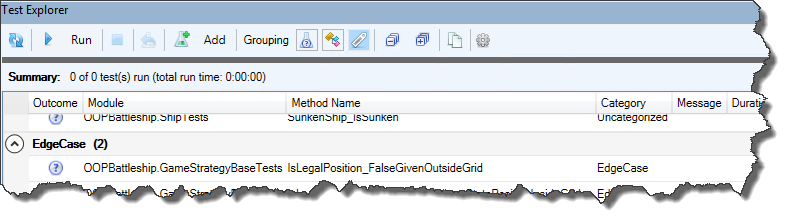
This annotation supports a string argument that determines the test’s category, which appears in the Test Explorer toolwindow and enables grouping by category. If no category argument is specified, “Uncategorized” is used as a default:

@TestMethod("Some Category")
Private Sub TestMethod1()
'...
End Sub

The other @TestXxxxx member annotations are used for setup & teardown. If test settings have the “Test module initialization/cleanup” option selected, then @ModuleInitialize and @ModuleCleanup procedure stubs are automatically added to a new test module. If test settings have “Test method initialization/cleanup” selected, then @TestInitialize and @TestCleanup procedure stubs are automatically added a new test modules.

@TestInitialize

In test modules, this annotation marks procedures that are invoked before every single test in the module. Use that method to run setup/initialization code that needs to execute before each test. Each annotated procedure is invoked, but the order of invocation cannot be guaranteed… however there shouldn’t be a need to have more than one single such initialization method in the module.

@TestCleanup

Also used in test modules, this annotation marks methods that are invoked after every single test in that test module. Use these methods to run teardown/cleanup code that needs to run after each test. Again, each annotated procedure is invoked, but the order of invocation cannot be guaranteed – and there shouldn’t be a need to have more than one single such cleanup method in the module.

@ModuleInitialize

Similar to @TestInitialize, but for marking procedures that are invoked once for the test module, before the tests start running. Use these procedures to run setup code that needs to run before the module’s tests begin to run; each annotated procedure will be invoked, but the order of invocation cannot be guaranteed. Again, only one such initialization procedure should be needed, if any.

@ModuleCleanup

Similar to @TestCleanup, but for marking procedures that are invoked once for the test module, after all tests in the module have executed. Use these procedures to run teardown/cleanup code that needs to run after all module’s tests have completed; each annotated procedure will be invoked, but the order of invocation isn’t guaranteed. Only one such cleanup procedure should be needed, if any.


Annotations are one of Rubberduck’s most useful but unfortunately also one of its most obscure and hard-to-discover features. Fortunately, we have plans to surface them as right-click context menu commands in the 2.5.x release cycle.

Dependency Injection in VBA

The big buzzy words are just a name given to what’s happening when we identify a procedure’s dependencies and decide to inject them. Like any procedure that needs to invoke Workbook.Worksheets.Add must depend on a given specific Workbook object. If the workbook we mean to work with is the document that’s hosting our VBA project, then that workbook is ThisWorkbook. Otherwise, you might have been writing something like this in a standard module:

Public Sub DoSomething()
    Dim sheet As Worksheet
    Set sheet = Worksheets.Add
    '...
End Sub

The problem is the implicit dependency in ActiveWorkbook. Indeed, if we don’t qualify a Worksheets call, then we’re implicitly writing [Global].Worksheets.Add, i.e. Application.Worksheets, …which means ActiveWorkbook.Worksheets – that is, whatever workbook happens to be active at that time. While that can be useful in certain specific situations, most of the time you will rather want to be working with one very specific Workbook object. The hidden, implicit dependency in the above snippet, is a Workbook; with dependency injection, you inject that Workbook object instead:

Public Sub DoSomething(ByVal wb As Workbook)
    Dim sheet As Worksheet
    Set sheet = wb.Worksheets.Add
    '...
End Sub

As a result, procedures explicitly tell their callers what their dependencies are. If a procedure starts needing many parameters, it speaks volumes about the code and its refactoring opportunities! Maybe two or more parameters are closely related and should really become a class in its own right, with its data and its methods; maybe the procedure is simply doing too many things though – having too many dependencies is easily a tell-tale sign.

Dependencies can be hard to find. Other times they’re plain obvious:

Public Sub DoSomething()
    Dim thing As ISomething
    Set thing = New Something
    thing.DoStuff
    '...
End Sub

In any case, correctly identifying all the dependencies of a procedure is definitely the hardest part of DI. The actual injection technique used makes for interesting decision-making though. If you’ve been passing parameters between procedures for any amount of time, congrats, you already master method injection.

Method Injection

We use method injection when we pass dependencies around as parameters to a method of an object.

Public Sub DoSomething(ByVal thing As ISomething)
    thing.DoStuff
    '...
End Sub

You would inject a parameter that way if no other method in that class would love to share that dependency – in which case you would preferably inject the dependency at the class level, and have one less parameter to every method that would otherwise need it.

Property Injection

Using a public Property Set member, we allow code written against the class’ default interface to inject a dependency at the class/instance level.

Public Property Get Thing() As ISomething
    Thing = this.Thing
End Property

Public Property Set Thing(ByVal value As ISomething)
    Set this.Thing = value
End Property

Public Sub DoSomething()
   this.Thing.DoStuff
    '...
End Sub

Property injection is nice, but the downside is that the point of injection isn’t as tight as with method injection: now we need to deal with temporal coupling, and make sure DoSomething can’t run if Thing isn’t set. Debug.Assert statements are perfect for this, since that kind of bug should be caught early on:

Debug.Assert Not this.Thing Is Nothing 'execution stops if expression is false
this.Thing.DoStuff '<~ this.Thing is safe to invoke members against

Alternatively, raise a custom error that explains that the Thing property needs to be assigned before DoSomething can be invoked.

But that won’t prevent other code from tampering with the assigned reference, since it’s Public. Remember when I said it allows code written against the default interface to invoke the setter? If we consider VBA classes’ default interface as the “concrete implementation”, and make it explicitly implement another interface, we can expose the Property Get member and leave the Property Set only accessible from the default interface – and since the “D” of SOLID says we shall be coding against interfaces, then very little code needs to know about the default interface: only the code that’s New-ing up the object does, in fact.

Implements IFoo

Public Property Get Thing() As ISomething
    Thing = this.Thing
End Property

Public Property Set Thing(ByVal value As ISomething)
    Set this.Thing = value
End Property

Private Property Get IFoo_Thing() As ISomething
    Set IFoo_Thing = this.Thing
End Property

Private Sub IFoo_DoSomething()
    this.Thing.DoStuff
    '...
End Sub

Any Public members of a class, are members of that class’ default interface. If this class module is Foo, then Foo.Thing can be read and assigned from a Foo variable. Since the class implements the IFoo interface and that this interface doesn’t expose a Property Set member for the Thing property, code written against IFoo will only be able to access the Property Get member and the DoSomething method: whatever code is responsible for injecting the Thing dependency, is the only code that needs to know about Foo and its Property Set Thing member.

Dim t As Foo
Set t = New Foo
Set t.Thing = New Something
'...

If you’ve read about factories in VBA, then you’ve already seen this in action; the Battleship project demonstrates it as well.

Where are all things created?

Since we’re injecting dependencies all the way down, this New-ing up necessarily happens near the entry point of the macro: ideally all dependencies are resolved and injected in one single place, known as the composition root. See, in the above snippet, imagine the Something dependency injected into foo.Thing itself had its own dependencies, which might themselves have their own dependencies: the dependency graph of a simple application should be relatively manageable, but larger applications configure a DI/IoC Container and let that object be responsible for automatically injecting all dependencies everywhere; Rubberduck uses Castle Windsor, and used Ninject before that. Unfortunately VBA does not have any offering of IoC containers at the moment, and until we’re able to create a VBA class instance from C# code, Rubberduck can’t do it either.

But, honestly, a VBA project shouldn’t become so huge as to really need an IoC container to resolve a dependency graph: poor man’s DI is perfectly fine! Here is one of the entry points of the Battleship code showing how each component is New‘d up and injected into other components – a WorksheetView is used for creating a GridViewAdapter through property injection (via a factory method), injected along with a GameRandomizer into a GameController through method injection in the NewGame method:

Public Sub PlayWorksheetInterface()
    Dim view As WorksheetView
    Set view = New WorksheetView
    
    Dim randomizer As IRandomizer
    Set randomizer = New GameRandomizer
    
    Set controller = New GameController
    controller.NewGame GridViewAdapter.Create(view), randomizer
End Sub

The controller has other dependencies that should be injected as well. One good example can be found in the viewAdapter_OnCreatePlayer handler:

    Dim player As IPlayer
    Select Case pt
        
        Case HumanControlled
            Set player = HumanPlayer.Create(grid)
            
        Case ComputerControlled
            Select Case difficulty
                Case AIDifficulty.RandomAI
                    Set player = AIPlayer.Create(grid, RandomShotStrategy.Create(rng))
                Case AIDifficulty.FairplayAI
                    Set player = AIPlayer.Create(grid, FairPlayStrategy.Create(rng))
                Case AIDifficulty.MercilessAI
                    Set player = AIPlayer.Create(grid, MercilessStrategy.Create(rng))
            End Select
    
    End Select

If we injected the IPlayer implementations from the start, we would be creating the players before the game even knows on which grid each player is playing, or whether a human player is even involved. So in this handler the GameController class is being coupled with HumanPlayer and AIPlayer classes, and this coupling isn’t ideal at all, because if the controller is coupled with a HumanPlayer object, then there’s no way we can write any unit tests for any of the controller logic. Surely there’s a better way to do this!

When you can’t create a dependency at the entry point

Sometimes you just can’t create the dependency until much later during the execution of a macro, so it’s not possible to inject it anywhere. For example you might need an ADODB.Connection, but the SQL authentication requires you to prompt the user for credentials – it would be clunky to prompt the user for database credentials at the start of the macro, before they even click any button to do something with a database. So instead of injecting the ADODB.Connection dependency directly, instead we inject an abstract factory, and since the role of a factory is precisely to create an instance of something, we’re not breaking any rules by New-ing up the connection object in there:

Implements IConnectionFactory

Private Function IConnectionFactory_Create(ByVal user As String, ByVal pwd As String) As ADODB.Connection
    Dim result As ADODB.Connection
    Set result = New ADODB.Connection
    result.ConnectionString = "..." & user & "..." & pwd & "..."
    result.Open
    Set IConnectionFactory_Create = result
End Function

And now whatever class needs a database connection can have an IConnectionFactory object injected as a dependency, and own a new connection object by invoking its Create method.

If we injected an abstract factory into Battleship’s GameController, say, IPlayerFactory, we would remove the coupling between the controller and the concrete IPlayer implementations: the controller wouldn’t need to care for HumanPlayer or AIPlayer, only that there’s a factory it can give parameters to, and get an IPlayer object back. That would greatly simplify the entire logic for the viewAdapter_OnCreatePlayer handler:

    Dim player As IPlayer
    Set player = factory.Create(grid, difficulty)

If the difficulty is AIDifficulty.Unspecified, the factory yields a HumanPlayer; otherwise, we get an AIPlayer – and by doing that, we’ve effectively removed a responsibility from the controller: now the concern of creating player objects belongs to a PlayerFactory class that can be injected into the controller at the entry point, as an IPlayerFactory dependency; the factory itself is coupled with the various IGameStrategy implementations, but that coupling isn’t hindering any testing, and so injecting some GameStrategyFactory would be possible, but it would also be over-abstracting/over-engineering, since IGameStrategy is only really relevant for an IPlayer, so a factory that’s creating players needs to know about the game strategies.

So now we can write tests for the factory to prove it returns the correct expected IPlayer implementations given different AIDifficulty arguments, and we could inject a fake implementation of the IPlayerFactory into the controller, and then write a series of tests that prove the GameController invokes the IPlayerFactory.Create method with the appropriate arguments in response to the GridViewAdapter.OnCreatePlayer event: given gridId=1, the handler instructs the factory it needs a player in grid 1; given pt=PlayerType.HumanControlled, the handler instructs the factory to create a player with AIDifficulty.Unspecified; given difficulty=AIDifficulty.MercilessAI, the handler instructs the factory to create a player with that specified difficulty parameter. We could also test that after two players have been created, the controller invokes the OnBeginShipPosition method against the view adapter, and so on.

Dependency injection promotes decoupling of dependencies, and testable procedures with fewer responsibilities.

Modern VBA Best Practices: Default Members

Today I learned that VB.NET does in fact support Default properties. For years I was under the impression that dismissing the Set keyword meant default members couldn’t possibly exist in .NET, and I was wrong: dismissing the Set keyword meant that parameterless default members couldn’t exist in .NET, but VB.NET can still implicitly invoke a Public Property Get Item(index) default member, just like its VB6 ancestor.

Rewind to their inception, and default members/properties have all the looks of a language feature that’s considered a nice convenient way to type code faster (in 20/20 hindsight, that was at the cost of readability). That’s why and how Debug.Print Application can compile, run, and output Microsoft Excel in the debug pane; it’s why and how an ADODB.Connection object and its ConnectionString properties can be impossible to tell apart… as a convenience; how a Range “is” its value(s), a TextBox “is” its text, or an OptionButton “is” True or False.

These are the modern-day considerations for VB.NET default properties (emphasis mine, .NET-specifics removed):

Default properties can result in a small reduction in source code-characters, but they can make your code more difficult to read. If the calling code is not familiar with your class […], when it makes a reference to the class […] name it cannot be certain whether that reference accesses the class […] itself, or a default property. This can lead to compiler errors or subtle run-time logic errors. […]
Because of these disadvantages, you should consider not defining default properties. For code readability, you should also consider always referring to all properties explicitly, even default properties.

I cannot think of a single valid reason for any of these considerations to not be applicable to modern VBA, or even VB6 code. VB.NET removed the need for a disambiguating Set keyword by making a parameterless default member throw a compiler error. For contrast consider this code, and imagine the Set keyword doesn’t exist:

Dim things(9)
things(0) = New Thing

If the Thing class defines a parameterless default member, then who can tell what’s at index 0 of the things array? A Thing object reference? A SomethingElse object reference? The String representation of a Thing instance? 42?

Default members are hopefully not side-effecting magic invisible stardust code that is by definition invoked implicitly, by code that says one thing and does another, and requires looking up the documentation or the object browser definition of a type to remember what member we’re actually invoking – and even then, it can be obscured; the Excel type library is a prime example, with a hidden _Default property being the (drumroll) default property of the Range class, for example. Lastly, an implicit default member call is not 100% equivalent to an explicit one, and that tiny little difference can go as far as instantly crashing Excel.

Sounds terrible. Why would Rubberduck have a @DefaultMember annotation then?

With Rubberduck’s annotation and inspection/quick-fix system, you can easily define default members for your class modules; simply decorate the procedure with a '@DefaultMember annotation, synchronize member attributes, and done.

It’s not because you can, that you should. If you’re like me and someone gave you a knife, you’d probably at least try not to cut yourself. If you’re writing a custom collection class and you want it to be usable with the classic things(i) syntax rather than an explicit things.Item(i) member call, Rubberduck’s job is to help you do exactly that without needing to remove/export the code file, tweak it manually in Notepad++, then re-import it back into the project – that’s why the @DefaultMember annotation exists: because for the rare cases where you do want a default member, your ducky doesn’t let you down.

Currently, Rubberduck won’t complain if you make a parameterless procedure a default member. There’s an inspection idea that’s up-for-grabs to flag them though, if you’re looking for a fun contribution to an open-source project!

About Class Modules

What is a class?

The term is known to everyone that read anything about programming in VBA. It defines objects, yes. But what else do we know about them? What don’t we know about them?

VBA being built on top of COM has a number of implications, and explains a number of language features and the mechanics around classes and objects. Let’s dive into what makes a class module, and what being written in a class module means for your code.


Metadata

In order to define a class, a class module needs to contain metadata, information that VBA will use when it needs to create an object. This metadata is thoroughly specified in MS-VBAL section 4.2.

If we add a new class module to a VBA project, name it Thing, then export the code file, it should look something like this (minus Option Explicit if you don’t have the “require variable declaration” VBE setting enabled for some reason):

VERSION 1.0 CLASS
BEGIN
  MultiUse = -1  'True
END
Attribute VB_Name = "Thing"
Attribute VB_GlobalNameSpace = False
Attribute VB_Creatable = False
Attribute VB_PredeclaredId = False
Attribute VB_Exposed = True
Option Explicit

This VERSION 1.0 CLASS is the header VBA is looking for – if you export a standard module, it will not have that header. It won’t have the BEGIN...END block that follows either.

MultiUse = -1 is controlled by the Instancing property, which you can find in the Properties toolwindow:

VBA supports two values for this property (VB6 has more, depending on the project type):

  • Private (default)
  • PublicNotCreateable

By default, a VBA class is private, thus only visible / only exists in the project in which it’s defined. In an add-in project, this is useful for a private/internal API. When an add-in project needs to be referenced from other VBA projects, it needs a public API – provided by PublicNotCreateable class modules. These classes can be used in referencing projects, but you can only New them up in the project they’re defined in.

We could imagine that, if a class module’s property grid had more rows than that, the other values would all be listed between the BEGIN and END keywords. So where’s the (Name) coming from?

Attribute VB_Name = "Thing"

The Attribute token, as per specifications, must always appear at the beginning of a line. Attribute names are a bit cryptic, and they’re not all specified or well-documented. In fact, different VBA host applications may support different attributes… but all VBA implementations support VB_Name and the attributes that control instantiation:

  • VB_GlobalNameSpace (false)
  • VB_Createable (false if public)
  • VB_PredeclaredId (false by default)
  • VB_Exposed (true if public)

3 of these 4 attributes are controlled by the Instancing property. VB_PredeclaredId is normally False, but special classes such as a UserForm have it set to True; the VBE provides no tooling to manipulate this attribute, but VBA will honor its value if you modify it manually (or if Rubberduck does it for you).

Instance

The instancing property of the class module determines whether & how the class is able to be instantiated; an instance of a class is an object that is defined by that class. In VBA you can create a new object with the New keyword or the CreateObject function – but CreateObject will not work with VBA user code, because the instancing modes supported in VBA don’t allow it.

Being an object, an instance of a class can only ever exist at run-time. Objects only ever exist at run-time.

There are several ways objects can come into existence in VBA.

  • Issued to the left-hand side of a Set assignment, using a New keyword or a CreateObject function call on the right-hand side;
  • Issued to a With block from a New keyword or CreateObject function call;
  • On the first encounter (or first since last destruction) of the name of a class module with the VB_PredeclaredId attribute value set to True;
  • On the first encounter (or first since last destruction) of an object reference declared with As New;

Similar to how an Excel project’s ThisWorkbook module “inherits” the Workbook members, VBA classes “inherit” a standard “VB user class” that provides two hooks on two particularly important stages in the object’s lifetime: Initialize, and Terminate.

Private Sub Class_Initialize()
End Sub

Private Sub Class_Terminate()
End Sub

Given this code:

Private Sub Test()
    Dim foo As Class1
    Set foo = New Class1

    With New Class1
    End With
End Sub

The Initialize handler would run twice – once at New Class1 as the right-hand-side of the Set assignment is being evaluated, so before the foo reference is assigned. Then once more at New Class1 in the With block, as the block is entered but before the object reference is captured by the With block.

The Terminate handler would first run at End With for the With instance, and the foo instance would terminate at End Sub, because that’s where it’s going out of scope (and it’s not Set to Nothing before that, and nothing else is keeping alive a reference to the object).

Keep in mind that declarations aren’t executable statements, so this code runs both handlers exactly 0 times:

Private Sub Test()
    Dim foo As New Class1
End Sub

The As New object is only actually created where foo is first referenced. If Class1 exposed a Public Sub DoSomething() method, and the above procedure had foo.DoSomething under the declaration, Initialize would run at the dereferencing operator (.), just before the member call to the DoSomething method; the Terminate handler would run at End Sub.

Auto-instantiated objects (declared with As New), like the default instance of class modules with a PredeclaredId attribute set to True, are re-created whenever they are no longer in scope but suddenly need to exist again:

Private Sub Test()
    Dim foo As New Class1
    foo.DoSomething
    Set foo = Nothing
    Debug.Print foo Is Nothing
End Sub

Without As New, the foo.DoSomething member call would be made against Nothing and this code would raise run-time error 91. Because of As New, the assignment to Nothing does terminate the object instance, but a new one is spawned again when foo is dereferenced again – so even though the object was just destroyed, the Debug.Print statement correctly (but confusingly) outputs False, since merely referencing the object foo has caused VBA to re-create it behind your back.

This behavior is marginally useful, but definitely not as obvious at it should be: that is why Rubberduck warns about As New declarations.


Members

The members of a class are the fields (module variables), properties, and methods of the class – whether private or public. Fields should be Private and encapsulate the instance state. Property Get members can expose private fields in a read-only manner, and Function and Sub procedures are dubbed methods.

Avoid write-only properties; if external code can write to a property, it should be able to read that value back.

A class module can define a default member by specifying a VB_UserMemId member attribute with a value of 0 (or with Rubberduck, by simply adding a '@DefaultMember annotation/comment). For collection classes, convention is to have an Item property as the default member, such that things(i) is equivalent to things.Item(i). The hidden attribute, like all attributes, is only visible when the code file is exported to be viewed in a text editor that isn’t the VBE:

'@DefaultMember
Public Property Get Item(ByVal index As Variant) As Variant
Attribute Item.VB_UserMemId = 0
    '...
End Property

In any other case, default members should be avoided: a class with a default member can be let-coerced into a value, and this easily makes things confusing – especially when considering that a default member might be returning an object that itself has a default member, that returns an object, that itself has a default member, that returns an object, …the compiler needs to work some recursive logic just to resolve what types/classes are involved: needless to say, us mere puny humans reading the code, understandably have no idea.

Let-coercion happens when you try to evaluate an object as a value expression, for example:

Debug.Print Application

We know that this instruction prints “Microsoft Excel” just like it would if we fully spelled out Debug.Print Application.Name, but we can’t know how. We can’t, because if we inspect the Application class in the Object Browser, we find that its default property is a hidden _Default get-only String property, and we can only best-guess that the implementation of that property is yielding the Name property. The result is an opaque API that does things implicitly, and nobody knows what these things are. This is bad, because at face value, Debug.Print Application makes no sense as a statement if we know that Application is an object.

If we try to let-coerce an object that doesn’t have a default member, we get run-time error 438 “object doesn’t support this property or method”, which we normally see when a late-bound member call fails. An with a hidden default member, we ensure that the inner workings of our APIs remain an arcane black box for everyone consuming our APIs. Don’t do this to your future self.

Without this language feature, the Set keyword wouldn’t be needed – assigning an object reference would never be ambiguous!

Dim rng As Variant
rng = Sheet1.Range("A1:A10") 'ambiguous: is rng the Range or its default value?
Set rng = Sheet1.Range("A1:A10") 'unambiguous: definitely the Range reference

Interfaces

Every class defines a default interface – the Public members determine what’s on that interface. When a variable is declared As Class1, the members available to IntelliSense are the members of the default interface of Class1. Interfaces cannot expose fields and/or events, so if a class defines public fields, they are exposed as read/write properties; events are simply ignored.

An interface defines how an object can interact with the outside world – or rather, how the outside world can interact with an object: it’s like a boundary, an interface between the object and its client. The object encapsulates state, its interface allows the outside world to manipulate it.

Having a default interface implies that objects can have non-default interfaces, too: an object can implement as many interfaces as needed. In VBA that’s done with the Implements keyword. And because every class defines a public interface, any class can implement any other.

Say we had a Thing class, we would declare an object variable of that type like this:

Dim instance As Thing
Set instance = New Thing

This makes the compiler understand that when we access the instance object, we are seeing it through the lens of its default Thing interface, so the member we get in the drop-down list when we type the . dereferencing operator in instance., are the public members defined in the Thing class module.

If Thing implemented an ISomething interface, and we declared it like this:

Dim instance As ISomething
Set instance = New Thing

We would still be looking at a Thing, however we would now be seeing it through the lens of its ISomething interface, and the members we would get in the drop-down list when we typed instance., would be the public members defined in the ISomething class module.

The benefits of this might seem very much theoretical and far-fetched if we’re coming from purely procedural programming, but from a COM standpoint, this is very much Tuesday – meaning, declaring explicit interfaces that formally define how we intend the outside world to be able to interact with our objects, is standard practice. .NET code intended to be consumed by COM, makes a cleaner API when it defines explicit interfaces.

When a class defines a public interface, but no implementation for these members, we give that class a generic name that we traditionally prefix with a very much Hungarian I. This makes it easy to identify purely abstract classes (interfaces) in a sea of modules. With Rubberduck’s Code Explorer, classes that are implemented by other classes, as well as classes annotated with an '@Interface annotation/comment, get a special dedicated “interface” icon that can help easily identify interface modules in a code base, prefixed or not.

This prefixing tradition was carried into modern practices, and you will find this I prefix everywhere in the .NET framework, just as you will find it in a lot of (often hidden) classes in standard VBA libraries – so in order to blend in and deliver a clear consistent message to the reader/maintainer, interface class module names should be prefixed with an I:

If you dig into the hidden classes of the Excel type library, you will find hidden interfaces that expose members that should look familiar: IAppEvents, IWorkbookEvents, IChartEvents, ICommandBarEvents, IDocEvents, IOLEObjectEvents, and many others; these hidden interfaces are your biggest clue about how interfaces and events are related, and indirectly, about how events work under COM: this mechanism explains why a VBA interface cannot expose events directly. So what are events then?


Events

Easily the very first aspect of writing VBA code we are exposed to, event handler procedures are defined by a special implicit interface that we specify in VBA code using the Event keyword in a class module. When we type the space following the RaiseEvent keyword, the editor assists by listing the members of that interface:

Raising an event can be seen as a special kind of call statement that invokes a callback – a procedure that’s written in some other class module: an event handler procedure, that may or may not execute code that we know nothing about. The handler procedure runs synchronously, so the next statement to run after a RaiseEvent statement, will run after the handler procedure has returned (this is particularly useful for events that define a ByRef cancel As Boolean parameter)… unless the handler bombed:

Option Explicit
Public Event Something(ByVal foo As String, ByVal bar As Long)

Public Sub DoSomething()
    On Error Resume Next
    RaiseEvent Something("foo", 42)
    Debug.Print "done"
End Sub

This is where the notion of callback matters: the above code will never print “done” if a handler runs into an unhandled error – execution will simply stop (and VBA will pop that familiar “unhandled error” box). If the Something handler were a “normal” procedure call, “done” would get printed whether or not an error was unhandled in the procedure.

We can handle Workbook events in the ThisWorkbook document class module, because the code of ThisWorkbook already includes every member of a Workbook class, even before we write a single line of code in it:

Debug.Print TypeOf ThisWorkbook Is Excel.Workbook 'True

This type of class inheritance unfortunately isn’t possible with VBA user code, but we can also express the relationship with composition, if we visualize the ThisWorkbook module like this:

Option Explicit
Private WithEvents Workbook As Workbook

Private Sub Class_Initialize()
    Set Workbook = Me
End Sub

The net effect being that in the ThisWorkbook module we have a Workbook event provider we can pick from the left-hand side code pane drop-down, listing the available events in the right-hand side drop-down – exactly as if there was an implicit WithEvents Workbook private field in any other class module:

ThisWorkbook module handling Workbook events for itself.
Class1 module handling Workbook events for a given Workbook object reference.

We use the WithEvents keyword to declare an object variable for which we would like to handle events. The keyword is only legal in class modules (this includes document class modules and userform modules), and the As clause may only specify a class that exposes public events. Moreover, an auto-instantiated object cannot be declared WithEvents, so As New is also illegal.

Events/callbacks are particularly useful to make application components that don’t “see” each other, still be able to talk to each other and interact: the class that’s raising an event doesn’t know if there’s someone answering the call on the other side, even less who that someone is and what they do for a living. They are a tool that can help decoupling components… to an extent: the problem is that in VBA classes, events are essentially considered implementation details – they are not exposed on the class’ default interface, even though they’re Public: the only class that is allowed to access an event, is the class that defines it – no other class can raise an event, unless we expose a method specifically for that:

Public Event Something()

Public Sub OnSomething()
    RaiseEvent Something
End Sub

Public Sub DoSomething()
    OnSomething()
    '...
End Sub

The Event and WithEvents keywords provide language-level assistance with the otherwise relatively complex wiring-up of callbacks. In order to use them with interfaces, we can use an adapter pattern with formalized SomethingEvents interfaces – like how the Battleship project demonstrates with the GridViewAdapter and IGridViewEvents classes.


On Error Resume Next

Despite everything that’s been written about it, sometimes On Error Resume Next is the perfect tool for the job. Say you have a ListObject on Sheet1, that would be named Table1; you could have a Table1 property that would return this ListObject:

'@Description("Gets the 'Table1' ListObject from this sheet.")
Public Property Get Table1() As ListObject
  Set Table1 = Me.ListObjects("Table1")
End Property

The only problem, is that when the Table1 table is inevitably renamed (right?) in Excel, this property starts raising run-time error 9, because the ListObjects collection of Sheet1 doesn’t contain an item named "Table1" anymore, and throwing [an error] from a Property Get procedure goes against property design best practices. Enter On Error Resume Next:

'@Description("Gets the 'Table1' ListObject from this sheet, or 'Nothing' if not found.")
Public Property Get Table1() As ListObject
  On Error Resume Next ' suppresses possible error 9...
    Set Table1 = Me.ListObjects("Table1") ' ...that would be raised while evaluating RHS
  On Error GoTo 0 ' execution would jump here before the Table1 reference is assigned
End Property

Error handling is promptly explicitly restored with On Error GoTo 0, and the property will now return Nothing and defer to the caller the decision of what to do with an invalid table:

Dim table As ListObject
Set table = Sheet1.Table1
If table Is Nothing Then Exit Sub ' or raise an error? MsgBox?
'...safely carry on...

A nice side-effect of this, is that it’s very compelling for the calling code to capture the returned value into a local variable – and leaving the complexities of caching concerns to the calling code (you don’t want/need to dereference that ListObject from the worksheet’s ListObjects collection every single time you need to access it!) makes it much less likely to run into an awkward situation such as this:

'@Description("Gets the 'Table1' ListObject from this sheet.")
Public Property Get Table1() As ListObject
  Static cache As ListObject
  If cache Is Nothing Then
    Set cache = Me.ListObjects("Table1")
  End If
  Set Table1 = cache
End Property

...
  Debug.Print Me.Table1.Name
  ...
  Me.ListObjects(1).Delete
  ...
  Debug.Print Me.Table1.Name ' error 424 "object required"
...

Assuming the table initially exists on the worksheet, the first call to Me.Table1 sets the cache reference and the calling instruction outputs the table’s name. In the second call to Me.Table1, the cache reference is already set, it’s not Nothing anymore – the object pointer is zombified: there’s a pointer, but the object itself is gone, and the corrupted cache state might very well be persisted until an End instruction kills the entire execution context. And that’s why cache invalidation is up there together with naming things at the top-2 of hard things in programming… but I digress.

On Error Resume Next + Conditionals = Trouble

Of all the things that could go wrong with generously suppressing error handling by spraying On Error Resume Next all over the code base, is that potentially catastrophic bugs like below can happen – what’s the MsgBox saying, and what icon does it have? Is that clearly intentional?

Public Sub AntiExample()
  'On Error GoTo Rubberduck
  On Error Resume Next
  ' ...code...
  Sheet1.Range("A1").Value = CVErr(xlErrNA) ' A1 contains a #N/A error value
  ' ...code...
  ' ...
  ' ...more code...
  ' ...
  If Sheet1.Range("A1").Value = 42 Then
    MsgBox Err.Description, vbCritical
    Exit Sub
  Else
    MsgBox Err.Description, vbExclamation
    Exit Sub
  End If
  Exit Sub
Rubberduck:
  MsgBox Err.Description, vbInformation
End Sub

Did you guess it right? I’m only going to tell you that Resume Next can be extremely dangerous if it’s used wrong: a MsgBox is harmless, but that conditional block could contain anything. When in doubt, On Error GoTo Rubberduck, but if you choose to use Resume Next anyway, there’s an inspection that can warn you when it is used without being paired with On Error GoTo 0 (in most common scenarios anyway) – but it’s not that inspection’s job to tell you there’s too much code between On Error Resume Next and On Error GoTo 0: that is entirely up to you… but the way I see it, OERN is great for fencing a single potentially problematic statement – and that is easier to do when the procedure is responsible for very few things: when you start having multiple potential errors to handle in the same scope, it’s past time to think about increasing the abstraction level and moving code to smaller procedures that do fewer things.

Pragmatically speaking, if used correctly, On Error Resume Next does not really need to be paired with On Error GoTo 0: execution state is always local to the procedure (/stack frame), and with On Error Resume Next the execution state will never be in error after the procedure exits. In a sense, specifying it explicitly is a bit like specifying an explicit Public access modifier, or an explicit ByRef specifier on a parameter declaration: it’s the implicit default, made explicit – on the other hand, it’s much cleaner to exit a procedure with Err.Number being 0, consistent with the execution/error state.

When you see On Error Resume Next at the top of a rather large procedure, comment it out and run the code if possible; see what errors are being silently shoved under the carpet, what code executes in that uncertain error state. Try to narrow down the potential errors to specific statements, and isolate them: reduce the amount of code that is allowed to run in an error state to a bare minimum, pull the “dangerous” statements into their own function, see if there’s a way to avoid needing to handle an error in the first place. In the above code for example, the error raised here:

If Sheet1.Range("A1").Value = 42 Then

Could easily be avoided by verifying whether we’re looking at a value that can legally be compared to 42 (or any other non-Error value), like this:

Dim cellValue As Variant
cellValue = Sheet1.Range("A1").Value ' cellValue is Variant/Error

If IsNumeric(cellValue) Then ' false
  If cellValue = 42 Then ' comparison is safe in this branch
     '...
  End If
ElseIf Not IsError(cellValue) Then ' false
  'cellValue isn't an error value, but isn't numeric either
  '...
Else
  'execution branches here
  '...
End If

Of course that’s just one example… and every situation is different: if you’re reading a Recordset and one of the fields is missing, you have all rights to blow things up… but you still have to make sure you clean up the mess and close the connection properly before you exit the scope – but then consider, if you were given the opened connection as a parameter… life is much simpler: it’s not your job at all to close that connection – whoever created it will be assuming it’s still open when the failing procedure returns! The basic golden rule of thumb being that the code that’s responsible for creating an object (or invoking a factory method that creates it) should also be the code that’s responsible for destroying that object.

Pattern: TryParse

Error-handling in VBA can easily get hairy. The best error handling code is no error handling code at all, and by writing our code at a high enough abstraction level, we can achieve exactly that – and leave the gory details in small, specialized, lower-abstraction procedures.

I’m growing rather fond of adapting the famous TryParse Pattern to VBA code, borrowed from the .NET landscape. Not really for performance reasons (VBA doesn’t deal with exceptions or stack traces), but for the net readability and abstraction gains. The crux of it is, you write a small, specialized function that returns a Boolean and takes a ByRef parameter for the return value – like this:

Public Function TryDoSomething(ByVal arg As String, ByRef outResult As Object) As Boolean
    'only return True and set outResult to a valid reference if successful
End Function

Let the calling code decide what to do with a failure – don’t pop a MsgBox in such a function: it’s the caller’s responsibility to know what to do when you return False.

The pattern comes from methods like bool Int32.TryParse(string, out Int32) in .NET, where an exception-throwing Int32 Int32.Parse(string) equivalent method is also provided: whenever there’s a TryDoSomething method, there’s an equivalent DoSomething method that is more straightforward, but also more risky.

Applied consistently, the Try prefix tells us that the last argument is a ByRef parameter that means to hold the return value; the out prefix is Apps Hungarian (the actual original intent of “[Systems] Hungarian Notation”) that the calling code can see with IntelliSense, screaming “this argument is your result, and must be passed by reference” – even though IntelliSense isn’t showing the ByRef modifier:

This pattern is especially useful to simplify error handling and replace it with standard flow control, like If statements. For example you could have a TryFind function that takes a Range object along with something to find in that range, invokes Range.Find, and only returns True if the result isn’t Nothing:

Dim result As Range
If Not TryFind(Sheet1.Range("A:A"), "test", result) Then
    MsgBox "Range.Find yielded no results.", vbInformation
    Exit Sub
End If

result.Activate 'result is guaranteed to be usable here

It’s especially useful for things that can raise a run-time error you have no control over – like opening a workbook off a user-provided String input, opening an ADODB database connection, or anything else that might fail for any reason well out of your control, and all your code needs to know is whether it worked or not.

Public Function TryOpenConnection(ByVal connString As String, ByRef outConnection As ADODB.Connection) As Boolean
    Dim result As ADODB.Connection
    Set result = New ADODB.Connection

    On Error GoTo CleanFail
    result.Open connString

    If result.State = adOpen Then
        TryOpenConnection = True
        Set outConnection = result
    End If

CleanExit:
    Exit Function

CleanFail:
    Debug.Print "TryOpenConnection failed with error: " & Err.Description
    Set result = Nothing
    'Resume CleanExit
    'Resume
End Function

The function returns True if the connection was successfully opened, False otherwise – regardless of whether that’s because the connection string is malformed, the server wasn’t found, or the connection timed out. If the calling code only needs to care about whether or not the connection succeeded, it’s perfect:

Dim adoConnection As ADODB.Connection
If Not TryOpenConnection(connString, adoConnection) Then
    MsgBox "Could not connect to database.", vbExclamation
    Exit Function
End If

'proceed to consume the successfully open connection

Note how Exit Sub/Exit Function are leveraged, to put a quick end to the doomed procedure’s misery… and let the rest of it confidently resume with the assurance that it’s working with an open connection, without a nesting level: having the rest of the procedure in an Else block would be redundant.

The .NET guideline about offering a pair of methods TryDoSomething/DoSomething are taken from Framework Design Guidelines, an excellent book with plenty of very sane conventions – but unless you’re writing a VBA Framework “library” project, it’s almost certainly unnecessary to include the error-throwing sister method. YAGNI: You Ain’t Gonna Need It.

Cool. Can it be abused though?

Of course, and easily so: any TryDoSomethingThatCouldNeverRaiseAnError method would be weird. Keep the Try prefix for methods that make you dodge that proverbial error-handling bullet. Parameters should generally passed ByVal, and if there’s a result to return, it should be returned as a Function procedure’s return value.

If a function needs to return more than one result and you find yourself using ByRef parameters for outputs, consider reevaluating its responsibilities: there’s a chance it might be doing more than it should. Or if the return values are so closely related they could be expressed as one thing, consider extracting them into a small class.

The GridCoord class in the OOP Battleship project is a great example of this: systematically passing X and Y values together everywhere quickly gets old, and turning them into an object suddenly gives us the ability to not only pass them as one single entity, but we also get to compare it with another coordinate object for equality or intersection, or to evaluate whether that other coordinate is adjacent; the object knows how to represent itself as a String value, and the rest of the code consumes it through the read-only IGridCoord interface – all that functionality would have to be written somewhere else, if X and Y were simply two Long integer values.

Late Binding

Ever wondered why sometimes the VBE tells you what the members of an object are, how to parameterize these member calls, what these members return… and other times it doesn’t? Late binding is why.

Rubberduck’s static code analysis is currently powerful enough to issue an inspection result for code that would fail to compile with VB.NET’s Option Strict enabled. It’s not yet implemented. But in the meantime, you can still benefit from writing modern VBA code that passes the Option Strict rules (at least as far as late binding is concerned)… and essentially eliminate the possibility for error 438 to ever be raised in your code.

If you’re coding against a dynamic API, then this isn’t really applicable. But for literally everything else, it’s a must.

What is Late Binding?

A quick Twitter survey revealed that a majority (67%) of VBA developers (well, at least those following the @rubberduckvba account) associate the term “late binding” with the CreateObject function. While it’s true that CreateObject is the only way to create an instance of an object for which you don’t have a compile-time reference, it’s mostly a mechanism for creating an object through a registry lookup: the function accepts a ProgID or a GUID that corresponds to a specific class that must exist in the Windows Registry on the machine that executes the code. If the ProgID does not exist in the registry, an error is raised and no object gets created. While this is useful for providing an alternative implementation (handle the error and return another, compatible object), it is rarely used that way – and then there’s this common misconception that CreateObject can somehow magically create an object out of thin air, even if the library doesn’t exist on the target machine. If you’re reading a blog that says or insinuates something to that effect (I’ve seen a few), close that browser tab immediately – you’re being grossly mislead and there’s no telling what other lies can be on that page.

If you’re still skeptical, consider these two simple lines of code:

Dim app As Excel.Application
Set app = CreateObject("Excel.Application")

Assuming this code compiles, no late binding happening here: all CreateObject is doing, is take something very simple (Set app = New Excel.Application) and make it very complicated (locate the ProgID in the registry, lookup the parent library, load the library, find the type, create an instance, return that object).

Late binding occurs whenever a member call is made against the Object interface.

Dim app As Object
Set app = CreateObject("Excel.Application")

If we’re not in Excel and need some Excel automation, referencing the Excel type library gives us the ability to bind the Excel.Application type at compile-time, however early binding is version-specific… which means if you code against the Excel 2016 type library and one of your users is running Excel 2010, there’s a chance that this user can’t compile or run your code (even if you’re careful to not use any of the newer APIs that didn’t exist in Excel 2010) – and this is where late binding is useful: now the code works against whatever version of the library that exists on that user’s machine (still won’t magically make a Worksheet.ListObjects call succeed in, say, Excel 2003). The downside is, obviously, that you can’t declare any Worksheet or Workbook object: since the library isn’t referenced, the compiler doesn’t know about these classes, or any of the xlXYZ global constants defined in that library.

Things get hairy when you start using late binding for libraries that are essentially guaranteed to exist on every Windows machine built this century. Like Scripting, or several others – if your code can’t work without these libraries present, late-binding them isn’t going to solve any problem. Rather, it will likely cause more of them… because late-bound code will happily compile with typos and glaring misuses of a type library; you don’t get IntelliSense or parameter QuickInfo as you type, and that is basically the best way to run into run-time error 438 (member not found):

Dim d As Object
Set d = CreateObject("Scripting.Dictionary")
d.Add "value", "key" 'or is it "key", "value"?
If d.ContainsKey("key") Then 'or is it d.Exists("key")?
   '...
End If

It’s not about project references

Late binding isn’t about what libraries are referenced and what types need to be created with CreateObject though: not referencing a library forces you to late-bind everything, but late binding can (and does!) also occur, even if you don’t use anything other than the host application’s object model and the VBA standard library: every time anything returns an Object and you make a member call against that object without first casting it to a compile-time known interface, you are making a late-bound member call that will only be resolved at run-time.

Try typing the below examples, and feel the difference:

Dim lateBound As Object
Set lateBound = Application.Worksheets("Sheet1")
latebound.Range("A1").Value = 42

Dim earlyBound As Worksheet
Set earlyBound = Application.Worksheets("Sheet1")
earlyBound.Range("A1").Value = 42

Worksheets yields an Object that might be a Worksheet reference, or a Sheets collection (depending if you’ve parameterized it with a string/sheet name or with an array of sheet names). There are dozens of other methods in the Excel object model that return an Object. If you’re automating Excel from VB.NET with Option Strict turned on, late-bound member calls are outright forbidden.

VBA is more permissive, but it is our duty as VBA developers, to understand what’s happening, why it’s happening, and what we can do to make things more robust, and fail at compile-time whenever it’s possible to do so. By systematically declaring explicit types and avoiding member calls against Object, we not only accomplish exactly that – we also…

  • Learn to work with a less permissive compiler, by treating late-bound calls as if they were errors: hopping into the .NET world will be much less of a steep learning curve!
  • Learn to work better with the object model, better understand what types are returned by what methods – and what to look for and what to research when things go wrong.
  • Write code that better adheres to modern programming standards.

Late binding isn’t inherently evil: it’s a formidable and powerful tool in your arsenal. But using it when an early-bound alternative is available, is abusing the language feature.

Whenever you type a member call and the VBE isn’t telling you what the available members are, consider introducing a local variable declared with an explicit type, and keeping things compile-time validated – as a bonus, Rubberduck will be able to “see” more of your code, and inspections will yield fewer false positives and fewer false negatives!

What’s Wrong With VBA?

The Most Dreaded Language

The annual Stack Overflow Developer Survey has always ranked VBA pretty high on the “most dreaded” languages. For some reason this year VB6 and VB.NET aren’t making the list, but VBA is sitting at the very top of it, with 75.2% of respondents “dreading” VBA.

VBA is a gateway language – it was for me, anyway. It gets things done, and abstracts away boilerplate that you don’t really need to worry about in order to, well, get things done. For some, that’s good enough. As long as it works. Code is written to be executed, right? What if we wrote code for it to be read instead? Code that’s easy to understand, is easier to maintain and to extend without breaking things. Code that’s well organized, that uses small specialized and reusable components that can be tested independently, …is just objectively better code. And nothing in VBA says it can’t be exactly that.

Nothing is wrong with VBA. Obscure code with weird variable names, twisted code that’s hard to read and ever harder to follow, can be written in every single programming language yet invented or not.

VBA is a version of “classic” Visual Basic (VB5, VB6) that is hosted in another application. For a number of years Microsoft was selling a VBA Software Development Kit (SDK), and with it you could embed VBA in your own product to enable scripting against your own COM API / object model library: you could write an ERP (Enterprise Resource Planning) system, CAD software, vector graphics drawing software, anything really – and enable user extensibility through the VBA SDK. These were the golden years of Visual Basic: everyone knew VB. I happened to be in college around these years, and Programming I involved VB6. It was a gateway language back then too: “real programmers” wrote C++.

Visual Basic happened a few years after QBasic, which succeeded to BASIC. Edsger W. Dijkstra famously had this to say about BASIC:

It is practically impossible to teach good programming to students that have had a prior exposure to BASIC: as potential programmers they are mentally mutilated beyond hope of regeneration.

And yet after all these years, BASIC is still alive, through VBA and VB.NET. Bad code is on the programmer, not the language. And if you want to learn, you will learn: don’t let anyone tell you otherwise. Every single programmer alive was once a beginner, and whether you’re writing VBA, Java, C++, C#, heck even PHP, or the latest flavor-of-the-week of Javascript, remove the curly braces and semicolons and rule of thumb they could all pass one for the other if the same person wrote them all: ignore the brogrammers that think whatever language they code in is better than yours. Your mind isn’t any more mutilated than any other’s for it.

VBA is a full-fledged, mature programming language that has proven itself multiple times over the past 20 years (and more). It’s not just procedural code either: Visual Basic projects can define custom classes and spawn real COM objects; objects that can present multiple interfaces, expose and handle events, and these capabilities open doors no toy language can even begin to dream opening. “But it doesn’t do class inheritance! It’s not real object-oriented programming!” – sure there are limitations; but while class inheritance is cool, it’s also often and easily abused. Composition is preferred over inheritance for many reasons, and VBA lets you compose objects as much as you need. What makes inheritance so nice is in no small part that you get to treat all derived classes as their common base class, which gives you polymorphism: Car, Plane, and Boat can all be treated as a Vehicle, and each object might have different means to implement a Move method. VBA code can do this too, using interfaces. For the most part, VBA is only as limiting as you make it.

Among the useful things other languages do that VBA doesn’t, we notably find reflection: the ability to write code that can inspect itself – for example being able to query a VBA project’s type library to locate a particular Enum type, iterate its members, and store the member names and their underlying values in a dictionary. Reflection is made possible in .NET with a very detailed type system that VBA doesn’t have: writing some kind of reflection API for VBA isn’t impossible, but demands very intimate knowledge of how VBA user code and types work internally, and a way to access the internal pointers to these COM structures. Reflection is extremely powerful, but comes at a cost: it is generally avoided in places where performance matters.

VBA doesn’t support delegates, and doesn’t treat functions as first-class citizens: you can’t pass a function to another procedure in VBA; you pass the result of that function instead. This makes it hard to implement, for example, feature-rich data structures that can be queried and/or filtered: the querying and filtering needs to happen in-place using an explicit loop, and this makes the code more verbose than the equivalent in, say, C# or VB.NET, where such deeds would be accomplished using LINQ and other modern technology. But lambdas only appeared in Java rather recently, and their decades-long absence didn’t undermine Java’s claim to fame for all these years – .NET delegates are an incredibly useful tool to have at your disposal, but we can very well do without, albeit with a little bit more verbose code. And guess what? Fancypants LINQ code might be very elegant (if used well… it can also be a mind-wrecking nightmare), but .NET programmers tend to avoid using it in places where performance matters.

Error handling in VBA works with global runtime error state, and On Error statements that essentially set up conditional GoTo jumps. Other languages have exceptions and try/catch blocks… which essentially set up conditional GoTo jumps. Sure exceptions are great, and they can simplify error handling. But they are no silver bullet, and judging by the sheer amount of “real programmers” using them for flow control, or just plain swallowing them and moving on… bad exception handling in any language is just as bad as bad error handling in VBA.

The stigma around VBA and VB6 as a language, is also and perhaps even mostly due to the Visual Basic Editor (VBE) itself. As an IDE the VBE simply didn’t keep up, it was… pretty much abandoned. There’s a (now closed) question on Stack Overflow asking whether there are any refactoring tools for VBA. The top-voted answer was then a funny jab at the legacy editor, saying the only refactoring they know about, is search/replace (Ctrl+H). The editor itself feels like it’s actively working against writing full-blown object-oriented VBA code, or just plain old clean-reading code: all your classes are shoved under a single “Class Modules” folder, sorted alphabetically… so you resort to funky naming schemes just to visually regroup things by functionality. You might have toyed with interfaces before, but coding against them (i.e. to abstractions, not concrete types; c.f. the Dependency Inversion Principle) makes it impossible to navigate to the actual code that implements these interfaces. There’s no built-in support for unit testing, no mocking framework, no refactorings, no static code analysis, no code metrics, …and the list goes on and on.

The language does have its little annoying quirks (every language does), and some massively used type libraries (like Excel’s) do have their own little annoying quirks as well – but VBA as a language isn’t to blame for the quirkiness of some type libraries, even first-party ones developed by Microsoft.

VBA isn’t what’s wrong with VBA. The Visual Basic Editor is. If only there was a VBIDE add-in that made working with VBA more pleasant…

Everything You Ever Wanted To Know About Events

VBA is often said to be an event-driven language: a lot of worksheet automation involves executing code in response to such or such workbook or worksheet event. ActiveX controls such as MSForms.CommandButton are trivially double-clicked, and code is written in some CommandButton1_Click procedure.

But how does it all work, and can we leverage this event-driven paradigm in our own code too? But first, what is this paradigm all about?

Asynchronous Code

In a procedural paradigm, code executes one statement at a time, top to bottom, in sequence: procedure A gets invoked, procedure A calls procedure B, procedure B completes, execution returns to procedure A, procedure A completes, execution ends. That’s a paradigm you’re likely already familiar with.

In an event-driven paradigm, code still executes one statement at a time, in the very same way – except now procedures are being invoked by an external object, and there isn’t always a way to tell at compile-time what the run-time sequence will be. If you’re writing the code-behind for a UserForm module with Button1 and Button2 controls, there is no way to know whether Button1_Click will run before Button2_Click, or if either are even going to run at all: what code gets to run, is driven by what events get raised – hence, event-driven.

Event-driven code is asynchronous, meaning you could be in the middle of a loop, and then a DoEvents statement is encountered, and suddenly you’re not in the loop body anymore, but (as an example) in some worksheet event handler that gets invoked when the selected cell changes. And when that handler completes, execution resumes in the loop body, right where it left off.

This mechanism is extremely useful, especially in an object-oriented project, since only objects (class modules) are allowed to raise and handle events. It is being put to extensive use in the OOP BattleShip project (see GridViewAdapter and WorksheetView classes for examples of event forwarding and how to define an interface that exposes events), which I’m hoping makes a good advanced-level study on the matter.

But let’s start at the beginning.

Host Document & Other Built-In Events

Whether you’re barely a week into your journey to learn VBA, or several years into it, unless all you ever did was record a macro, you’ve been exposed to VBA events.

VBA code lives in the host document, waiting to be executed: any standard module public procedure that can be invoked without parameters can be an entry point to begin code execution – these are listed in the “macros” list, and you can attach them to e.g. some Shape and have the host application invoke that VBA code when the user clicks it.

But macros aren’t the only possible entry points: the host document often provides “hooks” that you can use to execute VBA code when the host application is performing some specific operation – like opening a new document, saving it, modifying it, etc.: different hosts allow for various degrees of granularity on “hooking” a varying amount of operations. These “hooks” are the events exposed by the host application’s object model, and the procedures that are executed when these events are raised are event handler procedures.

Document Modules

In Excel the host document is represented by a Workbook module, named ThisWorkbook; every worksheet in this workbook is represented by a Worksheet module. These document modules are a special type of class module in that they inherit a base class: the ThisWorkbook class is a Workbook class; the Sheet1 class is a Worksheet class – and when classes relate to each other with an “is-a” relationship, we’re looking at class inheritance (“has-a” being composition). So document modules are a very special kind of module, first because their instantiation is in the hands of the host application (you can’t do Set foo = New Worksheet to create a new sheet), and second because like UserForm modules, they are inheriting the members of a base class – that’s how you can type Me. in a procedure inside an otherwise empty document module, and get plenty of members to pick from: if you’re in the Sheet1 module, you have access to Me.Range, and that Range property is inherited from the Worksheet “base class”. Or Me.Controls in the UserForm1 module, inherited from the UserForm class.

Wait I thought VBA didn’t support inheritance?

Indeed, VBA user code doesn’t have any mechanism in the language to support this: there’s no Inherits keyword in VBA. But VBA creates and consumes COM types, and these types can very well be pictured as having an inheritance hierarchy.

Or something like it. Picturing the ThisWorkbook : Workbook relationship as though there was a hidden Private WithEvents Workbook As Workbook field in the ThisWorkbook module, i.e. more like composition than inheritance, wouldn’t be inaccurate either.

Fair enough. So what does this have to do with events?

Take any old Sheet1 module: because it “inherits” the Worksheet class, it has access to the events defined in that class. You can easily see what events are available in any class, using the Object Browser (F2) – all events are members represented with a lightning bolt icon:

The Worksheet.Activate event is raised when the Worksheet.Activate method is invoked.

So when you’re in a Worksheet module, you can implement event handlers for any events fired by the base Worksheet class. Because of how events work under the hood, in order for an event handler to “hook” the event it means to handle, it must have the correct signature or at least, a compatible one: the name of the procedure, the number, order, and type of its parameters must match exactly with the signature/definition of the event to be handled… and ensuring that isn’t as complicated as it sounds:

All available event sources (left) and corresponding events (right) can be selected from dropdowns at the top of the code pane: the VBE generates a procedure with the correct signature automatically!

Notice the VBE generates Private procedures: there is no reason whatsoever to ever make an event handler public. Event handler procedures are meant to handle events, i.e. they’re callbacks whose intent is to be invoked by the VBA runtime, not by user code! That’s why I recommend limiting the amount of logic that you put into an event handler procedure, and having the bulk of the work into a separate, dedicated procedure that can be made public if it needs to be invoked from elsewhere. This is especially important for UserForm modules, which tend to be accessed from outside the form’s code-behind module.

Event handler procedures are always named in a very specific way, just like interface implementations:

Private Sub EventProvider_EventName()

Note the underscore: it matters, on a syntactical level. This is why you should avoid underscores in procedure names, and name all procedures in PascalCase. Adhering to this naming standard will spare you many headaches later, when you start defining and impementing your own interfaces (spoiler: your project will refuse to compile if you try implementing an interface that has members with an underscore in their name).

Custom Events

Any VBA class module can define its own events, and events may only be defined in a class module (remember: document and userform modules are classes). Defining events is done using the (drumroll) Event keyword:

Public Event BeforeSomething(ByRef Cancel As Boolean)
Public Event AfterSomething()

You’ll want the events Public, so they can be handled in other classes. Now all that’s left to do is to raise these events. That’s done using the RaiseEvent keyword:

Public Sub DoSomething()
    Dim cancelling As Boolean
    RaiseEvent BeforeSomething(cancelling)
    If Not cancelling Then
        'do stuff...
        RaiseEvent AfterSomething
    End If
End Sub

Here are a few guidelines (that word is chosen) for sane event design:

  • DO define Before/After event pairs that are raised before and after a given operation. This leaves the handlers the flexibility to execute preparatory/cleanup code around that operation.
  • DO provide a ByRef Cancel As Boolean parameter in Before events. This lets the handlers determine whether an operation should be cancelled or not.
  • CONSIDER using ByVal Cancel As MSForms.ReturnBoolean if the MSForms type library is referenced. Being a simple object encapsulating the cancel state, it can be passed by value, and the handler code can treat it as a Boolean if it wants to, because the object’s Value is the class’ default member.
  • CONSIDER exposing a public On[EventName] procedure with the same signature as the event, whose purpose is simply to raise said event; events can only be raised by the class they are defined in, so such methods are very useful for making an object raise an event, notably for testing purposes.
  • DO use past tense to indicate that an event occurs after a certain operation has completed, when there is no need for an event to occur before. For example: Changed instead of Change.
  • DO use future tense to indicate that an event occurs before a certain operation has started, when there is no need for an event to occur after. For example: WillConnect.
  • DO NOT use present tense (be it indicative or progressive/continuous), it’s ambiguous and unclear exactly when the event is raised in the operation. For example, a lot of standard library events use this naming scheme, and it’s easy to second-guess whether the event is fired before or after said Change or Changing has actually happened.
  • DO NOT use Before or After without also exposing a corresponding After/Before event.
  • DO NOT mistake guidelines for gospel, what really matters is consistency.

The class that defines an event is the provider; a class that handles that event is a client. The client code needs to declare a WithEvents field – these fields must be early-bound, and the only types available for the As clause are event providers, i.e. classes that expose at least one event.

Option Explicit
Private WithEvents foo As Something

Private Sub foo_BeforeDoSomething(ByRef Cancel As Boolean)
    'handles Something.DoSomething
End Sub

Every WithEvents field adds a new item in the left-hand code pane dropdown, and that class’ events are displayed in the right-hand code pane dropdown – exactly like any plain old workbook or worksheet event!

Rubberduck 2.4.1: ThunderFrame Edition

As was shared a week or two ago on social media, Rubberduck contributor and supporter Andrew “ThunderFrame” Jackson passed away recently – but his love for VBA, his awesomely twisted ways of breaking it, his insights, the 464 issues (but mostly ideas, with 215 still open as of this writing) and 30 pull requests he contributed to Rubberduck, have shaped a large part of what this project is all about, and for this release we wanted to honor him with a special little something in Rubberduck, starting with the splash screen.

Andrew joined the project very early on. He gave us the signature spinning duckies and the SVG icon of the project; he once implemented a very creative way to make unit testing work in Outlook (and I know a certain duck that had to eat their hat because of it!), before the feature was made host-agnostic. He gave us the weirdest, most completely evil-but-still-legal VBA code we could possibly test Rubberduck’s parser/resolver with – and we’re very proud to have a ThunderCode-proof parser now!

What’s New?

This isn’t an exhaustive list. See the release notes for more information.

¡Rubberduck ahora habla español!

This release introduces Spanish language support. German, French, and Czech translations have also been updated.

Rubberduck doesn’t speak your language yet? Nothing would make us happier than helping you help us translate Rubberduck! See contributing.md for all the details, and don’t hesitate to ask any questions you have – go on, fork us!

The project’s many resource files are easily handled with the ResX Manager add-in for Visual Studio.

UI Enhancements

The Test Explorer has had a rather impressive facelift, Inspection Results are now much easier to review, navigate and filter. There is a known issue about the GroupingGrid control expanding/collapsing all groupings together, but we weren’t going to hold back the release for this – we will definitely address it in a near-future release though.

Toggle buttons in the toolbar now allow filtering inspection results by severity, and grouping by inspection type, by module, by individual inspection, or by severity.
Similar toggle buttons in the Test Explorer allow grouping tests by outcome, module, or category. Tests can be categorized by specifying a category name string as an argument to the @TestMethod annotation.

Parser performance has improved, especially for the most common usages of “bang” (foo!bar) notation, which remain a difficult language construct to handle. But they’re also late-bound, implicit, default member calls that would probably be better off made explicit and early-bound.

Self-Closing Pair completion works rather nicely now, with only two known, low-priority edge cases that don’t behave quite as nicely as they should.

Easter Is Coming

And with Easter comes… White Walkers Easter Eggs, so all I’m going to say, is that they’ll be flagging ThunderCode – the kind of code our friend loved to test & push the limits of Rubberduck’s parser with. If your code trips a ThunderCode inspection, …nah, it can’t happen.

Woopsie, might happen after all. We’ll eventually figure out a way to hide them from the settings!

Also it’s apparently not impossible that there’s no way no other Easter Eggs were never not added to Rubberduck. For the record I don’t know if this means what I think I mean it to say, and that’s perfect.

What’s Next?

Some very important changes have been waiting for this release and will be merged in the next few weeks – these changes won’t necessarily be visible from a user standpoint, but they will greatly enhance our internal API – refactorings, COM object management, and we’ll be leveraging more of the TypeLibs API, which in turn should end up translating into greatly enhanced user experience and feature set.

Next release will include a few new inspections, including one that locates obsolete While...Wend loops, and suggests to rewrite them as Do While...Loop blocks, which can be exited with an Exit Do statement, whereas While loops can only be prematurely exited (without throwing an error) by an inelegant GoTo jump.

We really want to tighten our release cycle, so we’ll be shooting for the end of April for what should be version 2.4.2.