I know it’s been forever, trust me… I know. But life happens as they say, and here we are a whole year and over 20,000 downloads later with some movement at last in the Rubberduck repository.
Also… Rubberduck is now officially a whole 10 years old! It’s completely incredible how far we’ve pushed this project, and I’m very proud of everything we did, undid, redid. The number of times we’ve collectively crashed the VBIDE together must overflow an Integer by now!
Development on the project started late in 2014, but the website and blog only did in early 2015, with the initial release of what was then not much more than an extension of a thought experiment.
The “official” 2.5.92 release will come later once it’s been out in the wild a little as a pre-release, but the announcement will refer to this present article for what’s new.
The broken website did not like having the new tag records inserted for some reason, but the fallback links point to the right place so it’s still relatively easy to find the installer download; you’ll find the executable listed under the assets of the latest release/tag on GitHub:
A handful of new inspections are being introduced once again, this time around Option Base 1 and a little pet peeve of mine with Excel-specific code.
Parameterless Cells
As you know, in the Excel library Range.Cells is a parameterized get-only property that accepts a row or column index, or both, …or neither. Except when it’s not parameterized, it’ll just return exactly the parent Range object reference, making it an entirely superfluous member call. This new Excel-specific inspection will flag these parameterless calls. A quickfix could be implemented to automatically remove these calls, but flagging them as redundant is a good first step:
Public Sub DoSomething()
    Debug.Print Sheet1.Range("A1").Cells.Address '<<< inspection result here
End Sub
UPDATE 2025-02-01: Properly implementing this inspection requires more careful consideration that make it difficult to avoid false positives in the few specific situations where a parameterless Cells call does, actually, return different references depending on what other Range members were called before – this kind of tracking isn’t quite possible with v2.x, unfortunately. So this inspection isn’t making it to release, it’s been removed already.
When Option Base 1 is specified, implicitly sized arrays begin at index 1 instead of the more typical 0. However, ParamArray arrays will always be zero-based regardless of Option Base. Similarly, explicitly qualified VBA.Array function calls will also systematically yield a zero-based array. This new inspection flags these parameters and function calls as having a base that is inconsistent with the Option Base setting of the module. There’s no fix for this one either, it’s just a hint that could potentially help detect off-by-one errors.
Option Base 1
Public Sub DoSomething()
    Dim Values As Variant
    Values = Array(42)
    Debug.Print LBound(Values) '<~ 1 as per Option Base

    Values = VBA.Array(42) '<<< inspection result here
    Debug.Print LBound(Values) '<~ not 1
End Sub
Another example:
Option Base 1
Public Sub DoSomething(ParamArray Values) '<<< inspection result here
    Debug.Print LBound(Values) '<~ not 1
End Sub
Rebalanced Inspection Defaults
For a while now, something had been bugging me about the inspection types and default severities: things tended to stick to the default fallbacks over time, and the categorization of a number of inspections felt wrong and overall unbalanced. Because inspection types are for legacy reasons part of the inspection configuration, if yours isn’t the default configuration you will not see an effect until you either reset everything to defaults, or manually edit the configuration file to remove everything about inspections.
Here’s the breakdown of how things were shuffled around with inspection types:
Inspection Type
v2.5.91
v2.5.92
Code Quality
73
60
Language Opportunities
23
21
Naming and Conventions
19
28
Rubberduck Opportunities
3
12
Total
118
121
..and with the default severity levels:
Default Severity
v2.5.91
v2.5.92
DoNotShow
3
3
Hint
11
22
Suggestion
25
34
Warning
72
38
Error
7
24
Total
118
121
Notably, everything around annotations is now under Rubberduck Opportunities, and default severity levels are much more sensible; the 3 inspections disabled by default remain disabled:
RedundantByRef mirrors ImplicitByRef; both are valid takes, just different conventions and the more explicit one was made the default, but you can reconfigure them to match your style by enabling one and disabling the other.
StepIsNotSpecified mirrors RedundantStepOne; again both valid stances, this time with the less noisy one as the default configuration.
ShadowedDeclaration was disabled for performance reasons, if I recall correctly. Or it’s something about some difficult false negative situations making it somewhat too unreliable or experimental to ship enabled by default.
This clean-up touched every single inspection, and in the process the way to localize the resources has been standardized, which should fix the annoying partly-localized labels in some inspection results.
The inspection results toolwindow gets a new disable this inspection button right next to the Fix menu, which should make it easier to disable an inspection altogether with a single click, by selecting any of its results in the grid.
The “disable inspection” command remains available as a link/button in the bottom panel, but now also as a more prominently visible button on the main toolbar. Note that there is no confirmation prompt for this actionfor now.
Unit Testing
This is a very, very exciting release for the unit testing feature!
Performance Enhancements
Keeping the Test Explorer UI updated with a constantly changing source collection was taking a serious toll on the UI thread, incidentally the only one available for running VBA code. Thanks to a quick PR by contributor tommy9, the explorer now leverages WPF features that improve the situation.
Projects with a lot of tests can still significantly speed up their execution by hiding the toolwindow and selecting Run all tests from the Rubberduck menu. If the main thread isn’t busy drawing a UI element, it’s free to run the instructions of a test procedure.
Moq+VBA
Seven long years after the initial pull request was opened, it’s finally merged and ready to start a little revolution in the VBA unit testing world.
There are important limitations: user code cannot be mocked after it’s been modified, and the setup of ByRef parameters may not always work correctly, but the bulk of it is close enough (and has been for a long time) to be release-worthy. Part of what took so long was that we wanted to ship the full feature working exactly as intended, but there are some serious technical roadblocks and between entirely dropping a 7 years old pull request and merging it anyway, … I’m going with the merge. Perfect is the enemy of good, they say.
What’s happening here is nothing short of pure wizardry: we’re turning arbitrary COM objects into .net ones, and then we translate configuration calls written in VBA into .net expressions that literally get compiled and invoked on the fly to call the non-generic methods offered by Moq 4.8 (getting a bit old, but we’ve never had anything like this in VBA).
In other words, unit testing with Rubberduck now empowers you with quite a large part of what only becomes possible with a real mocking framework, which this is.
The mocking API is currently documented in the wiki, but here’s the crux of it… it’s a game changer:
    'arrange
    Dim Mock As Rubberduck.ComMock
    Set Mock = Mocks.Mock("Excel.Application") 'here we create a new mock using the Excel.Application progid
    'then we configure our mock as per our needs...
    Mock.SetupWithReturns "Name", "Mocked-Excel"
    Mock.SetupWithCallback "CalculateFull", AddressOf OnAppCalculate
    Dim Mocked As Excel.Application
    Set Mocked = Mock.Object 'ComMock.Object represents the mocked object and always implements the COM interface it's mocking
    'act
    'just making sure the mock works 🙂
    Debug.Print Mocked.Name
    Mocked.CalculateFull
    'assert
    'use the ComMock.Verify method to fail the test if a method that was setup was not invoked as per the test's specifications:
    Mock.Verify "CalculateFull", Mocks.Times.AtLeastOnce
There’s only a handful of simple objects to work with, and the API is clean, unambiguous, intuitive. The example above illustrates the enormous power that’s now in your hands by mocking the Excel.Application interface.
The COM mock lets you access the proxy object to pass it around as a surrogate implementation for a dependency that would otherwise compromise the “unit” part of it being a “unit test”; it’s a class type that’s spawned into existence from its definition, for which you can setup any member call in a test. Here we make the `Name` property return a different value just because we can, and when the macro invokes the `CalculateFull` method against this mock instance, rather than awaiting a full application-level compute you can simply verify that the method was invoked, or run a callback procedure (elegantly passing it to the API with the `AddressOf` operator) that can be parameterized if you need to accordingly alter some state.
I’ll write a whole article dedicated to this API soon, but together with the Fakes API, this really takes the Rubberduck unit testing feature to the next level (code coverage would be the next one). As long as you can identify the dependencies in your code (and come up with a way to inject them from the caller), you can now write a test that abstracts them away.
Other Tweaks
The Unassigned variable usage inspection will now honor the out prefix by convention, meaning it will no longer issue false positives when a variable is assigned by another procedure via a ByRef argument, as long as it’s named accordingly with an “out” prefix.
The About box will now mention “Win11” for Windows builds above 22000, even though the major version says 10. This was likely related to Rubberduck using an ancient .net Framework API to retrieve this OS version information.
Renaming an enum member in a way that requires the constant to be qualified, will now correctly use the enum type name rather than the name of the containing module, which was an edge case that could cause headaches and break the code.
What about v3?
If things had gone smoothly, you would know by now. They obviously haven’t, and not much has moved on that front since last May or so. I’m not abandoning the project, but building an entire editor client and a language server is honestly much more than I can chew at the moment, for multiple reasons… twinBASIC is coming, and while a commercial offering, it’s a VB6/VBA language server and compiler, and it reckons the whole editor part is already a solved problem. Rubberduck 3.0 was going to reinvent that wheel, which would have been a huge distraction.
So RD3 is going to be re-scoped a bit: the planned VBIDE integration / add-in part remains of course, but instead of making an entire editor from scratch, we’ll integrate into an existing, modern one that’s already an extensible LSP (Language Server Protocol) client, much like Visual Studio Code (but no, it’s not going to be VS Code). This instantly knocks off (well, removes outright) a gigantic, milestone.
With this v2.x release, the backlog of pending pull requests is finally cleared. 950+ open issues remain in the Rubberduck repository, but very few are actual unresolved bugs or realistically implementable feature ideas. Expect additional pull requests for missing translations, minor fixes and UI/UX enhancements, but the 2.x life cycle is now essentially completed… and it was about time: the technology used for building Rubberduck has evolved a lot in the last decade, with much of it either deprecated, or on the brink of falling out of official long-term support from Microsoft, which is making it harder and harder to easily and successfully build Rubberduck, hoping with fingers crossed that nothing breaks at every dependency update.
I bet VBA will outlive .NET Framework 4.8.1 LTS, which is non-ironically very funny to me… but for Rubberduck to keep moving forward, making the move from the now ancient .NET Framework over to current technology is inevitable – and development on v3 has already knocked that critical milestone, too.
Afterthoughts
I want to stop spreading too thin and actually finish the website now (as you can see, …the thing is falling apart!), and then with Rubberduck 2.x in its current state (more or less), I can finally draw a line and know exactly what v3.0 needs to be. My priorities have shifted quite much since 2021 for many reasons, and Rubberduck and the blog and my online presence in general basically had to hit the brakes. Life happens… doesn’t it.
I’ll always write code as a hobby, as I’ve done ever since I found out about programming. But I also played (badly) some guitar as a teen, and carried a few harmonicas with me to the Microsoft MVP Global Summit in 2018 and 2019 (the two I attended before they went virtual during the pandemic); these days I feel like I could write about the music theory I’ve learned since, or perhaps how to configure the reed gaps on a 10-hole diatonic, standard Richter-tuned harmonica to make it easy to play the hidden overblow notes. I haven’t been paid to maintain a line of VBA code for a very long time now, and I’ll always love it but I can’t say it’s my GoTo language anymore, but it’s all right – Rubberduck isn’t written in VBA anyway. But it’s becoming hard to find inspiration to write about some random VBA things, especially since I’ve stopped participating on Stack Overflow. I stopped, because they basically made an agreement with OpenAI and essentially stole (with a unilateral move in violation of the agreed-upon license) the volunteer work and helpful knowledge-dumps of tens of thousands of people (myself included) to train a… chatbot and make billions off of these people’s work, and then take art and reduce it a prompt.
I mean I get it, it’s fun. But it’s a very steep cost just for something that’s just innocent fun.This is the first and last AI-generated image you’ll ever see from me on this blog.
Perhaps I’m just turning into an old man screaming at a cloud (brought to you by AWS!), but… look, it doesn’t matter that you can prompt a machine to play some harmonica for you: you’ll never, ever, ever experience any AI-generated slop like when you’re actually playing the blues and counting that I-IV-V progression over these 12 bars. Same on guitar. Same on drums. Same with code.
Say you have a worksheet that contains a table with various settings, or options to run some macro with. Whatever the macro does, whatever it uses these values for, it must somehow solve this problem: how to get these values out of the worksheet and into the program?
We have a ListObject to play with, and since the table is in a specific worksheet, that’s the worksheet module we’re going to be editing. Since the very existence of that table matters for the rest of whatever this macro ends up doing, we’re going to make it clear it’s not an accident by making it a property of the worksheet (class) module – something like this:
Private Const TableName As String = "Table1"

Public Property Get SettingsTable() As ListObject
  Static Value As ListObject
  If Value Is Nothing Then
    On Error Resume Next
      Set Value = Me.ListObjects(TableName)
    On Error GoTo 0
  End If
  Set SettingsTable = Value
End Property
Property Get procedures usually do not raise an error – here if the table doesn’t exist the property will return Nothing, which should cause the calling code to blow up with error 91, and this would be reasonably expected behavior in this case. The Static local stands in for a module-scoped variable declaration that would be needed if the property had a setter procedure; because it’s only needed in one place, we can declare it locally and retain the module-scoped behavior with the Static keyword.
“Static” in VBA basically means “shared”, and “Shared” in VB.NET means what “static” means in essentially every other language with such semantics. Static as a scope modifier in .NET means a member belongs to the type (as opposed to an instance of the type in question), but in Classic-VB it is used for declaring local variables that retain their value between procedure calls, and if used as a modifier at procedure level it makes all locals behave as such… which [very likely] isn’t a good idea.
So we have now given ourselves access to the table, and we can just do Sheet1.SettingsTable to access it from anywhere.
But what if we don’t want that? If we know the settings each have a unique name and have a value that might be a String, a Double, a Date, or a Boolean. The table might just as well be empty for now, anyway.
If we don’t formalize access to the settings, then every place that needs them might be doing things differently! Imagine the chaos if sometimes an option is retrieved with Application.VLookup, elsewhere with a loop over SettingsTable.Rows, and then another one could be getting the value with an offset from the result of SettingsTable.DataBodyRange.Find, and there’s another couple of different but not always equivalently dangerous or misguided ways to go about retrieving a value from that table, and there’s no need to have all of them around.
We could write a function that accepts the name of a setting and returns a Variant holding the associated value if it exists, but what if we need to get the value multiple times, we’re going to read it off the worksheet every time?
Writing to a Range is perhaps the most expensive thing a macro can do, but reading anything from one comes close. In fact, a macro that performs well is usually a macro that limits its interactions with worksheets and the …entire Excel object model.
What we want is a method that iterates the table rows once, yielding an OptionValue class instance for each setting value. So we add this new class module and define an OptionValue class with a Name (String) and a Value (Variant) property.
But then if we call that method every time we want to get a setting value, things are going to be much worse than if we just used Application.VLookup every time, so what gives?
Grabbing every row of that table and turning them into as many OptionValue instances is an action, it wants to be a verb. Things we do with any kind of state are very often well described with a method’s name that starts with a verb, and that’s great already (especially if the rest of the name is actually somewhat descriptive), but a free-floating verb is up for grabs by anyone.
So we’re going to encapsulate it by making that method a member of a class for which SettingsService might be a good name: it’s a service that has the means to abstract away the worksheet and only expose OptionValue objects, and with it the rest of the code no longer needs to deal with the nitty-gritty details of how these objects come into existence, or how long they’ve been around.
Because we can write this class in such a way that we read the settings once from the worksheet (say, in the Initialize handler of the class itself), cache them in a private keyed collection (or private dictionary), and as long as our instance is alive we can return the cached option values whenever someone asks for them, and then they’ll be getting them without needing to hit the worksheet.
By adding an indexed property, we can even have a default member that makes sense, and the rest of the code can read its configuration like this:
Dim Settings As SettingsService
Set Settings = New SettingsService

If Settings("SomeSetting") Then
  Debug.Print "SomeSetting is ON"
Else
  Debug.Print "SomeSetting is OFF"
End If
Settings(“SomeSetting”) stands in for so many things here, all of which would distract from what this macro is supposed to be doing, however working with Variant like this is annoying, and the use of default members is abstracting away mechanics that we’d usually rather be explicit about, so we should instead expose typed methods, so we know (we/us, but also the compiler and Rubberduck here) what actual types and members we’re dealing with:
Dim Settings As SettingsService
Set Settings = New SettingsService

If Settings.GetBoolean("SomeSetting") Then
  Debug.Print "SomeSetting is ON"
Else
  Debug.Print "SomeSetting is OFF"
End If
Where GetBoolean being a method/function rather than a property should make us feel much better about throwing errors: if the setting doesn’t exist, we blow up. If the setting exists but its Variantsubtype isn’t Boolean then we probably want to blow up rather than return gibberish. If it exists and it’s of the expected data type, we return the setting value, converted to an actual Boolean.
That means SettingsService also needs GetDate, GetDouble (and maybe GetInteger), and of course GetString, leaving the Variant values completely encapsulated in the service: callers don’t need to care about any of that, and that’s neat.
There is no Worksheet
The only thing that needs to do anything with SettingsSheet is the SettingsService. Nothing else needs to access it for any reason whatsoever, because we have a service that fully abstracts it away, so it might as well not be there.
And the macro should still work, assuming it knows how to deal with and recover from a missing setting value.
Settings could be moved to a flat file, another workbook, or a database, and only one method would need to change: the one that’s reading and caching the settings from the worksheet, would instead be connecting and querying a database – and would still only need to hit it once.
And none of anything else would need to change, because it’s all completely yielding that responsibility to this service.
Compare to what it would be like to change inline VLookups and Range.Find calls (wherever they are) to read from another source, and you can quickly see the benefits of having sane abstraction levels.
Code that desperately wants to control how everything is done at the lowest level of detail, is tedious and heavy. It’s hard to tell what the role of such a procedure is, because too many things are going on and thesignal gets drowned in noise.
There doesn’t need to be a service class, or even an OptionValue class: any distinct procedure scope that’s clearly responsible for retrieving a valid setting value is a good step forward. But moving the state into an object makes it easier to control its lifetime, and by encapsulating behavior we clean up the calling modules the same way extracting procedure out of a larger scope cleans up that larger scope. It reduces the cognitive load and complexity by moving away code that’s concerned with the peripherals of any given macro’s purpose, and thus increases the cohesion of the macro’s module because things that aren’t directly related to what the macro is specifically responsible for, are simply elsewhere, where they belong.
A lot has been written about why Variant should be avoided whenever a more specific data type can be used instead. Indeed it makes little sense to use a Variant (explicit or not) when you could be working with a Long integer, a Date, or a String instead. That’s true for all intrinsic data types.
For object types, using a Variant in place of a specific class interface makes any call against it inherently late-bound, meaning it can only be resolved at run-time, because the actual class/interface type is not known at compile-time… and that’s why the VBE won’t be showing any member/completion list or parameter info for anything this Variant could be used for. Definitely no good, besides Object is a better option for explicit late binding.
Wait I thought you said it was awesome?
Totally. See, its nature makes it the perfect data type to return for any Excel UDF (user-defined function): when the function succeeds, it can return a different variant subtype than when the function fails, so an error-handling subroutine in a UDF can make the function return an actual Variant/Error value to the worksheet and yes, that’s awesome.
But wait, there’s more!
Arrays. Variant is awesome for arrays – because typed arrays must die.
Ok. What is a Typed Array?
It’s one of those language quirks that make VBA so… I’ll say adorable.
By “typed” I mean an array that’s declared as such, so any old “array of strings” would be it:
Option Explicit
Private DynamicallySizedArray() As String
Private FixedSizeArray(1 To 10) As String
The distinction between fixed and dynamically sized arrays is important in the language specifications, but let’s just take note of the fact that the syntax asks that we specify the array bounds right after the identifier name.
This is important, because As String(10) is a syntax error, not an array.
Same when you declare a parameter:
Private Sub DoSomething(ByRef Values() As String)
End Sub
Note the explicit ByRef modifier: arrays can only ever be passed by reference. Declaring this parameter ByVal would be a compile-time error, and this has interesting implications once we start considering whether and how these arrays can get assigned to.
Because the value parameter of a property is always passed by value (even if it says ByRef!), typed arrays are immediately problematic with property definitions:
Public Property Let SomeValues([ByVal] Values() As String)
End Property
And what if you wanted to return a typed array? It would look something like this:
Public Function GetSomeValues() As String()
End Function
Note that specifying array bounds or string length would be illegal here, and that because this is a member signature the sets of parentheses right after the identifier name denotes the parameter list and has to be included even when there are no parameters to declare.
I mean it’s for a lot of good and valid reasons, but the bottom line is, the syntax is inconsistent and confusing… and that’s just how bad it is at compile time. It gets worse.
ReDim
I need to talk about ReDim while I’m here. Somewhat recently, I was working on the RD3 type system and went on to implement ReDim for the array types, and I was surprised (not really 😅) at how much VBA defers to run-time. You’ll get a compile error for trying to ReDim a With block variable or a ParamArray parameter array value, but all these are run-time errors with the Preserve modifier specified:
Attempting to change the number of dimensions of the array
Attempting to change the lower boundary of the array
Attempting to change the upper boundary of a dimension that isn’t the last dimension of the array
Can’t assign to array
A fixed-size array can be assigned to if the value has the same number of dimensions, that the dimensions are the same size, and all the values are the default value for the declared type. A resizable array can be assigned to if… it has no dimensions.
This context-dependent behavior is something that either occupies mental space, or causes problems that the compiler will not detect until it’s too late (although, RD3 diagnostics might change that).
Variant/Array
Mental space is important when programming, because there’s a lot of things that need to be taken into consideration, and we don’t need the language itself to insert its own complexities in our code.
Variant can hold anything, including arrays. Simply put, we declare things As Variant and use a pluralized identifier name: ByVal Things As Variant.
Suddenly, working with arrays in VBA becomes much simpler – because a Variant/Arraydoes behave exactly as one would expect: it’s all pointers underneath, so the difference is subtle, but by adding just one “layer” of pointer indirection by “hiding” our array behind a Variant, we can do everything we can otherwise do with an array, and we can write function signatures without thinking twice about where to put the parentheses.
Public Function GetSomeValues() As String()
End Function
Becomes:
Public Function GetSomeValues() As Variant
End Function
Because it’s behind a Variant, we’re now free to pass arrays around as we please – of course no array data actually goes anywhere, it’s the pointers we’re moving around, in a way that’s quite similar to how objects (pointers) are passed around.
So when you pass a Variant by value, you’re passing a copy of a pointer that says “your array is over here”. Exactly like an object reference, in fact.
Without the Variant wrapping around the array, when we try to pass it by value it’s the entire literal array we’d be copying, and VBA refuses to do this, and forces arrays to be passed by reference.
In other words shoving arrays into a Variant makes them get passed as references regardless of whether we’re doing this ByRef or ByVal, which is exactly what VBA wants.
Private Sub DoSomething(ByVal Values As Variant)
End Sub
It’s also what we want, because our mental concept of passing an array to a procedure works like this too: if we simply accept the fact that it’s a pointer that we’re actually passing, then the rules around ByRef/ByVal remain relatively simple and there is no need to worry about code that compiles but might blow up at run-time, because when we assign the array pointer we’re assigning to a Variant and not an array, so there is no restriction here, it “just works”.
Conclusions
Arrays are extremely useful in VBA, but using them at the abstraction level they were originally intended to be used at is full of traps and caveats that make them difficult to work with. By working with Variant instead, we’re still dealing with arrays, but we’re no longer dealing with the restrictions that are inherent to array variables.
So there, it’s not that typed arrays must die, it’s just that arrays in VBA are much less irritating when VBA doesn’t know it’s looking at one.
Release 2.5.9 came with an unfortunate bug where an exception in the version check feature would blow everything up and fail the startup of the add-in. It was of course quickly fixed in a subsequent pre-release build, and meanwhile other enhancements have been merged, so here we are with a new release that fixes the error handling of the version check service and correctly parses empty instructions.
One parser bug was reported through an interesting edge case that was reminiscent of good old ThunderCode, looking something like this:
If condition Then:::::::::::DoSomething
It is of course grammatically correct, which means Rubberduck should be able to ingest it. Thanks to yet another contribution by @MDoerner this version correctly parses such empty instructions, which feels like it opens up an opportunity for an inspection that flags them, and a quick fix to remove them.
This parser tweak is definitely making it to RD3!
Other Hacktoberfest contributions include:
Correctly replacing any Exit Sub with Exit Function statements when converting a Sub procedure into a Function.
Fixing an unsafe conversion from Char to Int that was causing a crash in PowerPoint 2019.
COM Interop / RCW handling solidifying shutdown by taking measures to ensure reading or writing a CommandBarButton’s caption or enabled state does not happen during shutdown / after the COM objects have been destroyed.
Allowing multiple line continuations before the dot operator in member access expressions.
Version Check Bug
That one is purely on me rushing to release without realizing that the web API call wasn’t surrounded by a try/catch block, and since it was an asynchronous operation… any uncaught exception would take down the host process, which is utterly uncool.
The fix was, obviously, to handle errors around the network I/O. Of course a simple work-around was to simply disable the version check on startup, but unless you’re familiar with Rubberduck configurations, tweaking these without being able to load Rubberduck in the VBE to bring up the settings dialog wasn’t exactly a user-friendly experience.
Note: the web API that refreshes the website and responds to version check requests is still down! I’ve manually inserted the database records for this release, so it shows up on the website.
Extract Method
There’s an off-by-one selection glitch with this refactoring that’s also getting fixed in this release, thanks to a timely contribution by @tommy9. This selection glitch was disabling the refactoring command when it shouldn’t be disabled, making it more difficult to use than it should be.
RD3 Progress
Meanwhile I’ve been giving quite a bit of love to v3, working on the new settings model and UI. I needed to get settings out of the way early on, because everything wants to access the configuration settings, including the locations of the server executables: I got to a point where hard-coding these was no longer practical, and since debug builds don’t generate the assemblies in a single “install folder”, being able to point them to local debug builds was a good excuse to get the settings model under way.
Data Driven UI
Historically in Rubberduck, adding a new setting meant adding a property to one of the setting groups, crafting a dedicated UI section for it in the settings UI, and then editing a .XML configuration file to define the defaults. All this work means adding a new setting is a whole undertaking in its own right, and that’s essentially a deterrent to liberally sprinkling configurable options any time we come across a decision and go “hey it would be nice if this was configurable!”.
RD3 treats settings at a different abstraction level: instead of having a “GeneralSettings” class with a property for each setting, we go meta and now GeneralSettings is becoming a settings group, and the individual settings are becoming record type instances, where each setting has a name, a description, a data type, default and current values, and additional metadata to identify hidden settings that should not appear in the dialog (e.g. the flag indicating whether Rubberduck prompted to import legacy indenter settings), or settings that are recommended to keep their default value (e.g. server executables’ locations).
Because there are settings of pretty much every data type, templating the settings UI before everything else means everything else gets to use already-templated controls, resulting in a consistent UI that looks and behaves the same across the entire application.
The still-WIP RD3 settings dialog showing some language client settings.
Unless it’s for a new data type that wasn’t already templated, adding a new setting in RD3 means adding a new record class for the setting, defining its default value and metadata in the same place, and then adding an instance to an existing setting group – and that’s all there is to it… well, excluding the associated string resources, each of which will need translations (most of this doesn’t exist in RD2).
Language Server Protocol
The VBE addin itself is implementing a LSP client, but its server is going to be the Rubberduck Editor process: the editor will be notifying the addin whenever it needs to synchronize source files into the VBE. In other words the editor is both a server and a client, depending on whether it’s talking to the addin or to the language server.
At this stage the addin is initializing a language client when it launches the editor, and as soon as the editor completes the LSP initialization handshake with the addin, it starts the language server process and initializes its own language client.
While both the addin and the editor implement LSP initialization, the two processes have vastly different responsibilities: the addin doesn’t deal with documents, and doesn’t care about semantic tokens or diagnostics: its primary responsibility is to get the code files into and out of the hosted VBA project, and provide an insulation layer between COM and the rest of Rubberduck. The editor however, is going to implement most of the LSP-defined features.
All Json-RPC communications are happening across process standard I/O for now, but this isn’t viable because when the editor talks to the addin, it needs to do so in a channel that’s separate from when it talks to the language server (things could get really funky otherwise). Named pipes will solve this, but in order to keep things moving forward I’ve opted to leave the addin behind (it’s almost completed!) and build the editor as a standalone application (which greatly simplifies debugging). We’ll get the named pipes working to implement the synchronization with the VBE, but the VBE is otherwise not needed for now, so standard I/O it is, and we’ll look into named pipes when they’re needed.
Project Templates
As I was piecing together everything I needed to serialize the .rdproj file and initialize a workspace, I came across the need to create a blank project that references the VBA library… and as I was hard-coding this sensible default I realized I could just copy an existing project file instead of hard-coding it, and things snowballed from there a bit, and so RD3 will come with a default empty project that references the VBA library, but also templates for various Microsoft Office hosts, and then why not have a template for a host-agnostic MVP project!
In Visual Studio when you start a new ASP.NET MVC project, you get a bare-bones working application that’s already somewhat organized, with the source files under specialized folders; the RD3 Rubberduck Editor will be able to do the same.
Creating a new project in the Rubberduck Editor lets you pick a project template and not start from scratch every time.
Templates are just special folders with folders and code files; all the folders under the Templates folder are considered project templates!
Project/workspace files solve the problem of “remembering” which files were opened, so it should be easy to restore them – the same feature is how template projects will open in the editor with the README.md document tab opened.
Folders
Making VBA code as git-friendly as possible is, I believe, one of the best ways to ensure VBA lives on; being able to organize a VBA project into actual folders is an important part of this, but the lack of namespaces makes it a challenge… that’s solved with the .rdproj file. Indeed, it makes a way to ensure no RD3 project can have two source files that result in importing a module into the VBE… and then overwriting it when importing the next source file.
Taking RD2 @Folder annotations as a baseline, the relationship between modules and folders is reversed in RD3: RD2 folders were just a representation of where modules fit in a tree, folders could only exist if there was a module to define it. Now that we’re moving to the file system, a project can have empty folders, and modules don’t (can’t) have a say on what folder they live under.
This poses a compatibility problem with RD2 projects, that we’re going to address by acknowledging the RD2 annotations and migrating the project to the RD3 paradigm by creating actual folders under the project workspace, and moving the source files there; the @Folder annotation comments should then be removed. This functionality is not implemented yet despite the “new project” command being completed, because it’s the language server that will tell the editor about this when it starts issuing diagnostics… and we’re not there yet.
Forward
Rubberduck 3.0 can now create a new project, load an existing one, and save workspace changes to the file system. Loading a workspace/project loads all the file contents in memory in the editor process, and that’s where we’re at: the next step is to come up with a UI to explore the files in a workspace and pick one or more to actually open in an editor tab. This workspace explorer UI is similar to the VBE’s project explorer in that it knows everything there is to know about what files are in a project, and what content is in each file… but unlike the RD2 code explorer it knows nothing about any semantics, so it doesn’t/can’t drill down to member level – it’s really all about files and folders.
Once the Workspace Explorer UI is done, I’ll be focusing on the editor shell UI again, this time to work on the docking panels and document tab system: then we’ll have the infrastructure in place to add all the toolwindows we need, and document tabs that – finally – actually display file contents… whether that’s a markdown document, a plain text file, or a VBA source file.
Opening a workspace has implications with the LSP server: when you open a project in the editor, it sends everything it knows about these files to the server process through Json-RPC communications – the server process never accesses the files directly; files “belong to” the editor process.
Among the very first language keywords one comes across when learning VBA, is the Dim keyword; declaring and using variables is easily the first step one takes on their journey away from the macro recorder.
About Scopes
Before we can really understand what variables do and what they’re useful for, we need to have a minimal grasp of the concept of scoping. When you record a macro, the executable instructions get written for you inside a procedure scope that’s delimited with Sub and End Sub tokens (tokens are the grammatical elements of the language, not necessarily single keywords), with the identifier name of the macro after the Sub keyword:
Sub DoSomething()
    ' executable code goes here
End Sub
Exactly none of the above code is executable, but compiling it creates an entry point that the VBA runtime can invoke and execute, because the procedure is implicitly public and as such, can be accessed from outside the “Module1” module it exists in (with or without Option Private Module). In other words the above code could tell us explicitly what the scope of the DoSomething procedure is, using the Public keyword before the Sub token:
Public Sub DoSomething()
    ' executable code goes here
End Sub
If we used Private instead, then Excel (or whatever the host application is) could not “see” it, so you would no longer find DoSomething in the list of available macros, and other modules in the same VBA project couldn’t “see” or invoke it either; a private procedure is only callable from other procedures in the same module.
Standard modules are themselves public, so you can refer to them from any other module in your project, and invoke their public members using the member access operator, the dot:
Public Sub DoStuff()
   Module1.DoSomething
End Sub
Because public members of public modules become part of a global namespace, the public members can be referred to without an explicit qualifier:
Public Sub DoStuff()
    DoSomething
End Sub
While convenient to type, it also somewhat obscures exactly what code is being invoked: without an IDE and a “navigate to definition” command, it would be pretty hard to know where that other procedure is located.
The global namespace contains not only the public identifiers from your VBA project, but also all the public identifiers from every referenced library, and they don’t need to be qualified either so that’s how you can invoke the VBA.Interaction.MsgBox function without qualifying with the library or module it’s defined in. If you write your own MsgBox function, every unqualified MsgBox call in that project is now invoking that new custom function, because VBA always prioritizes the host VBA project’s own type library over the referenced ones (every VBA project references the VBA standard library and the type library that defines the COM extension and automation model for the host application).
But that’s all going outward from a module: within a module, there are two levels of scoping: module level members can be accessed from anywhere in the module, and procedure level declarations can be accessed from anywhere inside that procedure.
Module-level declarations use Public and Private modifiers, and procedure-level ones use the Dim keyword. Dim is legal at module level too, but because Private and Public are only legal at module level (you can’t use them for procedure scope / “local” declarations), Rubberduck encourages you to use Dim for locals only.
For example a variable declared in a conditional block is allocated when the stack frame is entered regardless of the state when the condition gets evaluated, and a variable declared inside a loop body is the same variable outside that loop, and for every iteration of that loop as well: there is no “block scope” in VBA.
Non-Executable Statements
Procedures don’t only contain executable instructions: Dim statements, like statements with Private and Public modifiers, are declarative and do not do anything. You cannot place a debugger breakpoint (F9) on such statements, either. This is important to keep in mind: the smallest scope in VBA is the procedure scope, and it includes the parameters and all the local declarations of that procedure – regardless of where in the procedure body they’re declared at, so the reason to declare variables as you need them has more to do with reducing mental load and making it easier to later extract a method by moving a chunk of code into another procedure scope. Declaring all locals at the top of a procedure often results in unused variables dangling, because of the constant up-and-down, back-and-forth scrolling that inevitably happens when a procedure eventually grows; the further a variable is out of its context, the more it becomes a liability.
Const statements (to declare constant values) are also legal in local/procedure scope, and they’re identically non-executable; the same applies to Static declarations (variables that retain their value between invocations).
ReDim statements however are executable, even though they also count as a compile-time declaration – but they don’t count as a duplicate declaration, so the presence of ReDim doesn’t really justify skipping an initial Dim declaration.
Explicitness as an Option
Not only access modifiers can be implicit in VBA; the language lets you define a Variant variable on the fly, without a prior explicit declaration. If this behavior is practical for getting the job done and will indeed work perfectly fine, it’s also unnecessarily putting you at risk of typos that will only become a problem at run-time, if you’re lucky close enough to the source of the problem to hunt down and debug. By specifying Option Explicit at the top of every module, the compiler will treat implicit declarations as compile-time errors, telling you about the problem before it even becomes one.
Option Explicit has its limits though, and won’t protect you from typos in late-bound member calls, where invoking a member that doesn’t exist on a given object throws error 438 at run-time.
When to Declare a Variable
There are many reasons to declare a variable, but if you’re cleaning up macro recorder code the first thing you’ll want to do is to remove the dependency on Selection and qualifyRange and Cells member calls with a proper Worksheet object.
For example before might look like this:
Sub Macro1
    Range("A10") = 42
    Sheet2.Activate
    Range("B10") = 42
End Sub
And after might look like this:
Public Sub Macro1()
    Dim Sheet As Worksheet
    Set Sheet = ActiveSheet
    Sheet.Range("A10") = 42
    Sheet2.Activate
    Sheet.Range("B10") = 42
End Sub
The two procedures do exactly the same thing, but only one of them is doing it reliably. If the Sheet2 worksheet is already active, then there’s no difference and both versions produce identical output. Otherwise, one of them writes to whatever the ActiveSheet is, activates Sheet2, and then writes to that sheet.
There’s a notion of state in the first snippet that adds to the number of things you need to track and think about in order to understand what’s going on. Using variables, exactly what sheet is active at any point during execution has no impact whatsoever on the second snippet, beyond the initial assignment.
It’s that (global) state that’s behind erratic behavior such as code working differently when you leave it alone than when you step through – especially when loops start getting involved. Managing that global state makes everything harder than necessary.
Keep your state close, and your ducky closer, they say.
Set: With or Without?
Not being explicit can make the code read ambiguously, especially when you consider that objects in VBA can have default members. In the above snippets, the value 42 reads like it’s assigned to… the object that’s returned by the Range property getter of the Worksheet class. And that’s weird, because normally you would assign to a property of an object, not the object itself. VBA understands what it needs to do here, because the Range class says “I have a default member!” and that default member is implemented in such a way that giving it the value 42 does exactly the same as if the Range.Value member was being invoked explicitly. Because that behavior is an implementation detail, it means the only way to know is to read its documentation.
The Set keyword modifies an assignment instruction and says “we’re assigning an object reference”, so VBA doesn’t try to check if there’s a default member on the left-hand side of the assignment operator, and the compiler expects an object reference on the right-hand side, …and then only throws at run-time when that isn’t the case – but because this information is all statically available at compile-time, Rubberduck can warn about such suspicious assignments.
So to assign a variable that holds a reference to a Range object, we must use the Set keyword. To assign a variable that holds the value of a Range object, we must not use the Set keyword. Declaring an explicit data type for every variable (meaning not only declaring things, but also typing them) helps prevent very preventable bugs and subtle issues that can be hard to debug.
As SomethingExplicit
Whether Public or Private, whether local or global, most variables are better off with a specific data type using an As clause:
Dim IsSomething
Dim SomeNumber As Long
Dim SomeAmount As Currency
Dim SomeValue As Double
Dim SomeDateTime As Date
Dim SomeText As String
Dim SomeSheet As Worksheets
Dim SomeCell As Range
Using an explicit data/class/interface type, especially with objects, helps keep things early-bound, meaning both the compiler and static code analysis tools (like Rubberduck) can better tell what’s going on before the code actually gets to run.
We can often chain member calls; the Worksheets collection’s indexer necessarily yields a Worksheet object, no?
Public Sub Macro1()
    ActiveWorkbook.Worksheets("Sheet1").Range("A1").Value = 42
End Sub
If you manually type this instruction, you’ll notice something awkward that should be unexpected when you type the dot operator after Worksheets(“Sheet1”), because the property returns an Object interface… which tells VBA it has members that can be invoked, but leaves no compile-time clue about any of them. That’s why the Range member call is late-bound and only resolved at run-time, and because the compiler has no idea what the members are until the code is running, it cannot populate the completion list with the members of Worksheet, and will merrily compile and attempt to invoke a Range member.
By breaking the chain and declaring variables, we restore compile-time validations:
Public Sub Macro1()
    Dim Sheet As Worksheet
    Set Sheet = ActiveWorkbook.Worksheets("Sheet2")
    Sheet.Range("A1").Value = 42
End Sub
When NOT to Declare Variables
Variables are so nice, sometimes we declare them even when we don’t need them. There are many valid reasons to use a variable, including abstracting the result of an expression behind its value. Assuming every variable is assigned and referenced somewhere, there are still certain variables that are always redundant!
Objects are sneaky little things… not only can they have a default member that gets implicitly invoked, they can also have a default instance that lives in the global scope and is always named after the class it’s an instance of.
Declaring a local variable to hold a copy of a reference to an object that’s already globally accessible, is always redundant! Document modules (in Excel that’s ThisWorkbook and the Worksheet modules) and UserForms always have such a default instance:
Public Sub Macro1()
    Dim WB As Workbook
    Set WB = ThisWorkbook 'redundant and obscures intent!
    Dim Sheet As Worksheet
    Set Sheet = Sheet1 'redundant, just use Sheet1 directly!
End Sub
Sprinkle Generously
Variables are a simple but powerful tool in your arsenal. Using them enhances the abstraction level of your code, practices your brain to stop and think about naming things, can help prevent binding errors and remove implicit late-binding / keep your code entirely visible to the compiler and Rubberduck. Used wisely, variables can make a huge difference between messy and redundant macro-recorder code and squeaky-clean, professionally-written VBA code.
A little while ago already, I went and explored dynamic UI with MSForms in VBA through a lens tinted with Windows Presentation Foundation (WPF) concepts, and ended up implementing a working prototype Model-View-ViewModel (MVVM) framework for VBA… across a hundred and some modules covering everything from property and command bindings to input and model validation. I’m still planning to build an actual COM library for it one day – for now I’m entirely focused on everything around Rubberduck3.
Although… the last month or so has actually been mostly about publishing the new website and setting up the Ko-fi shop: the new website is not without issues (search links are broken, for one), but the source code ownership has been transferred to the rubberduck-vba organization on GitHub and I’m satisfied enough with it to move on.
But then there’s operating the shop. When an order comes in, there’s a worksheet (duh!) with a Sales table where I enter the invoice line items sold using a Stock Keeping Unit (SKU) code that identifies each item sold; the Inventory table picks up the sale and calculates a new Available to Sell figure.
But tracking items sold isn’t the whole picture: an Invoice table tracks the actual totals including the shipping charges and actual shipping costs (currently 24% underwater, but I’ve since adjusted the shipping charges to better reflect reality), computing the Cost of Goods Sold, and ultimately a profit margin.
So for each invoice, I know I need:
Invoice number and date
Billing/shipping information (name, address, etc.)
The number of units sold per SKU, with the amount paid by the customer
The shipping charge paid by the customer
And then I manually prepare the invoice document. Such a waste of time, right? Of course I couldn’t leave it at that – all I needed was a UserForm to enter all that, and a command that would update the merchandise planning workbook and prepare the invoice document for me.
Thing is, I wanted that form to use property bindings and some extent of MVVM, but I wasn’t going to import the 100+ modules of the old MVVM prototype code. So instead, I made a “lite” version.
Bindings and the propagation of property value changes are the core mechanics that make MVVM work, and we don’t need dozens of classes for that.
We do need INotifyPropertyChanged and IHandlePropertyChanged interfaces:
Option Explicit
Public Sub OnPropertyChanged(ByVal Source As Object, ByVal Name As String)
End Sub
Public Sub RegisterHandler(ByVal Handler As IHandlePropertyChanged)
End Sub
Option Explicit
Public Sub OnPropertyChanged(ByVal Source As Object, ByVal Name As String)
End Sub
These interfaces are important, because the bindings need to handle property changed events; the View Model needs to invoke the registered callbacks. This is used in place of actual events, because interfaces in VBA don’t expose events, and we want an abstraction around property changes, so that everything that needs to notify about property changes can do so in a standardized way.
The IHandlePropertyChanged interface is to be implemented by property binding classes, such as this TextBoxValueBinding class:
Option Explicit
Implements IHandlePropertyChanged
Private WithEvents UI As MSForms.TextBox

Private Type TBinding
    Source As Object
    SourceProperty As String
End Type

Private This As TBinding

Public Sub Initialize(ByVal Control As MSForms.TextBox, ByVal Source As Object, ByVal SourceProperty As String)
    Set UI = Control
    Set This.Source = Source
    This.SourceProperty = SourceProperty
    If TypeOf Source Is INotifyPropertyChanged Then RegisterPropertyChanges Source
End Sub

Private Sub RegisterPropertyChanges(ByVal Source As INotifyPropertyChanged)
    Source.RegisterHandler Me
End Sub

Private Sub IHandlePropertyChanged_OnPropertyChanged(ByVal Source As Object, ByVal Name As String)
    If Source Is This.Source And Name = This.SourceProperty Then
        UI.Text = VBA.Interaction.CallByName(This.Source, This.SourceProperty, VbGet)
    End If
End Sub

Private Sub UI_Change()
    VBA.Interaction.CallByName This.Source, This.SourceProperty, VbLet, UI.Value
End Sub
A binding has a source and a target object and property; the source is a ViewModel object, and the target is a MSForms control, in this case a TextBox. The binding must handle the control’s events to update the source whenever the value of the target changes. In this limited version we’re only going to handle the Change event, but if we wanted we could go further and handle KeyDown here to implement input validation. Some error handling wouldn’t hurt, either.
Because everything that involves notifying about property changes is standardized through interfaces, we can make a PropertyChangeNotification helper class to register the handlers:
Option Explicit
Private Handlers As VBA.Collection

Public Sub AddHandler(ByVal Handler As IHandlePropertyChanged)
    Handlers.Add Handler
End Sub

Public Sub Notify(ByVal Source As Object, ByVal Name As String)
    Dim Handler As IHandlePropertyChanged
    For Each Handler In Handlers
        Handler.OnPropertyChanged Source, Name
    Next
End Sub

Private Sub Class_Initialize()
    Set Handlers = New VBA.Collection
End Sub
This class is responsible for holding a reference to a collection of handlers, and a Notify method invokes the OnPropertyChange method on each registered handler.
ViewModel
The OrderHeaderModel class is the binding source, so it exposes a property representing the value of each field in the form. The Property Let procedures are all structured as follows:
If current encapsulated value is not equal to the new value…
Set the current value to the new value
Notify of a property change
ViewModel classses need to implement INotifyPropertyChange, and the implementation simply uses an instance of the helper class above to do its thing:
Option Explicit
Implements INotifyPropertyChanged

Private Notification As New PropertyChangeNotification

'...

Private Sub OnPropertyChanged(ByVal Name As String)
    INotifyPropertyChanged_OnPropertyChanged Me, Name
End Sub

Private Sub INotifyPropertyChanged_OnPropertyChanged(ByVal Source As Object, ByVal Name As String)
    Notification.Notify Source, Name
End Sub

Private Sub INotifyPropertyChanged_RegisterHandler(ByVal Handler As IHandlePropertyChanged)
    Notification.AddHandler Handler
End Sub
The private OnPropertyChanged method further simplifies the notification by providing the Source argument, which needs to be an instance of the ViewModel, so that’s always Me. So the properties all look more or less like this:
Public Property Get OrderNumber() As Long
    OrderNumber = This.OrderNumber
End Property

Public Property Let OrderNumber(ByVal Value As Long)
    If This.OrderDate <> Value Then
        This.OrderNumber = Value
        OnPropertyChanged "OrderNumber"
    End If
End Property
The ViewModel is inherently domain-specific, so for a form that collects information about an order we’re going to be looking at properties like OrderNumber, OrderDate, BillToName, ShipToAddress, etc.; in another application, a ViewModel could be a completely different thing – it all really depends on what the thing is meant to do. But no matter what the domain is, a ViewModel will be implementing INotifyPropertyChanged as shown above.
View
Implementing the View (the form’s code-behind module) boils down to setting up all the necessary bindings, and we do this using a PropertyBindings helper module:
Option Explicit

'@Description "Binds a MSForms.Control property to a source property"
Public Function BindProperty(ByVal Control As MSForms.Control, ByVal ControlProperty As String, ByVal SourceProperty As String, ByVal Source As Object, Optional ByVal InvertBoolean As Boolean = False) As OneWayPropertyBinding

    Dim Binding As OneWayPropertyBinding
    Set Binding = New OneWayPropertyBinding

    Binding.Initialize Control, ControlProperty, Source, SourceProperty, InvertBoolean

    Set BindProperty = Binding

End Function

'@Description "Binds the Text/Value of a MSForms.TextBox to a source property"
Public Function BindTextBox(ByVal Control As MSForms.TextBox, ByVal SourceProperty As String, ByVal Source As Object) As TextBoxValueBinding

    Dim Binding As TextBoxValueBinding
    Set Binding = New TextBoxValueBinding

    Binding.Initialize Control, Source, SourceProperty

    Set BindTextBox = Binding

End Function

'@Description "Binds the Text of a MSForms.ComboBox to a String source property"
Public Function BindComboBox(ByVal Control As MSForms.ComboBox, ByVal SourceProperty As String, ByVal Source As Object) As ComboBoxValueBinding

    Dim Binding As ComboBoxValueBinding
    Set Binding = New ComboBoxValueBinding

    Binding.Initialize Control, Source, SourceProperty

    Set BindComboBox = Binding

End Function

'@Description "Binds the Value of a MSForms.CheckBox to a Boolean source property"
Public Function BindCheckBox(ByVal Control As MSForms.CheckBox, ByVal SourceProperty As String, ByVal Source As Object) As CheckBoxValueBinding

    Dim Binding As CheckBoxValueBinding
    Set Binding = New CheckBoxValueBinding

    Binding.Initialize Control, Source, SourceProperty

    Set BindCheckBox = Binding

End Function
As you can see each MSForms control gets its Binding class, and a OneWayPropertyBinding binds a source property to a target property without notifying for target changes (so without listening for control events) – this is useful for binding labels, ListBox/ComboBox contents, and anything else that doesn’t involve control events.
The form has a private ConfigureBindings method (invoked from the UserForm_Initialize handler) where we essentially map each one of the form controls to corresponding ViewModel properties:
This rather straightforward configuration completely replaces event handlers. That’s right: the bindings take care of the control events for us, so checking the ShipToSameBox checkbox automatically disables the ShipToNameLabel, ShipToAddressLabel, ShipToAddressLine1, ShipToAddressLine2, and ShipToAddressLine3 controls on the form, and un-checking it automatically enables them, and we don’t need to explicitly handle any control events to achieve this. Small note: here the View is accessing a table in InventorySheet directly, and it shouldn’t be doing that, because what SKUs are available belongs in the Model, not the View: I should instead implement a service that accesses the worksheet for me and supplies the available SKU codes.
With the form controls effectively abstracted away by the ViewModel, we never need to directly interact with MSForms to affect the View, because the property bindings do this automatically for us. This means commands can affect just the ViewModel, and doing that will automatically keep the View in sync.
Commands
This lite version of MVVM doesn’t (yet?) have command bindings, but UI commands are still abstracted behind an ICommand interface. In my case I needed a command to add a new order line item, so I implemented it like this:
Option Explicit
Implements ICommand

Private Function ICommand_CanExecute(ByVal Parameter As Object) As Boolean
    ICommand_CanExecute = TypeOf Parameter Is OrderHeaderModel
End Function

Private Sub ICommand_Execute(ByVal Parameter As Object)
    If Not TypeOf Parameter Is OrderHeaderModel Then Err.Raise 5

    Dim Model As OrderHeaderModel
    Set Model = Parameter

    Dim Item As OrderLineItemModel
    Set Item = New OrderLineItemModel

    Item.SKU = Model.NewLineItem.SKU
    Item.Quantity = Model.NewLineItem.Quantity
    Item.Price = Model.NewLineItem.Price

    Model.AddLineItem Item

End Sub
This code is completely oblivious of any form or form controls: it only knows about the OrderHeaderModel and OrderLineItemModel classes, and what it needs to do with them. Why bother implementing this in a separate class, rather than in the form’s code-behind?
Without command bindings, we do need to handle command buttons’ Click event:
Private Sub AddLineItemButton_Click()
    CmdAddLineItem.Execute OrderModel
End Sub
I don’t like having logic in event handlers, so this one-liner is perfect. Without a command class the View would need to have more code, code that isn’t directly related to the View itself, and then the commands’ dependencies would become the View‘s dependencies, and that would be wrong: if I made a “Save to Database” button, I’d want the ADODB stuff anywhere but in the form’s code-behind; command classes can have their own dependencies, so pulling commands into their own classes keeps the View cohesive and focused on its purpose.
I’m finding that MVVM works best with relatively complex forms such as this one, where some fields’ enabled state might depend on some checkbox control’s value, for example. There’s something oddly satisfying typing something in a textbox and seeing another (disabled!) textbox get updated with the same content, knowing zero event handling is going on in the form.
Viability
If the full-featured MVVM framework isn’t viable in VBA, a more lightweight version of the UI paradigm certainly is: this particular VBA project doesn’t have dozens of class modules, and yet still manages to leverage what makes Model-View-ViewModel such a compelling architecture.
One of the objectively coolest features in Rubberduck is the Fakes API. Code that pops a MsgBox for example, needs a way to work without actually popping that message box, otherwise that code cannot be unit tested… without somehow hijacking the MsgBox function. The Fakes API does exactly that: it hooks into the VBA runtime, intercepts specific internal function calls, and makes it return exactly what your test setup …set up.
This API can stop time, or Now can be told to return 1:59AM on first invocation, 1:00AM on the next, and then we can test and assert that some time-sensitive logic survives a daylight savings time toggle, or how Timer-dependent code behaves at midnight.
Let’s take a look at the members of the IFakesProvider interface.
Fakes Provider
Fakes for many of the internal VBA standard library functions exist since the initial release of the feature, although some providers wouldn’t always play nicely together – thanks to a recent pull request from @tommy9 these issues have been resolved, and a merry bunch of additional implementations are now available in pre-release builds:
Name
Description
Parameter names
MsgBox
Configures VBA.Interaction.MsgBox calls
Fakes.Params.MsgBox
InputBox
Configures VBA.Interaction.InputBox calls
Fakes.Params.InputBox
Beep
Configures VBA.Interaction.Beep calls
Environ
Configures VBA.Interaction.Environ calls
Fakes.Params.Environ
Timer
Configures VBA.DateTime.Timer calls
DoEvents
Configures VBA.Interaction.DoEvents calls
Shell
Configures VBA.Interaction.Shell calls
Fakes.Params.Shell
SendKeys
Configures VBA.Interaction.SendKeys calls
Fakes.Params.SendKeys
Kill
Configures VBA.FileSystem.Kill calls
Fakes.Params.Kill
MkDir
Configures VBA.FileSystem.MkDir calls
Fakes.Params.MkDir
RmDir
Configures VBA.FileSystem.RmDir calls
Fakes.Params.RmDir
ChDir
Configures VBA.FileSystem.ChDir calls
Fakes.Params.ChDir
ChDrive
Configures VBA.FileSystem.ChDrive calls
Fakes.Params.ChDrive
CurDir
Configures VBA.FileSystem.CurDir calls
Fakes.Params.CurDir
Now
Configures VBA.DateTime.Now calls
Time
Configures VBA.DateTime.Time calls
Date
Configures VBA.DateTime.Date calls
Rnd*
Configures VBA.Math.Rnd calls
Fakes.Params.Rnd
DeleteSetting*
Configures VBA.Interaction.DeleteSetting calls
Fakes.Params.DeleteSetting
SaveSetting*
Configures VBA.Interaction.SaveSetting calls
Fakes.Params.SaveSetting
Randomize*
Configures VBA.Math.Randomize calls
Fakes.Params.Randomize
GetAllSettings*
Configures VBA.Interaction.GetAllSettings calls
SetAttr*
Configures VBA.FileSystem.SetAttr calls
Fakes.Params.SetAttr
GetAttr*
Configures VBA.FileSystem.GetAttr calls
Fakes.Params.GetAttr
FileLen*
Configures VBA.FileSystem.FileLen calls
Fakes.Params.FileLen
FileDateTime*
Configures VBA.FileSystem.FileDateTime calls
Fakes.Params.FileDateTime
FreeFile*
Configures VBA.FileSystem.FreeFile calls
Fakes.Params.FreeFile
IMEStatus*
Configures VBA.Information.IMEStatus calls
Dir*
Configures VBA.FileSystem.Dir calls
Fakes.Params.Dir
FileCopy*
Configures VBA.FileSystem.FileCopy calls
Fakes.Params.FileCopy
*Members marked with an asterisk are only available in pre-release builds for now.
Parameter Names
The IVerify.ParameterXyz members make a unit test fail if the specified parameter wasn’t given a specified value, but the parameter names must be passed as strings. This is a UX issue: the API essentially requires hard-coded magic string literals in its users’ code; this is obviously error-prone and feels a bit arcane to use. The IFakesProvider interface has been given a Params property that gets an instance of a class that exposes the parameter names for each of the IFake implementations, as shown in the list above, and the screenshot below:
Picking the correct parameter name from a drop-down completion list beats risking a typo, doesn’t it?
Note: the PR for this feature has not yet been merged at the time of this writing.
Testing Without Fakes (aka Testing with Stubs)
Unit tests have a 3-part structure: first we arrange the test, then we act by invoking the method we want to test; lastly, we assert that an actual result matches the expectations. When using fakes, we configure them in the arrange part of the test, and in the assert part we can verify whether (and/or how many times) a particular method was invoked with a particular parameterization.
Let’s say we had a procedure we wanted to write some tests for:
Public Sub TestMe()
    If MsgBox("Print random number?", vbYesNo + vbQuestion, "Test") = vbYes Then
        Debug.Print Now & vbTab & Rnd * 42
    Else
        Debug.Print Now
    End If
End Sub
If we wanted to make this logic fully testable without the Fakes API, we would need to inject (likely as parameters) abstractions for MsgBox, Now, and Debug dependencies: instead of invoking MsgBox directly, the procedure would be invoking the Prompt method of an interface/class that wraps the MsgBox functionality. Unit tests would need a stub implementation of that interface in order to allow some level of configuration setup – an invocation counter, for example. A fully testable version of the above code might then look like this:
Public Sub TestMe(ByVal MessageBox As IMsgBox, ByVal Random As IRnd, ByVal DateTime As IDateTime, ByVal Logger As ILogger)
    If MessageBox.Prompt("Print random number?", "Test") = vbYes Then
        Logger.LogDebug DateTime.Now & vbTab & Random.Next * 42
    Else
        Logger.LogDebug DateTime.Now
    End If
End Sub
The method is testable, because the caller controls all the dependencies. We’re probably injecting an IMsgBox that pops a MsgBox, an IRnd that wraps Rnd, a DateTime parameter that returns VBA.DateTime.Now and an ILogger that writes to the debug pane, but we don’t know any of that. I fact, we could very well run this method with an ILogger that writes to some log file or even to a database; the IRnd implementation could consistently be returning 0.4 on every call, IDateTime.Now could return Now adjusted to UTC, and IMsgBox might actually display a fancy custom modal UserForm dialog – either way, TestMe doesn’t need to change for any of that to happen: it does what it needs to do, in this case fetching the next random number and outputting it along with the current date/time if a user prompt is answered with a “Yes”, otherwise just output the current date/time. It’s the interfaces that provide the abstraction that’s necessary to decouple the dependencies from the logic we want to test. We could implement these interfaces with stubs that simply count the number of times each member is invoked, and the logic we’re testing would still hold.
We could then write tests that validate the conditional logic:
'@TestMethod
Public Sub TestMe_WhenPromptYes_GetsNextRandomValue()
    ' Arrange
    Dim MsgBoxStub As StubMsgBox ' implements IMsgBox, but we want the stub functionality here
    Set MsgBoxStub = New StubMsgBox
    MsgBoxStub.Returns vbYes
    Dim RndStub As StubRnd ' implements IRnd, but we want the stub functionality here too
    Set RndStub = New StubRnd
    ' Act
    Module1.TestMe MsgBoxStub, RndStub, New DateTimeStub, New LoggerStub
    ' Assert
    Assert.Equals 1, RndStub.InvokeCount
End Sub
'@TestMethod
Public Sub TestMe_WhenPromptNo_DoesNotGetNextRandomValue()
    ' Arrange
    Dim MsgBoxStub As StubMsgBox
    Set MsgBoxStub = New StubMsgBox
    MsgBoxStub.Returns vbNo
    Dim RndStub As StubRnd
    Set RndStub = New StubRnd
    ' Act
    Module1.TestMe MsgBoxStub, RndStub, New DateTimeStub, New LoggerStub
    ' Assert
    Assert.Equals 0, RndStub.InvokeCount
End Sub
These stub implementations are class modules that need to be written to support such tests. StubMsgBox would implement IMsgBox and expose a public Returns method to configure its return value; StubRnd would implement IRnd and expose a public InvokeCount property that returns the number of times the IRnd.Next method was called. In other words, it’s quite a bit of boilerplate code that we’d usually rather not need to write.
Let’s see how using the Fakes API changes that.
Using Rubberduck.FakesProvider
The standard test module template defines Assert and Fakes private fields. When early-bound (needs a reference to the Rubberduck type library), the declarations and initialization look like this:
'@TestModule
Option Explicit
Option Private Module
Private Assert As Rubberduck.AssertClass
Private Fakes As Rubberduck.FakesProvider
'@ModuleInitialize
Public Sub ModuleInitialize()
    Set Assert = CreateObject("Rubberduck.AssertClass")
    Set Fakes = CreateObject("Rubberduck.FakesProvider")
End Sub
The Fakes API implements three of the four stubs for us, so we still need an implementation for ILogger, but now the method remains fully testable even with direct MsgBox, Now and Rnd calls:
Public Sub TestMe(ILogger Logger)
    If MsgBox("Print random number?", vbYesNo + vbQuestion, "Test") = vbYes Then
        Logger.LogDebug Now & vbTab & Rnd * 42
    Else
        Logger.LogDebug Now
    End If
End Sub
With an ILogger stub we could write a test that validates what’s being logged in each conditional branch (or we could decide that we don’t need an ILogger interface and we’re fine with tests actually writing to the debug pane, and leave Debug.Print statements in place), but let’s just stick with the same two tests we wrote above without the Fakes API. They look like this now:
'@TestMethod
Public Sub TestMe_WhenPromptYes_GetsNextRandomValue()

    ' Arrange
    Fakes.MsgBox.Returns vbYes
    ' Act
    Module1.TestMe New LoggerStub ' ILogger is irrelevant for this test
    ' Assert
    Fakes.Rnd.Verify.Once
End Sub
'@TestMethod
Public Sub TestMe_WhenPromptNo_DoesNotGetNextRandomValue()

    ' Arrange
    Fakes.MsgBox.Returns vbNo
    ' Act
    Module1.TestMe New LoggerStub ' ILogger is irrelevant for this test
    ' Assert
    Fakes.Rnd.Verify.Never
End Sub
We configure the MsgBox fake to return the value we need, we invoke the method under test, and then we verify that the Rnd fake was invoked once or never, depending on what we’re testing. A failed verification will fail the test the same as a failed Assert call.
The fakes automatically track invocations, and remember what parameter values each invocation was made with. Setup can optionally supply an invocation number (1-based) to configure specific invocations, and verification can be made against specific invocation numbers as well, and we could have a failing test that validates whether Randomize is invoked when Rnd is called.
API Details
The IFake interface exposes members for the setup/configuration of fakes:
Name
Description
AssignsByRef
Configures the fake such as an invocation assigns the specified value to the specified ByRef argument.
Passthrough
Gets/sets whether invocations should pass through to the native call.
RaisesError
Configures the fake such as an invocation raises the specified run-time error.
Returns
Configures the fake such as the specified invocation returns the specified value.
ReturnsWhen
Configures the fake such as the specified invocation returns the specified value given a specific parameter value.
Verify
Gets an interface for verifying invocations performed during the test. See IVerify.
The members of Rubberduck.IFake
The IVerify interface exposes members for verifying what happened during the “Act” phase of the test:
Name
Description
AtLeast
Verifies that the faked procedure was called a specified minimum number of times.
AtLeastOnce
Verifies that the faked procedure was called one or more times.
AtMost
Verifies that the faked procedure was called a specified maximum number of times.
AtMostOnce
Verifies that the faked procedure was not called or was only called once.
Between
Verifies that the number of times the faked procedure was called falls within the supplied range.
Exactly
Verifies that the faked procedure was called a specified number of times.
Never
Verifies that the faked procedure was called exactly 0 times.
Once
Verifies that the faked procedure was called exactly one time.
Parameter
Verifies that the value of a given parameter to the faked procedure matches a specific value.
ParameterInRange
Verifies that the value of a given parameter to the faked procedure falls within a specified range.
ParameterIsPassed
Verifies that an optional parameter was passed to the faked procedure. The value is not evaluated.
ParameterIsType
Verifies that the passed value of a given parameter was of a type that matches the given type name.
The members of Rubberduck.IVerify
There’s also an IStub interface: it’s a subset of IFake, without the Returns setup methods. Thus, IStub is used for faking Sub procedures, and IFake for Function and Property procedures.
When to Stub Standard Library Members
Members of VBA.FileSystem not covered include EOF and LOF functions, Loc, Seek, and Reset. VBA I/O keywords Name, Open, and Close operate at a lower level than the standard library and aren’t covered, either. VBA.Interaction.CreateObject and VBA.Interaction.GetObject, VBA.Interaction.AppActivate, VBA.Interaction.CallByName, and the hidden VBA.Interaction.MacScript function, aren’t implemented.
Perhaps CreateObject and GetObject calls belong behind an abstract factory and a provider interface, respectively, and perhaps CallByName doesn’t really need hooking anyway. In any case there are a number of file I/O operations that cannot be faked and demand an abstraction layer between the I/O work and the code that commands it: that’s when you’re going to want to write stub implementations.
If you’re writing a macro that makes an HTTP request and processes its response, consider abstracting the HttpClient stuff behind an interface (something like Function HttpGet(ByVal Url As String)): the macro code will gain in readability and focus, and then if you inject that interface as a parameter, then a unit test can inject a stub implementation for it, and you can write tests that handle (or not?) an HTTP client error, or process such or such JSON or HTML payload – without hitting any actual network and making any actual HTTP requests.
Until we can do mocking with Rubberduck, writing test stubs for our system-boundary interfaces is going to have to be it. Mocking would remove the need to explicitly implement most test stubs, by enabling the same kind of customization as with fakes, but with your own interfaces/classes. Or Excel’s. Or anything, in theory.
The next major version of Rubberduck is currently in [very] early development stages – saying that there is a lot of work ahead would be quite an understatement, but the skeleton is slowly taking shape, and things are looking very, very good.
Since the beginning of the project, Rubberduck’s user interface components (other than dialogs) have always been hosted in traditional, native dockable toolwindows. We built everything on top of the VBIDE editor, using Office CommandBar UI to simulate a status bar and make up for the lack of in-editor integration. Over the years this early design decision slowly became a burden: tearing down the many dockable toolwindows contributed to a pesky access violation crash on exit, low-level hooks for keyboard shortcuts constantly need to detach and re-attach as focus switches between the VBE main window and other applications, autocompletion/self-closing pairs was a nightmare to implement, and while the all-or-nothing approach to parsing made it so that we could always assume we were looking at valid VBA code that could be compiled, it also painted us into a corner where actually moving towards what we wanted Rubberduck to achieve by v3.0 would be extremely difficult, if not impossible.
Behold, the Rubberduck Editor
Rubberduck’s input was always driven by the Visual Basic Editor – now the code in the VBE is going to be output by Rubberduck. Of course, the code will go both ways, but now hidden attributes probably won’t need to be hidden anymore, and the editor can now be exactly what we envision it to be.
There will only be a single toolwindow that will host the editor and UI components like the Code Explorer. At this early stage my focus is entirely on the editor itself, but the idea is ultimately to get actual document tabs and a more practical and friendly docking manager.
Here’s what it looks like as of this writing:
The dropdowns don’t have a real item source yet, but the mock data gives a good idea of what it’s going to be like to edit VBA code with Rubberduck in the future.
Typing “Sub” and hitting the spacebar immediately completes the block and places a new folding node:
The faint dotted underline under “Sub” is a text marker; the editor has the ability to display various such markers at the exact desired position in the document, so we will be using them to show inspection results right there – with tooltips:
Hint-level results will be denoted with this dotted underline indicator; suggestion level will be a green squiggly underline, warnings a blue squiggle, and error level results will appear as red squiggles:
There will also be a new “ducky button” that pops up when the caret is on one such marker, and lets you pick a quick-fix in-place to address an inspection result:
The indenter still needs to be wired up, but this editor will ultimately indent your code as you type it. All the autocompletion features also need to be ported over to work here, and then we’ll want searchable and filterable IntelliSense, parameter info tooltips, and we’ll need to simulate the VBIDE “prettification” that occurs when a line is validated, so that public sub becomes Public Sub and identifiers take the casing they’re declared with.
We get an undo stack that can handle much more than 20 steps, and did I mention the status bar?
For now, all it does is report the current caret position in the editor, but Rubberduck 3.0 will be using it to report parsing progress, instead of the CommandBar button/label we’ve been abusing forever.
There will probably still be a command bar of some sort, but it will be part of the WPF/XAML managed UI; the old Rubberduck CommandBar will be decommissioned.
The one thing that’s 100% guaranteed to not happen in the new Rubberduck editor, is everything that needs to happen beyond design-time: there is no hook into the VBIDE debugger, so Rubberduck has no way of tracking the current instruction. As a result, the editor will be sadly useless in debug mode.
The editor work is just the beginning: Rubberduck 3.0 currently doesn’t even have a parser, let alone any inspections. In the next few months, the very heart of Rubberduck will be reworked to function with the new editor. It’s essentially like rewriting Rubberduck, but with an editor we fully control instead of one we constantly need to fight with.
Meanwhile v2.5.2 is approaching 25K downloads, and there’s quite a bit of work in 2.5.x that hasn’t been “officially” released yet, including everything that happened during a very successful Hacktoberfest 2022: we’ll be releasing v2.5.3 in the near future – stay tuned!
As Rubberduck started to beef up its static code analysis capabilities in late 2015, it became evident that writing VBA (or VB6) code with Rubberduck loaded up in the Visual Basic Editor (VBE) would inevitably change not only how we work in VBA, but also how we write our VBA code in the first place.
“Rubberduck is essentially providing a bridge between VBA land where people just get in and have a go and the VS land where if you don’t know a great deal about software development, you just waste your time and burn. Rubberduck will put a lot of people on a big learning curve and this will result in a lot of questions.” – AndrewM-commented on Oct 9, 2015
There’s an old issue (#823, still opened as of this writing) about having a coding style guide somewhere, that would enshrine the philosophy behind what Rubberduck is, in a way, trying to make your code-writing be/become; I think that was a great idea and I’m hoping this post captures the essence of it, at least as far as thinking code goes.
About Code Inspections
If you fire up Rubberduck on any legacy VBA project with any significant amount of code, there’s a very high probability that static code analysis generates tons of inspection results, for various mundane little things. Should your goal be to quick-fix all the things and have code that doesn’t spawn any Rubberduck inspection results?
Perhaps surprisingly, the answer is a resounding “no”.
Severity Levels
In Rubberduck each inspection has a configurable “severity level” that defaults to Warning for most inspections (it’s the default-unless-specified-otherwise for all Rubberduck inspections):
Error level indicates a potential problem you likely want to pay immediate attention to, because it could be (or cause) a bug. If inspection results rendered in the code pane, these would be red squiggly underlines.
Warning level indicates a potential issue you should be aware of.
Suggestion level is usually used for various opportunities, not necessarily problems.
Hint level is also for various non-problematic opportunities. If inspection results rendered in the code pane, these would be a subtle dotted underline with a hover text.
DoNotShow disables the inspection: not only its results won’t show, they won’t even be generated.
By default, Rubberduck is configured to run all (that’s currently over 110, counting the hidden/Easter egg ones) inspections, with a handful of cherry-picked exceptions for inspections that would be flagging the exact opposite situation that another enabled inspection is already flagging – for example we ship implicit ByRef modifier enabled (as a Hint), but redundant ByRef modifier is disabled unless you give it a severity level that’s anything other than DoNotShow. This avoids “fixing” one inspection result only to get a new one flagging the exact opposite, which would be understandably confusing for users that aren’t familiar with static code analysis tooling.
Are inspections somehow imbued with the knowledge of whether you should treat them as errors, warnings, or mere hints and suggestions? Sometimes, yes. Missing Option Explicit should make a clear consensus at Error level. On the flipside, whether an implicit default member call or the use of an empty string literal should be a Warning, a Hint, or shown at all probably depends more on how comfortable or experienced you are with VBA/VB6 as a language, or could be just a personal preference; what matters is that the static code analysis tooling is letting you know something about the code, that the code alone isn’t necessarily saying.
Philosophy
One of the very first inspection to be implemented in Rubberduck was the Option Explicit inspection. Okay, part of it was just because it was a trivial one to implement even before we had an actual parser… but the basic idea was (and still is) that nobody knows everything, and it’s with our combined knowledge that we make a mighty bunch, and that is why static code analysis in Rubberduck explains the reasoning behind each inspection result: there are quite many things Rubberduck warns of, that I had no idea about 10 or 15 years ago. That never stopped me (and won’t stop you either) from writing VBA code that worked perfectly fine (except when it didn’t), but whether we realize and accept it or not… a macro written in VBA code is a set of executable instructions, which makes it a program, which makes the act of writing it programming, which makes us programmers.
Being programmers that write and maintain VBA code does set us apart, mostly because the language isn’t going anywhere and the IDE is becoming more and more severely outdated and under-featured as years pass. Yet if the volume of VBA questions on Stack Overflow means anything, VBA is still very much alive, still very much being learned, and this is where Rubberduck and static code analysis comes in.
When I started learning about .NET and C# over a decade ago, there was this exciting new language feature they called LINQ for Language-INtegrated-Query where you could start querying object collections pretty much literally like you would a database, and it was awesome (still is!). In order to make this possible, the C# compiler and the .NET framework and runtime itself had to undergo some very interesting changes Jon Skeet covers in details, but the point is… the new syntax was a bit off-putting at first, and came with new and important implications (closures, deferred execution), and the company I worked for gave us all a ReSharper license, and that is how and when I discovered that thorough & accurate static code analysis tooling could be a formidable educational tool.
Maybe we don’t agree about Hungarian Notation, and that’s fine: Rubberduck wants you to be able to find it and rename it if that’s what you want to do, but you can mute that particular inspection anytime. But I believe the tool should tell you what Systems Hungarian notation is when it calls it out, and perhaps it should even explain what Apps Hungarian is and give examples, because Apps Hungarian notation absolutely is useful and meaningful (think o-for-OneBased, or src-for-Source and dst-for-Destination prefixes). But str-for-String, lng-for-Long, o-for-Object is different, in a bad kind of way.
Rubberduck flags obsolete code constructs and keywords, too. Global declarations, On Local Error statements, explicit Call statements, While...Wend loops, all have no reason to exist in brand new, freshly-written VBA code, and quick-fixes can easily turn them into Public declarations, On Error statements, implicit Call statements (without the Call keyword!), and Do While...Loop structures.
Rubberduck wants to push your programming towards objectively, quantitatively better code.
About Code Metrics
Rubberduck could count the number of lines in a procedure, and issue an inspection result when it’s above a certain configurable threshold. In fact, things are slowly falling into place for it to eventually happen. But we wouldn’t want you to just arbitrarily cut a procedure scope at 20 lines because an inspection said so! Rubberduck can measure line count, nesting levels, and cyclomatic complexity. These metrics can be used to identify problematic areas in a code base and methodically split up large complex problems into measurably much smaller and simpler ones.
Line Countsimply counts the number of lines. Eventually this would expand into Statements and Comments counts, perhaps with percentages; 10% comments is probably considered a good sign, for example. But no tool is going to tell you that ' increments i is a useless comment, and even the best tools would probably not tell the difference between a huge ' the following chunk of code does XYZ banner comment and an actually valuable comment. Common wisdom is to keep this line count metric down as much as possible, but one should not do this at the expense of readability.
Nesting Levels counts the number of… well, nesting levels. While nesting two For...Next loops to iterate a 2D array (or a Range of cells) down and across is probably reasonable, further nesting is probably better off made implicit through a procedure call. Rule of thumb, it’s always good idea to pull the body of a loop into its own parameterized procedure scope. Arrow-shaped code gets flattened, line count gets lower, and procedures become more specialized and have fewer reasons to fail that way.
Cyclomatic Complexity essentially calculates the number of independent execution paths in a given procedure (wikipedia). A procedure with a cyclomatic complexity above 5 is harder to follow than one with a complexity of 1 or 2, but it’s not uncommon for a “God procedure” with nested loops and conditionals to measure in the high 40s or above.
The code metrics feature will eventually get all the attention it deserves, but as with inspections the general idea is to highlight procedures that could be harder to maintain than necessary, and nudge our users towards:
Writing more, smaller, more specialized procedure scopes.
Passing parameters between procedures instead of using global variables.
Having more, smaller, more cohesive modules.
Navigating the VBE
You may or may not have noticed, but the Visual Basic Editor is nudging you in the exact opposite direction, because…
Having fewer, larger, more general-purpose procedures puts you in a scripting mindset.
Using globals instead of passing parameters around is perhaps a simpler thing to do.
Having fewer, larger, more general-purpose modules makes it simpler to share the code between projects, and arguably easier to find things in the Project Explorer.
If you’re actually writing a small script, you can and probably should absolutely do that.
But if you’re like me then you’ve been pushing VBA to do things it wasn’t really meant to do, and you’re maintaining actual applications that could just as well be written in any other language out there, but you’re doing it in VBA because [your reasons are valid, whatever they are].
And that’s kind of a problem, because the VBE seems to actively not want you to write proper object-oriented code: its navigation tooling indeed makes it very hard to work in a project with many small modules, let alone an OOP project involving explicit interfaces and high abstraction levels.
Rubberduck lifts pretty much all the IDE limitations that hinder treating a VBA project as more than just an automation script. Now you can have a project with 135 class modules, all neatly organized by functionality into folders that can contain any module type, so a UserForm can appear right next to the classes that use it, without needing to resort to any kind of ugly prefixing schemes. You can right-click on an abstract interface (or one of its members) and quickly find all classes that implement it. You get a Find symbol command that lets you quickly navigate to literally anything that has a name, anywhere in the project. Curious about the definition of a procedure, but don’t want to break your flow by navigating to it? Peek definition (currently only in pre-release builds) takes you there without leaving where you’re at.
The Peek Definition command pops a floating panel conveniently showing the source code for the user-defined module or member you’ve selected.Find all References shows all the places a given identifier is being used, and shows it in context so you can easily locate the specific usage you’re looking for – and then a double-click takes you there.The Find all Implementations command is incredibly useful in object-oriented projects that leverage polymorphism through abstract interfaces: quickly locate and navigate to any implementation of any interface (class or member).
The VBE’s Project Explorer aims to give you a bird’s eye view of your project, regrouping modules by module type which is great for a small script that can get away with a small number of components, but that makes it very hard to manage larger projects. With Rubberduck’s Code Explorer you get to drill down to member level, and regroup modules by functionality using an entirely customizable folder hierarchy:
The Code Explorer leaves the VBE’s Project Explorer in the dust, fair & square.
These navigational enhancements greatly simplify moving around a project of any size, although some of them might feel a bit overkill in a smaller project, and some of them are only useful in more advanced OOP scenarios. Still, having more than just a text-based search to look for things is very useful.
Guidelines
If there’s one single over-arching principle guiding everything else, it would have to be write code that does what it says, and says what it does. Everything else seems to stem from this. These are warmly recommended guidelines, not dogma.
Naming
Use PascalCase if you like. Use camelCase if you like. Consistency is what you want to shoot for, and in a case-insensitive language that only stores a single version of any identifier name it’s much easier and simpler to just use PascalCase everywhere and move on to more interesting things, like tabs vs spaces.
Avoid _ underscores in identifier names, especially in procedure/member names.
Causes compile errors with Implements.
Use meaningful names that can be pronounced.
Avoid disemvoweling (arbitrarily stripping vowels) and Systems Hungarian prefixing schemes.
A series of variables with a numeric suffix is a missed opportunity to use an array.
A good identifier name is descriptive enough that it doesn’t need an explainer comment.
Use a descriptive name that begins with a verb for Sub and Function procedures.
Use a descriptive name (a noun) for Property procedures and modules.
For object properties, consider naming them after the object type they’re returning, like Excel.Worksheet.Range returns a Range object, or like ADODB.Recordset.Fields returns a Fields object.
Appropriately name everything the code must interact with: if a rounded rectangle shape is attached to a DoSomething macro, the default “Rounded Rectangle 1” name should be changed to “DoSomethingButton” or something that tells us about its purpose. This includes all controls on a UserForm designer, too. CommandButton12 is useless; SearchButton is much better. Consider also naming the controls that don’t necessarily interact with code, too: future code might, and the author of that future code will appreciate that the bottom panel is named BottomPanel and not Label34.
Renaming
Naming is hard enough, renaming things should be easy. With Rubberduck’s Rename refactoring (Ctrl+Shift+R) you can safely rename any identifier once, and all references to that identifier automatically get updated. Without a refactoring tool, renaming a form control can only be done from the Properties toolwindow (F4), and doing this instantly breaks any event handlers for it; renaming a variable by hand can be tedious, and renaming a single-letter variable like a or i with a local-scope find/replace (Ctrl+H) can get funny if the scope has any comments. Rubberduck knows the exact location of every reference to every identifier in your project, so if you have a module with two procedures that each declare a localThing, when you rename the local variable localThing in the first procedure, you’re not going to be affecting the localThing in the other procedure. But if you rename CommandButton1 to OkButton, then CommandButton1_Click() becomes OkButton_Click().
Parameters & Arguments
Prefer passing values as parameters instead of bumping the scope of a variable to module-level, or instead of declaring global variables.
Pass parameters ByVal whenever possible.
Arrays and User-Defined Type structures cannot and should not be passed by value.
Objects are never passed anywhere no matter the modifier: it’s only ever (ByVal: a copy of) a pointer that gets passed around – and most of the time the intent of the author is to pass that pointer by value. A pointer is simply a 32-bit or 64-bit integer value, depending on the bitness of the process; passing that pointer ByRef (explicitly or not) leaves more opportunities for programming errors.
Use an explicit ByRef modifier whenever passing parameters by reference.
Consider specifying an out prefix to name ByRef return parameters.
Consider using named arguments for out-prefixed ByRef return parameters.
Comments
Use the single quote ' character to denote a comment.
Avoid line-continuing comments; use single quotes at position 1 of each line instead.
Consider having a @ModuleDescription annotation at the top of each module.
Consider having a @Description annotation for each Public member of a module.
Remove comments that describe what an instruction does, replace with comments that explain why an instruction needs to do what it does.
Remove comments that summarize what ablock of code does; replace with a call to a new procedure with a nice descriptive name.
Avoid cluttering a module with banner comments that state the obvious. We know they’re variables, or properties, or public methods: no need for a huge green comment banner to tell us.
Avoid cluttering a procedure scope with banner comments that split up the different responsibilities of a procedure: the procedure is doing too many things, split it up and appropriately name the new procedure instead.
Variables
Declare all variables, always. Option Explicit should be enabled at all times.
Declare an explicit data type, always. If you mean As Variant, make it say As Variant.
Consider using a Variant to pass arrays between scopes, instead of typed arrays (e.g. String()).
Pluralize these identifier names: it signals a plurality of elements/items much more elegantly than Pirate Notation (arr*) does.
Avoid Public fields in class modules; encapsulate them with a Property instead.
Consider using a backing user-defined Private Typestructure for the backing fields of class properties; doing so eliminates the need for a prefixing scheme, lets a property be named exactly as per its corresponding backing field, and cleans up the locals toolwindow by grouping the fields under a single module variable.
Limit the scope of variables as much as possible. Prefer passing parameters and keeping the value in local scope over promoting the variable to a larger scope.
Declare variables where you’re using them, as you need them. You should never need to scroll anywhere to see the declaration of a variable you’re looking at.
Late Binding
Late binding has precious little to do with CreateObject and whether or not a library is referenced. In fact, late binding happens implicitly rather easily, and way too often. Strive to remain in early-bound realm all the time: when the compiler / IntelliSense doesn’t know what you’re doing, you’re on your own, and even Option Explicit can’t save you from a typo (and error 438).
Avoid making a member call against Object or Variant. If a compile-time type exists that’s usable with that object, a local variable of that data type should be assigned (Set) the Object reference and the member call made early-bound against this local variable.
Taking an object presenting one interface and assigning it to another data type is called “casting”.
Of course explicit late binding is OK (As Object, no library reference, create objects with CreateObject instead of the New operator). Late binding is very useful and has many legitimate uses, but generally not when the object type is accessible at compile-time through a library reference.
Avoid the dictionary-access (aka “bang”) operator !, it is late-bound by definition, and makes what’s actually a string literal read like a member name, and any member call chained to it is inevitably late-bound too. Rubberduck can parse and resolve these, but they’re much harder to process than standard method calls.
Explicitness
Use explicit modifiers everywhere (Public/Private, ByRef/ByVal).
Declare an explicit data type, even (especially!) if it’s Variant.
Note: some object models define a hidden default member (e.g. Range.[_Default]) that redirects to another member depending on its parameterization. In such cases it’s best to invoke that member directly; for example use Range.Value as appropriate, but the hidden [_Default] member is better off not being invoked at all, for both readability and performance reasons.
Invoke parameterized default members implicitly when they are indexers that get a particular item in an object collection, for example the Item property of a Collection. Invoking them explicitly doesn’t hurt, but could be considered rather verbose.
Call is not a keyword that needs to be in your program’s vocabulary when you use expressive, descriptive procedure names that imply an action taking place.
Consider explicitly qualifying standard module member calls with the project (and module) name, including for standard and referenced libraries, especially in VBA projects that reference multiple object models.
Structured Programming (Procedural)
One macro/script per module. Do have it in a module rather than a worksheet’s code-behind.
Public procedure first, followed by parameterized Private procedures, in decreasing abstraction level order such that the top reads like a summary and the bottom like boring, small but specific operations.
You know it’s done right when you introduce a second macro/module and get to pull the small, low-abstraction, specific operations into Public members of a utility module, and reuse them.
Don’t Repeat Yourself (DRY).
Consider passing the relevant state to another procedure when entering a block of code. Code is simpler and easier to follow when the body of a loop or a conditional block is pulled into its own scope.
Avoid using error handling to control the flow of execution: the best error handling is no error handling at all, because assumptions are checked and things are validated. For example instead of opening a file from a parameter value, first verify that the file exists instead of handling a file not found error… but still handle errors, for any exceptional situations that might occur while accessing the file.
When it’s not possible to avoid error handling, consider extracting a Boolean function that swallows the expected error and returns False on failure, to simplify the logic.
Handle errors around all file and network I/O.
Never trust user inputs to be valid or formatted as expected.
Object Oriented Programming
In VBA/VB6 we get to go further than mere scripting and apply Object-Oriented Programming principles, probably more relevantly so in VB6 and larger VBA projects. For many years it has been drilled into our heads that VBA/VB6 cannot do “real” OOP because it doesn’t support inheritance. The truth is that there is much, much more to OOP than inheritance, and if you want to learn and apply OOP principles in your VBA/VB6 code, you absolutely can, and you absolutely should, and Rubberduck will absolutely help you do that.
Adhere to standard OOP best practices, they are general, language-agnostic concepts that couldn’t care less about the capabilities of VBA/VB6:
Single Responsibility Principle – each abstraction should be responsible for one thing.
Open/Closed Principle – write code that doesn’t need to change unless the purpose of the abstraction itself needs to change.
Liskov Substitution Principle – code should run the exact same execution paths regardless of the concrete implementation of a given abstraction.
Interface Segregation Principle – keep interfaces small and specialized, avoid a design that constantly needs new members to be added to an interface.
Dependency Inversion Principle – depend on abstractions, not concrete implementations.
Leverage composition where inheritance would be needed.
You cannot have parameterized constructors, but you still can leverage property injection in factory methods to inject instance-level dependencies.
Leverage method injection to inject method-level dependencies.
Avoid New-ing dependencies in-place, it couples a class with another, which hinders testability; inject the dependencies instead.
Use the New keyword in your composition root, as close as possible to an entry point.
The Workbook_Open event handler (Excel) is a possible entry point.
Macros (Sub procedures invoked from outside the code) are also valid entry points.
Let go of the idea that a module must control every last one of its dependencies: let something else deal with creating or dereferencing these objects.
Inject an abstract factory when a dependency cannot or should not be created at the composition root, for example if you needed to connect to a database and wish to keep the connection object as short-lived and tightly-scoped as possible.
Keep the default instance of a class stateless as much as possible. Actively protect/guard against accidental misuse by throwing a run-time error as necessary.
Use standard modules instead of a utility class with a @PredeclaredId, that never gets explicitly instantiated or used as an actual object.
User Interfaces
UI code is inherently object-oriented, and thus a UserForm should be treated as the object it wants to be. The responsibilities of a user interface are simple: display and collect data to/from the user, and/or offer a way to execute commands (which typically consume or otherwise manipulate the data).
Avoid working directly with the form’s default instance. New it up instead.
Form module / code-behind should be strictly concerned with presentation concerns.
Do implement UI logic in form’s code-behind, e.g. enable this control when this command says it can be executed, or show this label when the model isn’t valid, etc.
Consider creating a model class to encapsulate the form’s state/data.
Expose a read/write property for each editable field on the form.
Expose a read-only property for data needed by the controls (e.g. the items of a ListBox).
Controls’ Change handlers manipulate the model properties.
Expose additional methods and properties as needed for data/input validation.
Consider having an IsValid property that returns True when all required values are supplied and valid, False otherwise; use this property to enable or disable the form’s Accept button.
Avoid implementing any kind of side-effecting logic in a CommandButton‘s Click handler. A CommandButton should invoke a command, right?
In procedural code the command might be a Public Sub procedure in a standard module named after the form, e.g. a SomeDialogCommands module for a SomeDialog form.
In OOP the command might be a property-injected instance of a DoSomethingCommand class; the Click handler invokes the command’s Execute method and could pass the model as a parameter.
Consider implementing a presenter object that is responsible for owning and displaying the form instance; the Model-View-Presenter UI pattern is well documented, and like everything OOP, its concepts aren’t specific to any language or platform.
Caveat: Microsoft Access Data-Bound UI
VBA projects hosted in Microsoft Access can absolutely use UserForm modules too, but without Rubberduck you need to hunt down the IDE command for it because it’s hidden. Instead, in Access you mostly create Access Forms, which (being document modules owned by the host application) have much more in common with a Worksheet module in Excel than with a UserForm.
The paradigm is different in an Access form, because of data bindings: a data-bound form is inherently coupled with the underlying database storage, and any effort to decouple the UI from the database is working directly against everything Access is trying to make easier for you.
Treating an Access form the way one would treat a worksheet UI in Excel puts you in a bit of a different mindset. Imagine the Battleship worksheet UI implemented as an Access form: the game would be updating game state records in the underlying database, and instead of having code to pull the game state into the UI there would only need to be code to re-query the game state, and the data bindings would take care of updating the actual UI – and then the game could easily become multi-player, with two clients connecting to the database and sharing the same game state.
This is very fundamentally different than how one would go about getting the data into the controls without such data bindings. Binding the UI directly to a data source is perfectly fine when that data source happens to be running in the very same process your VBA code is hosted in: Access’ Rapid Application Development (RAD) approach is perfectly valid in this context, and its global objects and global state make a nice beginner-friendly API to accomplish quite a lot, even with only a minimal understanding of the programming language (and probably a bit of Access-SQL).
If we’re talking about unbound MS-Access forms, then it’s probably worth exploring Model-View-Presenter and Model-View-Controller architectures regardless: in such exploratory OOP scenarios the above recommendations can all hold.
UI Design
I’m not going to pretend to be a guru of UI design, but over the years I’ve come to find myself consistently incorporating the same elements in my modal forms, and it has worked very well for me so here we go turning that into general guidelines.
TopPanel is a Label control with a white background that is docked at the top and tall enough to comfortably fit short instructions.
BottomPanel is also a Label control, with a dark gray background, docked at the bottom and no more than 32 pixels in height.
DialogTitle is another Label control with a bold font, overlapping the TopPanel control.
DialogInstructions is another Label control overlapping the TopPanel control.
DialogIcon is an Image control for a 16×16 or 24×24 .bmp icon aligned left, at the same Top coordinate as the DialogTitle control.
OkButton, CancelButton, CloseButton, ApplyButton would be CommandButton controls overlapping the BottomPanel control, right-aligned.
The actual client area content layout isn’t exactly free-for-all, and I doubt it’s possible to come up with a set of “rules” that can apply universally, but we can try, yeah?
Identify each field with a label; align all fields to make it look like an implicit grid.
Seek visual balance; ensure a relatively constant margin on all sides of the client area, space things out but not too much. Use Frame controls to group ComboBox options.
Avoid making a complex form with too many responsibilities and, inevitably, too many controls. Beyond a certain complexity level, consider making separate forms instead of tabs.
Use Segoe UI for a more modern font than MS Sans Serif.
Do not bold all the labels.
Have a ToolTip string for the label of every field the user must interact with. If a field is required or demands a particular format/pattern, indicate it.
Consider toggling the visibility of a 16×16 icon next to (or even inside, right-aligned) input fields, to clearly indicate any data validation errors (have a tooltip string on the image control with the validation error message, e.g. “this field is required”, or “value cannot be greater than 100”).
Name. All. The. Things.
Use background colors in input controls only to strongly signal something to the user, like a validation error that must be corrected in order to move on. Dark red text over a light pink background makes a very strong statement.
Keep a consistent color scheme/palette and style across all of your application’s UI components.
This pretty much concludes the “guidelines” section (although I’ll quite probably be adding more to it), but since discussing unit testing and testability lines up with everything above…
Unit Testing
A unit test is a small, simple procedure that is responsible for 3 things:
Arrange dependencies and set expectations.
Act, by invoking the method or function under test.
Assert that the expected result matches the actual one.
When a unit test runs, Rubberduck tracks Assert.Xxxx method calls and their outcome; if a single Assert call fails, the test fails. Such automated tests are very useful to document the requirements of a particular model class, or the behavior of a given utility function with multiple optional parameters. With enough coverage, tests can actively prevent regression bugs from being inadvertently introduced as the code is maintained and modified: if a tweak breaks a test, you know exactly what functionality you broke, and if all tests are green you know the code is still going to behave as intended.
Have a test module per unit/class you’re testing, and consider naming the test methods following a MethodUnderTest_GivenAbcThenXyz, where MethodUnderTest is the name of the method you’re testing, Abc is a particular condition, and Xyz is the outcome. For tests that expect an error, consider following a MethodUnderTest_GivenAbc_Throws naming pattern. Rubberduck will not warn about underscores in test method names, and these underscores are safe because Rubberduck test modules are standard modules, and unit test naming recommendations usually heavily favor being descriptive over being concise.
What to test?
You want to test each object’s public interface, and treat an object’s private members as implementation details. You do NOT want to test implementation details. For example if a class’ default interface only exposes a handful of Property Get members and a Create factory method that performs property-injection and a handful of properties, then there should be tests that validate that each of the parameters of the Create method correspond to an injected property. If one of the parameters isn’t allowed to be Nothing, then there should be a guard clause in the Create method for it, and a unit test that ensures a specific error is being raised when the Create method is invoked with Nothing for that parameter.
Below is one such simple example, where we have 2 properties and a method; note how tests for the private InjectDependencies function would be redundant if the public Create function is already covered – the InjectDependencies function is an implementation detail of the Create function:
'@PredeclaredId
Option Explicit
Implements IClass1
Private Type TState
    SomeValue As String
    SomeDependency As Object
End Type
Private This As TState
Public Function Create(ByVal SomeValue As String, ByVal SomeDependency As Object) As IClass1
    If SomeValue = vbNullString Then Err.Raise 5
    If SomeDependency Is Nothing Then Err.Raise 5
    Dim Result As Class1
    Set Result = New Class1
    InjectProperties Result, SomeValue, SomeDependency
    Set Create = Result
End Function
Private Sub InjectProperties(ByVal Instance As Class1, ByVal SomeValue As String, ByVal SomeDependency As Object)
    Instance.SomeValue = SomeValue
    Set Instance.SomeDependency = SomeDependency
End Sub
Public Property Get SomeValue() As String
    SomeValue = This.SomeValue
End Property
Public Property Let SomeValue(ByVal RHS As String)
    This.SomeValue = RHS
End Property
Public Property Get SomeDependency() As Object
    SomeDependency = This.SomeDependency
End Property
Public Property Set SomeDependency(ByVal RHS As Object)
    Set This.SomeDependency = RHS
End Property
Private Property Get IClass1_SomeValue() As String
    IClass1_SomeValue = This.SomeValue
End Property
Private Property Get IClass1_SomeDependency() As Object
    IClass1_SomeDependency = This.SomeDependency
End Property
Note: the property injection mechanism doesn’t need a Property Get member on the Class1 interface, however not exposing a Property Get member for a property that has a Property Let (and/or Property Set) procedure, would leave the property as write-only on the Class1 interface. Write-only properties would be flagged as a design smell, so there’s a conundrum here: either we expose a Property Get that nothing is calling (except unit tests, perhaps), or we expose a write-only property (with a comment that explains its property injection purpose). There is no right or wrong, only a consistent design matters.
If we were to write unit tests for this class, we would need at least:
One test that invokes Class1.Create with an "" empty string for the first argument and fails if error 5 isn’t raised by the procedure call.
One test that invokes Class1.Create with Nothing for the second argument and fails if error 5 isn’t raised by the procedure call.
One test that invokes Class1.Create with valid arguments and fails if the returned object is Nothing.
One test that invokes Class1.Create with valid arguments and fails if the Class1.SomeValue property doesn’t return the value of the first argument.
One test that invokes Class1.Create with valid arguments and fails if the Class1.SomeDependency property doesn’t return the very same object reference as was passed for the second argument.
One test that invokes Class1.Create with valid arguments and fails if the IClass1.SomeValue property doesn’t return the same value as Class1.SomeValue does.
One test that invokes Class1.Create with valid arguments and fails if the IClass1.SomeDependency property doesn’t return the same object reference as Class1.SomeDependency does.
Obviously that’s just a simplified example, but it does perfectly illustrate the notion that the answer to “what to test?” is simply “every single execution path”… of every public member (private members are implementation details that are invoked from the public members; if they specifically need tests, then they deserve to be their own concern-addressing class module).
What is testable?
Without the Property Get members of Class1 and/or IClass1, we wouldn’t be able to test that the Create method is property-injecting SomeValue and SomeDependency, because the object’s internal state is encapsulated (as it should be). Therefore, there’s an implicit assumption that a Property Get member for a property-injected dependency is returning the encapsulated value or reference, and nothing more: by writing tests that rely on that assumption, we are documenting it.
Now SomeDependency might be an instance of another class, and that class might have its own encapsulated state, dependencies, and testable logic. A more meaty Class1 module might have a method that invokes SomeDependency.DoSomething, and the tests for that method would have to be able to assert that SomeDependency.DoSomething has been invoked once.
If Class1 wasn’t property-injecting SomeDependency (for example if SomeDependency was being New‘d it up instead), we would not be able to write such a test, because the outcome of the test might be dependent on a method being called against that dependency.
A simple example would be Class1 newing up a FileSystemObject to iterate the files of a given folder. In such a case, FileSystemObject is a dependency, and if Class1.DoSomething is newing it up directly then every time Class1.DoSomething is called, it’s going to try and iterate the files of a given folder, because that’s what a FileSystemObject does, it hits the file system. And that’s slow. I/O (file, network, …and user) is dependent on so many things that can go wrong for so many reasons, having it interfere with tests is something you want to avoid.
The way to avoid having user, network, and file inputs and outputs interfere with the tests of any method, is to completely let go of the “need” for a method to control any of its dependencies. The method doesn’t need to create a new instance of a FileSystemObject; what it really needs is actually a much simpler any object that’s capable of returning a list of files or file names in a given folder.
So instead of this:
Public Sub DoSomething(ByVal Path As String)
    With CreateObjet("Scripting.FileSystemObject")
        ' gets the Path folder...
        ' iterates all files...
        ' ...
    End With
End Sub
We would do this:
Public Sub DoSomething(ByVal Path As String, ByVal FileProvider As IFileProvider)
    Dim Files As Variant
    Files = FileProvider.GetFiles(Path)
    ' iterates all files...
    ' ...
End Sub
Where IFileProvider would be an interface/class module that might look like this:
Option Explicit
'@Interface
'@Description "Returns an array containing the file names under the specified folder."
Public Function GetFiles(ByVal Path As String) As Variant
End Function
That interface might very well be implemented in a class module named FileProvider that uses a FileSystemObject to return the promised array.
It could also be implemented in another class module, named TestFileProvider, that uses a ParamArray parameter so that unit tests can take control of the IFileProvider dependency and inject (here by method injection) a TestFileProvider instance. The DoSomething method doesn’t need to know where the file names came from, only that it can expect an array of existing, valid file names from IFileProvider.GetFiles(String). If the DoSomething method indeed doesn’t care where the files came from, then it’s adhering to pretty much all OOP design principles, and now a test can be written that fails if DoSomething is doing something wrong – as opposed to a test that might fail if some network drive happens to be dismounted, or works locally when working from home but only with a VPN.
The hard part is obviously identifying the dependencies in the first place. If you’re refactoring a procedural VBA macro, you must determine what the inputs and outputs are, what objects hold the state that’s being altered, and devise a way to abstract them away and inject these dependencies from the calling code – whether that caller is the original entry point macro procedure, or a new unit test.
Mocking
In the above example, the TestFileProvider implementation of the IFileProvider dependency is essentially a test stub: you actually write a separate implementation for the sole purpose of being able to run the code with fake dependencies that don’t incur any file, network, or user I/O. Reusing these stubs in “test” macros that wire up the UI by injecting the test stubs instead of the actual implementations, should result in the application running normally… without hitting any file system or network.
With mocks, you don’t need to write a “test” implementation. Instead, you configure an object provided by a mocking framework to behave as the method/test needs, and the framework implements the mocked interface with an object that can be injected, that verifiably behaves as configured.
Sounds like magic? A lot of it actually is, from a VBA/VB6 standpoint. Many tests in Rubberduck leverage a very popular mocking framework called Moq. What we’re going to be releasing as an experimental feature is not only a COM-visible wrapper around Moq. The fun part is that the Moq methods we need to use are generic methods that take lambda expressions as parameters, so our wrapper needs to expose an API VBA code can use, and then “translate” it into member calls into the Moq API, but because they’re generic methods and the mocked interface is a COM object, we essentially build a .NET type on the fly to match the mocked VBA/COM interface, so that’s what Moq actually mocks: a .NET interface type Rubberduck makes up at run-time from any COM object. Moq uses Castle Windsor under the hood to spawn instances of proxy types – made-up actual objects that actually implement one or more interfaces. Castle Windsor is excellent at what it does; we use CW to automate dependency injection in Rubberduck (a technique dubbed Inversion of Control, where a single container object is responsible for creating all instances of all objects in the application in the composition root; that’s what’s going on while Rubberduck’s splash screen is being displayed).
There is a problem though: CW seems to be caching types with the reasonable but still implicit assumption that the type isn’t going to change at run-time. In our case however, this means mocking a VBA interface once and then modifying that interface (e.g. adding, removing, or reordering members, or changing a member signature in any way) and re-running the test would still be mocking the old interface, as long as the host process lives. This isn’t a problem for mocking a Range or a Worksheet dependency, but VBA user code is being punished here.
Verifiable Invocations
Going back to the IFileProvider example, the GetFiles method could be configured to return a hard-coded array of bogus test strings, and a test could be made to turn green when IFileProvider.GetFiles is invoked with the same specific Path parameter value that was given to Class1.DoSomething. If you were stubbing IFileProvider, you would perhaps increment a counter every time IFileProvider_GetFiles is invoked, and expose that counter with a property that the test could Assert is equal to an expected value. With Moq, you can make a test fail by invoking a Verify method on the mock itself, that verifies whether the specified method was invoked as configured.
A best practice with mocking would be to only setup the minimal amount of members to make the test work, because of the performance overhead: if a mocked interface has 5 methods and 3 properties but the method under test only needs 2 of these methods and 1 of these properties, then it should only setup these. Verification makes mocking a very valuable tool to test behavior that relies on side-effects and state changes.
The best part is that because VBA is COM, then everything is an interface, so if you don’t have an IFileProvider interface but you’re still passing a FileProvider object as a dependency, then you can mock the FileProvider directly and don’t need to introduce any extra “just-for-testing” IFileProvider interface if you don’t already have one.
I’m going to stop here and just publish, otherwise I’ll be editing this post forever. So much is missing…
Version 2.5.1 was released August 22, 2020. Since then, the installer was downloaded over 11,600 times; we are now 420 commits and 650 modified files later, and the time has come to deliver all that work into a convenient little installer package and move on to the next dev/release cycle.
What’s New?
If you’ve kept up with latest pre-release builds (especially in the last few weeks), nothing much. If you’ve been patiently waiting for the next release, you’re in for a treat!
The first thing you’ll probably notice is the shiny new splash screen design:
It’s the same old yellow splash made with Paint.NET, with a tiled reflection distortion effect against the background, a semi-transparent white bottom panel, and a finer font. Do you like it?
50-some issues labelled “bug” were closed between 2020-08-22 and mid-April 2021, many of them thanks to flicking the switch on leveraging our internal ITypeLib API for user code – thanks to earlier invaluable contributions from the amazing Wayne Phillips (vbWatchdog, twinBASIC), Rubberduck is now able to tap into the actual in-memory COM type library compiled from the VBA code and, eventually, fill the remaining the gaps in Rubberduck’s understanding of the code: Rubberduck now understands enough to be able to tell that ThisWorkbook has a _Workbook subtype, and that Sheet1 has a _Worksheet subtype, …and that’s enough to identify the ThisWorkbook module at long last, and as a result Rubberduck’s ImplicitActiveSheetReference and ImplicitActiveWorkbookReference inspections get to work exactly as intended, and the door is now opened for so many interesting things…
New Inspections
A Rubberduck release wouldn’t be a Rubberduck release without at least a handful of new inspections. The IllegalAnnotation inspection is being replaced by InvalidAnnotation, UnrecognizedAnnotation, and together with the new AnnotationInIncompatibleComponentType inspection they allow Rubberduck to better convey exactly what’s wrong with a given “illegal” annotation comment.
Some annotations cannot be used in certain types of modules. For example, attribute-related annotations cannot be used in document modules (because Rubberduck cannot import back the modified modules), and a @TestModule annotation is only meaningful in a standard module.
Note that the @Description, @ModuleDescription and @VariableDescription annotations do work in document modules now, because Rubberduck is now reading docstrings off annotations rather than hidden attributes.
Code in the ThisWorkbook module (Excel) referring to members of the Workbook class, have an implicit Me qualifier. This makes an unqualified Worksheets(1) retrieval in ThisWorkbook refer to ThisWorkbook.Worksheets(1), but an identical statement in any other module would be (implicitly) referring to ActiveWorkbook. By qualifying such member calls with Me, the intent is clarified.
Code in a worksheet module (Excel) referring to members of the Worksheet class, have an implicit Me qualifier. This makes an unqualified Range member call in the Sheet2 module refer to Sheet2, but an identical statement in any other module would be (implicitly) referring to ActiveSheet. By qualifying such member calls with Me, the intent is clarified.
Flags unbound annotations; that is, annotation comments that were correctly parsed as Rubberduck annotations but that could not be associated with a target element. This would happen when a module annotation is used in local scope, or a member annotation at module level. This inspection only flags annotation comments that parsed as Rubberduck annotations.
The RHS/Value parameter of a Property Let procedure is always passed by value. As such, an explicit ByRef modifier on such a parameter definition is misleading. From MS-VBAL (VBA language specifications) section 5.3.1.7 Property Declarations:
§ If the <value-param> of a <property-LHS-declaration> does not have a <parameter-mechanism> element or has a <parameter-mechanism> consisting of the keywordByRef, it has the same meaning as if it instead had a <parameter-mechanism> element consisting of the keywordByVal. § The <value-param> of a <property-LHS-declaration> always has the runtime semantics of a ByVal parameter.
This inspection flags comments that parsed like a Rubberduck annotation, but aren’t recognized or supported. It picks up typos in Rubberduck annotations, and annotation-like comments that aren’t Rubberduck annotations but parse as such. Splicing this specific scenario from other invalid annotations is particularly useful when you want to mute inspection results for non-Rubberduck annotations while still validating the supported ones.
New Quick Fixes
This release also introduces a handful of new quick-fixes:
This fix is now available for ProcedureNotUsed inspection results in standard and document modules; it simply annotates a member with the new @EntryPoint annotation which specifically instructs ProcedureNotUsed to ignore that member. Use this quick-fix for UDFs and macro procedures that are attached to document objects and don’t need an Excel hotkey. If your project is hosted in an Excel workbook, macros annotated with @ExcelHotkey are also considered as entry points now.
VariableTypeNotDeclared inspection results could always be “fixed” by making the declared type an explicitVariant; this new quick-fix makes Rubberduck infer the declared type from usage where possible, which is objectively awesome.
This new quick-fix is available for the new implicit containing workbook/worksheet reference inspections, making the reference to the containing module explicit.
The Write-Only Property inspection gets a new quick-fix with this release; this iteration does not try to infer the backing field, so further manual edits are needed, but it’s a start.
New UI Language: Italian
Thanks to a timely contribution by @PhilCattivocaratere, we are thrilled to announce that this release introduces Italian as a UI language:
Every single UI string in Rubberduck comes from a localized resource file. Translating all the resources for a new language can take 3-5 hours, and then it’s only a matter of keeping the translations up-to-date by creating a small pull request when new resource strings are added for new features.
In a nutshell
Here’s a quick summary of the most significant pull requests and commits merged this cycle:
Encapsulate Field enhancements
We are now leveraging our internal ITypeLib API
We are now building Rubberduck with the latest version of Visual Studio 2019
Precompiler directives now parse correctly with line continuations
Internal CodeBuilder API honors indenter settings when generating code
Fixed a number of issues with name conflict validation
Test methods now support a @TestIgnore annotation to ignore a test
Specific projects can now be ignored by the parser
Users no longer need to accept the GPLv3 as if it were an End User License Agreement (EULA)
Custom templates extensions is changing from .rdt to .template
Implicit Variant inspection quick-fix will now infer the best type from usage instead of just making the variable an explicitVariant
For...Next loop variables no longer trigger a variable not used inspection
Implicit Public Member inspection will now flag Enum types and Type structures
Branch “master” was renamed to “main”
New Property Group indenter settings
Arrays declared with ReDim now correctly resolve the declared type
@Description, @VariableDescription, and @ModuleDescription can now be used in document modules (cannot be synchronized)
Documentation strings are now read from annotations when missing from attributes
Start menu link to website now uses https
Fixed context menu positioning
New @EntryPoint annotation marks a standard or document module member as invoked from outside the code; as such the Procedure Not Used inspection will no longer flags members annotated with @EntryPoint or @ExcelHotkey (Excel only).
Several other opportunistic fixes left & right, improved overall stability.
Shiny new splash screen; debug builds now indicate “debug” instead of a meaningless local build number (build version# is controlled by the AppVeyor CI build server; local builds are all .0).
Expand/collapse all in Code Explorer
Rubberduck CommandBar label will now show the corresponding parameter declaration for a selected argument, and Find all References will now include arguments at call sites for parameter declarations (previous versions would only count named arguments).
Find Symbol navigation tool works again.
Find all References search results will now highlight the target reference in its context.
Added Italian UI resources.
Possible (Silent) Crash on Exit
I haven’t personally experienced it in a long time in Excel, but Rubberduck may run into issues tearing down, sometimes causing an AccessViolationException when it unloads, which can either crash the host process or leave it hanging as a ghosted process that will interfere with reloading: verify that the host process (e.g. ACCESS.EXE) has shut down completely using Task Manager when you close everything, and make sure to kill any such ghosted processes before loading Rubberduck in a new process.
Sounds familiar? If you’ve been following the project all along, you probably remember similar behavior in earlier releases – at one point during this development cycle we thought the problem was finally under control, but the cure was worse than the disease and there was a chance that the host document / project gets completely corrupted and impossible to open in the VBE: because we think it’s much better to sometimes crash on teardown than to corrupt our users’ host documents forever, we have reverted that “fix” and will have to come up with something else.
What’s Next?
Lots of good stuff, including a new peek definition command to the code pane, Code Explorer, and the VBE’s own Project Explorer‘s context menus – the feature was developed too late to make the cut for this release, but will be available in 2.5.2.x pre-release builds very soon:
Peek Definition commands pop a panel that shows you the syntax-highlighted source code for a type or member. The pop-up panel can then be dragged around to keep it in sight while editing.
In the Unit Testing department, a mocking framework is about to debut as an experimental feature with a number of technical limitations.
I’m going to be turning my attention towards code path analysis this cycle; this internal API is needed to implement the more advanced inspection ideas, and an Extract Method refactoring needs it too.




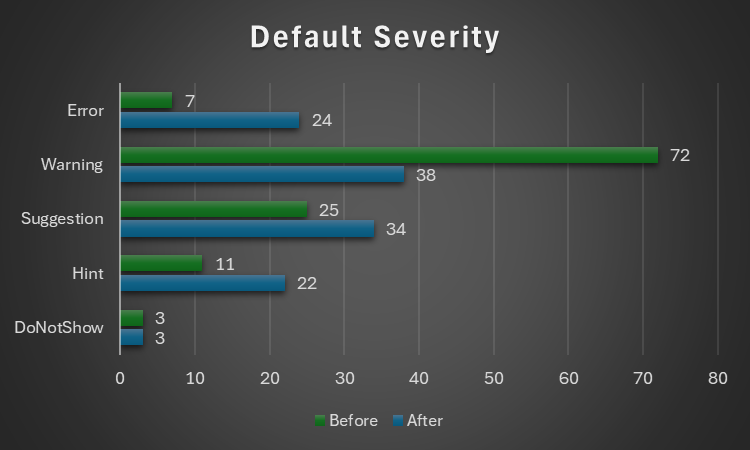
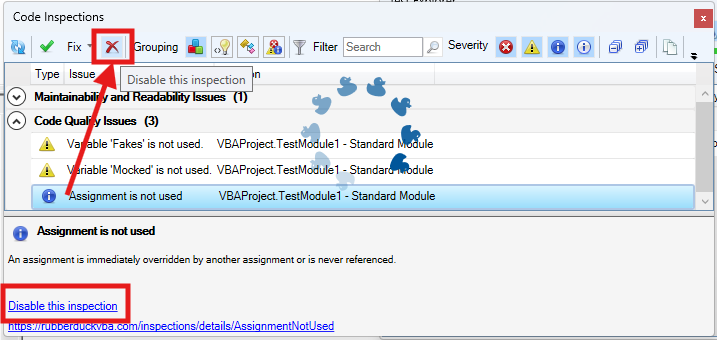


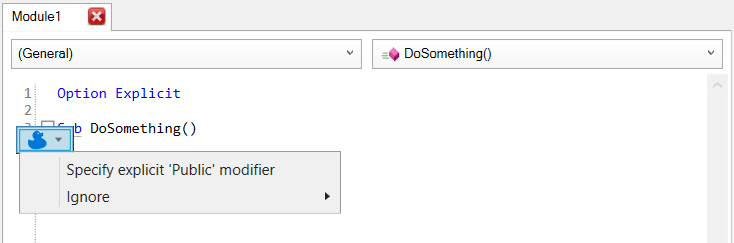


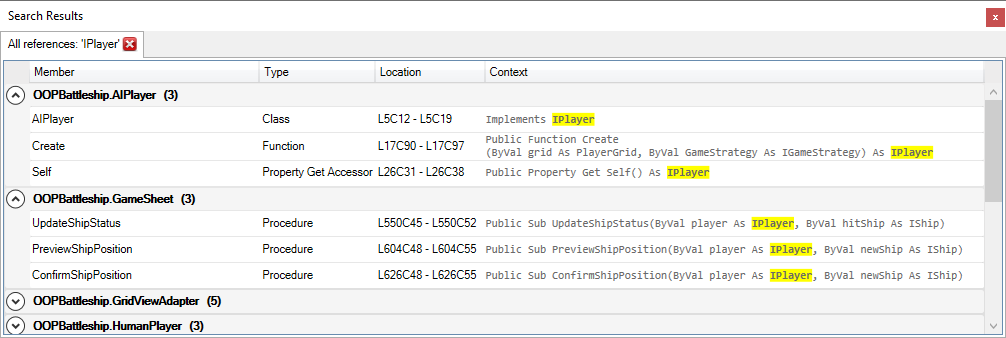


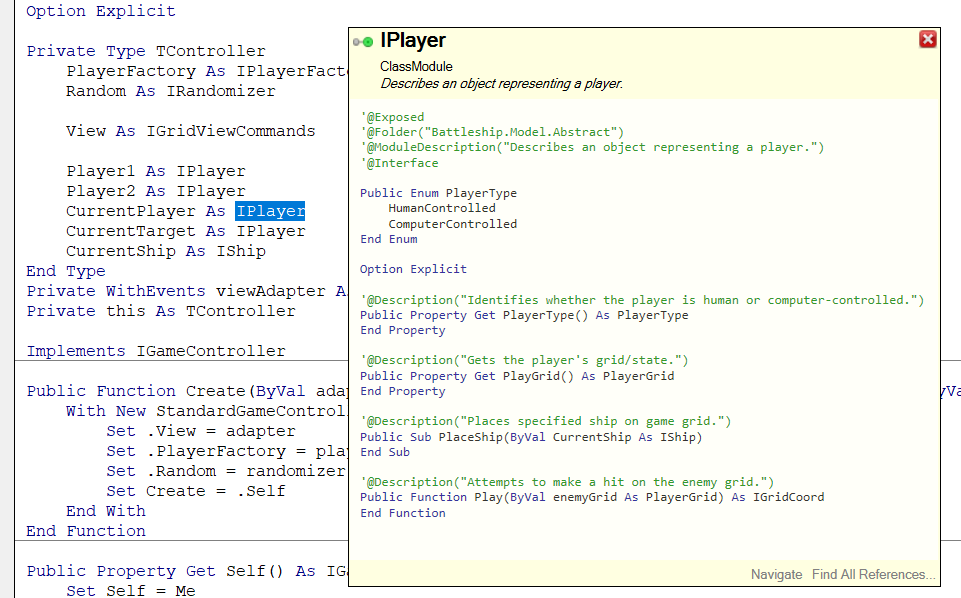
 Rubberduck News