Hello, Rubberduck 2.5.0

Creating the pull request to merge the current [next] branch into [master] is always thrilling: the incredible amount of work that goes into Rubberduck, release after release, never ceases to amaze me. This time (again!), the pull request is well over 1.2K commits. Green-release version 2.4.1.0 was all the way back on March 25, 2019 – which was the Monday that immediately followed the last MVP Global Summit.

What’s new?

If you’ve been keeping up with pre-release builds, you already know. If you’re still using v2.4.1.0 and have the check for newer version at startup setting enabled, your ducky will be telling you about the new build next time you fire up the VBE.

When you update to v2.5, you’ll notice a new option for the check for newer version at startup setting: there’s a new “check for pre-release builds” option that can let you know not only of a new minor version bump, but also for every pre-release build – which effectively means you now get to keep Rubberduck as up-to-date as possible (every merged pull request), without needing to subscribe to GitHub email notifications.

Splash Screen

But the first thing you’ll notice (assuming you haven’t disabled it) will be the splash screen going back to the 2.4.0 yellow ducky splash – if you didn’t know, v2.4.1 was “ThunderFrame Edition” and all this time the splash screen was a nod to our dear friend Andrew Jackson:

Rubberduck’s repository is still filled with hundreds of Andrew’s ideas, and his impact on the project will remain with us forever. This ducky is based on Andrew’s work, too:

I’m not a fan of the font (it’s the same as on the ThunderSplash), but SHOWCARD GOTHIC was getting old and annoyingly too playful-looking. If a graphic artist is reading this and has a nice idea they’d like to contribute, they’re welcome to do so!

But you’re not here to read about the splash screen, are you?

Website/GitHub Integration

In the past, a new green-release meant Rubberduck needed to be deployed to the project’s website itself, so that the /version/build pages could respond with the assembly version of the Rubberduck.dll file deployed. Today the website only needs a Rubberduck build to support the online indenter page, and we only need to update that build to keep the online indenter preview tool up-to-date: if no indenter changes are made, then nothing needs to be updated – the website uses GitHub’s REST API to get the latest pre-release and official “green release” version numbers, but also to download the latest xml-doc from the Rubberduck.CodeAnalysis project, and with that the website’s /inspections/list page will now start identifying the newer inspections that are only available in a pre-release build, versus those present in the latest “green release” (this hasn’t kicked in yet, only because the [master] branch didn’t have any xml-docs to download). The /inspections/details pages are also entirely generated from the in-code xml documentation, including the many examples: we’ll eventually start linking to these pages in the inspection results toolwindow, with “why am I seeing this?” links/buttons.

New Features?

New inspections and new quickfixes, of course – but mostly lots of bugs fixed, and extremely important enhancements to the resolver logic effectively warrant the minor version bump. As mentioned in What’s Cooking for Rubberduck 2.5.x, special attention was given to the resolution of implicit default member calls and bang notation – and with that there’s very, very little early-bound code (if any) that Rubberduck isn’t understanding.

Self-closing pairs aren’t a new feature, but Rubberduck will now ship with the feature enabled by default (was opt-in before). We have been able to hijack and suppress the annoying “beep” that the VBE sounds when the Parameter Quick-Info command doesn’t have anything to show, and this has unlocked restoring automatic quick-info when typing the argument list of a function or procedure call: before that, using self-closing pairs worked pretty nicely, but parameter quick-info had to be manual, which was rather disturbing.

VBA + Source Control

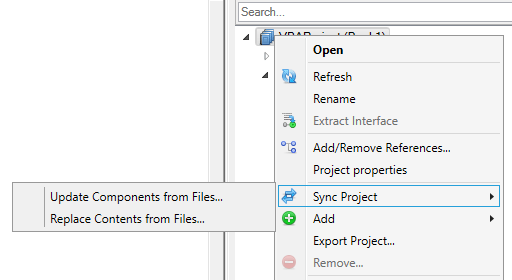
If you’ve been following the project for some time, you probably remember the defunct source control panel – a toolwindow that essentially implemented Visual Studio’s Team Explorer and let you synchronize your VBA project with the files in a git repository. It would also list modified files and let you commit, push, pull, fetch, create new branches, merge them, etc. It failed and isn’t coming back, but the Code Explorer in v2.5 brings back the ability to synchronize the contents of your VBA project from the file system:

Update Components from Files will update existing modules from files in a selected folder, and Replace Contents from Files will make the VBA project mirror the contents of the selected folder (creating new project components/modules as needed). Because Visual Basic 6.0 already works off the file system, in VB6 we only offer the Update Components from Files command.

Keep in mind that while the contents of document modules can be imported, new document modules can’t be added to the host project by the VBE (the host application owns these modules: see this article): for this reason you will want to minimize the amount of code you have in modules like ThisWorkbook and other Worksheet modules in Excel, or in reports & forms in Access. Implementing the actual functionality in separate modules will make things much easier to work with this feature in conjunction with source control (whether you use git, mercurial, SVN, or any other VCS technology).

Visual Studio 2019

Rubberduck has been built with Visual Studio 2017 for quite some time: we have successfully updated all projects in the solution to the awesome new .csproj format, and until now the WPF (Windows Presentation Foundation – the .NET UI framework we use to design our toolwindows and dialogs) dependencies made it impossible to upgrade our build process to work in Visual Studio 2019 until the release of .NET Core 3 last September. This release marks the milestone where we flip the page, sunset Visual Studio 2017 – the first pull request to be merged after v2.5.0, will be one that updates the build process to work with Visual Studio 2019.

If you have forked or cloned Rubberduck, please note that Rubberduck will no longer build in VS2017, as soon as it builds in VS2019.


What Next?

One of the biggest road blocks that’s currently keeping us from implementing a lot of the amazing inspection ideas (and bringing back a proper Extract Method refactoring!), is the lack of proper code path analysis. With that, we’ll have standard tooling that all these inspections can share and reuse (rather than reinvent a rather complex wheel everytime), and then we can tackle the many open Code Path Analysis issues. I’ll be posting an “Inside Rubberduck” article about the architecture and thinking behind this at some point.

Another road block, that’s currently keeping Rubberduck from fully understanding the interfaces it’s looking at, is flicking the switch for our internal TypeLib API, which taps deep into the VBIDE’s guts and gives us visibility on the internal ITypeLib of the VBA project. Rubberduck is already leveraging some of these capabilities (that’s how unit testing works in every VBA host application), but by flicking that switch we’ll be able to, among many other things, pick up the Workbook interface of the ThisWorkbook module… which unlocks fixing a number of long-standing issues and inspection false positives.

Block Completion is another upcoming feature that will possibly be getting my attention in 2020, but not before Code Path Analysis does.

In order to address the growing concerns of performance and memory consumption (especially in larger projects, which currently work best in 64-bit hosts, and possibly not at all in 32-bit hosts), we are exploring implementing a Language Server to offload parsing & resolution out of the host process, similar to how VSCode & Roslyn works, and possibly also moving a lot of the in-memory storage of referenced type libraries’ declarations to an out-of-process database.

Code Name: Sheet1

There are so many ways to get ahold of a Worksheet reference: you can dereference it from a Sheets collection, and even then you need to decide whether that’ll be off Workbook.Sheets or Workbook.Worksheets, two properties that both return a Sheets collection that will contain the worksheet you’re looking for. The Workbook might be the ActiveWorkbook, or it could be some object variable that was assigned earlier, with the result of Workbooks.Open. Or you might like living on the edge, and activate the Window that has some path/filename as a caption, and then work off the ActiveWorkbook. Every single one of these cases have a thing in common: the Workbook involved isn’t necessarily ThisWorkbook.

ActiveWorkbook vs. ThisWorkbook

In Excel, only one single Workbook is ever the ActiveWorkbook at any given point in time. If all workbooks are closed, then ActiveWorkbook will be Nothing (add-ins in particular, need to mind this). When a workbook is activated, it fires an Activate event; if another workbook was active before that, then that workbook fired a Deactivate event.

The ActiveWorkbook can change in the middle of a loop that uses a DoEvents statement to keep Excel responsive, because the user clicked somewhere and that click was allowed to be handled, because Excel remains responsive: if the user can interact with Excel, you can never assume what ActiveWorkbook is referring to – it can be literally any workbook, or none at all. And after the next instruction it might be something else.

For all these reasons, ActiveWorkbook and ActiveSheet are object you will want to capture into a local variable at the beginning of whatever it is that you need to do, and then use that variable and never refer to ActiveSheetexplicitly or not, for the rest of that procedure. For example instead of this:

Public Sub DoSomething()
    ActiveSheet.Range("A1").Value = 42
    ActiveSheet.Range("A2").Value = VBA.DateTime.Date
End Sub

You’d do that:

Public Sub DoSomething()
    Dim sheet As Worksheet
    Set sheet = ActiveSheet
    sheet.Range("A1").Value = 42
    sheet.Range("A2").Value = VBA.DateTime.Date
End Sub

Of course that’s just an example: if I had to write such a small procedure in real code, I’d skip the local variable and have a With block withold the object reference for me – note the . dereferencing operator qualifying the Range member calls:

Public Sub DoSomething()
    With ActiveSheet
        .Range("A1").Value = 42
        .Range("A2").Value = VBA.DateTIme.Date
    End With
End Sub

This would be very, very different:

Public Sub DoSomething()
    With ActiveSheet
        Range("A1").Value = 42
        Range("A2").Value = VBA.DateTIme.Date
    End With
End Sub

Note the missing dereferencing . operator now: the With ActiveSheet block variable is never actually accessed here. So what sheet is it that these Range member calls are referring to? If that code is written anywhere other than in some worksheet module, then they’re implicitly referring to ActiveSheet. If that same identical code is written in some worksheet module (say, Sheet1), then it refers to that sheet (that’s Me, aka Sheet1).

Implicit qualifiers are evil: they strip vital context out of the code, and suddenly you need to do more than just read the code to understand what’s going on. If you’re going to be referring to ActiveSheet, you might as well be explicit about it.

So what’s ThisWorkbook then? In a word, it’s the host document: the Excel workbook in which your VBA project is hosted. ThisWorkbook always refers specifically to this host document, even if your VBA project is an add-in. Maybe it’s the ActiveWorkbook. Maybe it isn’t.

A very common mistake, is to treat the worksheets of ThisWorkbook like the worksheets of any other workbook (active or not).

Compile-Time, Run-Time

Another common mistake, is to treat worksheets of ThisWorkbook that already exist in ThisWorkbook.Worksheets at compile-time, the same way you’d treat worksheets that only come into existence at run-time.

If the sheet is already in the workbook when your VBA project is in design mode, then at compile-time a project-scope automagic Workbook variable (constant?) exists, named after the (Name) property of the module:

The “Name” property (bottom) is the sheet tab caption that the user can modify as they please; users don’t even get to see the “(Name)” property (top) unless they bring up the VBE.

By default the code name of the first sheet of an empty workbook, is Sheet1, same as its Name property value. When you do this:

Dim sheet As Worksheet
Set sheet = ThisWorkbook.Worksheets("Sheet1")
sheet.Range("A1").Value = 42

You are using this Name property, …and if a user renames the sheet, the statements suddenly starts raising run-time error 9 subscript out of range.

But if you gave the (Name) property a nice meaningful identifier name, say SummarySheet, then you could do this instead:

SummarySheet.Range("A1").Value = 42

SummarySheet is a programmatic identifier that is much harder to tamper with than the sheet tab’s caption, if you’re the worksheet’s end user.

You can’t use worksheets’ code names to access any other sheets than those that exist in ThisWorkbook at compile-time, so a really good habit to take early on, is to name things. Leave ThisWorkbook alone, but name every worksheet module in your project. And then use these names whenever you can: these worksheets are part of your VBA project, they never need to be obtained from a Sheets collection.

In fact, Set sheet = Sheets("Sheet1") is at best a missed opportunity, when the “Sheet1” in question exists in ThisWorkbook. At worst, it’s an outright bug… and that’s the reasoning behind Rubberduck’s sheet accessed using string inspection.

Rubberduck Annotations

I wrote about this unfortunately hard-to-discover feature in 2017, but a lot has happened since then, and there’s 5 times more of you now! The wiki is essentially up-to-date, but I’m not sure of its viewership. So here’s a recap of annotations in the late Rubberduck 2.4.1.x pre-release builds, that 2.5.0.x will launch with.

What we call “annotations” are special comments that look like these:

'@Folder("MyProject.Abstract")
'@ModuleDescription("An interface that describes an object responsible for something.")
'@Interface
'@Exposed

'@Description("Does something")
Public Sub DoSomething()
End Sub

Syntax

Rubberduck’s parser includes a grammar rule that captures these special comments, such that we “see” them like any other language syntax element (tokens), and can analyze them as such, too.

The syntax is rather simple, and is made to look like a procedure call – note that string arguments must be surrounded with double quotes:

'@AnnotationName arg1, arg2, "string argument"

If desired, parentheses can be used, too:

'@AnnotationName(arg1, arg2)
'@AnnotationName("string argument")

Whether you use one notation or the other is entirely up to personal preference, both are completely equivalent. As with everything else, consistency should be what matters.

There’s an inspection that flags illegal/unsupported annotations that you, if you’re using this @PseudoSyntax for other purposes, will probably want to disable: that’s done by setting its severity level to DoNotShow in the inspection settings, or by simply clicking “disable this inspection” from the inspection results toolwindow.

Keep in mind that while they are syntactically comments as far as VBA is concerned, to Rubberduck parsing the argument list of an annotation needs to follow strict rules. This parses correctly:

'@Folder "Some.Sub.Folder" @ModuleDescription "Some description" : some comment

Without the : instruction separator token, the @ModuleDescription annotation parses as a regular comment. After : though, anything goes.

There are two distinct types of annotation comments: some annotations are only valid at module level, and others are only valid at member level.

Module Annotations

Module-level annotations apply to the entire module, and must appear in that module’s declarations section. Personally, I like having them at the very top, above Option Explicit. Note that if there’s no declaration under the last annotation, and no empty line, then the placement becomes visually ambiguous – even though Rubberduck correctly understands it, avoid this:

Option Explicit
'@Description("description here")
Public Sub DoSomething() '^^^ is this the module's or the procedure's annotation?
End Sub

Let it breathe – always have an empty line between the end of the module’s declarations section (there should always at least be Option Explicit there) and the module’s body:

Option Explicit
'@Folder("MyProject") : clearly belongs to the module

'@Description("description here")
Public Sub DoSomething() '^^^ clearly belongs to the procedure
End Sub

What follows is a list of every single module-level annotation currently supported (late v2.4.1.x pre-release builds), that v2.5.0 will launch with.

@Folder

The Visual Basic Editor regroups modules in its Project Explorer toolwindow, by component type: you get a folder for your “Modules”, another folder for your “Class Modules”; if you have userforms they’re all under a “Forms” folder, and then the document modules are all lumped under some “Microsoft Excel Objects” folder (in an Excel host, anyway). While this grouping is certainly fine for tiny little automation scripts, it makes navigation wildly annoying as soon as a project starts having multiple features and responsibilities.

In a modern IDE like Visual Studio, code files can be regrouped by functionality into a completely custom folder hierarchy: you get to have a form in the same folder as the presenter class that uses it, for example. With Rubberduck’s Code Explorer toolwindow, you get to do exactly the same, and the way you do this is with @Folder annotations.

'@Folder("Root.Parent.Child")
Option Explicit

The @Folder annotation takes a single string argument representing the “virtual folder” a module should appear under, where a dot (.) denotes a sub-folder – a bit like .NET namespaces. Somewhere deep in the history of this annotation, there’s a version that’s even named @Namespace. “Folder” was preferred though, because “Namespace” was deemed too misleading for VBA/VB6, given the language doesn’t support them: all module names under a given project must still be unique. The Code Explorer toolwindow uses these annotations to build the folder hierarchy to organize module nodes under, but the folders don’t actually exist: they’re just a representation of the annotation comments in existing modules – and that is why there is no way to create a new, empty folder to drag-and-drop modules into.

It is strongly recommended to adopt a standard and consistent PascalCase naming convention for folder names: future Rubberduck versions might very well support exporting modules accordingly with these folder annotations, so these “virtual folders” might not be “virtual” forever; by using a PascalCase naming convention, you not only adopt a style that can be seamlessly carried into the .NET world; you also make your folders future-proof. Avoid spaces and special characters that wouldn’t be legal in a folder name under Windows.

The ModuleWithoutFolder inspection (under “Rubberduck Opportunities”), if enabled, will warn you of modules where this annotation is absent. By default, Rubberduck’s Code Explorer will put all modules under a single root folder named after the VBA project. While this might seem rather underwhelming, it was a deliberate decision to specifically not re-create the “by component type” grouping of the VBE and encourage our users to instead regroup modules by functionality.

@IgnoreModule

The @IgnoreModule annotation is automatically added by the “Ignore in Module” inspection quick-fix, which effectively disables a specific code inspection, but only in a specific module. This can be useful for inspections that have false positives, such as procedure not used firing results in a module that contains public parameterless procedures that are invoked from ActiveX controls on a worksheet, which Rubberduck isn’t seeing (hence the false positives), but that are otherwise useful, such that you don’t necessarily want to completely disable the inspection (i.e. set its severity level to DoNotShow).

If no arguments are specified, this annotation will make all inspections skip the module. To skip a specific inspection, you may provide its name (minus the Inspection suffix) as an argument. To ignore multiple inspections, you can separate them with commas like you would any other argument list:

'@IgnoreModule ProcedureNotUsed, ParameterNotUsed

Alternatively, this annotation may be supplied multiple times:

'@IgnoreModule ProcedureNotUsed
'@IgnoreModule ParameterNotUsed

Use the : instruction separator to terminate the argument list and add an explanatory comment as needed:

'@IgnoreModule ProcedureNotUsed : These are public macros attached to shapes on Sheet1

Note that the arguments (inspection names) are not strings: enclosing the inspection names in string literals will not work.

@TestModule

This was the very first annotation supported by Rubberduck. This annotation is only legal in standard/procedural modules, and marks a module for test discovery: the unit testing engine will only scan these modules for unit tests. This annotation does not support any parameters.

@ModuleDescription(“value”)

Given a string value, this annotation can be used to control the value of the module’s hidden VB_Description attribute, which determines the module’s “docstring” – a short description that appears in the VBE’s Object Browser, and that Rubberduck displays in its toolbar and in the Code Explorer.

Because Rubberduck can’t alter module attributes in document modules, this annotation is illegal in modules representing objects owned by the host application (i.e. “document” modules), such as Worksheet modules and ThisWorkbook.

@PredeclaredId

This annotation does not support any parameters, and can be used to control the value of the hidden VB_PredeclaredId attribute, which determines whether a class has a default instance. When a class has a default instance, its members can be invoked without an instance variable (rather, using an implicit one named after the class itself), like you did every single time you’ve ever written UserForm1.Show – but now you get to have a default instance for your own classes, and this opens up a vast array of new possibilities, most notably the ability to now write factory methods in the same class module as the class being factory-created, effectively giving you the ability to initialize new object instances with parameters, just like you would if VBA classes had parameterized constructors:

Dim something As Class1
Set something = Class1.Create("test", 42)

@Exposed

VBA classes are private by default: this means if you make a VBA project that references another, then you can’t access that class from the referencing project. By setting the class’ instancing property to PublicNotCreatable, a referencing project is now able to consume the class (but the class can only be instantiated inside the project that defines it… and that’s where factory methods shine).

This annotation visibly documents that the class’ instancing property has a non-default value (this can easily be modified in the VBE’s properties toolwindow).

@Interface

In VBA every class modules defines a public interface: every class can Implements any other class, but not all classes are created equal, and in the vast majority of the time what you want to follow the Implements keyword will be the name of an abstract interface. An abstract interface might look like this:

'@Interface
Option Explicit

Public Sub DoSomething()
End Sub

Adding this annotation to a module serves as metadata that Rubberduck uses when analyzing the code: the Code Explorer will display these modules with a dedicated “interface” icon, and an inspection will be able to flag procedures with a concrete implementation in these modules.

@NoIndent

Rubberduck’s Smart Indenter port can indent your entire VBA project in a few milliseconds, but automatically indenting a module can have undesirable consequences, such as losing hidden member attributes. Use this annotation to avoid accidentally wiping hidden attributes in a module: the indenter will skip that module when bulk-indenting the project.


Member Annotations

Member-level annotations apply to the entire procedure they’re annotating, and must be located immediately over the procedure’s declaration:

'@Description("Does something")
Public Sub DoSomething()
    '...
End Sub

As with module annotations, multiple member annotations can be specified for the same procedure – either by stacking them, or enumerating them one after the other:

'@DefaultMember
'@Description("Gets the item at the specified index")
Public Property Get Item(ByVal index As Long) As Object
    '...
End Property

Member annotations that aren’t immediately above the procedure declaration, will be flagged as illegal by the IllegalAnnotation inspection:

'@Description("Does something") : <~ annotation is illegal/misplaced

Public Sub DoSomething()
    '...
End Sub

@Description

This very useful annotation controls the value of the member’s hidden VB_Description attribute, which defines a docstring that appears in the bottom panel of the Object Browser when the member is selected – Rubberduck also displays this content in the context-sensitive (selection-dependent) label in the Rubberduck VBIDE toolbar.

Toolbar label content is dependent on the current selection in the editor and includes the value of the hidden attribute’s value.

@Ignore

Similar to @IgnoreModule, the purpose of the member-level @Ignore annotation is to get specific inspections to ignore the annotated procedure: it works identically.

@DefaultMember

Only one single member of a class can be the class’ default member. Default members should generally be avoided, but they are very useful for indexed Item properties of custom collection classes. This annotation takes no arguments.

@Enumerator

Custom collections that need to support For Each enumeration are required to have a member that returns an IUnknown, and hidden flags and attributes: this annotation clearly identifies the special member, and gets the hidden flags and attributes right every time.

'@Enumerator
Public Property Get NewEnum() As IUnknown
    Set NewEnum = encapsulatedCollection.[_NewEnum]
End Property

@ExcelHotkey

This rather specific annotation works in Excel-hosted VBA projects (as of this writing its absence may cause inspection false positives in other host applications, like Microsoft Word).

When the VBA project is hosted in Microsoft Excel, you can use this annotation to assign hotkeys using the same mechanism Excel uses to map hotkeys to recorded macros.

'@ExcelHotkey "D" : Ctrl+Shift+D will invoke this procedure in Excel
Public Sub DoSomething()
    '...
End Sub

'@ExcelHotkey "d" : Ctrl+D will invoke this procedure in Excel
Public Sub DoSomethingElse()
    '...
End Sub

Note that the annotation will work regardless of whether the argument is treated as a string literal or not – only the first character of the annotation argument is used, and its case determines whether the Shift key is involved in the hotkey combination (all hotkeys involve the Ctrl key): use an uppercase letter for a Ctrl+Shift hotkey.

@Obsolete

Code under continued maintenance is constantly evolving, and sometimes in order to avoid breaking existing call sites, a procedure might need to be replaced by a newer version, while keeping the old one around: this annotation can be used to mark the old version as obsolete with an explanatory comment, and inspections can flag all uses of the obsolete procedure:

'@Obsolete("Use DoSomethingElse instead.")
Public Sub DoSomething()
    '...
End Sub

Public Sub DoSomethingElse()
    '...
End Sub
The argument string appears in the inspection results for each use of the obsolete member.

Test Method Annotations

These annotations have been in Rubberduck for a very long time, and they are actually pretty easy to discover since they are automatically added by Rubberduck when adding test modules and test methods using the UI commands – but since Test Settings can be configured to not include setup & teardown stubs, it can be easy to forget they exist and what they do.

@TestMethod

This annotation is used in test modules to identify test methods: every test must be marked with this annotation in order to be discoverable as a test method. It is automatically added by Rubberduck’s “add test method” commands, but needs to be added manually if a test method is typed manually in the editor rather than inserted by Rubberduck.

This annotation supports a string argument that determines the test’s category, which appears in the Test Explorer toolwindow and enables grouping by category. If no category argument is specified, “Uncategorized” is used as a default:

@TestMethod("Some Category")
Private Sub TestMethod1()
'...
End Sub

The other @TestXxxxx member annotations are used for setup & teardown. If test settings have the “Test module initialization/cleanup” option selected, then @ModuleInitialize and @ModuleCleanup procedure stubs are automatically added to a new test module. If test settings have “Test method initialization/cleanup” selected, then @TestInitialize and @TestCleanup procedure stubs are automatically added a new test modules.

@TestInitialize

In test modules, this annotation marks procedures that are invoked before every single test in the module. Use that method to run setup/initialization code that needs to execute before each test. Each annotated procedure is invoked, but the order of invocation cannot be guaranteed… however there shouldn’t be a need to have more than one single such initialization method in the module.

@TestCleanup

Also used in test modules, this annotation marks methods that are invoked after every single test in that test module. Use these methods to run teardown/cleanup code that needs to run after each test. Again, each annotated procedure is invoked, but the order of invocation cannot be guaranteed – and there shouldn’t be a need to have more than one single such cleanup method in the module.

@ModuleInitialize

Similar to @TestInitialize, but for marking procedures that are invoked once for the test module, before the tests start running. Use these procedures to run setup code that needs to run before the module’s tests begin to run; each annotated procedure will be invoked, but the order of invocation cannot be guaranteed. Again, only one such initialization procedure should be needed, if any.

@ModuleCleanup

Similar to @TestCleanup, but for marking procedures that are invoked once for the test module, after all tests in the module have executed. Use these procedures to run teardown/cleanup code that needs to run after all module’s tests have completed; each annotated procedure will be invoked, but the order of invocation isn’t guaranteed. Only one such cleanup procedure should be needed, if any.


Annotations are one of Rubberduck’s most useful but unfortunately also one of its most obscure and hard-to-discover features. Fortunately, we have plans to surface them as right-click context menu commands in the 2.5.x release cycle.

Document Modules

The first time you discovered the Visual Basic Editor and visualized the VBA project in the Project Explorer, when you first met ThisWorkbook and Sheet1, document modules were the world: your baby steps in VBA were very likely in the code-behind of ThisWorkbook or Sheet1 – document modules are the gateway to VBA-land.

In the VBIDE Extensibility object model, the modules are accessed via the VBComponents property of a VBProject object, and the VBComponent.Type property has a value of vbext_ComponentType.vbext_ct_Document (an enum member value) for both ThisWorkbook and Sheet1 modules, but would be vbext_ct_StdModule for a standard module like Module1. Clearly if document modules are class modules, there’s enough “special” about them that they need to be treated differently by the VBA compiler.

Document?

VBA itself is host-agnostic: whether it’s hosted in Excel, PowerPoint, AutoCAD, Sage, Corel Draw, or any other one of over 200 licensed hosts, it’s the same VBA (there’s no such thing as “Excel VBA”, really), and it doesn’t have any intrinsic knowledge of what an Excel.Worksheet is – only the Excel library does; when your VBA project is hosted in Excel, then the Excel type library is automatically added to (and locked; you can’t remove it from) your project. Document modules are a special kind of module that the VBIDE treats as part of the VBA project, but it can’t add or remove them: If you want to add or remove a Worksheet module from a VBA project, you need to actually add or remove a worksheet from the host Excel workbook.

So, other than we can’t directly add such components to a VBA project without involving the host application’s object model, what’s special about them?

They’re in the VBA project, because the host application decided that’s what’s in a VBA project hosted in – here Excel, but each host application gets to decide whether a project includes a module to represent the host document, and under what circumstances to add or remove other types of modules, like Worksheet, or Chart.

Document modules can’t be instantiated or destroyed, so there’s no Initialize or Terminate event handler for them. However, you get to create a handler for any or every one of many convenient events that the host application fires at various times and that the authors of the object model deemed relevant to expose as programmatic extensibility points. For ThisWorkbook, this includes events like Workbook.Open and Workbook.NewSheet, for example. For Worksheet modules, that’s worksheet-specific events like Worksheet.SelectionChange or Worksheet.Change, that you can use to “hook” custom code when such or such thing happens in the host document.

ThisWorkbook

Your VBA project is hosted inside an Excel document. In the VBA project, the host document is referred to with an identifier, and that identifier is (by default anyway, and renaming it is not something I’d recommend doing) ThisWorkbook.

The Excel workbook that contains the current VBA project: that’s ThisWorkbook. When you’re in the code-behind of that module, you’re extending a Workbook object: if you type Me., the VBE’s IntelliSense/autocomplete list will display all the public members you’d find on any other Workbook object, plus any Public (explicitly or not) member. That’s what’s special about a document module: it literally inherits members from another class, as in inheritance – something VBA user code cannot do. Isn’t it fascinating that, under the hood, Visual Basic for Applications apparently has no problem with class inheritance? Something similar happens with UserForm code: the UserForm1 class inherits the members of any other UserForm, “for free”. And of course every Sheet1 inherits the members of every other Worksheet in the world.

So, procedures you write in a document module, should logically be very closely related to that particular document. And because host-agnostic logic can’t add/remove these modules, you’ll want to have as little code as possible in them – and then as a bonus, your VBA project becomes easier to keep under source control, because the code is in modules that VBE add-ins (wink wink) are able to properly import back in and synchronize to & from the file system.


What about ActiveWorkbook?

ActiveWorkbook refers to the one and only workbook that is currently active in the Excel Application instance, which may or may not be ThisWorkbook / the host document. It’s easy to confuse the two, and even easier to write code that assumes one is the other: the macro recorder does it, many documentation examples and Stack Overflow answers do it too. But reliable code is code that makes as few assumptions as possible – sooner or later, built-in assumptions are broken, and you’re faced with an apparently intermittent error 1004 that sometimes happens when you’re debugging and stepping through the code, and it happened to a user once or twice but the problem always seemed to vaporize just because you showed up at the user’s cubicle and stood there watching as nothing blew up and everything went fine. *Shrug*, right?


Accessing Worksheets

You shouldn’t be dereferencing worksheets all the time. In fact, you rarely even need to. But when you do, it’s important to do it right, and for the right reasons. The first thing you need to think of, is whether the sheet exists in ThisWorkbook at compile-time. Meaning, it’s there in the host document, you can modify it in Excel and there’s a document module for it in the VBA project.

That’s the first thing you need to think about, because if the answer to that is “yep, it’s right there and it’s called Sheet3“, then you already have your Worksheet object and there’s no need to dereference it from any Sheets or Worksheets collection!

Dim sheet As Worksheet
Set sheet = ThisWorkbook.Worksheets("Sheet1") '<~ bad if Sheet1 exists at compile-time!

Set sheet = Sheet1 '<~ bad because redundant: the variable obfuscates the target!
sheet.Range("A1").Value = 42 '<~ bad if sheet is a local variable, but good if a parameter

Sheet1.Range("A1").Value = 42 '<~ most reliable way to refer to a worksheet

The magic Sheet1 identifier comes from the (Name) property of the Sheet1 document module under ThisWorkbook in the VBA project: set that property to a valid and meaningful name for that specific worksheet, and you have a user-proof way to refer to your ConfigurationSheet, the SummarySheet, and that DataSheet. If the user decides to rename the DataSheet to “Data (OLD)” for some reason, this code is now broken:

ThisWorkbook.Worksheets("Data").Range("A1").Value = 42

Meanwhile this code will survive any user-induced sheet-name tampering:

DataSheet.Range("A1").Value = 42

Wait, is it .Sheets() or .Worksheets()?

The first thing to note, is that they aren’t language-level keywords, but member calls. If you don’t qualify them, then in the ThisWorkbook module you’ll be referring to Me.Worksheets (i.e. ThisWorkbook.Worksheets), and anywhere else in the VBA project that same code be implicitly referring to ActiveWorkbook.Worksheets: that’s why it’s important to properly qualify member calls. Worksheets is a member of a Workbook object, so you explicitly qualify it with a Workbook object.

Now, Sheets and Worksheets both return an Excel.Sheets collection object, whose default member Item returns an Object. Both are happy to take a string with a sheet name, or an integer with a sheet index. Both will be unhappy (enough to raise runtime error 9 “subscript out of range”) with an argument that refers to a sheet that’s not in the (implicitly or not) qualifying workbook object. Both will return a Sheets collection object if you give it an array of sheet names: that’s one reason why the Item member returns an Object and not a Worksheet. Another reason is that sometimes a sheet is a Chart, not a Worksheet.

Use the Worksheets collection to retrieve Worksheet items; the Sheets collection contains all sheets in the qualifying workbook, regardless of the type, so use it e.g. to retrieve the Chart object for a chart sheet. Both are equivalent, but Worksheets is semantically more specific and should be preferred over Sheets for the common Worksheet-dereferencing scenarios.


Dereferencing Workbooks

If you only need to work with ThisWorkbook, then you don’t need to worry about any of this. But as soon as your code starts opening other workbooks and manipulating sheets that are in these other workbooks, you need to either go nuts over what workbook is currently the ActiveWorkbook as you Activate workbooks and repeatedly go Workbooks("foo.xlsm").Activate…. or properly keep a reference to the objects you’re dealing with.

When you open another workbook with Application.Workbooks.Open, that Open is a function, a member of the Excel.Workbooks class that returns a Workbook object reference if it successfully opens the file.

Workbooks.Open is also side-effecting: successfully opening a workbook makes that workbook the new ActiveWorkbook, and so global state is affected by its execution.

When you then go and work off ActiveWorkbook or unqualified Worksheets(...) member calls, you are writing code that is heavily reliant on the side effects of a function, and global state in general.

The right thing to do, is to capture the function’s return value, and store the object reference in a local variable:

Dim book As Workbook
Set book = Application.Workbooks.Open(path) '<~ global-scope side effects are irrelevant!

Dim dataSheet As Worksheet
Set dataSheet = book.Worksheets("DATA")

If a workbook was opened by your VBA code, then your VBA code has no reason to not have a Workbook reference to that object.

So when is ActiveWorkbook useful then?

As an argument to a procedure that takes a Workbook parameter because it doesn’t care what workbook it’s working with, or when you need to assign a Workbook object variable (presumably a WithEvents module-scope private variable in some class module) to whatever workbook is currently active. With few specific exceptions, that’s all.

ActiveWorkbook.Whatever is just not code that you normally want to see anywhere.


Cha-cha-cha-Chaining Calls

Strive to keep the VBA compiler aware of everything that’s going on. Moreover if all the code you write is early-bound, then Rubberduck understands it as completely as it can. But implicit late binding is alas too easy to introduce, and the primary cause for it is chained member calls:

book.Worksheets("Sheet1").Range("A1").Value = 42 '<~ late bound at .Range

Everything after the Worksheets("Sheet1") call is late-bound, because as described above, Excel.Sheets.Item returns an Object, and member calls against Object can only ever be resolved at run-time.

By introducing a Worksheet variable to collect the Object, we cast it to a usable compile-time interface (that’s Worksheet), and now the VBA compiler can resume validating the .Range member call:

Dim sheet As Worksheet
Set sheet = book.Worksheets("Sheet1")
sheet.Range("A1").Value = 42 '<~ all early bound

Chained early-bound member calls are fine: the compiler will be able to validate the Range.Value member call, because the Excel.Worksheet.Range property getter returns a Range reference. If it returned Object, we would have to declare a Range local variable to capture the Excel.Range object we want to work with, like this:

Dim sheet As Worksheet
Set sheet = book.Worksheets("Sheet1") '<~ good: casts Object into Worksheet.

Dim cell As Range
Set cell = sheet.Range("A1") '<~ redundant: sheet.Range("A1") returns an early-bound Range.
cell.Value = 42 '<~ early-bound, but sheet.Range("A1").Value = 42 would also be early-bound.

Avoid declaring extraneous variables, but never hesitate to use a local variable to turn an Object into a compile-time type that gives you IntelliSense, autocompletion, and parameter quick-info: you’ll avoid accidentally running into run-time error 438 for typos Option Explicit can’t save you from. Using the compiler to validate everything it can validate, is a very good idea.

If you need to repeatedly invoke members off an early-bound object, introducing a local variable reduces the dereferencing and helps make the code feel less repetitive:

sheet.Range("A1").Value = "Rubberduck"
sheet.Range("A1").Font.Bold = True
sheet.Range("A1").Font.Size = 72
sheet.Range("A1").Font.Name = "Showcard Gothic"

By introducing a local variable, we reduce the cognitive load and no longer repeatedly dereference the same identical Range object pointer every time:

Dim cell As Range
Set cell = sheet.Range("A1")

cell.Value = "Rubberduck"
cell.Font.Bold = True
cell.Font.Size = 72
cell.Font.Name = "Showcard Gothic"

Arguably, nested With blocks could hold all the object references involved, and reduces the dereferencing to a strict minimum (.Font is only invoked once, and the reference is witheld), but it’s very debatable whether it enhances or hurts readability:

With sheet.Range("A1")
    .Value = "Rubberduck"
    With .Font
        .Bold = True
        .Size = 72
        .Name = "Showcard Gothic"
    End With
End With

Avoiding nested With blocks seems a fair compromise:

Dim cell As Range
Set cell = sheet.Range("A1")

cell.Value = "Rubberduck"
With cell.Font
    .Bold = True
    .Size = 72
    .Name = "Showcard Gothic"
End With

All this is fairly subjective, of course, and really applies to everything you ever write in VBA (not just when coding against the Excel object model), but any of it is better than this (very cleaned-up) macro-recorder code:

    Range("A1").Select
    ActiveCell.Value = "Rubberduck"
    With Selection.Font
        .Name = "Showcard Gothic"
        .Bold = True
        .Size = 72
    End With

We note the implicit ActiveSheet reference with the implicitly-qualified Range member call; we note the use of Range.Select followed by a use of ActiveCell; we note a With block holding a late-bound reference to Range.Font through the Selection object, and the compiler gets to validate absolutely nothing inside that With block.

The macro recorder doesn’t declare local variables: instead, it Selects things and then works late-bound against the Selection. That’s why it’s a bad teacher: while it’s very useful to show us what members to use to accomplish something, it does everything without leveraging any compile-time checks, and teaches to Activate the sheet you want to work with so that your unqualified Range and Cells member calls can work off the correct sheet… but now you know why, how, and when to dereference a Worksheet object into a local variable, you don’t need any Select and Activate!

Hacktoberfest 2019 & Rubberduck

For the 3rd year in 2019, Rubberduck celebrated open-source with Digital Ocean’s (6th) Hacktoberfest event. This year’s was our busiest ever, with ~50 pull requests created, 11 new forks and 24 new stars in the past month; 67 issues were closed since October 1st, by 11 authors – including 4 first-time contributors!

This means… quite a lot was accomplished. Recap.

Parser & Resolver Tweaks

I’m always impressed with these, because such tweaks always enhance Rubberduck’s understanding of VBA code, so every such enhancement means better and more accurate inspections and overall functionality. This time, attention was given to Debug.Print and other statements that support a particular “output list” syntax, which would previously break the parser and fail to resolve identifier references in such expressions. Debug is no longer being treated as a “fake class”; rather, we’re now treating it as a more accurate “fake module”. VBA is special-casing Print methods in a way that forces us to parse it differently than a standard member call, and if you look carefully at how it’s syntax-highlighted, you’ll notice Debug.Print is really treated as a keyword, which is rather awkward. Print statements will now correctly parse and process their output list arguments.

It was also brought to our attention that under some regional settings OS configurations, exported forms could format decimal numbers in form properties with a comma for a decimal separator, and this tripped the parser since decimal literals are expected to be US-formatted! This was also fixed.

Default members and let-coercion behavior received significant attention too, and now bang notation (! operators) correctly resolve… and Rubberduck is now able to expand this notation (and other implicit default member calls) into explicit, early-bound code that preserves compiler validation and prevents the various problems associated with inadvertent late binding. Implicit procedure calls are now being identified, suspicious Let assignments are now being flagged, and jagged arrays now resolve correctly, too.

The broken resolution of Enum members has been corrected, and Next i will now correctly resolve the reference to i.

Inspection & Refactoring Fixes

An oversight in the implementation of the “Parameter can be ByVal” inspection was causing false positives with Enum types – a rather trivial fix. Much less trivial, the handling of @Ignore and @IgnoreModule annotations across all inspections was refactored and centralized, making it much harder to implement an inspection that doesn’t heed these annotations. Bugs were fixed in EncapsulatePublicField, UntypedFunction, and EmptyMethod inspections.

Name validation (e.g. when renaming an identifier) was refined and consolidated, and will now be more consistent and less prone to falsely claim name clashes.

UI & UX Enhancements

Autocompletion features will now be enabled by default for a new installation (note that the updated default will not affect an upgrade install). The caption of the “Ok” button of the settings dialog was changed to “Save & Close”, and the Extract Interface refactoring can now be invoked from the Code Explorer context menu. Inspection grouping was improved, every search box can now be cleared with the ESC key, and a long-standing issue with undocked toolwindows has been fixed: toolwindows made undockable can now easily be made dockable again.

The version check feature was updated, too: the wording of the notification message now includes the currently-running version number, and a new setting can now enable notifications for every pre-release build in-between. This update was made possible with the deployment of important changes to the project’s website: previously, the /Build/Version/stable URL would return the version of the Rubberduck build that was running on the web server – now, we hit the GitHub REST API and grab all releases: that’s how the home page can display this table with the breakdown of download stats; it’s how the /Build/Version endpoints know what version number to return, and how the /Inspections content is now generated directly from XML-doc comments in the source code. Note that caching/timing issues may cause the feature to announce a version number, and the actual latest build is actually more recent than that.

Miscellaneous

Our AppVeyor builds now generate a SHA256 hash for installer builds, that we issue as an asset that can be downloaded separately from the installer itself. Downloadable assets also include the .xml file that the website uses to generate the /Inspections content; because this content needs to follow certain specific conventions, a suite of Roslyn analyzers was implemented to inspect the XML documentation in the source code, and fail the build if a new inspection couldn’t properly show up on the website.

The PermissiveAssertClass is now leveraging Variant conversion in its IEqualityComparer<object> implementation, making Assert.AreEqual behave exactly as you would expect VBA to work. The settings dialog lets you select which IAssertClass implementation to use for new test modules.

Rubberduck’s own test suite is now up to well over 7,100 unit tests, and there are many refactoring opportunities, and a long-time contributor proposed to introduce an InspectionTestsBase abstract class, enhance our MockVbeBuilder, and boil writing test cases for inspections down to a one-liner, in two pull requests that netted a significant and welcome cut in our test code (diffs were +426/-1,759 and +1,431/-5,262, respectively), making a good payment on some technical debt.

Coming Up

With Hacktoberfest behind us, we’re getting ready to release v2.5.0 in November; translation rounds have begun, so now is a very good time to submit a pull request to add a new supported language, or to help complete other translations.

Rubberduck is currently built with Visual Studio 2017; there’s a draft pull request that changes the AppVeyor build environment to use Visual Studio 2019 and the newest SDK – the current and new build processes aren’t compatible: once that pull request is merged, Rubberduck will build correctly with Visual Studio 2019, and will start failing in VS 2017. The plan is to proceed with this IDE upgrade as v2.5.0 is released later this month.

Here’s to a successful Hacktoberfest, thanks to everyone that participated!

Dependency Injection in VBA

The big buzzy words are just a name given to what’s happening when we identify a procedure’s dependencies and decide to inject them. Like any procedure that needs to invoke Workbook.Worksheets.Add must depend on a given specific Workbook object. If the workbook we mean to work with is the document that’s hosting our VBA project, then that workbook is ThisWorkbook. Otherwise, you might have been writing something like this in a standard module:

Public Sub DoSomething()
    Dim sheet As Worksheet
    Set sheet = Worksheets.Add
    '...
End Sub

The problem is the implicit dependency in ActiveWorkbook. Indeed, if we don’t qualify a Worksheets call, then we’re implicitly writing [Global].Worksheets.Add, i.e. Application.Worksheets, …which means ActiveWorkbook.Worksheets – that is, whatever workbook happens to be active at that time. While that can be useful in certain specific situations, most of the time you will rather want to be working with one very specific Workbook object. The hidden, implicit dependency in the above snippet, is a Workbook; with dependency injection, you inject that Workbook object instead:

Public Sub DoSomething(ByVal wb As Workbook)
    Dim sheet As Worksheet
    Set sheet = wb.Worksheets.Add
    '...
End Sub

As a result, procedures explicitly tell their callers what their dependencies are. If a procedure starts needing many parameters, it speaks volumes about the code and its refactoring opportunities! Maybe two or more parameters are closely related and should really become a class in its own right, with its data and its methods; maybe the procedure is simply doing too many things though – having too many dependencies is easily a tell-tale sign.

Dependencies can be hard to find. Other times they’re plain obvious:

Public Sub DoSomething()
    Dim thing As ISomething
    Set thing = New Something
    thing.DoStuff
    '...
End Sub

In any case, correctly identifying all the dependencies of a procedure is definitely the hardest part of DI. The actual injection technique used makes for interesting decision-making though. If you’ve been passing parameters between procedures for any amount of time, congrats, you already master method injection.

Method Injection

We use method injection when we pass dependencies around as parameters to a method of an object.

Public Sub DoSomething(ByVal thing As ISomething)
    thing.DoStuff
    '...
End Sub

You would inject a parameter that way if no other method in that class would love to share that dependency – in which case you would preferably inject the dependency at the class level, and have one less parameter to every method that would otherwise need it.

Property Injection

Using a public Property Set member, we allow code written against the class’ default interface to inject a dependency at the class/instance level.

Public Property Get Thing() As ISomething
    Thing = this.Thing
End Property

Public Property Set Thing(ByVal value As ISomething)
    Set this.Thing = value
End Property

Public Sub DoSomething()
   this.Thing.DoStuff
    '...
End Sub

Property injection is nice, but the downside is that the point of injection isn’t as tight as with method injection: now we need to deal with temporal coupling, and make sure DoSomething can’t run if Thing isn’t set. Debug.Assert statements are perfect for this, since that kind of bug should be caught early on:

Debug.Assert Not this.Thing Is Nothing 'execution stops if expression is false
this.Thing.DoStuff '<~ this.Thing is safe to invoke members against

Alternatively, raise a custom error that explains that the Thing property needs to be assigned before DoSomething can be invoked.

But that won’t prevent other code from tampering with the assigned reference, since it’s Public. Remember when I said it allows code written against the default interface to invoke the setter? If we consider VBA classes’ default interface as the “concrete implementation”, and make it explicitly implement another interface, we can expose the Property Get member and leave the Property Set only accessible from the default interface – and since the “D” of SOLID says we shall be coding against interfaces, then very little code needs to know about the default interface: only the code that’s New-ing up the object does, in fact.

Implements IFoo

Public Property Get Thing() As ISomething
    Thing = this.Thing
End Property

Public Property Set Thing(ByVal value As ISomething)
    Set this.Thing = value
End Property

Private Property Get IFoo_Thing() As ISomething
    Set IFoo_Thing = this.Thing
End Property

Private Sub IFoo_DoSomething()
    this.Thing.DoStuff
    '...
End Sub

Any Public members of a class, are members of that class’ default interface. If this class module is Foo, then Foo.Thing can be read and assigned from a Foo variable. Since the class implements the IFoo interface and that this interface doesn’t expose a Property Set member for the Thing property, code written against IFoo will only be able to access the Property Get member and the DoSomething method: whatever code is responsible for injecting the Thing dependency, is the only code that needs to know about Foo and its Property Set Thing member.

Dim t As Foo
Set t = New Foo
Set t.Thing = New Something
'...

If you’ve read about factories in VBA, then you’ve already seen this in action; the Battleship project demonstrates it as well.

Where are all things created?

Since we’re injecting dependencies all the way down, this New-ing up necessarily happens near the entry point of the macro: ideally all dependencies are resolved and injected in one single place, known as the composition root. See, in the above snippet, imagine the Something dependency injected into foo.Thing itself had its own dependencies, which might themselves have their own dependencies: the dependency graph of a simple application should be relatively manageable, but larger applications configure a DI/IoC Container and let that object be responsible for automatically injecting all dependencies everywhere; Rubberduck uses Castle Windsor, and used Ninject before that. Unfortunately VBA does not have any offering of IoC containers at the moment, and until we’re able to create a VBA class instance from C# code, Rubberduck can’t do it either.

But, honestly, a VBA project shouldn’t become so huge as to really need an IoC container to resolve a dependency graph: poor man’s DI is perfectly fine! Here is one of the entry points of the Battleship code showing how each component is New‘d up and injected into other components – a WorksheetView is used for creating a GridViewAdapter through property injection (via a factory method), injected along with a GameRandomizer into a GameController through method injection in the NewGame method:

Public Sub PlayWorksheetInterface()
    Dim view As WorksheetView
    Set view = New WorksheetView
    
    Dim randomizer As IRandomizer
    Set randomizer = New GameRandomizer
    
    Set controller = New GameController
    controller.NewGame GridViewAdapter.Create(view), randomizer
End Sub

The controller has other dependencies that should be injected as well. One good example can be found in the viewAdapter_OnCreatePlayer handler:

    Dim player As IPlayer
    Select Case pt
        
        Case HumanControlled
            Set player = HumanPlayer.Create(grid)
            
        Case ComputerControlled
            Select Case difficulty
                Case AIDifficulty.RandomAI
                    Set player = AIPlayer.Create(grid, RandomShotStrategy.Create(rng))
                Case AIDifficulty.FairplayAI
                    Set player = AIPlayer.Create(grid, FairPlayStrategy.Create(rng))
                Case AIDifficulty.MercilessAI
                    Set player = AIPlayer.Create(grid, MercilessStrategy.Create(rng))
            End Select
    
    End Select

If we injected the IPlayer implementations from the start, we would be creating the players before the game even knows on which grid each player is playing, or whether a human player is even involved. So in this handler the GameController class is being coupled with HumanPlayer and AIPlayer classes, and this coupling isn’t ideal at all, because if the controller is coupled with a HumanPlayer object, then there’s no way we can write any unit tests for any of the controller logic. Surely there’s a better way to do this!

When you can’t create a dependency at the entry point

Sometimes you just can’t create the dependency until much later during the execution of a macro, so it’s not possible to inject it anywhere. For example you might need an ADODB.Connection, but the SQL authentication requires you to prompt the user for credentials – it would be clunky to prompt the user for database credentials at the start of the macro, before they even click any button to do something with a database. So instead of injecting the ADODB.Connection dependency directly, instead we inject an abstract factory, and since the role of a factory is precisely to create an instance of something, we’re not breaking any rules by New-ing up the connection object in there:

Implements IConnectionFactory

Private Function IConnectionFactory_Create(ByVal user As String, ByVal pwd As String) As ADODB.Connection
    Dim result As ADODB.Connection
    Set result = New ADODB.Connection
    result.ConnectionString = "..." & user & "..." & pwd & "..."
    result.Open
    Set IConnectionFactory_Create = result
End Function

And now whatever class needs a database connection can have an IConnectionFactory object injected as a dependency, and own a new connection object by invoking its Create method.

If we injected an abstract factory into Battleship’s GameController, say, IPlayerFactory, we would remove the coupling between the controller and the concrete IPlayer implementations: the controller wouldn’t need to care for HumanPlayer or AIPlayer, only that there’s a factory it can give parameters to, and get an IPlayer object back. That would greatly simplify the entire logic for the viewAdapter_OnCreatePlayer handler:

    Dim player As IPlayer
    Set player = factory.Create(grid, difficulty)

If the difficulty is AIDifficulty.Unspecified, the factory yields a HumanPlayer; otherwise, we get an AIPlayer – and by doing that, we’ve effectively removed a responsibility from the controller: now the concern of creating player objects belongs to a PlayerFactory class that can be injected into the controller at the entry point, as an IPlayerFactory dependency; the factory itself is coupled with the various IGameStrategy implementations, but that coupling isn’t hindering any testing, and so injecting some GameStrategyFactory would be possible, but it would also be over-abstracting/over-engineering, since IGameStrategy is only really relevant for an IPlayer, so a factory that’s creating players needs to know about the game strategies.

So now we can write tests for the factory to prove it returns the correct expected IPlayer implementations given different AIDifficulty arguments, and we could inject a fake implementation of the IPlayerFactory into the controller, and then write a series of tests that prove the GameController invokes the IPlayerFactory.Create method with the appropriate arguments in response to the GridViewAdapter.OnCreatePlayer event: given gridId=1, the handler instructs the factory it needs a player in grid 1; given pt=PlayerType.HumanControlled, the handler instructs the factory to create a player with AIDifficulty.Unspecified; given difficulty=AIDifficulty.MercilessAI, the handler instructs the factory to create a player with that specified difficulty parameter. We could also test that after two players have been created, the controller invokes the OnBeginShipPosition method against the view adapter, and so on.

Dependency injection promotes decoupling of dependencies, and testable procedures with fewer responsibilities.

Dependency Injection + Inversion of Control + VBA

Whether VBA can do serious OOP isn’t a question – it absolutely can: none of the SOLID principles have implications that disqualify VBA as a language, and this means we can implement dependency injection and inversion of control. This article will go over the general principles, and then subsequent articles will dive into various dependency injection techniques you can use in VBA code.

A quick summary of these fundamental guidelines, before we peek at DI and IoC:

SOLID

Single Responsibility Principle

Split things up, and then some. Write loop bodies in another procedure, extract if/else blocks into other small specialized procedures. Do as little as possible, aim for each procedure to have a well-defined single responsibility.

Open/Closed Principle

Designing classes that are “open for extension, but closed for modification” is much easier said than done, but definitely worth striving for; by adhering to the other SOLID principles, this one just naturally falls into place. In a nutshell, you’ll want to be able to add features by extending a class rather than modifying it (and risk breaking something) – the only code you need to think about is the code for the new feature… and how you’re going to be testing it.

Liskov Substitution Principle

Say you write a procedure that takes an IFooRepository parameter. Whether you invoke it with some SqlFooRepository, MySqlFooRepository, or FakeFooRepository, should make no difference whatsoever: each implementation fulfills the interface’s contract, each implementation could be swapped for another without altering the logic of the procedure.

Interface Segregation Principle

Write small, specialized interface with a clear purpose, that won’t likely need to grow new members in the future: IFooRepository.GetById is probably fine, but IFooRepository.GetByName looks like someone had a specific or particular implementation in mind when they designed the interface, and now you need to implement a GetByName method for a repository where that makes no sense.

Dependency Inversion Principle

Depend on abstractions, not concrete implementations – your code has dependencies, and you want them abstracted away behind interfaces that you receive as parameters.


What is a dependency?

You’re writing a procedure, and you need to invoke a method that belongs to another object or module – say, MsgBox: with it your procedure can warn the user of an error, or easily get a yes/no answer. But this ability comes with a cost: now there’s no way to invoke that procedure without popping a message box and stopping execution until it’s dismissed. Hard-wired dependencies make unit testing difficult (if not impossible), so we inject them instead, as abstractions.

And dependency injection?

MsgBox is a bad example – Rubberduck’s FakesProvider already lets you configure MsgBox calls any way your testing requires, and no pop-up ..pops up. But let’s say the procedure needs to do things to a Worksheet.

We could make the procedure take a Worksheet parameter, and that would be method injection.

Since we’re in a class module (right?), we could have a Property Set member that takes a Worksheet value argument and assigns it to a Worksheet instance field that our method can work with, and that would be property injection.

We could have a factory method on our class’ default instance, that receives a Worksheet argument and property-injects it to a New instance of the class, then returns an instance of the class that’s ready to use (behind an interface that doesn’t expose any Property Set accessor for the injected dependencies), and that would be as close to the ideal constructor injection as you could get in a language without constructors.

What “control” is inverted, and why?

When a method News up all its dependencies, it’s a control freak that doesn’t let the outside world know anything about what objects it needs to do its job: it’s a black box that other code needs to take as “it just works”, and we can’t do much to alter how it works.

With inversion of control (IoC), you give up that control and let something else New things up for you, and that’s why Dependency Injection (DI) goes hand-in-hand with it. IoC implies completely reversing the dependency graph. Take a UserForm that reads from / writes to a worksheet, with code-behind that implements every little bit of what needs to happen in CommandButton1_Click handlers – a “Smart UI” – reversing the dependency graph means the form’s code-behind is now only concerned about the data it needs to present to the user, and the data it needs to collect from the user; the CommandButton1 button was renamed to AcceptButton, and its Click handler does one single thing: it invokes a SaveChangesCommand object’s Execute method, and everything that was in that click handler is now in that ICommand implementation. The command knows nothing of any userform; it works with the model, that it receives in an Object parameter to its Execute method.

It all comes down to one thing: testability. You want to test your commands and what they do, how they manipulate the model – so you pull as much as possible out of UI-dependent code and into specialized classes that only know as much as they need to know. The form’s code-behind (aka the view) knows about the model, the commands; the model knows about nothing but itself; the commands know about the model; a presenter would know about both the view and the model, but shouldn’t need to care for commands.

If none of the components create their dependencies / if all components have their dependencies injected, then if we follow the dependency chain we arrive to an entry point: in VB6 that would be some Public Sub Main(); in VBA, that could be any Public Sub procedure / “macro” in a standard module, or any Worksheet or Workbook event handler. These entry points all need to New up (or otherwise provide) everything in the dependency graph (e.g. class1 depends on class2 which depends on class3 and class4, …), and then invoke the desired functionality.

What is testable code?

Testable code is code for which you can fully control/inject all the dependencies of that code. This is where coding against abstractions pays off: you can leverage polymorphism and implement test doubles / stubs / fakes as needed. The presence of a New keyword in a method is a rather obvious indicator of a dependency; it’s the implicit dependencies that are harder to spot. These could be a MsgBox prompt, a UserForm dialog, but also Open, Close, Write, Kill, Name keywords, or maybe ActiveSheet, or ActiveWorkbook implicit member calls against a hidden global object; even the current Date can be a hidden dependency if it’s involved in behavior you want to cover with one or more unit tests. The Rnd function is definitely a dependency as well.

SOLID code is inherently testable code. If you write the tests first (Test-Driven Development / TDD), you could even conceivably end up with SOLID-compliant code out of necessity.

Say you want to bring up a dialog that collects some inputs, and one of these inputs needs to be a decimal value greater than or equal to 0 but less than 1 – what are the odds that such validation logic ends up buried in some TextBox12_Change handler (and duplicated in 3 places) in the UserForm module if the problem is tackled from a testability standpoint? That’s right: exactly none.

If the first thing you do is create a MyViewModelTests module with a MySpecialDecimal_InvalidIfGreaterThanOne test method, there’s a good chance your next move could be to add a MyViewModel class with a MySpecialDecimal property – be it only so that the test method can compile:

'@TestMethod("ValidationTests")
Public Sub MySpecialDecimal_InvalidIfGreaterThanOne()
    Dim sut As MyViewModel
    Set sut = New MyViewModel
    sut.MySpecialDecimal = 42
    Assert.IsFalse sut.IsValid
End Sub

So we need this MyViewModel.IsValid member now:

Public Property Get IsValid() As Boolean
End Property

At this point we can run the test in Rubberduck’s Test Explorer, and see it fail. Never trust a test you’ve never seen fail! The next step is to write just enough code to make the test pass:

Public Property Get IsValid() As Boolean
    IsValid = MySpecialDecimal < 1
End Property

This prompts us to write another test that we know would fail:

'@TestMethod("ValidationTests")
Public Sub MySpecialDecimal_InvalidIfNegative()
    Dim sut As MyViewModel
    Set sut = New MyViewModel
    sut.MySpecialDecimal = -1
    Assert.IsFalse sut.IsValid
End Sub

So we tweak the code to make it pass:

Public Property Get IsValid() As Boolean
    IsValid = MySpecialDecimal >= 0 And MySpecialDecimal < 1
End Property

We then run the whole test suite, to validate that this change didn’t break any green test, which would mean a regression bug was introduced – and the red test is telling you exactly which input scenario broke.


In a vanilla VBE, OOP quickly gets out of hand, for any decently-sized project: wading through many class modules in the legacy editor, locating implementations of the interfaces you’re coding against – things that you would seamlessly deal with in a modern IDE, become excruciatingly painful when modules are all listed alphabetically under one single “classes” folder, and when Ctrl+F “Implements {name}” is the only thing that can help you locate interface implementations.

Rubberduck not only addresses the organization of your OOP project (with “@Folder” annotations that let you organize & regroup modules by functionality) and enhances navigation tooling (“find all implementations”, “find all references”, “find symbol”, etc.), it also provides a unit testing framework, so that testing your VBA code is done the same way it’s done in other languages and modern IDEs, with Assert expressions that make or break a green test.

But if you write unit tests for your object-oriented VBA code, you’ll quickly notice that when your tests need to inject a fake implementation of a dependency, a consequence is that you often end up with a lot of “test fake” classes whose sole purpose is to support unit testing. This is double-edged, because you need to be careful that you’re testing the right thing (i.e. the actual object/method under test) and not whether your test fake/stub is behaving correctly.

Rubberduck has well over 5K unit tests, and most of them would be very hard to implement without the ability to setup proper mocking. Using the popular Moq framework, we are able to create and configure these “test fakes” without actually writing a class that implements the interface we need to inject into the component we’re testing.

Soon, these capabilities will land in the VBA landscape, with Rubberduck’s unit testing tools wrapping up Moq to let VBA code do exactly that.

What’s Cooking for Rubberduck 2.5.x

If you’ve been following the project all along, this isn’t going to be news, but we kind of missed the v2.4.2 milestone we were slated to release back in April, and here we are with our [next] branch (“pre-release” builds) being a whopping 580+ commits ahead of [master] (“green-release” builds). These commits change a lot of things… so much that v2.4.1 will end up being the only “green-release” of the 2.4.x release cycle, and we’ve decided next release will have to be 2.5.0 – but what is it specifically that warrants such delays and the +1 on the minor version number?

ITypeLib

Perhaps the most important set of changes since v1.2 where we introduced an ANTLR-generated parser, this internal API was actually introduced last year, but until relatively recently it was only used to make the unit testing feature fully host-agnostic (i.e. unit testing works in every host application since) and to retrieve project-level precompiler constants, which closed an otherwise desperate gaping hole in Rubberduck’s understanding of the code that’s in the editor. We are also using it to retrieve and manipulate project references, and possibly in other places I don’t recall at the moment.

But this internal API unlocks much more power than that, and until very recently we hadn’t really started tapping into it. During the v2.5.x cycle, we’ll be using it to instantly populate the Code Explorer toolwindow with tree nodes that still drill down to member level – of course Rubberduck won’t know where a procedure is referenced or be able to refactor anything until parsing has actually occurred, but the project should be instantly navigatable regardless.

We have already begun leveraging this ITypeLib API to augment resolver capabilities, notably with regards to member and module attributes: we can now read most of their values without needing to export anything to any temp file.

So what this API does, is that it taps into VBA/VB6’s internal storage: you may not realize, but compiling your VBA code, internally, creates a COM type library. With this API we can safely query this type library and model user code modules and their members just like any other COM type library, e.g. project references. This means Rubberduck is be able to know what interfaces a document module implements – in other words, when we fully leverage this API we will be able to tell that Sheet1 is a Worksheet and that ThisWorkbook is a Workbook… which means a library-specific inspection like “sheet accessed using string” can now work exactly as intended. We already correctly identify event handler procedures in document modules thanks to these new capabilities; it might seem simple on the surface, but knowing that Sheet1 is a Worksheet and that this Worksheet_Change procedure is handling the Change event of that Worksheet interface, requires looking well beyond the code… and a side-effect of this, is that “procedure not used” no longer fires inspection results for them (the inspection already ignored event handler procedures… all it needed was for the resolver to recognize event handlers in document modules as such).

Default Member Resolution

Once again, a tremendous amount of effort went into augmenting resolver capabilities. This piece of the puzzle is the cornerstone that makes everything else fall into place: if we’re able to issue an inspection result when a variable is never referenced, it’s because the resolver processed all the parse trees and located no references to that variable. But it’s much more than just unused variables: the resolver is the literal central nervous system of Rubberduck – if the resolver doesn’t work well, everything else falls apart.

Except, resolving VBA code correctly is hard. We have an inspection that means to flag missing Set keywords, and until recently it would fire false positives whenever implicit default member calls were involved. What’s that? Picture this code:

Range("A1") = Range("B1")

What’s really happening is this:

Global.Range("A1").[_Default] = Global.Range("A1").[_Default]

But in order to know that, Rubberduck needs to know much more about the code than just what the code is saying: it needs to know that Range is an implicitly-qualified member call on Global (or is it? what if that very same code is in the code-behind of the Sheet3 module?), and that it has a default member that’s the target of this assignment on the left-hand side, and the provider of a value on the right-hand side; it needs to know that this default member yields a Variant (and not another object, which may have its own default member, which might yield an object, which may have a default member, which… so yeah, recursive resolution). And once it knows all that, it can warn you about implicit default member assignments, and soon about any implicit default member call – and help you make them explicit!

Bang notation now also resolves correctly. You write this:

Dim rs As ADODB.Recordset
Set rs = conn.Execute(procName)
Debug.Print rs!Field1

Rubberduck sees this:

Dim rs As ADODB.Recordset
Set rs = conn.Execute(procName)
Debug.Print rs.Fields.Item("Field1").Value

…and this means we’ll soon be able to offer quickfixes/refactorings that turn one notation into the other, and vice-versa.

This is where Rubberduck’s resolver is at, and I need to pinch myself to believe just how crazy wicked awesome it’s becoming – it’s not perfect, but I’m positive, and I’ll repeat this even though it’s been the case for a very long while, but no other VBIDE add-in understands VBA as deeply as Rubberduck.

Moq.Mock<T>

Rubberduck uses the Moq framework for its thousands of unit tests. With it, we’re able to inject “mock” implementations of any abstract dependency: unit testing isn’t complete without a mocking framework, and there’s none for VBA, …for now.

The amount of work involved is astounding, but the important and hard parts are working and we’re just a few road-bumps away from having a COM-visible Moq wrapper API that VBA code can consume to mock any class – your Class1 module or ISomething interface, a ListObject Excel table, any Word.Range, ADODB.Connection, or Scripting.FileSystemObject. This is a massive and complete game-changer that takes unit testing VBA code to a whole new level of credibility.


Timeline

To be honest, there isn’t really any timeline on the table: the 2.5.0 green-release will happen when it does. In the meantime you’ll want to keep an eye on pre-release builds: in the next couple of weeks we’ll be polishing the new features, reviewing what few inspection false positives remain, address a number of prioritized bugs (the all-or-nothing collapsing/expanding of grouping grids, for one), and then we’ll be ready.

There’s plenty of work for all levels and skills, you’re welcome to help us!

Modern VBA Best Practices: Default Members

Today I learned that VB.NET does in fact support Default properties. For years I was under the impression that dismissing the Set keyword meant default members couldn’t possibly exist in .NET, and I was wrong: dismissing the Set keyword meant that parameterless default members couldn’t exist in .NET, but VB.NET can still implicitly invoke a Public Property Get Item(index) default member, just like its VB6 ancestor.

Rewind to their inception, and default members/properties have all the looks of a language feature that’s considered a nice convenient way to type code faster (in 20/20 hindsight, that was at the cost of readability). That’s why and how Debug.Print Application can compile, run, and output Microsoft Excel in the debug pane; it’s why and how an ADODB.Connection object and its ConnectionString properties can be impossible to tell apart… as a convenience; how a Range “is” its value(s), a TextBox “is” its text, or an OptionButton “is” True or False.

These are the modern-day considerations for VB.NET default properties (emphasis mine, .NET-specifics removed):

Default properties can result in a small reduction in source code-characters, but they can make your code more difficult to read. If the calling code is not familiar with your class […], when it makes a reference to the class […] name it cannot be certain whether that reference accesses the class […] itself, or a default property. This can lead to compiler errors or subtle run-time logic errors. […]
Because of these disadvantages, you should consider not defining default properties. For code readability, you should also consider always referring to all properties explicitly, even default properties.

I cannot think of a single valid reason for any of these considerations to not be applicable to modern VBA, or even VB6 code. VB.NET removed the need for a disambiguating Set keyword by making a parameterless default member throw a compiler error. For contrast consider this code, and imagine the Set keyword doesn’t exist:

Dim things(9)
things(0) = New Thing

If the Thing class defines a parameterless default member, then who can tell what’s at index 0 of the things array? A Thing object reference? A SomethingElse object reference? The String representation of a Thing instance? 42?

Default members are hopefully not side-effecting magic invisible stardust code that is by definition invoked implicitly, by code that says one thing and does another, and requires looking up the documentation or the object browser definition of a type to remember what member we’re actually invoking – and even then, it can be obscured; the Excel type library is a prime example, with a hidden _Default property being the (drumroll) default property of the Range class, for example. Lastly, an implicit default member call is not 100% equivalent to an explicit one, and that tiny little difference can go as far as instantly crashing Excel.

Sounds terrible. Why would Rubberduck have a @DefaultMember annotation then?

With Rubberduck’s annotation and inspection/quick-fix system, you can easily define default members for your class modules; simply decorate the procedure with a '@DefaultMember annotation, synchronize member attributes, and done.

It’s not because you can, that you should. If you’re like me and someone gave you a knife, you’d probably at least try not to cut yourself. If you’re writing a custom collection class and you want it to be usable with the classic things(i) syntax rather than an explicit things.Item(i) member call, Rubberduck’s job is to help you do exactly that without needing to remove/export the code file, tweak it manually in Notepad++, then re-import it back into the project – that’s why the @DefaultMember annotation exists: because for the rare cases where you do want a default member, your ducky doesn’t let you down.

Currently, Rubberduck won’t complain if you make a parameterless procedure a default member. There’s an inspection idea that’s up-for-grabs to flag them though, if you’re looking for a fun contribution to an open-source project!

“I’m not a programmer”

If you’re an accountant, a sales analyst, or in any other office position where writing VBA code helps you do your job faster, you may have uttered the words “I’m not a programmer” before, and that wouldn’t have been wrong: once the code is written, you’d tweak it every once in a while to fix a bug here or there, and then move on to do your actual job as soon as things look like they work as they should. If you’re finding that as weeks and months pass, you’re spending more and more time debugging that code, it might pay off to learn a bit more about how “actual programmers” do things, but be warned: it’s a bit of a rabbit hole – in a good way, but still, it goes as deep as you’re willing to go.

If you’re a consultant delivering advanced Excel solutions to your business clients, you may have thought, said, or written the same words, too. But you like your worksheets efficient, flexible, reliable, easy to maintain; over the years you’ve become an expert at dissecting and modeling a business problem into a fine solution that will live on and grow with the client. You are a “power user”, a professional, and it shows.

Writing code involves exactly the same identical problem-solving thought process: dissecting a problem into small steps, and modeling it into …a sequence of executable statements. When you use a SUM function in a worksheet, you assess whether the range of cells you’re adding up will need to grow over time, and you make sure it’s as simple as possible to add or insert a new row without breaking the integrity of the worksheet: you’re not just solving the problem at hand, you’re anticipating the extension points, facilitating them, making it harder to break things. You shade the background of cells intended for data entry, use borders around fields, conditional formatting, and data validation to ensure everything is obvious and remains consistent; you source data validation lists from named ranges pointing to a column in a table, so that adding new possible valid entries is easy as pie and requires no other step than… adding the new possible valid entries in the table. Next to another table that requires a particular sort order because it’s being used by dynamic named ranges that source data validation lists for co-dependent dropdowns, you might put up a very obvious formatted shape with an inner text that explains why that table needs to be sorted by this column then that column, and what happens to the associated validation dropdowns when the sort is broken.

See, you are a programmer. Worksheets are programs – even more intensely so with the amazing new features coming to Excel: dynamic arrays are changing the entire paradigm and turning the very thinking of worksheet functions into something that really isn’t very far from the mindset you’d have in functional programming.

So why is it that VBA code is so often seen as merely a sequence of executable statements then? Why is it that “it works, therefore it’s good enough” is so often where the bar is? You could have made that data validation list work off a standard range of cells in some (hidden?) column somewhere off-screen, and that would have worked too… but “well, it works” isn’t where the bar should be at, and you know it.

Depending on what the code needs to do, VBA code can become much more than just a macro once you start not just solving the problem at hand, but also anticipating the extension points, facilitating them, making it easier to maintain, and harder to break things. If writing code is part of what you do for a living, then you might as well write good code. Good code isn’t just code that works. It’s code that adheres to a number of language-agnostic principles and modern-day guidelines that even plain procedural code should follow. It’s code that Joe from accounting probably couldn’t have written by themselves, but that they could likely read and understand (at least at the higher abstraction levels), and if they know enough VBA to be dangerous, they could likely even maintain and extend it!

I’m not saying every piece of VBA code needs OOP and dependency injection and inversion of control and 20 class modules with 1 method each ought to get involved in sorting a ListObject. Just that maybe, VBA code would be a little less dreadful to the eventual IT staff inheriting it, if instead of saying “I’m not a programmer”, we cared about the quality of our code in the exact same way we care about the quality of our worksheets and dashboards, or Access databases and reports, or whatever it is that we’re doing.