VBA+OOP: What, When, Why

As I’m writing a series of articles about a full-blown OOP Battleship game, and generally speaking keep babbling about OOP in VBA all the time, it occurred to me that I might have failed to clearly address when OOP is a good thing in VBA.

OOP is a paradigm, which entails a specific way of thinking about code. Functional Programming (FP) is another paradigm, which entails another different way of thinking about code. Procedural Programming is also a paradigm – one where code is essentially a sequence of executable statements. Each paradigm has its pros and cons; each paradigm has value, a set of problems that are particularly well-adapted to it, …and its flock of religious zealots that swear they saw the Truth and that their way is The One True Way: don’t believe everything you read on the Internet – think of one (doesn’t matter which) as a hammer, another as a screwdriver, and the other as a shovel.

Don’t be on the “Team Hammer!” or “Team Screwdriver!”, or “Team Shovel!” – the whole (sometimes heated) debate around OOP vs FP is a false dichotomy. Different tools work best for different jobs.

So the first question you need to ask yourself is…

What are you using VBA for?

Scripting/Automation

If you’re merely scripting Excel automation, you very likely don’t need OOP. An object-oriented approach to scripting makes no sense, feels bloated, and way, way overkill. Don’t go there. Instead, a possible approach to cleaner code could be to write one macro per module: have a Public procedure at the top (your “entry point”), at a high abstraction level so it’s easy to tell at a glance everything it does – then have all the Private procedures it calls underneath, listed in the order they’re invoked, so that the module/macro essentially unfolds like a story, with the high-level bird’s eye view at the top, and the low-level gory details at the bottom.

The concept at play here is abstraction levels – see abstraction is one of the pillars of OOP, but it’s not inherently OOP. Abstraction is a very good thing to have in plain procedural code too!

Procedural Programming isn’t inherently bad, nor evil. Well-written procedural code at the right abstraction level is a pleasure to read, and when you think in terms of functions (i.e. inputs -> output) rather than “steps” or “instructions”, then you can write pure functions – and pure functions can (and probably should) be unit-tested, too.

If you’ve ever written a User-Defined Function that a worksheet invokes, you’ve likely written a pure function: it takes input, and produces output without accessing or altering any other state. If you’ve done that, congratulations, you’ve learned the fundamental building block of the Functional Programming paradigm! ..then again, pure functions aren’t inherently FP.

The vast majority of VBA code written, falls in this category. It would likely be toxic to try to squeeze OOP into such code; I’ll even say that OOP is flat-out the wrong approach here. However, an FP-like approach isn’t necessarily a bad idea… although, VBA clearly wasn’t designed with Functional Programming in mind, so you’ll hit the language’s limitations very early in the process… but it can’t hurt to design your script avoiding side-effecting functions and proliferating global state.

Framework/Toolbox Code

Somewhere in-between the script and the full-blown application, there’s this type of VBA project that you write for yourself as some kind of “toolbox” with all kinds of useful code that you often carry around and pretty much systematically import into every one of your new VBA projects.

This, in my opinion, is where OOP really shines the brightest in VBA: it doesn’t matter if it’s procedural programming code consuming these objects – it’s OOP nonetheless. As much as the Excel object model itself is made of objects, and couldn’t care less if it’s procedural or object-oriented code consuming it.

We could be talking about a fully-reusable ProgressIndicator class, some polymorphic Logger tool that the consuming code can configure as needed to log to the debugger, some text file, or a database, or a set of custom data type classes – a Stack, or an ArrayList wrapper, or a File class that wraps file I/O operations and maybe some Scripting.FileSystemObject functionality, or something else: you get the idea.

Full-Blown Applications

If you’re seeing VBA as a document-hosted VB6 (it pretty much literally is) that can do everything a VB6 program can do, then you’re looking at something else entirely – and the problems you’re solving are in a completely different realm: you’re not automating spreadsheets anymore: you’re writing a CRUD application to automate or facilitate data entry into your ERP system, or you’re maintaining a set of support tables in some corporate database, …likely, something a programmer would look at and ask “hey why are you doing this in VBA?”

“Because I can” is a perfectly acceptable answer here, although “because I have to” is often more likely. Regardless, it doesn’t matter: well-written VBA code is better than poorly-written VB.NET or C# code (or Java, or anything else): if you’re writing VB.NET and it says “Imports Microsoft.VisualBasic” at the top of your modules/classes, then you’re likely not writing idiomatic .NET code, you’re writing glorified VB6 using modern syntax, in a modern IDE.

Bad code is on the programmer, not the language.

When you’re making an application, procedural programming can be actively harmful – you’re building a complex system, using a paradigm that doesn’t scale well. FP would be an option for the bulk of the application logic, but then again VBA wasn’t made for Functional Programming. An Object-Oriented approach seems the most sensible option here.

But what about RAD?

Rapid Application Development software, such as Microsoft Access, blurs the lines: now you’re given a framework to write event-driven code (which does stem from OOP), but using object-oriented patterns (e.g. MVC) can feel like you’re working against that framework… which is never a good sign. The best approach here would be to embrace the framework, and to extract as much of the logic as possible into small/specialized, self-contained components that can be individually tested.

OOP Battleship Part 1: The Patterns

Battleship

About OOP

If you’ve been following this blog, you know that VBA is indeed very capable of “real” object-oriented code, regardless of what “real programmers” say about the language.

So far I’ve presented snippets illustrating patterns, and tiny example projects – the main reason I haven’t posted recently is, I’ve been busy writing a VBA project that would illustrate everything, from factory methods to unit testing and Model-View-Controller architecture. In this blog series, you will discover not only that VBA code can be very elegant code, but also why you would want to take your skills up to the next level, and write object-oriented code.

You may have been writing VBA code for well over a decade already, and never felt the need or saw a reason to write your code in class modules. Indeed, you can write code that works – OOP will not change that. At one point or another you may find yourself thinking “well that’s nice, but I’ll never need to do any of this” – and you very well might be completely right. Think of OOP as another tool in your toolbox. OOP isn’t for throw-away code or small, simple projects; OOP is for large projects that need to scale and be maintained over the years – projects you would show to a programmer in your IT department and they’d go “but why are you doing this in Excel/VBA?” …and of course the reason is “because that’s the only tool you guys are letting me use!” – for these projects (and they exist, and they’re mission-critical in every business that have them!), the structure and architecture of the code is more important than its implementation details; being easy to extend is more important than everything else: these projects are the projects that will benefit the most from OOP.

Object-Oriented VBA code is much easier to port to another language than procedural VBA code, especially with proper unit test coverage – which simply can’t be done with traditional, procedural code. In fact, OOP VBA code reads very, very much like plain VB.NET, the only difference being the syntactic differences between the two languages. If your mission-critical VBA project ever falls in the hands of your IT department, they will be extremely grateful (not to mention utterly surprised) to see its components neatly identified, responsibilities clearly separated, and specifications beautifully documented in a thorough test suite.

Is OOP necessary to make a working Battleship game in VBA? Of course not. But taking this Battleship game as a fun metaphor for some business-critical complex application, OOP makes it much easier to make the game work with the human player on Grid1 just as well as on Grid2, or making it work with an AI player on both Grid1 and Grid2, or making different difficulty levels / strategies for the AI player to use, or trashing the entire Excel-based UI and making the game work in Word, Access, or PowerPoint, or all of the above… with minimal, inconsequential changes to the existing code.

Any of the above “changing requirements” could easily be a nightmare, even with the cleanest-written procedural code. As we explore this project, you’ll see how adhering to the SOLID OOP principles makes extending the game so much easier.

But before we dive into the details, let’s review the patterns at play.


PredeclaredId / default instance

I’ve covered this before, but here’s a refresher. I find myself using this trick so often, that I’ve got a StaticClass.cls class module readily available to import in any project under my C:\Dev\VBA folder. The file looks like this:

VERSION 1.0 CLASS
BEGIN
MultiUse = -1 'True
END
Attribute VB_Name = "StaticClass1"
Attribute VB_GlobalNameSpace = False
Attribute VB_Creatable = False
Attribute VB_PredeclaredId = True
Attribute VB_Exposed = False
Option Explicit

The VB_PredeclaredId = True attribute is the important part. With this attribute on, the class now has a default instance. What’s critical is to avoid storing instance state in this default instance (see UserForm1.Show). But for pure functions such as factory methods, it’s golden.

Under the hood, every single object is given an ID: when you New up a class, you create a new object ID. When a class has this attribute set to True, VBA automatically pre-declares an ID for an object that’s named after the class itself.

Interfaces

Perhaps the single most powerful (yet underused) feature of VBA: the Implements keyword makes an instance of a class able to present different public interfaces to its clients. This allows us to have public mutators on a class, and yet only expose public accessors to client code that is written against an interface. More on that below.

Think of an interface as a 110V power outlet.

449px-nema_5-15_outlet_120v-15a

It doesn’t care what it’s powering, so long as it fulfills the contract: any device that operates on a standard North American 110V power outlet can be plugged into it, and it’s just going to work, regardless of whether it’s a laptop, a desktop, a monitor, or a hairdryer.

An interface is a contract: it says “anything that implements this interface must have a method that does {thing}”, without any restrictions on how that {thing} is actually implemented: you can swap implementations at any given time, and the program will happily work with that implementation, unaware and uncaring of the implementation details.

This is a very powerful tool, enabling polymorphism – one of the 4 pillars of OOP. But strictly speaking, every single object exposes an interface: its public members are its interface – what the outside world sees of them. When you make a class implement an interface, you allow that class to be accessed through that interface.

Say you want to model the concept of a grid coordinate. You’ll want to have X and Y properties, …but will you want to expose Public Property Let members for these values? The GridCoord class can very well allow it, and then the IGridCoord interface can just as well deny it, making code written against IGridCoord only able to read the values: being able to make something read-only through an interface is a very desirable thing – it’s the closest we can get to immutable types in VBA.

In VBA you make an interface by adding a class module that includes stubs for the public members you want to have on that interface. For example, this is the entire code for the IPlayer interface module:

'@Folder("Battleship.Model.Player")
Option Explicit

Public Enum PlayerType
HumanControlled
ComputerControlled
End Enum

'@Description("Gets the player's grid/state.")
Public Property Get PlayGrid() As PlayerGrid
End Property

'@Description("Identifies the player class implementation.")
Public Property Get PlayerType() As PlayerType
End Property

'@Description("Attempts to make a hit on the enemy grid.")
Public Function Play(ByVal enemyGrid As PlayerGrid) As IGridCoord
End Function

'@Description("Places specified ship on game grid.")
Public Sub PlaceShip(ByVal currentShip As IShip)
End Sub

Anything that says Implements IPlayer will be required (by the VBA compiler) to implement these members – be it a HumanPlayer or a AIPlayer.

Here’s the a part of the actual implementation for the AIPlayer:

Private Sub IPlayer_PlaceShip(ByVal currentShip As IShip)
this.Strategy.PlaceShip this.PlayGrid, currentShip
End Sub

Private Function IPlayer_Play(ByVal enemyGrid As PlayerGrid) As IGridCoord
Set IPlayer_Play = this.Strategy.Play(enemyGrid)
End Function

The HumanPlayer class does something completely different (i.e. it does nothing / lets the view drive what the player does), but as far as the game is concerned, both are perfectly acceptable IPlayer implementations.

Factory Method

VBA doesn’t let you parameterize the initialization of a class. You need to first create an instance, then initialize it. With a factory method on the default instance (see above) of a class, you can write a parameterized Create function that creates the object, initializes it, and returns the instance ready to use:

Dim position As IGridCoord
Set position = GridCoord.Create(4, 2)

Because the sole purpose of this function is to create an instance of a class, it’s effectively a factory method: “factory” is a very useful OOP pattern. There are several ways to implement a factory, including making a class whose sole responsibility is to create instances of another object. When that class implements an interface that creates an instance of a class that implements another interface, we’re looking at an abstract factory – but we’re not going to need that much abstraction here: in most cases a simple factory method is all we need, at least in this project.

Public Function Create(ByVal xPosition As Long, ByVal yPosition As Long) As IGridCoord
With New GridCoord
.X = xPosition
.Y = yPosition
Set Create = .Self
End With
End Function

Public Property Get Self() As IGridCoord
Set Self = Me
End Property

The GridCoord class exposes Property Let members for both the X and Y properties, but the IGridCoord interface only exposes Property Get accessors for them – if we consistently write the client code against the “abstract” interface (as opposed to coding against the “concrete” GridCoord class), then we effectively get a read-only object, which is nice because it makes the intent of the code quite explicit.

Model-View-Controller

This architectural pattern is extremely widespread and very well known and documented: the model is essentially our game data, the game state – the players, their respective grids, the ships on these grids, the contents of each grid cell. The view is the component that’s responsible for presenting the model to the user, implementing commands it receives from the controller, and exposing events that the controller can handle. The controller is the central piece that coordinates everything: it’s the component that tells the view that a new game should begin; it’s also the component that knows what to do when the view says “hey just so you know, the user just interacted with cell F7”.

So the controller knows about the model and the view, the view knows about the model, and the model knows nothing about no view or controller: it’s just data.

Adapter

The adapter pattern is, in this case, implemented as a layer of abstraction between the controller and the view, that allows the former to interact with anything that implements the interfaces that are required of the latter. In other words, the controller is blissfully unaware whether the view is an Excel.Worksheet, a MSForms.Userform, a PowerPoint.Slide, or whatever: as long as it respects the contract expected by the controller, it can be the “view”.

Different view implementations will have their own public interface, which may or may not be compatible with what the controller needs to work with: quite possibly, an electronic device you plug into a 110V outlet, would be fried if it took the 110V directly. So we use an adapter to conform to the expected interface:

adapter

Or you may have taken your laptop to Europe, and need to plug it into some funny-looking 220V outlet: an adapter is needed to take one interface and make it compatible with another. This is quite literally exactly what the adapter pattern does: as long as it implements the IViewCommands interface, we can make the controller talk to it.

OOP Design Patterns: The Builder

The Builder Pattern is rarely something you need. Often a Factory Method does the job just fine, as far as creating object instances goes. But sometimes, creating an object in a valid state would require a Create method with many parameters, and that gets annoying.

There’s something rather elegant about chained member calls that build an object. The methods of a FooBuilder class return Me, so the calling code can chain the member calls and build the object in a single, expressive statement:

    Set pizza = builder _
        .OfSize(Medium) _
        .CrustType = Classic _
        .WithPepperoni _
        .WithCheese(Mozza) _
        .WithPeppers _
        .WithMushrooms _
        .Build

The Build method returns the product, i.e. the resulting object.

So a basic (and rather flawed) builder class might look like this:

Private result As Pizza

Private Sub Class_Initialize()
Set result = New Pizza
End Sub

Public Function OfSize(ByVal sz As PizzaSize) As PizzaBuilder
If result.Size = Unspecified Then
result.Size = sz
Else
Err.Raise 5, TypeName(Me), "Size was already specified"
End If
Set OfSize = Me
End Function

Public Function WithPepperoni() As PizzaBuilder
result.Toppings.Add(Pepperoni)
Set WithPepperoni = Me
End Function

'...

Public Function Build() As IPizza
Set Build = result
End Function

Every “builder method” is a Function that returns Me, and may or may not include a bit of logic to keep the result valid. Then the Build function returns the encapsulated and incrementally initialized result object.

If the return type of the Build function is an interface (that the result object implements), then the calling code can treat all pizzas equally (assuming, say, ClassicCrustPizzaPanPizza, ThinCrustPizza are different acceptable implementations of the IPizza interface… this is where the pizza example really crumbles), and the interface can very well not expose any Property Let members.

Considerations

The builder pattern is fun and very good to know, but it’s very rarely something that’s needed. But for these times when you do need it, there are a number of things to keep in mind:

  • No temporal coupling: the order in which the calling code calls the builder methods should make no difference.
  • Builder methods may not be invoked: if a pizza without a Size isn’t a valid Pizza object, then there shouldn’t be a builder method for it; either provide sensible defaults, or make a parameterized factory that creates the builder with all the non-optional values initialized.
  • Repeated invocations: the calling code might, intentionally or not, invoke a builder method more than once. This should be handled gracefully.
  • Readability: if the fluent API of a builder isn’t making the code any easier to read, then it’s probably not worth it.

You’ll think of using a builder pattern when a factory method starts having so many parameters that the call sites are getting hard to follow: a builder can make these call sites easier to read/digest.

This SoftwareEngineering.SE answer describes the actual GoF Builder Pattern (see Design Patterns: Elements of Reusable Object-Oriented Software), which takes it a notch further and makes the builder itself abstract, using a much better example than pizza. I warmly encourage you to read it; even though the code isn’t VBA, the principles are the very same regardless.

‘Apply’ logic for UserForm dialog

A recent comment on UserForm1.Show asked about how to extend that logic to a dialog that would have an “Apply” button. This article walks you through the process – and this time, there’s a download link!

The dialog is a simple UserForm with two textboxes and 3 buttons:

ExampleDialog

The Model for this dialog is a simple class exposing properties that the two textboxes manipulate – I’ve named the class ExampleModel:

Option Explicit

Private Type TModel
    field1 As String
    field2 As String
End Type

Private this As TModel

Public Property Get field1() As String
    field1 = this.field1
End Property

Public Property Let field1(ByVal value As String)
    this.field1 = value
End Property

Public Property Get field2() As String
    field2 = this.field2
End Property

Public Property Let field2(ByVal value As String)
    this.field2 = value
End Property

I also defined a simple IDialogView interface, which can be implemented by any other dialog, since it passes the model as an Object (i.e. it’s not tightly coupled with the ExampleModel class in any way); the contract is simply “here’s your model, now show me a dialog and tell me if I can proceed to consume the model” – in other words, the caller provides an instance of the model, and the implementation returns True unless the user cancelled the form.

Option Explicit

Public Function ShowDialog(ByVal viewModel As Object) As Boolean
End Function

The form’s code-behind therefore needs to implement the IDialogView interface, and somehow store a reference to the ExampleModel. And since we have cancellation logic but we’re not exposing it (we don’t need to – the IDialogView.ShowDialog interface handles that concern, by returning False if the dialog is cancelled), the IsCancelled flag is just internal state.

As far as the “apply” logic is concerned, the thing to note here is the Public Event ApplyChanges event, which we raise when the user clicks the “apply” button:

Option Explicit

Public Event ApplyChanges(ByVal viewModel As ExampleModel)

Private Type TView
    IsCancelled As Boolean
    Model As ExampleModel
End Type
Private this As TView

Implements IDialogView

Private Sub AcceptButton_Click()
    Me.Hide
End Sub

Private Sub ApplyButton_Click()
    RaiseEvent ApplyChanges(this.Model)
End Sub

Private Sub CancelButton_Click()
    OnCancel
End Sub

Private Sub Field1Box_Change()
    this.Model.field1 = Field1Box.value
End Sub

Private Sub Field2Box_Change()
    this.Model.field2 = Field2Box.value
End Sub

Private Sub OnCancel()
    this.IsCancelled = True
    Me.Hide
End Sub

Private Function IDialogView_ShowDialog(ByVal viewModel As Object) As Boolean
    Set this.Model = viewModel
    Me.Show vbModal
    IDialogView_ShowDialog = Not this.IsCancelled
End Function

Private Sub UserForm_Activate()
    Field1Box.value = this.Model.field1
    Field2Box.value = this.Model.field2
End Sub

Private Sub UserForm_QueryClose(Cancel As Integer, CloseMode As Integer)
    If CloseMode = VbQueryClose.vbFormControlMenu Then
        Cancel = True
        OnCancel
    End If
End Sub

The Presenter class does all the fun stuff. Here I’ve decided to allow the model’s data to be optionally supplied as parameters to the Show method; the form handles its Activate event to make sure the form controls reflect the model’s initial values when the form is displayed:

Option Explicit
Private WithEvents view As ExampleDialog

Private Property Get Dialog() As IDialogView
    Set Dialog = view
End Property

Public Sub Show(Optional ByVal field1 As String, Optional ByVal field2 As String)

    Set view = New ExampleDialog

    Dim viewModel As ExampleModel
    Set viewModel = New ExampleModel
    viewModel.field1 = field1
    viewModel.field2 = field2

    If Dialog.ShowDialog(viewModel) Then ApplyChanges viewModel
    Set view = Nothing

End Sub

Private Sub view_ApplyChanges(ByVal viewModel As ExampleModel)
    ApplyChanges viewModel
End Sub

Private Sub ApplyChanges(ByVal viewModel As ExampleModel)
    Sheet1.Range("A1").value = viewModel.field1
    Sheet1.Range("A2").value = viewModel.field2
End Sub

So we have a Private WithEvents field that gets assigned in the Show method, and we handle the form’s ApplyChanges event by invoking the ApplyChanges logic, which, for the sake of this example, takes the two fields and writes them to A1 and A2 on Sheet1; if you’ve read There is no worksheet then you know how you can introduce an interface there to decouple the worksheet from the presenter, and then it doesn’t matter if you’re writing to a worksheet, a text file, or a database: the presenter doesn’t need to know all the details.

The calling code in Module1 might look like this:

Option Explicit

Public Sub ExampleMacro()
    With New ExamplePresenter
        .Show "test"
    End With
End Sub

One problem here, is that the View implementation is coupled with the presenter (i.e. the presenter is creating the view): we need the concrete UserForm type in order for VBA to see the events; without further abstraction, we can’t quite pass a IDialogView implementation to the presenter logic without popping up the actual dialog. Pieter Geerkens has a nice answer on Stack Overflow that describes how an Adapter Pattern can be used to solve this problem by introducing more interfaces, but covering this design pattern will be the subject of another article.

Private this As TSomething

A post on Code Review recently caught my attention (emphasis mine):

If you are setting up a class, don’t encapsulate a Type inside of it – you are only repeating what a class does! I am not sure where this anti-pattern comes from.

The author of these words didn’t use the term “anti-pattern” in the same way I would have… They didn’t mean it as the toxic coding practices I use it for (I know, I asked!). But they aren’t seeing the benefits of it, and ultimately consider it clutter… and that’s where we disagree, regardless of whether “anti-pattern” is incendiary wording or not.

If you’ve been reading this blog for some time, you’ve probably noticed this rather consistent (VBA code written before 2015 doesn’t count!) pattern in my writing of class modules: whenever I need a class, I start by declaring a Private Type for its private instance fields, always named after the class module itself and prefixed with an admittedly rather “Hungarian” T prefix; then the only actual private field in the class is a Private this variable, like this:

Option Explicit
Private Type TPerson
FirstName As String
LastName As String
End Type
Private this As TPerson

Public Property Get FirstName() As String
FirstName = this.FirstName
End Property

Public Property Let FirstName(ByVal value As String)
this.FirstName = value
End Property

Public Property Get LastName() As String
LastName = this.LastName
End Property

Public Property Let LastName(ByVal value As String)
this.LastName = value
End Property

The same class module would “normally” look something like this:

Option Explicit
Private mFirstName As String
Private mLastName As String

Public Property Get FirstName() As String
FirstName = mFirstName
End Property

Public Property Let FirstName(ByVal pFirstName As String)
mFirstName = pFirstName
End Property

Public Property Get LastName() As String
LastName = mLastName
End Property

Public Property Let LastName(ByVal pLastName As String)
mLastName = pLastName
End Property

Yes, it’s less code. So what’s my problem with it?

Several things.

  • Properties and their respective backing field don’t (can’t) use the same identifier.
  • That m prefix is pure clutter that’s only there to say “hey look, this is a private field /module variable!” – in other words, it’s Systems Hungarian notation and does nothing other than increase the cognitive load. Even worse with an underscore, which wrecks the consistent camelCase/PascalCase conventions of literally everything written in any VB dialect.
  • It’s not true that using such Hungarian prefixes helps with autocompletion and IntelliSense. If the class has 5 properties that happen to start with a M, then your 5 backing fields are intertwined with 10 public members (so, drowned, really) that also start with an M.
  • Mutator parameters aren’t consistent either. That p prefix is just as annoying, and I’ll go as far as to say that this m-for-member and p-for-parameter convention is exactly what’s behind the fact that many VBA programmers have never dared implementing a class module “because it’s too confusing” and hard to follow.
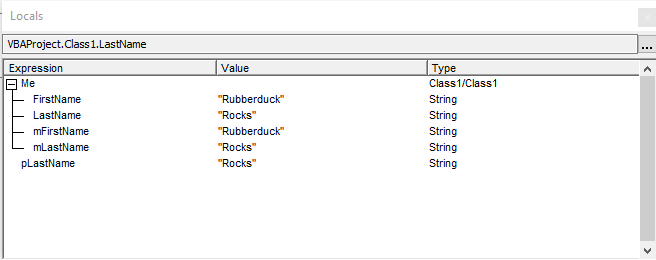
  • The locals debugging toolwindow becomes cluttered with all the private fields duplicating the Property Get membersvalues.
mFields-locals
The Locals toolwindow, showing fields and properties as members of Me.

With my “anti-pattern”, there’s a little bit more code, yes. But:

  • Properties and their respective backing field consistently use the same identifier. IntelliSense / autocomplete for my fields consistently only ever includes the backing fields, and all I had to do was to type this..
  • No need for any Hungarian prefix anywhere. I use T for the type declaration (I also use I for interfaces, like in .NET and most C-based languages), because I find that using the class identifier (which would be perfectly legal) would be potentially confusing in Private this As Class1, since in any other context (outside the class module itself) the identifier Class1 in an As clause would be referring to the Class1 class.
  • Parameter names are always explicitly passed ByVal and named value. Yes, this makes Range.Value show up as Range.value, but VBA being case-insensitive, it makes no difference whatsoever. I could have used any other identifier, but value is what VB.NET and C# use; besides RHS isn’t quite as sexy, if more semantically correct. But naming parameters after the property member is an objectively horrible idea; all you see is a soup of mFoo, pFoo and Foo with assignment operators in between.
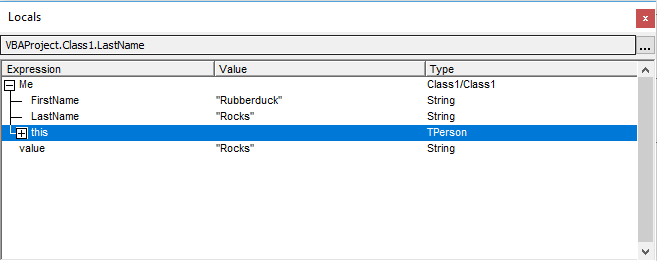
  • The locals debugging toolwindow now nicely regroups all the fields under this, so the object’s state is much easier to browse and understand at a glance.
  • If you ever need to serialize an object’s state to a binary file, then all you need to do is to Put #fileHandle this and you’re done. The inverse process is just as simple: no need to enumerate the properties one by one, convert them, or manipulate them in any way.
TPerson-locals
The Locals toolwindow, showing properties as members of Me, and a collapsed this member encapsulating the otherwise redundant fields.

I’d love to hear exactly what’s wrong with this “anti-pattern” of mine – I’ve grown pretty fond of it in the past couple years, and until someone can show me how and why I’m actively hurting something somewhere with it, I’ll keep using it in my own code, and posting Code Review and Stack Overflow answers featuring it.. and my blog posts will keep using it too.

One concern raised, was that a UDT doesn’t play well with collections. But this UDT isn’t going to end up in a collection anytime soon – and even if the class instance went into a collection, the encapsulated UDT couldn’t care less: all it does is regrouping the class’ internal state. Code outside the class doesn’t know about it, and couldn’t if it wanted.

You might be worried that a UDT incurs additional overhead… but it doesn’t: it simply provides a convenient structure to organize the private fields of a class. Two Long private fields allocate 4 bytes each and total 8 bytes; a UDT with two Long members allocates a total of 8 bytes, as Len(this) shows. What’s an easy way to know how much space the instance fields of a class take up?

Rubberduck has an encapsulate field refactoring that makes a public field private, renames it, and introduces Property Get and appropriate Property Let/Set mutators for it.

For a while I’ve been considering implementing a feature that builds on this Private Type [anti?] pattern, but held back because I didn’t want Rubberduck to enforce my coding style… although… I would love to be able to just declare my private type and my this private field, parse, and then right-click the UDT field and have Rubberduck generate all the Property Get/Let/Set boilerplate for me.

Would that make it more compelling?

Factories: Parameterized Object Initialization

Creating objects is something we do all the time. When we Set foo = New Something, we create a new instance of the Something class and assign that object reference to the foo variable, which would have been declared locally with Dim foo As Something.

With New

Often, you wish to instantiate Something with initial values for its properties – might look like this:

Dim foo As Something
Set foo = New Something
With foo
    .Bar = 42
    .Ducky = "Quack"
    '...
End With

Or, you could be fancy and make Something have a Self property that returns, well, the instance itself, like this:

Public Property Get Self() As Something
    Set Self = Me
End Property

But why would we do that? Because then we can leverage the rather elegant With New syntax:

Dim foo As Something
With New Something
    .Bar = 42
    .Ducky = "Quack"
    '...
    Set foo = .Self
End With

The benefits are perhaps more apparent with a factory method:

Public Function NewSomething(ByVal initialBar As Long, ByVal initialDucky As String) As Something
    With New Something
        .Bar = initialBar
        .Ducky = initialDucky
        Set NewSomething = .Self
    End With
End Function

See, no local variable is needed here, the With block holds the object reference. If we weren’t passing that reference down the call stack by returning it to the caller, the End With would have terminated that object. Not everybody knows that a With block can own an object reference like this, using With New. Without the Self property, a local variable would be needed in order to be able to assign the return value, because a With block doesn’t provide a handle to the object reference it’s holding.

Now the calling code can do this:

Dim foo As Something
Set foo = Factories.NewSomething(42, "Quack")

Here the NewSomething function is located in a standard module (.bas) named Factories. The code would have also been legal without qualifying NewSomething with the module name, but if someone is maintaining that code without Rubberduck to tell them by merely clicking on the identifier, meh, too bad for them they’ll have to Shift+F2 (go to definition) on NewSomething and waste time and break their momentum navigating to the Factories module it’s defined in – or worse, looking it up in the Object Browser (F2).

Where to put it?

In other languages, objects can be created with a constructor. In VBA you can’t have that, so you use a factory method instead. Factories manufacture objects, they create things.

In my opinion, the single best place to put a factory method isn’t in a standard/procedural module though – it’s on the class itself. I want my calling code to look something like this:

Dim foo As Something
Set foo = Something.Create(42, "Quack")

Last thing I want is some “factory module” that exposes a method for creating instances of every class in my project. But how can we do this? The Create method can’t be invoked without an instance of the Something class, right? But what’s happening here, is that the instance is being automatically created by VBA; that instance is named after the class itself, and there’s a VB_Attribute in the class header that you need to tweak to activate it:

VERSION 1.0 CLASS
BEGIN
  MultiUse = -1  'True
END
Attribute VB_Name = "Something"      '#FunFact controlled by the "Name" property of the class module
Attribute VB_GlobalNameSpace = False '#FunFact VBA ignores this attribute
Attribute VB_Creatable = False       '#FunFact VBA ignores this attribute
Attribute VB_PredeclaredId = True    '<~ HERE!
Attribute VB_Exposed = False         '#FunFact controlled by the "Instancing" property of the class module

The attribute is VB_PredeclaredId, which is False by default. At a low level, each object instance has an ID; by toggling this attribute value, you tell VBA to pre-declare that ID… and that’s how you get what’s essentially a global-scope free-for-all instance of your object.

That can be a good thing… but as is often the case with forms (which also have a predeclared ID), storing state in that instance leads to needless bugs and complications.

Interfaces

The real problem is that we really have two interfaces here, and one of them (the factory) shouldn’t be able to access instance data… but it needs to be able to access the properties of the object it’s creating!

If only there was a way for a VBA class to present one interface to the outside world, and another to the Create factory method!

VERSION 1.0 CLASS
BEGIN
  MultiUse = -1  'True
END
Attribute VB_Name = "ISomething"
Attribute VB_GlobalNameSpace = False
Attribute VB_Creatable = False
Attribute VB_PredeclaredId = False
Attribute VB_Exposed = False
Option Explicit

Public Property Get Bar() As Long
End Property

Public Property Get Ducky() As String
End Property

This would be some ISomething class: an interface that the Something class will implement.

The Something class would look like this- Notice that it only exposes Property Get accessors, and that the Create method returns the object through the ISomething interface:

VERSION 1.0 CLASS
BEGIN
  MultiUse = -1  'True
END
Attribute VB_Name = "Something"
Attribute VB_GlobalNameSpace = False
Attribute VB_Creatable = False
Attribute VB_PredeclaredId = True
Attribute VB_Exposed = False
Option Explicit
Private Type TSomething
    Bar As Long
    Ducky As String
End Type

Private this As TSomething
Implements ISomething

Public Function Create(ByVal initialBar As Long, ByVal initialDucky As String) As ISomething
    With New Something
        .Bar = initialBar
        .Ducky = initialDucky
        Set Create = .Self
    End With
End Function

Public Property Get Self() As ISomething
    Set Self = Me
End Property

Public Property Get Bar() As Long
    Bar = this.Bar
End Property

Friend Property Let Bar(ByVal value As Long)
    this.Bar = value
End Property

Public Property Get Ducky() As String
    Ducky = this.Ducky
End Property

Friend Property Let Ducky(ByVal value As String)
    this.Ducky = value
End Property

Private Property Get ISomething_Bar() As Long
    ISomething_Bar = Bar
End Property

Private Property Get ISomething_Ducky() As String
    ISomething_Ducky = Ducky
End Property

The Friend properties would only be accessible within that project; if that’s not a concern then they could also be Public, doesn’t really matter – the calling code only really cares about the ISomething interface:

With Something.Create(42, "Quack")
    Debug.Print .Bar 'prints 42
    .Bar = 42 'illegal, member not on interface
End With

Here the calling scope is still tightly coupled with the Something class though. But if we had a factory interface…

VERSION 1.0 CLASS
BEGIN
  MultiUse = -1  'True
END
Attribute VB_Name = "ISomethingFactory"
Attribute VB_GlobalNameSpace = False
Attribute VB_Creatable = False
Attribute VB_PredeclaredId = False
Attribute VB_Exposed = False
Option Explicit

Public Function Create(ByVal initialBar As Long, ByVal initialDuck As String) As ISomething
End Function

…and made Something implement that interface…

Implements ISomething
Implements ISomethingFactory

Public Function Create(ByVal initialBar As Long, ByVal initialDucky As String) As ISomething
    With New Something
        .Bar = initialBar
        .Ducky = initialDucky
        Set Create = .Self
    End With
End Function

Private Function ISomethingFactory_Create(ByVal initialBar As Long, ByVal initialDucky As String) As ISomething
    Set ISomethingFactory_Create = Create(initialBar, initialDucky)
End Function

…now we basically have an abstract factory that we can pass around to everything that needs to create an instance of Something or, even cooler, of anything that implements the ISomething interface:

Option Explicit

Public Sub Main()
    Dim factory As ISomethingFactory
    Set factory = Something.Self
    With MyMacro.Create(factory)
        .Run
    End With
End Sub

Of course this is a contrived example. Imagine Something is rather some SqlDataService encapsulating some ADODB data access, and suddenly it’s possible to execute MyMacro.Run without hitting a database at all, by implementing the ISomething and ISomethingFactory interfaces in some FakeDataService class that unit tests can use to test-drive the logic without ever needing to hit a database.

A factory is a creational pattern that allows us to parameterize the creation of an object, and even abstract away the very concept of creating an instance of an object, so much that the concrete implementation we’re actually coding against, has no importance anymore – all that matters is the interface we’re using.

Using interfaces, we can segregate parts of our API into different “views” of the same object and, benefiting from coding conventions, achieve get-only properties that can only be assigned when the object is initialized by a factory method.

If you really want to work with a specific implementation, you can always couple your code with a specific Something – but if you stick to coding against interfaces, you’ll find that writing unit tests to validate your logic without testing your database connections, the SQL queries, the presence of the data in the database, the network connectivity, and all the other things that can go wrong, that you have no control over, and that you don’t need to cover in a unit test, …will be much easier.

The whole setup likely isn’t a necessity everywhere, but abstract factories, factory methods, and interfaces, remain useful tools that are good to have in one’s arsenal… and Rubberduck will eventually provide tooling to generate all that boilerplate code.

Sounds like fun? Help us do it!

VBA Trap: Default Members

The key to writing clear, unambiguous code, is rather simple:

Do what you say; say what you do.

VBA has a number of features that make it easy to not even realize you’re writing code that doesn’t do what it says it does.

One of the reasons for that, is the existence of default members – under the guise of what appears to be simpler code, member calls are made implicitly.

If you know what’s going on, you’re probably fine. If you’re learning, or you’re just unfamiliar with the API you’re using, there’s a trap before your feet, and both run-time and compile-time errors waiting to happen.

Example

Consider this seemingly simple code:

myCollection.Add ActiveSheet.Cells(1, 1), ActiveSheet.Cells(1, 1)

It’s adding a Range object, using the String representation of Range.[_Default] as a key. That’s two very different things, done by two bits of identical code. Clearly that snippet does more than just what it claims to be doing.


Discovering Default Members

One of the first classes you might encounter, might be the Collection class. Bring up the Object Browser (F2) and find it in the VBA type library: you’ll notice a little blue dot next to the Item function’s icon:

Collection.Item

Whenever you encounter that blue dot in a list of members, you’ve found the default member of the class you’re looking at.

That’s why the Object Browser is your friend – even though it can list hidden members (that’s toggled via a somewhat hidden command buried the Object Browser‘s context menu), IntelliSense /autocomplete doesn’t tell you as much:

IntelliSense-Collection.Item

Rubberduck’s context-sensitive toolbar has an opportunity to display that information, however that wouldn’t help discovering default members:

rubberduck-collection-item.png

Until Rubberduck reinvents VBA IntelliSense, the Object Browser is all you’ve got.


What’s a Default Member anyway?

Any class can have a default member, and only one single member can be the default.

When a class has a default member, you can legally omit that member when working with an instance of that class.

In other words, myCollection.Item(1) is exactly the same as myCollection(1), except the latter is implicitly invoking the Item function, while the former is explicit about it.


Can my classes have a default member?

You too can make your own classes have a default member, by specifying a UserMemId attribute value of 0​ for that member.

Unfortunately only the Description attribute can be given a value (in the Object Browser, locate and right-click the member, select properties) without removing/exporting the module, editing the exported .cls file, and re-importing the class module into the VBA project.

An Item property that looks like this in the VBE:

Public Property Get Item(ByVal index As Long) As Variant
End Property

Might look like this once exported:

Public Property Get Item(ByVal index As Long) As Variant
Attribute Item.VB_Description = "Gets or sets the element at the specified index."
Attribute Item.VB_UserMemId = 0
End Property

It’s that VB_UserMemId member attribute that makes Item the default member of the class. The VB_Description member attribute determines the docstring that the Object Browser displays in its bottom panel, and that Rubberduck displays in its context-sensitive toolbar.

Whatever you do, DO NOT make a default member that returns an instance of the class it’s defined in. Unless you want to crash your host application as soon as the VBE tries to figure out what’s going on.


What’s Confusing About it?

There’s an open issue (now closed) detailing the challenges implicit default members pose. If you’re familiar with Excel.Range, you know how it’s pretty much impossible to tell exactly what’s going on when you invoke the Cells member (see Stack Overflow).

You may have encountered MSForms.ReturnBoolean before:

Private Sub ComboBox1_KeyPress(ByVal KeyAscii As MSForms.ReturnInteger)
If Not IsNumeric(Chr(KeyAscii)) Then KeyAscii = 0
End Sub

The reason you can assign KeyAscii = 0 and have any effect with that assignment (noticed it’s passed ByVal), is because MSForms.ReturnInteger is a class that has, you guessed it, a default member – compare with the equivalent explicit code:

Private Sub ComboBox1_KeyPress(ByVal KeyAscii As MSForms.ReturnInteger)
If Not IsNumeric(Chr(KeyAscii.Value)) Then KeyAscii.Value = 0
End Sub

And now everything makes better sense. Let’s look at common Excel VBA code:

Dim foo As Range
foo = Range("B12") ' default member Let = default member Get / error 91
Set foo = Range("B12") ' sets the object reference '...

If foo is a Range object that is already assigned with a valid object reference, it assigns foo.Value with whatever Range("B12").Value returns. If foo happened to be Nothing at that point, run-time error 91 would be raised. If we added the Set keyword to the assignment, we would now be assigning the actual object reference itself. Wait, there’s more.

Dim foo As Variant
Set foo = Range("B12") ' foo becomes Variant/Range
foo = Range("B12") ' Variant subtype is only known at run-time '...

If foo is a Variant, it assigns Range("B12").Value (given multiple cells e.g. Range("A1:B12").Value, foo becomes a 2D Variant array holding the values of every cell in the specified range), but if we add Set in front of the instruction, foo will happily hold a reference to the Range object itself. But what if foo has an explicit value type?

Dim foo As String
Set foo = Range("B12") ' object required
foo = Range("B12") ' default member Get and implicit type conversion '...

If foo is a String and the cell contains a #VALUE! error, a run-time error is raised because an error value can’t be coerced into a String …or any other type, for that matter. Since String isn’t an object type, sticking a Set in front of the assignment would give us an “object required” compile error.

Add to that, that Range is either a member of a global-scope object representing whichever worksheet is the ActiveSheet if the code is written in a standard module, or a member of the worksheet itself if the code is written in a worksheet module, and it becomes clear that this seemingly simple code is riddled with assumptions – and assumptions are usually nothing but bugs waiting to surface.

See, “simple” code really isn’t all that simple after all. Compare to a less naive / more defensive approach:

Dim foo As Variant foo = ActiveSheet.Range("B12").Value
If Not IsError(foo) Then
Dim bar As String
bar = CStr(foo) '...
End If

Now prepending a Set keyword to the foo assignment no longer makes any sense, since we know the intent is to get the .Value off the ActiveSheet. We’re reading the cell value into an explicit Variant and explicitly ensuring the Variant subtype isn’t Variant/Error before we go and explicitly convert the value into a String.

Write code that speaks for itself:

  • Avoid implicit default member calls
  • Avoid implicit global qualifiers (e.g. [ActiveSheet.]Range)
  • Avoid implicit type conversions from Variant subtypes

Bang (!) Operator

When the default member is a collection class with a String indexer, VBA allows you to use the Bang Operator ! to… implicitly access that indexer and completely obscure away the default member accesses:

Debug.Print myRecordset.Fields.Item("Field1").Value 'explicit
Debug.Print myRecordset!Field1 'all-implicit

Here we’re looking at ADODB.Recordset.Fields being the default member of ADODB.Recordset; that’s a collection class with an indexer that can take a String representing the field name. And since ADODB.Field has a default property, that too can be eliminated, making it easy to… completely lose track of what’s really going on.


Can Rubberduck help / Can I help Rubberduck?

As of this writing, Rubberduck has all the information it needs to issue inspection results as appropriate… assuming everything is early-bound (i.e. not written against Variant or Object, which means the types involved are only known to VBA at run-time).

In fact, there’s already an Excel-specific inspection addressing implicit ActiveSheet references, that would fire a result given an unqualified Range (or Cells, Rows, Columns, or Names) member call.

ImplicitActiveSheetReference

This inspection used to fire a result even when the code was written in a worksheet module, making it a half-lie: without Me. qualifying the call, Range("A1") in a worksheet module is actually implicitly referring to that worksheet…and changing the code to explicitly refer to ActiveSheet would actually change the behavior of the code. Rubberduck has since been updated to understand these implications.

Another inspection flagging implicit default member calls has also been implemented with a quick-fix to expand the default member call, and bang operators can now be expanded to full notation (in the entire project at once if you like) with a single click, and inspections can flag bang notation, unbound bang notation, recursive bang notation,

Let-assignments involving implicit type conversions are also something we need to look into. Help us do it! This inspection also implies resolving the type of the RHS expression – a capability we’re just barely starting to leverage.

If you’re curious about Rubberduck’s internals and/or would love to learn some serious C#, don’t hesitate to create an issue on our repository to ask anything about our code base; our team is more than happy to guide new contributors in every area!

The Reusable Progress Indicator

So you’ve written a beautiful piece of code, a macro that does everything it needs to do… the only thing is that, well, it takes a while to complete. Oh, it’s as efficient as it gets, you’ve put it up for peer review on Code Review Stack Exchange, and the reviewers helped you optimize it. You need a way to report progress to your users.

There are several possible solutions.

Updating Application.StatusBar

If the macro is written in such a way that the user could very well continue using Excel while the code is running, then why disturb their workflow – simply updating the application’s status bar is definitely the best way to do it.

You could use a small procedure to do it:

Public Sub UpdateStatus(Optional ByVal msg As String = vbNullString)
 
    Dim isUpdating As Boolean
    isUpdating = Application.ScreenUpdating
 
    'we need ScreenUpdating toggled on to do this:
    If Not isUpdating Then Application.ScreenUpdating = True
 
    'if msg is empty, status goes to "Ready"
    Application.StatusBar = msg
 
    'make sure the update gets displayed (we might be in a tight loop)
    DoEvents
 
    'if ScreenUpdating was off, toggle it back off:
    Application.ScreenUpdating = isUpdating
 
End Sub

It’s critical to understand that the user can change the ActiveSheet at any time, so if your long-running macro involves code that implicitly (or explicitly) refers to the active worksheet, you’ll run into problems. Rubberduck has an inspection that specifically locates these implicit references though, so you’ll do fine.

Modeless Progress Indicator

A commonly blogged-about solution is to display a modeless UserForm and update it from the worker code. I dislike this solution, for several reasons:

  • The user is free to interact with the workbook and change the ActiveSheet at any time, but the progress is reported in an invasive dialog that the user needs to drag around to move out of the way as they navigate the worksheets.
  • It pollutes the worker code with form member calls; the worker code decides when to display and when to hide and destroy the form.
  • It feels like a work-around: we’d like a modal UserForm, but we don’t know how to make that work nicely.

“Smart UI” Modal Progress Indicator

If we only care to make it work yesterday, a “Smart UI” works: we get a modal dialog, so the user can’t use the workbook while we’re modifying it. What’s the problem then?

The form is running the show – the “worker” code needs to be in the code-behind, or invoked from it. That is the problem: if you want to reuse that code, in another project, you need to carefully scrap the worker code. If you want to reuse that code in the same project, you’re out of luck – either you duplicate the “indicator” code and reimplement the other “worker” code in another form’s code-behind, or the form now has “modes” and some conditional logic determines which worker code will get to run: you can imagine how well that scales if you have a project that needs a progress indicator for 20 features.

“Smart UI” can’t be good either. So, what’s the real solution then?

A Reusable Progress Indicator

We want a modal indicator (so that the user can’t interfere with our modifications), but one that doesn’t run the show: we want the UserForm to be responsible for nothing more than keeping its indicator representative of the current progress.

This solution is based on a piece of code I posted on Code Review back in 2015; you can find the original post here. This version is better though, be it only because of how it deals with cancellation.

The solution is implemented across two components: a form, and a class module.

ProgressView

First, a UserForm, obviously.

ProgressView

Nothing really fancy here. The form is named ProgressView. There’s a ProgressLabel, a 228×24 DecorativeFrame, and inside that Frame control, a ProgressBar label using the Highlight color from the System palette. Here’s the complete code-behind:

Option Explicit
Private Const PROGRESSBAR_MAXWIDTH As Integer = 224
Public Event Activated()
Public Event Cancelled()

Private Sub UserForm_Activate()
    ProgressBar.Width = 0
    RaiseEvent Activated
End Sub

Public Sub Update(ByVal percentValue As Single, Optional ByVal labelValue As String, Optional ByVal captionValue As String)
    If labelValue  vbNullString Then ProgressLabel.Caption = labelValue 
    If captionValue  vbNullString Then Me.Caption = captionValue
    ProgressBar.Width = percentValue * PROGRESSBAR_MAXWIDTH
    DoEvents 
End Sub

Private Sub UserForm_QueryClose(Cancel As Integer, CloseMode As Integer)
    If CloseMode = VbQueryClose.vbFormControlMenu Then
        Cancel = True
        RaiseEvent Cancelled
    End If
End Sub

Clearly this isn’t a Smart UI: the form doesn’t even have a concept of “worker code”, it’s blissfully unaware of what it’s being used for. In fact, on its own, it’s pretty useless. Modally showing the default instance of this form leaves you with only the VBE’s “Stop” button to close it, because its QueryClose handler is actively preventing the user from “x-ing out” of it. Obviously that form is rather useless on its own – it’s not responsible for anything beyond updating itself and notifying the ProgressIndicator when it’s ready to start reporting progress – or when the user means to cancel the long-running operation.

ProgressIndicator

This is the class that the client code will be using. A PredeclaredId attribute gives it a default instance, which is used to expose a factory method.

Here’s the full code – walkthrough follows:

Option Explicit

Private Declare PtrSafe Sub Sleep Lib "kernel32" (ByVal dwMilliseconds As Long)

Private Const DEFAULT_CAPTION As String = "Progress"
Private Const DEFAULT_LABEL As String = "Please wait..."

Private Const ERR_NOT_INITIALIZED As String = "ProgressIndicator is not initialized."
Private Const ERR_PROC_NOT_FOUND As String = "Specified macro or object member was not found."
Private Const ERR_INVALID_OPERATION As String = "Worker procedure cannot be cancelled by assigning to this property."
Private Const VBERR_MEMBER_NOT_FOUND As Long = 438

Public Enum ProgressIndicatorError
    Error_NotInitialized = vbObjectError + 1001
    Error_ProcedureNotFound
    Error_InvalidOperation
End Enum

Private Type TProgressIndicator
    procedure As String
    instance As Object
    sleepDelay As Long
    canCancel As Boolean
    cancelling As Boolean
    currentProgressValue As Double
End Type

Private this As TProgressIndicator
Private WithEvents view As ProgressView

Private Sub Class_Initialize()
    Set view = New ProgressView
    view.Caption = DEFAULT_CAPTION
    view.ProgressLabel = DEFAULT_LABEL
End Sub

Private Sub Class_Terminate()
    Set view = Nothing
    Set this.instance = Nothing
End Sub

Private Function QualifyMacroName(ByVal book As Workbook, ByVal procedure As String) As String
    QualifyMacroName = "'" & book.FullName & "'!" & procedure
End Function

Public Function Create(ByVal procedure As String, Optional instance As Object = Nothing, Optional ByVal initialLabelValue As String, Optional ByVal initialCaptionValue As String, Optional ByVal completedSleepMilliseconds As Long = 1000, Optional canCancel As Boolean = False) As ProgressIndicator
 
    Dim result As ProgressIndicator
    Set result = New ProgressIndicator
 
    result.Cancellable = canCancel
    result.SleepMilliseconds = completedSleepMilliseconds
 
    If Not instance Is Nothing Then
        Set result.OwnerInstance = instance
    ElseIf InStr(procedure, "'!") = 0 Then
        procedure = QualifyMacroName(Application.ActiveWorkbook, procedure)
    End If
 
    result.ProcedureName = procedure
 
    If initialLabelValue  vbNullString Then result.ProgressView.ProgressLabel = initialLabelValue
    If initialCaptionValue  vbNullString Then result.ProgressView.Caption = initialCaptionValue

    Set Create = result
 
End Function

Friend Property Get ProgressView() As ProgressView
    Set ProgressView = view
End Property

Friend Property Get ProcedureName() As String
    ProcedureName = this.procedure
End Property

Friend Property Let ProcedureName(ByVal value As String)
    this.procedure = value
End Property

Friend Property Get OwnerInstance() As Object
    Set OwnerInstance = this.instance
End Property

Friend Property Set OwnerInstance(ByVal value As Object)
    Set this.instance = value
End Property

Friend Property Get SleepMilliseconds() As Long
    SleepMilliseconds = this.sleepDelay
End Property

Friend Property Let SleepMilliseconds(ByVal value As Long)
    this.sleepDelay = value
End Property

Public Property Get CurrentProgress() As Double
    CurrentProgress = this.currentProgressValue
End Property

Public Property Get Cancellable() As Boolean
    Cancellable = this.canCancel
End Property

Friend Property Let Cancellable(ByVal value As Boolean)
    this.canCancel = value
End Property

Public Property Get IsCancelRequested() As Boolean
    IsCancelRequested = this.cancelling
End Property

Public Sub AbortCancellation()
    Debug.Assert this.cancelling
    this.cancelling = False
End Sub

Public Sub Execute()
    view.Show vbModal
End Sub

Public Sub Update(ByVal percentValue As Double, Optional ByVal labelValue As String, Optional ByVal captionValue As String)

    On Error GoTo CleanFail
    ThrowIfNotInitialized

    ValidatePercentValue percentValue
    this.currentProgressValue = percentValue
 
    view.Update this.currentProgressValue, labelValue

CleanExit:
    If percentValue = 1 Then Sleep 1000 ' pause on completion
    Exit Sub

CleanFail:
    MsgBox Err.Number & vbTab & Err.Description, vbCritical, "Error"
    Resume CleanExit
End Sub

Public Sub UpdatePercent(ByVal percentValue As Double, Optional ByVal captionValue As String)
    ValidatePercentValue percentValue
    Update percentValue, Format$(percentValue, "0.0% Completed")
End Sub

Private Sub ValidatePercentValue(ByRef percentValue As Double)
    If percentValue > 1 Then percentValue = percentValue / 100
End Sub

Private Sub ThrowIfNotInitialized()
    If this.procedure = vbNullString Then
        Err.Raise ProgressIndicatorError.Error_NotInitialized, TypeName(Me), ERR_NOT_INITIALIZED
    End If
End Sub

Private Sub view_Activated()

    On Error GoTo CleanFail
    ThrowIfNotInitialized

    If Not this.instance Is Nothing Then
        ExecuteInstanceMethod
    Else
        ExecuteMacro
    End If

CleanExit:
    view.Hide
    Exit Sub

CleanFail:
    MsgBox Err.Number & vbTab & Err.Description, vbCritical, "Error"
    Resume CleanExit
End Sub

Private Sub ExecuteMacro()
    On Error GoTo CleanFail
    Application.Run this.procedure, Me

CleanExit:
    Exit Sub

CleanFail:
    If Err.Number = VBERR_MEMBER_NOT_FOUND Then
        Err.Raise ProgressIndicatorError.Error_ProcedureNotFound, TypeName(Me), ERR_PROC_NOT_FOUND
    Else
        Err.Raise Err.Number, Err.Source, Err.Description, Err.HelpFile, Err.HelpContext
    End If
    Resume CleanExit
End Sub

Private Sub ExecuteInstanceMethod()
    On Error GoTo CleanFail
 
    Dim parameter As ProgressIndicator
    Set parameter = Me 'Me cannot be passed to CallByName directly

    CallByName this.instance, this.procedure, VbMethod, parameter

CleanExit:
    Exit Sub

CleanFail:
    If Err.Number = VBERR_MEMBER_NOT_FOUND Then
        Err.Raise ProgressIndicatorError.Error_ProcedureNotFound, TypeName(Me), ERR_PROC_NOT_FOUND
    Else
        Err.Raise Err.Number, Err.Source, Err.Description, Err.HelpFile, Err.HelpContext
    End If
    Resume CleanExit
End Sub

Private Sub view_Cancelled()
    If Not this.canCancel Then Exit Sub
    this.cancelling = True
End Sub

The Create method is intended to be invoked from the default instance, which means if you’re copy-pasting this code into the VBE, it won’t work. Instead, paste this header into notepad first:

VERSION 1.0 CLASS
BEGIN
 MultiUse = -1 'True
END
Attribute VB_Name = "ProgressIndicator"
Attribute VB_GlobalNameSpace = False
Attribute VB_Creatable = False
Attribute VB_PredeclaredId = True
Attribute VB_Exposed = True

Then paste the actual code underneath, save as ProgressIndicator.cls, and import the class module into the VBE. Note the VB_Exposed attribute: this makes the class usable in other VBA projects, so you could have this progress indicator solution in, say, an Excel add-in, and have “client” VBA projects that reference it. Friend members won’t be accessible from external code.

Here I’m Newing up the ProgressView directly in the Class_Initialize handler: this makes it tightly coupled with the ProgressIndicator. A better solution might have been to inject some IProgressView interface through the Create method, but then this would have required gymnastics to correctly expose the Activated and Cancelled view events, because events can’t simply be exposed as interface members – I’ll cover that in a future article, but the benefit of that would be loose coupling and enhanced testability: one could inject some MockProgressView implementation (just some class / not a form!), and just like that, the worker code could be unit tested without bringing up any form – but then again, that’s a bit beyond the scope of this article, and I’m drifting.

So the Create method takes the name of a procedure​, and uses it to set the ProcedureName property: this procedure name can be any Public Sub that takes a ProgressIndicator parameter. If it’s in a standard module, nothing else is needed. If it’s in a class module, the instance parameter needs to be specified so that we can later invoke the worker code off an instance of that class. The other parameters optionally configure the initial caption and label on the form (that’s not exactly how I’d write it today, but give me a break, that code is from 2015). If the worker code supports cancellation, the canCancelparameter should be supplied.

The next interesting member is the Execute method, which displays the modal form. Doing that soon triggers the Activated event, which we handle by first validating that we have a procedure to invoke, and then we either ExecuteInstanceMethod (given an instance), or ExecuteMacro​ – then we Hide the view and we’re done.

ExecuteMacro uses Application.Run to invoke the procedure; ExecuteInstanceMethod uses CallByName to invoke the member on the instance. In both cases, Me is passed to the invoked procedure as a parameter, and this is where the fun part begins.

The worker code is responsible for doing the work, and uses its ProgressIndicator parameter to Update the progress indicator as it goes, and periodically check if the user wants to cancel; the AbortCancellation method can be used to, well, cancel the cancellation, if that’s needed.

Client & Worker Code

The client code is responsible for registering the worker procedure, and executing it through the ProgressIndicator instance, for example like this:

Public Sub DoSomething()
    With ProgressIndicator.Create("DoWork", canCancel:=True)
        .Execute
    End With
End Sub

The above code registers the DoWork worker procedure, and executes it. DoWork could be any Public Sub in a standard module (.bas), taking a ProgressIndicator parameter:

Public Sub DoWork(ByVal progress As ProgressIndicator)
    Dim i As Long
    For i = 1 To 10000
        If ShouldCancel(progress) Then
            'here more complex worker code could rollback & cleanup
            Exit Sub
        End If
        ActiveSheet.Cells(1, 1) = i
        progress.Update i / 10000
    Next
End Sub

Private Function ShouldCancel(ByVal progress As ProgressIndicator) As Boolean
    If progress.IsCancelRequested Then 
        If MsgBox("Cancel this operation?", vbYesNo) = vbYes Then
            ShouldCancel = True
        Else
            progress.AbortCancellation
        End If
    End If
End Function

The Create method can also register a method defined in a class module, given an instance of that class – again as long as it’s a Public Sub taking a ProgressIndicator parameter:

Public Sub DoSomething()
    Dim foo As SomeClass
    Set foo = New SomeClass
    With ProgressIndicator.Create("DoWork", foo)
        .Execute
    End With
End Sub

Considerations

In order to use this ProgressIndicator solution as an Excel add-in, I would recommend renaming the VBA project (say, ReusableProgress), otherwise referencing a project named “VBAProject” from a project named “VBAProject” will surely get confusing 🙂

Note that this solution could easily be adapted to work in any VBA host application, by removing the “standard module” support and only invoking the worker code in a class module, with CallByName.

Conclusion

By using a reusable progress indicator like this, you never need to reimplement it ever again: you do it once, and then you can use it in 200 places across 100 projects if you like: not a single line of code in the ProgressIndicator or ProgressView classes needs to change – all you need to write is your worker code, and all the worker code needs to worry about is, well, its job.

Don’t hesitate to comment and suggest further improvements, suggestions are welcome – questions, too.

Downloads

I’ve bundled the code in this article into a Microsoft Excel add-in that I uploaded to dropbox (Progress.xlam).

Enjoy!

UserForm1.Show

I’ve seen these tutorials. You’ve probably seen them too. They all go “see how easy it is?!” when they end with a glorious UserForm1.Show without explaining anything about what it means for your code and your understanding of programming concepts, to use a form’s default instance like this. Most don’t even venture into explaining anything about that default instance – and off you go, see you on Stack Overflow.

Because if you don’t know what you’re doing, all you’ve learned is how to write code that, in the name of “hey look it’s so easy”, abstracts away crucially important concepts that will, sooner or later, come back to bite you in the …rear end.

What’s that default instance anyway?

A UserForm is essentially a class module with a designer and a VB_PredeclaredId attribute. That PredeclaredId means VBA is automatically creating a global-scope instance of the class, named after that class. If the default instance is ever unloaded or set to Nothing, its internal state gets reset, and automatically reinitialized as soon as the default instance is invoked again. You can Set UserForm1 = Nothing all you want, you can never verify whether UserForm1 Is Nothing, because that expression will always evaluate to False. A default instance is nice for, say, exposing a factory method. But please, please don’t Show the default instance.


Doing. It. Wrong.™

There are a number of red flags invariably raised in many UserForm tutorials:

  • Unload Me, or worse, Unload UserForm1, in the form’s code-behind. The former makes the form instance a self-destructing object, the latter destroys resets the default instance, and that’s not necessarily the executing instance – and that leads to all kinds of funky unexpected behavior, and embarrassing duplicate questions on Stack Overflow. Every day.
  • UserForm1.Show at the call site, where UserForm1 isn’t a local variable but the “hey look it’s free” default instance, which means you’re using an object without even realizing it (at least without New​-ing it up yourself) – and you’re storing state that belongs to a global instance, which means you’re using an object but without the benefits of object-oriented programming. It also means that…
  • The application logic is implemented in the form’s code-behind. In programming this [anti-]pattern has a name: the “smart UI”. If a dialog does anything beyond displaying and collecting data, it’s doing someone else’s job. That piece of logic is now coupled with the UI, and it’s impossible to write a unit test for it. It also means you can’t possibly reuse that form for something else in the same project (heck, or for something similar in another project) without making considerable changes to the form’s code-behind. A form that’s used in 20 places and runs the show for 20 functionalities, can’t possibly be anything other than a spaghetti mess.

So that’s what not to do. Flipside.


Doing it right.

What you want at the call site is to show an instance of the form, let the user do its thing, and when the dialog closes, the calling code pulls the data from the form’s state. This means you can’t afford a self-destructing form that wipes out its entire state before the [Ok] button’s Click handler even returns.

Hide it, don’t Unload it.

In .NET’s Windows Forms UI framework (WinForms / the .NET successor of MSForms), a form’s Show method is a function that returns a DialogResult enum value, a bit like a MsgBox does. Makes sense; that Show method tells its caller what the user meant to do with the form’s state: Ok being your green light to process it, Cancel meaning the user chose not to proceed – and your program is supposed to act accordingly.

You see Show-ing a dialog isn’t some fire-and-forget business: if the caller is going to be responsible for knowing what to do when the form is okayed or cancelled, then it’s going to need to know whether the form is okayed or cancelled.

And a form can’t tell its caller anything if clicking the [Ok] button nukes the form object.

The basic code-behind for a form with an [Ok] and a [Cancel] button could look like this:

Option Explicit
'@Folder("UI")
Private cancelled As Boolean

Public Property Get IsCancelled() As Boolean
    IsCancelled = cancelled
End Property

Private Sub OkButton_Click()
    Hide
End Sub

Private Sub CancelButton_Click()
    OnCancel
End Sub

Private Sub UserForm_QueryClose(Cancel As Integer, CloseMode As Integer)
    If CloseMode = VbQueryClose.vbFormControlMenu Then
        Cancel = True
        OnCancel
    End If
End Sub

Private Sub OnCancel()
    cancelled = True
    Hide
End Sub

Notice there are two ways to cancel the dialog: the [Cancel] button, and the [X] button, which would also nuke the object instance if Cancel = True wasn’t specified in the QueryClose handler. Handling QueryClose is fundamental – not doing it means even if you’re not Unload-ing it anywhere, [X]-ing out of the form will inevitably cause issues, because the calling code has all rights to not be expecting a self-destructing object – you need to have the form’s object reference around, for the caller to be able to verify if the form was cancelled when .Show returns.

The calling code looks like this:

With New UserForm1
    .Show
    If Not .IsCancelled Then
        '...
    End If
End With

Notice there’s no need to declare a local variable; the With New syntax yields the object reference to the With block, which properly destroys the object whenever the With block is exited – hence why GoTo-jumping out and then back into a With block is never a good idea; this can happen accidentally, with a Resume or Resume Next instruction in an error-handling subroutine.

The Model

A dialog displays and collects data. If the caller needs to know about a UserName and a Password, it doesn’t need to care about some userNameBox and passwordBox textbox controls: what it cares about, is the UserName and the Password that the user provided in these controls – the controls themselves, the ability to hide them, move them, resize them, change their font and border style, etc., is utterly irrelevant. The calling code doesn’t need controls, it needs a model that encapsulates the form’s data.

LoginForm

In its simplest form, the model can take the shape of a few Property Get members in the form’s code-behind:

Public Property Get UserName() As String
    UserName = userNameBox.Text
End Property

Public Property Get Password() As String
    Password = passwordBox.Text
End Property

Or better, it could be a full-fledged class, exposing Property Get and Property Let members for every property.

The calling code can now get the form’s data without needing to care about controls and knowing that the UserName was entered in a TextBox control, or knowing the Password without knowing that the PasswordChar for the passwordBox was set to *.

Except, it can – form controls are basically public instance fields on the form object: the caller can happily access them at will… and this makes the UserName and Password interesting properties kind of lost in a sea of MSForms boilerplate in IntelliSense. So you implement the model in its own class module instead, and use composition to encapsulate it:

Private viewModel As LoginDialogModel

Public Property Get Model() As LoginDialogModel
    Set Model = viewModel
End Property

Public Property Set Model(ByVal value As LoginDialogModel)
    Set viewModel = value
End Property

The model could be updated by the textboxes – it could even expose Boolean properties that can be used to enable/disable the [Ok] button, or show/hide a validation error icon:

Private Sub userNameBox_Change()
    viewModel.UserName = userNameBox.Text
    ValidateForm
End Sub

Private Sub passwordBox_Change()
    viewModel.Password = passwordBox.Text
    ValidateForm
End Sub

Private Sub ValidateForm()
    okButton.Enabled = viewModel.IsValidModel
    userNameValidationErrorIcon.Visible = viewModel.IsInvalidUserName
    passwordValidationErrorIcon.Visible = viewModel.IsInvalidPassword
End Sub

Now, a problem remains: the caller doesn’t want to see the form’s controls.

The View

So we have a model abstraction that the view can consume, but we don’t have an abstraction for the view. That should be simple enough – let’s add a new class module and define a general-purpose IView interface:

Option Explicit
'@Folder("Abstractions")
'@Interface

Public Function ShowDialog(ByVal viewModel As Object) As Boolean
End Function

Now the form can implement that interface – and because the interface is exposing that ShowDialog method, we don’t need a public IsCancelled property anymore. I’m introducing a Private Type at this point, because I like having only one private field:

Option Explicit
Implements IView
'@Folder("UI")

Private Type TView
    IsCancelled As Boolean
    Model As LoginDialogModel
End Type

Private this As TView

Private Sub OkButton_Click()
    Hide
End Sub

Private Sub CancelButton_Click()
    OnCancel
End Sub

Private Sub UserForm_QueryClose(Cancel As Integer, CloseMode As Integer)
    If CloseMode = VbQueryClose.vbFormControlMenu Then
        Cancel = True
        OnCancel
    End If
End Sub

Private Sub OnCancel()
    this.IsCancelled = True
    Hide
End Sub

Private Function IView_ShowDialog(ByVal viewModel As Object) As Boolean
    Set this.Model = viewModel
    Show
    IView_ShowDialog = Not cancelled
End Function

The interface can’t be general-purpose if the Model property is of a type more specific than Object, but it doesn’t matter: the code-behind gets IntelliSense and early-bound, compile-time validation of member calls against it because the Private viewModel field is an implementation detail, and this particular IView implementation is a “login dialog” with a LoginDialogModel; the interface doesn’t need to know, only the implementation.

The [Ok] button will only ever be enabled if the model is valid – that’s one less thing for the caller to worry about, and the logic addressing that concern is neatly encapsulated in the model class itself.

The calling code is supplying the model, so its type is known to the caller – in fact that Property Get member is just provided as a convenience, because it makes little sense to Set a property without being able to Get it later.

Speaking of the calling code, with the addition of a Self property to the model class (Set Self = Me), it could look like this now:

Public Sub Test()
    Dim view As IView
    Set view = New LoginForm

    With New LoginDialogModel
        If Not view.ShowDialog(.Self) Then Exit Sub
        'consume the model:
        Debug.Print .UserName, .Password
    End With 'model goes out of scope

End Sub 'view goes out of scope

If you read the previous article about writing unit-testable code, you’re now realizing (if you haven’t already) that this IView interface could be implemented by some MockLoginDialog class that implements ShowDialog by returning a test-configured value, and unit tests could be written against any code that consumes an IView rather than an actual LoginForm, so long as you’ve written it in such a way that it’s the calling code that’s responsible for knowing what specific IView implementation the code is going to be interacting with.

The model’s validation logic could be unit-tested, too:

Const value As String = "1234"
With New LoginDialogModel
    .Password = value
    Assert.IsTrue .IsInvalidPassword, "'" & value & "' should be invalid."
End With

With a Model and a View, you’re one step away from implementing the New-ing-up a Presenter class, an abstraction that completes the MVP pattern, a much more robust way to write UI-involving code than a Smart UI is.