Version 1.22 – Hotfix

There was an issue with some of the features when a password protected VBA Project was loaded. This caused several of the tool window, most notably the Test Explorer, to fail to open. As many of the more popular add-ins are password protected, this was a pretty big problem.

This has been corrected and the 32bit installer is available now. This post will be updated when the 64bit installer is available.

Download the latest version here.

v1.21 is here! (yes, including for 64-bit Office!)

64-bit Office

At long last, after countless hours of mucking around with InstallShield Express, a working installer for 64-bit Office was finally released.

It unfortunately still requires admin privileges, but at that point all I wanted was to get something that works out – we’ll polish later and certainly end up properly addressing issue #310. But the good news is that 64-bit Office users can now enjoy all the goodies we’ve packed into this release!

What’s New?

Code Explorer

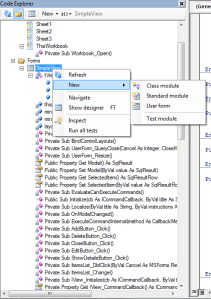
v1.21 was honestly meant to be nothing but a quick bug-fix release. But when I started addressing the Code Explorer issues, I couldn’t help adding, and adding, and adding… here’s what the new Code Explorer looks like:
code-explorer

Just like with the VBE’s Project Explorer, you can now toggle folders on/off, add forms, modules, classes, and show form designers. But here’s something the VBE doesn’t do: display full signatures (well, it doesn’t even display member names, but nevermind), run code inspections and unit tests, and add a new test module from a nifty little context menu!

Unit Testing

You asked for it, we implemented it. Unit tests now support setup & teardown methods:

  • TestInitialize methods run before each test
  • TestCleanup methods run after each test
  • ModuleInitialize methods run before the tests in the test module they’re in
  • ModuleCleanup methods run after the tests in the test module they’re in

Method stubs have been added to the new test module template to show how it’s done.

Code Inspections

Nobody really asked for this one, but I wanted to be able to bring inspection results into the clipboard, so the toolbar in the Code Inspections toolwindow now features a “Copy” button that does just that – and then you can paste inspection results wherever you like.

About Box

The about box got a serious facelift. I know, not exactly a feature, but I had to mention it! The new about box actually links to our official website (http://www.rubberduck-vba.com) and to our social media accounts.

And it’s much prettier than the old one.


That’s just new features – a number of annoying bugs were also taken care of.

We’re very, very happy about this release – and if you like what you’re seeing, know one thing: you ain’t seen nothin’ yet! (see our GitHub repository for everything we have in store for release 1.3)

Trouble with 64 bit Versions of Office

Today has been… surreal. Just surreal. It seems Rubberduck has reached the other side of the globe.

Or, as translated by Google.

Outrageous things had been dropped on Twitter timeline. In of one of such VBA has stopped when from the early 1990s development environment VBE (Visual Basic Editor), modern integrated development environment (IDE) seems crazy add-in to add a parallel features have appeared. Very incarnation of madness and flew down to modern times, also the name Rubberduck.

Just as I was starting to get excited though, I realized we had a problem with 64 bit versions of Office.

But, in the hand of the environment (Windows8.1 + Office2013 (64bit)), even if you install the add-in Rubberduck was not recognized from the VBE

I think I know what’s causing the issue, but I don’t have a 64 bit version of Office to test on. Which is problematic to say the least. However, one of the followers of our repo seems to be stepping up to test a theory, so hopefully we can get this corrected soon. I’d like to see a really glowing review out of @igeta in the new future.

Version 1.2 is here!

I’m really excited to announce this, so I’ll get to the point…

Version 1.2 just released!

The most visible change is all of the new Code Inspections. There were only a handful of them in Version 1.1, but now Rubberduck is finding all kinds of issues with VBA code. Everything from obsolete syntax to unused variables. It’s really very cool.

The other very visible change is the addition of an Extract Method refactoring tool. Highlight some code, and extract it into its own method. Awesome. This one is very much like the static code analysis was in the last version, just a glimpse at the great things to come.

There were also a lot of improvements under the hood. We entirely swapped out the parser that allows us to do much of what we’ve done. Along with that, we’ve fixed a verifiable crap ton of bugs and UX problems. I’m really proud of this release.

So, what are you waiting for? Check it out for yourself. It’s free, so you’ve nothing to lose but all that bad code.