

Last time I said I was going to be working on a Workspace Explorer user interface, so that I have a toolwindow to play with as I work on the toolpanel layouts and docking functionality.
And I did exactly that, so while it’s far from being ready for an alpha release, it’s there and it does exactly what it needs to do, up to and including opening document tabs in the editor.
I also added control templates for different document types, so editing a .MD markdown document is done in a differently-configured editor than when editing a VBA source file.

Workspace Explorer
The toolwindow has acquired context menus and commands to create a new project, to open an existing one, and to synchronize the workspace with the VBE; it is configured to be shown docked on the left side by default. I’m developing the editor as a standalone application, so for now VBE synchronization is set aside until JsonRPC communications happen over named pipes – which is going to be needed at one point or another; there’s just no need to have 3-way communications going on right now.
It already supports opening multiple workspaces/projects, although additional analysis is needed to work out exactly how that’s going to work with VBE synchronization (there is a concept of an “active” project/workspace that will probably be useful for this).
The content of a workspace is represented in the explorer by a tree view that lists all the files and folders under the “.src” source root folder. Document nodes (whether they’re source files or not) can be opened in the editor by double-clicking, or selecting “Open” from the node’s context menu.
The context menu when you right-click anywhere in the background area offers new and open commands to create a new project/workspace and open an existing one, so already the UI is taking a direction where there are multiple ways to discover a command, which I believe is a good thing in an IDE application.
Since a workspace represents the project, the explorer toolwindow also needs commands to create, delete, cut, copy paste, and rename files & folders, as well as the ability to include/exclude files/folders from the project, and to move things around, preferably by simply dragging and dropping the tree nodes. Dropping a file (or files, or folders) from Windows Explorer into the tree view should ultimately copy (or move?) the dragged items into the workspace folder, and then there needs to be a command that simply opens the workspace location in Windows Explorer.
These are well beyond what’s needed for an alpha release though, so I’ll likely just iron out a few wrinkles and let it be for a while: we can open workspace files in the editor, and it’s really all I need it to do… for now.
Eventually it will need a horizontal template that would be the default view when the toolwindow is docked at the bottom (or could serve as an alternative view when docked on the sides).
Shell Layout
The editor shell is divided into sections. There are two collapsible panels on either side, and a third at the bottom; all panels can be resized as needed by dragging their outer border, and each panel houses tooltabs that show tab headings at the bottom; only the document panel will display them at the top.
Even without tearable tabs, the layout would be usable as-is. As I’m writing this update though, my focus is on getting the InterTabClient to understand where I mean to have my content – after I re-dock an undocked tab, the content ends up being rendered in the tab headers, ..and then a NullReferenceException brings down the process as soon as something moves.
At this stage toolwindows are abstract enough that adding one for the Language Server Trace went very well – and that particular toolwindow is itself very abstracted too, such that adding Editor Trace and Update Server Trace toolwindows will be a breeze. In fact adding any new toolwindow is very simple.
The ThunderFrame control has been augmented with a pin button that all toolwindows have, that makes the parent collapsible panel remain open when the mouse leaves it. The font size has decreased a bit and the icons were scaled back to 16×16 for a tighter look and to yield more screen estate to the actual content. I’ve switched back to the light theme to see how much damage the dark theme adjustments did, and it’s not too bad: seems only the scrollbars’ buttons have suffered.
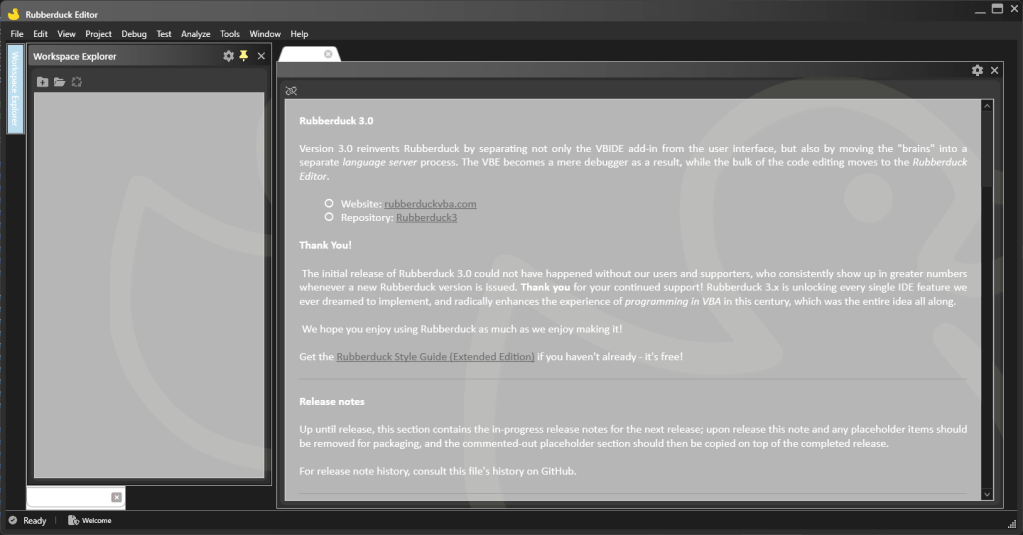
The background ducky has been severely toned down and is much more subtle now; it’s also been removed from the main window background, and the code editor template background isn’t letting it through either. It’s still there if you care to look for it, but it’s not an obnoxious distraction anymore.
Welcome.md
By default, RD3 will automatically open a read-only markdown document named Welcome.md; this document is not part of any workspace, and will include useful links and detailed release notes including new features, enhancements and bug fixes, broken down by component (editor, language server, add-in, etc.).
Maintaining this file whenever a pull request is merged will make it much easier to put together a release and communicate “what’s new?”.
This document is the first document type to be supported, because it stands on its own and contrary to source files, once it loads and renders, it’s essentially feature-complete which makes it a quick win. Every other document is going to involve the workspace, so it made sense to get that one out of the way right away.
It also makes a good place to put release notes; each merged RD3 pull request will be listed there along with a short description of the new feature, enhancement, or bug fix.


The template for a read-only markdown document is only showing the preview pane; editable markdown documents can collapse the pane to the right or resize it as needed (perhaps eventually re-dock it). Links are currently not working in the preview (not much effort has gone into this editor yet), but the idea is to allow navigating links when the option is enabled (and it would be disabled by default). The markdown document is already binding its font family from the ViewModel, which is a precursor to a bunch of editor settings that the code editor will want to have as well.
Status bar
The prototype-era status bar has been removed and properly templated to reflect the current editor state:
- Only a simple icon and status label will be shown until a workspace/project is loaded. The icon will reflect the connection status of the language server, and bring up the language server trace toolwindow when clicked.
- When a workspace is opened, the status bar label might show a small progress indicator tracking the server-side processing going on in the LSP process; the editor is immediately fully responsive and usable.
- Cancellable server operations can be cancelled by clicking a button that appears next to the progress indicator when cancellation is possible.
- When at least one editable document tab is opened in the editor, the status bar template changes to show the caret location, among other useful bits of information pertaining to the active document tab.
Next Steps
With the editor shell foundation in place, the next client-side features are going to start needing data from the language server, so now is a good time to take a step back, tidy things up, and make sure everything in place works as intended; document and address any pending bugs before adding new tooltabs and potentially creating more work than necessary.
Glitches with docking need to be resolved, the UI for tooltabs isn’t right, closing tabs should notify the language server, context menu commands need to be implemented to undock tooltabs, and frame headings should be draggable; little things left and right. The editor itself needs basic editing commands and a context menu; a toolbar will probably be useful, too.
Oh, and then I need to flip back to the dark theme, because working with the light one has done funky things… I need to revisit all the themes before it gets any worse:
And then LSP gets serious.
Update 2024-01-02: LSP communications over named pipes are now working; the problem was that the initialization was being performed twice.
Swag Shop 2024
The swag shop I opened this year is going to keep going in 2024. I’m brewing a number of RD3 design ideas, and I’d like to have embroidered hats and hoodies made.
Ko-fi supporters spending $1 or more get access to supporter-exclusive content; as I work on RD3, I upload screenshots and small posts about upcoming stuff, before it’s even pushed to GitHub.
I’m planning to start writing a complete RD3 user guide in 2024, that’ll probably end up as a PDF download alongside the Style Guide.
I bought way too much inventory in 2023, so expect extra free goodies in every shop order!
 Rubberduck News