
Whenever any VBA code touches a worksheet, Excel clears its undo stack and if you want to undo what a macro just did, you’re out of luck. Of course nothing will magically restore the native stack, but what if we could actually undo/redo everything a macro did in a workbook, step by step – how could we even begin to make it work?
If we look at Excel’s own undo drop-down, we can get a glimpse of how to go about this:
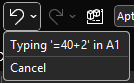
Each individual action is represented by an object that describes this action, and presumably encapsulates information about the initial state of its target. So if A1 says 123 and we type ABC and hit undo, A1 still says 123 and if we hit redo, it says ABC again. Clearly there’s a type of “last in, first out” thing going on here: that’s why it’s called a stack – because you pile things on top and only ever take whichever is the first one on top.
We can implement similar stack behavior with a regular VBA.Collection, by adding items normally but only ever reading/removing (“popping”) the item at the last index.
But that’s just the basic mechanics. How do we abstract anything we could do to a worksheet? Well, we probably don’t need to cover everything, or we can have more or less atomic commands depending on our needs – but the idea is that we need something that’s undoable.

The entire source code related to this article can be found in the Examples repository.
Abstractions
If we can identify what we need out of an undoable command, then we can formalize it in an IUndoable interface: we know we need a Description, and surely Undo and Redo methods would be appropriate.
'@Interface
Option Explicit
'@Description("Undoes a previously performed action")
Public Sub Undo()
End Sub
'@Description("Redoes a previously undone action")
Public Sub Redo()
End Sub
'@Description("Describes the undoable action")
Public Property Get Description() As String
End Property
Commands and Context
We’ve talked about commands before – we’re going to take a page from the command pattern and have an ICommand interface like this:
'@Interface
Option Explicit
'@Description("Returns True if the command can be executed given the provided context")
Public Function CanExecute(ByVal Context As Object) As Boolean
End Function
'@Description("Executes an action given a context")
Public Sub Execute(ByVal Context As Object)
End Sub
This is pretty much the exact same abstraction we’ve seen before; how an undoable command differs is by how often it gets instantiated. If we don’t need a command to remember whether it ran and/or what context in was executed with, then we can create a single instance and reuse that instance whenever we need to run that command. But commands that implement IUndoable do know all these things, which means each instance can actually do the same thing but in a different context, and so we will need to create a new instance every time we run it.
The Context parameter is declared using the generic object type, because it’s the most specific we can get at that abstraction level without painting ourselves into a corner. Implementations will have to cast the parameter to a more specific type as needed. The role of this parameter is to encapsulate everything the command needs to do its thing, so let’s say we were writing a WriteRangeFormulaCommand; the context would need to give it a target Range and a formula String.
Similar to a ViewModel, the context class for a particular command is mostly specific to that command, and each context class can conceivably have little in common with any other such class. But we can still make them implement a common validation behavior, and so we can have an ICommandContext interface like this:
'@Interface
Option Explicit
'@Description("True if the model is valid in its current state")
Public Function IsValid() As Boolean
End Function
In the case of WriteRangeFormulaContext, the implementation could then look like this:
'@ModuleDescription("Encapsulates the model for a WriteToRangeFormulaCommand")
Option Explicit
Implements ICommandContext
Private Type TContext
    Target As Excel.Range
    Formula As String
End Type
Private This As TContext
'@Description("The target Range")
Public Property Get Target() As Excel.Range
    Set Target = This.Target
End Property
Public Property Set Target(ByVal RHS As Excel.Range)
    Set This.Target = RHS
End Property
'@Description("The formula or value to be written to the target")
Public Property Get Formula() As String
    Formula = This.Formula
End Property
Public Property Let Formula(ByVal RHS As String)
    This.Formula = RHS
End Property
Private Function ICommandContext_IsValid() As Boolean
    If Not This.Target Is Nothing Then
        If This.Target.Areas.Count = 1 Then
            ICommandContext_IsValid = True
        End If
    End If
End Function
Rubberduck’s Encapsulate Field refactoring is once again being used to automatically expand the members of This into all these public properties, so granted it’s quite a bit of boilerplate code, but you don’t really need to actually write much of it: list what you need in the private type, declare an instance-level private field of that type, parse/refresh, and right-click the private field and select Rubberduck/Refactor/Encapsulate Field – and there’s likely nothing left to configure so just ok the dialog and poof the entire model class writes itself.
Implementation
So we add a WriteRangeFormulaCommand class and make it implement both ICommand and IUndoable. Why not have the undoable members in the command interface? Because interfaces should be clear and segregated, and only have members that are necessarily present in every implementation. If we wanted to implement a command that can’t be undone, we could, by simply omitting to implement IUndoable.
The encapsulated state of an undoable command is pretty straightforward: we have a reference to the context, something to hold the initial state, and then DidRun and DidUndo flags that the command can use to know what state it’s in and what can be done with it:
- If it wasn’t executed, DidRun is false
- If it was executed but not undone, DidUndo is false
- If it was undone, DidRun is necessarily true, and so is DidUndo
- If DidRun is true, we cannot execute the command again
- If DidUndo is true, we cannot undo again
- If DidRun is false, we cannot undo either
- Redo sets DidRun to false and then re-executes the command
Here’s the full implementation
'@ModuleDescription("An undoable command that writes to the Formula2 property of a provided Range target")
Option Explicit
Implements ICommand
Implements IUndoable
Private Type TState
    InitialFormulas As Variant
    Context As WriteToRangeFormulaContext
    DidRun As Boolean
    DidUndo As Boolean
End Type
Private This As TState
Private Function ICommand_CanExecute(ByVal Context As Object) As Boolean
    ICommand_CanExecute = CanExecuteInternal(Context)
End Function
Private Sub ICommand_Execute(ByVal Context As Object)
    ExecuteInternal Context
End Sub
Private Property Get IUndoable_Description() As String
    IUndoable_Description = GetDescriptionInternal
End Property
Private Sub IUndoable_Redo()
    RedoInternal
End Sub
Private Sub IUndoable_Undo()
    UndoInternal
End Sub
Private Function GetDescriptionInternal() As String
    Dim FormulaText As String
    If Len(This.Context.Formula) > 20 Then
        FormulaText = "formula"
    Else
        FormulaText = "'" & This.Context.Formula & "'"
    End If
    GetDescriptionInternal = "Write " & FormulaText & " to " & This.Context.Target.AddressLocal(RowAbsolute:=False, ColumnAbsolute:=False)
End Function
Private Function CanExecuteInternal(ByVal Context As Object) As Boolean
    On Error GoTo OnInvalidContext

    GuardInvalidContext Context
    CanExecuteInternal = Not This.DidRun

    Exit Function
OnInvalidContext:
    CanExecuteInternal = False
End Function
Private Sub ExecuteInternal(ByVal Context As WriteToRangeFormulaContext)

    GuardInvalidContext Context
    SetUndoState Context

    Debug.Print "> Executing action: " & GetDescriptionInternal

    Context.Target.Formula2 = Context.Formula
    This.DidRun = True

End Sub
Private Sub GuardInvalidContext(ByVal Context As Object)
    If Not TypeOf Context Is ICommandContext Then Err.Raise 5, TypeName(Me), "An invalid context type was provided."
    Dim SafeContext As ICommandContext
    Set SafeContext = Context
    If Not SafeContext.IsValid And Not TypeOf Context Is WriteToRangeFormulaContext Then Err.Raise 5, TypeName(Me), "An invalid context was provided."
End Sub
Private Sub SetUndoState(ByVal Context As WriteToRangeFormulaContext)
    Set This.Context = Context
    This.InitialFormulas = Context.Target.Formula2
End Sub
Private Sub UndoInternal()
    If Not This.DidRun Then Err.Raise 5, TypeName(Me), "Cannot undo what has not been done."
    If This.DidUndo Then Err.Raise 5, TypeName(Me), "Operation was already undone."

    Debug.Print "> Undoing action: " & GetDescriptionInternal

    This.Context.Target.Formula2 = This.InitialFormulas
    This.DidUndo = True
End Sub
Private Sub RedoInternal()
    If Not This.DidUndo Then Err.Raise 5, TypeName(Me), "Cannot redo what was never undone."
    ExecuteInternal This.Context
    This.DidUndo = False
End Sub
Quite a lot of this code would be identical in any other undoable command: only ExecuteInternal and UndoInternal methods would have to be different, and even then, only the part that actually performs or reverts the undoable action. Oh, and the GetDescriptionInternal string would obviously describe another command differently – here we say “Write (formula) to (target address)”, but another command might say “Set number format for (target address)” or “Format (edge) border of (target address)”. These descriptions can then be used in UI components to depict the undo/redo stack contents.
Management
There needs to be an object that is responsible for managing the undo and redo stacks, exposing simple methods to Push and Pop items, a way to Clear everything, and perhaps a method to get an array with all the command descriptions if you want to display them somewhere. The popping logic should push the retrieved item into the redo stack, and redoing an action should push it back into the undo stack.
Undo/Redo Mechanics
Enter UndoManager, which we’ll importantly be invoking from a predeclared instance to ensure we don’t have multiple undo/redo stacks around – any non-default instance usage would raise an error:
'@PredeclaredId
Option Explicit
Private UndoStack As Collection
Private RedoStack As Collection
Public Sub Clear()
    Do While UndoStack.Count > 0
        UndoStack.Remove 1
    Loop
    Do While RedoStack.Count > 0
        RedoStack.Remove 1
    Loop
End Sub
Public Sub Push(ByVal Action As IUndoable)
    ThrowOnInvalidInstance
    UndoStack.Add Action
End Sub
Public Function PopUndoStack() As IUndoable
    ThrowOnInvalidInstance

    Dim Item As IUndoable
    Set Item = UndoStack.Item(UndoStack.Count)

    UndoStack.Remove UndoStack.Count
    RedoStack.Add Item

    Set PopUndoStack = Item
End Function
Public Function PopRedoStack() As IUndoable
    ThrowOnInvalidInstance

    Dim Item As IUndoable
    Set Item = RedoStack.Item(RedoStack.Count)

    RedoStack.Remove RedoStack.Count
    UndoStack.Add Item

    Set PopRedoStack = Item
End Function
Public Property Get CanUndo() As Boolean
    CanUndo = UndoStack.Count > 0
End Property
Public Property Get CanRedo() As Boolean
    CanRedo = RedoStack.Count > 0
End Property
Public Property Get UndoState() As Variant
    If Not CanUndo Then Exit Sub
    ReDim Items(1 To UndoStack.Count) As String
    Dim StackIndex As Long
    For StackIndex = 1 To UndoStack.Count
        Dim Item As IUndoable
        Set Item = UndoStack.Item(StackIndex)
        Items(StackIndex) = StackIndex & vbTab & Item.Description
    Next
    UndoState = Items
End Property
Public Property Get RedoState() As Variant
    If Not CanRedo Then Exit Property
    ReDim Items(1 To RedoStack.Count) As String
    Dim StackIndex As Long
    For StackIndex = 1 To RedoStack.Count
        Dim Item As IUndoable
        Set Item = RedoStack.Item(StackIndex)
        Items(StackIndex) = StackIndex & vbTab & Item.Description
    Next
    RedoState = Items
End Property
Private Sub ThrowOnInvalidInstance()
    If Not Me Is UndoManager Then Err.Raise 5, TypeName(Me), "Instance is invalid"
End Sub
Private Sub Class_Initialize()
    Set UndoStack = New Collection
    Set RedoStack = New Collection
End Sub
Private Sub Class_Terminate()
    Set UndoStack = Nothing
    Set RedoStack = Nothing
End Sub
A Friendly API
At this point we could go ahead and consume this API already, but things would quickly get very repetitive, so let’s make a CommandManager predeclared object that we can use to simplify how VBA code can work with undoable commands. I’m not going to bother with dependency injection here, and simply accept the tight coupling with the UndoManager class, which we’re simply going to wrap here:
'@PredeclaredId
Option Explicit
Public Sub WriteToFormula(ByVal Target As Range, ByVal Formula As String)
    Dim Command As ICommand
    Set Command = New WriteToRangeFormulaCommand

    Dim Context As WriteToRangeFormulaContext
    Set Context = New WriteToRangeFormulaContext

    Set Context.Target = Target
    Context.Formula = Formula

    RunCommand Command, Context
End Sub
Public Sub SetNumberFormat(ByVal Target As Range, ByVal FormatString As String)
    Dim Command As ICommand
    Set Command = New SetNumberFormatCommand

    Dim Context As SetNumberFormatContext
    Set Context = New SetNumberFormatContext

    Set Context.Target = Target
    Context.FormatString = FormatString

    RunCommand Command, Context
End Sub
'TODO expose new commands here
Public Sub UndoAction()
    If UndoManager.CanUndo Then UndoManager.PopUndoStack.Undo
End Sub
Public Sub UndoAll()
    Do While UndoManager.CanUndo
        UndoManager.PopUndoStack.Undo
    Loop
End Sub
Public Sub RedoAction()
    If UndoManager.CanRedo Then UndoManager.PopRedoStack.Redo
End Sub
Public Sub RedoAll()
    Do While UndoManager.CanRedo
        UndoManager.PopRedoStack.Redo
    Loop
End Sub
Public Property Get CanUndo() As Boolean
    CanUndo = UndoManager.CanUndo
End Property
Public Property Get CanRedo() As Boolean
    CanRedo = UndoManager.CanRedo
End Property
Private Sub RunCommand(ByVal Command As ICommand, ByVal Context As ICommandContext)
    If Command.CanExecute(Context) Then
        Command.Execute Context
        StackUndoable Command
    Else
        Debug.Print "Command cannot be executed in this context."
    End If
End Sub
Private Sub ThrowOnInvalidInstance()
    If Not Me Is CommandManager Then Err.Raise 5, TypeName(Me), "Instance is invalid"
End Sub
Private Sub StackUndoable(ByVal Command As Object)
    If TypeOf Command Is IUndoable Then
        Dim Undoable As IUndoable
        Set Undoable = Command
        UndoManager.Push Undoable
    End If
End Sub
Now that we have a way to transparently create and run and stack commands, all the complexity is hidden away behind simple methods; the calling code doesn’t even need to know there are commands and context classes involved, and it doesn’t even need to know about the UndoManager either.
Beyond
We could extend this with some FormatRangeFontCommand that could work with a context that encapsulates information about what we’re formatting as a single undoable operation, and how we’re formatting it. For example we could have properties like FontName, FontSize, FontBold, and so on, and as long as the command tracks the initial state of everything we’re going to be able to undo it all.
I actually extended it with a FormatRangeBorderCommand, but removed it because it isn’t really an undoable operation (I could probably have left it in without Implements IUndoable)… because unformatting borders in Excel is apparently much harder than formatting them: you format the bottom border of a target range, and then undo it by setting the bottom border line style and width to the original values… and the border remains there as if xlLineStyleNone had no effect whatsoever. Offsetting or extending the target to compensate (pretty sure it would work if the target was extended to the row underneath and it’s the interior-horizontal border that we then removed) would be playing with fire, so I just let it go instead of complexifying the example with edge-case handling.
It doesn’t shoot down the idea, but it does make a good reminder of the caveat that this isn’t a native undo operation: we’re actually just doing more things, except these new things bring the sheet back to the state it was before – at least that’s the intent.
An entirely undoable macro could look something like this:
Public Sub DoSomething()
    With CommandManager
        .WriteToFormula Sheet1.Range("A1"), "Hello"
        .WriteToFormula Sheet1.Range("B1"), "World!"
        .WriteToFormula Sheet1.Range("C1:C10"), "=RANDBETWEEN(0, 255)"
        .WriteToFormula Sheet1.Range("D1:D10"), "=SUM($C$1:$C1)"
        .SetNumberFormat Sheet1.Range("D1:D10"), "$#,##0.00"
    End With
End Sub
Thoughts?
 Rubberduck News